height BMW X3 2017 Owners Manual
[x] Cancel search | Manufacturer: BMW, Model Year: 2017, Model line: X3, Model: BMW X3 2017Pages: 265, PDF Size: 5.37 MB
Page 41 of 265
WARNING
Body parts can be jammed when operat‐
ing the tailgate. There is a risk of injuries. Make
sure that the area of movement of the tailgate
is clear during opening and closing.◀
Opening
The tailgate swings back and up when it
opens.
Ensure that adequate clearance is available
before opening.
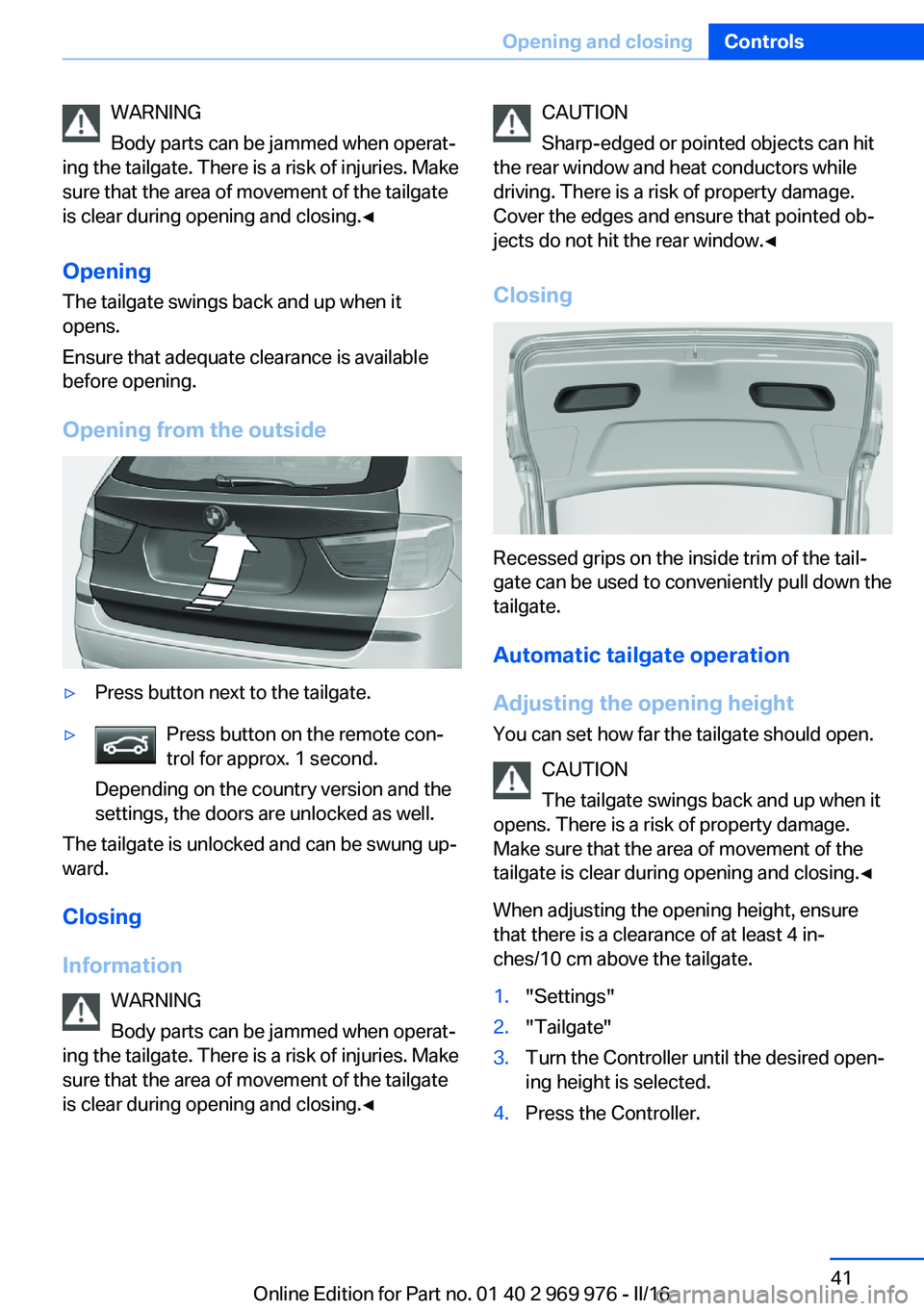
Opening from the outside▷Press button next to the tailgate.▷Press button on the remote con‐
trol for approx. 1 second.
Depending on the country version and the
settings, the doors are unlocked as well.
The tailgate is unlocked and can be swung up‐
ward.
Closing
Information WARNING
Body parts can be jammed when operat‐
ing the tailgate. There is a risk of injuries. Make
sure that the area of movement of the tailgate
is clear during opening and closing.◀
CAUTION
Sharp-edged or pointed objects can hit
the rear window and heat conductors while
driving. There is a risk of property damage.
Cover the edges and ensure that pointed ob‐
jects do not hit the rear window.◀
Closing
Recessed grips on the inside trim of the tail‐
gate can be used to conveniently pull down the
tailgate.
Automatic tailgate operation
Adjusting the opening height You can set how far the tailgate should open.
CAUTION
The tailgate swings back and up when it
opens. There is a risk of property damage.
Make sure that the area of movement of the
tailgate is clear during opening and closing.◀
When adjusting the opening height, ensure
that there is a clearance of at least 4 in‐
ches/10 cm above the tailgate.
1."Settings"2."Tailgate"3.Turn the Controller until the desired open‐
ing height is selected.4.Press the Controller.Seite 41Opening and closingControls41
Online Edition for Part no. 01 40 2 969 976 - II/16
Page 42 of 265
OpeningCAUTION
The tailgate swings back and up when it
opens. There is a risk of property damage.
Make sure that the area of movement of the
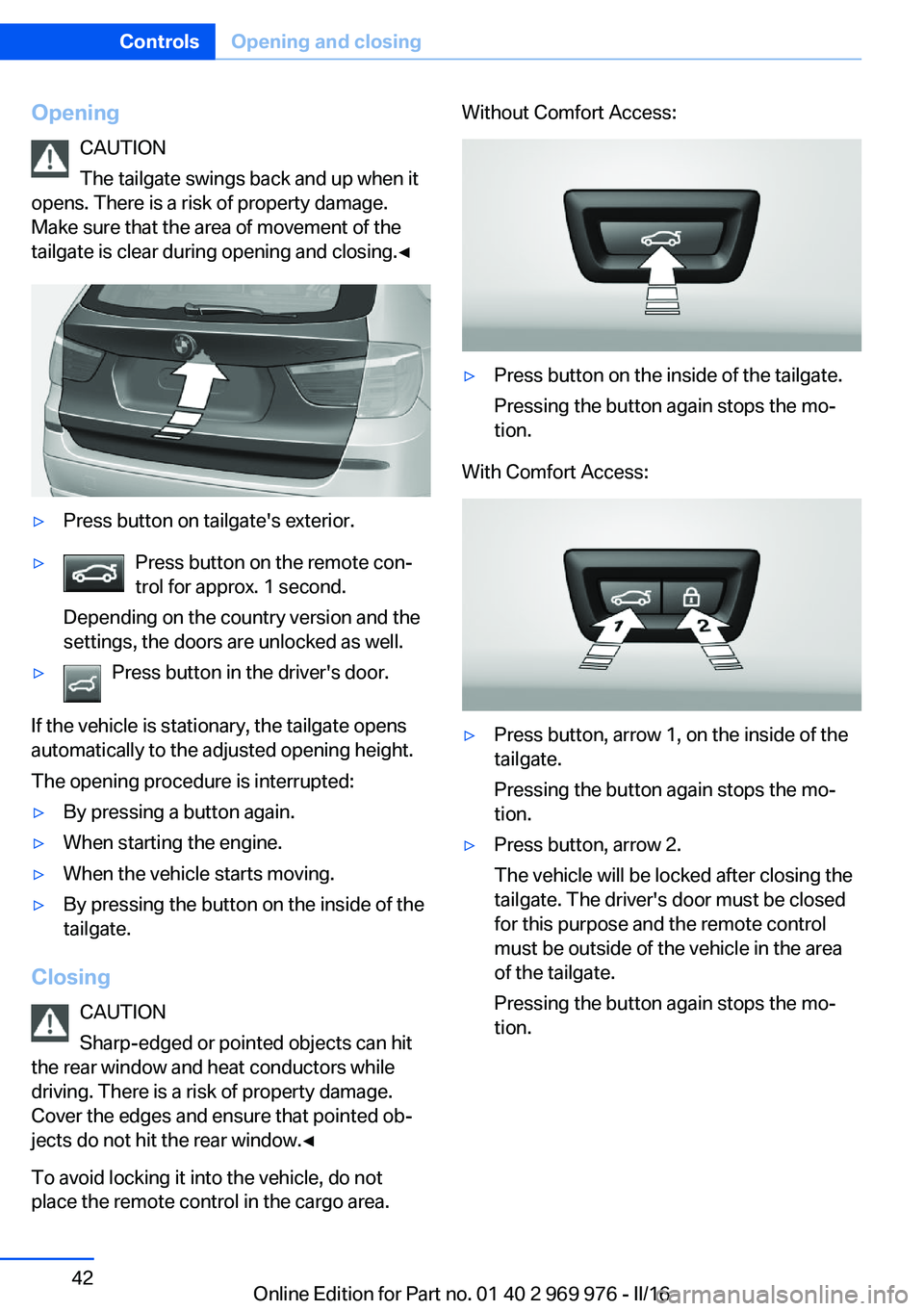
tailgate is clear during opening and closing.◀▷Press button on tailgate's exterior.▷Press button on the remote con‐
trol for approx. 1 second.
Depending on the country version and the
settings, the doors are unlocked as well.▷Press button in the driver's door.
If the vehicle is stationary, the tailgate opens
automatically to the adjusted opening height.
The opening procedure is interrupted:
▷By pressing a button again.▷When starting the engine.▷When the vehicle starts moving.▷By pressing the button on the inside of the
tailgate.
Closing
CAUTION
Sharp-edged or pointed objects can hit
the rear window and heat conductors while
driving. There is a risk of property damage.
Cover the edges and ensure that pointed ob‐
jects do not hit the rear window.◀
To avoid locking it into the vehicle, do not
place the remote control in the cargo area.
Without Comfort Access:▷Press button on the inside of the tailgate.
Pressing the button again stops the mo‐
tion.
With Comfort Access:
▷Press button, arrow 1, on the inside of the
tailgate.
Pressing the button again stops the mo‐
tion.▷Press button, arrow 2.
The vehicle will be locked after closing the
tailgate. The driver's door must be closed
for this purpose and the remote control
must be outside of the vehicle in the area
of the tailgate.
Pressing the button again stops the mo‐
tion.Seite 42ControlsOpening and closing42
Online Edition for Part no. 01 40 2 969 976 - II/16
Page 53 of 265
AdjustingVehicle features and options
This chapter describes all standard, country-
specific and optional features offered with the
series. It also describes features that are not
necessarily available in your car, e. g., due to
the selected options or country versions. This
also applies to safety-related functions and
systems. The respectively applicable country
provisions must be observed when using the
respective features and systems.
Sitting safely The ideal seating position meeting the needs
of the occupants can make a vital contribution
to relaxed, fatigue-free driving.
The seating position plays an important role in
an accident in combination with:▷Safety belts, refer to page 56.▷Head restraints, refer to page 58.▷Airbags.
Seats
Information WARNING
Seat adjustments while driving can lead
to unexpected movements of the seat. Vehicle
control could be lost. There is risk of an acci‐
dent. Only adjust the seat on the driver's side
when the vehicle is stationary.◀
WARNING
With a backrest inclined too far to the
rear, the protective effect of the safety belt
cannot be ensured anymore. There is a danger
of sliding under the safety belt in an accident.
There is a risk of injury or danger to life. Adjust
the seat prior to starting the trip. Adjust the
backrest so that it is in the most upright posi‐
tion as possible and do not adjust again while
driving.◀
WARNING
There is risk of jamming when moving
the seats. There is a risk of injury or risk of
property damage. Make sure that the area of
movement of the seat is clear prior to any ad‐
justment.◀
Manually adjustable seats
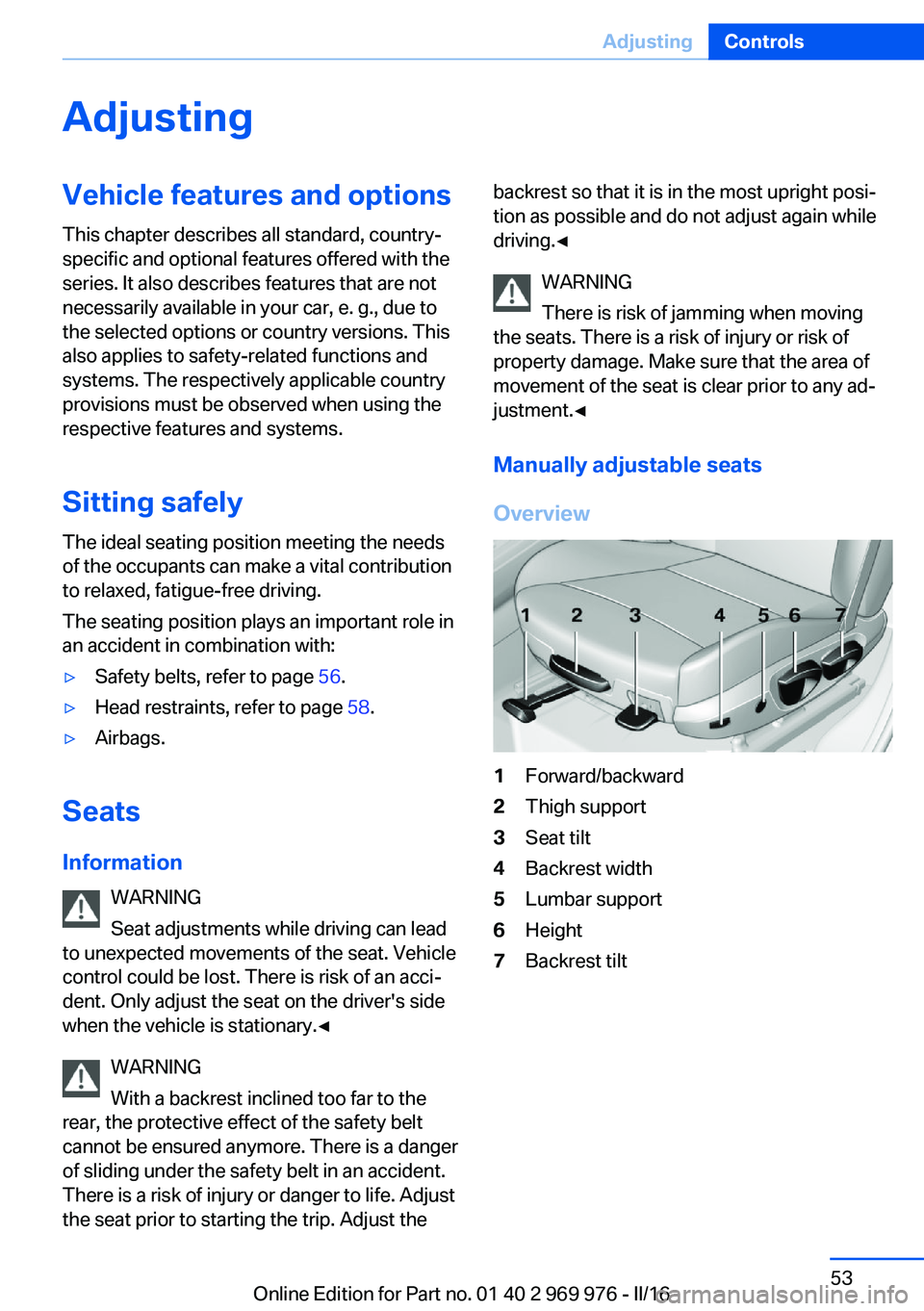
Overview1Forward/backward2Thigh support3Seat tilt4Backrest width5Lumbar support6Height7Backrest tiltSeite 53AdjustingControls53
Online Edition for Part no. 01 40 2 969 976 - II/16
Page 54 of 265
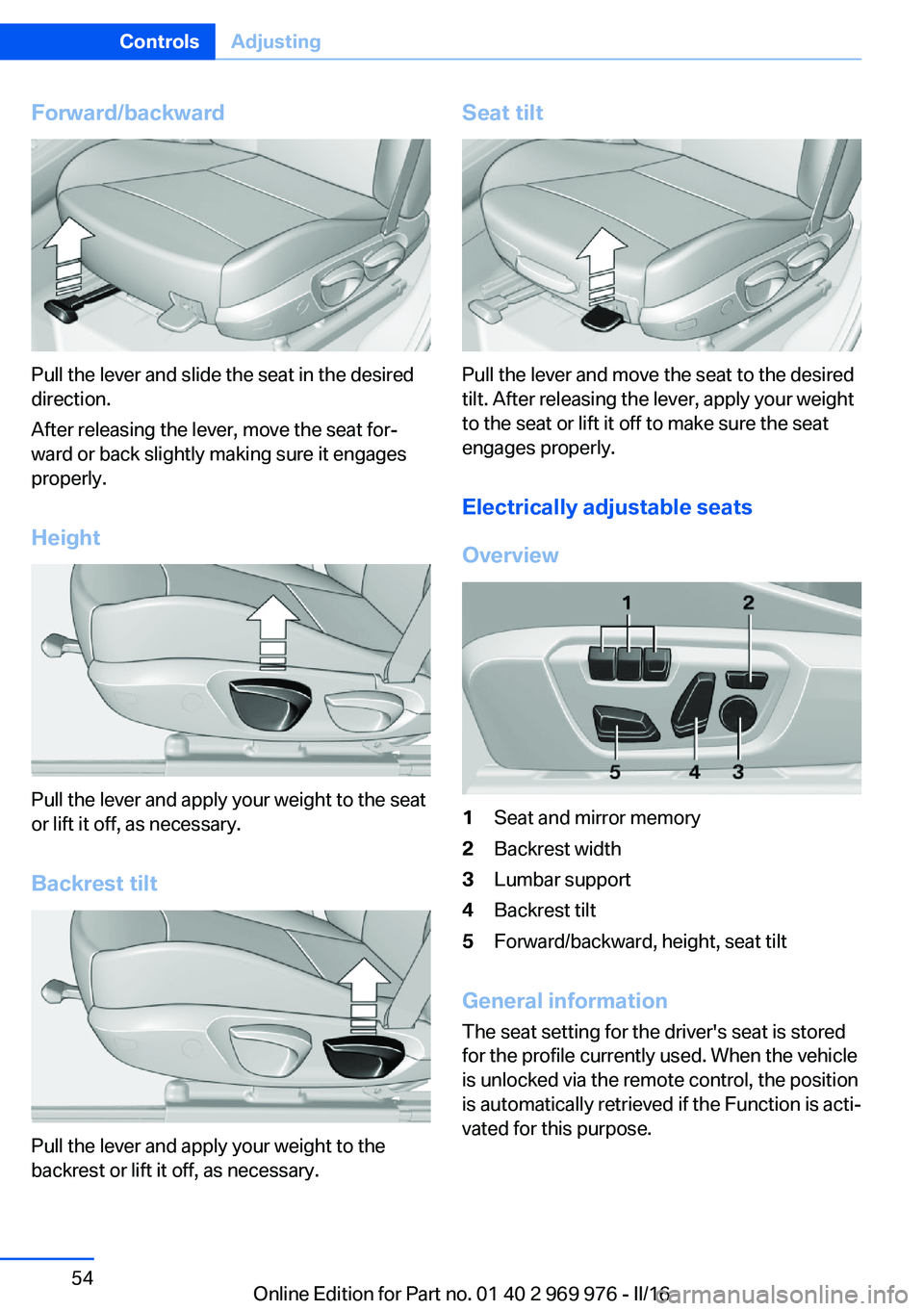
Forward/backward
Pull the lever and slide the seat in the desired
direction.
After releasing the lever, move the seat for‐
ward or back slightly making sure it engages
properly.
Height
Pull the lever and apply your weight to the seat
or lift it off, as necessary.
Backrest tilt
Pull the lever and apply your weight to the
backrest or lift it off, as necessary.
Seat tilt
Pull the lever and move the seat to the desired
tilt. After releasing the lever, apply your weight
to the seat or lift it off to make sure the seat
engages properly.
Electrically adjustable seats
Overview
1Seat and mirror memory2Backrest width3Lumbar support4Backrest tilt5Forward/backward, height, seat tilt
General information
The seat setting for the driver's seat is stored
for the profile currently used. When the vehicle
is unlocked via the remote control, the position
is automatically retrieved if the Function is acti‐
vated for this purpose.
Seite 54ControlsAdjusting54
Online Edition for Part no. 01 40 2 969 976 - II/16
Page 55 of 265
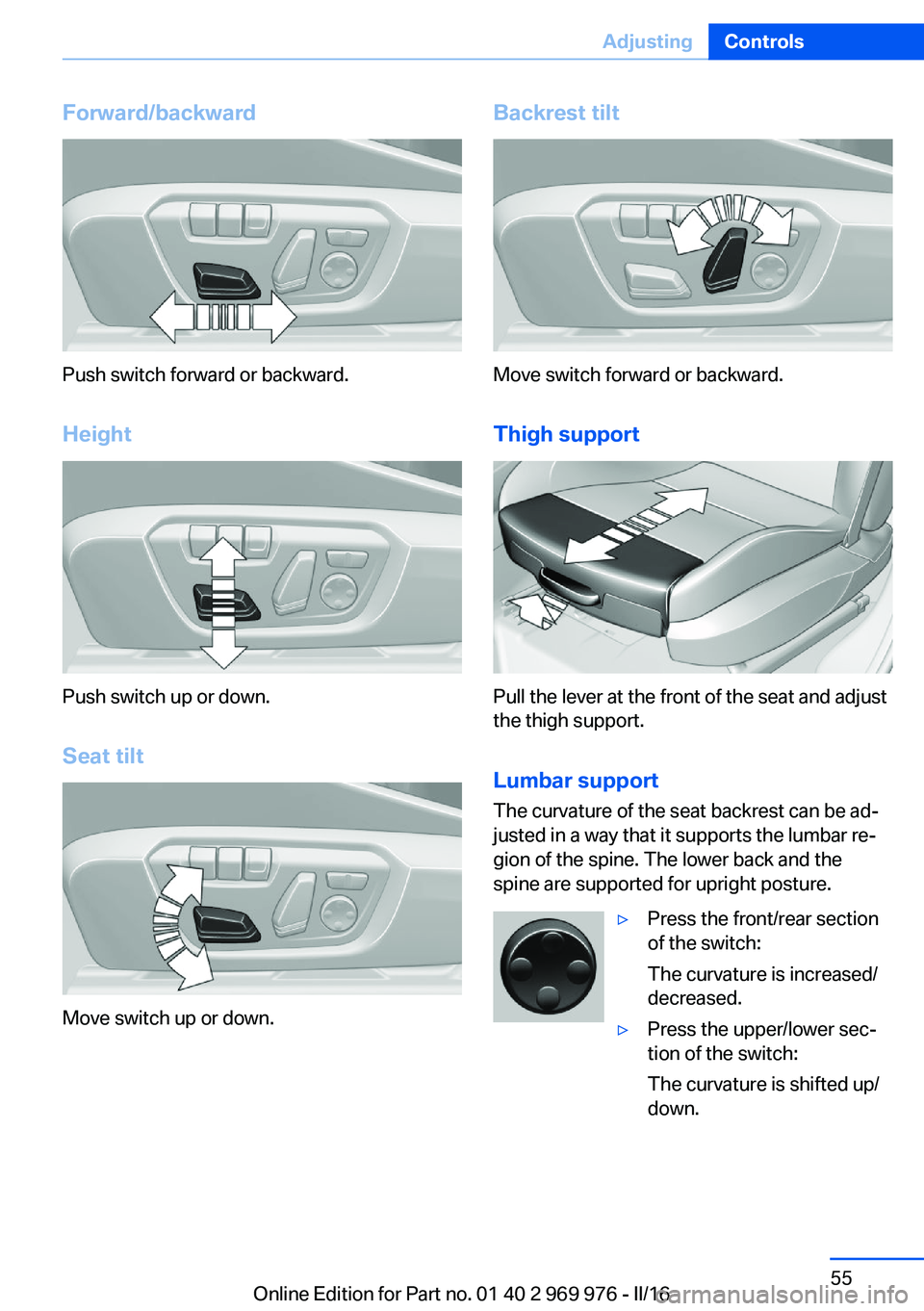
Forward/backward
Push switch forward or backward.
Height
Push switch up or down. Seat tilt
Move switch up or down.
Backrest tilt
Move switch forward or backward.Thigh support
Pull the lever at the front of the seat and adjust
the thigh support.
Lumbar support The curvature of the seat backrest can be ad‐
justed in a way that it supports the lumbar re‐
gion of the spine. The lower back and the
spine are supported for upright posture.
▷Press the front/rear section
of the switch:
The curvature is increased/
decreased.▷Press the upper/lower sec‐
tion of the switch:
The curvature is shifted up/
down.Seite 55AdjustingControls55
Online Edition for Part no. 01 40 2 969 976 - II/16
Page 58 of 265
Safety belt reminder for driver's and
passenger's seat
The indicator lamp lights up and a sig‐
nal sounds. Make sure that the safety
belts are positioned correctly. The
safety belt reminder is active at speeds above
approx. 6 mph/10 km/h. It can also be activated
if objects are placed on the front passenger
seat.
Damage to safety belts WARNING
The protective effect of the safety belts
may not be fully functional or fail in the follow‐
ing situations:▷Safety belts are damaged, soiled or
changed in any other way.▷Safety belt buckle is damaged or heavily
soiled.▷Belt tensioners or belt retractors were
modified.
Safety belts can be imperceptibly damaged in
the event of an accident. There is a risk of in‐
jury or danger to life. Do not modify safety
belts, safety belt buckles, belt tensioners, belt
retractors or belt anchors and keep them
clean. Have the safety belts checked after an
accident at the dealer’s service center or an‐
other qualified service center or repair shop.◀
Front headrests Information WARNING
A missing protective effect due to re‐
moved or not correctly adjusted head re‐
straints can cause injuries in the head and
neck area. There is a a risk of injury. Install
head restraints on occupied seats prior to driv‐
ing and make sure that the center of the head
restraint supports the back of the head at eye
level.◀
WARNING
Objects on the head restraint reduce the
protective effect in the head and neck area.
There is a a risk of injury.▷Do not use seat or head restraint covers.▷Do not hang objects, e.g., clothes hangers,
directly on the head restraint.▷Only use accessories that have been de‐
termined to be safe for attachment to a
head restraint.▷Do not use any accessories, e.g., pillows,
while driving.◀
Correctly adjusted head restraint
General information
A correctly adjusted head restraint reduces the
risk of injury to cervical vertebrae in the event
of an accident.
Height Adjust the head restraint so that its center is
approximately at eye level.
Distance
Adjust the distance so that the head restraint is as close as possible to the back of the head.
If necessary, adjust the distance by adjusting
the tilt of the backrest.
Active head restraint
In the event of a rear-end collision with a cer‐
tain severity, the active head restraint automat‐
ically reduces the distance from the head.
Wear and tear after accidents or when dam‐
aged otherwise:
Have the active head restraint checked and if
needed replaced.
Seite 58ControlsAdjusting58
Online Edition for Part no. 01 40 2 969 976 - II/16
Page 59 of 265
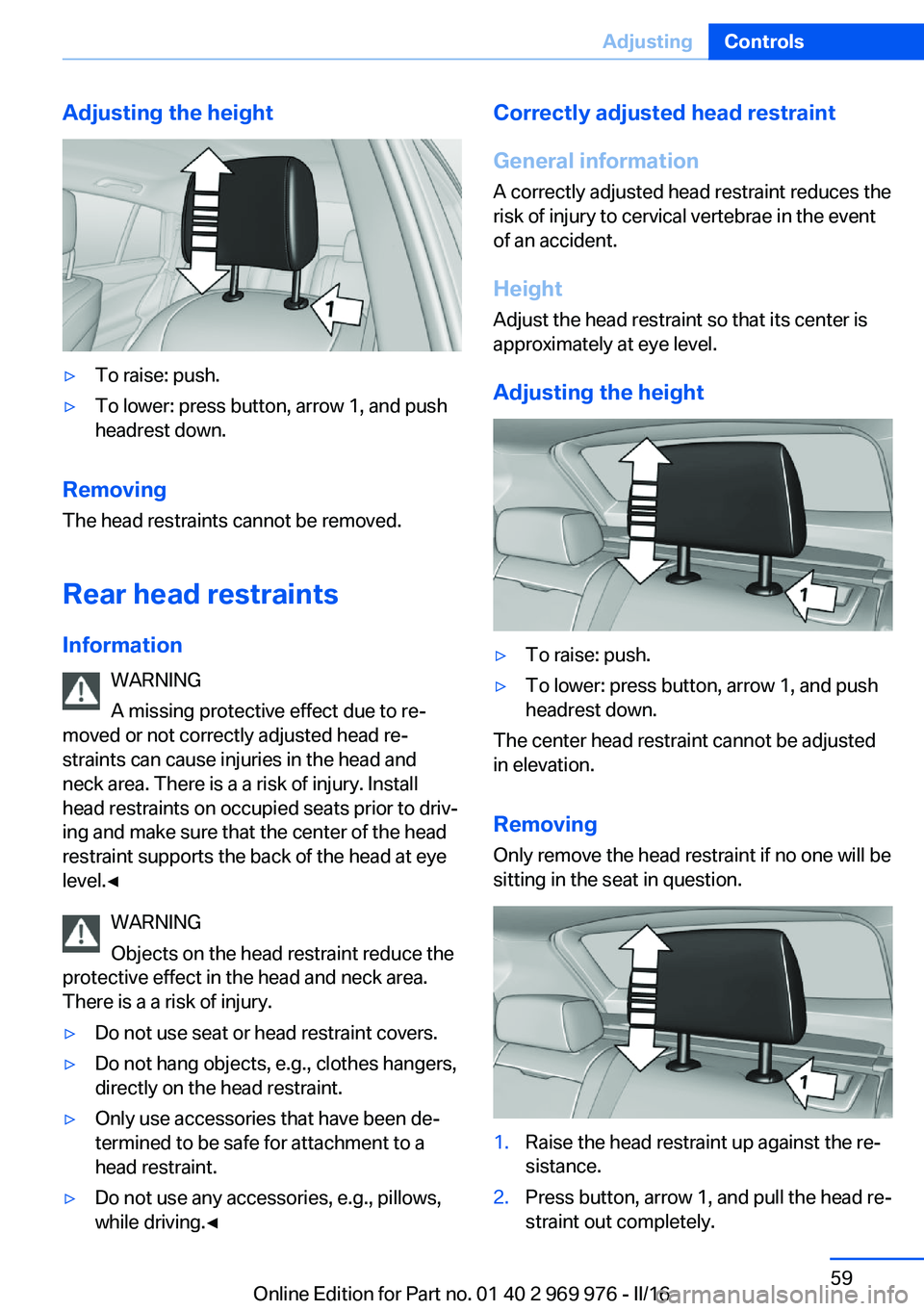
Adjusting the height▷To raise: push.▷To lower: press button, arrow 1, and push
headrest down.
Removing
The head restraints cannot be removed.
Rear head restraints
Information WARNING
A missing protective effect due to re‐
moved or not correctly adjusted head re‐
straints can cause injuries in the head and
neck area. There is a a risk of injury. Install
head restraints on occupied seats prior to driv‐
ing and make sure that the center of the head
restraint supports the back of the head at eye
level.◀
WARNING
Objects on the head restraint reduce the
protective effect in the head and neck area.
There is a a risk of injury.
▷Do not use seat or head restraint covers.▷Do not hang objects, e.g., clothes hangers,
directly on the head restraint.▷Only use accessories that have been de‐
termined to be safe for attachment to a
head restraint.▷Do not use any accessories, e.g., pillows,
while driving.◀Correctly adjusted head restraint
General information
A correctly adjusted head restraint reduces the
risk of injury to cervical vertebrae in the event
of an accident.
Height Adjust the head restraint so that its center is
approximately at eye level.
Adjusting the height▷To raise: push.▷To lower: press button, arrow 1, and push
headrest down.
The center head restraint cannot be adjusted
in elevation.
RemovingOnly remove the head restraint if no one will be
sitting in the seat in question.
1.Raise the head restraint up against the re‐
sistance.2.Press button, arrow 1, and pull the head re‐
straint out completely.Seite 59AdjustingControls59
Online Edition for Part no. 01 40 2 969 976 - II/16
Page 63 of 265
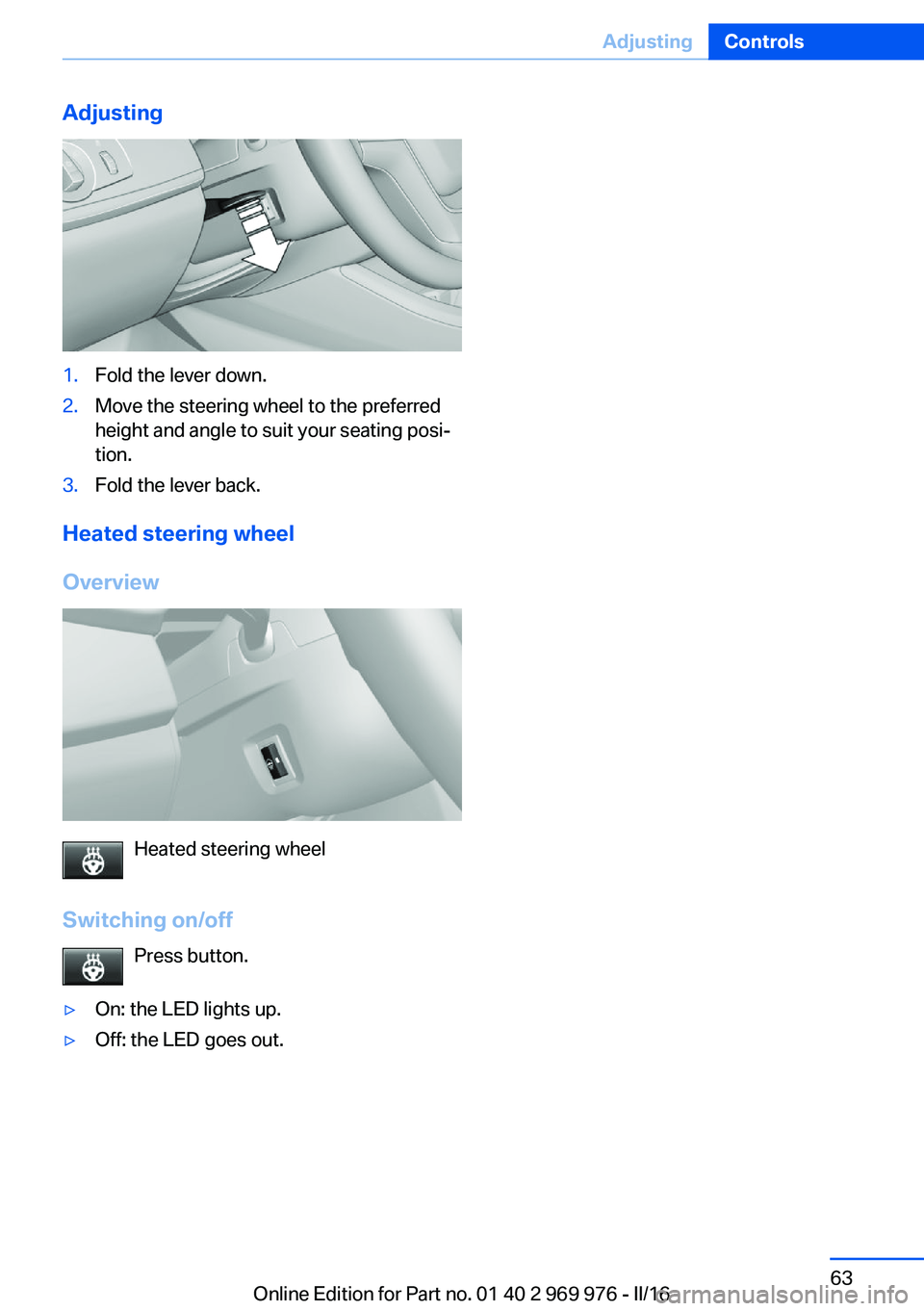
Adjusting1.Fold the lever down.2.Move the steering wheel to the preferred
height and angle to suit your seating posi‐
tion.3.Fold the lever back.
Heated steering wheel
Overview
Heated steering wheel
Switching on/off Press button.
▷On: the LED lights up.▷Off: the LED goes out.Seite 63AdjustingControls63
Online Edition for Part no. 01 40 2 969 976 - II/16
Page 65 of 265
WARNING
The stability of the child restraint system
is limited or compromised with incorrect seat
adjustment or improper installation of the child
seat. There is a risk of injury or danger to life.
Make sure that the child restraint system fits
securely against the backrest. If possible, ad‐
just the backrest tilt for all affected backrests
and correctly adjust the seats. Make sure that
seats and backrests are securely engaged. If
possible, adjust the height of the head re‐
straints or remove them.◀
Installing child restraint
systems
Information Pay attention to the specifications of the child
restraint system manufacturer when selecting,
installing, and using child restraint systems.
WARNING
The stability of the child restraint system
is limited or compromised with incorrect seat
adjustment or improper installation of the child
seat. There is a risk of injury or danger to life.
Make sure that the child restraint system fits
securely against the backrest. If possible, ad‐
just the backrest tilt for all affected backrests
and correctly adjust the seats. Make sure that
seats and backrests are securely engaged. If
possible, adjust the height of the head re‐
straints or remove them.◀
On the front passenger seat
Deactivating airbags WARNING
Active front-seat passenger airbags can
injure a child in a child restraint system when
the airbags are activated. There is a risk of in‐
jury. Make sure that the front-seat passengerairbags are deactivated and that the PASSEN‐
GER AIRBAG OFF indicator lamp lights up.◀
After installing a child restraint system in the
front passenger seat, make sure that the front,
knee and side airbags on the front passenger
side are deactivated.
Deactivate the front-seat passenger airbags
automatically, refer to page 107.
Seat position and height
Before installing a child restraint system, move
the front passenger seat as far back as possi‐
ble and bring it as far up as possible to obtain
the best possible position for the belt and to
offer optimal protection in the event of an acci‐
dent.
If the upper anchorage of the safety belt is lo‐
cated in front of the belt guide of the child seat,
move the passenger seat carefully forward un‐
til the best possible belt guide position is
reached.
Backrest width Adjustable backrest width: before installing a
child restraint system in the front passenger
seat, open the backrest width completely. Do
not change the backrest width again and do
not call up a memory position.
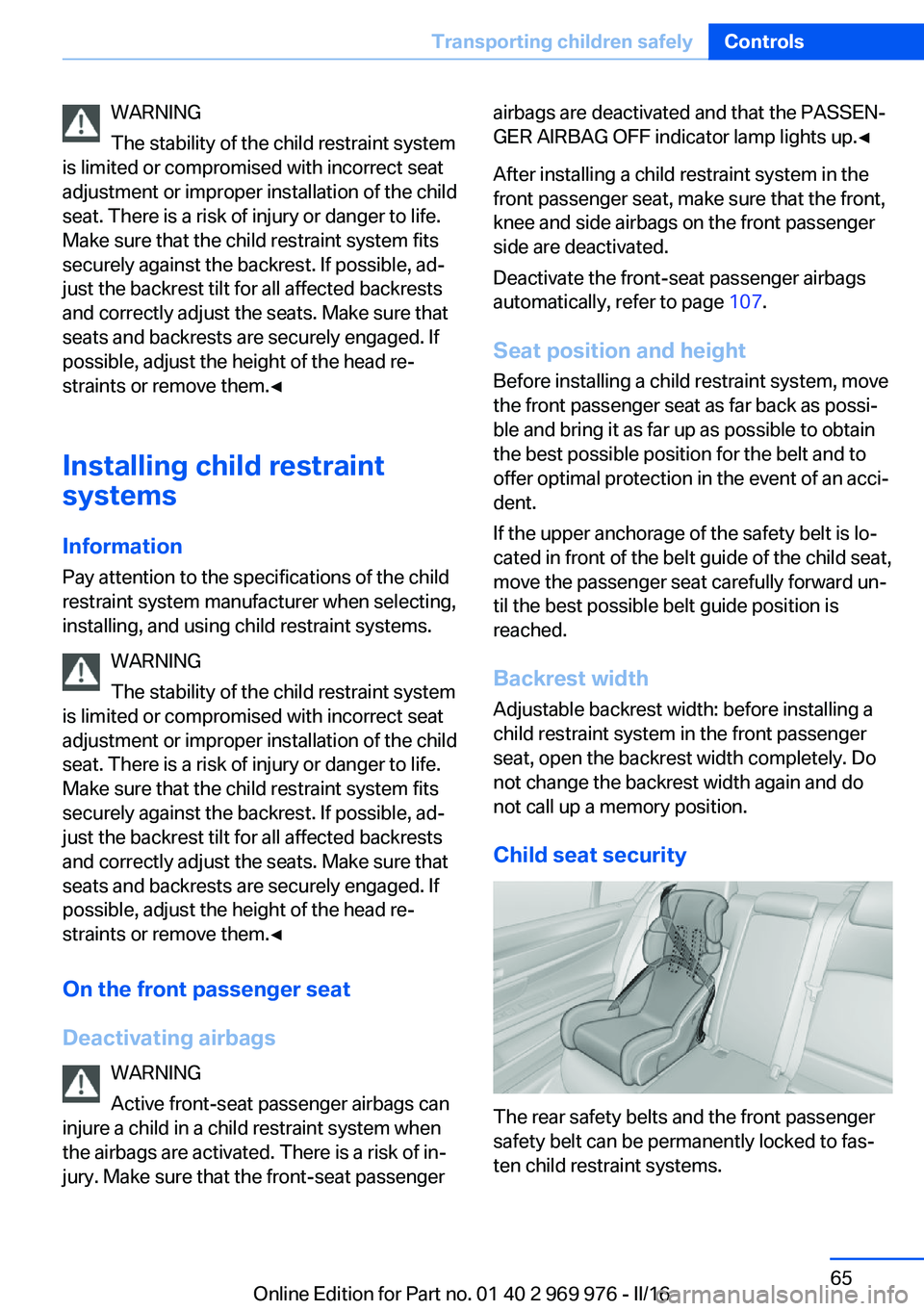
Child seat security
The rear safety belts and the front passenger
safety belt can be permanently locked to fas‐
ten child restraint systems.
Seite 65Transporting children safelyControls65
Online Edition for Part no. 01 40 2 969 976 - II/16
Page 99 of 265
Adjusting the height
On the Control Display:1."Settings"2."Head-Up Display"3."Height"4.Turn the Controller until the desired height
is reached.5.Press the Controller.
Settings are stored for the profile currently
used.
Setting the rotation
The screen of the Head-up Display can be ro‐
tated around its own axis.
On the Control Display:
1."Settings"2."Head-Up Display"3."Rotation"4.Turn the Controller until the desired set‐
ting is selected.5.Press the Controller.
Settings are stored for the profile currently
used.
Special windshield
The windshield is part of the system.
The shape of the windshield makes it possible
to display a precise image.
A film in the windshield prevents double im‐
ages from being displayed.
For this reason, it is strongly suggested to
have the special windshield replaced by a
dealer’s service center or another qualified
service center or repair shop.
Seite 99DisplaysControls99
Online Edition for Part no. 01 40 2 969 976 - II/16