phone BMW X3 3.0I 2004 E83 Owner's Manual
[x] Cancel search | Manufacturer: BMW, Model Year: 2004, Model line: X3 3.0I, Model: BMW X3 3.0I 2004 E83Pages: 132, PDF Size: 3.62 MB
Page 7 of 132

Reference
At a glance
Controls
Driving tips
Mobility
5
The individual vehicle
On buying your BMW, you have decided in
favor of a model with individualized equip-
ment and features. This Owner's Manual
describes all models and equipment that
BMW offers within the same group.
We hope you will understand that equip-
ment and features are included that you
might not have chosen for your vehicle.
Sections describing options and special
equipment are marked by asterisks
*
to
assist you in identifying possible differ-
ences between the descriptions in this
manual and your own vehicle's equipment.
Should your BMW be equipped with fea-
tures or accessories not described in this
manual, e.g. car radio or portable phone,
please consult the enclosed supplemen-
tary owner's manuals.
Editorial notice
BMW pursues a policy of continuous,
ongoing development that is conceived to
ensure that our vehicles continue to
embody the highest quality and safety
standards combined with advanced, state-
of-the-art technology. For this reason, the
features described in this Owner's Manual
may differ from those on your vehicle. Nor
can errors and omissions be entirely ruled
out. You are therefore asked to appreciate
that no claims can be entertained on the
basis of the data, illustrations or descrip-
tions in this Owner's Manual.
Page 8 of 132
Notes
6
For your own safety
Fuels
Use unleaded gasoline only. Fuels
containing up to and including 10 %
ethanol or other oxygenates with up to
2.8 % oxygen by weight, i.e. 15% MTBE or
3% methanol plus an equivalent amount of
co-solvent Ð will not void the applicable
warranties respecting defects in materials
or workmanship. Field experience has indi-
cated significant differences in fuel quality Ð
i.e. volatility, composition, additives, etc. Ð
among gasolines offered for sale in the
United States and Canada. The use of
poor-quality fuels may result in driveability,
starting and stalling problems especially
under certain environmental conditions,
such as high ambient temperature and high
altitude.
Should you encounter driveability prob-
lems which you suspect could be related to
the fuel you are using, we recommend that
you respond by switching to a recognized
high-quality brand.
Failure to comply with these recommenda-
tions may result in unscheduled mainte-
nance.
Follow the relevant safety rules when you
are handling gasoline.
<
Maintenance and repair
Advanced technology, e.g. the use of
modern materials and high-perfor-
mance electronics, requires specially
adapted maintenance and repair methods.
Therefore, only have corresponding work
on your BMW carried out by a BMW Sports
Activity Vehicle Center or a workshop that
works according to BMW repair proce-
dures with correspondingly trained person-
nel. If work is carried out improperly, there
is a danger of consequential damage and
the related safety risks.
<
Parts and accessories
For your own safety, use genuine
parts and accessories approved by
BMW.
When you purchase accessories tested
and approved by BMW and Genuine BMW
Parts, you simultaneously acquire the
assurance that they have been thoroughly
tested by BMW to ensure optimum perfor-
mance when installed on your vehicle.
BMW warrants these parts to be free from
defects in material and workmanship.
BMW will not accept any liability for dam-
ages resulting from installation of parts and
accessories not approved by BMW.
BMW cannot test every product made by
other manufacturers to verify if it can be
used on a BMW safely and without risk to
either the vehicle, its operation, or its occu-
pants.
Genuine BMW Parts, BMW Accessories
and other products approved by BMW,
together with professional advice on using
these items, are available from all BMW
Sports Activity Vehicle Centers.
Installation and operation of non-BMW
approved accessories such as alarms,
radios, amplifiers, radar detectors, wheels,
suspension components, brake dust
shields, telephones Ð including operation of
any portable phone from within the vehicle
without using an externally mounted
antenna Ð or transceiver equipment, for
instance, CBs, walkie-talkie, ham radio or
similar accessories, may cause extensive
damage to the vehicle, compromise its
safety, interfere with the vehicle's electrical
system or affect the validity of the BMW
Limited Warranty. See your BMW Sports
Activity Vehicle Center for additional infor-
mation.
<
Maintenance, replacement, or repair
of the emission control devices and
systems may be performed by any automo-
tive repair establishment or individual using
any certified automotive part.
<
Page 9 of 132

Reference
At a glance
Controls
Driving tips
Mobility
7
Service and warranty
This manual is supplemented by a Service
and Warranty Information Booklet for US
models or a Warranty and Service Guide
Booklet for Canadian models.
We recommend that you read this publica-
tion thoroughly.
Your BMW is covered by the following war-
ranties:
>
New Vehicle Limited Warranty
>
Rust Perforation Limited Warranty
>
Federal Emissions System Defect War-
ranty
>
Federal Emissions Performance War-
ranty
>
California Emission Control System
Limited Warranty.
Detailed information about these warran-
ties is listed in the Service and Warranty
Information Booklet for US models or in the
Warranty and Service Guide Booklet for
Canadian models.
Reporting safety defects
The following only applies to vehicles
owned and operated in the US.
If you believe that your vehicle has a defect
which could cause a crash or could cause
injury or death, you should immediately
inform the National Highway Traffic Safety
Administration NHTSA in addition to notify-
ing BMW of North America, LLC, P.O. Box
1227, Westwood, New Jersey 07675-
1227, telephone toll-free
1-800-831-1117.
If NHTSA receives similar complaints, it
may open an investigation, and if it finds
that a safety defect exists in a group of
vehicles, it may order a recall and remedy
campaign. However, NHTSA cannot
become involved in individual problems
between you, your dealer, or BMW of North
America, LLC.
To contact NHTSA, you may either call the
Auto Safety Hotline toll-free at
1-800-424-9393 or 366-0123
in Washington, D.C. area, or write to:
NHTSA, U.S. Department of Transporta-
tion, Washington, D.C. 20590. You can also
obtain other information about motor vehi-
cle safety from the Hotline.
Page 16 of 132
Cockpit
14
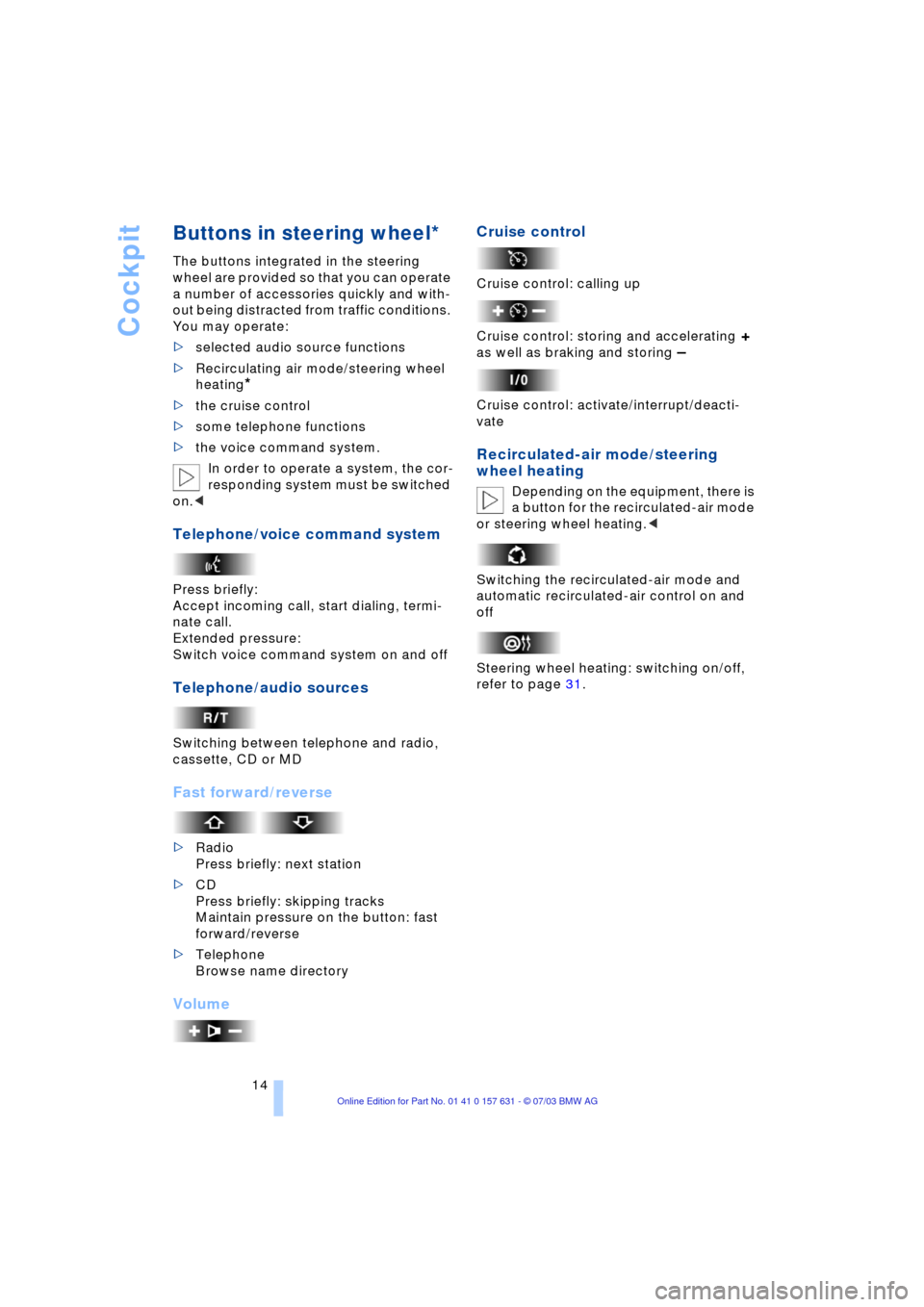
Buttons in steering wheel*
The buttons integrated in the steering
wheel are provided so that you can operate
a number of accessories quickly and with-
out being distracted from traffic conditions.
You may operate:
>selected audio source functions
>Recirculating air mode/steering wheel
heating
*
>the cruise control
>some telephone functions
>the voice command system.
In order to operate a system, the cor-
responding system must be switched
on.<
Telephone/voice command system
Press briefly:
Accept incoming call, start dialing, termi-
nate call.
Extended pressure:
Switch voice command system on and off
Telephone/audio sources
Switching between telephone and radio,
cassette, CD or MD
Fast forward/reverse
>Radio
Press briefly: next station
>CD
Press briefly: skipping tracks
Maintain pressure on the button: fast
forward/reverse
>Telephone
Browse name directory
VolumeCruise control
Cruise control: calling up
Cruise control: storing and accelerating
+
as well as braking and storing
Ð
Cruise control: activate/interrupt/deacti-
vate
Recirculated-air mode/steering
wheel heating
Depending on the equipment, there is
a button for the recirculated-air mode
or steering wheel heating.<
Switching the recirculated-air mode and
automatic recirculated-air control on and
off
Steering wheel heating: switching on/off,
refer to page 31.
Page 24 of 132
Opening and closing
22
Electric power windows
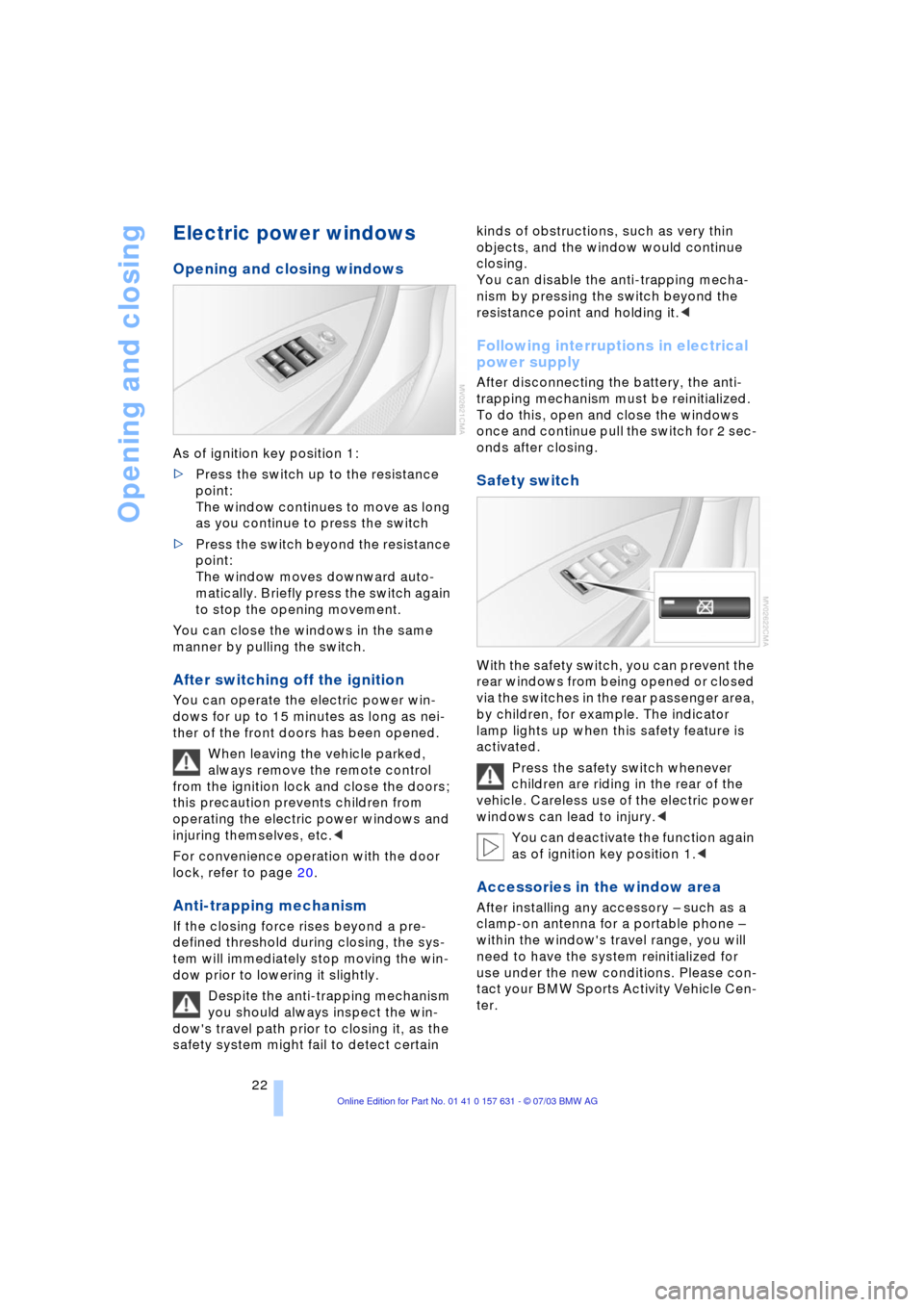
Opening and closing windows
As of ignition key position 1:
>Press the switch up to the resistance
point:
The window continues to move as long
as you continue to press the switch
>Press the switch beyond the resistance
point:
The window moves downward auto-
matically. Briefly press the switch again
to stop the opening movement.
You can close the windows in the same
manner by pulling the switch.
After switching off the ignition
You can operate the electric power win-
dows for up to 15 minutes as long as nei-
ther of the front doors has been opened.
When leaving the vehicle parked,
always remove the remote control
from the ignition lock and close the doors;
this precaution prevents children from
operating the electric power windows and
injuring themselves, etc.<
For convenience operation with the door
lock, refer to page 20.
Anti-trapping mechanism
If the closing force rises beyond a pre-
defined threshold during closing, the sys-
tem will immediately stop moving the win-
dow prior to lowering it slightly.
Despite the anti-trapping mechanism
you should always inspect the win-
dow's travel path prior to closing it, as the
safety system might fail to detect certain kinds of obstructions, such as very thin
objects, and the window would continue
closing.
You can disable the anti-trapping mecha-
nism by pressing the switch beyond the
resistance point and holding it.<
Following interruptions in electrical
power supply
After disconnecting the battery, the anti-
trapping mechanism must be reinitialized.
To do this, open and close the windows
once and continue pull the switch for 2 sec-
onds after closing.
Safety switch
With the safety switch, you can prevent the
rear windows from being opened or closed
via the switches in the rear passenger area,
by children, for example. The indicator
lamp lights up when this safety feature is
activated.
Press the safety switch whenever
children are riding in the rear of the
vehicle. Careless use of the electric power
windows can lead to injury.<
You can deactivate the function again
as of ignition key position 1.<
Accessories in the window area
After installing any accessory Ð such as a
clamp-on antenna for a portable phone Ð
within the window's travel range, you will
need to have the system reinitialized for
use under the new conditions. Please con-
tact your BMW Sports Activity Vehicle Cen-
ter.
Page 72 of 132
Practical interior accessories
70
Car phone preparation*
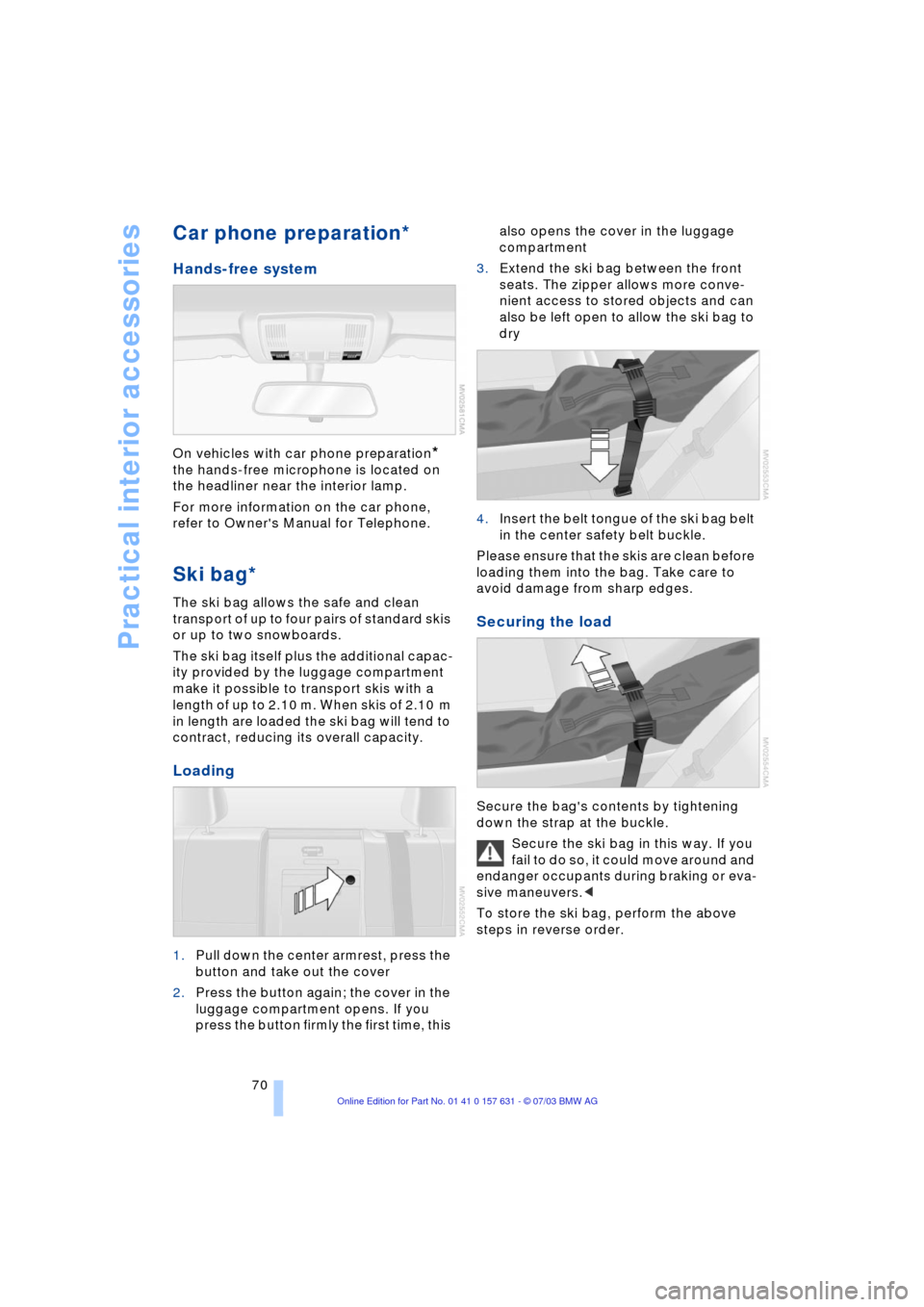
Hands-free system
On vehicles with car phone preparation*
the hands-free microphone is located on
the headliner near the interior lamp.
For more information on the car phone,
refer to Owner's Manual for Telephone.
Ski bag*
The ski bag allows the safe and clean
transport of up to four pairs of standard skis
or up to two snowboards.
The ski bag itself plus the additional capac-
ity provided by the luggage compartment
make it possible to transport skis with a
length of up to 2.10 m. When skis of 2.10 m
in length are loaded the ski bag will tend to
contract, reducing its overall capacity.
Loading
1.Pull down the center armrest, press the
button and take out the cover
2.Press the button again; the cover in the
luggage compartment opens. If you
press the button firmly the first time, this also opens the cover in the luggage
compartment
3.Extend the ski bag between the front
seats. The zipper allows more conve-
nient access to stored objects and can
also be left open to allow the ski bag to
dry
4.Insert the belt tongue of the ski bag belt
in the center safety belt buckle.
Please ensure that the skis are clean before
loading them into the bag. Take care to
avoid damage from sharp edges.
Securing the load
Secure the bag's contents by tightening
down the strap at the buckle.
Secure the ski bag in this way. If you
fail to do so, it could move around and
endanger occupants during braking or eva-
sive maneuvers.<
To store the ski bag, perform the above
steps in reverse order.
Page 109 of 132
Reference
At a glance
Controls
Driving tips
Mobility
107
Giving and receiving assistance
Receiving assistance
The Roadside Assistance of the BMW
Group offers you assistance in the event of
a breakdown around the clock, also at
weekends and on public holidays.
The phone numbers of the Roadside Assis-
tance control center in your home country
can be found in the BMW Dealer Directory.
In the case of vehicles with the corre-
sponding equipment, you can use buttons
in the headlining to contact Roadside
Assistance or start an emergency call.
When an emergency call is started, a tele-
phone connection is set up to the general
emergency call center.
In vehicles where BMW Assist is enabled,
the phone system will also automatically
establish contact with the BMW Assist
emergency call center. If the current loca-
tion of your vehicle can be determined, this
is transferred to the BMW Assist emer-
gency call center.
The condition for starting an emergency
call or contacting Roadside Assistance:
>The car phone is logged on to a mobile
telephone network
>The emergency call system is operable.
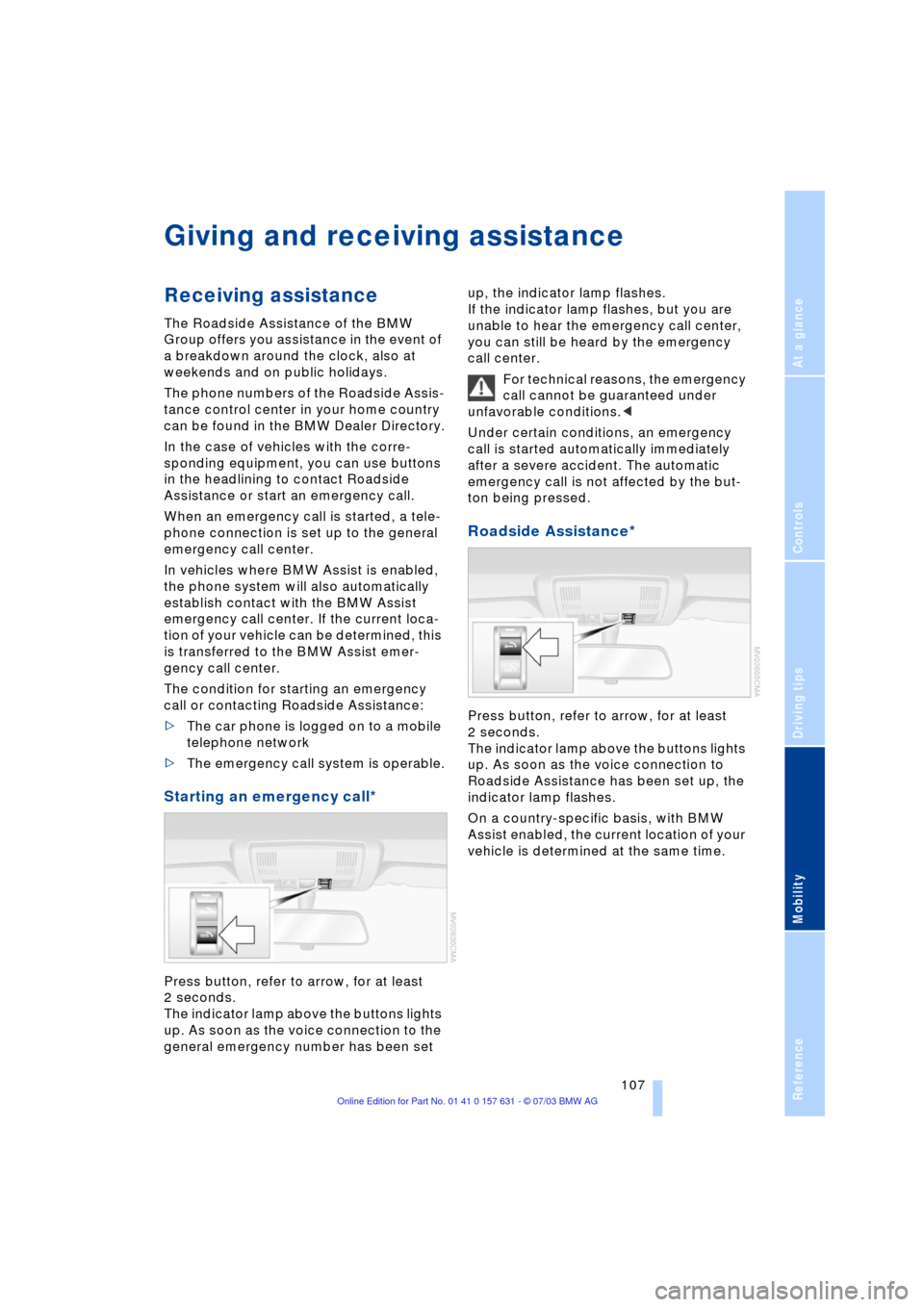
Starting an emergency call*
Press button, refer to arrow, for at least
2 seconds.
The indicator lamp above the buttons lights
up. As soon as the voice connection to the
general emergency number has been set up, the indicator lamp flashes.
If the indicator lamp flashes, but you are
unable to hear the emergency call center,
you can still be heard by the emergency
call center.
For technical reasons, the emergency
call cannot be guaranteed under
unfavorable conditions.<
Under certain conditions, an emergency
call is started automatically immediately
after a severe accident. The automatic
emergency call is not affected by the but-
ton being pressed.
Roadside Assistance*
Press button, refer to arrow, for at least
2 seconds.
The indicator lamp above the buttons lights
up. As soon as the voice connection to
Roadside Assistance has been set up, the
indicator lamp flashes.
On a country-specific basis, with BMW
Assist enabled, the current location of your
vehicle is determined at the same time.
Page 122 of 132
Everything from A to Z
120 Bottle holder, refer to
Beverage holders 67
Brake fluid 96
Ð indicator lamp 96
Ð level 96
Ð replacing 96
Brake force display 54
Brake lamps
Ð defect 57
Ð indicator lamp 12
Ð replacing the bulbs 102
Brake pads and rotors
Ð breaking-in procedure 76
Brakes 77, 96
Ð ABS 77
Ð brake fluid 96
Ð break-in procedure 76
Ð handbrake 38
Ð indicator/warning
lamp 38
Brake system
Ð brake-fluid level 96
Ð brake pads 96
Ð corrosion 77
Ð disc brakes 76, 77
Ð indicator lamp 96
Ð rotors 76, 77
Brake wear warning
Ð brake pads 96
Ð indicator lamp 96
Break-in procedures 76
Bulbs and lamps 99
Buttons in steering
wheel 14
C
California Proposition
65 Warning 98
Capacities 117
Car care, refer to Caring for
your vehicle brochure
Car-care products, refer to
Caring for your vehicle
brochure
Care, refer to Caring for
your vehicle brochureCargo area 71
Ð capacity 116
Ð cover 71
Ð floor cover 72
Ð folding rear seat
backrest 71
Ð increasing volume 71
Ð lashing eyes 73
Ð manual unlocking 21
Ð opening, remote
control 19
Ð opening/closing 21
Ð opening from the
outside 21
Ð sockets 73
Ð volume 116
Cargo bay, refer to Cargo
area 71
Cargo loading 78
Caring for leather, refer to
Caring for your vehicle
brochure
Caring for the carpet, refer
to Caring for your vehicle
brochure
Caring for the vehicle finish,
refer to Caring for your
vehicle brochure
Car keys, refer to Key
set 18
Car phone preparation 70
Car wash 77
Car wash, refer to Caring
for your vehicle brochure
Catalytic converter, refer to
High temperatures 76
Central locking system 18
Ð interior 20
Changes, technical, refer to
For your own safety 6
Changing a wheel 103
Check Gas Cap
Ð indicator lamp 12, 84
Checking inflation
pressure 86
Child's seats, refer to
Child-restraint
systems 34
Child-restraint systems 34
Child-safety locks 36
Chock 103Chrome parts, care, refer to
Caring for your vehicle
brochure
Cigarette lighter
Ð front 69
Ð rear 69
Circulation of air, refer to
Recirculated-air
mode 61, 64
Cleaning, vehicle, refer to
Caring for your vehicle
brochure
Cleaning the windshield 42
Cleaning windows,
reservoir 94
Clean the rear window 42
Clock 46
Ð 12/24 hour mode 48
Ð setting, refer also to
Owner's Manual for
Radio/Onboard
computer 46
Clutch 76
Ð breaking in 76
Cockpit 10
Cold start, refer to Starting
the engine 37
Comfort operation
Ð panorama glass roof 20
Compact wheel
Ð wheel changes 103
Compression ratio, refer to
Engine data 114
Computer 47
Computer, functions 48
Condensation, refer to A/C
operation 61, 64
Connecting a vacuum
cleaner, refer to Lighter
socket 69
Consumption, refer to
Average fuel
consumption 48
Consumption indicator,
refer to Fuel gauge 45
Contents 3
Controls, refer to
Cockpit 10
Convenience operation
Ð from outside 20
Ð windows 20
Page 124 of 132
Everything from A to Z
122 US models, Warranty and
Service Guide Booklet for
Canadian models
ESP Electronic Stability
Program, refer to DSC
Dynamic Stability
Control 50
Exhaust system, refer to
High temperatures 76
Exterior mirror
Ð automatic dimming
feature 32
Exterior mirrors 31
F
Fan, refer to Air
supply 61, 64
Filling the windshield
washer reservoir 94
Filter
Ð refer to Microfilter 62
Ð refer to Microfilter/
Activated charcoal
filter 65
First-aid kit 108
Fittings, tow-starting and
towing 109
Flat tire 103
Ð compact wheel 103
Ð Flat Tire Monitor 53
Flat Tire Monitor 53
Ð indicator lamp 53
Flooding, refer to Driving on
bad roads 80
Floor cover 72
Fluid level
Ð indicator lamp 94
Fog lamps 58
Ð replacing bulbs 102
Folding rear seat back 71
Folding rear seat
backrest 71
Footbrake, refer to Brake
system 77, 96
Footbrake, refer to General
driving notes 77, 96
Front/rear reading
lamps 58
Front airbags 54
Front center armrest 68Front seat adjustment 27
Fuel 85
Ð average
fuel consumption 48
Ð capacity 117
Ð gauge 45
Ð quality 85
Ð volume 48
Fuel capacity 117
Fuel clock, refer to Fuel
gauge 45
Fuel display, refer to Fuel
gauge 45
Fuel filler cap 84
Fuel filler door 84
Ð releasing in the event of
electrical defect 84
Fuses 106
G
Garage-door opener, refer
to Integrated universal
remote control 66
Gasoline, refer to Fuel
quality 85
Gasoline consumption,
refer to Average fuel
consumption 48
Gasoline display, refer to
Fuel gauge 45
Gear changes, refer to
Automatic transmission
with Steptronic 40
Gear display 41
Gear lever
Ð automatic transmission
with Steptronic 39
Ð manual transmission 39
General driving notes 76
Glove compartment 68
Grills, refer to
Ventilation 61, 65
Ground clearance 80
H
Halogen lamps 100
Handbrake
Ð indicator lamp 38Hands-free microphone,
refer to Car phone
preparation 70
Hands-free system 70
Hazard warning flashers 10
HDC Hill Descent
Control 51
Headlamp control,
automatic 57
Headlamp flasher 41
Ð indicator lamp 41
Headlamps 100
Ð bulb replacement 99
Headlamps, care, refer to
Caring for your vehicle
brochure
Headlamp washer
reservoir 94
Headlamp washer
system 94
Ð cleaning headlamps 42
Ð tank capacity, refer to
Filling capacities 117
Ð washer fluid 94
Head restraints 28
Heated mirrors 32
Heated rear window
Ð air conditioner 61
Ð automatic climate
control 65
Heated seats 30
Heated steering wheel 31
Heated windshield,
automatic climate
control 64
Heating
Ð exterior mirror 32
Ð rear window 61, 65
Ð seats 30
Ð steering wheel 31
Heating and
ventilation 60, 63
Heavy cargo, refer to Cargo
loading 78
Height, refer to
Dimensions 115
Height adjustment
Ð seats 28
Ð steering wheel 31
Page 126 of 132
Everything from A to Z
124 Maximum axle loads 116
Maximum roof weight 116
MD operation, refer to
Owner's Manual for
Radio/Onboard computer
Mechanical seats 28
Memory, refer to Seat and
mirror memory 29
Memory, refer to Vehicle
Memory, Key Memory 33
Microfilter
Ð air conditioner 62
Ð automatic climate
control 65
Microphone, refer to Car
phone preparation 70
Microphone for
telephone 70
Mileage, refer to Engine
data 114
Mini-Disc operation, refer
to Owner's Manual for
Radio/Onboard computer
Mirror
Ð automatic curb
monitor 32
Ð mirror heating 32
Ð mirror memory, refer to
Seat and mirror
memory 29
Mirror dimming feature 32
Mirrors 31
Mobile Service, refer to
Roadside Assistance 107
Modifications, technical 6
Multifunction switch
Ð turn signal indicators/
headlamp flasher 41
Ð washer/wiper system 41
N
Neck support, refer to Head
restraints 28
Next Service
indicator 46, 97
Nozzles, refer to
Ventilation 61, 65
Nylon rope 109
O
OBD connector 98
Octane number, refer to
Fuel quality 85
Odometer 45
Oil
Ð approved engine oils 95
Ð dipstick 94
Oil change interval, refer to
Next Service indicator 97
Oil change interval, refer to
Service Manual
Oil consumption 94
Oil grades 95
Oil level 94
Oil pressure 94
Oil sensor
Ð indicator lamp 94
OILSERVICE 46, 97
Onboard Diagnostic OBD
interface socket 98
Onboard tool kit 99
Opening and closing 18
Ð from inside 20
Ð from outside 18
Ð using the door lock 20
Ð using the remote
control 18
Operating on bad roads 80
Output, refer to Engine
data 114
Outside air 61
Ð air conditioner 61
Ð automatic climate
control 64
Outside temperature
display
Ð changing unit of
measure 47
Ð in computer 47
Overview indicator/warning
lamps 12
P
Package tray, refer to
Cargo area 71Panorama glass roof 23
Ð comfort operation 20
Ð manual operation 24
Ð protective function 24
Park Distance Control
PDC 49
Parking
Ð vehicle 38
Parking aid, refer to Park
Distance Control PDC 49
Parking brake, refer to
Handbrake 38
Parking lamps 57
Ð bulb replacement 101
Parking lamps/low
beams 57
Parking the vehicle 38
Particulate filter, refer to
Microfilter 62
Partition net 72
PDC Park Distance
Control 49
Plastic, refer to Caring for
your vehicle brochure
Pollen, refer to
Microfilter 62
Pollen, refer to Microfilter/
Activated charcoal
filter 65
Power seat 29
Pressure, tires 86
Pressure monitoring,
tires 53
Ð Flat Tire Monitor 53
Programming settings,
refer to Vehicle Memory,
Key Memory 33
Protective function
Ð panorama glass roof 24
Puncture
Ð Flat Tire Monitor 53
R
Radiator, refer to
Coolant 95
Radio, refer to separate
Owner's Manual
Radio navigation, refer to
separate Owner's Manual
Rain sensor 42