lock BMW X3 3.0I 2007 E83 User Guide
[x] Cancel search | Manufacturer: BMW, Model Year: 2007, Model line: X3 3.0I, Model: BMW X3 3.0I 2007 E83Pages: 139, PDF Size: 4.74 MB
Page 28 of 139
Opening and closing
26 onds. However, the interior motion sensor
is not activated.
>The indicator lamp goes out after unlocking:
no manipulation or attempted intrusions
have been detected in the period since the
system was armed.
>The indicator lamp flashes for 10 seconds
after the vehicle is unlocked: an attempted
entry has been detected in the period since
the system was armed.
Following triggering of an alarm, the indicator
lamp will flash continuously.
Tilt alarm sensor
The tilt of the vehicle is monitored. The alarm
system reacts, e.g. in case of an attempted
wheel theft or towing.
Interior motion sensor
In order for the interior motion sensor to func-
tion properly, the windows and panorama glass
sunroof must be completely closed.
Avoiding unintentional alarms
The tilt alarm sensor and interior motion sensor
may be switched off at the same time. This pre-
vents unintentional alarms, e.g. in the following
situations:
>In duplex garages
>When being transported on car-carrying
trains, aboard ship, or on a trailer
>When animals are to remain in the vehicle
Switching off tilt alarm sensor and
interior motion sensor
Press the button on the remote con-
trol again as soon as the vehicle is locked.
The indicator lamp lights up briefly and then
flashes continuously. The tilt alarm sensor and
the interior motion sensor are switched off until
the next time the vehicle is unlocked and subse-
quently locked again.If you wish, you can have the tilt alarm
sensor and interior motion sensor perma-
nently deactivated. You can have this setting
made at your BMW Sports Activity Vehicle
Center.<
Page 29 of 139
Reference
At a glance
Controls
Driving tips
Mobility
27
Adjustments
Sitting safely
The ideal sitting position can make a vital con-
tribution to relaxed driving that is as fatigue-free
as possible. Together with safety belts, head
restraints, and airbags, sitting position plays an
important role in an accident. Compliance with
the following instructions is important; failure to
do so could impair the protective function of the
safety systems.
For additional information on transporting chil-
dren safely, refer to page34.
Airbags
Always maintain an adequate distance
between yourself and the airbags. Always
hold the steering wheel by its rim with hands at
the 9 o'clock and 3 o'clock positions, to mini-
mize the risk of injuries to your hands and arms
in the event of airbag deployment.
No one and nothing is to come between the air-
bags and the seat occupant.
Do not use the cover of the front airbag on the
front passenger side as a storage area. Make
sure that the passenger sits correctly, e.g. does
not rest his feet or legs on the dashboard. Oth-
erwise, a triggering of the front airbag could
result in leg injuries. Make sure that passengers
do not lean their heads against side or head air-
bags. Otherwise, a triggering of the airbag could
result in injuries.<
Even if you adhere to all the instructions, inju-
ries resulting from contact with airbags cannot
be entirely ruled out, depending on the circum-
stances. The ignition and inflation noise may
provoke a mild – usually temporary – hearing
loss in extremely sensitive individuals.
For airbag locations and additional information
on airbags, refer to page56.
Head restraint
A correctly adjusted head restraint reduces the
risk of damage to the cervical vertebrae in acci-
dents.
Adjust the head restraint so that its mid-
dle lies approximately at the height of
your ears. Otherwise, there is an increased risk
of injury in the event of an accident.<
Head restraints, refer to page29.
Safety belts
Make sure the safety belts are worn in all occu-
pied seats every time you drive. Although air-
bags enhance safety by providing added pro-
tection, they are not a substitute for safety
belts.
Your vehicle has five seats that are each
equipped with a safety belt.
Never allow more than one person to
wear a single safety belt. Infants and chil-
dren must not ride on a lap. Make sure that the
belt in the lap area sits low against the hips and
does not press against the abdomen. The
safety belt must never rest against the throat,
rub against sharp edges, pass over hard or frag-
ile objects or be pinched. Fasten the safety belt
around your body snugly, making sure that it is
pulled taut across your lap and shoulder and
that it is not twisted; otherwise, the belt can
slide over the hips in the event of a frontal colli-
sion and injure your abdomen. Avoid wearing
clothing that prevents the belt from fitting prop-
erly and pull the shoulder belt upward periodi-
cally to readjust the tension across your lap in
order to avoid a reduction in the restraining
action of the safety belt.
If the middle safety belt is used, the larger part
of the backrest must be locked in position, refer
to page74; otherwise, the middle safety belt
cannot exert any restraining action.<
Safety belts, refer to page31.
Page 33 of 139
Reference
At a glance
Controls
Driving tips
Mobility
31
Storing
1.Turn the ignition key to position 1 or 2.
2.Set the desired seat and exterior mirror
position.
3.Press the button:
The LED in the button lights up.
4.Press the desired memory button 1, 2 or3:
The LED goes out.
Requesting a stored setting
Do not request a position from the mem-
ory while the vehicle is moving; otherwise,
there is a risk of accident from unexpected seat
movement.<
Convenience mode
1.Open the driver's door after unlocking or
turn the ignition key to position 1.
2.Briefly press the desired memory button 1,
2 or3.
The adjustment procedure is canceled when
you press one of the seat adjustment buttons or
use one of the memory buttons.
Safety feature
1.Close the driver's door and turn the ignition
key to position 0 or 2.
2.Press the desired memory button 1, 2 or3
and maintain pressure until the adjustment
process has been completed.
If the button has been pressed inadvert-
ently:
Press the button again, the LED goes out.You can have your vehicle programmed
to automatically recall your own individual
stored adjustment settings for the seat and
exterior mirror position whenever you use your
personal remote control to unlock the vehicle.<
If you make use of this setting, be sure
that the footwell behind the driver's seat
is unobstructed before unlocking the vehicle.
If you fail to do so, any persons, animals or
objects behind the seat could be injured or
damaged by a rearward movement of the
seat.<
Safety belts
To ensure that the safety systems con-
tinue to provide optimum protection,
please follow the instructions on page27.<
Make sure the safety belts are worn in all occu-
pied seats every time you drive. Although air-
bags enhance safety by providing added pro-
tection, they are not a substitute for safety
belts.
Fastening
Make sure you hear the latch plate engage in
the belt buckle.
Safety belt reminder for front seats
The indicator lamp flashes or lights up.
In addition, a signal sounds. Please
make sure that the safety belts are
being worn correctly.
The safety belt reminder is activated if the
safety belt on the driver's side has not yet been
fastened.
At speeds greater than 5 mph/8 km/h, the
Page 36 of 139
Transporting children safely
34
Transporting children safely
The right place for children
Do not leave children unattended in the
vehicle; otherwise, they could endanger
themselves and/or others, for example by open-
ing the doors.<
Children always in the rear
Accident research has demonstrated that the
safest place for children is in the rear seat.
Children younger than 13 or smaller than
5 ft/150 cm should only ride in the rear, in
child restraint systems provided in accordance
with their age, weight, and height. Otherwise,
there is an increased risk of injury in the event of
an accident.<
Children older than 13 must be secured with a
safety belt as soon as they have outgrown a
suitable child restraint system due to their age,
height, and weight.
Exception for the front passenger seat
If it should be necessary to use a child
restraint system on the front passenger
seat, the front and side airbags must be deacti-
vated. Otherwise, there is an increased risk of
injury to the child if the airbag is triggered, even
with a child restraint system.<
For more information on automatic deactivation
of the front passenger airbags, refer to page56.
Installing child restraint
systems
Follow the child restraint system manu-
facturer's instructions for selection,
installation and use of the child restraint sys-
tem. Otherwise, the degree of protection can be
reduced.<
On the passenger's seat
After installing a child restraint system on
the passenger seat, make sure that the
front and side airbag on the front passenger
side have been deactivated. Otherwise, there is
an increased risk of injury when the airbags are
triggered.<
Child seat security
In order to permit installation of child restraint
systems, all rear safety belts and the front pas-
senger safety belt can be locked to prevent
them from being pulled out.
Locking safety belt
1.Secure child restraint system with the belt.
2.Pull safety belt strap all the way out.
3.Allow safety belt to retract and pull it snugly
against the child restraint system. The
safety belt is locked.
Unlocking safety belt
1.Open safety belt buckle.
2.Remove child restraint system.
3.Allow safety belt strap to retract all the way.
Page 38 of 139
Transporting children safely
36 Outer seats:
1.Slide head restraint upward.
2.Guide upper tether strap between the sup-
ports of the head restraint.
3.Attach tether strap hook to attachment
point.
4.Slide head restraint into the lowest position.
5.Pull tether strap tight.
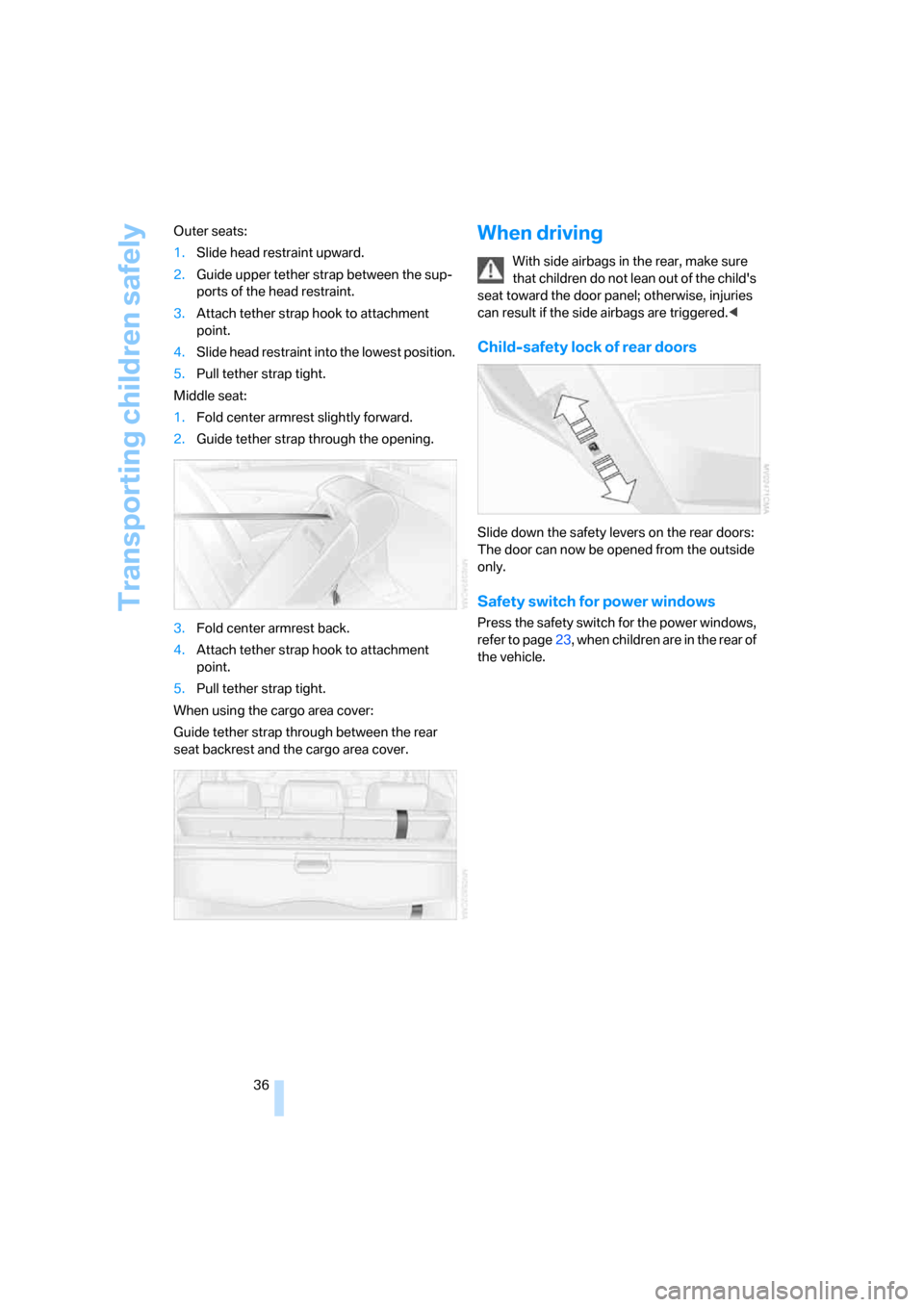
Middle seat:
1.Fold center armrest slightly forward.
2.Guide tether strap through the opening.
3.Fold center armrest back.
4.Attach tether strap hook to attachment
point.
5.Pull tether strap tight.
When using the cargo area cover:
Guide tether strap through between the rear
seat backrest and the cargo area cover.
When driving
With side airbags in the rear, make sure
that children do not lean out of the child's
seat toward the door panel; otherwise, injuries
can result if the side airbags are triggered.<
Child-safety lock of rear doors
Slide down the safety levers on the rear doors:
The door can now be opened from the outside
only.
Safety switch for power windows
Press the safety switch for the power windows,
refer to page23, when children are in the rear of
the vehicle.
Page 39 of 139
Reference
At a glance
Controls
Driving tips
Mobility
37
Driving
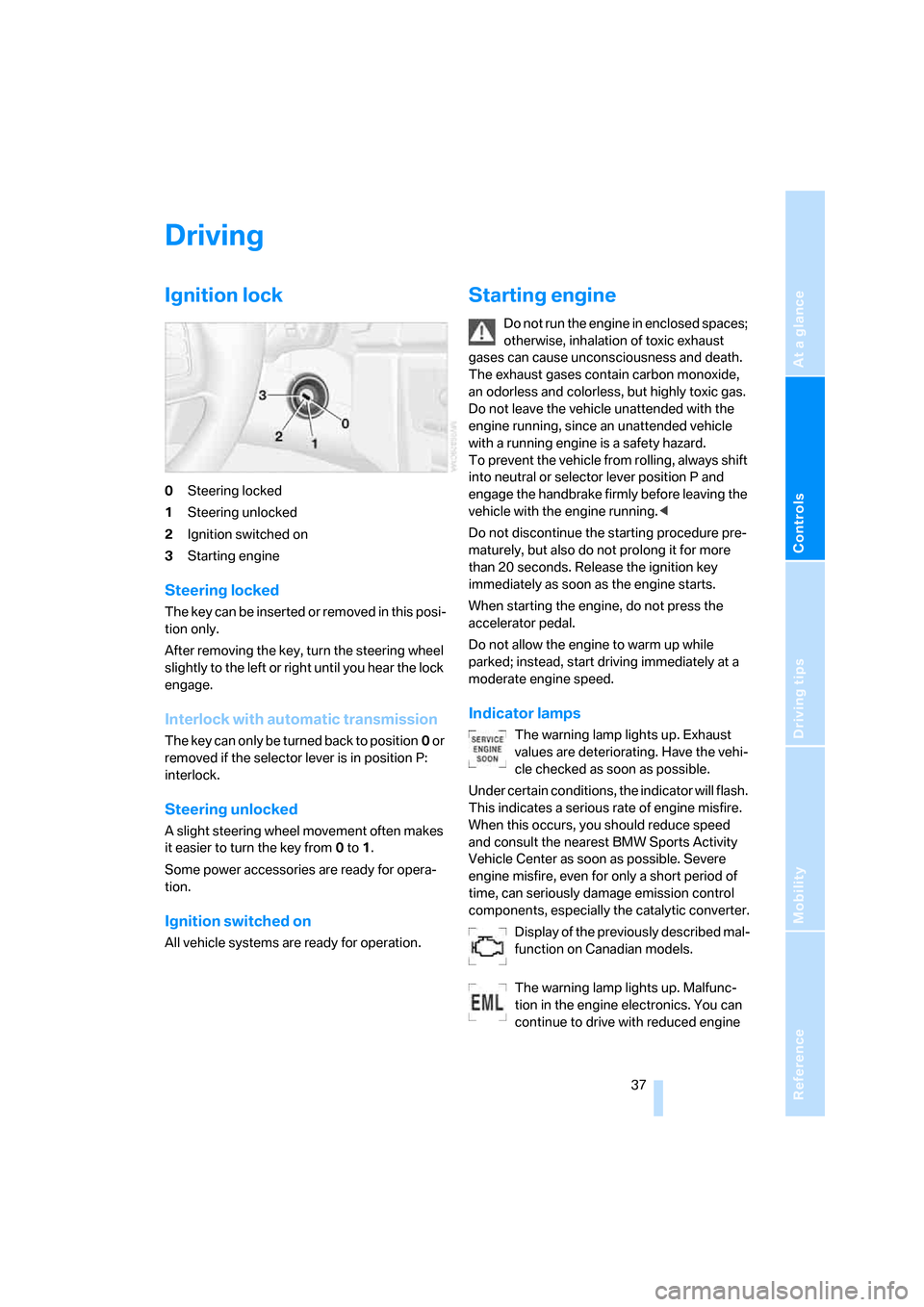
Ignition lock
0Steering locked
1Steering unlocked
2Ignition switched on
3Starting engine
Steering locked
T h e k e y c a n b e i n s e r t ed o r r em o v e d in t h is p o s i -
tion only.
After removing the key, turn the steering wheel
slightly to the left or right until you hear the lock
engage.
Interlock with automatic transmission
The key can only be turned back to position0 or
removed if the selector lever is in position P:
interlock.
Steering unlocked
A slight steering wheel movement often makes
it easier to turn the key from0 to1.
Some power accessories are ready for opera-
tion.
Ignition switched on
All vehicle systems are ready for operation.
Starting engine
Do not run the engine in enclosed spaces;
otherwise, inhalation of toxic exhaust
gases can cause unconsciousness and death.
The exhaust gases contain carbon monoxide,
an odorless and colorless, but highly toxic gas.
Do not leave the vehicle unattended with the
engine running, since an unattended vehicle
with a running engine is a safety hazard.
To prevent the vehicle from rolling, always shift
into neutral or selector lever position P and
engage the handbrake firmly before leaving the
vehicle with the engine running.<
Do not discontinue the starting procedure pre-
maturely, but also do not prolong it for more
than 20 seconds. Release the ignition key
immediately as soon as the engine starts.
When starting the engine, do not press the
accelerator pedal.
Do not allow the engine to warm up while
parked; instead, start driving immediately at a
moderate engine speed.
Indicator lamps
The warning lamp lights up. Exhaust
values are deteriorating. Have the vehi-
cle checked as soon as possible.
Under certain conditions, the indicator will flash.
This indicates a serious rate of engine misfire.
When this occurs, you should reduce speed
and consult the nearest BMW Sports Activity
Vehicle Center as soon as possible. Severe
engine misfire, even for only a short period of
time, can seriously damage emission control
components, especially the catalytic converter.
Display of the previously described mal-
function on Canadian models.
The warning lamp lights up. Malfunc-
tion in the engine electronics. You can
continue to drive with reduced engine
Page 40 of 139
Driving
38 output or speed. Have the system checked
immediately.
Manual transmission
1.Step on the brake.
2.Depress the clutch pedal and shift into neu-
tral.
If the clutch pedal is not depressed,
the motor will not start.<
3.Start the engine.
Automatic transmission*
1.Step on the brake.
2.Move selector lever into position P.
3.Start the engine.
Special starting conditions
In the following situations, press the accelerator
pedal halfway down while starting:
>If the engine fails to start on the first
attempt, for instance if it is very hot or cold.
>When starting the engine at very low tem-
peratures, e.g. below approx. +57/–156,
at high altitudes over approx. 3,300 ft/
1,000 m.
Avoid frequent starting in quick succes-
sion or repeated start attempts in which
the engine does not start. Otherwise, the fuel is
either not burned or inadequately burned and
there is a danger of overheating and damaging
the catalytic converter.<
Switching off engine
Do not remove the ignition key when the
vehicle is rolling; otherwise, the steering
wheel lock would engage, preventing you from
steering.
When leaving the vehicle, remove the ignition
key and lock the steering. To prevent the vehi-
cle from rolling, engage the parking brake firmly
when parking.<
Manual transmission
1.Engage the parking brake firmly.
2.Turn the ignition key to position 1 or 0.
3.Shift into first gear or reverse.
Automatic transmission*
1.With the vehicle at a stop, move the selector
lever into position P.
2.Turn the ignition key to position 1 or 0.
3.Engage the parking brake firmly.
Handbrake
The handbrake is primarily intended to prevent
the vehicle from rolling while parked; it brakes
the rear wheels.
Indicator lamp
The indicator lamp lights up; an acous-
tic signal also sounds when you begin
to drive. The handbrake is still engaged.
Indicator lamp for Canadian models.
Engaging
The lever engages automatically when you pull
up on it.
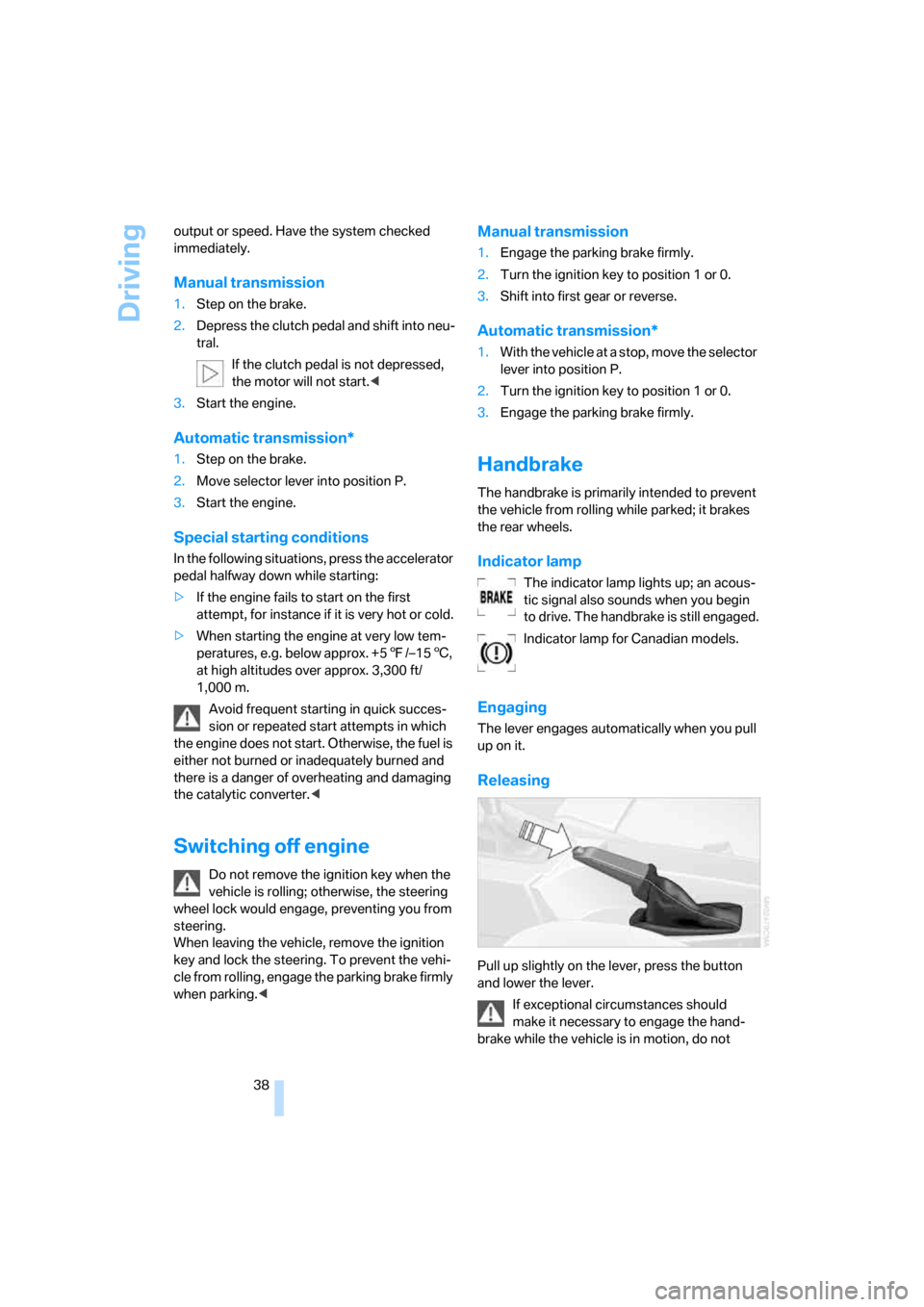
Releasing
Pull up slightly on the lever, press the button
and lower the lever.
If exceptional circumstances should
make it necessary to engage the hand-
brake while the vehicle is in motion, do not
Page 41 of 139
Reference
At a glance
Controls
Driving tips
Mobility
39
engage it too forcefully. In doing so, continu-
ously press the button of the handbrake lever.
Otherwise, excessively forceful engagement of
the handbrake can cause the rear wheels to lock
and cause the rear of the vehicle to fishtail.<
To prevent corrosion and one-sided brak-
ing action, occasionally engage the hand-
brake lightly when the vehicle is slowly coming
to a stop if traffic conditions permit. The brake
lamps do not light up when the handbrake is
applied.<
Manual transmission
When shifting into 5th or 6th gear, press
the gearshift to the right. Otherwise, an
inadvertent shift into 3rd or 4th gear could harm
the engine.<
Reverse
Select only when the vehicle is stationary. Press
the gearshift lever to the left to overcome the
resistance.
Automatic transmission with
Steptronic*
In addition to fully automatic operation, you can
also manually shift with the Steptronic, refer to
page40.
Parking vehicle
To prevent the vehicle from rolling,
always select position P and engage the
handbrake before leaving the vehicle with the
engine running.<
Selector lever positions
P R N D M/S + –
Starting the engine
The engine can only be started in selector lever
positions P: Park or N: Neutral.
Displays in the instrument cluster
P R N D SD M1 M2 M3 M4 M5 M6
The selector lever position is indicated, and in
the manual mode, the gear currently engaged.
Changing selector lever positions
>Only move the selector lever from posi-
tion P with the engine running: interlock.
>When the vehicle is stationary, step on the
brake before shifting out of P or N; other-
wise, the selector lever is locked: shiftlock.
To prevent the vehicle from creeping
after you select a drive position, press
on the brake pedal until you are ready to
start driving.<
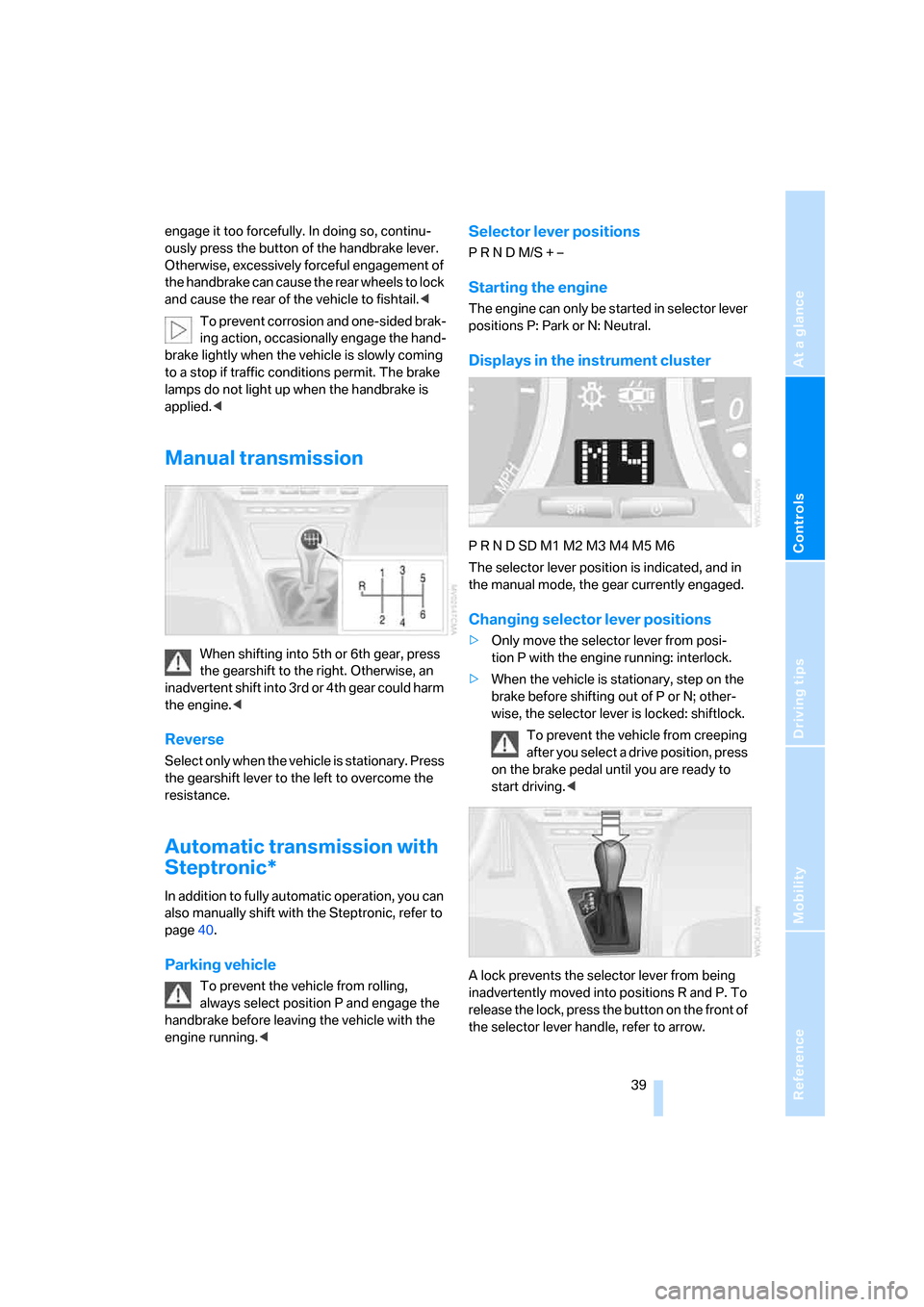
A lock prevents the selector lever from being
inadvertently moved into positions R and P. To
release the lock, press the button on the front of
the selector lever handle, refer to arrow.
Page 42 of 139
Driving
40
P Park
Select only when the vehicle is stationary. The
transmission locks to prevent the rear wheels
from turning.
R Reverse
Select only when the vehicle is stationary.
N Neutral
You can shift into neutral, for example, in auto-
matic car washes. This allows the vehicle to roll.
D Drive, automatic position
Under normal operating conditions, fuel con-
sumption is the lowest when the vehicle is
driven in position D.
Kick-down
The kick-down mode provides maximum accel-
eration.
Press the accelerator pedal past the increased
resistance point at the full-throttle position.
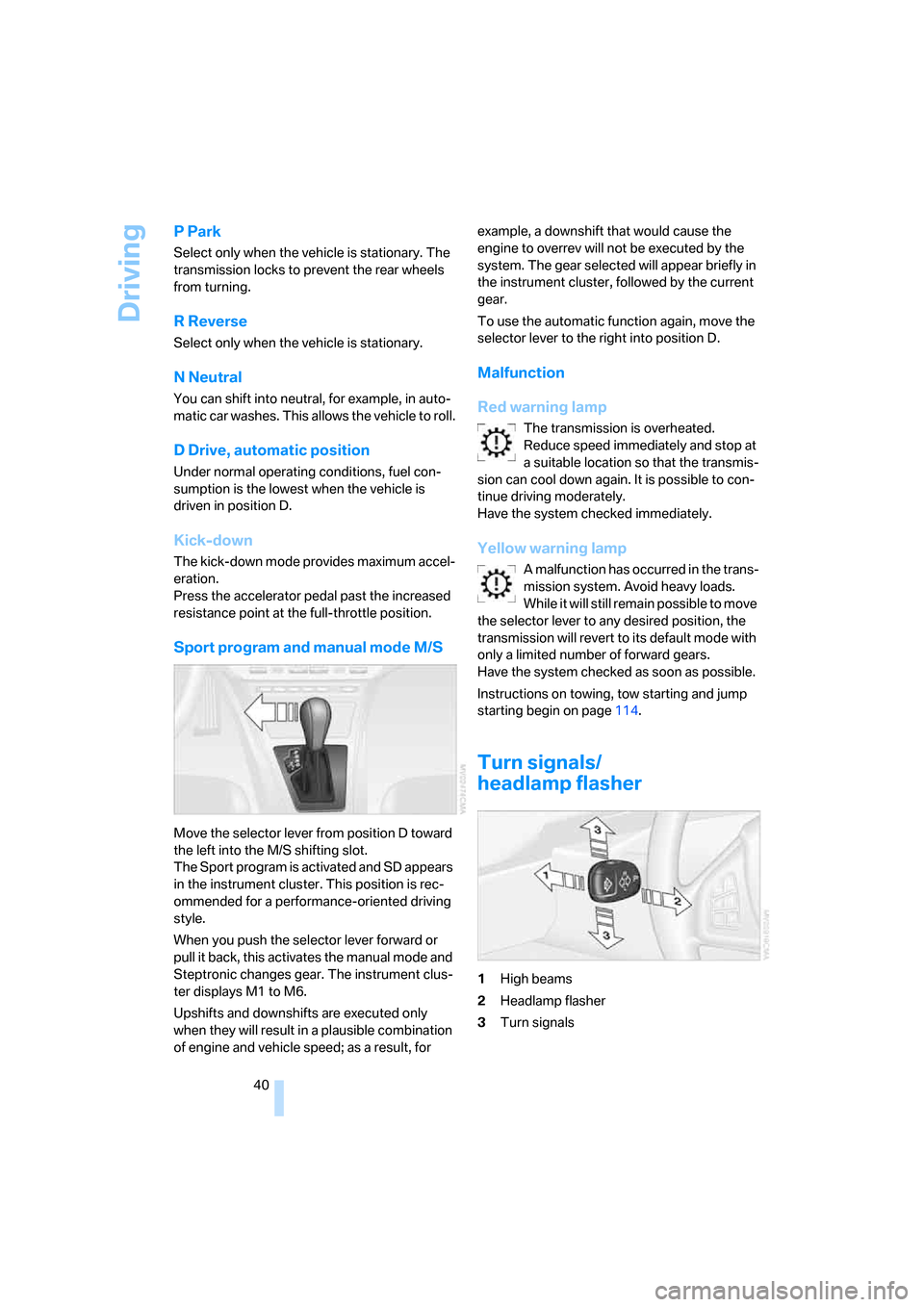
Sport program and manual mode M/S
Move the selector lever from position D toward
the left into the M/S shifting slot.
The Sport program is activated and SD appears
in the instrument cluster. This position is rec-
ommended for a performance-oriented driving
style.
When you push the selector lever forward or
pull it back, this activates the manual mode and
Steptronic changes gear. The instrument clus-
ter displays M1 to M6.
Upshifts and downshifts are executed only
when they will result in a plausible combination
of engine and vehicle speed; as a result, for example, a downshift that would cause the
engine to overrev will not be executed by the
system. The gear selected will appear briefly in
the instrument cluster, followed by the current
gear.
To use the automatic function again, move the
selector lever to the right into position D.
Malfunction
Red warning lamp
The transmission is overheated.
Reduce speed immediately and stop at
a suitable location so that the transmis-
sion can cool down again. It is possible to con-
tinue driving moderately.
Have the system checked immediately.
Yellow warning lamp
A malfunction has occurred in the trans-
mission system. Avoid heavy loads.
While it will still remain possible to move
the selector lever to any desired position, the
transmission will revert to its default mode with
only a limited number of forward gears.
Have the system checked as soon as possible.
Instructions on towing, tow starting and jump
starting begin on page114.
Turn signals/
headlamp flasher
1High beams
2Headlamp flasher
3Turn signals
Page 48 of 139
Everything under control
46
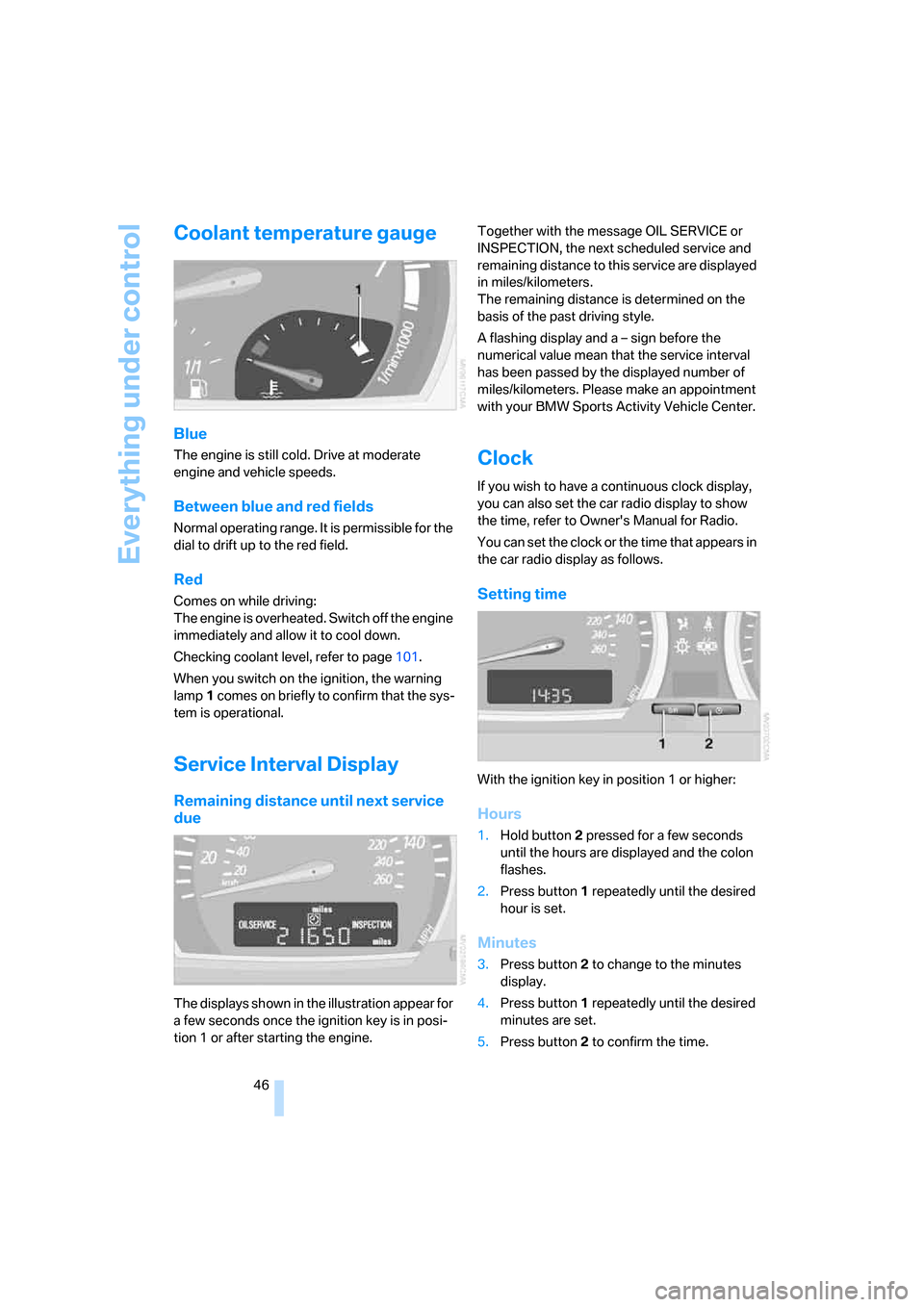
Coolant temperature gauge
Blue
The engine is still cold. Drive at moderate
engine and vehicle speeds.
Between blue and red fields
Normal operating range. It is permissible for the
dial to drift up to the red field.
Red
Comes on while driving:
The engine is overheated. Switch off the engine
immediately and allow it to cool down.
Checking coolant level, refer to page101.
When you switch on the ignition, the warning
lamp1 comes on briefly to confirm that the sys-
tem is operational.
Service Interval Display
Remaining distance until next service
due
The displays shown in the illustration appear for
a few seconds once the ignition key is in posi-
tion 1 or after starting the engine.Together with the message OIL SERVICE or
INSPECTION, the next scheduled service and
remaining distance to this service are displayed
in miles/kilometers.
The remaining distance is determined on the
basis of the past driving style.
A flashing display and a – sign before the
numerical value mean that the service interval
has been passed by the displayed number of
miles/kilometers. Please make an appointment
with your BMW Sports Activity Vehicle Center.
Clock
If you wish to have a continuous clock display,
you can also set the car radio display to show
the time, refer to Owner's Manual for Radio.
You can set the clock or the time that appears in
the car radio display as follows.
Setting time
With the ignition key in position 1 or higher:
Hours
1.Hold button2 pressed for a few seconds
until the hours are displayed and the colon
flashes.
2.Press button1 repeatedly until the desired
hour is set.
Minutes
3.Press button2 to change to the minutes
display.
4.Press button1 repeatedly until the desired
minutes are set.
5.Press button2 to confirm the time.