DSC BMW X3 3.0SI 2008 Owners Manual
[x] Cancel search | Manufacturer: BMW, Model Year: 2008, Model line: X3 3.0SI, Model: BMW X3 3.0SI 2008Pages: 140, PDF Size: 3.36 MB
Page 14 of 140
Cockpit
12
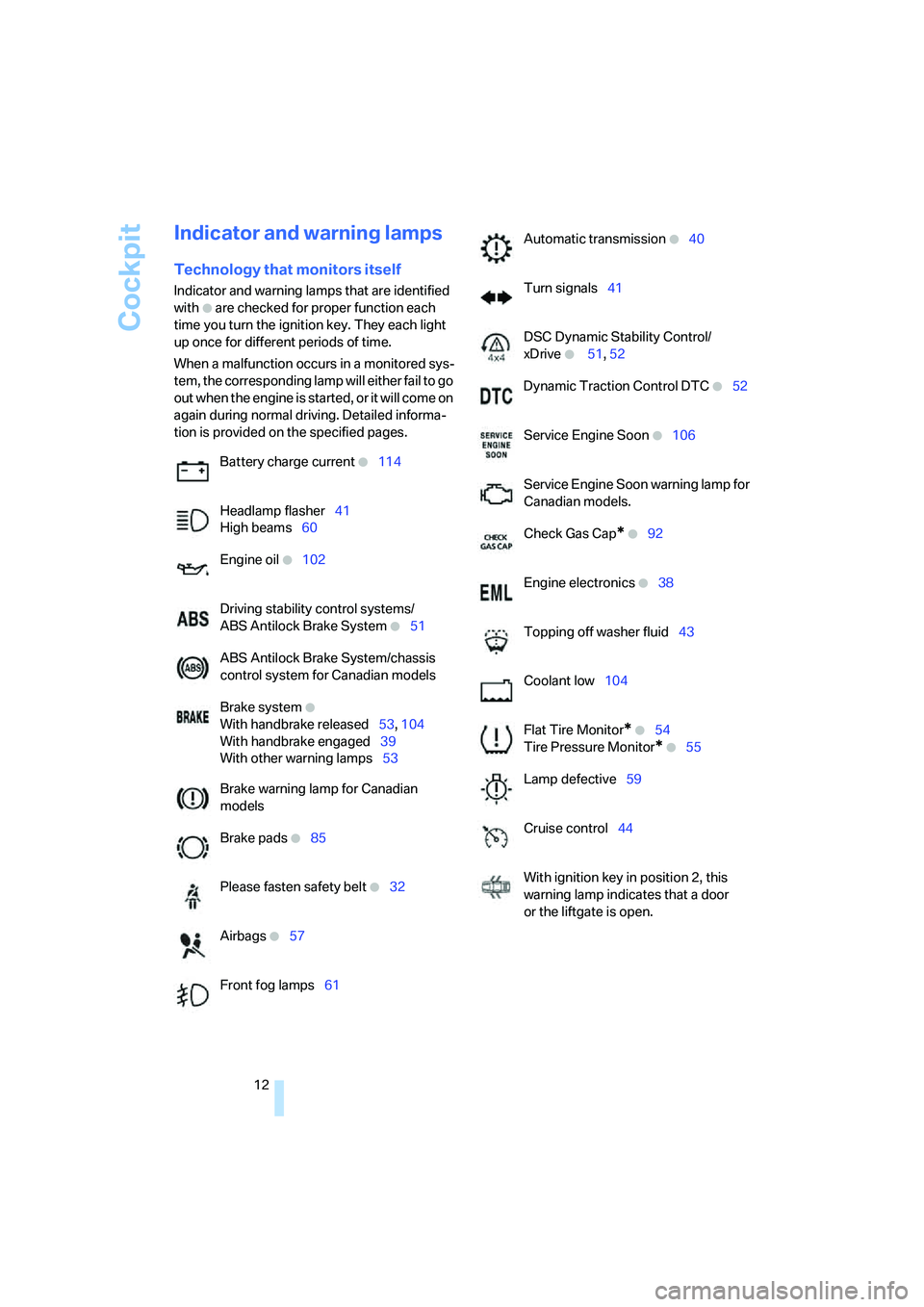
Indicator and warning lamps
Technology that monitors itself
Indicator and warning lamps that are identified
with
+ are checked for proper function each
time you turn the ignition key. They each light
up once for different periods of time.
When a malfunction occurs in a monitored sys-
tem, the corresponding lamp will either fail to go
o u t w h e n t h e e n g i n e i s s t a r t e d , o r i t w i l l c o m e o n
again during normal driving. Detailed informa-
tion is provided on the specified pages.
Battery charge current
+114
Headlamp flasher41
High beams60
Engine oil
+102
Driving stability control systems/
ABS Antilock Brake System
+51
ABS Antilock Brake System/chassis
control system for Canadian models
Brake system
+
With handbrake released53, 104
With handbrake engaged39
With other warning lamps53
Brake warning lamp for Canadian
models
Brake pads
+85
Please fasten safety belt
+32
Airbags
+57
Front fog lamps61
Automatic transmission +40
Turn signals41
DSC Dynamic Stability Control/
xDrive
+ 51, 52
Dynamic Traction Control DTC
+52
Service Engine Soon
+106
Service Engine Soon warning lamp for
Canadian models.
Check Gas Cap
* +92
Engine electronics
+38
Topping off washer fluid43
Coolant low104
Flat Tire Monitor
* +54
Tire Pressure Monitor
* +55
Lamp defective59
Cruise control44
With ignition key in position 2, this
warning lamp indicates that a door
or the liftgate is open.
Page 46 of 140
Driving
44
Cruise control*
The vehicle maintains and stores the speed that
you set at speeds greater than approx. 20 mph/
30 km/h.
You can use cruise control whenever the sys-
tem is active while the engine is running.
Do not use the cruise control under unfa-
vorable conditions that do not permit a
constant speed, e.g. when driving on winding
roads or in heavy traffic or when negotiating
poor road conditions such as snow, rain, ice, or
a loose road surface. Otherwise, you could lose
control of the vehicle and cause an accident.<
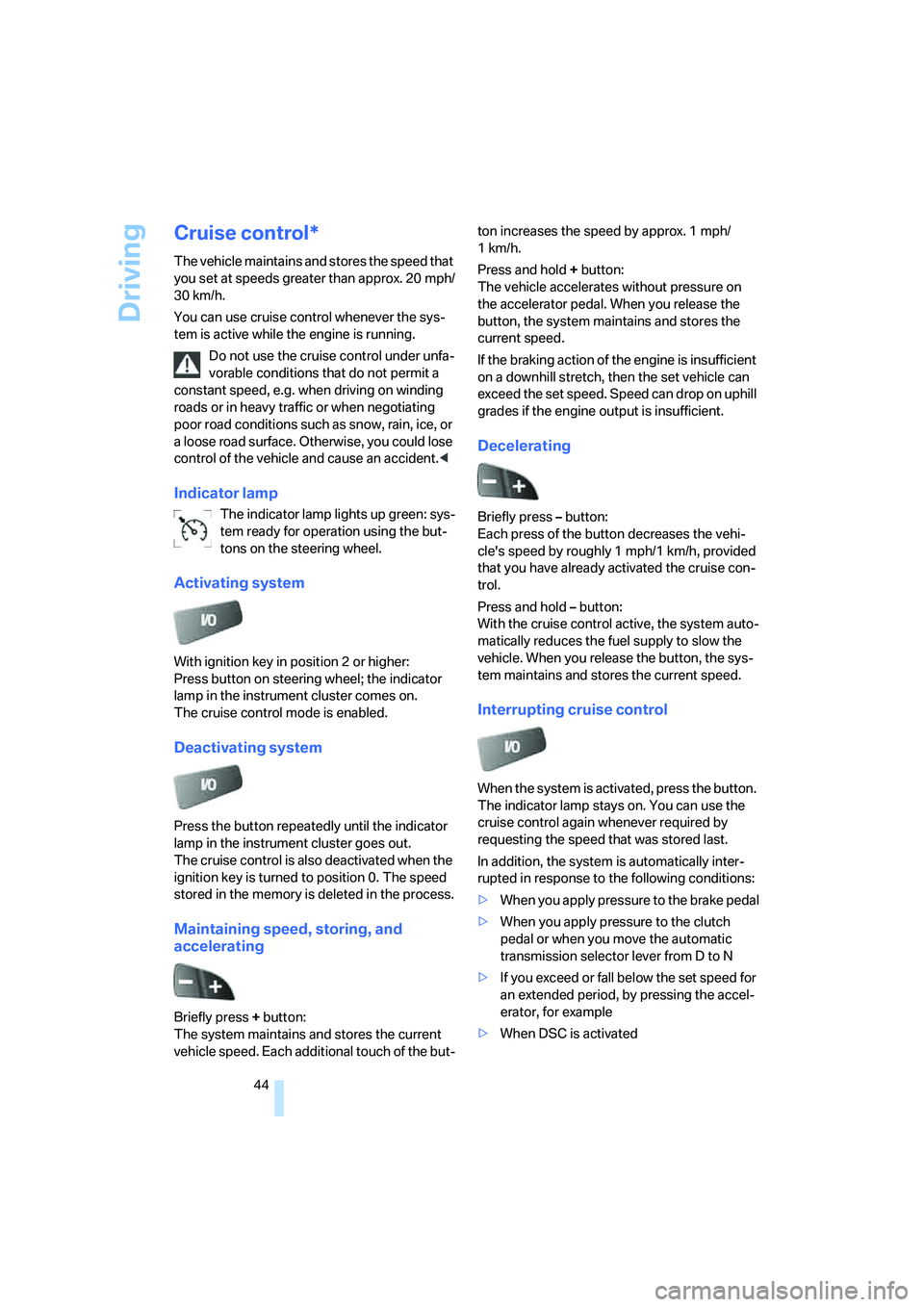
Indicator lamp
The indicator lamp lights up green: sys-
tem ready for operation using the but-
tons on the steering wheel.
Activating system
With ignition key in position 2 or higher:
Press button on steering wheel; the indicator
lamp in the instrument cluster comes on.
The cruise control mode is enabled.
Deactivating system
Press the button repeatedly until the indicator
lamp in the instrument cluster goes out.
The cruise control is also deactivated when the
ignition key is turned to position 0. The speed
stored in the memory is deleted in the process.
Maintaining speed, storing, and
accelerating
Briefly press + button:
The system maintains and stores the current
vehicle speed. Each additional touch of the but-ton increases the speed by approx. 1 mph/
1km/h.
Press and hold + button:
The vehicle accelerates without pressure on
the accelerator pedal. When you release the
button, the system maintains and stores the
current speed.
If the braking action of the engine is insufficient
on a downhill stretch, then the set vehicle can
exceed the set speed. Speed can drop on uphill
grades if the engine output is insufficient.
Decelerating
Briefly press – button:
Each press of the button decreases the vehi-
cle's speed by roughly 1 mph/1 km/h, provided
that you have already activated the cruise con-
trol.
Press and hold – button:
With the cruise control active, the system auto-
matically reduces the fuel supply to slow the
vehicle. When you release the button, the sys-
tem maintains and stores the current speed.
Interrupting cruise control
When the system is activated, press the button.
The indicator lamp stays on. You can use the
cruise control again whenever required by
requesting the speed that was stored last.
In addition, the system is automatically inter-
rupted in response to the following conditions:
>When you apply pressure to the brake pedal
>When you apply pressure to the clutch
pedal or when you move the automatic
transmission selector lever from D to N
>If you exceed or fall below the set speed for
an extended period, by pressing the accel-
erator, for example
>When DSC is activated
Page 53 of 140
Reference
At a glance
Controls
Driving tips
Mobility
51
Malfunction
The LED in the button flashes and a short con-
tinuous tone sounds. PDC is malfunctioning.
Switch off PDC. Have the system checked.
To prevent this problem, keep the sensors
clean and free of ice or snow in order to ensure
that they will continue to operate effectively.
When using high-pressure washers, do not
spray sensors for long periods and keep the
sprayer at least 4 in/10 cm away from the sen-
sors.
System limits
Even with PDC, final responsibility for
estimating the distance between the
vehicle and any obstructions always remains
with the driver. Even when sensors are involved,
there is a blind spot in which objects cannot be
detected. The system is also subject to the
physical limits that apply to all forms of ultra-
sonic measurement, such as those encoun-
tered with tow bars and trailer couplings, or thin
and wedge-shaped objects. Low objects
already displayed, e.g. curb edges, can come
into the blind spot of the sensors before or after
a continuous tone sounds. The system may fail
to detect higher obstacles such as projections
from walls.
Loud sources of sound, inside and outside the
vehicle, could drown out the PDC signal tone.<
Driving stability control
systems
Your BMW is equipped with an extended array
of systems designed to enhance and maintain
vehicle stability even under unfavorable driving
conditions.
ABS Antilock Brake System
ABS prevents the wheels from locking during
braking. Safe steering response is maintained
even during full braking. This results in an
increase in the active safety.
ABS is operational every time you start the
engine. Safe braking, refer to page84.
Electronic brake-force distribution
The system controls the brake pressure in the
rear wheels to ensure a stable braking behavior.
Brake assistant
When the brake pedal is depressed quickly, this
system automatically generates a maximum
braking force distribution and thus helps keep
the braking distance to a minimum during full
braking. This system exploits all of the benefits
provided by ABS.
As long as you want full braking to continue, do
not reduce pressure on the brake.
DSC Dynamic Stability Control
DSC prevents slip at the drive wheels when
starting off and accelerating. The system also
detects unstable driving conditions, such as a
fishtailing of the vehicle's rear end or the sliding
of the vehicle on its front wheels. In these cir-
cumstances, DSC helps keep the vehicle on a
safe path, within physical limits, by reducing
engine output and by applying the brakes in
individual wheels.
The laws of physics cannot be repealed,
even with DSC. An appropriate driving
style always remains the responsibility of the
driver. Do not squander the additional margin of
safety by driving dangerously; otherwise, you
run the risk of causing an accident.<
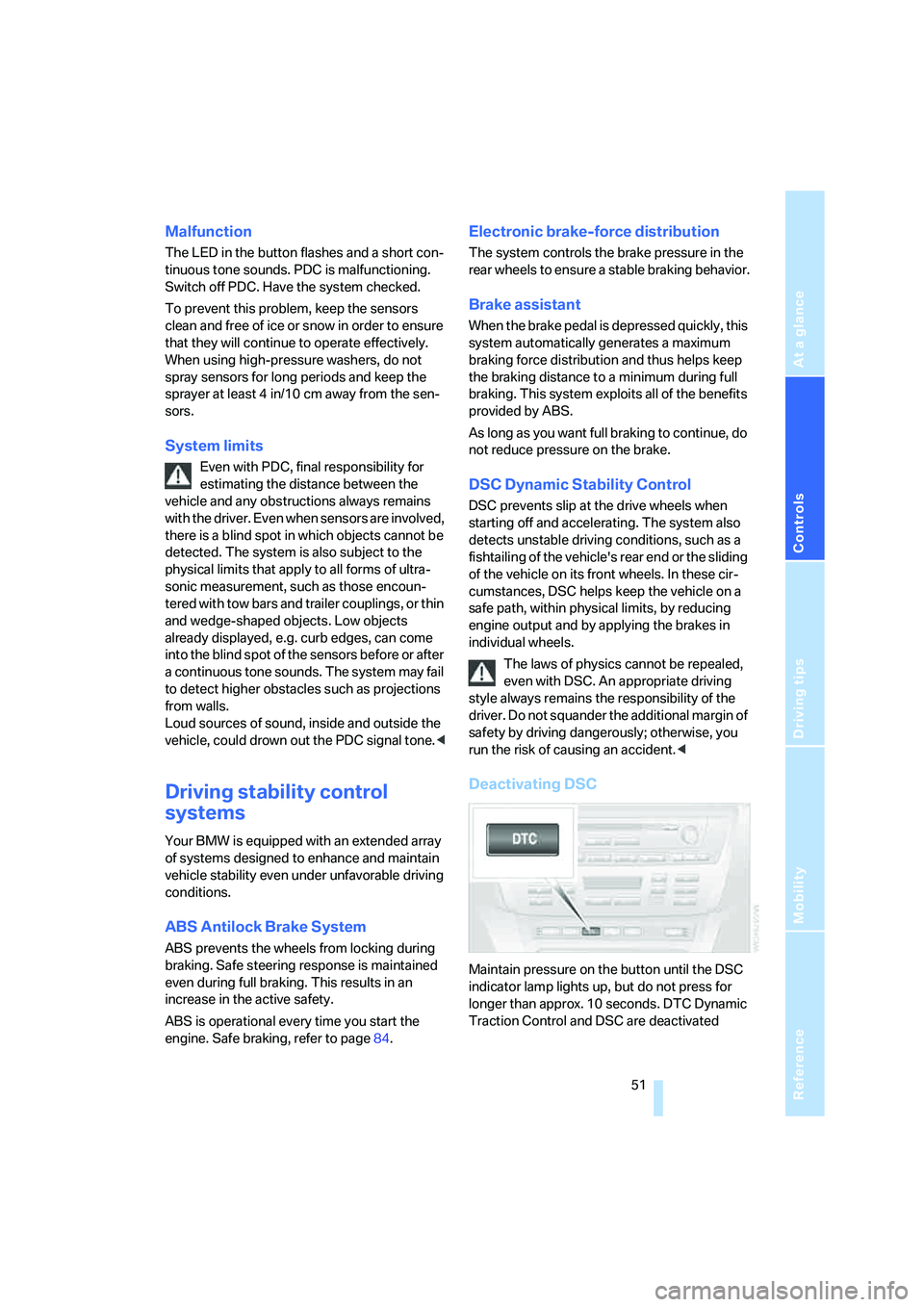
Deactivating DSC
Maintain pressure on the button until the DSC
indicator lamp lights up, but do not press for
longer than approx. 10 seconds. DTC Dynamic
Traction Control and DSC are deactivated
Page 54 of 140
Technology for comfort, convenience and safety
52 jointly. These systems do not take their cus-
tomary stabilizing actions.
To increase vehicle stability, reactivate DSC as
soon as possible.
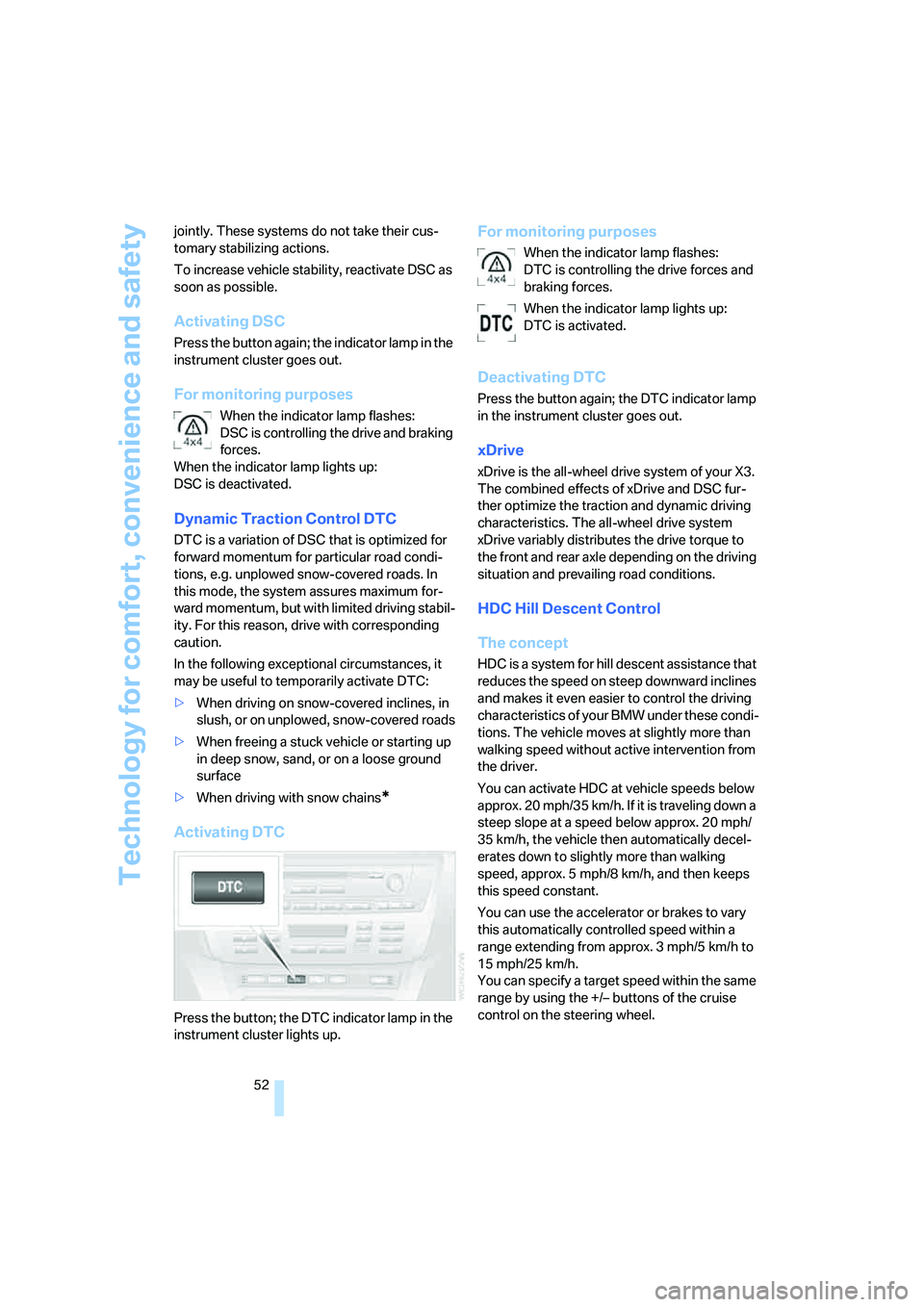
Activating DSC
Press the button again; the indicator lamp in the
instrument cluster goes out.
For monitoring purposes
When the indicator lamp flashes:
DSC is controlling the drive and braking
forces.
When the indicator lamp lights up:
DSC is deactivated.
Dynamic Traction Control DTC
DTC is a variation of DSC that is optimized for
forward momentum for particular road condi-
tions, e.g. unplowed snow-covered roads. In
this mode, the system assures maximum for-
ward momentum, but with limited driving stabil-
ity. For this reason, drive with corresponding
caution.
In the following exceptional circumstances, it
may be useful to temporarily activate DTC:
>When driving on snow-covered inclines, in
slush, or on unplowed, snow-covered roads
>When freeing a stuck vehicle or starting up
in deep snow, sand, or on a loose ground
surface
>When driving with snow chains
*
Activating DTC
Press the button; the DTC indicator lamp in the
instrument cluster lights up.
For monitoring purposes
When the indicator lamp flashes:
DTC is controlling the drive forces and
braking forces.
When the indicator lamp lights up:
DTC is activated.
Deactivating DTC
Press the button again; the DTC indicator lamp
in the instrument cluster goes out.
xDrive
xDrive is the all-wheel drive system of your X3.
The combined effects of xDrive and DSC fur-
ther optimize the traction and dynamic driving
characteristics. The all-wheel drive system
xDrive variably distributes the drive torque to
the front and rear axle depending on the driving
situation and prevailing road conditions.
HDC Hill Descent Control
The concept
HDC is a system for hill descent assistance that
reduces the speed on steep downward inclines
and makes it even easier to control the driving
characteristics of your BMW under these condi-
tions. The vehicle moves at slightly more than
walking speed without active intervention from
the driver.
You can activate HDC at vehicle speeds below
approx. 20 mph/35 km/h. If it is traveling down a
steep slope at a speed below approx. 20 mph/
35 km/h, the vehicle then automatically decel-
erates down to slightly more than walking
speed, approx. 5 mph/8 km/h, and then keeps
this speed constant.
You can use the accelerator or brakes to vary
this automatically controlled speed within a
range extending from approx. 3 mph/5 km/h to
15 mph/25 km/h.
You can specify a target speed within the same
range by using the +/– buttons of the cruise
control on the steering wheel.
Page 55 of 140
Reference
At a glance
Controls
Driving tips
Mobility
53
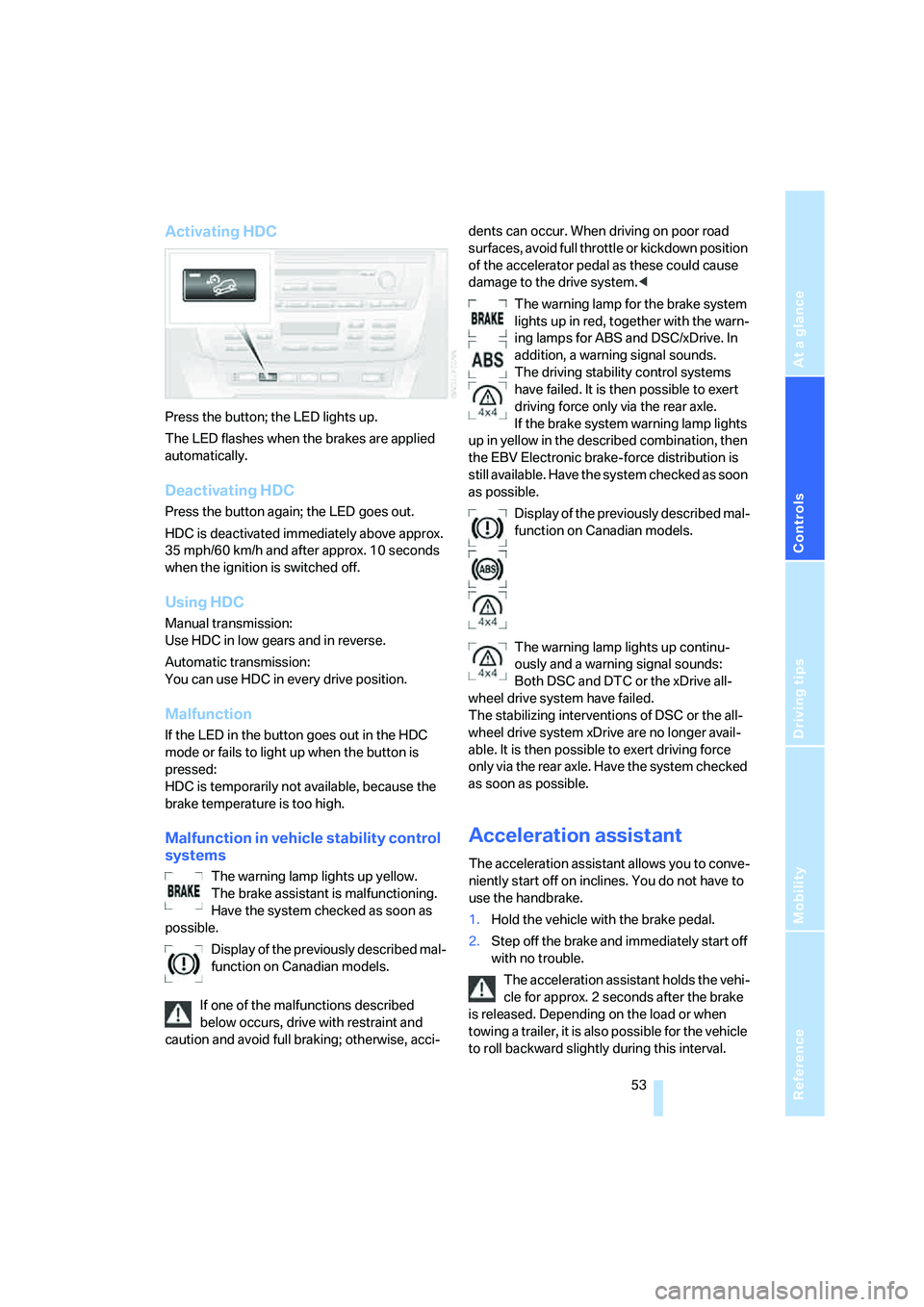
Activating HDC
Press the button; the LED lights up.
The LED flashes when the brakes are applied
automatically.
Deactivating HDC
Press the button again; the LED goes out.
HDC is deactivated immediately above approx.
35 mph/60 km/h and after approx. 10 seconds
when the ignition is switched off.
Using HDC
Manual transmission:
Use HDC in low gears and in reverse.
Automatic transmission:
You can use HDC in every drive position.
Malfunction
If the LED in the button goes out in the HDC
mode or fails to light up when the button is
pressed:
HDC is temporarily not available, because the
brake temperature is too high.
Malfunction in vehicle stability control
systems
The warning lamp lights up yellow.
The brake assistant is malfunctioning.
Have the system checked as soon as
possible.
Display of the previously described mal-
function on Canadian models.
If one of the malfunctions described
below occurs, drive with restraint and
caution and avoid full braking; otherwise, acci-dents can occur. When driving on poor road
surfaces, avoid full throttle or kickdown position
of the accelerator pedal as these could cause
damage to the drive system.<
The warning lamp for the brake system
lights up in red, together with the warn-
ing lamps for ABS and DSC/xDrive. In
addition, a warning signal sounds.
The driving stability control systems
have failed. It is then possible to exert
driving force only via the rear axle.
If the brake system warning lamp lights
up in yellow in the described combination, then
the EBV Electronic brake-force distribution is
still available. Have the system checked as soon
as possible.
Display of the previously described mal-
function on Canadian models.
The warning lamp lights up continu-
ously and a warning signal sounds:
Both DSC and DTC or the xDrive all-
wheel drive system have failed.
The stabilizing interventions of DSC or the all-
wheel drive system xDrive are no longer avail-
able. It is then possible to exert driving force
only via the rear axle. Have the system checked
as soon as possible.
Acceleration assistant
The acceleration assistant allows you to conve-
niently start off on inclines. You do not have to
use the handbrake.
1.Hold the vehicle with the brake pedal.
2.Step off the brake and immediately start off
with no trouble.
The acceleration assistant holds the vehi-
cle for approx. 2 seconds after the brake
is released. Depending on the load or when
towing a trailer, it is also possible for the vehicle
to roll backward slightly during this interval.
Page 100 of 140
Wheels and tires
98 age and related safety hazards. Make sure that
the new wheels are balanced.<
Retreaded tires
BMW does not recommend the use of
retreaded tires; otherwise, driving safety
may be reduced. The causes for this include the
possibly different tire casing structures and the
often wide variations in their age, which can
result in a limited service life.<
Correct wheels and tires
BMW recommends that you use only
wheel and tire combinations that BMW
has tested and approved for your particular
vehicle. Variations in factors such as manufac-
turing tolerances mean that even wheels and
tires with identical official size ratings could
actually have different dimensions than the
approved units – these differences could lead to
body contact and with it, the risk of severe acci-
dents. If non-approved wheels and tires are
used, BMW cannot evaluate their suitability,
and therefore cannot be held liable for driving
safety.<
You can ask your BMW Sports Activity Vehicle
Center for the correct wheel-and-tire combina-
tion.
The correct wheel-and-tire combination affects
various systems whose function would other-
wise be impaired, e.g. ABS, DSC or xDrive.
To maintain good handling and vehicle
response, use only tires of a single tread config-
uration from a single manufacturer. After tire
damage, always remember to have the original
wheel and tire combination remounted on the
vehicle as soon as possible.
Wheels equipped with electronics for
TPM Tire Pressure Monitor
When installing new tires or when changing
from summer tires to winter tires or vice versa,
only use wheels equipped with TPM electron-
ics; otherwise, the Tire Pressure Monitor can-
not detect a flat tire, refer to page55. Your
BMW Sports Activity Vehicle Center will be
happy to advise you in this regard.
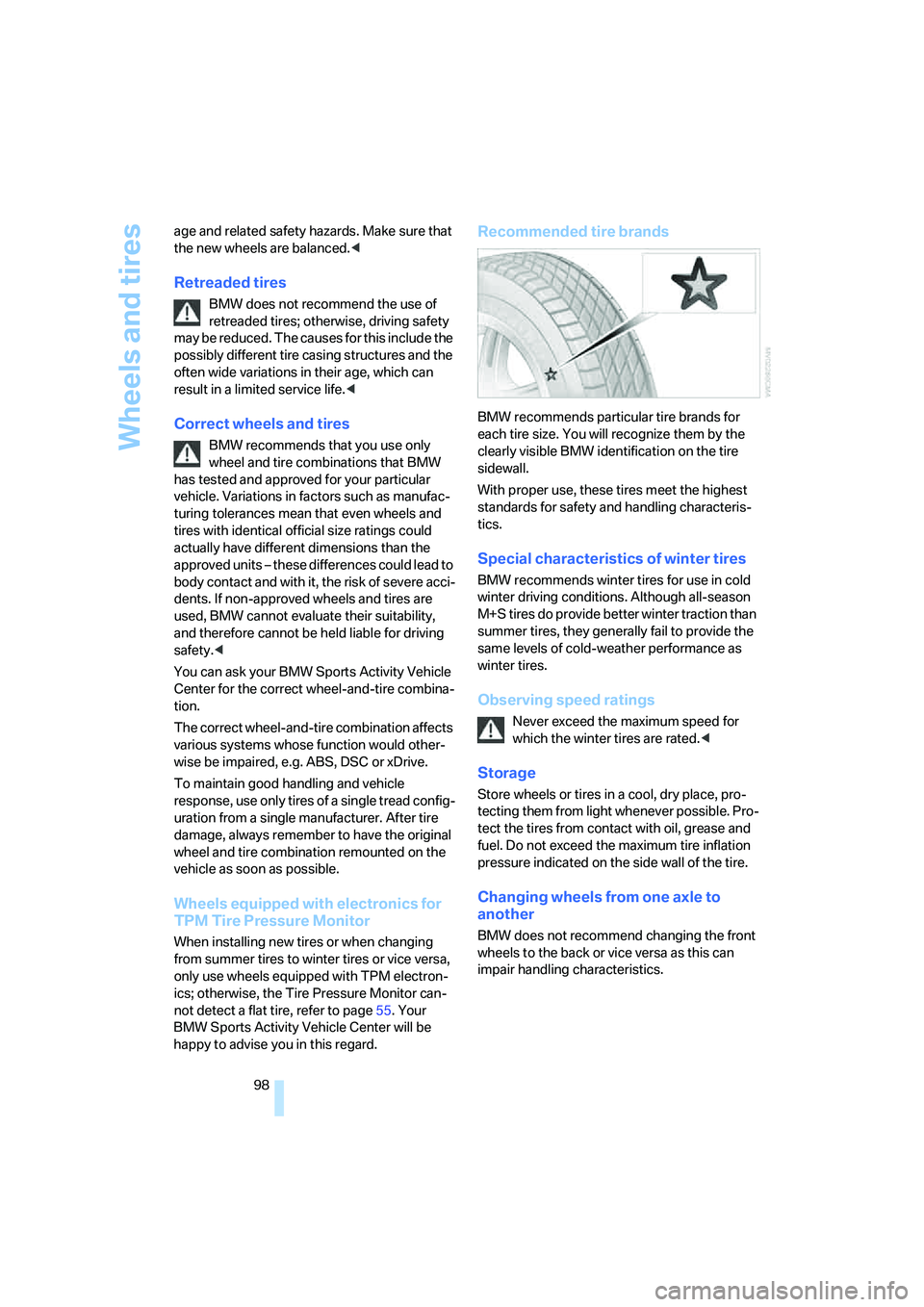
Recommended tire brands
BMW recommends particular tire brands for
each tire size. You will recognize them by the
clearly visible BMW identification on the tire
sidewall.
With proper use, these tires meet the highest
standards for safety and handling characteris-
tics.
Special characteristics of winter tires
BMW recommends winter tires for use in cold
winter driving conditions. Although all-season
M+S tires do provide better winter traction than
summer tires, they generally fail to provide the
same levels of cold-weather performance as
winter tires.
Observing speed ratings
Never exceed the maximum speed for
which the winter tires are rated.<
Storage
Store wheels or tires in a cool, dry place, pro-
tecting them from light whenever possible. Pro-
tect the tires from contact with oil, grease and
fuel. Do not exceed the maximum tire inflation
pressure indicated on the side wall of the tire.
Changing wheels from one axle to
another
BMW does not recommend changing the front
wheels to the back or vice versa as this can
impair handling characteristics.
Page 128 of 140
Everything from A to Z
126
Everything from A to Z
Index
A
ABS Antilock Brake
System51
– indicator lamp12
Acceleration assistance
– refer to Acceleration
assistant53
– refer to DSC51
Acceleration assistant53
Accessories, refer to For your
own safety5
Accident, refer to Receiving
assistance116
Activated-charcoal filter68
Adaptive Head Light60
Adding engine oil103
Adjusting seats28
– electrically28
– mechanically28
– mechanically, Sports seat29
Airbags57
– front passenger side,
deactivating35,57
– indicator lamp for front
passenger airbags58
– sitting safely27
– warning lamp58
Air circulation, refer to
Recirculated-air
mode64,68
Air conditioner63
Air distribution
– air conditioner64
– automatic climate control67
Airing, refer to
Ventilation65,68
Air outlets, refer to
Ventilation65,68
Air pressure, refer to Tire
inflation pressure94Air vents, refer to
Ventilation65,68
Air volume64
– adjusting manually67
AKI, refer to Fuel
specifications93
Alarm system25
– avoiding unintentional
alarms26
All-season tires, refer to
Special characteristics of
winter tires98
All wheel drive, refer to
xDrive52
Anchorage points78
Antifreeze
– coolant104
– washer fluid43
Antilock Brake System
ABS51
– indicator lamp12
Anti-theft alarm system, refer
to Alarm system19,25
Approved axle load, refer to
Weights124
Approved engine oils103
Approved gross vehicle
weight, refer to Weights124
Armrest
– front73
– rear73
Artificial leather, refer to
Caring for your vehicle
brochure
Ashtray74
AUC Automatic recirculated-
air control68
Audio device, external74
Automatic
– air distribution67
– air volume67
– recirculated-air control
AUC68Automatic car wash, refer to
Caring for your vehicle
brochure
Automatic climate control66
Automatic cruise control44
Automatic curb monitor33
Automatic deactivation of
front passenger airbags57
Automatic headlamp
control60
Automatic transmission with
Steptronic40
– indicator lamp41
– interlock38
– selector lever interlock40
– shiftlock40
– towing118
– tow starting119
AUTO program67
Average fuel consumption49
– setting units48
Average speed49
– setting units48
Avoiding unintentional
alarms26
Axle loads, refer to
Weights124
B
Backrest, refer to Seats28
Backrest contour, refer to
Lumbar support29
Backup lamps, bulb
replacement110
Bandages, refer to First-aid
kit117
Bar, towing119
Page 131 of 140
Reference
At a glance
Controls
Driving tips
Mobility
129
Door keys18
Door lock21
Doors
– locking and unlocking from
inside21
– manual operation21
– unlocking and locking,
confirmation signals19,21
DOT Quality Grades96
Draft-free ventilation65,68
Driving lamps, refer to Parking
lamps/low beams59
Driving notes84
Driving on poor roads87
Driving stability control
systems51
Driving through water87
Driving tips, refer to Driving
instructions84
Drying air, refer to Switching
cooling function on/
off64,67
DSC Dynamic Stability
Control51
– indicator lamp52
DTC Dynamic Traction
Control52
– indicator lamps52
DVD changer, refer to Owner's
Manual for Radio/Onboard
Computer
Dynamic Stability Control
DSC51
– indicator lamp52
Dynamic Traction Control
DTC52
– indicator lamps52
E
Electrical malfunctions
– automatic transmission
malfunction41
– door lock21
– driver's door21
– fuel filler door92
– liftgate22
– panorama glass sunroof25Electronic brake-force
distribution51
Electronic Stability Program,
refer to DSC Dynamic
Stability Control51
Emergency call116
Emergency operation, refer to
Manual operation
– doors21
– driver's door21
– fuel filler door92
– liftgate22
– panorama glass sunroof25
Emergency Service, refer to
Receiving assistance116
Engine
– breaking-in82
– data122
– indicator lamps38
– overheated, refer to Coolant
thermometer47
– speed46
– starting38
– switching off39
Engine compartment101
Engine coolant104
Engine coolant
temperature47
Engine oil102
– additives, refer to Approved
engine oils103
– approved engine oils103
– electronic oil level
control102
– indicator/warning lamp102
– possible displays102
– required oil grades103
– specifications, also refer to
Approved engine oils103
Engine oil grades103
Engine oil level, indicator/
warning lamp102
Engine oil pressure102
– indicator/warning lamp102
Engine output, refer to Engine
data122
Equipment package, refer to
Service and Warranty
Information Booklet for US models, Warranty and
Service Guide Booklet for
Canadian models
ESP Electronic Stability
Program, refer to DSC
Dynamic Stability
Control51
Exhaust system84
Exterior mirrors33
– automatically dimming34
External audio device74
Eye, tow starting and
towing118
F
Failure of electrical
accessories115
False alarms, refer to Avoiding
unintentional alarms26
Fastening safety belts, refer to
Safety belts32
Filter, refer to
– Microfilter65
– Microfilter/activated
charcoal filter68
First-aid kit117
Flat tire111
– compact wheel112
– Flat Tire Monitor54
– refer to Tire inflation
pressure94
– refer to Wheel changes111
– Tire Pressure Monitor55
Flat Tire Monitor54
– indicator lamp54
– initializing system54
– snow chains99
– system limits54
– warning errors54
Flooding, refer to Driving
through water84
Floor cover78
Fog lamps, indicator lamp61
Folding rear seat back76
Footwell lamps61
Four wheel drive, refer to
xDrive52
Front airbags57
Page 132 of 140
Everything from A to Z
130 Front fog lamps61
– replacing bulbs110
Front passenger airbags
– automatic deactivation57
– status58
Fuel93
– average consumption49
– capacity124
– gauge46
– quality93
– saving83
Fuel cap92
Fuel display, refer to Fuel
gauge46
Fuel filler door92
– releasing in the event of
electrical malfunction92
Fuel gauge46
Fuel tank contents, refer to
Filling capacities124
Full preparation package
mobile phone, refer to
separate Owner's Manual
Fuses115
G
Garage-door opener, refer to
Integrated universal remote
control69
Gasoline
– refer to Fuel quality93
– refer to Fuel
specifications93
Gasoline display, refer to Fuel
gauge46
Gear indicator in automatic
transmission with
Steptronic40
Gearshift lever, manual
transmission40
General driving notes84
Glove compartment72
Grills, refer to
Ventilation65,68
Gross vehicle weight, refer to
Weights124
Ground clearance87
H
Halogen lamps108
Handbrake39
– indicator lamp39
Hands-free microphone75
– refer to Car phone
preparation75
Hazard warning flashers10
HDC Hill Descent Control52
Head airbags57
Headlamp control,
automatic60
Headlamp flasher41
– indicator lamp12
Headlamps108
– care, refer to Caring for your
vehicle brochure
– replacing bulbs107
Headlamp washer reservoir
– capacity, refer to Filling
capacities124
– refer to Washer fluid43
Headlamp washer system
– headlamp washing43
– washer fluid43
Head Light, refer to Adaptive
Head Light60
Head restraints29
– sitting safely27
Heated mirrors33
Heated rear window
– air conditioner64
– automatic climate control68
Heated seats31
Heated steering wheel34
Heater
– rear window64,68
– windshield washer jets43
Heating
– exterior mirror33
– seats31
– steering wheel34
Heating and ventilation63,66
Heavy cargo, refer to Cargo
loading85
Height, refer to
Dimensions123Height adjustment
– seats28
– steering wheel34
High beams60
– headlamp flasher60
– indicator lamp12
– replacing bulbs109
High Performance Synthetic
Oil103
Hill-climbing ability, refer to
Driving on poor roads87
Hill Descent Control HDC
52
Hills85
Holder for beverages72
Hood100
Horn10
Hotel function18
Hot exhaust system84
Hydraulic brake assistant,
refer to Brake assistant51
Hydroplaning84
I
Icy conditions, refer to
Outside temperature
warning48
Ignition38
Ignition key18
Ignition key positions, refer to
Ignition lock38
Ignition lock38
Imprint2
Indicator/warning lamp
– airbags58
– alarm system25
– automatic transmission with
Steptronic41
– brakes104
– coolant temperature47
– DSC52
– engine temperature47
– Flat Tire Monitor54
– fog lamps61
– front passenger airbags58
– reserve46
– safety belt warning32
– Tire Pressure Monitor55
Page 135 of 140
Reference
At a glance
Controls
Driving tips
Mobility
133
Power failure
– battery114
– panorama glass sunroof24
– windows23
Power seat adjustment28
Power socket
– in cargo area74
– refer to Cigarette lighter
socket74
Power windows22
– initializing23
– safety switch23
Precious wood, refer to Caring
for your vehicle brochure
Pressure, tires94
Pressure monitoring,
tires54,55
Programming settings, refer
to Vehicle Memory, Key
Memory18
Puncture, Flat Tire Monitor54
R
Radiator, refer to Coolant104
Radio, refer to Owner's
Manual for Radio/Onboard
Computer
Radio-control key, refer to
Master key with remote
control18
Radio navigation, refer to
separate Owner's Manual
Rain sensor42
Range, setting units48
Reading lamps
– front61
– rear62
Rear armrest, refer to Armrest,
rear73
Rear backrests, folding76
Rear lamps and reflector, refer
to Tail lamps110
Rear seat back, folding76
Rearview mirrors, exterior33
Rear window defroster
– air conditioner64
– automatic climate control68Rear window safety switch23
Rear window wiper43
– wiper blade
replacement107
Rechargeable flashlight73
Recirculated-air mode
– air conditioner64
– automatic climate control68
Refueling92
Remaining distance, refer to
Cruising range49
Remaining distance until
service47
Remote control19
– garage-door opener69
– liftgate20
– malfunction20
Removing condensation,
windows
– air conditioner64
– automatic climate control67
Replacement fuses115
Replacing bulbs, refer to
Lamps and bulbs107
Replacing tires
– new wheels and tires97
– wheel changes111
Replacing windshield
wipers107
Reporting an accident, refer to
Initiating an emergency
call116
Reporting safety defects7
Required oil grades, refer to
Approved engine oils103
Reserve indicator lamp, refer
to Fuel gauge46
Restraint systems
– for children35
– refer to Safety belts
32
Reverse gear
– automatic transmission with
Steptronic41
– manual transmission40
Roadside Assistance, refer to
Receiving assistance116
Roadside parking lamps60Roller cover for cargo area,
refer to Cargo area cover77
Roll-up cover, refer to Cargo
area cover77
Roof load capacity, refer to
Weights124
Roof-mounted luggage
rack87
Rope, refer to Tow starting
and towing118
Rotating coin holder, refer to
Storage compartments73
Run-flat indicator, refer to Flat
Tire Monitor54
S
Safety belts32
– safe sitting position27
– warning lamp32
Safety belt tensioners, refer to
Safety belts32
Safety defects7
Safety feature, windows23
Safety systems, refer to
– ABS Antilock Brake
System51
– Airbags57
– DSC Dynamic Stability
Control51
– xDrive52
Screw thread for tow
fitting118
Seat heating31
Seat memory, refer to Seat
and mirror memory31
Seats
– adjusting electrically28
– adjusting sports seat29
– heating31
– memory, refer to Seat and
mirror memory31
– sitting safely27
– storing the setting31
Securing cargo, refer to Cargo
loading85
Securing vehicle, with the
remote control19