cooling BMW X3 3.0SI 2008 Owners Manual
[x] Cancel search | Manufacturer: BMW, Model Year: 2008, Model line: X3 3.0SI, Model: BMW X3 3.0SI 2008Pages: 140, PDF Size: 3.36 MB
Page 65 of 140
Reference
At a glance
Controls
Driving tips
Mobility
63
Air conditioner
Air conditioner
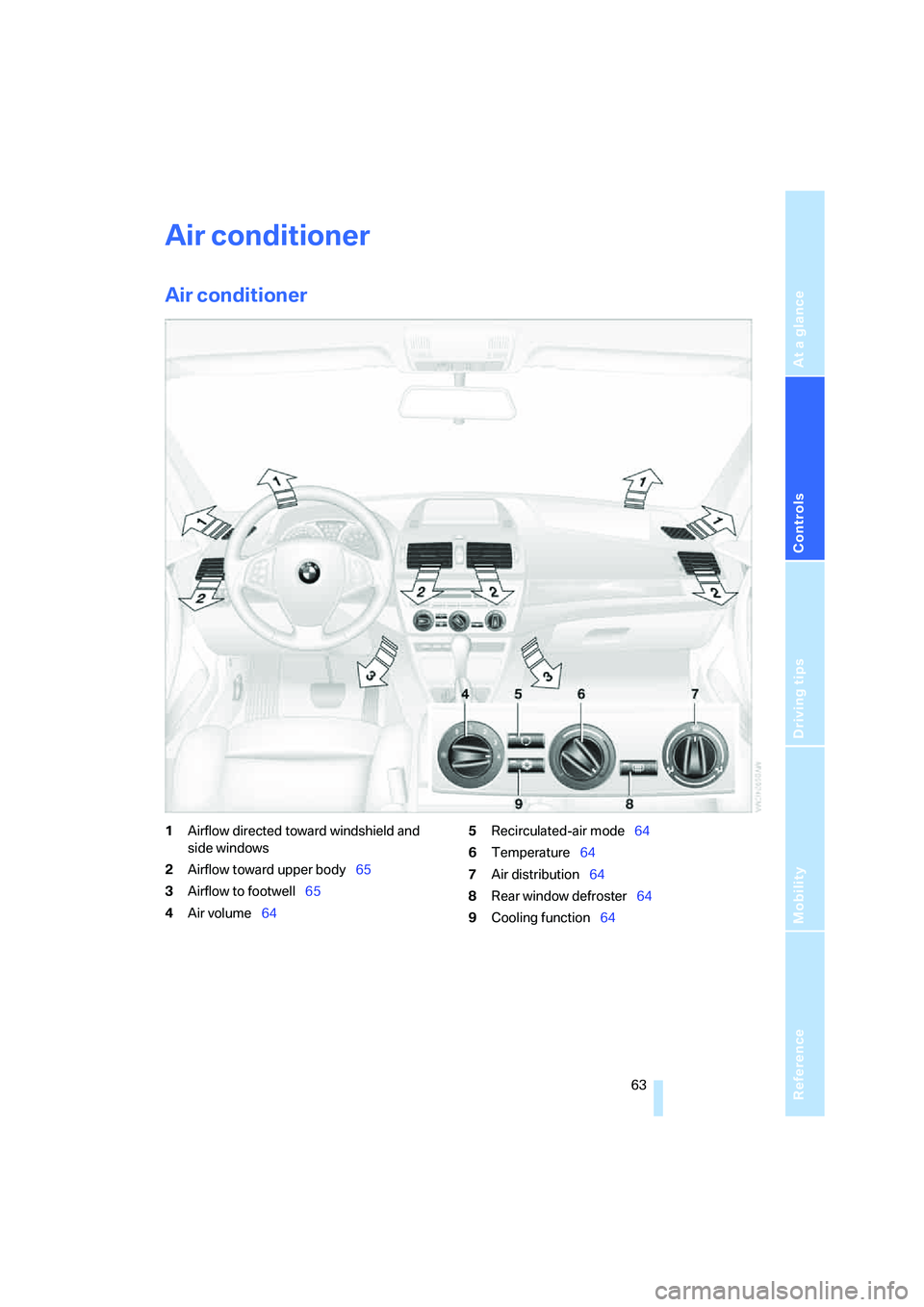
1Airflow directed toward windshield and
side windows
2Airflow toward upper body65
3Airflow to footwell65
4Air volume645Recirculated-air mode64
6Temperature64
7Air distribution64
8Rear window defroster64
9Cooling function64
Page 66 of 140
Air conditioner
64
Air volume
You can vary the air volume in
steps 1 through 4. The heating or
cooling output is more effective
with a higher air volume.
Switching system on/off
Turn air volume rotary switch to 0. This com-
pletely shuts off the blower and air conditioning
system and stops the flow of air.
To switch on the air conditioning system, set an
arbitrary air volume.
Temperature
To increase the temperature, turn
to the right, toward red.
For a lower temperature, turn the
rotary switch counterclockwise
toward blue.
Air distribution
You can direct air to flow onto the
windows , toward the upper
body and into the footwell .
Intermediate settings are possible.
Rear window defroster
The rear window heating switches
off automatically after a certain
amount of time. Depending on
your equipment package, the upper wires are
used as an antenna and are not part of the rear
window defroster.
Switching cooling function on/off
When the cooling function is on,
the air is cooled, dehumidified, and
then reheated depending on the
temperature setting.
Depending on the weather, the windshield may
fog over briefly when the engine is started.
Recirculated-air mode
You can respond to unpleasant
odors outside the vehicle by tem-
porarily suspending the supply of
outside air. The system then recirculates the air
currently within the vehicle.
If condensation starts to form on the
inside window surfaces during operation
in recirculated-air mode, you should switch it off
and increase the air supply as needed.
The recirculated-air mode should not be used
over a sustained period of time; otherwise, the
air quality inside the vehicle will steadily deteri-
orate.<
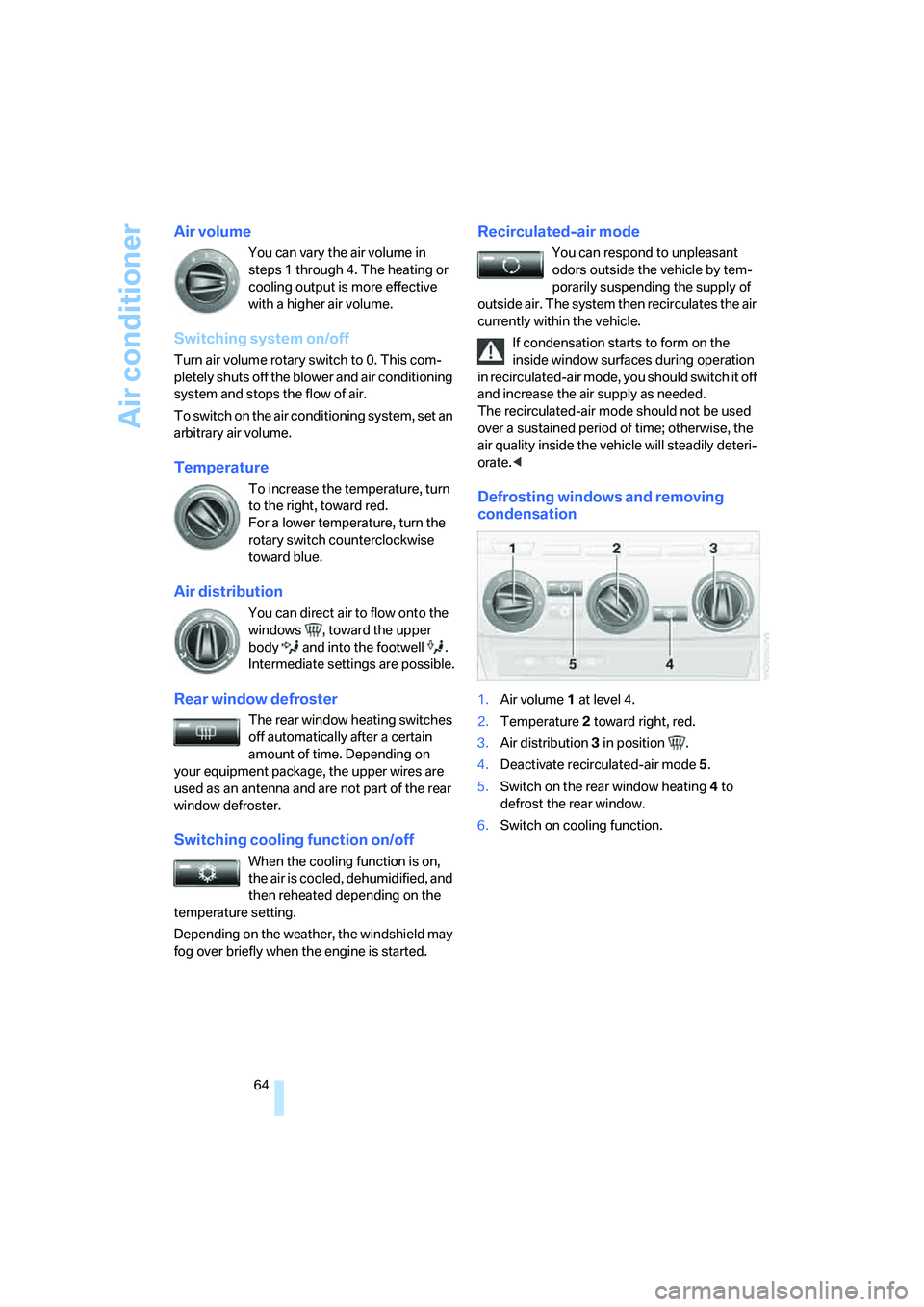
Defrosting windows and removing
condensation
1.Air volume 1 at level 4.
2.Temperature 2 toward right, red.
3.Air distribution 3 in position .
4.Deactivate recirculated-air mode 5.
5.Switch on the rear window heating 4 to
defrost the rear window.
6.Switch on cooling function.
Page 67 of 140
Reference
At a glance
Controls
Driving tips
Mobility
65
Ventilation
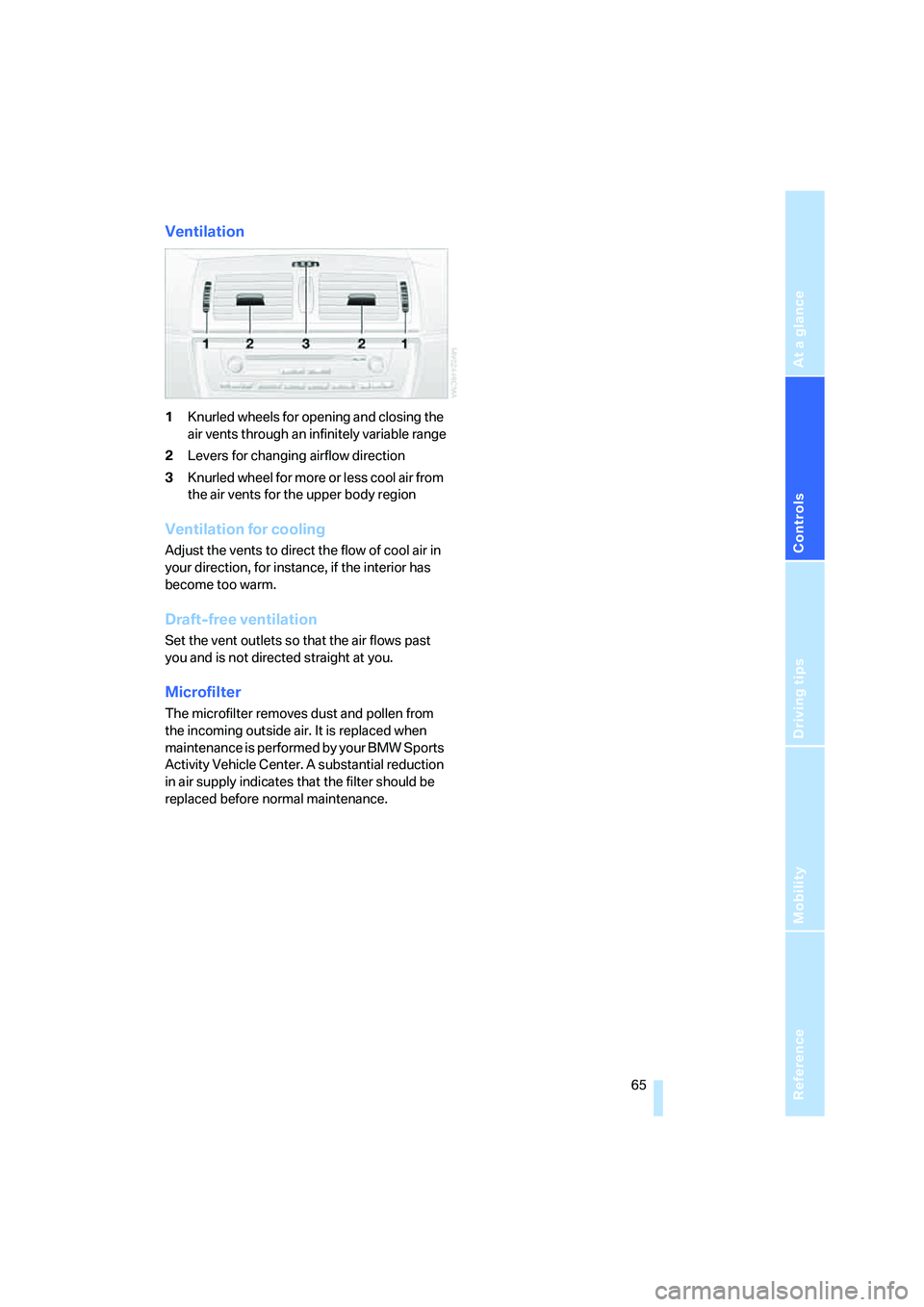
1Knurled wheels for opening and closing the
air vents through an infinitely variable range
2Levers for changing airflow direction
3Knurled wheel for more or less cool air from
the air vents for the upper body region
Ventilation for cooling
Adjust the vents to direct the flow of cool air in
your direction, for instance, if the interior has
become too warm.
Draft-free ventilation
Set the vent outlets so that the air flows past
you and is not directed straight at you.
Microfilter
The microfilter removes dust and pollen from
the incoming outside air. It is replaced when
maintenance is performed by your BMW Sports
Activity Vehicle Center. A substantial reduction
in air supply indicates that the filter should be
replaced before normal maintenance.
Page 68 of 140
Air conditioner
66
Automatic climate control*
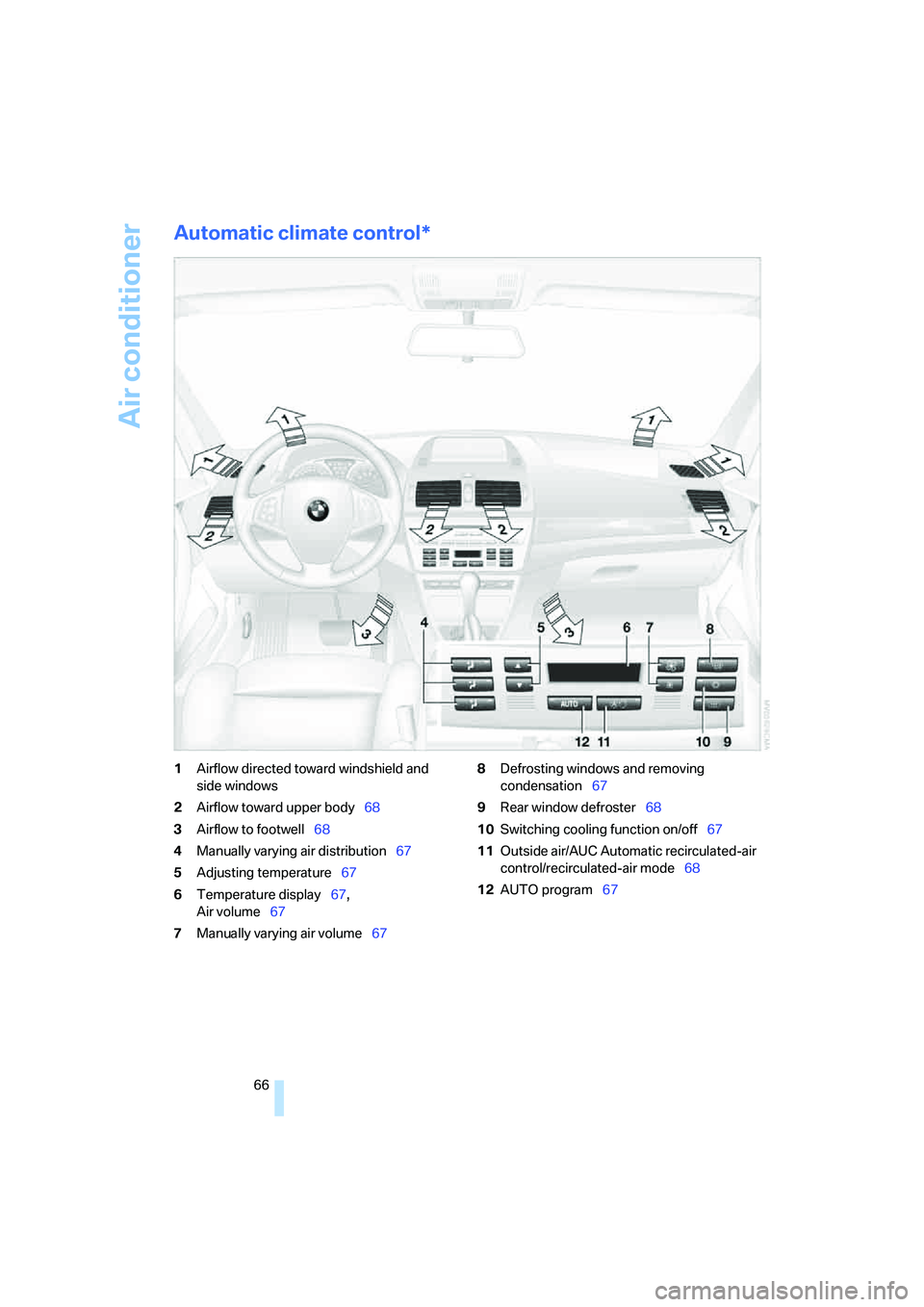
1Airflow directed toward windshield and
side windows
2Airflow toward upper body68
3Airflow to footwell68
4Manually varying air distribution67
5Adjusting temperature67
6Temperature display67,
Air volume67
7Manually varying air volume678Defrosting windows and removing
condensation67
9Rear window defroster68
10Switching cooling function on/off67
11Outside air/AUC Automatic recirculated-air
control/recirculated-air mode68
12AUTO program67
Page 69 of 140
Reference
At a glance
Controls
Driving tips
Mobility
67
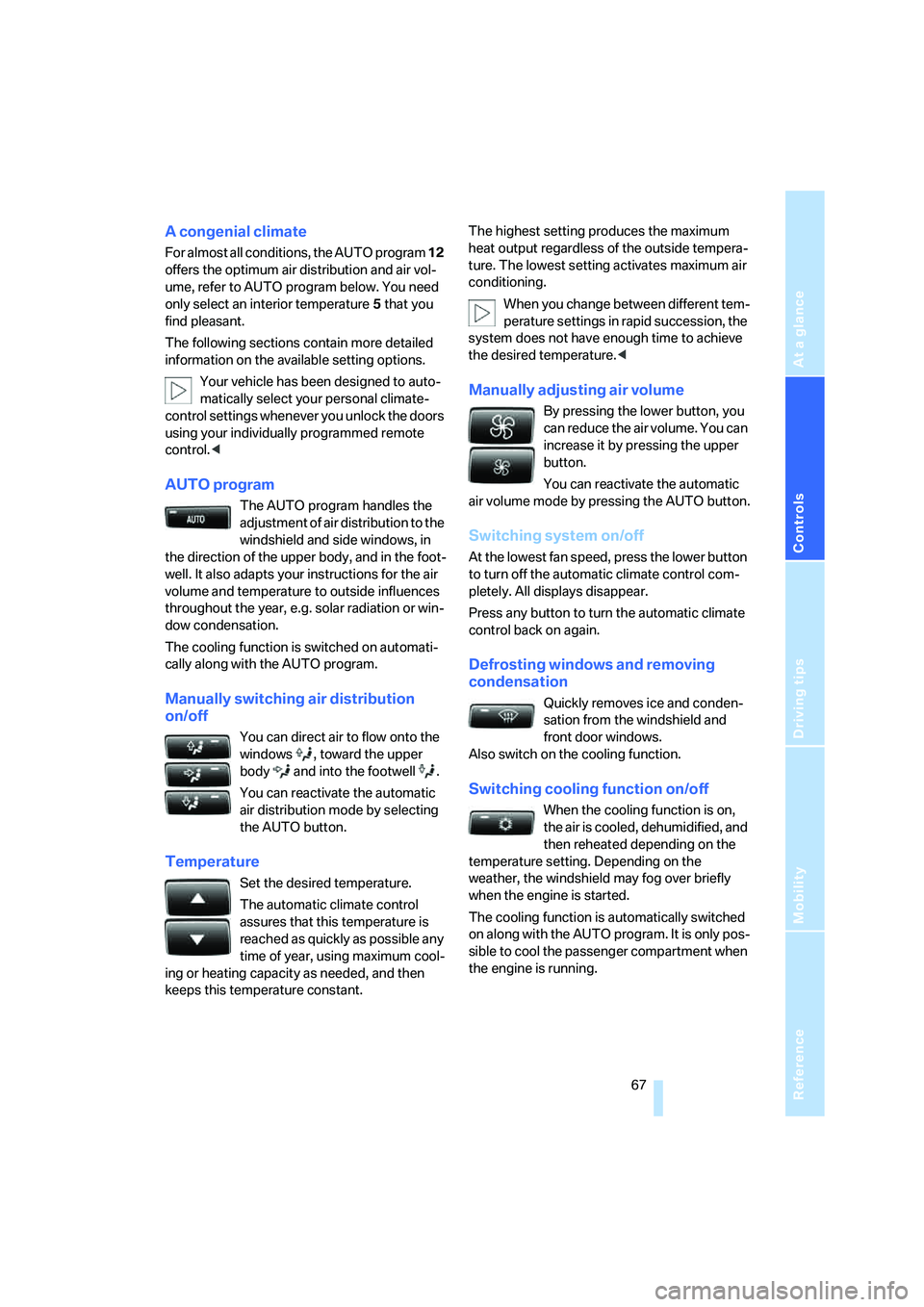
A congenial climate
For almost all conditions, the AUTO program 12
offers the optimum air distribution and air vol-
ume, refer to AUTO program below. You need
only select an interior temperature 5 that you
find pleasant.
The following sections contain more detailed
information on the available setting options.
Your vehicle has been designed to auto-
matically select your personal climate-
control settings whenever you unlock the doors
using your individually programmed remote
control.<
AUTO program
The AUTO program handles the
adjustment of air distribution to the
windshield and side windows, in
the direction of the upper body, and in the foot-
well. It also adapts your instructions for the air
volume and temperature to outside influences
throughout the year, e.g. solar radiation or win-
dow condensation.
The cooling function is switched on automati-
cally along with the AUTO program.
Manually switching air distribution
on/off
You can direct air to flow onto the
windows , toward the upper
body and into the footwell .
You can reactivate the automatic
air distribution mode by selecting
the AUTO button.
Temperature
Set the desired temperature.
The automatic climate control
assures that this temperature is
reached as quickly as possible any
time of year, using maximum cool-
ing or heating capacity as needed, and then
keeps this temperature constant.The highest setting produces the maximum
heat output regardless of the outside tempera-
ture. The lowest setting activates maximum air
conditioning.
When you change between different tem-
perature settings in rapid succession, the
system does not have enough time to achieve
the desired temperature.<
Manually adjusting air volume
By pressing the lower button, you
can reduce the air volume. You can
increase it by pressing the upper
button.
You can reactivate the automatic
air volume mode by pressing the AUTO button.
Switching system on/off
At the lowest fan speed, press the lower button
to turn off the automatic climate control com-
pletely. All displays disappear.
Press any button to turn the automatic climate
control back on again.
Defrosting windows and removing
condensation
Quickly removes ice and conden-
sation from the windshield and
front door windows.
Also switch on the cooling function.
Switching cooling function on/off
When the cooling function is on,
the air is cooled, dehumidified, and
then reheated depending on the
temperature setting. Depending on the
weather, the windshield may fog over briefly
when the engine is started.
The cooling function is automatically switched
on along with the AUTO program. It is only pos-
sible to cool the passenger compartment when
the engine is running.
Page 70 of 140
Air conditioner
68
AUC Automatic Recirculated-air
Control/recirculated air mode
You can set the desired operating
mode by pressing the button
repeatedly:
>LEDs off: outside air continuously flows into
the vehicle.
>Left LED on, AUC mode: a sensor detects
pollutants in the outside air. The system
suspends the supply of outside air as
needed and recirculates the air currently
within the vehicle. As soon as the concen-
tration of pollutants in the outside air has
decreased sufficiently, the system switches
automatically back to supplying outside air.
>Right LED on, recirculated-air mode: the
outside air supply into the vehicle is shut off
continuously. The system then recirculates
the air currently within the vehicle.
If the windows fog over in recirculated-air
mode, then press the AUTO button or
switch off the recirculated air mode and
increase the air volume as needed.
The recirculated-air mode should not be used
over a sustained period of time; otherwise, the
air quality inside the vehicle will steadily deteri-
orate.<
Rear window defroster
The rear window heating switches
off automatically after a certain
amount of time. Depending on
your equipment package, the upper wires are
used as an antenna and are not part of the rear
window defroster.
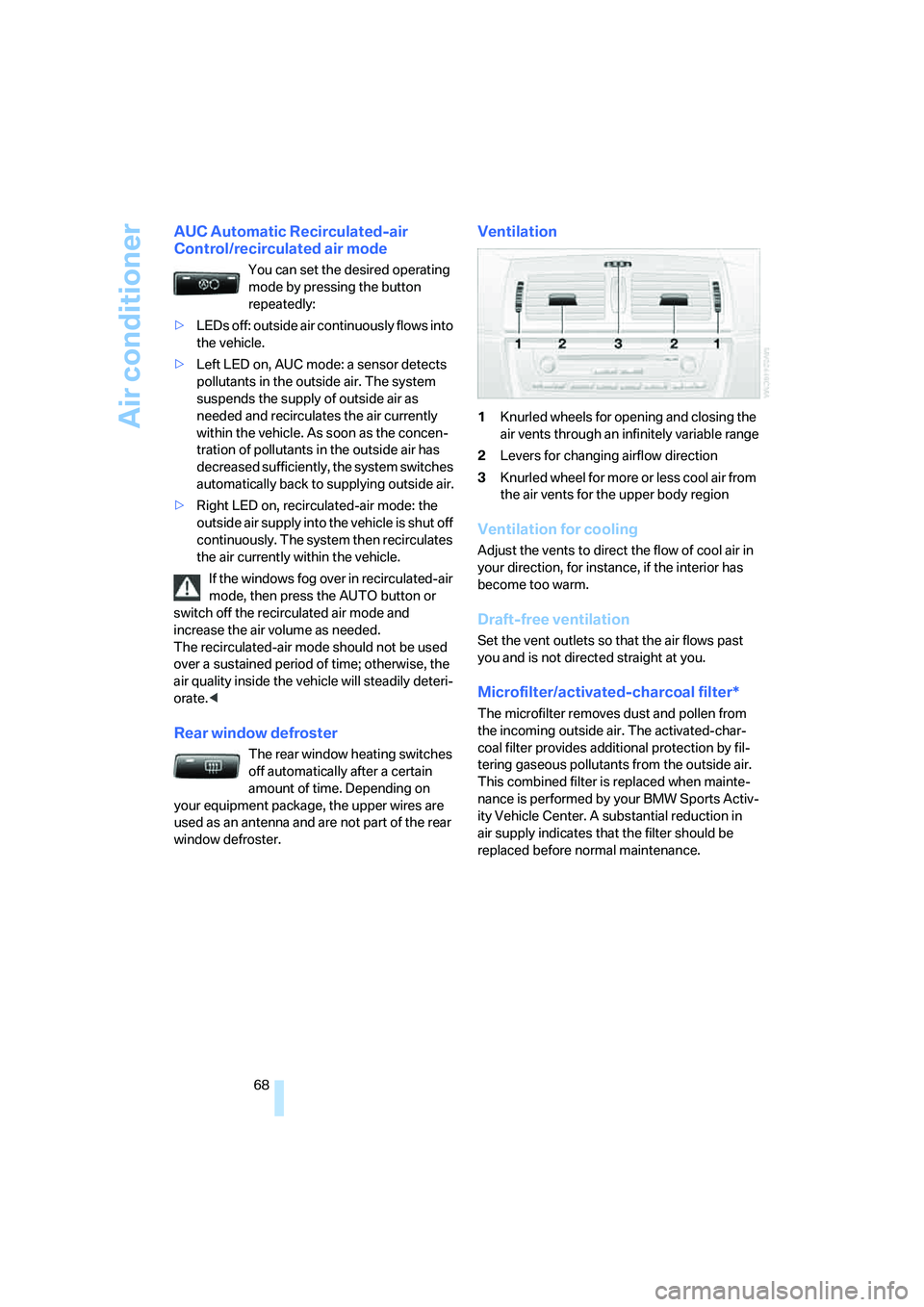
Ventilation
1Knurled wheels for opening and closing the
air vents through an infinitely variable range
2Levers for changing airflow direction
3Knurled wheel for more or less cool air from
the air vents for the upper body region
Ventilation for cooling
Adjust the vents to direct the flow of cool air in
your direction, for instance, if the interior has
become too warm.
Draft-free ventilation
Set the vent outlets so that the air flows past
you and is not directed straight at you.
Microfilter/activated-charcoal filter*
The microfilter removes dust and pollen from
the incoming outside air. The activated-char-
coal filter provides additional protection by fil-
tering gaseous pollutants from the outside air.
This combined filter is replaced when mainte-
nance is performed by your BMW Sports Activ-
ity Vehicle Center. A substantial reduction in
air supply indicates that the filter should be
replaced before normal maintenance.
Page 106 of 140
Under the hood
104
Coolant
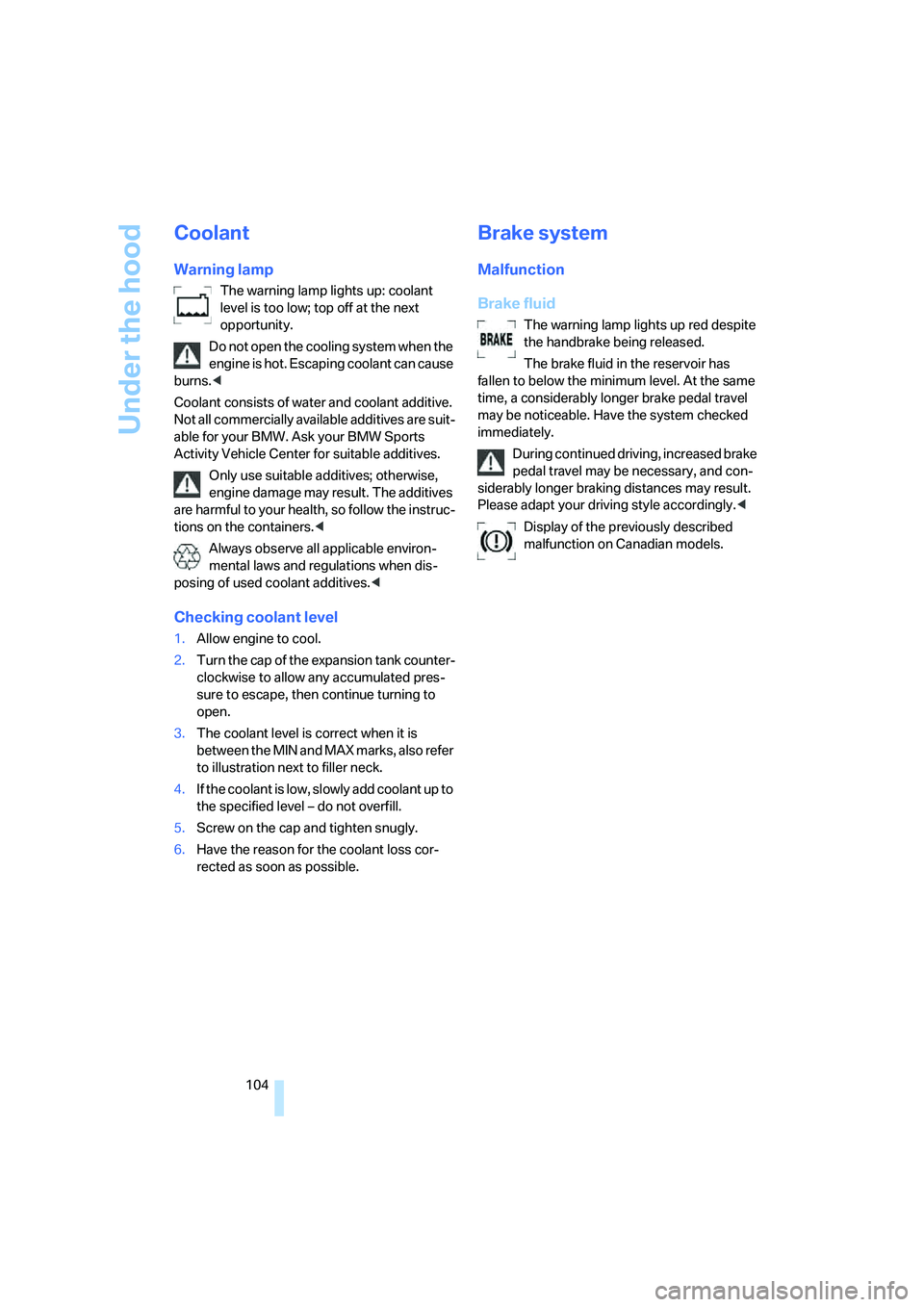
Warning lamp
The warning lamp lights up: coolant
level is too low; top off at the next
opportunity.
Do not open the cooling system when the
engine is hot. Escaping coolant can cause
burns.<
Coolant consists of water and coolant additive.
Not all commercially available additives are suit-
able for your BMW. Ask your BMW Sports
Activity Vehicle Center for suitable additives.
Only use suitable additives; otherwise,
engine damage may result. The additives
are harmful to your health, so follow the instruc-
tions on the containers.<
Always observe all applicable environ-
mental laws and regulations when dis-
posing of used coolant additives.<
Checking coolant level
1.Allow engine to cool.
2.Turn the cap of the expansion tank counter-
clockwise to allow any accumulated pres-
sure to escape, then continue turning to
open.
3.The coolant level is correct when it is
between the MIN and MAX marks, also refer
to illustration next to filler neck.
4.If the coolant is low, slowly add coolant up to
the specified level – do not overfill.
5.Screw on the cap and tighten snugly.
6.Have the reason for the coolant loss cor-
rected as soon as possible.
Brake system
Malfunction
Brake fluid
The warning lamp lights up red despite
the handbrake being released.
The brake fluid in the reservoir has
fallen to below the minimum level. At the same
time, a considerably longer brake pedal travel
may be noticeable. Have the system checked
immediately.
During continued driving, increased brake
pedal travel may be necessary, and con-
siderably longer braking distances may result.
Please adapt your driving style accordingly.<
Display of the previously described
malfunction on Canadian models.
Page 130 of 140
Everything from A to Z
128 Charge-current indicator
lamp12,114
Check Gas Cap, warning
lamp12,92
Child's seats, refer to Child
restraint systems35
Child restraint fixing system
LATCH36
Child restraint systems35
– installing35
– with tether strap36
Child-safety locks37
Child seat security35
Chock112
Chrome parts, care, refer to
Caring for your vehicle
brochure
Cigarette lighter74
Circulation of air, refer to
Recirculated-air
mode64,68
Cleaning, vehicle, refer to
Caring for your vehicle
brochure
Cleaning rear window43
Clock47,48
– 12 or 24 hour mode48
– setting, also refer to Owner's
Manual for Radio/Onboard
Computer
– setting time47
Closing
– from inside21
– with the remote control19
Clothes hooks74
Clutch82
– breaking-in82
Cockpit10
Cold start, refer to Starting
engine38
Combination of wheel/tire98
Compact wheel, wheel
changes112
Compartments, refer to
Storage compartments73
Compartments in cargo area,
refer to Behind side trim
panel78Compass, digital70
Computer48
– also refer to Owner's Manual
for Onboard Computer
– functions48
Condensation, refer to When
the vehicle is parked84
Confirmation signal for
locking/unlocking
vehicle19,21
Connecting car vacuum
cleaner, refer to Connecting
electrical devices74
Connecting electrical
devices74
Consumption, refer to
Average fuel
consumption49
Consumption indicator, refer
to Fuel gauge46
Controls, refer to Cockpit10
Convenience operation
– from outside21
– panorama glass sunroof21
– windows21
Coolant104
– level104
– temperature gauge47
– warning lamp104
Cooling, refer to
Temperature64,67
Copyright2
Correct wheels and tires98
Courtesy lamps61
Cruise control44
– buttons on steering
wheel13
– indicator lamp44
Cruising range49
Cup holders72
Curb weight, refer to
Weights124
Cylinders, refer to Engine
data122
D
Dashboard lighting, refer to
Instrument lighting61
Dashboard system, refer to
Cockpit10
Data, technical122
– dimensions123
– engine122
– filling capacities124
– weights124
Daytime running lamps59
Deactivating front passenger
airbags35,57
Defective lamp59
Defects7
Defrosting windows64,67
– air conditioner64
– automatic climate control67
Defrosting windows and
removing condensation
– air conditioner64
– automatic climate control67
Defrost position, refer to
Defrosting windows64,67
Digital clock47
Digital compass70
Dimensions123
Dimming mirror34
Directional indicators, refer to
Turn signals41
Disk brakes85
Displacement, refer to Engine
data122
Display illumination, refer to
Instrument lighting61
Display lighting, refer to
instrument lighting61
Displays, refer to Instrument
cluster11
Disposal, vehicle battery114
Disposal of the vehicle, refer
to Caring for your vehicle
brochure
Distance warning, refer to
PDC Park Distance
Control50
Door exit lighting61
Door handle lighting59
Page 131 of 140
Reference
At a glance
Controls
Driving tips
Mobility
129
Door keys18
Door lock21
Doors
– locking and unlocking from
inside21
– manual operation21
– unlocking and locking,
confirmation signals19,21
DOT Quality Grades96
Draft-free ventilation65,68
Driving lamps, refer to Parking
lamps/low beams59
Driving notes84
Driving on poor roads87
Driving stability control
systems51
Driving through water87
Driving tips, refer to Driving
instructions84
Drying air, refer to Switching
cooling function on/
off64,67
DSC Dynamic Stability
Control51
– indicator lamp52
DTC Dynamic Traction
Control52
– indicator lamps52
DVD changer, refer to Owner's
Manual for Radio/Onboard
Computer
Dynamic Stability Control
DSC51
– indicator lamp52
Dynamic Traction Control
DTC52
– indicator lamps52
E
Electrical malfunctions
– automatic transmission
malfunction41
– door lock21
– driver's door21
– fuel filler door92
– liftgate22
– panorama glass sunroof25Electronic brake-force
distribution51
Electronic Stability Program,
refer to DSC Dynamic
Stability Control51
Emergency call116
Emergency operation, refer to
Manual operation
– doors21
– driver's door21
– fuel filler door92
– liftgate22
– panorama glass sunroof25
Emergency Service, refer to
Receiving assistance116
Engine
– breaking-in82
– data122
– indicator lamps38
– overheated, refer to Coolant
thermometer47
– speed46
– starting38
– switching off39
Engine compartment101
Engine coolant104
Engine coolant
temperature47
Engine oil102
– additives, refer to Approved
engine oils103
– approved engine oils103
– electronic oil level
control102
– indicator/warning lamp102
– possible displays102
– required oil grades103
– specifications, also refer to
Approved engine oils103
Engine oil grades103
Engine oil level, indicator/
warning lamp102
Engine oil pressure102
– indicator/warning lamp102
Engine output, refer to Engine
data122
Equipment package, refer to
Service and Warranty
Information Booklet for US models, Warranty and
Service Guide Booklet for
Canadian models
ESP Electronic Stability
Program, refer to DSC
Dynamic Stability
Control51
Exhaust system84
Exterior mirrors33
– automatically dimming34
External audio device74
Eye, tow starting and
towing118
F
Failure of electrical
accessories115
False alarms, refer to Avoiding
unintentional alarms26
Fastening safety belts, refer to
Safety belts32
Filter, refer to
– Microfilter65
– Microfilter/activated
charcoal filter68
First-aid kit117
Flat tire111
– compact wheel112
– Flat Tire Monitor54
– refer to Tire inflation
pressure94
– refer to Wheel changes111
– Tire Pressure Monitor55
Flat Tire Monitor54
– indicator lamp54
– initializing system54
– snow chains99
– system limits54
– warning errors54
Flooding, refer to Driving
through water84
Floor cover78
Fog lamps, indicator lamp61
Folding rear seat back76
Footwell lamps61
Four wheel drive, refer to
xDrive52
Front airbags57
Page 136 of 140
Everything from A to Z
134 Selector lever
– automatic transmission40
– automatic transmission with
Steptronic40
Selector lever interlock, refer
to Shiftlock40
Selector-lever positions,
automatic transmission40
Service, refer to Receiving
assistance116
Service and warranty6
Service Engine Soon38,106
Service Interval
Display47,105
Setting interior
temperature64,67
Shifting gears in automatic
transmission with
Steptronic41
Shiftlock40
Side airbags57
Side tilt, permissible87
Side turn signals, bulb
replacement110
Signal horn, refer to Horn10
Sitting safely27
– with airbags27
– with head restraint27
– with safety belt27
Ski bag75
Smokers' package, refer to
Ashtray74
Snow chains99
Soft drink can holder, refer to
Cup holders72
SOS, refer to Initiating an
emergency call116
Spare fuses115
Spare key18
Spare wheel, refer to Compact
wheel112
Speed
– with compact wheel114
– with winter tires98
Speedometer, refer to
Instrument cluster11
Split rear backrest, refer to
Enlarging cargo area76Sport program, automatic
transmission with
Steptronic41
Sports seat29
Stability control, refer to
Driving stability control
systems51
Starting, refer to Starting
engine38
Starting difficulties
– at very low temperatures39
– jump starting117
Starting engine38
Starting off uphill, refer to
Acceleration assistant53
Status of passenger
airbags58
Status of this Owner's Manual
at time of printing5
Steering lock38
Steering wheel10,13
– adjustment34
– buttons on steering
wheel13
– heater34
– lock38
Steering wheel with
buttons13
Steptronic40
Storage compartments73
Storage package73
Storage package nets73
Storage space, refer to Cargo
area76
Storing desired speed, refer to
Cruise control44
Storing seat position, refer to
Seat and mirror memory31
Storing tires98
Straps, refer to Cargo
loading85
Sunroof, refer to Panorama
glass sunroof23
Switches, refer to Cockpit10
Switching cooling function on/
off64,67
Switching off engine39
Symbols4
T
Tachometer46
Tail lamps110
– indicator lamp, defective
bulb59
– replacing bulbs110
Tank, washing systems, refer
to Washer fluid43
Tank capacity124
Technical data122
Technical modifications5
Telephone, refer to separate
operating instructions
Temperature
– air conditioner64
– automatic climate control67
– tires97
Temperature display
– outside temperature48
– outside temperature
warning48
– setting units48
Temperature gauge47
Temperature of coolant, refer
to Coolant thermometer47
Temperature warning48
Tempomat, refer to Cruise
control44
Thigh support adjustment29
Three point safety belts32
Tightening torque of lug bolts,
refer to After mounting113
Tilt alarm sensor
– remote control20
– switching off20,26
Tilt function, passenger-side
mirror33
Tire inflation pressures94
– monitoring, refer to Tire
Pressure Monitor55
– restoring94
Tire Pressure Monitor55
– malfunction warnings55
– resetting system55
– system limitations55
– warning lamp55
Tire replacement97