key BMW X3 XDRIVE 28I 2013 Owners Manual
[x] Cancel search | Manufacturer: BMW, Model Year: 2013, Model line: X3 XDRIVE 28I, Model: BMW X3 XDRIVE 28I 2013Pages: 211, PDF Size: 8.62 MB
Page 21 of 211
Split screen
General information
Additional information can be displayed on the
right side of the split screen, e.g., information
from the onboard computer.
In the divided screen view, the so-called split
screen, this information remains visible even
when you change to another menu.
Switching the split screen on and off1. Press the button.2."Split screen"
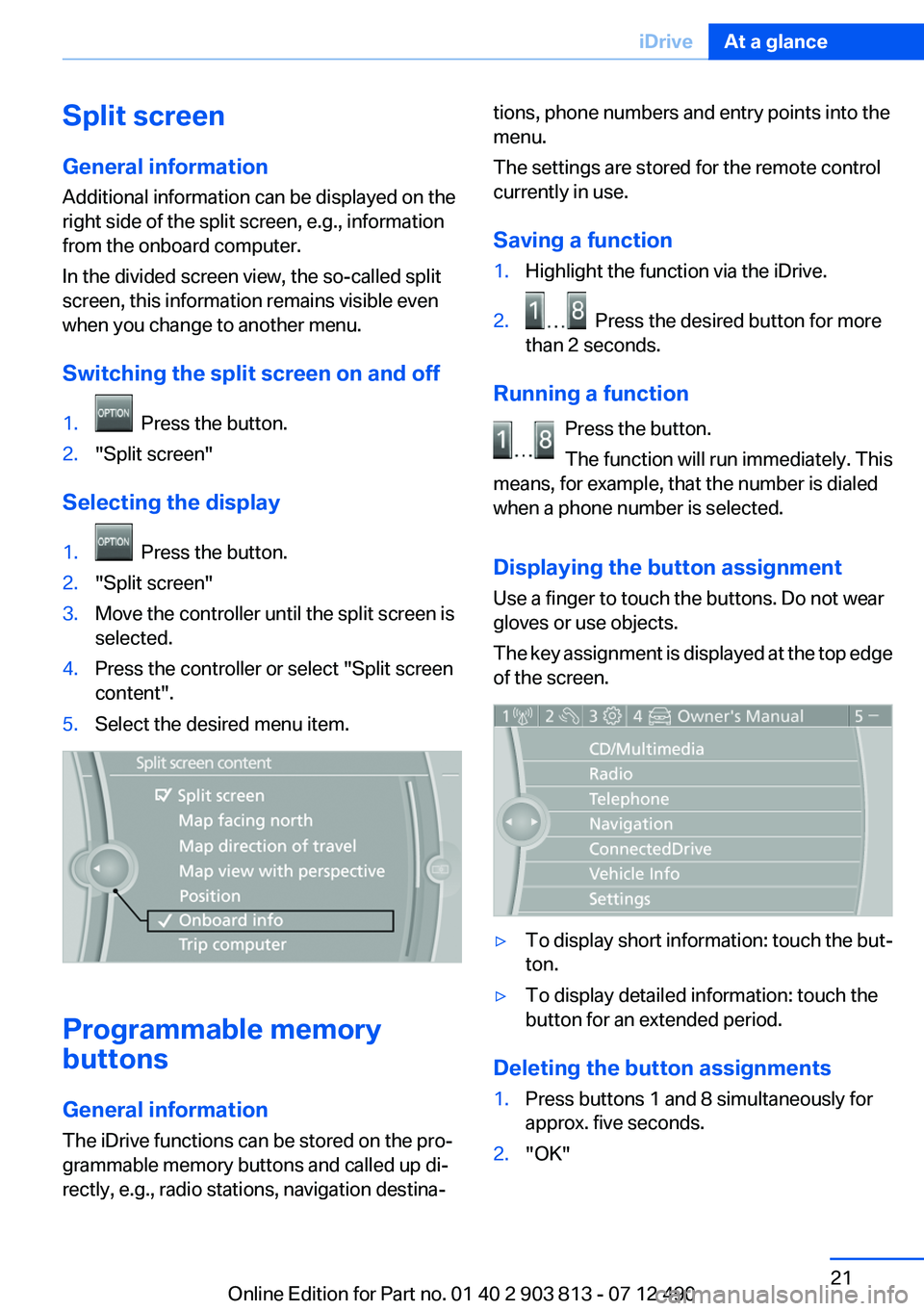
Selecting the display
1. Press the button.2."Split screen"3.Move the controller until the split screen is
selected.4.Press the controller or select "Split screen
content".5.Select the desired menu item.
Programmable memory
buttons
General information
The iDrive functions can be stored on the pro‐
grammable memory buttons and called up di‐
rectly, e.g., radio stations, navigation destina‐
tions, phone numbers and entry points into the
menu.
The settings are stored for the remote control
currently in use.
Saving a function1.Highlight the function via the iDrive.2. Press the desired button for more
than 2 seconds.
Running a function
Press the button.
The function will run immediately. This
means, for example, that the number is dialed
when a phone number is selected.
Displaying the button assignment
Use a finger to touch the buttons. Do not wear
gloves or use objects.
The key assignment is displayed at the top edge
of the screen.
▷To display short information: touch the but‐
ton.▷To display detailed information: touch the
button for an extended period.
Deleting the button assignments
1.Press buttons 1 and 8 simultaneously for
approx. five seconds.2."OK"Seite 21iDriveAt a glance21
Online Edition for Part no. 01 40 2 903 813 - 07 12 490
Page 30 of 211
Opening and closingVehicle equipment
All standard, country-specific and optional
equipment that is offered in the model series is
described in this chapter. Therefore, equipment
is also described that is not available in a vehicle,
e. g., because of the selected optional equip‐
ment or country variant. This also applies for
safety-related functions and systems.
Remote control/key
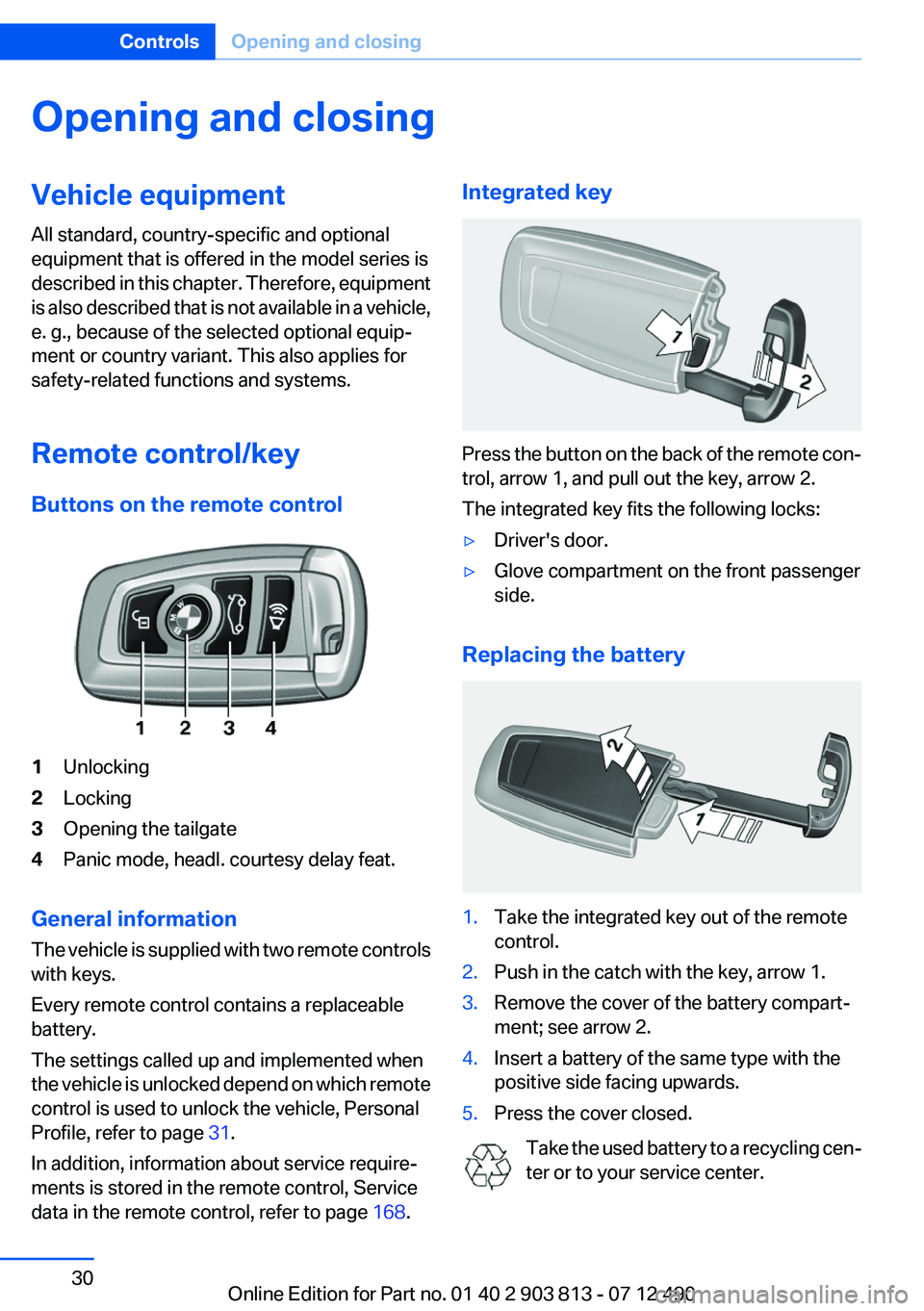
Buttons on the remote control1Unlocking2Locking3Opening the tailgate4Panic mode, headl. courtesy delay feat.
General information
The vehicle is supplied with two remote controls
with keys.
Every remote control contains a replaceable
battery.
The settings called up and implemented when
the vehicle is unlocked depend on which remote
control is used to unlock the vehicle, Personal
Profile, refer to page 31.
In addition, information about service require‐
ments is stored in the remote control, Service
data in the remote control, refer to page 168.
Integrated key
Press the button on the back of the remote con‐
trol, arrow 1, and pull out the key, arrow 2.
The integrated key fits the following locks:
▷Driver's door.▷Glove compartment on the front passenger
side.
Replacing the battery
1.Take the integrated key out of the remote
control.2.Push in the catch with the key, arrow 1.3.Remove the cover of the battery compart‐
ment; see arrow 2.4.Insert a battery of the same type with the
positive side facing upwards.5.Press the cover closed.
Take the used battery to a recycling cen‐
ter or to your service center.
Seite 30ControlsOpening and closing30
Online Edition for Part no. 01 40 2 903 813 - 07 12 490
Page 35 of 211
Switching on interior lamps and
courtesy lamps
Press the button on the remote control
with the vehicle locked.
Panic mode
You can trigger the alarm system if you find
yourself in a dangerous situation.
Press the button on the remote control
for at least 3 seconds.
To switch off the alarm: press any button.
Switching on the headlamp courtesy
delay feature
Briefly press the button on the remote
control.
The duration can be set.
Opening the tailgate Press the button on the remote control
for approx. 1 second.
The tailgate opens, regardless of whether it was
previously locked or unlocked.
The tailgate pivots back and up when it opens.
Ensure that adequate clearance is available be‐
fore opening.
In some vehicle equipment variants, the tailgate
can only be opened using the remote control if
the vehicle was unlocked first.
To avoid locking yourself out of the vehicle, do
not place the remote control into the cargo area.
The tailgate is locked again as soon as it is
pushed closed.
Provide edge protection
Sharp or angular objects can hit the rear
window while driving and damage the heating
wires of the rear window. Provide edge protec‐
tion.◀Confirmation signals from the vehicle1."Settings"2."Door locks"3.Deactivate or activate the desired confirma‐
tion signals.▷"Acoustic sig. lock/unlock"▷"Flash when lock/unlock"
Retrieving the seat and mirror settings
The driver's seat and exterior mirror positions
used last are stored for the remote control cur‐
rently in use.
When the vehicle is unlocked, these positions
are automatically retrieved if this function was
activated.
Pinch hazard when moving back the seat
If this function is used, first make sure that
the footwell behind the driver's seat is empty.
Otherwise, people can be injured or objects
damaged when the seat is moved back.◀
The adjustment procedure is interrupted:
▷When a seat position switch is pressed.▷When a button of the seat and mirror mem‐
ory is pressed.
Activating the setting
1."Settings"2."Door locks"3."Last seat position auto."
Malfunction
If the vehicle can no longer be locked or un‐
locked with the remote control, the battery may
be discharged or there may be interference from
external sources such as mobile phones, metal
objects, overhead power lines, transmission
towers, etc.
If this occurs, unlock or lock the vehicle at the
door lock using the integrated key.
Seite 35Opening and closingControls35
Online Edition for Part no. 01 40 2 903 813 - 07 12 490
Page 36 of 211
For US owners only
The transmitter and receiver units comply with
part 15 of the FCC/Federal Communication
Commission regulations. Operation is governed
by the following:
FCC ID:▷LX8766S.▷LX8766E.▷LX8CAS.▷LX8CAS2.▷MYTCAS4.
Compliance statement:
This device complies with part 15 of the FCC
Rules. Operation is subject to the following two
conditions:
▷This device may not cause harmful interfer‐
ence, and▷this device must accept any interference re‐
ceived, including interference that may
cause undesired operation.
Any unauthorized modifications or changes to
these devices could void the user's authority to
operate this equipment.
Using the door lock
General information
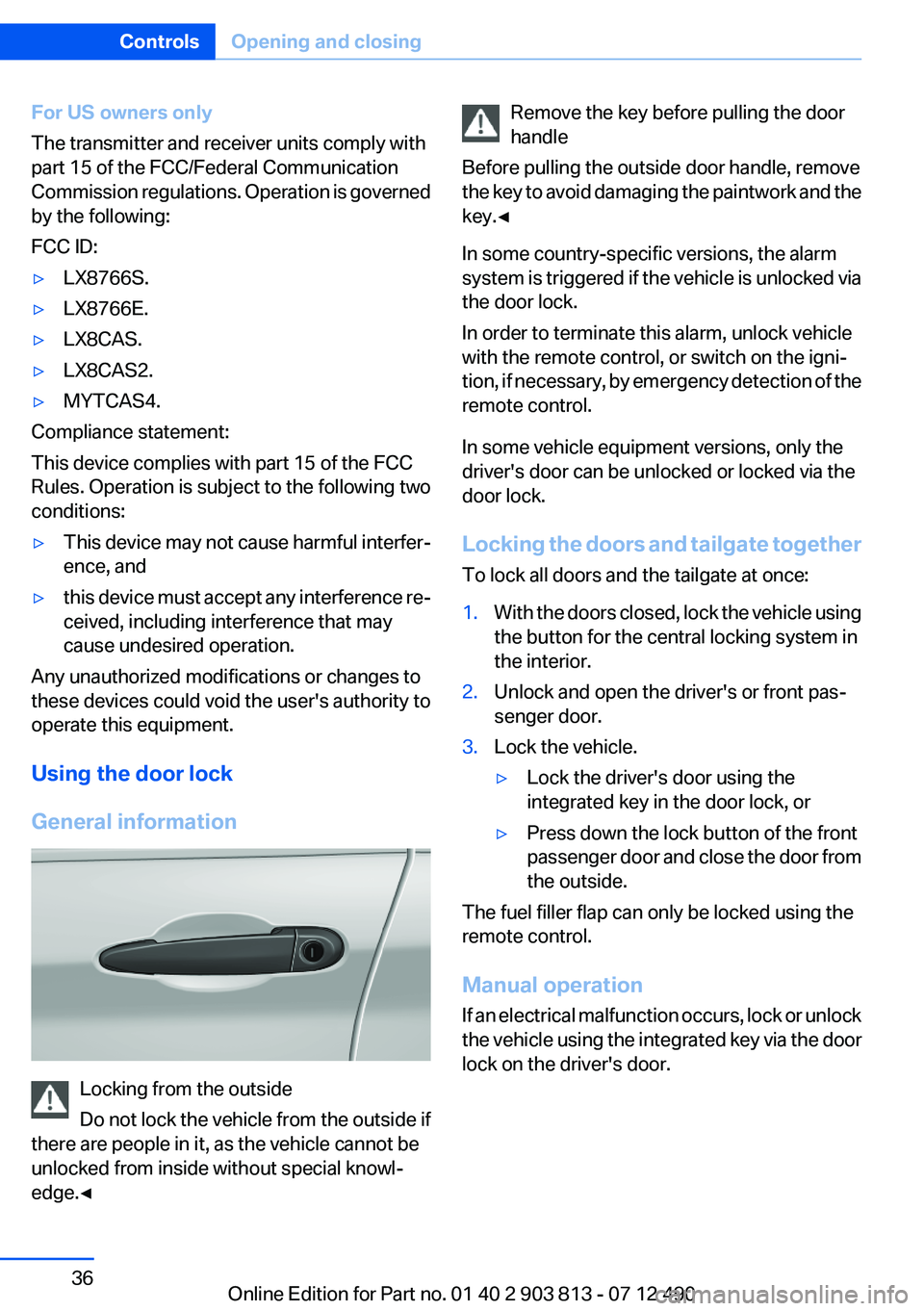
Locking from the outside
Do not lock the vehicle from the outside if
there are people in it, as the vehicle cannot be
unlocked from inside without special knowl‐
edge.◀
Remove the key before pulling the door
handle
Before pulling the outside door handle, remove
the key to avoid damaging the paintwork and the
key.◀
In some country-specific versions, the alarm
system is triggered if the vehicle is unlocked via
the door lock.
In order to terminate this alarm, unlock vehicle
with the remote control, or switch on the igni‐
tion, if necessary, by emergency detection of the
remote control.
In some vehicle equipment versions, only the
driver's door can be unlocked or locked via the
door lock.
Locking the doors and tailgate together
To lock all doors and the tailgate at once:1.With the doors closed, lock the vehicle using
the button for the central locking system in
the interior.2.Unlock and open the driver's or front pas‐
senger door.3.Lock the vehicle.▷Lock the driver's door using the
integrated key in the door lock, or▷Press down the lock button of the front
passenger door and close the door from
the outside.
The fuel filler flap can only be locked using the
remote control.
Manual operation
If an electrical malfunction occurs, lock or unlock
the vehicle using the integrated key via the door
lock on the driver's door.
Seite 36ControlsOpening and closing36
Online Edition for Part no. 01 40 2 903 813 - 07 12 490
Page 40 of 211
Functional requirements▷There are no external sources of interfer‐
ence nearby.▷To lock the vehicle, the remote control must
be located outside of the vehicle.▷The next unlocking and locking cycle is not
possible until after approx. 2 seconds.▷The engine can only be started if the remote
control is inside the vehicle.
Comparison with ordinary remote
control
The functions can be controlled by pressing the
buttons of the remote control or Comfort Ac‐
cess.
Unlocking
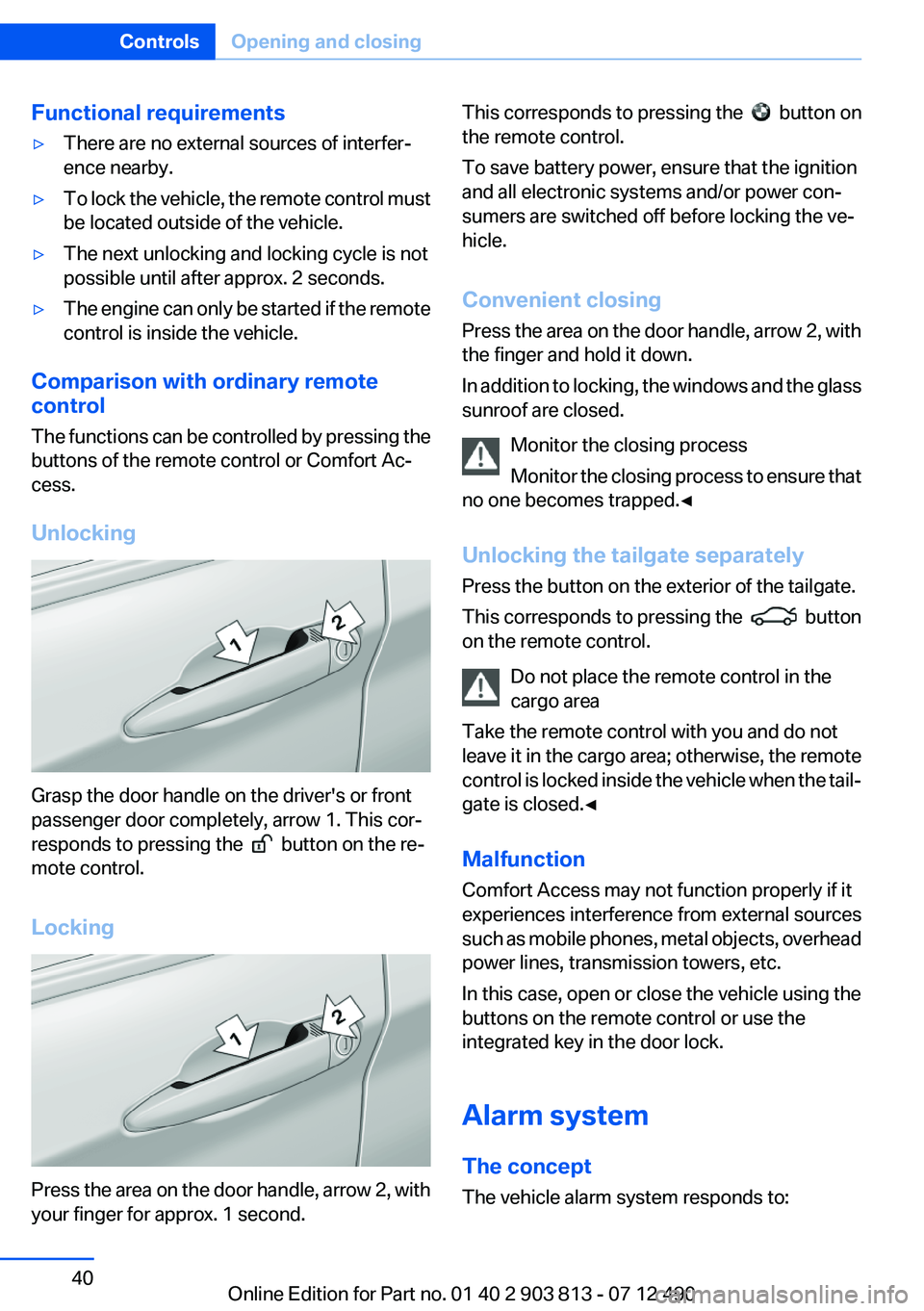
Grasp the door handle on the driver's or front
passenger door completely, arrow 1. This cor‐
responds to pressing the
button on the re‐
mote control.
Locking
Press the area on the door handle, arrow 2, with
your finger for approx. 1 second.
This corresponds to pressing the button on
the remote control.
To save battery power, ensure that the ignition
and all electronic systems and/or power con‐
sumers are switched off before locking the ve‐
hicle.
Convenient closing
Press the area on the door handle, arrow 2, with
the finger and hold it down.
In addition to locking, the windows and the glass
sunroof are closed.
Monitor the closing process
Monitor the closing process to ensure that
no one becomes trapped.◀
Unlocking the tailgate separately
Press the button on the exterior of the tailgate.
This corresponds to pressing the
button
on the remote control.
Do not place the remote control in the
cargo area
Take the remote control with you and do not
leave it in the cargo area; otherwise, the remote
control is locked inside the vehicle when the tail‐
gate is closed.◀
Malfunction
Comfort Access may not function properly if it
experiences interference from external sources
such as mobile phones, metal objects, overhead
power lines, transmission towers, etc.
In this case, open or close the vehicle using the
buttons on the remote control or use the
integrated key in the door lock.
Alarm system
The concept
The vehicle alarm system responds to:
Seite 40ControlsOpening and closing40
Online Edition for Part no. 01 40 2 903 813 - 07 12 490
Page 134 of 211
Storage compartmentsVehicle equipment
All standard, country-specific and optional
equipment that is offered in the model series is
described in this chapter. Therefore, equipment
is also described that is not available in a vehicle,
e. g., because of the selected optional equip‐
ment or country variant. This also applies for
safety-related functions and systems.
Notes No loose objects in the passenger com‐
partment
Do not stow any objects in the passenger com‐
partment without securing them; otherwise,
they may present a danger to occupants for in‐
stance during braking and avoidance maneu‐
vers.◀
Do not place anti-slip mats on the dash‐
board
Do not place anti-slip mats on the dashboard.
The mat materials could damage the dash‐
board.◀
Storage compartments
The following storage compartments are avail‐
able in the vehicle interior:▷Glove compartment on the front passenger
side, refer to page 134.▷Storage compartment in the front center
armrest, refer to page 135.▷Compartments in the doors.▷Pockets on the backrests of the front seats.▷Net in the front passenger footwell.Glove compartment
Front passenger side
Opening
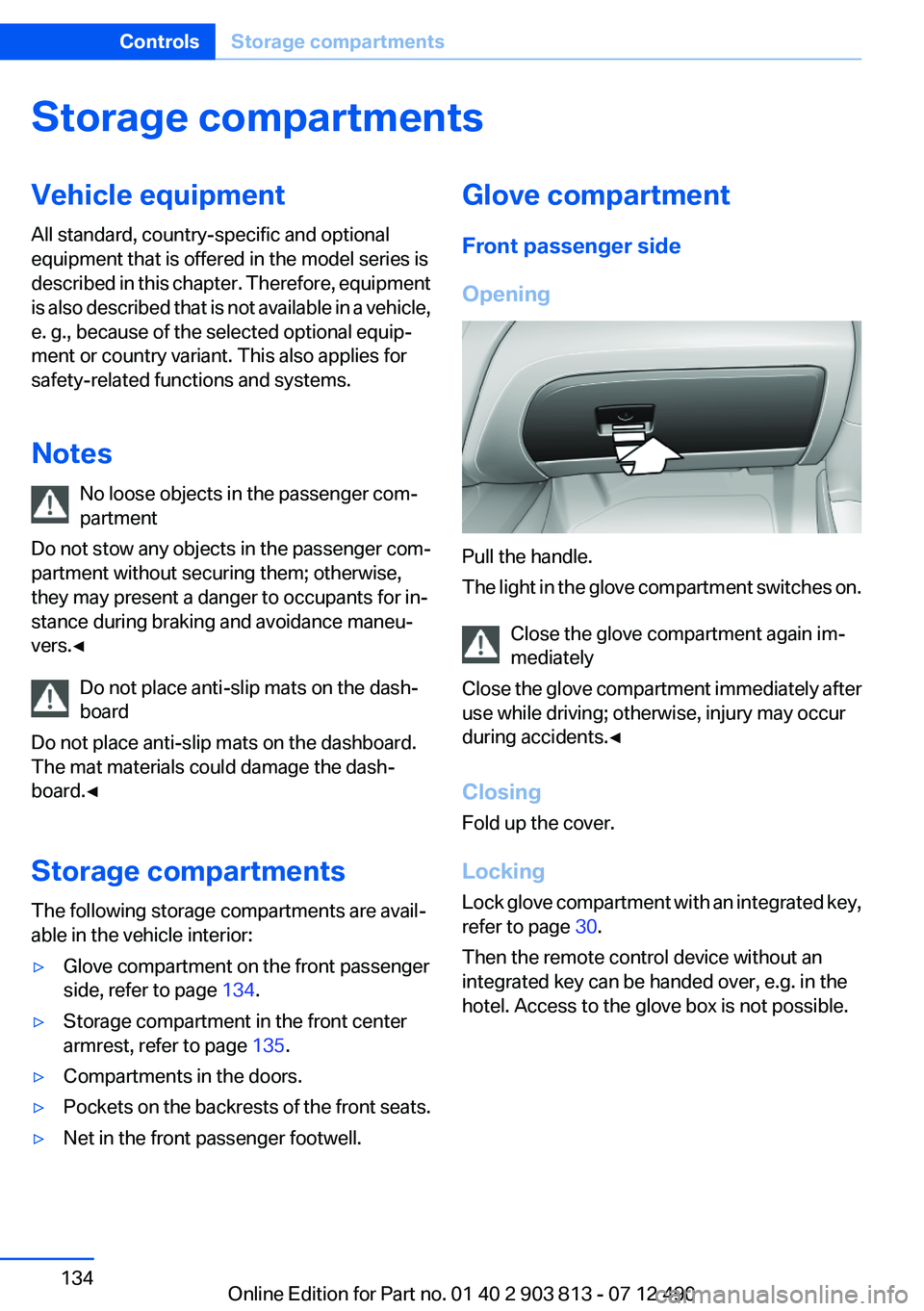
Pull the handle.
The light in the glove compartment switches on.
Close the glove compartment again im‐
mediately
Close the glove compartment immediately after
use while driving; otherwise, injury may occur
during accidents.◀
Closing
Fold up the cover.
Locking
Lock glove compartment with an integrated key,
refer to page 30.
Then the remote control device without an
integrated key can be handed over, e.g. in the
hotel. Access to the glove box is not possible.
Seite 134ControlsStorage compartments134
Online Edition for Part no. 01 40 2 903 813 - 07 12 490
Page 135 of 211
Compartments in the doorsDo not stow any breakable objects
Do not store any breakable objects, e. g.
glass bottles, in the compartments, or there is
an increased risk of injury in the event of an ac‐
cident.◀
Center armrest
Opening
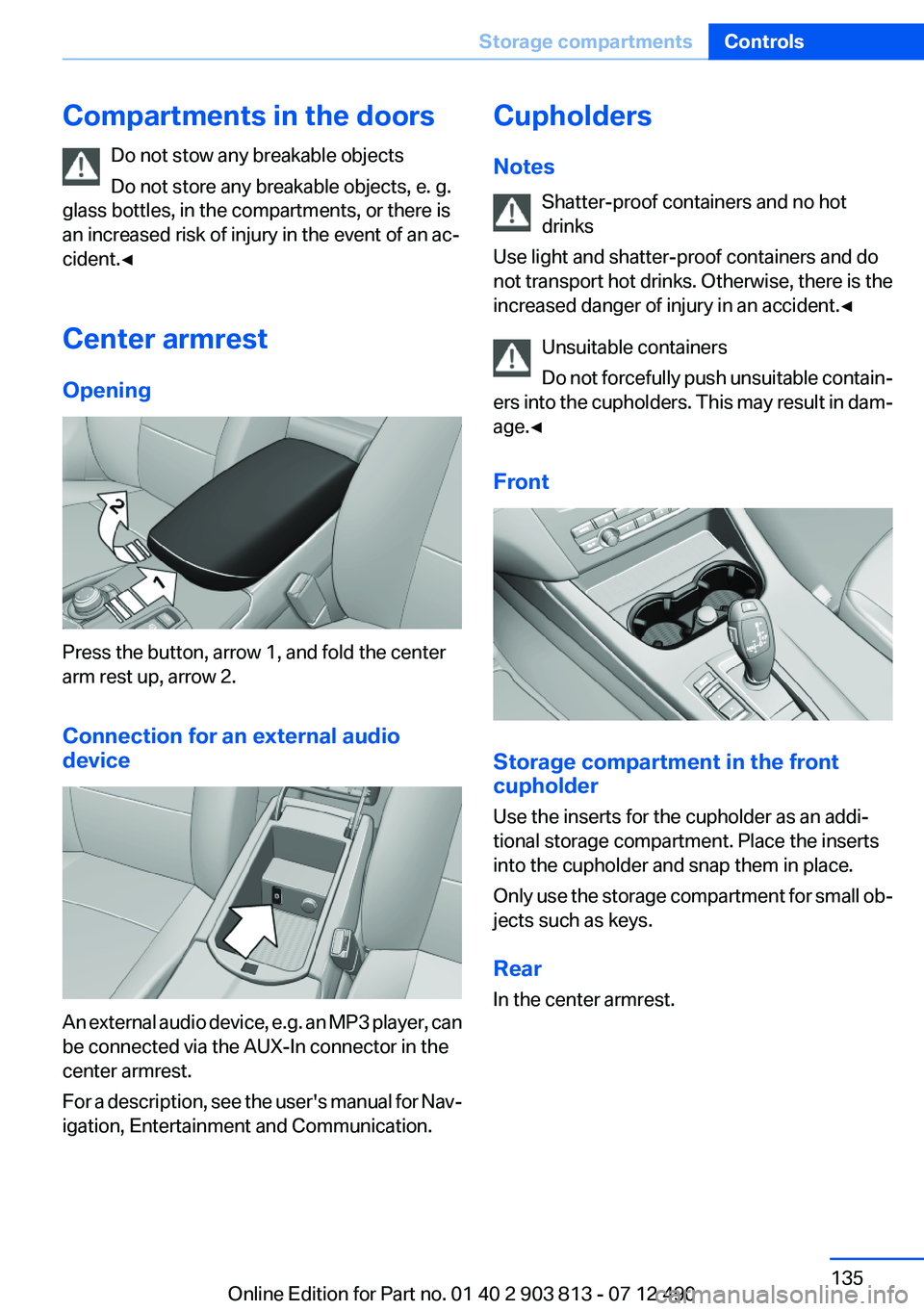
Press the button, arrow 1, and fold the center
arm rest up, arrow 2.
Connection for an external audio
device
An external audio device, e.g. an MP3 player, can
be connected via the AUX-In connector in the
center armrest.
For a description, see the user's manual for Nav‐
igation, Entertainment and Communication.
Cupholders
Notes Shatter-proof containers and no hot
drinks
Use light and shatter-proof containers and do
not transport hot drinks. Otherwise, there is the
increased danger of injury in an accident.◀
Unsuitable containers
Do not forcefully push unsuitable contain‐
ers into the cupholders. This may result in dam‐
age.◀
Front
Storage compartment in the front
cupholder
Use the inserts for the cupholder as an addi‐
tional storage compartment. Place the inserts
into the cupholder and snap them in place.
Only use the storage compartment for small ob‐
jects such as keys.
Rear
In the center armrest.
Seite 135Storage compartmentsControls135
Online Edition for Part no. 01 40 2 903 813 - 07 12 490
Page 203 of 211
Braking, notes 141
Breakdown assis‐ tance 178, 179
Breaking in 140
Brightness of Control Dis‐ play 85
Bulb replacement 172
Bulb replacement, front 172
Bulb replacement, rear 175
Bulbs and lamps 172
Button, Start/Stop 59
Bypassing, refer to Jump- starting 179
C
California Proposition 65 Warning 7
Camera, backup camera 114
Camera, care 186
Camera, Top View 117
Can holder, refer to Cu‐ pholder 135
Car battery 176
Car care products 184
Care, displays 186
Care, vehicle 184
Cargo 143
Cargo area 131
Cargo area, enlarging 131
Cargo area lid 37
Cargo area, storage compart‐ ments 136
Cargo cover 131
Cargo straps, securing cargo 144
Car key, refer to Remote con‐ trol 30
Carpet, care 185
Car wash 183
Catalytic converter, refer to Hot exhaust system 140
CBS Condition Based Serv‐ ice 168
CD/Multimedia, see user's manual for Navigation, Enter‐tainment and Communica‐
tion
Center armrest 135
Center console 14
Central locking system 33
Central screen, refer to Control Display 16
Changes, technical, refer to Safety 7
Changing parts 171
Changing wheels 176
Changing wheels/tires 160
Check Control 74
Children, seating position 55
Children, transporting safely 55
Child restraint fixing sys‐ tem 55
Child restraint fixing system LATCH 56
Child restraint fixing systems, mounting 55
Child safety locks 58
Child seat, mounting 55
Child seats 55
Chrome parts, care 185
Cleaning, displays 186
Climate control 120, 122
Clock 77
Closing/opening from in‐ side 37
Closing/opening via door lock 36
Closing/opening with remote control 34
Clothes hooks 136
Collision warning 108
Combination switch, refer to Turn signals 65
Combination switch, refer to Wiper system 66
Comfort Access 39
COMFORT program, Dynamic Driving Control 106
Compartments in the doors 135 Computer 81
Condensation on win‐ dows 121, 124
Condensation under the vehi‐ cle 142
Condition Based Service CBS 168
Confirmation signal 35
ConnectedDrive, see user's manual for Navigation, Enter‐
tainment and Communica‐
tion
Control Display 16
Control Display, settings 83
Controller 16, 17
Control systems, driving sta‐ bility 102
Convenient opening 34
Coolant 167
Coolant temperature 76
Cooling function 121, 124
Cooling, maximum 123
Cooling system 167
Corrosion on brake discs 142
Cruise control 109
Cruising range 77
Cupholder 135
Current fuel consumption 78
D
Damage, tires 160
Damping control, dy‐ namic 104
Data, technical 190
Date 77
Daytime running lights 87
Defrosting, refer to Windows, defrosting 121, 124
Dehumidifying, air 121, 124
Destination distance 82
Digital clock 77
Dimensions 190
Dimmable exterior mirrors 53
Dimmable interior rearview mirror 54 Seite 203Everything from A to ZReference203
Online Edition for Part no. 01 40 2 903 813 - 07 12 490
Page 205 of 211
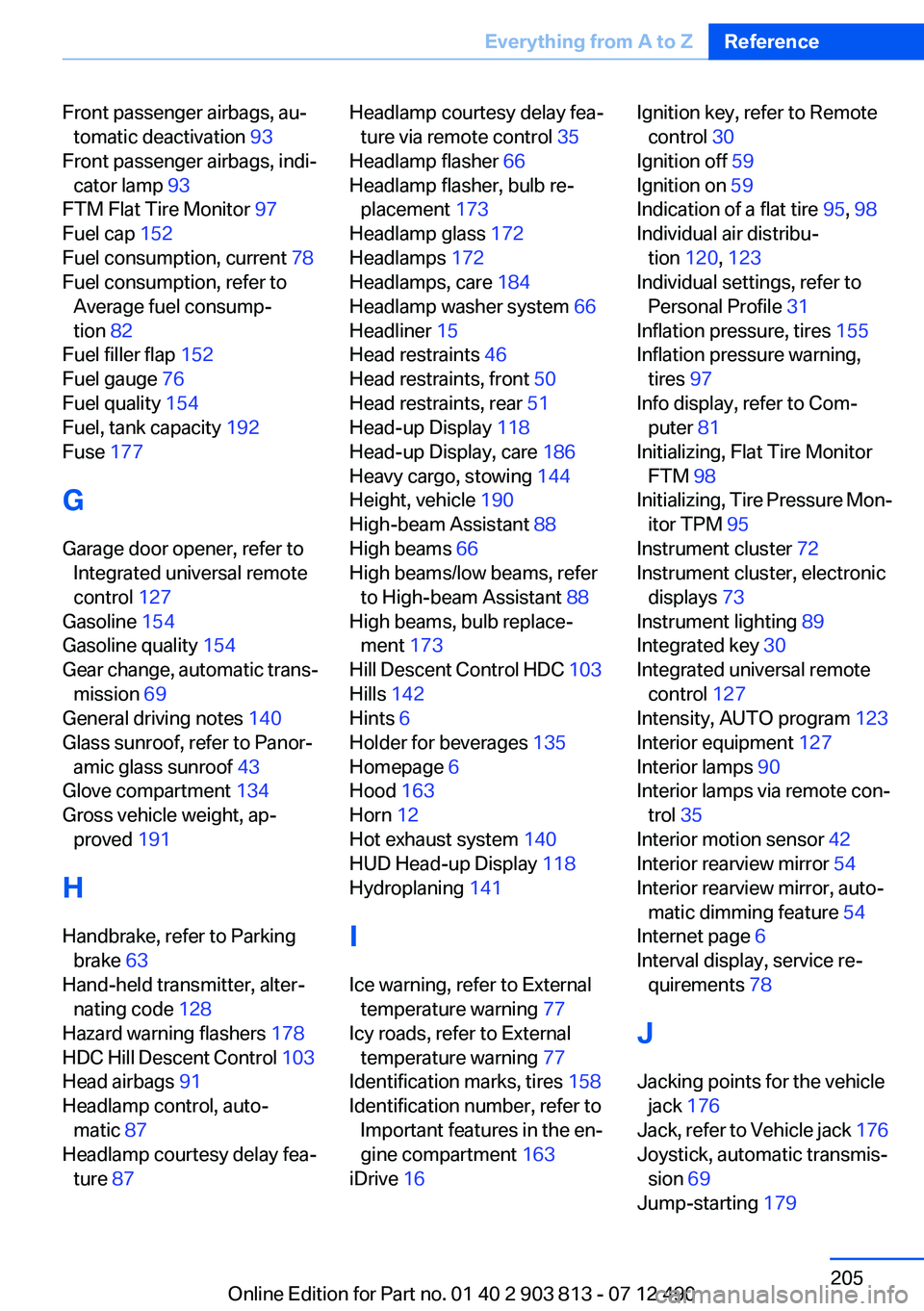
Front passenger airbags, au‐tomatic deactivation 93
Front passenger airbags, indi‐ cator lamp 93
FTM Flat Tire Monitor 97
Fuel cap 152
Fuel consumption, current 78
Fuel consumption, refer to Average fuel consump‐
tion 82
Fuel filler flap 152
Fuel gauge 76
Fuel quality 154
Fuel, tank capacity 192
Fuse 177
G
Garage door opener, refer to Integrated universal remote
control 127
Gasoline 154
Gasoline quality 154
Gear change, automatic trans‐ mission 69
General driving notes 140
Glass sunroof, refer to Panor‐ amic glass sunroof 43
Glove compartment 134
Gross vehicle weight, ap‐ proved 191
H
Handbrake, refer to Parking brake 63
Hand-held transmitter, alter‐ nating code 128
Hazard warning flashers 178
HDC Hill Descent Control 103
Head airbags 91
Headlamp control, auto‐ matic 87
Headlamp courtesy delay fea‐ ture 87 Headlamp courtesy delay fea‐
ture via remote control 35
Headlamp flasher 66
Headlamp flasher, bulb re‐ placement 173
Headlamp glass 172
Headlamps 172
Headlamps, care 184
Headlamp washer system 66
Headliner 15
Head restraints 46
Head restraints, front 50
Head restraints, rear 51
Head-up Display 118
Head-up Display, care 186
Heavy cargo, stowing 144
Height, vehicle 190
High-beam Assistant 88
High beams 66
High beams/low beams, refer to High-beam Assistant 88
High beams, bulb replace‐ ment 173
Hill Descent Control HDC 103
Hills 142
Hints 6
Holder for beverages 135
Homepage 6
Hood 163
Horn 12
Hot exhaust system 140
HUD Head-up Display 118
Hydroplaning 141
I
Ice warning, refer to External temperature warning 77
Icy roads, refer to External temperature warning 77
Identification marks, tires 158
Identification number, refer to Important features in the en‐
gine compartment 163
iDrive 16 Ignition key, refer to Remote
control 30
Ignition off 59
Ignition on 59
Indication of a flat tire 95, 98
Individual air distribu‐ tion 120, 123
Individual settings, refer to Personal Profile 31
Inflation pressure, tires 155
Inflation pressure warning, tires 97
Info display, refer to Com‐ puter 81
Initializing, Flat Tire Monitor FTM 98
Initializing, Tire Pressure Mon‐ itor TPM 95
Instrument cluster 72
Instrument cluster, electronic displays 73
Instrument lighting 89
Integrated key 30
Integrated universal remote control 127
Intensity, AUTO program 123
Interior equipment 127
Interior lamps 90
Interior lamps via remote con‐ trol 35
Interior motion sensor 42
Interior rearview mirror 54
Interior rearview mirror, auto‐ matic dimming feature 54
Internet page 6
Interval display, service re‐ quirements 78
J
Jacking points for the vehicle jack 176
Jack, refer to Vehicle jack 176
Joystick, automatic transmis‐ sion 69
Jump-starting 179 Seite 205Everything from A to ZReference205
Online Edition for Part no. 01 40 2 903 813 - 07 12 490
Page 206 of 211
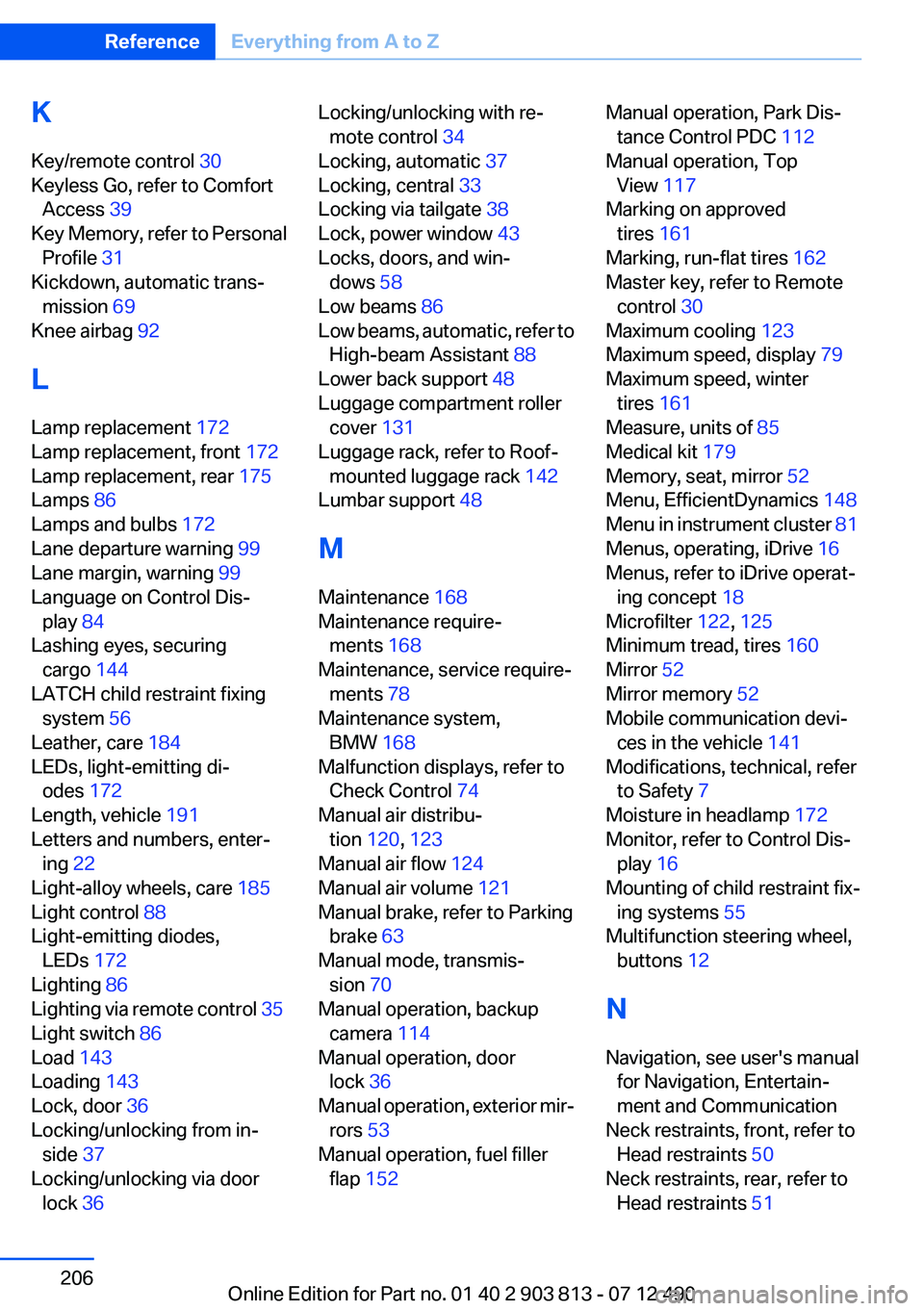
K
Key/remote control 30
Keyless Go, refer to Comfort Access 39
Key Memory, refer to Personal Profile 31
Kickdown, automatic trans‐ mission 69
Knee airbag 92
L
Lamp replacement 172
Lamp replacement, front 172
Lamp replacement, rear 175
Lamps 86
Lamps and bulbs 172
Lane departure warning 99
Lane margin, warning 99
Language on Control Dis‐ play 84
Lashing eyes, securing cargo 144
LATCH child restraint fixing system 56
Leather, care 184
LEDs, light-emitting di‐ odes 172
Length, vehicle 191
Letters and numbers, enter‐ ing 22
Light-alloy wheels, care 185
Light control 88
Light-emitting diodes, LEDs 172
Lighting 86
Lighting via remote control 35
Light switch 86
Load 143
Loading 143
Lock, door 36
Locking/unlocking from in‐ side 37
Locking/unlocking via door lock 36 Locking/unlocking with re‐
mote control 34
Locking, automatic 37
Locking, central 33
Locking via tailgate 38
Lock, power window 43
Locks, doors, and win‐ dows 58
Low beams 86
Low beams, automatic, refer to High-beam Assistant 88
Lower back support 48
Luggage compartment roller cover 131
Luggage rack, refer to Roof- mounted luggage rack 142
Lumbar support 48
M
Maintenance 168
Maintenance require‐ ments 168
Maintenance, service require‐ ments 78
Maintenance system, BMW 168
Malfunction displays, refer to Check Control 74
Manual air distribu‐ tion 120, 123
Manual air flow 124
Manual air volume 121
Manual brake, refer to Parking brake 63
Manual mode, transmis‐ sion 70
Manual operation, backup camera 114
Manual operation, door lock 36
Manual operation, exterior mir‐ rors 53
Manual operation, fuel filler flap 152 Manual operation, Park Dis‐
tance Control PDC 112
Manual operation, Top View 117
Marking on approved tires 161
Marking, run-flat tires 162
Master key, refer to Remote control 30
Maximum cooling 123
Maximum speed, display 79
Maximum speed, winter tires 161
Measure, units of 85
Medical kit 179
Memory, seat, mirror 52
Menu, EfficientDynamics 148
Menu in instrument cluster 81
Menus, operating, iDrive 16
Menus, refer to iDrive operat‐ ing concept 18
Microfilter 122, 125
Minimum tread, tires 160
Mirror 52
Mirror memory 52
Mobile communication devi‐ ces in the vehicle 141
Modifications, technical, refer to Safety 7
Moisture in headlamp 172
Monitor, refer to Control Dis‐ play 16
Mounting of child restraint fix‐ ing systems 55
Multifunction steering wheel, buttons 12
N
Navigation, see user's manual for Navigation, Entertain‐
ment and Communication
Neck restraints, front, refer to Head restraints 50
Neck restraints, rear, refer to Head restraints 51 Seite 206ReferenceEverything from A to Z206
Online Edition for Part no. 01 40 2 903 813 - 07 12 490