tailgate BMW X3 XDRIVE 28I 2014 User Guide
[x] Cancel search | Manufacturer: BMW, Model Year: 2014, Model line: X3 XDRIVE 28I, Model: BMW X3 XDRIVE 28I 2014Pages: 208, PDF Size: 5.21 MB
Page 43 of 208
▷When a seat position switch is pressed.▷When a button of the seat and mirror mem‐
ory is pressed.
Activating the setting
1."Settings"2."Doors/key"3."Last seat position autom."
Alarm system
The conceptThe vehicle alarm system responds to:
▷Opening of a door, the hood or the tailgate.▷Movements in the vehicle.▷Changes in the vehicle tilt, e.g., during at‐
tempts to steal a wheel or when towing the
car.▷Interruptions in battery voltage.
The alarm system briefly indicates tampering:
▷By sounding an acoustic alarm.▷By switching on the hazard warning sys‐
tem.▷By flashing the high beams.
Arming and disarming the alarm
system
General information
When you lock or unlock the vehicle, either
with the remote control or via the Comfort Ac‐
cess at the door lock, the alarm system is
armed or disarmed at the same time.
Door lock and armed alarm systemThe alarm system is triggered when the door is
opened, if the vehicle is unlocked via the door
lock.
In order to terminate this alarm, unlock vehicle
with the remote control or switch on the igni‐
tion, if necessary, by emergency detection of
the remote control.
Tailgate and armed alarm system
The tailgate can be opened even when the
alarm system is armed.
Press the button on the remote con‐
trol for approx. 1 second.
After the tailgate is closed, it is locked and
monitored again if the doors are locked. The
hazard warning system flashes once.
In some vehicle equipment variants, the tail‐
gate can only be opened using the remote
control if the vehicle was unlocked first.
Panic mode
You can trigger the alarm system if you find
yourself in a dangerous situation.
Press the button on the remote con‐
trol for at least 3 seconds.
To switch off the alarm: press any button.
Switching off the alarm▷Unlock the vehicle using the remote con‐
trol.▷With Comfort Access: If you are carrying
the remote control with you, pull on the
driver side or front passenger side door
handle.Seite 43Opening and closingControls43
Online Edition for Part no. 01 40 2 911 041 - VI/13
Page 44 of 208
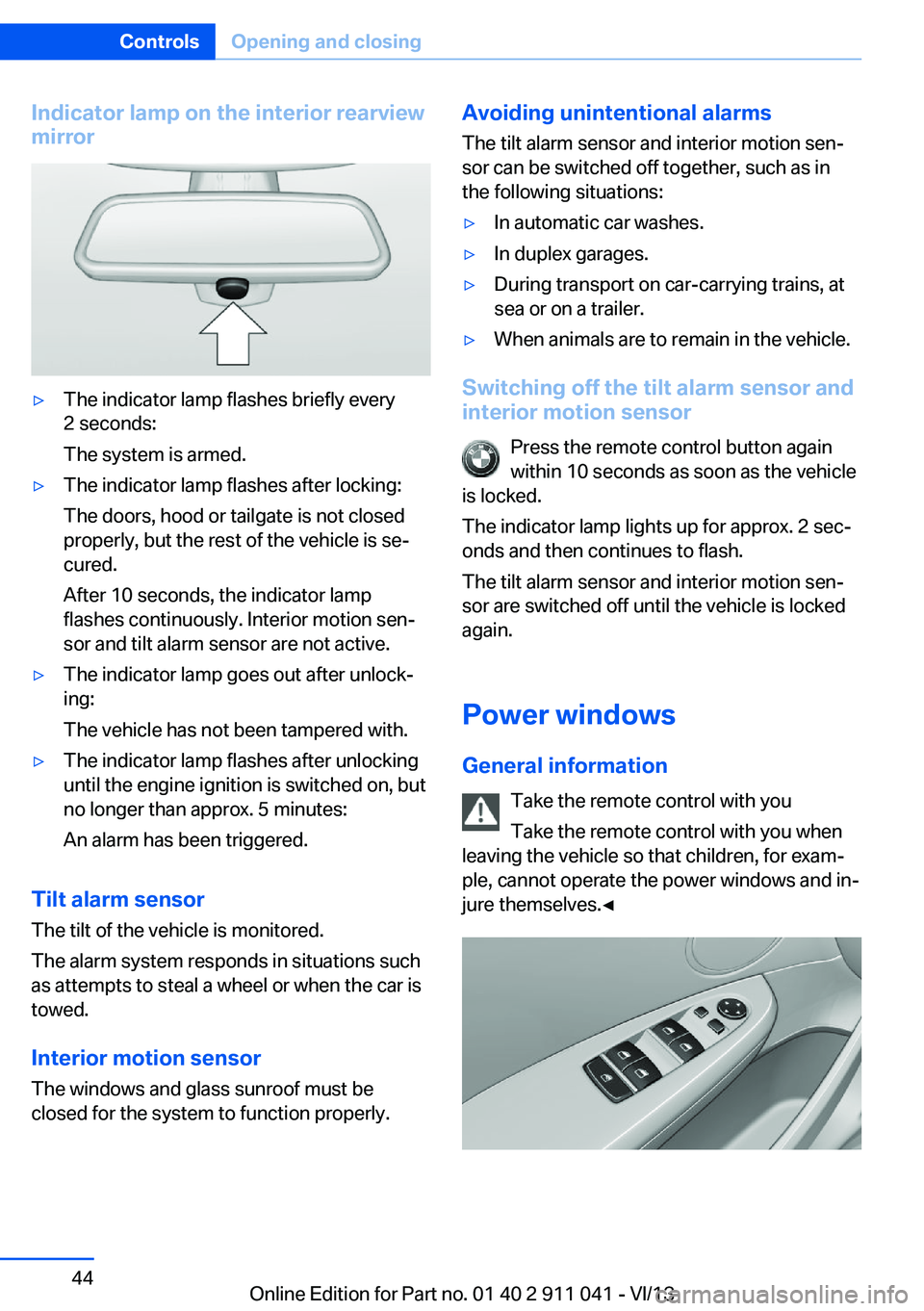
Indicator lamp on the interior rearview
mirror▷The indicator lamp flashes briefly every
2 seconds:
The system is armed.▷The indicator lamp flashes after locking:
The doors, hood or tailgate is not closed
properly, but the rest of the vehicle is se‐
cured.
After 10 seconds, the indicator lamp
flashes continuously. Interior motion sen‐
sor and tilt alarm sensor are not active.▷The indicator lamp goes out after unlock‐
ing:
The vehicle has not been tampered with.▷The indicator lamp flashes after unlocking
until the engine ignition is switched on, but
no longer than approx. 5 minutes:
An alarm has been triggered.
Tilt alarm sensor The tilt of the vehicle is monitored.
The alarm system responds in situations such
as attempts to steal a wheel or when the car is
towed.
Interior motion sensor The windows and glass sunroof must be
closed for the system to function properly.
Avoiding unintentional alarms
The tilt alarm sensor and interior motion sen‐
sor can be switched off together, such as in
the following situations:▷In automatic car washes.▷In duplex garages.▷During transport on car-carrying trains, at
sea or on a trailer.▷When animals are to remain in the vehicle.
Switching off the tilt alarm sensor and
interior motion sensor
Press the remote control button again
within 10 seconds as soon as the vehicle
is locked.
The indicator lamp lights up for approx. 2 sec‐
onds and then continues to flash.
The tilt alarm sensor and interior motion sen‐
sor are switched off until the vehicle is locked
again.
Power windows
General information Take the remote control with you
Take the remote control with you when
leaving the vehicle so that children, for exam‐
ple, cannot operate the power windows and in‐
jure themselves.◀
Seite 44ControlsOpening and closing44
Online Edition for Part no. 01 40 2 911 041 - VI/13
Page 54 of 208
Seat and mirror memory
General information
Two different driver's seat and exterior mirror
positions can be stored and retrieved for each
remote control. Settings for the backrest width
and lumbar support are not stored in memory.
Storing
1.Switch on the ignition.2.Set the desired position.3. Press the button. The LED in the
button lights up.4.Press the desired button 1 or 2. The LED
goes out.
If the M button is pressed accidentally:
Press the button again.
The LED goes out.
Calling up settings Do not retrieve the memory while driving
Do not retrieve the memory setting while
driving, as an unexpected movement of the
seat or steering wheel could result in an acci‐
dent.◀
Comfort function
1.Open the driver's door.2.Switch off the ignition.3.Briefly press the desired button 1 or 2.The corresponding seat position is performed
automatically.
The procedure stops when a switch for adjust‐
ing the seat or one of the buttons is pressed.
Safety mode1.Close the driver's door or switch on the ig‐
nition.2.Press and hold the desired button 1 or 2
until the adjustment procedure is com‐
pleted.
Calling up of a seat position
deactivated
After a brief period, the calling up of stored
seat positions is deactivated to save battery
power.
To reactivate calling up of a seat position:
▷Open or close the door or tailgate.▷Press a button on the remote control.▷Press the Start/Stop button.
Mirrors
Exterior mirrors
At a glance
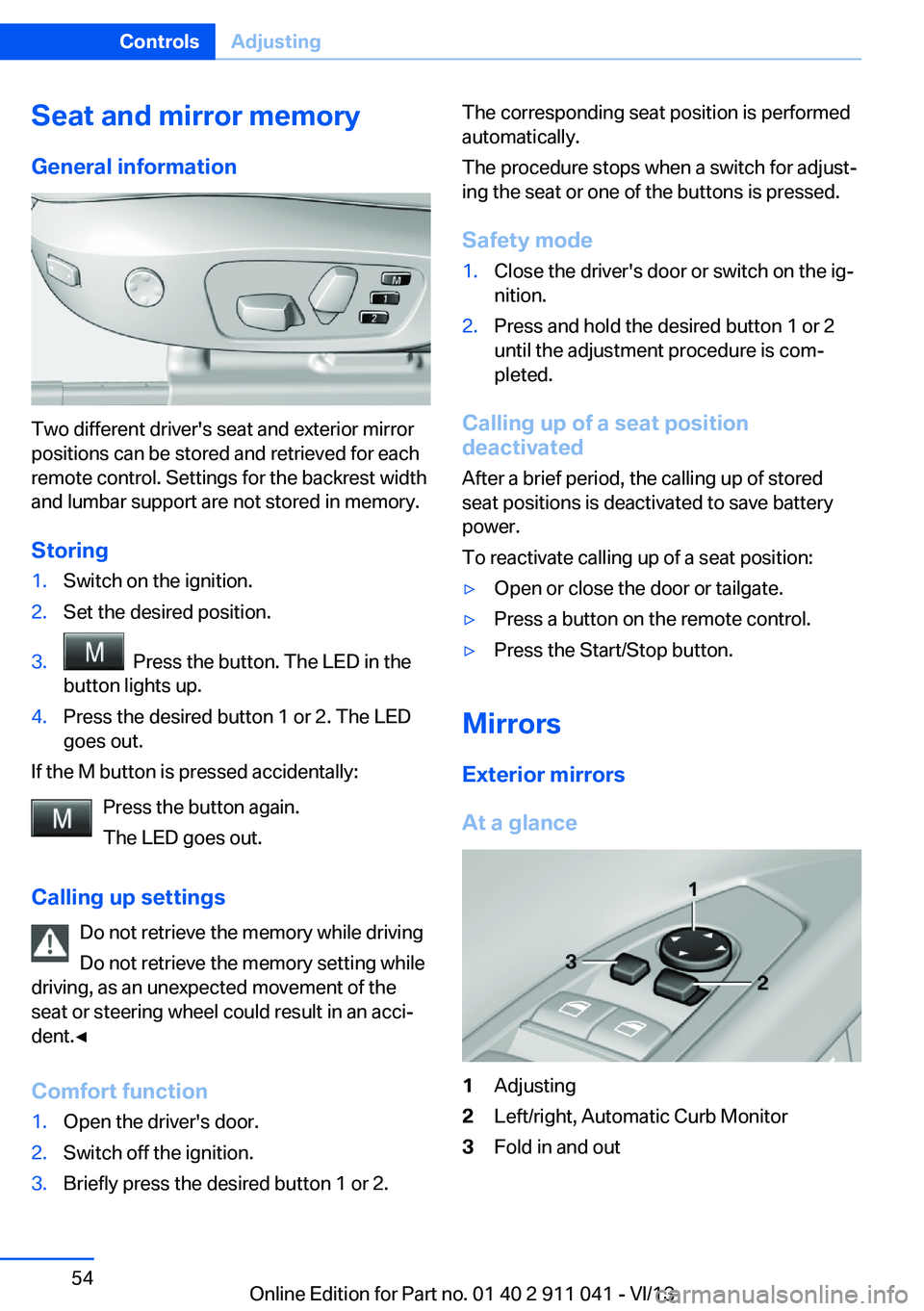
1Adjusting2Left/right, Automatic Curb Monitor3Fold in and outSeite 54ControlsAdjusting54
Online Edition for Part no. 01 40 2 911 041 - VI/13
Page 118 of 208
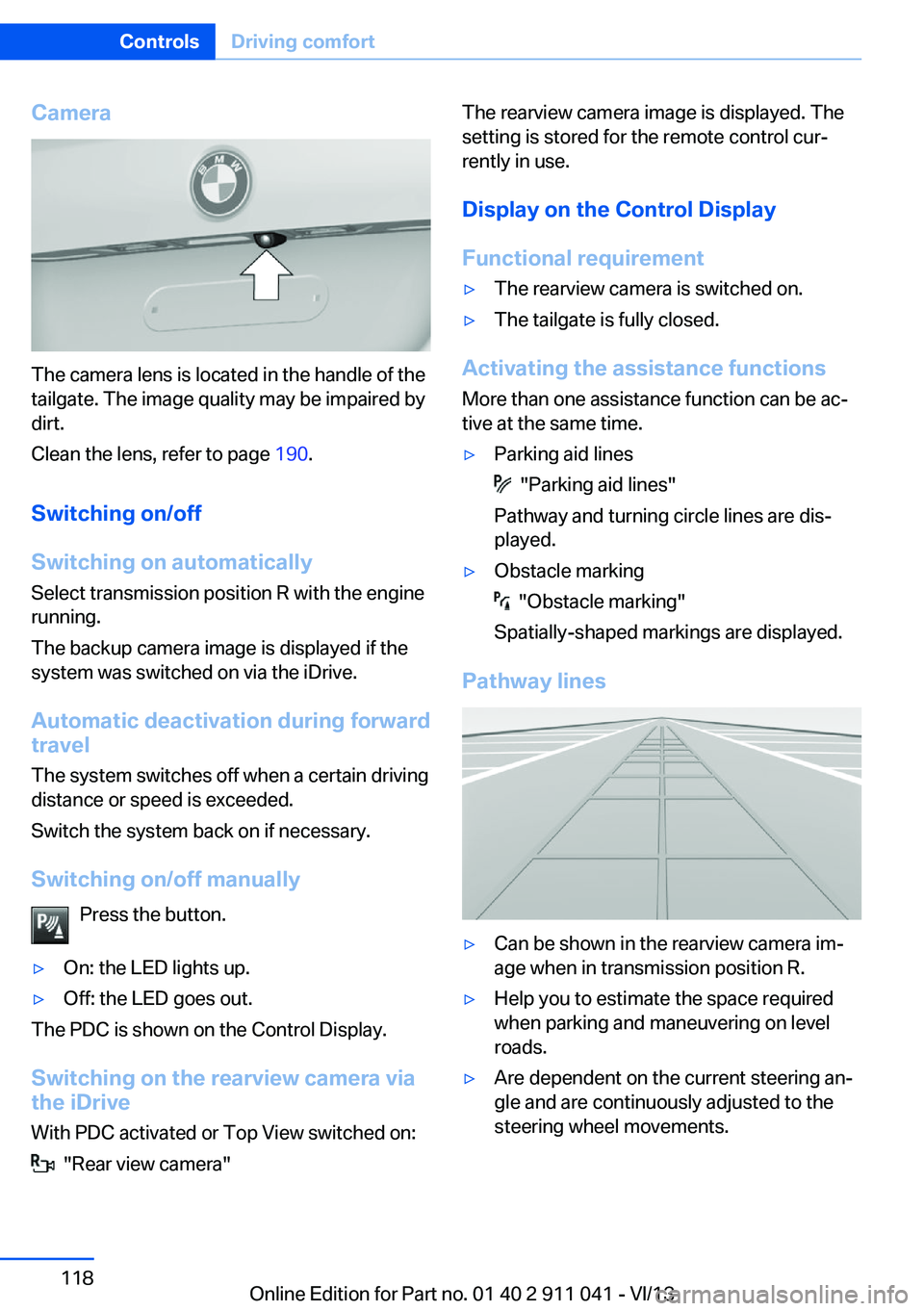
Camera
The camera lens is located in the handle of the
tailgate. The image quality may be impaired by
dirt.
Clean the lens, refer to page 190.
Switching on/off
Switching on automatically Select transmission position R with the engine
running.
The backup camera image is displayed if the
system was switched on via the iDrive.
Automatic deactivation during forward
travel
The system switches off when a certain driving
distance or speed is exceeded.
Switch the system back on if necessary.
Switching on/off manually Press the button.
▷On: the LED lights up.▷Off: the LED goes out.
The PDC is shown on the Control Display.
Switching on the rearview camera via
the iDrive
With PDC activated or Top View switched on:
"Rear view camera"
The rearview camera image is displayed. The
setting is stored for the remote control cur‐
rently in use.
Display on the Control Display
Functional requirement▷The rearview camera is switched on.▷The tailgate is fully closed.
Activating the assistance functions
More than one assistance function can be ac‐
tive at the same time.
▷Parking aid lines
"Parking aid lines"
Pathway and turning circle lines are dis‐
played.
▷Obstacle marking
"Obstacle marking"
Spatially-shaped markings are displayed.
Pathway lines
▷Can be shown in the rearview camera im‐
age when in transmission position R.▷Help you to estimate the space required
when parking and maneuvering on level
roads.▷Are dependent on the current steering an‐
gle and are continuously adjusted to the
steering wheel movements.Seite 118ControlsDriving comfort118
Online Edition for Part no. 01 40 2 911 041 - VI/13
Page 121 of 208
Switch the system back on if necessary.
Switching on/off manually Press the button.▷On: the LED lights up.▷Off: the LED goes out.
Top View is displayed.
Switching on the backup camera via
the iDrive
With Top View switched on:
"Rear view camera"
The backup camera image is displayed. The
setting is stored for the remote control cur‐
rently in use.
Display
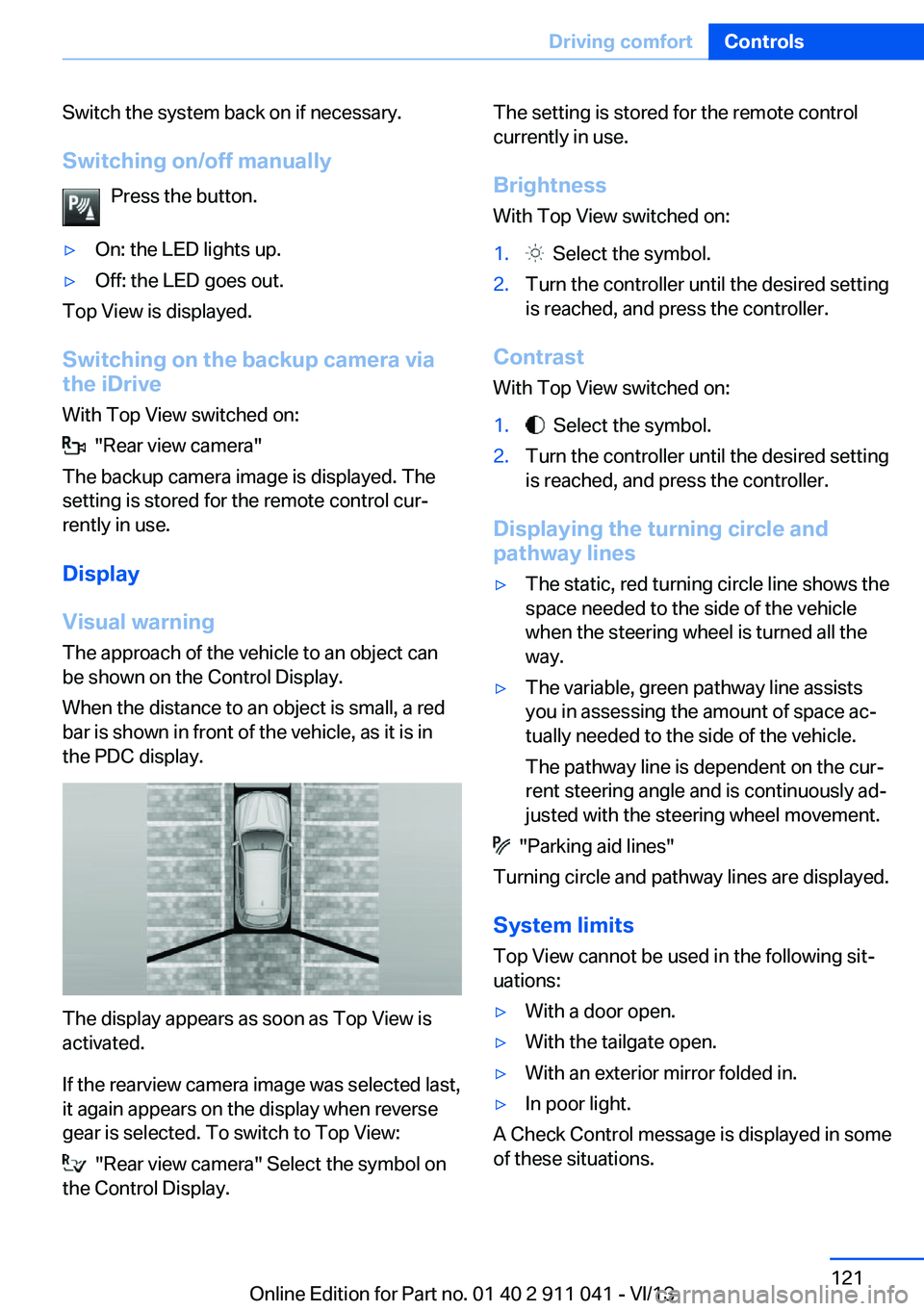
Visual warning The approach of the vehicle to an object can
be shown on the Control Display.
When the distance to an object is small, a red
bar is shown in front of the vehicle, as it is in
the PDC display.
The display appears as soon as Top View is
activated.
If the rearview camera image was selected last,
it again appears on the display when reverse
gear is selected. To switch to Top View:
"Rear view camera" Select the symbol on
the Control Display.
The setting is stored for the remote control
currently in use.
Brightness
With Top View switched on:1. Select the symbol.2.Turn the controller until the desired setting
is reached, and press the controller.
Contrast
With Top View switched on:
1. Select the symbol.2.Turn the controller until the desired setting
is reached, and press the controller.
Displaying the turning circle and
pathway lines
▷The static, red turning circle line shows the
space needed to the side of the vehicle
when the steering wheel is turned all the
way.▷The variable, green pathway line assists
you in assessing the amount of space ac‐
tually needed to the side of the vehicle.
The pathway line is dependent on the cur‐
rent steering angle and is continuously ad‐
justed with the steering wheel movement.
"Parking aid lines"
Turning circle and pathway lines are displayed.
System limits
Top View cannot be used in the following sit‐
uations:
▷With a door open.▷With the tailgate open.▷With an exterior mirror folded in.▷In poor light.
A Check Control message is displayed in some
of these situations.
Seite 121Driving comfortControls121
Online Edition for Part no. 01 40 2 911 041 - VI/13
Page 144 of 208
Things to remember when drivingVehicle equipment
All standard, country-specific and optional
equipment that is offered in the model series is
described in this chapter. Therefore, equip‐
ment is also described that is not available in a
vehicle, e. g., because of the selected optional
equipment or country variant. This also applies
for safety-related functions and systems.
Breaking-in period General information Moving parts need to be broken in to adjust to
each other.
The following instructions will help achieve a
long vehicle life and good economy.
Engine and differential Always obey the official speed limit.
Up to 1,200 miles/2,000 km
Do not exceed the maximum engine and road
speed:▷For gasoline engine 4,500 rpm and
100 mph/160 km/h.
Avoid full load or kickdown under all circum‐
stances.
From 1,200 miles/2,000 km The engine and vehicle speed can gradually be
increased.
Tires
Due to technical factors associated with their
manufacture, tires do not achieve their full
traction potential until after an initial breaking-
in period.
Drive conservatively for the first
200 miles/300 km.
Brake system
Brakes require an initial break-in period of ap‐
prox. 300 miles/500 km to achieve optimized
contact and wear patterns between brake
discs and brake pads. Drive moderately during
this break-in period.
Following part replacement
The same breaking in procedures should be
observed if any of the components mentioned
above have to be renewed in the course of the
vehicle's operating life.
General driving notes
Closing the tailgate Drive with the tailgate closed
Only drive with the tailgate closed; other‐
wise, in the event of an accident or braking and
evasive maneuvers, passengers and other road
users may be injured, and the vehicle may be
damaged. In addition, exhaust fumes may en‐
ter the passenger compartment.◀
If driving with the tailgate open cannot be avoided:▷Close all windows and the glass sunroof.▷Greatly increase the blower speed.▷Drive moderately.
Hot exhaust system
Hot exhaust system
High temperatures are generated in the
exhaust system.
Do not remove the heat shields installed and
never apply undercoating to them. Make sure
that flammable materials, e. g. hay, leaves,
grass, etc. do not come in contact with the hot
exhaust system during driving, while in idle po‐
Seite 144Driving tipsThings to remember when driving144
Online Edition for Part no. 01 40 2 911 041 - VI/13
Page 149 of 208
▷Lashing eyes on the rail system.▷Eyes on the cargo area wall.
The eyes are located on both sides of the
cargo area.
Securing cargo
▷Smaller and lighter items: secure with re‐
taining straps or with a cargo net or draw
straps.▷Larger and heavy objects: secure with
cargo straps.
Cargo straps, cargo netting, retaining
straps or draw straps on the lashing eyes in
the cargo area.
Securing cargo
Always position and secure the cargo as
described above; otherwise, it can endanger
the car's occupants if sudden braking or
swerving becomes necessary.
Heavy or hard objects should not be carried
loose inside the car; otherwise, they could be
thrown around as a result of hard braking, sud‐
den swerves, etc., and endanger the occu‐
pants.◀
Roof-mounted luggage rack
Note Installation only possible with roof rack.
Roof racks are available as special accessories.
Attachment to the rackFollow the installation instructions of the roof
rack.
Mounting
Be sure that adequate clearance is maintained for tilting and opening the glass sunroof.
Loading
Because roof racks raise the vehicle's center
of gravity when loaded, they have a major ef‐
fect on vehicle handling and steering re‐
sponse.
Therefore, note the following when loading
and driving:▷Do not exceed the approved roof/axle
loads and the approved gross vehicle
weight.▷Distribute the roof load uniformly.▷The roof load should not be too large in
area.▷Always place the heaviest pieces on the
bottom.▷Secure the roof luggage firmly, e.g., tie
with ratchet straps.▷Do not let objects project into the opening
path of the tailgate.▷Drive smoothly. Avoid sudden acceleration
and braking maneuvers. Take corners gen‐
tly.Seite 149LoadingDriving tips149
Online Edition for Part no. 01 40 2 911 041 - VI/13
Page 178 of 208
5.Turn the bulb bracket and remove it.6.Remove the bulb and replace it.7.Proceed in reverse order to insert the front
fog lamp. Note the guide rails in doing so.
Turn signal
Follow the general instructions on Lamps and
bulbs, refer to page 175.
The turn signals are located next to each low
beam in the engine compartment.
21-watt bulb, PY 21W.
1.Open the hood, refer to page 167.2.Unscrew the cap counterclockwise and re‐
move it carefully.
The bulb is attached to the cap.3.Turn the bulb clockwise to remove it.4.Insert the new bulb and attach the cover in
the reverse order.
Lateral turn signals
Follow the general instructions on Lamps and
bulbs, refer to page 175.
These lamps are made using LED technology.
Please contact your service center in the event
of a malfunction.
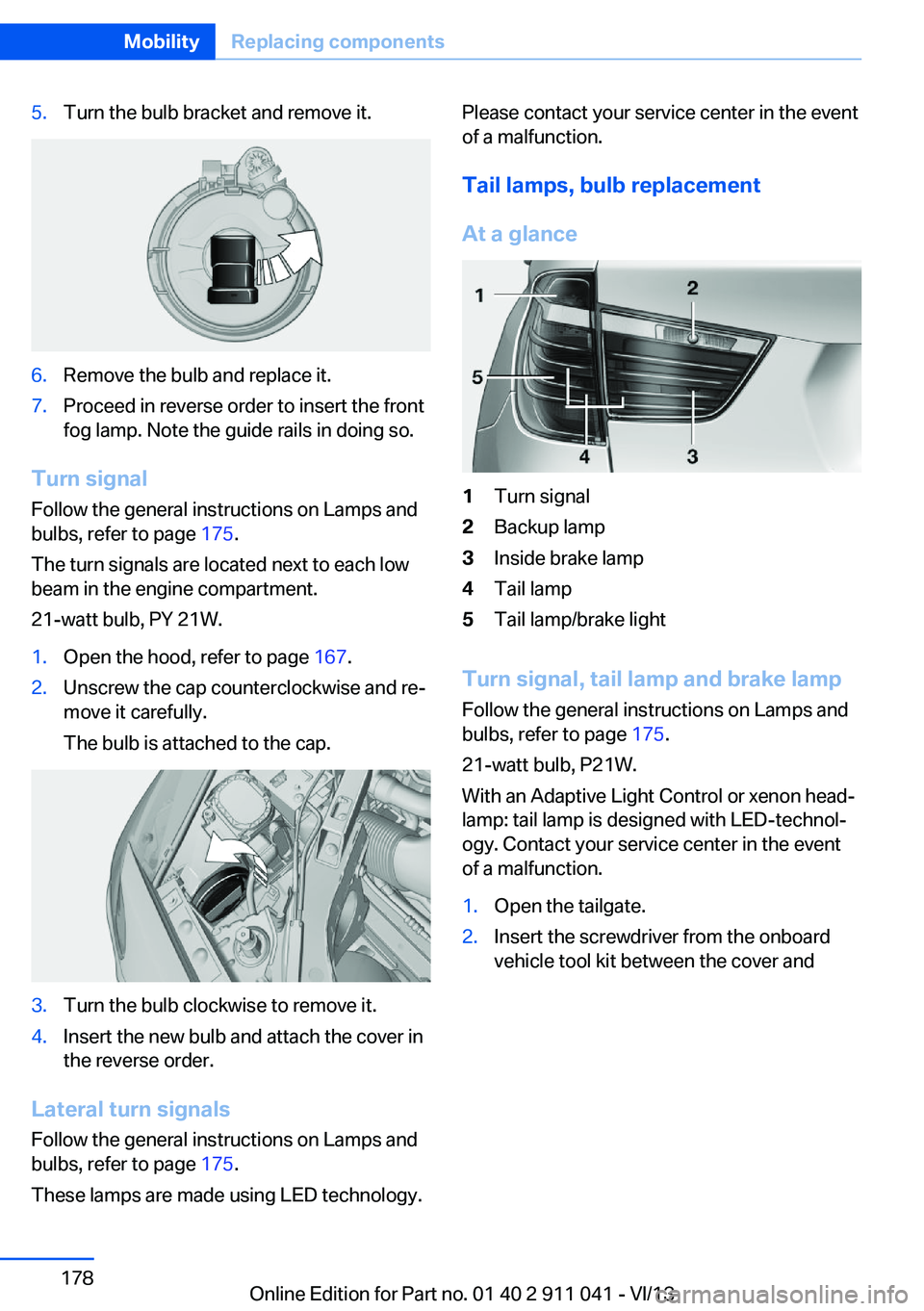
Tail lamps, bulb replacement
At a glance1Turn signal2Backup lamp3Inside brake lamp4Tail lamp5Tail lamp/brake light
Turn signal, tail lamp and brake lamp
Follow the general instructions on Lamps and
bulbs, refer to page 175.
21-watt bulb, P21W.
With an Adaptive Light Control or xenon head‐
lamp: tail lamp is designed with LED-technol‐
ogy. Contact your service center in the event
of a malfunction.
1.Open the tailgate.2.Insert the screwdriver from the onboard
vehicle tool kit between the cover andSeite 178MobilityReplacing components178
Online Edition for Part no. 01 40 2 911 041 - VI/13
Page 179 of 208
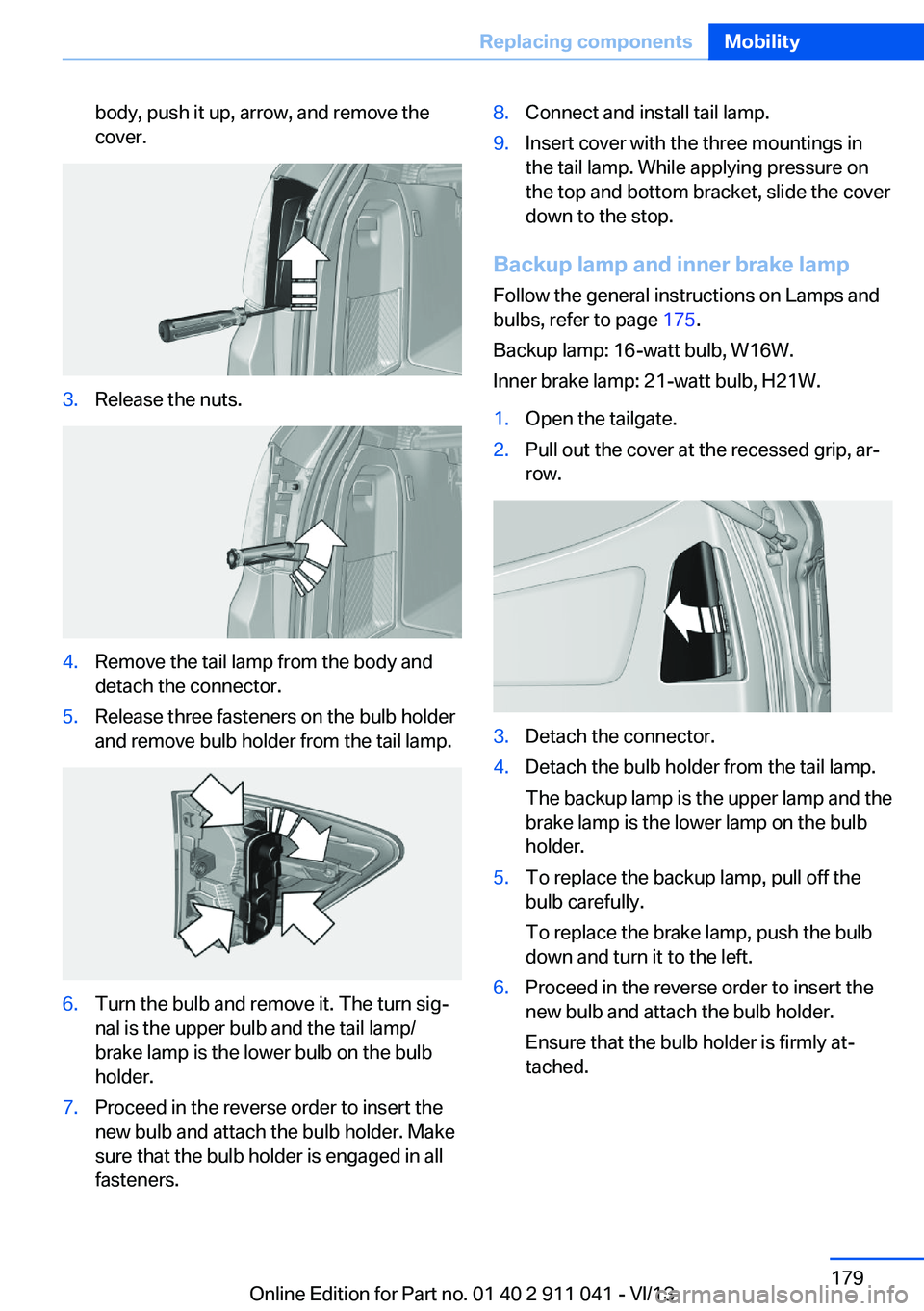
body, push it up, arrow, and remove the
cover.3.Release the nuts.4.Remove the tail lamp from the body and
detach the connector.5.Release three fasteners on the bulb holder
and remove bulb holder from the tail lamp.6.Turn the bulb and remove it. The turn sig‐
nal is the upper bulb and the tail lamp/
brake lamp is the lower bulb on the bulb
holder.7.Proceed in the reverse order to insert the
new bulb and attach the bulb holder. Make
sure that the bulb holder is engaged in all
fasteners.8.Connect and install tail lamp.9.Insert cover with the three mountings in
the tail lamp. While applying pressure on
the top and bottom bracket, slide the cover
down to the stop.
Backup lamp and inner brake lamp
Follow the general instructions on Lamps and
bulbs, refer to page 175.
Backup lamp: 16-watt bulb, W16W.
Inner brake lamp: 21-watt bulb, H21W.
1.Open the tailgate.2.Pull out the cover at the recessed grip, ar‐
row.3.Detach the connector.4.Detach the bulb holder from the tail lamp.
The backup lamp is the upper lamp and the
brake lamp is the lower lamp on the bulb
holder.5.To replace the backup lamp, pull off the
bulb carefully.
To replace the brake lamp, push the bulb
down and turn it to the left.6.Proceed in the reverse order to insert the
new bulb and attach the bulb holder.
Ensure that the bulb holder is firmly at‐
tached.Seite 179Replacing componentsMobility179
Online Edition for Part no. 01 40 2 911 041 - VI/13
Page 198 of 208
Everything from A to Z
IndexA ABS, Antilock Brake Sys‐ tem 107
Activated-charcoal filter 129
Adaptive brake lights, refer to Brake force display 105
Adaptive light control 90
Additives, oil 170
Adjustments, seats/head re‐ straints 48
After washing vehicle 188
Airbags 94
Airbags, indicator/warning light 95
Air circulation, refer to Recir‐ culated-air mode 125, 128
Air, dehumidifying, refer to Cooling function 125
Air distribution, manual 124, 127
Air drying, refer to Cooling function 128
Air flow, automatic climate control 125, 128
Air pressure, tires 159
Air vents, refer to Ventila‐ tion 129
Alarm system 43
Alarm, unintentional 44
All around the center con‐ sole 14
All around the headliner 15
All around the steering wheel 12
ALL program, automatic cli‐ mate control 128
All-season tires, refer to Win‐ ter tires 165
All-wheel-drive 108 Alternating-code hand-held
transmitter 132
Alternative oil types 170
Ambient light 93
Antifreeze, washer fluid 70
Antilock Brake System, ABS 107
Anti-slip control, refer to DSC 107
Approved engine oils 170
Armrest, refer to Center arm‐ rest 139
Arrival time 86
Assistance, Roadside Assis‐ tance 183
AUTO H button, refer to Au‐ tomatic Hold 66
AUTO intensity 127
Automatic car wash 187
Automatic climate con‐ trol 124
Automatic climate control with enhanced features 126
Automatic Curb Monitor 55
Automatic deactivation, front passenger airbags 96
Automatic headlamp con‐ trol 90
Automatic Hold 66
Automatic locking 42
Automatic recirculated-air control 128
Automatic tailgate 39
Automatic transmission with Steptronic 71
AUTO program, automatic cli‐ mate control 127
AUTO program, climate con‐ trol 125
AUTO program, intensity 127
Auto Start/Stop function 63 Average fuel consumption 86
Average speed 86
Axle loads, weights 195
B Backrest curvature, refer to Lumbar support 50
Backrest, width 50
Backup camera 117
Bad road trips 146
Band-aids, refer to First aid kit 183
Bar for tow-starting/ towing 185
Battery replacement, vehicle battery 180
Battery replacement, vehicle remote control 32
Battery, vehicle 180
Belts, safety belts 51
Beverage holder, cu‐ pholder 139
Blinds, sun protection 46
BMW Assist, see user's manual for Navigation, En‐
tertainment and Communi‐
cation
BMW Homepage 6
BMW Internet page 6
BMW maintenance sys‐ tem 172
Bonus range, ECO PRO 152
Bottle holder, refer to Cu‐ pholder 139
Brake assistant 107
Brake discs, breaking in 144
Brake force display 105
Brake lamps, brake force dis‐ play 105
Brake lights, adaptive 105 Seite 198ReferenceEverything from A to Z198
Online Edition for Part no. 01 40 2 911 041 - VI/13