Compartment BMW X5 2009 E70 Owner's Guide
[x] Cancel search | Manufacturer: BMW, Model Year: 2009, Model line: X5, Model: BMW X5 2009 E70Pages: 317, PDF Size: 9.56 MB
Page 261 of 317
Mobility
259Reference
At a glance
Controls
Driving tips
Communications
Navigation
Entertainment
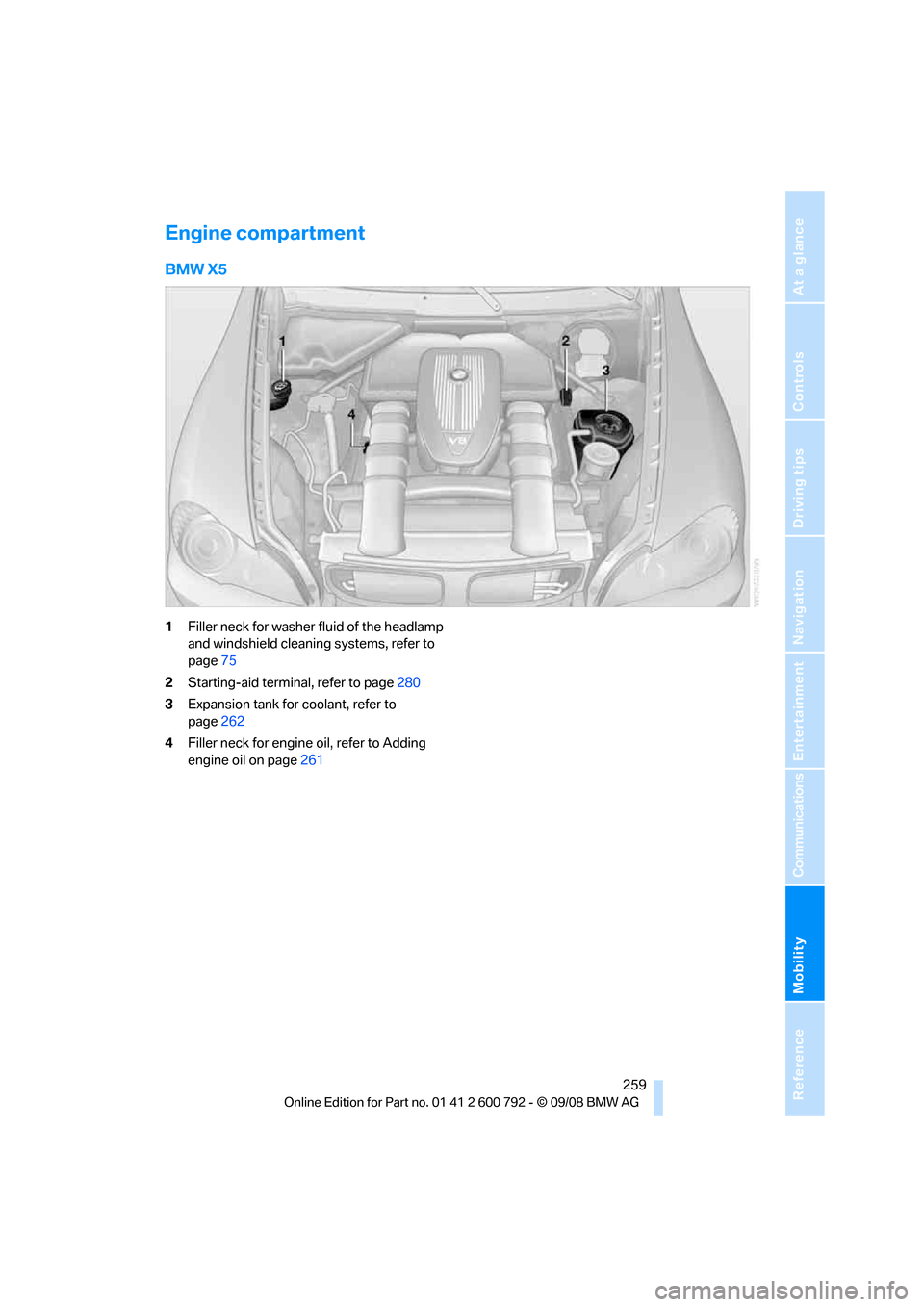
Engine compartment
BMW X5
1Filler neck for washer fluid of the headlamp
and windshield cleaning systems, refer to
page 75
2 Starting-aid terminal, refer to page 280
3 Expansion tank for coolant, refer to
page 262
4 Filler neck for engine oil, refer to Adding
engine oil on page 261
Page 279 of 317
Mobility
277Reference
At a glance
Controls
Driving tips
Communications
Navigation
Entertainment
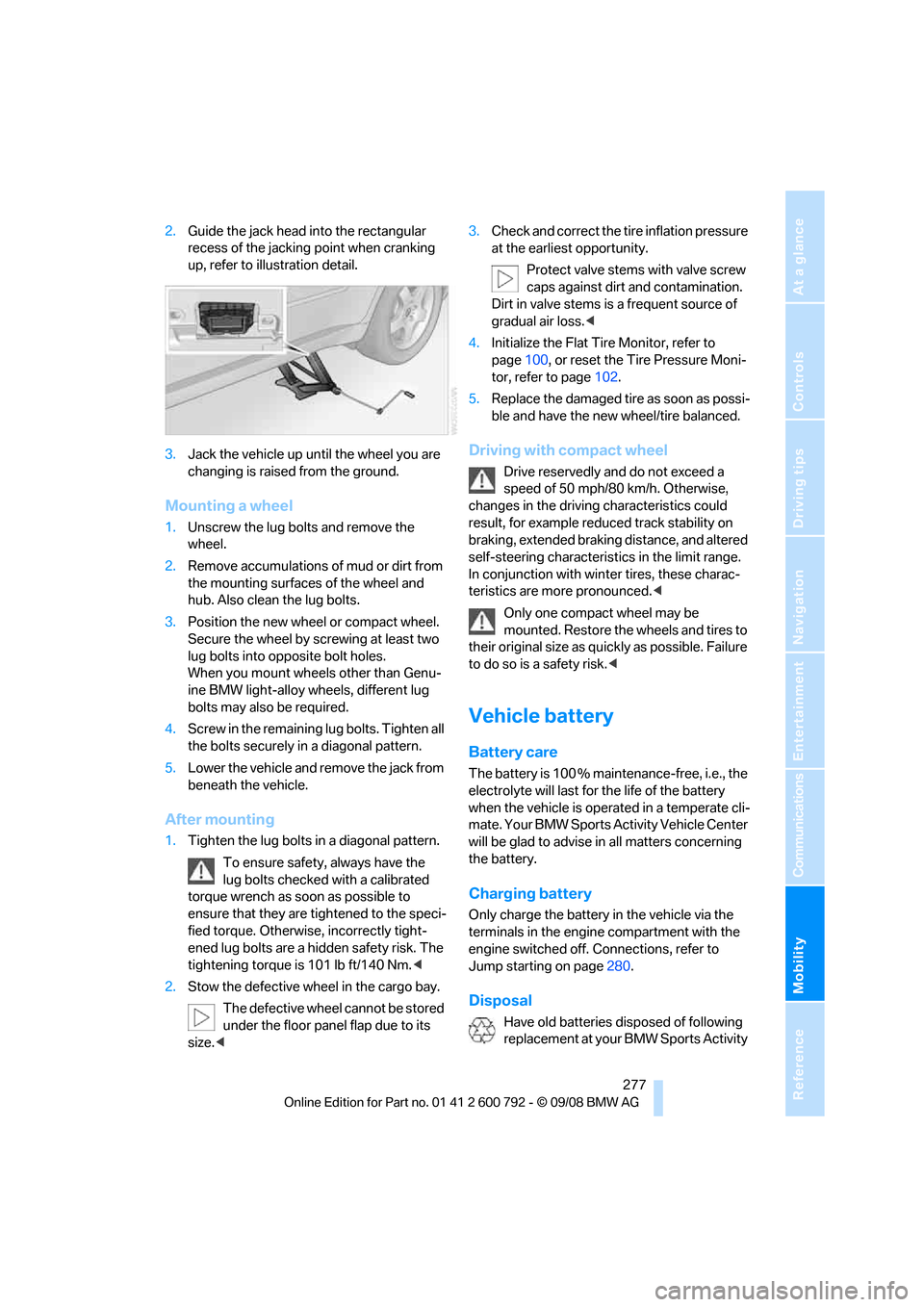
2.Guide the jack head into the rectangular
recess of the jacking point when cranking
up, refer to illustration detail.
3. Jack the vehicle up until the wheel you are
changing is raised from the ground.
Mounting a wheel
1.Unscrew the lug bolts and remove the
wheel.
2. Remove accumulations of mud or dirt from
the mounting surfaces of the wheel and
hub. Also clean the lug bolts.
3. Position the new wheel or compact wheel.
Secure the wheel by sc rewing at least two
lug bolts into opposite bolt holes.
When you mount wheels other than Genu-
ine BMW light-alloy wheels, different lug
bolts may also be required.
4. Screw in the remaining lug bolts. Tighten all
the bolts securely in a diagonal pattern.
5. Lower the vehicle and remove the jack from
beneath the vehicle.
After mounting
1.Tighten the lug bolts in a diagonal pattern.
To ensure safety, always have the
lug bolts checked with a calibrated
torque wrench as soon as possible to
ensure that they are tightened to the speci-
fied torque. Otherwis e, incorrectly tight-
ened lug bolts are a hidden safety risk. The
tightening torque is 101 lb ft/140 Nm. <
2. Stow the defective wheel in the cargo bay.
The defective wheel cannot be stored
under the floor panel flap due to its
size. < 3.
Check and correct the ti re inflation pressure
at the earliest opportunity.
Protect valve stems with valve screw
caps against dirt and contamination.
Dirt in valve stems is a frequent source of
gradual air loss. <
4. Initialize the Flat Tire Monitor, refer to
page 100, or reset the Tire Pressure Moni-
tor, refer to page 102.
5. Replace the damaged tire as soon as possi-
ble and have the new wheel/tire balanced.
Driving with compact wheel
Drive reservedly and do not exceed a
speed of 50 mph/80 km/h. Otherwise,
changes in the driving characteristics could
result, for example reduced track stability on
braking, extended brakin g distance, and altered
self-steering characterist ics in the limit range.
In conjunction with wint er tires, these charac-
teristics are more pronounced. <
Only one compact wheel may be
mounted. Restore the wheels and tires to
their original size as quickly as possible. Failure
to do so is a safety risk. <
Vehicle battery
Battery care
The battery is 100 % main tenance-free, i.e., the
electrolyte will last for the life of the battery
when the vehicle is operated in a temperate cli-
mate. Your BMW Sports Activity Vehicle Center
will be glad to advise in all matters concerning
the battery.
Charging battery
Only charge the battery in the vehicle via the
terminals in the engine compartment with the
engine switched off. Connections, refer to
Jump starting on page 280.
Disposal
Have old batteries disposed of following
replacement at your BMW Sports Activity
Page 282 of 317
Giving and receiving assistance
280
replace the contents conc
erned in good time if
necessary.
BMW X5
BMW X6
The first aid kit is stored in the cargo bay,
behind the left side panel.
Roadside Assistance*
The BMW Roadside Assistance offers you
assistance in the event of a breakdown around
the clock, including on weekends and public
holidays.
The phone numbers of the Roadside Assis-
tance in your home country can be found in the
Contact brochure.
With BMW Assist or BMW TeleServices, you
can contact BMW Roadside Assistance for
assistance in the event of a breakdown directly
via iDrive, refer to page 236.
Jump starting
When your battery is discharged, you can use
two jumper cables to start your BMW with
power from the battery in a second vehicle. You can also use the same
method to help start
another vehicle. Use only jumper cables with
fully-insulated clamp handles.
To avoid the risk of po tentially fatal injury,
always avoid all contact with electrical
components while the engine is running. Care-
fully adhere to the following sequence, both to
prevent damage to one or both vehicles, and to
guard against possible personal injuries.<
Preparation
1. Check whether the battery of the other
vehicle has a voltage of 12 Volts and
approximately the same capacitance in Ah.
This information can be found on the bat-
tery.
2. Switch off the engine of the assisting vehi-
cle.
3. Switch off any electrical systems and com-
ponents in both vehicles.
There must not be any contact between
the bodies of the tw o vehicles, otherwise
there is a danger of shorting. <
Connecting jumper cables
To avoid personal injury from sparks, fol-
low this sequence when connecting
jumper cables. <
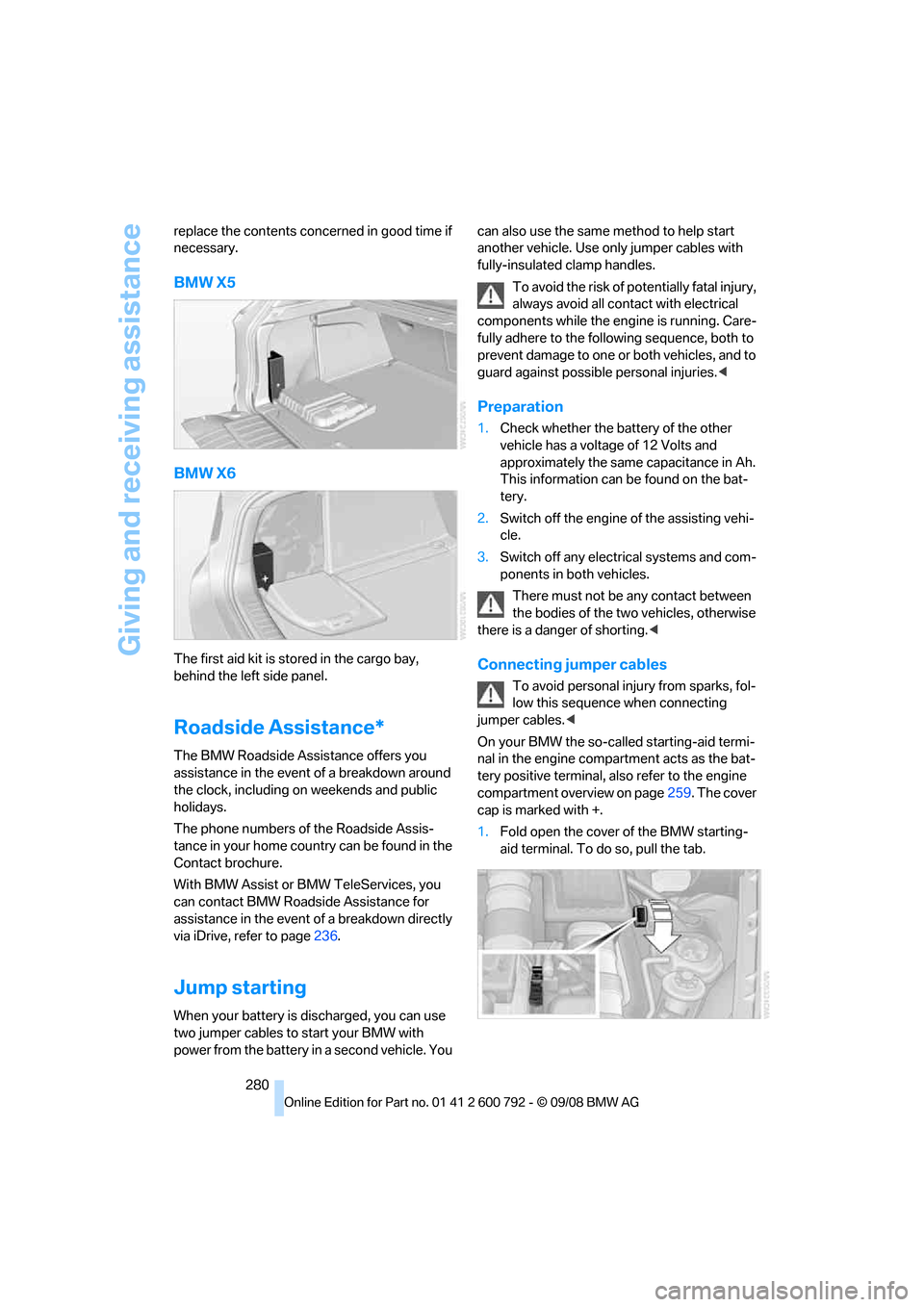
On your BMW the so-called starting-aid termi-
nal in the engine compar tment acts as the bat-
tery positive terminal, al so refer to the engine
compartment overview on page 259. The cover
cap is marked with +.
1. Fold open the cover of the BMW starting-
aid terminal. To do so, pull the tab.
Page 301 of 317
Reference 299
At a glance
Controls
Driving tips
Communications
Navigation
Entertainment
Mobility
Cargo bay
– capacity289
– emergency operation, refer to Opening manually 33,36
– expanding 132
– opening/closing, refer to Liftgate 33,35
– opening/closing, refer to
Tailgate 35
– opening from inside 33,36
– opening from outside 33,36
– opening with remote control 30
Cargo bay cover, refer to Roll- up cover 130
Caring for the vehicle
finish 266
Car key, refer to Keys/remote control 28
Car phone 220
– installation location, refer to Center armrest, front 127
– refer to Mobile phone 220
– refer to separate operating instructions
Car radio, refer to Radio 178
Car wash 140,265
– before driving in 66
– with comfort access 41
Catalytic converter, refer to Hot exhaust system 139
"Categories" in Satellite radio 185
CBC Cornering Brake
Control 96
CBS Condition Based Service 263
"CD" 175,187
– for DVD system in rear 206
CD, refer to Playing audio
tracks, DVD system in
rear 210
CD/DVD player, DVD system
in rear 205 CD changer
187
– compressed audio files 187
– controls 174
– fast forward/reverse 190
– random sequence 190
– repeating a track 189
– sampling tracks 189
– selecting a CD 187
– selecting a track 188
– switching on/off 174
– ton
e control 175
– volume 175
CD player 187
– compressed audio files 187
– controls 174
– fast forward/reverse 190
– random sequence 190
– repeating a track 189
– sampling tracks 189
– selecting a track 188
– switching on/off 174
– tone control 175
– volume 175
Cell phone
– refer to Mobile phone
Center armrest
– front 127
– rear 130
Center brake lamp 272,275
Center console 14
Central locking system 29
– comfort access 39
– from inside vehicle 32
Changes, technical
– refer to For your own safety 5
– refer to Parts and
accessories 6
Changing gears using shift paddles 71
Changing language on Control Display 90
Changing tires 256
Changing units of measure on Control Display 89
Changing wheels 275
Check Control 85
"Check Control messages" 86 Checking the air pressure,
refer to Tire inflation
pressure 249
Children, transporting 61
Child restraint devices 61
Child restraint fixing system LATCH 62
Child restraint systems 61
Child-safety locks 64
Child seats 61
Chime, refer to Check
Control 85
Cigarette lighter, refer to
Lighter 129
Cleaning your BMW, refer to Care 265
"Climate" 56
Clock 78
– 12h/24h mode 89
– setting tim
e 88
Closing
– from inside 32
– using remote control 29
Closing fuel filler cap 244
Clothes hooks 127
Cockpit 10
Cold start, refer to Starting engine 66
"Color" in DVD system in rear 208
Comfort access 39
– observe in car wash 41
– replacing battery 41
Comfort area, refer to Around
the center console 14
Comfort start, refer to Starting engine 66
"Communication" 226 ,236, 237, 238,239
Compact Disc
– refer to CD changer 187
– refer to CD player 187
Compact wheel
– inflation pressure 251
– wheel change 275
Compartment for remote
control, refer to Ignition
lock 65
Page 302 of 317
Everything from A to Z
300
Compartments, refer to
Storage compartments 127
Compass, digital 124
Computer 80
– displays in instrument
panel 80
– displays on Control Display 80
– trip computer 81
"Concierge" 239
Concierge service 239
Condition Based Service CBS 263
"Confirmation" 31
Connecting car vacuum cleaner, refer to Connecting
electrical devices 129
Connecting headphones 205
Consumption, refer to
Average fuel
consumption 80
Consumption indicator,
energy control 79
Consumption statistics, refer to Average fuel
consumption 80
"Contrast"
– DVD changer 196
– DVD system in rear 208
Control Center, refer to iDrive 16
Control Display, refer to iDrive 16
– setting brightness 89
Controller, refer to iDrive 16
Controls
– DVD changer 193
– DVD system in rear 204
– refer to Cockpit 10
Convenience operation
– glass sunroof 30,32
– glass sunroof with comfort access 40
– windows 30,32
– windows with comfort access 40
– with comfort access 40Coolant
262
– checking level 262
– temperature 79
Cooling, maximum 117
Cornering Brake Control
CBC 96
Courtesy lamps, refer to Interior lamps 113
Cradle for telephone or mobile phone 127
Cruise control 75
Cruising range 80
Cup holders 127
Curb weight, refer to Wei
ghts 289
"Current position" 169
Current position
– displaying 169
– entering 158
– storing 158
"Customer Relations" 230,238
Cylinders, refer to Engine data 286
D
Data 286
– capacities 290
– dimensions 287
– engine 286
– technical data 286
– weights 289
"Date" 89
Date 78
– display format 89
– retrieving 78
– setting 89
"Date format" 89
Daytime driving lamps 111
"Deactivated" 51
Defrosting windows 116
Defrosting windows and
removing condensation 116
Defrost position, refer to Defrosting windows 116
"Delete all numbers" on the mobile phone 229 "Delete data" for
navigation 159
"Delete" for mobile phone 229
Destination address
– deleting 159
– entering 151,153
Destination for navigation
– destination list 157
– entering 150
– selecting from address
book 159
– selecting using
information 156
– selecting using voice 153
– storing 158
Destination guidance 162
– canceling voice instructions 60
– changing specified route 160
– displaying route 163
– distance and arrival 162
– ending/continuing 162
– starting 162
– voice instructions 165
– volume of voice instructions 166
Destination list for navigation system 157
Destinations recently driven
to 157
"Details"
– DVD system in the rear 212
– in audio mode 202
"Dial" for mobile phone 227
"Dial number" 227
"
Diamond button" 59
Diesel exhaust fluid
– at low temperatures 246
– at minimum 246
– refilling yourself 247
Diesel particulate filter 139
Digital clock 78
Digital compass 124
Digital radio, refer to High
Definition Radio 181
Page 304 of 317
Everything from A to Z
302
Dynamic Performance
Control 97
"Dynamic route" in navigation 161
Dynamic Stability Control
DSC 96
Dynamic Traction Control DTC 97
E
Easy entry/exit 58
Eject button, refer to Buttons
on the CD player 174
Electrical malfunction
– automatic transmission with
Steptronic 72
– door lock 32
– driver's door 32
– fuel filler door 244
– glass sunroof, electric 46
– liftgate 33
– panorama glass sunroof 44
– parking brake 69
Electric seat 49
Electronic brake-force distribution 96
Electronic oil level check 260
Emergency operation, refer to Manual operation
– door lock 32
– driver's door 32
– fuel filler door 244
– liftgate 33
– transmission lock, automatic transmission 72
Emergency request 279
Emergency services, refer to Roadside Assistance 280
"Enabled services" 241
"Enabled TeleServices" 238
"End call" 228 Engine
– breaking-in
138
– data 286
– oil temperature 79
– overheated, refer to Coolant
temperature 79
– speed 286
– starting 66
– starting, with comfort access 40
– switching off 66
Engine compartment 259
Engine coolant 262
Engine oil
– adding 261
– additives, refer to Approved
engine oils 262
– approved engine oil 262
– checking oil level 260
– electronic oil level check 260
– temperature 79
Engine oil temperature 79
Engine output, refer to Engine data 286
Engine overheating, refer to
Coolant temperature 79
Engine speed 286
Engine starting, refer to
Starting engine 66
E
ntering country of destination 151
Entering destination 151
Entering house number or intersection 152
Entering intersection 152
Entering street 152
"Entertainment" 174
Entertainment sound output on/off 175
"Equalizer", refer to Tone
control 177
Equalizer, refer to Tone control 177
"ESN" 184
ESP Electronic Stability Program, refer to DSC
Dynamic Stability
Control 96 Event Data Recorders
264
Exhaust system, refer to Hot
exhaust system 139
Exterior mirrors 57
– adjusting 57
– automatic dimming feature 58
– automatic heating 58
– folding in and out 57
– tilting down passenger-side exterior mirror 58
External audio device 127
– refer to AUX-In
connection 200
Eye for tow-starting and towing, refer to Tow
fitting 281
F
Fader, refer to Tone
control 176
Failure messages, refer to Check Control 85
False alarm, refer to Avoiding
unintentional alarms 39
Fastening safety belts, refer to Safety belts 54
– warning lamp 55
Fastest route for navigation 160
Fast forward
– CD changer 190
– CD player 190
– DVD changer 195
"Fast route" in navigation 160
Fault displays, refer to Check
Control 85
Filler neck for washer fluid 75
First aid, refer to First-aid
kit 279
First-aid kit 279
Fixing system, adaptive 133
Flashing during locking/ unlocking, refer to Setting
confirmation signals 31
Page 305 of 317
Reference 303
At a glance
Controls
Driving tips
Communications
Navigation
Entertainment
Mobility
Flat tire
– changing wheels275
– compact wheel 275
– Flat Tire Monitor 100
– run-flat tires 101,103, 256
– TPM Tire Pressure Monitor 101
Flat Tire Monitor FTM 100
Fluid reservoir, refer to Filler neck for washer fluid 75
"FM", reception
range 175,178
FM, waveband 178
Fog lamps 112
– indicator lamp 13,112
Folding display screen open/
closed, DVD system in
rear 204
Folding rear seat backrest 132
Footbrake, refer to Braking safely 140
Footwell lamps 113
For your own safety 5
4-wheel drive system, refer to xDrive 97
Front airbags 105
Front passenger airbags 105
– deactivating 106
– refer to Exception of front passenger seat 61
Front seat adjustment 49
FTM Flat Tire Monitor 100
– false alarms 100
– indicating a flat tire 101
– initializing the system 100
– snow chains 257
– system limits 100
– warning lamp 101
Fuel 245
– capacity 290
– display 80
– high-quality brands 245
– quality 245
– saving 138
– specifications 245
Fuel clock, refer to Fuel
gauge 80 Fuel consumption display
– computer, average fuel
consumption 80
Fuel display, refer to Fuel gauge 80
Fuel filler door 244
– closing 24
4
– opening 244
– releasing manually 244
Fuses 278
G
Garage door opener, refer to
Integrated universal remote
control 123
Gasoline, refer to Required fuel 245
Gasoline display, refer to Fuel
gauge 80
Gearshifts, automatic transmission with
Steptronic 71
General driving notes 138,139
Glass sunroof
– convenience operation from outside 32
– convenience operation with comfort access 40
– remote control 30
Glass sunroof, electric 45
– moving manually 46
– opening, closing 45
– power interruption 46
– raising 45
Glove compartment 126
– lighting 126
GPS navigation, refer to Navigation system 148
Grills, refer to Ventilation 118
Grills of the automatic climate control 114
Gross vehicle weight, refer to Weights 289
H
Handbrake, refer to Parking
brake 67
Hands-free system, refer to
Microphone 14
Hand washing 266
Have diesel exhaust fluid
refilled 246
Hazard warning flashers 15
HDC Hill Descent Control 98
"HD radio" 181
HD radio, refer to High
Definition Radio 181
Head airbags 105
Headlamp control,
automatic 110
Headlamp flasher 73
Headlamps 110
– cleaning, refer to Washer/ wiper system 74
– replacing bulbs 269
Head Light, refer to Adaptive Head Light 112
Head restraints 52
– sitting safely 48
"Head-Up Display" 108
Head-Up Display 107
Heated
– mirrors 58
– rear window 116
– seats 55,56
– steering wheel 59
Heating 114
– exterior mirrors 58
– interior 114
– rear window 116
– residual heat 118
– seats 55,56
– steering wheel 59
Heating with engine switched off, refer to Residual
heat 118
Heavy cargo, refer to Securing cargo 143
Height, refer to
Dimensions 287
Page 307 of 317
Reference 305
At a glance
Controls
Driving tips
Communications
Navigation
Entertainment
Mobility
Interior rearview mirror58
– automatic dimming
feature 58
– compass 124
Intermittent mode of the
wipers 74
J
Jacking points 276
Joystick
– refer to iDrive 16
– refer to Selector lever,
selecting transmission
positions 70
Jump starting 280
K
Keyless-Go, refer to Comfort
access 39
Keyless opening and closing,
refer to Comfort access 39
Key Memory, refer to Personal Profile 28
"Keypad" 230
Keys 28
– key-related settings, refer to
Personal Profile 28
Kick-down, automatic transmission with
Steptronic 71
Knock control 245
L
Lamps, refer to Parking lamps/
low beams 110
Lamps and bulbs 269
"Language / Units" 89,90
– for navigation 149
"Language" for DVD system in rear 208,209
"Languages" 90
– for navigation 149,165
Lashing eyes, refer to
Securing cargo 143
Last destinations, refer to Destination list 157 "Last seat pos."
51
LATCH child restraint fixing
system 62
Leather care 267
LEDs light-emitting
diodes 270
Length, refer to Dimensions 287
License plate lamp, replacing bulbs 272,275
Liftgate 33,35
– adjusting opening height 34,36, 37
– automatic operation 34,37
– closing 34,37
– locking and unlocking from
inside 32
– opening from inside 33,36
– opening from outside 33,36
– opening manually 33,36
Light-emitting diodes LEDs 270
Lighter 129
Lighter socket 129
"Lighting" 73,111
Lighting
– instruments 113
– lamps and bulbs 269
– of the vehicle, refer to Lamps 110
Light switch 110
"Limit" 87
Load 141
Loadin
g141
– securing cargo 143
– stowing cargo 142
– vehicle 141
Load securing equipment, refer to Securing cargo 143
"Lock after driving" 33
Lock buttons in the doors, refer to Locking 33
Locking
– from inside 32
– setting confirmation signals 31
– using remote control 29
– without key, refer to Comfort access 39 Locking and unlocking doors
– from inside
32
– setting confirmation signals 31
Locking without key, refer to
Comfort access 39
Low beams 110
– automatic 110
Lower back support, refer to Lumbar support 50
Lows, refer to Treble and
bass 175
Lug bolts 276
– tightening torque, refer to After mounting 277
– wrench 276
Luggage compartment capacity, refer to Cargo bay
capacity 289
Luggage rack, refer to Roof- mounted luggage rack 143
Lumbar support 50
M
M+S tires, refer to Winter
tires 257
"Main menu" for DVD system
in rear 209
Maintenance
– refer to Service and
Warranty Information
Booklet for US models 263
– refer to Service
requirements 82
– refer to Warranty and Service Guide Booklet for
Canadian models 263
Maintenance system 263
Malfunction
– door lock 32
– driver's door 32
– fuel filler door 244
– glass sunroof, electric 46
– liftgate 33
– panorama glass sunroof 44
– parking brake 69
Page 313 of 317
Reference 311
At a glance
Controls
Driving tips
Communications
Navigation
Entertainment
Mobility
Special oils, refer to Approved engine oils 262
Specified oil grades, refer to Approved engine oils 262
Speed
– with compact wheel 277
– with winter tires 257
Speed-dependent
volume 176
Speed limit warning, refer to Speed limit 87
Speedometer 12
"Speed volume", refer to Tone
control 176
Sport program, automatic transmission with
Steptronic 71
Stability control, refer to Driving stability control
systems 96
"Standard" for DVD system in rear 209,216
"Star button" 59
Star button 59
Start/Stop button 65
"Start" for stopwatch 87
Starting, refer to Starting engine 66
Starting assistance, refer to Jump starting 280
Starting assistant 99
Starting difficulties, jump starting 280
Starting off on slopes, refer to
Starting assistant 99
Start menu, iDrive 17
"Start service" 236
– with BMW Assist 239
"State / Province" for destination entry 151
"State inspection" 84
Station, refer to Radio 178
Status of this Owner's Manual
at time of printing 5
Steam cleaners 266 Steering wheel
– adjusting
58
– automatic adjustment, refer to Steering wheel
memory 50
– buttons on steering wheel 11
– easy entry/exit 58
– heating 59
– memory 50
– programmable buttons 59
Steering with variable ratio, refer to Active steering 104
Steptronic, refer to Sport program and manual mode
M/S 71
"Stop" the stopwatch 87
"Stopwatch" 87
Stopwatch 87
Stor
age compartments 127
"Store"
– in Satellite radio 186
– with the radio 180
"Store in address book" for navigation 158
Storing current position 158
Storing radio stations 180
Storing sitting position, refer
to Seat, mirror and steering
wheel memory 50
Storing tires 257
Storing vehicle 268
Storing your vehicle 268
"Street" for destination
entry 152
"Subtitles" in DVD system in rear 209
Summer tires, refer to Wheels and tires 249
Switches, refer to Cockpit 10
Switching cooling function on and off 117
Switching off engine 66
Switching on
– audio 174
– CD changer 174
– CD player 174
– radio 174
Switching on hour signal 88Swiveling headla
mps, refer to
Adaptive Head Light 112
Symbols 4
– indicator/warning lamps 13
– navigation system 168
– traffic information with navigation system 166
T
Tachometer79
"Tailgate" 34,37
Tailgate 35
Tail lamps 270,273
– replacing bulbs 270,273
Tank contents, refer to
Capacities 290
Target cursor for navigation 155
Technical alterations, refer to For your own safety 5
Technical data 286
Telematics, refer to BMW TeleServices,
BMW Assist 235
Telephone
– refer to Mobile phone 220
– refer to separate operating
instructions
"Telephone list" 59
Temperature
– adjusting in upper body region 116
– adjusting with automatic
climate control 116,120
– changing units of measure 89
– refer to Coolant temperature 79
Temperature display
– outside temperature 78
– setting units 89
– temperature warning 78
Temperature warning 78
Tempomat, refer to Cruise control 75
The individual vehicle 5
Third brake lamp, refer to Center brake lamp 272,275
Page 316 of 317
Everything from A to Z
314
Winter diesel
245
Winter tires 257
– storage 257
"With highways" in navigation 160
Word matching principle for navigation 161
Working in the engine
compartment 258
Wrenches/screwdrivers, refer to Onboard toolkit 269
X
xDrive97
Xenon lamps 272
– bulb changing 272
Xenon light 270
– bulb changing 270
Z
"Zoom" for DVD system in
rear 209