buttons BMW X5 2009 E70 Owner's Guide
[x] Cancel search | Manufacturer: BMW, Model Year: 2009, Model line: X5, Model: BMW X5 2009 E70Pages: 317, PDF Size: 9.56 MB
Page 204 of 317
USB audio interface
202
Starting audio playback
Via iDrive
If the audio device has a device name, this will
be displayed if possible.
1. Press the button.
This opens the start menu.
2. Move the controller backwards to open
"Entertainment".
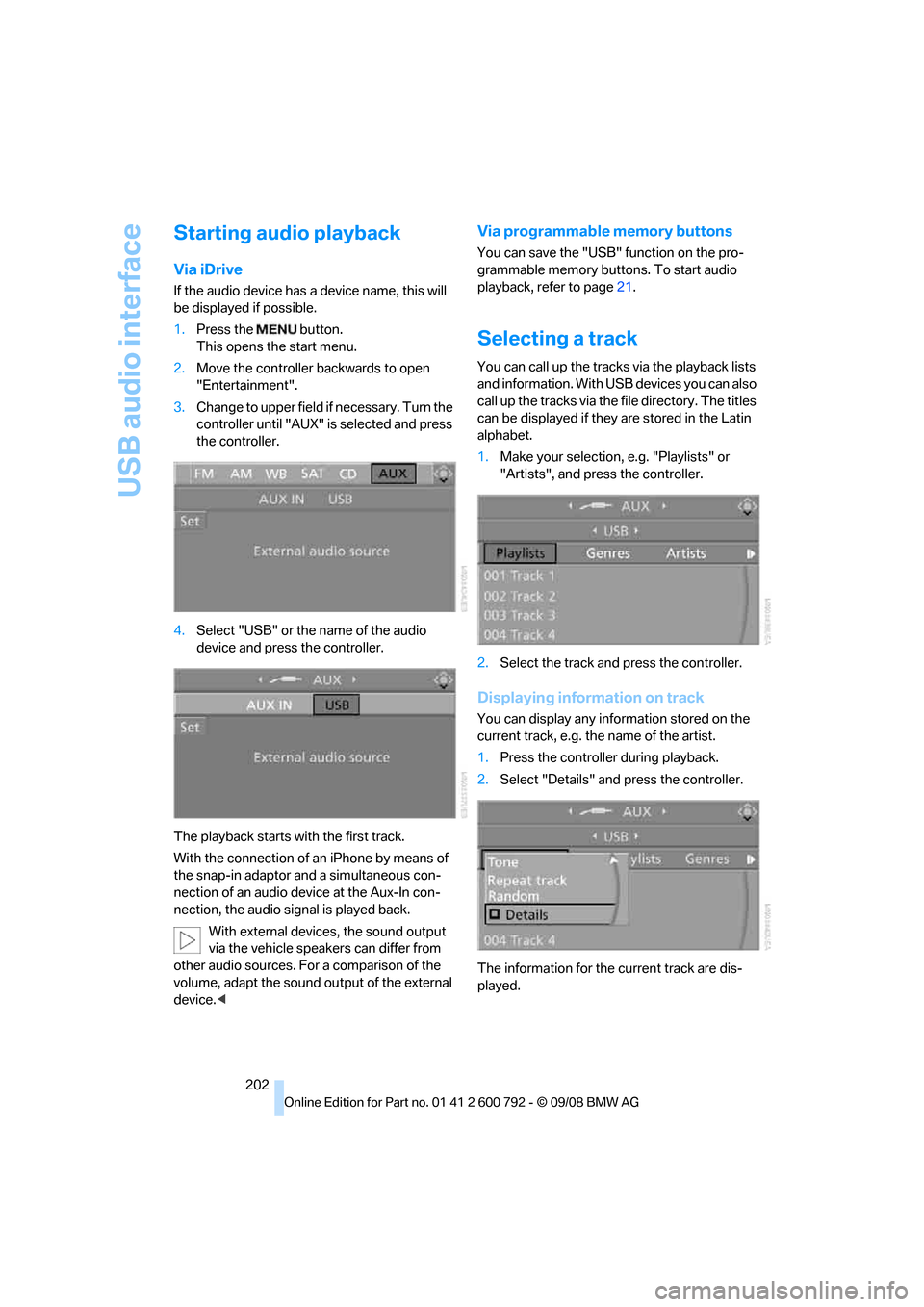
3. Change to upper field if necessary. Turn the
controller until "AUX" is selected and press
the controller.
4. Select "USB" or the name of the audio
device and press the controller.
The playback starts with the first track.
With the connection of an iPhone by means of
the snap-in adaptor and a simultaneous con-
nection of an audio device at the Aux-In con-
nection, the audio signal is played back. With external devices, the sound output
via the vehicle speakers can differ from
other audio sources. For a comparison of the
volume, adapt the sound ou tput of the external
device. <
Via programmable memory buttons
You can save the "USB" function on the pro-
grammable memory buttons. To start audio
playback, refer to page 21.
Selecting a track
You can call up the tracks via the playback lists
and information. With USB devices you can also
call up the tracks via the file directory. The titles
can be displayed if they are stored in the Latin
alphabet.
1. Make your selection, e.g. "Playlists" or
"Artists", and press the controller.
2. Select the track and press the controller.
Displaying information on track
You can display any information stored on the
current track, e.g. the name of the artist.
1.Press the controller during playback.
2. Select "Details" and press the controller.
The information for the current track are dis-
played.
Page 205 of 317
Navigation
Entertainment
Driving tips
203Reference
At a glance
Controls
Communications
Mobility
Repeating a track
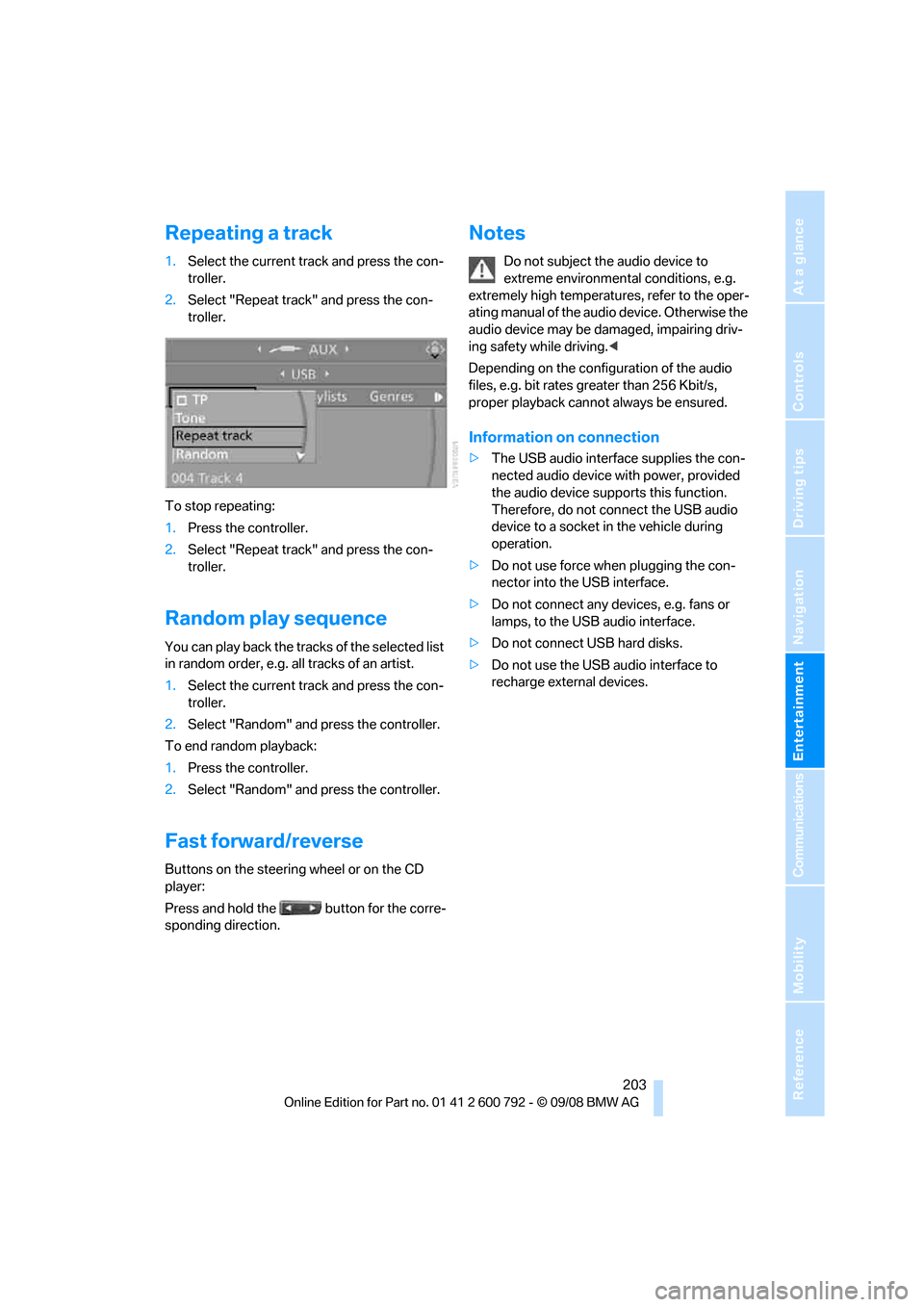
1.Select the current track and press the con-
troller.
2. Select "Repeat track" and press the con-
troller.
To stop repeating:
1. Press the controller.
2. Select "Repeat track" and press the con-
troller.
Random play sequence
You can play back the trac ks of the selected list
in random order, e.g. a ll tracks of an artist.
1. Select the current track and press the con-
troller.
2. Select "Random" and press the controller.
To end random playback:
1. Press the controller.
2. Select "Random" and press the controller.
Fast forward/reverse
Buttons on the steering wheel or on the CD
player:
Press and hold the button for the corre-
sponding direction.
Notes
Do not subject the audio device to
extreme environmental conditions, e.g.
extremely high temperatures, refer to the oper-
ating manual of the audio device. Otherwise the
audio device may be damaged, impairing driv-
ing safety while driving. <
Depending on the configuration of the audio
files, e.g. bit rates greater than 256 Kbit/s,
proper playback cannot always be ensured.
Information on connection
> The USB audio interface supplies the con-
nected audio device with power, provided
the audio device suppo rts this function.
Therefore, do not connect the USB audio
device to a socket in the vehicle during
operation.
> Do not use force when plugging the con-
nector into the USB interface.
> Do not connect any devices, e.g. fans or
lamps, to the USB audio interface.
> Do not connect USB hard disks.
> Do not use the USB audio interface to
recharge external devices.
Page 206 of 317
DVD system in rear
204
DVD system in rear
With the DVD system in the rear you can play
CDs and DVDs with audio, video and image
data. External audio and video devices can also
be connected and played via the DVD system in
the rear.
Tone output is possible both via headphones
and via the vehicle speakers.
You can operate the DVD system in the rear
with the buttons on the CD/DVD player or with
the remote control.
Some functions can only be operated
with the remote control. <
Enabling DVD system
Enable the DVD system with iDrive.
For operating principle refer to page 16.
1. Press the button.
This opens the start menu.
2. Press the controller to open the menu.
3. Select "Settings" and press the controller.
4. Select "Unlock rear menu" and press the
controller.
5. Select "Rear enabled" and press the con-
troller.
The DVD system is enabled.
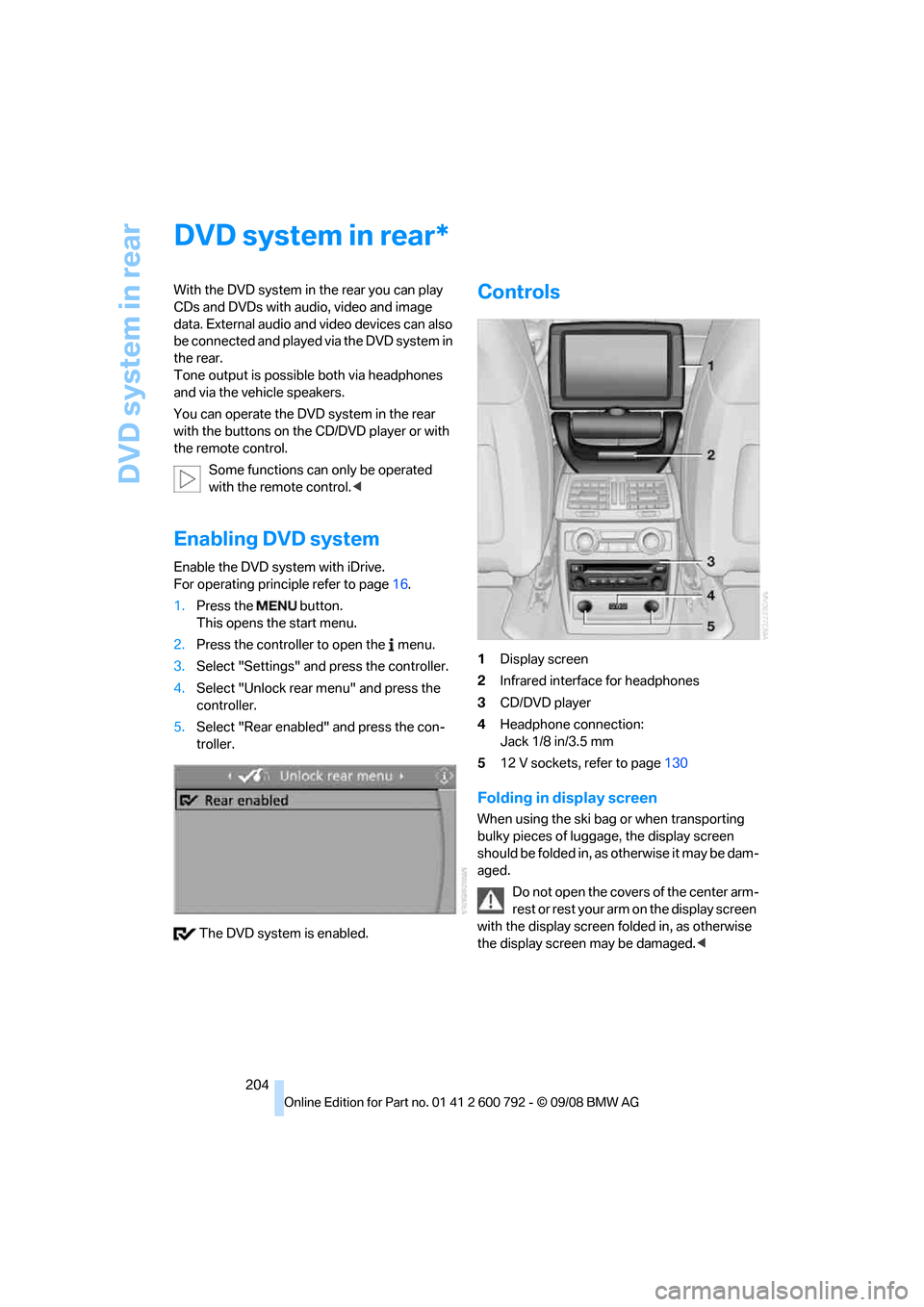
Controls
1 Display screen
2 Infrared interface for headphones
3 CD/DVD player
4 Headphone connection:
Jack 1/8 in/3.5 mm
5 12 V sockets, refer to page 130
Folding in display screen
When using the ski bag or when transporting
bulky pieces of luggage, the display screen
should be folded in, as otherwise it may be dam-
aged.
Do not open the covers of the center arm-
rest or rest your arm on the display screen
with the display screen folded in, as otherwise
the display screen may be damaged. <
*
Page 207 of 317
Navigation
Entertainment
Driving tips
205Reference
At a glance
Controls
Communications
Mobility
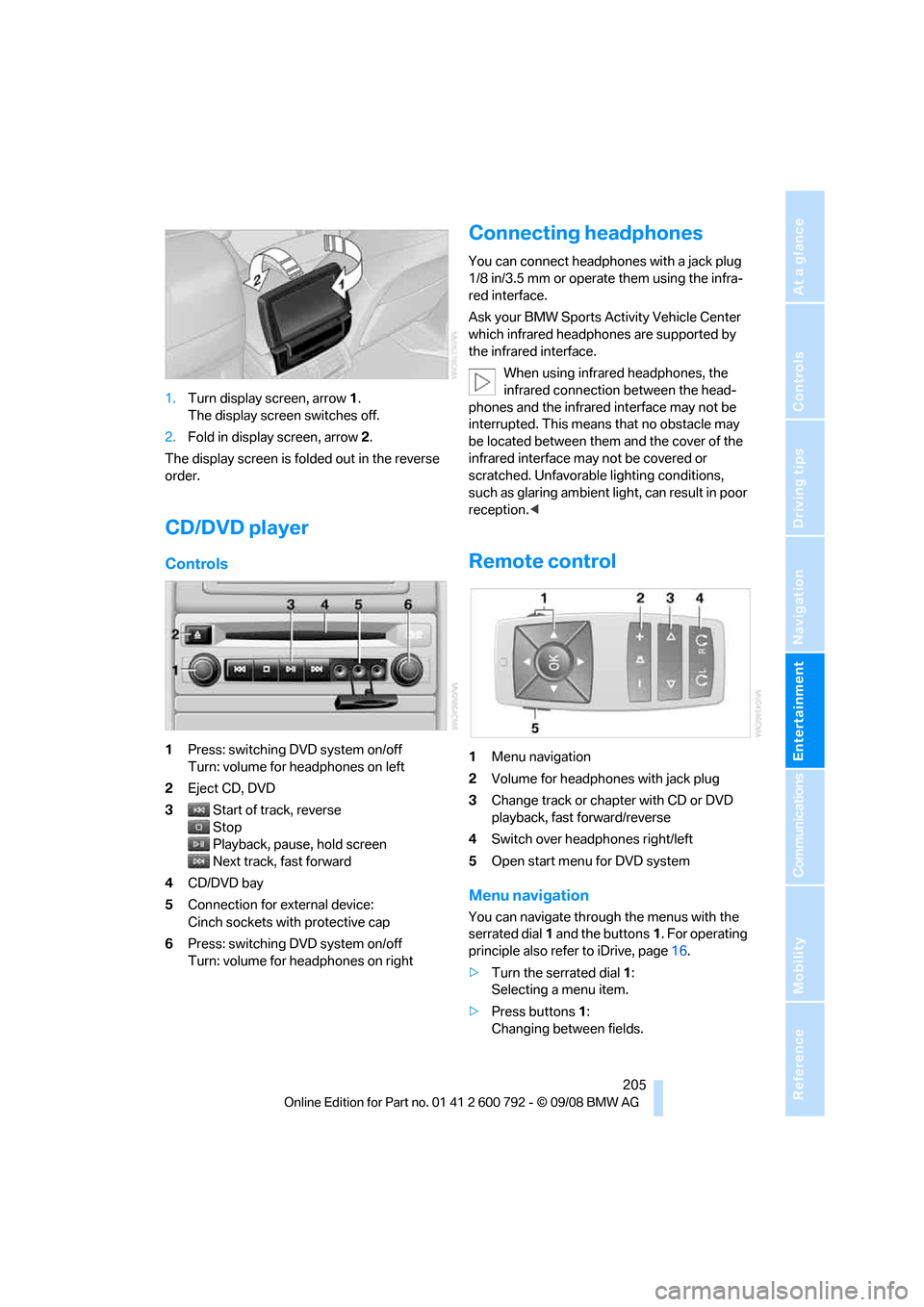
1.Turn display screen, arrow 1.
The display screen switches off.
2. Fold in display screen, arrow 2.
The display screen is folded out in the reverse
order.
CD/DVD player
Controls
1 Press: switching DVD system on/off
Turn: volume for he adphones on left
2 Eject CD, DVD
3 Start of track, reverse
Stop
Playback, pause, hold screen
Next track, fast forward
4 CD/DVD bay
5 Connection for external device:
Cinch sockets with protective cap
6 Press: switching DVD system on/off
Turn: volume for he adphones on right
Connecting headphones
You can connect headphones with a jack plug
1/8 in/3.5 mm or operate them using the infra-
red interface.
Ask your BMW Sports Activity Vehicle Center
which infrared headphones are supported by
the infrared interface.
When using infrared headphones, the
infrared connection between the head-
phones and the infrared interface may not be
interrupted. This means that no obstacle may
be located between them and the cover of the
infrared interface may not be covered or
scratched. Unfavorable lighting conditions,
such as glaring ambient lig ht, can result in poor
reception. <
Remote control
1Menu navigation
2 Volume for headphones with jack plug
3 Change track or chapter with CD or DVD
playback, fast forward/reverse
4 Switch over headphones right/left
5 Open start menu for DVD system
Menu navigation
You can navigate throug h the menus with the
serrated dial 1 and the buttons 1. For operating
principle also refer to iDrive, page 16.
> Turn the serrated dial 1:
Selecting a menu item.
> Press buttons 1:
Changing between fields.
Page 209 of 317
Navigation
Entertainment
Driving tips
207Reference
At a glance
Controls
Communications
Mobility
An overview of the coding zones:
Starting playback
1.Push the CD/DVD into the drive with the
labeled side facing upward.
The CD/DVD is automa tically pulled in.
> Playback usually begins automatically
after a few seconds.
> If playback does no t begin automatically:
Select "DVD".
Press the button.
2. If the DVD controller or the DVD-specific
menu is displayed fo r a DVD, select the
desired option for menu guidance with the
remote control buttons.
Or:
Press the button on the CD/DVD player.
You can control the playback with the buttons
on the CD/DVD player or the DVD control. Video CDs, VCD, and Super Video CDs,
SVCD, can be played like DVDs if they do
not have a DVD menu of their own. <
Ejecting CD/DVD
Press the button on the CD/DVD player.
The DVD emerges slightly from the drive.
DVD control
With the DVD control, you can select the title
and chapter, open the DVD-specific menu and
operate functions such as Language, Fast for-
ward and Reverse or Freeze frame.
A DVD can briefly deacti vate functions of the
DVD control, under certain circumstances while the entire DVD is being played. It is not possible
to operate the DVD control under these circum-
stances. In this case, tr
y to make the selection
using the DVD-specific menu.
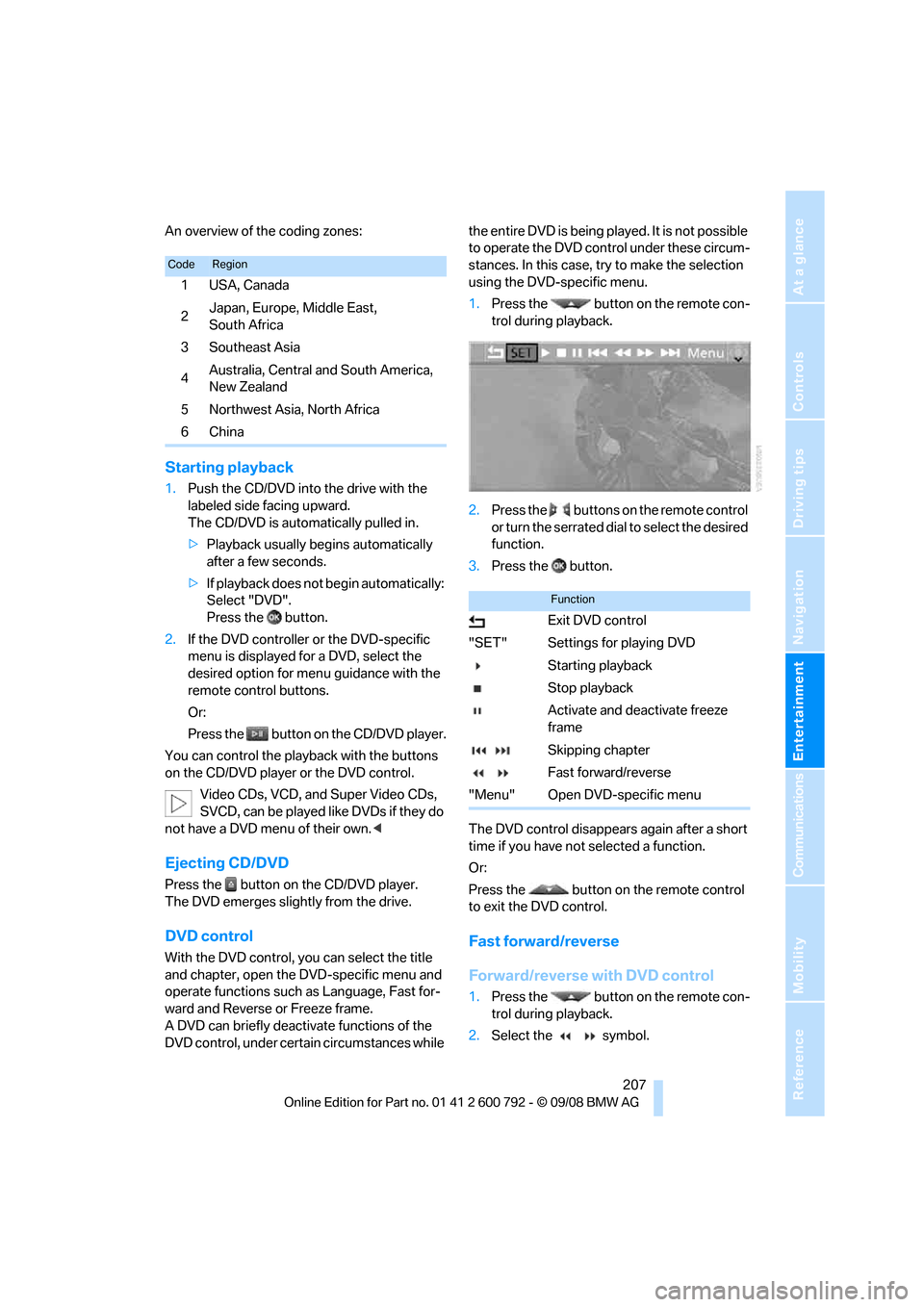
1. Press the button on the remote con-
trol during playback.
2. Press the buttons on the remote control
or turn the serrated dial to select the desired
function.
3. Press the button.
The DVD control disappears again after a short
time if you have not selected a function.
Or:
Press the button on the remote control
to exit the DVD control.
Fast forward/reverse
Forward/reverse with DVD control
1. Press the button on the remote con-
trol during playback.
2. Select the symbol.
CodeRegion
1USA, Canada
2 Japan, Europe, Middle East,
South Africa
3 Southeast Asia
4 Australia, Central and South America,
New Zealand
5Northwest Asia, North Africa
6China
Function
Exit DVD control
"SET" Settings for playing DVD Starting playback
Stop playback
Activate and deactivate freeze
frame
Skipping chapter
Fast forward/reverse
"Menu" Open DVD-specific menu
Page 211 of 317
Navigation
Entertainment
Driving tips
209Reference
At a glance
Controls
Communications
Mobility
>"Tone":
>"Treble / Bass" and "Balance":
Separately adjustable for the left and
right-hand headphones and the infrared
headphones.
> "Reset":
The settings are reset to the default
value.
> "DVD format":
>"Standard"
> "Zoom": full-screen playback
> "Language":
Language or sound track of DVD playback.
The language advances one setting each
time the menu item is selected.
> "Subtitles":
Language of subtitles
"00 n/a": no subtitles.
> "Title":
Selection of a single track of the DVD.
> "Angle of view":
Camera angle
Notes or symbols that appear during the
playback of a film generally point out differ-
ent camera angles. These are usually only
briefly available.
> "Menu":
Call up the DVD-specific menu.
> "Return":
Exit menu or:
Press the buttons on the remote con-
trol.
Many DVDs offer dialogs and subtitles in vari-
ous languages or scene descriptions for the
hearing impaired. These functions are stored
on the DVD. With some DVDs, it is only possible to
select language, subtit les, camera angle,
or title by using the DVD-specific menu.
Refer to the information on your DVD for possi-
ble selections.
Entries marked in gray in the menus cannot be
selected.
For example, it is possible to select from several
possible plots or display information on the film.
1. Press the button on the remote con-
trol during playback.
2. Select "Menu".
3. Press the button.
On some DVDs, selecting "Menu"
and "Title" gives you the option of
choosing from additional menus. <
To make a selection:
1. Use the buttons on the remote control to
select the desired func tion in the DVD-spe-
cific menu.
2. Press the button.
You can also select language, subtitles,
camera angle, or title in the DVD-specific
menu.
Observe the information on your DVD. <
Compressed video files
Playback
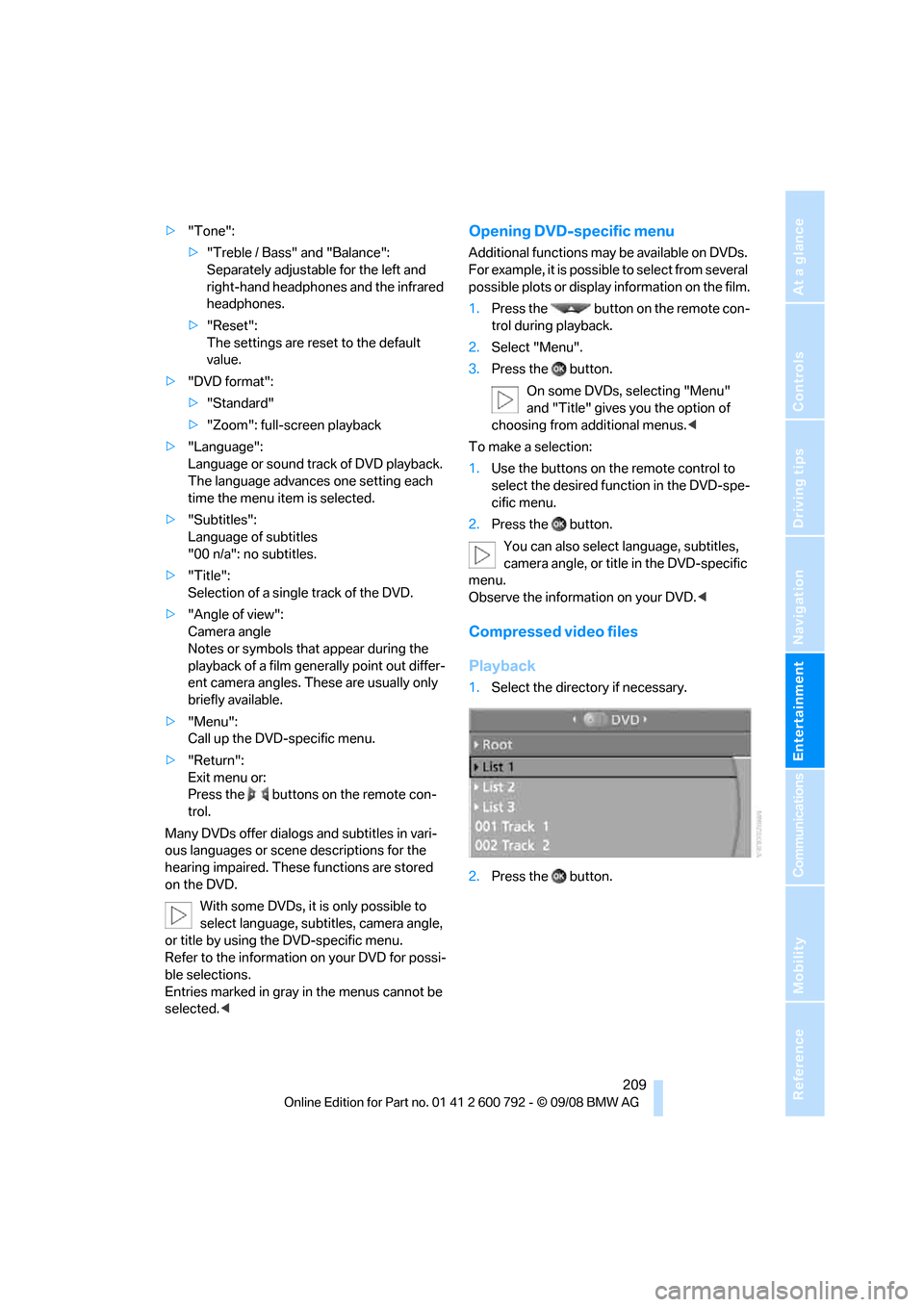
1.Select the direct ory if necessary.
2. Press the button.
Page 212 of 317
DVD system in rear
210
3.
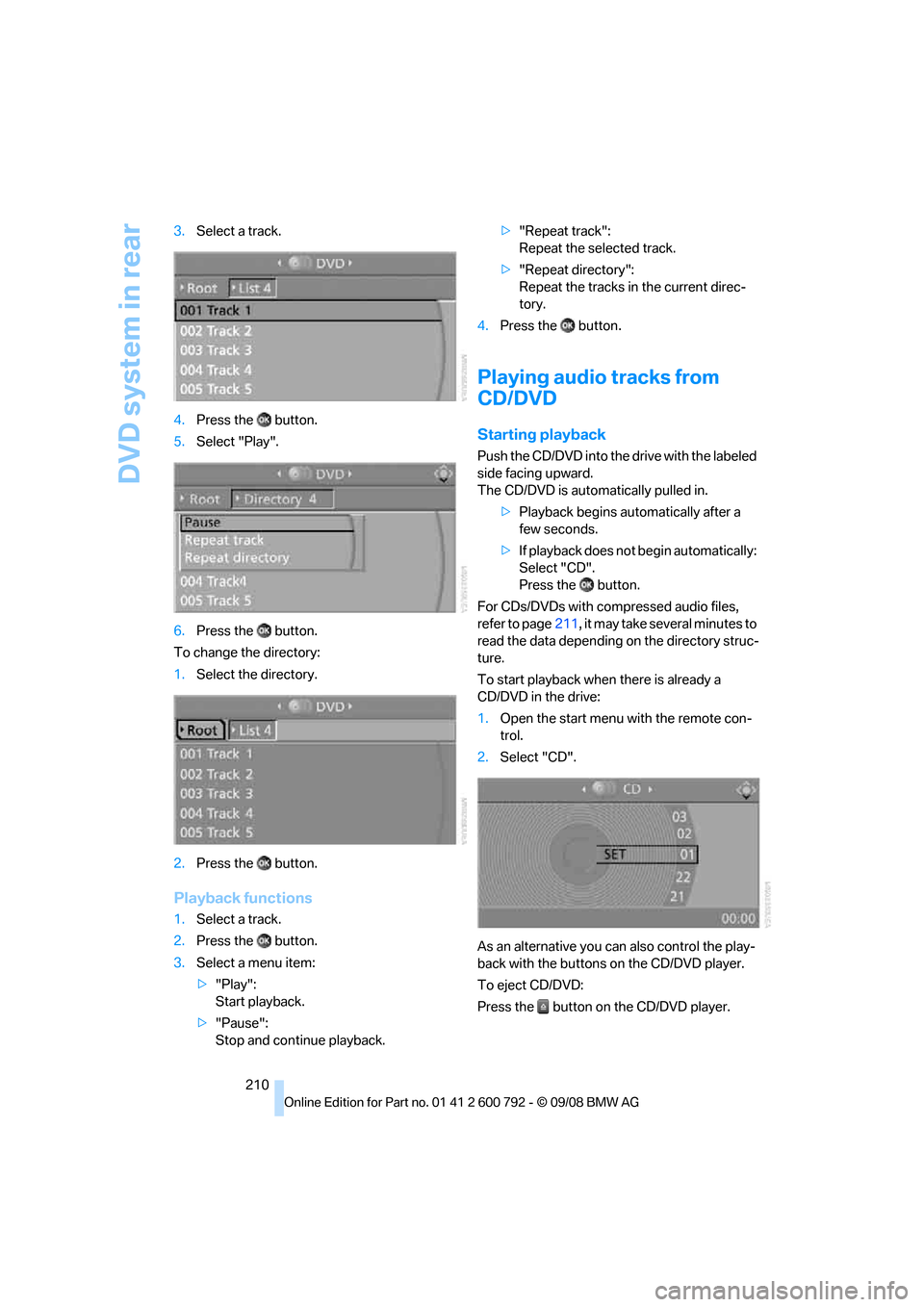
Select a track.
4. Press the button.
5. Select "Play".
6. Press the button.
To change the directory:
1. Select the directory.
2. Press the button.
Playback functions
1.Select a track.
2. Press the button.
3. Select a menu item:
>"Play":
Start playback.
> "Pause":
Stop and continue playback. >
"Repeat track":
Repeat the selected track.
> "Repeat directory":
Repeat the tracks in the current direc-
tory.
4. Press the button.
Playing audio tracks from
CD/DVD
Starting playback
Push the CD/DVD into th e drive with the labeled
side facing upward.
The CD/DVD is auto matically pulled in.
> Playback begins au tomatically after a
few seconds.
> If playback does not begin automatically:
Select "CD".
Press the button.
For CDs/DVDs with compressed audio files,
refer to page 211, it may take several minutes to
read the data depending on the directory struc-
ture.
To start playback when there is already a
CD/DVD in the drive:
1. Open the start menu with the remote con-
trol.
2. Select "CD".
As an alternative you can also control the play-
back with the buttons on the CD/DVD player.
To eject CD/DVD:
Press the button on the CD/DVD player.
Page 213 of 317
Navigation
Entertainment
Driving tips
211Reference
At a glance
Controls
Communications
Mobility
Selecting a track
Buttons on CD/DVD player
Press the button for the corresponding
direction repeatedly until you reach the desired
track.
Playback begins at the start of the track.
Via the remote control
Press the button for the corresponding
direction repeatedly or turn the serrated dial
until you reach the desired track.
Playback begins at the start of the track.
Settings and playback functions for
audio CDs/DVDs
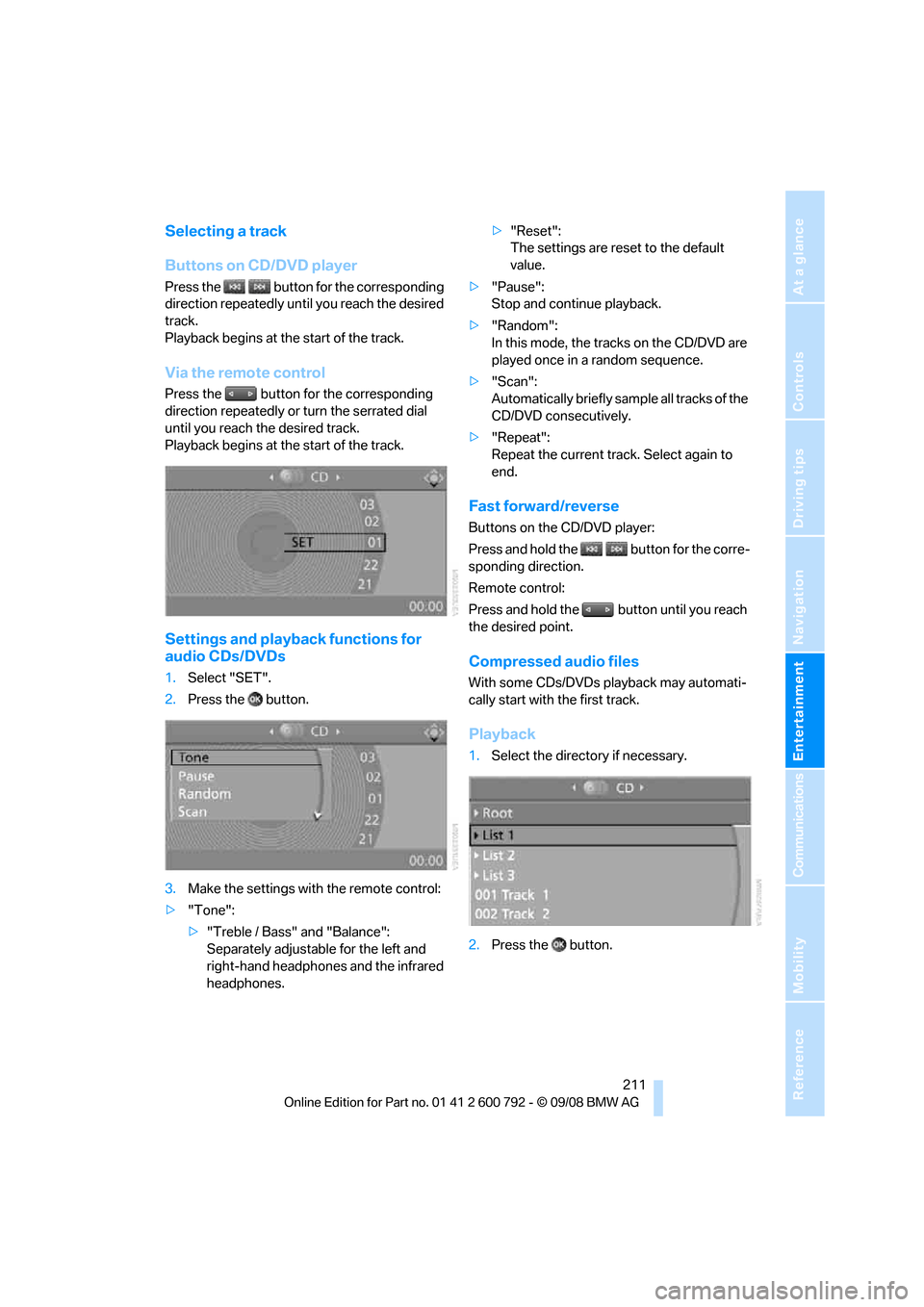
1. Select "SET".
2. Press the button.
3. Make the settings with the remote control:
> "Tone":
>"Treble / Bass" and "Balance":
Separately adjustable for the left and
right-hand headphones and the infrared
headphones. >
"Reset":
The settings are reset to the default
value.
> "Pause":
Stop and continue playback.
> "Random":
In this mode, the trac ks on the CD/DVD are
played once in a random sequence.
> "Scan":
Automatically briefly samp le all tracks of the
CD/DVD consecutively.
> "Repeat":
Repeat the current track. Select again to
end.
Fast forward/reverse
Buttons on the CD/DVD player:
Press and hold the button for the corre-
sponding direction.
Remote control:
Press and hold the button until you reach
the desired point.
Compressed audio files
With some CDs/DVDs playback may automati-
cally start with the first track.
Playback
1.Select the direct ory if necessary.
2. Press the button.
Page 215 of 317
Navigation
Entertainment
Driving tips
213Reference
At a glance
Controls
Communications
Mobility
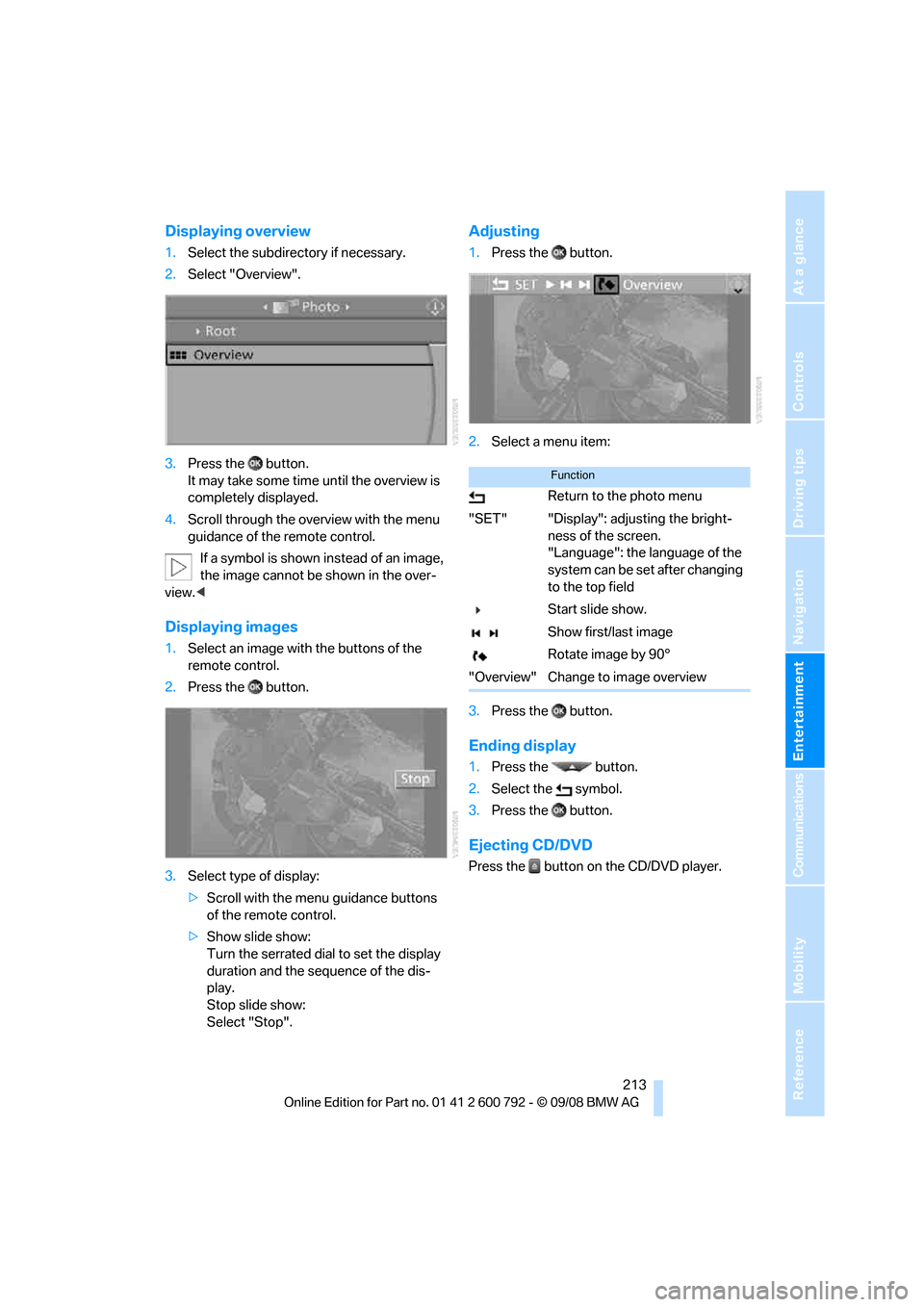
Displaying overview
1.Select the subdirec tory if necessary.
2. Select "Overview".
3. Press the button.
It may take some time until the overview is
completely displayed.
4. Scroll through the over view with the menu
guidance of the remote control.
If a symbol is shown instead of an image,
the image cannot be shown in the over-
view. <
Displaying images
1.Select an image with the buttons of the
remote control.
2. Press the button.
3. Select type of display:
>Scroll with the menu guidance buttons
of the remote control.
> Show slide show:
Turn the serrated dial to set the display
duration and the sequence of the dis-
play.
Stop slide show:
Select "Stop".
Adjusting
1. Press the button.
2. Select a menu item:
3. Press the button.
Ending display
1.Press the button.
2. Select the symbol.
3. Press the button.
Ejecting CD/DVD
Press the button on the CD/DVD player.
Function
Return to the photo menu
"SET" "Display": adjusting the bright- ness of the screen.
"Language": the language of the
system can be set after changing
to the top field
Start slide show.
Show first/last image
Rotate image by 90°
"Overview" Change to image overview
Page 222 of 317
Telephoning
220
Telephoning
The concept
Your BMW is equipped with a full mobile phone
preparation package. After pairing a suitable
mobile phone in the vehicle once, you can oper-
ate the mobile phone via iDrive, with the buttons
on the steering wheel and by voice.
Once a mobile phone has been paired in your
vehicle, it is automatically recognized as soon
as it is inside the vehicl e while the engine is run-
ning or the ignition is switched on. The pairing
data of up to four mobile phones can be stored
simultaneously. If seve ral mobile phones are
detected simultaneously, the respective last
mobile phone paired can be operated via the
vehicle.
Using a phone in your vehicle
Using snap-in adapter*
The so-called snap-in adapter, a mobile phone
cradle, enables the batte ry to be charged and
the mobile phone to be connected to the exter-
nal antenna of your vehicle. This ensures
improved network reception and a consistent
voice reproduction qu ality. Ask your BMW
Sports Activity Vehicle Center which mobile
phones snap-in adapters are offered for.
For your safety
A car phone makes life more convenient in
many ways, and can even save lives in an emer-
gency. While you should consult your mobile
phone's separate operating instructions for a
detailed description of safety precautions and
information, we request that you direct your
particular attention to the following:
Only make entries when the traffic situa-
tion allows you to do so. Do not hold the
mobile phone in your hand while you are driving;
use the hands-free system instead. If you do
not observe this precau tion, your being dis- tracted can endanger vehicle occupants and
other road users.
<
Suitable mobile phones
Ask your BMW Sports Activity Vehicle Center
which mobile phones wi th Bluetooth interface
are supported by the mo bile phone preparation
package and which mobile phones are compat-
ible with the snap-in adapter. By virtue of their
particular software ve rsions, these mobile
phones support the functions described in this
Owner's Manual. Malfunctions can occur with
other mobile phones.
Care instructions
You can find everything you need to know on
this topic by consulting the separate operating
instructions for the mobile phone.
Operating options
You can operate the mobile phone* using:
> Buttons on steering wheel, refer to page11
> iDrive, refer to page 226
> Voice commands, refer to page 231
> Programmable memory buttons, refer to
page 21
Avoid operating a mobile phone detected by
the vehicle with the keypad of the mobile
phone, otherwise malf unctions can occur.
Placing phone calls with BMW Assist
system*: BMW Assist calls
You can use the BMW Assist system via the
hands-free unit for BMW Assist calls.
When the status information "Communication"
or "BMW Assist" is displayed in "BMW Ser-
vice", only BMW Assi st calls are possible.
*