audio BMW X5 2010 E70 Owner's Guide
[x] Cancel search | Manufacturer: BMW, Model Year: 2010, Model line: X5, Model: BMW X5 2010 E70Pages: 300, PDF Size: 12.41 MB
Page 196 of 300
DVD system in rear
194
Using the remote control
Press the button for the corresponding
direction repeatedly or turn the thumbwheel
until you reach the desired track.
Playback begins at the start of the track.
Settings and playback functions for
audio CDs
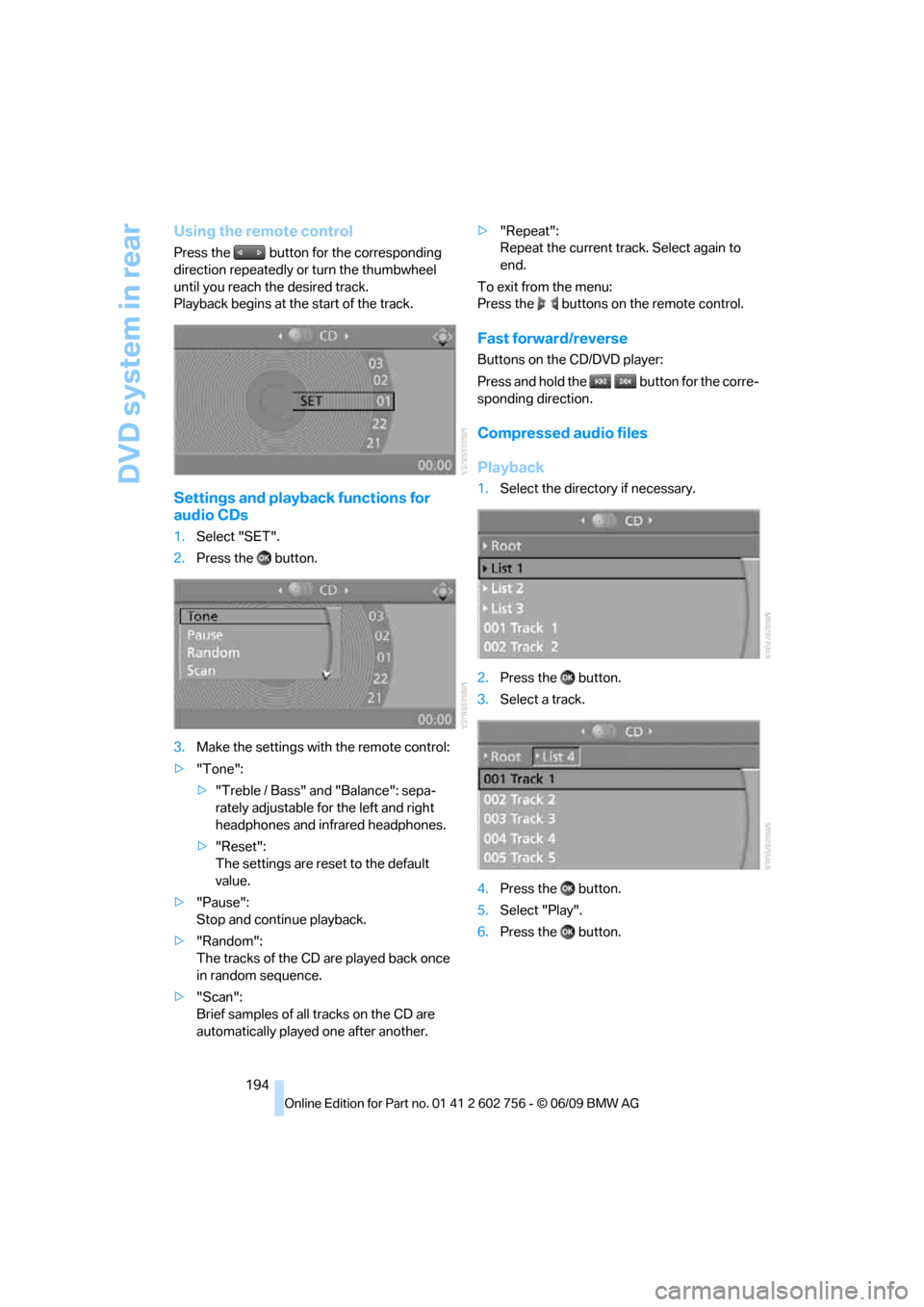
1.Select "SET".
2.Press the button.
3.Make the settings with the remote control:
>"Tone":
>"Treble / Bass" and "Balance": sepa-
rately adjustable for the left and right
headphones and infrared headphones.
>"Reset":
The settings are reset to the default
value.
>"Pause":
Stop and continue playback.
>"Random":
The tracks of the CD are played back once
in random sequence.
>"Scan":
Brief samples of all tracks on the CD are
automatically played one after another.>"Repeat":
Repeat the current track. Select again to
end.
To exit from the menu:
Press the buttons on the remote control.
Fast forward/reverse
Buttons on the CD/DVD player:
Press and hold the button for the corre-
sponding direction.
Compressed audio files
Playback
1.Select the directory if necessary.
2.Press the button.
3.Select a track.
4.Press the button.
5.Select "Play".
6.Press the button.
ba8_e70ag.book Seite 194 Freitag, 5. Juni 2009 11:42 11
Page 197 of 300
Navigation
Entertainment
Driving tips
195Reference
At a glance
Controls
Communications
Mobility
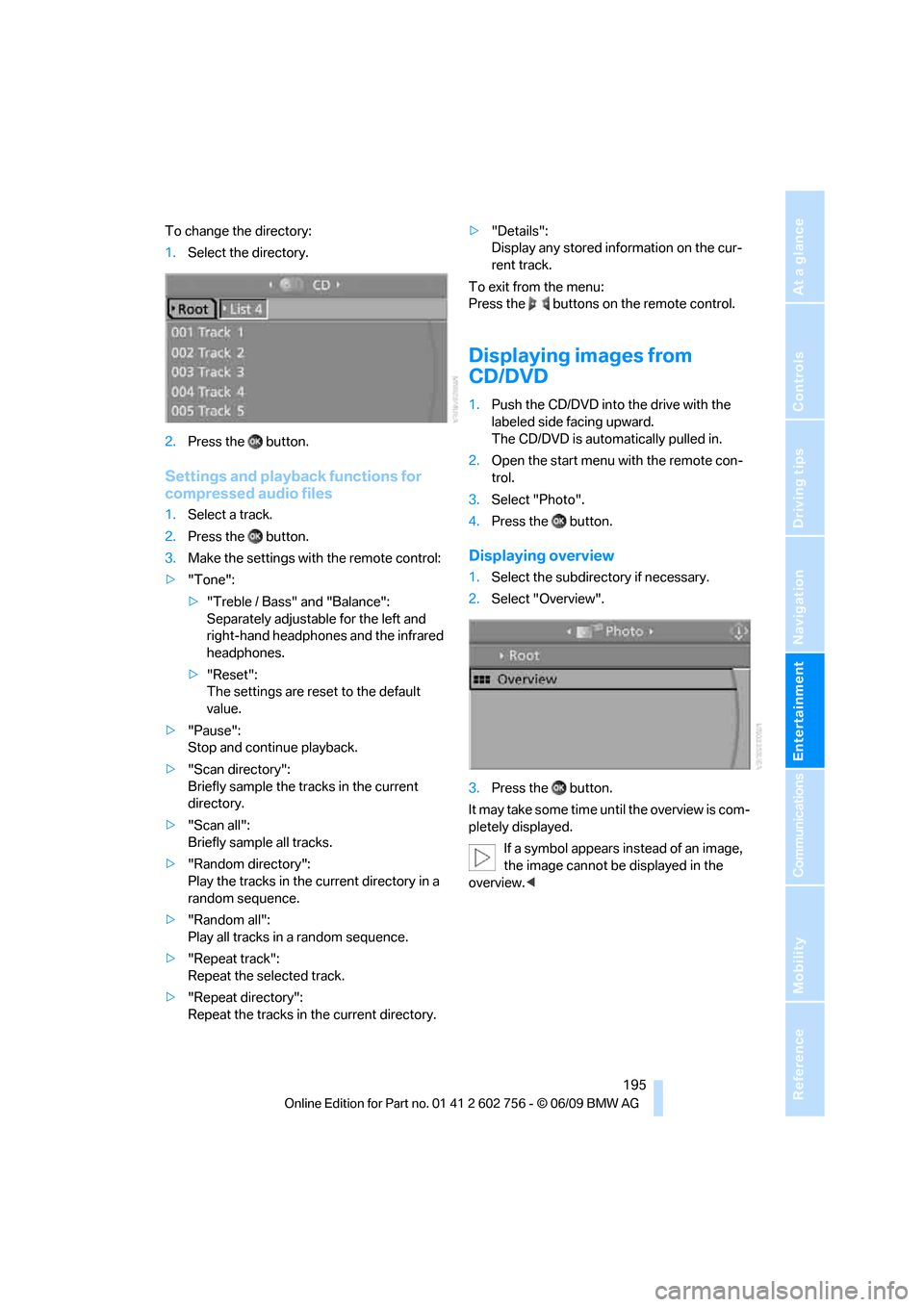
To change the directory:
1.Select the directory.
2.Press the button.
Settings and playback functions for
compressed audio files
1.Select a track.
2.Press the button.
3.Make the settings with the remote control:
>"Tone":
>"Treble / Bass" and "Balance":
Separately adjustable for the left and
right-hand headphones and the infrared
headphones.
>"Reset":
The settings are reset to the default
value.
>"Pause":
Stop and continue playback.
>"Scan directory":
Briefly sample the tracks in the current
directory.
>"Scan all":
Briefly sample all tracks.
>"Random directory":
Play the tracks in the current directory in a
random sequence.
>"Random all":
Play all tracks in a random sequence.
>"Repeat track":
Repeat the selected track.
>"Repeat directory":
Repeat the tracks in the current directory.>"Details":
Display any stored information on the cur-
rent track.
To exit from the menu:
Press the buttons on the remote control.
Displaying images from
CD/DVD
1.Push the CD/DVD into the drive with the
labeled side facing upward.
The CD/DVD is automatically pulled in.
2.Open the start menu with the remote con-
trol.
3.Select "Photo".
4.Press the button.
Displaying overview
1.Select the subdirectory if necessary.
2.Select "Overview".
3.Press the button.
It may take some time until the overview is com-
pletely displayed.
If a symbol appears instead of an image,
the image cannot be displayed in the
overview.<
ba8_e70ag.book Seite 195 Freitag, 5. Juni 2009 11:42 11
Page 198 of 300
DVD system in rear
196
Displaying images
1.Use the buttons or the thumbwheel of the
remote control to select an image.
2.Press the button.
3.Displaying images:
>Scroll using the menu navigation but-
tons of the remote control
>Show slide show:
Turn the thumbwheel to adjust how long
each image is displayed.
Stop slide show:
Select "Stop
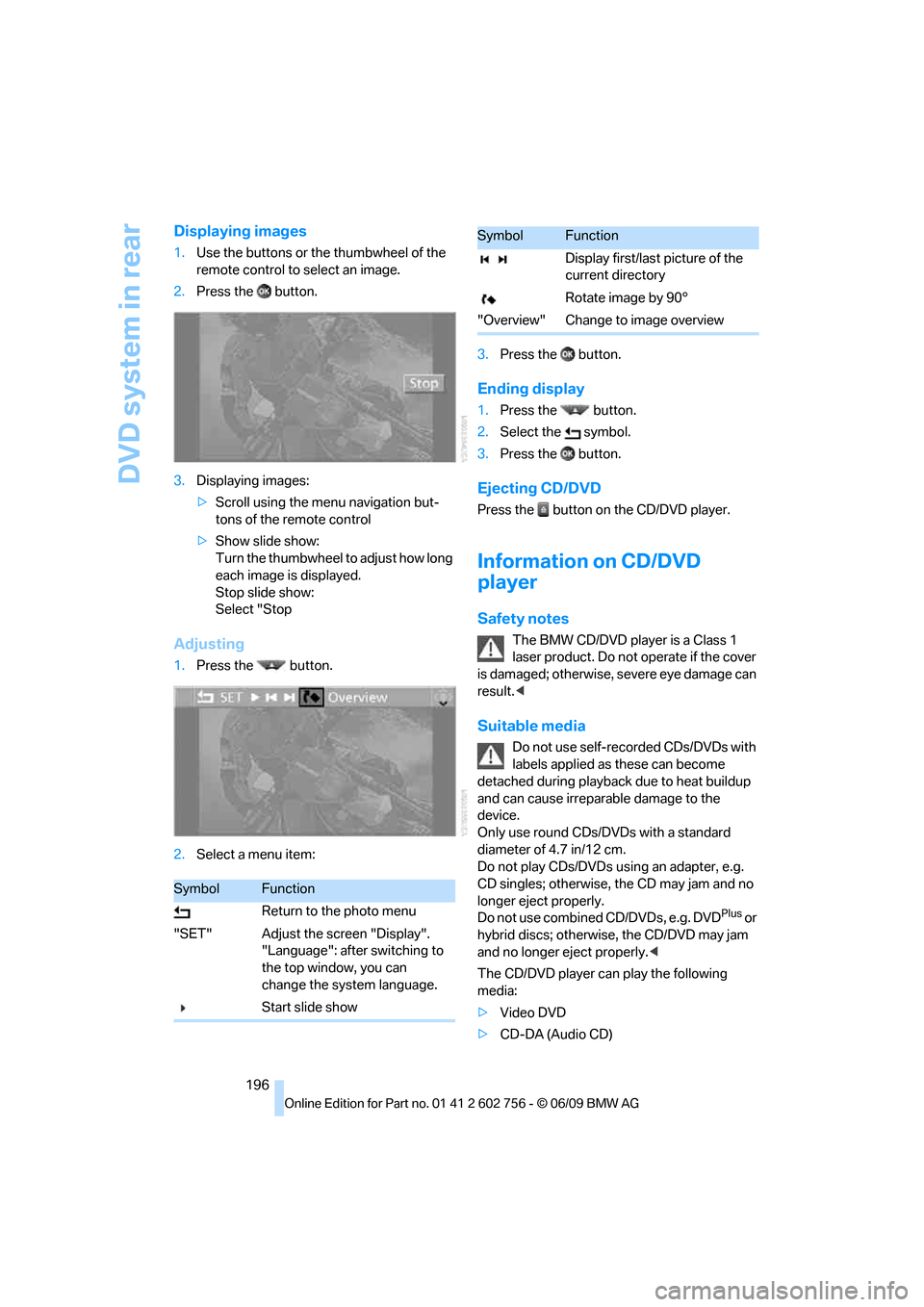
Adjusting
1.Press the button.
2.Select a menu item:3.Press the button.
Ending display
1.Press the button.
2.Select the symbol.
3.Press the button.
Ejecting CD/DVD
Press the button on the CD/DVD player.
Information on CD/DVD
player
Safety notes
The BMW CD/DVD player is a Class 1
laser product. Do not operate if the cover
is dam age d; othe rwise , se ver e e y e da mag e c a n
result.<
Suitable media
Do not use self-recorded CDs/DVDs with
labels applied as these can become
detached during playback due to heat buildup
and can cause irreparable damage to the
device.
Only use round CDs/DVDs with a standard
diameter of 4.7 in/12 cm.
Do not play CDs/DVDs using an adapter, e.g.
CD singles; otherwise, the CD may jam and no
longer eject properly.
Do not use combined CD/DVDs, e.g. DVD
Plus or
hybrid discs; otherwise, the CD/DVD may jam
and no longer eject properly.<
The CD/DVD player can play the following
media:
>Video DVD
>CD-DA (Audio CD)
SymbolFunction
Return to the photo menu
"SET" Adjust the screen "Display".
"Language": after switching to
the top window, you can
change the system language.
Start slide show
Display first/last picture of the
current directory
Rotate image by 90°
"Overview" Change to image overview
SymbolFunction
ba8_e70ag.book Seite 196 Freitag, 5. Juni 2009 11:42 11
Page 199 of 300
Navigation
Entertainment
Driving tips
197Reference
At a glance
Controls
Communications
Mobility
>CDs/DVDs with compressed image data
>CDs/DVDs with compressed audio data
>CDs/DVDs with compressed video data
The DVD player does not support DVD audio.
However, many audio DVDs available in stores
also contain a video track in the DVD Video for-
mat in addition to the audio track. These DVDs
can be played back by the DVD player. Refer to
the information on your DVD to determine
whether your audio DVD contains an additional
video track. Depending on the authoring used, it
is possible that not all functions are available
during playback.
Dual-sided DVDs available from retail suppliers
are coated on both sides and bear no markings.
This means both sides are information carriers.
To play the information on the other side, turn
over the DVD.
Supported formats
Depending on the compression method used,
not all files of the specified formats can be
opened.
Images
JPEG/JPG
With very large image files, it can take longer for
the images to be displayed.
Compressed audio files
>MP3
>WMA
>OGG
>AAC
Compressed video files
>SVCD
>MPEG1
>MPEG2
>MPEG4/DivX
Digital Rights Management (DRM)
In some cases, it may not be possible to play
CDs/DVDs with integrated Digital Rights Man-
agement (DRM).
General malfunctions
The BMW CD/DVD player is optimized for oper-
ation in the vehicle. It may react more sensi-
tively to defective CDs/DVDs than devices
intended for stationary use.
If a CD/DVD cannot be played, first check
whether it has been inserted correctly.
Make sure that no foreign objects or liq-
uids get into the CD/DVD slot; otherwise,
the CD/DVD player will be damaged.<
Humidity
High levels of humidity can lead to condensa-
tion on the CD/DVD or the laser's scan lens and
temporarily prevent playback.
Malfunctions with individual CDs/DVDs
If malfunctions occur only with particular CDs/
DVDs, this can be due to one of the following
causes.
Copied or self-recorded CDs/DVDs
Possible reasons for malfunctions with copied
or self-recorded CDs/DVDs may include incon-
sistent data-creation or recording processes, or
poor quality or significant aging of the CD/DVD
blank.
Only label CDs/DVDs on the upper side with a
pen intended for this purpose.
Damaged CDs/DVDs
Avoid fingerprints, dust, scratches and mois-
ture.
Store CDs/DVDs in a sleeve.
Do not subject CDs/DVDs to temperatures
above 1227/506 o r t o h i g h h u m i d i t y l e v e l s o r
direct sunlight.
CDs/DVDs with copy protection
CDs/DVDs are often provided with a copy pro-
tection feature by the manufacturer. As a result,
ba8_e70ag.book Seite 197 Freitag, 5. Juni 2009 11:42 11
Page 200 of 300
DVD system in rear
198 some CDs/DVDs cannot be played, can only be
played to a limited degree, or cause the system
to switch off. In this case, wait a short while and
then switch the system back on again. Then
remove the CD/DVD from the drive.
CDs/DVDs with compressed audio files
If the language set for the CD/DVD player does
not match the language of the music track, the
music tracks may be displayed incorrectly.
Care instructions
More information about this can be found under
Care, starting on page246.
External device
Connecting
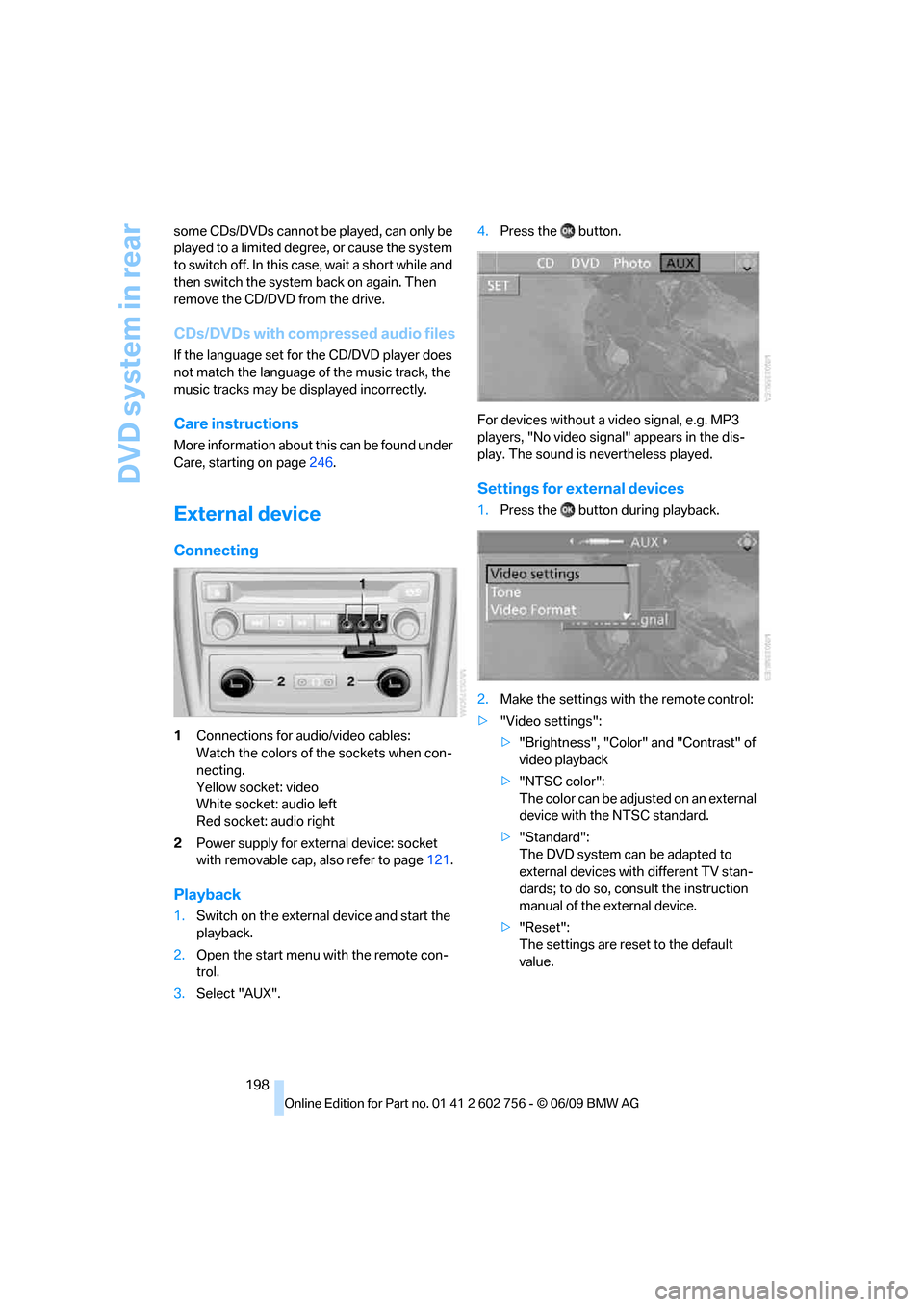
1Connections for audio/video cables:
Watch the colors of the sockets when con-
necting.
Yellow socket: video
White socket: audio left
Red socket: audio right
2Power supply for external device: socket
with removable cap, also refer to page121.
Playback
1.Switch on the external device and start the
playback.
2.Open the start menu with the remote con-
trol.
3.Select "AUX".4.Press the button.
For devices without a video signal, e.g. MP3
players, "No video signal" appears in the dis-
play. The sound is nevertheless played.
Settings for external devices
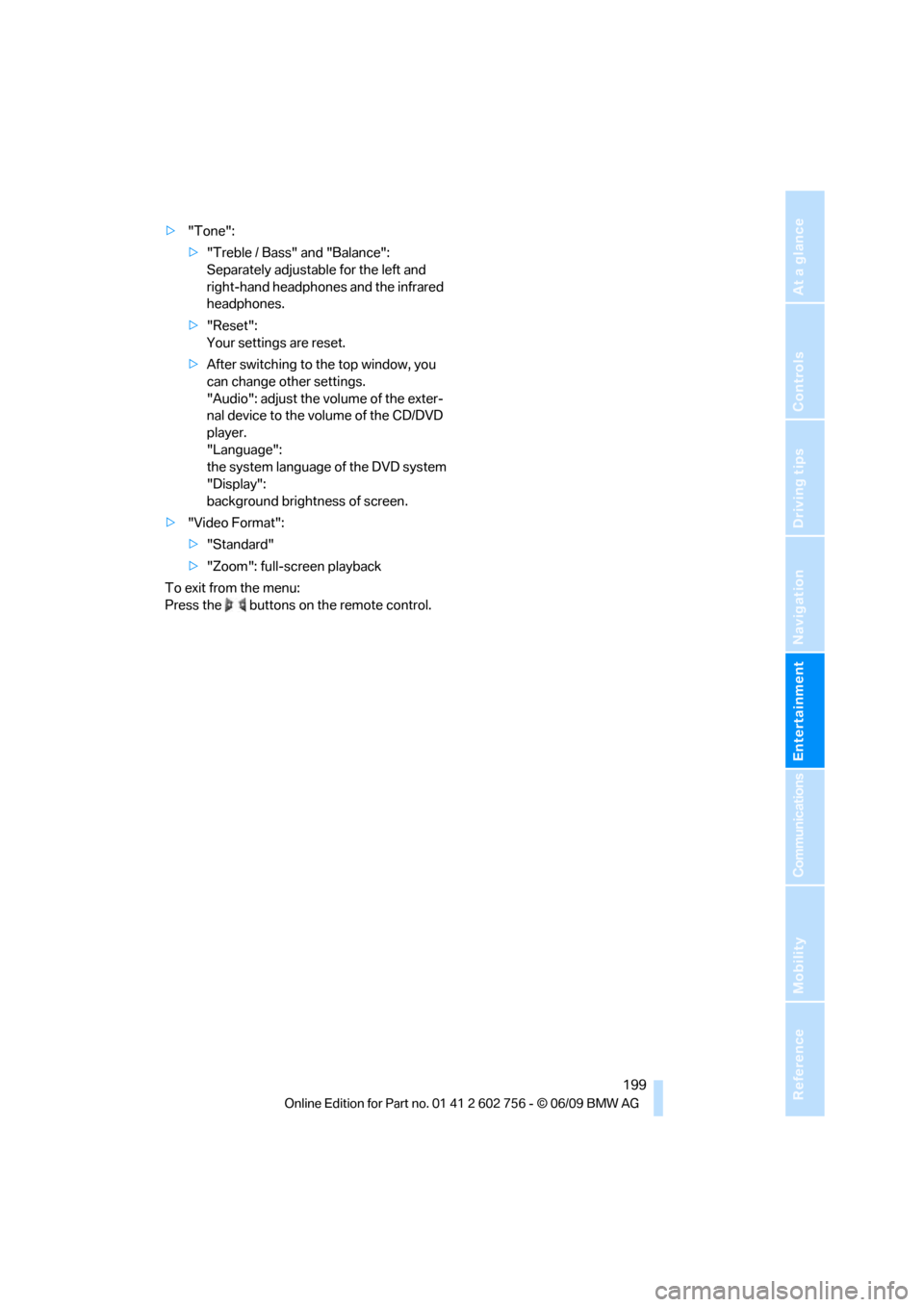
1.Press the button during playback.
2.Make the settings with the remote control:
>"Video settings":
>"Brightness", "Color" and "Contrast" of
video playback
>"NTSC color":
The color can be adjusted on an external
device with the NTSC standard.
>"Standard":
The DVD system can be adapted to
external devices with different TV stan-
dards; to do so, consult the instruction
manual of the external device.
>"Reset":
The settings are reset to the default
value.
ba8_e70ag.book Seite 198 Freitag, 5. Juni 2009 11:42 11
Page 201 of 300
Navigation
Entertainment
Driving tips
199Reference
At a glance
Controls
Communications
Mobility
>"Tone":
>"Treble / Bass" and "Balance":
Separately adjustable for the left and
right-hand headphones and the infrared
headphones.
>"Reset":
Your settings are reset.
>After switching to the top window, you
can change other settings.
"Audio": adjust the volume of the exter-
nal device to the volume of the CD/DVD
player.
"Language":
the system language of the DVD system
"Display":
background brightness of screen.
>"Video Format":
>"Standard"
>"Zoom": full-screen playback
To exit from the menu:
Press the buttons on the remote control.
ba8_e70ag.book Seite 199 Freitag, 5. Juni 2009 11:42 11
Page 207 of 300
205
Entertainment
Reference
At a glance
Controls
Driving tips Communications
Navigation
Mobility
Adjusting volume
Turn the knob during a call to select the desired
volume.
This volume for the hands-free system is main-
tained, even if the other audio sources are set to
minimum volume.
The setting is stored for the remote control cur-
rently in use.
Operation via iDrive
You can operate the following functions via
iDrive:
>Accepting/refusing a call
>dialing phone numbers
>Dialing phone numbers from the phone
book
>Selecting stored phone numbers, e.g. from
the list of received calls
>Ending a call
When the ignition is switched off or in radio
readiness, e.g. after taking the remote control
out of the ignition switch, you can continue an
ongoing call via the hands-free system for sev-
eral minutes.
Speech quality
If the person you are talking to is having difficul-
ties understanding you, this may be due to
excessive background noise. The full prepara-
tion package mobile phone can compensate for
these noises to a certain extent. To optimize the
speech quality during a call, we recommend
that you:>Reduce background noise, e.g. by closing
the windows, reducing air flow from the
automatic climate control or pointing the
open front air vents downward.
>Reduce the volume of the hands-free sys-
tem.
Requirements
>The pairing data of the mobile phone are
stored in the vehicle and the mobile phone
is ready to operate.
>The engine is running or the ignition is
switched on.
>The mobile phone is detected by the vehi-
cle.
Receiving calls
If you have the phone number of the caller
stored in the phone book and the phone num-
ber has been transmitted, the name of the entry
is displayed.
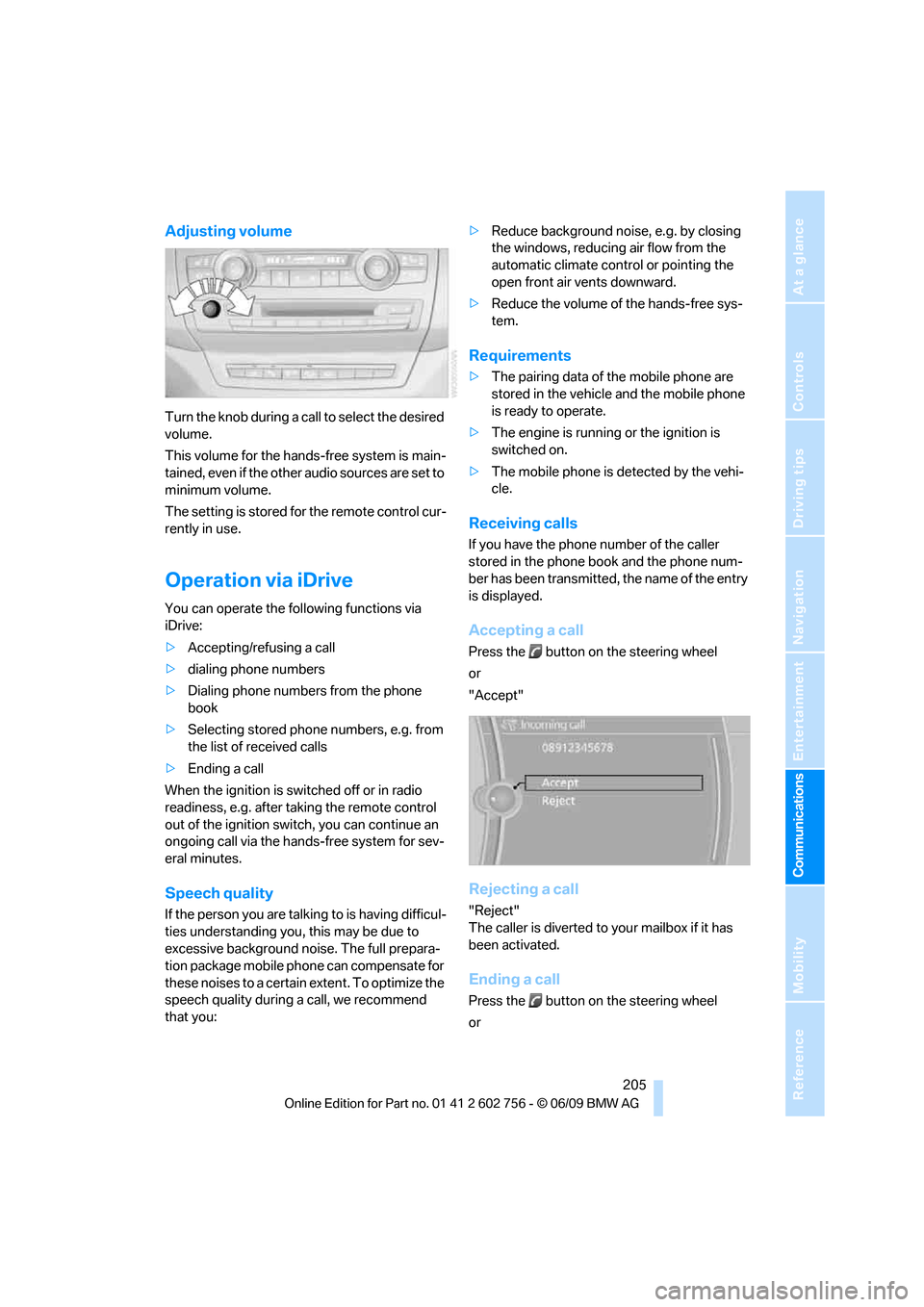
Accepting a call
Press the button on the steering wheel
or
"Accept"
Rejecting a call
"Reject"
The caller is diverted to your mailbox if it has
been activated.
Ending a call
Press the button on the steering wheel
or
ba8_e70ag.book Seite 205 Freitag, 5. Juni 2009 11:42 11
Page 212 of 300
Telephone
210
Ending/canceling operation by voice
commands
Press the button on the steering wheel
or
In dialogs where text is spoken, e.g. a name
rather than a command, canceling is only possi-
ble using the button on the steering wheel.
Having possible commands read aloud
The system understands default commands
that must be spoken word for word. You can have the possible commands spoken
by the system at any point:
Using alternative commands
There are often a number of commands to run a
function, e.g.:
The system recognizes digits from zero to nine.
You can say each digit individually or group
them into a sequence to accelerate the input.
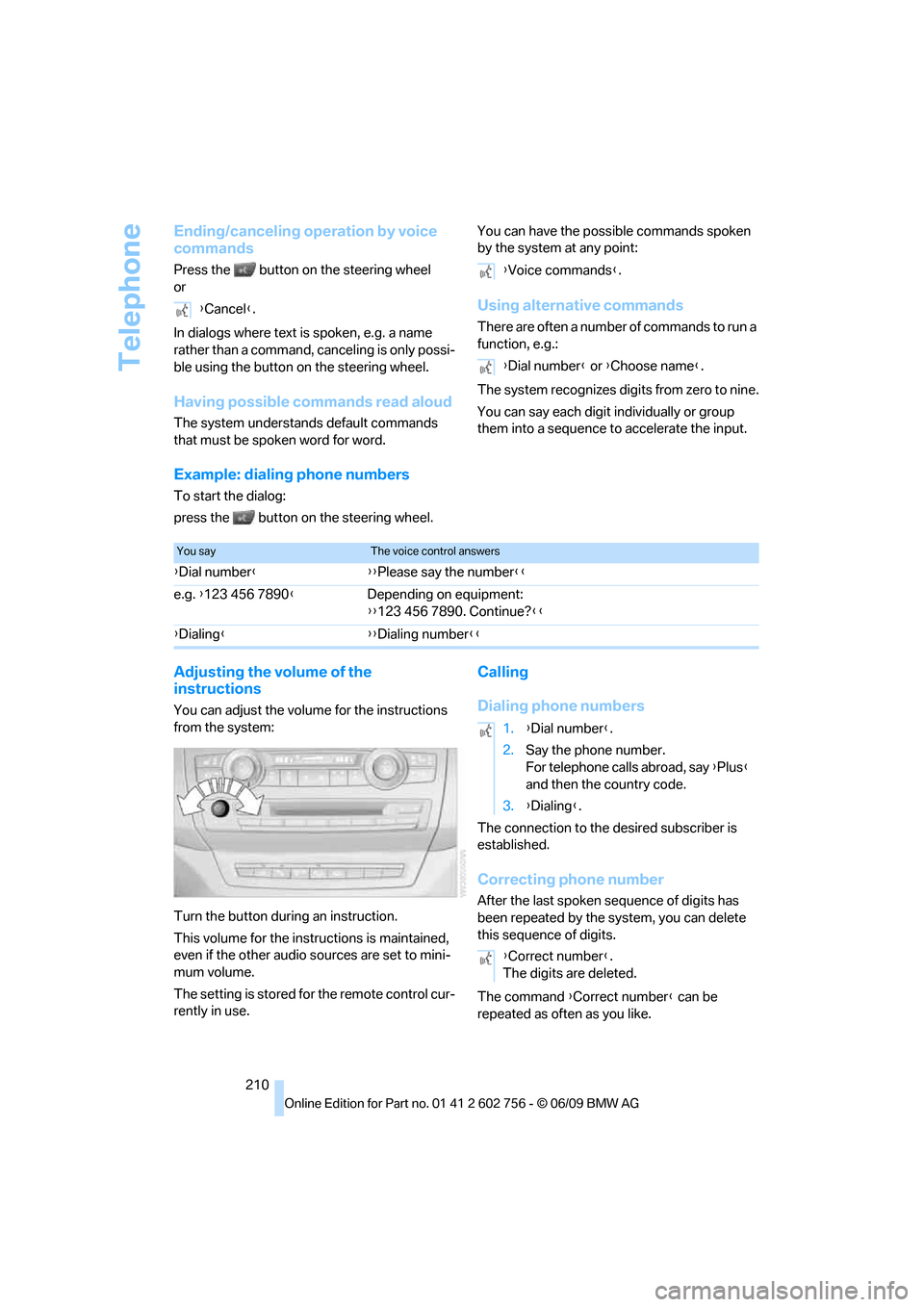
Example: dialing phone numbers
To start the dialog:
press the button on the steering wheel.
Adjusting the volume of the
instructions
You can adjust the volume for the instructions
from the system:
Turn the button during an instruction.
This volume for the instructions is maintained,
even if the other audio sources are set to mini-
mum volume.
The setting is stored for the remote control cur-
rently in use.
Calling
Dialing phone numbers
The connection to the desired subscriber is
established.
Correcting phone number
After the last spoken sequence of digits has
been repeated by the system, you can delete
this sequence of digits.
The command {Correct number} can be
repeated as often as you like. {Cancel}.
{Voice commands}.
{Dial number} or {Choose name}.
You sayThe voice control answers
{Dial number}{{Please say the number}}
e.g. {123 456 7890}Depending on equipment:
{{123 456 7890. Continue?}}
{Dialing}{{Dialing number}}
1.{Dial number}.
2.Say the phone number.
For telephone calls abroad, say {Plus}
and then the country code.
3.{Dialing}.
{Correct number}.
The digits are deleted.
ba8_e70ag.book Seite 210 Freitag, 5. Juni 2009 11:42 11
Page 281 of 300
Everything from A to Z
279
Everything from A to Z
Index
A
ABS Antilock Brake
System88
Accessories5
Access to 3rd row seats48
Acoustic signal, refer to Check
Control77
Activated-charcoal filter112
Active seat52
Active seat ventilation51
Active steering96
– malfunction97
– warning lamp97
Adaptive brake lamp, brake
force display97
Adaptive Drive91
Adaptive fixing system124
Adaptive Head Light103
Address for navigation,
entering141,147
Adjusting confirmation signals
for locking and unlocking28
Adjusting opening
height31,33
Adjusting temperature with
expanded-scope automatic
climate control109
Adjusting the tone during
audio operation, refer to
Tone control160
Adjusting thigh
support44,45
Airbags98
– sitting safely43
– warning lamp99
Air distribution
– automatic108,113
– manual110
Air recirculation110
– AUC Automatic
recirculated-air control110
– recirculated-air mode110Air vents107
– refer to Ventilation111
Air vents of automatic climate
control107
Air volume109,113
AKI, refer to Fuel
specifications225
Alarm system34
– avoiding unintentional
alarms35
– interior motion sensor35
– switching off alarm34
– switching off tilt alarm
sensor and interior motion
sensor35
– tilt alarm sensor35
Albums of music
collection180
Alloy wheels247
All-season tires, refer to
Winter tires238
All-wheel drive, refer to
xDrive90
Alterations, technical, refer to
For your own safety5
AM, waveband163
Antenna for mobile phone202
Antifreeze
– coolant243
– washer fluid69
Antilock Brake System
ABS88
Anti-theft system
– refer to Alarm system34
– refer to Central locking
system27
Approved axle weights, refer
to Weights271
Approved engine oils243
Approved gross vehicle
weight, refer to Weights271
Armrest, refer to Center
armrest, front119Around the center console14
Around the steering wheel10
Arrival time, refer to
Computer74
Ashtray
– front120
– rear120
Assist, refer to separate
operating instructions
Assistance systems, refer to
Driving stability control
systems88
AUC Automatic recirculated-
air control110
Audio160
– controls160
– switching on/off160
– tone control160
– volume160
Audio CDs, DVD system in
rear193
Audio device, external119
Automatic
– air distribution108,113
– air volume108,113
– headlamp control102
– liftgate operation31
– steering wheel adjustment,
refer to Easy entry/exit54
Automatically switching high-
beams on and off, refer to
High-beam assistant104
Automatic car washes246
Automatic climate control
– automatic air
distribution108,113
– in rear112
– switching off111,113
– ventilation in rear111
– with 2-zone control108
– with 4-zone control112
ba8_e70ag.book Seite 279 Freitag, 5. Juni 2009 11:42 11
Page 283 of 300
Reference 281
At a glance
Controls
Driving tips
Communications
Navigation
Entertainment
Mobility
C
Calibrating driver's seat50
California Proposition 65
Warning6
Call
– accepting205
– ending205
– rejecting205
Calling, refer to Phone
numbers, dialing206
Calling, refer to telephone
operating instructions
Camera
– refer to Rear view camera86
– refer to Top View84
Can holder, refer to Cup
holders119
Capacities272
Capacity of cargo bay271
Car battery, refer to Vehicle
battery258
Care246
– car-care products246
– carpets248
– car washes246
– CD/DVD-player249
– chrome components247
– displays249
– exterior246
– fine wooden
components248
– hand washing247
– headlamps247
– high-pressure cleaning
jets247
– interior248
– leather248
– light-alloy wheels247
– paint247
– plastic components248
– rubber gaskets247
– running boards248
– safety belts248
– sensors and cameras248
– upholstery materials and
cloth-covered paneling248
– windows247Cargo
– refer to Loading133
– securing134
– securing with ski bag126
Cargo area, refer to Cargo
bay122
Cargo area cover, refer to Roll-
up cover122
Cargo bay
– capacity271
– emergency actuation, refer
to Manually opening or
closing
34
– emergency operation, refer
to Opening manually31
– expanding124
– opening33
– opening/closing, refer to
Liftgate30,33
– opening/closing, refer to
Tailgate33
– opening from inside31
– opening from outside31
– opening with remote
control28
Cargo bay cover, refer to Roll-
up cover122
Caring for the vehicle
finish247
Car key, refer to Keys/remote
control26
Car phone
– installation location, refer to
Center armrest, front119
– refer to separate operating
instructions
– refer to Telephone202
Car radio, refer to Radio163
Car wash246
– before driving in60
– with comfort access37
Catalytic converter, refer to
Hot exhaust system131
CBC Cornering Brake
Control88
CBS Condition Based
Service244CD
– audio playback172
– refer to Playing audio tracks,
DVD system in rear193
CD-/DVD player in rear188
CD changer171
– controls160
– fast forward/reverse173
– random play sequence172
– selecting a track172
– switching on/off160
– tone control160
– volume160
CD player171
– controls160
– fast forward/reverse173
– random play sequence172
– selecting a track172
– switching on/off160
– tone control160
– volume160
Cell phone, refer to Mobile
phone
Center armrest
– front119
– rear122
Center brake lamp253,256
Center console14
Central locking system27
– comfort access35
– from inside vehicle30
Changes, technical
– refer to For your own
safety5
– refer to Parts and
accessories5
Changing gears using shift
paddles65
Changing language on
Control Display81
Changing tires237
Changing trips149
Changing units of measure on
Control Display80
Changing wheels256
Check Control77
Checking the air pressure,
refer to Tire inflation
pressure229
ba8_e70ag.book Seite 281 Freitag, 5. Juni 2009 11:42 11