Pdc BMW X5 2011 E70 User Guide
[x] Cancel search | Manufacturer: BMW, Model Year: 2011, Model line: X5, Model: BMW X5 2011 E70Pages: 312, PDF Size: 8.91 MB
Page 171 of 312
Navigation
Entertainment
Driving tips
169Reference
At a glance
Controls
Communications
Mobility
>"Fader": front/rear volume distribution
Adjustments
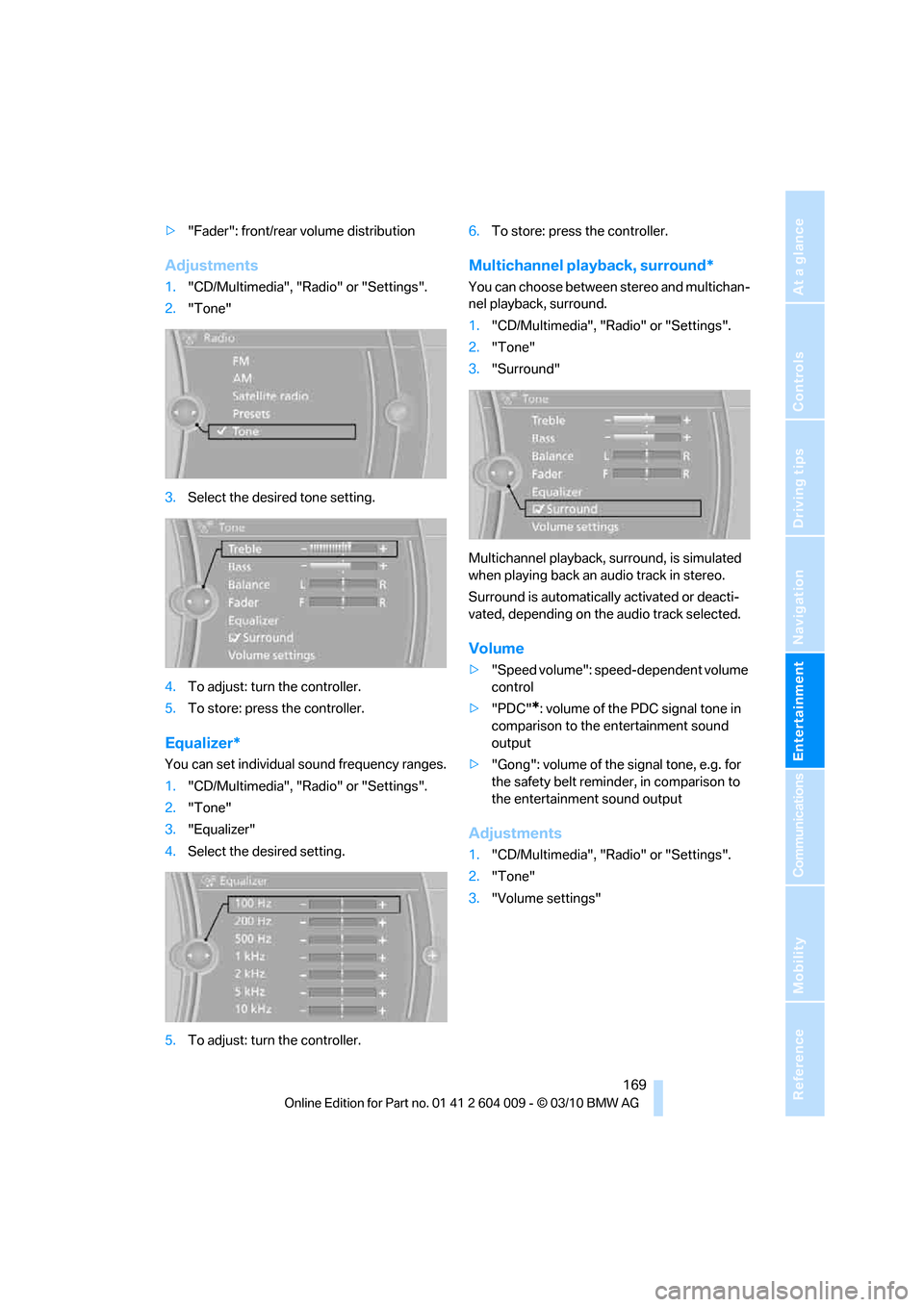
1."CD/Multimedia", "Radio" or "Settings".
2."Tone"
3.Select the desired tone setting.
4.To adjust: turn the controller.
5.To store: press the controller.
Equalizer*
You can set individual sound frequency ranges.
1."CD/Multimedia", "Radio" or "Settings".
2."Tone"
3."Equalizer"
4.Select the desired setting.
5.To adjust: turn the controller.6.To store: press the controller.
Multichannel playback, surround*
You can choose between stereo and multichan-
nel playback, surround.
1."CD/Multimedia", "Radio" or "Settings".
2."Tone"
3."Surround"
Multichannel playback, surround, is simulated
when playing back an audio track in stereo.
Surround is automatically activated or deacti-
vated, depending on the audio track selected.
Volume
>"Speed volume": speed-dependent volume
control
>"PDC"
*: volume of the PDC signal tone in
comparison to the entertainment sound
output
>"Gong": volume of the signal tone, e.g. for
the safety belt reminder, in comparison to
the entertainment sound output
Adjustments
1."CD/Multimedia", "Radio" or "Settings".
2."Tone"
3."Volume settings"
Page 298 of 312
Everything from A - Z
296 Data memory257
Data transfer230
Date76
– display format85
– retrieving76
– setting85
Daytime driving lamps112
Defrosting windows118
Defrosting windows and
removing condensation118
Defrost position, refer to
Defrosting windows118
Deleting a trip157
Destination, entering by town/
city name149
Destination address
– entering149,155
Destination entry using BMW
Assist153
Destination for navigation
– entering149
– entering by voice155
– entering via map154
Destination guidance158
– bypassing a route
section159
– changing specified
route158
– continuing158
– starting158
– voice instructions160
– volume of voice
instructions160
Diesel exhaust fluid
– at low temperatures237
– at minimum236
– refilling yourself237
Diesel particulate filter139
Digital clock76
Digital compass125
Digital radio, refer to HD
Radio172
Dimensions281
Directional indicators, refer to
Turn signals65
Direction announcements,
refer to Voice
instructions160Directory for navigation, refer
to Address book151
Displacement, refer to Engine
data280
Display, refer to iDrive16
Displaying images204
Displaying special
destinations154
Display lighting, refer to
Instrument lighting115
Displays, refer to Instrument
panel12
Displays on the windshield,
refer to Head-up
Display109
Disposal
– battery of remote control
with Comfort Access37
– battery of the remote
control, DVD system in
rear198
– vehicle battery270
Distance, refer to
Computer79
Distance, selecting for active
cruise control70
Distance control, refer to
Active cruise control68
Distance to destination, refer
to Computer79
Distance warning, refer to
PDC Park Distance
Control88
Door entry lighting115
Door key, refer to Keys/
remote control26
Door lock29
Door locking, confirmation
signals28
Doors
– manual operation29
– remote control28
DOT Quality Grades247
Downhill driving assistance,
refer to HDC97
Draft-free ventilation120
Drinks holder, refer to
Cupholders128
Drive-off assistant99Driver's seat, calibrating49
Driving lamps, refer to Parking
lamps/low beams111
Driving on poor roads143
Driving stability control
systems95
Driving through water140
Driving tips, refer to General
driving notes138
Dry air, refer to Cooling
function119
Drying the air, refer to Cooling
function119
DSC Dynamic Stability
Control95
– indicator lamp13,96
DSC OFF, refer to Dynamic
Stability Control95
DTC Dynamic Traction
Control96
– activating96
– indicator lamp97
DVD
– country codes181
– settings182
– video playback181
DVD changer183
– malfunctions184
DVD changer, refer to CD
changer179
DVD menu182
DVD player, refer to CD
player179
DVD system in rear196
– CD/DVD player197
– connecting headphones197
– controls196
– displaying images from CD/
DVD204
– DVD country codes199
– external device207
– information on CD/DVD
player205
– playing audio tracks from
CD/DVD202
– playing video from CD/
DVD199
– remote control197
– switching on/off198
Page 304 of 312
Everything from A - Z
302 Oil
– additives, refer to Approved
engine oils255
– approved engine oils255
– consumption, refer to
Checking engine oil
level253
– level253
– refilling, refer to Adding
engine oil254
Oil change interval, refer to
Service requirements79
Onboard computer, refer to
iDrive16
Onboard toolkit262
Opening and closing
– Comfort Access35
– from inside30
– panoramic glass sunroof39
– using remote control28
– using the door lock29
Operation on poor roads143
Options, selecting for
navigation158
Orientation menu, refer to
Main menu17
Output, refer to Engine
data280
Outside air, refer to AUC
Automatic recirculated-air
control119
Outside temperature
display76
– changing units of
measure86
Outside temperature
warning76
Overheating of engine, refer to
Coolant thermometer77
Overview
– radio control168
P
Panic mode28
Panoramic glass sunroof38
– power failure40
– raising, opening, closing39
Park Distance Control PDC88Parked-car ventilation122
– preselecting activation
times123
– switching on and off
directly122
Parking
– vehicle59
Parking aid
– refer to PDC Park Distance
Control88
– refer to Rear view camera93
Parking assistance
– refer to Top View90
Parking assistant, refer to
PDC Park Distance
Control88
Parking brake60
– Automatic Hold61
– indicator lamp13
– releasing manually60
– releasing manually in case of
an electrical malfunction62
– setting manually60
Parking brake, indicator
lamp13
Parking lamps111
Parking with Automatic
Hold61
Particulate filter, refer to
Diesel particulate filter139
Parts and accessories5
Passenger-side exterior
mirror, tilting down52
Pathway lighting112
Paying attention to speed250
PDC Park Distance Control88
Personal Profile26
Phone book215
Phone numbers
– dialing216
Pinch protection system
– glass sunroof, electric40
– panoramic glass sunroof39
– power windows38
Plasters, refer to First-aid
kit273
Playing videos, DVD system in
rear199Plug-in unit for remote
control, refer to Ignition
lock58
Postal code, entering for
navigation150
Power failure270
Power windows, refer to
Windows37
Preglowing, refer to Diesel
engine
59
Preselecting activation times
of parked-car
ventilation123
Pressure, tires239
Pressure monitoring of tires
– refer to TPM Tire Pressure
Monitor101
Protective function, refer to
Pinch protection system
– glass sunroof, electric40
– panoramic glass sunroof39
– windows38
R
Radio
– controls168
– HD Radio172
– satellite radio174
– storing stations171
– switching on/off168
– tone control168
– volume168
– waveband, selecting171
Radio key, refer to Keys/
remote control26
Radio position, refer to Radio
readiness58
Radio readiness58
– switched off58
– switched on58
– with Comfort Access36
Rain sensor66
Random sequence
– external devices194
– music collection190
Reading lamps115