battery BMW X5 2011 E70 User Guide
[x] Cancel search | Manufacturer: BMW, Model Year: 2011, Model line: X5, Model: BMW X5 2011 E70Pages: 312, PDF Size: 8.91 MB
Page 117 of 312
Controls
115Reference
At a glance
Driving tips
Communications
Navigation
Entertainment
Mobility
Instrument lighting
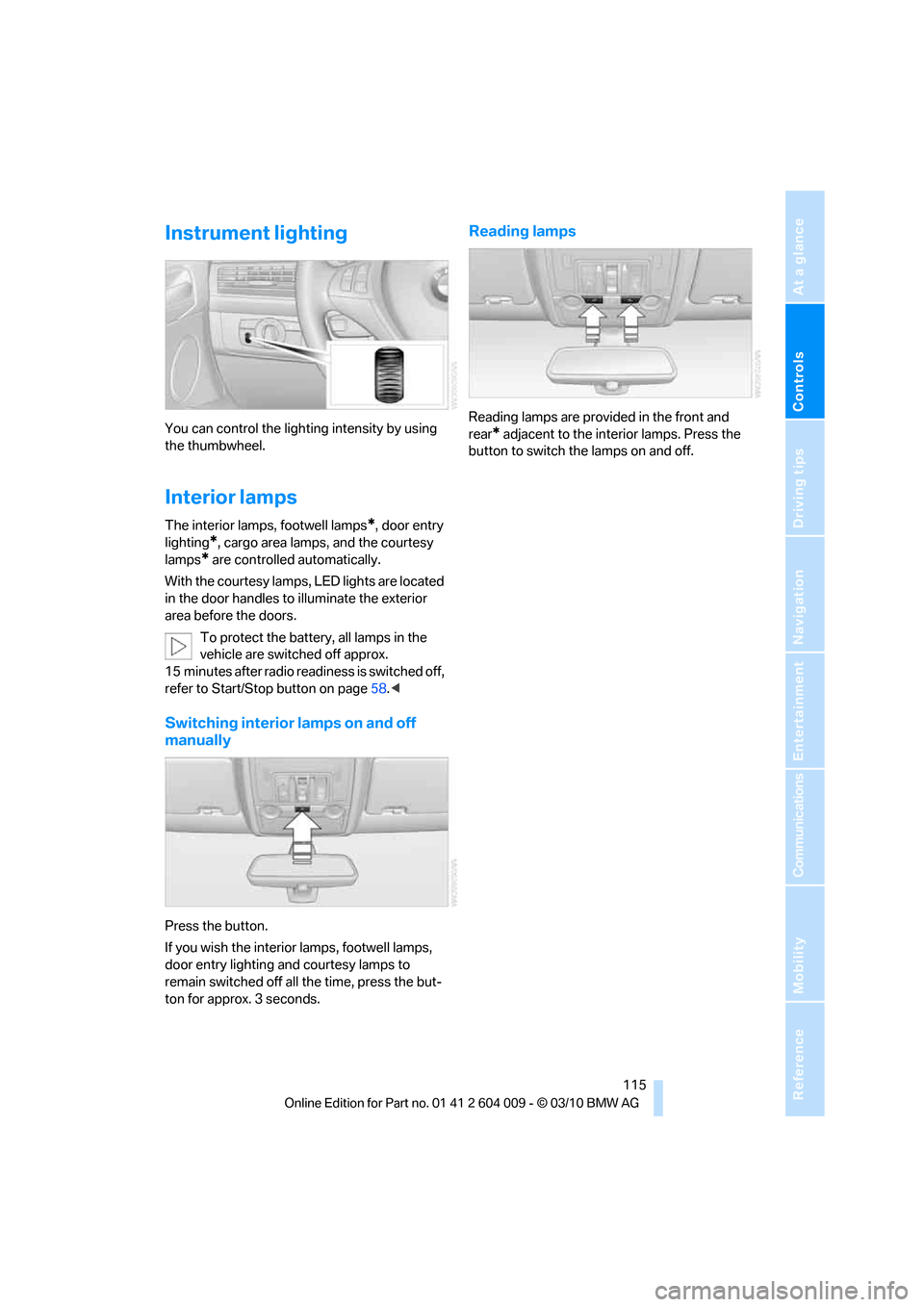
You can control the lighting intensity by using
the thumbwheel.
Interior lamps
The interior lamps, footwell lamps*, door entry
lighting
*, cargo area lamps, and the courtesy
lamps
* are controlled automatically.
With the courtesy lamps, LED lights are located
in the door handles to illuminate the exterior
area before the doors.
To protect the battery, all lamps in the
vehicle are switched off approx.
15 minutes after radio readiness is switched off,
refer to Start/Stop button on page58.<
Switching interior lamps on and off
manually
Press the button.
If you wish the interior lamps, footwell lamps,
door entry lighting and courtesy lamps to
remain switched off all the time, press the but-
ton for approx. 3 seconds.
Reading lamps
Reading lamps are provided in the front and
rear
* adjacent to the interior lamps. Press the
button to switch the lamps on and off.
Page 121 of 312
Controls
119Reference
At a glance
Driving tips
Communications
Navigation
Entertainment
Mobility
Selecting program
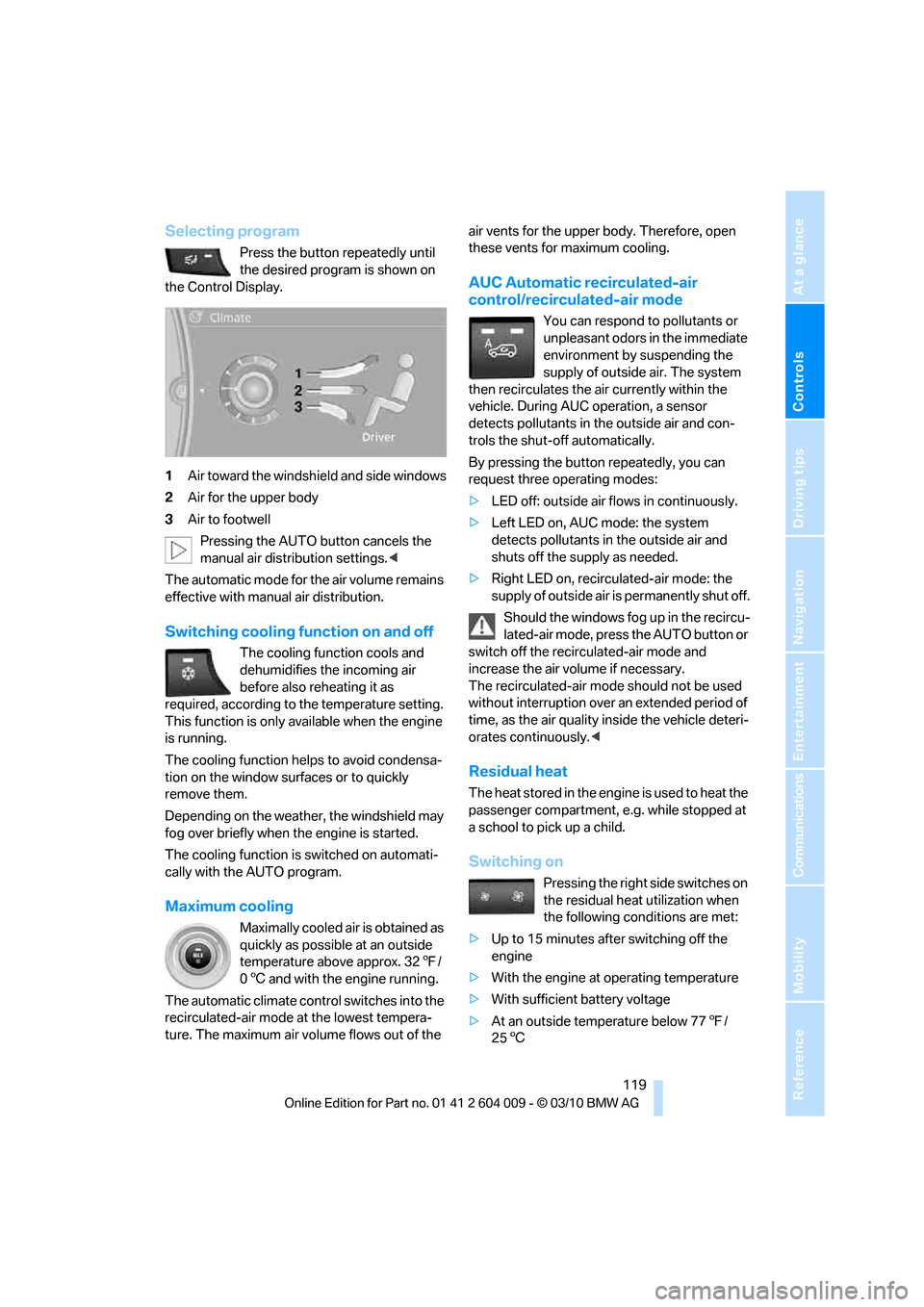
Press the button repeatedly until
the desired program is shown on
the Control Display.
1Air toward the windshield and side windows
2Air for the upper body
3Air to footwell
Pressing the AUTO button cancels the
manual air distribution settings.<
The automatic mode for the air volume remains
effective with manual air distribution.
Switching cooling function on and off
The cooling function cools and
dehumidifies the incoming air
before also reheating it as
required, according to the temperature setting.
This function is only available when the engine
is running.
The cooling function helps to avoid condensa-
tion on the window surfaces or to quickly
remove them.
Depending on the weather, the windshield may
fog over briefly when the engine is started.
The cooling function is switched on automati-
cally with the AUTO program.
Maximum cooling
Maximally cooled air is obtained as
quickly as possible at an outside
temperature above approx. 327/
06 and with the engine running.
The automatic climate control switches into the
recirculated-air mode at the lowest tempera-
ture. The maximum air volume flows out of the air vents for the upper body. Therefore, open
these vents for maximum cooling.
AUC Automatic recirculated-air
control/recirculated-air mode
You can respond to pollutants or
unpleasant odors in the immediate
environment by suspending the
supply of outside air. The system
then recirculates the air currently within the
vehicle. During AUC operation, a sensor
detects pollutants in the outside air and con-
trols the shut-off automatically.
By pressing the button repeatedly, you can
request three operating modes:
>LED off: outside air flows in continuously.
>Left LED on, AUC mode: the system
detects pollutants in the outside air and
shuts off the supply as needed.
>Right LED on, recirculated-air mode: the
supply of outside air is permanently shut off.
Should the windows fog up in the recircu-
lated-air mode, press the AUTO button or
switch off the recirculated-air mode and
increase the air volume if necessary.
The recirculated-air mode should not be used
without interruption over an extended period of
time, as the air quality inside the vehicle deteri-
orates continuously.<
Residual heat
The heat stored in the engine is used to heat the
passenger compartment, e.g. while stopped at
a school to pick up a child.
Switching on
Pressing the right side switches on
the residual heat utilization when
the following conditions are met:
>Up to 15 minutes after switching off the
engine
>With the engine at operating temperature
>With sufficient battery voltage
>At an outside temperature below 777/
256
Page 124 of 312
Climate
122
Air volume, manual
You can vary the air volume by
pressing on the corresponding
side. You can reactivate the auto-
matic mode for the air volume with the AUTO
button.
Switching off rear automatic climate
control
You can select the lowest blower
speed by pressing and holding the
left side. Pressing again switches
off the automatic climate control.
The automatic climate control can also be
switched off with iDrive. To switch on the
automatic climate control again, the system
must first be reactivated, refer to Activating/
deactivating.<
Y o u s w i t c h o n t h e s y s t e m a g a i n b y p r e s s i n g a n y
button of the rear automatic climate control.
Ventilation in rear
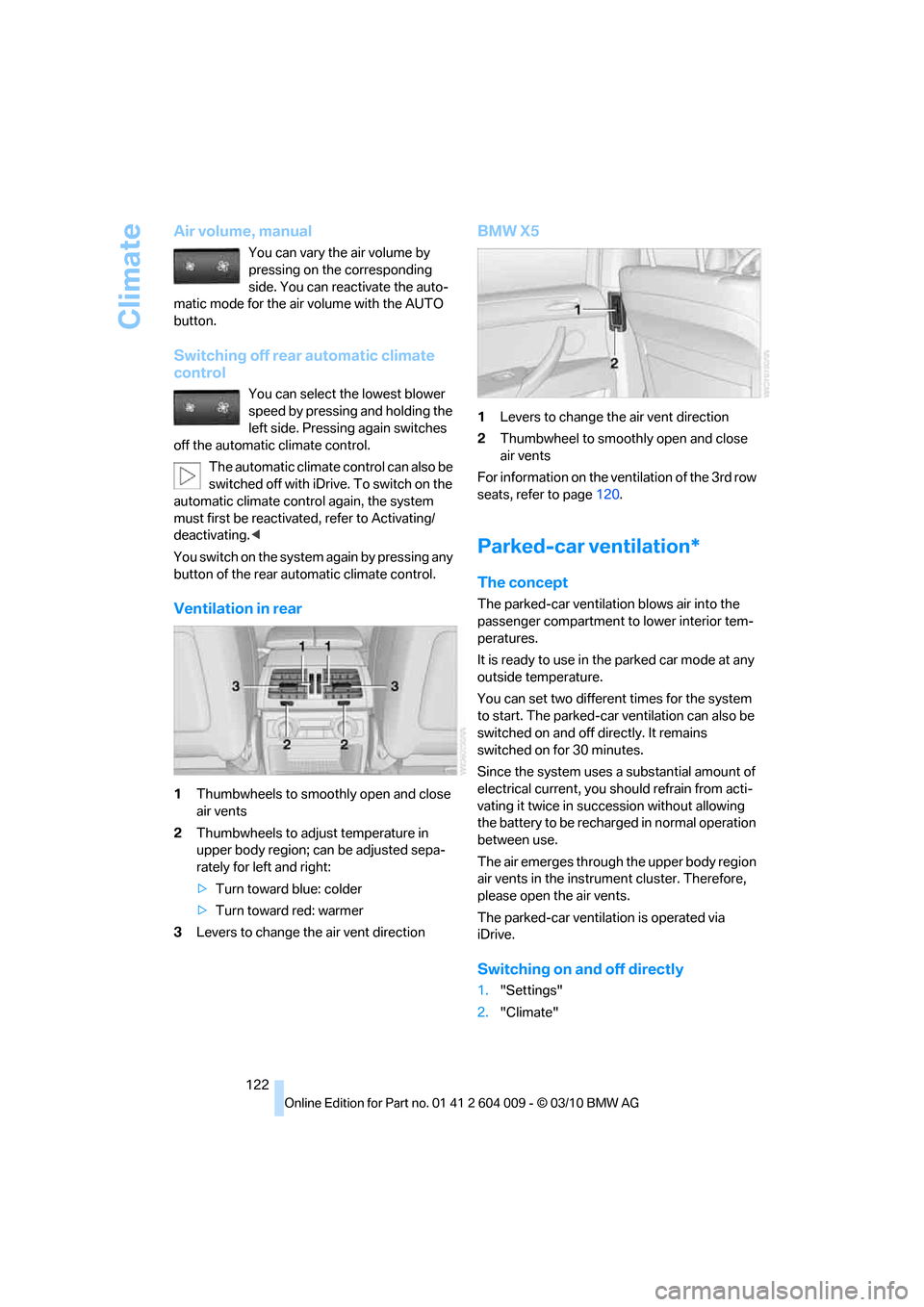
1Thumbwheels to smoothly open and close
air vents
2Thumbwheels to adjust temperature in
upper body region; can be adjusted sepa-
rately for left and right:
>Turn toward blue: colder
>Turn toward red: warmer
3Levers to change the air vent direction
BMW X5
1Levers to change the air vent direction
2Thumbwheel to smoothly open and close
air vents
For information on the ventilation of the 3rd row
seats, refer to page120.
Parked-car ventilation*
The concept
The parked-car ventilation blows air into the
passenger compartment to lower interior tem-
peratures.
It is ready to use in the parked car mode at any
outside temperature.
You can set two different times for the system
to start. The parked-car ventilation can also be
switched on and off directly. It remains
switched on for 30 minutes.
Since the system uses a substantial amount of
electrical current, you should refrain from acti-
vating it twice in succession without allowing
the battery to be recharged in normal operation
between use.
The air emerges through the upper body region
air vents in the instrument cluster. Therefore,
please open the air vents.
The parked-car ventilation is operated via
iDrive.
Switching on and off directly
1."Settings"
2."Climate"
Page 200 of 312
DVD system in rear
198 >Press the arrow buttons:
To switch between windows.
>Press the button:
To activate the menu item.
The transmission time of the remote control is
limited in accordance with legal guidelines. A
function can be repeated by pressing or turning
the appropriate button or knob.
Changing batteries
1.Press the detent and remove the cover.
2.Change the batteries. The type and installa-
tion position are marked on the bottom of
the battery compartment.
3.Close the cover.
Return old batteries to a recycling center
or to your BMW Sports Activity Vehicle
Center.<
Setting the language of the
DVD system
1.Select a CD/DVD track.
2.Press the button.
3.Select "Tone".
4.Press the button.
5.Switch to the top window.
6.Select "Language".
7.Press the button.
8.Select the desired language.
9.Press the button.
Sound output via speakers
In addition to the headphones, you can also play
the sound via the vehicle speakers.
1."CD/Multimedia"
2."External devices"
3."AUX rear"
Switching DVD system on/off
Press the button on the CD-/DVD player or
under the desired screen.
The DVD system switches on automatically
when a CD or DVD is inserted.
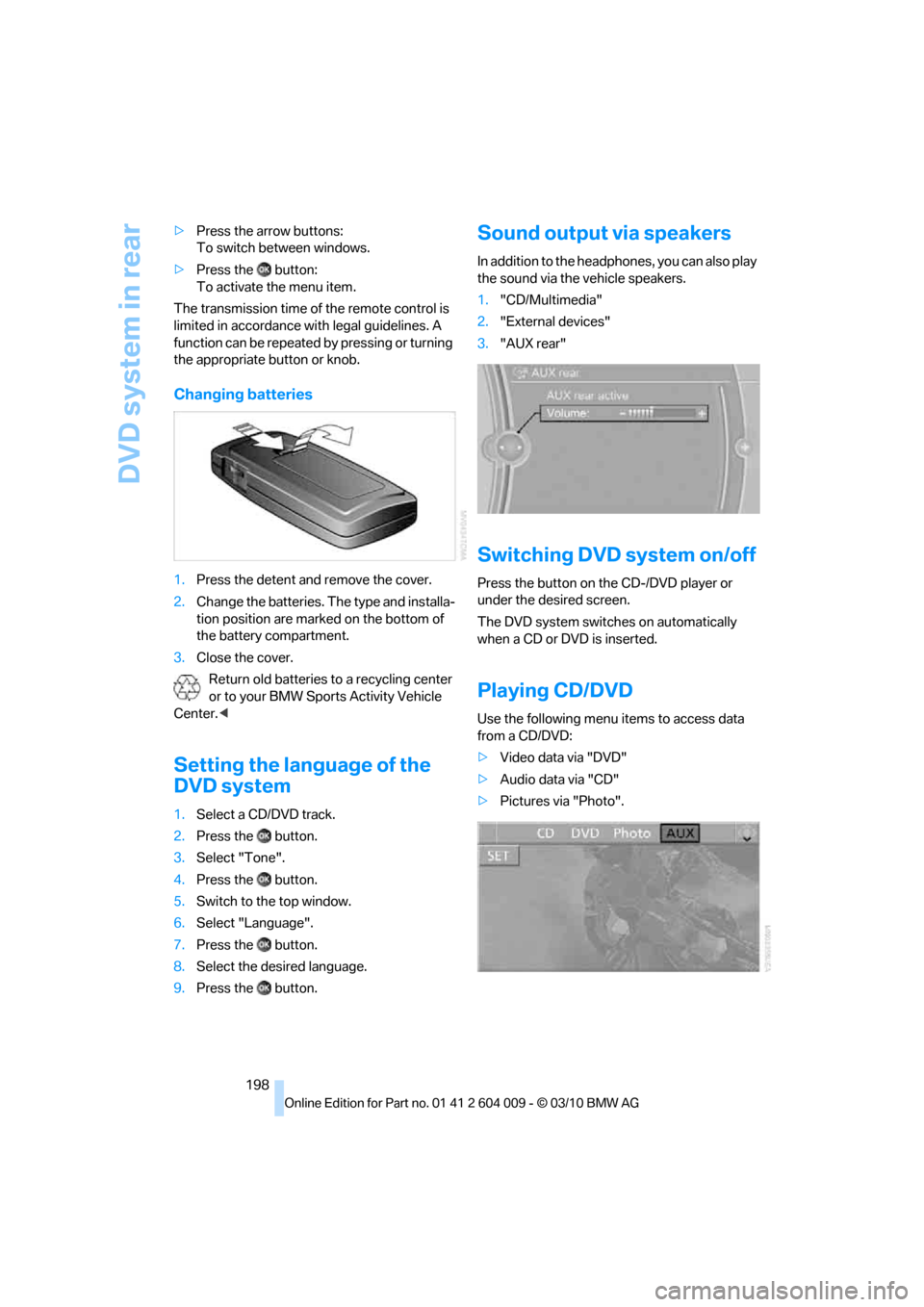
Playing CD/DVD
Use the following menu items to access data
from a CD/DVD:
>Video data via "DVD"
>Audio data via "CD"
>Pictures via "Photo".
Page 214 of 312
Telephone
212
Telephone
The concept
Your BMW is equipped with a full preparation
package mobile phone. After pairing a suitable
mobile phone with the vehicle once, you can
operate the mobile phone using iDrive, the but-
tons on the steering wheel, or voice com-
mands
*.
Once a mobile phone has been paired with your
vehicle, it is automatically recognized as soon
as it is inside the vehicle while the engine is run-
ning or the ignition is switched on. The pairing
data of up to four mobile phones can be stored
simultaneously. If several mobile phones are
detected simultaneously, the respective last
mobile phone paired can be operated via the
vehicle.
Using a phone in your vehicle
Using snap-in adapter*
The so-called snap-in adapter, a mobile phone
cradle, enables the battery to be charged and
the mobile phone to be connected to the exter-
nal antenna of your vehicle. This ensures
improved network reception and a consistent
voice reproduction quality. Ask your BMW
Sports Activity Vehicle Center which mobile
phones snap-in adapters are offered for.
For your safety
A car phone makes life more convenient in
many ways, and can even save lives in an emer-
gency. While you should consult your mobile
phone's separate operating instructions for a
detailed description of safety precautions and
information, we request that you direct your
particular attention to the following:
Only make entries when the traffic situa-
tion allows you to do so. Do not hold the
mobile phone in your hand while you are driving;
use the hands-free system instead. If you do
not observe this precaution, your being dis-tracted can endanger vehicle occupants and
other road users.<
Suitable mobile phones
Please ask your BMW Sports Activity Vehicle
Center which mobile phones with Bluetooth
interface are supported by the mobile phone
preparation package and which mobile phones
are compatible with the snap-in adapter. By vir-
tue of their particular software versions, these
mobile phones support the functions described
in this Owner's Manual. Malfunctions can occur
with other mobile phones.
Operating options
You can operate the mobile phone using:
>Buttons on the steering wheel, refer to
page10
>iDrive, refer to page16
>Voice commands
*, refer to page219
>Programmable memory buttons, refer to
page20
Avoid operating a mobile phone detected by
the vehicle with the keypad of the mobile
phone, otherwise malfunctions can occur.
Commissioning
Pairing mobile phone in vehicle
The following prerequisites must be met:
>Compatible mobile phone: the mobile
phone is supported by the full mobile phone
preparation package. Information on this
subject is also provided on the Internet at:
www.bmw.com/bluetooth
>The mobile phone is ready to operate.
>Bluetooth has been activated in the vehicle,
refer to page214, and on the mobile phone.
*
Page 225 of 312
223
Entertainment
Reference
At a glance
Controls
Driving tips Communications
Navigation
Mobility
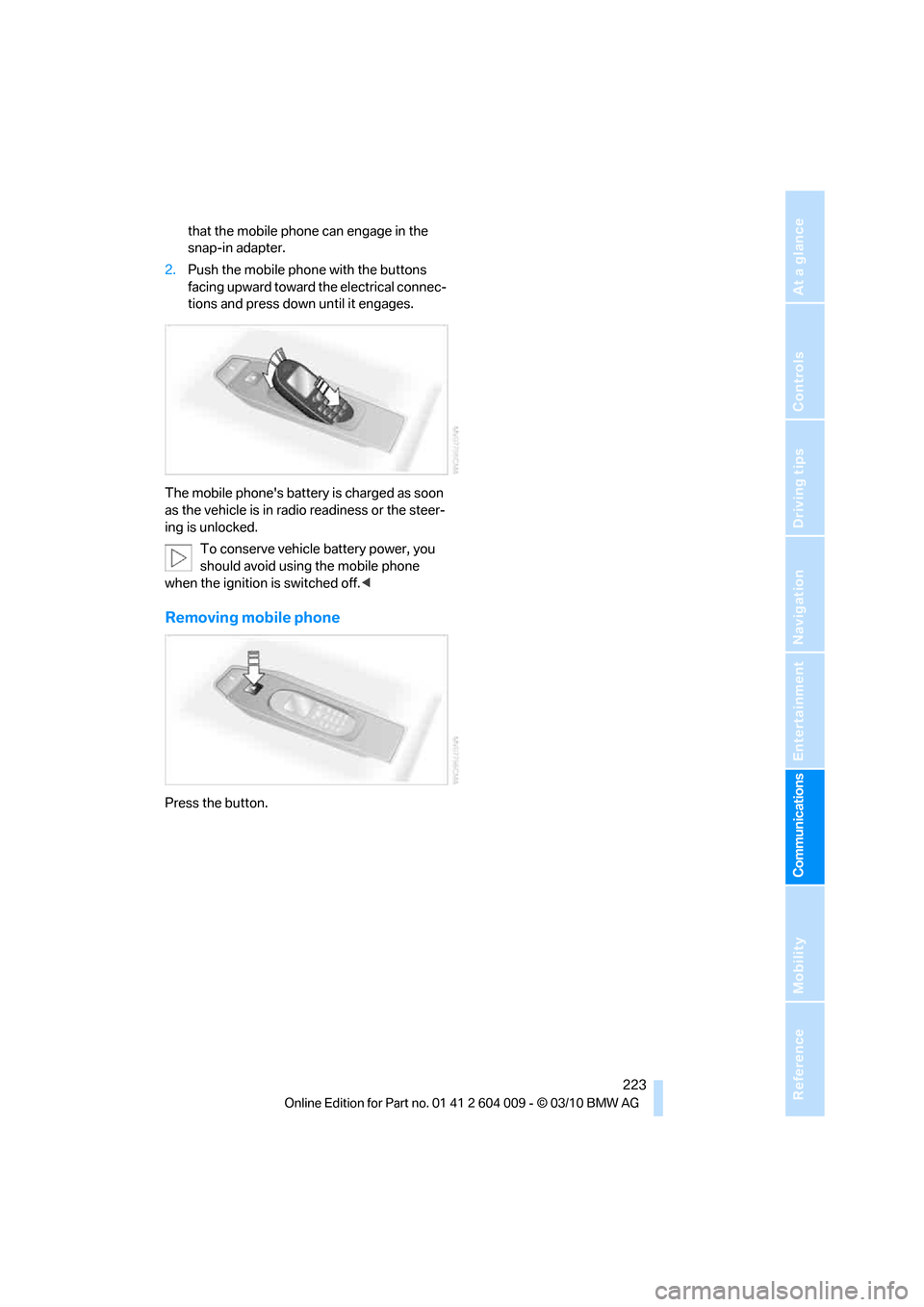
that the mobile phone can engage in the
snap-in adapter.
2.Push the mobile phone with the buttons
facing upward toward the electrical connec-
tions and press down until it engages.
The mobile phone's battery is charged as soon
as the vehicle is in radio readiness or the steer-
ing is unlocked.
To conserve vehicle battery power, you
should avoid using the mobile phone
when the ignition is switched off.<
Removing mobile phone
Press the button.
Page 272 of 312
Replacing components
270 3.Position the new wheel or compact wheel.
Secure the wheel by screwing at least two
lug bolts into opposite bolt holes.
When you mount wheels other than Genu-
ine BMW light-alloy wheels, different lug
bolts may also be required.
4.Screw in the remaining lug bolts. Tighten all
the bolts securely in a diagonal pattern.
5.Lower the vehicle and remove the jack from
beneath the vehicle.
After mounting
1.Tighten the lug bolts in a diagonal pattern.
To ensure safety, always have the
lug bolts checked with a calibrated
torque wrench as soon as possible to
ensure that they are tightened to the speci-
fied torque. Otherwise, incorrectly tight-
ened lug bolts are a hidden safety risk. The
tightening torque is 101 lb ft/140 Nm.<
2.Stow the defective wheel in the cargo area.
The defective wheel cannot be stored
under the floor panel flap due to its
size.<
3.Check and correct the tire inflation pressure
at the earliest opportunity.
Protect valve stems with valve screw
caps against dirt and contamination.
Dirt in valve stems is a frequent source of
gradual air loss.<
4.Initialize the Flat Tire Monitor, refer to
page100, or reset the Tire Pressure Moni-
tor, refer to page102.
5.Replace the damaged tire as soon as possi-
ble and have the new wheel/tire balanced.
Driving with compact wheel
Drive reservedly and do not exceed a
speed of 50 mph/80 km/h. Otherwise,
changes in the driving characteristics could
result, for example reduced track stability on
braking, extended braking distance, and altered
self-steering characteristics in the limit range.
In conjunction with winter tires, these charac-
teristics are more pronounced.
their original size as quickly as possible. Failure
to do so is a safety risk.<
Vehicle battery
Battery care
The battery is 100 % maintenance-free, i.e., the
electrolyte will last for the life of the battery
when the vehicle is operated in a temperate cli-
mate. Your BMW Sports Activity Vehicle Center
will be glad to advise in all matters concerning
the battery.
Replacing battery
Only use vehicle batteries that have been
approved for your vehicle by the manu-
facturer; otherwise, the vehicle could be dam-
aged and systems or functions may not be fully
available.<
After a battery replacement, have the battery
registered on the vehicle by your BMW Sports
Activity Vehicle Center to ensure that all com-
fort functions are fully available.
Charging battery
Only charge the battery in the vehicle via the
terminals in the engine compartment with the
engine switched off. Connections, refer to
Jump starting on page274.
Disposal
Have old batteries disposed of following
replacement at your BMW Sports Activity
Vehicle Center or bring them to a recycling cen-
ter. Maintain the battery in an upright position
for transport and storage. Always restrain the
battery to prevent it from tipping over during
transport.<
Power failure
Following a temporary power failure, e.g. due to
a discharged battery, the use of some equip-
ment will be restricted, requiring its reinitializa-
Page 276 of 312
Giving and receiving assistance
274 expiration dates of the contents regularly and
replace the contents concerned in good time if
necessary.
The first-aid kit is stored in the cargo area,
depending on the vehicle's equipment,
>On the right in a storage tray or
>Behind the left side panel
Roadside Assistance*
Roadside Assistance can be reached around
the clock in many countries. You can obtain
assistance there in the event of a vehicle break-
down.
The phone numbers of Roadside Assistance
can be found in the Contact brochure.
With BMW Assist or BMW TeleService, you can
contact BMW Roadside Assistance directly via
iDrive to request assistance in the event of a
breakdown, refer to page227.
Jump starting
When your battery is discharged, you can use
two jumper cables to start your BMW with
power from the battery in a second vehicle. You
can also use the same method to help start
another vehicle. Use only jumper cables with
fully-insulated clamp handles.
To avoid the risk of potentially fatal injury,
always avoid all contact with electrical
components while the engine is running. Care-
fully adhere to the following sequence, both to
prevent damage to one or both vehicles, and to
guard against possible personal injuries.<
Preparation
1.Check whether the battery of the other
vehicle has a voltage of 12 Volts and
approximately the same capacitance in Ah.
This information can be found on the bat-
tery.
2.Switch off the engine of the assisting vehi-
cle.3.Switch off any electrical systems and com-
ponents in both vehicles.
There must not be any contact between
the bodies of the two vehicles, otherwise
there is a danger of shorting.<
Connecting jumper cables
To avoid personal injury from sparks, fol-
low this sequence when connecting
jumper cables.<
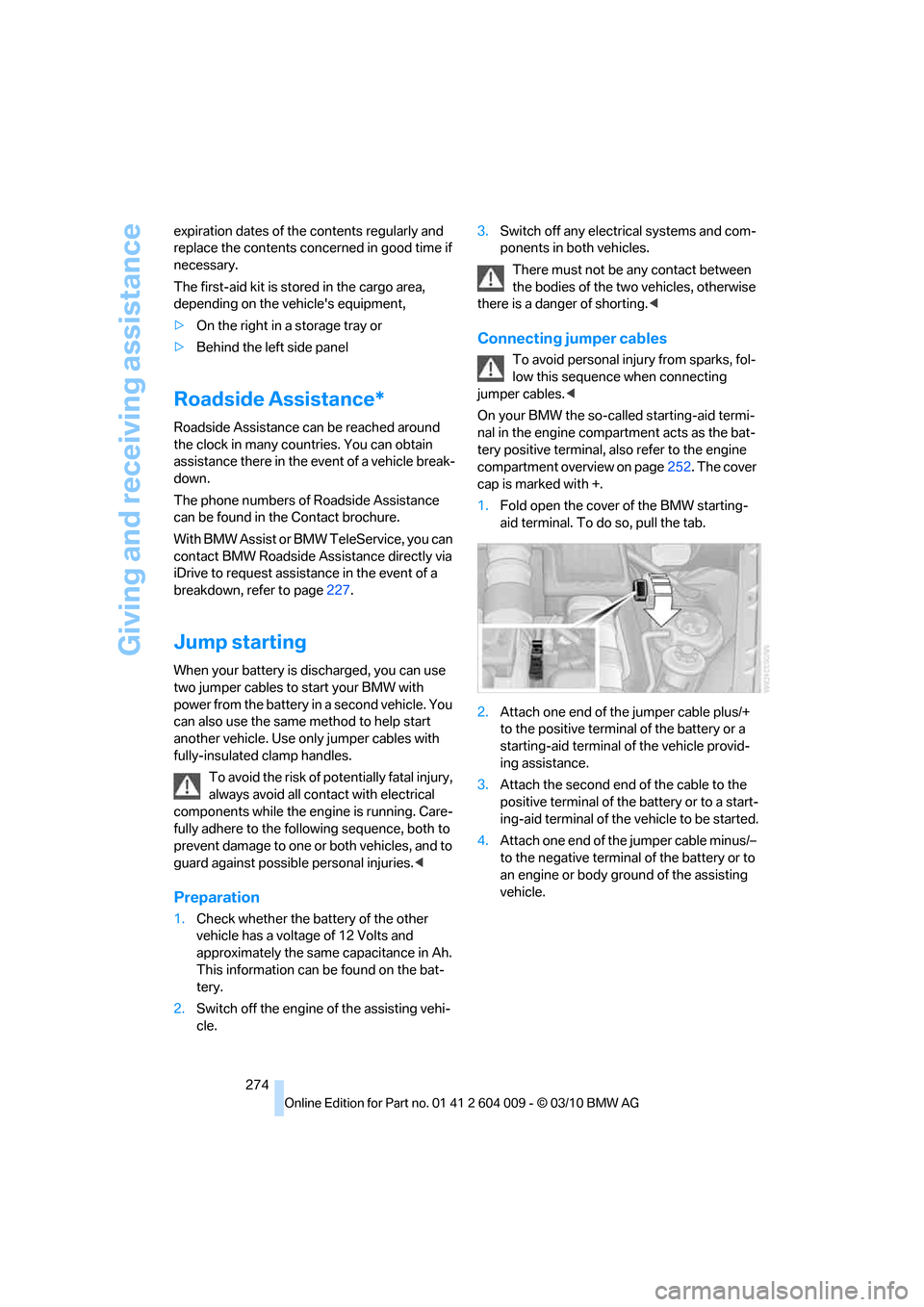
On your BMW the so-called starting-aid termi-
nal in the engine compartment acts as the bat-
tery positive terminal, also refer to the engine
compartment overview on page252. The cover
cap is marked with +.
1.Fold open the cover of the BMW starting-
aid terminal. To do so, pull the tab.
2.Attach one end of the jumper cable plus/+
to the positive terminal of the battery or a
starting-aid terminal of the vehicle provid-
ing assistance.
3.Attach the second end of the cable to the
positive terminal of the battery or to a start-
ing-aid terminal of the vehicle to be started.
4.Attach one end of the jumper cable minus/–
to the negative terminal of the battery or to
an engine or body ground of the assisting
vehicle.
Page 277 of 312
Mobility
275Reference
At a glance
Controls
Driving tips
Communications
Navigation
Entertainment
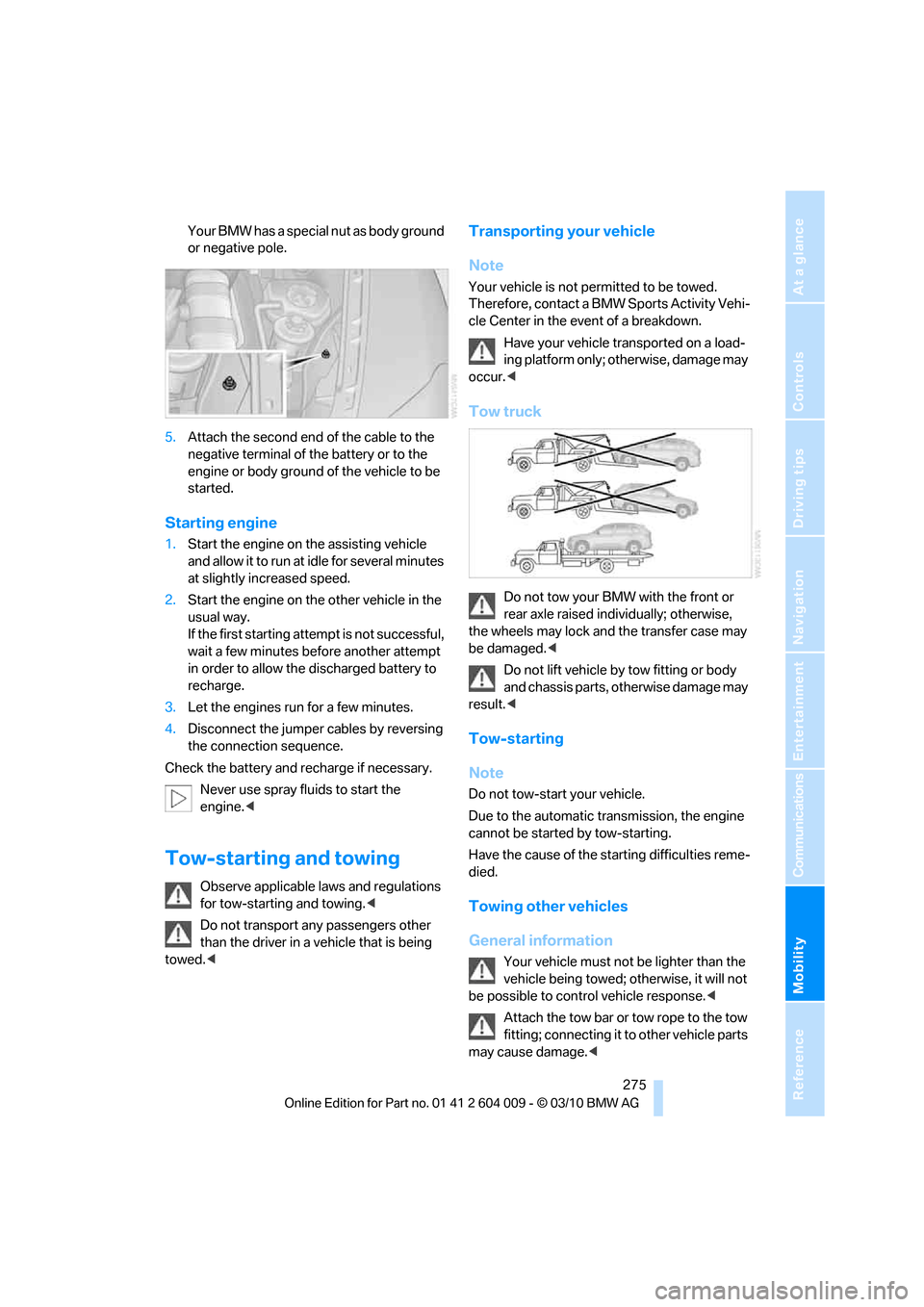
Your BMW has a special nut as body ground
or negative pole.
5.Attach the second end of the cable to the
negative terminal of the battery or to the
engine or body ground of the vehicle to be
started.
Starting engine
1.Start the engine on the assisting vehicle
and allow it to run at idle for several minutes
at slightly increased speed.
2.Start the engine on the other vehicle in the
usual way.
If the first starting attempt is not successful,
wait a few minutes before another attempt
in order to allow the discharged battery to
recharge.
3.Let the engines run for a few minutes.
4.Disconnect the jumper cables by reversing
the connection sequence.
Check the battery and recharge if necessary.
Never use spray fluids to start the
engine.<
Tow-starting and towing
Observe applicable laws and regulations
for tow-starting and towing.<
Do not transport any passengers other
than the driver in a vehicle that is being
towed.<
Transporting your vehicle
Note
Your vehicle is not permitted to be towed.
Therefore, contact a BMW Sports Activity Vehi-
cle Center in the event of a breakdown.
Have your vehicle transported on a load-
ing platform only; otherwise, damage may
occur.<
Tow truck
Do not tow your BMW with the front or
rear axle raised individually; otherwise,
the wheels may lock and the transfer case may
be damaged.<
Do not lift vehicle by tow fitting or body
and chassis parts, otherwise damage may
result.<
Tow-starting
Note
Do not tow-start your vehicle.
Due to the automatic transmission, the engine
cannot be started by tow-starting.
Have the cause of the starting difficulties reme-
died.
Towing other vehicles
General information
Your vehicle must not be lighter than the
vehicle being towed; otherwise, it will not
be possible to control vehicle response.<
Attach the tow bar or tow rope to the tow
fitting; connecting it to other vehicle parts
may cause damage.<
Page 295 of 312
Reference 293
At a glance
Controls
Driving tips
Communications
Navigation
Entertainment
Mobility
Automatic climate control
– automatic air
distribution117,121
– in rear121
– switching off120,122
– ventilation in rear120
– with 2-zone control117
– with 4-zone control121
Automatic climate control in
rear
– activating on Control
Display121
– deactivating on Control
Display121
Automatic closing of doors,
refer to Automatic soft
closing30
Automatic curb monitor52
Automatic garage door
opener124
Automatic headlamps
– refer to High-beam
Assistant113
Automatic Hold61
– activating61
– deactivating61
– parking61
Automatic lighting
– refer to Automatic headlamp
control111
– refer to Daytime driving
lamps112
– refer to Interior lamps115
– refer to Pathway lighting112
Automatic low-beams, refer to
High-beam Assistant113
Automatic recirculated-air
control AUC119
Automatic Service
Request230
Automatic soft closing30
Automatic transmission with
Steptronic63
– deactivating selector lever
interlock64
– kickdown64
– with Comfort Access36AUTO program of the
automatic climate
control117,121
AUX-IN connection128,192
Available services230
Average fuel consumption78
– setting units86
Average speed, refer to
Computer78
Avoiding highways for
navigation158
Avoiding unintentional
alarms35
Axle weights, refer to
Weights283
B
Backrest contour, refer to
Lumbar support44
Backrests, refer to Seats43
Backrest width adjustment44
Backup lamps, replacing
bulbs264,266
Band-aids, refer to First-aid
kit273
Base plate for telephone or
mobile phone
– refer to Snap-in adapter222
Bass, tone setting168
Battery
– charging270
– jump starting274
– power failure270
Battery, refer to Vehicle
battery270
Battery disposal
– remote control with Comfort
Access37
– vehicle battery270
Battery for mobile phone223
Battery replacement
– remote control for DVD
system in rear198
– remote control with Comfort
Access37
Belts, refer to Safety belts48
Beverage holder, refer to
Cupholders128Blower, refer to Air
volume118,122
Bluetooth, activating/
deactivating214
BMW Assist,
activating228,230
BMW Advanced Diesel236
BMW Assist226
BMW homepage4
BMW maintenance
system256
BMW Search228
BMW TeleService226
BMW website4
Bottle holder, refer to
Cupholders128
Brake assistant95
Brake force display106
Brake lamps
– brake force display106
– replacing bulbs264,266
Brake pedal, refer to Braking
safely140
Brake rotors140
Brakes
– ABS Antilock Brake
System95
– brake assistant95
– brake force display106
– breaking-in138
– CBC Cornering Brake
Control95
– electronic brake-force
distribution95
– parking brake60
– refer to Braking safely140
– warning lamp13
Brake system138
– brake pads138
– breaking-in138
– disc brakes140
Braking safely140
Breakdown
– Flat Tire Monitor99
Breakdown, transporting your
vehicle275
Breakdown services, refer to
Roadside Assistance274
Breaking-in brake pads138