restraint BMW X5 2013 E70 User Guide
[x] Cancel search | Manufacturer: BMW, Model Year: 2013, Model line: X5, Model: BMW X5 2013 E70Pages: 345, PDF Size: 9.45 MB
Page 65 of 345
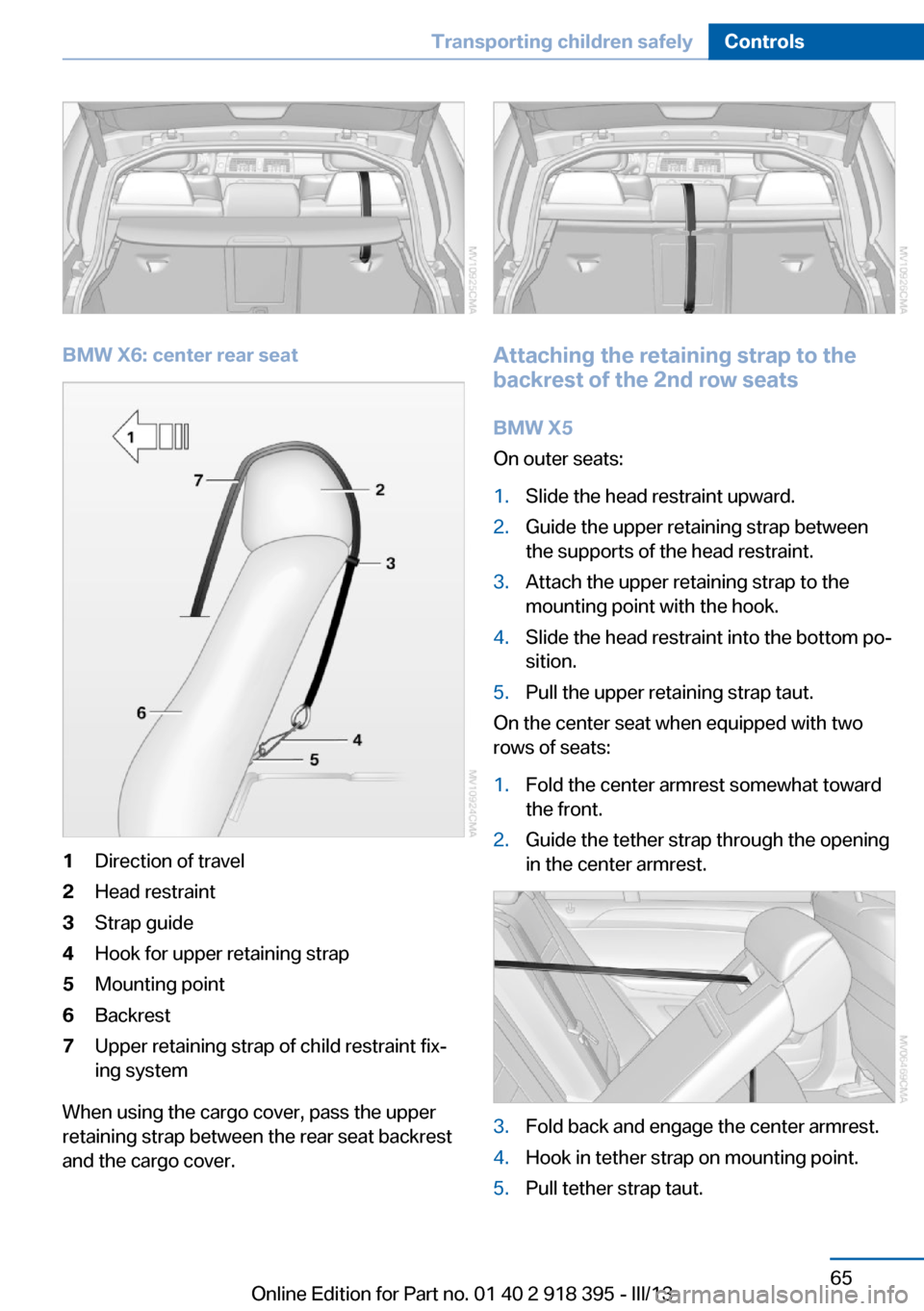
BMW X6: center rear seat
1Direction of travel2Head restraint3Strap guide4Hook for upper retaining strap5Mounting point6Backrest7Upper retaining strap of child restraint fix‐
ing system
When using the cargo cover, pass the upper
retaining strap between the rear seat backrest
and the cargo cover.
Attaching the retaining strap to the
backrest of the 2nd row seats
BMW X5
On outer seats:
1.Slide the head restraint upward.2.Guide the upper retaining strap between
the supports of the head restraint.3.Attach the upper retaining strap to the
mounting point with the hook.4.Slide the head restraint into the bottom po‐
sition.5.Pull the upper retaining strap taut.
On the center seat when equipped with two
rows of seats:
1.Fold the center armrest somewhat toward
the front.2.Guide the tether strap through the opening
in the center armrest.3.Fold back and engage the center armrest.4.Hook in tether strap on mounting point.5.Pull tether strap taut.Seite 65Transporting children safelyControls65
Online Edition for Part no. 01 40 2 918 395 - III/13
Page 66 of 345
On the center seat when equipped with three
rows of seats:1.Slide the head restraint upward.2.Guide the tether strap between the head
restraint brackets.3.Hook in the tether strap on the mounting
point with the hook.4.Slide the head restraint into the bottom po‐
sition.5.Pull tether strap taut.
BMW X6
1.Route the upper retaining strap over the
middle of the head restraint.2.Attach the upper retaining strap to the
mounting point with the hook.3.Pull the retaining strap taut until it com‐
presses the cushion of the head restraint,
thus preventing the strap from sliding off.
Locking the doors and
windows
Rear doors
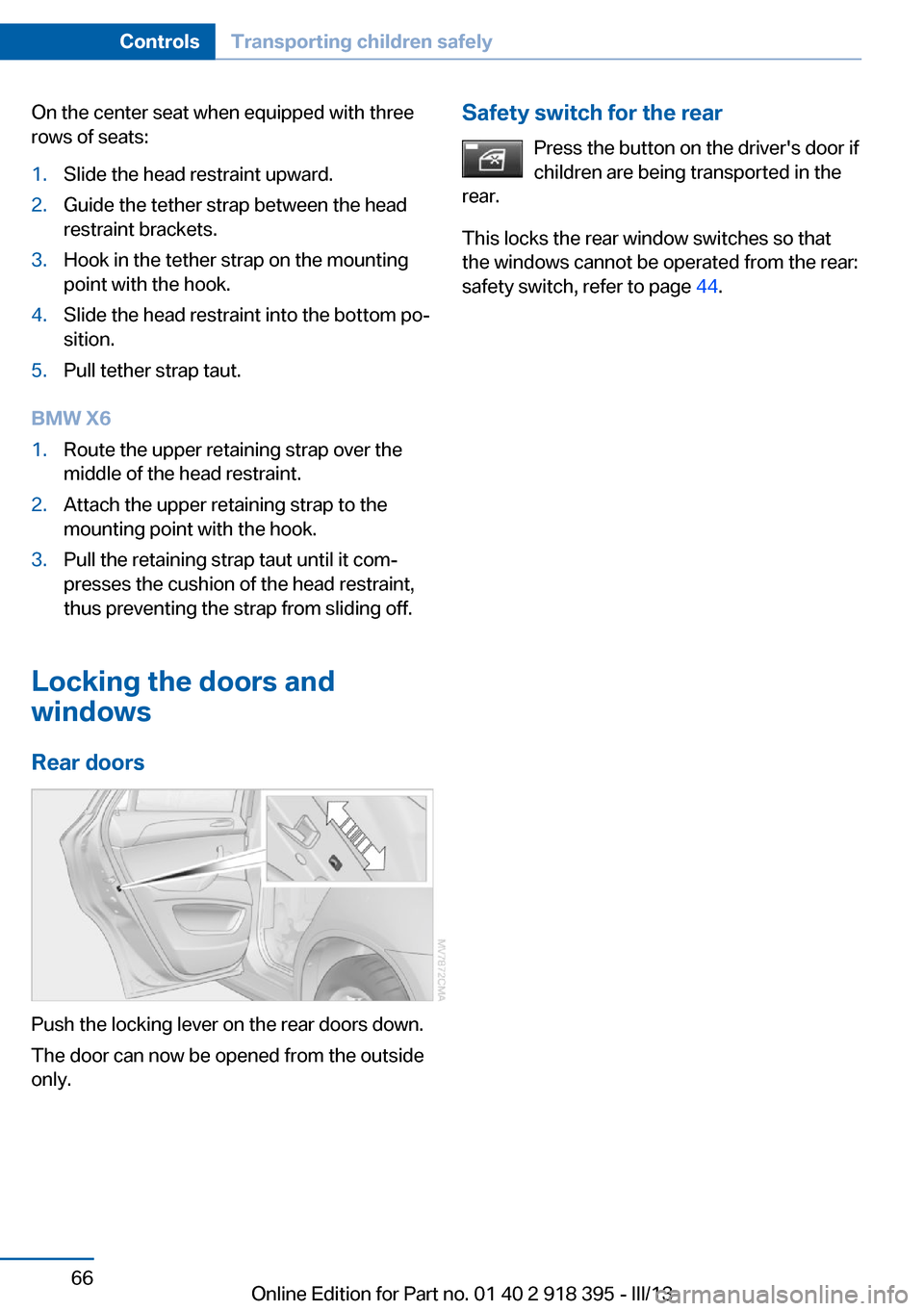
Push the locking lever on the rear doors down.
The door can now be opened from the outside
only.
Safety switch for the rear
Press the button on the driver's door if
children are being transported in the
rear.
This locks the rear window switches so that
the windows cannot be operated from the rear:
safety switch, refer to page 44.Seite 66ControlsTransporting children safely66
Online Edition for Part no. 01 40 2 918 395 - III/13
Page 95 of 345
SafetyVehicle equipment
This chapter describes all series equipment as
well as country-specific and special equipment
offered for this model series.Therefore, it alsodescribes equipment that may not be found in
your vehicle, for instance due to the selected
special equipment or the country version. This
also applies to safety-related functions and
systems.
Airbags
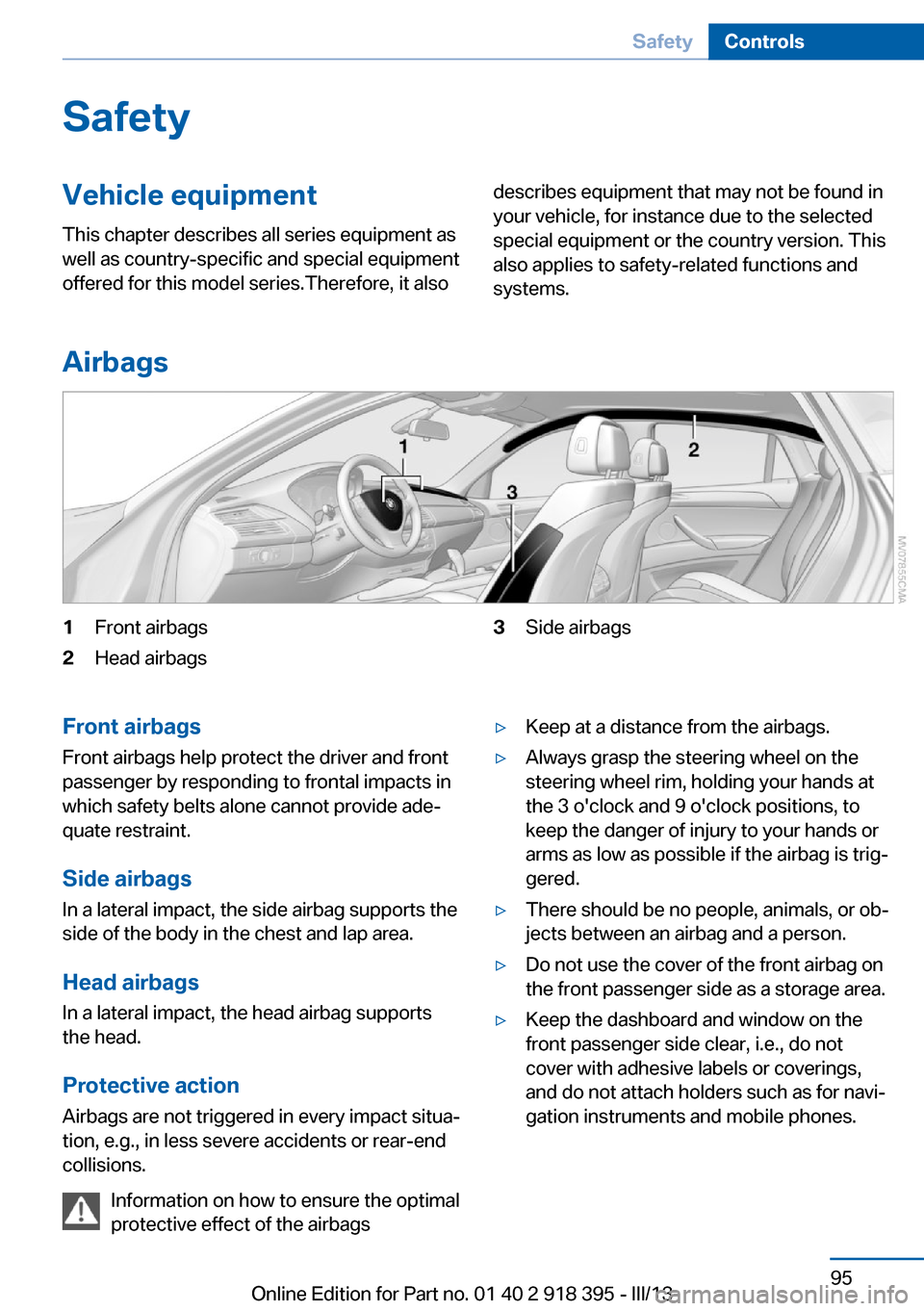
1Front airbags2Head airbags3Side airbagsFront airbags
Front airbags help protect the driver and front
passenger by responding to frontal impacts in
which safety belts alone cannot provide ade‐
quate restraint.
Side airbags
In a lateral impact, the side airbag supports the
side of the body in the chest and lap area.
Head airbags
In a lateral impact, the head airbag supports
the head.
Protective action
Airbags are not triggered in every impact situa‐
tion, e.g., in less severe accidents or rear-end
collisions.
Information on how to ensure the optimal
protective effect of the airbags▷Keep at a distance from the airbags.▷Always grasp the steering wheel on the
steering wheel rim, holding your hands at
the 3 o'clock and 9 o'clock positions, to
keep the danger of injury to your hands or
arms as low as possible if the airbag is trig‐
gered.▷There should be no people, animals, or ob‐
jects between an airbag and a person.▷Do not use the cover of the front airbag on
the front passenger side as a storage area.▷Keep the dashboard and window on the
front passenger side clear, i.e., do not
cover with adhesive labels or coverings,
and do not attach holders such as for navi‐
gation instruments and mobile phones.Seite 95SafetyControls95
Online Edition for Part no. 01 40 2 918 395 - III/13
Page 96 of 345
▷Make sure that the front passenger is sit‐
ting correctly, i.e., keeps his or her feet and
legs in the footwell; otherwise, leg injuries
can occur if the front airbag is triggered.▷Do not place slip covers, seat cushions or
other objects on the front passenger seat
that are not approved specifically for seats
with integrated side airbags.▷Do not hang pieces of clothing, such as
jackets, over the backrests.▷Make sure that occupants keep their heads
away from the side airbag and do not rest
against the head airbag; otherwise, injuries
can occur if the airbags are triggered.▷Do not remove the airbag restraint system.▷Do not remove the steering wheel.▷Do not apply adhesive materials to the air‐
bag cover panels, cover them or modify
them in any way.▷Never modify either the individual compo‐
nents or the wiring in the airbag system.
This also applies to steering wheel covers,
the dashboard, the seats, the roof pillars
and the sides of the headliner.◀
Even when all instructions are followed closely,
injury from contact with the airbags cannot be
ruled out in certain situations.
The ignition and inflation noise may lead to
short-term and, in most cases, temporary
hearing impairment in sensitive individuals.
In the case of a malfunction, deactivation
and after triggering of the airbags
Do not touch the individual components imme‐
diately after the system has been triggered;
otherwise, there is the danger of burns.
Only have the airbags checked, repaired or dis‐
mantled and the airbag generator scrapped by
your service center or a workshop that has the
necessary authorization for handling explo‐
sives.
Non-professional attempts to service the sys‐
tem could lead to failure in an emergency or
undesired triggering of the airbag, either of
which could result in injury.◀
Warnings and information on the airbags are
also found on the sun visors.
Automatic deactivation of the frontpassenger airbags
The occupation of the seat is detected by eval‐
uating the impression on the occupied seat
surface of the front passenger seat.
The front and side airbags on the front passen‐
ger side are activated or deactivated accord‐
ingly by the system.
The indicator lamp above the interior rearview
mirror shows the current status of the front
passenger airbags, deactivated or activated,
refer to Front passenger airbag indicator lamp
below.
Leave feet in the footwell
Make sure that the front passenger
keeps his or her feet in the footwell; otherwise,
the front passenger airbags may not function
properly.◀
Child restraint fixing system in the front
passenger seat
Before transporting a child on the front pas‐
senger seat, refer to the safety notes and in‐
structions under Children on the front passen‐
ger seat, refer to page 61.◀
Malfunction of the automatic
deactivation system
When transporting older children and adults,
the front passenger airbags may be deacti‐
vated in certain sitting positions. In this case,
the indicator lamp for the front passenger air‐ bags lights up.
In this case, change the sitting position so that
the front passenger airbags are activated and
the indicator lamp goes out.Seite 96ControlsSafety96
Online Edition for Part no. 01 40 2 918 395 - III/13
Page 97 of 345
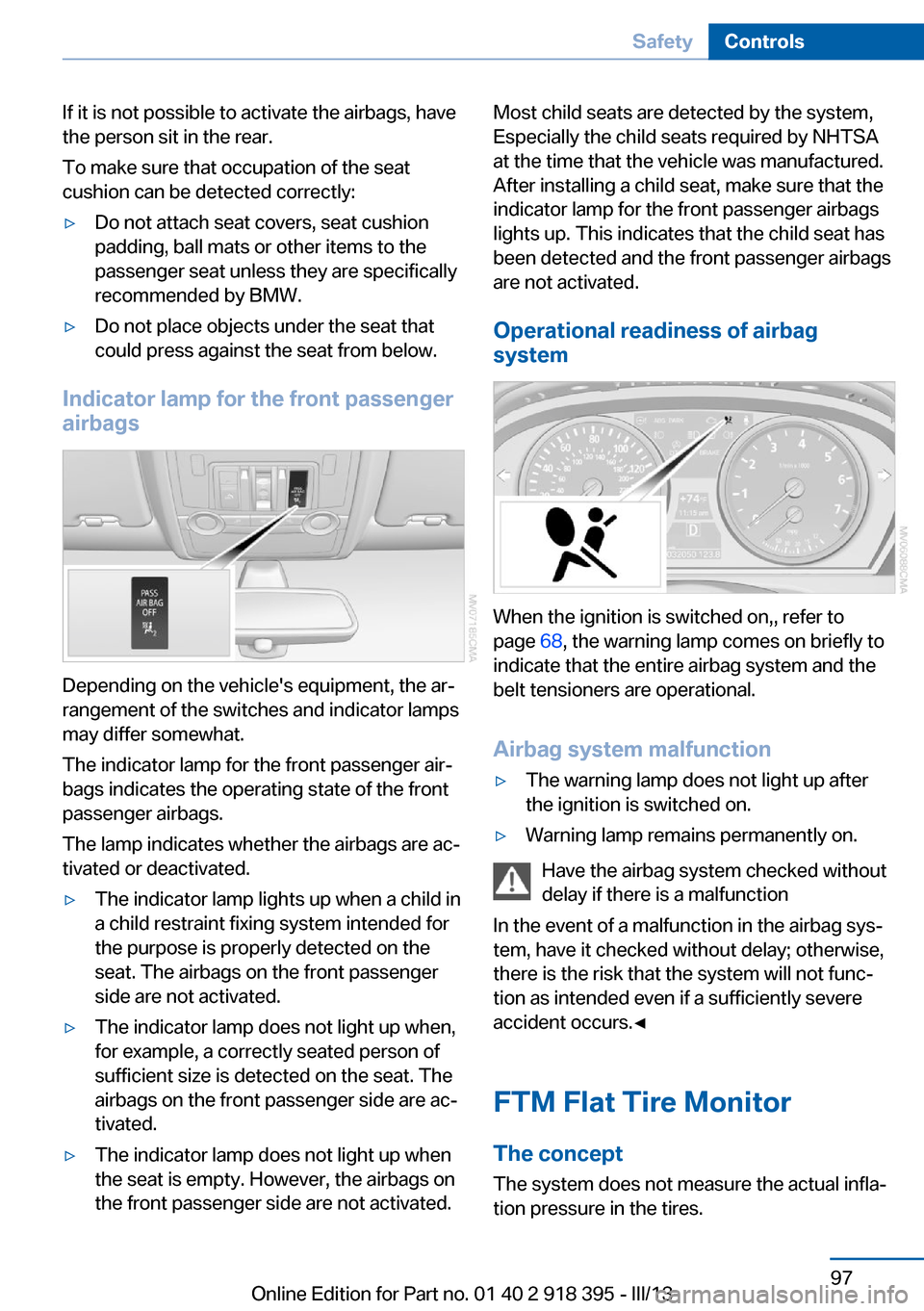
If it is not possible to activate the airbags, have
the person sit in the rear.
To make sure that occupation of the seat
cushion can be detected correctly:▷Do not attach seat covers, seat cushion
padding, ball mats or other items to the
passenger seat unless they are specifically
recommended by BMW.▷Do not place objects under the seat that
could press against the seat from below.
Indicator lamp for the front passenger
airbags
Depending on the vehicle's equipment, the ar‐
rangement of the switches and indicator lamps
may differ somewhat.
The indicator lamp for the front passenger air‐
bags indicates the operating state of the front
passenger airbags.
The lamp indicates whether the airbags are ac‐
tivated or deactivated.
▷The indicator lamp lights up when a child in
a child restraint fixing system intended for
the purpose is properly detected on the
seat. The airbags on the front passenger
side are not activated.▷The indicator lamp does not light up when,
for example, a correctly seated person of
sufficient size is detected on the seat. The
airbags on the front passenger side are ac‐
tivated.▷The indicator lamp does not light up when
the seat is empty. However, the airbags on
the front passenger side are not activated.Most child seats are detected by the system,
Especially the child seats required by NHTSA
at the time that the vehicle was manufactured.
After installing a child seat, make sure that the
indicator lamp for the front passenger airbags
lights up. This indicates that the child seat has
been detected and the front passenger airbags
are not activated.
Operational readiness of airbag
system
When the ignition is switched on,, refer to
page 68, the warning lamp comes on briefly to
indicate that the entire airbag system and the
belt tensioners are operational.
Airbag system malfunction
▷The warning lamp does not light up after
the ignition is switched on.▷Warning lamp remains permanently on.
Have the airbag system checked without
delay if there is a malfunction
In the event of a malfunction in the airbag sys‐
tem, have it checked without delay; otherwise,
there is the risk that the system will not func‐
tion as intended even if a sufficiently severe
accident occurs.◀
FTM Flat Tire Monitor The conceptThe system does not measure the actual infla‐
tion pressure in the tires.
Seite 97SafetyControls97
Online Edition for Part no. 01 40 2 918 395 - III/13
Page 331 of 345
Automatic climate control,automatic air distribu‐
tion 131, 136
Automatic climate control, in rear 135
Automatic climate control in rear, activating on Control
Display 136
Automatic climate control in rear, air supply 136
Automatic climate control in rear, deactivating on Control
Display 136
Automatic climate control in rear, switching off 136
Automatic climate control, switching off 134, 136
Automatic climate control, ventilation in rear 135
Automatic climate control, with 2-zone control 131
Automatic climate control, with 4-zone control 135
Automatic, cruise control 118
Automatic Cruise Con‐ trol 111
Automatic Curb Monitor 58
Automatic headlamp con‐ trol 90, 91
Automatic Hold 70
Automatic Hold, activating 70
Automatic Hold, deactivat‐ ing 70
Automatic Hold, parking 71
Automatic recirculated air control 133
Automatic Soft Closing, doors 35
Automatic Soft Closing, tail‐ gate 36
Automatic tailgate opera‐ tion 37, 38
Automatic transmission with Steptronic 75
Automatic transmission with
Steptronic– Kickdown 75AUTO program with auto‐
matic climate con‐
trol 131 , 136
AUX-IN port 148, 212
Average fuel consumption 82
Average fuel consumption, setting the units 88
Average speed 81
Average speed, refer to Com‐ puter 81
Axle loads, refer to Weights 320
B
Backrest curvature, refer to Lumbar support 50
Backrest width 50
Back seats, adjusting the head restraints 57
Backup camera 122
Backup camera, cleaning 124
Backup camera, obstacle marking 124
Backup camera, pathway lines 123
Backup camera, turning lines 123
Balance 190
Band-aids, refer to First aid kit 308
Bass 190
Battery– Remote control 30
Battery change, remote con‐
trol for rear DVD sys‐
tem 222
Battery disposal 305
Battery, refer to Vehicle bat‐ tery 304
Battery replacement, remote control for vehicle 42
Before entering the car wash 312
Belts, refer to Safety belts 54
Belt tensioners, refer to Safety belts 54
Beverage holder, refer to Cu‐
pholder 149
Black and white map dis‐ play 184
Blower, refer to Air flow rate 132
Bluetooth audio 215
Bluetooth connection, acti‐ vating/deactivating 237
BMW Advanced Diesel 271
BMW Apps 265
BMW EfficientDynamics, re‐ fer to Saving fuel 164
BMW Homepage 6
BMW Internet page 6
BMW maintenance sys‐ tem 293
BMW Online 262
Bottle holder, refer to Cu‐ pholder 149
Brake assistant 105
Brake discs, breaking in 156
Brake fluid, refer to Service requirements 83
Brake force display 104
Brake force distribution, elec‐ tronic 105
Brake lamps, brake force dis‐ play 104
Brake lights, adaptive 104
Brake pads, breaking in 156
Brakes, BMW maintenance system 293
Brakes, parking brake 69
Brakes, service require‐ ments 83
Brake system, BMW mainte‐ nance system 293
Braking, notes 157
Breakdown assistance 308
Breakdown, transporting the vehicle 310
Breaking in 156
Brightness, on the Control Display 88 Seite 331Everything from A to ZReference331
Online Edition for Part no. 01 40 2 918 395 - III/13
Page 332 of 345
Bulb replacement, refer toLamp and bulb replace‐
ment 295
Button for starting the engine, refer to Start/Stop but‐
ton 67
C
Calendar 254
Calibration, driver's seat 55
California Proposition 65 Warning 7
Camera, care 315
Camera, refer to Backup cam‐ era 122
Camera, Side View 127
Camera, Top View 126
Can holder, refer to Cu‐ pholder 149
Car battery, refer to Vehicle battery 304
Car care products 313
Care 312
Care, displays 315
Care, vehicle 313
Cargo 160
Cargo area– Comfort Access 41
Cargo area, capacities 320
Cargo area, enlarging 146
Cargo area lamp, refer to Inte‐ rior lamps 94
Cargo area lid, refer to Tail‐ gate 36, 38
Cargo area, opening/closing, refer to Lower tailgate 38
Cargo area, opening/closing, refer to Tailgate 36, 38
Cargo area, opening from the inside 36
Cargo area, opening from the outside 36
Cargo area, refer to Cargo area 145
Cargo cover, refer to Luggage
compartment roller
cover 145
Cargo, securing with ski bag, refer to Securing cargo 152
Cargo straps, securing cargo 162
Car key, refer to Integrated key/remote control 30
Carpet, care 315
Car phone, installation loca‐ tion, refer to Center arm‐
rest 148
Car phone, refer to Tele‐ phone 236
Car vacuum cleaner, connect‐ ing, refer to Connecting
electrical devices 143
Car wash 312
Catalytic converter, refer to Hot exhaust system 157
CBC, refer to Cornering Brake Control 105
CBS Condition Based Serv‐ ice 293
CD/DVD 200
CD/DVD changer 204
CD/DVD in rear 221
CD/DVD notes 206
CD, refer to Playing audio tracks, rear DVD sys‐
tem 226
CDs, storing 207
Cell phone 236
Cell phone, installation loca‐ tion, refer to Center arm‐
rest 148
Center armrest, front 148
Center armrest, rear 148
Center brake lamp 298, 301
Center console, refer to Around the center con‐
sole 16 Central locking– Comfort Access 40– From the inside 35– Setting the unlocking char‐
acteristics 32
Central locking system
– From the outside 32– Principle 32
Central screen, refer to Con‐
trol Display 19
Changes, technical, refer to Safety 6
Changing wheels/tires 285
Chassis number, refer to En‐ gine compartment 288
Check Control 85
Children, transporting 61
Child restraint fixing system LATCH 62
Child restraint fixing sys‐ tems 61
Child restraint fixing systems, mounting 61
Child safety locks 66
Child seat, mounting 61
Child seats, refer to Trans‐ porting children safely 61
Chrome parts, care 314
Cigarette lighter, connecting electrical devices 143
Cigarette lighter, refer to Lighter 143
Cigarette lighter socket 143
Circulation of air, refer to Re‐ circulated air mode 133
Cleaning, displays 315
Cleaning your BMW, refer to Care 312
Clock 79
Clock, 12h/24h mode 87
Closing
– From the inside 35– From the outside 32
Clothes hooks 149
Cockpit 12
Cold start, refer to Starting the engine 68
Seite 332ReferenceEverything from A to Z332
Online Edition for Part no. 01 40 2 918 395 - III/13
Page 336 of 345
Hand-held transmitter, alter‐nating code 140
Hands-free microphone 16
Hazard warning sys‐ tem 16, 307
HDC Hill Descent Con‐ trol 108
HD Radio 193
Head airbags 95
Headlamp control, auto‐ matic 90, 91
Headlamp courtesy delay fea‐ ture 91
Headlamp flasher 72, 92
Headlamp flasher, indicator lamp 15
Headlamps 90
Headlamps, care 313
Headlamps, cleaning 74
Headlamps, cleaning, washer fluid 75
Headliner 17
Headphones, connecting, rear DVD system 221
Head restraints 55
Head-up Display 127
Head-up Display, care 315
Heatable rear window 132
Heating 130
Heating– Seats 52
Heating, interior 130
Heating, mirrors 59
Heating, residual heat 134
Heating with the engine switched off, refer to Resid‐
ual heat 134
Heavy cargo, refer to Stowing cargo 161
Height, refer to Dimen‐ sions 318
High-beam Assistant 92
High beams 92
High beams/low beams, auto‐ matic, refer to High-beam
Assistant 92
High beams, indicator
lamp 15
High-pressure washers 312
Hill Descent Control HDC 108
Hill drive-off assistant, refer to Drive-off assistant 109
Hills 158
Holder for beverages 149
Holder for remote control, re‐ fer to Ignition lock 67
Homepage 6
Hood 289
Hood, opening 289
Horn 12
Hot exhaust system 157
Hotline 263
House number, entering for navigation 171
Hydraulic brake assis‐ tant 105
Hydroplaning 157
I Ice warning, refer to External temperature warning 79
Icy roads, refer to External temperature warning 79
Identification marks, tires 283
iDrive 18
iDrive, changing settings 87
iDrive, changing the lan‐ guage 88
iDrive, changing the units of measure and display for‐
mat 88
iDrive, setting the bright‐ ness 88
iDrive, setting the date 87
iDrive, setting the time 87
Ignition 68
Ignition key position 1, refer to Radio ready state 67
Ignition key position 2, refer to Ignition on 68 Ignition key, refer to Remote
control with integrated
key 30
Ignition lock 67
Ignition, switched off 68
Ignition, switched on 68
Images, displaying, rear DVD system 228
Indication of a flat tire 98, 100
Indicator and warning lamps 15
Inflation pressure monitor, re‐ fer to Flat Tire Monitor 97
Inflation pressure, refer to Tire inflation pressure 275
Information on the navigation data 168
Initialization after power fail‐ ure 305
Initializing– Compass, refer to Calibrat‐
ing 142– Panoramic glass sunroof 46
Initializing, Flat Tire Monitor
FTM 98
Initializing, glass sunroof 48
Initializing, refer to Setting the date 87
Initializing, refer to Setting the time 87
Initializing, Tire Pressure Monitor TPM 100
Installation location, tele‐ phone 148
Instrument cluster 14
Instrument lighting 94
Instrument panel, refer to In‐ strument cluster 14
Instruments, refer to Cock‐ pit 12
Integrated key 30
Interactive map 175
Interior equipment 139
Interior lamps 94
Interior lamps
– Remote control 33
Interior mirror 59
Seite 336ReferenceEverything from A to Z336
Online Edition for Part no. 01 40 2 918 395 - III/13
Page 337 of 345
Interior rearview mirror, auto‐matic dimming 59
Interior rearview mirror, com‐ pass 141
Interior temperature, setting, automatic climate con‐
trol 130
Intermediate destina‐ tions 177
Internet page 6
Intersection, entering for navi‐ gation 171
iPod/iPhone 212
J
Jacking points for the vehicle jack 302
Jack, refer to Vehicle jack 302
Joystick, refer to Selector lever 76
Jump-starting 308
K
Keyless Go, refer to Comfort Access 40
Keyless opening and closing, refer to Comfort Access 40
Key Memory, refer to Per‐ sonal Profile 30
Key, refer to Integrated key/ remote control 30
Kickdown– Automatic transmission with
Steptronic 75
Knocking control 270
L
Label, run-flat tire 286
Lamp and bulb replacement, lamp replacement 295
Lamps 90
Lamps, automatic headlamp control 90, 91
Lamps, High-beam Assis‐
tant 92
Lamps, parking lamps/low beams 90
Lamps, replacing, refer to Lamp and bulb replace‐
ment 295
Lane departure warning 102
Lane margin, warning 102
Language, changing on Con‐ trol Display 88
Lap-and-shoulder belt, refer to Safety belts 54
Lashing eyes, securing cargo 162
LATCH child restraint fixing system 62
Leather, care 313
LEDs, light-emitting di‐ odes 296
Length, refer to Dimen‐ sions 318
Letters and numbers, enter‐ ing 23
License plate lamps, replac‐ ing bulbs 298, 301
Light-alloy wheels, care 314
Light-emitting diodes, LEDs 296
Lighter 143
Lighting– Instruments 94
Lighting, vehicle, refer to
Lamps 90
Light switch 90
Limit, refer to Speed limit 86
Load 160
Loading 160
Lock buttons, doors, refer to Locking 35
Locking
– From the inside 35– From the outside 33– Setting the confirmation
signals 33– Without remote control, re‐
fer to Comfort Access 40Locking the vehicle– From the inside 35– From the outside 32
Locks, doors, and win‐
dows 66
Longlife oils, alternative oil types 292
Longlife oils, refer to Ap‐ proved engine oils 291
Low beams 90
Low beams
– Automatic 91
Low beams, automatic 90
Low beams, automatic, refer to High-beam Assistant 92
Lower back support, refer to Lumbar support 50
Lower tailgate 38
Low-sulfur diesel 270
Luggage compartment roller cover 145
Luggage rack, refer to Roof- mounted luggage rack 162
Lumbar support 50
M
Main inspection, refer to Service requirements 83
Maintenance 293
Maintenance, refer to Service booklet
Maintenance, refer to Service requirements 83
Maintenance require‐ ments 293
Maintenance system BMW 293
Malfunction
– Door lock 34– Fuel filler flap 268
Malfunction of upper tail‐
gate 36
Malfunction, parking brake 71
Malfunction warnings, refer to Check Control 85
Seite 337Everything from A to ZReference337
Online Edition for Part no. 01 40 2 918 395 - III/13
Page 338 of 345
Manual air distribution 133
Manual mode, automatic transmission with Step‐
tronic 77
Manual operation– Door lock 34– Driver's door 34
Manual operation, fuel filler
flap 268
Manual operation of upper tailgate 36
Manual operation, Side View 127
Manual operation, Top View 125
Map, destination entry 175
Map display in black and white 184
Map in split screen 183
Map view 181
Marking on approved tires 286
Master key, refer to Remote control with integrated
key 30
Maximum cooling 133
Maximum speed, winter tires 286
Medical kit, refer to First aid kit 308
Memory, refer to Seat and mirror memory 57
Menus, operating, iDrive 18
Menus, refer to iDrive operat‐ ing concept 19
Message list, traffic bulle‐ tins 183
Messages 252
Microfilter 135
Minimum tread, tires 284
Mirror
– Mirror memory, refer to Seat
and mirror memory 57
Mirrors 58
Mirrors
– Automatic Curb Monitor 58
Mirrors, folding in and out 59
Mirrors, heating 59
Mirrors, interior mirror 59
Mobile communication devi‐ ces in the vehicle 157
Mobile phone, installation lo‐ cation, refer to Center arm‐
rest 148
Mobile phone, refer to Tele‐ phone 236
Modifications, technical, refer to Safety 6
Monitor, refer to Control Dis‐ play 19
Mounting of child restraint fix‐ ing systems 61
MP3 player 212
Multimedia 200
Music collection 207
Music search 208
Music, storing 207
N
Navigation 168
Navigation data 168
Navigation data, updat‐ ing 168
Navigation system– Destination entry by
voice 176
Neck restraints, refer to Head
restraints 55
Nets, refer to Storage com‐ partments 148
Neutral cleaner, care 314
New wheels and tires 285
Notes 6, 255
Nozzles of automatic climate control 130
Nozzles, refer to Ventila‐ tion 134
O OBD Onboard Diagnos‐ tics 294
OBD socket, refer to Socket
for OBD Onboard Diagno‐
sis 294
Octane number, refer to Fuel quality 270
Octane rating, refer to Gaso‐ line quality 270
Odometer 80
Office 249
Oil additives 291
Oil consumption 290
Oil level 290
Oil, refer to Engine oil 290
Oil types, alternative 291
Oil types, approved 291
Old batteries, disposal 305
Onboard Diagnostics OBD 294
Onboard monitor, refer to Control Display 19
Onboard vehicle tool kit 295
Opening and closing– Comfort Access 40– From the inside 35– From the outside 32– Using the door lock 34– Using the remote control 32
Opening height, adjust‐
ing 37, 38
Operating concept, iDrive 18
Outside-air mode, automatic climate control 133
Outside air, refer to Recircu‐ lated air mode 133
Overheating of engine, refer to Coolant temperature 80
P Paint, vehicle 313
Pairing, mobile phone 237
Panic mode 33
Seite 338ReferenceEverything from A to Z338
Online Edition for Part no. 01 40 2 918 395 - III/13