windshield BMW X5 2016 F15 Owner's Guide
[x] Cancel search | Manufacturer: BMW, Model Year: 2016, Model line: X5, Model: BMW X5 2016 F15Pages: 275, PDF Size: 6.46 MB
Page 169 of 275
Intensity of the AUTO program
With the AUTO program activated, the auto‐
matic intensity control can be changed.
Press the left or right side of the but‐
ton: decrease or increase the inten‐
sity.
The selected intensity is shown on the display
of the automatic climate control.
Automatic recirculated-air control/
recirculated-air mode
You may respond to unpleasant odors or pollu‐
tants in the immediate environment by tempo‐
rarily suspending the supply of outside air. The
system then recirculates the air currently
within the vehicle.
Press button repeatedly to select an
operating mode:▷LEDs off: outside air flows in continuously.▷Left LED on, automatic recirculated-air
control: a sensor detects pollutants in the
outside air and shuts off automatically.▷Right LED on, recirculated-air mode: the
supply of outside air into the vehicle is per‐
manently blocked.
With constant recirculated-air mode, the air
quality in the car's interior deteriorates and the
fogging of the windows increases.
If the windows are fogged over, switch off the
recirculated-air mode and press the AUTO
button on the driver's side to utilize the con‐
densation sensor. Make sure that air can flow
to the windshield.
Air flow, manual To manually adjust air flow turn off AUTO pro‐
gram first.
Press the left or right side of the but‐
ton: decrease or increase air flow.
The selected air flow is shown on the display of
the automatic climate control.
The air flow of the automatic climate control
may be reduced automatically to save battery
power.
Manual air distribution Press button repeatedly to select a
program:▷Upper body region.▷Upper body region and footwell.▷Footwell.▷Windows and footwell.▷Windows, upper body region, and footwell.▷Windows: driver's side only.▷Windows and upper body region.
If the windows are fogged over, press the
AUTO button on the driver's side to utilize the
condensation sensor.
SYNC program The current settings on the driver's
side for temperature, air flow, air distri‐
bution, and AUTO program are transferred to the front passenger side and to the left and
right rear.
The program is switched off if the settings on
the front passenger side or in the rear are
changed.
Residual heat The heat stored in the engine is used to heat
the interior.
Functional requirement
▷Up to 15 minutes after switching off the
engine.▷Warm engine.▷The battery is sufficiently charged.▷External temperature below 77 ℉/25 ℃.
The availability of the function is shown on the
display of the automatic climate control.
Seite 169Climate controlControls169
Online Edition for Part no. 01 40 2 963 410 - VI/15
Page 170 of 275
Switching on1.Switch off the ignition.2. Press the right side of the button
on the driver's side.
The symbol appears on the automatic cli‐
mate Control Display.
The interior temperature, air volume and air
distribution can be adjusted with the ignition
switched on.
Switch off
At the lowest fan speed, press the left side of
the button on the driver's side.
The symbol on the display of the automatic
climate control flashes.
Defrosts windows and removes
condensation
Press button.
Ice and condensation are quickly re‐
moved from the windshield and the front side
windows.
For this purpose, point the side vents onto the
side windows as needed.
Adjust air flow with the program active.
If the windows are fogged over, you can also
switch on the cooling function or press the AUTO button to utilize the condensation sen‐
sor.
Rear window defroster Press button.
The rear window defroster switches
off automatically after a certain period of time.
Microfilter/activated-charcoal filter
The microfilter removes dust and pollen from
the incoming air.
The activated-charcoal filter removes gaseous
pollutants from the outside air that enters the
vehicle.
This combined filter should be replaced during
scheduled maintenance, refer to page 238, of
your vehicle.
Ventilation
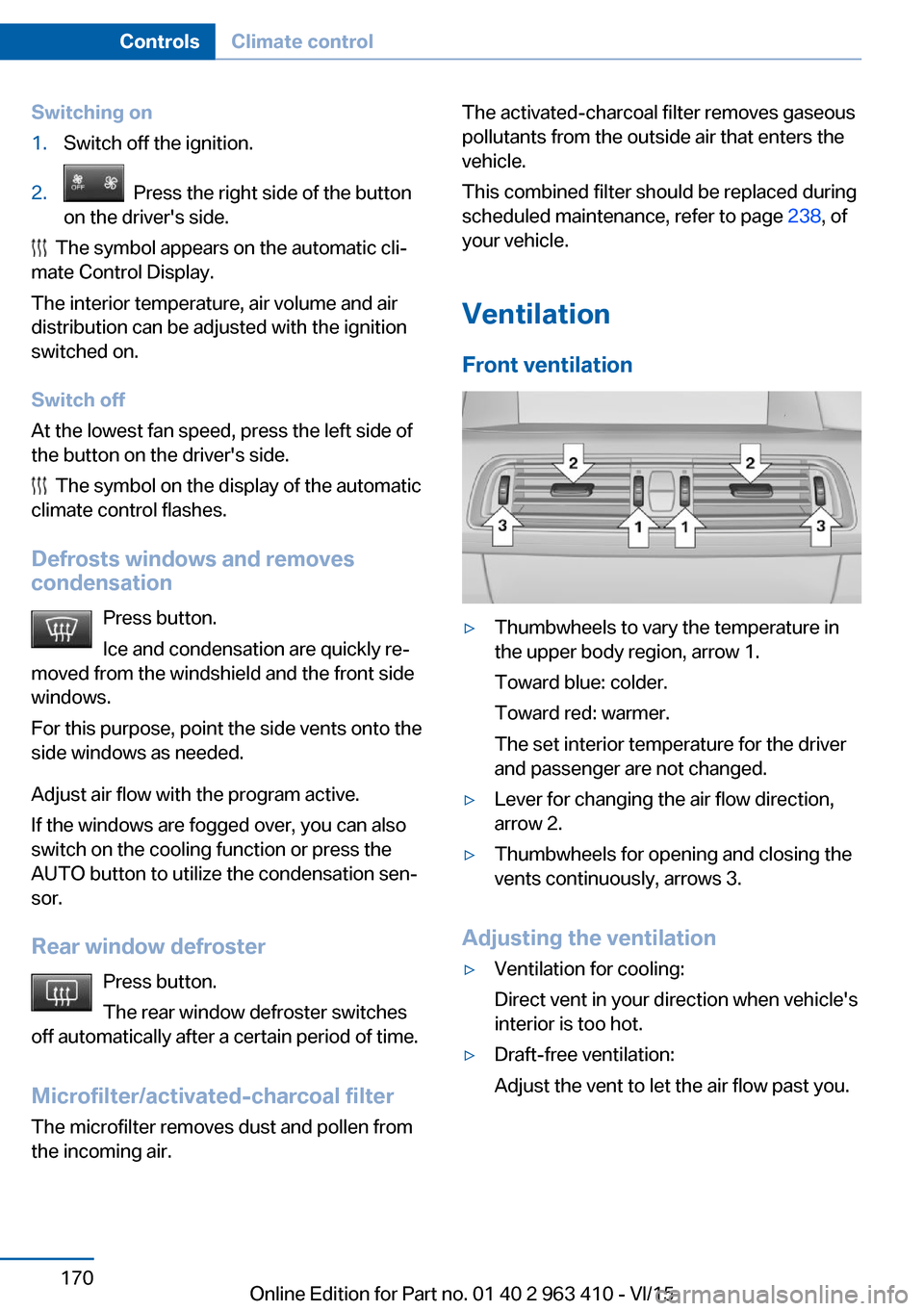
Front ventilation▷Thumbwheels to vary the temperature in
the upper body region, arrow 1.
Toward blue: colder.
Toward red: warmer.
The set interior temperature for the driver
and passenger are not changed.▷Lever for changing the air flow direction,
arrow 2.▷Thumbwheels for opening and closing the
vents continuously, arrows 3.
Adjusting the ventilation
▷Ventilation for cooling:
Direct vent in your direction when vehicle's
interior is too hot.▷Draft-free ventilation:
Adjust the vent to let the air flow past you.Seite 170ControlsClimate control170
Online Edition for Part no. 01 40 2 963 410 - VI/15
Page 193 of 275
Hot exhaust systemWARNING
During driving operation, high tempera‐
tures can occur underneath the body, e.g.
caused by the exhaust gas system. If combus‐
tible materials, such as leaves or grass, come
in contact with hot parts of the exhaust gas
system, these materials can ignite. There is
risk of injuries or risk of property damage.
Do not remove the heat shields installed and
never apply undercoating to them. Make sure
that no combustible materials can come in
contact with hot vehicle parts in driving opera‐
tion, idle or during parking. Do not touch the
hot exhaust system.◀
Diesel particulate filter The diesel particulate filter collects soot parti‐
cles and burns them periodically at high tem‐
peratures.
During several minutes of cleaning the follow‐
ing may occur:▷Temporarily, the engine may run less
smoothly.▷Noises and a slight amount of smoke com‐
ing from the exhaust until shortly after the
engine is shut down.▷A somewhat higher engine speed is neces‐
sary to reach usual performance.
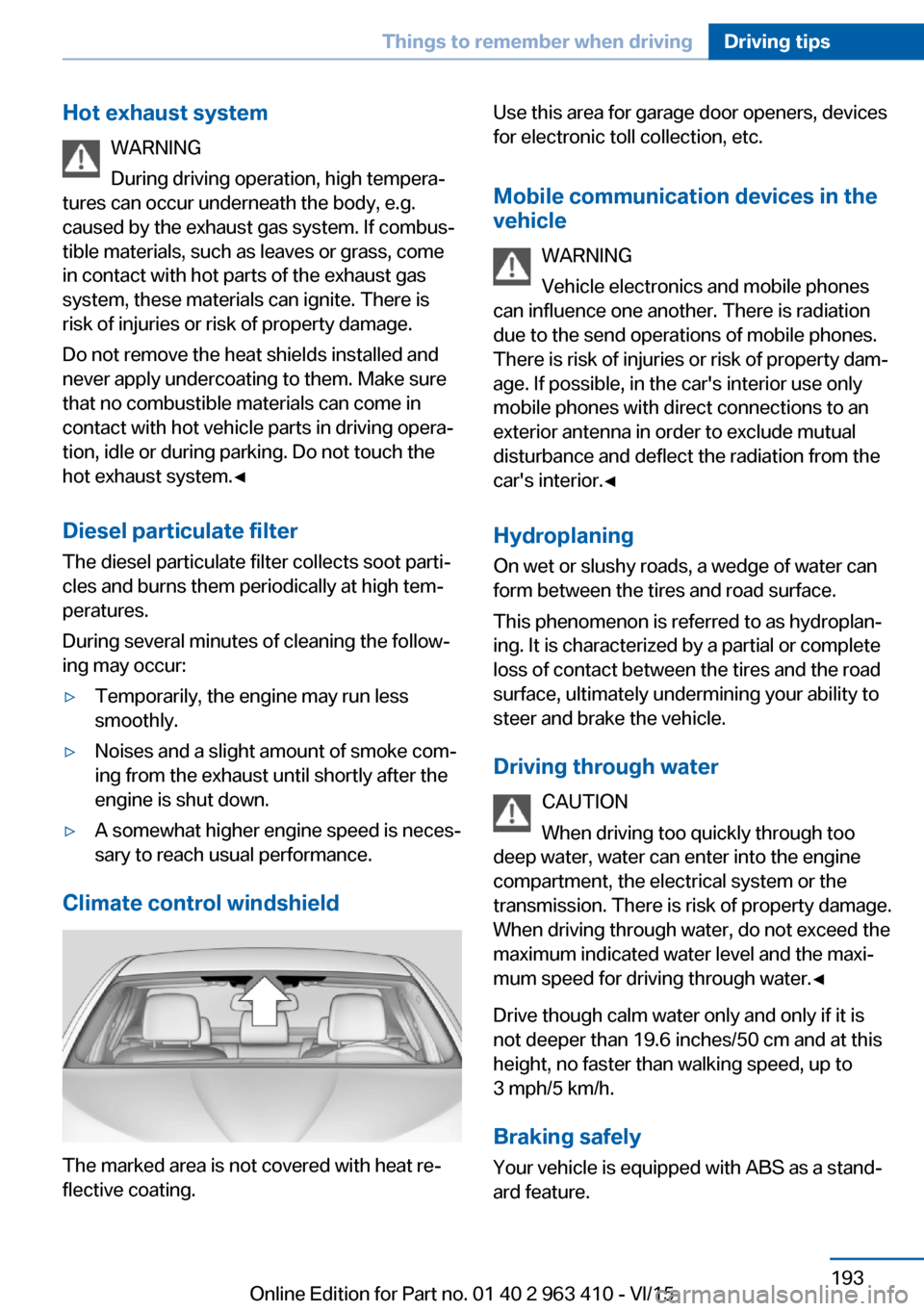
Climate control windshield
The marked area is not covered with heat re‐
flective coating.
Use this area for garage door openers, devices
for electronic toll collection, etc.
Mobile communication devices in the vehicle
WARNING
Vehicle electronics and mobile phones
can influence one another. There is radiation
due to the send operations of mobile phones.
There is risk of injuries or risk of property dam‐
age. If possible, in the car's interior use only
mobile phones with direct connections to an
exterior antenna in order to exclude mutual
disturbance and deflect the radiation from the
car's interior.◀
Hydroplaning
On wet or slushy roads, a wedge of water can
form between the tires and road surface.
This phenomenon is referred to as hydroplan‐
ing. It is characterized by a partial or complete
loss of contact between the tires and the road
surface, ultimately undermining your ability to
steer and brake the vehicle.
Driving through water CAUTION
When driving too quickly through too
deep water, water can enter into the engine
compartment, the electrical system or the
transmission. There is risk of property damage.
When driving through water, do not exceed the
maximum indicated water level and the maxi‐
mum speed for driving through water.◀
Drive though calm water only and only if it is
not deeper than 19.6 inches/50 cm and at this
height, no faster than walking speed, up to
3 mph/5 km/h.
Braking safely Your vehicle is equipped with ABS as a stand‐
ard feature.Seite 193Things to remember when drivingDriving tips193
Online Edition for Part no. 01 40 2 963 410 - VI/15
Page 230 of 275
Hood
Information WARNING
Improperly executed work in the engine
compartment can damage components and
lead to a safety risk. There is risk of accidents
or risk of property damage.◀
WARNING
The engine compartment accommo‐
dates moving components. Certain compo‐
nents can move in the engine compartment
with the vehicle switched off, e.g. the cooler
fan. There is risk of injuries. Do not reach into
the area of moving parts. Keep articles of
clothing and hair away from moving parts.◀
CAUTION
Folded-away wipers can be jammed
when the hood is opened. There is risk of
property damage. Make sure that the wipers
with the wiper blades mounted are folded
down onto the windshield before opening the
hood.◀
WARNING
There are protruding parts, e.g. lock
hook, on the inside of the hood. There is risk of
injuries. If the hood is open, pay attention to
protruding parts and keep these areas clear.◀
WARNING
An incorrectly locked hood can open
while driving and restrict visibility. There is risk
of an accident. Stop immediately and correctly
close the hood.◀
WARNING
Body parts can be jammed on opening
and closing the hood. There is risk of injuries.
Make sure that the area of movement of the
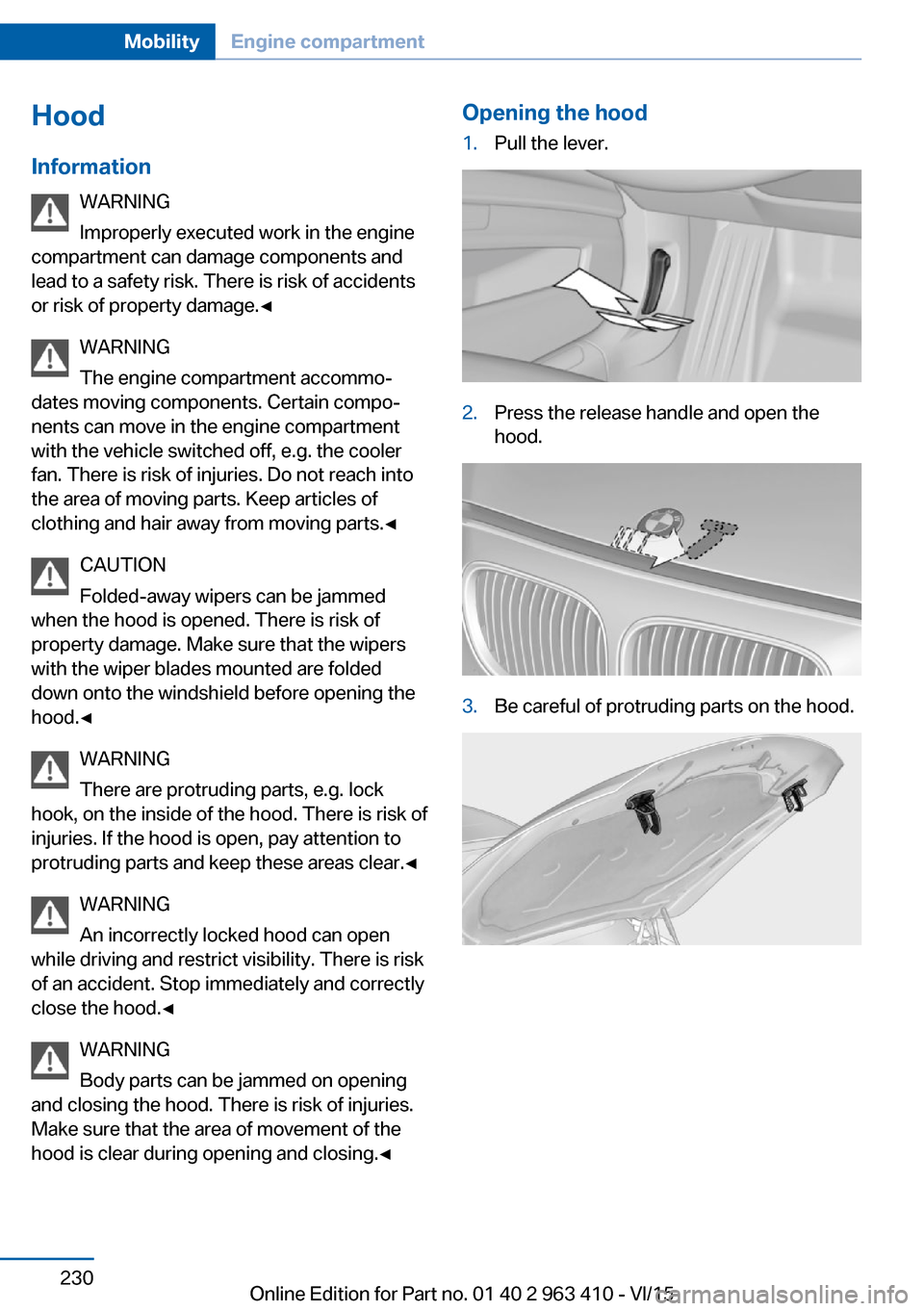
hood is clear during opening and closing.◀Opening the hood1.Pull the lever.2.Press the release handle and open the
hood.3.Be careful of protruding parts on the hood.Seite 230MobilityEngine compartment230
Online Edition for Part no. 01 40 2 963 410 - VI/15
Page 240 of 275
Replacing componentsVehicle features and optionsThis chapter describes all standard, country-
specific and optional features offered with the
series. It also describes features that are not
necessarily available in your car, e. g., due to
the selected options or country versions. This
also applies to safety-related functions and
systems. The respectively applicable country
provisions must be observed when using the
respective features and systems.
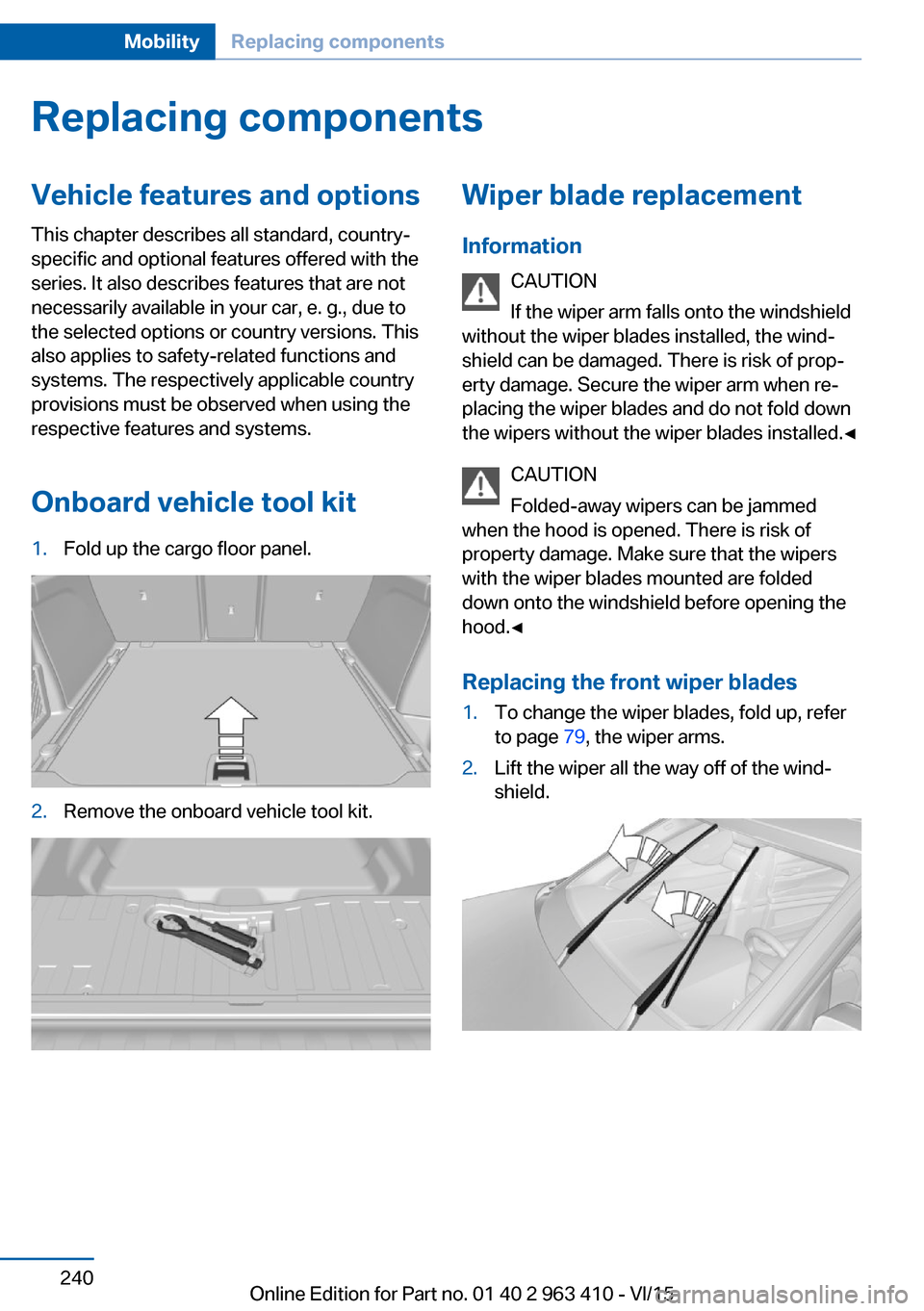
Onboard vehicle tool kit1.Fold up the cargo floor panel.2.Remove the onboard vehicle tool kit.Wiper blade replacement Information CAUTION
If the wiper arm falls onto the windshield
without the wiper blades installed, the wind‐
shield can be damaged. There is risk of prop‐
erty damage. Secure the wiper arm when re‐
placing the wiper blades and do not fold down
the wipers without the wiper blades installed.◀
CAUTION
Folded-away wipers can be jammed
when the hood is opened. There is risk of
property damage. Make sure that the wipers
with the wiper blades mounted are folded
down onto the windshield before opening the
hood.◀
Replacing the front wiper blades1.To change the wiper blades, fold up, refer
to page 79, the wiper arms.2.Lift the wiper all the way off of the wind‐
shield.Seite 240MobilityReplacing components240
Online Edition for Part no. 01 40 2 963 410 - VI/15
Page 254 of 275
CareVehicle features and optionsThis chapter describes all standard, country-
specific and optional features offered with the
series. It also describes features that are not
necessarily available in your car, e. g., due to
the selected options or country versions. This
also applies to safety-related functions and
systems. The respectively applicable country
provisions must be observed when using the
respective features and systems.
Car washes General information
Regularly remove foreign objects such as
leaves in the area below the windshield when
the hood is raised.
Wash your vehicle frequently, particularly in
winter. Intense soiling and road salt can dam‐
age the vehicle.
Steam blaster and high-pressure
washer
Information CAUTION
When cleaning with high-pressure wash‐
ers, components can be damaged due to the
pressure or temperatures being too high.
There is risk of property damage. Maintain suf‐
ficient distance and do not spray too long con‐
tinuously. Follow the user's manual for the
high-pressure washer.◀
Distances and temperature▷Maximum temperature: 140 ℉/60 ℃.▷Minimum distance from sensors, cameras,
seals: 12 in/30 cm.▷Minimum distance from glass sunroof:
31.5 inches/80 cm.
Automatic car washes
Information Note the following:
▷Give preference to cloth car washes or
those that use soft brushes in order to
avoid paint damage.▷Make sure that the wheels and tires are not
damaged by the transport mechanisms.▷Fold in the exterior mirrors; otherwise, they
may be damaged, depending on the width
of the vehicle.▷Deactivate the rain sensor, refer to
page 78, to avoid unintentional wiper acti‐
vation.▷In some cases, an unintentional alarm can
be triggered by the interior motion sensor
of the alarm system. Follow the instruc‐
tions on avoiding an unintentional alarm,
refer to page 47.
CAUTION
Too high guide rails in car washes can
damage body parts. There is risk of property
damage. Avoid car washes with guide rails
higher than 4 in/10 cm.◀
Different types of tires CAUTION
The vehicle might be too large for the car
wash. There is risk of property damage. Before
driving into the car wash, make sure that the
vehicle is not too large.◀
Seite 254MobilityCare254
Online Edition for Part no. 01 40 2 963 410 - VI/15
Page 266 of 275
Compartments in thedoors 184
Compass 99
Compressor 225
Condensation on win‐ dows 170
Condensation under the vehi‐ cle 195
Condition Based Service CBS 238
Confirmation signal 45
ConnectedDrive, see user's manual for Navigation, En‐
tertainment and Communi‐
cation
ConnectedDrive Services
Connecting electrical devi‐ ces 178
Continued driving with a flat tire 114 , 117
Control Display 18
Control Display, settings 100
Controller 19
Control systems, driving sta‐ bility 137
Convenient opening with the remote control 38
Coolant 236
Coolant level 236
Coolant temperature 93
Cooler 179
Cooling function 168
Cooling, maximum 168
Cooling system 236
Cornering light 106
Corrosion on brake discs 194
Cosmetic mirror 176
Courtesy lamps during un‐ locking 37
Courtesy lamps with the vehi‐ cle locked 38
Cruise control 151
Cruise control, active with Stop & Go 145
Cruise Control, refer to Active Cruise Control 145 Cruising range 94
Cupholder 186
Current fuel consumption 94
D
Damage, tires 223
Data, technical 260
Date 94
Daytime running lights 106
Defrosting, see Windows, de‐ frosting 170
Dehumidifying, air 168
Deleting personal data 24
Deletion of personal data 24
Departure time, parked-car ventilation 173
Destination distance 99
Diesel exhaust fluid, at low temperatures 212
Diesel exhaust fluid, having refilled 212
Diesel exhaust fluid, on mini‐ mum 212
Diesel exhaust fluid, replen‐ ishing yourself 212
Diesel fuel 211
Diesel particulate filter 193
Digital clock 94
Dimensions 260
Dimmable exterior mirrors 62
Dimmable interior rearview mirror 63
Direction indicator, see Turn signals 76
Display, electronic, instru‐ ment cluster 85
Display in windshield 101
Display lighting, see Instru‐ ment lighting 108
Displays 86
Displays, cleaning 257
Disposal, coolant 237
Disposal, vehicle battery 247
Distance control, see PDC 154 Distance to destination 99
Divided screen view, split screen 23
Door lock 39
Door lock, see Remote con‐ trol 34
Doors, Automatic Soft Clos‐ ing 40
Downhill control 140
DPC, see Dynamic Perform‐ ance Control 137
Drink holder, third row of seats 187
Drive mode 142
Drive-off assistant 137
Drive-off assistant, see DSC 138
Driving Dynamics Con‐ trol 142
Driving instructions, break- in 192
Driving notes, general 192
Driving on bad roads 195
Driving stability control sys‐ tems 137
Driving tips 192
DSC Dynamic Stability Con‐ trol 138
DTC Dynamic Traction Con‐ trol 139
Dynamic Performance Con‐ trol DPC 137
Dynamic Stability Control DSC 138
Dynamic Traction Control DTC 139
E
ECO PRO 200
ECO PRO, bonus range 201
ECO PRO display 200
ECO PRO displays 87
ECO PRO driving mode 200
ECO PRO mode 200 Seite 266ReferenceEverything from A to Z266
Online Edition for Part no. 01 40 2 963 410 - VI/15
Page 273 of 275
Unlocking, settings 44
Unpaved roads, cross-coun‐ try trips 195
Updates made after the edito‐ rial deadline 7
Upholstery care 256
USB interface 179
V
Vanity mirror 176
Variable steering 141
Vehicle battery 246
Vehicle battery, replac‐ ing 246
Vehicle, break-in 192
Vehicle care 255
Vehicle features and op‐ tions 7
Vehicle identification num‐ ber 10
Vehicle jack 244
Vehicle paint 255
Vehicle storage 257
Vehicle wash 254
Ventilation 170
Ventilation, see Parked-car ventilation 173
Venting, see ventilation 170
Vent, see ventilation 170
Vertical Dynamic Control 141
VIN, see vehicle identification number 10
Voice activation system 26
W Warning and indicator lamps, see Check Control 89
Warning displays, see Check Control 89
Warning lamp in the exterior mirror, see Active Blind Spot
Detection 133
Warning messages, see Check Control 89 Warning triangle 249
Warranty 7
Washer fluid 80
Washer nozzles, wind‐ shield 79
Washer system 77
Washing, vehicle 254
Water on roads 193
Weights 261
Welcome lamps during un‐ locking 37
Welcome lights 105
Wheel cleaner 256
Wheels, changing 223
Wheels, everything on wheels and tires 215
Wheels, Flat Tire Monitor FTM 116
Wheels, Tire Pressure Moni‐ tor TPM 112
Window defroster, rear 170
Windows, powered 47
Windshield, climate con‐ trol 193
Windshield washer fluid 80
Windshield washer noz‐ zles 79
Windshield washer sys‐ tem 77
Windshield washer system, see washer/wiper sys‐
tem 77
Windshield wiper 77
Winter storage, care 257
Winter tires, suitable tires 224
Winter tires, tread 222
Wiper 77
Wiper blades, replacing 240
Wiper fluid 80
Wiper, fold-out position 79
Wiper system 77
Wood, care 256
Word match concept, naviga‐ tion 25 Wrench, see Onboard vehicle
tool kit 240
X
xDrive 139
Xenon headlights, bulb re‐ placement 242 Seite 273Everything from A to ZReference273
Online Edition for Part no. 01 40 2 963 410 - VI/15