fuel BMW X5 3.0I 2004 E53 Owner's Guide
[x] Cancel search | Manufacturer: BMW, Model Year: 2004, Model line: X5 3.0I, Model: BMW X5 3.0I 2004 E53Pages: 200, PDF Size: 3.91 MB
Page 84 of 200
82n
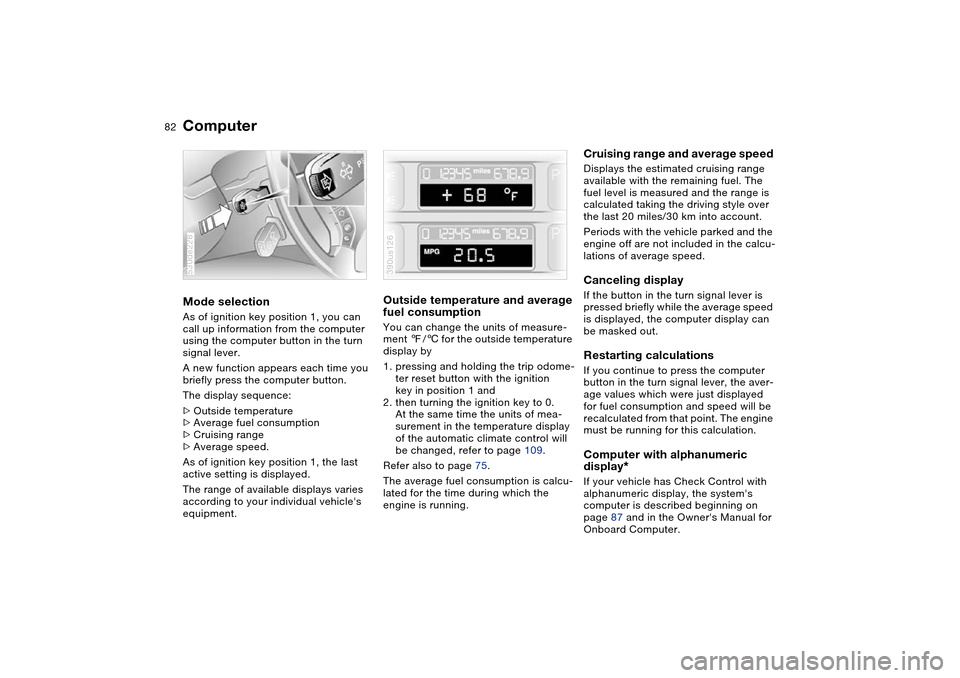
ComputerMode selection As of ignition key position 1, you can
call up information from the computer
using the computer button in the turn
signal lever.
A new function appears each time you
briefly press the computer button.
The display sequence:
>Outside temperature
>Average fuel consumption
>Cruising range
>Average speed.
As of ignition key position 1, the last
active setting is displayed.
The range of available displays varies
according to your individual vehicle's
equipment.530de228
Outside temperature and average
fuel consumption You can change the units of measure-
ment 7/6 for the outside temperature
display by
1. pressing and holding the trip odome-
ter reset button with the ignition
key in position 1 and
2. then turning the ignition key to 0.
At the same time the units of mea-
surement in the temperature display
of the automatic climate control will
be changed, refer to page 109.
Refer also to page 75.
The average fuel consumption is calcu-
lated for the time during which the
engine is running.390us126
Cruising range and average speed Displays the estimated cruising range
available with the remaining fuel. The
fuel level is measured and the range is
calculated taking the driving style over
the last 20 miles/30 km into account.
Periods with the vehicle parked and the
engine off are not included in the calcu-
lations of average speed.Canceling display If the button in the turn signal lever is
pressed briefly while the average speed
is displayed, the computer display can
be masked out. Restarting calculations If you continue to press the computer
button in the turn signal lever, the aver-
age values which were just displayed
for fuel consumption and speed will be
recalculated from that point. The engine
must be running for this calculation.Computer with alphanumeric
display
*
If your vehicle has Check Control with
alphanumeric display, the system's
computer is described beginning on
page 87 and in the Owner's Manual for
Onboard Computer.
Page 85 of 200
83n
OverviewControlsMaintenanceRepairsDataIndex
MID Multi-Information Display Central display The MID serves as the central display
and operation for the following onboard
systems:
>Digital clock, e.g. time display, date
>Audio systems: radio, cassette, CD
>Computer, e.g. fuel consumption,
cruising range
>Telephone, e.g. dialing.
You will find explanations and notes for
operating the digital clock and the com-
puter on the following pages. Please
refer to the separate Owner's Manuals
for operating the audio systems, the
telephone and the onboard computer.
Any unrealistic numerical entries
will not be accepted.
All stored data will be lost if the power
supply is interrupted. Time display,
switch-on times for independent venti-
lation, distance and cruise control
speed limit may have to be reset once
the power supply has been reestab-
lished.<
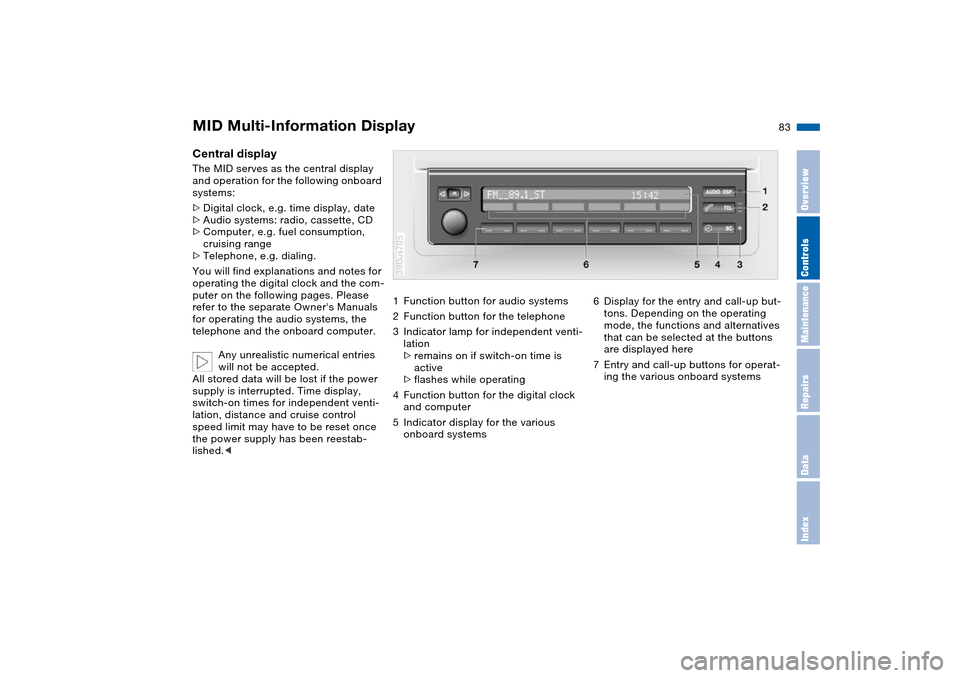
1Function button for audio systems
2Function button for the telephone
3Indicator lamp for independent venti-
lation
>remains on if switch-on time is
active
>flashes while operating
4Function button for the digital clock
and computer
5Indicator display for the various
onboard systems390us705
6Display for the entry and call-up but-
tons. Depending on the operating
mode, the functions and alternatives
that can be selected at the buttons
are displayed here
7Entry and call-up buttons for operat-
ing the various onboard systems
Page 91 of 200
89n
OverviewControlsMaintenanceRepairsDataIndex
Computer
* in MID
Estimated time of arrival When you have entered the distance to
your destination, you can obtain an
estimated time of arrival display which
is continuously updated by the com-
puter as your average driving period
varies.
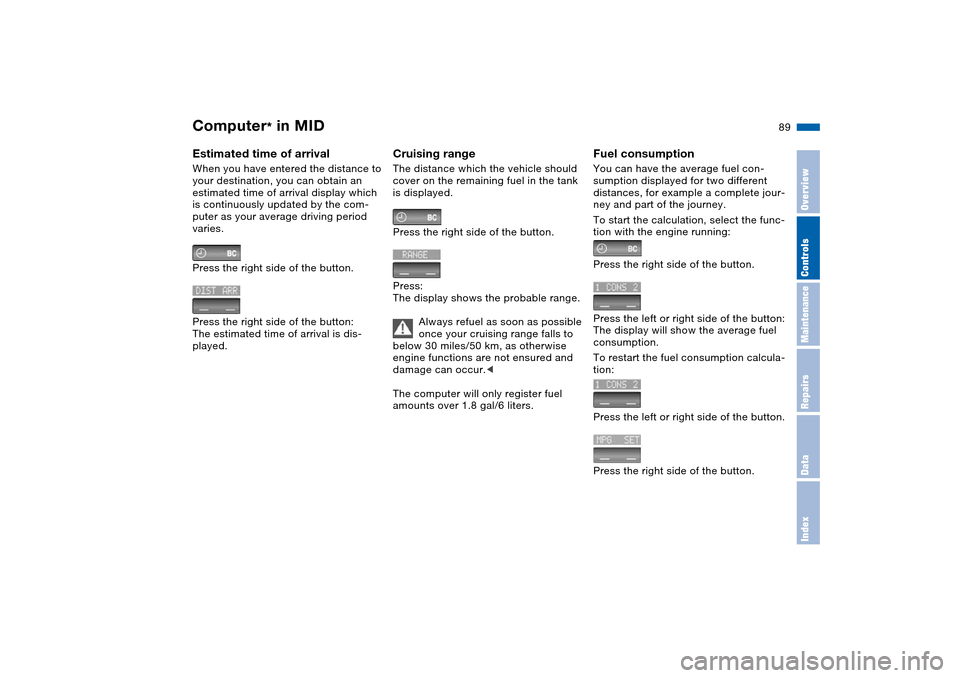
Press the right side of the button.
Press the right side of the button:
The estimated time of arrival is dis-
played.
Cruising range The distance which the vehicle should
cover on the remaining fuel in the tank
is displayed.
Press the right side of the button.
Press:
The display shows the probable range.
Always refuel as soon as possible
once your cruising range falls to
below 30 miles/50 km, as otherwise
engine functions are not ensured and
damage can occur.<
The computer will only register fuel
amounts over 1.8 gal/6 liters.
Fuel consumption You can have the average fuel con-
sumption displayed for two different
distances, for example a complete jour-
ney and part of the journey.
To start the calculation, select the func-
tion with the engine running:
Press the right side of the button.
Press the left or right side of the button:
The display will show the average fuel
consumption.
To restart the fuel consumption calcula-
tion:
Press the left or right side of the button.
Press the right side of the button.
Page 147 of 200
145n
OverviewControlsMaintenanceRepairsDataIndex
Replacing wheels/tires Snow chains
*
The right wheels and tires
BMW recommends that you use
only wheel and tire combinations
that BMW has tested and approved for
your particular vehicle. Variations in
factors such as manufacturing toler-
ances mean that even wheels and tires
with identical official size ratings could
actually have different dimensions than
the approved units – these differences
could lead to body contact, and with it
the risk of severe accidents. If non-
approved wheels and tires are used,
BMW cannot evaluate their suitability,
and therefore cannot be held liable for
driving safety.<
To maintain good handling and vehicle
response, use only tires of a single
tread configuration from a single manu-
facturer. After a flat tire, always remem-
ber to have the original wheel and tire
combination remounted on the vehicle
as soon as possible.
Special features of winter tires BMW recommends winter tires for use
in cold winter driving conditions.
Although all-season M+S tires provide
better winter traction than summer
tires, they generally fail to provide the
same levels of cold-weather perfor-
mance as winter tires.
When switching to winter tires, observe
the description under Tire condition,
page 143, and Replacing wheels/tires.
Observing speed ratings:
Never exceed the maximum
speed for which the winter tires
are rated. Unprofessional attempts by
laymen to service tires can lead to dam-
age and accidents. Have this work per-
formed by skilled professionals only.
The technicians at your BMW Sports
Activity Vehicle center will be glad to
assist you with the required profes-
sional knowledge and specialized
equipment.
whenever possible. Always protect tires
against all contact with oil, grease and
fuels.
Do not exceed the maximum tire infla-
tion pressure indicated on the side wall
of the tire.
Only certain snow chains have been
tested by BMW and classified and
approved as safe. Consult your BMW
Sports Activity Vehicle center for
details. BMW recommends only using
these approved, narrow-link snow
chains. Use is only permitted in pairs on
the rear wheels with the following tire
sizes:
X5 4.8is: 255/55 R 18
All other models: 235/65 R 17
Observe the manufacturer's instruc-
tions when installing snow chains.
Do not exceed a maximum speed of
30 mph/50 km/h.
After mounting snow chains, do
not initialize the Flat Tire Monitor.
When you are driving with snow chains,
it can be beneficial to switch off DSC
briefly, refer to page 95.<
Page 150 of 200
148n
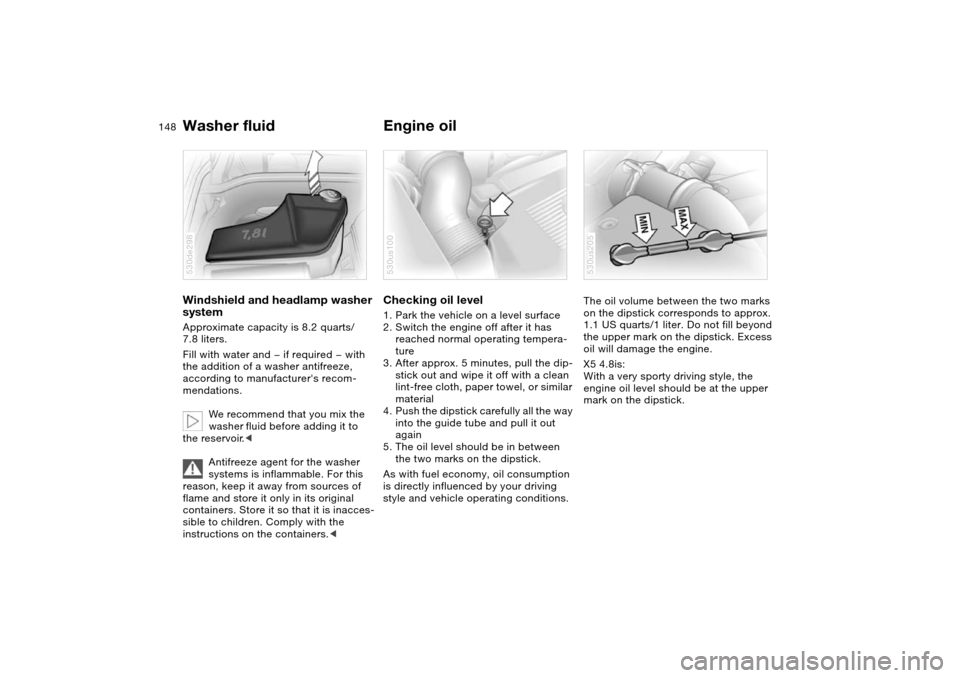
Washer fluid Engine oilWindshield and headlamp washer
system Approximate capacity is 8.2 quarts/
7.8 liters.
Fill with water and — if required — with
the addition of a washer antifreeze,
according to manufacturer's recom-
mendations.
We recommend that you mix the
washer fluid before adding it to
the reservoir.<
Antifreeze agent for the washer
systems is inflammable. For this
reason, keep it away from sources of
flame and store it only in its original
containers. Store it so that it is inacces-
sible to children. Comply with the
instructions on the containers.< 530de298
Checking oil level 1. Park the vehicle on a level surface
2. Switch the engine off after it has
reached normal operating tempera-
ture
3. After approx. 5 minutes, pull the dip-
stick out and wipe it off with a clean
lint-free cloth, paper towel, or similar
material
4. Push the dipstick carefully all the way
into the guide tube and pull it out
again
5. The oil level should be in between
the two marks on the dipstick.
As with fuel economy, oil consumption
is directly influenced by your driving
style and vehicle operating conditions. 530us100
The oil volume between the two marks
on the dipstick corresponds to approx.
1.1 US quarts/1 liter. Do not fill beyond
the upper mark on the dipstick. Excess
oil will damage the engine.
X5 4.8is:
With a very sporty driving style, the
engine oil level should be at the upper
mark on the dipstick.530us205
Page 183 of 200
181n
OverviewControlsMaintenanceRepairsDataIndex
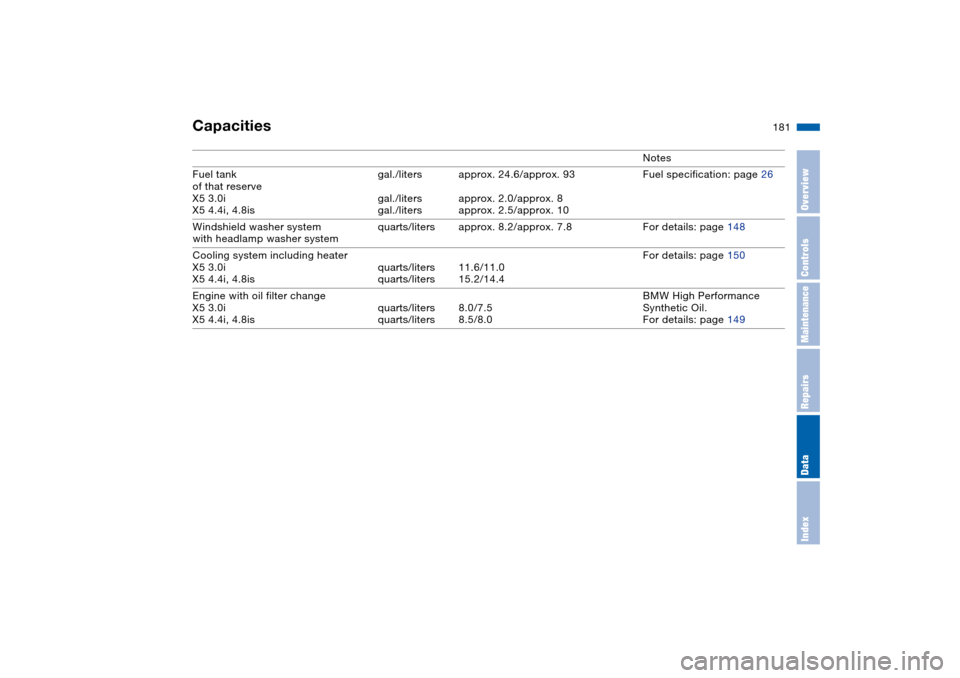
Capacities
Notes
Fuel tank
of that reserve
X5 3.0i
X5 4.4i, 4.8isgal./liters
gal./liters
gal./litersapprox. 24.6/approx. 93
approx. 2.0/approx. 8
approx. 2.5/approx. 10Fuel specification: page 26
Windshield washer system
with headlamp washer system quarts/liters approx. 8.2/approx. 7.8 For details: page 148
Cooling system including heater
X5 3.0i
X5 4.4i, 4.8isquarts/liters
quarts/liters11.6/11.0
15.2/14.4For details: page 150
Engine with oil filter change
X5 3.0i
X5 4.4i, 4.8isquarts/liters
quarts/liters8.0/7.5
8.5/8.0BMW High Performance
Synthetic Oil.
For details: page 149
Page 187 of 200
Everything from A to Z
185n
OverviewControlsMaintenanceRepairsDataIndex
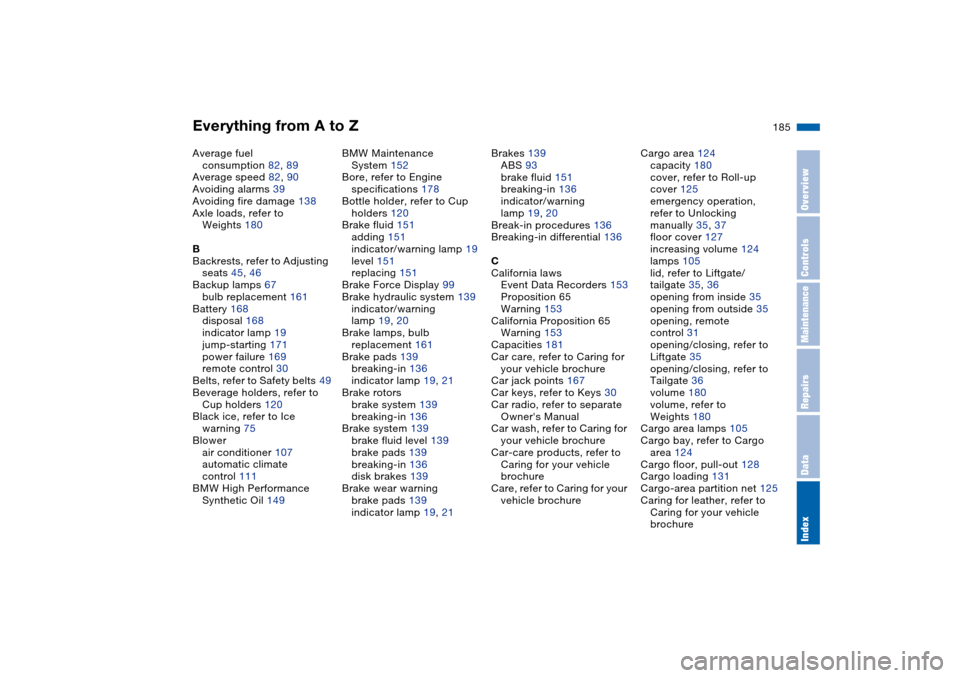
Average fuel
consumption 82, 89
Average speed 82, 90
Avoiding alarms 39
Avoiding fire damage 138
Axle loads, refer to
Weights 180
B
Backrests, refer to Adjusting
seats 45, 46
Backup lamps 67
bulb replacement 161
Battery 168
disposal 168
indicator lamp 19
jump-starting 171
power failure 169
remote control 30
Belts, refer to Safety belts 49
Beverage holders, refer to
Cup holders 120
Black ice, refer to Ice
warning 75
Blower
air conditioner 107
automatic climate
control 111
BMW High Performance
Synthetic Oil 149BMW Maintenance
System 152
Bore, refer to Engine
specifications 178
Bottle holder, refer to Cup
holders 120
Brake fluid 151
adding 151
indicator/warning lamp 19
level 151
replacing 151
Brake Force Display 99
Brake hydraulic system 139
indicator/warning
lamp 19, 20
Brake lamps, bulb
replacement 161
Brake pads 139
breaking-in 136
indicator lamp 19, 21
Brake rotors
brake system 139
breaking-in 136
Brake system 139
brake fluid level 139
brake pads 139
breaking-in 136
disk brakes 139
Brake wear warning
brake pads 139
indicator lamp 19, 21Brakes 139
ABS 93
brake fluid 151
breaking-in 136
indicator/warning
lamp 19, 20
Break-in procedures 136
Breaking-in differential 136
C
California laws
Event Data Recorders 153
Proposition 65
Warning 153
California Proposition 65
Warning 153
Capacities 181
Car care, refer to Caring for
your vehicle brochure
Car jack points 167
Car keys, refer to Keys 30
Car radio, refer to separate
Owner's Manual
Car wash, refer to Caring for
your vehicle brochure
Car-care products, refer to
Caring for your vehicle
brochure
Care, refer to Caring for your
vehicle brochureCargo area 124
capacity 180
cover, refer to Roll-up
cover 125
emergency operation,
refer to Unlocking
manually 35, 37
floor cover 127
increasing volume 124
lamps 105
lid, refer to Liftgate/
tailgate 35, 36
opening from inside 35
opening from outside 35
opening, remote
control 31
opening/closing, refer to
Liftgate 35
opening/closing, refer to
Tailgate 36
volume 180
volume, refer to
Weights 180
Cargo area lamps 105
Cargo bay, refer to Cargo
area 124
Cargo floor, pull-out 128
Cargo loading 131
Cargo-area partition net 125
Caring for leather, refer to
Caring for your vehicle
brochure
Page 188 of 200
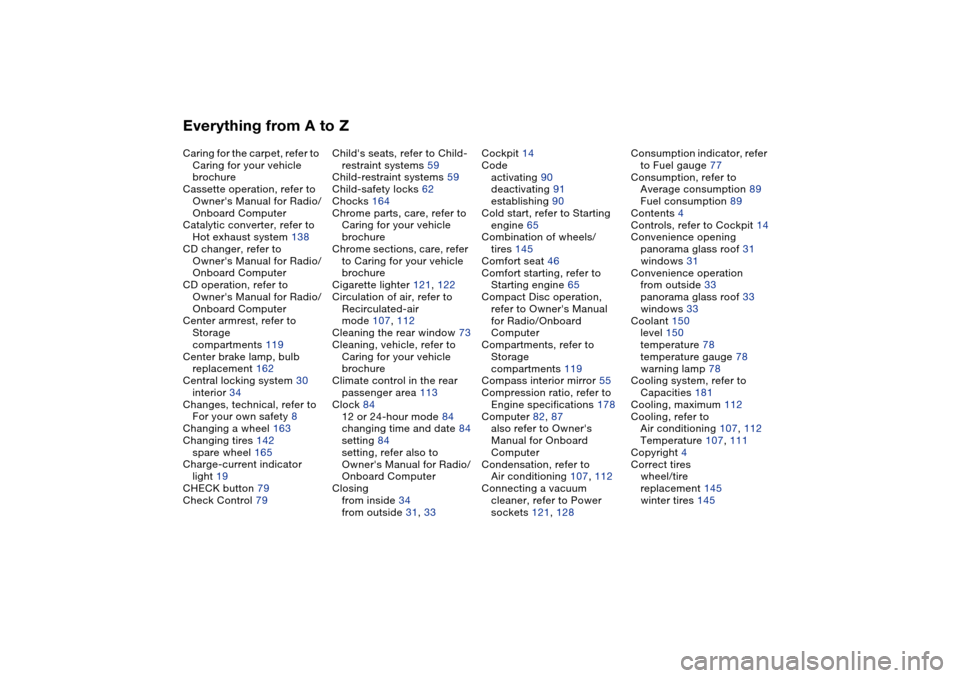
Everything from A to ZCaring for the carpet, refer to
Caring for your vehicle
brochure
Cassette operation, refer to
Owner's Manual for Radio/
Onboard Computer
Catalytic converter, refer to
Hot exhaust system 138
CD changer, refer to
Owner's Manual for Radio/
Onboard Computer
CD operation, refer to
Owner's Manual for Radio/
Onboard Computer
Center armrest, refer to
Storage
compartments 119
Center brake lamp, bulb
replacement 162
Central locking system 30
interior 34
Changes, technical, refer to
For your own safety 8
Changing a wheel 163
Changing tires 142
spare wheel 165
Charge-current indicator
light 19
CHECK button 79
Check Control 79Child's seats, refer to Child-
restraint systems 59
Child-restraint systems 59
Child-safety locks 62
Chocks 164
Chrome parts, care, refer to
Caring for your vehicle
brochure
Chrome sections, care, refer
to Caring for your vehicle
brochure
Cigarette lighter 121, 122
Circulation of air, refer to
Recirculated-air
mode 107, 112
Cleaning the rear window 73
Cleaning, vehicle, refer to
Caring for your vehicle
brochure
Climate control in the rear
passenger area 113
Clock 84
12 or 24-hour mode 84
changing time and date 84
setting 84
setting, refer also to
Owner's Manual for Radio/
Onboard Computer
Closing
from inside 34
from outside 31, 33Cockpit 14
Code
activating 90
deactivating 91
establishing 90
Cold start, refer to Starting
engine 65
Combination of wheels/
tires 145
Comfort seat 46
Comfort starting, refer to
Starting engine 65
Compact Disc operation,
refer to Owner's Manual
for Radio/Onboard
Computer
Compartments, refer to
Storage
compartments 119
Compass interior mirror 55
Compression ratio, refer to
Engine specifications 178
Computer 82, 87
also refer to Owner's
Manual for Onboard
Computer
Condensation, refer to
Air conditioning 107, 112
Connecting a vacuum
cleaner, refer to Power
sockets 121, 128Consumption indicator, refer
to Fuel gauge 77
Consumption, refer to
Average consumption 89
Fuel consumption 89
Contents 4
Controls, refer to Cockpit 14
Convenience opening
panorama glass roof 31
windows 31
Convenience operation
from outside 33
panorama glass roof 33
windows 33
Coolant 150
level 150
temperature 78
temperature gauge 78
warning lamp 78
Cooling system, refer to
Capacities 181
Cooling, maximum 112
Cooling, refer to
Air conditioning 107, 112
Temperature 107, 111
Copyright 4
Correct tires
wheel/tire
replacement 145
winter tires 145
Page 189 of 200
Everything from A to Z
187n
OverviewControlsMaintenanceRepairsDataIndex
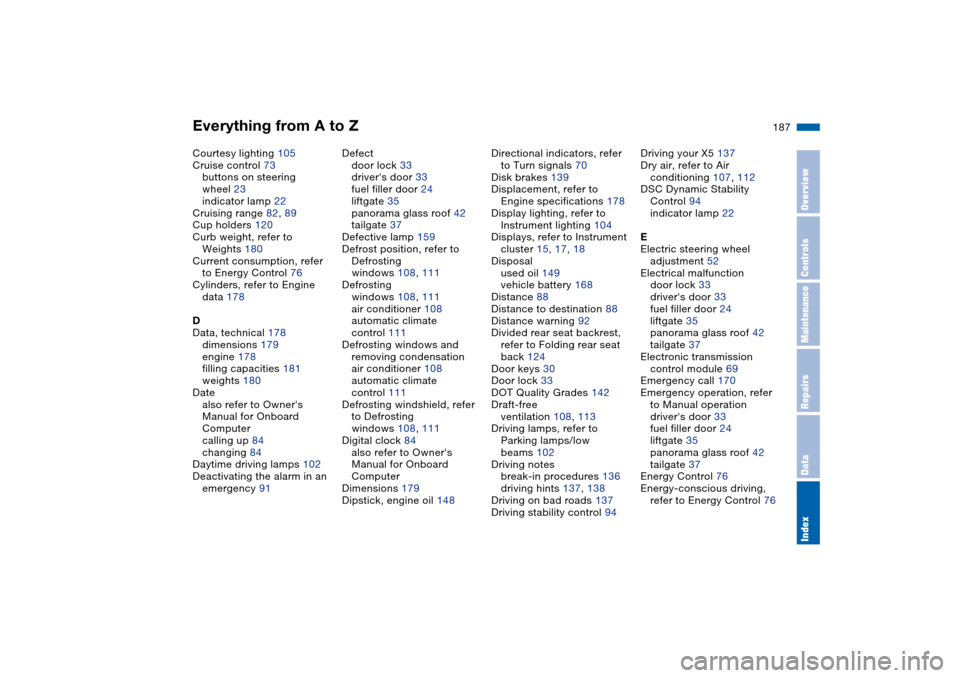
Courtesy lighting 105
Cruise control 73
buttons on steering
wheel 23
indicator lamp 22
Cruising range 82, 89
Cup holders 120
Curb weight, refer to
Weights 180
Current consumption, refer
to Energy Control 76
Cylinders, refer to Engine
data 178
D
Data, technical 178
dimensions 179
engine 178
filling capacities 181
weights 180
Date
also refer to Owner's
Manual for Onboard
Computer
calling up 84
changing 84
Daytime driving lamps 102
Deactivating the alarm in an
emergency 91Defect
door lock 33
driver's door 33
fuel filler door 24
liftgate 35
panorama glass roof 42
tailgate 37
Defective lamp 159
Defrost position, refer to
Defrosting
windows 108, 111
Defrosting
windows 108, 111
air conditioner 108
automatic climate
control 111
Defrosting windows and
removing condensation
air conditioner 108
automatic climate
control 111
Defrosting windshield, refer
to Defrosting
windows 108, 111
Digital clock 84
also refer to Owner's
Manual for Onboard
Computer
Dimensions 179
Dipstick, engine oil 148Directional indicators, refer
to Turn signals 70
Disk brakes 139
Displacement, refer to
Engine specifications 178
Display lighting, refer to
Instrument lighting 104
Displays, refer to Instrument
cluster 15, 17, 18
Disposal
used oil 149
vehicle battery 168
Distance 88
Distance to destination 88
Distance warning 92
Divided rear seat backrest,
refer to Folding rear seat
back 124
Door keys 30
Door lock 33
DOT Quality Grades 142
Draft-free
ventilation 108, 113
Driving lamps, refer to
Parking lamps/low
beams 102
Driving notes
break-in procedures 136
driving hints 137, 138
Driving on bad roads 137
Driving stability control 94Driving your X5 137
Dry air, refer to Air
conditioning 107, 112
DSC Dynamic Stability
Control 94
indicator lamp 22
E
Electric steering wheel
adjustment 52
Electrical malfunction
door lock 33
driver's door 33
fuel filler door 24
liftgate 35
panorama glass roof 42
tailgate 37
Electronic transmission
control module 69
Emergency call 170
Emergency operation, refer
to Manual operation
driver's door 33
fuel filler door 24
liftgate 35
panorama glass roof 42
tailgate 37
Energy Control 76
Energy-conscious driving,
refer to Energy Control 76
Page 190 of 200
Everything from A to ZEngine
breaking-in 136
data 178
electronic circuitry 22
speed 76
starting 64
switching off 65
Engine compartment 147
Engine coolant 150
Engine hood 146
Engine oil 148
additives, refer to Adding
engine oil 149
filling capacity 181
indicator/warning lamp 19
specified oils 149
Engine oil level, indicator/
warning lamp 21
Engine oil pressure,
indicator/warning lamp 19
Engine oil thermometer 77
Engine output, refer to
Engine specifications 178
Engine specifications 178
Engine speed, refer to
Engine specifications 178
Environmentally friendly
driving, refer to Energy
Control 76ESP Electronic Stability
Program, refer to DSC
Dynamic Stability
Control 94
Exhaust system 138
Extended immobilizer
function 90
Exterior mirror
automatic dimming
feature 55
Exterior mirrors 54
F
Failure messages, refer to
Check Control 79
Failure of a current
consumer 169
False alarms, refer to
Avoiding unintentional
alarms 39
Fan
refer to Air
supply 107, 111
Fasten safety belts
warning lamp 21, 49
Fault displays, refer to Check
Control 79
Filter, refer to
Microfilter 108
Microfilter/activated-
charcoal filter 114First aid, refer to First-aid
kit 24
First-aid kit 24
Flashlight 119
Flat tire 163
Flat Tire Monitor 100
refer to Tire inflation
pressure 140
spare wheel 165
Flat Tire Monitor 100
indicator lamp 101
initializing 100
Flooding, refer to Water on
roads 137
Floor coverings, carpet, refer
to Caring for your vehicle
brochure
Floor mats, refer to Caring
for your vehicle brochure
Fluid level, indicator lamp 21
Fog lamps 104
indicator lamp 22
Folding rear backrest 124
Folding the floor cover
up 128
Footbrake, refer to Driving
notes 138
Footwell lamps 105
Front airbags 57
Front fog lamps 104
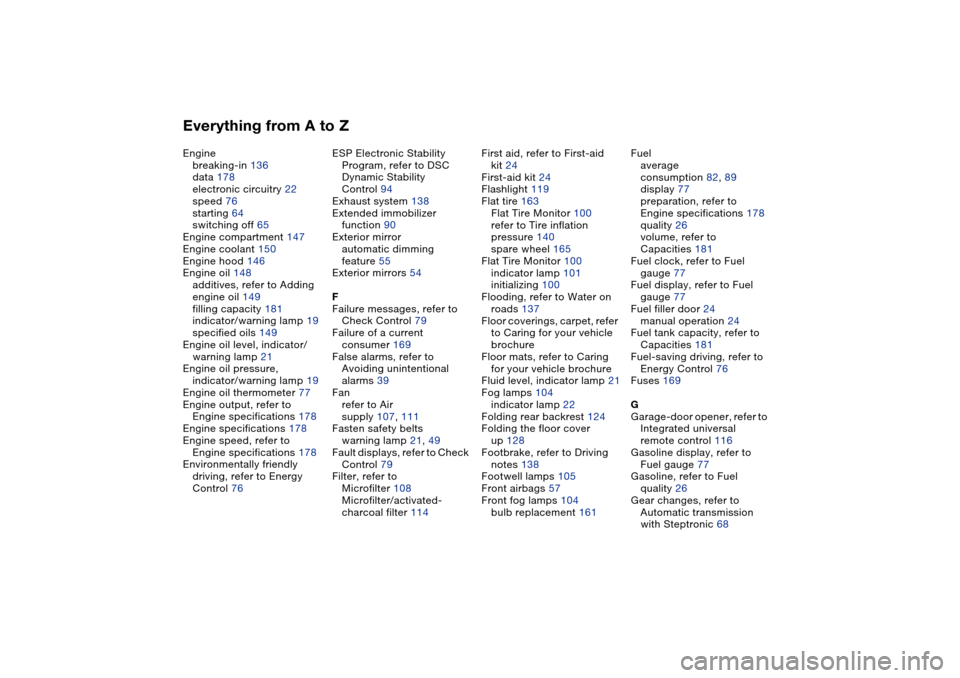
bulb replacement 161Fuel
average
consumption 82, 89
display 77
preparation, refer to
Engine specifications 178
quality 26
volume, refer to
Capacities 181
Fuel clock, refer to Fuel
gauge 77
Fuel display, refer to Fuel
gauge 77
Fuel filler door 24
manual operation 24
Fuel tank capacity, refer to
Capacities 181
Fuel-saving driving, refer to
Energy Control 76
Fuses 169
G
Garage-door opener, refer to
Integrated universal
remote control 116
Gasoline display, refer to
Fuel gauge 77
Gasoline, refer to Fuel
quality 26
Gear changes, refer to
Automatic transmission
with Steptronic 68