light BMW X5 3.0I 2007 E70 User Guide
[x] Cancel search | Manufacturer: BMW, Model Year: 2007, Model line: X5 3.0I, Model: BMW X5 3.0I 2007 E70Pages: 272, PDF Size: 9.03 MB
Page 44 of 272
Adjusting
42
Adjusting lumbar support*
You can also adjust the contour of the backrest
to obtain additional support in the lumbar
region.
The upper hips and spinal column receive sup-
plementary support to help you maintain a
relaxed, upright sitting position.
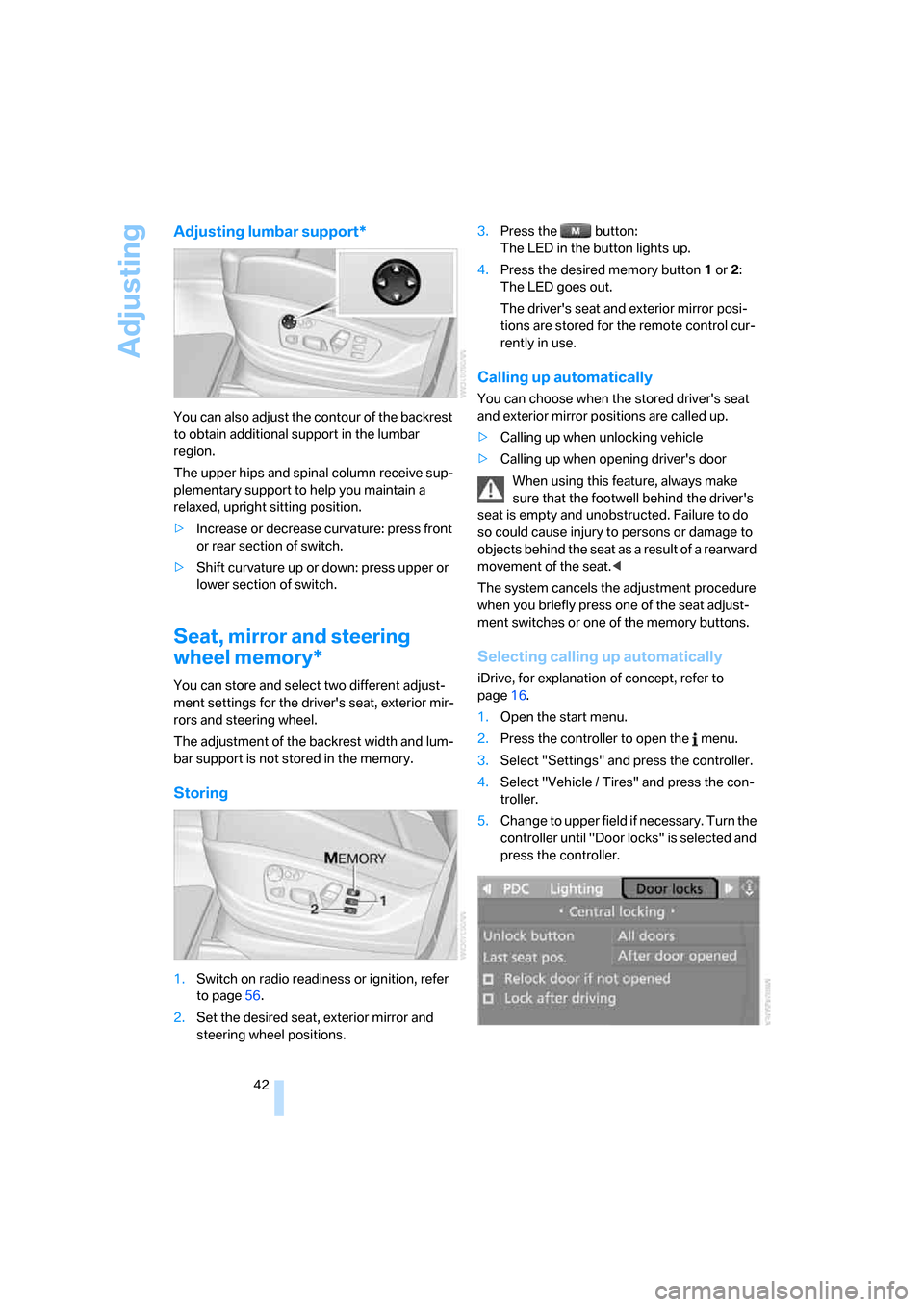
>Increase or decrease curvature: press front
or rear section of switch.
>Shift curvature up or down: press upper or
lower section of switch.
Seat, mirror and steering
wheel memory*
You can store and select two different adjust-
ment settings for the driver's seat, exterior mir-
rors and steering wheel.
The adjustment of the backrest width and lum-
bar support is not stored in the memory.
Storing
1.Switch on radio readiness or ignition, refer
to page56.
2.Set the desired seat, exterior mirror and
steering wheel positions.3.Press the button:
The LED in the button lights up.
4.Press the desired memory button1 or2:
The LED goes out.
The driver's seat and exterior mirror posi-
tions are stored for the remote control cur-
rently in use.
Calling up automatically
You can choose when the stored driver's seat
and exterior mirror positions are called up.
>Calling up when unlocking vehicle
>Calling up when opening driver's door
When using this feature, always make
sure that the footwell behind the driver's
seat is empty and unobstructed. Failure to do
so could cause injury to persons or damage to
objects behind the seat as a result of a rearward
movement of the seat.<
The system cancels the adjustment procedure
when you briefly press one of the seat adjust-
ment switches or one of the memory buttons.
Selecting calling up automatically
iDrive, for explanation of concept, refer to
page16.
1.Open the start menu.
2.Press the controller to open the menu.
3.Select "Settings" and press the controller.
4.Select "Vehicle / Tires" and press the con-
troller.
5.Change to upper field if necessary. Turn the
controller until "Door locks" is selected and
press the controller.
Page 46 of 272
Adjusting
44
Front seats: setting the angle of the
head restraint
Swivel the head restraint.
With the comfort seat, use the shoulder support
to set the distance to the back of the head.
Adjusting side extensions* of head
restraints with comfort seat
You can fold the side extensions on the head
restraint forward for increased lateral support in
the resting position.
Rear seats and 3rd row seats*
Adjusting height
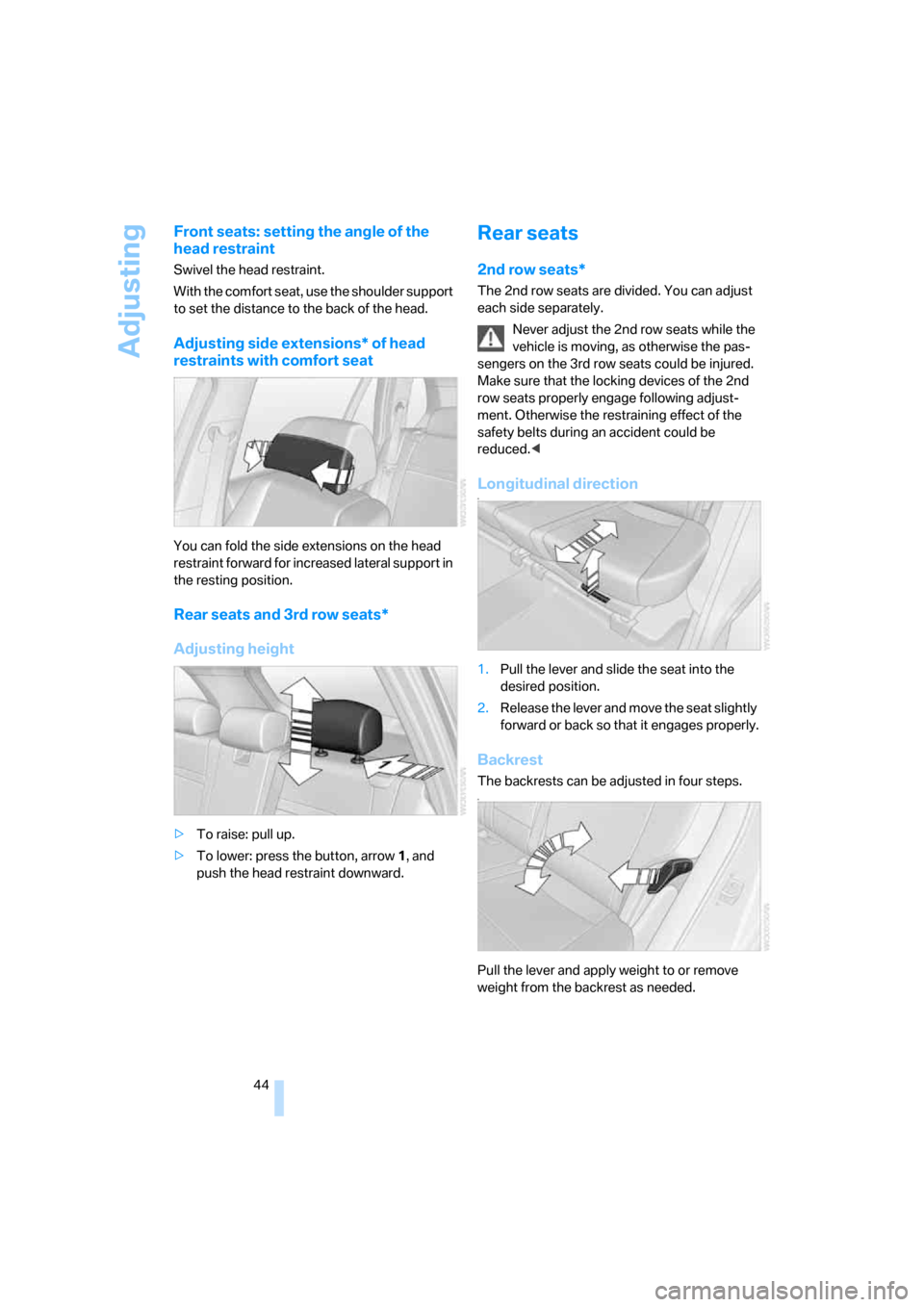
>To raise: pull up.
>To lower: press the button, arrow1, and
push the head restraint downward.
Rear seats
2nd row seats*
The 2nd row seats are divided. You can adjust
each side separately.
Never adjust the 2nd row seats while the
vehicle is moving, as otherwise the pas-
sengers on the 3rd row seats could be injured.
Make sure that the locking devices of the 2nd
row seats properly engage following adjust-
ment. Otherwise the restraining effect of the
safety belts during an accident could be
reduced.<
Longitudinal directionn
1.Pull the lever and slide the seat into the
desired position.
2.Release the lever and move the seat slightly
forward or back so that it engages properly.
Backrest
The backrests can be adjusted in four steps.n
Pull the lever and apply weight to or remove
weight from the backrest as needed.
Page 47 of 272
Controls
45Reference
At a glance
Driving tips
Communications
Navigation
Entertainment
Mobility
Access to 3rd row seatsn
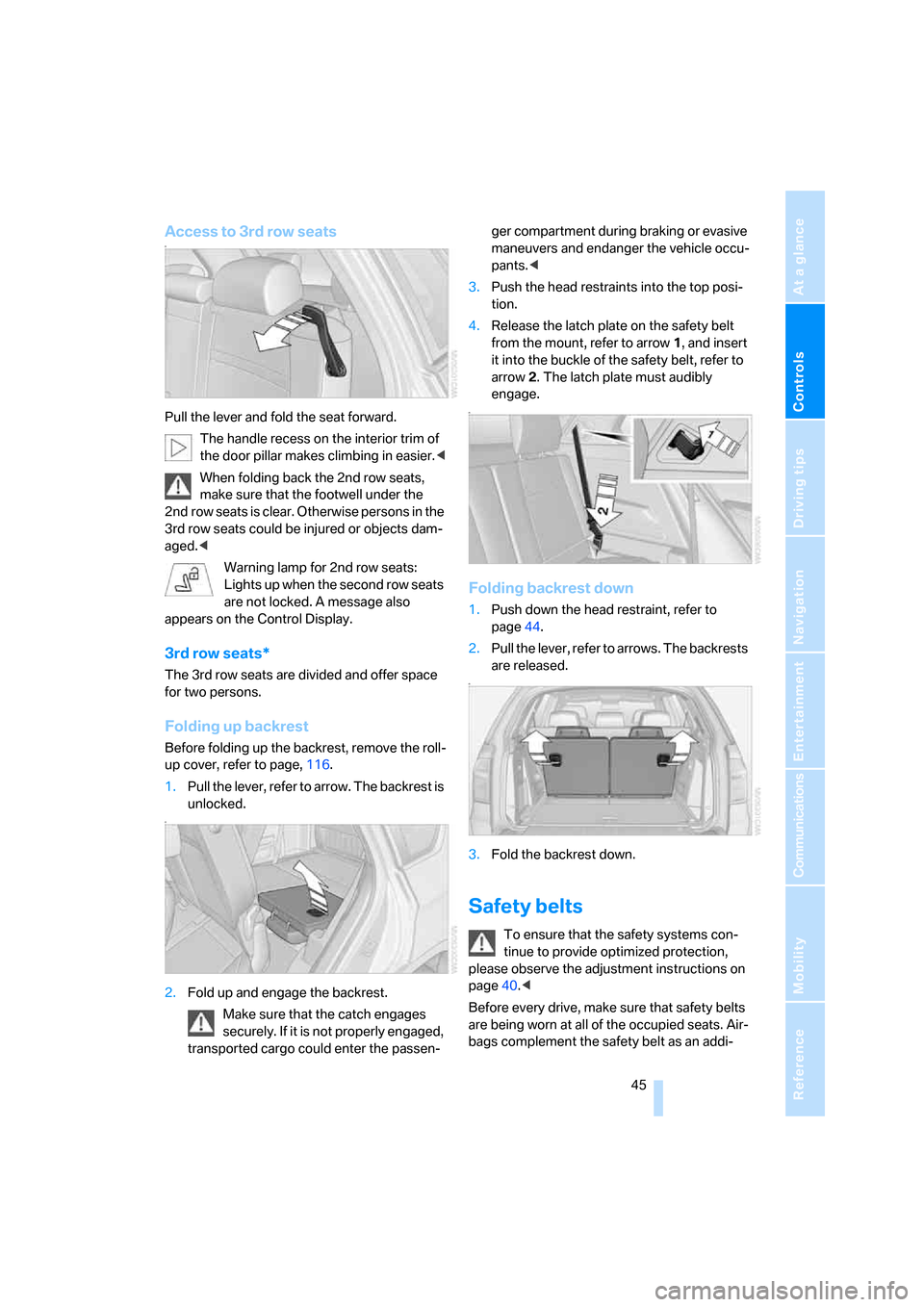
Pull the lever and fold the seat forward.
The handle recess on the interior trim of
the door pillar makes climbing in easier.<
When folding back the 2nd row seats,
make sure that the footwell under the
2nd row seats is clear. Otherwise persons in the
3rd row seats could be injured or objects dam-
aged.<
Warning lamp for 2nd row seats:
Lights up when the second row seats
are not locked. A message also
appears on the Control Display.
3rd row seats*
The 3rd row seats are divided and offer space
for two persons.
Folding up backrest
Before folding up the backrest, remove the roll-
up cover, refer to page, 116.
1.Pull the lever, refer to arrow. The backrest is
unlocked.
n
2.Fold up and engage the backrest.
Make sure that the catch engages
securely. If it is not properly engaged,
transported cargo could enter the passen-ger compartment during braking or evasive
maneuvers and endanger the vehicle occu-
pants.<
3.Push the head restraints into the top posi-
tion.
4.Release the latch plate on the safety belt
from the mount, refer to arrow1, and insert
it into the buckle of the safety belt, refer to
arrow2. The latch plate must audibly
engage.
n
Folding backrest down
1.Push down the head restraint, refer to
page44.
2.Pull the lever, refer to arrows. The backrests
are released.
n
3.Fold the backrest down.
Safety belts
To ensure that the safety systems con-
tinue to provide optimized protection,
please observe the adjustment instructions on
page40.<
Before every drive, make sure that safety belts
are being worn at all of the occupied seats. Air-
bags complement the safety belt as an addi-
Page 48 of 272
Adjusting
46 tional safety device, but they do not represent a
substitute.
n
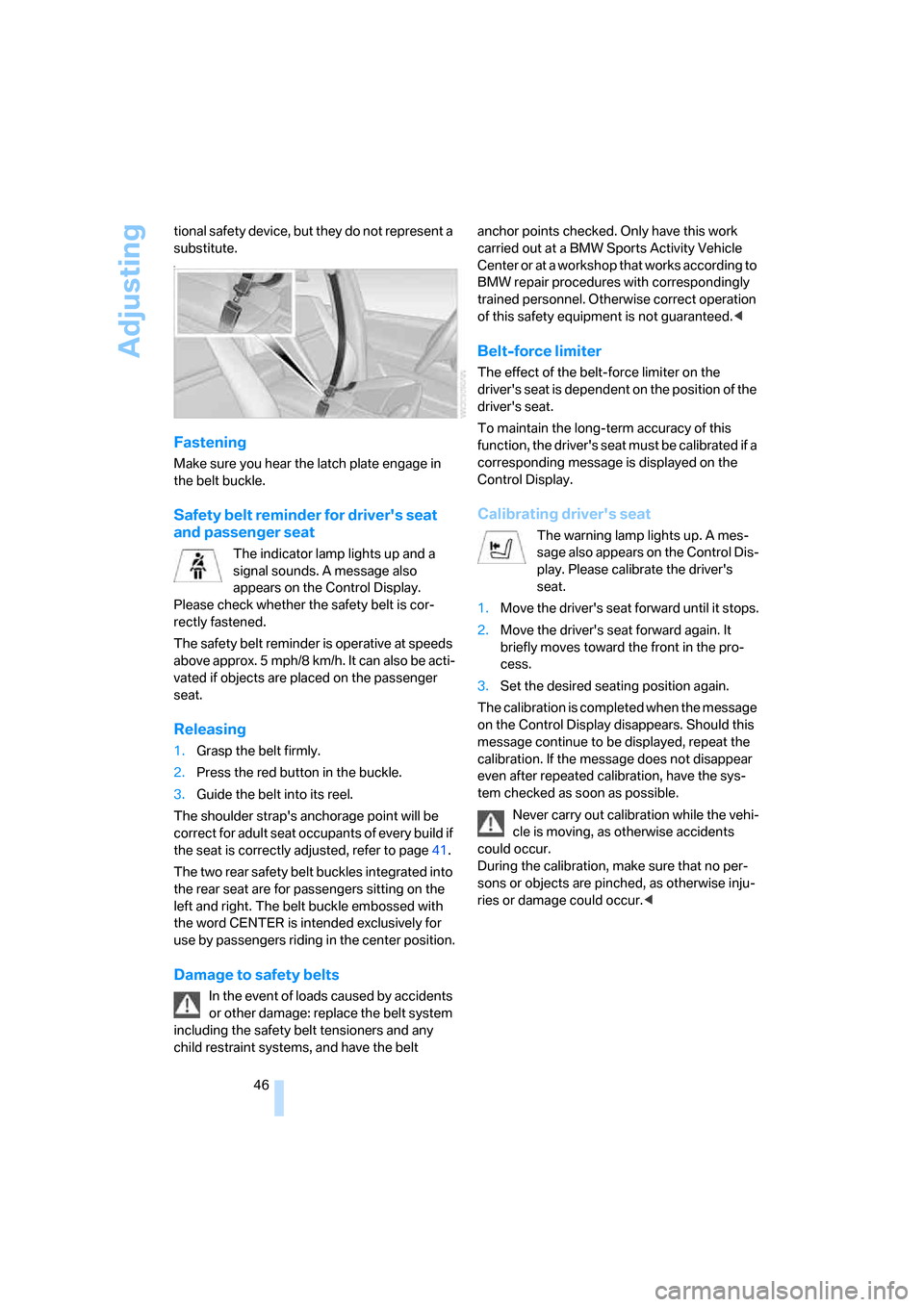
Fastening
Make sure you hear the latch plate engage in
the belt buckle.
Safety belt reminder for driver's seat
and passenger seat
The indicator lamp lights up and a
signal sounds. A message also
appears on the Control Display.
Please check whether the safety belt is cor-
rectly fastened.
The safety belt reminder is operative at speeds
above approx. 5 mph/8 km/h. It can also be acti-
vated if objects are placed on the passenger
seat.
Releasing
1.Grasp the belt firmly.
2.Press the red button in the buckle.
3.Guide the belt into its reel.
The shoulder strap's anchorage point will be
correct for adult seat occupants of every build if
the seat is correctly adjusted, refer to page41.
The two rear safety belt buckles integrated into
the rear seat are for passengers sitting on the
left and right. The belt buckle embossed with
the word CENTER is intended exclusively for
use by passengers riding in the center position.
Damage to safety belts
In the event of loads caused by accidents
or other damage: replace the belt system
including the safety belt tensioners and any
child restraint systems, and have the belt anchor points checked. Only have this work
carried out at a BMW Sports Activity Vehicle
Center or at a workshop that works according to
BMW repair procedures with correspondingly
trained personnel. Otherwise correct operation
of this safety equipment is not guaranteed.<
Belt-force limiter
The effect of the belt-force limiter on the
driver's seat is dependent on the position of the
driver's seat.
To maintain the long-term accuracy of this
function, the driver's seat must be calibrated if a
corresponding message is displayed on the
Control Display.
Calibrating driver's seat
The warning lamp lights up. A mes-
sage also appears on the Control Dis-
play. Please calibrate the driver's
seat.
1.Move the driver's seat forward until it stops.
2.Move the driver's seat forward again. It
briefly moves toward the front in the pro-
cess.
3.Set the desired seating position again.
The calibration is completed when the message
on the Control Display disappears. Should this
message continue to be displayed, repeat the
calibration. If the message does not disappear
even after repeated calibration, have the sys-
tem checked as soon as possible.
Never carry out calibration while the vehi-
cle is moving, as otherwise accidents
could occur.
During the calibration, make sure that no per-
sons or objects are pinched, as otherwise inju-
ries or damage could occur.<
Page 49 of 272
Controls
47Reference
At a glance
Driving tips
Communications
Navigation
Entertainment
Mobility
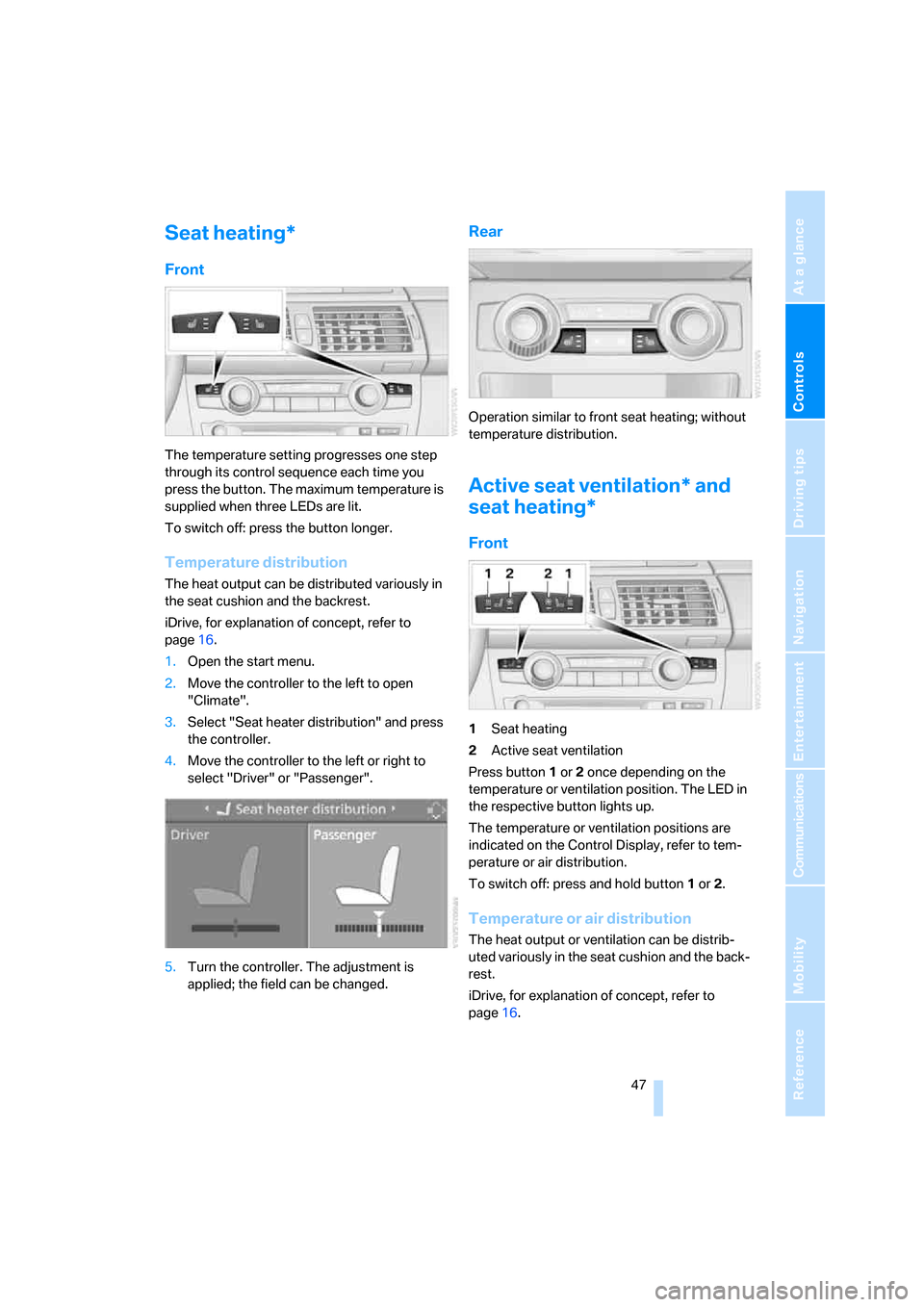
Seat heating*
Front
The temperature setting progresses one step
through its control sequence each time you
press the button. The maximum temperature is
supplied when three LEDs are lit.
To switch off: press the button longer.
Temperature distribution
The heat output can be distributed variously in
the seat cushion and the backrest.
iDrive, for explanation of concept, refer to
page16.
1.Open the start menu.
2.Move the controller to the left to open
"Climate".
3.Select "Seat heater distribution" and press
the controller.
4.Move the controller to the left or right to
select "Driver" or "Passenger".
5.Turn the controller. The adjustment is
applied; the field can be changed.
Rear
Operation similar to front seat heating; without
temperature distribution.
Active seat ventilation* and
seat heating*
Front
1Seat heating
2Active seat ventilation
Press button1 or 2 once depending on the
temperature or ventilation position. The LED in
the respective button lights up.
The temperature or ventilation positions are
indicated on the Control Display, refer to tem-
perature or air distribution.
To switch off: press and hold button1 or 2.
Temperature or air distribution
The heat output or ventilation can be distrib-
uted variously in the seat cushion and the back-
rest.
iDrive, for explanation of concept, refer to
page16.
Page 50 of 272
Adjusting
48 1.Open the start menu.
2.Move the controller to the left to open
"Climate".
3.Select "Driver's seat climate" or "Passen-
ger's seat climate" and press the controller.
4.Turn the controller to adjust the distribu-
tion.
The setting is applied.
Heated rear seats
Operation similar to front seat heating; without
temperature distribution, refer to page47.
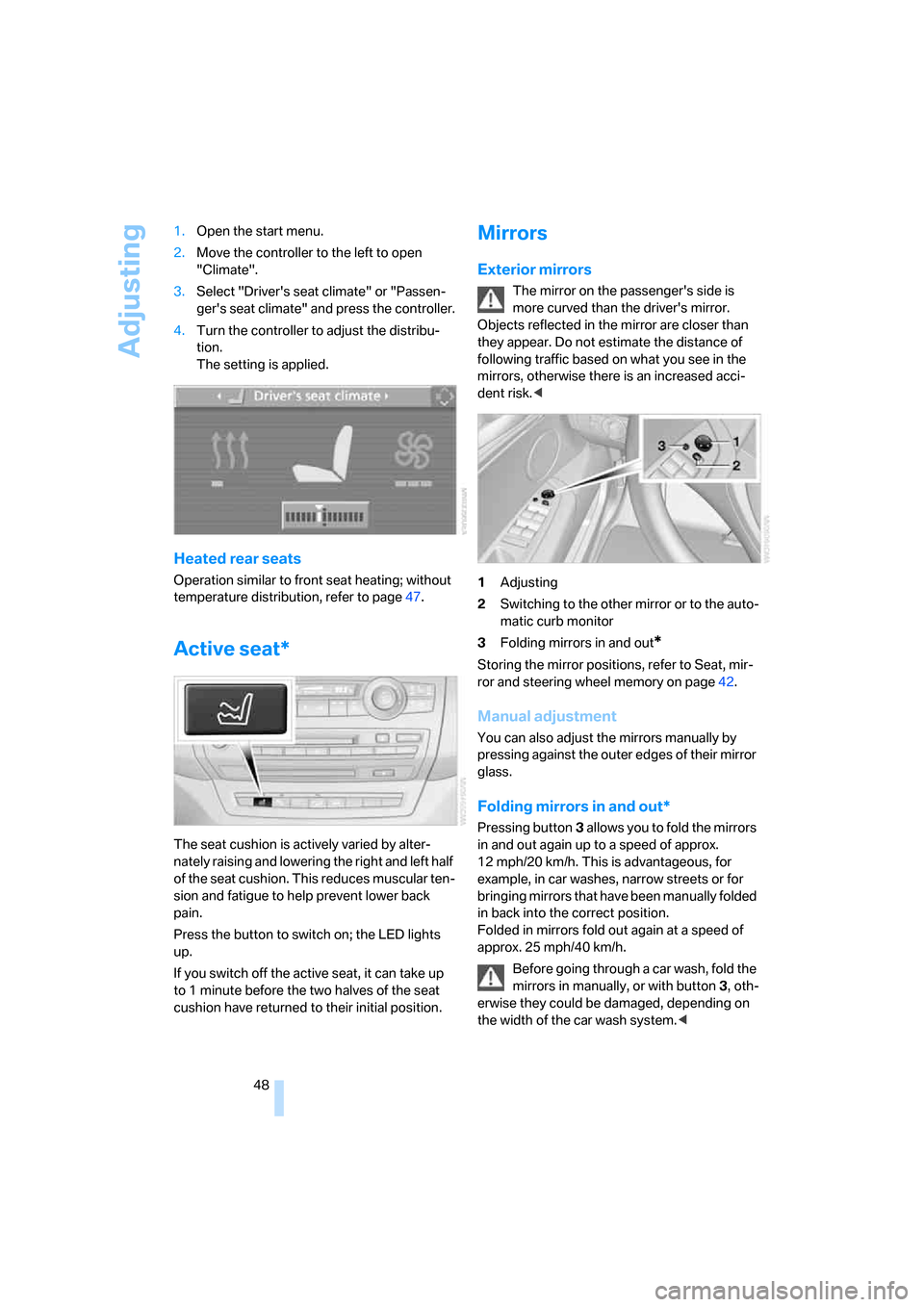
Active seat*
The seat cushion is actively varied by alter-
nately raising and lowering the right and left half
of the seat cushion. This reduces muscular ten-
sion and fatigue to help prevent lower back
pain.
Press the button to switch on; the LED lights
up.
If you switch off the active seat, it can take up
to 1 minute before the two halves of the seat
cushion have returned to their initial position.
Mirrors
Exterior mirrors
The mirror on the passenger's side is
more curved than the driver's mirror.
Objects reflected in the mirror are closer than
they appear. Do not estimate the distance of
following traffic based on what you see in the
mirrors, otherwise there is an increased acci-
dent risk.<
1Adjusting
2Switching to the other mirror or to the auto-
matic curb monitor
3Folding mirrors in and out
*
Storing the mirror positions, refer to Seat, mir-
ror and steering wheel memory on page42.
Manual adjustment
You can also adjust the mirrors manually by
pressing against the outer edges of their mirror
glass.
Folding mirrors in and out*
Pressing button3 allo ws you to fold the mirrors
in and out again up to a speed of approx.
12 mph/20 km/h. This is advantageous, for
example, in car washes, narrow streets or for
bringing mirrors that have been manually folded
in back into the correct position.
Folded in mirrors fold out again at a speed of
approx. 25 mph/40 km/h.
Before going through a car wash, fold the
mirrors in manually, or with button 3, oth-
erwise they could be damaged, depending on
the width of the car wash system.<
Page 52 of 272
Adjusting
50
Easy entry/exit*
To facilitate entry and exit, the steering wheel
temporarily moves into the uppermost position.
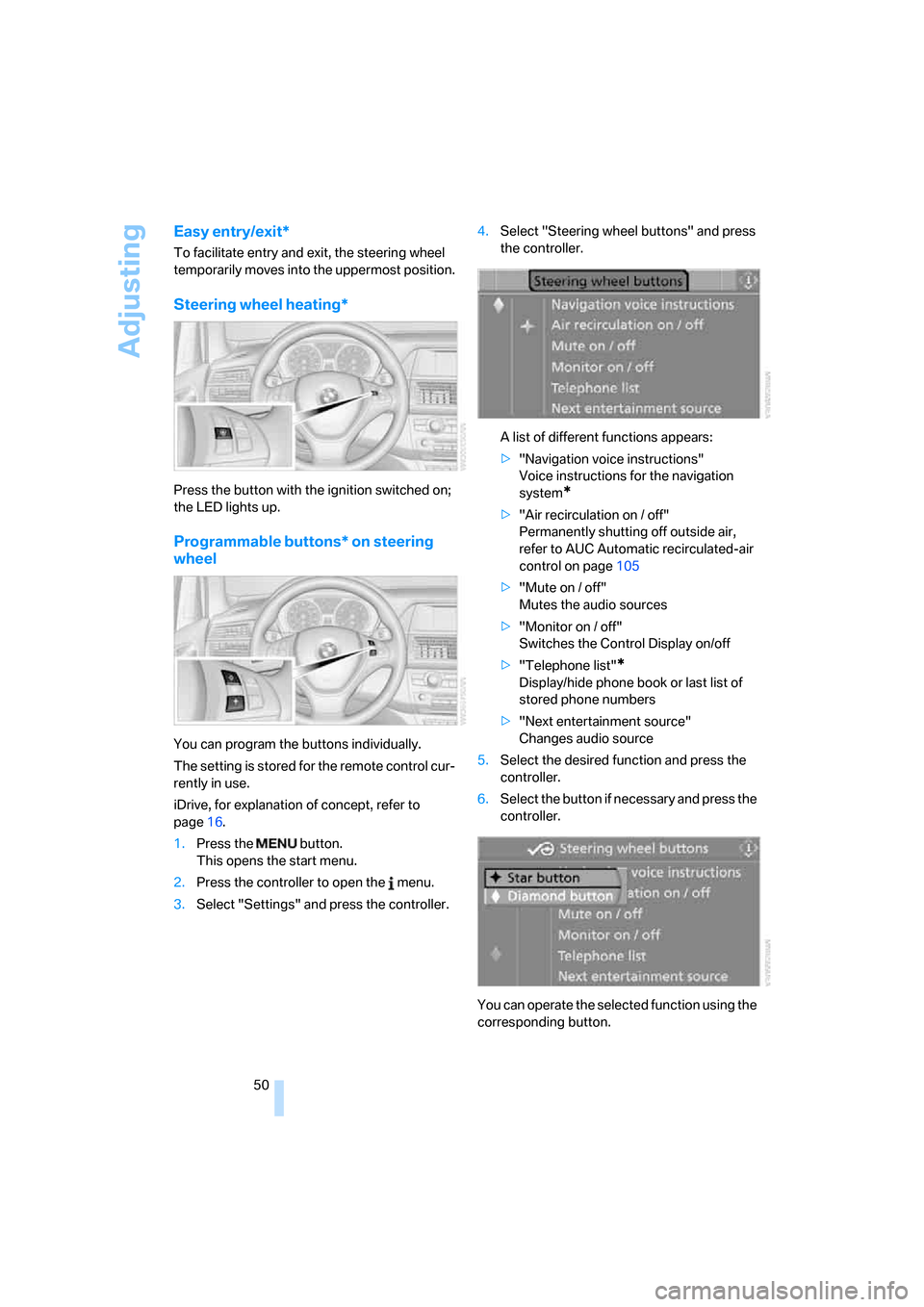
Steering wheel heating*
Press the button with the ignition switched on;
the LED lights up.
Programmable buttons* on steering
wheel
You can program the buttons individually.
The setting is stored for the remote control cur-
rently in use.
iDrive, for explanation of concept, refer to
page16.
1.Press the button.
This opens the start menu.
2.Press the controller to open the menu.
3.Select "Settings" and press the controller.4.Select "Steering wheel buttons" and press
the controller.
A list of different functions appears:
>"Navigation voice instructions"
Voice instructions for the navigation
system
*
>"Air recirculation on / off"
Permanently shutting off outside air,
refer to AUC Automatic recirculated-air
control on page105
>"Mute on / off"
Mutes the audio sources
>"Monitor on / off"
Switches the Control Display on/off
>"Telephone list"
*
Display/hide phone book or last list of
stored phone numbers
>"Next entertainment source"
Changes audio source
5.Select the desired function and press the
controller.
6.Select the button if necessary and press the
controller.
You can operate the selected function using the
corresponding button.
Page 60 of 272
Driving
58
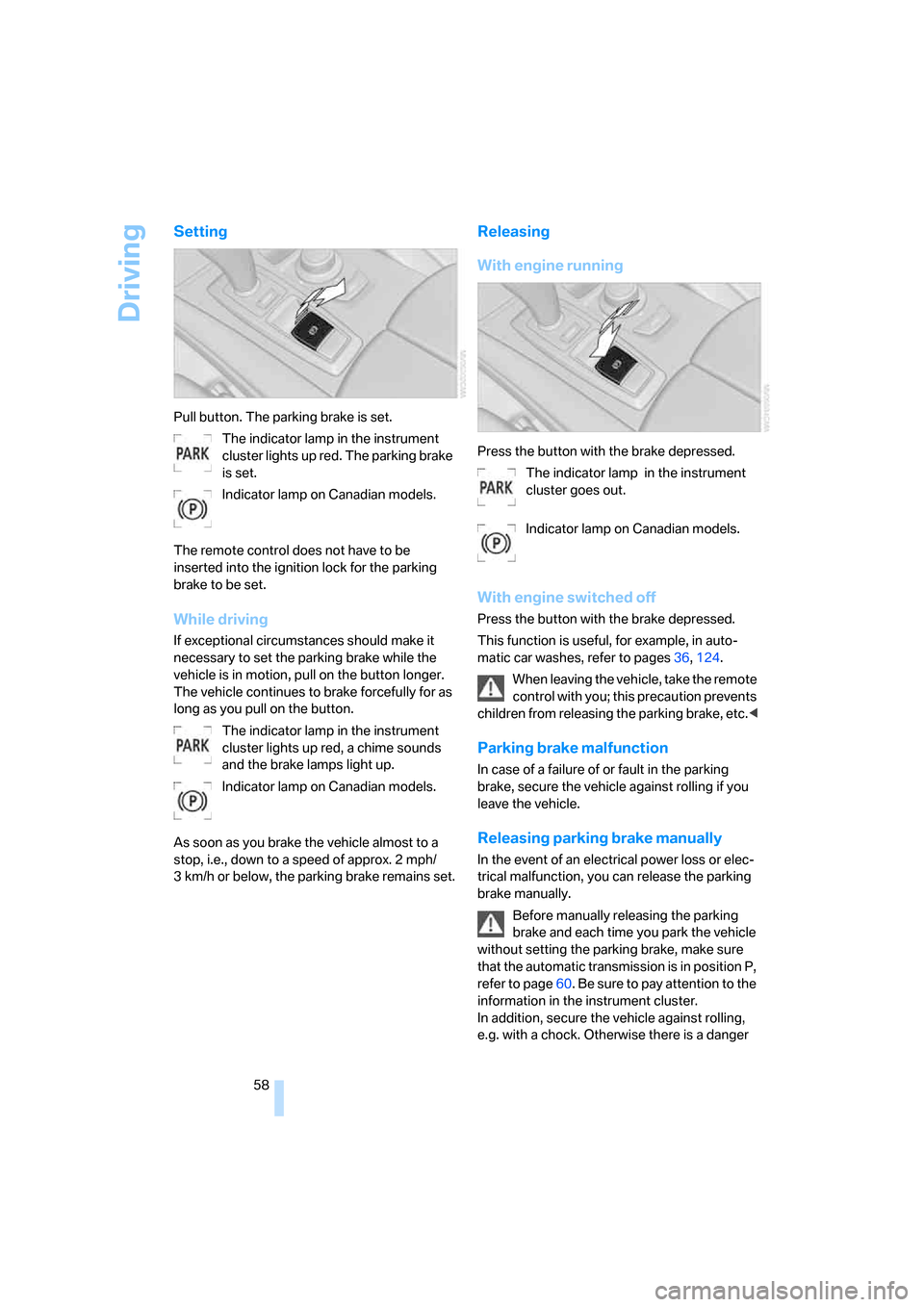
Setting
Pull button. The parking brake is set.
The indicator lamp in the instrument
cluster lights up red. The parking brake
is set.
Indicator lamp on Canadian models.
The remote control does not have to be
inserted into the ignition lock for the parking
brake to be set.
While driving
If exceptional circumstances should make it
necessary to set the parking brake while the
vehicle is in motion, pull on the button longer.
The vehicle continues to brake forcefully for as
long as you pull on the button.
The indicator lamp in the instrument
cluster lights up red, a chime sounds
and the brake lamps light up.
Indicator lamp on Canadian models.
As soon as you brake the vehicle almost to a
stop, i.e., down to a speed of approx. 2 mph/
3 km/h or below, the parking brake remains set.
Releasing
With engine running
Press the button with the brake depressed.
The indicator lamp in the instrument
cluster goes out.
Indicator lamp on Canadian models.
With engine switched off
Press the button with the brake depressed.
This function is useful, for example, in auto-
matic car washes, refer to pages36,124.
When leaving the vehicle, take the remote
control with you; this precaution prevents
children from releasing the parking brake, etc.<
Parking brake malfunction
In case of a failure of or fault in the parking
brake, secure the vehicle against rolling if you
leave the vehicle.
Releasing parking brake manually
In the event of an electrical power loss or elec-
trical malfunction, you can release the parking
brake manually.
Before manually releasing the parking
brake and each time you park the vehicle
without setting the parking brake, make sure
that the automatic transmission is in position P,
refer to page60. Be sure to pay attention to the
information in the instrument cluster.
In addition, secure the vehicle against rolling,
e.g. with a chock. Otherwise there is a danger
Page 65 of 272
Controls
63Reference
At a glance
Driving tips
Communications
Navigation
Entertainment
Mobility
5.Change to upper field if necessary. Turn the
controller until "Lighting" is selected and
press the controller.
6.Select "Triple turn signal" and press the
controller.
Triple turn signaling is activated.
Washer/wiper system
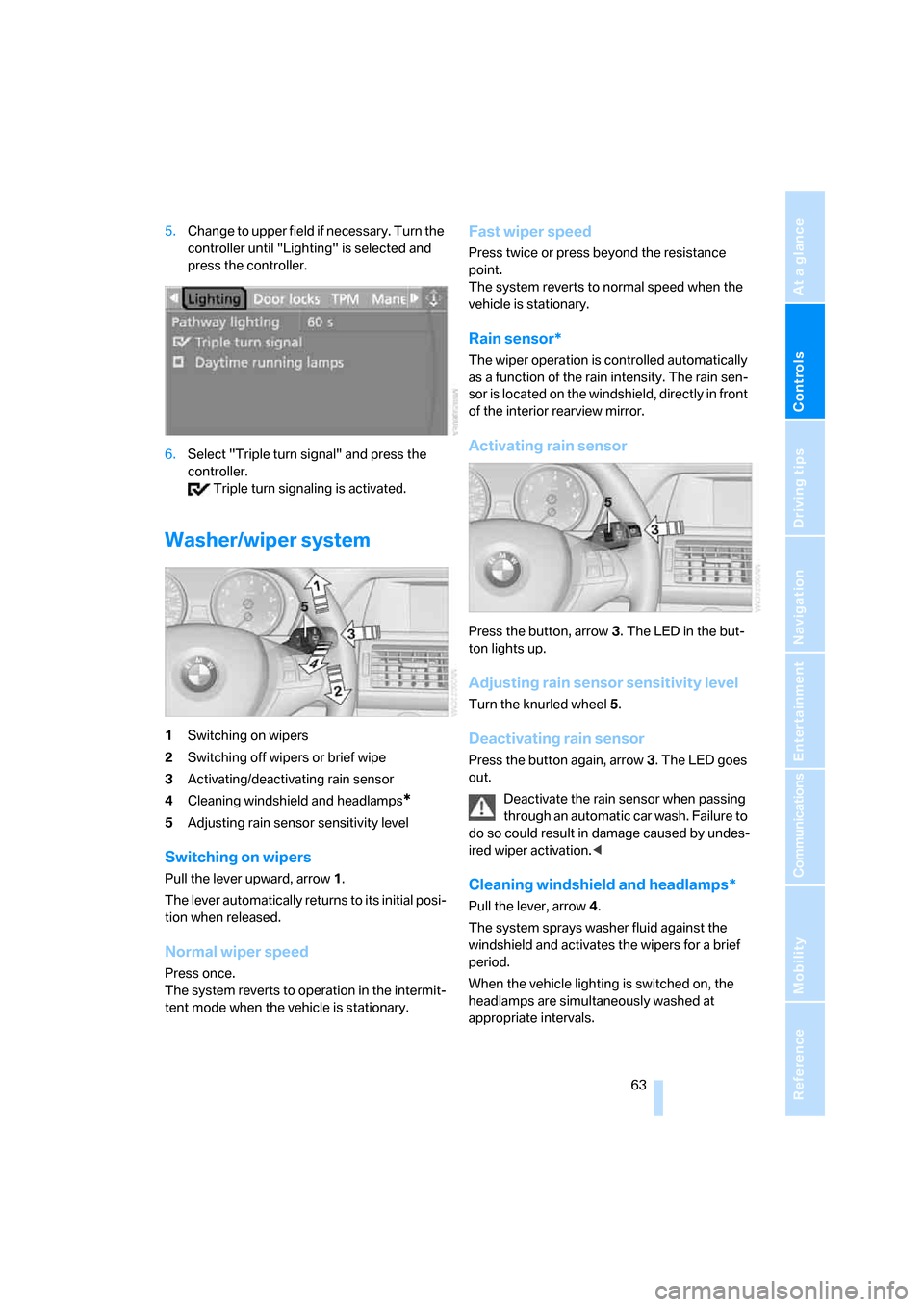
1Switching on wipers
2Switching off wipers or brief wipe
3Activating/deactivating rain sensor
4Cleaning windshield and headlamps
*
5Adjusting rain sensor sensitivity level
Switching on wipers
Pull the lever upward, arrow1.
The lever automatically returns to its initial posi-
tion when released.
Normal wiper speed
Press once.
The system reverts to operation in the intermit-
tent mode when the vehicle is stationary.
Fast wiper speed
Press twice or press beyond the resistance
point.
The system reverts to normal speed when the
vehicle is stationary.
Rain sensor*
The wiper operation is controlled automatically
as a function of the rain intensity. The rain sen-
sor is located on the windshield, directly in front
of the interior rearview mirror.
Activating rain sensor
Press the button, arrow3. The LED in the but-
ton lights up.
Adjusting rain sensor sensitivity level
Turn the knurled wheel5.
Deactivating rain sensor
Press the button again, arrow3. The LED goes
out.
Deactivate the rain sensor when passing
through an automatic car wash. Failure to
do so could result in damage caused by undes-
ired wiper activation.<
Cleaning windshield and headlamps*
Pull the lever, arrow4.
The system sprays washer fluid against the
windshield and activates the wipers for a brief
period.
When the vehicle lighting is switched on, the
headlamps are simultaneously washed at
appropriate intervals.
Page 67 of 272
Controls
65Reference
At a glance
Driving tips
Communications
Navigation
Entertainment
Mobility
One lever for all functions
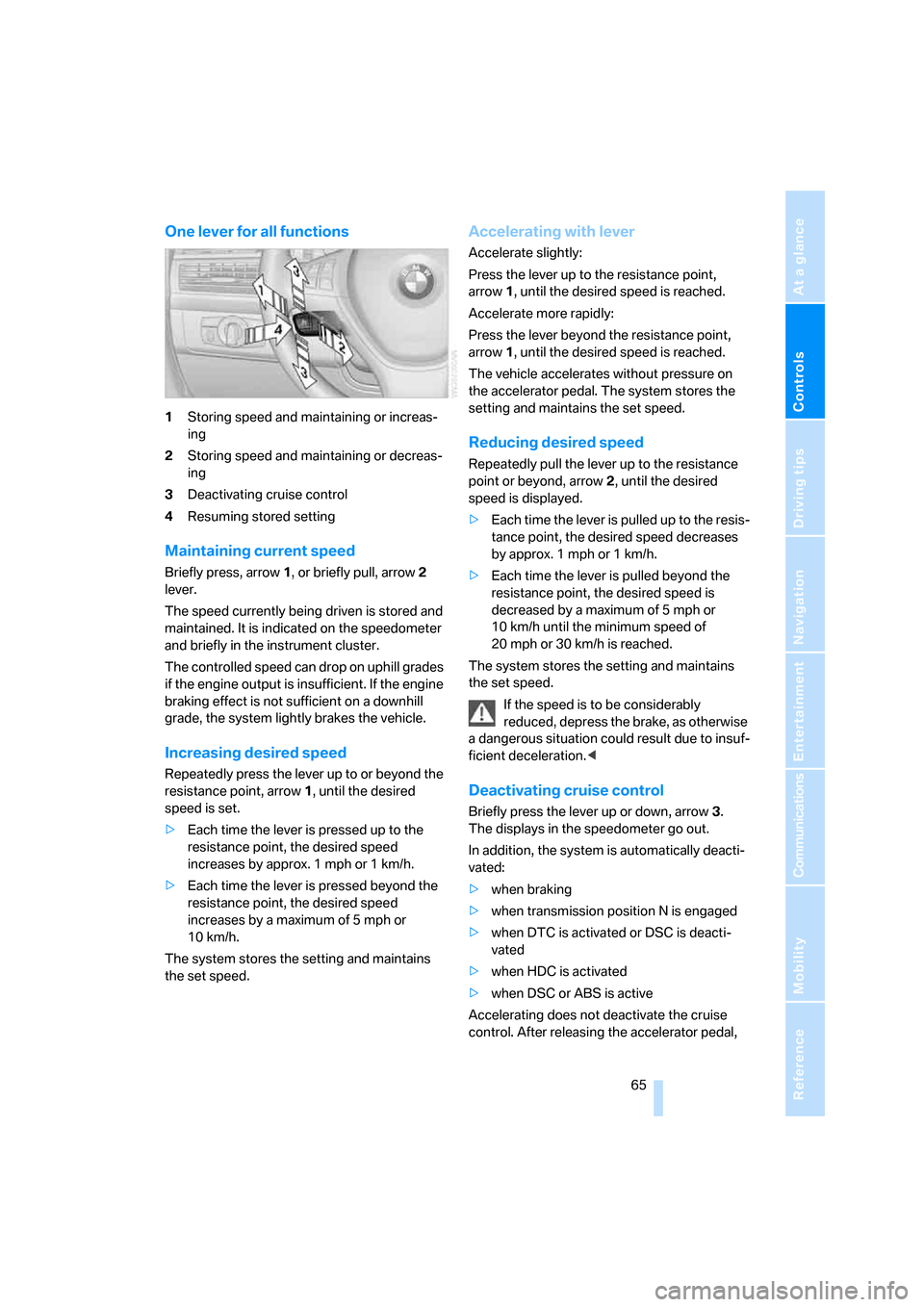
1Storing speed and maintaining or increas-
ing
2Storing speed and maintaining or decreas-
ing
3Deactivating cruise control
4Resuming stored setting
Maintaining current speed
Briefly press, arrow1, or briefly pull, arrow2
lever.
The speed currently being driven is stored and
maintained. It is indicated on the speedometer
and briefly in the instrument cluster.
The controlled speed can drop on uphill grades
if the engine output is insufficient. If the engine
braking effect is not sufficient on a downhill
grade, the system lightly brakes the vehicle.
Increasing desired speed
Repeatedly press the lever up to or beyond the
resistance point, arrow1, until the desired
speed is set.
>Each time the lever is pressed up to the
resistance point, the desired speed
increases by approx. 1 mph or 1 km/h.
>Each time the lever is pressed beyond the
resistance point, the desired speed
increases by a maximum of 5 mph or
10 km/h.
The system stores the setting and maintains
the set speed.
Accelerating with lever
Accelerate slightly:
Press the lever up to the resistance point,
arrow1, until the desired speed is reached.
Accelerate more rapidly:
Press the lever beyond the resistance point,
arrow1, until the desired speed is reached.
The vehicle accelerates without pressure on
the accelerator pedal. The system stores the
setting and maintains the set speed.
Reducing desired speed
Repeatedly pull the lever up to the resistance
point or beyond, arrow2, until the desired
speed is displayed.
>Each time the lever is pulled up to the resis-
tance point, the desired speed decreases
by approx. 1 mph or 1 km/h.
>Each time the lever is pulled beyond the
resistance point, the desired speed is
decreased by a maximum of 5 mph or
10 km/h until the minimum speed of
20 mph or 30 km/h is reached.
The system stores the setting and maintains
the set speed.
If the speed is to be considerably
reduced, depress the brake, as otherwise
a dangerous situation could result due to insuf-
ficient deceleration.<
Deactivating cruise control
Briefly press the lever up or down, arrow3.
The displays in the speedometer go out.
In addition, the system is automatically deacti-
vated:
>when braking
>when transmission position N is engaged
>when DTC is activated or DSC is deacti-
vated
>when HDC is activated
>when DSC or ABS is active
Accelerating does not deactivate the cruise
control. After releasing the accelerator pedal,