parking brake BMW X5 3.0I 2007 E70 User Guide
[x] Cancel search | Manufacturer: BMW, Model Year: 2007, Model line: X5 3.0I, Model: BMW X5 3.0I 2007 E70Pages: 272, PDF Size: 9.03 MB
Page 234 of 272
Replacing components
232
Changing wheels
Your BMW is equipped with run-flat tires as
standard. As a result, it is not necessary to
change the wheel immediately in the case of air
loss in the event of a breakdown.
To continue driving with a damaged tire:
>With Flat Tire Monitor, refer to Indication of
a flat tire page88
>With Tire Pressure Monitor, refer to Mes-
sage with low tire inflation pressure page90
You will recognize run-flat tires by a circular
symbol containing the letters RSC on the side
of the tire, refer to Run-flat tires, page220.
When mounting new tires, or changing from
summer to winter tires or vice versa, use run-flat
tires for your own safety. No spare tire is avail-
able in case of a flat tire. Your BMW Sports
Activity Vehicle Center will be happy to advise
you. Also refer to New wheels and tires,
page220.
Suitable tools for changing tires are avail-
able as accessories at your BMW Sports
Activity Vehicle Center.<
Jacking points for vehicle jack
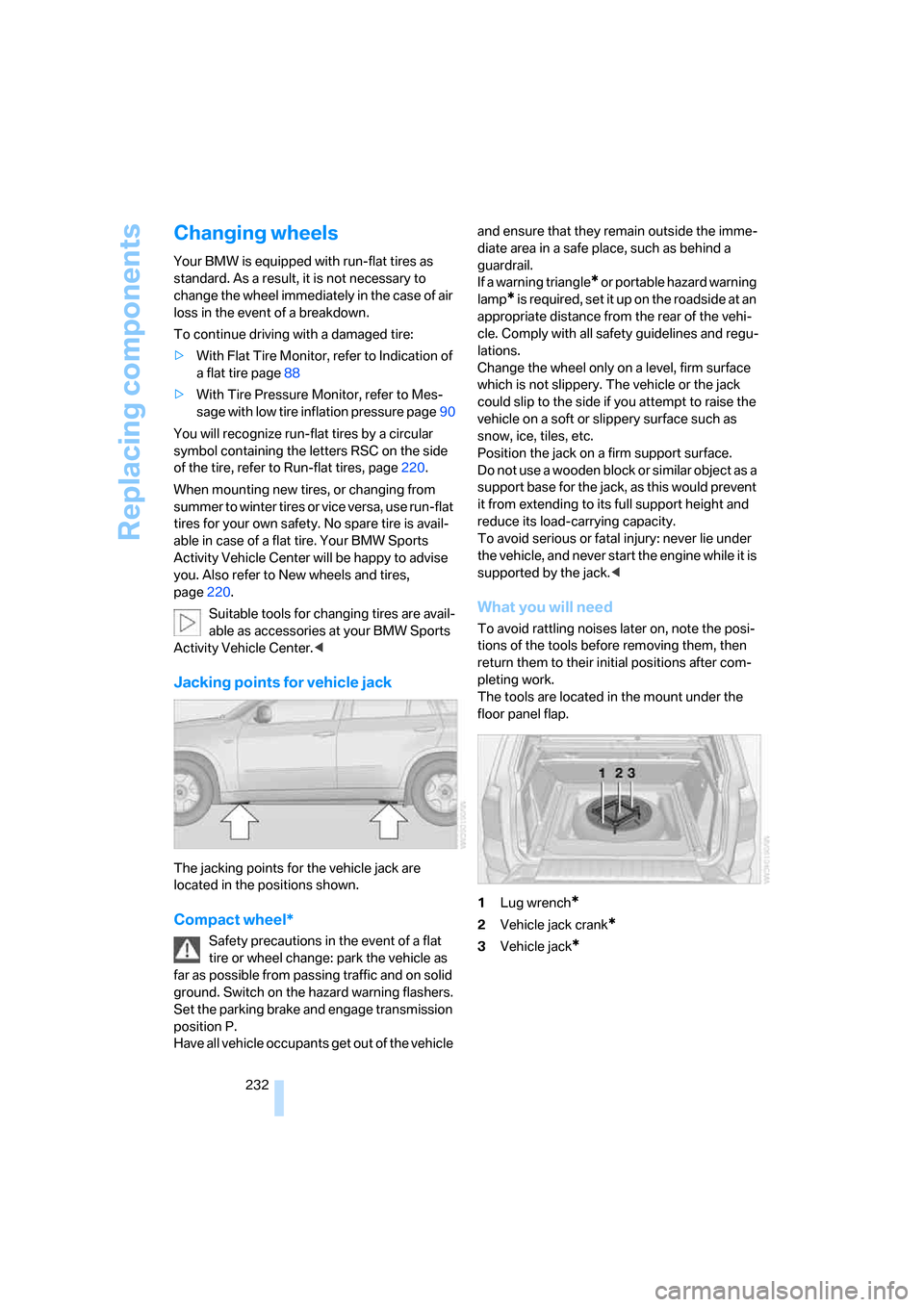
The jacking points for the vehicle jack are
located in the positions shown.
Compact wheel*
Safety precautions in the event of a flat
tire or wheel change: park the vehicle as
far as possible from passing traffic and on solid
ground. Switch on the hazard warning flashers.
Set the parking brake and engage transmission
position P.
Have all vehicle occupants get out of the vehicle and ensure that they remain outside the imme-
diate area in a safe place, such as behind a
guardrail.
If a warning triangle
* or portable hazard warning
lamp
* is required, set it up on the roadside at an
appropriate distance from the rear of the vehi-
cle. Comply with all safety guidelines and regu-
lations.
Change the wheel only on a level, firm surface
which is not slippery. The vehicle or the jack
could slip to the side if you attempt to raise the
vehicle on a soft or slippery surface such as
snow, ice, tiles, etc.
Position the jack on a firm support surface.
Do not use a wooden block or similar object as a
support base for the jack, as this would prevent
it from extending to its full support height and
reduce its load-carrying capacity.
To avoid serious or fatal injury: never lie under
the vehicle, and never start the engine while it is
supported by the jack.<
What you will need
To avoid rattling noises later on, note the posi-
tions of the tools before removing them, then
return them to their initial positions after com-
pleting work.
The tools are located in the mount under the
floor panel flap.
1Lug wrench
*
2Vehicle jack crank*
3Vehicle jack*
Page 241 of 272
Mobility
239Reference
At a glance
Controls
Driving tips
Communications
Navigation
Entertainment
Being towed
Make sure that the ignition is switched on,
refer to page56, otherwise the low
beams, tail lamps, turn signals and windshield
wipers would not be available. When the engine
is stopped, there is no power assist. This then
requires increased effort for braking and steer-
ing. Active steering is deactivated and larger
steering wheel movements are required.<
Switch on the hazard warning flashers depend-
ing on the local regulations. If the electrical sys-
tem fails, mark the vehicle to be towed, e.g. with
a sign or warning triangle in the rear window.
Engage transmission position N and release the
parking brake before towing.
Manually releasing transmission lock, refer to
page61.
Do not exceed a towing speed of 45 mph/
70 km/h and a towing distance of
90 miles/150 km, otherwise the automatic
transmission may be damaged.<
Towing methods
Do not lift vehicle by tow fitting or body
and chassis parts, otherwise damage may
result.<
In some countries, towing with tow bars or
ropes in public traffic is not permitted. Familiar-
ize yourself with the regulations on towing in the
respective country.
With tow bar
The towing vehicle may not be lighter
than the vehicle to be towed, otherwise it
will not be possible to reliably control vehicle
response.<
The tow fittings used should be on the same
side on both vehicles. Should it prove impossi-
ble to avoid mounting the tow bar at an offset
angle, please observe the following:
>Clearance and maneuvering capability will
be sharply limited during cornering.
>When mounted at an angle, the tow bar will
exert lateral forces, tending to push the
vehicle sideways.Only attach the tow bar to the tow fittings,
as attachment to other vehicle parts can
lead to damage.<
With tow rope
When starting off in the towing vehicle, make
sure that the tow rope is taut.
To avoid jerking and the associated
stresses on vehicle components when
towing, always use nylon ropes or nylon straps.
Only attach tow ropes to the tow fittings, as
attachment to other vehicle parts can lead to
damage.<
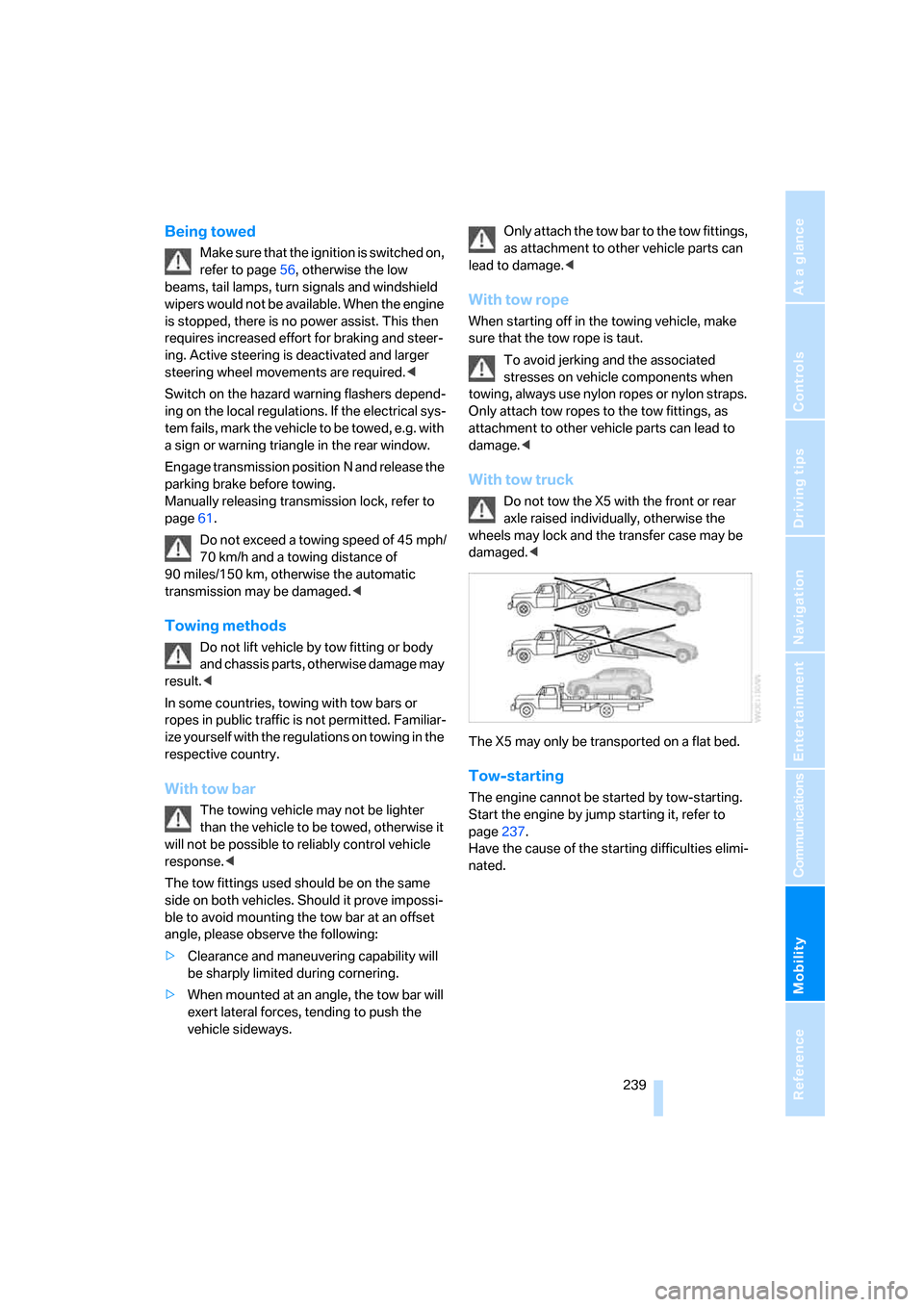
With tow truck
Do not tow the X5 with the front or rear
axle raised individually, otherwise the
wheels may lock and the transfer case may be
damaged.<
The X5 may only be transported on a flat bed.
Tow-starting
The engine cannot be started by tow-starting.
Start the engine by jump starting it, refer to
page237.
Have the cause of the starting difficulties elimi-
nated.
Page 254 of 272
Everything from A to Z
252 BMW homepage4
BMW maintenance
system226
"BMW Services"206,208
BMW website4
Bottle holder, refer to Cup
holders114
Brackets, adaptive fixing
system118
Brake Assistant, refer to DBC
Dynamic Brake Control84
Brake force display92
Brake lamps
– brake force display92
– replacing bulbs230
Brake pads, breaking-in122
Brake rotors123
Brakes
– ABS Antilock Brake
System84
– brake force display92
– breaking-in122
– CBC Cornering Brake
Control84
– DBC Dynamic Brake
Control84
– electronic brake-force
distribution84
– parking brake57
– refer to Braking safely123
– warning lamp13
Brake system122
– brake pads122
– breaking-in122
– disc brakes123
Braking safely123
Breakdown assistance203
Breakdown services, refer to
Roadside Assistance237
Breaking-in the
differential122
Break-in period122
"Brightness"78,95
– for DVD system in rear176
Brightness of Control
Display78
Button for starting engine56Buttons on steering wheel11
Bypassing traffic
congestion149
C
Calibrating driver's seat46
California Proposition 65
Warning6
"Call"195,206
Call
– accepting193
– displaying accepted195
– ending194
– in absence195
– starting193
Calling
– from phone book194
– from Top 8 list195
– redialing195
– refer to telephone operating
instructions
Can holder, refer to Cup
holders114
Capacities244
Capacity of cargo bay244
Car battery, refer to Vehicle
battery234
Car care, refer to Caring for
your vehicle brochure
Car-care products, refer to
Caring for your vehicle
brochure
"Car data"69
Care227
– refer to Caring for your
vehicle brochure
Cargo
– refer to Loading124
– securing125
– securing with ski bag119
Cargo area, refer to Cargo
bay116
Cargo area cover, refer to Roll-
up cover116Cargo bay
– capacity244
– dividing up118
– emergency operation, refer
to Opening manually33
– expanding117
– opening/closing, refer to
Liftgate33
– opening/closing, refer to
Tailgate34
– opening from inside33
– opening from outside33
– opening with remote
control30
Cargo bay cover, refer to Roll-
up cover116
Caring for artificial leather,
refer to Caring for your
vehicle brochure
Caring for leather, refer to
Caring for your vehicle
brochure
Caring for light-alloy wheels,
refer to Caring for your
vehicle brochure
Caring for the carpet, refer to
Caring for your vehicle
brochure
Caring for the vehicle finish,
refer to Caring for your
vehicle brochure
Car key, refer to Keys/remote
control28
Car phone188
– installation location, refer to
Center armrest113
– refer to Mobile phone188
– refer to separate operating
instructions
Car radio, refer to Radio158
Car wash124
– also refer to Caring for your
vehicle brochure
– with comfort access36
Catalytic converter, refer to
Hot exhaust system122
Page 257 of 272
Reference 255
At a glance
Controls
Driving tips
Communications
Navigation
Entertainment
Mobility
Displays on the windshield,
refer to Head-Up Display94
Disposal
– battery of remote control
with comfort access37
– remote control battery174
– vehicle battery234
Distance, refer to
Computer69
"Distance to dest."70
Distance to destination, refer
to Computer69
Distance warning, refer to
PDC Park Distance
Control80
Door entry lighting100
Door key, refer to Keys/
remote control28
Door lock31
Door locking, confirmation
signals31
"Door locks"30,31,72
Doors
– manual operation32
– remote control30
DOT Quality Grades218
Draft-free ventilation106
Drinks holder, refer to Cup
holders114
"Driver's door only"30
Driver's seat, calibrating46
"Driver's seat climate"48
Driving lamps, refer to Parking
lamps/low beams97
Driving on poor roads126
Driving route, refer to
Displaying route144
Driving stability control
systems84
Driving through water123
Driving tips, refer to General
driving notes122
Dry air, refer to Cooling
function104
DSC Dynamic Stability
Control84
– indicator lamp13,84DTC Dynamic Traction
Control85
– activating85
– indicator lamp13,85
"DVD" DVD system in
rear174
"DVD format" for DVD system
in rear177
DVD for navigation130
DVD system in rear172
– CD/DVD player
173
– connecting headphones173
– controls172
– displaying images from CD/
DVD181
– DVD country codes174
– external device183
– information on CD/DVD
player182
– playing audio tracks from
CD/DVD178
– playing video from CD/
DVD174
– remote control173
– switching on/off174
Dynamic Brake Control
DBC84
"Dynamic route" for
navigation142
Dynamic Stability Control
DSC84
Dynamic Traction Control
DTC85
E
Easy entry/exit50
Electrical malfunction
– door lock32
– driver's door32
– fuel filler door212
– liftgate33
– panorama glass sunroof39
Electric steering wheel
adjustment49
Electronic brake-force
distribution84Electronic oil level check223
Emergency call236
Emergency operation, refer to
Manual operation
– door lock32
– driver's door32
– fuel filler door212
– liftgate33
– panorama glass sunroof39
– transmission lock, automatic
transmission61
Emergency services, refer to
Roadside Assistance237
"Enable services"208
"End call"194
Energy-conscious driving,
refer to Energy Control68
Energy Control68
Engine
– breaking-in122
– data242
– overheated, refer to Coolant
temperature68
– speed242
– starting56
– starting, comfort access36
– starting difficulties57
– switching off57
Engine compartment223
Engine coolant225
Engine oil
– adding224
– additives, refer to Approved
engine oils224
– approved engine oil224
– checking oil level223
– electronic oil level check223
"Engine oil level"224
Engine output, refer to Engine
data242
Engine overheating, refer to
Coolant temperature68
Engine speed242
Engine starting, refer to
Starting engine56
"Enter address"132
Page 259 of 272
Reference 257
At a glance
Controls
Driving tips
Communications
Navigation
Entertainment
Mobility
Glove compartment113
– lighting113
GPS navigation, refer to
Navigation system130
Grills, refer to Ventilation105
Grills of the automatic climate
control101
Gross vehicle weight, refer to
Weights244
H
Handbrake, refer to Parking
brake57
Hand lamp, refer to
Rechargeable flashlight113
Hands-free system, refer to
Microphone14
Hazard warning flashers15
HDC Hill Descent Control85
Head airbags92
Headlamp control,
automatic97
Headlamp flasher62
Headlamps97
– care, refer to Caring for your
vehicle brochure
– cleaning, refer to Washer/
wiper system63
Head Light, refer to Adaptive
Head Light98
Head restraints43
– removing43
– sitting safely40
"Head-Up Display"95
Head-Up Display94
Heated
– mirrors49
– rear window103
– seats47
– steering wheel50
Heating101
– exterior mirrors49
– interior101
– rear window103
– residual heat105
– seats47
– steering wheel50Heating with engine switched
off, refer to Residual
heat105
Heavy cargo, refer to Securing
cargo125
Height, refer to
Dimensions243
Height adjustment
– seats41
– steering wheel49
High beams62,99
– headlamp flasher99
– indicator lamp13
Highs, refer to Treble and
bass155
High water, refer to Driving
through water123
Highway, refer to Route
criteria141
Hill Descent Control HDC85
Hills123
Holder for cups114
Home address141
"Home address" for
navigation141
Homepage4
Hood222
Horn10
Hot exhaust system122
"Hour memo"78
"House number" for
destination entry134
Hydraulic brake assistant,
refer to DBC Dynamic Brake
Control84
Hydroplaning123
I
Ice, refer to Outside
temperature warning67
ID3 tag, refer to Information on
track167iDrive16
– assistance window20
– changing language79
– changing menu page19
– changing settings77
– changing units of measure
and display type79
– confirming selection or
entry19
– controller16
– controls16
– displays, menus17
– selecting menu item19
– setting brightness78
– setting date78
– setting time77
– start menu17
– status information20
– symbols18
Ignition56
– switched off56
– switched on56
Ignition key, refer to Keys/
remote control28
Ignition key position 1, refer to
Radio readiness56
Ignition key position 2, refer to
Ignition on56
Ignition lock56
– starting engine with comfort
access36
Independent ventilation, refer
to Parked car ventilation108
Indicator/warning lamps13
– active steering91
– airbags94
– DSC13,84
– DTC13,85
– fasten safety belt46
– Flat Tire Monitor88
– fog lamps13
– TPM Tire Pressure
Monitor90
Individual air distribution104
Individually programmable
buttons on steering
wheel50
Individual settings, refer to
Personal Profile28
Page 263 of 272
Reference 261
At a glance
Controls
Driving tips
Communications
Navigation
Entertainment
Mobility
Parking assistant, refer to
PDC Park Distance
Control80
Parking brake57
– indicator lamp13
Parking lamps97
Parts and accessories6
"Passenger's seat climate"48
Passenger-side exterior
mirror, tilting down49
"Pathway lighting"98
Pathway lighting97
"Pause" for DVD system in
rear178
"PDC"81
"PDC display on"81
PDC Park Distance Control80
Personal Profile28
"Perspective"145
Phone book192
– creating and editing voice
phone book199
Phone numbers
– deleting from phone
book196
– dialing193
– most recent numbers195
– selecting in phone book195
– Top 8195
"Photo" for DVD system in
rear174,181
Pinch protection system
– panorama glass sunroof39
– power windows37
Plasters, refer to First-aid
kit237
"Play"
– for DVD system in
rear178,180
– in audio mode166
– with satellite radio163
Playing videos, DVD system in
rear174
Plug-in unit for remote
control, refer to Ignition
lock56Position
– displaying150
– storing, refer to Storing
current position139
Power failure234
Power windows, refer to
Windows37
Preselecting activation times
of the parked car
ventilation109
"Presets"
– display with radio158
– with satellite radio163
Pressure, tires214
Pressure monitoring of tires,
refer to TPM Tire Pressure
Monitor89
"Profile"208
Programmable buttons on
steering wheel50
Programmable memory
buttons21
Protective function, refer to
Pinch protection system
– panorama glass sunroof39
– windows37
R
Radio
– Autostore159
– controls154
– listen to station158
– sampling stations159
– satellite radio162
– selecting frequency
manually159
– selecting
waveband154,158
– station search159
– station with the best
reception159
– storing stations160
– switching on/off154
– tone control155
– volume155
– Weather Band161Radio key, refer to Keys/
remote control28
Radio position, refer to Radio
readiness56
Radio readiness56
– switched off56
– switched on56
– with comfort access36
Rain sensor63
"Random"
– for DVD system in rear179
– refer to Random
sequence168
"Random all"
– for DVD system in rear180
– in audio mode168
"Random directory"
– for DVD system in rear180
– in audio mode168
Random sequence168
"RDS" Radio Data
System161
Reading lamps100
"Rear climate control"107
"Rear enabled"172
Rear entertainment, refer to
DVD system in rear172
Rear lamps, refer to Tail
lamps230
– replacing bulbs230
Rear seat backrest,
folding117
Rear seats44
– adjusting head restraints44
– folding over backrest117
– heating47,48
Rear ventilation106
– rear automatic climate
control107
– 3rd row seats106
Rearview mirror48
Rear window
– heating103
– replacing wiper blade228
– windshield wiper64,124
Rear window safety switch38
Rear window wiper, replacing
wiper blade228
Page 264 of 272
Everything from A to Z
262 "Received calls"194
Recent numbers in mobile
phone195
Reception level of mobile
phone, refer to Status
information20
Rechargeable flashlight113
Recirculated-air mode105
– air recirculation105
– AUC Automatic
recirculated-air control105
Recording times, refer to
Stopwatch76
"Redial" for mobile phone194
Reflectors, refer to Tail
lamps230
Refueling212
Releasing
– hood222
– refer to Unlocking35
"Relock door if not
opened"32
Remaining distance, refer to
Cruising range69
Remaining distance to
destination, refer to
Computer69
Remote control28
– comfort access35
– DVD system in rear173
– garage door opener110
– liftgate30
– malfunction31,36
– replacing battery37
Removing condensation on
the windows103
"Repeat"
– for DVD system in rear179
– in audio mode168
"Repeat directory"
– for DVD system in
rear178,181
– in audio mode168
"Repeat track"
– for DVD system in
rear178,180
– in audio mode168
Replacement fuses234Replacement of tires, refer to
Changing wheels232
Replacing bulbs, refer to
Lamps and bulbs228
Replacing tires220
Replacing wheels/tires, refer
to New wheels and tires220
Replacing wiper blades228
Reporting an accident, refer to
Initiating an emergency
call236
Reporting safety defects
7
Reserve warning, refer to Fuel
gauge68
Reservoir for washer
systems64
"Reset"88,90
– for DVD system in
rear176,177
– stopwatch76
– tone settings157
Reset, refer to Resetting tone
settings157
"resetting FTM …"88
Residual heat105
Restraint systems
– for children52
– refer to Safety belts45
Retreaded tires220
"Return" for DVD system in
rear177
Reverse
– CD changer169
– CD player169
Reverse gear, automatic
transmission with
Steptronic60
Road map145
"Roadside Assistance"203
Roadside Assistance237
Roadside parking lamps99
Roller sun blinds113
Roll-up cover116
Roof load capacity244
Roof-mounted luggage
rack126
Rope, refer to Tow-starting
and towing238Rotary pushbutton, refer to
iDrive16
Route141
– changing147
– displaying144
– displaying arrow display144
– displaying map view145
– displaying streets and
towns/cities145
– displaying towns/cities145
– list145
– selecting141
– selecting criteria141
RSC, refer to Run-flat
tires220
Run-flat tires220
– continuing driving with a
damaged tire88,90
– flat tire88,
90
– new wheels and tires220
– tire inflation
pressure88,90,214
– tire replacement220,221
S
Safety5
Safety belts45
– damage46
– sitting safely40
– warning lamp46
Safety belt tensioners
– refer to Airbags92
– refer to Safety belts45
Safety systems
– ABS Antilock Brake
System84
– airbags92
– DSC Dynamic Stability
Control84
– safety belts45
"SAT"155,162
Satellite radio162
– displaying additional
information163
– enabling162
– selecting channel163
– storing channel163