Short info BMW X5 3.0Si 2008 E70 User Guide
[x] Cancel search | Manufacturer: BMW, Model Year: 2008, Model line: X5 3.0Si, Model: BMW X5 3.0Si 2008 E70Pages: 292, PDF Size: 9.32 MB
Page 258 of 292
Giving and receiving assistance
256
First-aid kit*
Some of the articles contained in the first-aid kit
have a limited service life. Therefore, check the
expiration dates of the contents regularly and
replace the contents concerned in good time if
necessary.
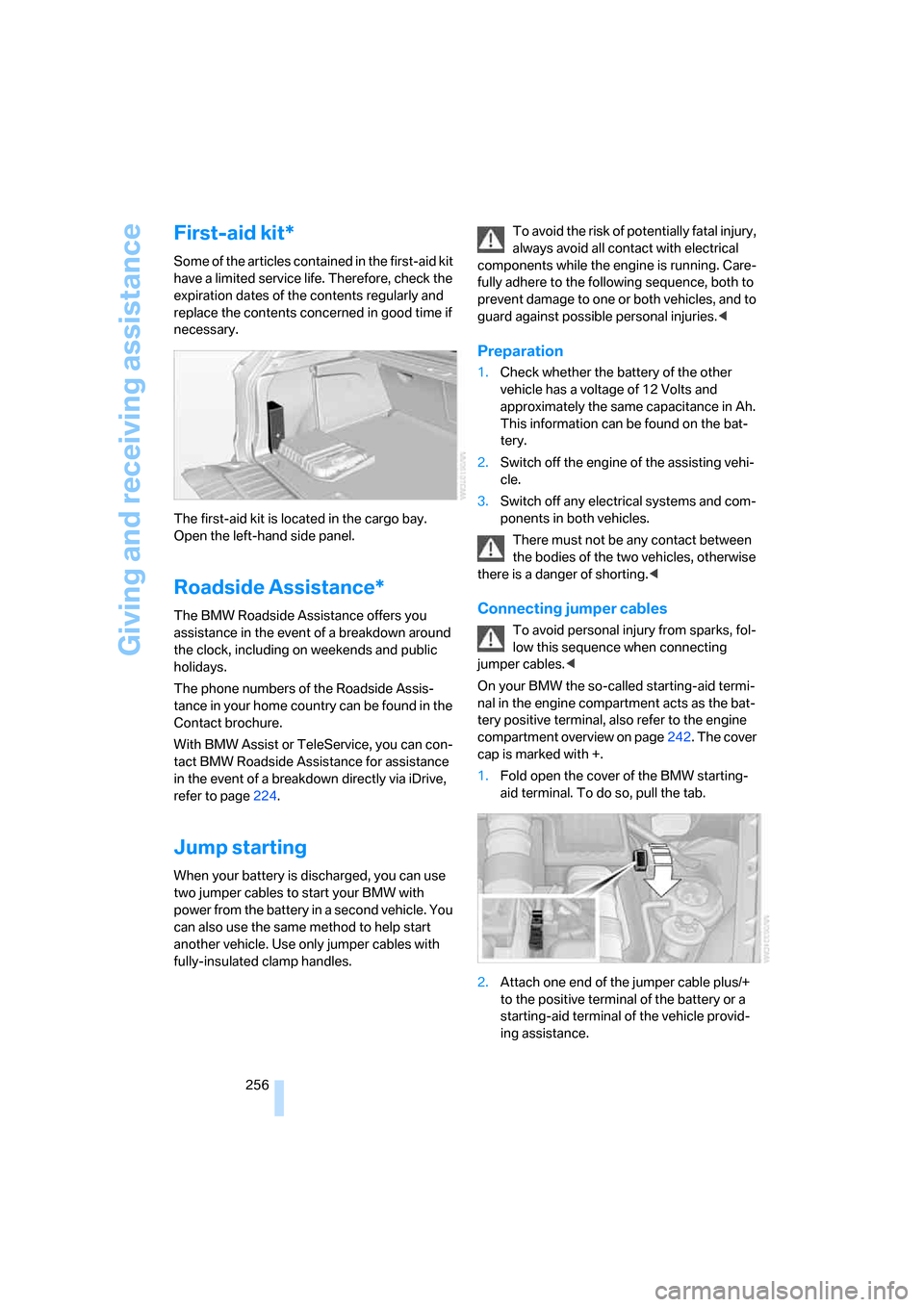
The first-aid kit is located in the cargo bay.
Open the left-hand side panel.
Roadside Assistance*
The BMW Roadside Assistance offers you
assistance in the event of a breakdown around
the clock, including on weekends and public
holidays.
The phone numbers of the Roadside Assis-
tance in your home country can be found in the
Contact brochure.
With BMW Assist or TeleService, you can con-
tact BMW Roadside Assistance for assistance
in the event of a breakdown directly via iDrive,
refer to page224.
Jump starting
When your battery is discharged, you can use
two jumper cables to start your BMW with
power from the battery in a second vehicle. You
can also use the same method to help start
another vehicle. Use only jumper cables with
fully-insulated clamp handles.To avoid the risk of potentially fatal injury,
always avoid all contact with electrical
components while the engine is running. Care-
fully adhere to the following sequence, both to
prevent damage to one or both vehicles, and to
guard against possible personal injuries.<
Preparation
1.Check whether the battery of the other
vehicle has a voltage of 12 Volts and
approximately the same capacitance in Ah.
This information can be found on the bat-
tery.
2.Switch off the engine of the assisting vehi-
cle.
3.Switch off any electrical systems and com-
ponents in both vehicles.
There must not be any contact between
the bodies of the two vehicles, otherwise
there is a danger of shorting.<
Connecting jumper cables
To avoid personal injury from sparks, fol-
low this sequence when connecting
jumper cables.<
On your BMW the so-called starting-aid termi-
nal in the engine compartment acts as the bat-
tery positive terminal, also refer to the engine
compartment overview on page242. The cover
cap is marked with +.
1.Fold open the cover of the BMW starting-
aid terminal. To do so, pull the tab.
2.Attach one end of the jumper cable plus/+
to the positive terminal of the battery or a
starting-aid terminal of the vehicle provid-
ing assistance.
Page 263 of 292
Reference
This chapter contains the technical data,
the short commands of the voice command
system, and the index that will direct you
as quickly as possible to the information
you are looking for.
Reference
Page 267 of 292
Reference 265
At a glance
Controls
Driving tips
Communications
Navigation
Entertainment
Mobility
Short commands of voice command
system
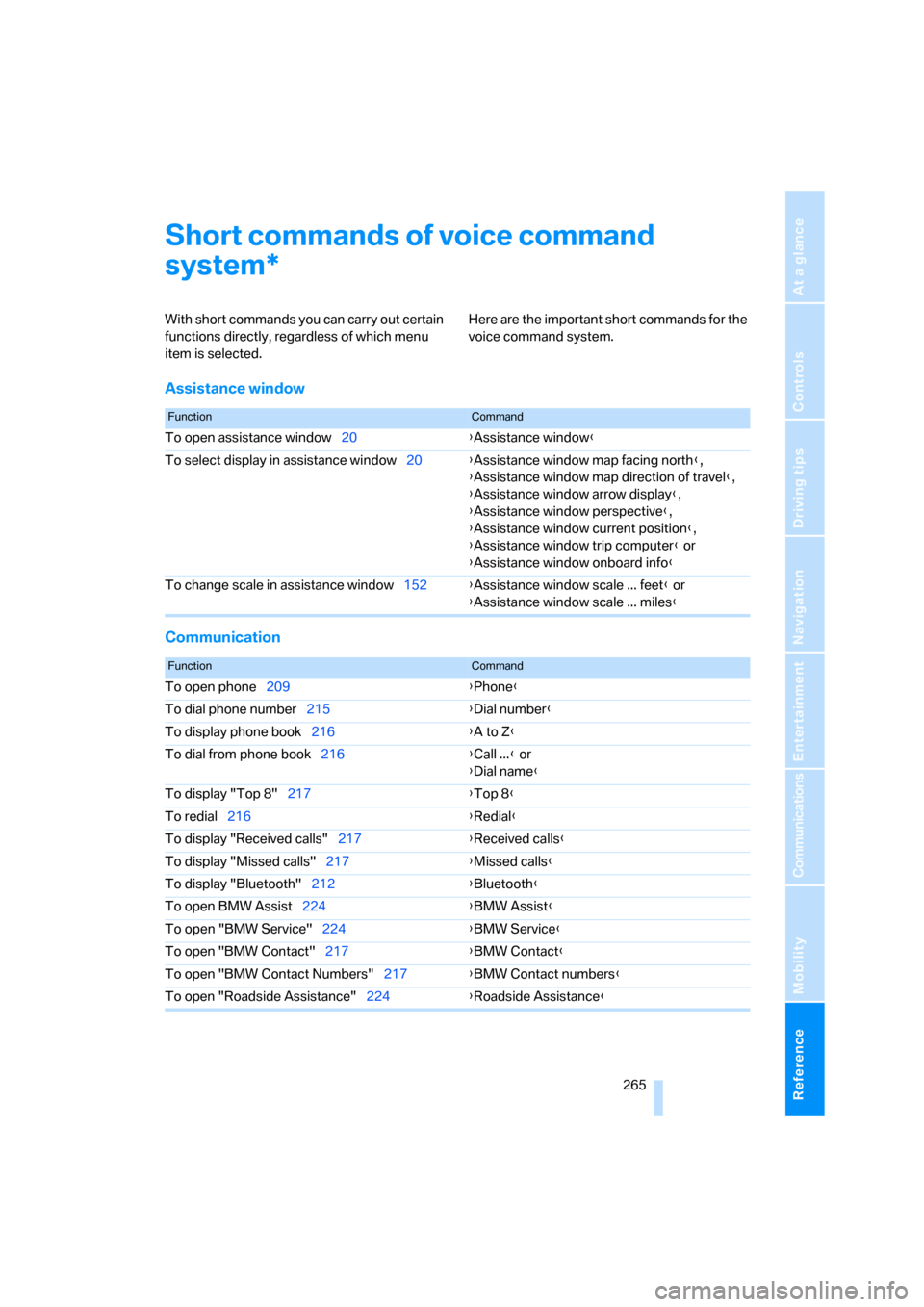
With short commands you can carry out certain
functions directly, regardless of which menu
item is selected. Here are the important short commands for the
voice command system.
Assistance window
Communication
*
FunctionCommand
To open assistance window20{Assistance window}
To select display in assistance window20{Assistance window map facing north},
{Assistance window map direction of travel},
{Assistance window arrow display},
{Assistance window perspective},
{Assistance window current position},
{Assistance window trip computer} or
{Assistance window onboard info}
To change scale in assistance window152{Assistance window scale ... feet} or
{Assistance window scale ... miles}
FunctionCommand
To open phone209{Phone}
To dial phone number215{Dial number}
To display phone book216{A to Z}
To dial from phone book216{Call ...} or
{Dial name}
To display "Top 8"217{Top 8}
To redial216{Redial}
To display "Received calls"217{Received calls}
To display "Missed calls"217{Missed calls}
To display "Bluetooth"212{Bluetooth}
To open BMW Assist224{BMW Assist}
To open "BMW Service"224{BMW Service}
To open "BMW Contact"217{BMW Contact}
To open "BMW Contact Numbers"217{BMW Contact numbers}
To open "Roadside Assistance"224{Roadside Assistance}
Page 268 of 292
Short commands of voice command system
266
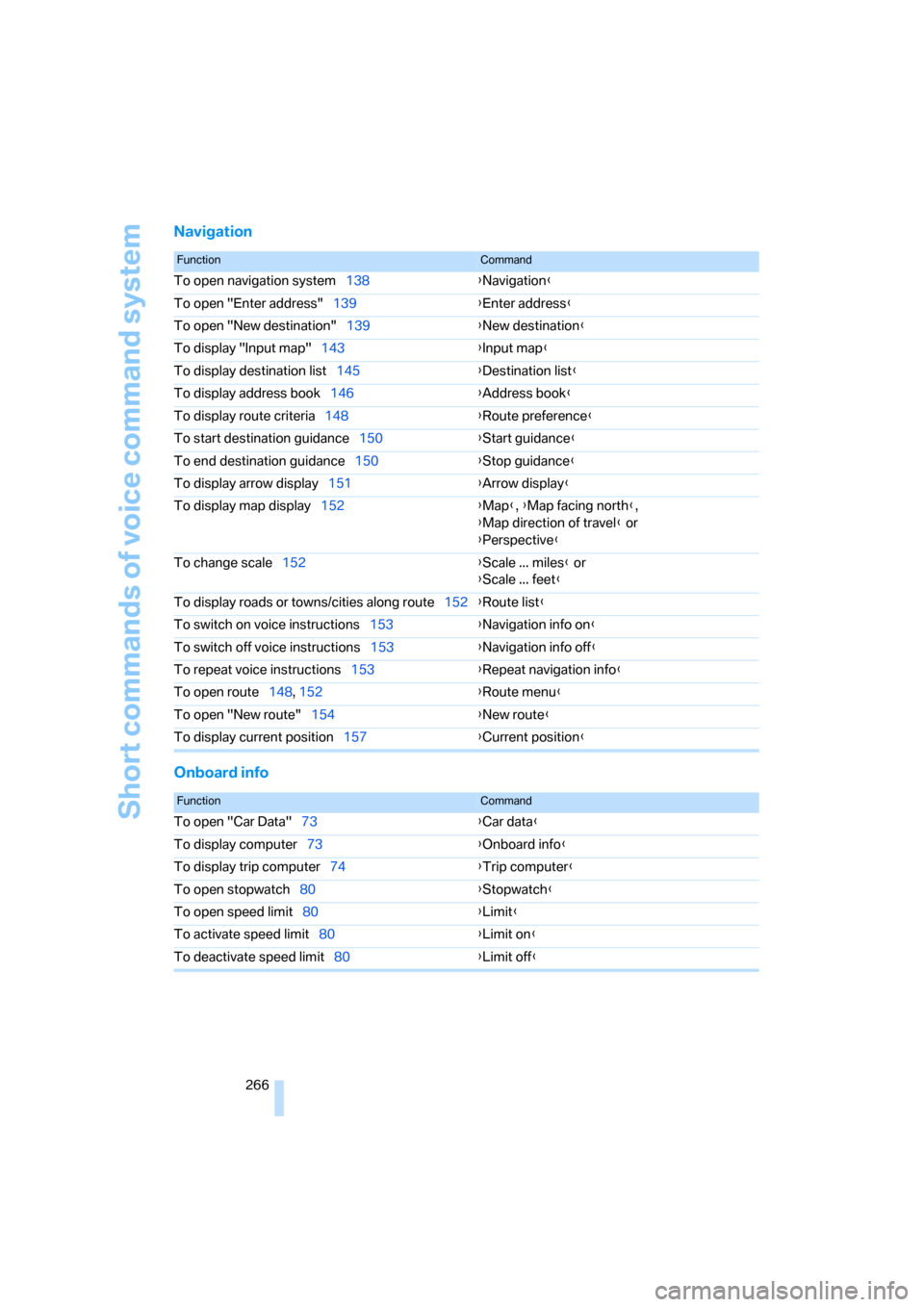
Navigation
Onboard info
FunctionCommand
To open navigation system138{Navigation}
To open "Enter address"139{Enter address}
To open "New destination"139{New destination}
To display "Input map"143{Input map}
To display destination list145{Destination list}
To display address book146{Address book}
To display route criteria148{Route preference}
To start destination guidance150{Start guidance}
To end destination guidance150{Stop guidance}
To display arrow display151{Arrow display}
To display map display152{Map}, {Map facing north},
{Map direction of travel} or
{Perspective}
To change scale152{Scale ... miles} or
{Scale ... feet}
To display roads or towns/cities along route152{Route list}
To switch on voice instructions153{Navigation info on}
To switch off voice instructions153{Navigation info off}
To repeat voice instructions153{Repeat navigation info}
To open route148, 152
{Route menu}
To open "New route"154{New route}
To display current position157{Current position}
FunctionCommand
To open "Car Data"73{Car data}
To display computer73{Onboard info}
To display trip computer74{Trip computer}
To open stopwatch80{Stopwatch}
To open speed limit80{Limit}
To activate speed limit80{Limit on}
To deactivate speed limit80{Limit off}
Page 270 of 292
Short commands of voice command system
268
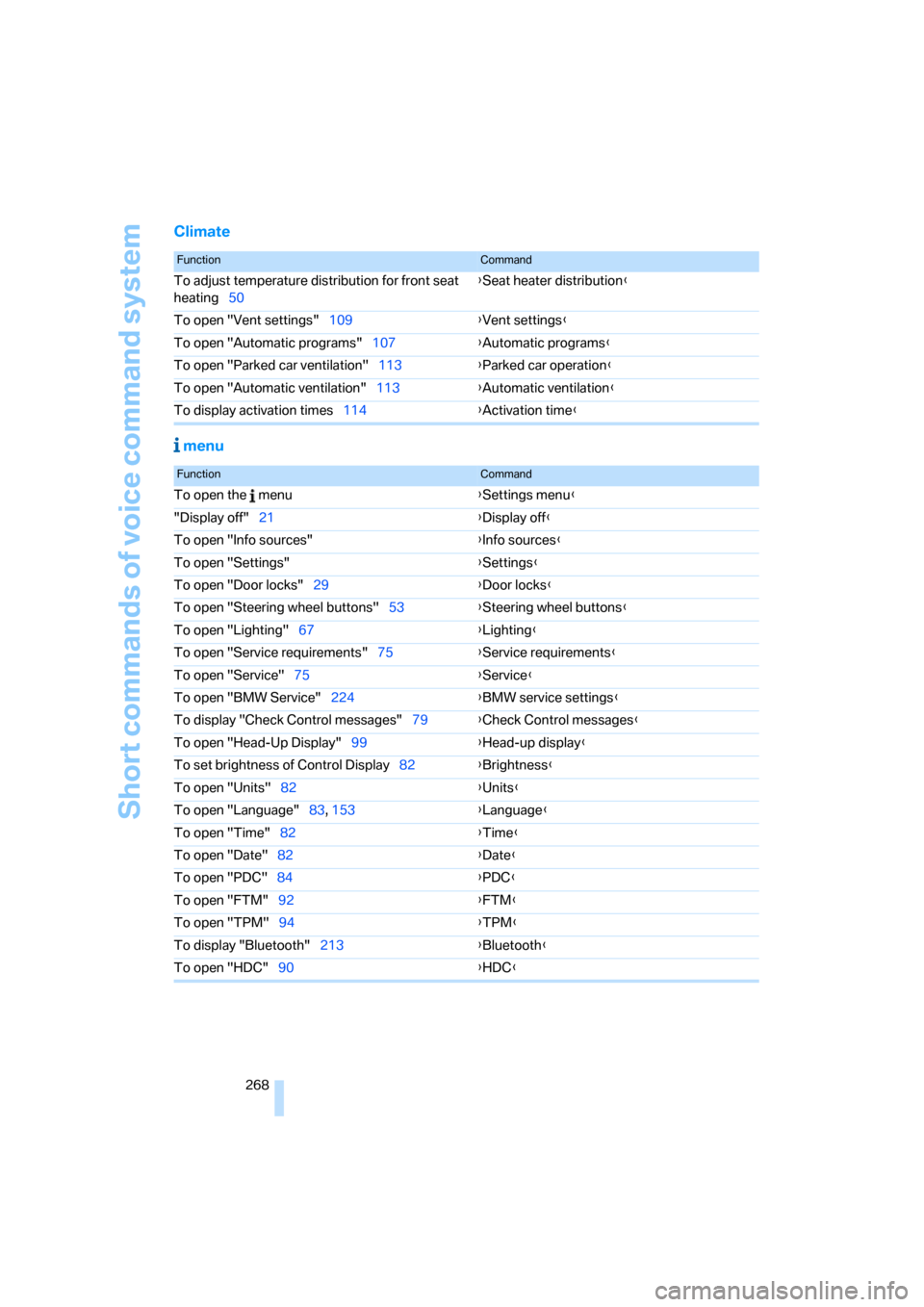
Climate
menu
FunctionCommand
To adjust temperature distribution for front seat
heating50{Seat heater distribution}
To open "Vent settings"109{Vent settings}
To open "Automatic programs"107{Automatic programs}
To open "Parked car ventilation"113{Parked car operation}
To open "Automatic ventilation"113{Automatic ventilation}
To display activation times114{Activation time}
FunctionCommand
To open the menu{Settings menu}
"Display off"21{Display off}
To open "Info sources"{Info sources}
To open "Settings"{Settings}
To open "Door locks"29{Door locks}
To open "Steering wheel buttons"53{Steering wheel buttons}
To open "Lighting"67{Lighting}
To open "Service requirements"75{Service requirements}
To open "Service"75{Service}
To open "BMW Service"224{BMW service settings}
To display "Check Control messages"79{Check Control messages}
To open "Head-Up Display"99{Head-up display}
To set brightness of Control Display82{Brightness}
To open "Units"82{Units}
To open "Language"83, 153{Language}
To open "Time"82{Time}
To open "Date"82{Date}
To open "PDC"84{PDC}
To open "FTM"92{FTM}
To open "TPM"94{TPM}
To display "Bluetooth"213
{Bluetooth}
To open "HDC"90{HDC}