air condition BMW X5 3.0Si 2008 E70 User Guide
[x] Cancel search | Manufacturer: BMW, Model Year: 2008, Model line: X5 3.0Si, Model: BMW X5 3.0Si 2008 E70Pages: 292, PDF Size: 9.32 MB
Page 257 of 292
Mobility
255Reference
At a glance
Controls
Driving tips
Communications
Navigation
Entertainment
Giving and receiving assistance
Emergency request
Conditions for an emergency request:
>Full preparation package mobile phone.
With this equipment, an emergency request
is still possible when no mobile phone is
paired in the vehicle.
>BMW Assist is activated.
Activating BMW Assist, refer to page228.
>Radio readiness is switched on.
>The BMW Assist system is logged in on a
wireless communications network.
>The emergency request system is opera-
ble.
When the contract of participation with BMW
Assist expires, the BMW Assist system can be
deactivated by a BMW Sports Activity Vehicle
Center without having to visit a workshop. Once
the BMW Assist system has been deactivated,
emergency requests are not possible. The
BMW Assist system be reactivated by a BMW
Sports Activity Vehicle Center after signing a
new contract.
Initiating an emergency request
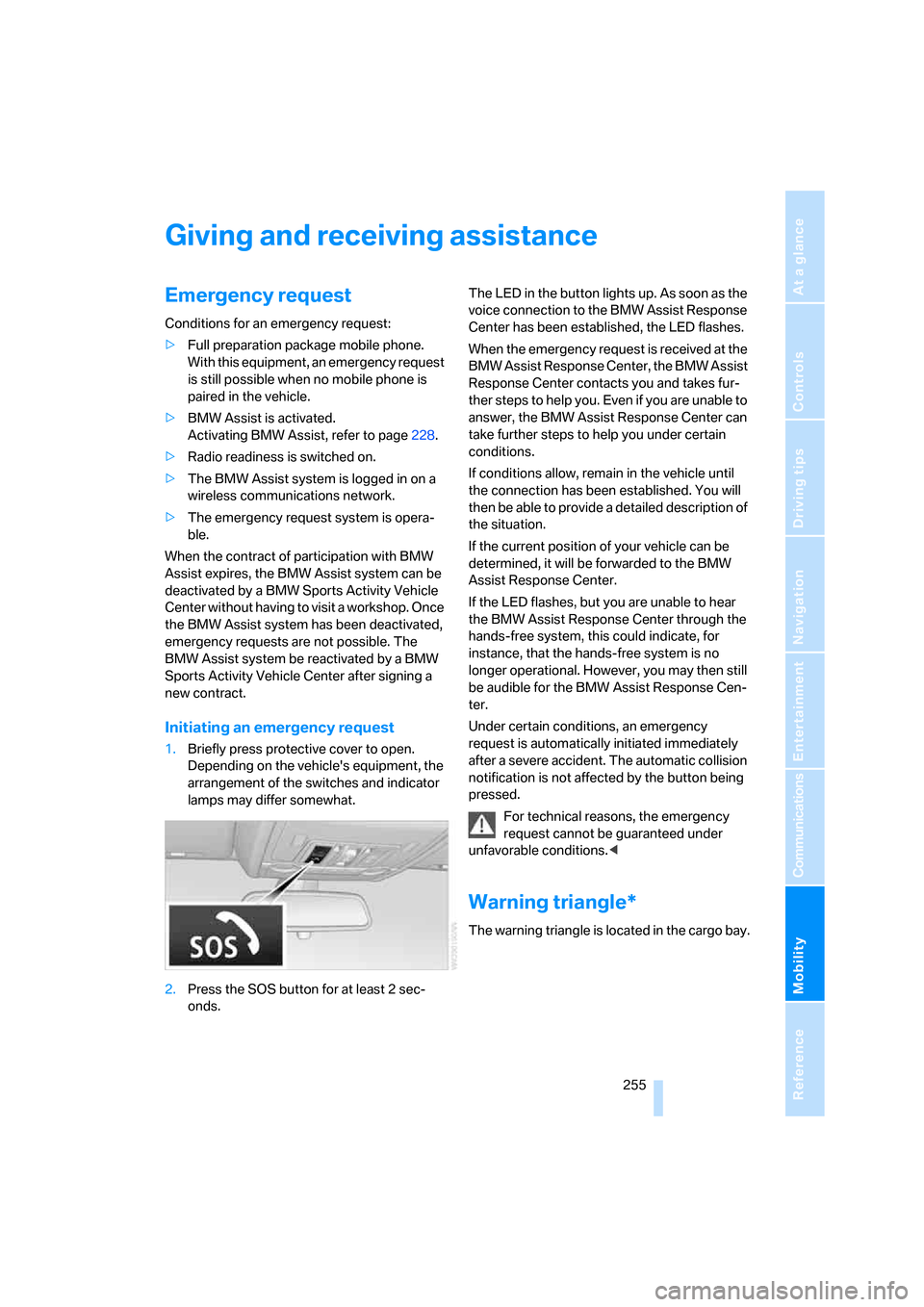
1.Briefly press protective cover to open.
Depending on the vehicle's equipment, the
arrangement of the switches and indicator
lamps may differ somewhat.
2.Press the SOS button for at least 2 sec-
onds.The LED in the button lights up. As soon as the
voice connection to the BMW Assist Response
Center has been established, the LED flashes.
When the emergency request is received at the
BMW Assist Response Center, the BMW Assist
Response Center contacts you and takes fur-
ther steps to help you. Even if you are unable to
answer, the BMW Assist Response Center can
take further steps to help you under certain
conditions.
If conditions allow, remain in the vehicle until
the connection has been established. You will
then be able to provide a detailed description of
the situation.
If the current position of your vehicle can be
determined, it will be forwarded to the BMW
Assist Response Center.
If the LED flashes, but you are unable to hear
the BMW Assist Response Center through the
hands-free system, this could indicate, for
instance, that the hands-free system is no
longer operational. However, you may then still
be audible for the BMW Assist Response Cen-
ter.
Under certain conditions, an emergency
request is automatically initiated immediately
after a severe accident. The automatic collision
notification is not affected by the button being
pressed.
For technical reasons, the emergency
request cannot be guaranteed under
unfavorable conditions.<
Warning triangle*
The warning triangle is located in the cargo bay.
Page 275 of 292
Reference 273
At a glance
Controls
Driving tips
Communications
Navigation
Entertainment
Mobility
Catalytic converter, refer to
Hot exhaust system129
"Categories", with satellite
radio173
CBC Cornering Brake
Control88
CBS Condition Based
Service245
"CD"163,175
– for DVD system in rear194
CD, refer to Playing audio
tracks, DVD system in
rear198
CD/DVD player, DVD system
in rear193
CD changer175
– compressed audio files175
– controls162
– fast forward/reverse178
– random sequence178
– repeating a track177
– sampling tracks177
– selecting a CD175
– selecting a track176
– switching on/off162
– tone control163
– volume163
CD player175
– compressed audio files175
– controls162
– fast forward/reverse178
– random sequence178
– repeating a track177
– sampling tracks177
– selecting a track176
– switching on/off162
– tone control163
– volume163
Cell phone, refer to Mobile
phone
Center armrest119
Center brake lamp250
Center console14
"Central locking"30
Central locking system29
– comfort access36
– from inside vehicle32Changes, technical
– refer to For your own
safety5
– refer to Parts and
accessories6
Changing language on
Control Display83
Changing tires239
Changing units of measure on
Control Display
82
Changing wheels251
Check Control78
"Check Control
messages"79
Checking the air pressure,
refer to Tire inflation
pressure234
Children, transporting55
Child restraint fixing system
LATCH56
Child restraint systems55
Child-safety locks58
Child seats55
Chime, refer to Check
Control78
Chrome parts, care, refer to
Caring for your vehicle
brochure
Cigarette lighter, refer to
Lighter121
Cleaning, refer to Caring for
your vehicle brochure
"Climate"50
Clock71
– 12h/24h mode82
– setting time81
Closing
– from inside32
– using remote control29
Closing fuel filler cap232
Clothes hooks119
Cockpit10
Cold start, refer to Starting
engine60
"Color" for DVD system in
rear196
Comfort access36
– observe in car wash37
– replacing battery38Comfort area, refer to Around
the center console14
Comfort start, refer to Starting
engine60
"Communi-
cation"214,224,225,226
Compact Disc
– refer to CD changer175
– refer to CD player175
Compact wheel
– inflation pressure235
– wheel change251
Compartment for remote
control, refer to Ignition
lock59
Compartments, refer to
Storage compartments119
Compass, digital117
Computer73
– displays in instrument
panel73
– displays on Control
Display73
– trip computer74
"Concierge"226
Concierge service226
Condition Based Service
CBS245
"Confirmation"31
Connecting car vacuum
cleaner, refer to Connecting
electrical devices121
Connecting headphones193
Consumption, refer to
Average fuel
consumption73
Consumption indicator,
Energy Control72
Consumption statistics, refer
to Average fuel
consumption73
"Continue guidance to
destination?"151
"Contrast"
– for DVD system in rear196
– in TV mode184
Control Center, refer to
iDrive16
Page 286 of 292
Everything from A to Z
284 "Service Request"218,225
"Service
requirements"76,225,243
Service requirements75
– also refer to CBS Condition
Based Service245
"Set date"82
"Set" on trip computer74
"Set service date"77
"Set time"81
"Settings"229
– for unlocking30
Settings
– changing on Control
Display81
– clock, 12h/24h mode82
– configuring, refer to
Personal Profile28
Setting speed limit80
Setting time, refer to
Preselecting activation
times114
"SET" with rear
entertainment183,195
Shifting, automatic
transmission with
Steptronic65
Short commands of voice
command system265
Shortest route in navigation,
refer to Selecting route148
"Short route" for
navigation148
Shoulder support44
"Show current position"143
"Show destination
position"143
Shuffled, refer to Random
– CD changer178
– CD player178
Side airbags97
Side marker lamps, replacing
bulbs248
Signal horn, refer to Horn10
Sitting safely42
– with airbags42
– with head restraint42
– with safety belts42
Ski bag125Slide show, refer to Displaying
images200
Sliding/tilt sunroof, refer to
Panorama glass sunroof39
Slope assistant, refer to
Starting assistant91
Smokers' package, refer to
Ashtray120
Snow chains240
Socket for Onboard
Diagnostics interface246
Socket for remote control,
refer to Ignition lock59
Sockets, refer to Connecting
electrical devices121
Soft closure aid, refer to
Automatic soft closing33
Song search, refer to
Sampling tracks177
SOS, refer to Initiating an
emergency request255
Spare fuses253
Spare remote control28
Spare wheel
– refer to Changing
wheels251
– refer to Compact wheel251
Special oils, refer to Approved
engine oils243
Specified oil grades, refer to
Approved engine oils243
Speed
– with compact wheel253
– with winter tires240
Speed-dependent
volume164
Speed limit warning, refer to
Speed limit80
Speedometer12
"Speed volume", refer to Tone
control164
Sport program, automatic
transmission with
Steptronic65
Stability control, refer to
Driving stability control
systems88
"Standard" for DVD system in
rear197,204"Star button"54
Star button53
Start/Stop button59
"Start" for stopwatch80
"Start guidance"141
Starting, refer to Starting
engine60
Starting assistance, refer to
Jump starting256
Starting assistant91
Starting difficulties, jump
starting256
Starting off on slopes, refer to
Starting assistant91
Start menu, iDrive17
"Start service"224
"Start Service" with
BMW Assist226
"State / Province" for
destination entry139
"State inspection"77
Station, refer to Radio
166
"Status"77
Status of this Owner's Manual
at time of printing5
Steering wheel
– adjusting52
– automatic adjustment, refer
to Steering wheel
memory44
– buttons on steering
wheel11
– easy entry/exit53
– heating53
– memory44
– programmable buttons53
"Steering wheel buttons"53
Steering with variable ratio,
refer to Active steering96
Steptronic, refer to Sport
program and manual mode
M/S65
"Stop" for stopwatch80
"Stopwatch"80
Stopwatch80
Storage compartments119
"Store"
– on the radio168
– with satellite radio174
Page 287 of 292
Reference 285
At a glance
Controls
Driving tips
Communications
Navigation
Entertainment
Mobility
"Store in address book" for
navigation system146
Storing current position146
Storing radio stations168
Storing sitting position, refer
to Seat, mirror and steering
wheel memory44
Storing tires240
"Street" for destination
entry140
"Subtitles" for DVD system in
rear197
Summer tires, refer to Wheels
and tires234
Switches, refer to Cockpit10
Switching cooling function on
and off109
Switching off engine60
Switching on
– audio162
– CD changer162
– CD player162
– radio162
Switching on hour signal82
Swiveling headlamps, refer to
Adaptive Head Light104
Symbols4
– indicator/warning lamps13
– navigation system156
– traffic information with
navigation system154
T
Tachometer72
"Tailgate"34
Tailgate35
– opening from inside33
– opening from outside33
– opening manually33
Tail lamps249
– replacing bulbs249
Tank contents, refer to
Capacities264
Target cursor for
navigation143
Technical alterations, refer to
For your own safety5Technical data262
Telematic, refer to
TeleService,
BMW Assist223
Telephone
– refer to Mobile phone208
– refer to separate operating
instructions
"Telephone list"53
TeleService225
Temperature
– adjusting in upper body
region108
– adjusting with automatic
climate control108,112
– changing units of
measure82
– refer to Coolant
temperature72
Temperature display
– outside temperature71
– setting units82
– temperature warning71
Temperature warning71
Tempomat, refer to Cruise
control69
"Terminate services"228
"Text language"83
The individual vehicle5
Third brake lamp, refer to
Center brake lamp250
3rd row seats48
Tightening torque of the lug
bolts, refer to After
mounting252
Tilt alarm sensor, switching
off36
Tilting down passenger-side
exterior mirror52
"Time"81
"Time / Date"81
"Time format"82
Timer, refer to Preselecting
activation times114
"Timer 2" for parked car
ventilation114
"Timer 1" for parked car
ventilation114Tire inflation pressure
monitoring, refer to Flat Tire
Monitor92
Tire inflation pressures234
– checking234
Tire Pressure Monitor
TPM94
Tire Quality Grading237
Tires
– age237
– air loss93,95
– breaking-in128
– changing239
– condition238
– damage238
– flat tire, refer to Changing
wheels251
– inflation pressure234
– inflation pressure
monitoring, refer to FTM
Flat Tire Monitor92
– new wheels and tires239
– pressure loss93,95
– pressure monitoring, refer to
TPM Tire Pressure
Monitor94
– replacing251
– retreaded tires239
– run-flat tires239
– size237
– tread238
– wear indicators238
– wheel/tire combination239
– winter tires240
"Title" for DVD system in
rear197
TMC station, refer to Traffic
information154
"Tone"163
– for DVD system in rear197
Tone in audio mode
– adjusting163
– middle setting165
"Tone left" for DVD system in
rear196
Tone on locking/unlocking31
Tools, refer to Onboard
toolkit247