Manual BMW X5 3.0Si 2008 E70 Workshop Manual
[x] Cancel search | Manufacturer: BMW, Model Year: 2008, Model line: X5 3.0Si, Model: BMW X5 3.0Si 2008 E70Pages: 292, PDF Size: 9.32 MB
Page 221 of 292
219
Entertainment
Reference
At a glance
Controls
Driving tips Communications
Navigation
Mobility
Changing between mobile
phone and hands-free system
From mobile phone to hands-free
system*
You can continue calls begun outside the Blue-
tooth range of the vehicle via the handsfree sys-
tem when the engine is running or the ignition is
switched on. Depending on your mobile phone,
the system automatically switches over to the
handsfree mode.
For mobile phones that do not automatically
switch over to the handsfree mode:
>Depending on the mobile phone model
used, the conversation can be continued via
the hands-free system if necessary. Act
according to what is shown on the mobile
phone display, refer to the operating
instructions of your mobile phone.
>Press the button above the storage
compartment. Switching over may take
several seconds.
From handsfree system to mobile
phone
When you telephone via the handsfree system,
you can also continue the call via the mobile
phone if necessary, depending on the mobile
phone model. Act according to what is shown
on the mobile phone display, refer to the oper-
ating instructions of your mobile phone.
As an alternative, you can deactivate the Blue-
tooth link.
Depending on your mobile phone model, poor
reception of the wireless communications net-
work can result in the system changing from the
hands-free system to the mobile phone.
Operation by voice*
The concept
You can operate your mobile phone without
having to remove your hands from the steering
wheel. When making your entries, you will be supported by announcements or questions in
many cases.
The same prerequisites as for operation via
iDrive apply, refer to page214.
Symbols in Owner's Manual
Voice commands
Activating system
1.Briefly press the button on the steering
wheel.
An acoustic signal indicates that you can
say commands.
2.Say the command.
Ending/canceling operation by voice
Press the button on the steering wheel
or
In dialogs where text is spoken, not a command,
e.g. a name, canceling is only possible using the
button on the steering wheel.
Having possible commands read aloud
The system understands default commands
that must be spoken word for word.
You can have the possible commands spoken
by the system at any point:
Using alternative commands
There are often a number of commands to run a
function, e.g.:
The system recognizes digits from zero to nine.
You can say each digit individually or group
them into a sequence to accelerate the input.
{...}Say the specified commands word for
word.
{{...}} Indicates responses of the system.
{Cancel}.
{Help}
{Dial name} or {Name}.
Page 227 of 292
225
Entertainment
Reference
At a glance
Controls
Driving tips Communications
Navigation
Mobility
TeleService
Automatic service notification*
The data on the service status of your vehicle or
on required inspections are transmitted auto-
matically directly to your BMW Sports Activity
Vehicle Center prior to the due date. You can
check when the BMW Sports Activity Vehicle
Center was notified.
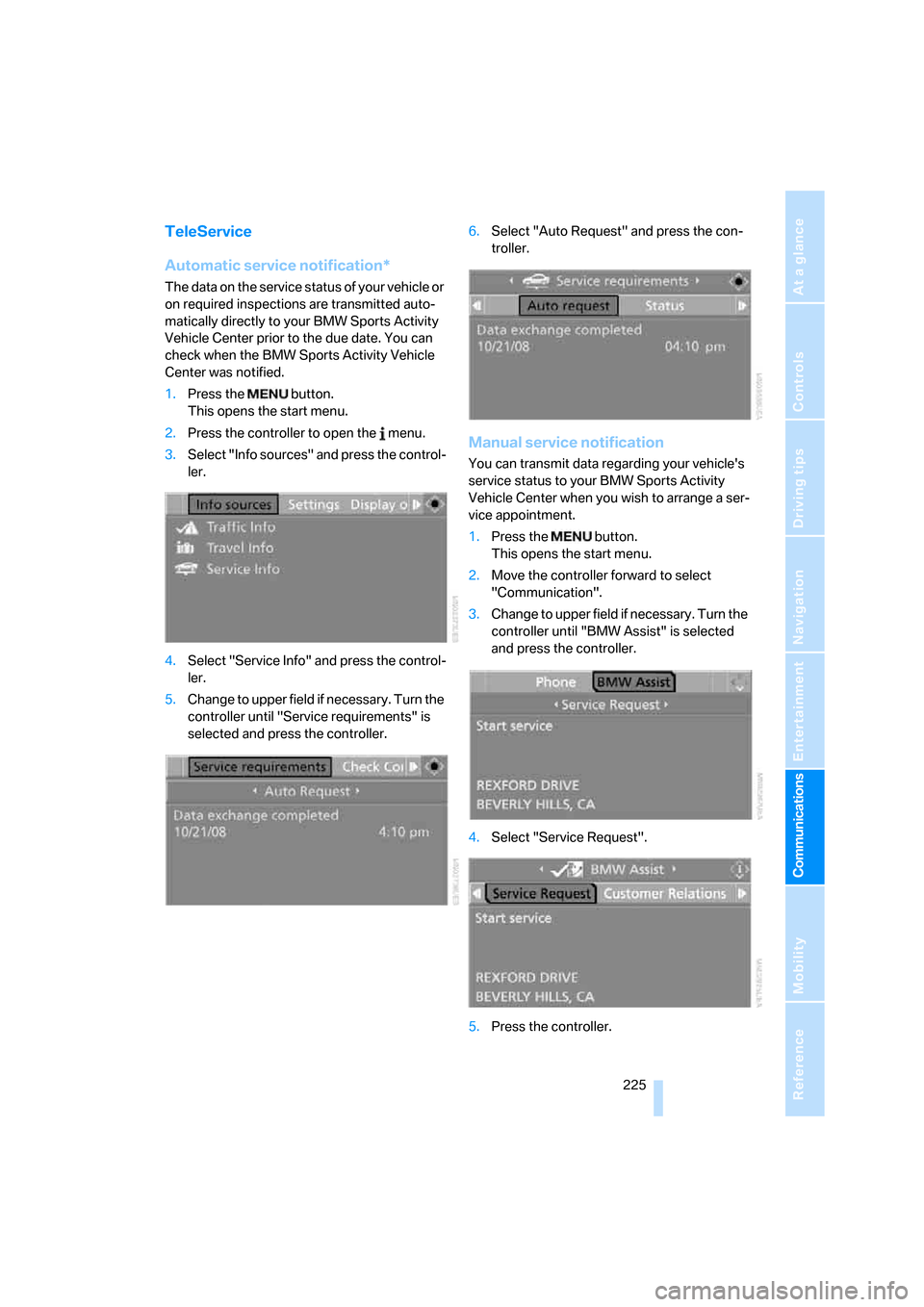
1.Press the button.
This opens the start menu.
2.Press the controller to open the menu.
3.Select "Info sources" and press the control-
ler.
4.Select "Service Info" and press the control-
ler.
5.Change to upper field if necessary. Turn the
controller until "Service requirements" is
selected and press the controller.6.Select "Auto Request" and press the con-
troller.
Manual service notification
You can transmit data regarding your vehicle's
service status to your BMW Sports Activity
Vehicle Center when you wish to arrange a ser-
vice appointment.
1.Press the button.
This opens the start menu.
2.Move the controller forward to select
"Communication".
3.Change to upper field if necessary. Turn the
controller until "BMW Assist" is selected
and press the controller.
4.Select "Service Request".
5.Press the controller.
Page 234 of 292
Refueling
232
Refueling
Switch off the engine before refueling.
When handling fuel, always observe all
applicable precautionary measures and regula-
tions. Never transport reserve fuel containers in
the vehicle. These could become leaky and
cause an explosion or a fire in an accident.<
Fuel filler door
Opening
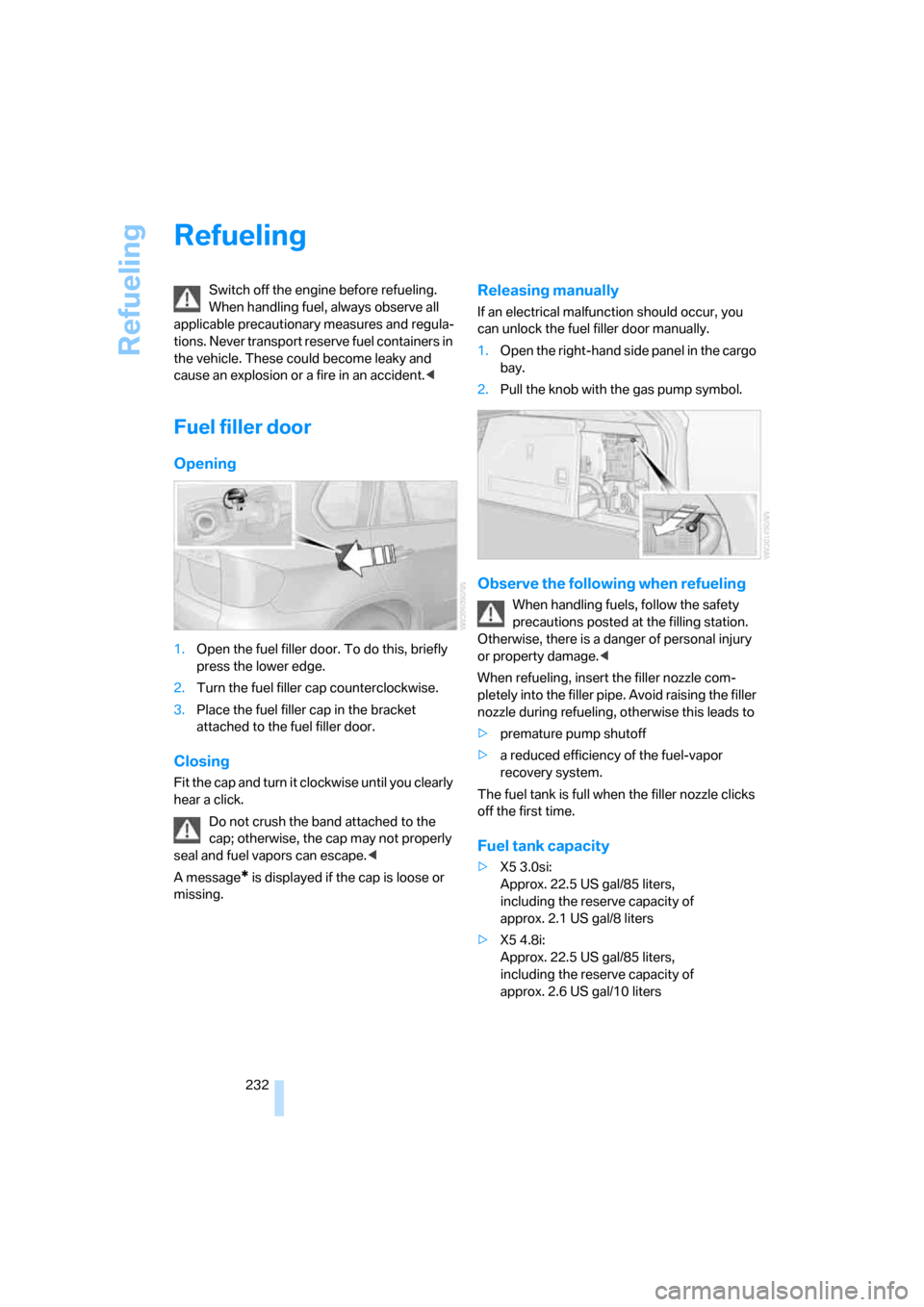
1.Open the fuel filler door. To do this, briefly
press the lower edge.
2.Turn the fuel filler cap counterclockwise.
3.Place the fuel filler cap in the bracket
attached to the fuel filler door.
Closing
Fit the cap and turn it clockwise until you clearly
hear a click.
Do not crush the band attached to the
cap; otherwise, the cap may not properly
seal and fuel vapors can escape.<
A message
* is displayed if the cap is loose or
missing.
Releasing manually
If an electrical malfunction should occur, you
can unlock the fuel filler door manually.
1.Open the right-hand side panel in the cargo
bay.
2.Pull the knob with the gas pump symbol.
Observe the following when refueling
When handling fuels, follow the safety
precautions posted at the filling station.
Otherwise, there is a danger of personal injury
or property damage.<
When refueling, insert the filler nozzle com-
pletely into the filler pipe. Avoid raising the filler
nozzle during refueling, otherwise this leads to
>premature pump shutoff
>a reduced efficiency of the fuel-vapor
recovery system.
The fuel tank is full when the filler nozzle clicks
off the first time.
Fuel tank capacity
>X5 3.0si:
Approx. 22.5 US gal/85 liters,
including the reserve capacity of
approx. 2.1 US gal/8 liters
>X5 4.8i:
Approx. 22.5 US gal/85 liters,
including the reserve capacity of
approx. 2.6 US gal/10 liters
Page 260 of 292
Giving and receiving assistance
258
Being towed
Make sure that the ignition is switched on,
refer to page59, otherwise the low
beams, tail lamps, turn signals and windshield
wipers would not be available. When the engine
is stopped, there is no power assist. This then
requires increased effort for braking and steer-
ing. Active steering is deactivated and larger
steering wheel movements are required.<
Switch on the hazard warning flashers depend-
ing on the local regulations. If the electrical sys-
tem fails, mark the vehicle to be towed, e.g. with
a sign or warning triangle in the rear window.
Engage transmission position N and release the
parking brake before towing.
If transmission position N cannot be engaged,
manually release the transmission lock, refer to
page65.
Do not exceed a towing speed of 45 mph/
70 km/h and a towing distance of
90 miles/150 km, otherwise the automatic
transmission may be damaged.<
Towing methods
Do not lift vehicle by tow fitting or body
and chassis parts, otherwise damage may
result.<
In some countries, towing with tow bars or
ropes in public traffic is not permitted. Familiar-
ize yourself with the regulations on towing in the
respective country.
With tow bar
The towing vehicle may not be lighter
than the vehicle to be towed, otherwise it
will not be possible to reliably control vehicle
response.<
The tow fittings used should be on the same
side on both vehicles. Should it prove impossi-
ble to avoid mounting the tow bar at an offset
angle, please observe the following:
>Clearance and maneuvering capability will
be sharply limited during cornering.
>When mounted at an angle, the tow bar will
exert lateral forces, tending to push the
vehicle sideways.Only attach the tow bar to the tow fittings,
as attachment to other vehicle parts can
lead to damage.<
With tow rope
When starting off in the towing vehicle, make
sure that the tow rope is taut.
To avoid jerking and the associated
stresses on vehicle components when
towing, always use nylon ropes or nylon straps.
Only attach tow ropes to the tow fittings, as
attachment to other vehicle parts can lead to
damage.<
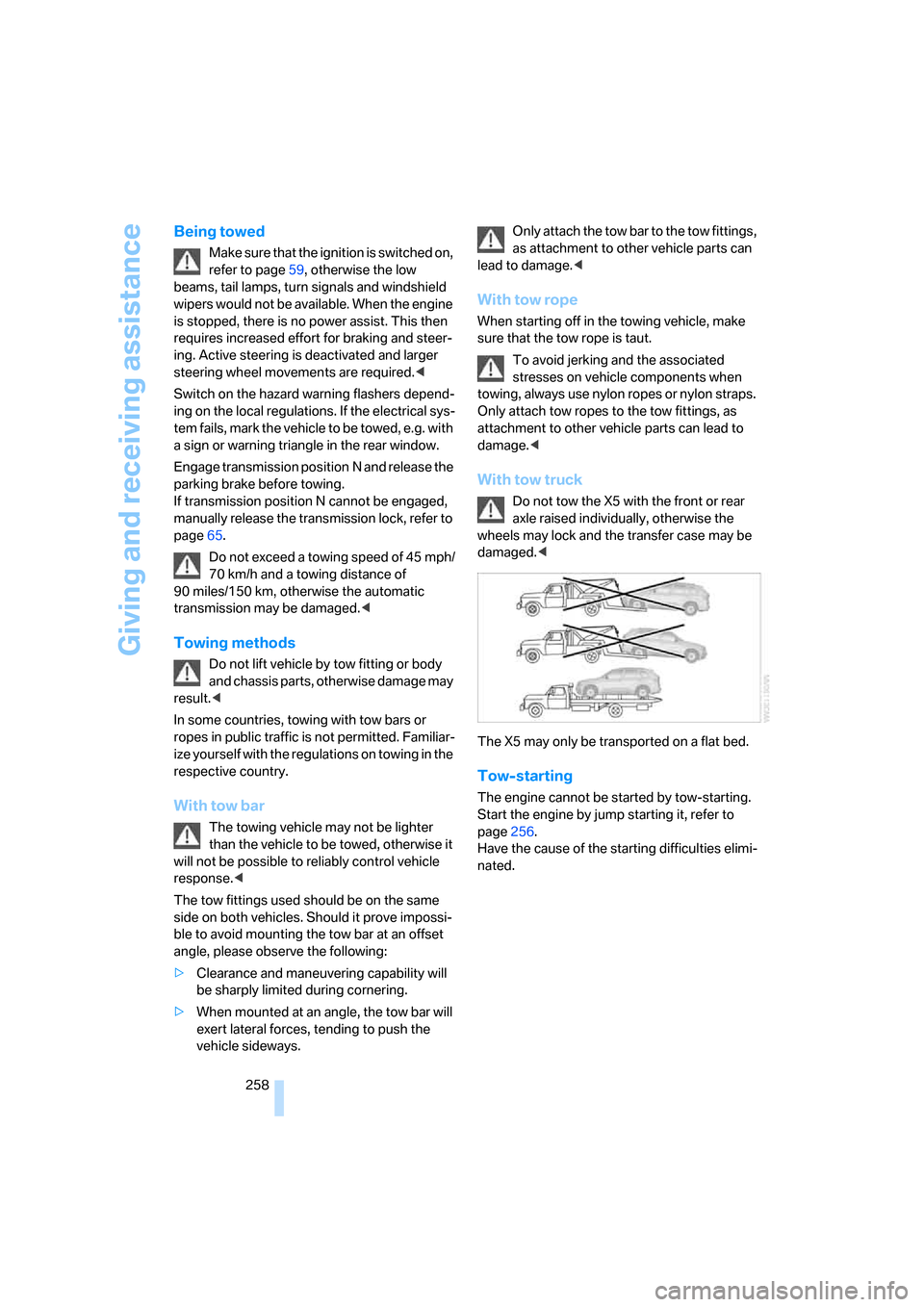
With tow truck
Do not tow the X5 with the front or rear
axle raised individually, otherwise the
wheels may lock and the transfer case may be
damaged.<
The X5 may only be transported on a flat bed.
Tow-starting
The engine cannot be started by tow-starting.
Start the engine by jump starting it, refer to
page256.
Have the cause of the starting difficulties elimi-
nated.
Page 269 of 292
Reference 267
At a glance
Controls
Driving tips
Communications
Navigation
Entertainment
Mobility
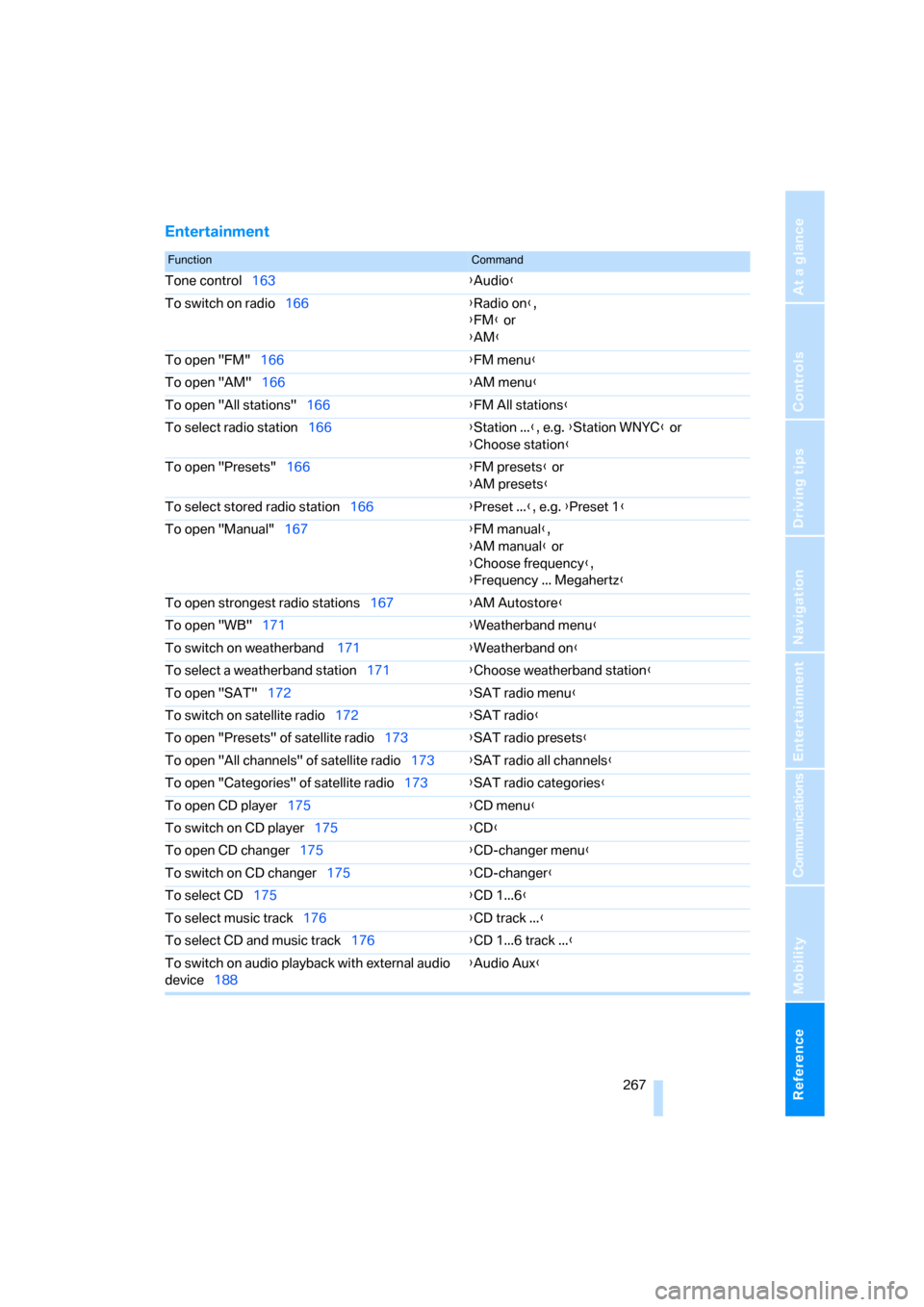
Entertainment
FunctionCommand
Tone control163{Audio}
To switch on radio166{Radio on},
{FM} or
{AM}
To open "FM"166{FM menu}
To open "AM"166{AM menu}
To open "All stations"166{FM All stations}
To select radio station166{Station ...}, e.g. {Station WNYC} or
{Choose station}
To open "Presets"166{FM presets} or
{AM presets}
To select stored radio station166{Preset ...}, e.g. {Preset 1}
To open "Manual"167{FM manual},
{AM manual} or
{Choose frequency},
{Frequency ... Megahertz}
To open strongest radio stations167{AM Autostore}
To open "WB"171{Weatherband menu}
To switch on weatherband 171{Weatherband on}
To select a weatherband station171{Choose weatherband station}
To open "SAT"172{SAT radio menu}
To switch on satellite radio172{SAT radio}
To open "Presets" of satellite radio173{SAT radio presets}
To open "All channels" of satellite radio173{SAT radio all channels}
To open "Categories" of satellite radio173{SAT radio categories}
To open CD player175{CD menu}
To switch on CD player175{CD}
To open CD changer175{CD-changer menu}
To switch on CD changer175{CD-changer}
To select CD175{CD 1...6}
To select music track176{CD track ...}
To select CD and music track176{CD 1...6 track ...}
To switch on audio playback with external audio
device188{Audio Aux}
Page 272 of 292
Everything from A to Z
270
Everything from A to Z
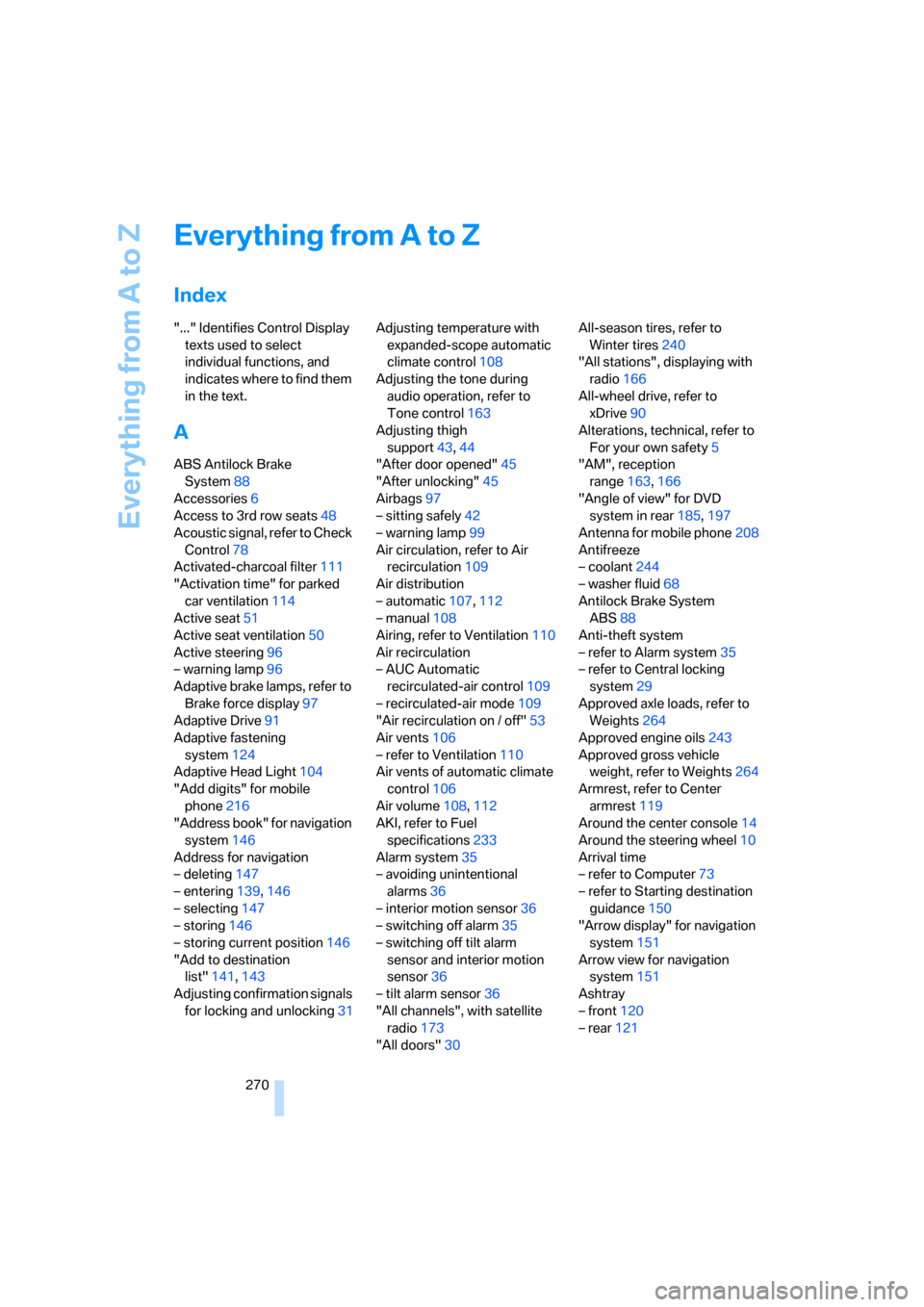
Index
"..." Identifies Control Display
texts used to select
individual functions, and
indicates where to find them
in the text.
A
ABS Antilock Brake
System88
Accessories6
Access to 3rd row seats48
Acoustic signal, refer to Check
Control78
Activated-charcoal filter111
"Activation time" for parked
car ventilation114
Active seat51
Active seat ventilation50
Active steering96
– warning lamp96
Adaptive brake lamps, refer to
Brake force display97
Adaptive Drive91
Adaptive fastening
system124
Adaptive Head Light104
"Add digits" for mobile
phone216
"Address book" for navigation
system146
Address for navigation
– deleting147
– entering139,146
– selecting147
– storing146
– storing current position146
"Add to destination
list"141,143
Adjusting confirmation signals
for locking and unlocking31Adjusting temperature with
expanded-scope automatic
climate control108
Adjusting the tone during
audio operation, refer to
Tone control163
Adjusting thigh
support43,44
"After door opened"45
"After unlocking"45
Airbags97
– sitting safely42
– warning lamp99
Air circulation, refer to Air
recirculation109
Air distribution
– automatic107,112
– manual108
Airing, refer to Ventilation110
Air recirculation
– AUC Automatic
recirculated-air control109
– recirculated-air mode109
"Air recirculation on / off"
53
Air vents106
– refer to Ventilation110
Air vents of automatic climate
control106
Air volume108,112
AKI, refer to Fuel
specifications233
Alarm system35
– avoiding unintentional
alarms36
– interior motion sensor36
– switching off alarm35
– switching off tilt alarm
sensor and interior motion
sensor36
– tilt alarm sensor36
"All channels", with satellite
radio173
"All doors"30All-season tires, refer to
Winter tires240
"All stations", displaying with
radio166
All-wheel drive, refer to
xDrive90
Alterations, technical, refer to
For your own safety5
"AM", reception
range163,166
"Angle of view" for DVD
system in rear185,197
Antenna for mobile phone208
Antifreeze
– coolant244
– washer fluid68
Antilock Brake System
ABS88
Anti-theft system
– refer to Alarm system35
– refer to Central locking
system29
Approved axle loads, refer to
Weights264
Approved engine oils243
Approved gross vehicle
weight, refer to Weights264
Armrest, refer to Center
armrest119
Around the center console14
Around the steering wheel10
Arrival time
– refer to Computer73
– refer to Starting destination
guidance150
"Arrow display" for navigation
system151
Arrow view for navigation
system151
Ashtray
– front120
– rear121
Page 273 of 292
Reference 271
At a glance
Controls
Driving tips
Communications
Navigation
Entertainment
Mobility
Assist, refer to separate
operating instructions
Assistance systems, refer to
Driving stability control
systems88
Assistance window20
"Assist. window off"21
AUC Automatic recirculated-
air control109
"Audio"165,169
– for DVD system in rear204
Audio162
– controls162
– switching on/off162
– tone control163
– volume163
Audio CD for DVD system in
rear198
Audio device, external119
Automatic
– air distribution107,112
– air volume107,112
– headlamp control102
– liftgate operation34
– service notification225
– steering wheel adjustment,
refer to Easy entry/exit53
– storing stations167
Automatic car washes130
– also refer to Caring for your
vehicle brochure
Automatic climate control107
– automatic air
distribution107,112
– in rear111
– switching off110,112
– ventilation in rear111
Automatic closing of doors,
refer to Automatic soft
closing33
Automatic curb monitor52
Automatic garage door
opener115
Automatic Hold61
– activating62
– deactivating62
– parking62Automatic lighting
– refer to Automatic headlamp
control102
– refer to Daytime running
lamps103
– refer to Interior lamps105
– refer to Pathway lighting103
"Automatic programs"
108
Automatic recirculated-air
control AUC109
Automatic soft closing33
Automatic station search167
Automatic transmission with
Steptronic64
– deactivating selector lever
interlock64
– kick-down65
– manually releasing
transmission lock65
– tow-starting258
– with comfort access37
"Automatic ventilation"113
AUTO program for automatic
climate control107,112
"Auto Request"225
"Autostore" on the radio168
"AUX"163,188,190
– AUX-In connection188
– for DVD system in rear203
– USB audio interface189
"AUX / Rear"194
AUX-In connection119,188
Average fuel consumption73
– setting units82
Average speed, refer to
Computer73
"Avoid ferries" for navigation
system149
"Avoid highways" for
navigation system148
Avoiding highways for
navigation148
Avoiding unintentional
alarms36
"Avoid tollroads" for
navigation system149
Axle loads, refer to
Weights264
"A - Z"216
B
Backrest contour, refer to
Lumbar support44
Backrests, refer to Seats43
Backrest width adjustment44
Backup lamps, replacing
bulbs249
Balance, refer to Tone
control164
"Balance" for DVD system in
rear197
Band-aids, refer to First-aid
kit256
Bass, refer to Tone
control163
Battery
– charging253
– jump starting256
– power failure253
– refer to Vehicle battery253
Battery disposal
– remote control with comfort
access38
– vehicle battery253
Battery replacement
– remote control for DVD
system in rear194
– remote control with comfort
access38
Being towed258
Belts, refer to Safety belts48
Beverage holder, refer to Cup
holders120
Blower, refer to Air
volume108,112
"BMW Assist"224,225,226
BMW Assist
– activating228
– concierge service226
– contacting BMW Customer
Relations226
– offered services223
– roadside assistance224
– TeleService225
"BMW Contact"218
"BMW Contact
Numbers"218
Page 274 of 292
Everything from A to Z
272 BMW homepage4
BMW maintenance
system245
"BMW Service settings"229
BMW website4
Body roll, refer to Driving on
poor roads133
Bottle holder, refer to Cup
holders120
Brake assistant89
Brake force display97
Brake lamps
– brake force display97
– replacing bulbs249
Brake rotors130
Brakes
– ABS Antilock Brake
System88
– brake assistant89
– brake force display97
– breaking-in128
– CBC Cornering Brake
Control88
– electronic brake-force
distribution88
– parking brake60
– refer to Braking safely129
– warning lamp13
Brake system128
– brake pads128
– breaking-in128
– disk brakes130
Braking safely129
Breakdown, Flat Tire
Monitor92
Breakdown services, refer to
Roadside Assistance256
Breaking-in brake pads128
Breaking-in differential128
Break-in period128
"Brightness"82
– for DVD system in rear196
– in TV mode184
Brightness
– of Control Display82
– of the rear view camera88
– on Head-Up Display100
"Brightness / Position"100Button for starting engine59
Buttons on steering wheel11
Bypassing traffic
congestion157
C
Calibrating driver's seat49
California Proposition 65
Warning6
"Call"216,227
Call
– accepting214
– displaying accepted217
– ending215
– in absence217
– starting215
Calling
– from phone book216
– from Top 8 list217
– redialing217
– refer to telephone operating
instructions
Camera, refer to Rear view
camera86
"Camera picture and PDC"88
"Camera view
– full screen"88
– main window"88
Can holder, refer to Cup
holders120
Capacities264
Capacity of cargo bay264
Car battery, refer to Vehicle
battery253
Car care, refer to Caring for
your vehicle brochure
Car-care products, refer to
Caring for your vehicle
brochure
"Car Data"73
Care246
– refer to Caring for your
vehicle brochure
Cargo
– refer to Loading131
– securing132
– securing with ski bag125Cargo area, refer to Cargo
bay122
Cargo area cover, refer to Roll-
up cover122
Cargo bay
– capacity264
– emergency operation, refer
to Opening manually33
– expanding123
– opening/closing, refer to
Liftgate33
– opening/closing, refer to
Tailgate35
– opening from inside33
– opening from outside33
– opening with remote
control30
Cargo bay cover, refer to Roll-
up cover122
Caring for artificial leather,
refer to Caring for your
vehicle brochure
Caring for leather, refer to
Caring for your vehicle
brochure
Caring for light-alloy wheels,
refer to Caring for your
vehicle brochure
Caring for the carpet, refer to
Caring for your vehicle
brochure
Caring for the vehicle finish,
refer to Caring for your
vehicle brochure
Car key, refer to Keys/remote
control28
Car phone208
– installation location, refer to
Center armrest119
– refer to Mobile phone208
– refer to separate operating
instructions
Car radio, refer to Radio166
Car wash130
– also refer to Caring for your
vehicle brochure
– before driving in60
– with comfort access37
Page 277 of 292
Reference 275
At a glance
Controls
Driving tips
Communications
Navigation
Entertainment
Mobility
Disposal
– battery of remote control
with comfort access38
– remote control battery194
– vehicle battery253
Distance, refer to
Computer73
"Distance to dest."74
Distance to destination, refer
to Computer73
Distance warning, refer to
PDC Park Distance
Control84
Door entry lighting105
Door key, refer to Keys/
remote control28
Door lock31
Door locking, confirmation
signals31
"Door locks"30,31,76
Doors
– manual operation32
– remote control29
DOT Quality Grades237
Downhill driving assistance,
refer to HDC90
Draft-free ventilation110
Drinks holder, refer to Cup
holders120
"Driver's door only"30
Driver's seat, calibrating49
"Driver's seat climate"51
Driving lamps, refer to Parking
lamps/low beams102
Driving on poor roads133
Driving route, refer to
Displaying route151
Driving stability control
systems88
Driving through water129
Driving tips, refer to General
driving notes128
Dry air, refer to Cooling
function109
Drying the air, refer to Cooling
function109DSC Dynamic Stability
Control89
– indicator lamp13,89
DTC Dynamic Traction
Control89
– activating89
– indicator lamp90
"DVD"182
– for DVD system in rear194
DVD changer
– fast forward183
– reverse
183
– skip chapter183
"DVD format" for DVD system
in rear197
DVD for navigation136
DVD system in rear192
– CD/DVD player193
– connecting headphones193
– controls192
– displaying images from CD/
DVD200
– DVD country codes195
– external device203
– information on CD/DVD
player202
– playing audio tracks from
CD/DVD198
– playing video from CD/
DVD195
– remote control193
– switching on/off194
"Dynamic route" for
navigation149
Dynamic Stability Control
DSC89
Dynamic Traction Control
DTC89
E
Easy entry/exit53
Electrical malfunction
– automatic transmission with
Steptronic65
– door lock32
– driver's door32
– fuel filler door232
– liftgate33
– panorama glass sunroof40
– parking brake63
Electric seat43
Electric steering wheel
adjustment52
Electronic brake-force
distribution88
Electronic oil level check242
Emergency operation, refer to
Manual operation
– door lock32
– driver's door32
– fuel filler door232
– liftgate33
– transmission lock, automatic
transmission65
Emergency request255
Emergency services, refer to
Roadside Assistance256
"Enabled services"229
"Enable services"229
"End call"216
Energy-conscious driving,
refer to Energy Control72
Energy Control72
Engine
– breaking-in128
– data262
– overheated, refer to Coolant
temperature72
– speed262
– starting60
– starting, with comfort
access37
– switching off60
Engine compartment242
Engine coolant244
Page 278 of 292
Everything from A to Z
276 Engine oil
– adding243
– additives, refer to Approved
engine oils243
– approved engine oil243
– checking oil level242
– electronic oil level check242
"Engine oil level"243
Engine output, refer to Engine
data262
Engine overheating, refer to
Coolant temperature72
Engine speed262
Engine starting, refer to
Starting engine60
"Enter address"139
Entering country of
destination139
Entering destination139
Entering house number or
intersection140
Entering intersection140
Entering street140
"Entertainment"162
Entertainment sound output
on/off163
"Equalizer", refer to Tone
control165
Equalizer, refer to Tone
control165
"ESN"172
ESP Electronic Stability
Program, refer to DSC
Dynamic Stability
Control89
Event Data Recorders246
Exhaust system, refer to Hot
exhaust system129
Exterior mirrors51
– adjusting51
– automatic dimming
feature52
– automatic heating52
– folding in and out51
– tilting down passenger-side
exterior mirror52External audio device119
– refer to AUX-In
connection188
Eye for tow-starting and
towing, refer to Tow
fitting257
F
Fader, refer to Tone
control164
Failure messages, refer to
Check Control78
False alarm, refer to Avoiding
unintentional alarms36
Fastening safety belts, refer to
Safety belts48
– warning lamp49
Fastening system,
adaptive124
Fastest route for
navigation148
Fast forward
– CD changer178
– CD player178
– DVD changer183
"Fast route" for
navigation148
Fault displays, refer to Check
Control78
Filler neck for washer fluid68
First-aid kit256
Flashing during locking/
unlocking, refer to Setting
confirmation signals31
Flashlight119
Flat tire
– changing wheels251
– compact wheel251
– Flat Tire Monitor92
– run-flat tires93,95,239
– TPM Tire Pressure
Monitor94
Flat Tire Monitor FTM92
Fluid reservoir, refer to Filler
neck for washer fluid68
"FM", reception
range163,166FM, waveband166
Fog lamps105
– indicator lamp13,105
Folding display screen open/
closed, DVD system in
rear192
Folding rear seat backrest123
Footbrake, refer to Braking
safely129
Footwell lamps105
For your own safety5
4-wheel drive system, refer to
xDrive90
Fresh-air nozzles, refer to Air
vents106
Front airbags97
Front passenger airbags97
– deactivating98
– refer to Exception of front
passenger seat55
Front seat adjustment43
FTM Flat Tire Monitor92
– false alarms92
– indicating a flat tire93
– initializing the system92
– malfunction96
– snow chains240
– system limits92
– warning lamp93
Fuel233
– capacity264
– display72
– high-quality brands233
– quality233
– saving128
– specifications233
Fuel clock, refer to Fuel
gauge72
Fuel consumption display,
computer, average fuel
consumption73
Fuel display, refer to Fuel
gauge72
Fuel filler door232
– closing232
– opening232
– releasing manually232
Fuses253