key BMW X5 4.4I 2001 Owner's Manual
[x] Cancel search | Manufacturer: BMW, Model Year: 2001, Model line: X5 4.4I, Model: BMW X5 4.4I 2001Pages: 223, PDF Size: 2.66 MB
Page 65 of 223

Index
Data
Technology
Repairs
Car care
Controls
Overview
65nStarting the engine Switching off the engine
Do not press the accelerator pedal
while starting the engine.
BMW X5 3.0i:
Do not actuate the starter for too
short a time. Do not turn it for more
than approx. 20 seconds. Release the
ignition key immediately as soon as the
engine starts.
BMW X5 4.4i:
Your BMW is equipped with the conve-
nience starting feature. Simply turn the
key to position 3 (starter) and then
release it immediately.
The starter continues to operate auto-
matically.
The automatic starting mode will not
operate if the battery voltage is low.
The engine can be started by means of
jump-starting (refer to page 190).<
Do not allow the engine to warm up
by leaving it running while the vehicle
remains stationary. Instead, begin to
drive immediately at a moderate engine
speed.Should the engine fail to start on the
first attempt (if it is very hot or cold, for
instance):
> Press the accelerator pedal halfway
down while engaging the starter.
Cold starts at very low temperatures,
from approx. +5 7 (–15 6) and at alti-
tudes above 3,300 ft (1,000 meters):
> For the initial start attempt, allow the
starter to remain engaged somewhat
longer (approx. 10 seconds).
> Press the accelerator pedal halfway
down while engaging the starter.
Engine idle speed is controlled by the
engine computer system. Increased
speeds at startup are normal and
should decrease as the engine warms
up. If engine speed does not decrease,
service is required.
To prevent the battery from discharging,
always deactivate electrical devices
that are not in use. Switch the ignition
off when the vehicle is not being driven. Turn the ignition key to position 1 or 0.
Never remove the ignition key
while the vehicle is rolling. If you
did so, the ignition lock would engage
when the steering wheel is turned.
Always remove the ignition key and
engage the steering lock before leaving
the vehicle.
Vehicles with manual transmission:
Always engage the parking brake when
parking on slopes and inclined
surfaces. Even placing the lever in
1st gear or reverse may not provide
adequate resistance to rolling.
Vehicles with automatic transmission:
Place the selector lever in "Park." <
Vehicles with automatic transmission:
The vehicle must be stationary and the
selector lever in "Park" before you can
remove the ignition key.
Page 66 of 223
66nParking brake
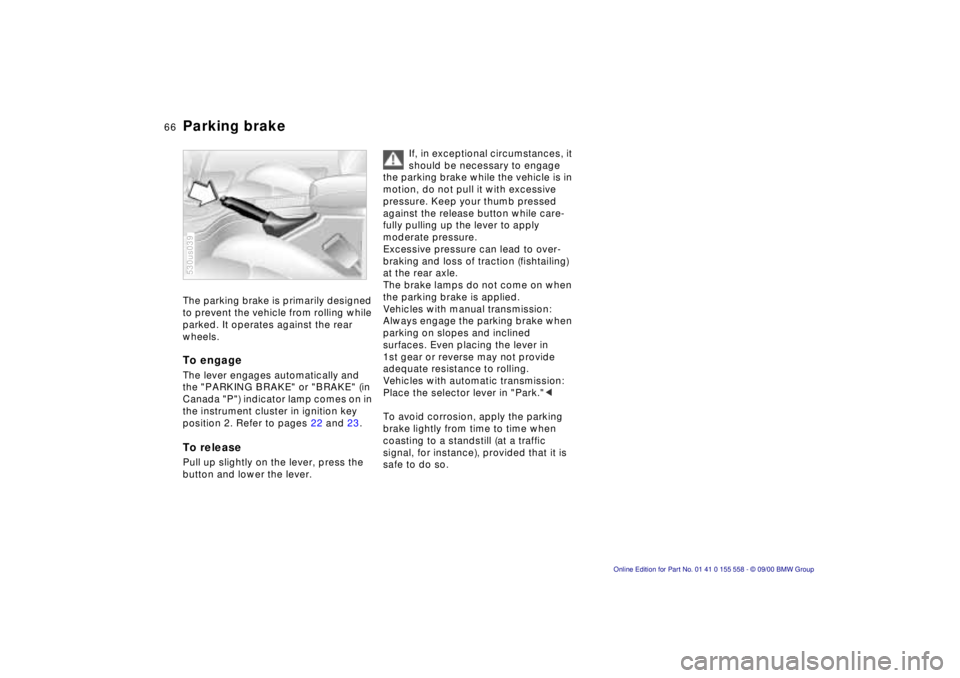
The parking brake is primarily designed
to prevent the vehicle from rolling while
parked. It operates against the rear
wheels.
To engage
The lever engages automatically and
the "PARKING BRAKE" or "BRAKE" (in
Canada "P") indicator lamp comes on in
the instrument cluster in ignition key
position 2. Refer to pages 22 and 23.
To release
Pull up slightly on the lever, press the
button and lower the lever.
530us039
If, in exceptional circumstances, it
should be necessary to engage
the parking brake while the vehicle is in
motion, do not pull it with excessive
pressure. Keep your thumb pressed
against the release button while care-
fully pulling up the lever to apply
moderate pressure.
Excessive pressure can lead to over-
braking and loss of traction (fishtailing)
at the rear axle.
The brake lamps do not come on when
the parking brake is applied.
Vehicles with manual transmission:
Always engage the parking brake when
parking on slopes and inclined
surfaces. Even placing the lever in
1st gear or reverse may not provide
adequate resistance to rolling.
Vehicles with automatic transmission:
Place the selector lever in "Park." <
To avoid corrosion, apply the parking
brake lightly from time to time when
coasting to a standstill (at a traffic
signal, for instance), provided that it is
safe to do so.
Page 67 of 223
Index
Data
Technology
Repairs
Car care
Controls
Overview
67nManual transmission
Press the clutch pedal all the way down
each time you shift, pressing the
manual-shift gear lever into its proper
end position.
Depress the clutch when starting the
vehicle, too, otherwise, lockout will
prevent the engine from starting if the
clutch is not depressed.
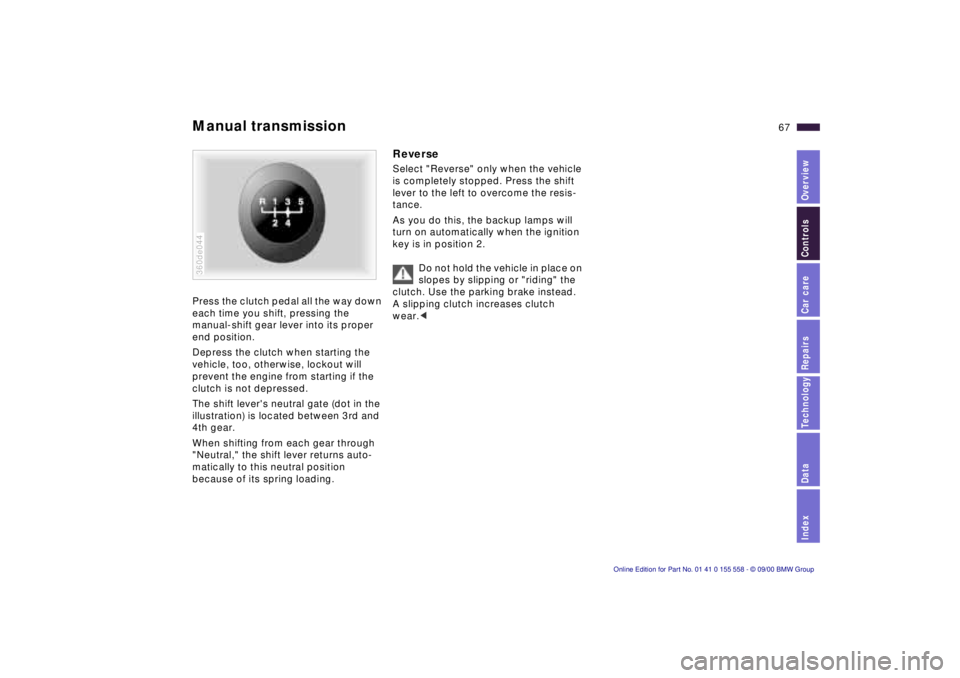
The shift lever's neutral gate (dot in the
illustration) is located between 3rd and
4th gear.
When shifting from each gear through
"Neutral," the shift lever returns auto-
matically to this neutral position
because of its spring loading.
360de044
Reverse
Select "Reverse" only when the vehicle
is completely stopped. Press the shift
lever to the left to overcome the resis-
tance.
As you do this, the backup lamps will
turn on automatically when the ignition
key is in position 2.
Do not hold the vehicle in place on
slopes by slipping or "riding" the
clutch. Use the parking brake instead.
A slipping clutch increases clutch
wear. <
Page 70 of 223
70nAutomatic transmission with Steptronic*Indicator/Headlamp flasher
Electronic transmission control
module
If the indicator lamp comes on
or the message "TRANS.FAIL-
SAFE PROG" appears in the
Check Control
*, there is a fault in the
transmission system.
Bring the vehicle to a stop. Move the
transmission selector lever to "P." Set
the parking brake and turn the engine
off (ignition key to position 0).
Wait a few seconds, then start the
engine.
If the indicator lamp goes out after a
few seconds, normal transmission
performance has been restored. You
may continue to drive as usual. If the
indicator lamp does not go out, you can
place the selector lever in all positions.
However, the vehicle will now only drive
forward with limited gear selection.
If this happens, avoid extreme engine
loads and consult the nearest BMW
center.
Do not work in the engine
compartment when a drive gear
(forward or reverse) is engaged. If you
do this, the vehicle could move. <
Information on jump-starting, tow-
starting and towing begins on
page 190.
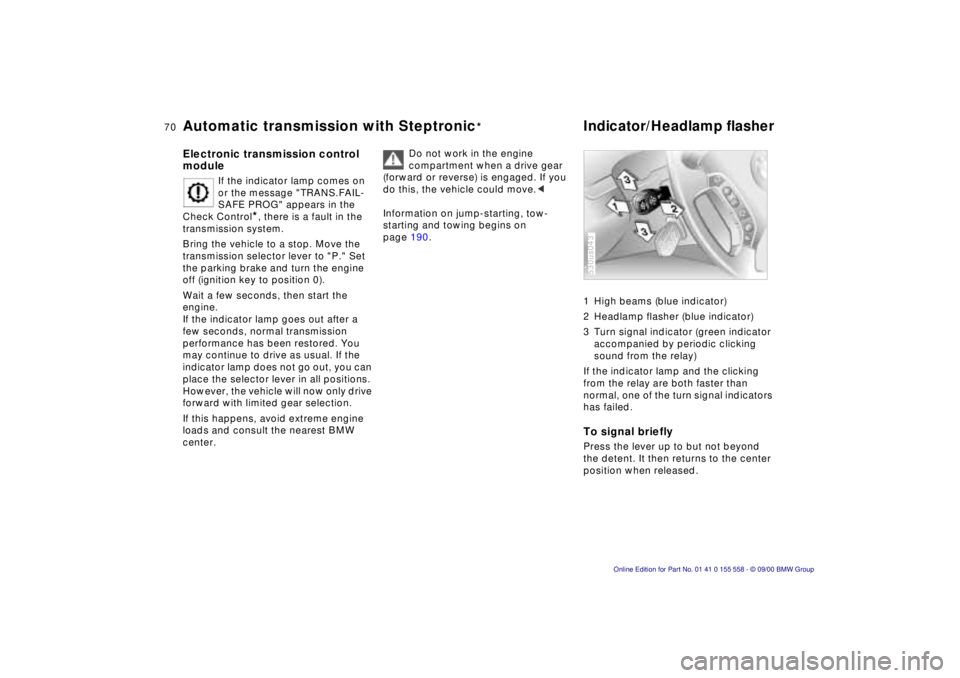
1 High beams (blue indicator)
2 Headlamp flasher (blue indicator)
3 Turn signal indicator (green indicator
accompanied by periodic clicking
sound from the relay)
If the indicator lamp and the clicking
from the relay are both faster than
normal, one of the turn signal indicators
has failed.
To signal briefly
Press the lever up to but not beyond
the detent. It then returns to the center
position when released.
530us043
Page 71 of 223
Index
Data
Technology
Repairs
Car care
Controls
Overview
71nWasher/Wiper system
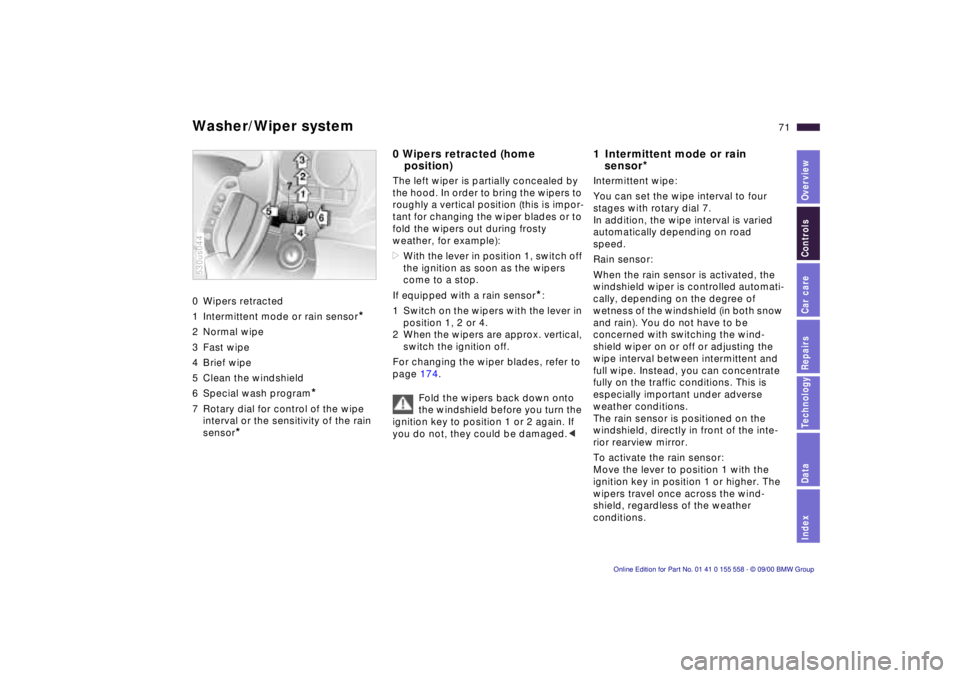
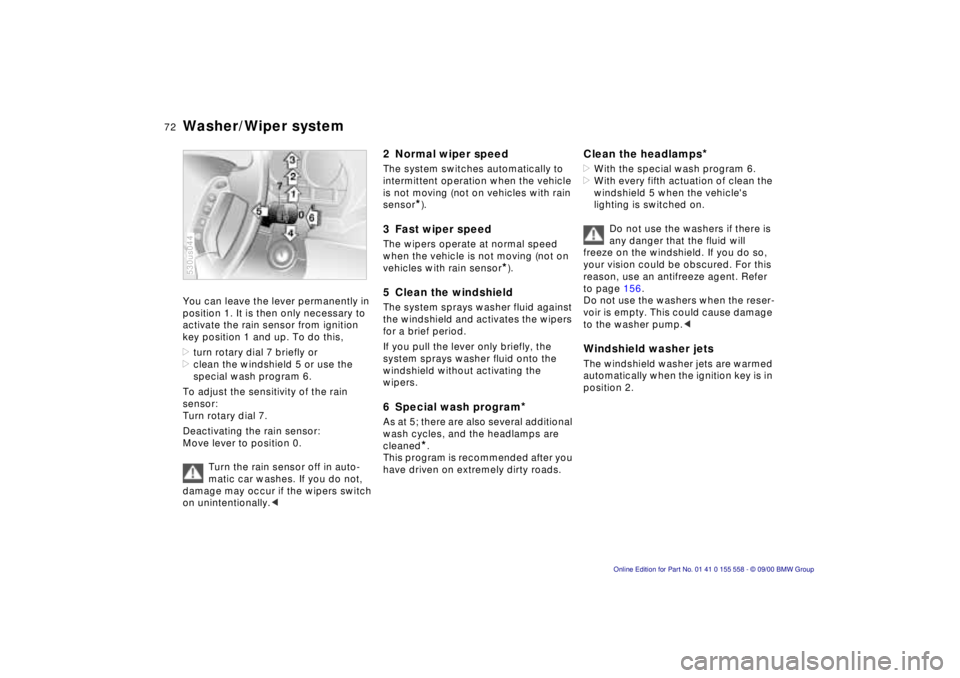
0 Wipers retracted
1 Intermittent mode or rain sensor
*
2 Normal wipe
3 Fast wipe
4 Brief wipe
5 Clean the windshield
6 Special wash program
*
7 Rotary dial for control of the wipe interval or the sensitivity of the rain
sensor
*
530us044
0 Wipers retracted (home position)
The left wiper is partially concealed by
the hood. In order to bring the wipers to
roughly a vertical position (this is impor-
tant for changing the wiper blades or to
fold the wipers out during frosty
weather, for example):
> With the lever in position 1, switch off
the ignition as soon as the wipers
come to a stop.
If equipped with a rain sensor
*:
1 Switch on the wipers with the lever in position 1, 2 or 4.
2 When the wipers are approx. vertical, switch the ignition off.
For changing the wiper blades, refer to
page 174.
Fold the wipers back down onto
the windshield before you turn the
ignition key to position 1 or 2 again. If
you do not, they could be damaged. <
1 Intermittent mode or rain
sensor
*
Intermittent wipe:
You can set the wipe interval to four
stages with rotary dial 7.
In addition, the wipe interval is varied
automatically depending on road
speed.
Rain sensor:
When the rain sensor is activated, the
windshield wiper is controlled automati-
cally, depending on the degree of
wetness of the windshield (in both snow
and rain). You do not have to be
concerned with switching the wind-
shield wiper on or off or adjusting the
wipe interval between intermittent and
full wipe. Instead, you can concentrate
fully on the traffic conditions. This is
especially important under adverse
weather conditions.
The rain sensor is positioned on the
windshield, directly in front of the inte-
rior rearview mirror.
To activate the rain sensor:
Move the lever to position 1 with the
ignition key in position 1 or higher. The
wipers travel once across the wind-
shield, regardless of the weather
conditions.
Page 72 of 223
72nWasher/Wiper system
You can leave the lever permanently in
position 1. It is then only necessary to
activate the rain sensor from ignition
key position 1 and up. To do this,
>turn rotary dial 7 briefly or
> clean the windshield 5 or use the
special wash program 6.
To adjust the sensitivity of the rain
sensor:
Turn rotary dial 7.
Deactivating the rain sensor:
Move lever to position 0.
Turn the rain sensor off in auto-
matic car washes. If you do not,
damage may occur if the wipers switch
on unintentionally. <
530us044
2 Normal wiper speed
The system switches automatically to
intermittent operation when the vehicle
is not moving (not on vehicles with rain
sensor
*).
3 Fast wiper speed
The wipers operate at normal speed
when the vehicle is not moving (not on
vehicles with rain sensor
*).
5 Clean the windshield
The system sprays washer fluid against
the windshield and activates the wipers
for a brief period.
If you pull the lever only briefly, the
system sprays washer fluid onto the
windshield without activating the
wipers.
6 Special wash program*
As at 5; there are also several additional
wash cycles, and the headlamps are
cleaned
*.
This program is recommended after you
have driven on extremely dirty roads.
Clean the headlamps*
> With the special wash program 6.
> With every fifth actuation of clean the
windshield 5 when the vehicle's
lighting is switched on.
Do not use the washers if there is
any danger that the fluid will
freeze on the windshield. If you do so,
your vision could be obscured. For this
reason, use an antifreeze agent. Refer
to page 156.
Do not use the washers when the reser-
voir is empty. This could cause damage
to the washer pump. <
Windshield washer jets
The windshield washer jets are warmed
automatically when the ignition key is in
position 2.
Page 74 of 223
74nCruise control
You can store and automatically main-
tain any desired vehicle speed above
approx. 20 mph (30 km/h).
Do not use cruise control on
twisting roads, when high traffic
density prevents driving at a constant
speed, when the road surface is slick
(snow, rain, ice), or when the road
surface is loose (rocks or gravel,
sand). <
To activate the system
In ignition key position 1 or 2:
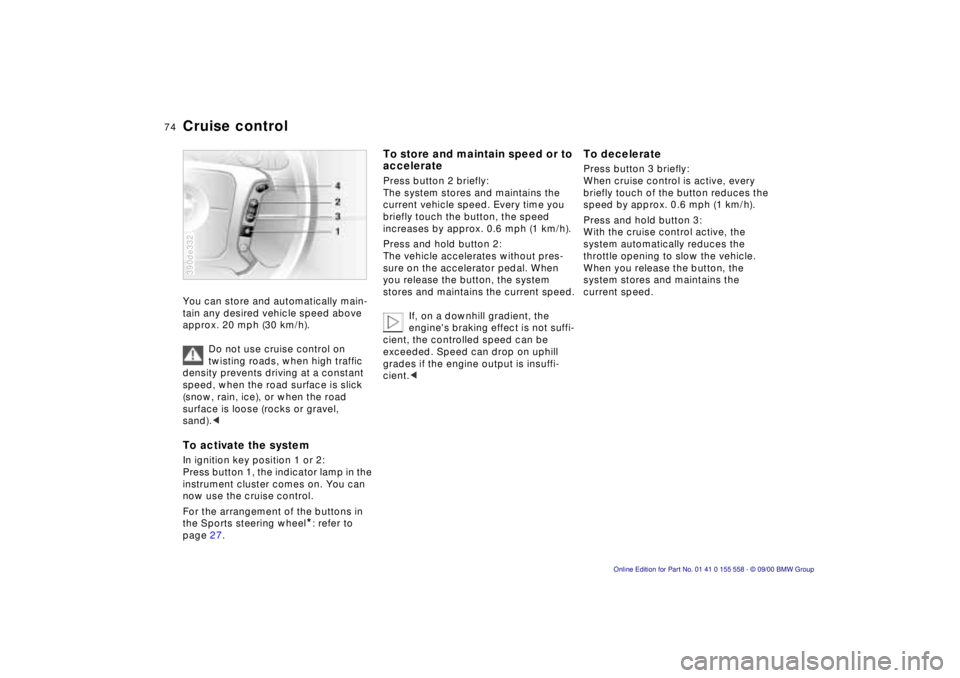
Press button 1, the indicator lamp in the
instrument cluster comes on. You can
now use the cruise control.
For the arrangement of the buttons in
the Sports steering wheel
*: refer to
page 27.
390de332
To store and maintain speed or to
accelerate
Press button 2 briefly:
The system stores and maintains the
current vehicle speed. Every time you
briefly touch the button, the speed
increases by approx. 0.6 mph (1 km/h).
Press and hold button 2:
The vehicle accelerates without pres-
sure on the accelerator pedal. When
you release the button, the system
stores and maintains the current speed.
If, on a downhill gradient, the
engine's braking effect is not suffi-
cient, the controlled speed can be
exceeded. Speed can drop on uphill
grades if the engine output is insuffi-
cient. <
To decelerate
Press button 3 briefly:
When cruise control is active, every
briefly touch of the button reduces the
speed by approx. 0.6 mph (1 km/h).
Press and hold button 3:
With the cruise control active, the
system automatically reduces the
throttle opening to slow the vehicle.
When you release the button, the
system stores and maintains the
current speed.
Page 75 of 223
Index
Data
Technology
Repairs
Car care
Controls
Overview
75nCruise control
To cancel the cruise control
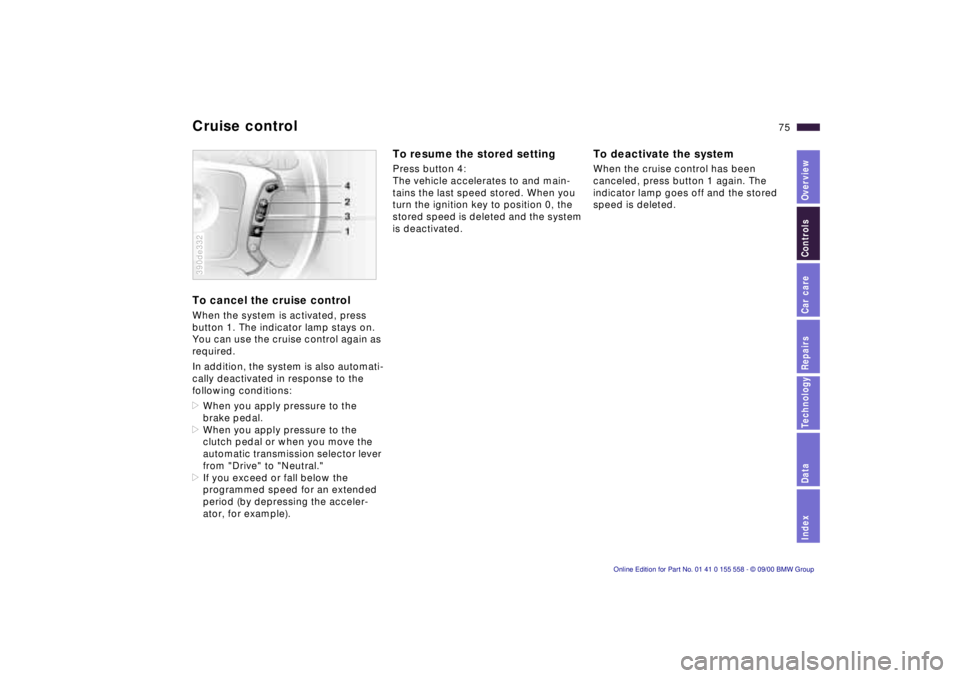
When the system is activated, press
button 1. The indicator lamp stays on.
You can use the cruise control again as
required.
In addition, the system is also automati-
cally deactivated in response to the
following conditions:
>When you apply pressure to the
brake pedal.
> When you apply pressure to the
clutch pedal or when you move the
automatic transmission selector lever
from "Drive" to "Neutral."
> If you exceed or fall below the
programmed speed for an extended
period (by depressing the acceler-
ator, for example).
390de332
To resume the stored setting
Press button 4:
The vehicle accelerates to and main-
tains the last speed stored. When you
turn the ignition key to position 0, the
stored speed is deleted and the system
is deactivated.
To deactivate the system
When the cruise control has been
canceled, press button 1 again. The
indicator lamp goes off and the stored
speed is deleted.
Page 76 of 223
76n
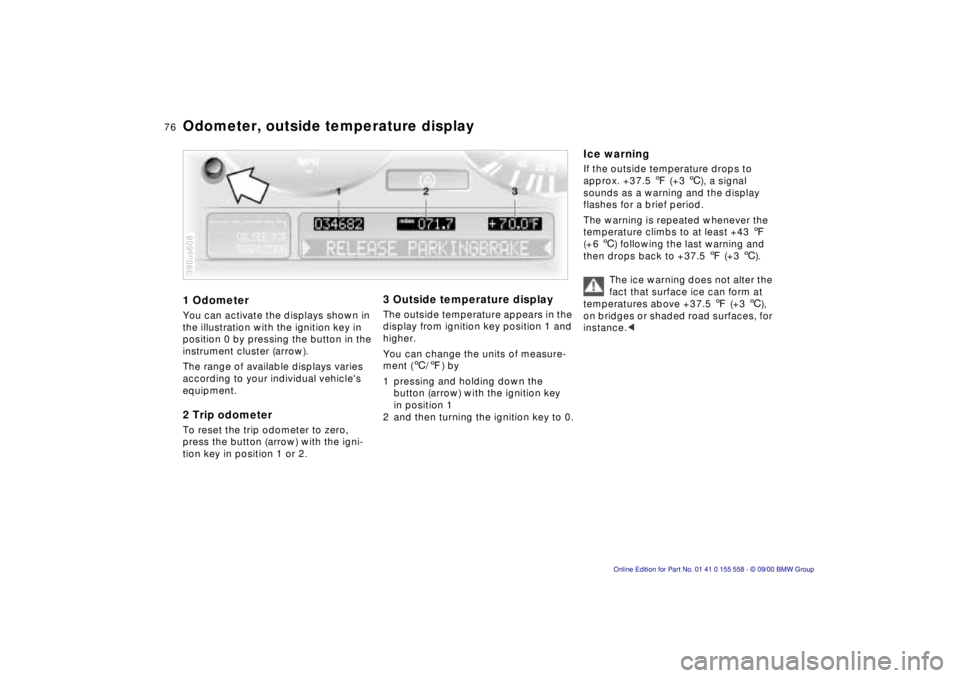
1 Odometer
You can activate the displays shown in
the illustration with the ignition key in
position 0 by pressing the button in the
instrument cluster (arrow).
The range of available displays varies
according to your individual vehicle's
equipment.
2 Trip odometer
To reset the trip odometer to zero,
press the button (arrow) with the igni-
tion key in position 1 or 2.
390us608
3 Outside temperature display
The outside temperature appears in the
display from ignition key position 1 and
higher.
You can change the units of measure-
ment ( 6/7 ) by
1 pressing and holding down the button (arrow) with the ignition key
in position 1
2 and then turning the ignition key to 0.
Ice warning
If the outside temperature drops to
approx. +37.5 7 (+3 6), a signal
sounds as a warning and the display
flashes for a brief period.
The warning is repeated whenever the
temperature climbs to at least +43 7
(+6 6) following the last warning and
then drops back to +37.5 7 (+3 6).
The ice warning does not alter the
fact that surface ice can form at
temperatures above +37.5 7 (+3 6),
on bridges or shaded road surfaces, for
instance. <
Odometer, outside temperature display
Page 79 of 223
Index
Data
Technology
Repairs
Car care
Controls
Overview
79nCheck Control
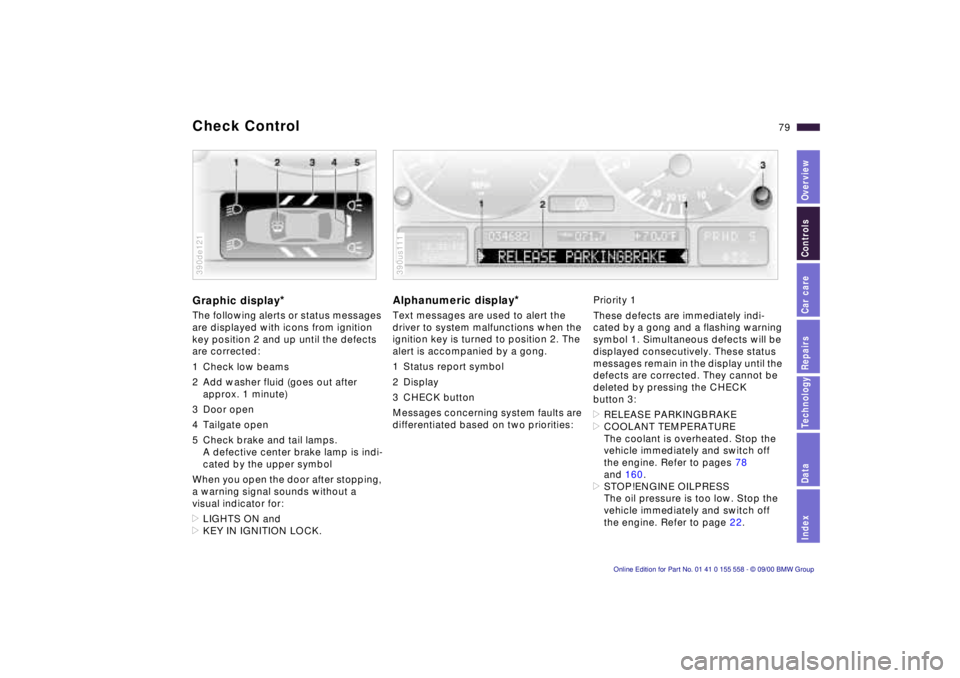
Graphic display*
The following alerts or status messages
are displayed with icons from ignition
key position 2 and up until the defects
are corrected:
1 Check low beams
2 Add washer fluid (goes out after
approx. 1 minute)
3 Door open
4 Tailgate open
5 Check brake and tail lamps. A defective center brake lamp is indi-
cated by the upper symbol
When you open the door after stopping,
a warning signal sounds without a
visual indicator for:
> LIGHTS ON and
> KEY IN IGNITION LOCK.
390de121
Alphanumeric display*
Text messages are used to alert the
driver to system malfunctions when the
ignition key is turned to position 2. The
alert is accompanied by a gong.
1 Status report symbol
2 Display
3 CHECK button
Messages concerning system faults are
differentiated based on two priorities:
390us111
Priority 1
These defects are immediately indi-
cated by a gong and a flashing warning
symbol 1. Simultaneous defects will be
displayed consecutively. These status
messages remain in the display until the
defects are corrected. They cannot be
deleted by pressing the CHECK
button 3:
> RELEASE PARKINGBRAKE
> COOLANT TEMPERATURE
The coolant is overheated. Stop the
vehicle immediately and switch off
the engine. Refer to pages 78
and 160.
> STOP!ENGINE OILPRESS
The oil pressure is too low. Stop the
vehicle immediately and switch off
the engine. Refer to page 22.