engine coolant BMW X5 4.4I 2001 Owners Manual
[x] Cancel search | Manufacturer: BMW, Model Year: 2001, Model line: X5 4.4I, Model: BMW X5 4.4I 2001Pages: 223, PDF Size: 2.66 MB
Page 10 of 223

Contents
Overview
Controls and features
Cockpit 16
Instrument cluster 18
Indicator and warning lamps 22
Multifunction steering wheel 26
Sports steering wheel 27
Hazard warning flashers 28
Warning triangle 28
First-aid kit 28
Refueling 29
Fuel specifications 30
Tire inflation pressure 30
Locks and security systems:
Keys34
Electronic vehicle immobilizer 35
Central locking system 36
Opening and closing – from the outside 36
Using the key 36
Using the remote control 37
Opening and closing – from the inside 40
Liftgate 41
Tailgate 41
Alarm system 43
Electric power windows 45
Sliding/Tilt sunroof with glass moonroof 46
Adjustments:
Seats48
Steering wheel 52
Mirrors 53
Seat, mirror and steering wheel memory 55
Car Memory, Key Memory 56
Passenger safety systems:
Safety belts57
Airbags 58
Transporting children safely 61
Driving:
Steering/Ignition lock64
Starting the engine 64
Switching off the engine 65
Parking brake 66
Manual transmission 67
Automatic transmission with Steptronic 68
Turn signal indicator/Headlamp flasher 70
Washer/Wiper system 71
Rear window defroster 73
Cruise control 74
Everything under control:
Odometer, outside temperature
display 76
Tachometer 77
Energy control 77
Fuel gauge 77
Coolant temperature gauge 78
Service Interval Display 78
Check Control 79
Computer 82
Multi-Information display (MID) 84
Digital clock in the MID 85
Computer in the MID 88
Contents
Page 12 of 223

Contents
Operation, care and maintenanceOwner service proceduresAdvanced technology
Under the hood:
Hood 151
Engine compartment 152
Washer fluid 156
Washer nozzles 156
Engine oil 157
Coolant 160
Brake fluid 161
Vehicle Identification Number 161
Care and maintenance:
The BMW Maintenance
System 162
Caring for your vehicle 163
Airbags 168
Vehicle storage 168
Laws and regulations:
Technical modifications 169
California Proposition 65 Warning 169
OBD interface socket 170
Replacement procedures:
Onboard tool kit174
Windshield wiper blades 174
Lamps and bulbs 175
Changing a wheel 180
Battery 185
Fuses 187
In case of electrical
malfunction:
Fuel filler door 188
Sliding/Tilt sunroof 188
Liftgate 188
Tailgate 189
Assistance, giving and
receiving:
Jump-starting 190
Towing the vehicle 191 Airbags
196
Adaptive Transmission Control (ATC) 196
Four-wheel drive 197
Dynamic Stability Control (DSC) 197
Radio reception 198
Safety belt tensioner 198
DSP sound system 199
Rearview mirrors with automatic dimmer 199
Rain sensor 200
Front axle 200
Integrated rear suspension 201
Level control system 201
Xenon lamps 202
Page 19 of 223

Index
Data
Technology
Repairs
Car care
Controls
Overview
19n
Instrument cluster
There are two versions, depending on
the equipment on your vehicle.
1 Fuel gauge with indicator lamp for fuel reserve 77
2 Indicator lamp for turn signals 25
3 Speedometer
4 Indicator lamp for high beams 25
5 Tachometer and Energy Control 77
6 Coolant temperature gauge with "Coolant temperature too high"
indicator 78
7 Indicator and warning lamps (clockwise) for:
>
Parking brake/Brake hydraulic
system, Dynamic Brake Control
(DBC) 22, 24
>
Antilock Brake System (ABS) 23
>
Brake pads24
>
Airbags23
>
Automatic transmission
*
24
>
Please fasten safety belts 23
>
Cruise control25
8 Selector lever and program display for automatic transmission
*
68
9 Service Interval Display 7810 Computer display –
operation via the turn signal lever,
refer to page 82:
>
Outside temperature
>
Average fuel consumption
>
Cruising range
>
Average speed
11 Indicator lamp for Dynamic Stability Control (DSC) 24
12 Indicator lamp for level control system
*
24
13 Odometer and trip odometer 76
14 Indicator for Check Control 79
15 Reset button for trip odometer 76
16 Indicator and warning lamps (clockwise) for:
>
Fog lamps 25
>
Battery charge current 22
>
Engine oil level/Engine oil
pressure22, 24
>
Engine Power Control 24
>
Service Engine Soon24
Page 21 of 223

Index
Data
Technology
Repairs
Car care
Controls
Overview
21n
Instrument cluster
*
There are two versions, depending on
the equipment on your vehicle. 1 Fuel gauge with indicator lamp for fuel reserve 77
2 Indicator lamp for turn signals 25
3 Speedometer
4 Indicator lamp for high beams 25
5 Tachometer and Energy Control 77
6 Engine coolant temperature gauge 78
7 Indicator and warning lamps (clockwise) for:
>
Parking brake 23
>
Brake hydraulic system/Dynamic
Brake Control (DBC) 22, 24
>
Antilock Brake System (ABS) 23
>
Airbags23
>
Please fasten safety belts 23
>
Cruise control25
8 CHECK button 79
9 Selector lever and program display for automatic transmission
*
68 10 Outside temperature display
76
11 Indicator lamp for Dynamic Stability Control (DSC) 24
12 Trip odometer 76
13 Indicator for Check Control
*
79
14 Odometer 76
15 Service Interval Display 78
16 Reset button for trip odometer 76
17 Indicator and warning lamps (clockwise) for:
>
Fog lamps 25
>
Battery charge current 22
>
Engine oil pressure22
>
Service Engine Soon 24
Page 32 of 223
32n
Locks and security systems:
Keys 34
Electronic vehicle immobilizer 35
Central locking system 36
Opening and closing – from the outside 36
Using the key 36
Using the remote control 37
Opening and closing – from the inside 40
Liftgate 41
Tailgate 41
Alarm system 43
Electric power windows 45
Sliding/Tilt sunroof with glass moonroof 46
Adjustments:
Seats 48
Steering wheel 52
Mirrors 53
Seat, mirror and steering wheel memory 55
Car Memory, Key Memory 56
Passenger safety systems:
Safety belts 57
Airbags 58
Transporting children safely 61Driving:
Steering/Ignition lock
64
Starting the engine 64
Switching off the engine 65
Parking brake 66
Manual transmission 67
Automatic transmission with Steptronic 68
Turn signal indicator/Headlamp flasher 70
Washer/Wiper system/Rain sensor 71
Rear window defroster 73
Cruise control 74
Everything under control:
Odometer, outside temperature display 76
Tachometer 77
Energy control 77
Fuel gauge 77
Coolant temperature gauge 78
Service Interval Display 78
Check Control 79
Computer 82
Multi-Information Display
(MID) 84
Digital clock in the MID 85
Computer in the MID 88
Controls
Page 78 of 223
78nCoolant temperature gauge Service Interval Display
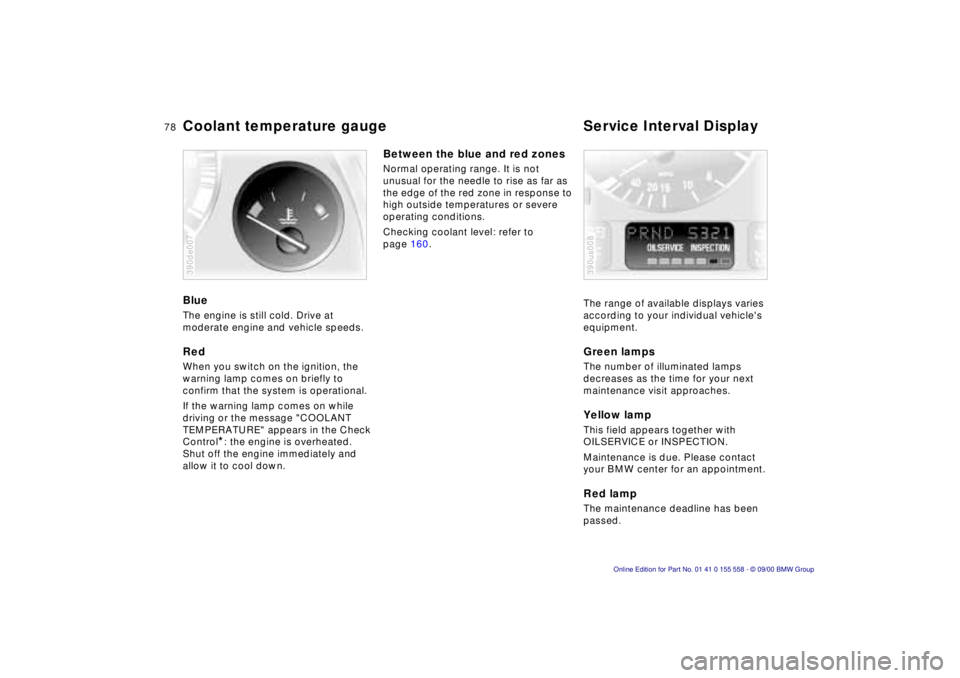
Blue
The engine is still cold. Drive at
moderate engine and vehicle speeds.
Red
When you switch on the ignition, the
warning lamp comes on briefly to
confirm that the system is operational.
If the warning lamp comes on while
driving or the message "COOLANT
TEMPERATURE" appears in the Check
Control
*: the engine is overheated.
Shut off the engine immediately and
allow it to cool down.
390de007
Between the blue and red zones
Normal operating range. It is not
unusual for the needle to rise as far as
the edge of the red zone in response to
high outside temperatures or severe
operating conditions.
Checking coolant level: refer to
page 160.
The range of available displays varies
according to your individual vehicle's
equipment.
Green lamps
The number of illuminated lamps
decreases as the time for your next
maintenance visit approaches.
Yellow lamp
This field appears together with
OILSERVICE or INSPECTION.
Maintenance is due. Please contact
your BMW center for an appointment.
Red lamp
The maintenance deadline has been
passed.
390us008
Page 79 of 223
Index
Data
Technology
Repairs
Car care
Controls
Overview
79nCheck Control
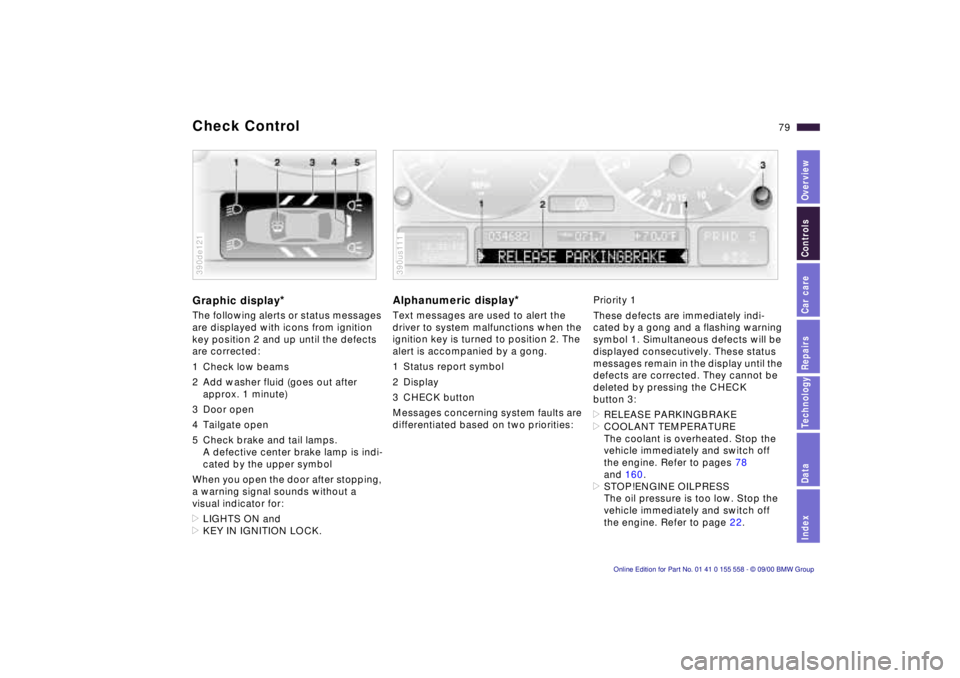
Graphic display*
The following alerts or status messages
are displayed with icons from ignition
key position 2 and up until the defects
are corrected:
1 Check low beams
2 Add washer fluid (goes out after
approx. 1 minute)
3 Door open
4 Tailgate open
5 Check brake and tail lamps. A defective center brake lamp is indi-
cated by the upper symbol
When you open the door after stopping,
a warning signal sounds without a
visual indicator for:
> LIGHTS ON and
> KEY IN IGNITION LOCK.
390de121
Alphanumeric display*
Text messages are used to alert the
driver to system malfunctions when the
ignition key is turned to position 2. The
alert is accompanied by a gong.
1 Status report symbol
2 Display
3 CHECK button
Messages concerning system faults are
differentiated based on two priorities:
390us111
Priority 1
These defects are immediately indi-
cated by a gong and a flashing warning
symbol 1. Simultaneous defects will be
displayed consecutively. These status
messages remain in the display until the
defects are corrected. They cannot be
deleted by pressing the CHECK
button 3:
> RELEASE PARKINGBRAKE
> COOLANT TEMPERATURE
The coolant is overheated. Stop the
vehicle immediately and switch off
the engine. Refer to pages 78
and 160.
> STOP!ENGINE OILPRESS
The oil pressure is too low. Stop the
vehicle immediately and switch off
the engine. Refer to page 22.
Page 81 of 223

Index
Data
Technology
Repairs
Car care
Controls
Overview
81nCheck Control
>TRANS. FAILSAFE PROG
Please consult the nearest BMW
center. Refer to page 70.
> CHECK BRAKE LININGS
Have the brake linings inspected by
your BMW center. Refer to page 141.
> CHECK COOLANT LEVEL
Coolant too low, top up at the next
opportunity. Refer to page 160.
> ENGINE FAILSAFE PROG
There is a fault in the engine's elec-
tronic control system.
You can continue to drive with
reduced engine output or engine
speed. Have the system checked by
your BMW center. Displays after completion of trip
All of the malfunctions registered during
the trip appear consecutively when the
ignition key is turned to position 0.
The following displays will appear when
appropriate:
>LIGHTS ON
> KEY IN IGNITION LOCK
> CHECK ENGINE OIL LEV
Add engine oil at the next opportunity
(next stop for fuel). Refer to
page 157.
This display appears when you open
the driver's door after parking the
vehicle. A supplementary gong is also
heard.
Status reports remain available for a
period of approx. three minutes after
the display goes out and the key is
removed from the ignition. Press the
CHECK button 3. If there were multiple
reports, press the CHECK button
repeatedly to view them all in
sequence.
To check the Check Control
Press the CHECK button 3 with the
ignition key in position 2: CHECK
CONTROL OK appears in the display.
No malfunctions are present in the
monitored systems.
Computer
You will find a description of the
computer in the Owner's Manual for
the Radio and Information System or
the Owner's Manual for the Onboard
Computer.
You can have the Check Control
and computer messages
displayed in a different language. <
Page 133 of 223
IndexDataTechnologyRepairsCar careControlsOverview
Overview
Controls and features
Operation, care
and maintenance
Owner service procedures
Technical data
Index Advanced technology
133n
Under the hood:
Hood151
Engine compartment152
Washer fluid156
Washer nozzles156
Engine oil157
Coolant160
Brake fluid161
Vehicle Identification
Number161
Care and maintenance:
The BMW Maintenance
System162
Caring for your vehicle163
Airbags168
Vehicle storage168
Laws and regulations:
Technical modifications169
California Proposition
65 Warning169
OBD interface socket170
Car care Special operating instructions:
Break-in procedures134
Driving your BMW X5135
General driving notes136
Catalytic converter136
Antilock Brake System
(ABS)137
Disc brakes140
Brake system141
Winter operation141
Power steering143
Level control system143
Cellular phone144
Radio reception144
Wheels and tires:
Tire inflation pressure145
Tire condition145
Tire replacement146
Tire rotation147
Wheel and tire
combinations148
Special features of winter
tires149
Snow chains149
Approved wheel and tire
specifications150
Page 135 of 223

IndexDataTechnologyRepairsCar careControlsOverview
135n
Driving your BMW X5 Your BMW is right at home on all roads
and byways – even where the pavement
ends. It combines permanent four-
wheel drive with the agility of a typical
passenger car. On bad roadsWhen you are driving on bad roads,
there are a few points which you should
strictly heed — for your own safety, for
that of your passengers, and for the
safekeeping of the vehicle:
>Familiarize yourself with the vehicle
before you begin driving. Do not take
risks with the vehicle under any
circumstances.
>Always adapt vehicle speed to road
conditions – the steeper and more
uneven the road surface is, the
slower the vehicle's speed should be.
>You can operate your vehicle on
uphill and downhill gradients with a
maximum slope of 50 %. If you intend
to drive on either an uphill or downhill
gradient of this steepness, check to
be sure in advance that the engine oil
and coolant levels are both near the
"MAX" mark. Refer to pages 157
and 160.
When driving down steep slopes, use
the Hill Descent Control (HDC). Refer
to page 95. Starting from a full stop is possible on
uphill gradients of up to 32 %.
The permitted side tilt is also 50 %.
>While driving, watch carefully for
obstacles such as rocks or holes. Try
to avoid these obstacles whenever
possible.
>On hill crests and bumpy roads, for
example, be careful to prevent the
body from "bottoming" (contact
between the body and the ground).
The ground clearance of the vehicle
is:
– 8 inches (200 mm) with up to four
passengers
– 7 inches (180 mm) fully loaded.
>Do not drive in water that is deeper
than 20 inches (50 cm). If you must
drive through water up to that depth,
drive at a walking speed and do not
stop.
After leaving the water, press on the
footbrake gently several times while
driving at a low speed. The brake
applications will help to dry the
brakes, thus preventing a reduction in
braking performance caused by the
moisture.
Back onto the paved road In recommending that you observe the
following points after driving on adverse
road surfaces, it is not as a "beauty
treatment" for your BMW. Instead, it is
intended for the maintenance of driving
safety:
>Clean accumulations of dirt from the
body and check the undercarriage for
damage.
>Clean mud, snow, ice and other
materials from the wheels and tires.
Check the tires for damage.
>Check to determine whether rocks,
gravel or accumulations of dirt on the
brake discs and calipers could influ-
ence braking performance. Remove
all such foreign objects.
>In order to clean the brake discs,
apply the footbrake gently several
times while driving at a low speed. Be
sure that following traffic is not
endangered by this.
>For cleaning the parking brake, apply
the lever slightly at approx. 25 mph
(40 km/h) and continue to drive for
approx. 200 yards (200 meters),
provided that traffic conditions allow
you to do so.