battery BMW X5 4.4I 2004 E53 User Guide
[x] Cancel search | Manufacturer: BMW, Model Year: 2004, Model line: X5 4.4I, Model: BMW X5 4.4I 2004 E53Pages: 200, PDF Size: 3.91 MB
Page 117 of 200
115n
OverviewControlsMaintenanceRepairsDataIndex
Roller sun blinds
*
Independent ventilation
*
Roller sun blinds for rear side
windows
*
Use the strap to pull out the blinds, then
hook them in the provided attachment.
With roller sun blinds attached, do
not open the windows during
travel. The blinds may otherwise be
damaged by the wind.<
You can use this system to ventilate the
interior and lower its temperature, using
the blower of the independent ventila-
tion or of the automatic climate control.
The independent ventilation is operated
via the MID Multi-Information Display,
refer to page 86 or via the onboard
computer, refer to the separate
Owner's Manual.
You can set two different times for the
system to start; it will remain active for
30 minutes. You can also switch it on
and off directly. Since the system uses
a substantial amount of electrical cur-
rent, you should refrain from switching
it on twice in succession without allow-
ing the battery to be recharged in nor-
mal operation between use.When a preselected activation time is
set, the independent ventilation is oper-
ational at outside temperatures above
607/166, or by direct switch activa-
tion.
The air enters the passenger compart-
ment through the vent outlets in the
instrument cluster, which can be
adjusted for both direction and airflow.
Therefore, the vent outlets must be
open for the independent ventilation to
operate.
Page 155 of 200
153n
OverviewControlsMaintenanceRepairsDataIndex
Proposition 65 Warning California laws require us to state the
following warning:
Engine exhaust and a wide variety
of automobile components and
parts, including components found in
the interior furnishings in a vehicle, con-
tain or emit chemicals known to the
State of California to cause cancer and
birth defects and reproductive harm. In
addition, certain fluids contained in
vehicles and certain products of com-
ponent wear contain or emit chemicals
known to the State of California to
cause cancer and birth defects or other
reproductive harm. Battery posts, ter-
minals and related accessories contain
lead and lead compounds. Wash your
hands after handling.
Used engine oil contains chemicals that
have caused cancer in laboratory ani-
mals. Always protect your skin by
washing thoroughly with soap and
water.<
Event Data Recorders Your vehicle may be equipped with one
or more sensing and diagnostic mod-
ules or a recording device capable of
recording or transmitting certain vehicle
data or information. In addition, if you
have a Subscription Service Agreement
for the BMW Assist system, certain
vehicle information may be transmitted
or recorded in order to provide such
services.
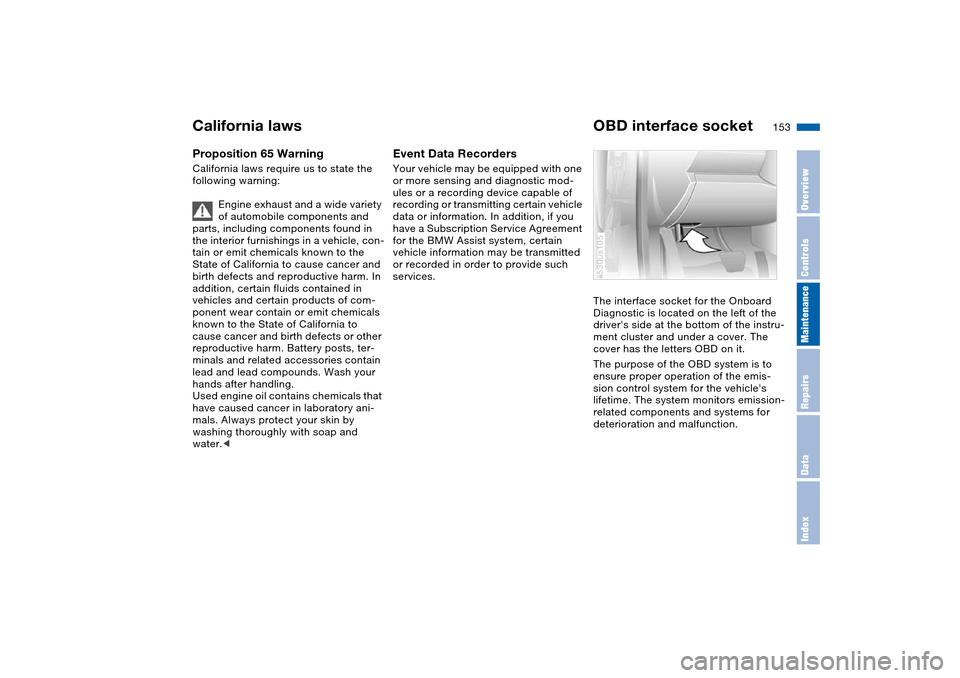
The interface socket for the Onboard
Diagnostic is located on the left of the
driver's side at the bottom of the instru-
ment cluster and under a cover. The
cover has the letters OBD on it.
The purpose of the OBD system is to
ensure proper operation of the emis-
sion control system for the vehicle's
lifetime. The system monitors emission-
related components and systems for
deterioration and malfunction.
530us105
California laws OBD interface socket
Page 161 of 200
159n
OverviewControlsMaintenanceRepairsDataIndex
Lamps and bulbs The lamps and bulbs make essential
contributions to the safety of your vehi-
cle. For this reason, follow the instruc-
tions below carefully when replacing a
bulb. If you are not familiar with any of
the procedures, consult your BMW
Sports Activity Vehicle center.
Never touch the glass on new
bulbs with your bare fingers, as
even minute amounts of contamination
will burn into the bulb's surface and
reduce its service life. Use a clean
cloth, paper napkin, or a similar mate-
rial, or hold the bulb by its metallic
base.<
A replacement bulb set is available from
your BMW Sports Activity Vehicle cen-
ter.
To prevent short circuits, before
working on any electrical system,
equipment or accessory you should
always switch it off and disconnect the
cable from the battery's negative termi-
nal before starting.
To avoid possible injury or equipment
damage when changing bulbs, observe
any instructions provided by the bulb
manufacturer.<
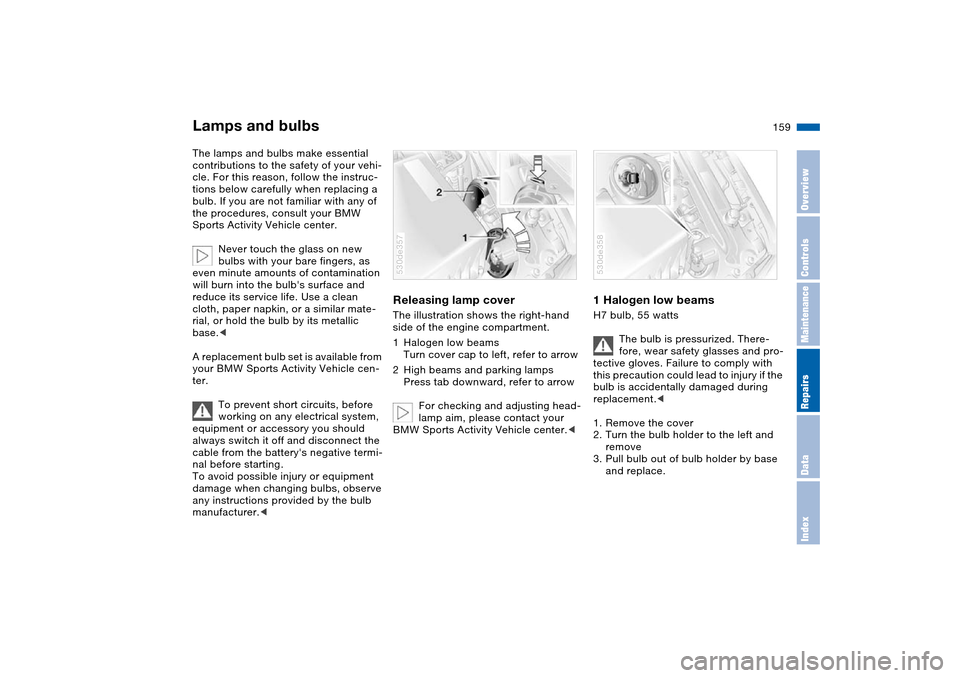
Releasing lamp cover The illustration shows the right-hand
side of the engine compartment.
1Halogen low beams
Turn cover cap to left, refer to arrow
2High beams and parking lamps
Press tab downward, refer to arrow
For checking and adjusting head-
lamp aim, please contact your
BMW Sports Activity Vehicle center.< 530de357
1 Halogen low beams H7 bulb, 55 watts
The bulb is pressurized. There-
fore, wear safety glasses and pro-
tective gloves. Failure to comply with
this precaution could lead to injury if the
bulb is accidentally damaged during
replacement.<
1. Remove the cover
2. Turn the bulb holder to the left and
remove
3. Pull bulb out of bulb holder by base
and replace.530de358
Page 170 of 200
168n
Changing a wheel Battery 10. Screw in the remaining lug bolts.
Tighten all the bolts securely in a
diagonal pattern
11. Lower the jack and remove it from
beneath the vehicle
12. Tighten the lug bolts in a diagonal
pattern
13. Check and correct the tire inflation
pressure at the earliest opportunity.
After mounting the spare wheel or
correcting the inflation pressure,
reinitialize the Flat Tire Monitor,
refer to page 100.
Protect valve stems and valves from dirt
using screw-on valve stem caps. Dirt in
the valve stems frequently leads to slow
leaks.
The vehicle jack is designed for
changing wheels only. Do not
attempt to raise another vehicle model
with it or to raise any load of any kind.
To do so could cause accidents and
personal injury.
To ensure safety, always have the lug
bolts checked with a calibrated torque
wrench as soon as possible to ensure
that they are tightened to the speci-
fied torque. The tightening torque is
101 lb-ft/140 Nm.<
Store the wheel and the tools in the
order opposite that for removal.
Before removing the support rod,
be sure that the tailgate is held
down firmly. If you fail to do so, it could
retract sharply upward and cause per-
sonal injury and vehicle damage.
After you remove the rod, close the tail-
gate carefully. Continue to hold it firmly
until it is completely closed.<
If light-alloy wheels other than Genuine
BMW light-alloy wheels have been
mounted, it may be necessary to use
different lug bolts for those wheels.
Replace the defective tire as soon as
possible and have the new wheel/tire
balanced.
Driving with spare wheel
Do not exceed a speed of
130 mph/210 km/h, as otherwise
accidents may occur due to tire dam-
age.<
With certain wheel-and-tire com-
binations the size of the spare
wheel differs from that of the other
wheels. However, to restore the original
state, the normal wheel should be
remounted as soon as possible.<
Battery posts, terminals and
related accessories contain lead
and lead compounds. Wash hands after
handling.<
Battery care The battery is maintenance-free, that is,
the original electrolyte will normally last
for the service life of the battery under
moderate climatic conditions. Your
BMW Sport Activity Vehicle center will
be glad to advise in all matters con-
cerning the battery.Charging battery Only charge the battery in the vehicle
via the terminals in the engine compart-
ment with the engine off. For correct
connections, refer to Jump-starting on
page 171. Disposal
Following replacement, have old
batteries disposed of by your
BMW Sports Activity Vehicle center or
hand them in to a recycling center.
Maintain the battery in an upright posi-
tion for transport and storage. Always
restrain the battery to prevent it from
tipping over during transport.<
Page 171 of 200
169n
OverviewControlsMaintenanceRepairsDataIndex
Battery FusesPower failure Following a temporary power failure,
e.g. in the case of a flat battery, some
equipment is subject to restricted use
and must be reinitialized. Individual set-
tings are also lost and must be updated
again:
>Seat, mirror and steering wheel
memory
The position must be newly stored,
refer to page 50
>Time and date
Have to be updated, refer to page 84
>Activation time for independent venti-
lation
Must be updated again, refer to
page 86.
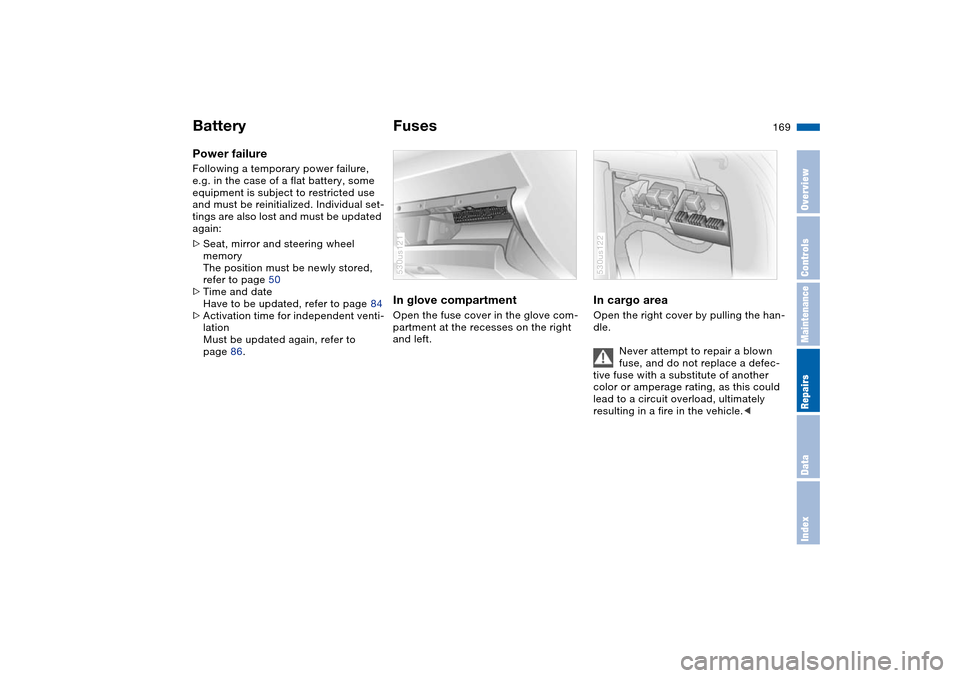
In glove compartment Open the fuse cover in the glove com-
partment at the recesses on the right
and left.530us121
In cargo area Open the right cover by pulling the han-
dle.
Never attempt to repair a blown
fuse, and do not replace a defec-
tive fuse with a substitute of another
color or amperage rating, as this could
lead to a circuit overload, ultimately
resulting in a fire in the vehicle.< 530us122
Page 173 of 200
171n
OverviewControlsMaintenanceRepairsDataIndex
Jump-starting When your battery is discharged you
can used two jumper cables to start
your vehicle with power from the bat-
tery in a second vehicle. You can also
use the same method to help start
another vehicle. Use only jumper cables
with fully-insulated clamp handles.
To avoid the risk of potentially
fatal injury, always avoid all con-
tact with electrical components while
the engine is running. Carefully observe
the following instructions to avoid per-
sonal injury and/or damage to one or
both vehicles.<
Preparing1. Check whether the battery of the
other vehicle has a voltage of
12 Volts and approximately the same
capacitance in Ah. This information
can be found on the battery
2. Switch off the engine of the support
vehicle
3. Switch off any electrical systems and
components in both vehicles.
Ensure that no contact exists
between the bodywork on the two
vehicles, otherwise there is a danger of
short circuits.
sparks, always observe this
sequence when connecting jumper
cables.<
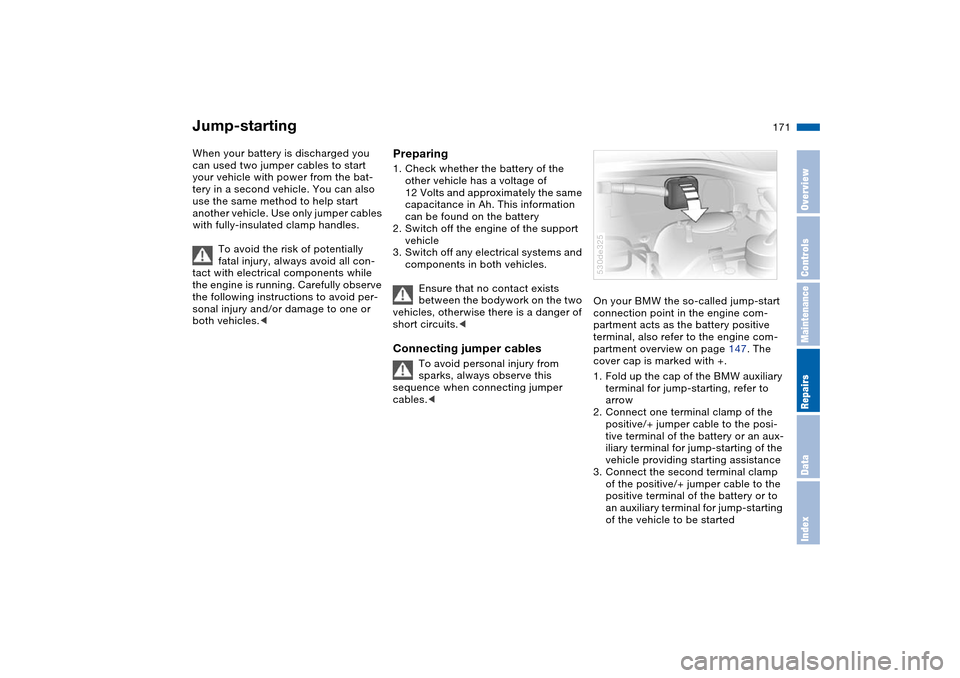
On your BMW the so-called jump-start
connection point in the engine com-
partment acts as the battery positive
terminal, also refer to the engine com-
partment overview on page 147. The
cover cap is marked with +.
1. Fold up the cap of the BMW auxiliary
terminal for jump-starting, refer to
arrow
2. Connect one terminal clamp of the
positive/+ jumper cable to the posi-
tive terminal of the battery or an aux-
iliary terminal for jump-starting of the
vehicle providing starting assistance
3. Connect the second terminal clamp
of the positive/+ jumper cable to the
positive terminal of the battery or to
an auxiliary terminal for jump-starting
of the vehicle to be started530de325
Page 174 of 200
172n
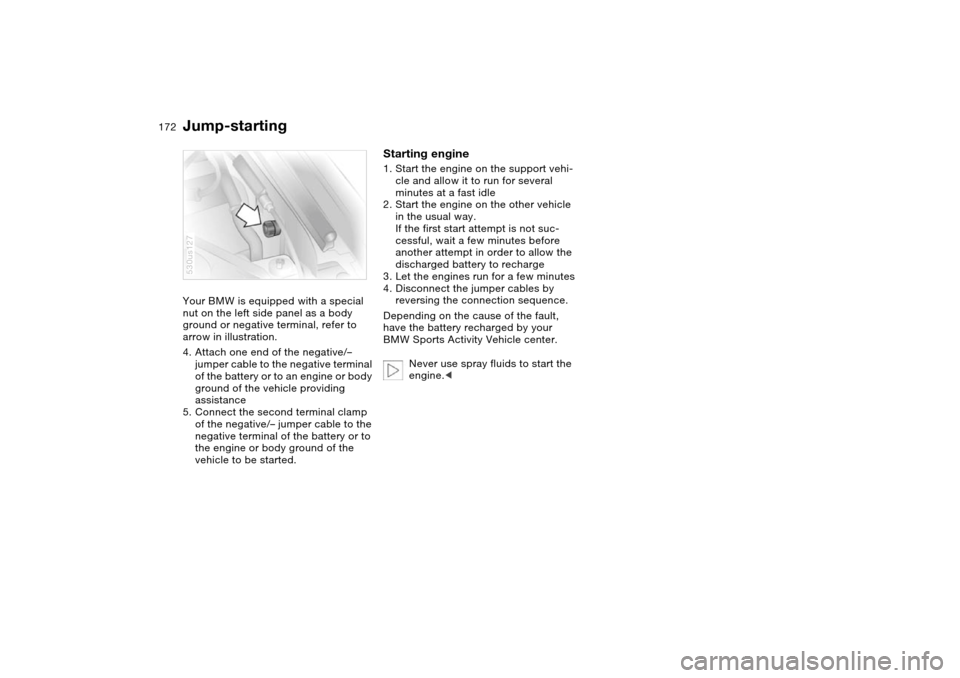
Jump-starting Your BMW is equipped with a special
nut on the left side panel as a body
ground or negative terminal, refer to
arrow in illustration.
4. Attach one end of the negative/–
jumper cable to the negative terminal
of the battery or to an engine or body
ground of the vehicle providing
assistance
5. Connect the second terminal clamp
of the negative/– jumper cable to the
negative terminal of the battery or to
the engine or body ground of the
vehicle to be started.530us127
Starting engine1. Start the engine on the support vehi-
cle and allow it to run for several
minutes at a fast idle
2. Start the engine on the other vehicle
in the usual way.
If the first start attempt is not suc-
cessful, wait a few minutes before
another attempt in order to allow the
discharged battery to recharge
3. Let the engines run for a few minutes
4. Disconnect the jumper cables by
reversing the connection sequence.
Depending on the cause of the fault,
have the battery recharged by your
BMW Sports Activity Vehicle center.
Never use spray fluids to start the
engine.<
Page 187 of 200
Everything from A to Z
185n
OverviewControlsMaintenanceRepairsDataIndex
Average fuel
consumption 82, 89
Average speed 82, 90
Avoiding alarms 39
Avoiding fire damage 138
Axle loads, refer to
Weights 180
B
Backrests, refer to Adjusting
seats 45, 46
Backup lamps 67
bulb replacement 161
Battery 168
disposal 168
indicator lamp 19
jump-starting 171
power failure 169
remote control 30
Belts, refer to Safety belts 49
Beverage holders, refer to
Cup holders 120
Black ice, refer to Ice
warning 75
Blower
air conditioner 107
automatic climate
control 111
BMW High Performance
Synthetic Oil 149BMW Maintenance
System 152
Bore, refer to Engine
specifications 178
Bottle holder, refer to Cup
holders 120
Brake fluid 151
adding 151
indicator/warning lamp 19
level 151
replacing 151
Brake Force Display 99
Brake hydraulic system 139
indicator/warning
lamp 19, 20
Brake lamps, bulb
replacement 161
Brake pads 139
breaking-in 136
indicator lamp 19, 21
Brake rotors
brake system 139
breaking-in 136
Brake system 139
brake fluid level 139
brake pads 139
breaking-in 136
disk brakes 139
Brake wear warning
brake pads 139
indicator lamp 19, 21Brakes 139
ABS 93
brake fluid 151
breaking-in 136
indicator/warning
lamp 19, 20
Break-in procedures 136
Breaking-in differential 136
C
California laws
Event Data Recorders 153
Proposition 65
Warning 153
California Proposition 65
Warning 153
Capacities 181
Car care, refer to Caring for
your vehicle brochure
Car jack points 167
Car keys, refer to Keys 30
Car radio, refer to separate
Owner's Manual
Car wash, refer to Caring for
your vehicle brochure
Car-care products, refer to
Caring for your vehicle
brochure
Care, refer to Caring for your
vehicle brochureCargo area 124
capacity 180
cover, refer to Roll-up
cover 125
emergency operation,
refer to Unlocking
manually 35, 37
floor cover 127
increasing volume 124
lamps 105
lid, refer to Liftgate/
tailgate 35, 36
opening from inside 35
opening from outside 35
opening, remote
control 31
opening/closing, refer to
Liftgate 35
opening/closing, refer to
Tailgate 36
volume 180
volume, refer to
Weights 180
Cargo area lamps 105
Cargo bay, refer to Cargo
area 124
Cargo floor, pull-out 128
Cargo loading 131
Cargo-area partition net 125
Caring for leather, refer to
Caring for your vehicle
brochure
Page 189 of 200
Everything from A to Z
187n
OverviewControlsMaintenanceRepairsDataIndex
Courtesy lighting 105
Cruise control 73
buttons on steering
wheel 23
indicator lamp 22
Cruising range 82, 89
Cup holders 120
Curb weight, refer to
Weights 180
Current consumption, refer
to Energy Control 76
Cylinders, refer to Engine
data 178
D
Data, technical 178
dimensions 179
engine 178
filling capacities 181
weights 180
Date
also refer to Owner's
Manual for Onboard
Computer
calling up 84
changing 84
Daytime driving lamps 102
Deactivating the alarm in an
emergency 91Defect
door lock 33
driver's door 33
fuel filler door 24
liftgate 35
panorama glass roof 42
tailgate 37
Defective lamp 159
Defrost position, refer to
Defrosting
windows 108, 111
Defrosting
windows 108, 111
air conditioner 108
automatic climate
control 111
Defrosting windows and
removing condensation
air conditioner 108
automatic climate
control 111
Defrosting windshield, refer
to Defrosting
windows 108, 111
Digital clock 84
also refer to Owner's
Manual for Onboard
Computer
Dimensions 179
Dipstick, engine oil 148Directional indicators, refer
to Turn signals 70
Disk brakes 139
Displacement, refer to
Engine specifications 178
Display lighting, refer to
Instrument lighting 104
Displays, refer to Instrument
cluster 15, 17, 18
Disposal
used oil 149
vehicle battery 168
Distance 88
Distance to destination 88
Distance warning 92
Divided rear seat backrest,
refer to Folding rear seat
back 124
Door keys 30
Door lock 33
DOT Quality Grades 142
Draft-free
ventilation 108, 113
Driving lamps, refer to
Parking lamps/low
beams 102
Driving notes
break-in procedures 136
driving hints 137, 138
Driving on bad roads 137
Driving stability control 94Driving your X5 137
Dry air, refer to Air
conditioning 107, 112
DSC Dynamic Stability
Control 94
indicator lamp 22
E
Electric steering wheel
adjustment 52
Electrical malfunction
door lock 33
driver's door 33
fuel filler door 24
liftgate 35
panorama glass roof 42
tailgate 37
Electronic transmission
control module 69
Emergency call 170
Emergency operation, refer
to Manual operation
driver's door 33
fuel filler door 24
liftgate 35
panorama glass roof 42
tailgate 37
Energy Control 76
Energy-conscious driving,
refer to Energy Control 76
Page 193 of 200
Everything from A to Z
191n
OverviewControlsMaintenanceRepairsDataIndex
Microphone for telephone,
refer to Telephone 118
Microphone, refer to
Telephone 118
MID Multi-Information
Display 83
Mirror
automatic curb monitor 51
mirror heating 54
mirror memory, refer to
Seat, mirror and steering
wheel memory 50
Mirror dimming feature 55
Mirrors 54
Multifunction switch
turn signals/headlamp
flasher 70
washer/wiper system 71
Multi-Information Display
MID 83
N
Navigation system, refer to
Owner's Manual for
Onboard Computer/Radio
and Navigation System
Neck support, refer to Head
restraints 47
Nozzles, refer to
Ventilation 108, 113O
OBD interface socket 153
Odometer 75
Oil
additives, refer to Adding
engine oil 149
consumption 148
dipstick 148
filling capacity 181
specified engine oil
grades 149
Oil change interval, refer to
Service and Warranty
Information Booklet, US
models or Warranty and
Service Guide Booklet,
Canadian models
Oil pressure, indicator/
warning lamp 19
OILSERVICE 78
Old batteries, refer to
Disposal 168
Onboard computer, refer to
separate Owner's Manual
Onboard tool kit 158
Opening and closing
from inside 34
using the door lock 33
using the remote
control 31
Output, refer to Engine
specifications 178Outside temperature
display 75
changing unit of
measure 75, 82
in computer 82
P
Panorama glass roof 41
automatic opening and
closing 41
closing in the event of an
electrical defect 42
comfort position 41
convenience operation 33
initializing 42
power failure 42
remote control 31
Park Distance Control
PDC 92
Parking aid, refer to PDC
Park Distance Control 92
Parking lamps 102
bulb replacement 160
Parking lamps/low
beams 102
Parking, vehicle 65
Parts and accessories, refer
to Your individual vehicle 8
Passenger-side mirror tilt
function 51
Pathway lighting 102PDC Park Distance
Control 92
Permissible axle load, refer
to Weights 180
Permissible gross weight,
refer to Weights 180
Plastic, refer to Caring for
your vehicle brochure
Pollen, refer to
Microfilter 108
Microfilter/activated-
charcoal filter 114
Power failure, battery 169
Power rear-seat
backrests 48
Power seat 46
Power windows 39
safety switch 40
Pressure monitoring,
tires 100
Flat Tire Monitor 100
Pressure, tires 140
Producing tire inflation
pressure 140
Programming settings, refer
to Vehicle Memory, Key
Memory 63
Protective function
panorama glass roof 42
Pull-out cargo floor 128