door lock BMW X5 XDRIVE 48I 2010 E70 Owner's Guide
[x] Cancel search | Manufacturer: BMW, Model Year: 2010, Model line: X5 XDRIVE 48I, Model: BMW X5 XDRIVE 48I 2010 E70Pages: 300, PDF Size: 12.41 MB
Page 104 of 300
Lamps
102
Lamps
Parking lamps/low beams
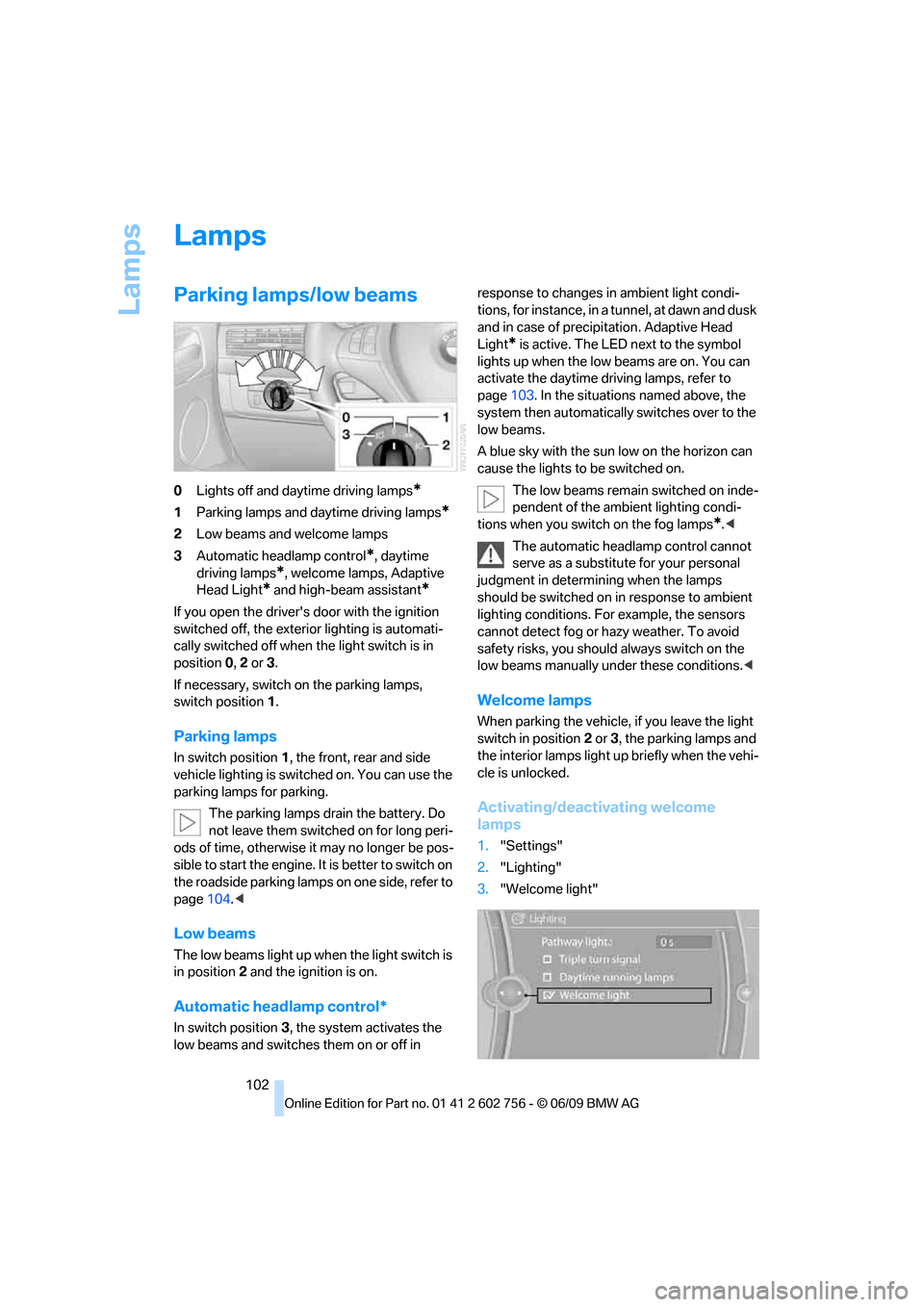
0Lights off and daytime driving lamps*
1Parking lamps and daytime driving lamps*
2Low beams and welcome lamps
3Automatic headlamp control
*, daytime
driving lamps
*, welcome lamps, Adaptive
Head Light
* and high-beam assistant*
If you open the driver's door with the ignition
switched off, the exterior lighting is automati-
cally switched off when the light switch is in
position0, 2 or 3.
If necessary, switch on the parking lamps,
switch position1.
Parking lamps
In switch position1, the front, rear and side
vehicle lighting is switched on. You can use the
parking lamps for parking.
The parking lamps drain the battery. Do
not leave them switched on for long peri-
ods of time, otherwise it may no longer be pos-
sible to start the engine. It is better to switch on
the roadside parking lamps on one side, refer to
page104.<
Low beams
The low beams light up when the light switch is
in position 2 and the ignition is on.
Automatic headlamp control*
In switch position3, the system activates the
low beams and switches them on or off in response to changes in ambient light condi-
tions, for instance, in a tunnel, at dawn and dusk
and in case of precipitation. Adaptive Head
Light
* is active. The LED next to the symbol
lights up when the low beams are on. You can
activate the daytime driving lamps, refer to
page103. In the situations named above, the
system then automatically switches over to the
low beams.
A blue sky with the sun low on the horizon can
cause the lights to be switched on.
The low beams remain switched on inde-
pendent of the ambient lighting condi-
tions when you switch on the fog lamps
*.<
The automatic headlamp control cannot
serve as a substitute for your personal
judgment in determining when the lamps
should be switched on in response to ambient
lighting conditions. For example, the sensors
cannot detect fog or hazy weather. To avoid
safety risks, you should always switch on the
low beams manually under these conditions.<
Welcome lamps
When parking the vehicle, if you leave the light
switch in position2 or3, the parking lamps and
the interior lamps light up briefly when the vehi-
cle is unlocked.
Activating/deactivating welcome
lamps
1."Settings"
2."Lighting"
3."Welcome light"
ba8_e70ag.book Seite 102 Freitag, 5. Juni 2009 11:42 11
Page 217 of 300
215
Entertainment
Reference
At a glance
Controls
Driving tips Communications
Navigation
Mobility
BMW Assist
BMW Assist*
BMW Assist provides a number of different ser-
vices. For example, the position data of the
vehicle can be transmitted to the BMW Assist
Response Center when an Emergency
Request
* is sent.
Many BMW Assist services depend on the indi-
vidually agreed contract.
After your contract has expired, the BMW
Assist system will be deactivated by the BMW
Assist Response Center without you having to
visit a BMW Sports Activity Vehicle Center.
After the BMW Assist system has been deacti-
vated, no BMW Assist service will be available.
The BMW Assist system can be reactivated by
a BMW Sports Activity Vehicle Center after a
new contract has been signed.
Requirements
>The installed BMW Assist system is logged
in on a wireless communications network.
This network must be capable of transmit-
ting the services.
>To transmit position data, the vehicle must
be able to determine the current position.
>To activate and update BMW Assist, a
GPS signal must be available.
>The BMW Assist service contract was
signed with your BMW Sports Activity Vehi-
cle Center or with the BMW Assist
Response Center. Enabling must have
been completed.
>BMW Assist is activated.
Services offered
>Emergency Request: when you press the
SOS button, a connection to the BMW
Assist Response Center is established. The
BMW Assist Response Center then speaks
with you and takes further steps to help you.>Automatic Collision Notification: under cer-
tain conditions, a connection is established
to the BMW Assist Response Center after a
serious accident. If possible, the BMW
Assist Response Center then speaks with
you and takes further steps to help you.
>Enhanced Roadside Assistance: BMW
Roadside Assistance
* can be contacted if
assistance is needed in the event of a
breakdown. If possible, the vehicle and
position data are transmitted in the process.
>Customer Relations: connection to Cus-
tomer Relations for information on all
aspects of your vehicle.
>TeleServices: data on your vehicle's service
status or required inspections are transmit-
ted to your BMW Sports Activity Vehicle
Center, either automatically before a ser-
vice due date or when you request a BMW
service appointment.
>Remote Door Unlock: the BMW Assist
Response Center provides assistance if, for
example, the remote control is not available
and the vehicle needs to be opened.
>Stolen Vehicle Recovery: after you report to
the police that your vehicle was stolen, the
BMW Assist Response Center can deter-
mine its position.
>In addition, the optional Convenience Plan
offers a concierge service and information
on route planning, the traffic situation and
weather. Using Critical Calling, a limited
number of calls can be made via the BMW
Assist Response Center, for example if the
mobile phone is not available or discharged.
Press the SOS button to contact the BMW
Assist Response Center.
>You can also access the BMW Assist con-
cierge service via the Internet.
*
ba8_e70ag.book Seite 215 Freitag, 5. Juni 2009 11:42 11
Page 226 of 300
Refueling
224
Refueling
Switch off the engine before refueling.
When handling fuel, always observe all
applicable precautionary measures and regula-
tions. Never transport reserve fuel containers in
the vehicle. These could become leaky and
cause an explosion or a fire in an accident.<
Fuel filler door
Opening
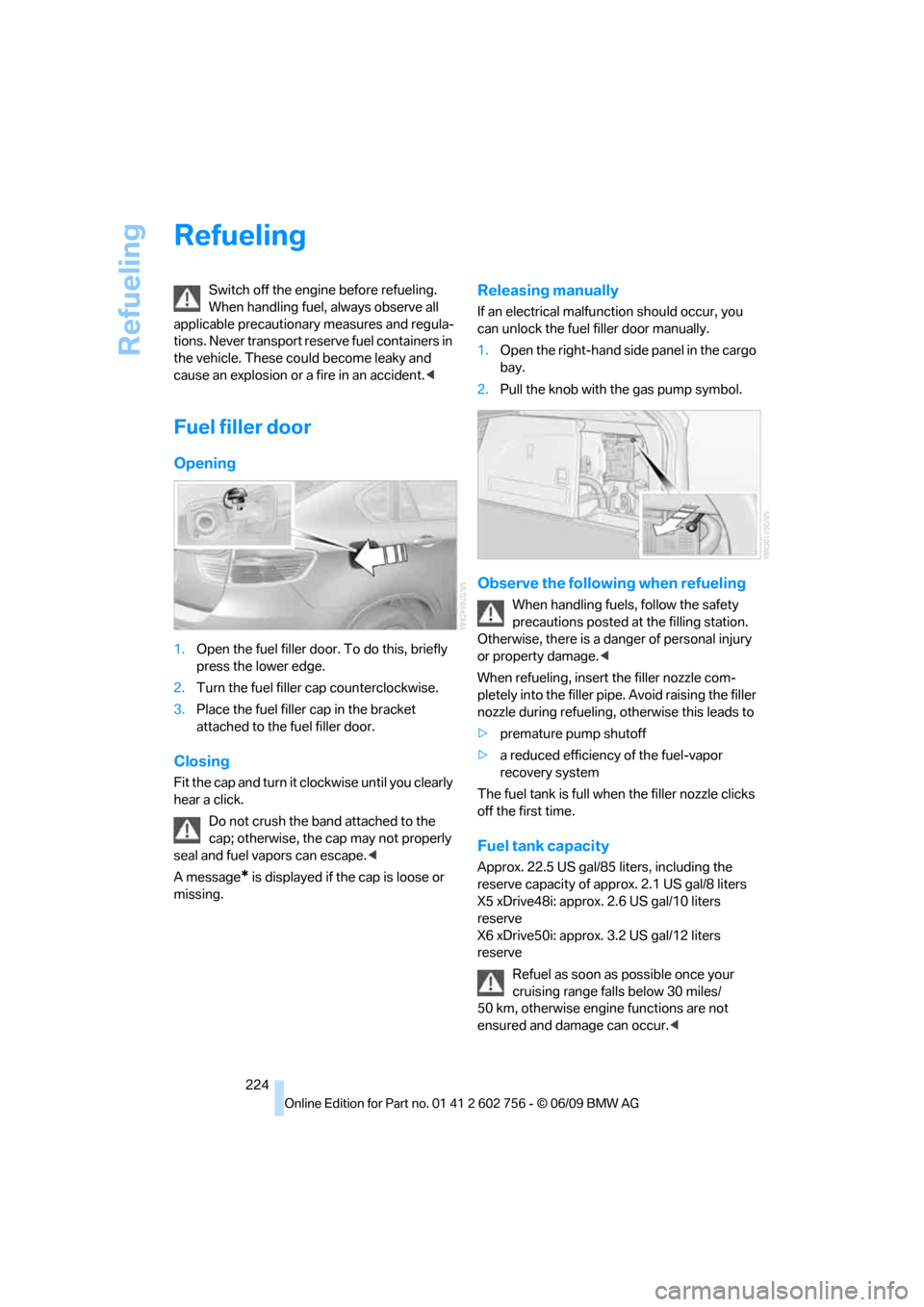
1.Open the fuel filler door. To do this, briefly
press the lower edge.
2.Turn the fuel filler cap counterclockwise.
3.Place the fuel filler cap in the bracket
attached to the fuel filler door.
Closing
Fit the cap and turn it clockwise until you clearly
hear a click.
Do not crush the band attached to the
cap; otherwise, the cap may not properly
seal and fuel vapors can escape.<
A message
* is displayed if the cap is loose or
missing.
Releasing manually
If an electrical malfunction should occur, you
can unlock the fuel filler door manually.
1.Open the right-hand side panel in the cargo
bay.
2.Pull the knob with the gas pump symbol.
Observe the following when refueling
When handling fuels, follow the safety
precautions posted at the filling station.
Otherwise, there is a danger of personal injury
or property damage.<
When refueling, insert the filler nozzle com-
pletely into the filler pipe. Avoid raising the filler
nozzle during refueling, otherwise this leads to
>premature pump shutoff
>a reduced efficiency of the fuel-vapor
recovery system
The fuel tank is full when the filler nozzle clicks
off the first time.
Fuel tank capacity
Approx. 22.5 US gal/85 liters, including the
reserve capacity of approx. 2.1 US gal/8 liters
X5 xDrive48i: approx. 2.6 US gal/10 liters
reserve
X6 xDrive50i: approx. 3.2 US gal/12 liters
reserve
Refuel as soon as possible once your
cruising range falls below 30 miles/
50 km, otherwise engine functions are not
ensured and damage can occur.<
ba8_e70ag.book Seite 224 Freitag, 5. Juni 2009 11:42 11
Page 248 of 300
Care
246
Care
Car-care products
For the cleaning and care of your vehicle, BMW
recommends using only products that BMW
has approved for this purpose.
Regular cleaning and care make a significant
contribution to retaining your BMW's value.
The BMW Sports Activity Vehicle Center will be
happy to consult you on products and services
for the cleaning and care of your BMW.
Genuine BMW Care Products are materi-
als tested, laboratory tested, and tested in
actual use. They offer optimum care and pro-
tection for your vehicle.<
Do not use cleaners that contain alcohol
or solvents; they can damage your vehi-
cle.<
Cleaning agents can contain substances
that are dangerous or pose health risks.
You should therefore heed the warnings and
hazard indications on the packaging. Open the
doors or windows on your vehicle whenever
cleaning the interior. Make sure there is suffi-
cient ventilation in enclosed spaces. Use only
products that are formulated for vehicle clean-
ing.<
Exterior care
Washing your vehicle
In the winter months, it is especially
important to ensure that the vehicle is
washed on a regular basis. Otherwise, signifi-
cant soiling and road salt can cause damage to
the vehicle.<
After washing the vehicle, apply the
brakes briefly to dry them. Failure to do so
may lead to a reduction in braking efficiency and
also to corrosion of the brake rotors.<
Car washes
Give preference to cloth car washes.
Before driving into the car wash, make sure that
it is suitable for your BMW. Pay attention to the
following points:
>Dimensions of your vehicle, refer to
page269.
>If necessary, fold in exterior mirrors, refer to
page52.
>Maximum permissible tire width.
Avoid car washes with guide rail heights
over 4 in/10 cm, otherwise there is dan-
ger of damaging chassis parts.<
Preparations for driving into the car wash:
>Deactivate rain sensor
* to prevent
unwanted wiper activation.
>BMW X5: deactivate rear window wiper and
protect it from damage. Take appropriate
protective measures; inquiring with the car
wash operator as needed.
>Remove add-on parts such as spoilers or
phone antennas if they risk being damaged.
Before driving into the car wash, observe the
following so that the vehicle is able to roll:
1.Insert the remote control into the ignition
lock, even with comfort access.
2.Shift into transmission position N.
3.Release the parking brake.
4.Deactivate Automatic Hold, refer to
page62.
5.Switch off the engine.
6.Leave the remote control in the ignition lock
so that the vehicle can roll.
Mixed tires*
Before driving into a car wash, make sure
that the vehicle width is not too large for
the car wash, as otherwise the vehicle and the
car wash could be damaged.<
ba8_e70ag.book Seite 246 Freitag, 5. Juni 2009 11:42 11
Page 279 of 300
Reference 277
At a glance
Controls
Driving tips
Communications
Navigation
Entertainment
Mobility
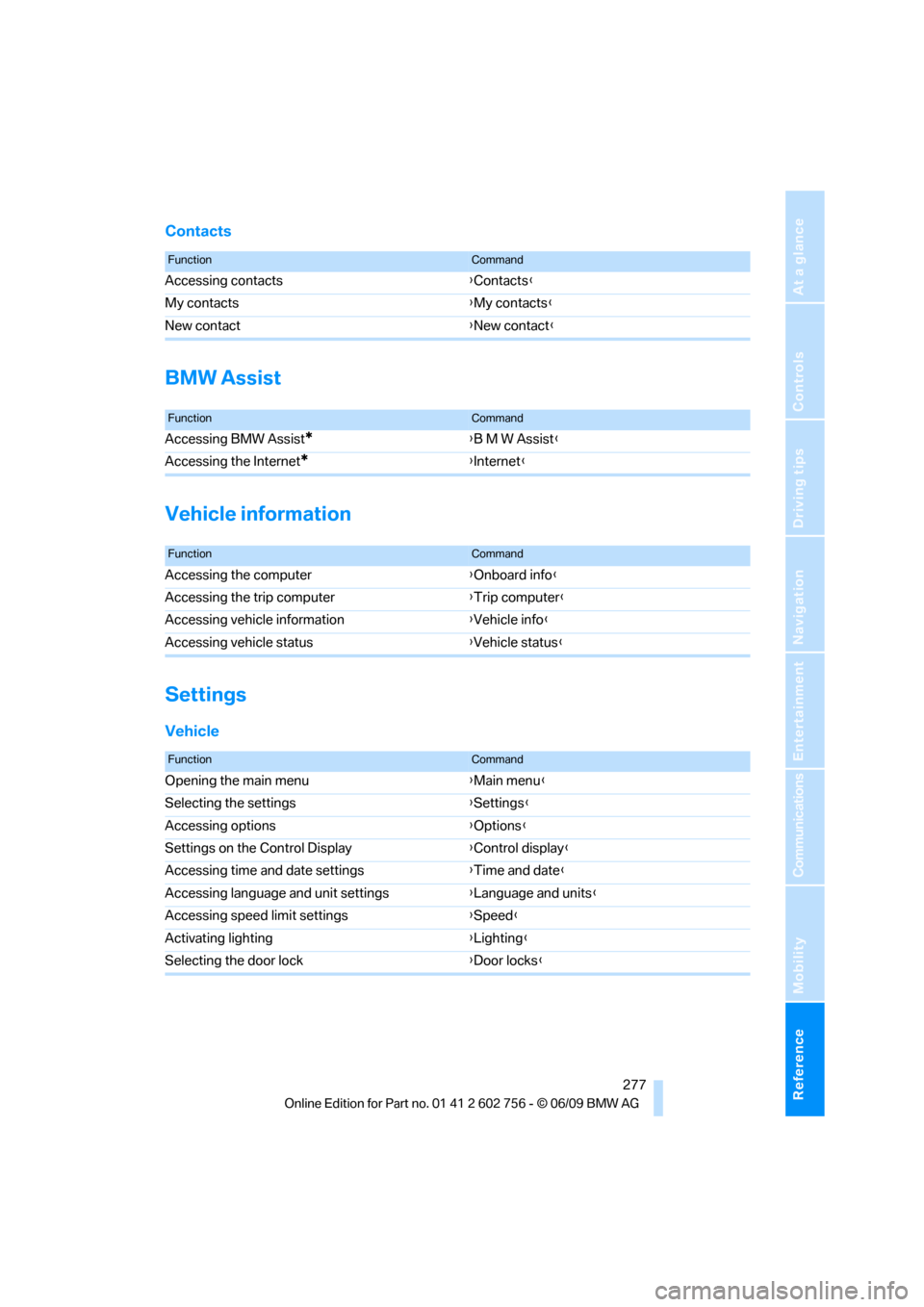
Contacts
BMW Assist
Vehicle information
Settings
Vehicle
FunctionCommand
Accessing contacts{Contacts}
My contacts{My contacts}
New contact{New contact}
FunctionCommand
Accessing BMW Assist*{B M W Assist}
Accessing the Internet
*{Internet}
FunctionCommand
Accessing the computer{Onboard info}
Accessing the trip computer{Trip computer}
Accessing vehicle information{Vehicle info}
Accessing vehicle status{Vehicle status}
FunctionCommand
Opening the main menu{Main menu}
Selecting the settings{Settings}
Accessing options{Options}
Settings on the Control Display{Control display}
Accessing time and date settings{Time and date}
Accessing language and unit settings{Language and units}
Accessing speed limit settings{Speed}
Activating lighting{Lighting}
Selecting the door lock{Door locks}
ba8_e70ag.book Seite 277 Freitag, 5. Juni 2009 11:42 11
Page 282 of 300
Everything from A to Z
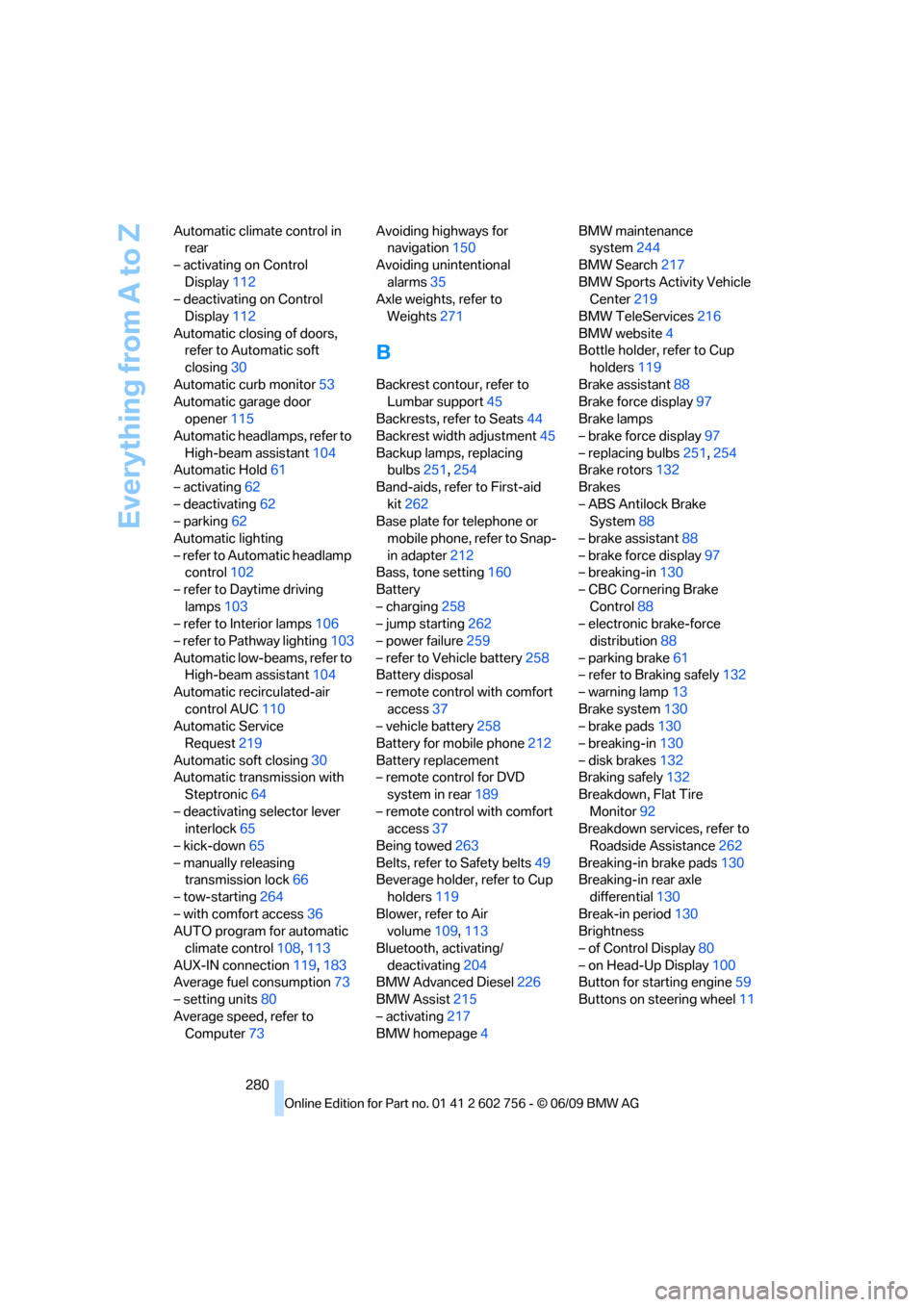
280 Automatic climate control in
rear
– activating on Control
Display112
– deactivating on Control
Display112
Automatic closing of doors,
refer to Automatic soft
closing30
Automatic curb monitor53
Automatic garage door
opener115
Automatic headlamps, refer to
High-beam assistant104
Automatic Hold61
– activating62
– deactivating62
– parking62
Automatic lighting
– refer to Automatic headlamp
control102
– refer to Daytime driving
lamps103
– refer to Interior lamps106
– refer to Pathway lighting103
Automatic low-beams, refer to
High-beam assistant104
Automatic recirculated-air
control AUC110
Automatic Service
Request219
Automatic soft closing30
Automatic transmission with
Steptronic64
– deactivating selector lever
interlock65
– kick-down65
– manually releasing
transmission lock66
– tow-starting264
– with comfort access36
AUTO program for automatic
climate control108,113
AUX-IN connection119,183
Average fuel consumption73
– setting units80
Average speed, refer to
Computer73Avoiding highways for
navigation150
Avoiding unintentional
alarms35
Axle weights, refer to
Weights271
B
Backrest contour, refer to
Lumbar support45
Backrests, refer to Seats44
Backrest width adjustment45
Backup lamps, replacing
bulbs251,254
Band-aids, refer to First-aid
kit262
Base plate for telephone or
mobile phone, refer to Snap-
in adapter212
Bass, tone setting160
Battery
– charging258
– jump starting262
– power failure259
– refer to Vehicle battery258
Battery disposal
– remote control with comfort
access37
– vehicle battery258
Battery for mobile phone212
Battery replacement
– remote control for DVD
system in rear189
– remote control with comfort
access37
Being towed263
Belts, refer to Safety belts49
Beverage holder, refer to Cup
holders119
Blower, refer to Air
volume109,113
Bluetooth, activating/
deactivating204
BMW Advanced Diesel226
BMW Assist215
– activating217
BMW homepage4BMW maintenance
system244
BMW Search217
BMW Sports Activity Vehicle
Center219
BMW TeleServices216
BMW website4
Bottle holder, refer to Cup
holders119
Brake assistant88
Brake force display97
Brake lamps
– brake force display97
– replacing bulbs251,254
Brake rotors132
Brakes
– ABS Antilock Brake
System88
– brake assistant88
– brake force display97
– breaking-in130
– CBC Cornering Brake
Control88
– electronic brake-force
distribution88
– parking brake61
– refer to Braking safely132
– warning lamp13
Brake system130
– brake pads130
– breaking-in130
– disk brakes132
Braking safely132
Breakdown, Flat Tire
Monitor92
Breakdown services, refer to
Roadside Assistance262
Breaking-in brake pads130
Breaking-in rear axle
differential130
Break-in period130
Brightness
– of Control Display80
– on Head-Up Display100
Button for starting engine59
Buttons on steering wheel11
ba8_e70ag.book Seite 280 Freitag, 5. Juni 2009 11:42 11
Page 285 of 300
Reference 283
At a glance
Controls
Driving tips
Communications
Navigation
Entertainment
Mobility
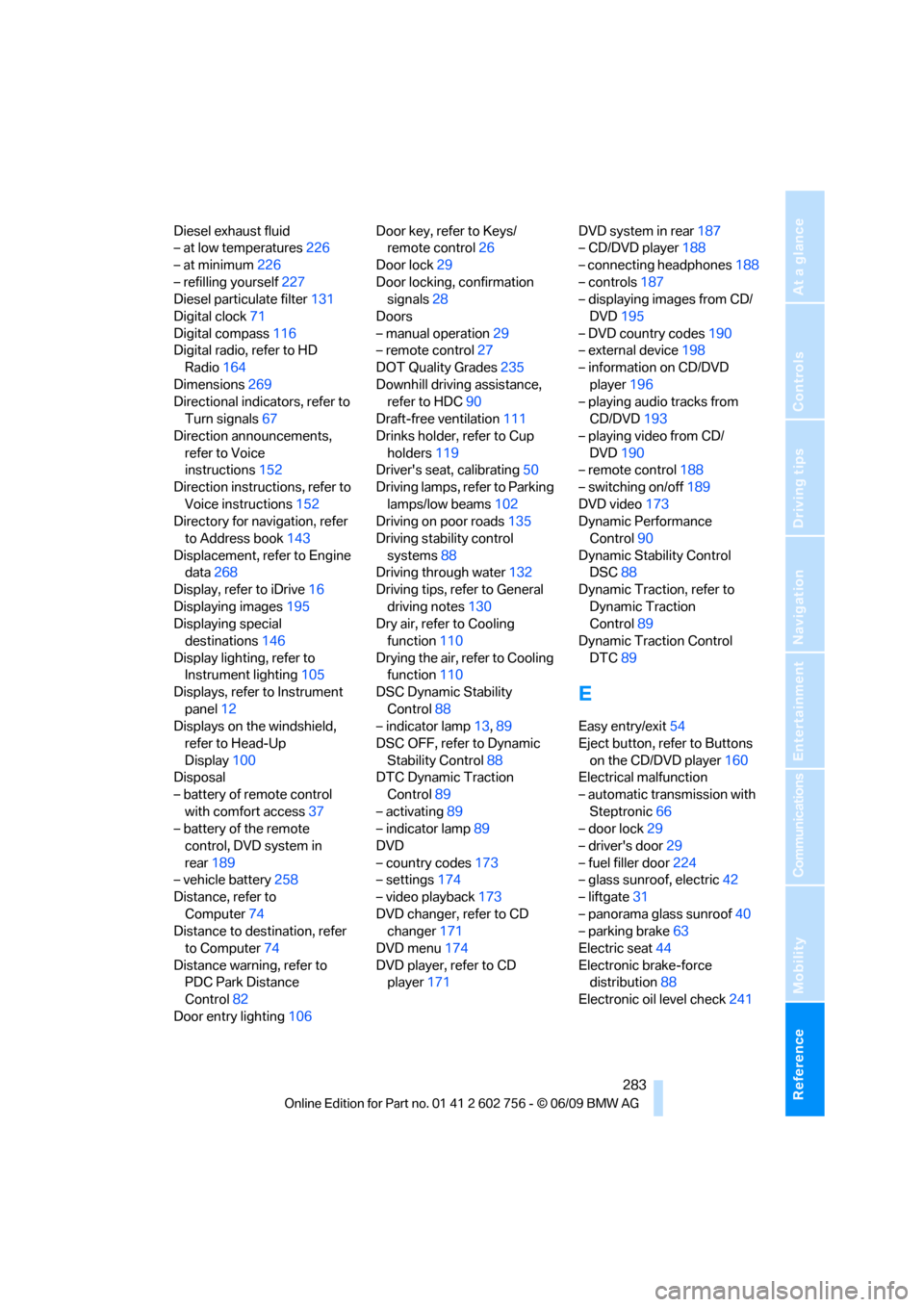
Diesel exhaust fluid
– at low temperatures226
– at minimum226
– refilling yourself227
Diesel particulate filter131
Digital clock71
Digital compass116
Digital radio, refer to HD
Radio164
Dimensions269
Directional indicators, refer to
Turn signals67
Direction announcements,
refer to Voice
instructions152
Direction instructions, refer to
Voice instructions152
Directory for navigation, refer
to Address book143
Displacement, refer to Engine
data268
Display, refer to iDrive16
Displaying images195
Displaying special
destinations146
Display lighting, refer to
Instrument lighting105
Displays, refer to Instrument
panel12
Displays on the windshield,
refer to Head-Up
Display100
Disposal
– battery of remote control
with comfort access37
– battery of the remote
control, DVD system in
rear189
– vehicle battery258
Distance, refer to
Computer74
Distance to destination, refer
to Computer74
Distance warning, refer to
PDC Park Distance
Control82
Door entry lighting106Door key, refer to Keys/
remote control26
Door lock29
Door locking, confirmation
signals28
Doors
– manual operation29
– remote control27
DOT Quality Grades235
Downhill driving assistance,
refer to HDC90
Draft-free ventilation111
Drinks holder, refer to Cup
holders119
Driver's seat, calibrating50
Driving lamps, refer to Parking
lamps/low beams102
Driving on poor roads135
Driving stability control
systems88
Driving through water132
Driving tips, refer to General
driving notes130
Dry air, refer to Cooling
function110
Drying the air, refer to Cooling
function110
DSC Dynamic Stability
Control88
– indicator lamp13,89
DSC OFF, refer to Dynamic
Stability Control88
DTC Dynamic Traction
Control89
– activating89
– indicator lamp89
DVD
– country codes173
– settings174
– video playback173
DVD changer, refer to CD
changer171
DVD menu174
DVD player, refer to CD
player171DVD system in rear187
– CD/DVD player188
– connecting headphones188
– controls187
– displaying images from CD/
DVD195
– DVD country codes190
– external device198
– information on CD/DVD
player196
– playing audio tracks from
CD/DVD193
– playing video from CD/
DVD190
– remote control188
– switching on/off189
DVD video173
Dynamic Performance
Control90
Dynamic Stability Control
DSC88
Dynamic Traction, refer to
Dynamic Traction
Control89
Dynamic Traction Control
DTC89
E
Easy entry/exit54
Eject button, refer to Buttons
on the CD/DVD player160
Electrical malfunction
– automatic transmission with
Steptronic66
– door lock29
– driver's door29
– fuel filler door224
– glass sunroof, electric42
– liftgate31
– panorama glass sunroof40
– parking brake63
Electric seat44
Electronic brake-force
distribution88
Electronic oil level check241
ba8_e70ag.book Seite 283 Freitag, 5. Juni 2009 11:42 11
Page 286 of 300
Everything from A to Z
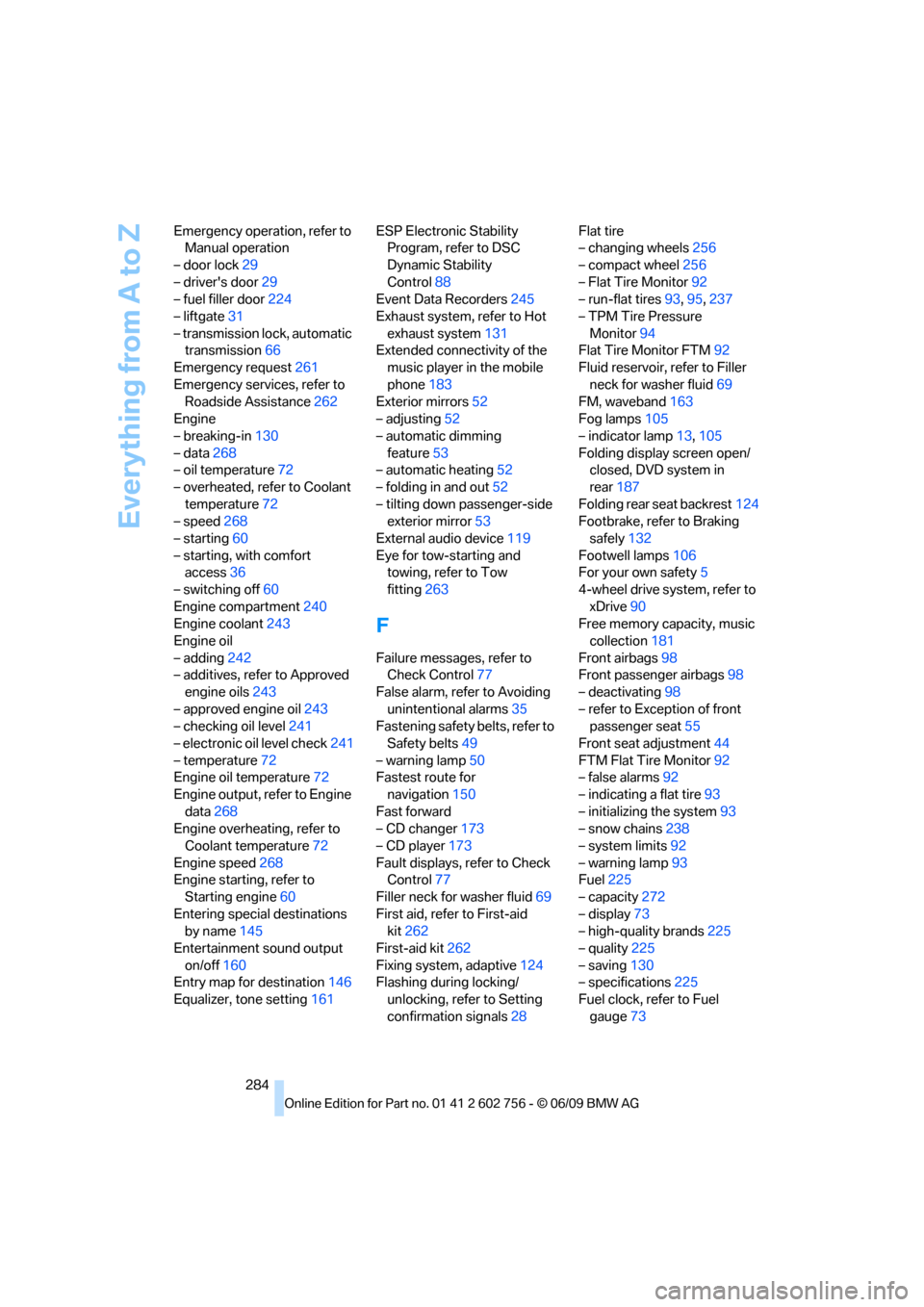
284 Emergency operation, refer to
Manual operation
– door lock29
– driver's door29
– fuel filler door224
– liftgate31
– transmission lock, automatic
transmission66
Emergency request261
Emergency services, refer to
Roadside Assistance262
Engine
– breaking-in130
– data268
– oil temperature72
– overheated, refer to Coolant
temperature72
– speed268
– starting60
– starting, with comfort
access36
– switching off60
Engine compartment240
Engine coolant243
Engine oil
– adding242
– additives, refer to Approved
engine oils243
– approved engine oil243
– checking oil level241
– electronic oil level check241
– temperature72
Engine oil temperature72
Engine output, refer to Engine
data268
Engine overheating, refer to
Coolant temperature72
Engine speed268
Engine starting, refer to
Starting engine60
Entering special destinations
by name145
Entertainment sound output
on/off160
Entry map for destination146
Equalizer, tone setting161ESP Electronic Stability
Program, refer to DSC
Dynamic Stability
Control88
Event Data Recorders245
Exhaust system, refer to Hot
exhaust system131
Extended connectivity of the
music player in the mobile
phone183
Exterior mirrors52
– adjusting52
– automatic dimming
feature53
– automatic heating
52
– folding in and out52
– tilting down passenger-side
exterior mirror53
External audio device119
Eye for tow-starting and
towing, refer to Tow
fitting263
F
Failure messages, refer to
Check Control77
False alarm, refer to Avoiding
unintentional alarms35
Fastening safety belts, refer to
Safety belts49
– warning lamp50
Fastest route for
navigation150
Fast forward
– CD changer173
– CD player173
Fault displays, refer to Check
Control77
Filler neck for washer fluid69
First aid, refer to First-aid
kit262
First-aid kit262
Fixing system, adaptive124
Flashing during locking/
unlocking, refer to Setting
confirmation signals28Flat tire
– changing wheels256
– compact wheel256
– Flat Tire Monitor92
– run-flat tires93,95,237
– TPM Tire Pressure
Monitor94
Flat Tire Monitor FTM92
Fluid reservoir, refer to Filler
neck for washer fluid69
FM, waveband163
Fog lamps105
– indicator lamp13,105
Folding display screen open/
closed, DVD system in
rear187
Folding rear seat backrest124
Footbrake, refer to Braking
safely132
Footwell lamps106
For your own safety5
4-wheel drive system, refer to
xDrive90
Free memory capacity, music
collection181
Front airbags98
Front passenger airbags98
– deactivating98
– refer to Exception of front
passenger seat55
Front seat adjustment44
FTM Flat Tire Monitor92
– false alarms92
– indicating a flat tire93
– initializing the system93
– snow chains238
– system limits92
– warning lamp93
Fuel225
– capacity272
– display73
– high-quality brands225
– quality225
– saving130
– specifications225
Fuel clock, refer to Fuel
gauge73
ba8_e70ag.book Seite 284 Freitag, 5. Juni 2009 11:42 11
Page 289 of 300
Reference 287
At a glance
Controls
Driving tips
Communications
Navigation
Entertainment
Mobility
Loading133
– securing cargo134
– stowing cargo134
– vehicle133
Load securing equipment,
refer to Securing cargo134
Lock buttons in the doors,
refer to Locking30
Locking
– from inside30
– setting confirmation
signals28
– using remote control27
– without key, refer to Comfort
access35
Locking and unlocking doors
– from inside30
– setting confirmation
signals28
Locking without key, refer to
Comfort access35
Low beams102
– automatic102
Lower back support, refer to
Lumbar support45
Low-sulfur diesel225
Lug bolts257
– tightening torque, refer to
After mounting258
– wrench257
Luggage compartment
capacity, refer to Cargo bay
capacity271
Luggage rack, refer to Roof-
mounted luggage rack135
Lumbar support45
LW, waveband163
M
M+S tires, refer to Winter
tires238
Main menu, iDrive17Maintenance
– refer to Service and
Warranty Information
Booklet for US models244
– refer to Service
requirements74
– refer to Warranty and
Service Guide Booklet for
Canadian models244
Maintenance system244
Malfunction
– door lock29
– driver's door29
– fuel filler door224
– glass sunroof, electric42
– liftgate31
– panorama glass sunroof40
– parking brake63
Malfunction warnings, refer to
Check Control77
Manual air distribution110
Manually releasing
transmission lock66
Manual mode, automatic
transmission with
Steptronic65
Manual operation
– door lock29
– driver's door29
– fuel filler door224
– transmission lock, automatic
transmission66
Map display152
Map for navigation
– changing scale153
– entering destination146
Master key, refer to Keys/
remote control26
Maximum cooling110
Maximum speed
– for winter tires238
– with compact wheel258
Memory, refer to Seat, mirror
and steering wheel
memory45
Menus, refer to iDrive16
Messages208
Microfilter112Microphone
– for mobile phone14
– for telephone14
– for voice activation
system14
Mirror dimming feature53
Mirrors52
– automatic curb monitor53
– exterior mirrors52
– folding in and out52
– heating
52
– interior rearview mirror53
– memory, refer to Seat, mirror
and steering wheel
memory45
Mobile phone
– adjusting volume205
– connecting, refer to Mobile
phone, pairing202
– installation location, refer to
Center armrest, front119
– operation via iDrive205
– pairing202
– refer to separate operating
instructions
– refer to Telephone202
Monitor, refer to iDrive16
Monitoring tire pressure, refer
to FTM Flat Tire Monitor92
MP3 player, connecting
– refer to AUX-IN
connection183
– refer to USB-audio
interface183
Multifunction steering wheel,
refer to Buttons on steering
wheel11
Multifunction switch
– refer to Turn signals/
headlamp flasher/high
beams67
– refer to Washer/wiper
system67
Music
– managing181
– playing179
– storing178
Music collection178
– backup181
ba8_e70ag.book Seite 287 Freitag, 5. Juni 2009 11:42 11
Page 290 of 300
Everything from A to Z
288 Music player
– connecting, refer to USB-
audio interface183
Music player, connecting
– refer to AUX-IN
connection183
Music search179
My Info208
N
Navigation data140
Navigation destination
– entering manually141
– home address144
Navigation instructions, refer
to Switching voice
instructions on/off152
Navigation system140
– address book143
– bypassing a route
section151
– continuing destination
guidance150
– destination entry141
– entering a destination by
voice147
– entering a destination
manually141
– questions about system157
– route list151
– selecting destination via
map146
– selecting route criteria150
– special destinations144
– starting destination
guidance150
– terminating destination
guidance150
– trip planner148
– voice instructions152
– volume adjustment152
Neck support, refer to Head
restraints46
New remote control26
New wheels and tires237
North-facing map152Nozzles, refer to Windshield
washer nozzles68
Nylon rope, refer to Tow-
starting and towing263
O
OBD socket245
Octane ratings, refer to Fuel
specifications225
Odometer71
Oil
– additives, refer to Approved
engine oils243
– approved engine oils243
– consumption, refer to
Checking engine oil
level241
– level241
– refilling, refer to Adding
engine oil242
Oil change interval, refer to
Service requirements74
Onboard computer, refer to
iDrive16
Onboard toolkit250
Opening and closing
– comfort access35
– from inside30
– panorama glass sunroof39
– using remote control27
– using the door lock29
Opening liftgate33
Operation on poor roads135
Options, selecting for
navigation150
Orientation menu, refer to
Main menu17
Output, refer to Engine
data268
Outside air, refer to AUC
Automatic recirculated-air
control110
Outside temperature
display71
– changing unit of measure80
Outside temperature
warning71
Overview, radio control160
P
Panic mode28
Panorama glass sunroof38
– moving manually40
– power failure40
– raising, opening, closing39
Park Distance Control PDC82
Parked-car ventilation114
– preselecting activation
times114
– switching on and off
directly114
Parking, vehicle60
Parking aid
– refer to PDC Park Distance
Control82
– refer to Rear view camera86
Parking assistance
– refer to PDC Park Distance
Control82
– refer to Top View84
Parking brake61
– Automatic Hold61
– indicator lamp13
– releasing manually61
– releasing manually in case of
an electrical malfunction63
– setting manually61
Parking lamps102
Parking with Automatic
Hold62
Particulate filter, refer to
Diesel particulate filter131
Parts and accessories5
Passenger-side exterior
mirror, tilting down53
Pathway lighting103
Paying attention to speed238
PDC Park Distance Control82
Personal Profile26
Phone book205
Phone numbers, dialing206
Pinch protection system
– glass sunroof, electric41
– panorama glass sunroof39
– power windows38
Plasters, refer to First-aid
kit262
ba8_e70ag.book Seite 288 Freitag, 5. Juni 2009 11:42 11