iPhone BMW X5 XDRIVE35D 2012 Owners Manual
[x] Cancel search | Manufacturer: BMW, Model Year: 2012, Model line: X5 XDRIVE35D, Model: BMW X5 XDRIVE35D 2012Pages: 317, PDF Size: 8.83 MB
Page 189 of 317
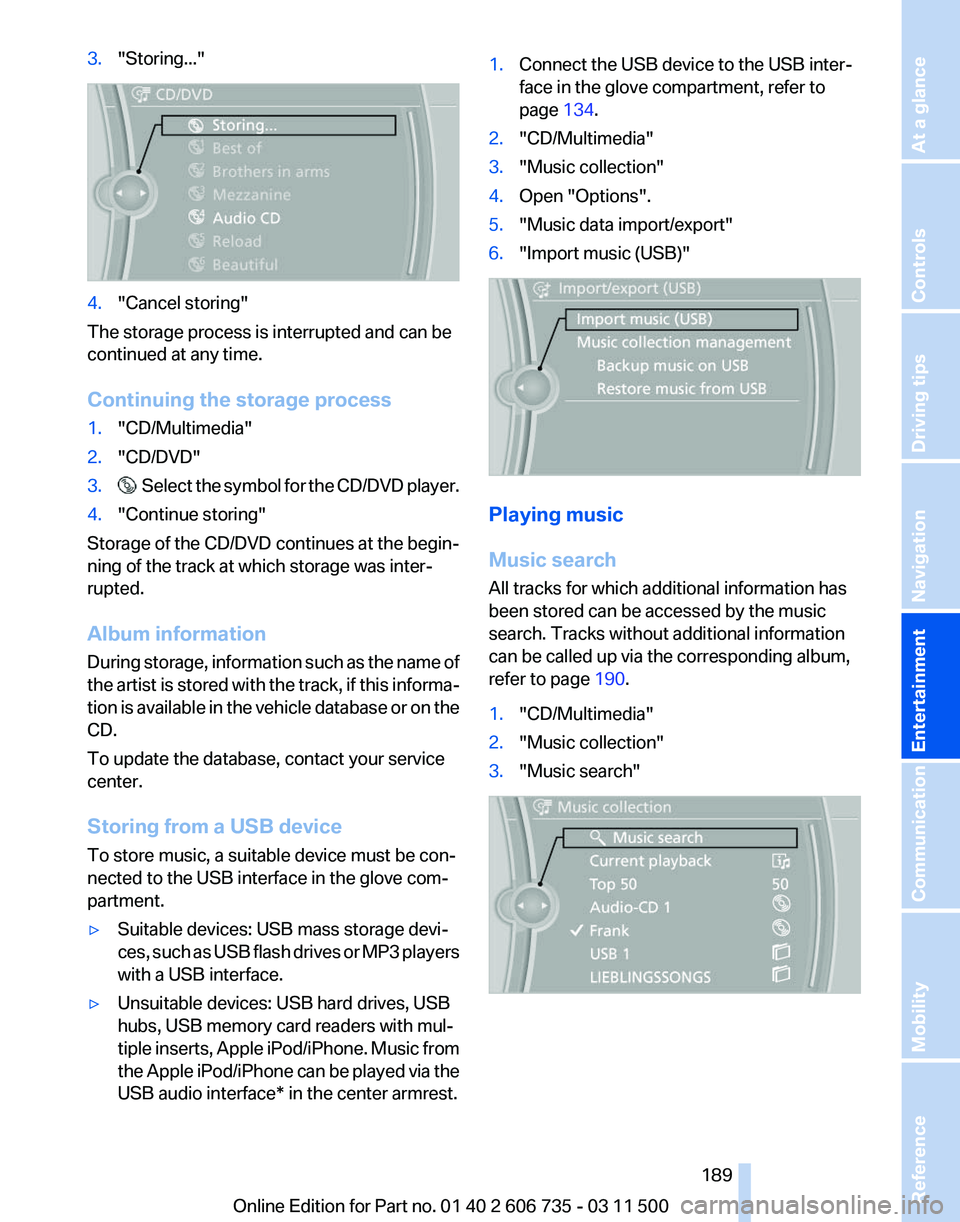
3.
"Storing..." 4.
"Cancel storing"
The storage process is interrupted and can be
continued at any time.
Continuing the storage process
1. "CD/Multimedia"
2. "CD/DVD"
3. Select the symbol for the CD/DVD player.
4. "Continue storing"
Storage of the CD/DVD continues at the begin‐
ning of the track at which storage was inter‐
rupted.
Album information
During
storage, information such as the name of
the artist is stored with the track, if this informa‐
tion is available in the vehicle database or on the
CD.
To update the database, contact your service
center.
Storing from a USB device
To store music, a suitable device must be con‐
nected to the USB interface in the glove com‐
partment.
▷ Suitable devices: USB mass storage devi‐
ces,
such as USB flash drives or MP3 players
with a USB interface.
▷ Unsuitable devices: USB hard drives, USB
hubs, USB memory card readers with mul‐
tiple
inserts, Apple iPod/iPhone. Music from
the Apple iPod/iPhone can be played via the
USB audio interface* in the center armrest. 1.
Connect the USB device to the USB inter‐
face in the glove compartment, refer to
page 134.
2. "CD/Multimedia"
3. "Music collection"
4. Open "Options".
5. "Music data import/export"
6. "Import music (USB)" Playing music
Music search
All tracks for which additional information has
been stored can be accessed by the music
search. Tracks without additional information
can be called up via the corresponding album,
refer to page
190.
1. "CD/Multimedia"
2. "Music collection"
3. "Music search" Seite 189
189Online Edition for Part no. 01 40 2 606 735 - 03 11 500
Reference Mobility Communication
Entertainment Navigation Driving tips Controls At a glance
Page 193 of 317
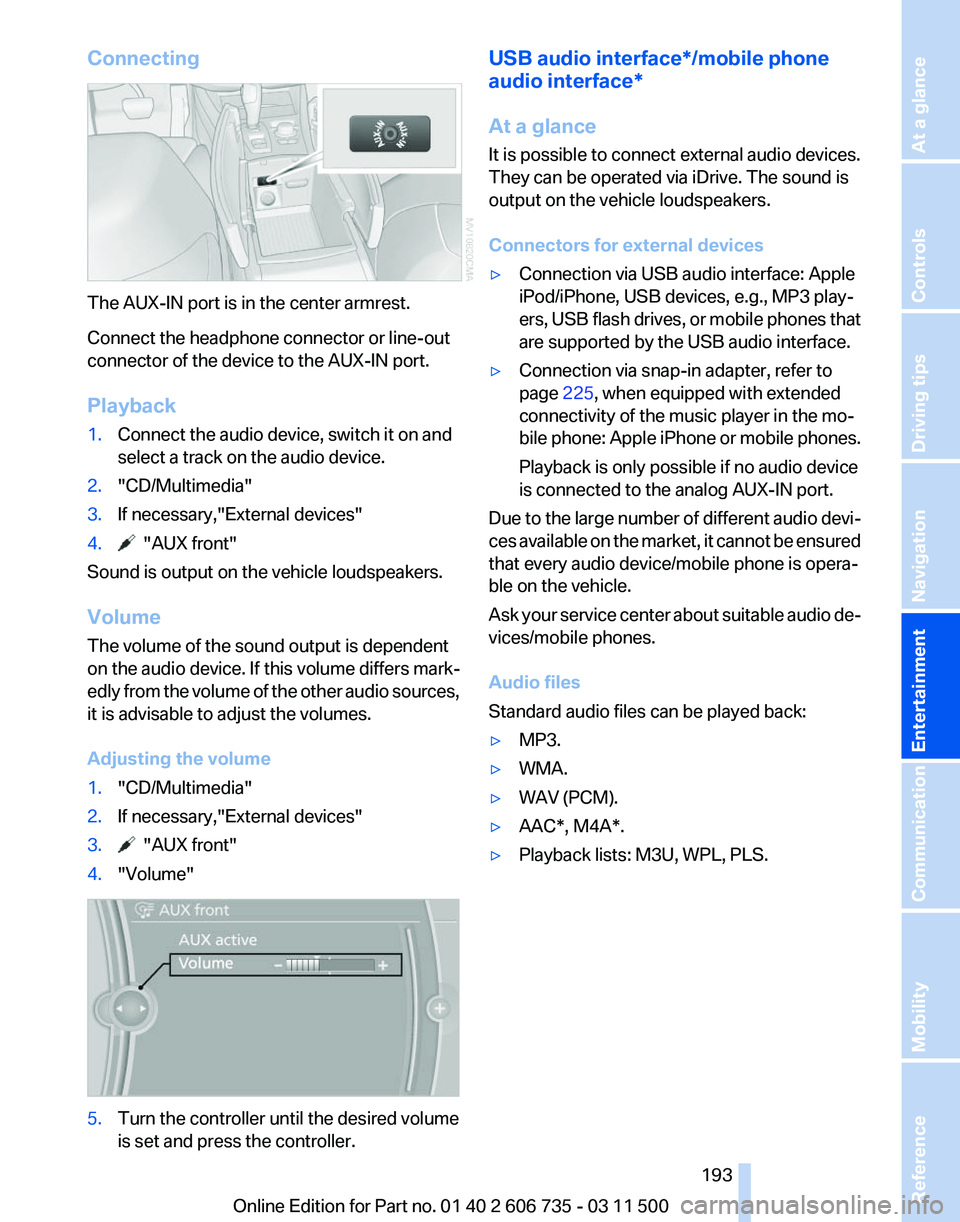
Connecting
The AUX-IN port is in the center armrest.
Connect the headphone connector or line-out
connector of the device to the AUX-IN port.
Playback
1.
Connect the audio device, switch it on and
select a track on the audio device.
2. "CD/Multimedia"
3. If necessary,"External devices"
4. "AUX front"
Sound is output on the vehicle loudspeakers.
Volume
The volume of the sound output is dependent
on the audio device. If this volume differs mark‐
edly
from the volume of the other audio sources,
it is advisable to adjust the volumes.
Adjusting the volume
1. "CD/Multimedia"
2. If necessary,"External devices"
3. "AUX front"
4. "Volume" 5.
Turn the controller until the desired volume
is set and press the controller. USB audio interface*/mobile phone
audio interface
*
At a glance
It is possible to connect external audio devices.
They can be operated via iDrive. The sound is
output on the vehicle loudspeakers.
Connectors for external devices
▷ Connection via USB audio interface: Apple
iPod/iPhone, USB devices, e.g., MP3 play‐
ers,
USB flash drives, or mobile phones that
are supported by the USB audio interface.
▷ Connection via snap-in adapter, refer to
page 225, when equipped with extended
connectivity of the music player in the mo‐
bile
phone: Apple iPhone or mobile phones.
Playback is only possible if no audio device
is connected to the analog AUX-IN port.
Due to the large number of different audio devi‐
ces
available on the market, it cannot be ensured
that every audio device/mobile phone is opera‐
ble on the vehicle.
Ask your service center about suitable audio de‐
vices/mobile phones.
Audio files
Standard audio files can be played back:
▷ MP3.
▷ WMA.
▷ WAV (PCM).
▷ AAC*, M4A*.
▷ Playback lists: M3U, WPL, PLS.
Seite 193
193Online Edition for Part no. 01 40 2 606 735 - 03 11 500
Reference Mobility Communication
Entertainment Navigation Driving tips Controls At a glance
Page 194 of 317
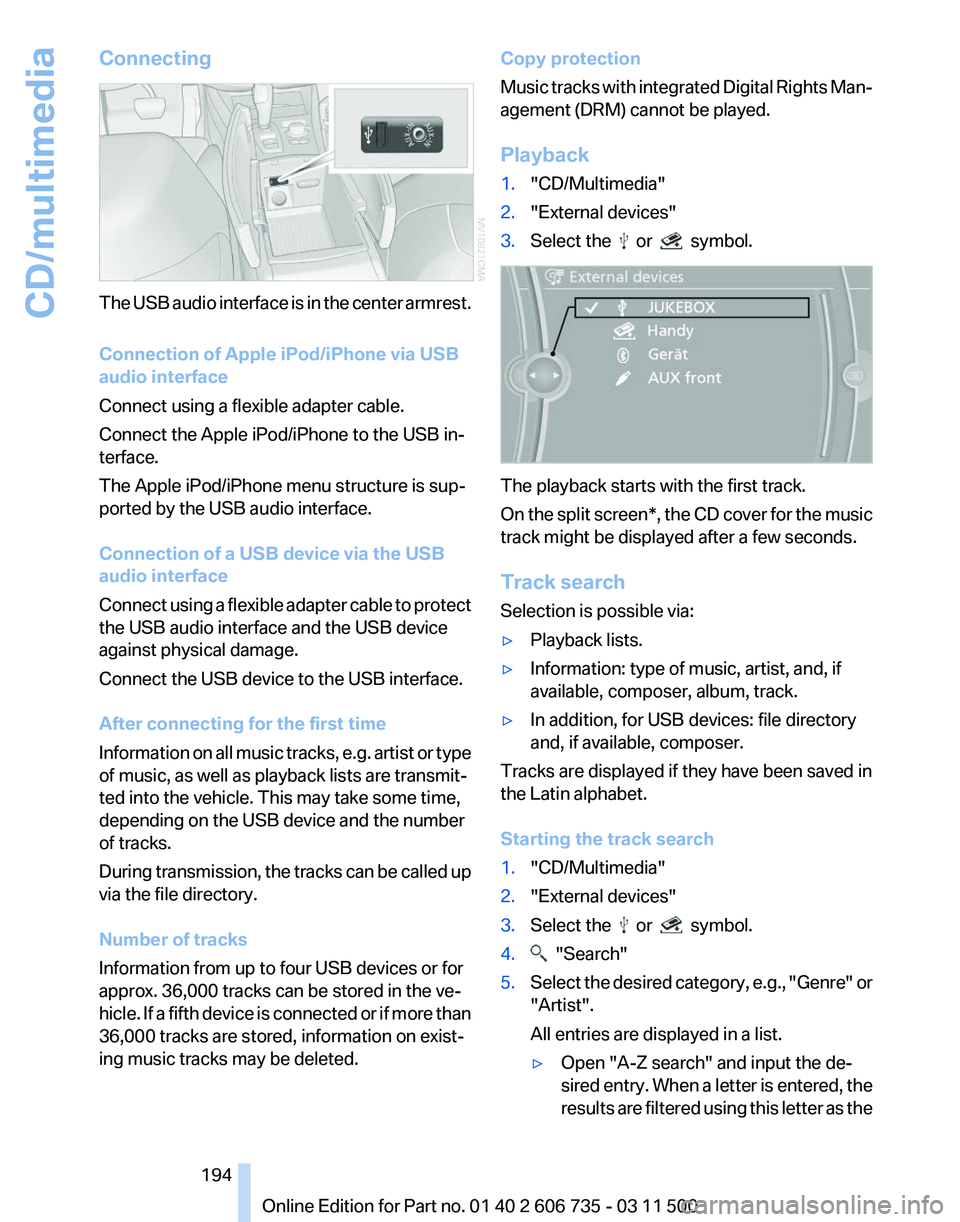
Connecting
The USB audio interface is in the center armrest.
Connection of Apple iPod/iPhone via USB
audio interface
Connect using a flexible adapter cable.
Connect the Apple iPod/iPhone to the USB in‐
terface.
The Apple iPod/iPhone menu structure is sup‐
ported by the USB audio interface.
Connection of a USB device via the USB
audio interface
Connect
using a flexible adapter cable to protect
the USB audio interface and the USB device
against physical damage.
Connect the USB device to the USB interface.
After connecting for the first time
Information on all music tracks, e.g. artist or type
of music, as well as playback lists are transmit‐
ted into the vehicle. This may take some time,
depending on the USB device and the number
of tracks.
During transmission, the tracks can be called up
via the file directory.
Number of tracks
Information from up to four USB devices or for
approx. 36,000 tracks can be stored in the ve‐
hicle. If a fifth device is connected or if more than
36,000 tracks are stored, information on exist‐
ing music tracks may be deleted. Copy protection
Music
tracks with integrated Digital Rights Man‐
agement (DRM) cannot be played.
Playback
1. "CD/Multimedia"
2. "External devices"
3. Select the or symbol.
The playback starts with the first track.
On
the split screen*, the CD cover for the music
track might be displayed after a few seconds.
Track search
Selection is possible via:
▷ Playback lists.
▷ Information: type of music, artist, and, if
available, composer, album, track.
▷ In addition, for USB devices: file directory
and, if available, composer.
Tracks are displayed if they have been saved in
the Latin alphabet.
Starting the track search
1. "CD/Multimedia"
2. "External devices"
3. Select the or symbol.
4. "Search"
5. Select the desired category, e.g., "Genre"
or
"Artist".
All entries are displayed in a list.
▷ Open "A-Z search" and input the de‐
sired
entry. When a letter is entered, the
results are filtered using this letter as the
Seite 194
194 Online Edition for Part no. 01 40 2 606 735 - 03 11 500
CD/multimedia
Page 308 of 317
High beams, indicator
lamp 15
High-pressure washers 285
Hill Descent Control HDC 98
Hill drive-off assistant, refer to Drive-off assistant 100
Hills 144
Holder for beverages 135
Holder for remote control, re‐ fer to Ignition lock 61
Homepage 6
Hood 264
Hood, opening 264
Horn 12
Hot exhaust system 142
Hotline 240
House number, entering for navigation 154
Hydraulic brake assistant 96
Hydroplaning 143
I
Ice warning, refer to External temperature warning 71
Icy roads, refer to External temperature warning 71
Identification marks, tires 258
iDrive 18
iDrive, changing settings 78
iDrive, changing the lan‐ guage 80
iDrive, changing the units of measure and display for‐
mat 80
iDrive, setting the bright‐ ness 80
iDrive, setting the date 79
iDrive, setting the time 79
Ignition 61
Ignition
key position 1, refer to
Radio ready state 61
Ignition key position 2, refer to Ignition on 61
Ignition key, refer to Remote control with integrated
key 28
Ignition lock 61 Ignition, switched off 61
Ignition, switched on 61
Images, displaying, rear DVD
system 208
Indication of a flat tire 89, 91
Indicator and warning lamps 15
Inflation pressure monitor, re‐ fer to Flat Tire Monitor 88
Inflation
pressure, refer to Tire
inflation pressure 252
Information on the navigation data 152
Initialization after power fail‐ ure 278
Initializing
– Compass, refer to Calibrat‐ ing 129
– Panoramic glass sunroof 43
Initializing, Flat Tire Monitor
FTM 89
Initializing, glass sunroof 44
Initializing, refer to Setting the date 79
Initializing, refer to Setting the time 79
Initializing,
Tire Pressure Mon‐
itor TPM 91
Installation location, tele‐ phone 134
Instrument cluster 14
Instrument lighting 84
Instrument panel, refer to In‐ strument cluster 14
Instruments, refer to Cock‐ pit 12
Integrated key 28
Integrated universal remote control 127
Interactive map 157
Interior equipment 127
Interior lamps 84
Interior lamps
– Remote control 30
Interior mirror 54
Interior rearview mirror, auto‐ matic dimming 55
Interior rearview mirror, com‐ pass 129 Interior temperature, setting,
automatic climate con‐
trol 119
Intermediate
destinations 159
Internet page 6
Intersection, entering for navi‐ gation 154
iPod/iPhone 193
J
Jacking points for the vehicle jack 276
Jack, refer to Vehicle jack 276
Joystick, refer to Selector lever 69
Jump-starting 281
K
Keyless Go, refer to Comfort Access 37
Keyless opening and closing, refer to Comfort Access 37
Key Memory, refer to Personal Profile 28
Key, refer to Integrated key/re‐ mote control 28
Kickdown
– Automatic transmission with Steptronic 69
Knocking control 248
L
Label, run-flat tire 261
Lamp and bulb replacement, lamp replacement 270
Lamps 81
Lamps, automatic headlamp control 81, 82
Lamps, High-beam Assis‐ tant 83
Lamps, parking lamps/low beams 81
Lamps, replacing, refer to Lamp and bulb replace‐
ment 270
Lane departure warning 93
Seite 308
308 Online Edition for Part no. 01 40 2 606 735 - 03 11 500
Everything from A to Z
Page 312 of 317
Screen, refer to Control Dis‐
play 19
Search, refer to BMW On‐ line 239
Seat adjustment, electric 46
Seat adjustment, manual 45
Seat and mirror memory 53
Seat belts
– Refer to Safety belts 50
Seat heating 48, 49
Seat heating, rear 48
Seats
– Adjusting electrically 46
– Heating 48
– Memory, refer to Seat and mirror memory 53
– Sitting safely 45
– Storing the setting, refer to Seat and mirror memory 53
– Ventilation, refer to Active seat ventilation and seat
heating 49
Seats, adjusting 45
Seats, backrest width 46
Seats in the rear 47
Seats, shoulder support 46
2nd row seats 47
Selector lever, automatic transmission with Step‐
tronic 69
Selector lever lock, releas‐ ing 69
Self-leveling suspension 100
Sensors, care 287
Service and warranty 7
Service data in the remote control 268
Service interval display, refer to Condition Based Service
CBS 268
Service interval display, refer to Service requirements 75
Service requirements 75
Service requirements, CBS Condition Based Serv‐
ice 268
Service, Roadside Assis‐ tance 281 Settings, clock, 12h/24h
mode 79
Settings, configuring, refer to Personal Profile 28
Settings, DVD 184
Settings on the Control Dis‐ play, changing 78
Shifting, automatic transmis‐ sion with Steptronic 70
Shift paddles 70
Short commands, voice acti‐ vation 295
Side airbags 86
Side View 116
Side windows, refer to Win‐ dows 40
Size, refer to Dimensions 291
Ski bag 138
Slide/tilt glass roof, refer to Glass sunroof 43
Slide/tilt glass roof, refer to Panoramic glass sunroof 42
Slot for remote control 61
Smokers' package, refer to Ashtray 130
Snap-in adapter, mobile phone 225
Snap-in adapter, refer to Stor‐ age compartment of center
armrest 134
Snow chains 261
Socket, OBD Onboard Diag‐ nosis 269
Socket, refer to Connecting electrical devices 131
Software applications, iPhone 241
Software part number 216
Software update 199
Soot particulate filter, refer to Diesel particulate filter 143
SOS, refer to Emergency Re‐ quest, initiating 280
Sound output 174, 181
Spare fuse 279
Special destinations, naviga‐ tion 156
Speed, average 73 Speed limit
78
Speed limit, setting 78
Speedometer 14
Speed, with winter tires 261
Split screen 22
Split
screen map settings 164
Spoken instructions, naviga‐ tion 163
Sport program, automatic transmission with Step‐
tronic 70
Spray nozzles, refer to Clean‐ ing the windshield and head‐
lamps 67
Spray nozzles, refer to Wind‐ shield washer nozzles 68
Stability control systems 96
Start/Stop button 61
Start/Stop button, starting the engine 62
Start/Stop button, switching off the engine 62
Starting the engine 62
Start problems, refer to Jump- starting 281
State/province, selecting for navigation 153
Stations, stored 180
Station, storing 174
Status information, iDrive 21
Status of Owner's Manual 6
Steam jets 285
Steering wheel 55
Steering wheel, adjusting 55
Steering wheel, easy entry/ exit 55
Steering wheel lock 61
Steering with variable transla‐ tion, refer to Active steer‐
ing 100
Steptronic, refer to Sport pro‐ gram and manual mode M/
S 70
Stopping, engine 62
Storage compartment nets 135
Storage compart‐ ments 134, 135
Seite 312
312 Online Edition for Part no. 01 40 2 606 735 - 03 11 500
Everything from A to Z
Page 314 of 317
Units, average fuel consump‐
tion 80
Units, temperature 80
Universal garage door opener, refer to Integrated universal
remote control 127
Universal remote control 127
Unlocking
– From the outside 30
– Setting the unlocking char‐ acteristics 30
– Tailgate 38
– Without remote control, refer to Comfort Access 37
Unlocking, from the inside 33
Unlocking, hood 264
Updates made after the edito‐ rial deadline 6
Update, software 199
Upholstery care 286
Upper tailgate 33
Upper tailgate, automatic op‐ eration 34
Upper tailgate, closing 34
Upper
tailgate, emergency op‐
eration, refer to Opening
manually 34
Upper tailgate, opening from the inside 34
Upper tailgate, opening from the outside 34
Upper tailgate, opening man‐ ually 34
USB audio interface 193
V
Vacuum cleaner, connecting, refer to Connecting electrical
devices 131
Vehicle
– Identification number 216
– Identification number, refer to Engine compartment 263
Vehicle battery, changing 278
Vehicle, breaking in 142
Vehicle care 286
Vehicle care, refer to Care 285 Vehicle jack
276
Vehicle paint 286
Vehicle storage 287
Vehicle, switching off 62
Vehicle wash 285
Ventilation 123
Ventilation,
3rd row seats 123
Ventilation, automatic climate control in rear 125
Ventilation, draft-free 123
Ventilation, in rear 123
Ventilation, refer to Parked-car ventilation 125
Vents of automatic climate control 119
Version of the navigation data 152
Video playback 183
Video playback, iPhone 195
Video playback, snap-in adapter 195
Voice activation
– Navigation 158
Voice activation, mobile
phone 224
Voice activation, short com‐ mands 295
Voice activation system 24
Volume, setting 172
W
Warning and indicator lamps 15
Warning messages, refer to Check Control 76
Warning signal volumes 173
Warning triangle 281
Washer/wiper system 67
Washer/wiper system, rain sensor 67
Washer/wiper system, washer fluid 68
Washer/wiper system, wind‐ shield washer nozzles 68
Washer fluid 68
Washer fluid reservoir 68
Washing, vehicle 285 Waste tray, refer to Ash‐
tray 130
Water
on roads, refer to Driving
through water 143
Weights 292
Welcome lamps 81
Wheelbase, refer to Dimen‐ sions 291
Wheel change 275
Wheels and tires 252
Wheels, changing 260
Wheels, Flat Tire Monitor FTM 88
Wheels, Tire Pressure Monitor TPM 90
Width, refer to Dimen‐ sions 291
Window, convenient opera‐ tion 30
Windows
– Safety switch 41
Windows, defrosting and de‐
fogging, automatic climate
control 121
Windows,
pinch protection 41
Windshield, cleaning 67
Windshield, defrosting, refer to Defrosting windows 121
Windshield wash 67
Windshield washer fluid 68
Windshield wash, rear win‐ dow 68
Windshield wash, reservoir for washer fluid 68
Windshield wash, washer fluid 68
Windshield wash, washer noz‐ zles 68
Windshield wiper blades, changing 270
Windshield wiper, refer to Washer/wiper system 67
Winter diesel 249
Winter storage, care 287
Winter tires, setting the speed limit 78
Winter tires, suitable tires 261
Winter tires, tread 259
Wiper blades, changing 270
Seite 314
314 Online Edition for Part no. 01 40 2 606 735 - 03 11 500
Everything from A to Z