instrument panel BMW X5M 2009 E70 Owner's Guide
[x] Cancel search | Manufacturer: BMW, Model Year: 2009, Model line: X5M, Model: BMW X5M 2009 E70Pages: 317, PDF Size: 9.56 MB
Page 107 of 317
Controls
105Reference
At a glance
Driving tips
Communications
Navigation
Entertainment
Mobility
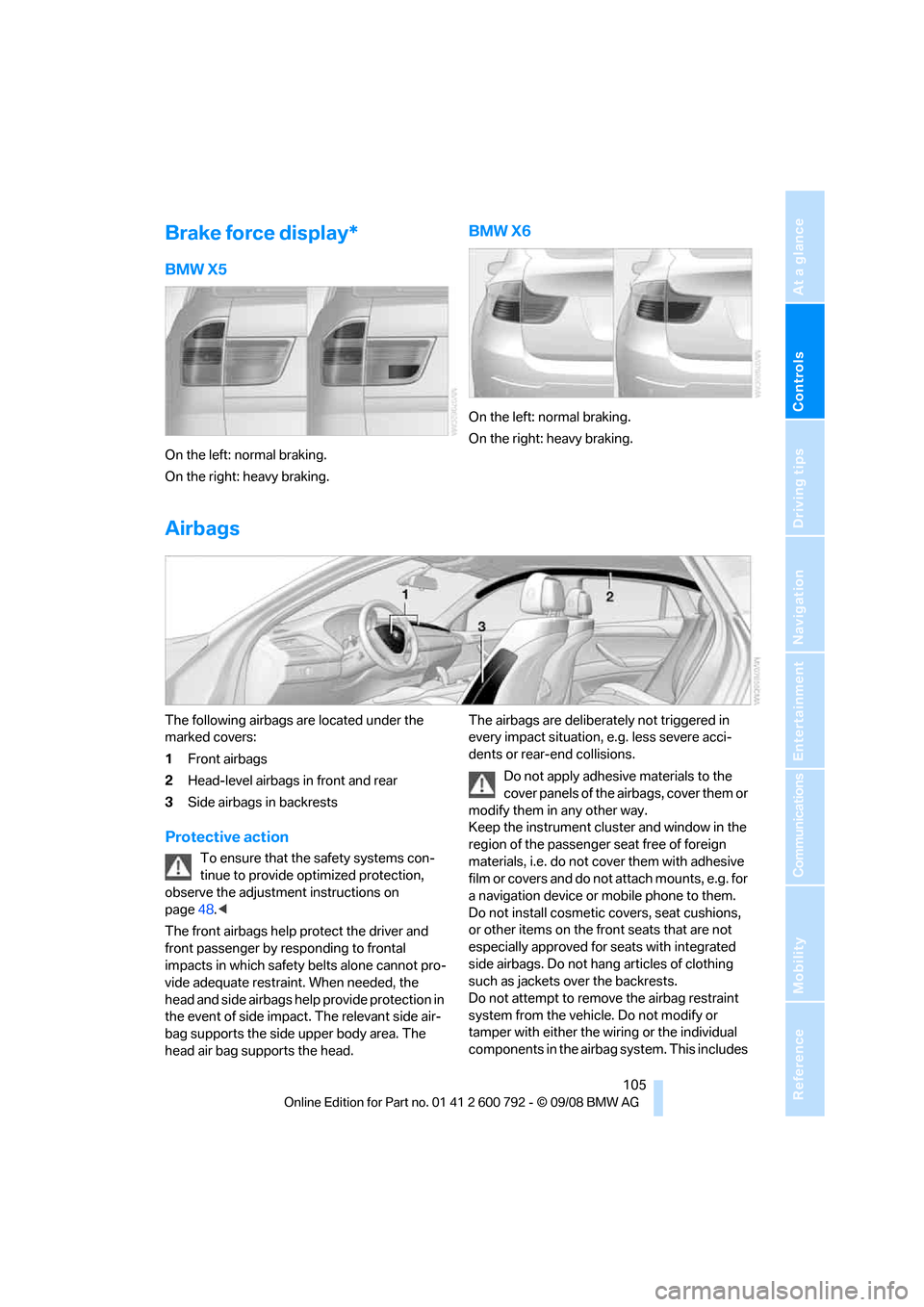
Brake force display*
BMW X5
On the left: normal braking.
On the right: heavy braking.
BMW X6
On the left: normal braking.
On the right: heavy braking.
Airbags
The following airbags are located under the
marked covers:
1Front airbags
2 Head-level airbags in front and rear
3 Side airbags in backrests
Protective action
To ensure that the safety systems con-
tinue to provide optimized protection,
observe the adjustment instructions on
page 48.<
The front airbags help protect the driver and
front passenger by re sponding to frontal
impacts in which safety belts alone cannot pro-
vide adequate restraint. When needed, the
head and side airbags help provide protection in
the event of side impact. The relevant side air-
bag supports the side upper body area. The
head air bag supports the head. The airbags are deliberately not triggered in
every impact situation, e.g. less severe acci-
dents or rear-end collisions.
Do not apply adhesive materials to the
cover panels of the airbags, cover them or
modify them in any other way.
Keep the instrument cluster and window in the
region of the passenger seat free of foreign
materials, i.e. do not co ver them with adhesive
film or covers and do not attach mounts, e.g. for
a navigation device or mobile phone to them.
Do not install cosmetic covers, seat cushions,
or other items on the fr ont seats that are not
especially approved for seats with integrated
side airbags. Do not hang articles of clothing
such as jackets over the backrests.
Do not attempt to remove the airbag restraint
system from the vehicle. Do not modify or
tamper with either the wiring or the individual
components in the airbag system. This includes
Page 248 of 317
Refueling
246
In order to be able to start the engine in the
usual way, there must be a sufficient supply of
diesel exhaust fluid in the separate reservoir.
System heating
In order to bring the system to operating tem-
perature after a cold start of the engine, the
automatic transmission
shifts into the next
higher gear at a later point.
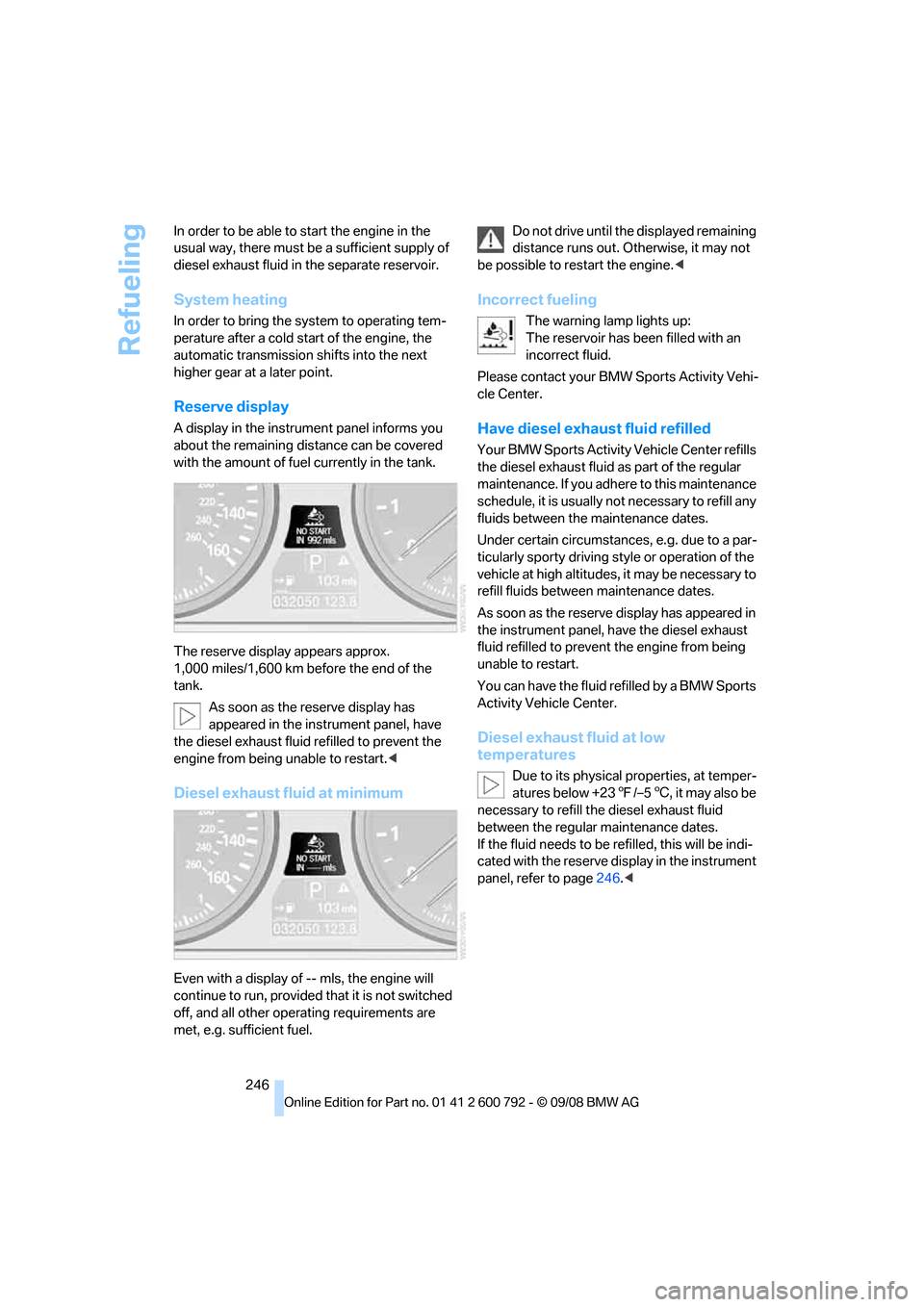
Reserve display
A display in the instrument panel informs you
about the remaining distance can be covered
with the amount of fuel currently in the tank.
The reserve display appears approx.
1,000 miles/1,600 km before the end of the
tank.
As soon as the reserve display has
appeared in the inst rument panel, have
the diesel exhaust fluid refilled to prevent the
engine from being unable to restart. <
Diesel exhaust fluid at minimum
Even with a display of -- mls, the engine will
continue to run, provided that it is not switched
off, and all other operating requirements are
met, e.g. sufficient fuel. Do not drive until the displayed remaining
distance runs out. Otherwise, it may not
be possible to restart the engine. <
Incorrect fueling
The warning lamp lights up:
The reservoir has been filled with an
incorrect fluid.
Please contact your BMW Sports Activity Vehi-
cle Center.
Have diesel exhaust fluid refilled
Your BMW Sports Activity Vehicle Center refills
the diesel exhaust fluid as part of the regular
maintenance. If you adhe re to this maintenance
schedule, it is usually no t necessary to refill any
fluids between the maintenance dates.
Under certain circumstances, e.g. due to a par-
ticularly sporty driving st yle or operation of the
vehicle at high altitudes, it may be necessary to
refill fluids betwee n maintenance dates.
As soon as the reserve display has appeared in
the instrument panel, have the diesel exhaust
fluid refilled to prevent the engine from being
unable to restart.
You can have the fluid refilled by a BMW Sports
Activity Vehicle Center.
Diesel exhaust fluid at low
temperatures
Due to its physical properties, at temper-
atures below +23 7/–5 6, it may also be
necessary to refill the diesel exhaust fluid
between the regular maintenance dates.
If the fluid needs to be re filled, this will be indi-
cated with the reserve display in the instrument
panel, refer to page 246.<
Page 269 of 317
Mobility
267Reference
At a glance
Controls
Driving tips
Communications
Navigation
Entertainment
with shampoo added to it. For additional treat-
ment, use chrome polish.
Alloy wheels
Depending on your syst em, braking can gener-
ate dust, which settles on the light-alloy wheels.
Remove this dust regula rly with acid-free wheel
cleaner.
Do not use aggressive, acid-containing,
strongly alkaline, or coarse cleansers and
do not use steam cleaners at temperatures
greater than 140 7/60 6; otherwise you may
damage your vehicle. <
Aluminum running boards
A rust film on the aluminum running boards can
be removed with a special cleaning agent.
Outside sensors/cameras
Keep the sensors and cameras outside
the vehicle, e.g. the Park Distance Control
or rear view camera, clean and free of ice to
ensure their full operability. <
Interior care
Upholstery materials/cloth-covered
paneling
Clean regularly with a vacuum cleaner in order
to remove surface dirt.
In the event of more serious soiling such as bev-
erage stains, use a soft sponge or a lint-free
microfiber cloth in combination with suitable
interior cleaners. Follow the instructions on the
packaging.
Clean upholstery material over a large
area extending out to the seams. Avoid
intense friction. <
Open Velcro fasteners on pants or other
items of clothing can cause damage to
the seat covering. Make sure that the Velcro
fasteners are closed. <
Leather/leather-covered paneling
The leather used by BM W is a high quality
natural product. Slight patterns in the
grain are part of the typical properties of a natu-
ral leather. <
Dust and dirt from the road chafe in pores and
folds and result in considerable wear and cause
the leather surface to become prematurely brit-
tle. We therefore suggest that you clean the
leather with a dust cloth or vacuum cleaner at
regular intervals.
Particularly with light-c olored leather, make
sure to clean it regularly since it has a greater
tendency to become soiled.
Treat the leather twice a year with a leather
lotion since dirt and grease harm the protective
layer of the leather.
Carpets/cargo bay
Floor carpets and floor mats can be vacuumed
or cleaned with interior cleaner when they are
more heavily soiled.
Floor mats can be remo ved for cleaning. When
inserting into place, make sure that the seat
rails do not protrude over the floor mats; other-
wise floor mats can be damaged.
Fluff on new floor mats is a result of the produc-
tion process and can be removed by repeated
vacuuming.
Plastic components inside
> Vinyl upholstery surfaces
> Lamp lenses
> Cover glass of instrument cluster
> Matt parts
should be cleaned with water and, if necessary,
solvent-free plastic cleaner.
Fine wooden components
Use a damp cloth to clean fine wooden trim
panels and components. Follow up by drying
with a soft cloth.
Page 280 of 317
Replacing components
278
Vehicle Center or bring them to a collection
point. Maintain the battery
in an upright position
for transport and storage. Always restrain the
battery to prevent it from tipping over during
transport. <
Power failure
Following a temporary power failure, e.g. due to
a discharged battery, the use of some equip-
ment will be restricted, requiring its reinitializa-
tion. In the same way, individual settings are lost
and must be updated again:
> Seat, mirror and steering wheel memory
The positions must be stored again, refer to
page 50.
> Time and Date
The values must be updated again, refer to
pages 88, 89.
> Radio
Radio stations must be stored again, refer
to page 180.
> Navigation system
You must wait until the system becomes
functional again, refer to page 170.
> Glass sunroof/panorama glass sunroof
It may only be possible to raise the glass
sunroof/panorama gl ass sunroof The sys-
tem must be initialized, refer to page 46.
> Digital compass
The system must be calibrated, refer to
page 126.
Before removing the vehicle from stor-
age, consult your BMW Sports Activity
Vehicle Center. <
Fuses
Never attempt to repair a blown fuse and
do not replace a defective fuse with a sub-
stitute of another color or amperage rating, as
this could lead to a circ uit overload, ultimately
resulting in a fire in the vehicle. <
Spare fuses, a pair of plastic tweezers and infor-
mation on the fuse assi gnment are located near
the fuses in the cargo bay.
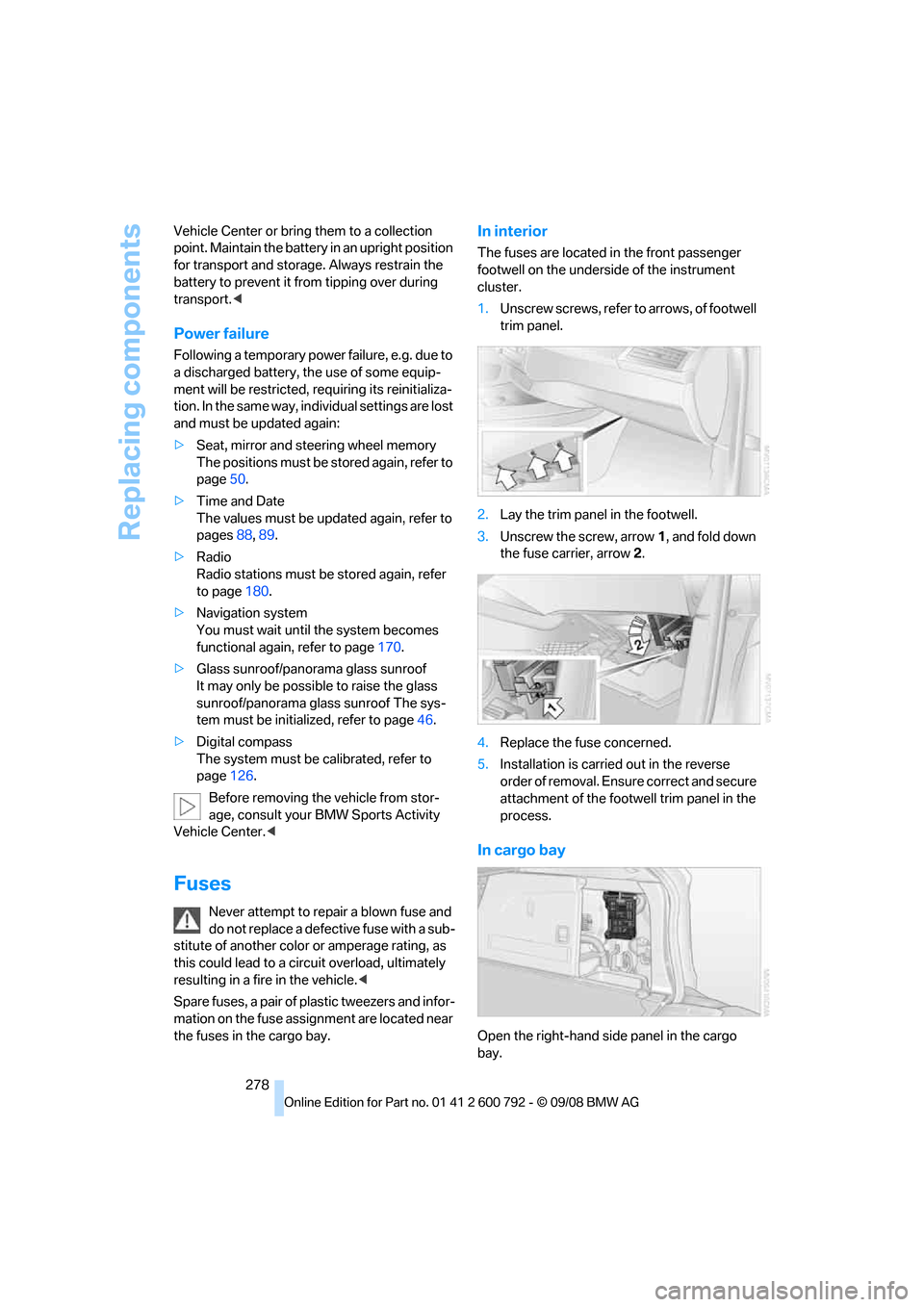
In interior
The fuses are located in the front passenger
footwell on the undersid e of the instrument
cluster.
1. Unscrew screws, refer to arrows, of footwell
trim panel.
2. Lay the trim panel in the footwell.
3. Unscrew the screw, arrow 1, and fold down
the fuse carrier, arrow 2.
4. Replace the fuse concerned.
5. Installation is carrie d out in the reverse
order of removal. Ensure correct and secure
attachment of the foot well trim panel in the
process.
In cargo bay
Open the right-hand side panel in the cargo
bay.
Page 302 of 317
Everything from A to Z
300
Compartments, refer to
Storage compartments 127
Compass, digital 124
Computer 80
– displays in instrument
panel 80
– displays on Control Display 80
– trip computer 81
"Concierge" 239
Concierge service 239
Condition Based Service CBS 263
"Confirmation" 31
Connecting car vacuum cleaner, refer to Connecting
electrical devices 129
Connecting headphones 205
Consumption, refer to
Average fuel
consumption 80
Consumption indicator,
energy control 79
Consumption statistics, refer to Average fuel
consumption 80
"Contrast"
– DVD changer 196
– DVD system in rear 208
Control Center, refer to iDrive 16
Control Display, refer to iDrive 16
– setting brightness 89
Controller, refer to iDrive 16
Controls
– DVD changer 193
– DVD system in rear 204
– refer to Cockpit 10
Convenience operation
– glass sunroof 30,32
– glass sunroof with comfort access 40
– windows 30,32
– windows with comfort access 40
– with comfort access 40Coolant
262
– checking level 262
– temperature 79
Cooling, maximum 117
Cornering Brake Control
CBC 96
Courtesy lamps, refer to Interior lamps 113
Cradle for telephone or mobile phone 127
Cruise control 75
Cruising range 80
Cup holders 127
Curb weight, refer to Wei
ghts 289
"Current position" 169
Current position
– displaying 169
– entering 158
– storing 158
"Customer Relations" 230,238
Cylinders, refer to Engine data 286
D
Data 286
– capacities 290
– dimensions 287
– engine 286
– technical data 286
– weights 289
"Date" 89
Date 78
– display format 89
– retrieving 78
– setting 89
"Date format" 89
Daytime driving lamps 111
"Deactivated" 51
Defrosting windows 116
Defrosting windows and
removing condensation 116
Defrost position, refer to Defrosting windows 116
"Delete all numbers" on the mobile phone 229 "Delete data" for
navigation 159
"Delete" for mobile phone 229
Destination address
– deleting 159
– entering 151,153
Destination for navigation
– destination list 157
– entering 150
– selecting from address
book 159
– selecting using
information 156
– selecting using voice 153
– storing 158
Destination guidance 162
– canceling voice instructions 60
– changing specified route 160
– displaying route 163
– distance and arrival 162
– ending/continuing 162
– starting 162
– voice instructions 165
– volume of voice instructions 166
Destination list for navigation system 157
Destinations recently driven
to 157
"Details"
– DVD system in the rear 212
– in audio mode 202
"Dial" for mobile phone 227
"Dial number" 227
"
Diamond button" 59
Diesel exhaust fluid
– at low temperatures 246
– at minimum 246
– refilling yourself 247
Diesel particulate filter 139
Digital clock 78
Digital compass 124
Digital radio, refer to High
Definition Radio 181
Page 303 of 317
Reference 301
At a glance
Controls
Driving tips
Communications
Navigation
Entertainment
Mobility
Digital Versatile Disc, refer to
– DVD changer193
– Player for navigation DVD 174
Dimensions 287
Directional indicators, refer to Turn signals 73
Direction announcements,
refer to Voice
instructions 165
Direction instructions, refer to
Voice instructions 165
Directory for navigation, refer
to Address book 158
Displacement, refer to Engine data 286
Display, refer to iDrive 16
Displaying images 212
Display lighting, refer to
Instrument lighting 113
"Display off" 21
Displays, refer to Instrument
panel 12
"Display settings" 89,107
Displays on the windshield,
refer to Head-Up
Display 107
Disposal
– battery of remote control with comfort access 41
– remote control battery 206
– vehicle battery 277
Distance, refer to Computer 80
"Distance to dest." 81
Distance to destination, refer to Computer 80
Distance warning, refer to PDC Park Distance
Control 91
Door entry lighting 113
Door key, refer to Keys/ remote control 28
Door lock 32
Door locking, confirmation signals 31 "Door locks"
30,31,83
Doors
– manual operation 32
– remote control 29
DOT Quality Grades 254
Downhill driving assistance, refer to HDC 98
Draft-free ventilation 118
Drinks holder, refer to Cup holders 127
Drive for navigation DVDs 174
"Driver's door only" 30
Driver's seat, calibrating 55
"Driver's seat climate" 56
Dr
iving lamps, refer to Parking
lamps/low beams 110
Driving on poor roads 144
Driving route, refer to Displaying route 163
Driving stability control systems 96
Driving through water 140
Driving tips, refer to General driving notes 138
Dry air, refer to Cooling
function 117
Drying the air, refer to Cooling function 117
DSC Dynamic Stability Control 96
– indicator lamp 13,97
DTC Dynamic Traction Control 97
– activating 97
– indicator lamp 97
"DVD"
– for DVD system in rear 206
– in DVD changer 194
DVD
– DVD changer 193
– DVD system in rear 204
– player for navigation DVD 174 DVD changer
193
– adjusting brightness 196
– adjusting contrast 196
– audio and video playback 194
– audio playback 197
– chapter selection 198
– controls 193
– DVD audio content 198
– DVD control 194
– DVD country codes 194
– DVD-specific menu 197
– fast forward 195
– filling 193
– installation position 193
– malfunctions 194
– removing DVDs 193
– reverse 195
– selecting audio
language 198
– selecting language 196
– selecting subtitles 196
– selecting title 197
– selecting viewing angle 197
– skip chapter 195
– tone control 195,198
– zoom 196
"DVD form
at"
– for DVD system in rear 209
– in DVD changer 196
DVD for navigation 148
DVD system in rear 204
– CD/DVD player 205
– connecting headphones 205
– controls 204
– displaying images from CD/ DVD 212
– DVD country codes 206
– external device 215
– information on CD/DVD
player 214
– playing audio tracks from CD/DVD 210
– playing video from CD/ DVD 206
– remote control 205
– switching on/off 206
Page 306 of 317
Everything from A to Z
304
Height adjustment
– seats
49
– steering wheel 58
High beams 73,112
– headlamp flasher 73
– indicator lamp 13
High Definition Radio 181
High-pressure cleaning
jets 266
Highs, refer to Treble and bass 175
High water, refer to Driving through water 140
Highway, refer to Route criteria 160
Hill Descent Control HDC 98
Hills 140
Holder for cups 127
Home address 160
"Home address" in navigation 160
Homepage 4
Hood 258
Horn 10
Hot exhaust system 139
"Hour memo" 88
"House number" for destination entry 153
Hydraulic brake assistant, refer to Brake assistant 96
Hydroplaning 139
I
IBOC, refer to High Definition
Radio 181
Ice, refer to Outside
temperature warning 78
Ice warning, refer to Outside temperature warning 78
ID3 tag, refer to Information on track 188
Identification, tire 257
Identification mark, run-flat tires 256 iDrive
16
– assistance window 20
– changing language 90
– changing menu page 19
– changing settings 88
– changing units of measure and display type 89
– confirming selection or
entry 19
– controller 16
– controls 16
– displays, menus 17
– selecting menu item 19
– setting brightness 89
– setting date 89
– setting time 88
– start menu 17
– status information 20
– symbols 18
Ignition 65
– switched off 65
– switched on 65
Ignition key, refer to Keys/ remote control 28
Ignition key position 1, refer to
Radio readiness 65
Ignition key position 2, refer to Ignition on 65
Ignition lock 65
– starting engine with comfort access 40
Indicator/warning lamps 13
– active steering 104
– airbags 107
– DSC 13,97
– DTC 97
– fasten safety belt 55
– Flat Tire Monitor 101
– fog lamps 13
– TPM Tire Pressure
Monitor 103
Individual air distribution 117
Individually programmable
buttons on steering
wheel 59
Individual settings, refer to
Personal Profile 28
I
nflation pressure, refer to Tire inflation pressure 249Inflation pressure monitoring
– refer to FTM Flat Tire
Monitor 100
– refer to TPM Tire Pressure Monitor 101
Information
– on another location 156
– on country 156
– on current position 156
– on destination location 156
"Information on
destination" 157
"Info sources" 83
Initializing
– Flat Tire Monitor 100
– refer to Power failure 278
– refer to Setting date 89
– refer to Setting time 88
– seat, mirror and steering
wheel memory 50
Installation location
– drive for navigation DVD 148
– DVD changer 193
– mobile phone 127
Instructions for navigation
system, refer to Voice
instructions 165
Instrument cluster
– refer to Cockpit 10
– refer to Instrument panel 12
Instrument illumination, refer
to Instrument lighting 113
Instrument lighting 113
Instrument panel 12
– refer to Cockpit 10
Integrated key 28
Integrated universal remote
control 123
Interesting destination for navigation 156
"Interim time" 87
Interior lamps 113
– switching on with remote
control 30
Interior motion sensor 39
– switching off 39