instrument cluster BMW X5M 2012 User Guide
[x] Cancel search | Manufacturer: BMW, Model Year: 2012, Model line: X5M, Model: BMW X5M 2012Pages: 317, PDF Size: 8.83 MB
Page 75 of 317
Service requirements
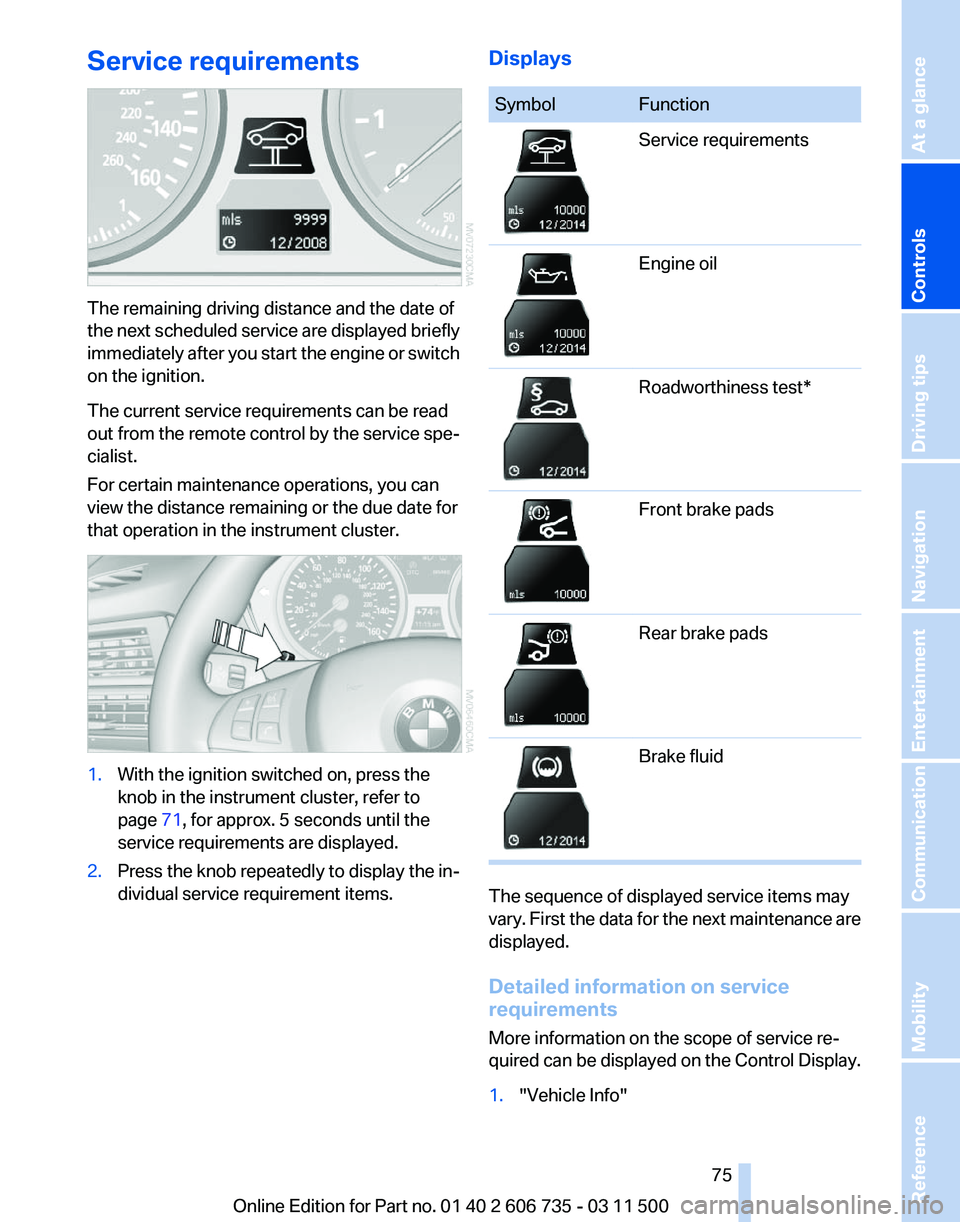
The remaining driving distance and the date of
the
next scheduled service are displayed briefly
immediately after you start the engine or switch
on the ignition.
The current service requirements can be read
out from the remote control by the service spe‐
cialist.
For certain maintenance operations, you can
view the distance remaining or the due date for
that operation in the instrument cluster. 1.
With the ignition switched on, press the
knob in the instrument cluster, refer to
page 71, for approx. 5 seconds until the
service requirements are displayed.
2. Press the knob repeatedly to display the in‐
dividual service requirement items. Displays Symbol Function
Service requirements
Engine oil
Roadworthiness test*
Front brake pads
Rear brake pads
Brake fluid
The sequence of displayed service items may
vary.
First the data for the next maintenance are
displayed.
Detailed information on service
requirements
More information on the scope of service re‐
quired can be displayed on the Control Display.
1. "Vehicle Info"
Seite 75
75Online Edition for Part no. 01 40 2 606 735 - 03 11 500
Reference Mobility Communication Entertainment Navigation Driving tips
Controls At a glance
Page 76 of 317
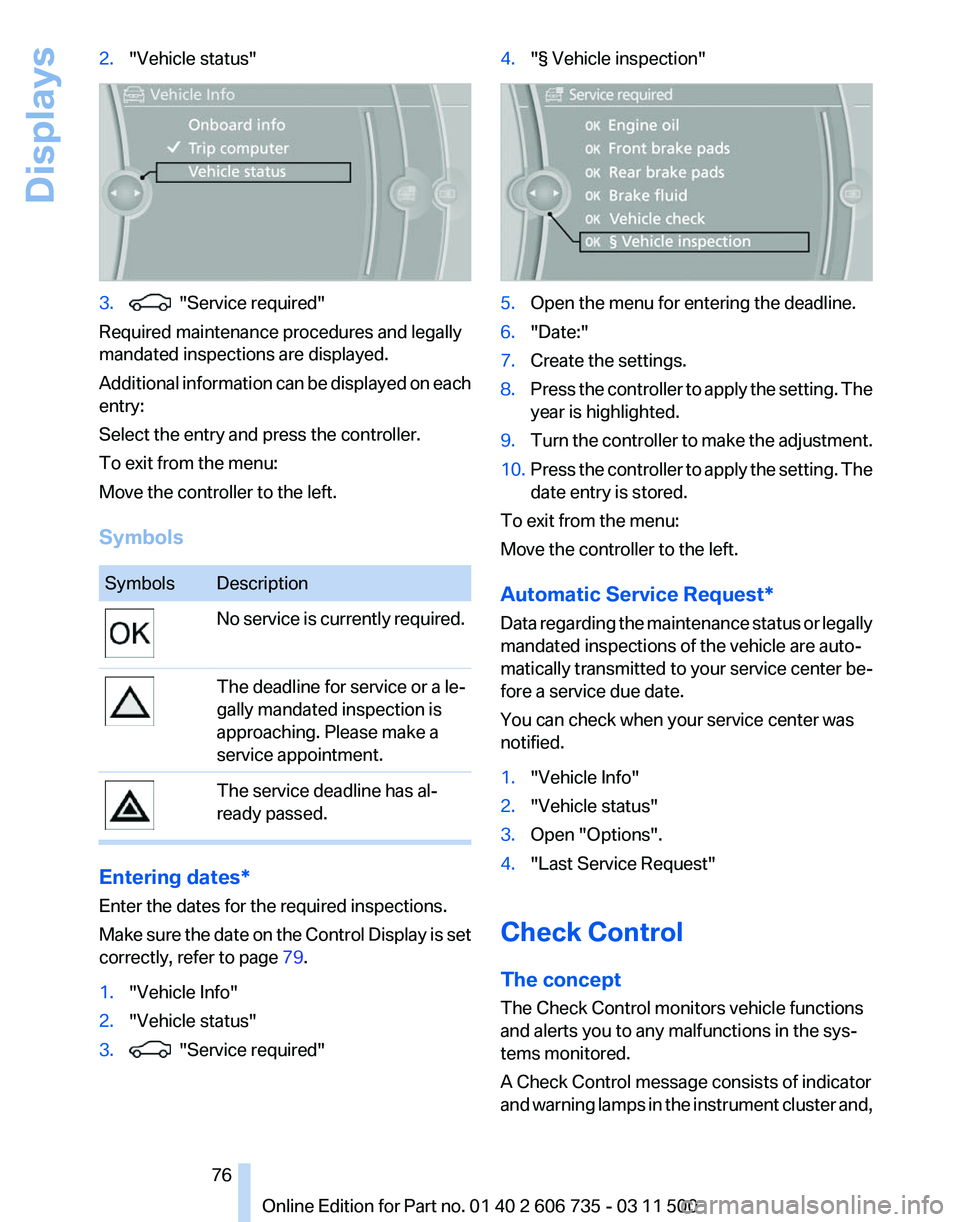
2.
"Vehicle status" 3. "Service required"
Required maintenance procedures and legally
mandated inspections are displayed.
Additional
information can be displayed on each
entry:
Select the entry and press the controller.
To exit from the menu:
Move the controller to the left.
Symbols Symbols Description
No service is currently required.
The deadline for service or a le‐
gally mandated inspection is
approaching. Please make a
service appointment.
The service deadline has al‐
ready passed.
Entering dates*
Enter the dates for the required inspections.
Make
sure the date on the Control Display is set
correctly, refer to page 79.
1. "Vehicle Info"
2. "Vehicle status"
3. "Service required" 4.
"§ Vehicle inspection" 5.
Open the menu for entering the deadline.
6. "Date:"
7. Create the settings.
8. Press the controller to apply the setting. The
year is highlighted.
9. Turn the controller to make the adjustment.
10. Press the controller to apply the setting. The
date entry is stored.
To exit from the menu:
Move the controller to the left.
Automatic Service Request
*
Data regarding the maintenance status or legally
mandated inspections of the vehicle are auto‐
matically transmitted to your service center be‐
fore a service due date.
You can check when your service center was
notified.
1. "Vehicle Info"
2. "Vehicle status"
3. Open "Options".
4. "Last Service Request"
Check Control
The concept
The Check Control monitors vehicle functions
and alerts you to any malfunctions in the sys‐
tems monitored.
A Check Control message consists of indicator
and
warning lamps in the instrument cluster and,
Seite 76
76 Online Edition for Part no. 01 40 2 606 735 - 03 11 500
Displays
Page 83 of 317
Malfunction
A message is displayed.
Adaptive light control is malfunctioning or has
failed.
Have the system checked as soon as pos‐
sible.
High beams/roadside parking
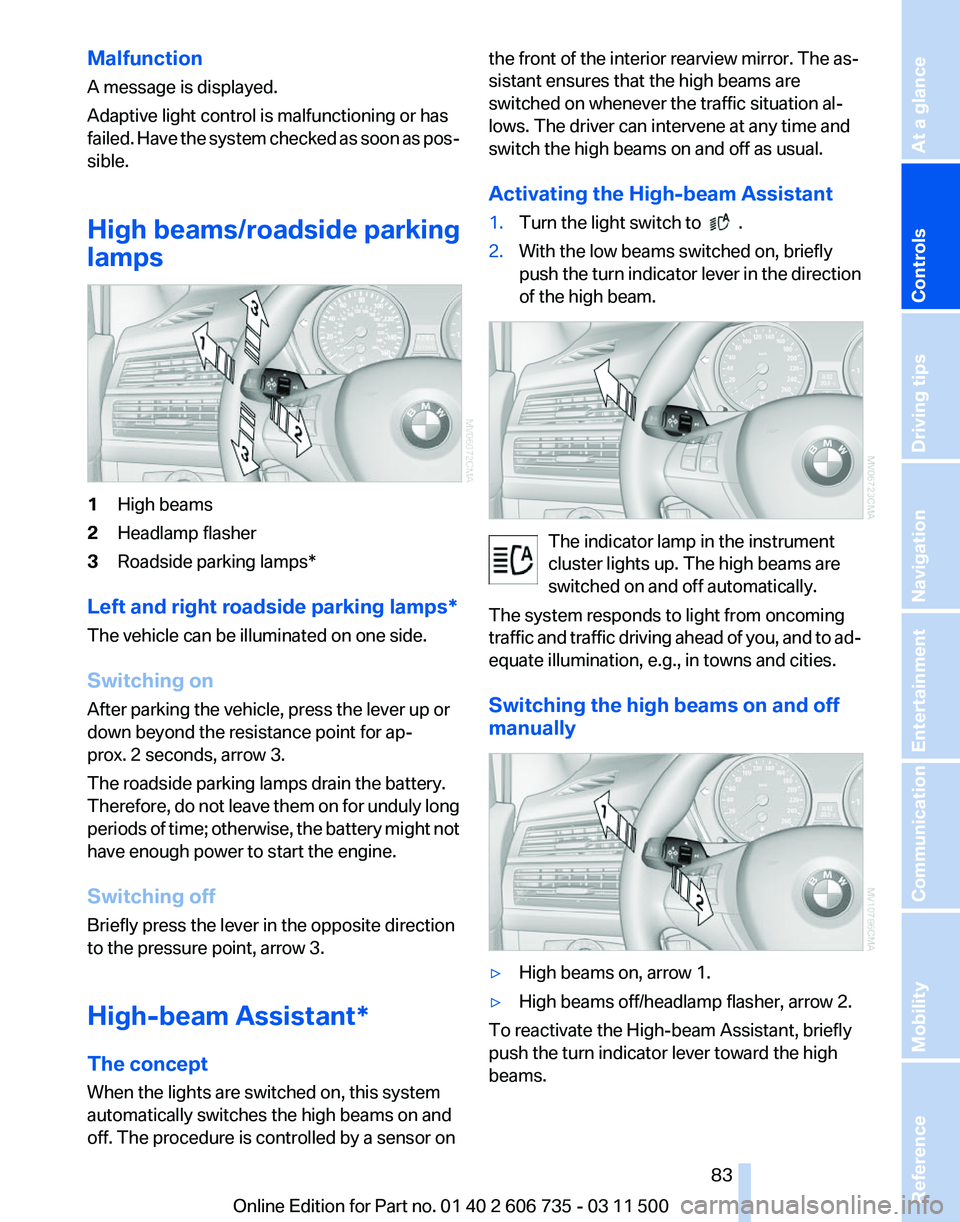
lamps 1
High beams
2 Headlamp flasher
3 Roadside parking lamps*
Left and right roadside parking lamps*
The vehicle can be illuminated on one side.
Switching on
After parking the vehicle, press the lever up or
down beyond the resistance point for ap‐
prox. 2 seconds, arrow 3.
The roadside parking lamps drain the battery.
Therefore,
do not leave them on for unduly long
periods of time; otherwise, the battery might not
have enough power to start the engine.
Switching off
Briefly press the lever in the opposite direction
to the pressure point, arrow 3.
High-beam Assistant*
The concept
When the lights are switched on, this system
automatically switches the high beams on and
off. The procedure is controlled by a sensor on the front of the interior rearview mirror. The as‐
sistant ensures that the high beams are
switched on whenever the traffic situation al‐
lows. The driver can intervene at any time and
switch the high beams on and off as usual.
Activating the High-beam Assistant
1.
Turn the light switch to .
2. With the low beams switched on, briefly
push
the turn indicator lever in the direction
of the high beam. The indicator lamp in the instrument
cluster lights up. The high beams are
switched on and off automatically.
The system responds to light from oncoming
traffic
and traffic driving ahead of you, and to ad‐
equate illumination, e.g., in towns and cities.
Switching the high beams on and off
manually ▷
High beams on, arrow 1.
▷ High beams off/headlamp flasher, arrow 2.
To reactivate the High-beam Assistant, briefly
push the turn indicator lever toward the high
beams. Seite 83
83Online Edition for Part no. 01 40 2 606 735 - 03 11 500
Reference Mobility Communication Entertainment Navigation Driving tips
Controls At a glance
Page 84 of 317
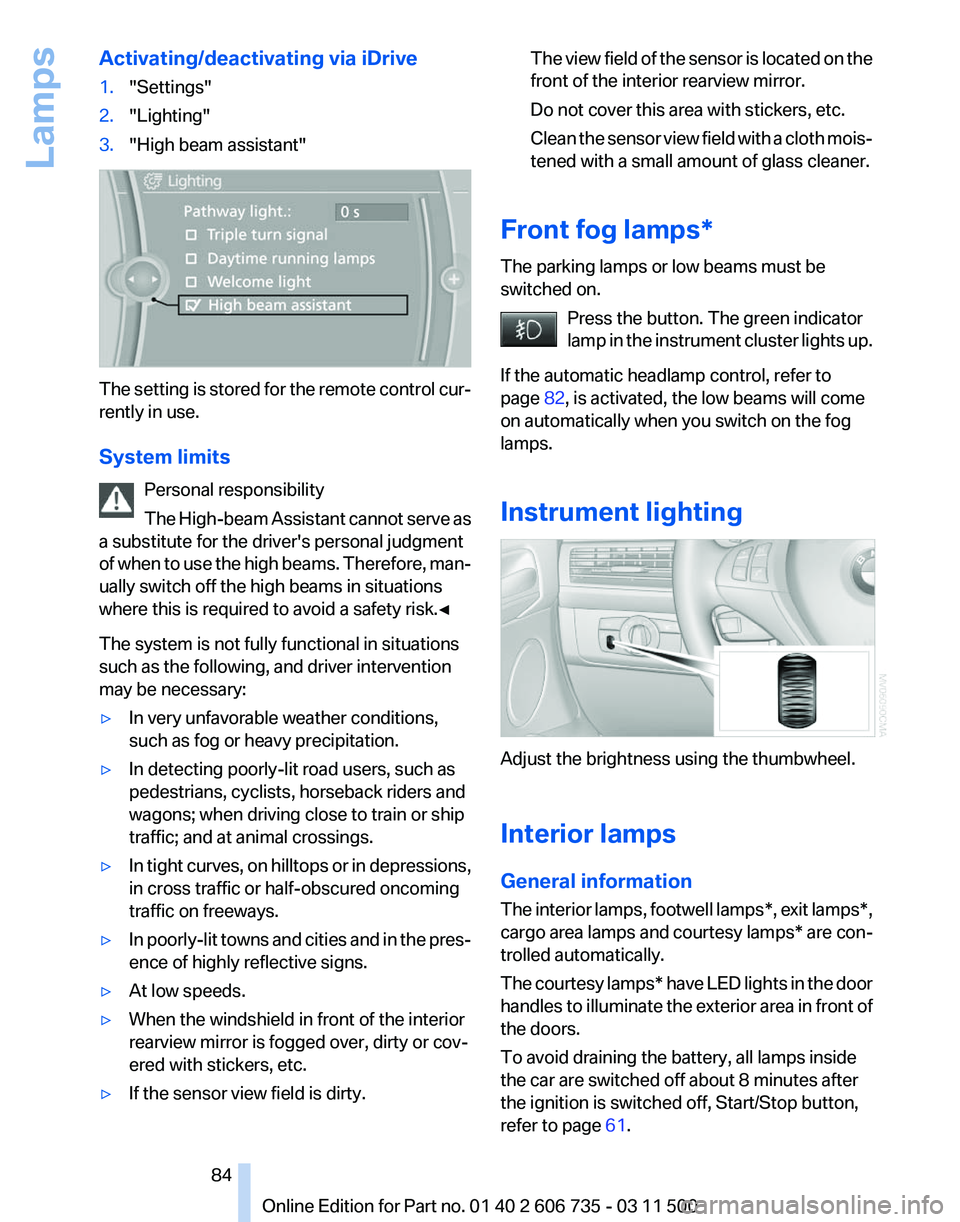
Activating/deactivating via iDrive
1.
"Settings"
2. "Lighting"
3. "High beam assistant" The setting is stored for the remote control cur‐
rently in use.
System limits
Personal responsibility
The
High-beam Assistant cannot serve as
a substitute for the driver's personal judgment
of when to use the high beams. Therefore, man‐
ually switch off the high beams in situations
where this is required to avoid a safety risk.◀
The system is not fully functional in situations
such as the following, and driver intervention
may be necessary:
▷ In very unfavorable weather conditions,
such as fog or heavy precipitation.
▷ In detecting poorly-lit road users, such as
pedestrians, cyclists, horseback riders and
wagons; when driving close to train or ship
traffic; and at animal crossings.
▷ In tight curves, on hilltops or in depressions,
in cross traffic or half-obscured oncoming
traffic on freeways.
▷ In poorly-lit towns and cities and in the pres‐
ence of highly reflective signs.
▷ At low speeds.
▷ When the windshield in front of the interior
rearview mirror is fogged over, dirty or cov‐
ered with stickers, etc.
▷ If the sensor view field is dirty. The view field of the sensor is located on the
front of the interior rearview mirror.
Do not cover this area with stickers, etc.
Clean
the sensor view field with a cloth mois‐
tened with a small amount of glass cleaner.
Front fog lamps*
The parking lamps or low beams must be
switched on. Press the button. The green indicator
lamp
in the instrument cluster lights up.
If the automatic headlamp control, refer to
page 82, is activated, the low beams will come
on automatically when you switch on the fog
lamps.
Instrument lighting Adjust the brightness using the thumbwheel.
Interior lamps
General information
The
interior lamps, footwell lamps*, exit lamps*,
cargo area lamps and courtesy lamps* are con‐
trolled automatically.
The courtesy lamps* have LED lights in the door
handles to illuminate the exterior area in front of
the doors.
To avoid draining the battery, all lamps inside
the car are switched off about 8 minutes after
the ignition is switched off, Start/Stop button,
refer to page 61. Seite 84
84 Online Edition for Part no. 01 40 2 606 735 - 03 11 500
Lamps
Page 96 of 317
Driving stability control systems
Antilock Brake System ABS
ABS
prevents locking of the wheels during brak‐
ing.
The vehicle remains steerable even during full
brake applications, thus increasing active
safety.
ABS is operational every time you start the en‐
gine.
CBC Cornering Brake Control
When braking during curves or when braking
during a lane change, driving stability and steer‐
ing response are improved further.
Electronic brake-force
distribution
The system controls the brake pressure in the
rear wheels to ensure stable braking behavior.
Brake assistant
When you apply the brakes rapidly, this system
automatically produces the maximum braking
force boost. It thus helps to achieve the shortest
possible braking distance during full braking.
This system utilizes all of the benefits provided
by ABS.
Do not reduce the pressure on the brake pedal
for the duration of the full braking.
Dynamic Stability Control
DSC
The concept
DSC prevents traction loss in the driving wheels
when driving away and accelerating. DSC also recognizes unstable vehicle condi‐
tions,
such as fishtailing or nose-diving. Subject
to physical limits, DSC helps to keep the vehicle
on a steady course by reducing engine speed
and by applying brakes to the individual wheels.
Adjust your driving style to the situation
An appropriate driving style is always the
responsibility of the driver.
The laws of physics cannot be repealed, even
with DSC.
Do not reduce the additional safety margin with
a risky driving style, as otherwise there is a risk
of an accident.◀
Deactivating DSC: DSC OFF
When DSC is deactivated, driving stability is re‐
duced during acceleration and when driving in
bends.
To increase vehicle stability, activate DSC again
as soon as possible.
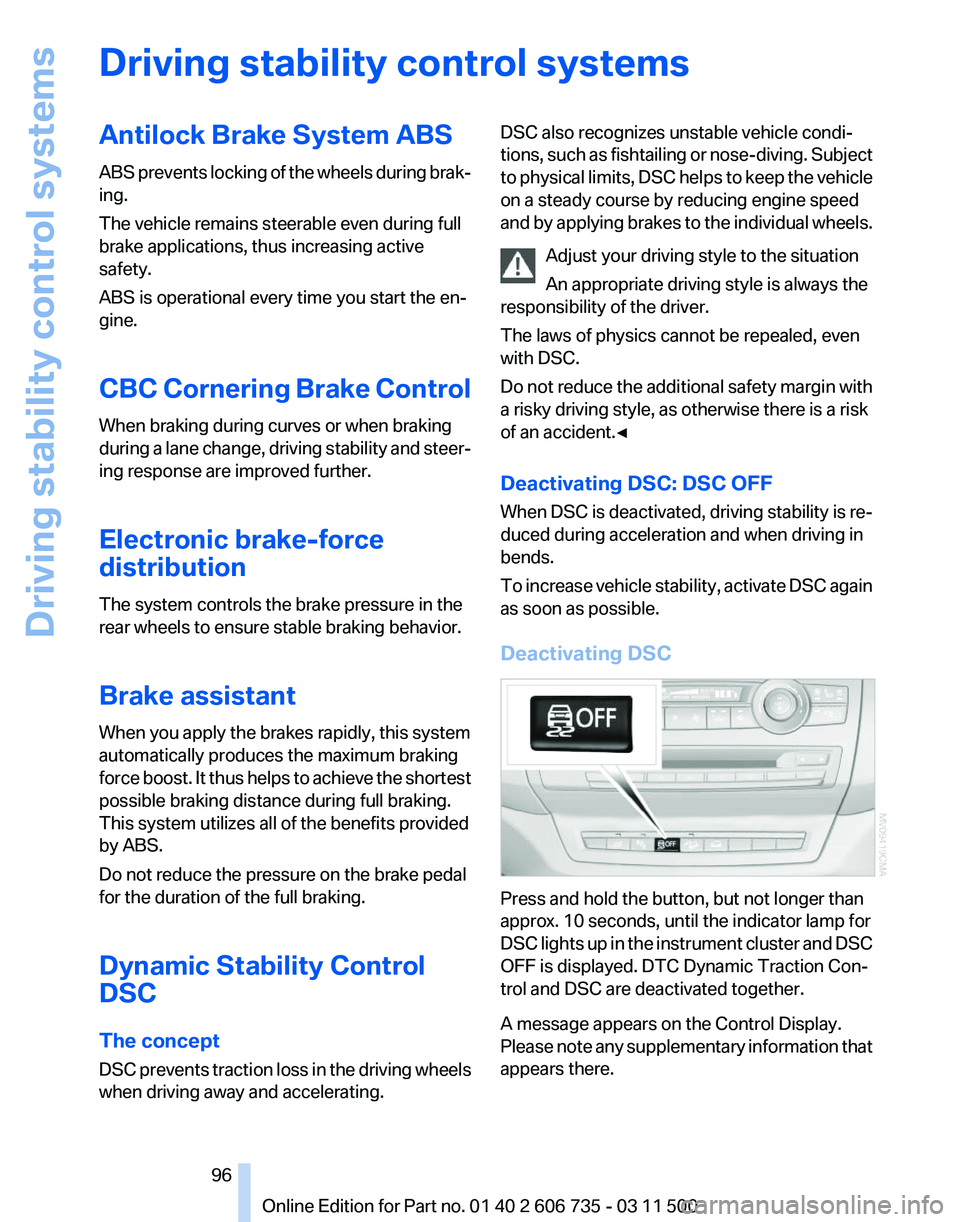
Deactivating DSC Press and hold the button, but not longer than
approx. 10 seconds, until the indicator lamp for
DSC
lights up in the instrument cluster and DSC
OFF is displayed. DTC Dynamic Traction Con‐
trol and DSC are deactivated together.
A message appears on the Control Display.
Please note any supplementary information that
appears there. Seite 96
96 Online Edition for Part no. 01 40 2 606 735 - 03 11 500
Driving stability control systems
Page 97 of 317
Activating DSC
Press the button.
DSC OFF and the indicator lamp in the instru‐
ment cluster go out.
For better control
The indicator lamp flashes: DSC con‐
trols the drive forces and brake forces.
The indicator lamp lights up: DSC and
DTC has failed.
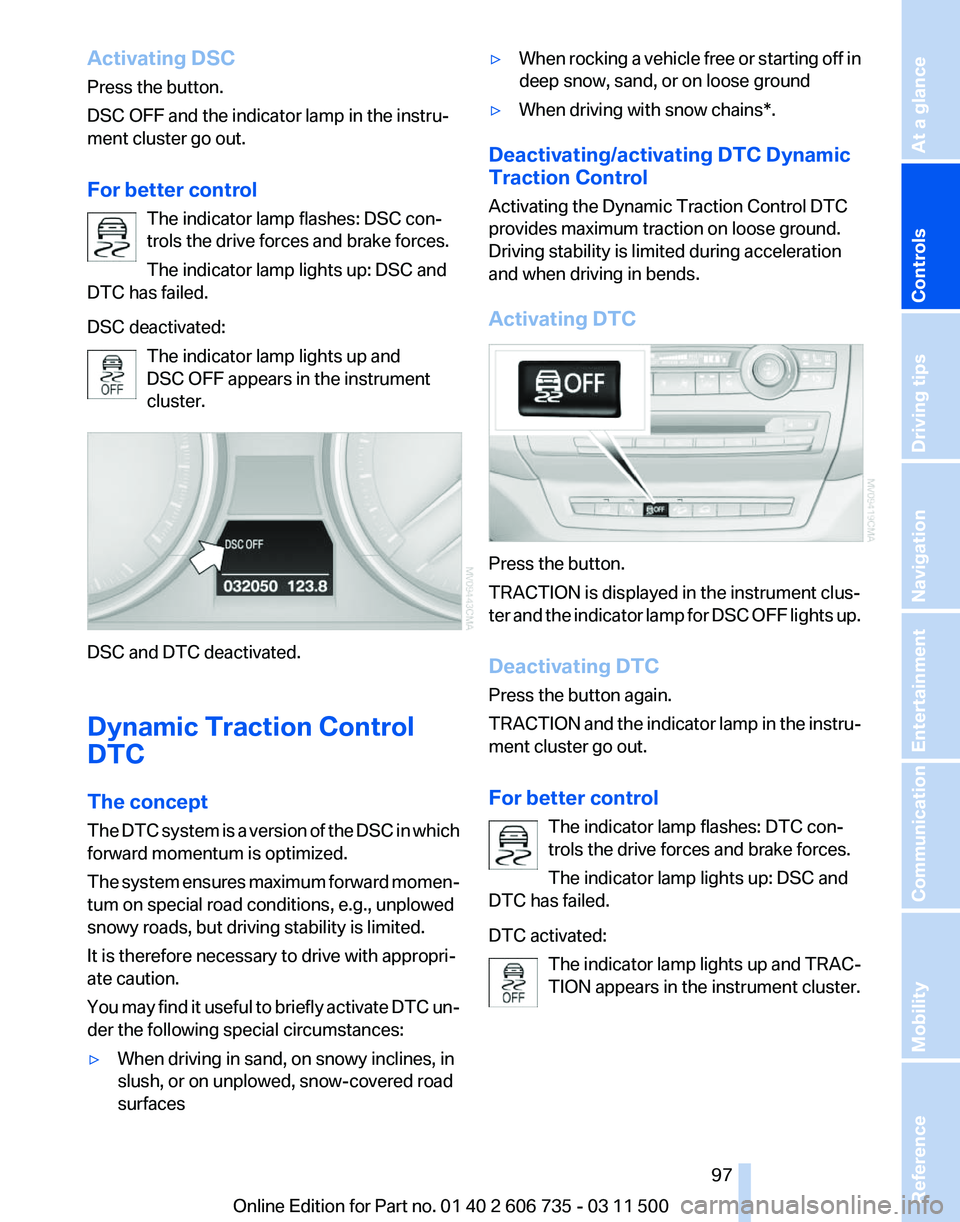
DSC deactivated:
The indicator lamp lights up and
DSC OFF appears in the instrument
cluster. DSC and DTC deactivated.
Dynamic Traction Control
DTC
The concept
The
DTC system is a version of the DSC in which
forward momentum is optimized.
The system ensures maximum forward momen‐
tum on special road conditions, e.g., unplowed
snowy roads, but driving stability is limited.
It is therefore necessary to drive with appropri‐
ate caution.
You may find it useful to briefly activate DTC un‐
der the following special circumstances:
▷ When driving in sand, on snowy inclines, in
slush, or on unplowed, snow-covered road
surfaces ▷
When rocking a vehicle free or starting off in
deep snow, sand, or on loose ground
▷ When driving with snow chains*.
Deactivating/activating DTC Dynamic
Traction Control
Activating the Dynamic Traction Control DTC
provides maximum traction on loose ground.
Driving stability is limited during acceleration
and when driving in bends.
Activating DTC Press the button.
TRACTION is displayed in the instrument clus‐
ter
and the indicator lamp for DSC OFF lights up.
Deactivating DTC
Press the button again.
TRACTION and the indicator lamp in the instru‐
ment cluster go out.
For better control The indicator lamp flashes: DTC con‐
trols the drive forces and brake forces.
The indicator lamp lights up: DSC and
DTC has failed.
DTC activated:
The indicator lamp lights up and TRAC‐
TION appears in the instrument cluster. Seite 97
97Online Edition for Part no. 01 40 2 606 735 - 03 11 500
Reference Mobility Communication Entertainment Navigation Driving tips
Controls At a glance
Page 99 of 317
A target speed within the same range can be
specified using the lever of the cruise control.
On
inclines over 10 %, you can reduce the speed
to approx. 3 mph/4 km/h. Pull the lever of the
cruise control beyond the resistance point, ar‐
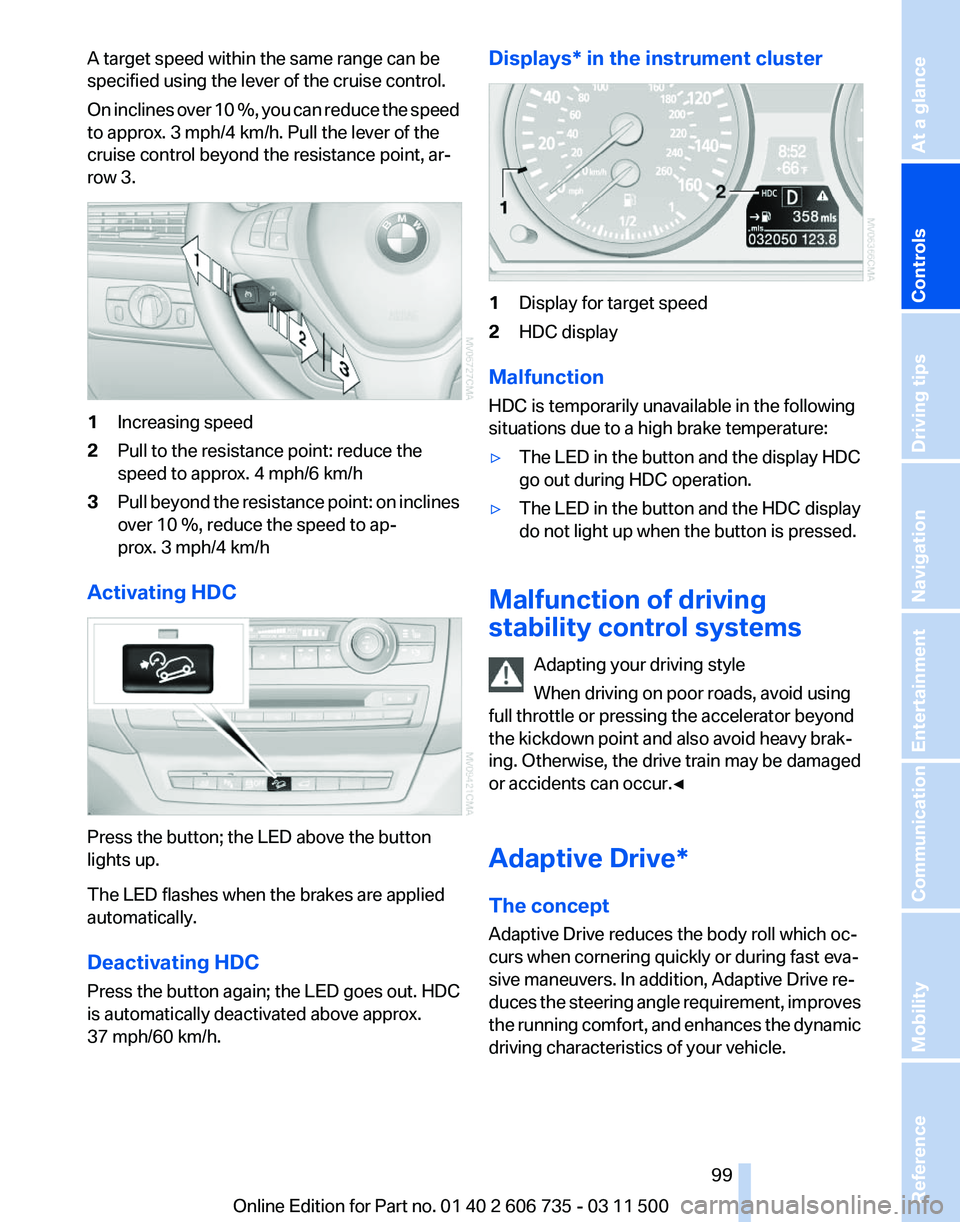
row 3. 1
Increasing speed
2 Pull to the resistance point: reduce the
speed to approx. 4 mph/6 km/h
3 Pull beyond the resistance point: on inclines
over 10 %, reduce the speed to ap‐
prox. 3 mph/4 km/h
Activating HDC Press the button; the LED above the button
lights up.
The LED flashes when the brakes are applied
automatically.
Deactivating HDC
Press the button again; the LED goes out. HDC
is automatically deactivated above approx.
37 mph/60 km/h. Displays* in the instrument cluster
1
Display for target speed
2 HDC display
Malfunction
HDC is temporarily unavailable in the following
situations due to a high brake temperature:
▷ The LED in the button and the display HDC
go out during HDC operation.
▷ The LED in the button and the HDC display
do not light up when the button is pressed.
Malfunction of driving
stability control systems Adapting your driving style
When driving on poor roads, avoid using
full throttle or pressing the accelerator beyond
the kickdown point and also avoid heavy brak‐
ing. Otherwise, the drive train may be damaged
or accidents can occur.◀
Adaptive Drive*
The concept
Adaptive Drive reduces the body roll which oc‐
curs when cornering quickly or during fast eva‐
sive maneuvers. In addition, Adaptive Drive re‐
duces
the steering angle requirement, improves
the running comfort, and enhances the dynamic
driving characteristics of your vehicle. Seite 99
99Online Edition for Part no. 01 40 2 606 735 - 03 11 500
Reference Mobility Communication Entertainment Navigation Driving tips
Controls At a glance
Page 105 of 317
While standing
Before leaving the vehicle
Before
leaving the vehicle with the engine
running, engage position P of the automatic
transmission and apply the parking brake. Oth‐
erwise, the vehicle may begin to roll.◀
If a vehicle detected ahead of you slows to a halt
and your vehicle is also brought to a halt by the
system:
▷ If the vehicle ahead of you drives away, your
vehicle
accelerates automatically as long as
mark 1 for the desired speed in the speed‐
ometer is green.
▷ If the vehicle ahead of you drives away when
mark 1 is orange, depress the accelerator
briefly or press button 4.Rolling bars in the
distance indicator 3 mean that the vehicle
ahead of you has driven away.
If you are standing behind a vehicle with your
brake
pedal depressed and the system is deac‐
tivated or interrupted:
1. Select the desired speed using the lever, ar‐
row
1 or arrow 2, or press button 4 to retrieve
a stored speed.
2. Release the brake pedal.
3. When the vehicle ahead of you drives away,
press
on the accelerator briefly or press but‐
ton 4.
Deactivating the system
▷ When driving, press the lever up or down
twice.
▷ When stationary, do the same while de‐
pressing the brake pedal.
▷ Switch off the ignition.
The displays go out, and the stored desired
speed and distance are deleted. Displays in instrument cluster
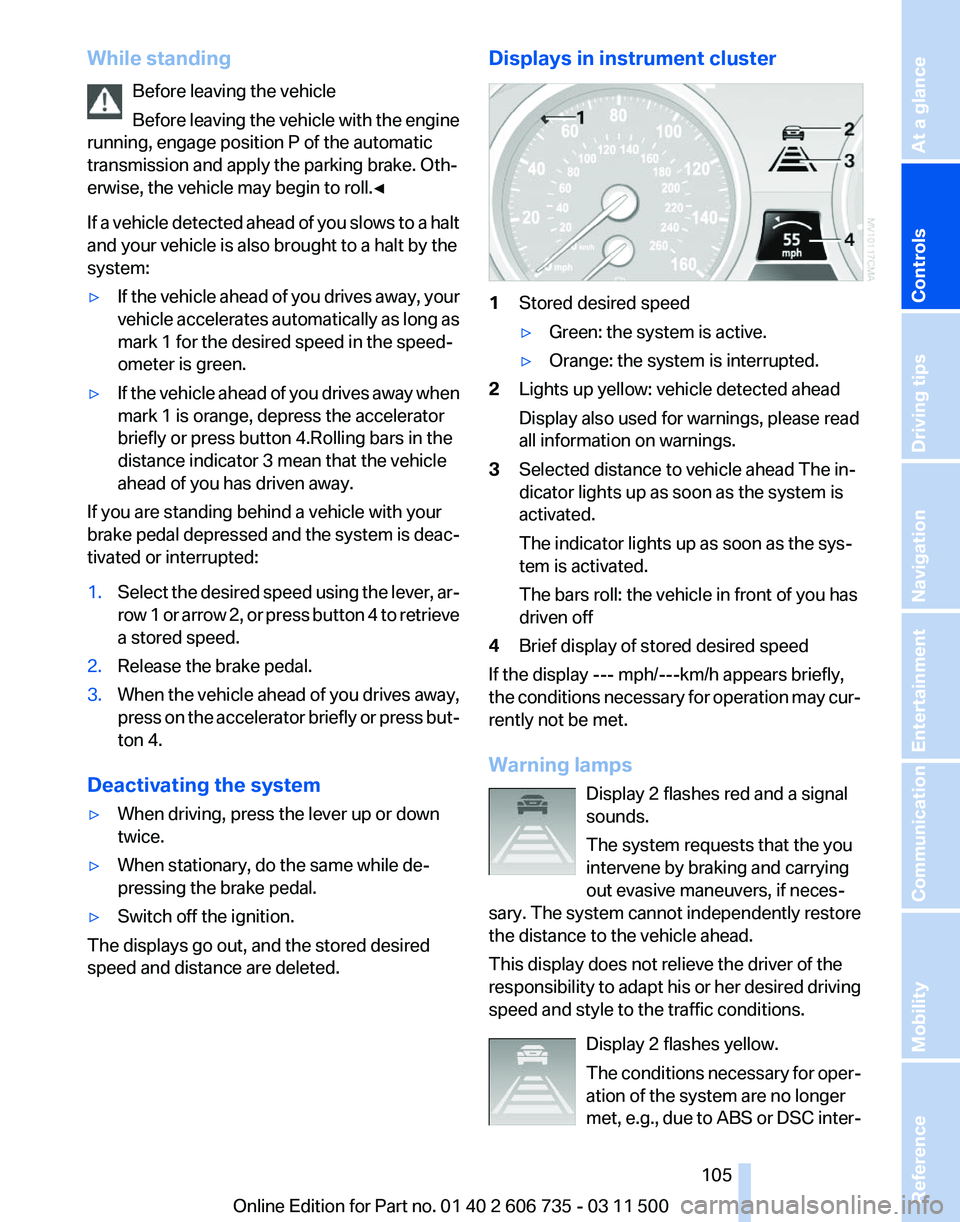
1
Stored desired speed
▷Green: the system is active.
▷ Orange: the system is interrupted.
2 Lights up yellow: vehicle detected ahead
Display also used for warnings, please read
all information on warnings.
3 Selected distance to vehicle ahead The in‐
dicator lights up as soon as the system is
activated.
The indicator lights up as soon as the sys‐
tem is activated.
The bars roll: the vehicle in front of you has
driven off
4 Brief display of stored desired speed
If the display --- mph/---km/h appears briefly,
the conditions necessary for operation may cur‐
rently not be met.
Warning lamps
Display 2 flashes red and a signal
sounds.
The system requests that the you
intervene by braking and carrying
out evasive maneuvers, if neces‐
sary. The system cannot independently restore
the distance to the vehicle ahead.
This display does not relieve the driver of the
responsibility to adapt his or her desired driving
speed and style to the traffic conditions.
Display 2 flashes yellow.
The conditions necessary for oper‐
ation of the system are no longer
met, e.g., due to ABS or DSC inter‐ Seite 105
105Online Edition for Part no. 01 40 2 606 735 - 03 11 500
Reference Mobility Communication Entertainment Navigation Driving tips
Controls At a glance
Page 109 of 317
Maintaining current speed
Push, arrow 1, or pull, arrow 2, the lever to the
resistance point.
The car's current speed is stored and main‐
tained. It is displayed on the speedometer and
briefly in the instrument cluster.
On uphill gradients, it may prove impossible to
maintain the set speed if current engine power
output
is insufficient. If the engine braking effect
is insufficient on downhill slopes, the system will
brake the vehicle slightly.
Increasing desired speed
Repeatedly press the lever to the resistance
point or beyond, arrow 1, until the desired speed
is reached.
▷ Each time the lever is pressed to the point of
resistance, the desired speed increases by
approx. 1 mph/1 km/h.
▷ Each time the lever is pressed beyond the
resistance point, the desired speed is in‐
creased by up to 5 mph/10 km/h.
The system stores and maintains the speed.
Accelerating using the lever
Accelerating slightly:
Press the lever to the resistance point, arrow 1,
until the desired speed is reached.
Accelerating significantly:
Press
the lever beyond the resistance point, ar‐
row 1, until the desired speed is reached.
The vehicle accelerates without pressure on the
accelerator pedal. The system stores and main‐
tains the speed.
Decreasing speed
Repeatedly pull the lever to the resistance point
or beyond, arrow 2, until the desired speed is
displayed.
▷ Each time the lever is pulled to the resist‐
ance point, the desired speed is decreased
by approx. 1 mph/1 km/h.
▷ Each time the lever is pulled beyond the re‐
sistance
point, the desired speed is reduced by up to 5 mph/10 km/h until the minimum
speed of 20 mph/30 km/h is achieved.
The system stores and maintains the speed.
Interrupting the system
Press
the lever up or down, arrow 3: display 1 in
the speedometer changes color, refer to
page 109.
In addition, the system is interrupted:
▷ When the brakes are applied.
▷ When the transmission position D is disen‐
gaged.
▷ When DTC is activated or DSC is deacti‐
vated.
▷ When DSC or ABS is intervening.
Warning lamp The warning lamp lights up if cruise
control has been deactivated auto‐
matically, e.g., by a control interven‐
tion
of the DSC. A message appears on the Con‐
trol Display.
Resuming cruising speed
Press button 4:
The stored speed is resumed and maintained.
Deactivating the system
▷ Press the lever upward or downward twice,
arrow 3.
▷ Switch off the ignition.
The stored speed is cleared.
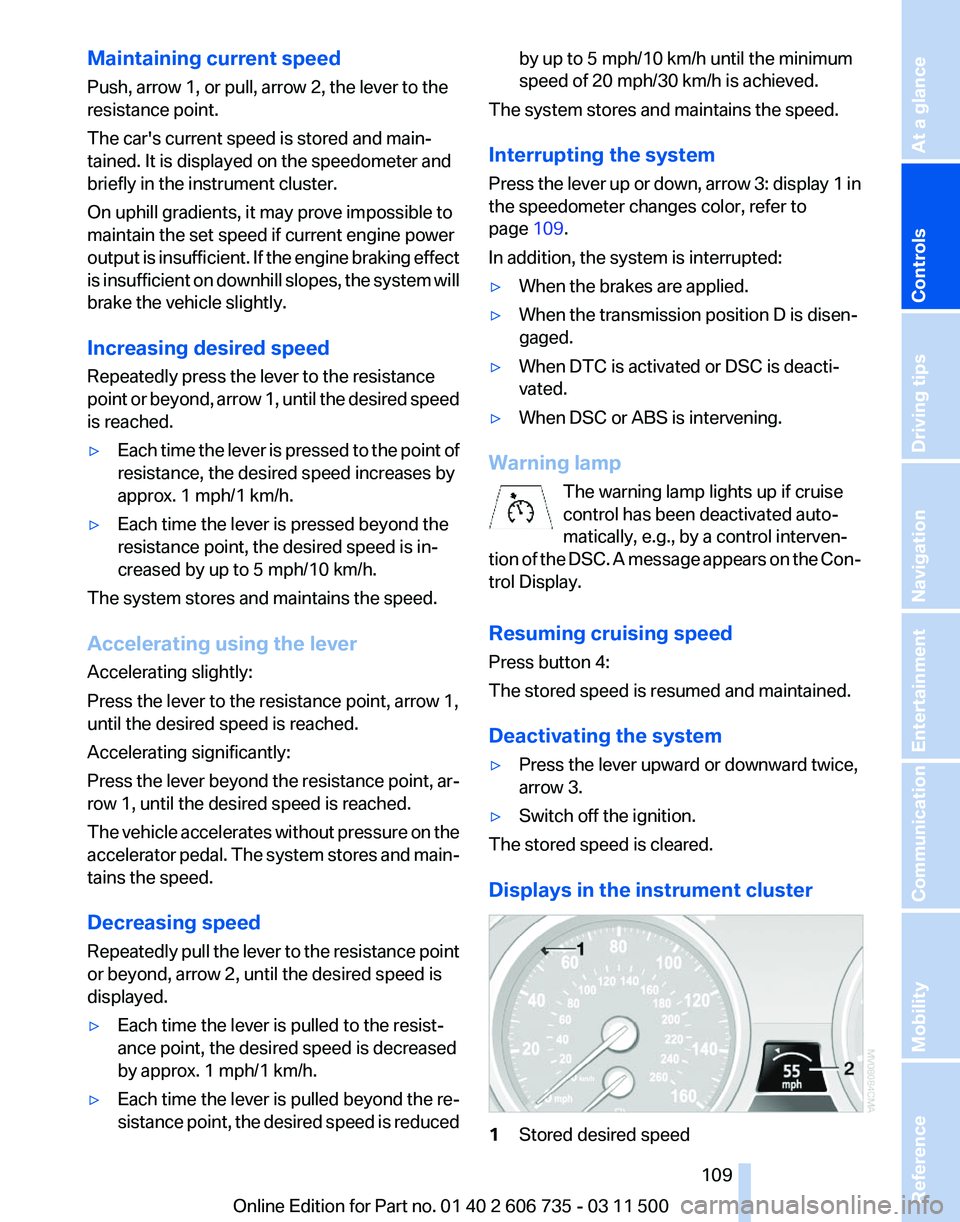
Displays in the instrument cluster 1
Stored desired speed Seite 109
109Online Edition for Part no. 01 40 2 606 735 - 03 11 500
Reference Mobility Communication Entertainment Navigation Driving tips
Controls At a glance
Page 112 of 317
The image of the rear view camera is displayed.
The
setting is stored for the remote control cur‐
rently in use.
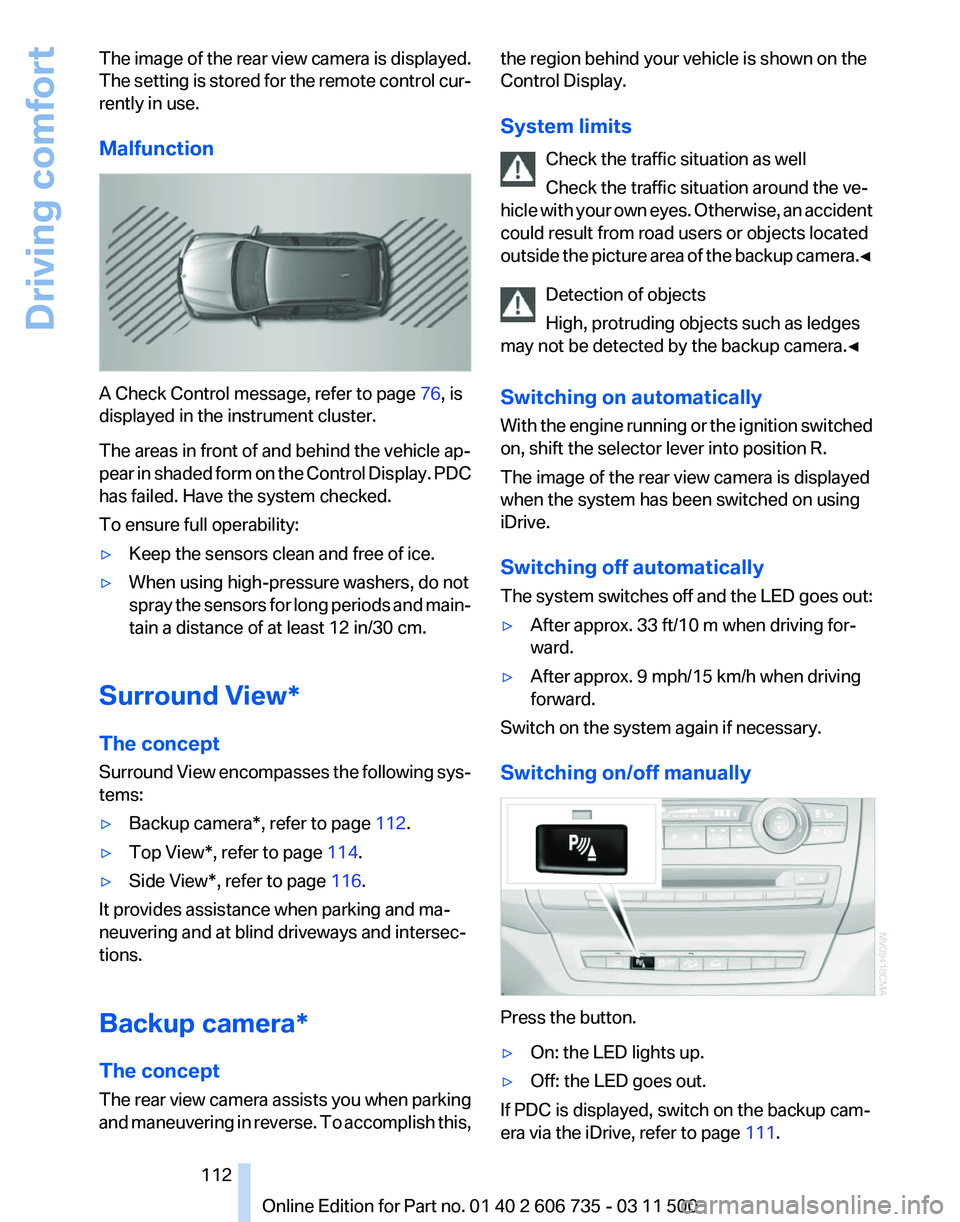
Malfunction A Check Control message, refer to page
76, is
displayed in the instrument cluster.
The areas in front of and behind the vehicle ap‐
pear
in shaded form on the Control Display. PDC
has failed. Have the system checked.
To ensure full operability:
▷ Keep the sensors clean and free of ice.
▷ When using high-pressure washers, do not
spray
the sensors for long periods and main‐
tain a distance of at least 12 in/30 cm.
Surround View*
The concept
Surround
View encompasses the following sys‐
tems:
▷ Backup camera*, refer to page 112.
▷ Top View*, refer to page 114.
▷ Side View*, refer to page 116.
It provides assistance when parking and ma‐
neuvering and at blind driveways and intersec‐
tions.
Backup camera*
The concept
The
rear view camera assists you when parking
and maneuvering in reverse. To accomplish this, the region behind your vehicle is shown on the
Control Display.
System limits
Check the traffic situation as well
Check the traffic situation around the ve‐
hicle
with your own eyes. Otherwise, an accident
could result from road users or objects located
outside the picture area of the backup camera.◀
Detection of objects
High, protruding objects such as ledges
may not be detected by the backup camera.◀
Switching on automatically
With the engine running or the ignition switched
on, shift the selector lever into position R.
The image of the rear view camera is displayed
when the system has been switched on using
iDrive.
Switching off automatically
The system switches off and the LED goes out:
▷ After approx. 33 ft/10 m when driving for‐
ward.
▷ After approx. 9 mph/15 km/h when driving
forward.
Switch on the system again if necessary.
Switching on/off manually Press the button.
▷
On: the LED lights up.
▷ Off: the LED goes out.
If PDC is displayed, switch on the backup cam‐
era via the iDrive, refer to page 111. Seite 112
112 Online Edition for Part no. 01 40 2 606 735 - 03 11 500
Driving comfort