warning light BMW X5M 2012 Owner's Manual
[x] Cancel search | Manufacturer: BMW, Model Year: 2012, Model line: X5M, Model: BMW X5M 2012Pages: 317, PDF Size: 8.83 MB
Page 109 of 317
Maintaining current speed
Push, arrow 1, or pull, arrow 2, the lever to the
resistance point.
The car's current speed is stored and main‐
tained. It is displayed on the speedometer and
briefly in the instrument cluster.
On uphill gradients, it may prove impossible to
maintain the set speed if current engine power
output
is insufficient. If the engine braking effect
is insufficient on downhill slopes, the system will
brake the vehicle slightly.
Increasing desired speed
Repeatedly press the lever to the resistance
point or beyond, arrow 1, until the desired speed
is reached.
▷ Each time the lever is pressed to the point of
resistance, the desired speed increases by
approx. 1 mph/1 km/h.
▷ Each time the lever is pressed beyond the
resistance point, the desired speed is in‐
creased by up to 5 mph/10 km/h.
The system stores and maintains the speed.
Accelerating using the lever
Accelerating slightly:
Press the lever to the resistance point, arrow 1,
until the desired speed is reached.
Accelerating significantly:
Press
the lever beyond the resistance point, ar‐
row 1, until the desired speed is reached.
The vehicle accelerates without pressure on the
accelerator pedal. The system stores and main‐
tains the speed.
Decreasing speed
Repeatedly pull the lever to the resistance point
or beyond, arrow 2, until the desired speed is
displayed.
▷ Each time the lever is pulled to the resist‐
ance point, the desired speed is decreased
by approx. 1 mph/1 km/h.
▷ Each time the lever is pulled beyond the re‐
sistance
point, the desired speed is reduced by up to 5 mph/10 km/h until the minimum
speed of 20 mph/30 km/h is achieved.
The system stores and maintains the speed.
Interrupting the system
Press
the lever up or down, arrow 3: display 1 in
the speedometer changes color, refer to
page 109.
In addition, the system is interrupted:
▷ When the brakes are applied.
▷ When the transmission position D is disen‐
gaged.
▷ When DTC is activated or DSC is deacti‐
vated.
▷ When DSC or ABS is intervening.
Warning lamp The warning lamp lights up if cruise
control has been deactivated auto‐
matically, e.g., by a control interven‐
tion
of the DSC. A message appears on the Con‐
trol Display.
Resuming cruising speed
Press button 4:
The stored speed is resumed and maintained.
Deactivating the system
▷ Press the lever upward or downward twice,
arrow 3.
▷ Switch off the ignition.
The stored speed is cleared.
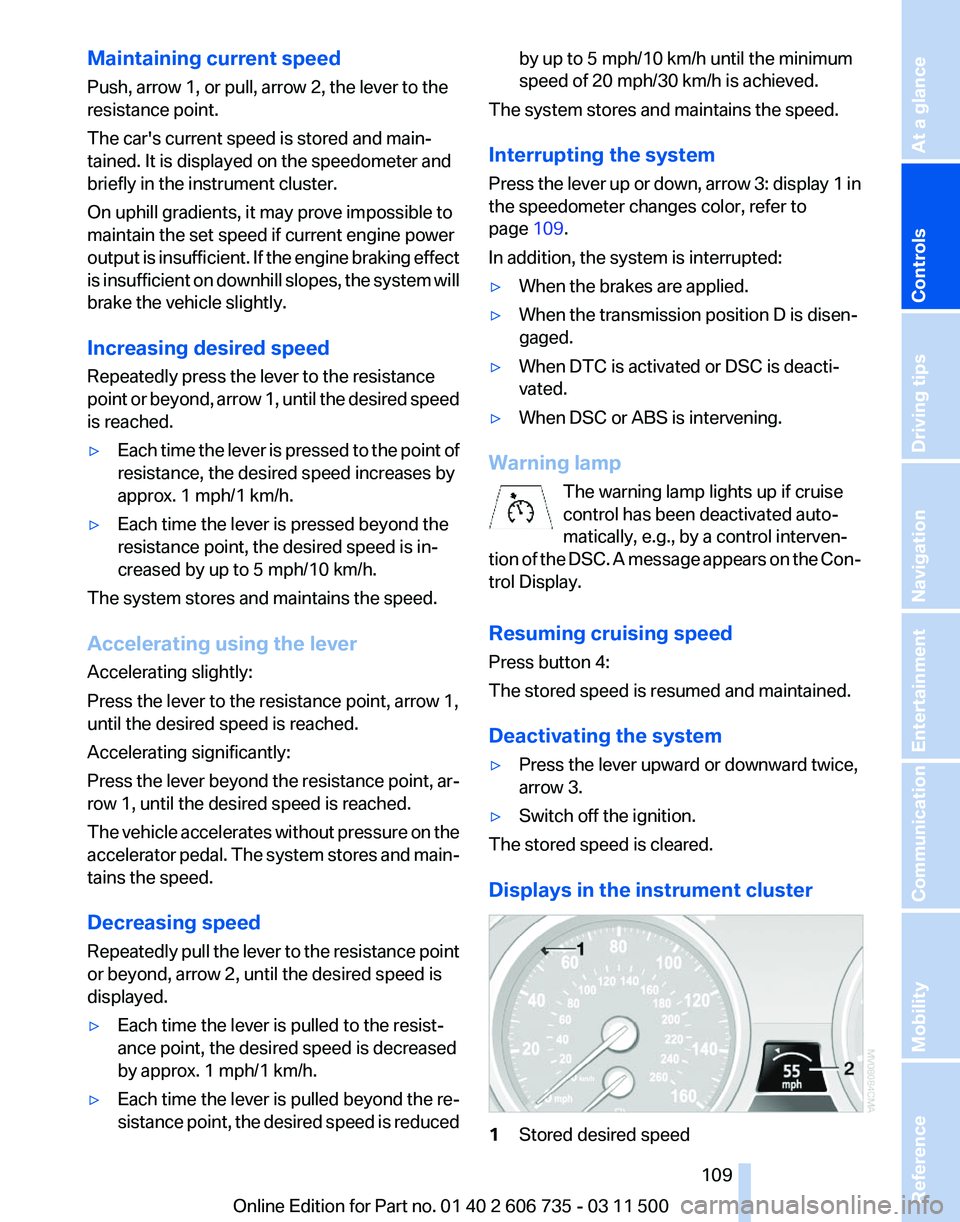
Displays in the instrument cluster 1
Stored desired speed Seite 109
109Online Edition for Part no. 01 40 2 606 735 - 03 11 500
Reference Mobility Communication Entertainment Navigation Driving tips
Controls At a glance
Page 110 of 317
▷
Green: the system is active.
▷ Orange: the system is interrupted.
2 Selected desired speed appears briefly
If the display --- mph or --- km/h appears briefly,
conditions may not be adequate to operate the
system.
Call up Check Control messages, refer to
page 77.
Malfunction The
warning lamp comes on when the
system has failed.
A message appears on the Control
Display. More information, refer to page 76.
Park Distance Control PDC*
The concept
In addition to the PDC Park Distance Control, the
backup camera*, refer to page 112, can be
switched on.
PDC supports you when parking. A slow ap‐
proach to an object in front of or behind your ve‐
hicle is announced by:
▷ Signal tones.
▷ Visual display.
Measurement
Measurements
are made by ultrasound sensors
in the bumpers.
The range is approx. 6 ft/2 m.
An acoustic warning is first given:
▷ By the front* sensors and two rear corner
sensors at approx. 24 in/60 cm.
▷ By the rear middle sensors at approx. 5 ft/
1.50 m.
System limits Check the traffic situation as well
PDC cannot serve as a substitute for the
driver's personal judgment of the traffic situa‐
tion.
Check the traffic situation around the vehi‐ cle with your own eyes. Otherwise, an accident
could result from road users or objects located
outside of the PDC detection range.
Loud
noises from outside and inside the vehicle
may prevent you from hearing the PDC's signal
tone.◀
Avoid driving quickly with PDC
Avoid approaching an object quickly.
Avoid driving away quickly while PDC is not yet
active.
For technical reasons, the system may other‐
wise be too late in issuing a warning.◀
Limits of ultrasonic measurement
The detection of objects can reach the physical
limits of ultrasonic measurement, for instance:
▷ With tow bars and trailer hitches.
▷ With thin or wedge-shaped objects.
▷ With low objects.
▷ With objects with corners and sharp edges.
Low objects already displayed, e.g., curbs, can
move
into the blind area of the sensors before or
after a continuous tone sounds.
High, protruding objects such as ledges may not
be detected.
False warnings
PDC may issue a warning under the following
conditions even though there is no obstacle
within the detection range:
▷ In heavy rain.
▷ When sensors are very dirty or covered in
ice.
▷ When sensors are covered in snow.
▷ On rough road surfaces.
▷ In large buildings with right angles and
smooth
walls, e.g., in underground garages.
▷ In heavy exhaust.
▷ Due to other ultrasound sources, e.g.,
sweeping machines, high pressure steam
cleaners or neon lights. Seite 110
110 Online Edition for Part no. 01 40 2 606 735 - 03 11 500
Driving comfort
Page 111 of 317
Switching on automatically
With
the engine running or the ignition switched
on, shift the selector lever into position R.
Switching off automatically
The system switches off and the LED goes out:
▷ After approx. 165 ft/50 m when driving for‐
ward.
▷ After approx. 22 mph/35 km/h when driving
forward.
Switch on the system again if necessary.
Switching on/off manually Press the button.
▷
On: the LED lights up.
▷ Off: the LED goes out.
Signal tones
When approaching an object, an intermittent
tone
is sounded that indicates the position of the
object. For example, if an object is detected to
the left rear of the vehicle, a signal tone sounds
from the left rear speaker.
The shorter the distance to the object becomes,
the shorter the intervals.
If the distance to a detected object is less than
approx. 12 in/30 cm, a continuous tone is
sounded.
If objects are located both in front of and behind
the vehicle, an alternating continuous signal is
sounded.
The intermittent tone is interrupted after approx.
3 seconds: ▷
If the vehicle stops in front of an object that
is detected by only one of the corner sen‐
sors.
▷ If moving parallel to a wall.
The signal tone is switched off:
▷ When the vehicle moves away from an ob‐
ject by more than approx. 4 in/10 cm.
▷ When transmission position P is engaged.
Volume
You can set the volume of the PDC signal tone,
refer to page 173.
The
setting is stored for the remote control cur‐
rently in use.
Visual warning
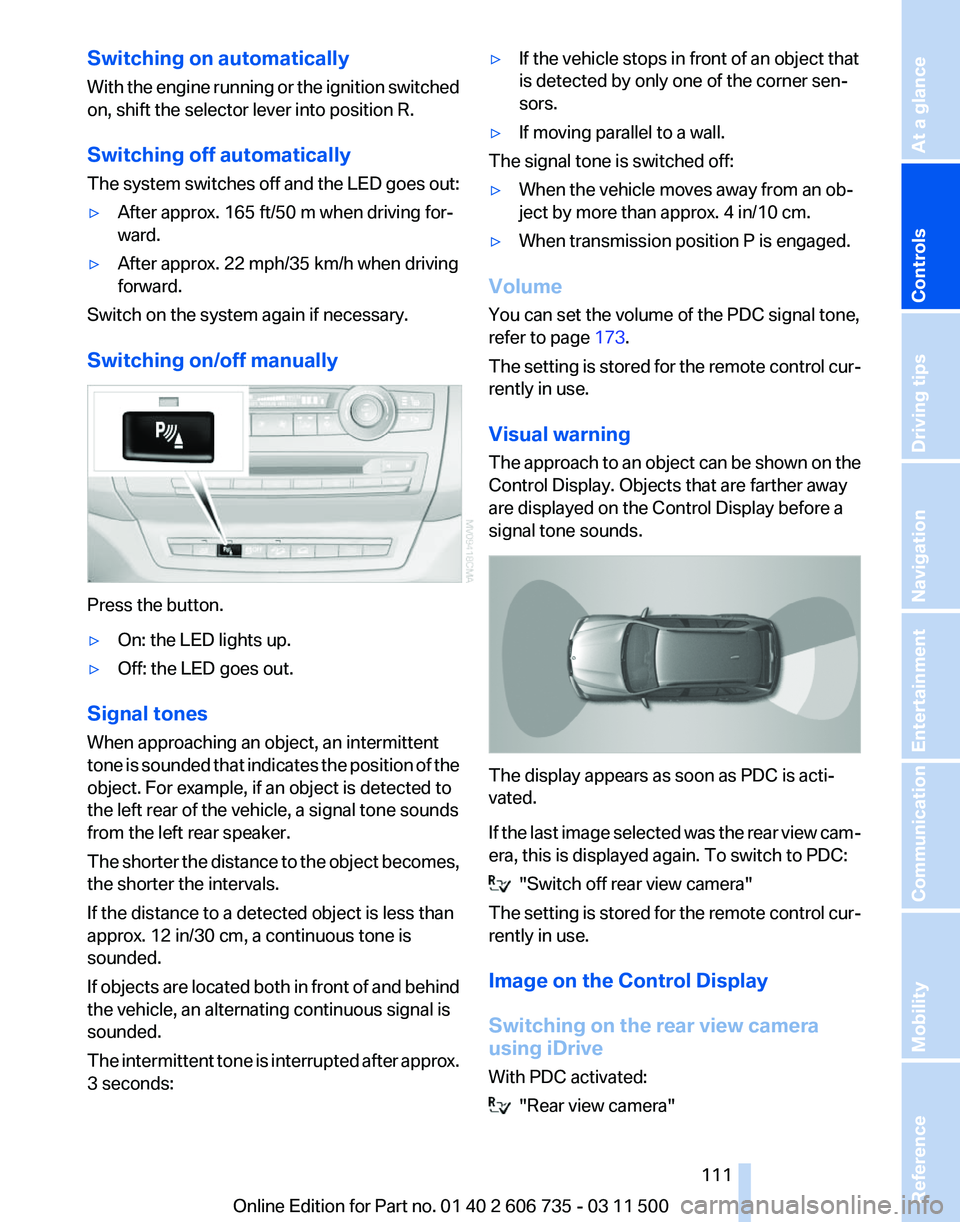
The approach to an object can be shown on the
Control Display. Objects that are farther away
are displayed on the Control Display before a
signal tone sounds. The display appears as soon as PDC is acti‐
vated.
If
the last image selected was the rear view cam‐
era, this is displayed again. To switch to PDC: "Switch off rear view camera"
The
setting is stored for the remote control cur‐
rently in use.
Image on the Control Display
Switching on the rear view camera
using iDrive
With PDC activated: "Rear view camera"
Seite 111
111Online Edition for Part no. 01 40 2 606 735 - 03 11 500
Reference Mobility Communication Entertainment Navigation Driving tips
Controls At a glance
Page 115 of 317
bol appears at the corresponding location on the
vehicle.
Check the traffic situation as well
Check the traffic situation around the ve‐
hicle
with your own eyes. Otherwise, an accident
could result from road users or objects located
outside the picture area of the cameras.◀
Switching on automatically
Select transmission position R with the engine
running.
The images from Top View and PDC are dis‐
played when the system has been switched on
using iDrive.
Switching off automatically
The system switches off and the LED goes out:
▷ After approx. 165 ft/50 m when driving for‐
ward.
▷ After approx. 22 mph/35 km/h when driving
forward.
Switch on the system again if necessary.
Switching on/off manually Press the button.
▷
On: the LED lights up.
▷ Off: the LED goes out.
If Top View is displayed, switch on the backup
camera via the iDrive, refer to page 114.
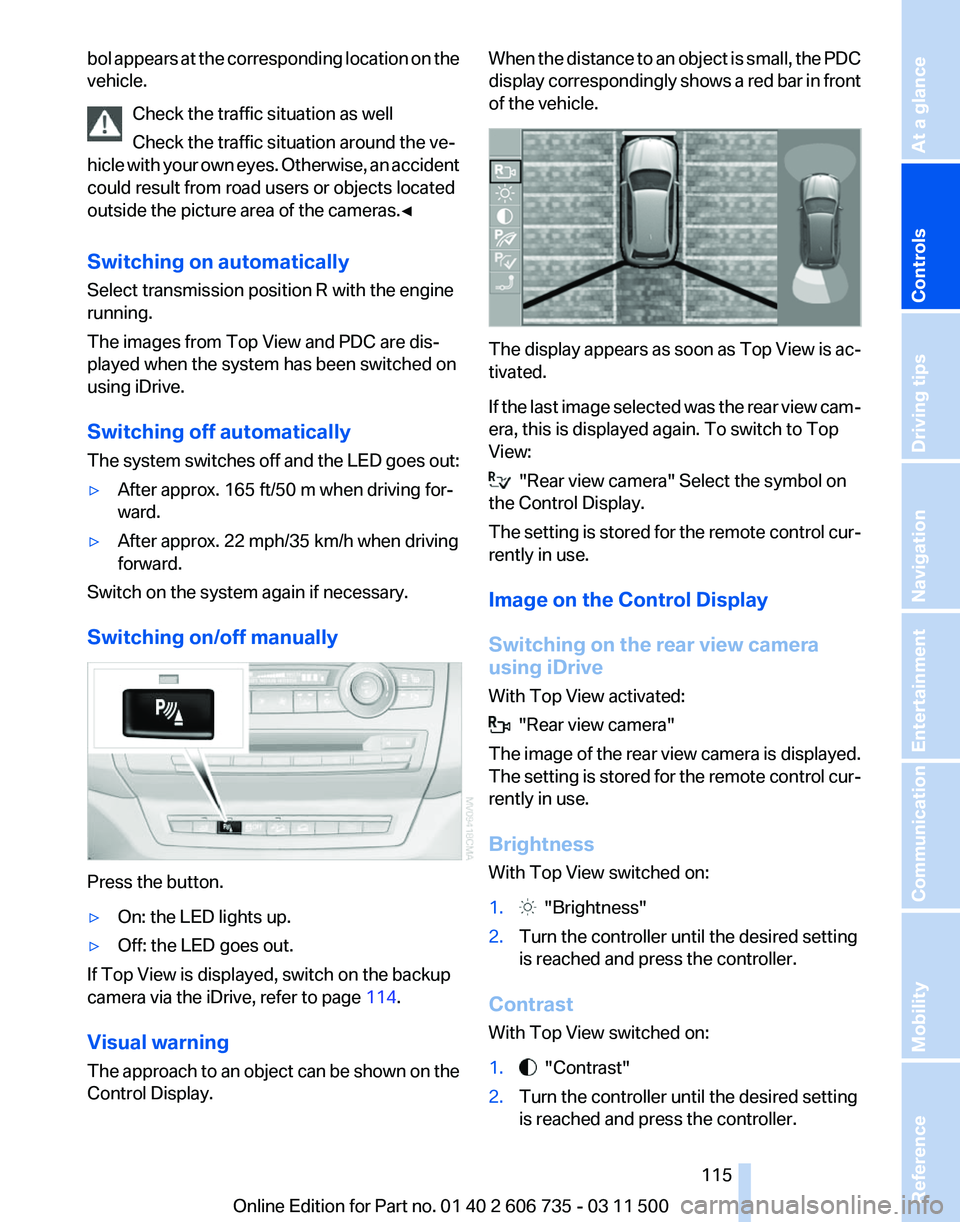
Visual warning
The
approach to an object can be shown on the
Control Display. When the distance to an object is small, the PDC
display
correspondingly shows a red bar in front
of the vehicle. The display appears as soon as Top View is ac‐
tivated.
If
the last image selected was the rear view cam‐
era, this is displayed again. To switch to Top
View: "Rear view camera" Select the symbol on
the Control Display.
The
setting is stored for the remote control cur‐
rently in use.
Image on the Control Display
Switching on the rear view camera
using iDrive
With Top View activated: "Rear view camera"
The
image of the rear view camera is displayed.
The setting is stored for the remote control cur‐
rently in use.
Brightness
With Top View switched on:
1. "Brightness"
2. Turn the controller until the desired setting
is reached and press the controller.
Contrast
With Top View switched on:
1. "Contrast"
2. Turn the controller until the desired setting
is reached and press the controller.
Seite 115
115Online Edition for Part no. 01 40 2 606 735 - 03 11 500
Reference Mobility Communication Entertainment Navigation Driving tips
Controls At a glance
Page 118 of 317
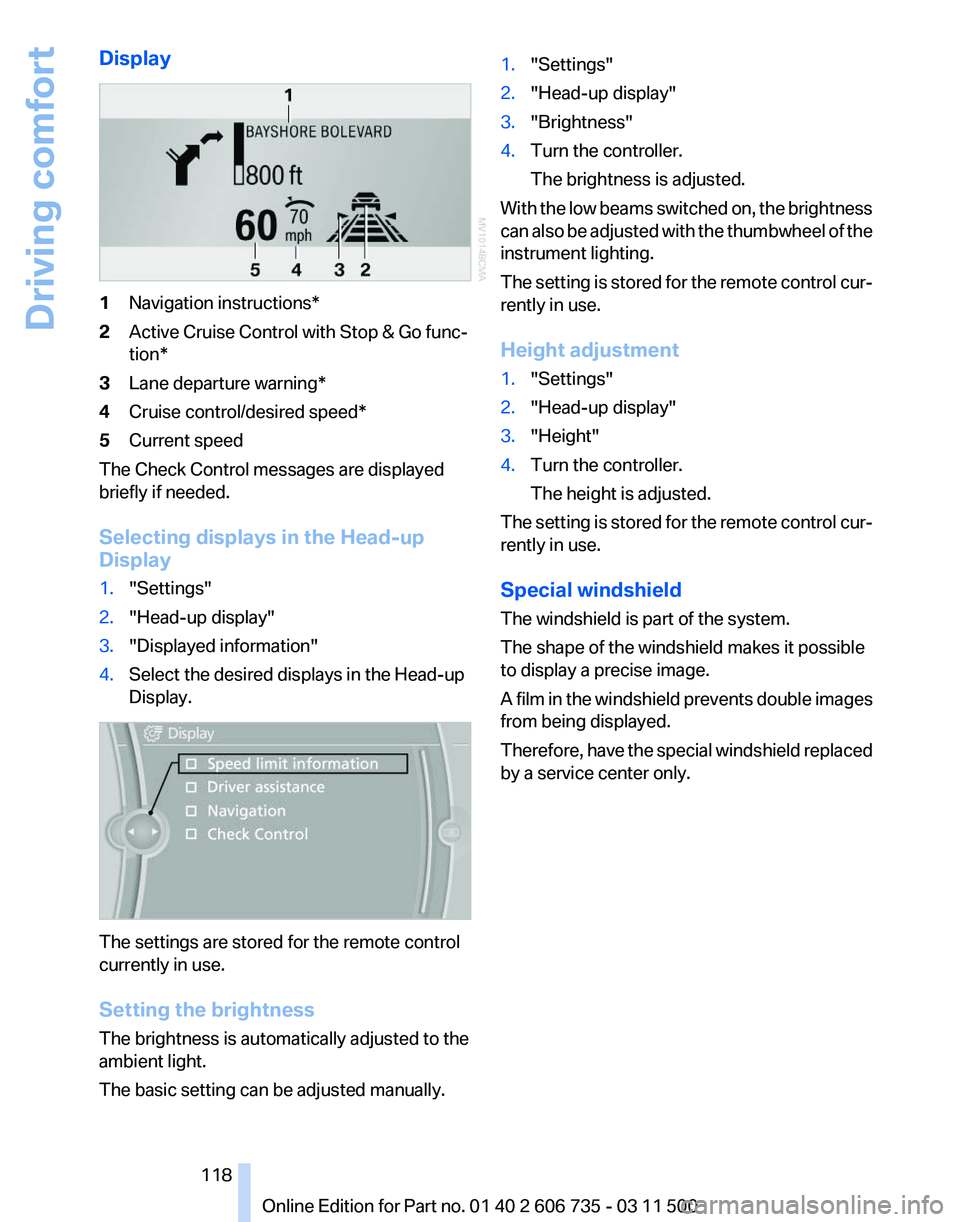
Display
1
Navigation instructions*
2 Active Cruise Control with Stop & Go func‐
tion*
3 Lane departure warning*
4 Cruise control/desired speed*
5 Current speed
The Check Control messages are displayed
briefly if needed.
Selecting displays in the Head-up
Display
1. "Settings"
2. "Head-up display"
3. "Displayed information"
4. Select the desired displays in the Head-up
Display. The settings are stored for the remote control
currently in use.
Setting the brightness
The brightness is automatically adjusted to the
ambient light.
The basic setting can be adjusted manually. 1.
"Settings"
2. "Head-up display"
3. "Brightness"
4. Turn the controller.
The brightness is adjusted.
With the low beams switched on, the brightness
can also be adjusted with the thumbwheel of the
instrument lighting.
The setting is stored for the remote control cur‐
rently in use.
Height adjustment
1. "Settings"
2. "Head-up display"
3. "Height"
4. Turn the controller.
The height is adjusted.
The setting is stored for the remote control cur‐
rently in use.
Special windshield
The windshield is part of the system.
The shape of the windshield makes it possible
to display a precise image.
A
film in the windshield prevents double images
from being displayed.
Therefore, have the special windshield replaced
by a service center only.
Seite 118
118 Online Edition for Part no. 01 40 2 606 735 - 03 11 500
Driving comfort
Page 133 of 317
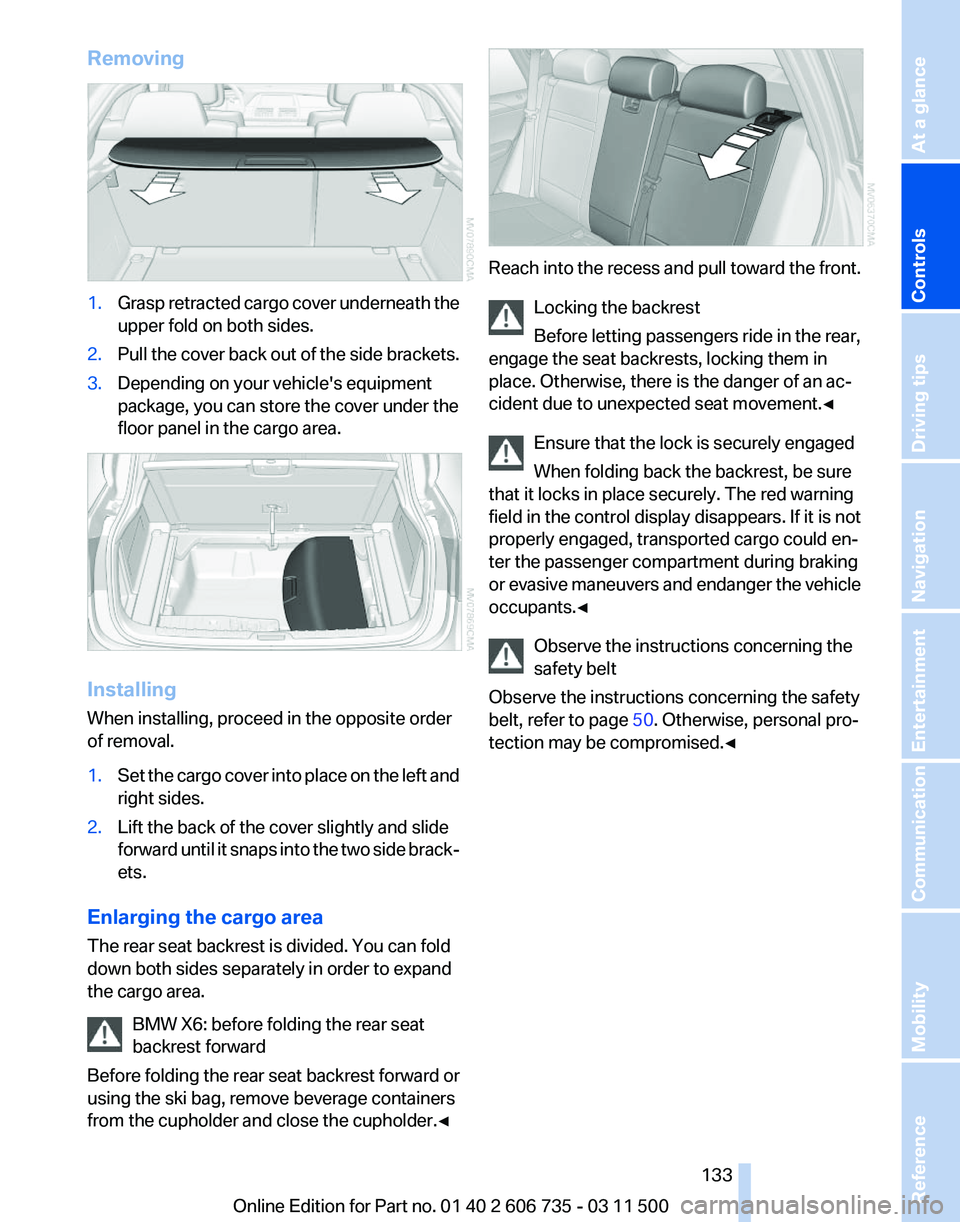
Removing
1.
Grasp retracted cargo cover underneath the
upper fold on both sides.
2. Pull the cover back out of the side brackets.
3. Depending on your vehicle's equipment
package, you can store the cover under the
floor panel in the cargo area. Installing
When installing, proceed in the opposite order
of removal.
1.
Set the cargo cover into place on the left and
right sides.
2. Lift the back of the cover slightly and slide
forward
until it snaps into the two side brack‐
ets.
Enlarging the cargo area
The rear seat backrest is divided. You can fold
down both sides separately in order to expand
the cargo area. BMW X6: before folding the rear seat
backrest forward
Before
folding the rear seat backrest forward or
using the ski bag, remove beverage containers
from the cupholder and close the cupholder.◀ Reach into the recess and pull toward the front.
Locking the backrest
Before letting passengers ride in the rear,
engage the seat backrests, locking them in
place. Otherwise, there is the danger of an ac‐
cident due to unexpected seat movement.
◀
Ensure that the lock is securely engaged
When folding back the backrest, be sure
that it locks in place securely. The red warning
field in the control display disappears. If it is not
properly engaged, transported cargo could en‐
ter the passenger compartment during braking
or evasive maneuvers and endanger the vehicle
occupants.◀
Observe the instructions concerning the
safety belt
Observe the instructions concerning the safety
belt, refer to page 50. Otherwise, personal pro‐
tection may be compromised.◀ Seite 133
133Online Edition for Part no. 01 40 2 606 735 - 03 11 500
Reference Mobility Communication Entertainment Navigation Driving tips
Controls At a glance
Page 250 of 317
Incorrect fueling
The warning lamp lights up:
The reservoir has been filled with an in‐
correct fluid.
Please contact your service center.
Have diesel exhaust fluid refilled
This
exhaust fluid is refilled by your service cen‐
ter during regular maintenance. If you adhere to
this maintenance schedule, it is usually not nec‐
essary to refill any fluids between the mainte‐
nance dates.
Under certain circumstances, for example, due
to a particularly sporty driving style or operation
of the vehicle at high altitudes, it may be neces‐
sary to refill fluids between maintenance dates.
As soon as the reserve display has appeared in
the instrument panel, have the diesel exhaust
fluid refilled to prevent the engine from being
unable to restart.
You can have the fluid refilled by a service cen‐
ter.
Diesel exhaust fluid at low
temperatures
Due to its physical properties, it may be neces‐
sary to replenish the level of diesel exhaust fluid
at temperatures below +23 ℉/ -5 ℃, even be‐
tween the regular maintenance dates.
If the fluid needs to be refilled, this will be indi‐
cated with the reserve display in the instrument
cluster, refer to page 249.
Only refill the diesel exhaust fluid
yourself in exceptional circumstances
To be able to reach the nearest service center
with your vehicle, you may refill the diesel ex‐
haust fluid yourself, making sure to heed the
warning notices specified below. Handling diesel exhaust fluid
Do not allow diesel exhaust fluid to come
into contact with you. This can lead to skin and
eye irritation. Wear protective goggles and
gloves as needed. Follow the safety instructions
on the bottle. When opening the bottle or res‐ ervoir, pungent smelling vapors can escape. Be‐
fore refilling, close the vehicle completely so
that
the vapors do not get into the interior of the
vehicle. When handling diesel exhaust fluid in
enclosed spaces, make sure to have sufficient
ventilation. After handling diesel exhaust fluid,
wash hands thoroughly. Failure to do so may
lead to irritation, for instance, due to inadvertent
contact with the eyes. If eye irritation occurs,
immediately rinse eyes with ample water and
contact a doctor if necessary. If diesel exhaust
fluid comes into contact with surfaces of your
vehicle, rinse the affected surfaces with water or
else damage may occur. Keep diesel exhaust
fluid out of reach of children.◀
Suitable diesel exhaust fluid
▷ Preferred: BMW Diesel Exhaust Fluid. This
bottle and its special adapter permit con‐
venient refilling with diesel exhaust fluid.
▷ Alternative: NOx reduction agent AUS 32
Diesel exhaust fluid can be obtained from your
service center.
Refilling quantity
Refilling quantity at the start of the reserve dis‐
play:
Approx. 0.75 gallons/2.7 liters
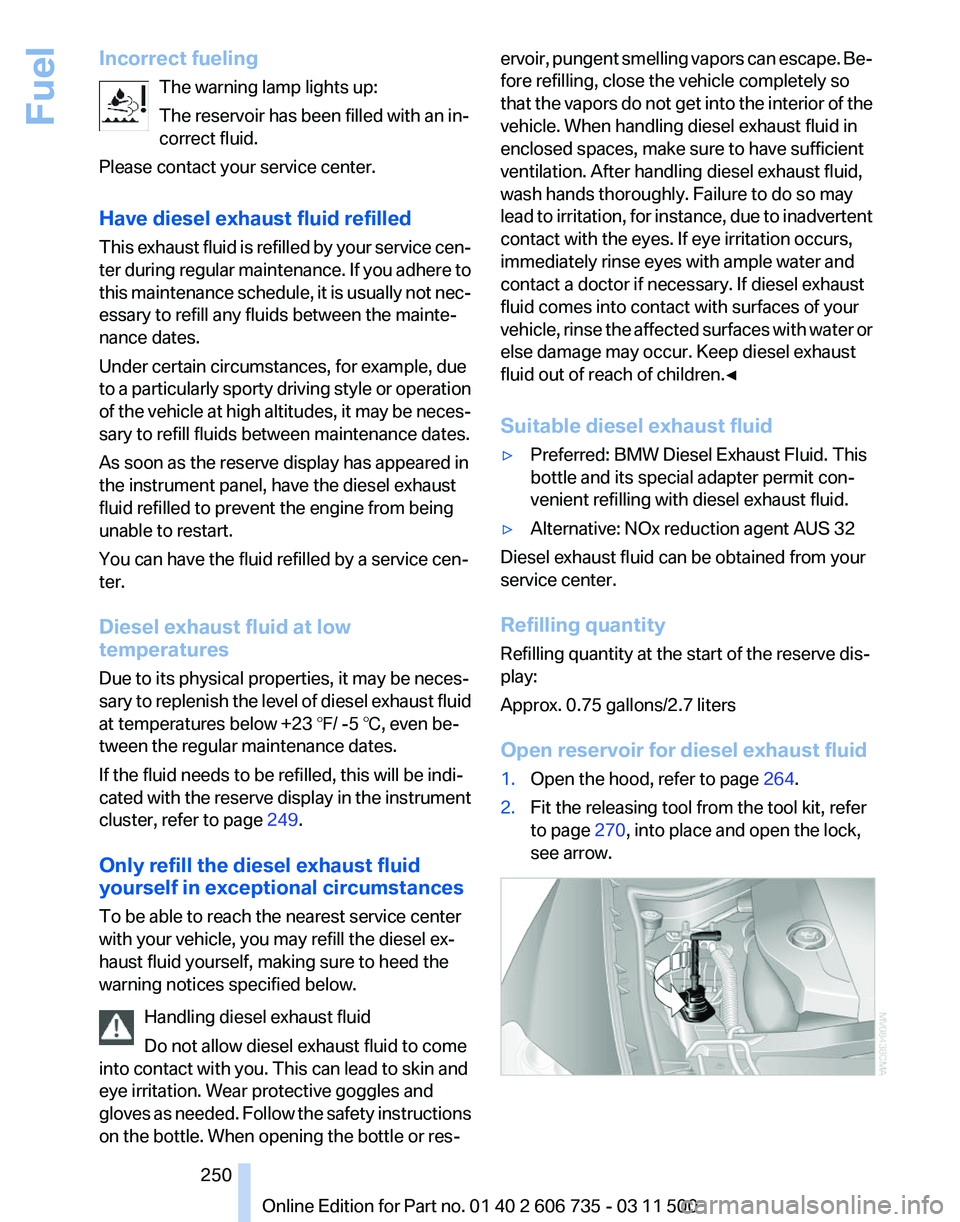
Open reservoir for diesel exhaust fluid
1. Open the hood, refer to page 264.
2. Fit the releasing tool from the tool kit, refer
to page 270, into place and open the lock,
see arrow. Seite 250
250 Online Edition for Part no. 01 40 2 606 735 - 03 11 500
Fuel
Page 269 of 317
Socket for OBD Onboard
Diagnosis
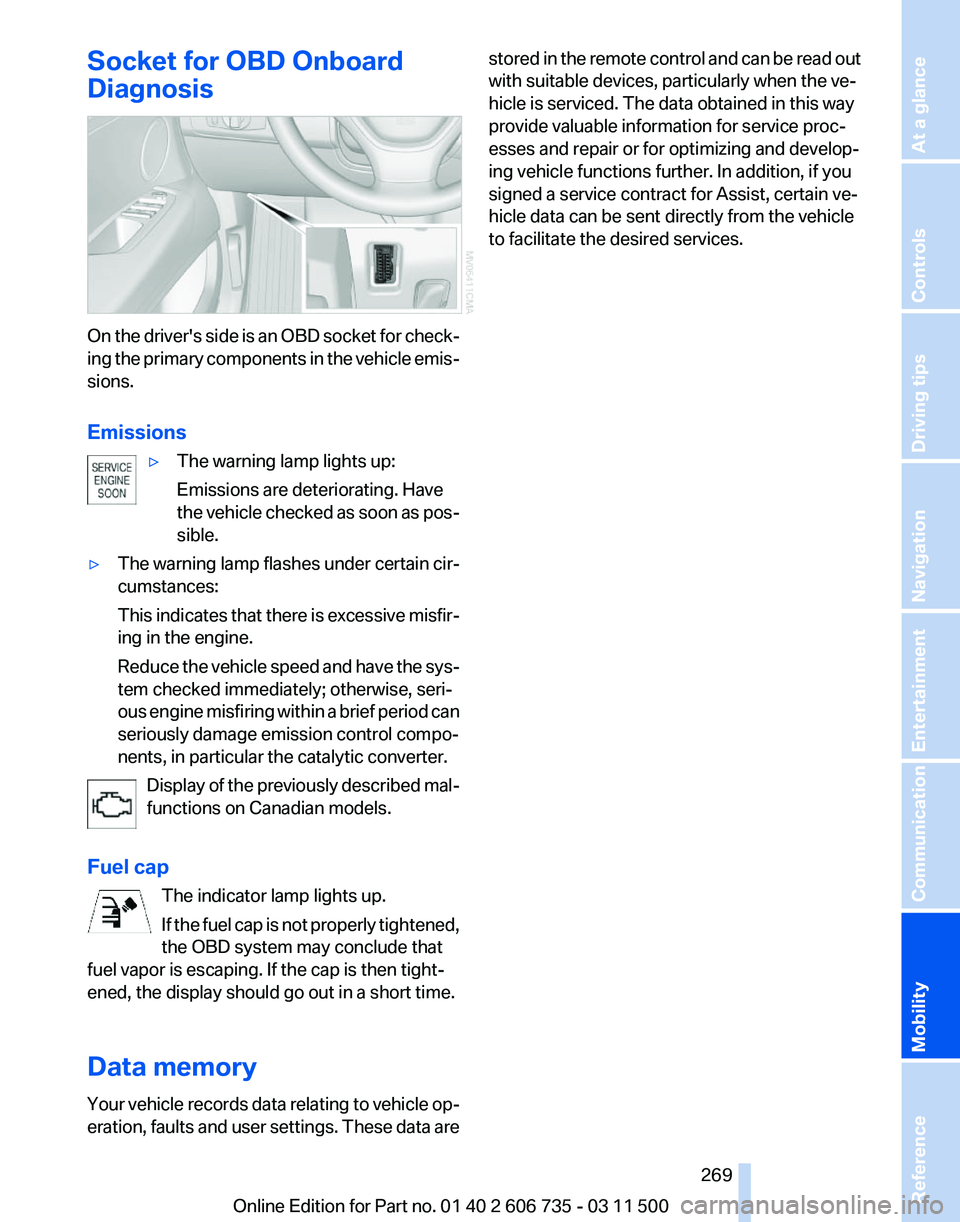
On the driver's side is an OBD socket for check‐
ing
the primary components in the vehicle emis‐
sions.
Emissions
▷The warning lamp lights up:
Emissions are deteriorating. Have
the
vehicle checked as soon as pos‐
sible.
▷ The warning lamp flashes under certain cir‐
cumstances:
This
indicates that there is excessive misfir‐
ing in the engine.
Reduce the vehicle speed and have the sys‐
tem checked immediately; otherwise, seri‐
ous engine misfiring within a brief period can
seriously damage emission control compo‐
nents, in particular the catalytic converter.
Display of the previously described mal‐
functions on Canadian models.
Fuel cap The indicator lamp lights up.
If
the fuel cap is not properly tightened,
the OBD system may conclude that
fuel vapor is escaping. If the cap is then tight‐
ened, the display should go out in a short time.
Data memory
Your vehicle records data relating to vehicle op‐
eration, faults and user settings. These data are stored in the remote control and can be read out
with suitable devices, particularly when the ve‐
hicle is serviced. The data obtained in this way
provide valuable information for service proc‐
esses and repair or for optimizing and develop‐
ing vehicle functions further. In addition, if you
signed a service contract for Assist, certain ve‐
hicle data can be sent directly from the vehicle
to facilitate the desired services.
Seite 269
269Online Edition for Part no. 01 40 2 606 735 - 03 11 500
Reference
Mobility Communication Entertainment Navigation Driving tips Controls At a glance
Page 272 of 317
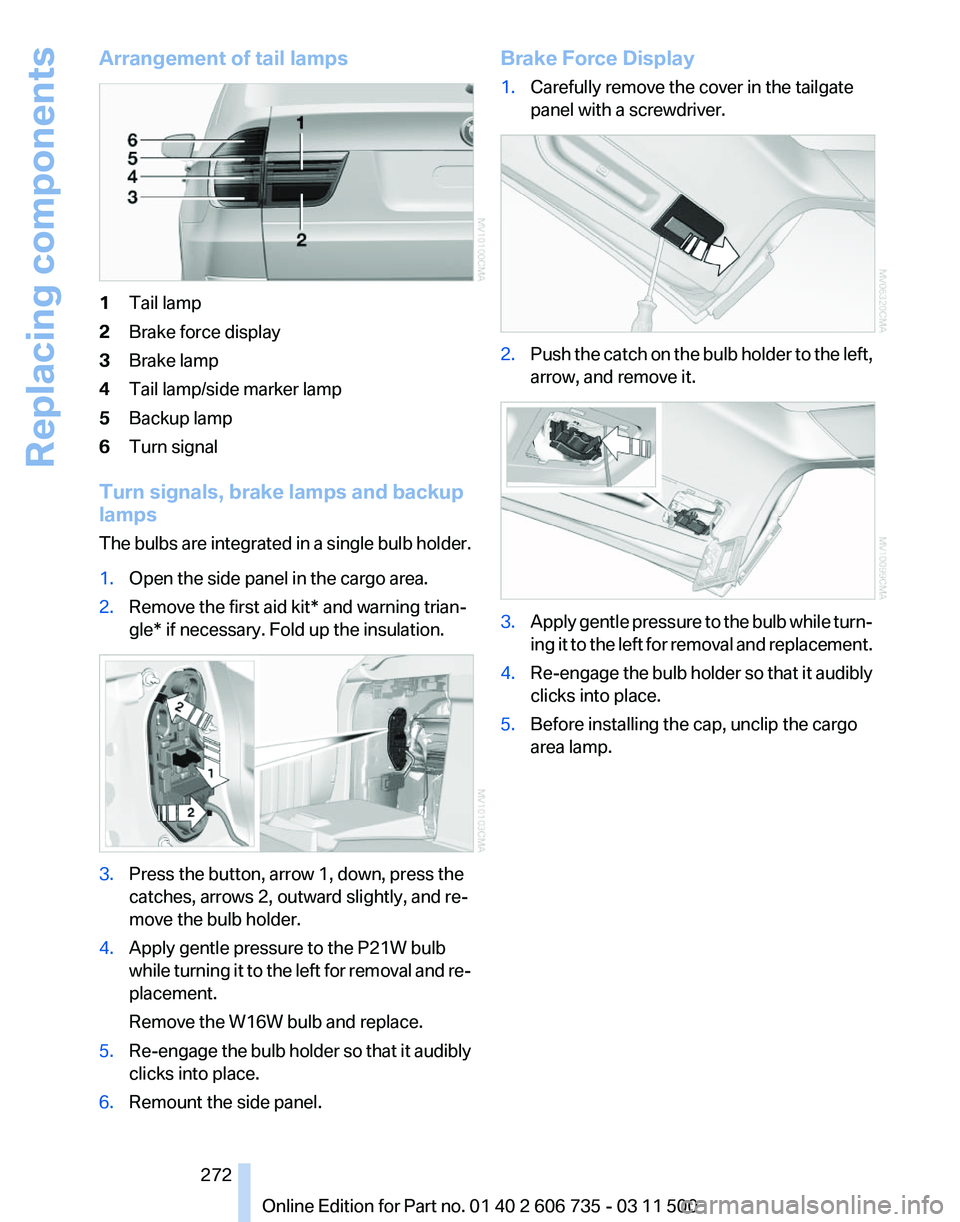
Arrangement of tail lamps
1
Tail lamp
2 Brake force display
3 Brake lamp
4 Tail lamp/side marker lamp
5 Backup lamp
6 Turn signal
Turn signals, brake lamps and backup
lamps
The
bulbs are integrated in a single bulb holder.
1. Open the side panel in the cargo area.
2. Remove the first aid kit* and warning trian‐
gle* if necessary. Fold up the insulation. 3.
Press the button, arrow 1, down, press the
catches, arrows 2, outward slightly, and re‐
move the bulb holder.
4. Apply gentle pressure to the P21W bulb
while
turning it to the left for removal and re‐
placement.
Remove the W16W bulb and replace.
5. Re-engage the bulb holder so that it audibly
clicks into place.
6. Remount the side panel. Brake Force Display
1.
Carefully remove the cover in the tailgate
panel with a screwdriver. 2.
Push the catch on the bulb holder to the left,
arrow, and remove it. 3.
Apply gentle pressure to the bulb while turn‐
ing
it to the left for removal and replacement.
4. Re-engage the bulb holder so that it audibly
clicks into place.
5. Before installing the cap, unclip the cargo
area lamp.
Seite 272
272 Online Edition for Part no. 01 40 2 606 735 - 03 11 500
Replacing components
Page 280 of 317
Breakdown assistance
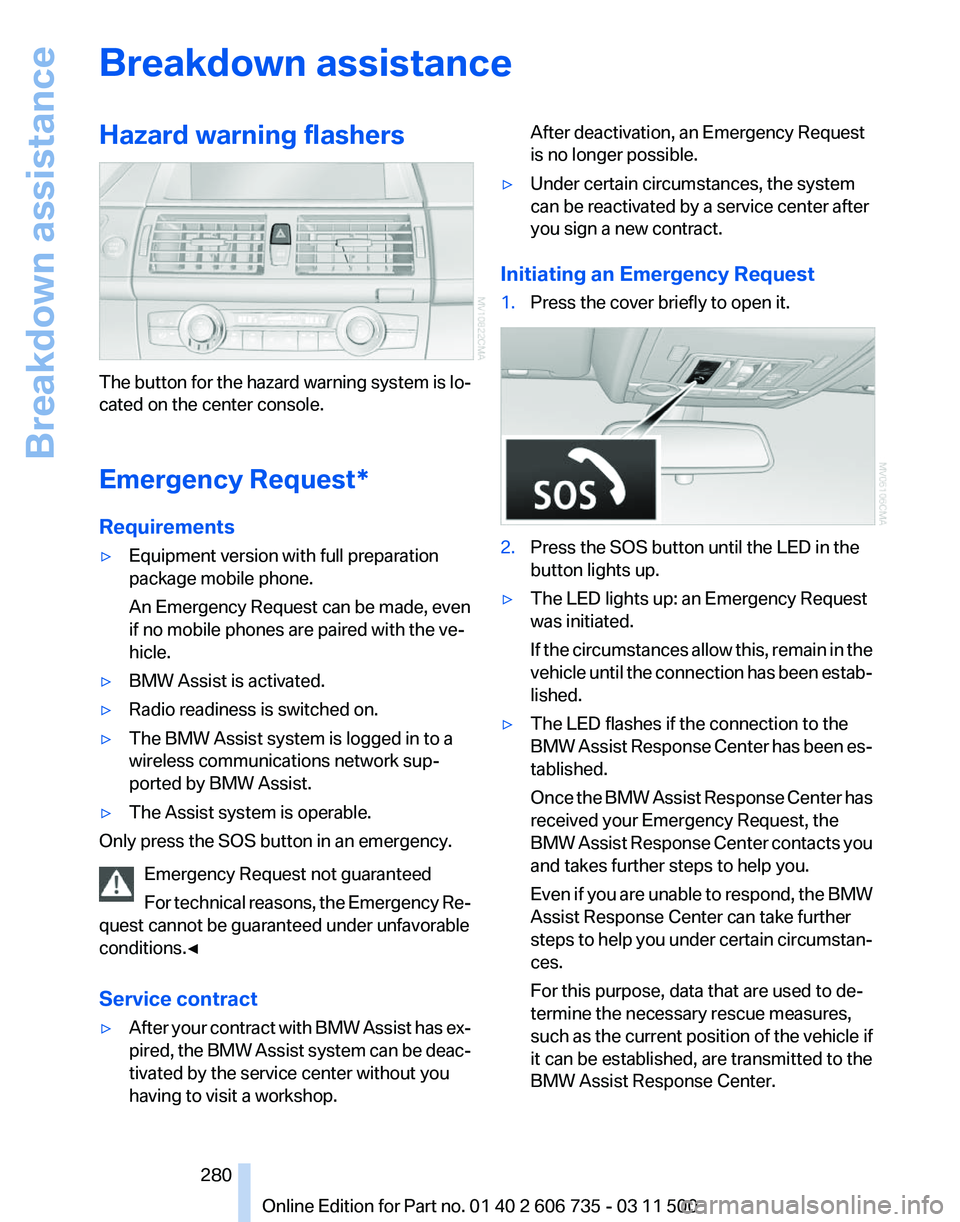
Hazard warning flashers
The button for the hazard warning system is lo‐
cated on the center console.
Emergency Request
*
Requirements
▷ Equipment version with full preparation
package mobile phone.
An Emergency Request can be made, even
if no mobile phones are paired with the ve‐
hicle.
▷ BMW Assist is activated.
▷ Radio readiness is switched on.
▷ The BMW Assist system is logged in to a
wireless communications network sup‐
ported by BMW Assist.
▷ The Assist system is operable.
Only press the SOS button in an emergency.
Emergency Request not guaranteed
For
technical reasons, the Emergency Re‐
quest cannot be guaranteed under unfavorable
conditions.◀
Service contract
▷ After your contract with BMW Assist has ex‐
pired,
the BMW Assist system can be deac‐
tivated by the service center without you
having to visit a workshop. After deactivation, an Emergency Request
is no longer possible.
▷ Under certain circumstances, the system
can be reactivated by a service center after
you sign a new contract.
Initiating an Emergency Request
1. Press the cover briefly to open it. 2.
Press the SOS button until the LED in the
button lights up.
▷ The LED lights up: an Emergency Request
was initiated.
If
the circumstances allow this, remain in the
vehicle until the connection has been estab‐
lished.
▷ The LED flashes if the connection to the
BMW
Assist Response Center has been es‐
tablished.
Once the BMW Assist Response Center has
received your Emergency Request, the
BMW Assist Response Center contacts you
and takes further steps to help you.
Even if you are unable to respond, the BMW
Assist Response Center can take further
steps to help you under certain circumstan‐
ces.
For this purpose, data that are used to de‐
termine the necessary rescue measures,
such as the current position of the vehicle if
it can be established, are transmitted to the
BMW Assist Response Center.
Seite 280
280 Online Edition for Part no. 01 40 2 606 735 - 03 11 500
Breakdown assistance