seats BMW X5M 2016 F85 User Guide
[x] Cancel search | Manufacturer: BMW, Model Year: 2016, Model line: X5M, Model: BMW X5M 2016 F85Pages: 255, PDF Size: 6.73 MB
Page 110 of 255
Knee airbagThe knee airbag supports the legs in a frontal
impact.
Protective action
Airbags are not triggered in every impact situa‐
tion, e.g., in less severe accidents or rear-end
collisions.
Information for optimum effect of the
airbags
WARNING
If the seat position is incorrect or the de‐
ployment area of the airbags is impacted, the
airbag system cannot protect as intended or
cause additional injuries due to triggering.
There is risk of injuries or danger to life. Ob‐
serve the Information for optimum protective
effect of the airbag system.◀▷Keep at a distance from the airbags.▷Make sure that occupants keep their heads
away from the side airbag.▷Always grasp the steering wheel on the
steering wheel rim. Hold your hands at the
3 o'clock and 9 o'clock positions, to keep
the risk of injury to your hands or arms as
low as possible when the airbag is trig‐
gered.▷Make sure that the front passenger is sit‐
ting correctly, i.e., keeps his or her feet and
legs in the floor area.▷There should be no persons, animals or
objects between an airbag and a person.▷Do not apply adhesive materials to the air‐
bag cover panels, do not cover them or
modify them in any way.▷Dashboard and windshield on the front
passenger side must stay clear - do not at‐
tach adhesive labels or coverings and do
not attach brackets or cables, e. g., for GPS
devices or' mobile phones.▷Do not use the cover of the front airbag on
the front passenger side as a storage area.▷Do not place slip covers, seat cushions or
other objects on the front passenger seat
that are not specifically suited for seats
with integrated side airbags.▷Do not hang pieces of clothing, such as
jackets, over the backrests.▷Never modify either the individual compo‐
nents or the wiring in the airbag system.
This also applies to steering wheel covers,
the dashboard, and the seats.▷Do not remove the airbag system.
Even when you follow all instructions very
closely, injury from contact with the airbags
cannot be ruled out in certain situations.
The ignition and inflation noise may lead to
short-term and, in most cases, temporary
hearing impairment in sensitive individuals.
Warnings and information on the airbags are
also found on the sun visors.
Functional readiness of the airbag
system
Information WARNING
Individual components can be hot after
triggering of the airbag system. There is risk of
injuries. Do not touch individual components.◀
WARNING
Improperly executed work can lead to
failure, malfunction or unintentional triggering
of the airbag system. In the case of a malfunc‐
tion, the airbag system could not trigger as in‐
tended in the event of an accident despite re‐
spective accident severity. There is risk of
injuries or danger to life. Have the airbag sys‐
tem checked, repaired, dismantled and scrap‐
ped by a dealer’s service center or another qualified service center or repair shop.◀
Seite 110ControlsSafety110
Online Edition for Part no. 01 40 2 964 090 - VI/15
Page 112 of 255
front passenger side are not
activated.▷The indicator lamp does not light up when,
e.g., a correctly seated person of sufficient
size is detected on the seat. The airbags
on the front passenger side are activated.
Detected child seats
The system generally detects children seated
in a child seat, particularly in child seats re‐
quired by NHTSA when the vehicle was manu‐ factured. After installing a child seat, make
sure that the indicator lamp for the front-seat
passenger airbags lights up. This indicates
that the child seat has been detected and the
front-seat passenger airbags are not activated.
Strength of the driver's and front-seat
passenger airbag
The explosive power that activates driver's/
front passenger's airbags very much depends
on the positions of the driver's/front passeng‐ er's seat.
With a respective message appearing on Con‐
trol Display calibrate the front seats to keep the accuracy of this function over the long-
term.
Calibrating the front seats WARNING
There is risk of jamming when moving
the seats. There is risk of injuries or risk of
property damage. Make sure that the area of
movement of the seat is clear prior to any ad‐
justment.◀
A corresponding message appears on the
Control Display.
1.Press the switch and move the respective
seat all the way forward.2.Press the switch forward again. The seat
still moves forward slightly.3.Readjust the seat to the desired position.The calibration procedure is completed when
the message on the Control Display disap‐
pears.
If the message continues to be displayed, re‐
peat the calibration.
If the message does not disappear after a re‐
peat calibration, have the system checked as
soon as possible.
Tire Pressure Monitor TPM
The concept The system monitors tire inflation pressure in
the four mounted tires. The system warns you
if there is a significant loss of pressure in one
or more tires. For this purpose, sensors in the
tire valves measure the tire inflation pressure
and tire temperature.
Information With use of the system observe further infor‐
mation found under Tire inflation pressure, re‐
fer to page 200.
Functional requirements
The system must have been reset with the
correct tire inflation pressure; otherwise, relia‐
ble signaling of tire inflation pressure loss is
not assured.
Reset the system after each adjustment of the
tire inflation pressure and after every tire or
wheel change.
Always use wheels with TPM electronics to
ensure that the system will operate properly.
Status display The current status of the Tire Pressure Moni‐
tor TPM can be displayed on the Control Dis‐
play, e.g., whether or not the TPM is active.
On the Control Display:1."Vehicle info"2."Vehicle status"Seite 112ControlsSafety112
Online Edition for Part no. 01 40 2 964 090 - VI/15
Page 131 of 255
If the vehicle includes the front-end collision
warning or front-end collision warning with
braking feature, impending collisions with vehi‐
cles driving ahead or stopped in front of you
can also be detected within the system's
range.
Information WARNING
The system does not relieve from the
personal responsibility. Due to the system lim‐
its, critical situation could not be detected reli‐
ably or in time. There is risk of an accident. Ad‐
just the driving style to the traffic conditions. Watch traffic closely and actively interfere in
the respective situations.◀
Function
After the safety belt is buckled, the front belts
are automatically pretensioned once after the
vehicle is driven is away.
In critical driving situations, the following indi‐
vidual functions become active as needed:▷The front belts are automatically preten‐
sioned.▷Automatic closing of the windows.▷Automatic closing of the glass sunroof.▷For vehicles equipped with Comfort Seats:
automatic positioning of the backrest for
the front passenger seat.
After a critical driving situation without an acci‐
dent, the front belts are loosened again. All
other systems can be restored to the desired
setting.
If the belt tension does not loosen automati‐
cally, stop the vehicle and unbuckle the belt
using the red button in the buckle. Fasten the
belt before continuing on your trip.
PostCrash
In the event of an accident, the system can
bring the car to a halt automatically without in‐
tervention by the driver in certain situations.
This can reduce the risk of a further collision
and the consequences thereof.
Depressing the brake pedal can cause the ve‐
hicle to brake harder. This interrupts automatic
braking. Destepping on the gas pedal also in‐
terrupts automatic braking.
After coming to a halt, the brake is released
automatically. Secure the vehicle against roll‐
ing.Seite 131SafetyControls131
Online Edition for Part no. 01 40 2 964 090 - VI/15
Page 169 of 255
BMW X5 M: trunk
Cargo cover
Information CAUTION
A cargo cover hooked in incorrectly can
cause damage. There is risk of property dam‐
age. Hook the cargo cover on both sides.◀
WARNING
Loose objects in the car's interior can be
thrown into the car's interior while driving, e.g.
in the event of an accident or during braking
and evasive maneuvers. There is risk of inju‐
ries. Secure loose objects in the car's inte‐
rior.◀
WARNING
A cargo cover that snaps back quickly
can jam body parts or cause damage. There is
risk of injuries or risk of property damage. Do
not let the cargo cover snap back into place.◀
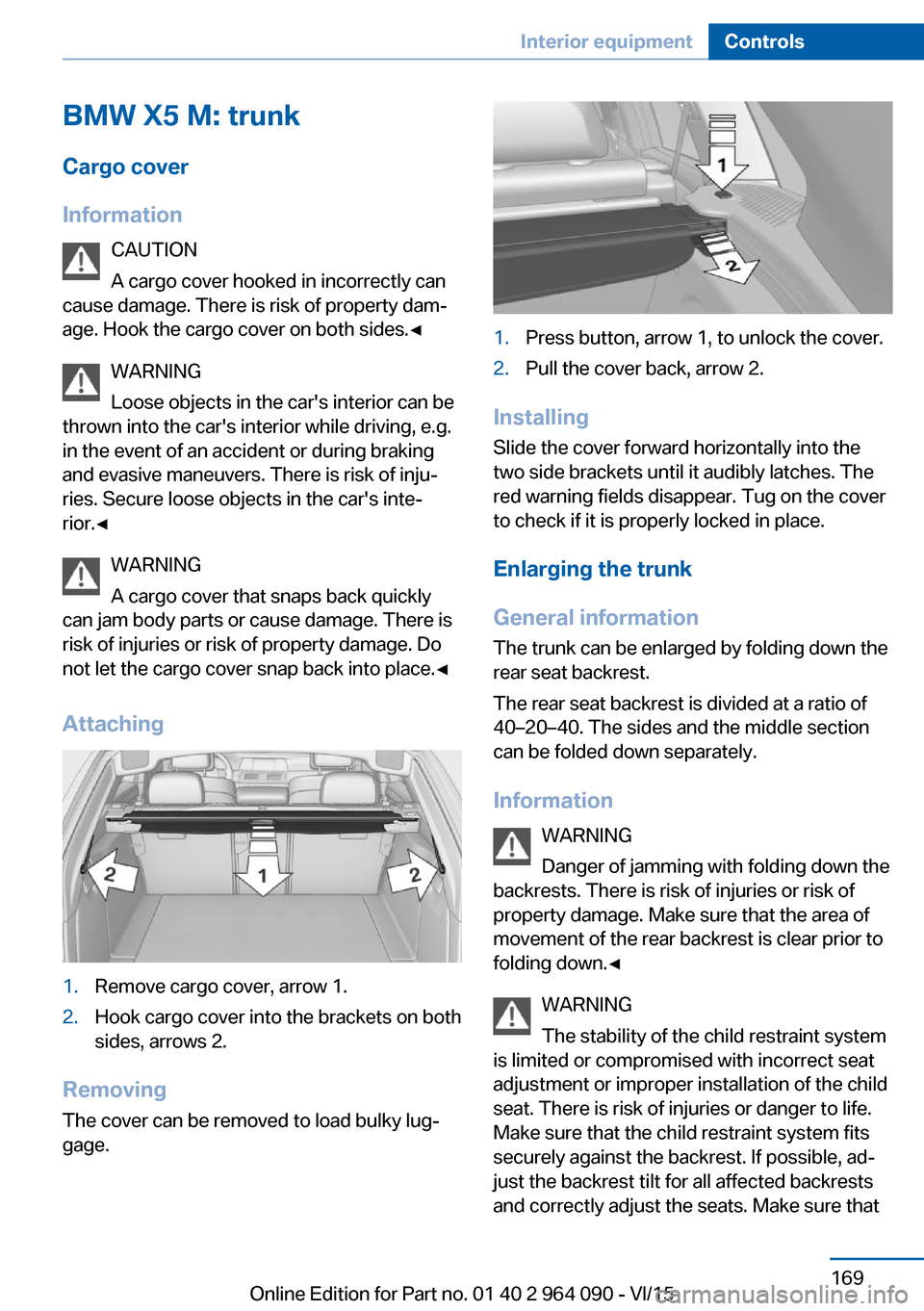
Attaching1.Remove cargo cover, arrow 1.2.Hook cargo cover into the brackets on both
sides, arrows 2.
Removing
The cover can be removed to load bulky lug‐
gage.
1.Press button, arrow 1, to unlock the cover.2.Pull the cover back, arrow 2.
Installing
Slide the cover forward horizontally into the
two side brackets until it audibly latches. The
red warning fields disappear. Tug on the cover
to check if it is properly locked in place.
Enlarging the trunk
General information
The trunk can be enlarged by folding down the
rear seat backrest.
The rear seat backrest is divided at a ratio of
40–20–40. The sides and the middle section
can be folded down separately.
Information WARNING
Danger of jamming with folding down the
backrests. There is risk of injuries or risk of
property damage. Make sure that the area of
movement of the rear backrest is clear prior to
folding down.◀
WARNING
The stability of the child restraint system
is limited or compromised with incorrect seat
adjustment or improper installation of the child
seat. There is risk of injuries or danger to life.
Make sure that the child restraint system fits
securely against the backrest. If possible, ad‐
just the backrest tilt for all affected backrests
and correctly adjust the seats. Make sure that
Seite 169Interior equipmentControls169
Online Edition for Part no. 01 40 2 964 090 - VI/15
Page 170 of 255
seats and backrests are securely engaged. If
possible, adjust the height of the head re‐
straints or remove them.◀
WARNING
With an unlocked backrest, an unsecured
load can be thrown into the car's interior, e.g.
in case of an accident, braking or evasive ma‐
neuver. There is risk of injuries. Make sure that
the backrest engages into the locking after
folding it back.◀
WARNING
With a rear backrest that is not locked,
the protective function of the middle safety
belt is not guaranteed. There is risk of injuries
or danger to life. If you are using the middle safety belt, lock the wider rear backrest.◀
Folding down the sides CAUTION
Screens in the rear can be damaged
when folding down the rear backrest. There is
risk of property damage. Make sure that the
area of movement is clear prior to folding down
the rear backrest.◀
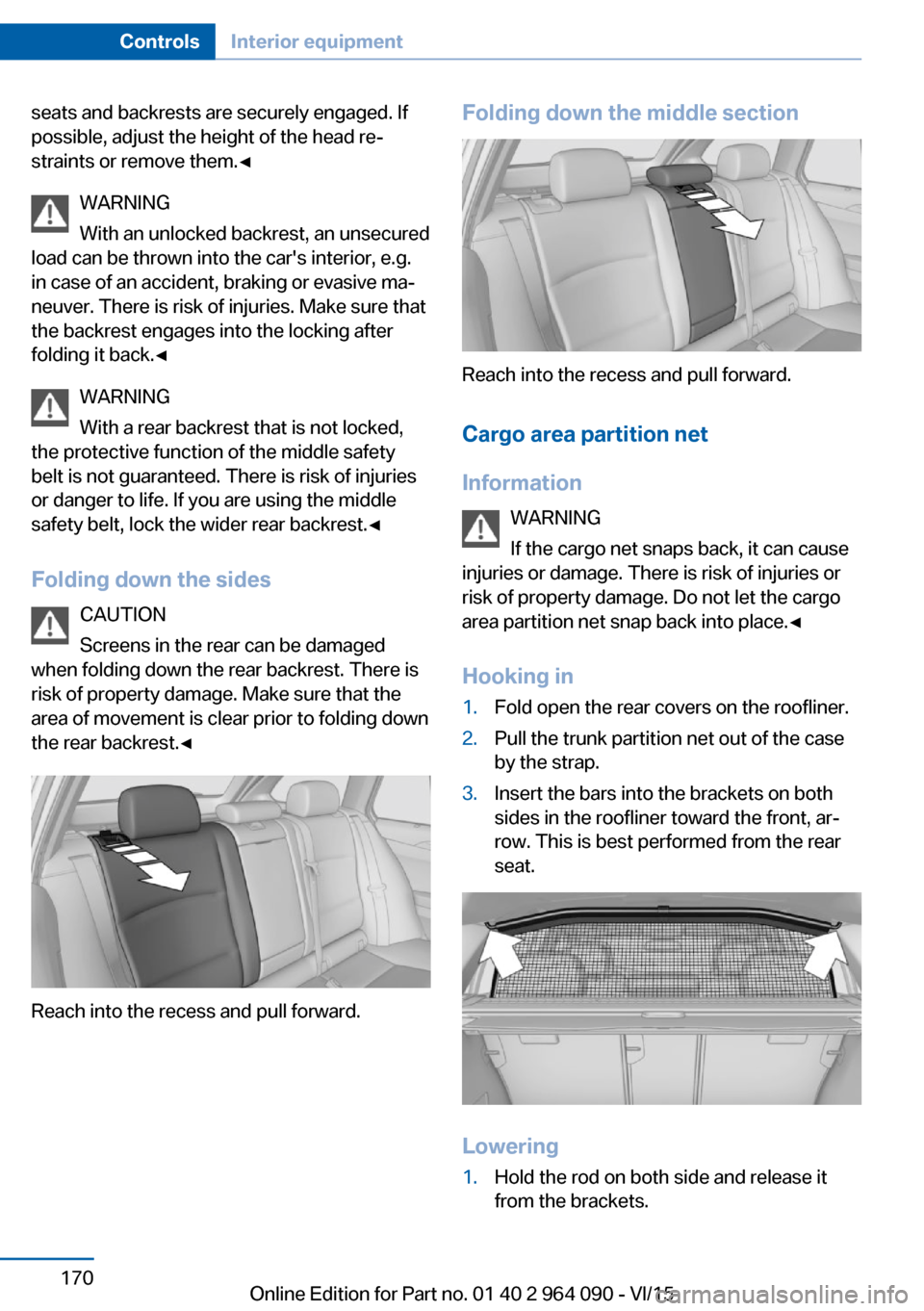
Reach into the recess and pull forward.
Folding down the middle section
Reach into the recess and pull forward.
Cargo area partition net
Information WARNING
If the cargo net snaps back, it can cause
injuries or damage. There is risk of injuries or
risk of property damage. Do not let the cargo
area partition net snap back into place.◀
Hooking in
1.Fold open the rear covers on the roofliner.2.Pull the trunk partition net out of the case
by the strap.3.Insert the bars into the brackets on both
sides in the roofliner toward the front, ar‐
row. This is best performed from the rear
seat.
Lowering
1.Hold the rod on both side and release it
from the brackets.Seite 170ControlsInterior equipment170
Online Edition for Part no. 01 40 2 964 090 - VI/15
Page 171 of 255
2.Slowly slide the trunk partition net into the
case.
BMW X6 M: trunk
Cargo cover
Information WARNING
Loose objects in the car's interior can be
thrown into the car's interior while driving, e.g.
in the event of an accident or during braking
and evasive maneuvers. There is risk of inju‐
ries. Secure loose objects in the car's inte‐
rior.◀
General information
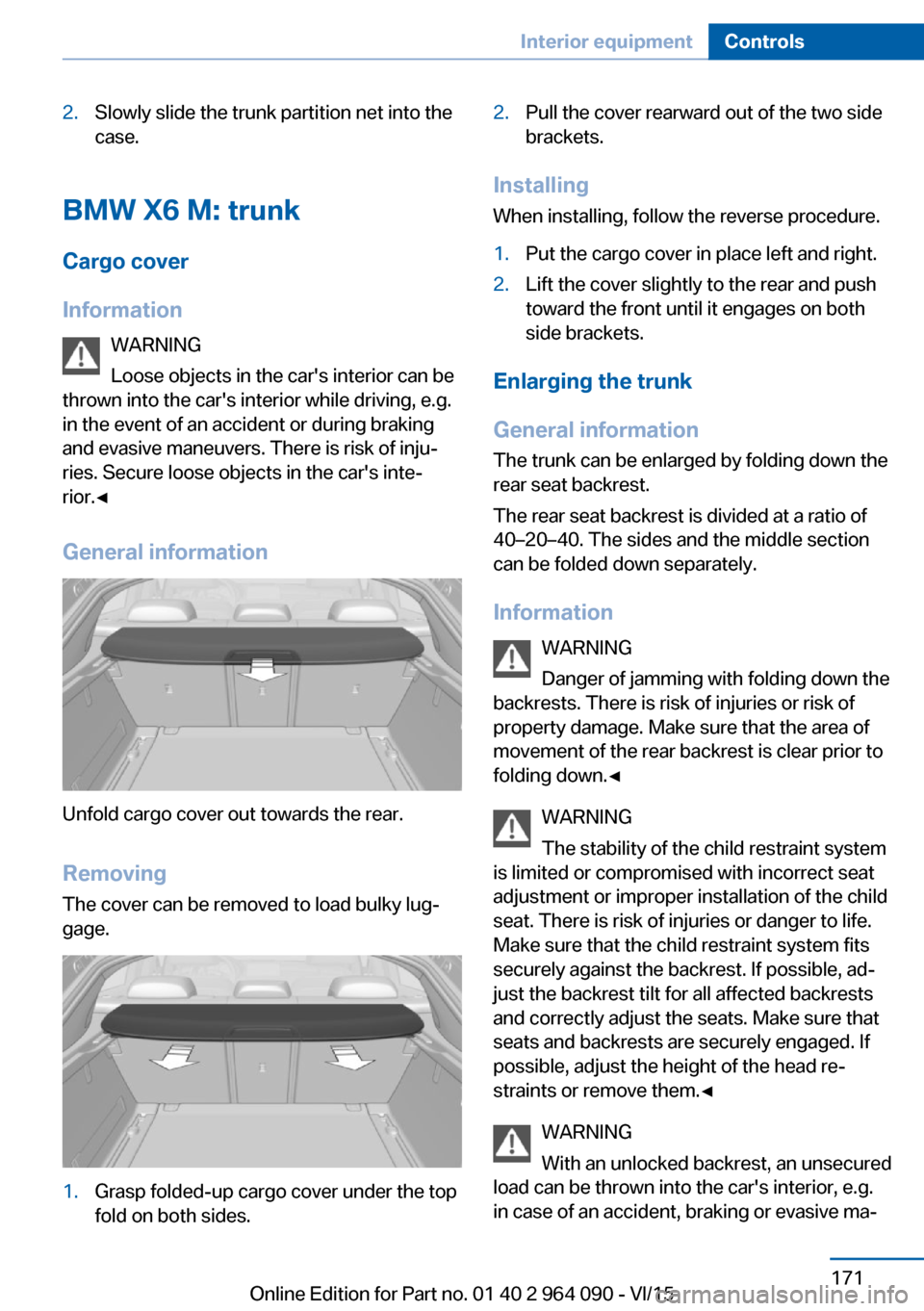
Unfold cargo cover out towards the rear.
RemovingThe cover can be removed to load bulky lug‐
gage.
1.Grasp folded-up cargo cover under the top
fold on both sides.2.Pull the cover rearward out of the two side
brackets.
Installing
When installing, follow the reverse procedure.
1.Put the cargo cover in place left and right.2.Lift the cover slightly to the rear and push
toward the front until it engages on both
side brackets.
Enlarging the trunk
General information
The trunk can be enlarged by folding down the
rear seat backrest.
The rear seat backrest is divided at a ratio of
40–20–40. The sides and the middle section
can be folded down separately.
Information WARNING
Danger of jamming with folding down the
backrests. There is risk of injuries or risk of
property damage. Make sure that the area of
movement of the rear backrest is clear prior to
folding down.◀
WARNING
The stability of the child restraint system
is limited or compromised with incorrect seat adjustment or improper installation of the child
seat. There is risk of injuries or danger to life.
Make sure that the child restraint system fits
securely against the backrest. If possible, ad‐
just the backrest tilt for all affected backrests
and correctly adjust the seats. Make sure that
seats and backrests are securely engaged. If
possible, adjust the height of the head re‐
straints or remove them.◀
WARNING
With an unlocked backrest, an unsecured
load can be thrown into the car's interior, e.g.
in case of an accident, braking or evasive ma‐
Seite 171Interior equipmentControls171
Online Edition for Part no. 01 40 2 964 090 - VI/15
Page 174 of 255
After the glove compartment is locked, the re‐
mote control can be handed over, such as at a
hotel, without the integrated key.
Driver's side
Information WARNING
Folded open, the glove compartment
protrudes in the car's interior. Objects in the
glove compartment can be thrown into the
car's interior while driving, e.g. in the event of
an accident or during braking and evasive ma‐
neuvers. There is risk of injuries. Always close
the glove compartment immediately after us‐
ing it.◀
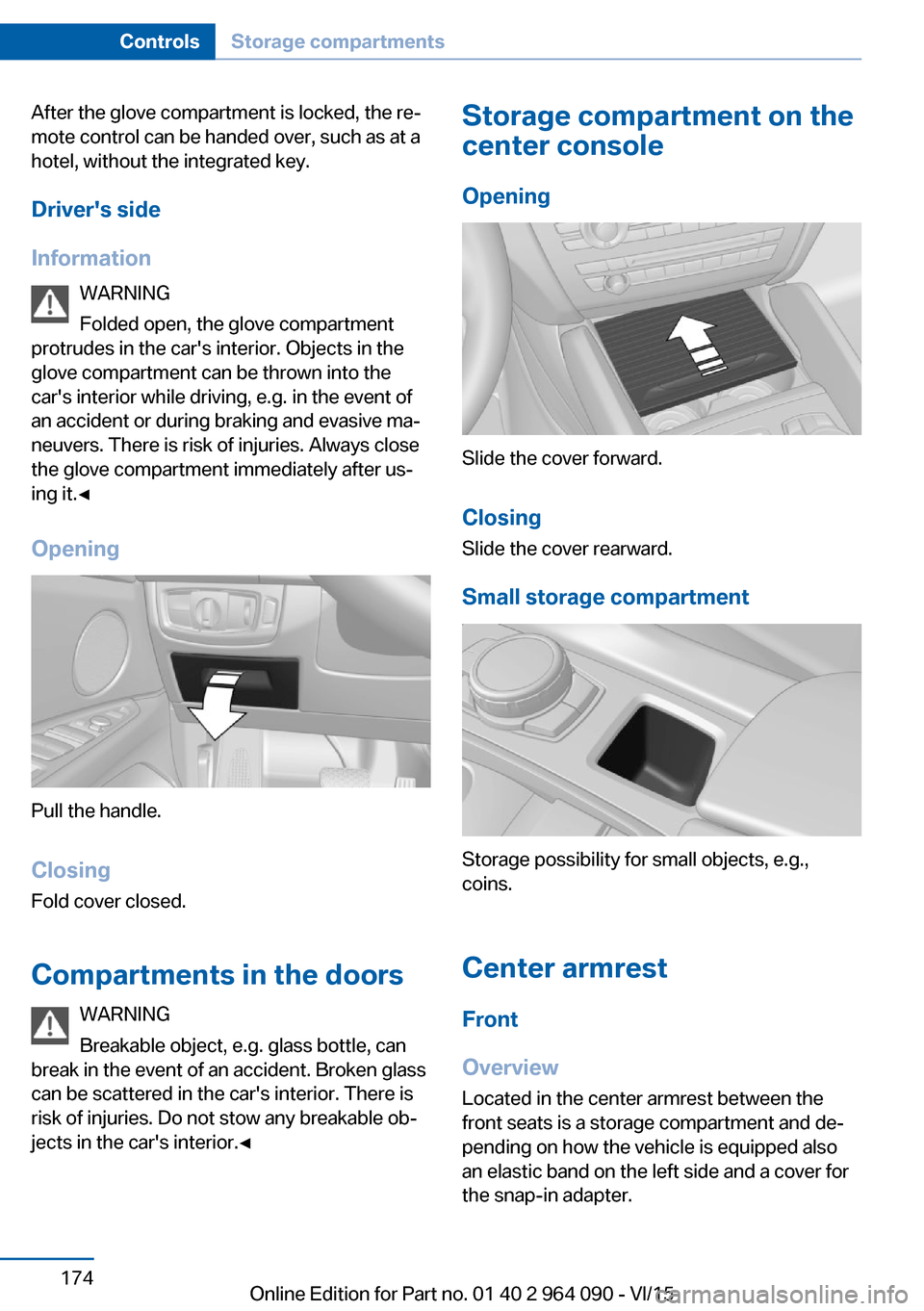
Opening
Pull the handle.
ClosingFold cover closed.
Compartments in the doors WARNING
Breakable object, e.g. glass bottle, can
break in the event of an accident. Broken glass
can be scattered in the car's interior. There is
risk of injuries. Do not stow any breakable ob‐
jects in the car's interior.◀
Storage compartment on the
center console
Opening
Slide the cover forward.
Closing Slide the cover rearward.
Small storage compartment
Storage possibility for small objects, e.g.,
coins.
Center armrest Front
Overview
Located in the center armrest between the
front seats is a storage compartment and de‐
pending on how the vehicle is equipped also
an elastic band on the left side and a cover for
the snap-in adapter.
Seite 174ControlsStorage compartments174
Online Edition for Part no. 01 40 2 964 090 - VI/15
Page 175 of 255
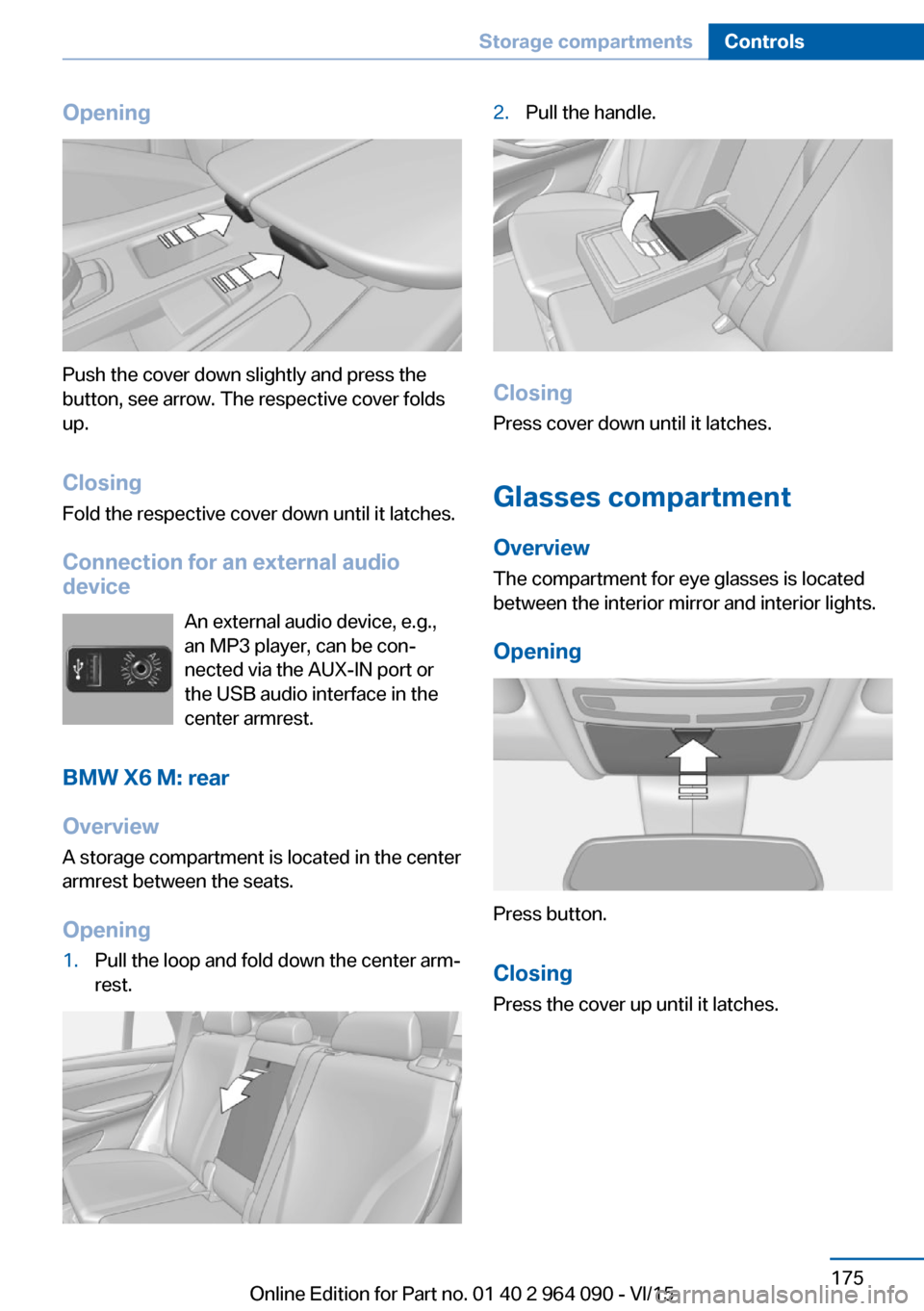
Opening
Push the cover down slightly and press the
button, see arrow. The respective cover folds
up.
ClosingFold the respective cover down until it latches.
Connection for an external audio
device
An external audio device, e.g.,
an MP3 player, can be con‐
nected via the AUX-IN port or
the USB audio interface in the
center armrest.
BMW X6 M: rear
Overview A storage compartment is located in the centerarmrest between the seats.
Opening
1.Pull the loop and fold down the center arm‐
rest.2.Pull the handle.
Closing
Press cover down until it latches.
Glasses compartment Overview
The compartment for eye glasses is located
between the interior mirror and interior lights.
Opening
Press button.
Closing Press the cover up until it latches.
Seite 175Storage compartmentsControls175
Online Edition for Part no. 01 40 2 964 090 - VI/15
Page 244 of 255
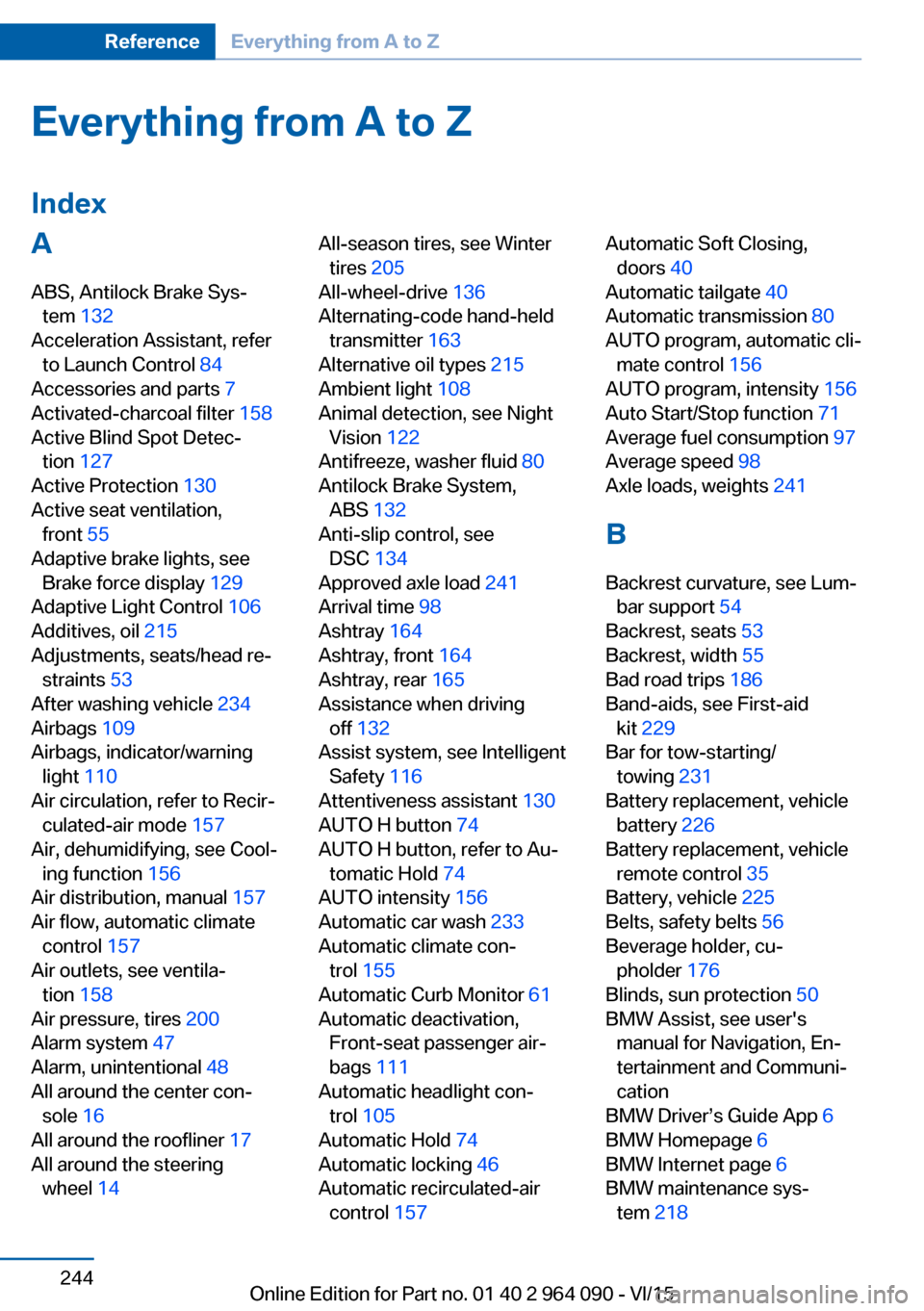
Everything from A to Z
IndexA ABS, Antilock Brake Sys‐ tem 132
Acceleration Assistant, refer to Launch Control 84
Accessories and parts 7
Activated-charcoal filter 158
Active Blind Spot Detec‐ tion 127
Active Protection 130
Active seat ventilation, front 55
Adaptive brake lights, see Brake force display 129
Adaptive Light Control 106
Additives, oil 215
Adjustments, seats/head re‐ straints 53
After washing vehicle 234
Airbags 109
Airbags, indicator/warning light 110
Air circulation, refer to Recir‐ culated-air mode 157
Air, dehumidifying, see Cool‐ ing function 156
Air distribution, manual 157
Air flow, automatic climate control 157
Air outlets, see ventila‐ tion 158
Air pressure, tires 200
Alarm system 47
Alarm, unintentional 48
All around the center con‐ sole 16
All around the roofliner 17
All around the steering wheel 14 All-season tires, see Winter
tires 205
All-wheel-drive 136
Alternating-code hand-held transmitter 163
Alternative oil types 215
Ambient light 108
Animal detection, see Night Vision 122
Antifreeze, washer fluid 80
Antilock Brake System, ABS 132
Anti-slip control, see DSC 134
Approved axle load 241
Arrival time 98
Ashtray 164
Ashtray, front 164
Ashtray, rear 165
Assistance when driving off 132
Assist system, see Intelligent Safety 116
Attentiveness assistant 130
AUTO H button 74
AUTO H button, refer to Au‐ tomatic Hold 74
AUTO intensity 156
Automatic car wash 233
Automatic climate con‐ trol 155
Automatic Curb Monitor 61
Automatic deactivation, Front-seat passenger air‐
bags 111
Automatic headlight con‐ trol 105
Automatic Hold 74
Automatic locking 46
Automatic recirculated-air control 157 Automatic Soft Closing,
doors 40
Automatic tailgate 40
Automatic transmission 80
AUTO program, automatic cli‐ mate control 156
AUTO program, intensity 156
Auto Start/Stop function 71
Average fuel consumption 97
Average speed 98
Axle loads, weights 241
B Backrest curvature, see Lum‐ bar support 54
Backrest, seats 53
Backrest, width 55
Bad road trips 186
Band-aids, see First-aid kit 229
Bar for tow-starting/ towing 231
Battery replacement, vehicle battery 226
Battery replacement, vehicle remote control 35
Battery, vehicle 225
Belts, safety belts 56
Beverage holder, cu‐ pholder 176
Blinds, sun protection 50
BMW Assist, see user's manual for Navigation, En‐
tertainment and Communi‐
cation
BMW Driver’s Guide App 6
BMW Homepage 6
BMW Internet page 6
BMW maintenance sys‐ tem 218 Seite 244ReferenceEverything from A to Z244
Online Edition for Part no. 01 40 2 964 090 - VI/15
Page 245 of 255
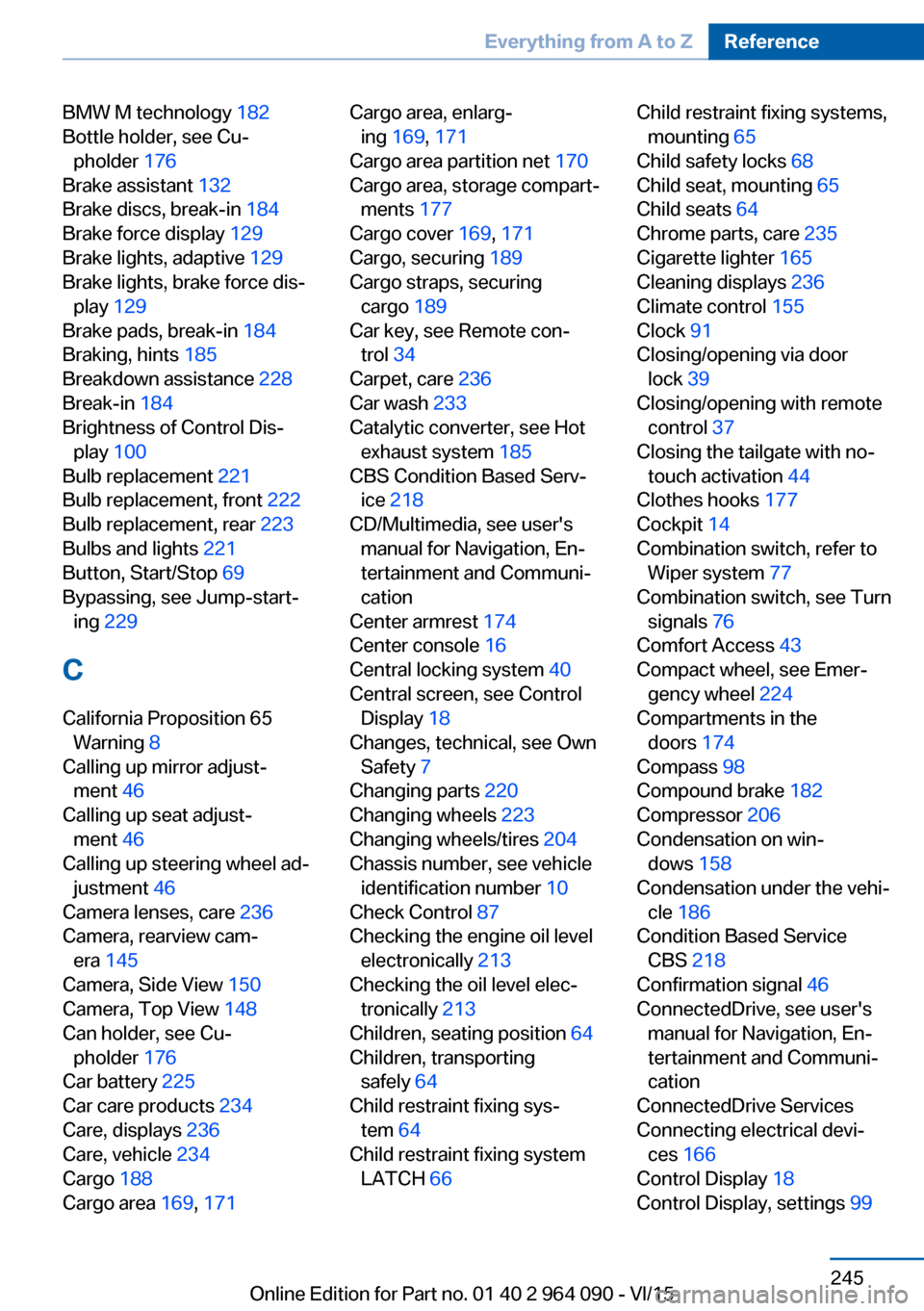
BMW M technology 182
Bottle holder, see Cu‐ pholder 176
Brake assistant 132
Brake discs, break-in 184
Brake force display 129
Brake lights, adaptive 129
Brake lights, brake force dis‐ play 129
Brake pads, break-in 184
Braking, hints 185
Breakdown assistance 228
Break-in 184
Brightness of Control Dis‐ play 100
Bulb replacement 221
Bulb replacement, front 222
Bulb replacement, rear 223
Bulbs and lights 221
Button, Start/Stop 69
Bypassing, see Jump-start‐ ing 229
C
California Proposition 65 Warning 8
Calling up mirror adjust‐ ment 46
Calling up seat adjust‐ ment 46
Calling up steering wheel ad‐ justment 46
Camera lenses, care 236
Camera, rearview cam‐ era 145
Camera, Side View 150
Camera, Top View 148
Can holder, see Cu‐ pholder 176
Car battery 225
Car care products 234
Care, displays 236
Care, vehicle 234
Cargo 188
Cargo area 169, 171 Cargo area, enlarg‐
ing 169 , 171
Cargo area partition net 170
Cargo area, storage compart‐ ments 177
Cargo cover 169, 171
Cargo, securing 189
Cargo straps, securing cargo 189
Car key, see Remote con‐ trol 34
Carpet, care 236
Car wash 233
Catalytic converter, see Hot exhaust system 185
CBS Condition Based Serv‐ ice 218
CD/Multimedia, see user's manual for Navigation, En‐
tertainment and Communi‐
cation
Center armrest 174
Center console 16
Central locking system 40
Central screen, see Control Display 18
Changes, technical, see Own Safety 7
Changing parts 220
Changing wheels 223
Changing wheels/tires 204
Chassis number, see vehicle identification number 10
Check Control 87
Checking the engine oil level electronically 213
Checking the oil level elec‐ tronically 213
Children, seating position 64
Children, transporting safely 64
Child restraint fixing sys‐ tem 64
Child restraint fixing system LATCH 66 Child restraint fixing systems,
mounting 65
Child safety locks 68
Child seat, mounting 65
Child seats 64
Chrome parts, care 235
Cigarette lighter 165
Cleaning displays 236
Climate control 155
Clock 91
Closing/opening via door lock 39
Closing/opening with remote control 37
Closing the tailgate with no- touch activation 44
Clothes hooks 177
Cockpit 14
Combination switch, refer to Wiper system 77
Combination switch, see Turn signals 76
Comfort Access 43
Compact wheel, see Emer‐ gency wheel 224
Compartments in the doors 174
Compass 98
Compound brake 182
Compressor 206
Condensation on win‐ dows 158
Condensation under the vehi‐ cle 186
Condition Based Service CBS 218
Confirmation signal 46
ConnectedDrive, see user's manual for Navigation, En‐
tertainment and Communi‐
cation
ConnectedDrive Services
Connecting electrical devi‐ ces 166
Control Display 18
Control Display, settings 99 Seite 245Everything from A to ZReference245
Online Edition for Part no. 01 40 2 964 090 - VI/15