radio controls BMW X6 2012 E71 Owner's Guide
[x] Cancel search | Manufacturer: BMW, Model Year: 2012, Model line: X6, Model: BMW X6 2012 E71Pages: 312, PDF Size: 8.91 MB
Page 177 of 312
Navigation
Entertainment
Driving tips
175Reference
At a glance
Controls
Communications
Mobility
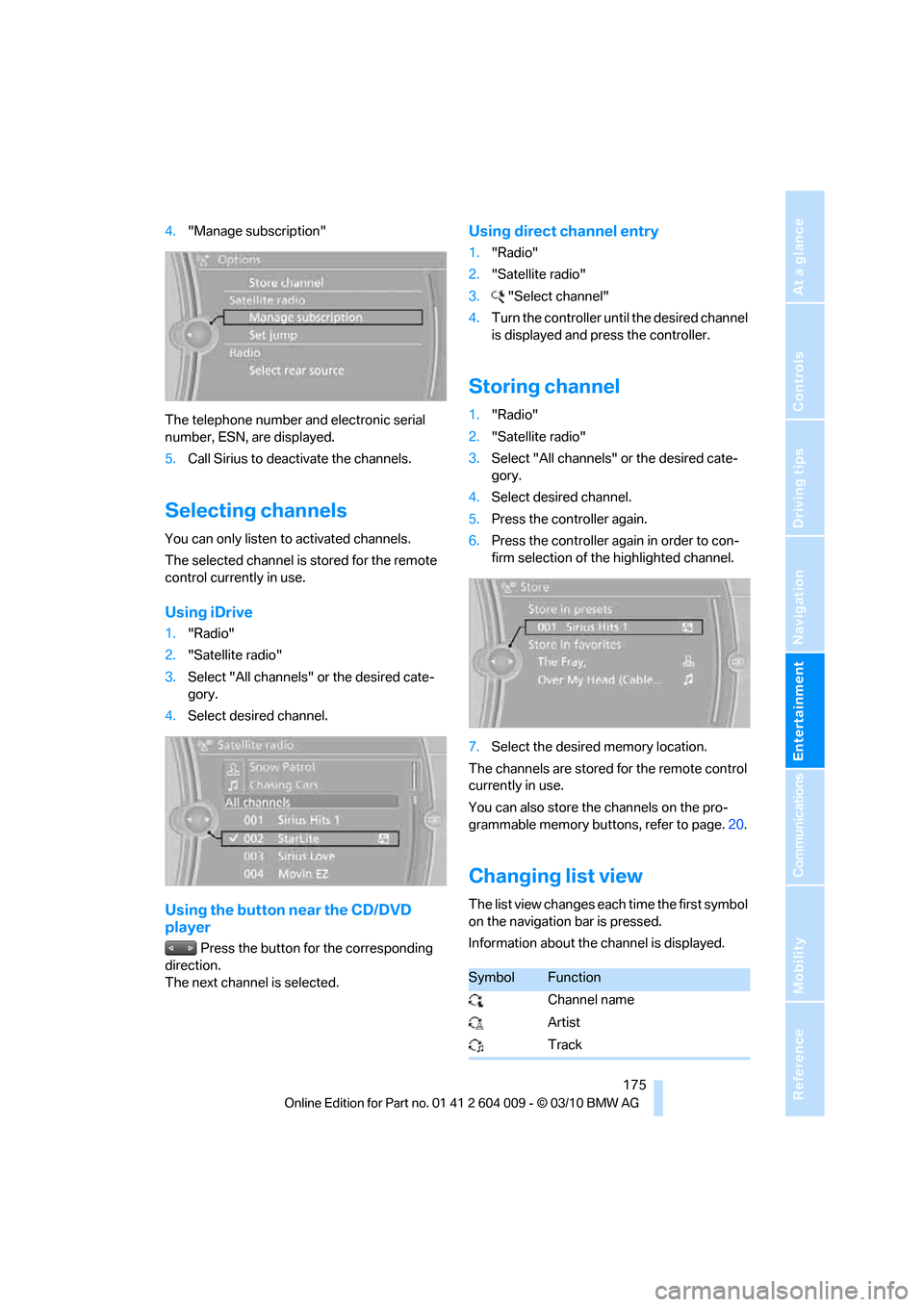
4."Manage subscription"
The telephone number and electronic serial
number, ESN, are displayed.
5.Call Sirius to deactivate the channels.
Selecting channels
You can only listen to activated channels.
The selected channel is stored for the remote
control currently in use.
Using iDrive
1."Radio"
2."Satellite radio"
3.Select "All channels" or the desired cate-
gory.
4.Select desired channel.
Using the button near the CD/DVD
player
Press the button for the corresponding
direction.
The next channel is selected.
Using direct channel entry
1."Radio"
2."Satellite radio"
3."Select channel"
4.Turn the controller until the desired channel
is displayed and press the controller.
Storing channel
1."Radio"
2."Satellite radio"
3.Select "All channels" or the desired cate-
gory.
4.Select desired channel.
5.Press the controller again.
6.Press the controller again in order to con-
firm selection of the highlighted channel.
7.Select the desired memory location.
The channels are stored for the remote control
currently in use.
You can also store the channels on the pro-
grammable memory buttons, refer to page.20.
Changing list view
The list view changes each time the first symbol
on the navigation bar is pressed.
Information about the channel is displayed.
SymbolFunction
Channel name
Artist
Track
Page 179 of 312
Navigation
Entertainment
Driving tips
177Reference
At a glance
Controls
Communications
Mobility
Storing league or team
Leagues or teams can be added to the favorites
from a selection list.
1."Radio"
2."Satellite radio"
3."Manage favorites"
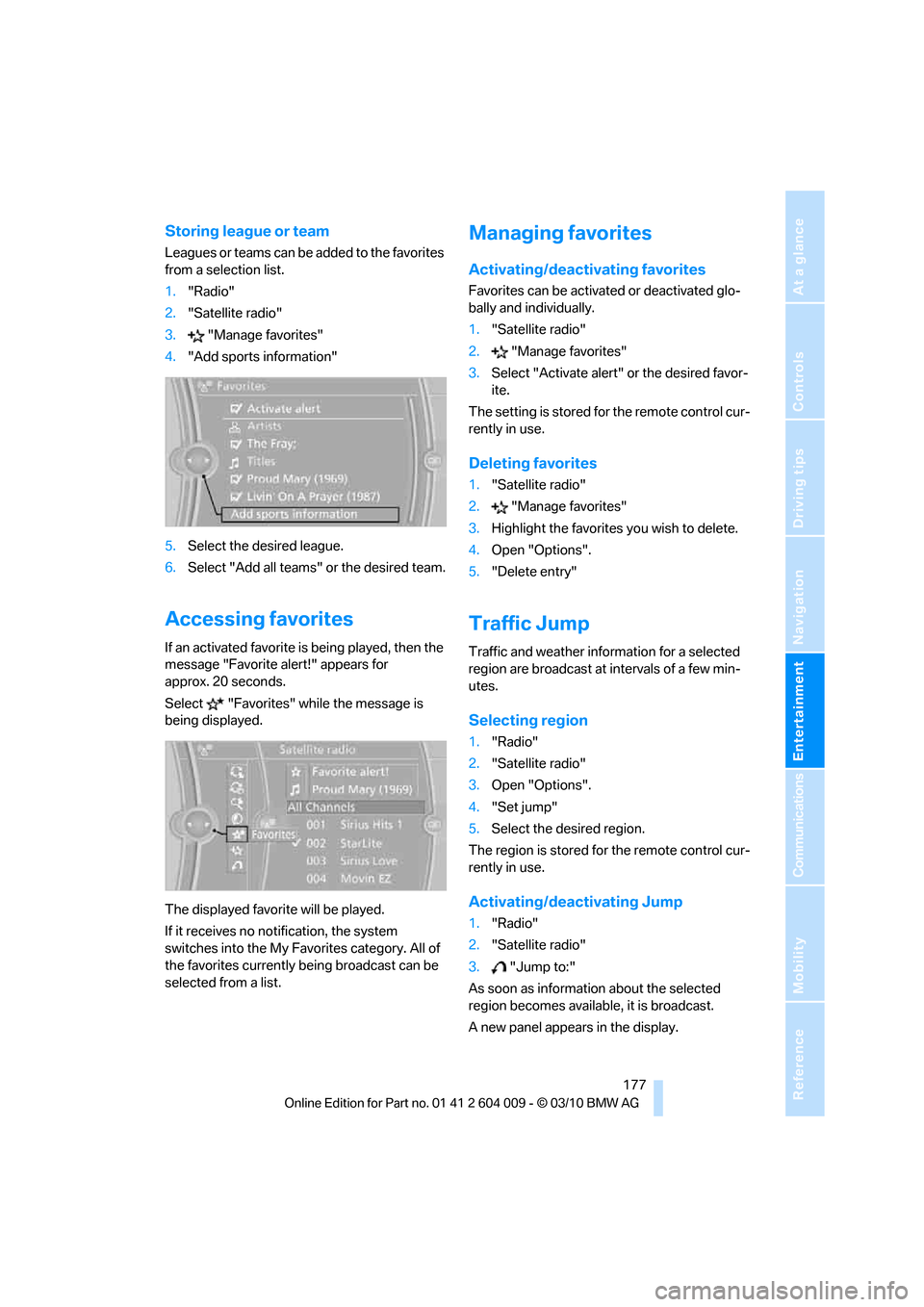
4."Add sports information"
5.Select the desired league.
6.Select "Add all teams" or the desired team.
Accessing favorites
If an activated favorite is being played, then the
message "Favorite alert!" appears for
approx. 20 seconds.
Select "Favorites" while the message is
being displayed.
The displayed favorite will be played.
If it receives no notification, the system
switches into the My Favorites category. All of
the favorites currently being broadcast can be
selected from a list.
Managing favorites
Activating/deactivating favorites
Favorites can be activated or deactivated glo-
bally and individually.
1."Satellite radio"
2."Manage favorites"
3.Select "Activate alert" or the desired favor-
ite.
The setting is stored for the remote control cur-
rently in use.
Deleting favorites
1."Satellite radio"
2."Manage favorites"
3.Highlight the favorites you wish to delete.
4.Open "Options".
5."Delete entry"
Traffic Jump
Traffic and weather information for a selected
region are broadcast at intervals of a few min-
utes.
Selecting region
1."Radio"
2."Satellite radio"
3.Open "Options".
4."Set jump"
5.Select the desired region.
The region is stored for the remote control cur-
rently in use.
Activating/deactivating Jump
1."Radio"
2."Satellite radio"
3."Jump to:"
As soon as information about the selected
region becomes available, it is broadcast.
A new panel appears in the display.
Page 217 of 312
215
Entertainment
Reference
At a glance
Controls
Driving tips Communications
Navigation
Mobility
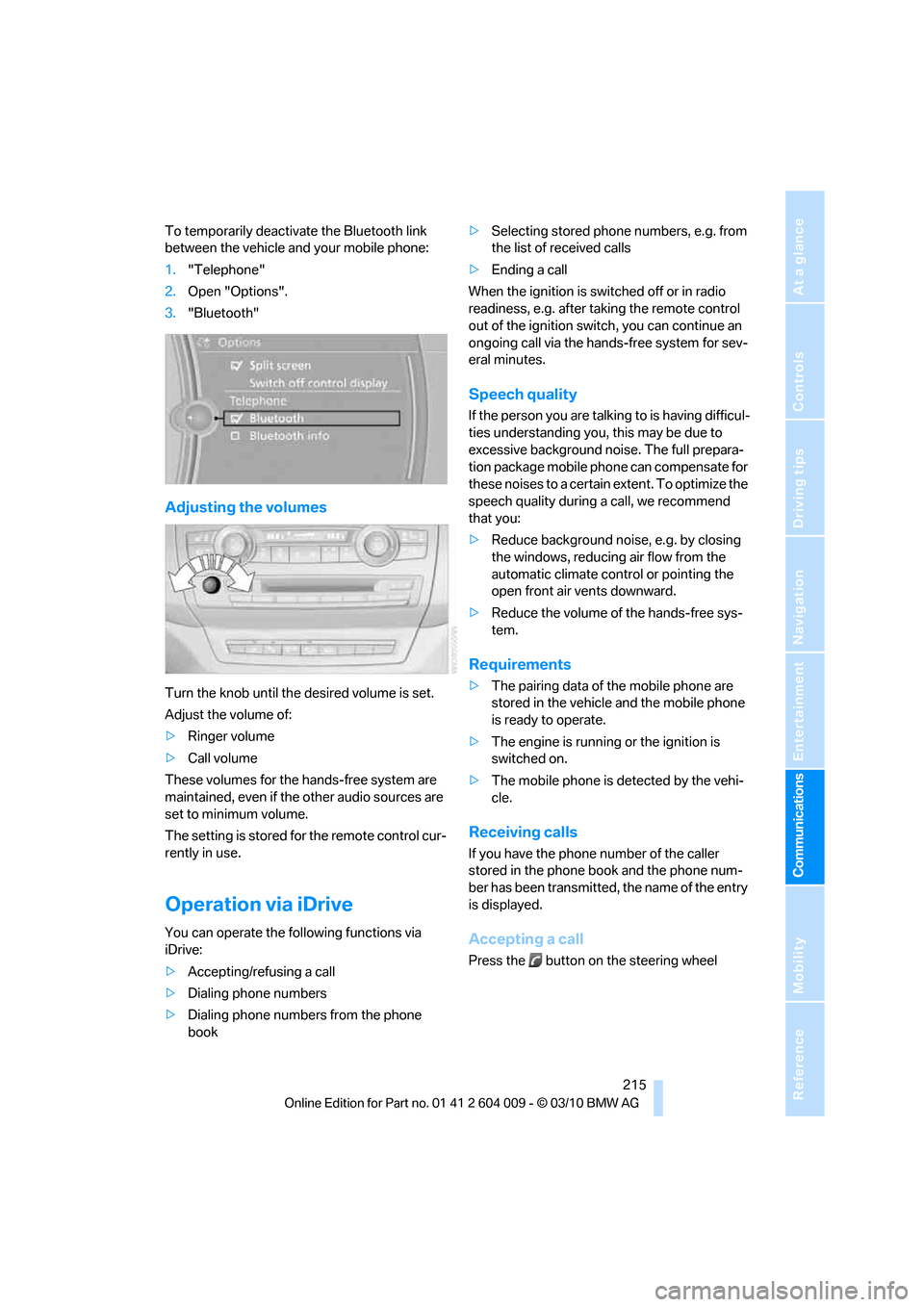
To temporarily deactivate the Bluetooth link
between the vehicle and your mobile phone:
1."Telephone"
2.Open "Options".
3."Bluetooth"
Adjusting the volumes
Turn the knob until the desired volume is set.
Adjust the volume of:
>Ringer volume
>Call volume
These volumes for the hands-free system are
maintained, even if the other audio sources are
set to minimum volume.
The setting is stored for the remote control cur-
rently in use.
Operation via iDrive
You can operate the following functions via
iDrive:
>Accepting/refusing a call
>Dialing phone numbers
>Dialing phone numbers from the phone
book>Selecting stored phone numbers, e.g. from
the list of received calls
>Ending a call
When the ignition is switched off or in radio
readiness, e.g. after taking the remote control
out of the ignition switch, you can continue an
ongoing call via the hands-free system for sev-
eral minutes.
Speech quality
If the person you are talking to is having difficul-
ties understanding you, this may be due to
excessive background noise. The full prepara-
tion package mobile phone can compensate for
these noises to a certain extent. To optimize the
speech quality during a call, we recommend
that you:
>Reduce background noise, e.g. by closing
the windows, reducing air flow from the
automatic climate control or pointing the
open front air vents downward.
>Reduce the volume of the hands-free sys-
tem.
Requirements
>The pairing data of the mobile phone are
stored in the vehicle and the mobile phone
is ready to operate.
>The engine is running or the ignition is
switched on.
>The mobile phone is detected by the vehi-
cle.
Receiving calls
If you have the phone number of the caller
stored in the phone book and the phone num-
ber has been transmitted, the name of the entry
is displayed.
Accepting a call
Press the button on the steering wheel
Page 225 of 312
223
Entertainment
Reference
At a glance
Controls
Driving tips Communications
Navigation
Mobility
that the mobile phone can engage in the
snap-in adapter.
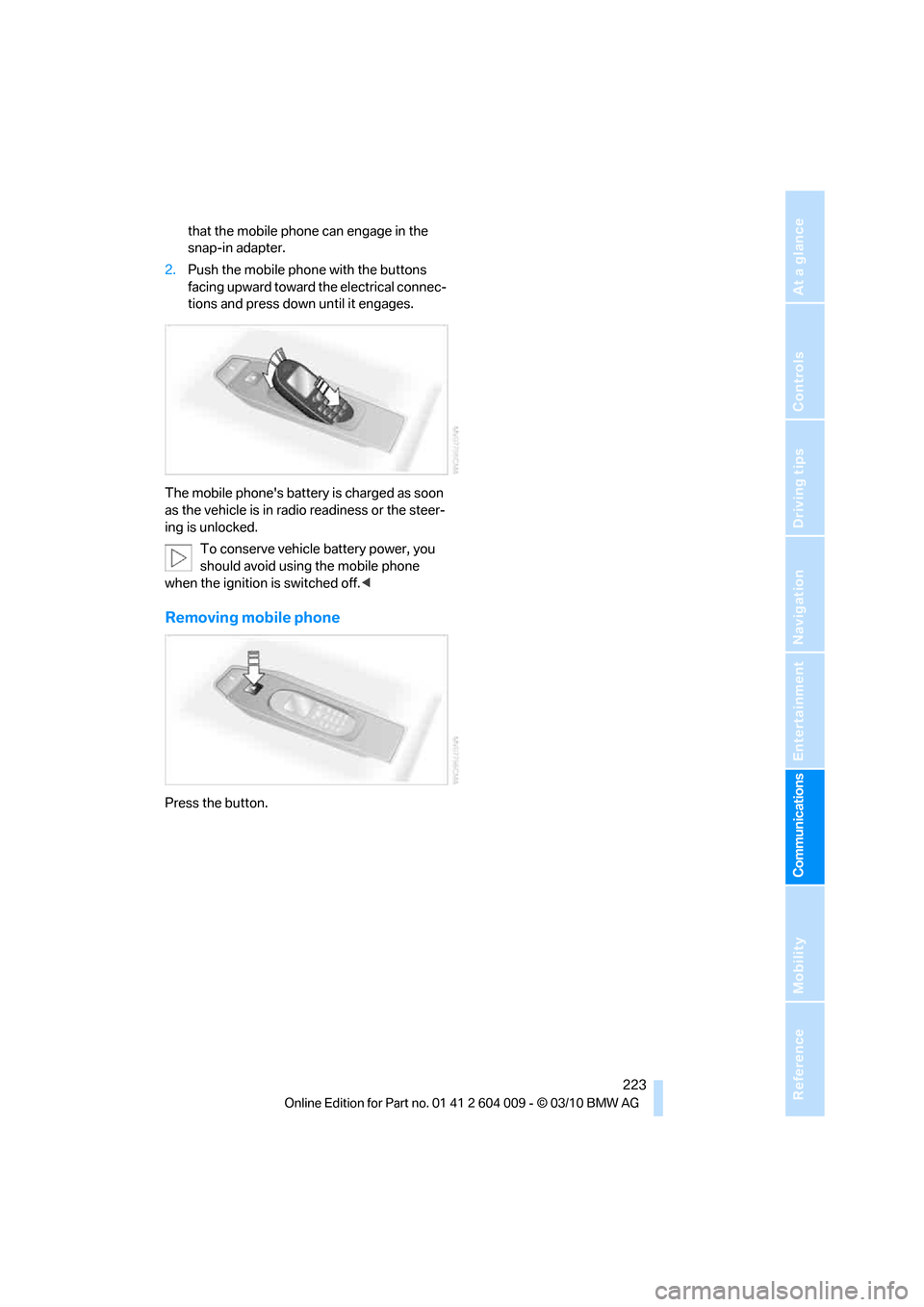
2.Push the mobile phone with the buttons
facing upward toward the electrical connec-
tions and press down until it engages.
The mobile phone's battery is charged as soon
as the vehicle is in radio readiness or the steer-
ing is unlocked.
To conserve vehicle battery power, you
should avoid using the mobile phone
when the ignition is switched off.<
Removing mobile phone
Press the button.
Page 273 of 312
Mobility
271Reference
At a glance
Controls
Driving tips
Communications
Navigation
Entertainment
tion. In the same way, individual settings are lost
and must be updated again:
>Seat, mirror and steering wheel memory
The positions must be stored again, refer to
page44.
>Time and Date
The values must be updated again, refer to
pages85, 85.
>Radio
Radio stations must be stored again, refer
to page171.
>Navigation system
You must wait until the system becomes
functional again, refer to page165.
>Glass sunroof/panoramic glass sunroof
It may only be possible to raise the glass
sunroof/panoramic glass sunroof. The sys-
tem must be initialized, refer to page41.
>Digital compass
The system must be calibrated, refer to
page126.
>Active steering
The system automatically initializes for a
short time as you drive. During this time, the
system is deactivated, refer to page106.
>xDrive
The system automatically initializes as you
drive. During this time, indicator lamps light
up. If the lamps do not disappear during the
current trip, have the system checked.
Before removing the vehicle from stor-
age, consult your BMW Sports Activity
Vehicle Center.<
Fuses
Never attempt to repair a blown fuse and
do not replace a defective fuse with a sub-
stitute of another color or amperage rating, as
this could lead to a circuit overload, ultimately
resulting in a fire in the vehicle.<
A pair of plastic tweezers and instructions for
fuse allocation is stored with the fuses in the
cargo area.Spare fuses can be obtained from your BMW
Sports Activity Vehicle.
In interior
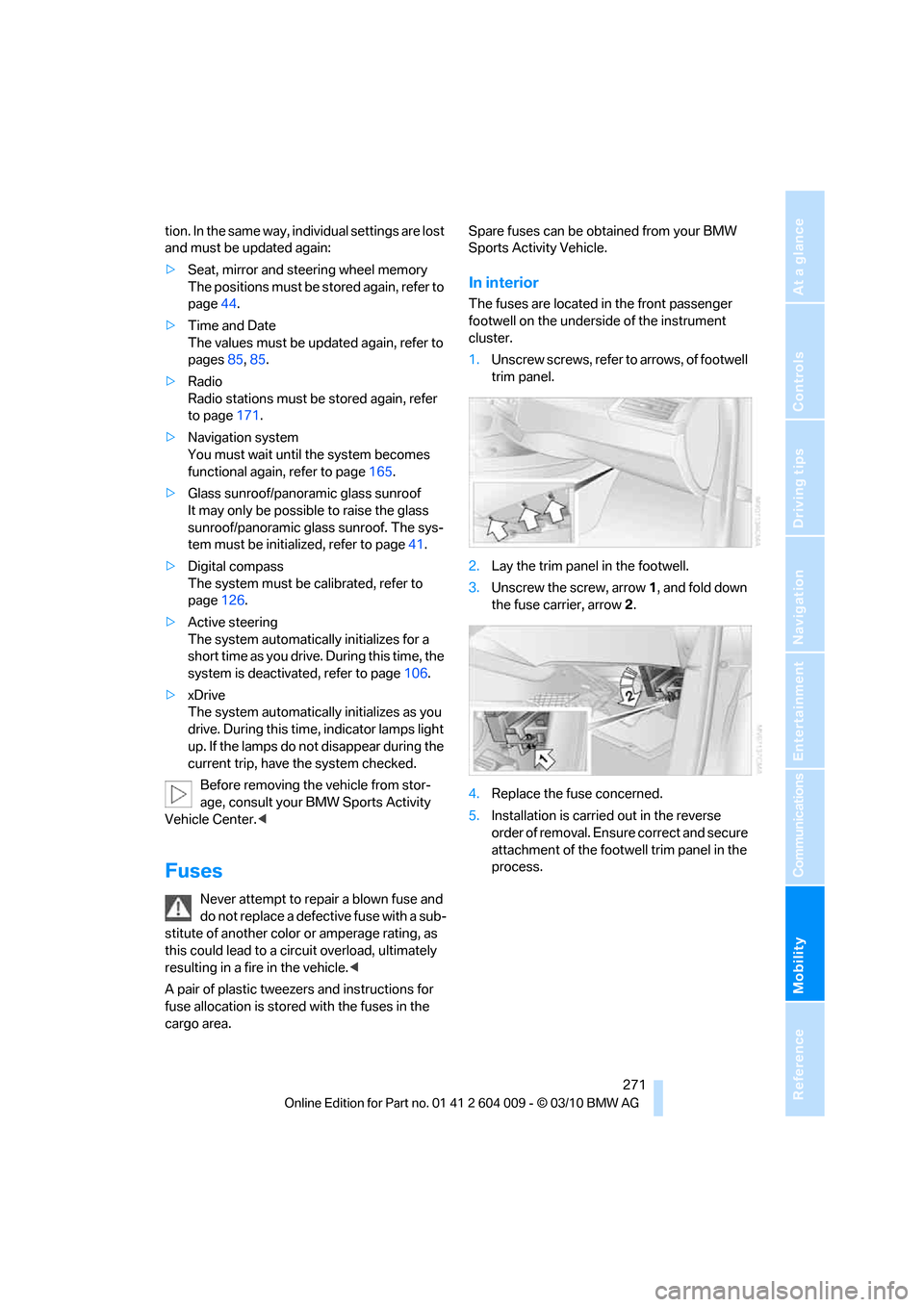
The fuses are located in the front passenger
footwell on the underside of the instrument
cluster.
1.Unscrew screws, refer to arrows, of footwell
trim panel.
2.Lay the trim panel in the footwell.
3.Unscrew the screw, arrow1, and fold down
the fuse carrier, arrow2.
4.Replace the fuse concerned.
5.Installation is carried out in the reverse
order of removal. Ensure correct and secure
attachment of the footwell trim panel in the
process.
Page 275 of 312
Mobility
273Reference
At a glance
Controls
Driving tips
Communications
Navigation
Entertainment
Giving and receiving assistance
Emergency request
Conditions for an emergency request:
>Full preparation package mobile phone.
With this equipment, an emergency request
is still possible when no mobile phone is
paired in the vehicle.
>BMW Assist is activated.
Activating BMW Assist, refer to page228.
>Radio readiness is switched on.
>The BMW Assist system is logged in on a
wireless communications network.
>The emergency request system is opera-
ble.
When the contract of participation with BMW
Assist expires, the BMW Assist system can be
deactivated by a BMW Sports Activity Vehicle
Center without having to visit a workshop. Once
the BMW Assist system has been deactivated,
emergency requests are not possible. The
BMW Assist system be reactivated by a BMW
Sports Activity Vehicle Center after signing a
new contract.
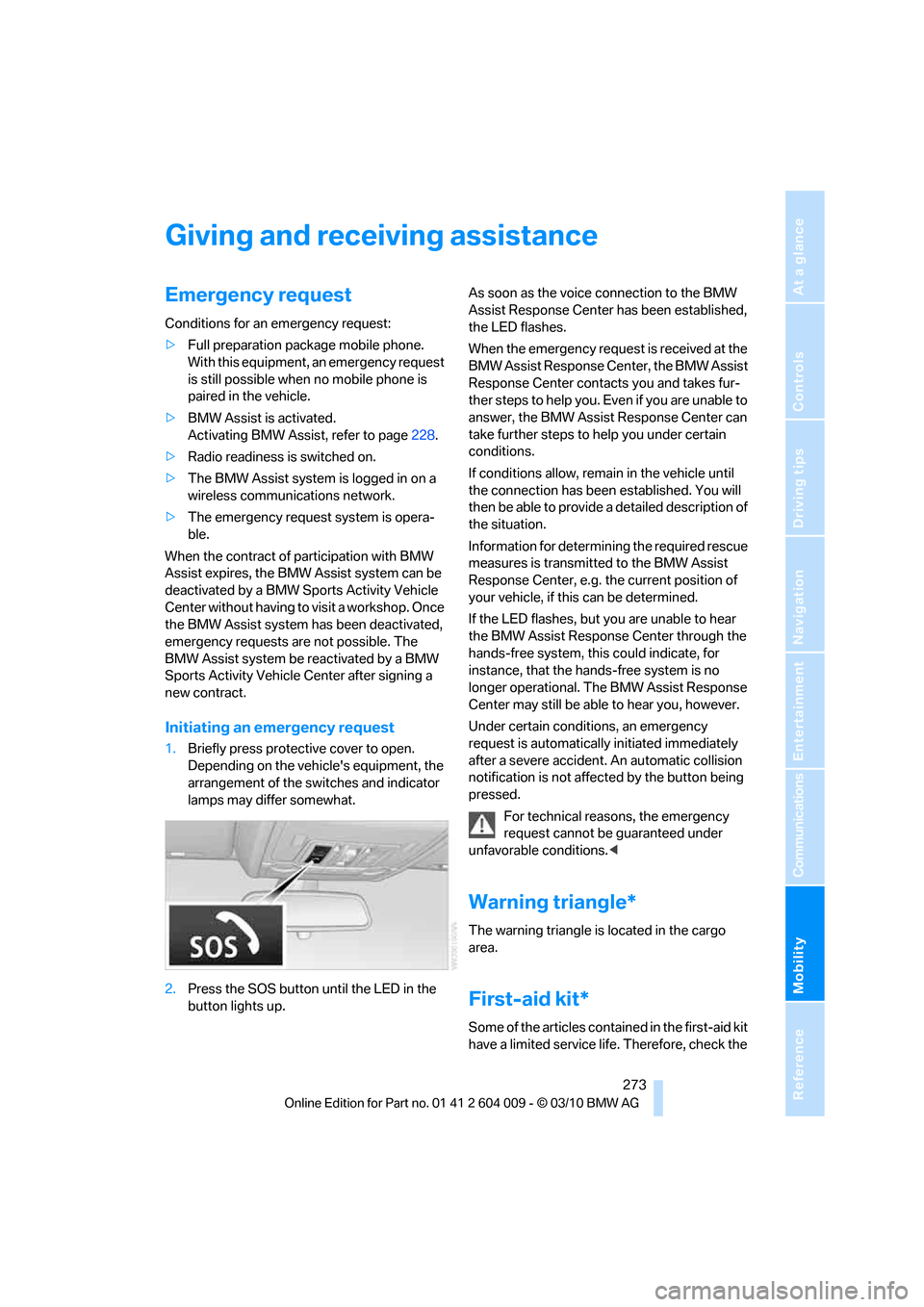
Initiating an emergency request
1.Briefly press protective cover to open.
Depending on the vehicle's equipment, the
arrangement of the switches and indicator
lamps may differ somewhat.
2.Press the SOS button until the LED in the
button lights up.As soon as the voice connection to the BMW
Assist Response Center has been established,
the LED flashes.
When the emergency request is received at the
BMW Assist Response Center, the BMW Assist
Response Center contacts you and takes fur-
ther steps to help you. Even if you are unable to
answer, the BMW Assist Response Center can
take further steps to help you under certain
conditions.
If conditions allow, remain in the vehicle until
the connection has been established. You will
then be able to provide a detailed description of
the situation.
Information for determining the required rescue
measures is transmitted to the BMW Assist
Response Center, e.g. the current position of
your vehicle, if this can be determined.
If the LED flashes, but you are unable to hear
the BMW Assist Response Center through the
hands-free system, this could indicate, for
instance, that the hands-free system is no
longer operational. The BMW Assist Response
Center may still be able to hear you, however.
Under certain conditions, an emergency
request is automatically initiated immediately
after a severe accident. An automatic collision
notification is not affected by the button being
pressed.
For technical reasons, the emergency
request cannot be guaranteed under
unfavorable conditions.<
Warning triangle*
The warning triangle is located in the cargo
area.
First-aid kit*
Some of the articles contained in the first-aid kit
have a limited service life. Therefore, check the
Page 289 of 312
Reference 287
At a glance
Controls
Driving tips
Communications
Navigation
Entertainment
Mobility
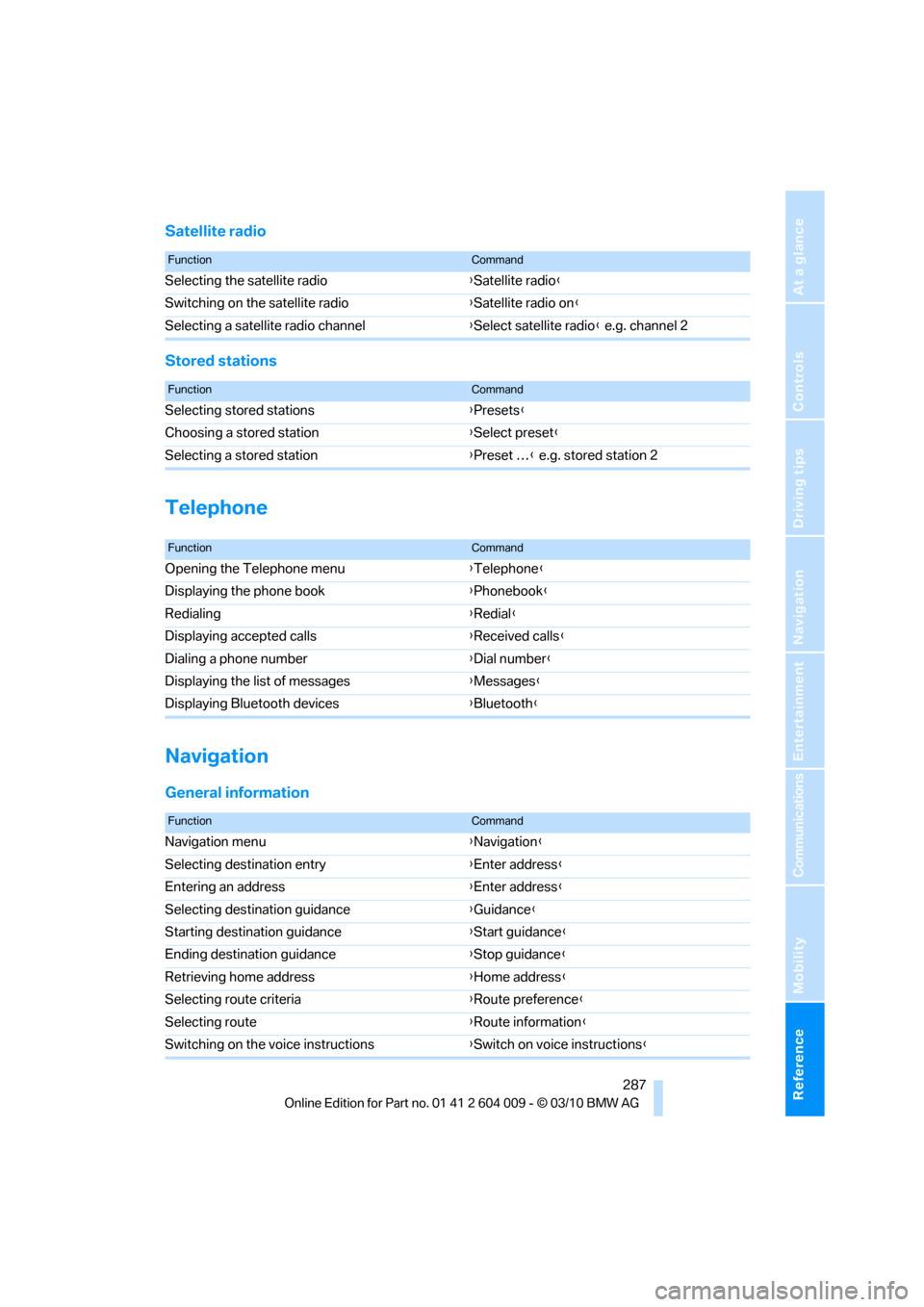
Satellite radio
Stored stations
Telephone
Navigation
General information
FunctionCommand
Selecting the satellite radio{Satellite radio}
Switching on the satellite radio{Satellite radio on}
Selecting a satellite radio channel{Select satellite radio} e.g. channel 2
FunctionCommand
Selecting stored stations{Presets}
Choosing a stored station{Select preset}
Selecting a stored station{Preset …} e.g. stored station 2
FunctionCommand
Opening the Telephone menu{Telephone}
Displaying the phone book{Phonebook}
Redialing{Redial}
Displaying accepted calls{Received calls}
Dialing a phone number{Dial number}
Displaying the list of messages{Messages}
Displaying Bluetooth devices{Bluetooth}
FunctionCommand
Navigation menu{Navigation}
Selecting destination entry{Enter address}
Entering an address{Enter address}
Selecting destination guidance{Guidance}
Starting destination guidance{Start guidance}
Ending destination guidance{Stop guidance}
Retrieving home address{Home address}
Selecting route criteria{Route preference}
Selecting route{Route information}
Switching on the voice instructions{Switch on voice instructions}
Page 296 of 312
Everything from A - Z
294 Breaking-in rear axle
differential138
Break-in period138
Brightness
– of Control Display86
– on Head-up Display109
Button for starting engine58
Buttons on steering wheel11
C
Calibrating driver's seat49
California Proposition 65
Warning6
Call
– accepting215
– ending216
– rejecting216
Calling, refer to Phone
numbers, dialing216
Calling, refer to the telephone
owner's manual
Camera
– refer to Rear view camera93
– refer to Top View90
Camera, Side View93
Can holder, refer to
Cupholders128
Capacities284
Capacity of cargo area283
Car battery, refer to Vehicle
battery270Care258
– car-care products258
– carpets260
– car washes258
– CD/DVD-player261
– chrome components259
– displays260
– exterior258
– fine wooden
components260
– hand washing259
– headlamps259
– high-pressure cleaning
jets259
– interior260
– leather260
– light-alloy wheels259
– paint259
– plastic components260
– rubber gaskets259
– running boards260
– safety belts260
– sensors and cameras260
– upholstery materials and
cloth-covered paneling260
– windows259
Cargo
– refer to Loading140
– securing142
– securing with ski bag135
Cargo area
– capacity283
– emergency actuation, refer
to Manually opening or
closing34
– emergency operation, refer
to Opening manually31
– expanding132
– opening
33
– opening/closing, refer to
Liftgate30,33
– opening/closing, refer to
Tailgate32
– opening from inside31
– opening from outside31
– opening with remote
control28
Cargo area, refer to Cargo
area131Cargo area cover, refer to
Luggage compartment
roller cover131
Caring for the vehicle
finish259
Car key, refer to Keys/remote
control26
Car phone
– installation location, refer to
Center armrest, front128
– refer to separate operating
instructions
Car phone, refer to
Telephone212
Car radio, refer to Radio171
Car wash258
– before driving in59
– with Comfort Access36
Car washes258
Catalytic converter, refer to
Hot exhaust system139
CBC Cornering Brake
Control95
CBS Condition Based
Service256
CD, audio playback180
CD, refer to Playing audio
tracks, DVD system in
rear202
CD/DVD changer
– magazine, loading183
CD-/DVD player in rear197
CD changer179,183
– controls168
– fast forward/reverse181
– random play sequence180
– selecting a track180
– switching on/off168
– tone control168
– volume168
CD player179
– controls168
– fast forward/reverse181
– random play sequence180
– selecting a track180
– switching on/off168
– tone control168
– volume168
Page 298 of 312
Everything from A - Z
296 Data memory257
Data transfer230
Date76
– display format85
– retrieving76
– setting85
Daytime driving lamps112
Defrosting windows118
Defrosting windows and
removing condensation118
Defrost position, refer to
Defrosting windows118
Deleting a trip157
Destination, entering by town/
city name149
Destination address
– entering149,155
Destination entry using BMW
Assist153
Destination for navigation
– entering149
– entering by voice155
– entering via map154
Destination guidance158
– bypassing a route
section159
– changing specified
route158
– continuing158
– starting158
– voice instructions160
– volume of voice
instructions160
Diesel exhaust fluid
– at low temperatures237
– at minimum236
– refilling yourself237
Diesel particulate filter139
Digital clock76
Digital compass125
Digital radio, refer to HD
Radio172
Dimensions281
Directional indicators, refer to
Turn signals65
Direction announcements,
refer to Voice
instructions160Directory for navigation, refer
to Address book151
Displacement, refer to Engine
data280
Display, refer to iDrive16
Displaying images204
Displaying special
destinations154
Display lighting, refer to
Instrument lighting115
Displays, refer to Instrument
panel12
Displays on the windshield,
refer to Head-up
Display109
Disposal
– battery of remote control
with Comfort Access37
– battery of the remote
control, DVD system in
rear198
– vehicle battery270
Distance, refer to
Computer79
Distance, selecting for active
cruise control70
Distance control, refer to
Active cruise control68
Distance to destination, refer
to Computer79
Distance warning, refer to
PDC Park Distance
Control88
Door entry lighting115
Door key, refer to Keys/
remote control26
Door lock29
Door locking, confirmation
signals28
Doors
– manual operation29
– remote control28
DOT Quality Grades247
Downhill driving assistance,
refer to HDC97
Draft-free ventilation120
Drinks holder, refer to
Cupholders128
Drive-off assistant99Driver's seat, calibrating49
Driving lamps, refer to Parking
lamps/low beams111
Driving on poor roads143
Driving stability control
systems95
Driving through water140
Driving tips, refer to General
driving notes138
Dry air, refer to Cooling
function119
Drying the air, refer to Cooling
function119
DSC Dynamic Stability
Control95
– indicator lamp13,96
DSC OFF, refer to Dynamic
Stability Control95
DTC Dynamic Traction
Control96
– activating96
– indicator lamp97
DVD
– country codes181
– settings182
– video playback181
DVD changer183
– malfunctions184
DVD changer, refer to CD
changer179
DVD menu182
DVD player, refer to CD
player179
DVD system in rear196
– CD/DVD player197
– connecting headphones197
– controls196
– displaying images from CD/
DVD204
– DVD country codes199
– external device207
– information on CD/DVD
player205
– playing audio tracks from
CD/DVD202
– playing video from CD/
DVD199
– remote control197
– switching on/off198
Page 301 of 312
Reference 299
At a glance
Controls
Driving tips
Communications
Navigation
Entertainment
Mobility
Highway, refer to Route
criteria158
Hill Descent Control HDC97
Hills140
Holder for cups128
Homepage4
Hood251
Horn10
Hot exhaust system139
Hydraulic brake assistant,
refer to Brake assistant95
Hydroplaning139
I
IBOC, refer to HD Radio172
Ice, refer to Outside
temperature warning76
Ice warning, refer to Outside
temperature warning76
Identification
– tire250
Identification mark
– run-flat tires249
iDrive16
– changing language86
– changing settings85
– changing units of measure
and display type86
– controller16
– controls16
– main menu17
– setting brightness86
– setting date85
– setting time85
– status information19
Ignition58
– switched off58
– switched on58
Ignition key, refer to Keys/
remote control26
Ignition key position 1, refer to
Radio readiness58
Ignition key position 2, refer to
Ignition on58
Ignition lock58
– starting engine with Comfort
Access36
Imprint2Indicator/warning lamps13
– active steering105
– airbags108
– DSC13,96
– DTC97
– fasten safety belt48
– Flat Tire Monitor100
– fog lamps13
– TPM Tire Pressure
Monitor103
Individual settings, refer to
Personal Profile26
Inflation pressure, refer to Tire
inflation pressure239
Inflation pressure monitoring,
refer to FTM Flat Tire
Monitor99
Inflation pressure monitoring,
refer to TPM Tire Pressure
Monitor101
Initializing
– Flat Tire Monitor100
– radio, refer to Station,
storing171
– refer to Power failure270
– refer to Setting date
85
– refer to Setting time85
– seat, mirror and steering
wheel memory44
Installation location
– mobile phone128
Instructions for navigation
system, refer to Voice
instructions160
Instrument lighting115
Instrument panel12
Instrument panel, refer to
Cockpit10
Integrated key26
Integrated universal remote
control124
Interactive map154
Interior lamps115
– switching on with remote
control28
Interior motion sensor35
– switching off35Interior rearview mirror52
– automatic dimming
feature52
– compass125
Intermittent mode of the
wipers66
Intersection, entering,
navigation150
iPod, connecting, refer to
AUX-IN connection192
iPod, connecting, refer to USB
audio interface192
J
Jacking points269
Joystick
– refer to iDrive16
– refer to Selector lever,
selecting transmission
positions63
Jumpering, refer to Jump
starting274
Jump starting274
K
Keyless go, refer to Comfort
Access35
Keyless opening and closing,
refer to Comfort Access35
Key Memory, refer to Personal
Profile26
Keys26
– key-related settings, refer to
Personal Profile26
Kickdown, automatic
transmission with
Steptronic64
Knock control235
L
Lamps, refer to Parking lamps/
low beams111
Lamps and bulbs262
Lashing eyes, refer to
Securing cargo142
Last destinations152