Content BMW X6 2013 E71 User Guide
[x] Cancel search | Manufacturer: BMW, Model Year: 2013, Model line: X6, Model: BMW X6 2013 E71Pages: 345, PDF Size: 9.45 MB
Page 308 of 345
Once the BMW Response Center has re‐
ceived your Emergency Request, the BMW
Response Center contacts you and takes
further steps to help you.
Even if you are unable to respond, the
BMW Response Center can take further
steps to help you under certain circum‐
stances.
For this purpose, data that are used to de‐
termine the necessary rescue measures,
such as the current position of the vehicle
if it can be established, are transmitted to
the BMW Response Center.▷If the LED is flashing but the BMW Re‐
sponse Center cannot be heard on the
hands-free system, the hands-free system
may be malfunctioning. However, the
BMW Response Center may still be able to
hear you.
Initiating an Emergency Request
automatically
Under certain conditions, an Emergency Re‐
quest is automatically initiated immediately af‐
ter a severe accident. Automatic Collision Noti‐
fication is not affected by pressing the SOS
button.
Roadside Assistance
Service availability Roadside Assistance can be reached around
the clock in many countries. You can obtain as‐
sistance there in the event of a vehicle break‐
down.
Roadside Assistance The Roadside Assistance, refer to page 262,
phone number can be viewed on the iDrive or a
connection to Roadside Assistance can be es‐
tablished directly.
Warning triangle
The warning triangle is located in the cargo
area.
First aid kit
The first aid kit is located in a storage compart‐
ment on the right side in the cargo area.
Some of the articles contained in the first aid
pouch have a limited service life.
Check the expiration dates of the contents
regularly and replace any items promptly.
Jump-starting
Notes
If the battery is discharged, an engine can be started using the battery of another vehicle
and two jumper cables. Only use jumper ca‐ bles with fully insulated clamp handles.
To prevent personal injury or damage to both
vehicles, adhere strictly to the following proce‐
dure.
Do not touch live parts
To avoid the risk of potentially fatal in‐
jury, always avoid all contact with electrical
components while the engine is running.◀
Preparation1.Check whether the battery of the other ve‐
hicle has a voltage of 12 volts and approxi‐
mately the same capacitance in Ah. This
information can be found on the battery.2.Switch off the engine of the assisting vehi‐
cle.3.Switch off any electronic systems/power
consumers in both vehicles.Seite 308MobilityBreakdown assistance308
Online Edition for Part no. 01 40 2 918 395 - III/13
Page 325 of 345
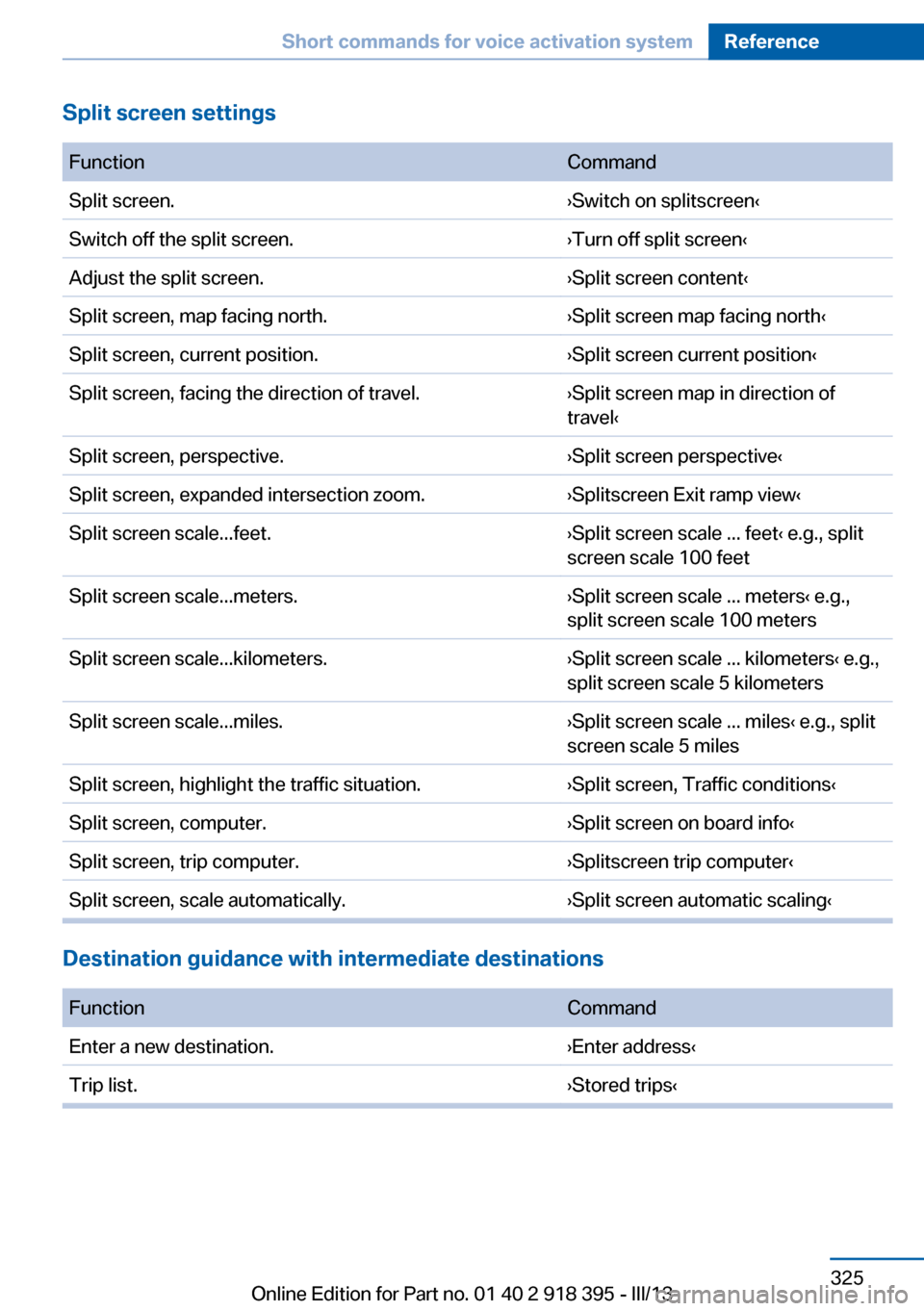
Split screen settings FunctionCommandSplit screen.›Switch on splitscreen‹Switch off the split screen.›Turn off split screen‹Adjust the split screen.›Split screen content‹Split screen, map facing north.›Split screen map facing north‹Split screen, current position.›Split screen current position‹Split screen, facing the direction of travel.›Split screen map in direction of
travel‹Split screen, perspective.›Split screen perspective‹Split screen, expanded intersection zoom.›Splitscreen Exit ramp view‹Split screen scale...feet.›Split screen scale ... feet‹ e.g., split
screen scale 100 feetSplit screen scale...meters.›Split screen scale ... meters‹ e.g.,
split screen scale 100 metersSplit screen scale...kilometers.›Split screen scale ... kilometers‹ e.g.,
split screen scale 5 kilometersSplit screen scale...miles.›Split screen scale ... miles‹ e.g., split
screen scale 5 milesSplit screen, highlight the traffic situation.›Split screen, Traffic conditions‹Split screen, computer.›Split screen on board info‹Split screen, trip computer.›Splitscreen trip computer‹Split screen, scale automatically.›Split screen automatic scaling‹
Destination guidance with intermediate destinations
FunctionCommandEnter a new destination.›Enter address‹Trip list.›Stored trips‹Seite 325Short commands for voice activation systemReference325
Online Edition for Part no. 01 40 2 918 395 - III/13
Page 335 of 345
External temperature display,changing the units of meas‐
ure, changing the units of
measure on the Control Dis‐
play 88
External temperature warn‐ ing 79
Externel temperature dis‐ play 79
Eyes for securing cargo 162
F
Fader 190
Failure messages, refer to Check Control 85
False alarm– Avoiding unintentional
alarms 43– Ending an alarm 43
Fastening safety belts, refer
to Safety belts 54
Fault messages, refer to Check Control 85
Filling capacities 321
Filter, refer to Microfilter/acti‐ vated-charcoal filter 135
Fine wood, care 314
First aid kit 308
Fitting for towing 310
Fixing system, adaptive 150
Flashing when locking/ unlocking 33
Flat Tire Monitor FTM 97
Flat Tire Monitor FTM, snow chains 287
Flat tire, run-flat tires 286
Flat tire, Tire Pressure Moni‐ tor TPM 99
Flat tire, warning lamp 98, 100
Flat tire, wheel change 302
Flooding, refer to Driving through water 157
Floor carpet, care 315
Floor mats, care 315
FM/AM station 192
Fog on windows, remov‐
ing 132
Foldable rear seat back‐ rest 146
Foot brake 157
Footwell lamps, refer to Inte‐ rior lamps 94
For your own safety 6
Four-wheel drive, refer to xDrive 107
Front airbags 95
Front fog lamps 93
Front fog lamps, bulb replace‐ ment 297, 300
Front fog lamps, indicator lamp 93
FTM Flat Tire Monitor 97
Fuel 270
Fuel– Refer to Average fuel con‐
sumption 82
Fuel, additives 270
Fuel, average consump‐ tion 82
Fuel cap 268
Fuel cap, closing 268
Fuel consumption display
– Average fuel consump‐
tion 82
Fuel consumption display,
current fuel consump‐
tion 80
Fuel-efficient driving, refer to Current fuel consump‐
tion 80
Fuel filler flap, closing 268
Fuel filler flap, opening 268
Fuel filler flap, unlocking in case of an electrical mal‐
function 268
Fuel gauge 81
Fuel, saving 164
Fuel tank capacity, refer to Filling capacities 321
Fuel tank contents, refer to Filling capacities 321
Fuel tank, refer to Filling ca‐
pacities 321
Fuse 305
G
Garage door opener, refer to Universal Garage Door
Opener 139
Gasoline 270
Gasoline gauge, refer to Fuel gauge 81
Gasoline quality 270
Gas station recommenda‐ tion 181
Gear change, automatic transmission with Step‐
tronic 77
Gear change, via shift pad‐ dles 77
General driving notes 156
Glass sunroof, closing 47
Glass sunroof, electric– Convenient operation 33– Remote control 33
Glass sunroof, initializing 48
Glass sunroof, opening 47
Glass sunroof, pinch protec‐ tion 47
Glass sunroof, power fail‐ ure 48
Glass sunroof, refer to Panor‐ amic glass sunroof 45
Glass sunroof, tilting 47
Glove compartment 147
Glove compartment, light‐ ing 147
GPS navigation, refer to Navi‐ gation system 168
Gross vehicle weight, refer to Weights 320
H
Handbrake, refer to Parking brake 69
Seite 335Everything from A to ZReference335
Online Edition for Part no. 01 40 2 918 395 - III/13