navigation BMW X6 M 2012 Repair Manual
[x] Cancel search | Manufacturer: BMW, Model Year: 2012, Model line: X6 M, Model: BMW X6 M 2012Pages: 317, PDF Size: 8.83 MB
Page 119 of 317
Climate
At a glance
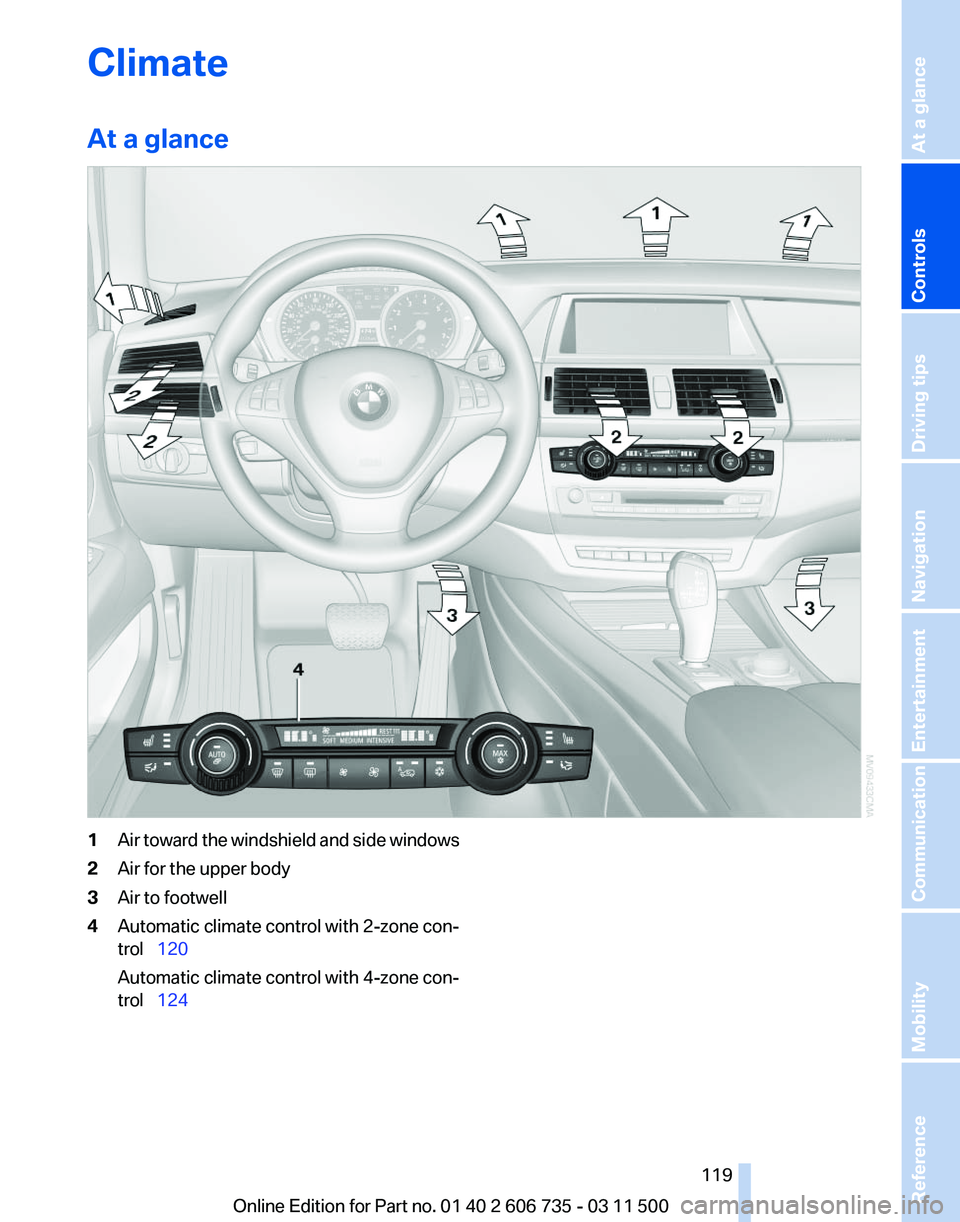
1
Air toward the windshield and side windows
2 Air for the upper body
3 Air to footwell
4 Automatic climate control with 2-zone con‐
trol 120
Automatic climate control with 4-zone con‐
trol 124
Seite 119
119Online Edition for Part no. 01 40 2 606 735 - 03 11 500
Reference Mobility Communication Entertainment Navigation Driving tips
Controls At a glance
Page 121 of 317
To switch off the program: press the button
again or manually adjust the air distribution.
Intensity of the AUTO program
Pressing the AUTO button repeatedly adjusts
the intensity of the AUTO program. The se‐
lected
intensity, SOFT, MEDIUM or INTENSIVE,
appears on the display of the automatic climate
control.
Temperature
Turn the wheel to set the desired
temperature.
The automatic climate control ach‐
ieves this temperature as quickly as
possible, if necessary with the max‐
imum cooling or heating capacity, and then
keeps it constant.
Avoid rapidly switching between different tem‐
perature settings. The automatic climate control
will not have sufficient time to adjust the set
temperature.
Maximum heating power can be obtained with
the highest setting, regardless of the external
temperature.
At the lowest setting, cooling is continuous, re‐
gardless of the external temperature.
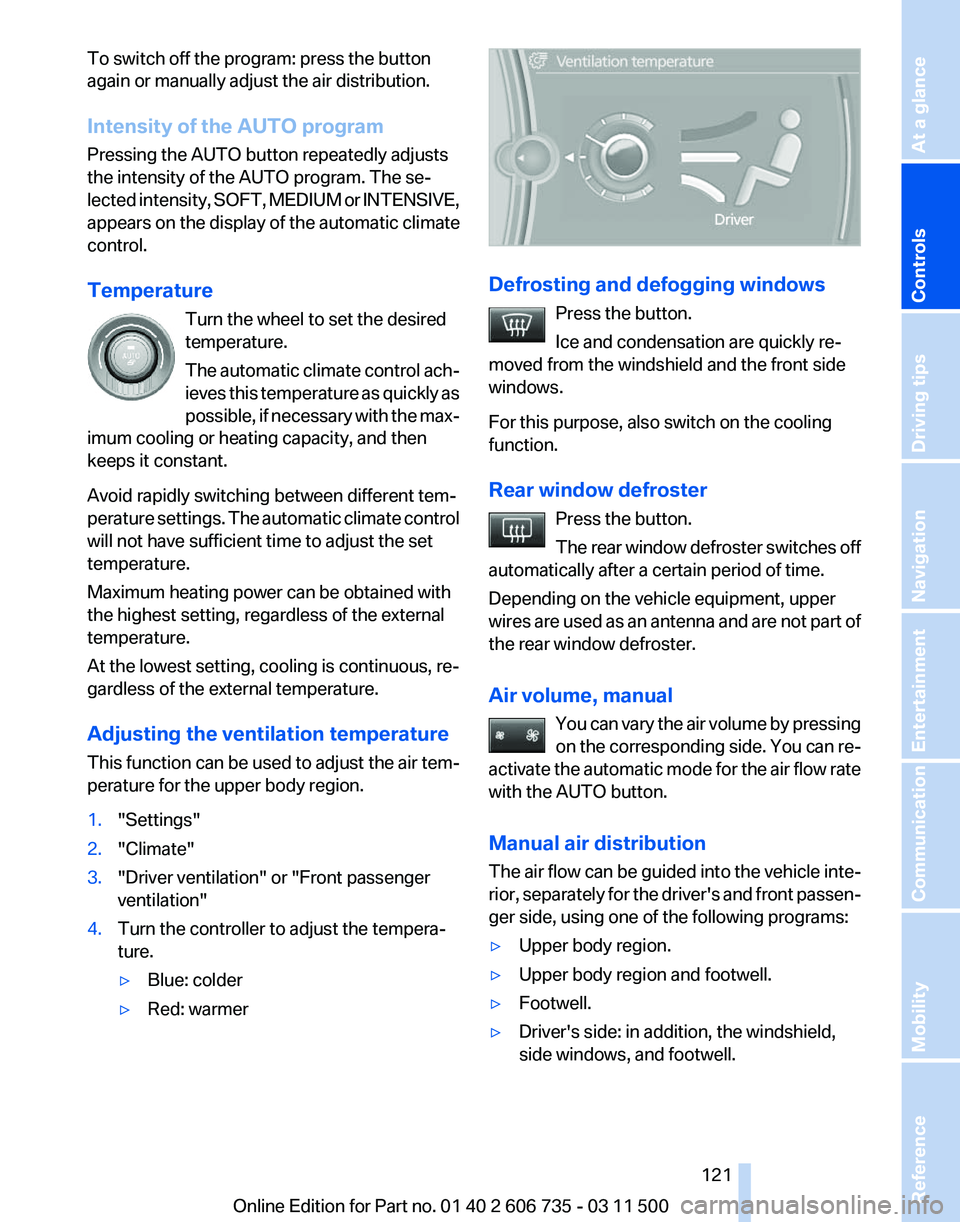
Adjusting the ventilation temperature
This function can be used to adjust the air tem‐
perature for the upper body region.
1. "Settings"
2. "Climate"
3. "Driver ventilation" or "Front passenger
ventilation"
4. Turn the controller to adjust the tempera‐
ture.
▷Blue: colder
▷ Red: warmer Defrosting and defogging windows
Press the button.
Ice and condensation are quickly re‐
moved from the windshield and the front side
windows.
For this purpose, also switch on the cooling
function.
Rear window defroster
Press the button.
The
rear window defroster switches off
automatically after a certain period of time.
Depending on the vehicle equipment, upper
wires are used as an antenna and are not part of
the rear window defroster.
Air volume, manual
You can vary the air volume by pressing
on the corresponding side. You can re‐
activate the automatic mode for the air flow rate
with the AUTO button.
Manual air distribution
The air flow can be guided into the vehicle inte‐
rior, separately for the driver's and front passen‐
ger side, using one of the following programs:
▷ Upper body region.
▷ Upper body region and footwell.
▷ Footwell.
▷ Driver's side: in addition, the windshield,
side windows, and footwell. Seite 121
121Online Edition for Part no. 01 40 2 606 735 - 03 11 500
Reference Mobility Communication Entertainment Navigation Driving tips
Controls At a glance
Page 123 of 317
Switching on
1.
Switch off the ignition.
2. Press the right-hand button. REST appears on the display of the automatic
climate
control when the residual heat utilization
is switched on.
From radio readiness the interior temperature,
the air volume and the air distribution can be set.
Switching off
You can select the lowest blower speed by
pressing and holding the left side. Pressing
again switches off the residual heat utilization.
REST disappears from the display of the auto‐
matic climate control.
Switching on/off the automatic climate
control
Switching off
With the blower at its lowest setting,
press the left side of the button to
switch off the automatic climate control.
Switching on
Press any button to switch the automatic cli‐
mate control back on.
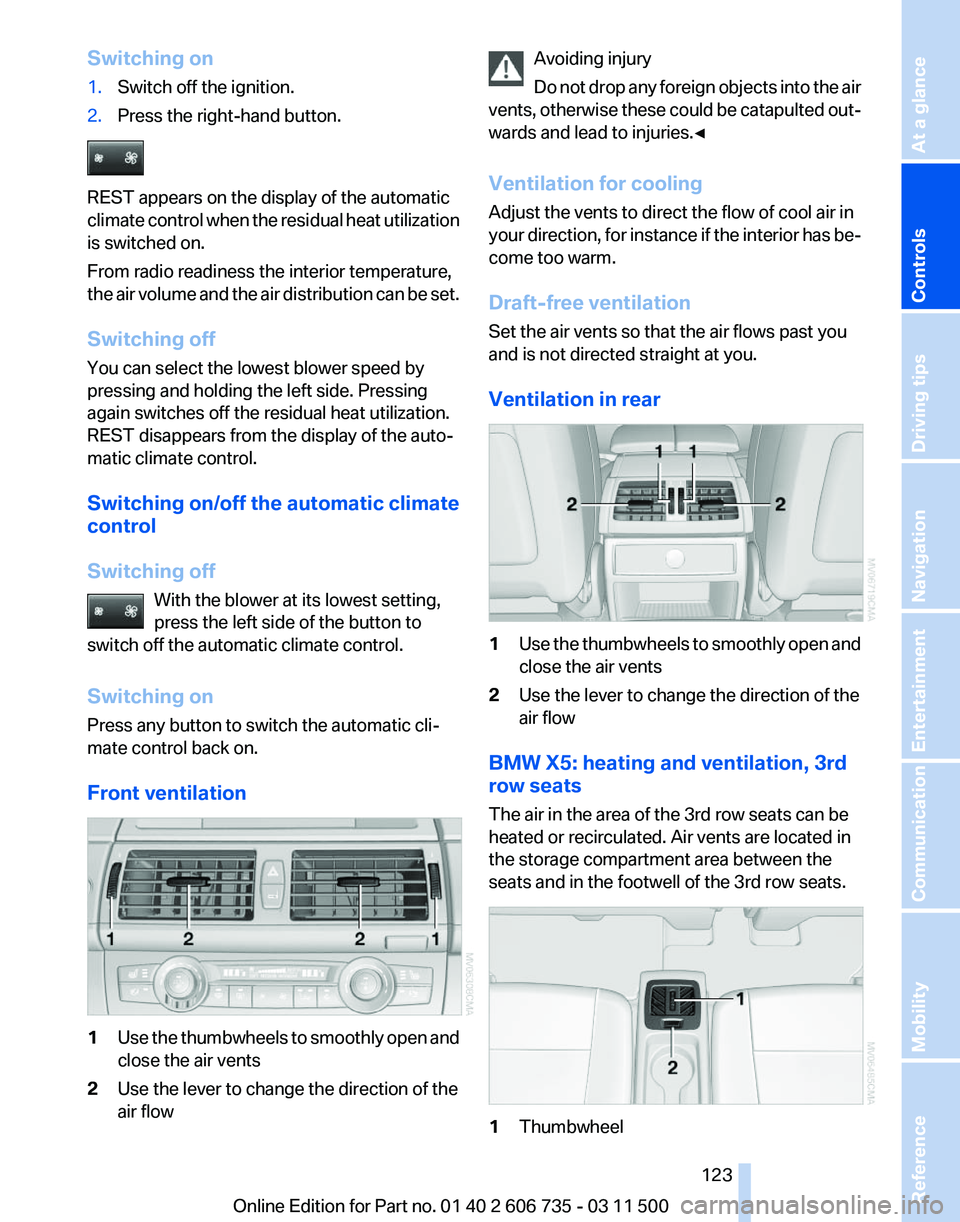
Front ventilation 1
Use the thumbwheels to smoothly open and
close the air vents
2 Use the lever to change the direction of the
air flow Avoiding injury
Do
not drop any foreign objects into the air
vents, otherwise these could be catapulted out‐
wards and lead to injuries.◀
Ventilation for cooling
Adjust the vents to direct the flow of cool air in
your direction, for instance if the interior has be‐
come too warm.
Draft-free ventilation
Set the air vents so that the air flows past you
and is not directed straight at you.
Ventilation in rear 1
Use the thumbwheels to smoothly open and
close the air vents
2 Use the lever to change the direction of the
air flow
BMW X5: heating and ventilation, 3rd
row seats
The air in the area of the 3rd row seats can be
heated or recirculated. Air vents are located in
the storage compartment area between the
seats and in the footwell of the 3rd row seats. 1
Thumbwheel Seite 123
123Online Edition for Part no. 01 40 2 606 735 - 03 11 500
Reference Mobility Communication Entertainment Navigation Driving tips
Controls At a glance
Page 125 of 317
AUTO program
The AUTO program automatically
sets the air distribution toward the
upper body and in the footwell, as
well as the air flow rate. It also
adapts your instructions for the
temperature to outside influences throughout
the year.
Temperature
Set the desired temperature indi‐
vidually on the left and right side.
The automatic climate control achieves this
temperature
as quickly as possible regardless of
the season, using maximum cooling or heating
power if necessary, and then maintains it.
When switching between different temperature
settings in rapid succession, the automatic cli‐
mate control does not have sufficient time to
adjust the set temperature.
Air volume, manual
The air flow rate can be varied by press‐
ing on the corresponding side. The au‐
tomatic mode for the air flow rate can be
switched on again using the AUTO button.
Switching off rear automatic climate
control
With the blower at its lowest setting,
press the left side of the button to
switch off the automatic climate control.
The automatic climate control can also be
switched off with iDrive. To switch on the auto‐
matic climate control again, the system must
first be reactivated, refer to Activating/deacti‐
vating.
The system is switched on again by pressing
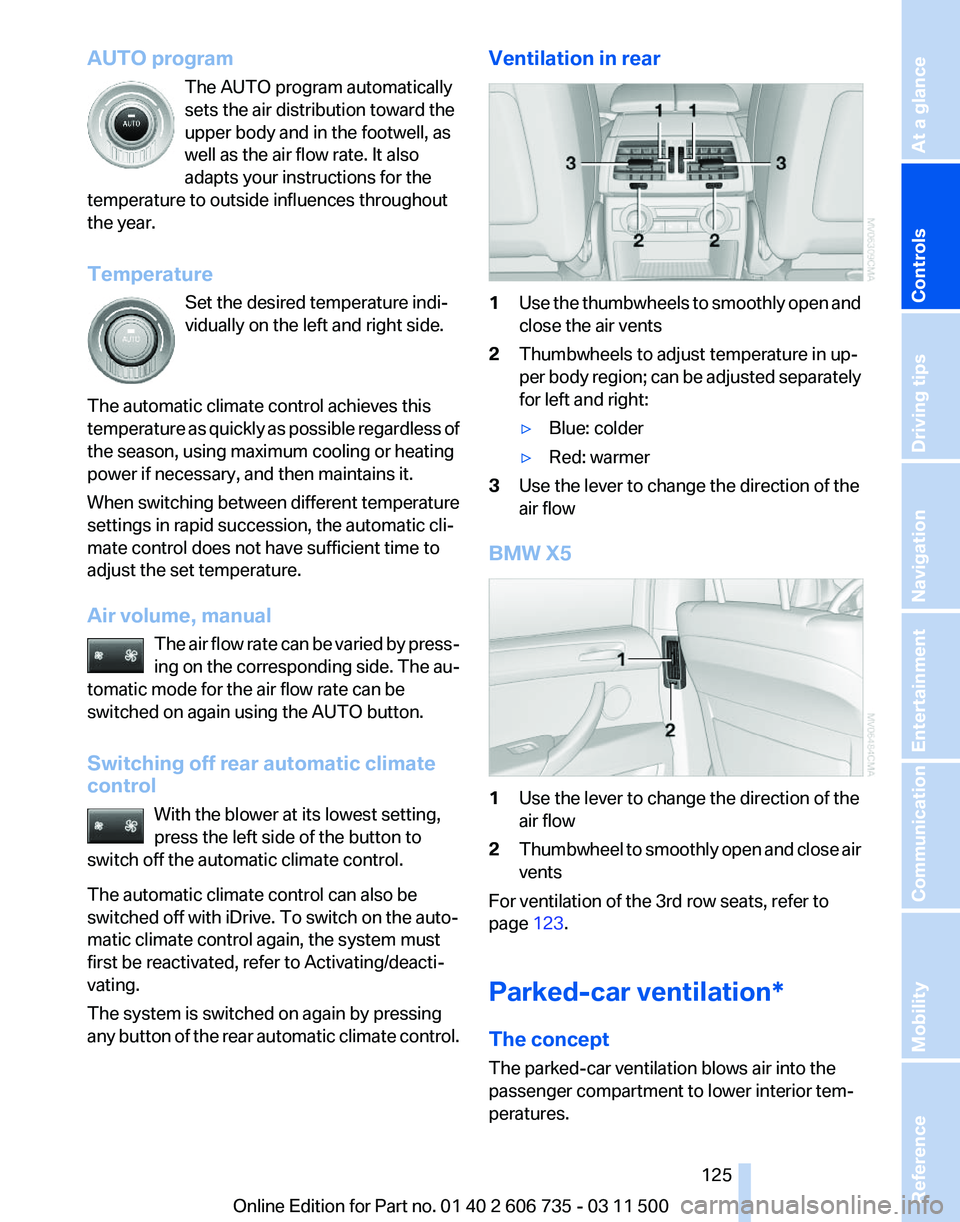
any button of the rear automatic climate control. Ventilation in rear
1
Use the thumbwheels to smoothly open and
close the air vents
2 Thumbwheels to adjust temperature in up‐
per
body region; can be adjusted separately
for left and right:
▷ Blue: colder
▷ Red: warmer
3 Use the lever to change the direction of the
air flow
BMW X5 1
Use the lever to change the direction of the
air flow
2 Thumbwheel to smoothly open and close air
vents
For ventilation of the 3rd row seats, refer to
page 123.
Parked-car ventilation*
The concept
The parked-car ventilation blows air into the
passenger compartment to lower interior tem‐
peratures.
Seite 125
125Online Edition for Part no. 01 40 2 606 735 - 03 11 500
Reference Mobility Communication Entertainment Navigation Driving tips
Controls At a glance
Page 127 of 317
Interior equipment
Integrated universal remote
control*
The concept
This system can replace up to three different
hand-held transmitters for various types of re‐
mote-controlled equipment, such as garage
doors or lighting systems.
The hand-held transmitter signal can be pro‐
grammed on one of the three memory buttons.
The
corresponding device can then be operated
using the programmed memory button.
The LED indicates that a signal is being trans‐
mitted.
When selling the vehicle, delete the stored pro‐
grams for security reasons.
During programming
During programming and before activat‐
ing a device using the integrated universal re‐
mote control, ensure that there are no people,
animals or objects in the range of movement of
the remote-controlled device; otherwise, there
is a risk of injury or damage.
Also follow the safety instructions of the hand-
held transmitter.◀
Compatibility
If this symbol is printed on the packaging
or in the instructions of the hand-held
transmitter, the remote-controlled de‐
vice is generally compatible with the universal
remote control.
If you have any questions, please contact:
▷ Your service center.
▷ www.homelink.com on the Internet. Programming
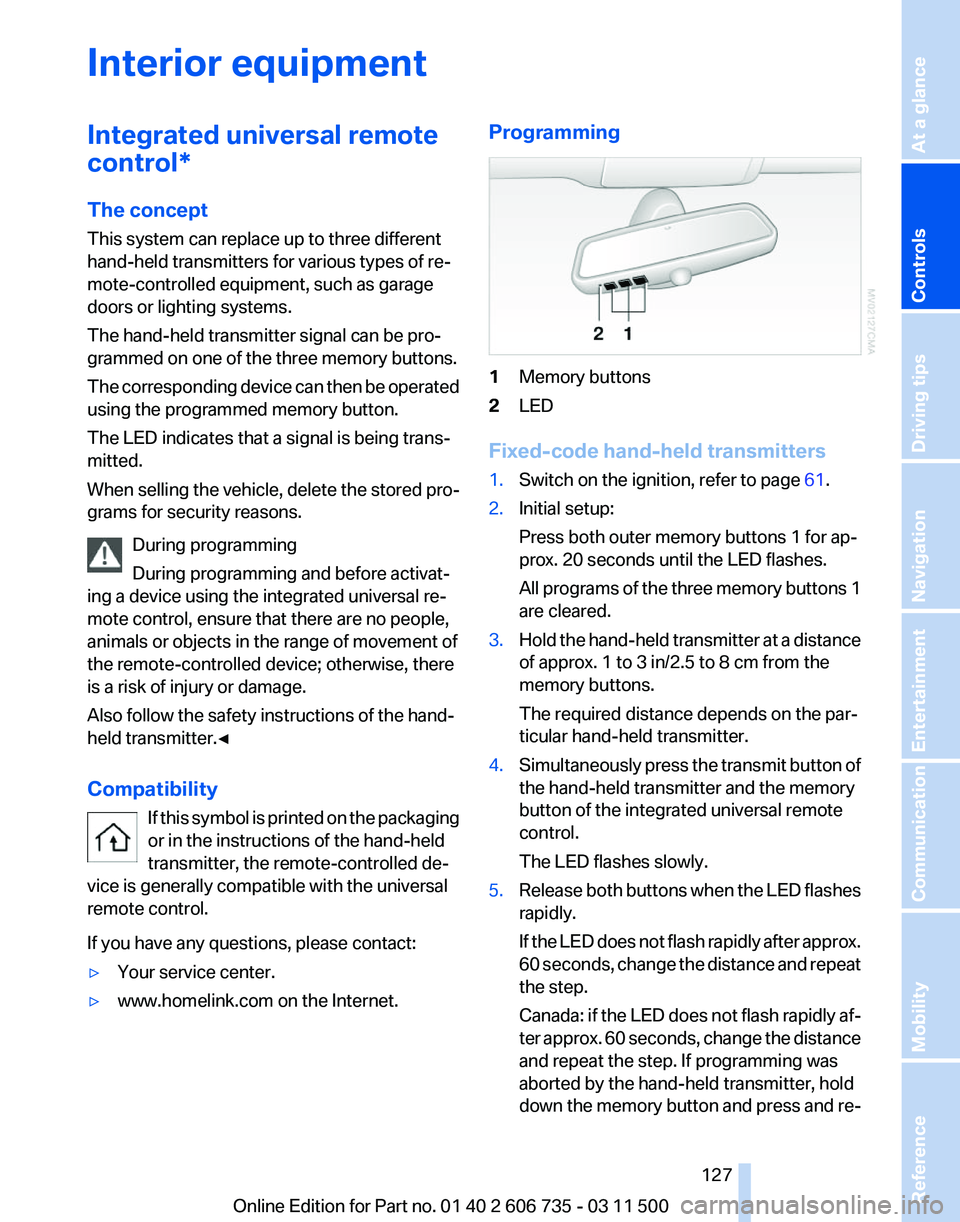
1
Memory buttons
2 LED
Fixed-code hand-held transmitters
1. Switch on the ignition, refer to page 61.
2. Initial setup:
Press both outer memory buttons 1 for ap‐
prox. 20 seconds until the LED flashes.
All
programs of the three memory buttons 1
are cleared.
3. Hold the hand-held transmitter at a distance
of approx. 1 to 3 in/2.5 to 8 cm from the
memory buttons.
The required distance depends on the par‐
ticular hand-held transmitter.
4. Simultaneously press the transmit button of
the hand-held transmitter and the memory
button of the integrated universal remote
control.
The LED flashes slowly.
5. Release both buttons when the LED flashes
rapidly.
If
the LED does not flash rapidly after approx.
60 seconds, change the distance and repeat
the step.
Canada: if the LED does not flash rapidly af‐
ter approx. 60 seconds, change the distance
and repeat the step. If programming was
aborted by the hand-held transmitter, hold
down the memory button and press and re‐
Seite 127
127Online Edition for Part no. 01 40 2 606 735 - 03 11 500
Reference Mobility Communication Entertainment Navigation Driving tips
Controls At a glance
Page 129 of 317
Digital compass*
1
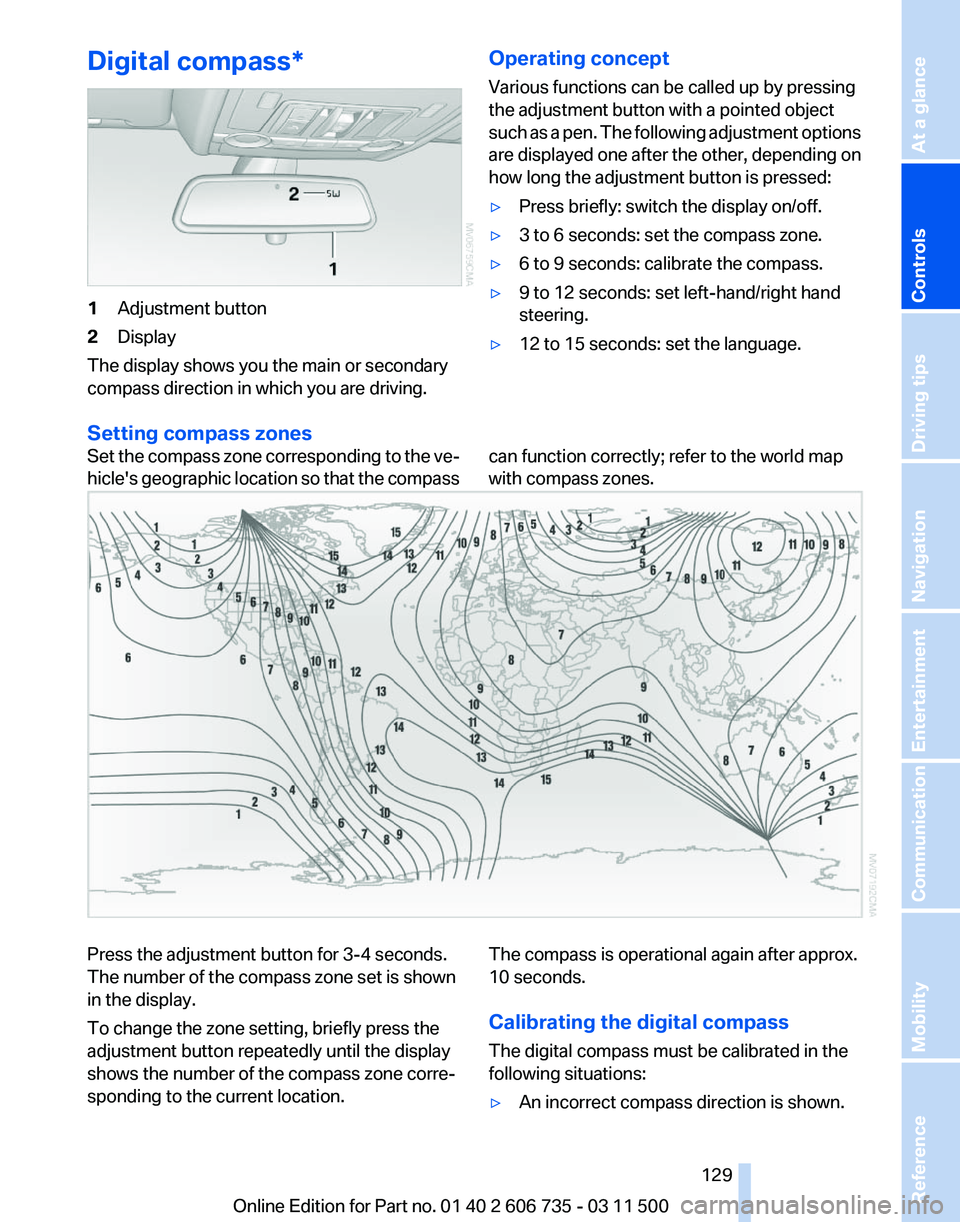
Adjustment button
2 Display
The display shows you the main or secondary
compass direction in which you are driving. Operating concept
Various functions can be called up by pressing
the adjustment button with a pointed object
such
as a pen. The following adjustment options
are displayed one after the other, depending on
how long the adjustment button is pressed:
▷ Press briefly: switch the display on/off.
▷ 3 to 6 seconds: set the compass zone.
▷ 6 to 9 seconds: calibrate the compass.
▷ 9 to 12 seconds: set left-hand/right hand
steering.
▷ 12 to 15 seconds: set the language.
Setting compass zones
Set the compass zone corresponding to the ve‐
hicle's
geographic location so that the compass can function correctly; refer to the world map
with compass zones.Press the adjustment button for 3‑4 seconds.
The number of the compass zone set is shown
in the display.
To change the zone setting, briefly press the
adjustment button repeatedly until the display
shows the number of the compass zone corre‐
sponding to the current location.
The compass is operational again after approx.
10 seconds.
Calibrating the digital compass
The digital compass must be calibrated in the
following situations:
▷
An incorrect compass direction is shown.
Seite 129
129Online Edition for Part no. 01 40 2 606 735 - 03 11 500
Reference Mobility Communication Entertainment Navigation Driving tips
Controls At a glance
Page 131 of 317
Connecting electrical devices
Sockets
The lighter socket can be used as a socket for
electrical
equipment while the engine is running
or when the ignition is switched on. The total
load of all sockets must not exceed 140 watt at
12 volt.
Avoid damaging the sockets by attempting to
insert plugs of unsuitable shape or size.
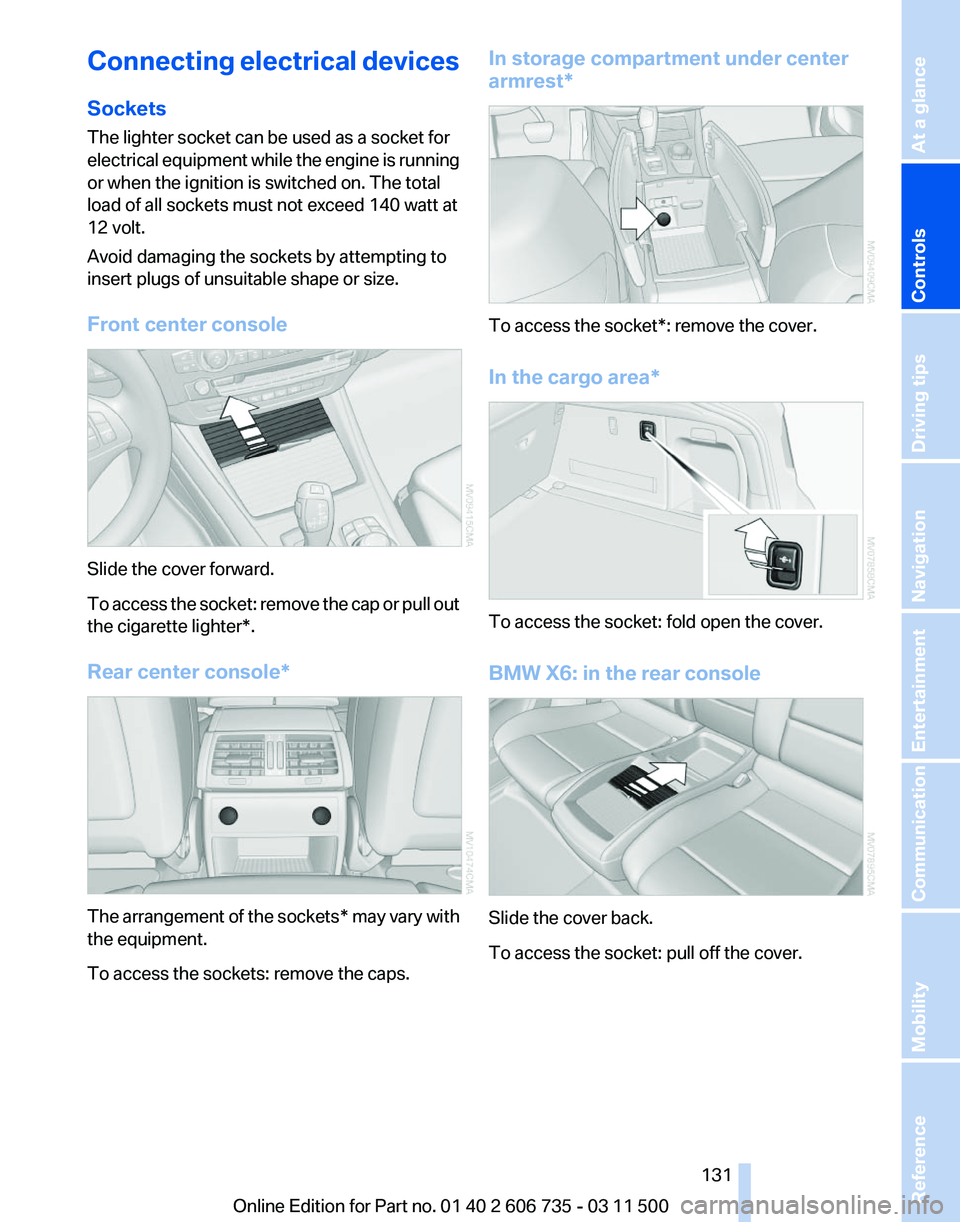
Front center console Slide the cover forward.
To
access the socket: remove the cap or pull out
the cigarette lighter*.
Rear center console* The arrangement of the sockets*
may vary with
the equipment.
To access the sockets: remove the caps. In storage compartment under center
armrest*
To access the socket*: remove the cover.
In the cargo area*
To access the socket: fold open the cover.
BMW X6: in the rear console
Slide the cover back.
To access the socket: pull off the cover.
Seite 131
131Online Edition for Part no. 01 40 2 606 735 - 03 11 500
Reference Mobility Communication Entertainment Navigation Driving tips
Controls At a glance
Page 133 of 317
Removing
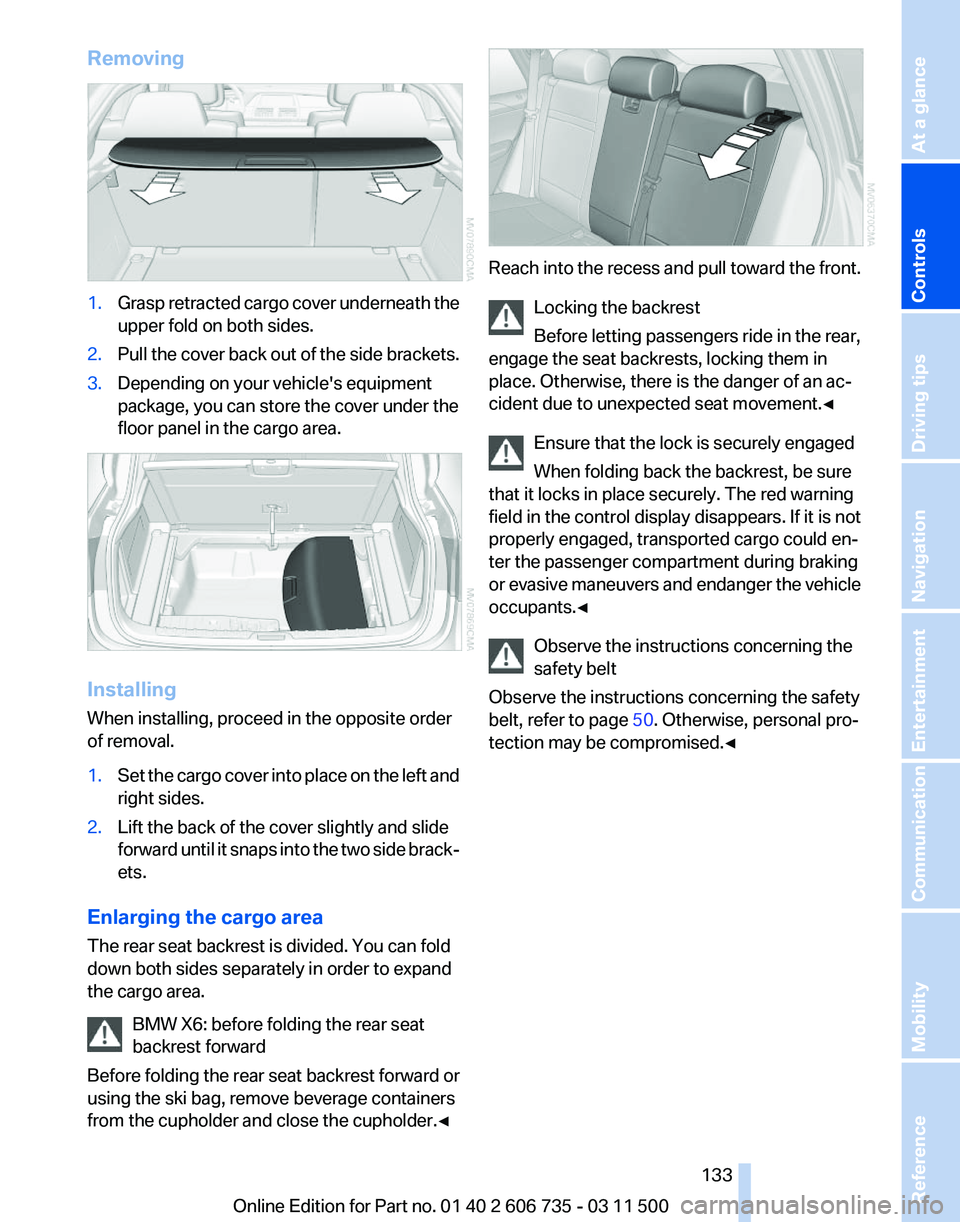
1.
Grasp retracted cargo cover underneath the
upper fold on both sides.
2. Pull the cover back out of the side brackets.
3. Depending on your vehicle's equipment
package, you can store the cover under the
floor panel in the cargo area. Installing
When installing, proceed in the opposite order
of removal.
1.
Set the cargo cover into place on the left and
right sides.
2. Lift the back of the cover slightly and slide
forward
until it snaps into the two side brack‐
ets.
Enlarging the cargo area
The rear seat backrest is divided. You can fold
down both sides separately in order to expand
the cargo area. BMW X6: before folding the rear seat
backrest forward
Before
folding the rear seat backrest forward or
using the ski bag, remove beverage containers
from the cupholder and close the cupholder.◀ Reach into the recess and pull toward the front.
Locking the backrest
Before letting passengers ride in the rear,
engage the seat backrests, locking them in
place. Otherwise, there is the danger of an ac‐
cident due to unexpected seat movement.
◀
Ensure that the lock is securely engaged
When folding back the backrest, be sure
that it locks in place securely. The red warning
field in the control display disappears. If it is not
properly engaged, transported cargo could en‐
ter the passenger compartment during braking
or evasive maneuvers and endanger the vehicle
occupants.◀
Observe the instructions concerning the
safety belt
Observe the instructions concerning the safety
belt, refer to page 50. Otherwise, personal pro‐
tection may be compromised.◀ Seite 133
133Online Edition for Part no. 01 40 2 606 735 - 03 11 500
Reference Mobility Communication Entertainment Navigation Driving tips
Controls At a glance
Page 135 of 317
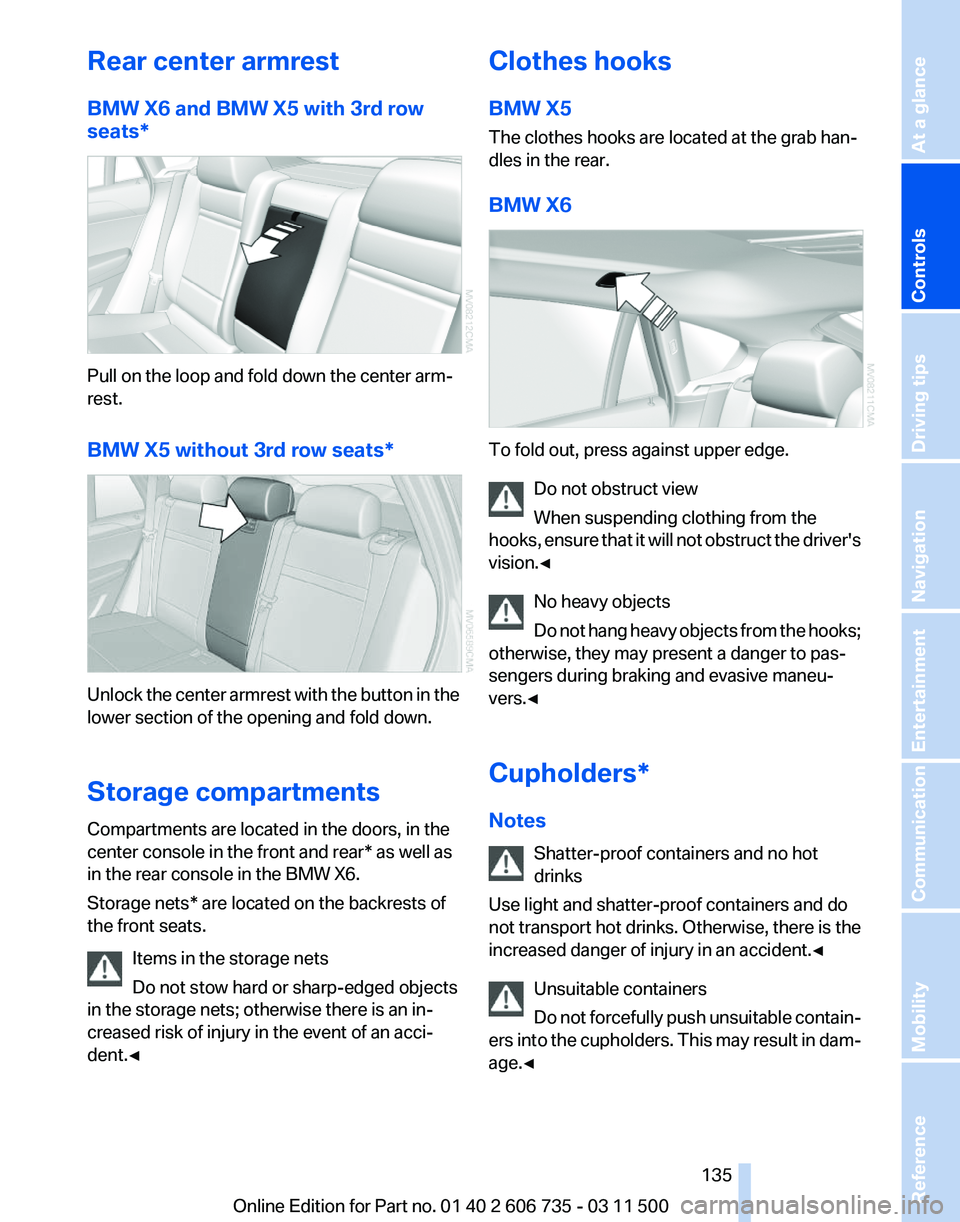
Rear center armrest
BMW X6 and BMW X5 with 3rd row
seats*
Pull on the loop and fold down the center arm‐
rest.
BMW X5 without 3rd row seats*
Unlock the center armrest with the button in the
lower section of the opening and fold down.
Storage compartments
Compartments are located in the doors, in the
center console in the front and rear* as well as
in the rear console in the BMW X6.
Storage nets* are located on the backrests of
the front seats.
Items in the storage nets
Do not stow hard or sharp-edged objects
in the storage nets; otherwise there is an in‐
creased risk of injury in the event of an acci‐
dent.◀ Clothes hooks
BMW X5
The clothes hooks are located at the grab han‐
dles in the rear.
BMW X6
To fold out, press against upper edge.
Do not obstruct view
When suspending clothing from the
hooks,
ensure that it will not obstruct the driver's
vision.◀
No heavy objects
Do not hang heavy objects from the hooks;
otherwise, they may present a danger to pas‐
sengers during braking and evasive maneu‐
vers.◀
Cupholders*
Notes
Shatter-proof containers and no hot
drinks
Use light and shatter-proof containers and do
not transport hot drinks. Otherwise, there is the
increased danger of injury in an accident.◀
Unsuitable containers
Do not forcefully push unsuitable contain‐
ers into the cupholders. This may result in dam‐
age.◀ Seite 135
135Online Edition for Part no. 01 40 2 606 735 - 03 11 500
Reference Mobility Communication Entertainment Navigation Driving tips
Controls At a glance
Page 137 of 317
▷
Retaining straps* on the left and right side
trim for fastening small objects.
▷ Lashing rail with lashing eyes*. You can se‐
cure
heavy-duty cargo straps on the lashing
eyes. They can be removed at the notches
in the rails. To move the lashing eyes, press
the button.
Read and comply with the information enclosed
with the heavy-duty cargo straps.
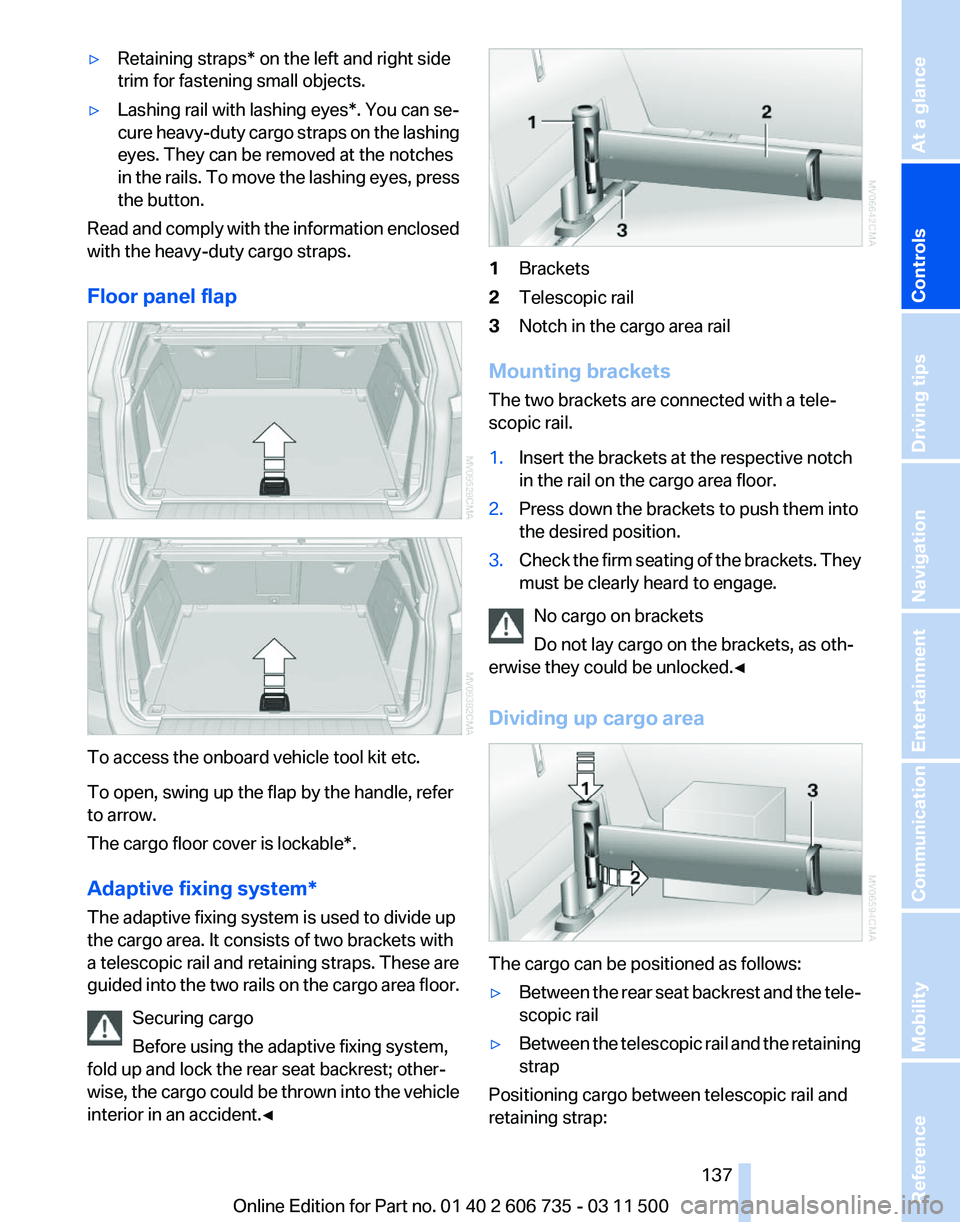
Floor panel flap To access the onboard vehicle tool kit etc.
To open, swing up the flap by the handle, refer
to arrow.
The cargo floor cover is lockable*.
Adaptive fixing system
*
The adaptive fixing system is used to divide up
the cargo area. It consists of two brackets with
a telescopic rail and retaining straps. These are
guided into the two rails on the cargo area floor.
Securing cargo
Before using the adaptive fixing system,
fold up and lock the rear seat backrest; other‐
wise, the cargo could be thrown into the vehicle
interior in an accident.◀ 1
Brackets
2 Telescopic rail
3 Notch in the cargo area rail
Mounting brackets
The two brackets are connected with a tele‐
scopic rail.
1. Insert the brackets at the respective notch
in the rail on the cargo area floor.
2. Press down the brackets to push them into
the desired position.
3. Check the firm seating of the brackets. They
must be clearly heard to engage.
No cargo on brackets
Do not lay cargo on the brackets, as oth‐
erwise they could be unlocked.◀
Dividing up cargo area The cargo can be positioned as follows:
▷
Between the rear seat backrest and the tele‐
scopic rail
▷ Between the telescopic rail and the retaining
strap
Positioning cargo between telescopic rail and
retaining strap: Seite 137
137Online Edition for Part no. 01 40 2 606 735 - 03 11 500
Reference Mobility Communication Entertainment Navigation Driving tips
Controls At a glance