Rear BMW X6 XDRIVE 2009 E71 Owner's Guide
[x] Cancel search | Manufacturer: BMW, Model Year: 2009, Model line: X6 XDRIVE, Model: BMW X6 XDRIVE 2009 E71Pages: 317, PDF Size: 9.57 MB
Page 93 of 317
Controls
91Reference
At a glance
Driving tips
Communications
Navigation
Entertainment
Mobility
Technology for comfort, convenience and
safety
PDC Park Distance Control*
The concept
The PDC assists you when you are parking.
Acoustic signals and an optical displays
alert
you to the approach of an object in front of
* or
behind your vehicle. To measure the distance,
there are four ultrasonic sensors in each
bumper. The range of these sensors is approx.
7 ft/2 m. But an acoustic warning only sounds at
approx. 24 in/60 cm for the sensors at the
front
* and at the two rear corners and at approx.
5 ft/1,50 m for the middle sensors at the rear.
PDC is a parking aid that can indicate
objects when they are approached
slowly, as is usually th e case when parking.
Avoid approaching an obje ct a t h i g h s p e e d , o t h -
erwise the physical circumstances would mean
that the system warning was too late. <
Automatic activation
Whenever the engine is running or the ignition
i s o n , e a c h t i m e y o u m o v e the selector lever into
position R, the PDC syst em is activated after
approx. 1 second.
Wait this short period before driving off.
Manual activation
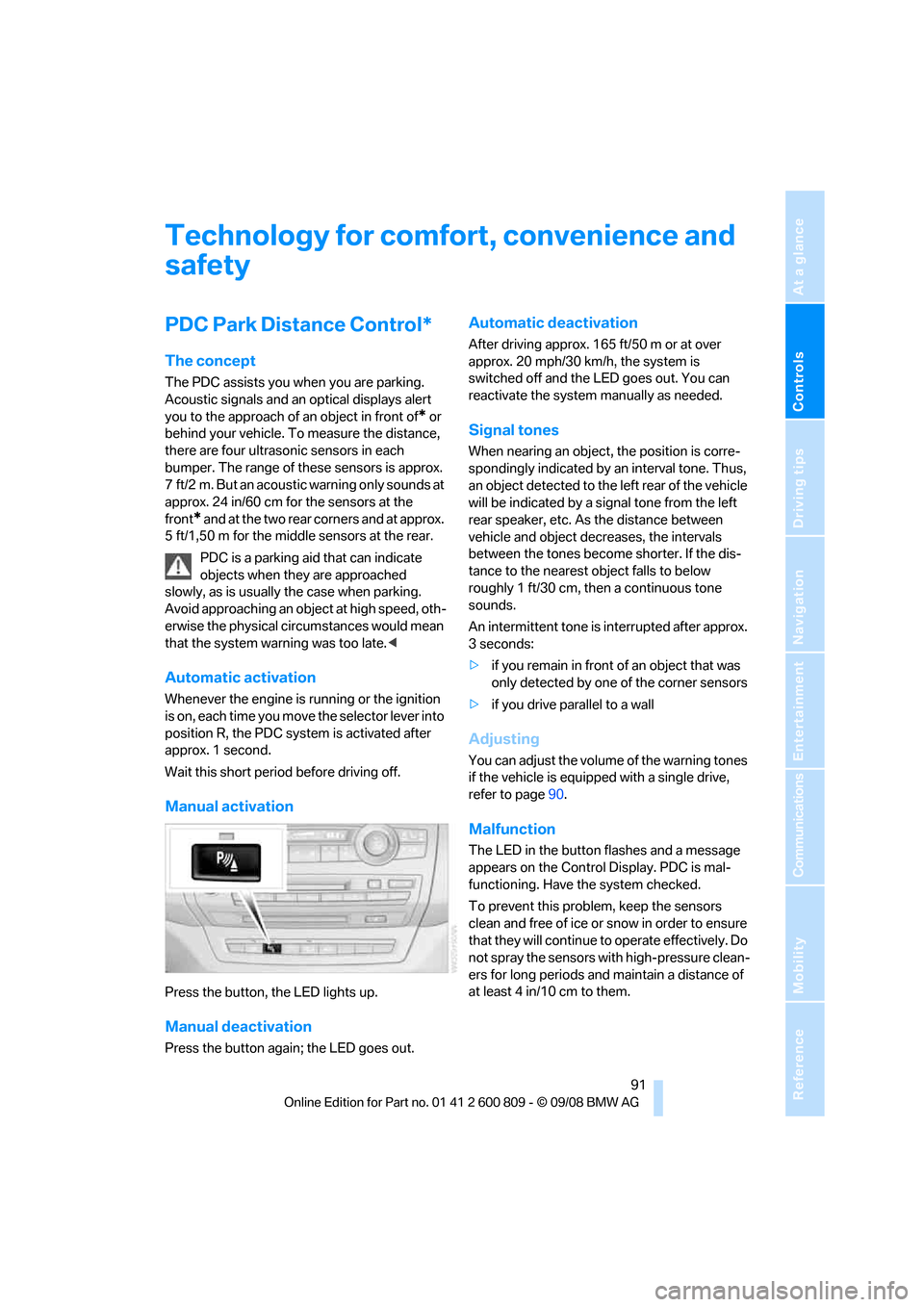
Press the button, the LED lights up.
Manual deactivation
Press the button again; the LED goes out.
Automatic deactivation
After driving approx. 165 ft/50 m or at over
approx. 20 mph/30 km/h, the system is
switched off and the LED goes out. You can
reactivate the system manually as needed.
Signal tones
When nearing an object, the position is corre-
spondingly indicated by an interval tone. Thus,
an object detected to the left rear of the vehicle
will be indicated by a sign al tone from the left
rear speaker, etc. As the distance between
vehicle and object decreases, the intervals
between the tones become shorter. If the dis-
tance to the nearest ob ject falls to below
roughly 1 ft/30 cm, then a continuous tone
sounds.
An intermittent tone is interrupted after approx.
3seconds:
> if you remain in front of an object that was
only detected by one of the corner sensors
> if you drive parallel to a wall
Adjusting
You can adjust the volume of the warning tones
if the vehicle is equipped with a single drive,
refer to page 90.
Malfunction
The LED in the button flashes and a message
appears on the Control Display. PDC is mal-
functioning. Have the system checked.
To prevent this problem, keep the sensors
clean and free of ice or snow in order to ensure
that they will continue to operate effectively. Do
not spray the sensors with high-pressure clean-
ers for long periods and maintain a distance of
at least 4 in/10 cm to them.
Page 94 of 317
Technology for comfort, convenience and safety
92
PDC with visual warning
You can also have the system show distances
to objects on the Control Display. Objects that
are farther away are already shown there before
a signal tone sounds.
The setting is stored for the remote control cur-
rently in use.
If the vehicle is equipped with a rear view cam-
era, refer to Displays on page 95.
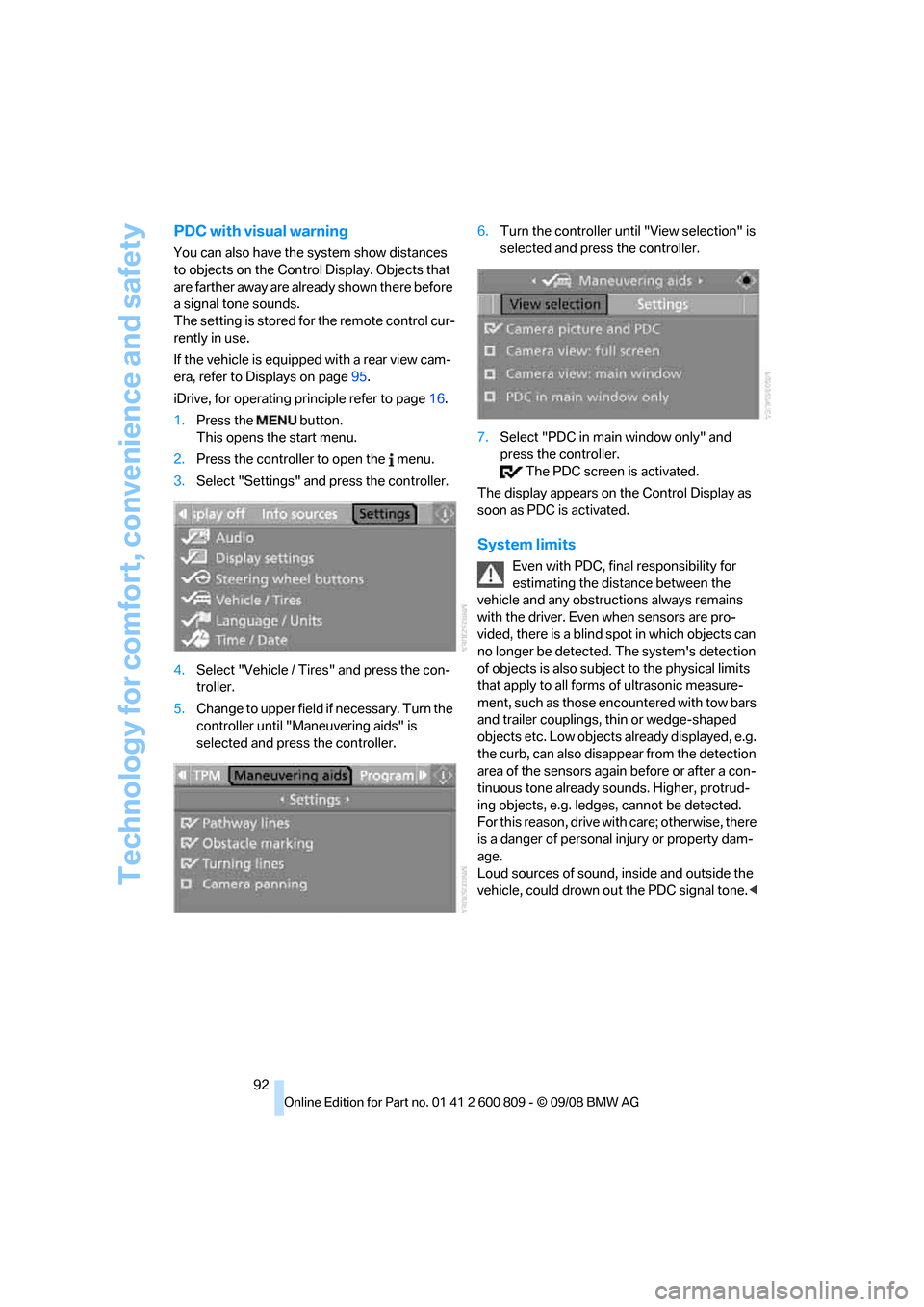
iDrive, for operating pr inciple refer to page16.
1. Press the button.
This opens the start menu.
2. Press the controller to open the menu.
3. Select "Settings" and press the controller.
4. Select "Vehicle / Tire s" and press the con-
troller.
5. Change to upper field if necessary. Turn the
controller until "Maneuvering aids" is
selected and press the controller. 6.
Turn the controller until "View selection" is
selected and press the controller.
7. Select "PDC in main window only" and
press the controller.
The PDC screen is activated.
The display appears on the Control Display as
soon as PDC is activated.
System limits
Even with PDC, final responsibility for
estimating the distance between the
vehicle and any obstructions always remains
with the driver. Even when sensors are pro-
vided, there is a blind sp ot in which objects can
no longer be detected. The system's detection
of objects is also subjec t to the physical limits
that apply to all forms of ultrasonic measure-
ment, such as those encountered with tow bars
and trailer couplings, th in or wedge-shaped
objects etc. Low objects already displayed, e.g.
the curb, can also disappear from the detection
area of the sensors again before or after a con-
tinuous tone already sounds. Higher, protrud-
ing objects, e.g. ledg es, cannot be detected.
For this reason, drive with care; otherwise, there
is a danger of personal injury or property dam-
age.
Loud sources of sound, inside and outside the
vehicle, could drown ou t the PDC signal tone.<
Page 95 of 317
Controls
93Reference
At a glance
Driving tips
Communications
Navigation
Entertainment
Mobility
Rear view camera*
The concept
The rear view camera in the liftgate displays the
area behind your vehicle on the Control Display.
Also check the traffic situation around the
vehicle during parking and maneuvering
with direct vision, as otherwise danger of an
accident could result, for example, from road
users or objects locate d outside the picture
area of the rear view camera. <
Switching on
Automatically
With the engine running, shift into reverse.
If the image of the PDC Park Distance
Control appears on the Control Display,
you can switch the image to the rear view cam-
era, refer to Displays on page 95.<
Manually
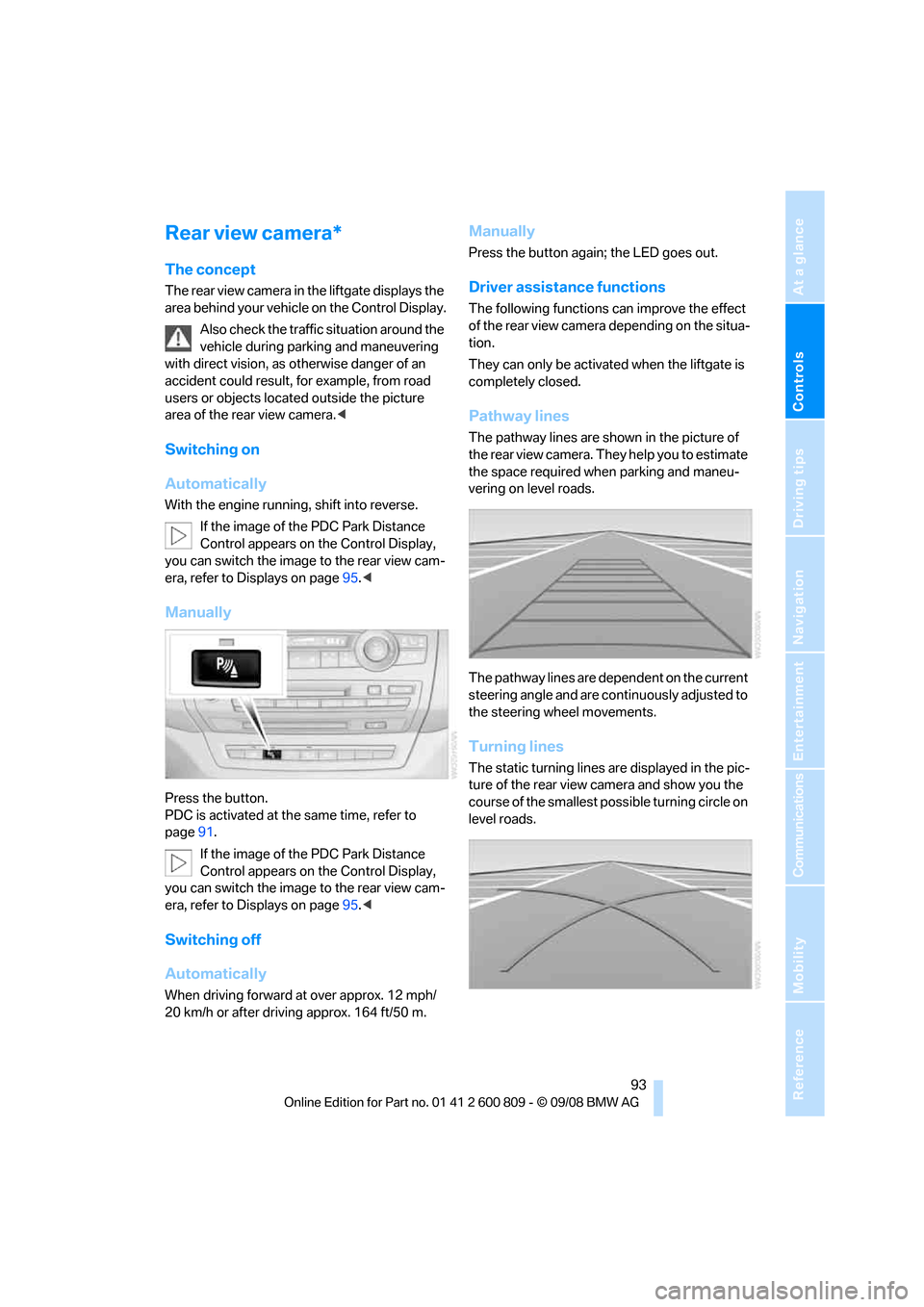
Press the button.
PDC is activated at th e same time, refer to
page 91.
If the image of the PDC Park Distance
Control appears on the Control Display,
you can switch the image to the rear view cam-
era, refer to Displays on page 95.<
Switching off
Automatically
When driving forward at over approx. 12 mph/
20 km/h or after driving approx. 164 ft/50 m.
Manually
Press the button again; the LED goes out.
Driver assistan ce functions
The following functions can improve the effect
of the rear view camera depending on the situa-
tion.
They can only be activated when the liftgate is
completely closed.
Pathway lines
The pathway lines are shown in the picture of
the rear view camera. They help you to estimate
the space required when parking and maneu-
vering on level roads.
The pathway lines are dependent on the current
steering angle and are continuously adjusted to
the steering wheel movements.
Turning lines
The static turning lines are displayed in the pic-
ture of the rear view camera and show you the
course of the smallest possible turning circle on
level roads.
Page 96 of 317
Technology for comfort, convenience and safety
94
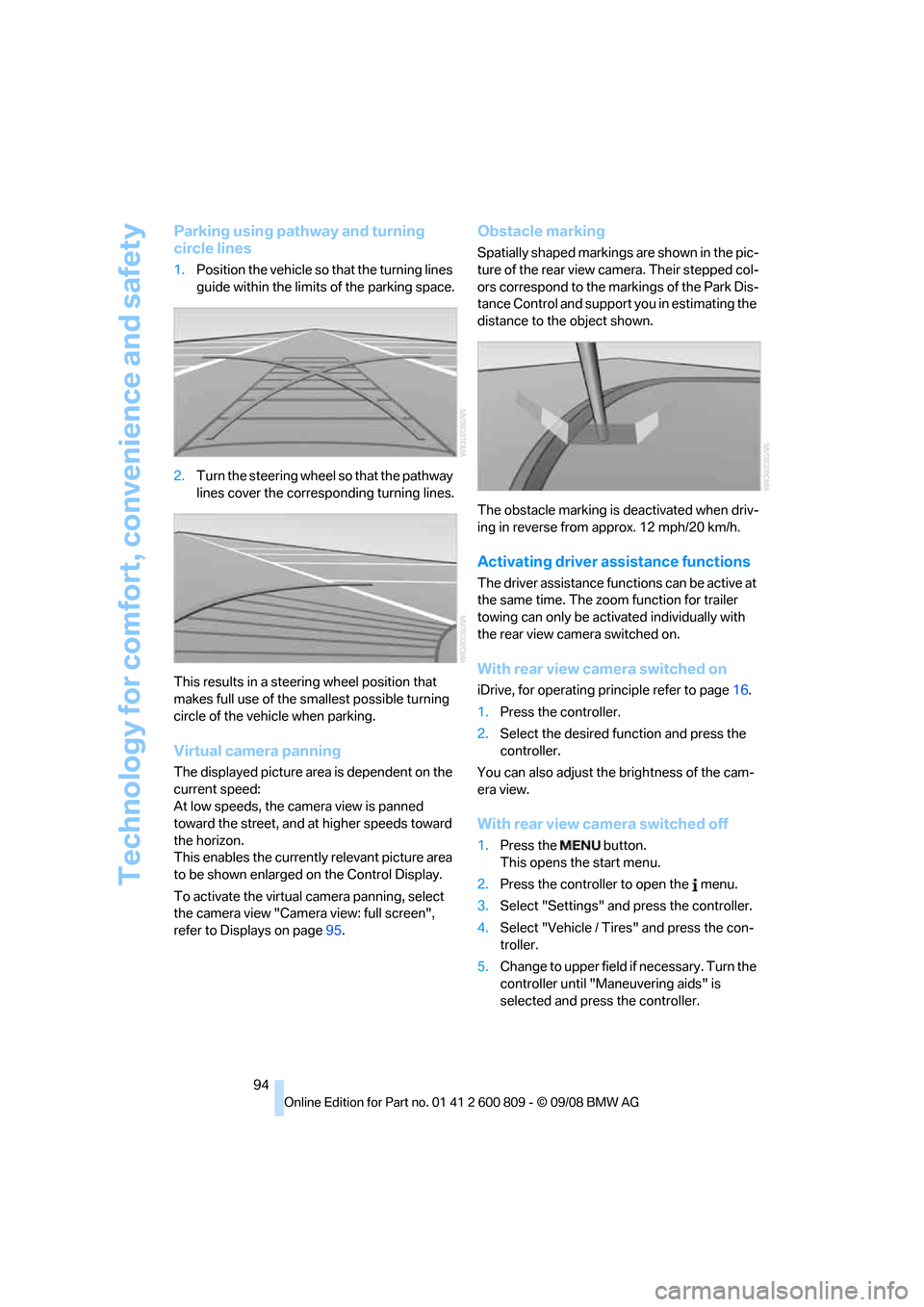
Parking using pathway and turning
circle lines
1.Position the vehicle so that the turning lines
guide within the limits of the parking space.
2. Turn the steering wheel so that the pathway
lines cover the corresp onding turning lines.
This results in a steerin g wheel position that
makes full use of the smallest possible turning
circle of the vehicle when parking.
Virtual camera panning
The displayed picture area is dependent on the
current speed:
At low speeds, the camera view is panned
toward the street, and at higher speeds toward
the horizon.
This enables the currentl y relevant picture area
to be shown enlarged on the Control Display.
To activate the virtual camera panning, select
the camera view "Camera view: full screen",
refer to Displays on page 95.
Obstacle marking
Spatially shaped markings are shown in the pic-
ture of the rear view camera. Their stepped col-
ors correspond to the markings of the Park Dis-
tance Control and support you in estimating the
distance to the object shown.
The obstacle marking is deactivated when driv-
ing in reverse from approx. 12 mph/20 km/h.
Activating driver a ssistance functions
The driver assistance functions can be active at
the same time. The zoom function for trailer
towing can only be acti vated individually with
the rear view camera switched on.
With rear view camera switched on
iDrive, for operating pr inciple refer to page16.
1. Press the controller.
2. Select the desired fu nction and press the
controller.
You can also adjust the brightness of the cam-
era view.
With rear view ca mera switched off
1.Press the button.
This opens the start menu.
2. Press the controller to open the menu.
3. Select "Settings" an d press the controller.
4. Select "Vehicle / Tire s" and press the con-
troller.
5. Change to upper field if necessary. Turn the
controller until "Maneuvering aids" is
selected and press the controller.
Page 97 of 317
Controls
95Reference
At a glance
Driving tips
Communications
Navigation
Entertainment
Mobility
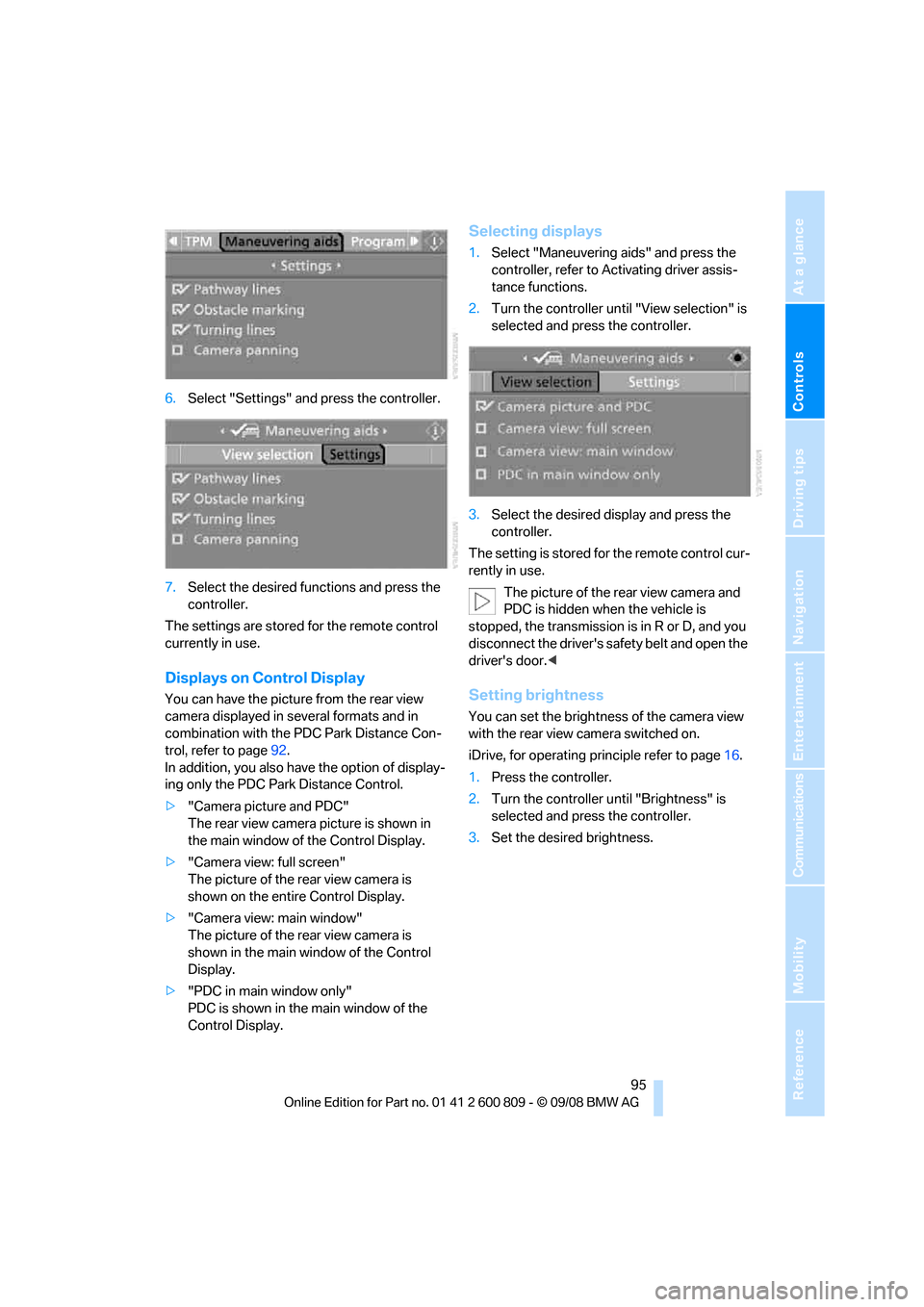
6.Select "Settings" and press the controller.
7. Select the desired fu nctions and press the
controller.
The settings are stored for the remote control
currently in use.
Displays on Control Display
You can have the picture from the rear view
camera displayed in se veral formats and in
combination with the PDC Park Distance Con-
trol, refer to page 92.
In addition, you also have the option of display-
ing only the PDC Park Distance Control.
> "Camera picture and PDC"
The rear view camera picture is shown in
the main window of the Control Display.
> "Camera view: full screen"
The picture of the rear view camera is
shown on the entire Control Display.
> "Camera view: main window"
The picture of the rear view camera is
shown in the main window of the Control
Display.
> "PDC in main window only"
PDC is shown in the main window of the
Control Display.
Selecting displays
1.Select "Maneuvering aids" and press the
controller, refer to Activating driver assis-
tance functions.
2. Turn the controller until "View selection" is
selected and press the controller.
3. Select the desired display and press the
controller.
The setting is stored for the remote control cur-
rently in use. The picture of the rear view camera and
PDC is hidden when the vehicle is
stopped, the transmission is in R or D, and you
disconnect the driver's safety belt and open the
driver's door. <
Setting brightness
You can set the brightness of the camera view
with the rear view camera switched on.
iDrive, for operating pr inciple refer to page16.
1. Press the controller.
2. Turn the controller until "Brightness" is
selected and press the controller.
3. Set the desired brightness.
Page 98 of 317
Technology for comfort, convenience and safety
96
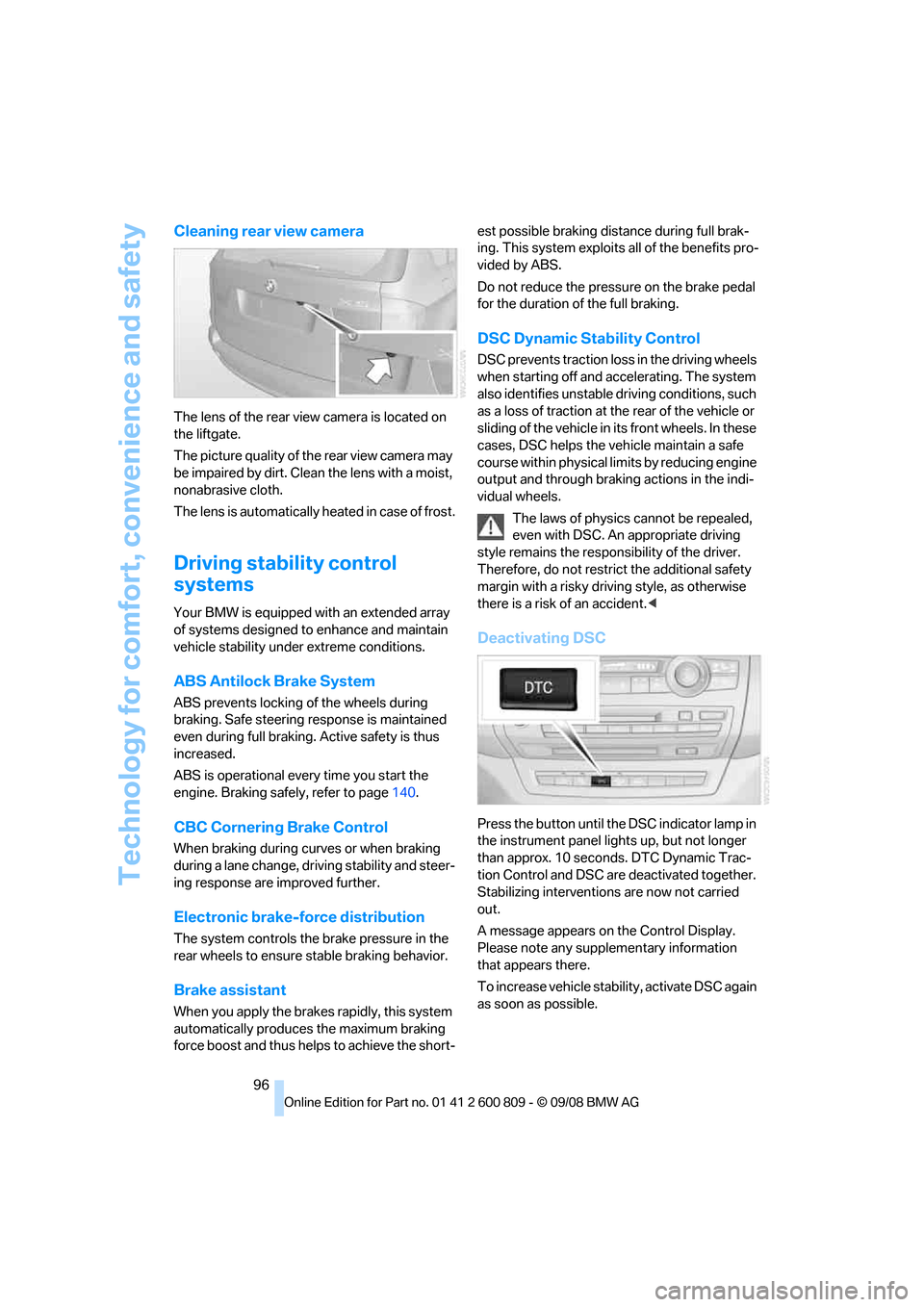
Cleaning rear view camera
The lens of the rear view camera is located on
the liftgate.
The picture quality of the rear view camera may
be impaired by dirt. Clean the lens with a moist,
nonabrasive cloth.
The lens is automatically heated in case of frost.
Driving stability control
systems
Your BMW is equipped wi th an extended array
of systems designed to enhance and maintain
vehicle stability under extreme conditions.
ABS Antilock Brake System
ABS prevents locking of the wheels during
braking. Safe steering response is maintained
even during full braking. Active safety is thus
increased.
ABS is operational every time you start the
engine. Braking safely, refer to page 140.
CBC Cornering Brake Control
When braking during curves or when braking
during a lane change, dr iving stability and steer-
ing response are improved further.
Electronic brake-force distribution
The system controls the brake pressure in the
rear wheels to ensure st able braking behavior.
Brake assistant
When you apply the brakes rapidly, this system
automatically produces the maximum braking
force boost and thus helps to achieve the short- est possible braking distance during full brak-
ing. This system exploits all of the benefits pro-
vided by ABS.
Do not reduce th
e pressure on the brake pedal
for the duration of the full braking.
DSC Dynamic Stability Control
DSC prevents traction lo ss in the driving wheels
when starting off and accelerating. The system
also identifies unstable driving conditions, such
as a loss of traction at the rear of the vehicle or
sliding of the vehicle in its front wheels. In these
cases, DSC helps the vehicle maintain a safe
course within physical lim its by reducing engine
output and through braking actions in the indi-
vidual wheels.
The laws of physics cannot be repealed,
even with DSC. An appropriate driving
style remains the responsibility of the driver.
Therefore, do not restrict the additional safety
margin with a risky driving style, as otherwise
there is a risk of an accident. <
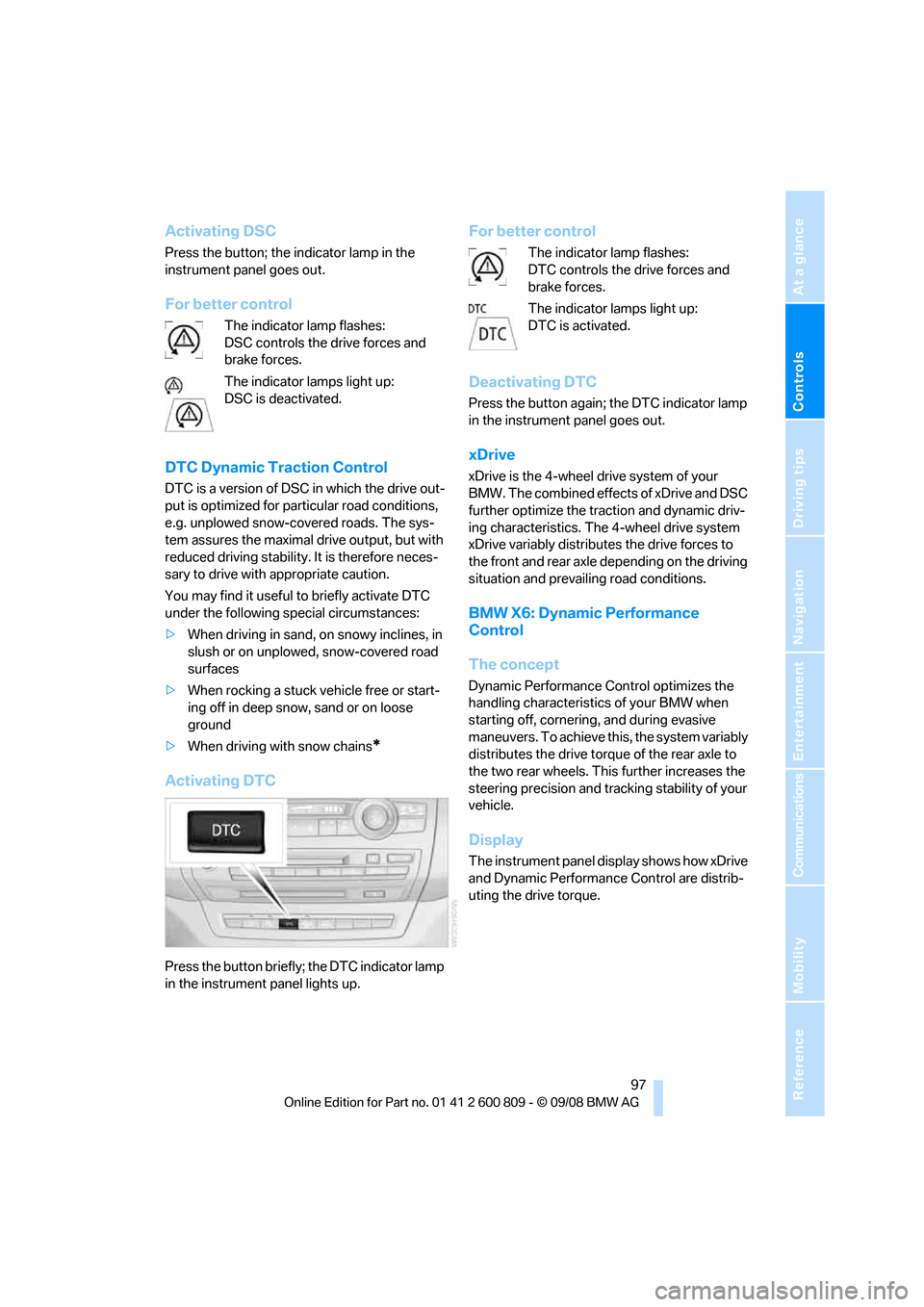
Deactivating DSC
Press the button until the DSC indicator lamp in
the instrument panel lights up, but not longer
than approx. 10 seconds. DTC Dynamic Trac-
tion Control and DSC ar e deactivated together.
Stabilizing intervention s are now not carried
out.
A message appears on the Control Display.
Please note any supplementary information
that appears there.
To increase vehicle stability, activate DSC again
as soon as possible.
Page 99 of 317
Controls
97Reference
At a glance
Driving tips
Communications
Navigation
Entertainment
Mobility
Activating DSC
Press the button; the indicator lamp in the
instrument panel goes out.
For better control
The indicator lamp flashes:
DSC controls the drive forces and
brake forces.
The indicator lamps light up:
DSC is deactivated.
DTC Dynamic Traction Control
DTC is a version of DSC in which the drive out-
put is optimized for particular road conditions,
e.g. unplowed snow-covered roads. The sys-
tem assures the maximal drive output, but with
reduced driving stability. It is therefore neces-
sary to drive with appropriate caution.
You may find it useful to briefly activate DTC
under the following special circumstances:
> When driving in sand, on snowy inclines, in
slush or on unplowed, snow-covered road
surfaces
> When rocking a stuck vehicle free or start-
ing off in deep snow, sand or on loose
ground
> When driving with snow chains
*
Activating DTC
Press the button briefly; the DTC indicator lamp
in the instrument panel lights up.
For better control
The indicator lamp flashes:
DTC controls the drive forces and
brake forces.
The indicator lamps light up:
DTC is activated.
Deactivating DTC
Press the button again; the DTC indicator lamp
in the instrument panel goes out.
xDrive
xDrive is the 4-wheel drive system of your
BMW. The combined effects of xDrive and DSC
further optimize the traction and dynamic driv-
ing characteristics. The 4-wheel drive system
xDrive variably distributes the drive forces to
the front and rear axle depending on the driving
situation and prevailing road conditions.
BMW X6: Dynamic Performance
Control
The concept
Dynamic Performance Control optimizes the
handling characteristic s of your BMW when
starting off, cornering, and during evasive
maneuvers. To achieve this, the system variably
distributes the drive torque of the rear axle to
the two rear wheels. This further increases the
steering precision and tracking stability of your
vehicle.
Display
The instrument panel display shows how xDrive
and Dynamic Performanc e Control are distrib-
uting the drive torque.
Page 102 of 317
Technology for comfort, convenience and safety
100
longer holds the vehicle
after approx. 2 seconds
and it begins to roll back. <
Self-leveling suspension*
Malfunction
The warning lamp for self-leveling
suspension lights up yellow and a
message is shown on the Control
Display. A malfunction has occurred in the self-
leveling suspension. Stop and check the vehi-
cle. If it is considerably lower at the rear than at
the front, and possibly also on one side – rear
left compared to rear right –, proceed to the
nearest BMW Sports Activi ty Vehicle Center or
a workshop that works according to BMW
repair procedures with correspondingly trained
personnel. Drive with a ppropriate caution in the
meantime. The vehicle has reduced ground
clearance and driving co mfort may be notice-
ably reduced. Even if th e orientation of the vehi-
cle is normal, when a malfunction is indicated
on the display, you should proceed to the near-
est BMW Sports Activity Vehicle Center or a
workshop that works according to BMW guide-
lines and uses appropriately trained personnel.
FTM Flat Tire Monitor*
The concept
The Flat Tire Monitor detects a pressure loss in
one tire by comparing the speeds of the individ-
ual wheels during driving.
In the event of a pressure loss, there is a change
in the rolling circumference and therefore the
rotation speed of the corresponding wheel. The
system detects this change and reports it as a
flat tire.
Function requirements
In order to assure the re liable reporting of a flat
tire, the system must be initialized for the cor-
rect tire inflation pressure. The initialization must be repeated after
each time the tire inflation pressure is cor-
rected and after every tire or wheel change. <
System limits
The Flat Tire Monitor cannot indicate
sudden severe tire damage caused by
outside factors and does not detect a natural,
even pressure drop in all four tires. <
In the following situatio ns, the system could be
delayed or malfunction:
> System has not been initialized
> Driving on snowy or slippery road surface
> Sporty driving style: slip in the drive wheels,
high lateral acceleration
> Driving with snow chains
*
When you are driving with the compact wheel*
the Flat Tire Monitor is unable to function.
Initializing system
The initialization finishes during driving,
which can be interrupted at any time.
When driving resumes, th e initialization is con-
tinued automatically. Do not initialize the sys-
tem when driving with snow chains
* or with the
compact wheel
*. <
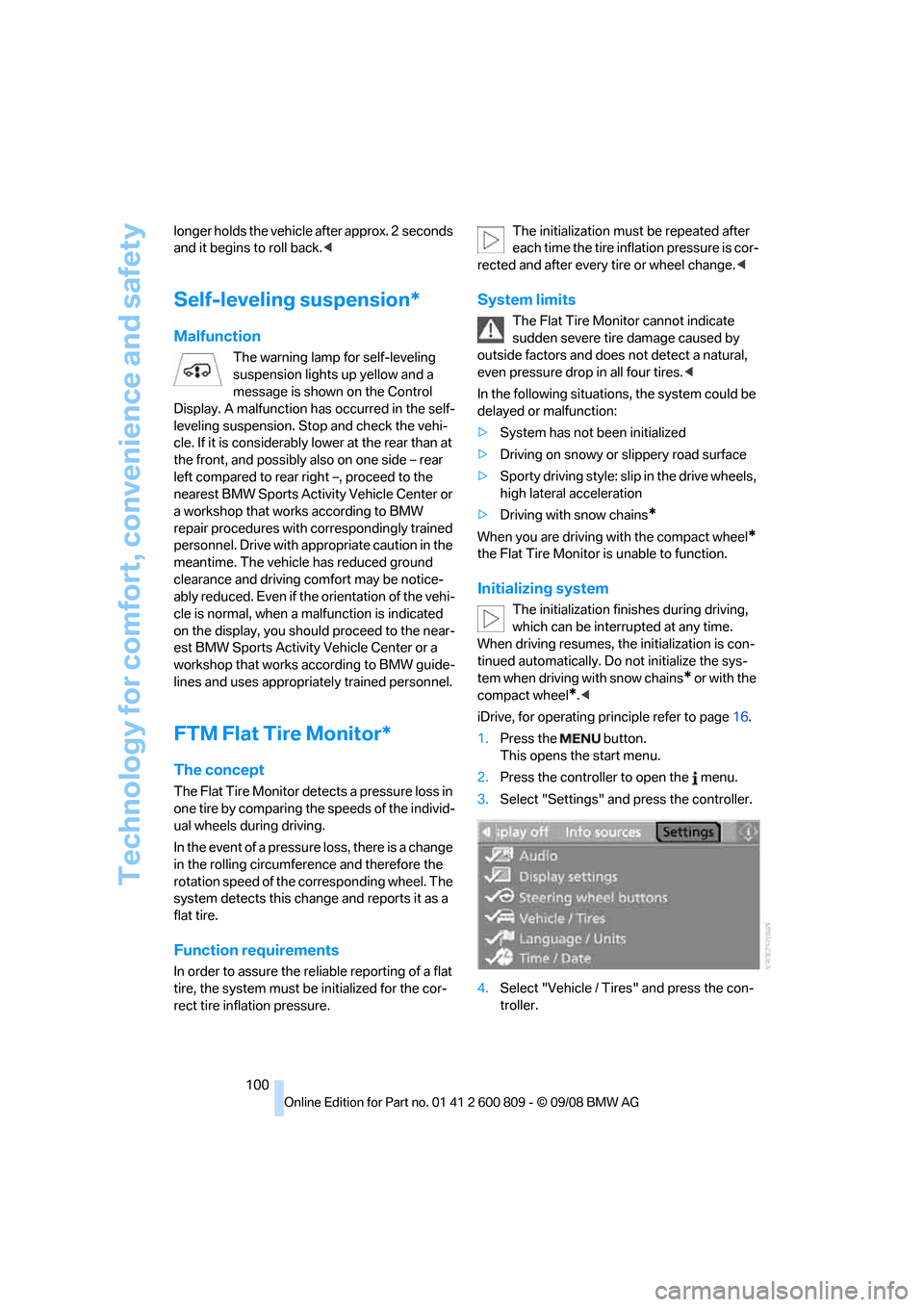
iDrive, for operating pr inciple refer to page16.
1. Press the button.
This opens the start menu.
2. Press the controller to open the menu.
3. Select "Settings" an d press the controller.
4. Select "Vehicle / Tire s" and press the con-
troller.
Page 107 of 317
Controls
105Reference
At a glance
Driving tips
Communications
Navigation
Entertainment
Mobility
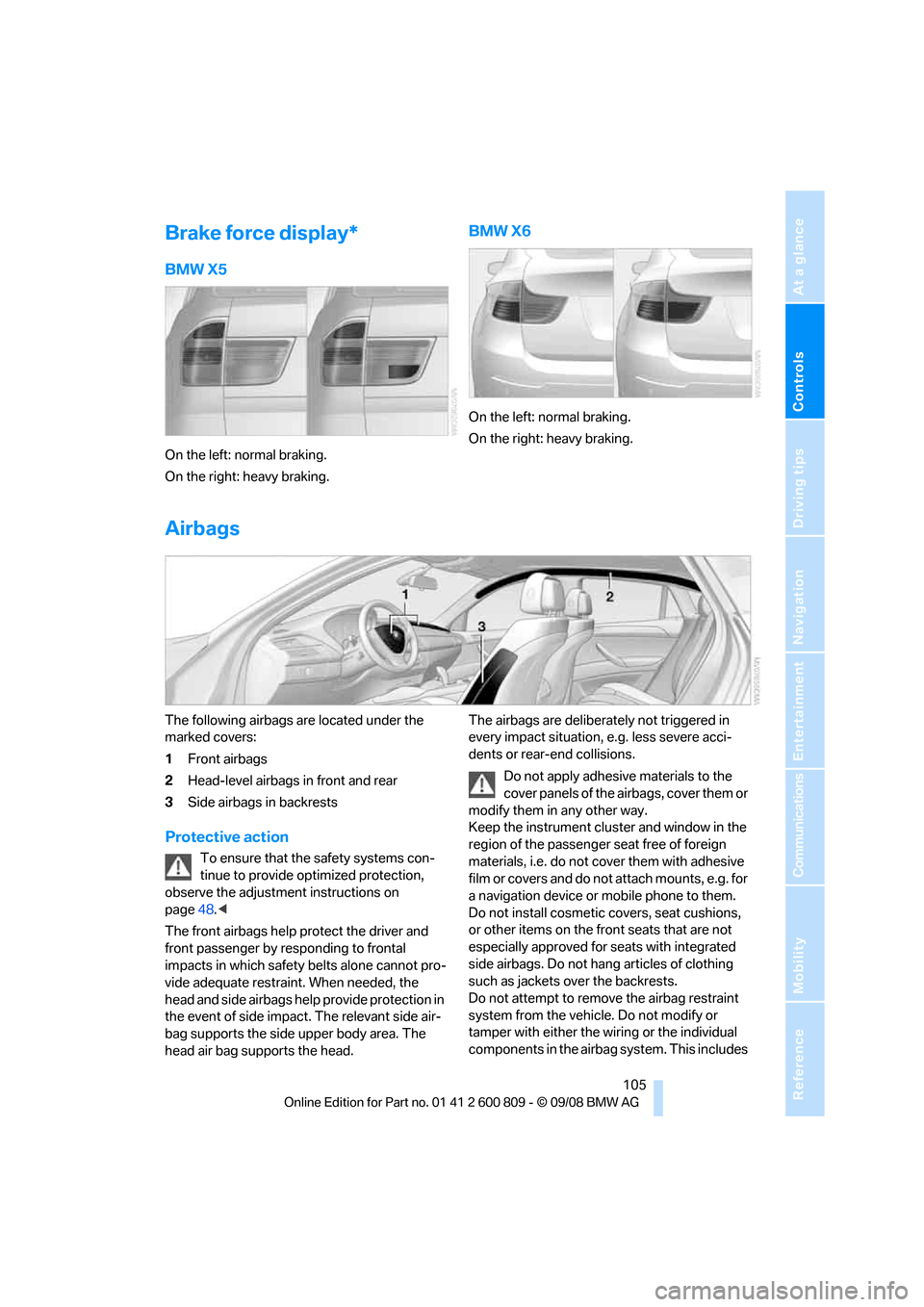
Brake force display*
BMW X5
On the left: normal braking.
On the right: heavy braking.
BMW X6
On the left: normal braking.
On the right: heavy braking.
Airbags
The following airbags are located under the
marked covers:
1Front airbags
2 Head-level airbags in front and rear
3 Side airbags in backrests
Protective action
To ensure that the safety systems con-
tinue to provide optimized protection,
observe the adjustment instructions on
page 48.<
The front airbags help protect the driver and
front passenger by re sponding to frontal
impacts in which safety belts alone cannot pro-
vide adequate restraint. When needed, the
head and side airbags help provide protection in
the event of side impact. The relevant side air-
bag supports the side upper body area. The
head air bag supports the head. The airbags are deliberately not triggered in
every impact situation, e.g. less severe acci-
dents or rear-end collisions.
Do not apply adhesive materials to the
cover panels of the airbags, cover them or
modify them in any other way.
Keep the instrument cluster and window in the
region of the passenger seat free of foreign
materials, i.e. do not co ver them with adhesive
film or covers and do not attach mounts, e.g. for
a navigation device or mobile phone to them.
Do not install cosmetic covers, seat cushions,
or other items on the fr ont seats that are not
especially approved for seats with integrated
side airbags. Do not hang articles of clothing
such as jackets over the backrests.
Do not attempt to remove the airbag restraint
system from the vehicle. Do not modify or
tamper with either the wiring or the individual
components in the airbag system. This includes
Page 108 of 317
Technology for comfort, convenience and safety
106
the upholstery in the center of the steering
wheel, on the instrument cluster, the doors, and
the roof pillars as well as
the sides of the head-
liner. Do not attempt to remove or dismantle the
steering wheel. Do not touch the individual
components immediately after the system has
been triggered, because there is a danger of
burns.
In the event of malfunctions, deactivation, or
triggering of the airbag restraint system, have
the testing, repair, remova l, and disposal of air-
bag generators executed only by a BMW Sports
Activity Vehicle Center or a workshop that
works according to BMW repair procedures
with correspondingly trained personnel and has
the required explosives licenses. Otherwise
unprofessional attempts to service the system
could lead to failure in an emergency or undes-
ired airbag triggering, either of which could
result in personal injury. <
Warnings and information on the airbags is also
provided on the sun visors.
Automatic deactivation of front
passenger airbags
The occupation of the seat is detected by eval-
uating the impression on the occupied seat sur-
face of the front passeng er seat. The front and
side airbags on the front passenger side are
activated or deactivated accordingly by the sys-
tem.
The current status of the front passenger
airbag, i.e. deactivated or activated, is
indicated by the indicator lamp over the interior
rearview mirror, refer to Operating state of front
passenger airbags in the following. <
Before transporting a child on the front
passenger seat, read the safety informa-
tion and follow the inst ructions under Trans-
porting children safely, refer to page 61.
When teenagers and adults assume certain sit-
ting positions, this can cause the front and side
airbags to deactivate. The indicator lamp for the
front passenger airbags lights up when this
occurs. In these cases, change the sitting posi-
tion so that the front passenger airbags are acti-
vated and the indicator la mp goes out. If the
desired status cannot be produced by changing the sitting position, transport the correspond-
ing person on the rear se
at. Do not fit seat cov-
ers, seat cushion padding, ball mats or other
items onto the front passenger seat unless they
are specifically recomme nded by BMW. Do not
lay objects under the seat which could press
against the seat from below. Otherwise a cor-
rect evaluation of the occupied seat surface
cannot be ensured. <
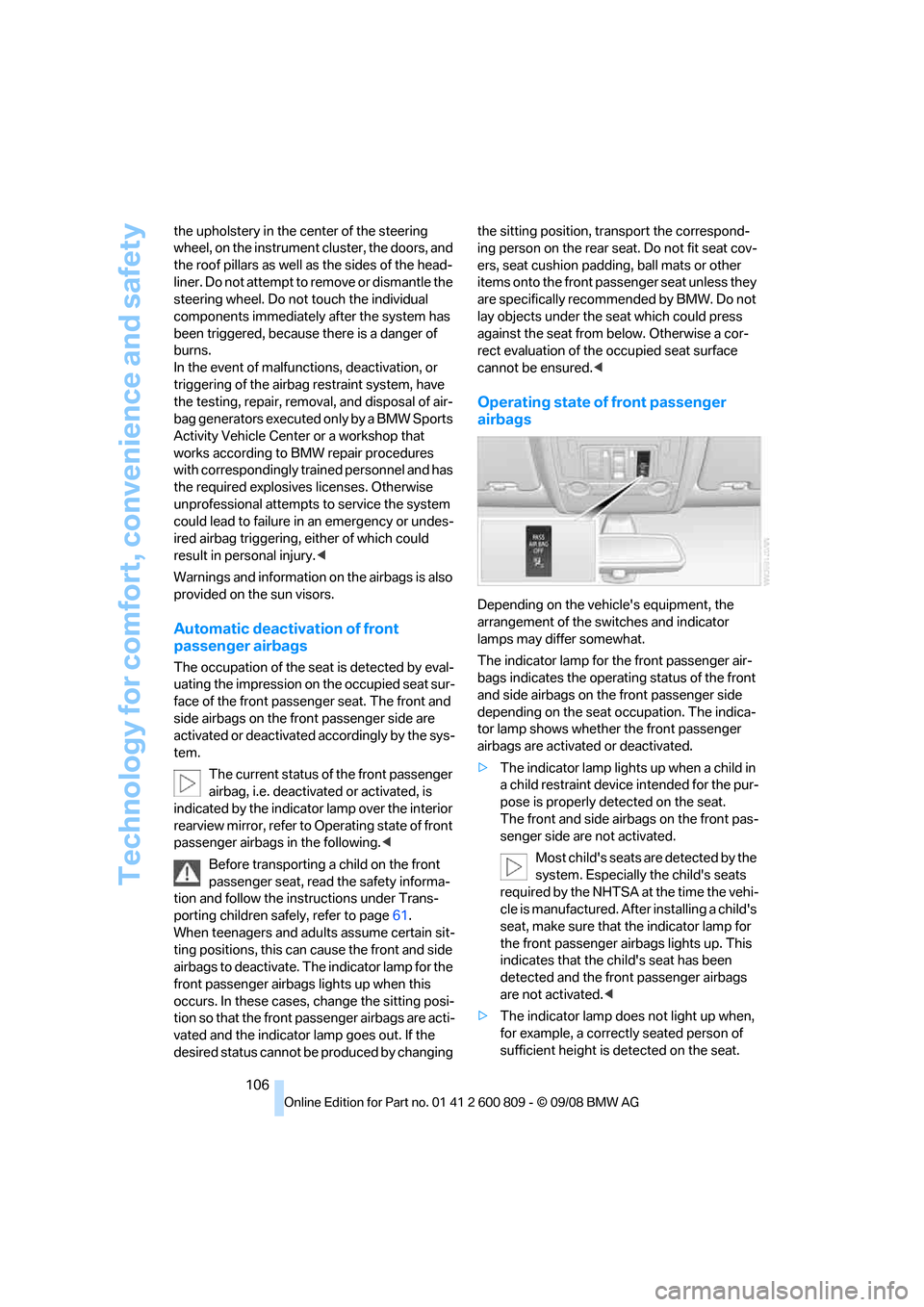
Operating state of front passenger
airbags
Depending on the vehicle's equipment, the
arrangement of the switches and indicator
lamps may differ somewhat.
The indicator lamp for the front passenger air-
bags indicates the operating status of the front
and side airbags on the front passenger side
depending on the seat occupation. The indica-
tor lamp shows whether the front passenger
airbags are activated or deactivated.
> The indicator lamp light s up when a child in
a child restraint device intended for the pur-
pose is properly detected on the seat.
The front and side airbags on the front pas-
senger side are not activated.
Most child's seats are detected by the
system. Especially the child's seats
required by the NHTSA at the time the vehi-
cle is manufactured. Af ter installing a child's
seat, make sure that the indicator lamp for
the front passenger airbags lights up. This
indicates that the child's seat has been
detected and the front passenger airbags
are not activated. <
> The indicator lamp does not light up when,
for example, a correctly seated person of
sufficient height is detected on the seat.