button BMW X6 XDRIVE 35I 2009 E71 Owner's Guide
[x] Cancel search | Manufacturer: BMW, Model Year: 2009, Model line: X6 XDRIVE 35I, Model: BMW X6 XDRIVE 35I 2009 E71Pages: 317, PDF Size: 9.56 MB
Page 61 of 317
Controls
59Reference
At a glance
Driving tips
Communications
Navigation
Entertainment
Mobility
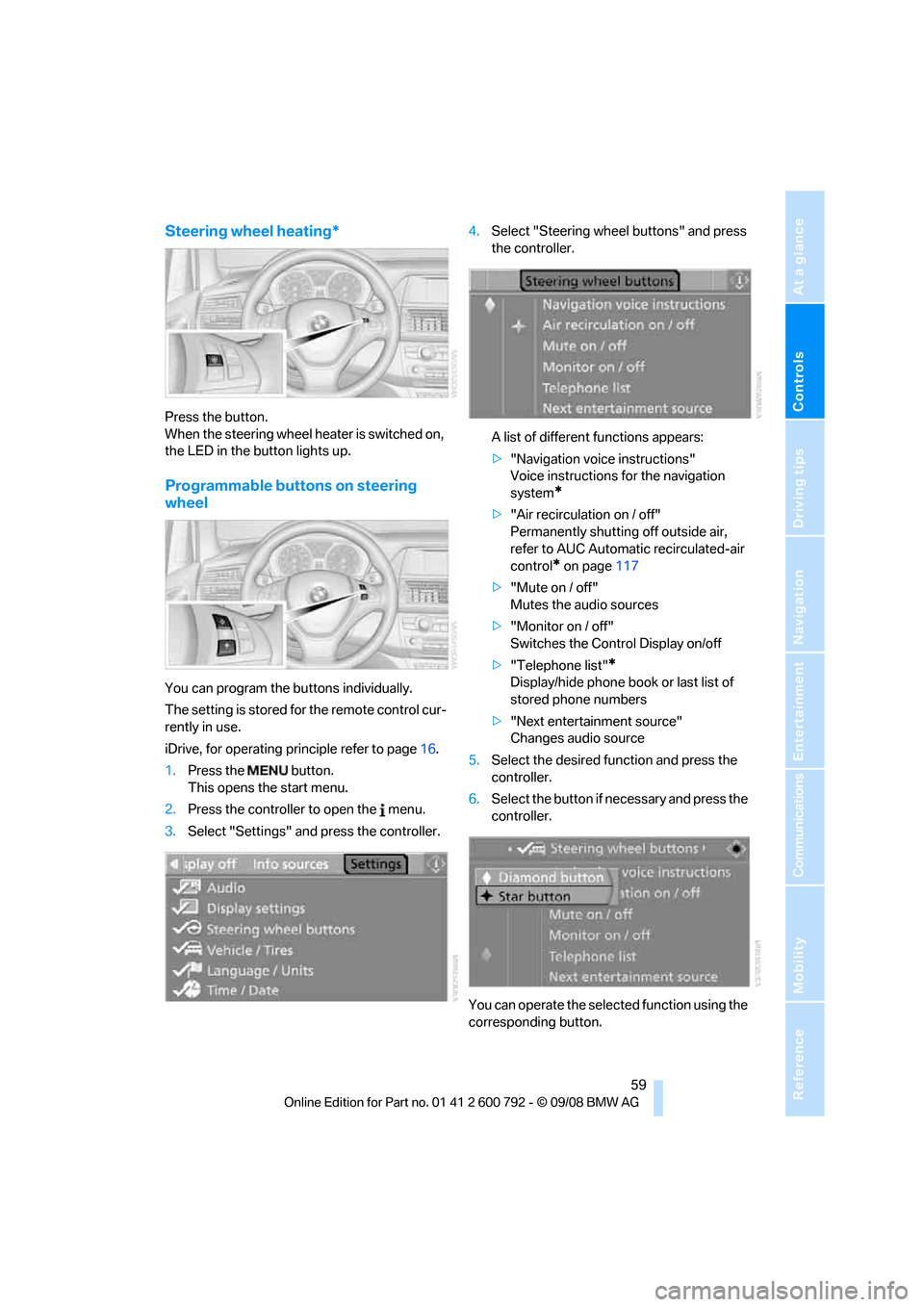
Steering wheel heating*
Press the button.
When the steering wheel heater is switched on,
the LED in the button lights up.
Programmable buttons on steering
wheel
You can program the buttons individually.
The setting is stored for the remote control cur-
rently in use.
iDrive, for operating principle refer to page16.
1. Press the button.
This opens the start menu.
2. Press the controller to open the menu.
3. Select "Settings" and press the controller. 4.
Select "Steering wheel buttons" and press
the controller.
A list of different functions appears:
>"Navigation voice instructions"
Voice instructions for the navigation
system
*
>"Air recirculation on / off"
Permanently shutting off outside air,
refer to AUC Automatic recirculated-air
control
* on page 117
> "Mute on / off"
Mutes the audio sources
> "Monitor on / off"
Switches the Control Display on/off
> "Telephone list"
*
Display/hide phone book or last list of
stored phone numbers
> "Next entertainment source"
Changes audio source
5. Select the desired function and press the
controller.
6. Select the button if ne cessary and press the
controller.
You can operate the selected function using the
corresponding button.
Page 62 of 317
Adjusting
60
Operating function
Press the corresponding button on the steering
wheel.
If you have programmed "Navigation voice
instructions" for one of the buttons:
>To switch voice instructions on/off:
Hold the button down.
> To repeat the last voice instruction:
Press the button.
Page 67 of 317
Controls
65Reference
At a glance
Driving tips
Communications
Navigation
Entertainment
Mobility
Driving
Ignition lock
Inserting remote control into ignition
lock
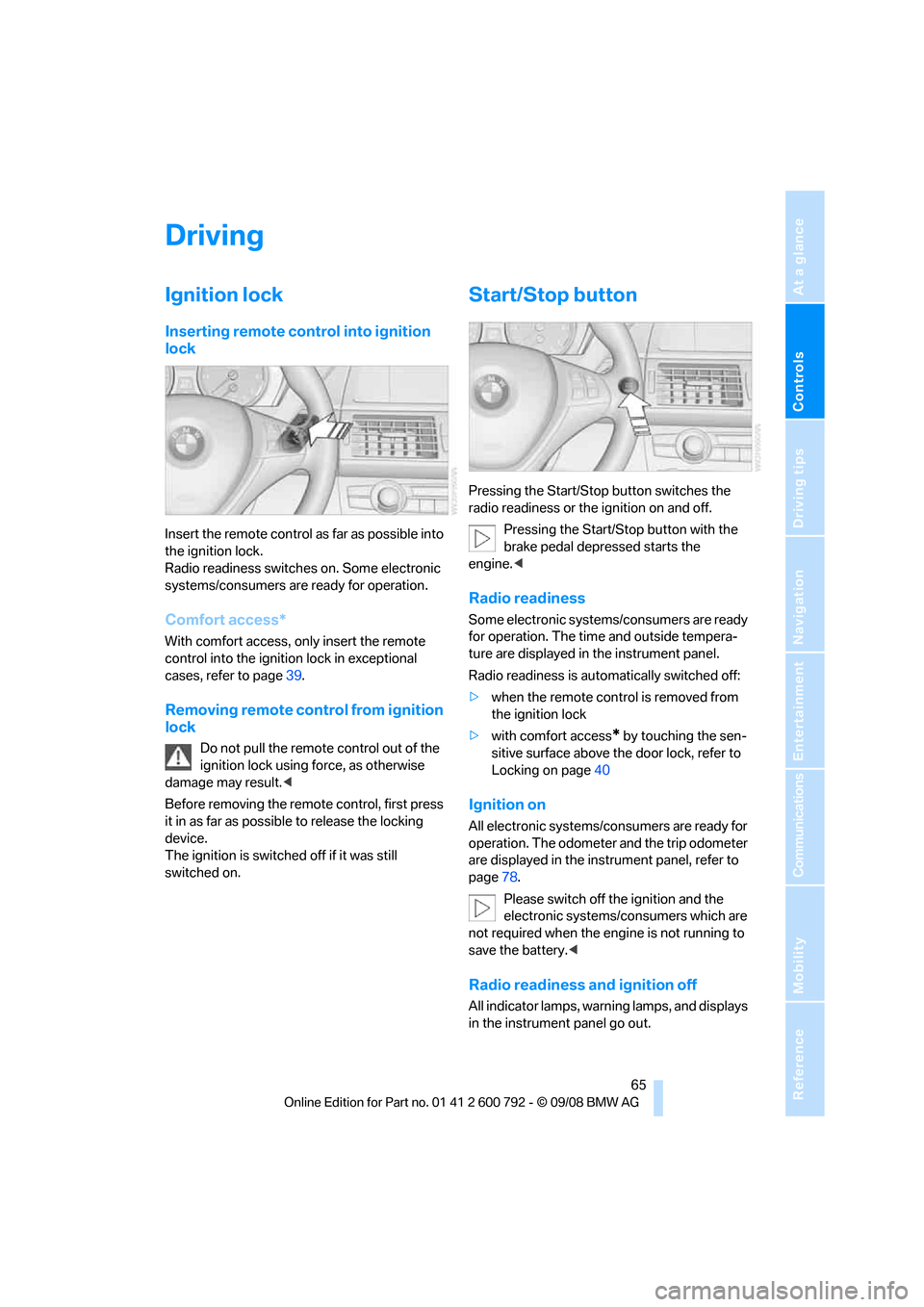
Insert the remote control as far as possible into
the ignition lock.
Radio readiness switches on. Some electronic
systems/consumers are ready for operation.
Comfort access*
With comfort access, only insert the remote
control into the ignition lock in exceptional
cases, refer to page 39.
Removing remote control from ignition
lock
Do not pull the remote control out of the
ignition lock using force, as otherwise
damage may result. <
Before removing the remo te control, first press
it in as far as possibl e to release the locking
device.
The ignition is switched off if it was still
switched on.
Start/Stop button
Pressing the Start/Stop button switches the
radio readiness or the ignition on and off.
Pressing the Start/Stop button with the
brake pedal depre ssed starts the
engine. <
Radio readiness
Some electronic systems/consumers are ready
for operation. The time and outside tempera-
ture are displayed in the instrument panel.
Radio readiness is auto matically switched off:
> when the remote control is removed from
the ignition lock
> with comfort access
* by touching the sen-
sitive surface above the door lock, refer to
Locking on page 40
Ignition on
All electronic systems/consumers are ready for
operation. The odometer and the trip odometer
are displayed in the instrument panel, refer to
page78.
Please switch off the ignition and the
electronic systems/consumers which are
not required when the engine is not running to
save the battery. <
Radio readiness and ignition off
All indicator lamps, warning lamps, and displays
in the instrument panel go out.
Page 68 of 317
Driving
66
The ignition switches off automatically
* if the
driver's door is opened. Pressing the start/stop
button again switches the ignition back on.
For example, the ignition is not switched off in
the following situations:
> the brakes are actuated
> the low beams are switched on
Starting engine
Do not run the engine in closed rooms,
otherwise the inhalati on of toxic exhaust
gases can cause uncons ciousness and death.
The exhaust gases contain carbon monoxide,
an odorless and colorless, but highly toxic gas.
Never leave an unattend ed vehicle with the
engine running, as such a vehicle represents a
potential safety hazard.
To prevent the vehicle from rolling, always
engage transmission position N or P and set the
parking brake before le aving the vehicle with
the engine running. <
Do not allow the engine to warm up by leaving it
running while the vehicl e remains stationary.
Instead, begin to drive at a moderate engine
speed.
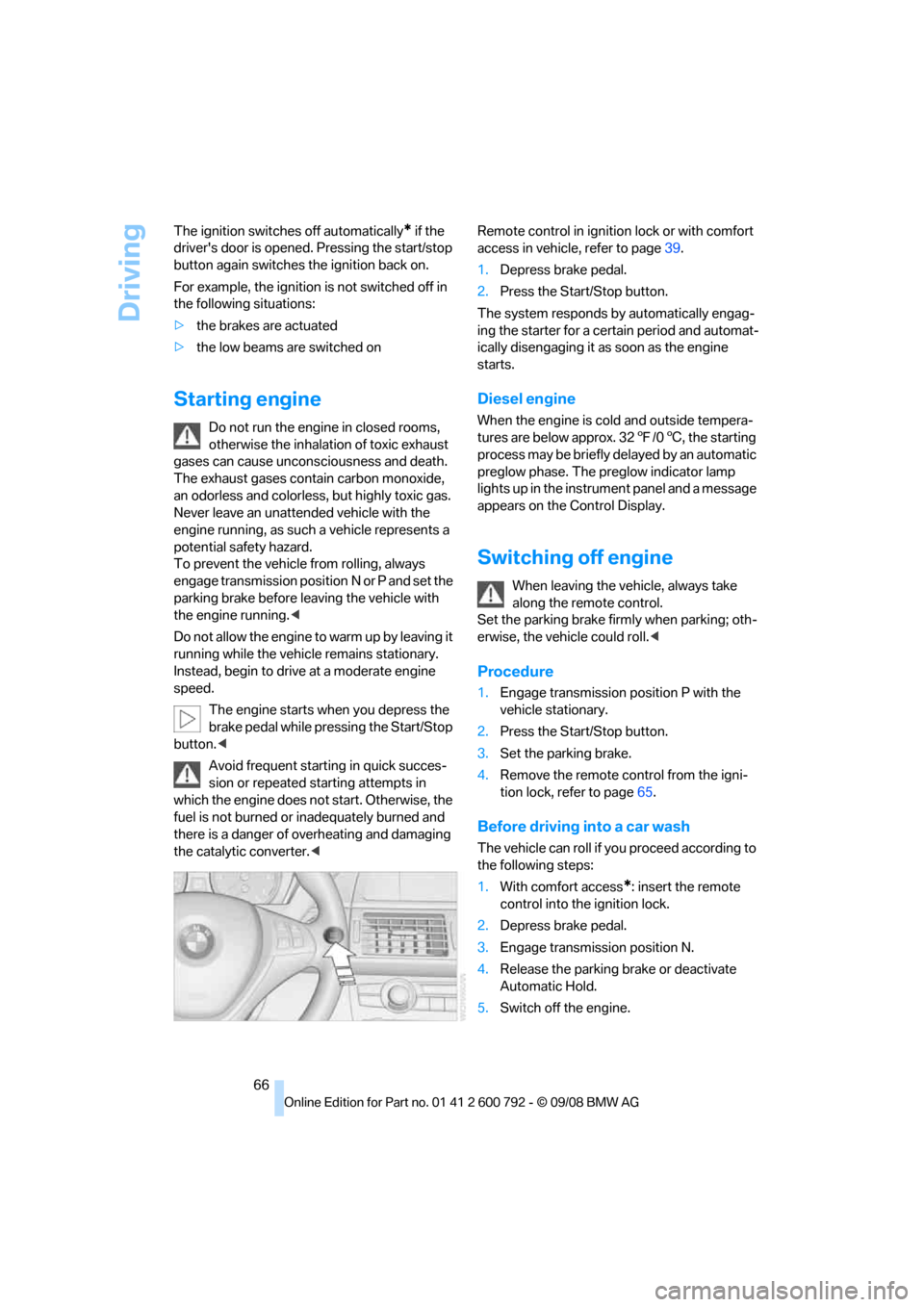
The engine starts when you depress the
brake pedal while pressing the Start/Stop
button. <
Avoid frequent starting in quick succes-
sion or repeated starting attempts in
which the engine does no t start. Otherwise, the
fuel is not burned or inadequately burned and
there is a danger of overheating and damaging
the catalytic converter. < Remote control in ignition lock or with comfort
access in vehicle, refer to page
39.
1. Depress brake pedal.
2. Press the Start/Stop button.
The system responds by automatically engag-
ing the starter for a cert ain period and automat-
ically disengaging it as soon as the engine
starts.
Diesel engine
When the engine is cold and outside tempera-
tures are below approx. 32 7/06 , the starting
process may be briefly delayed by an automatic
preglow phase. The pr eglow indicator lamp
lights up in the instrument panel and a message
appears on the Control Display.
Switching off engine
When leaving the vehicle, always take
along the remote control.
Set the parking brake firmly when parking; oth-
erwise, the vehicle could roll. <
Procedure
1.Engage transmission position P with the
vehicle stationary.
2. Press the Start/Stop button.
3. Set the parking brake.
4. Remove the remote control from the igni-
tion lock, refer to page 65.
Before driving into a car wash
The vehicle can roll if yo u proceed according to
the following steps:
1. With comfort access
*: insert the remote
control into the ignition lock.
2. Depress brake pedal.
3. Engage transmission position N.
4. Release the parking brake or deactivate
Automatic Hold.
5. Switch off the engine.
Page 69 of 317
Controls
67Reference
At a glance
Driving tips
Communications
Navigation
Entertainment
Mobility
Transmission position P will be engaged:
>automatically after approx. 30 minutes
> if you remove the remo te control from the
ignition lock
Parking brake
The concept
Your BMW is equipped with an electromechan-
ical parking brake.
The parking brake is primarily intended to pre-
vent the vehicle from rolling while parked.
You can use the parking brake in two ways:
> manually, by pulling an d pushing the button
> automatically, by ac tivating Automatic
Hold, refer to page 67
With the engine stopped, the parking brake acts
on the rear wheels via an electromechanical
system. When the engine is running, the park-
ing brake acts on the disk brakes of the front
and rear wheels via the brake hydraulics.
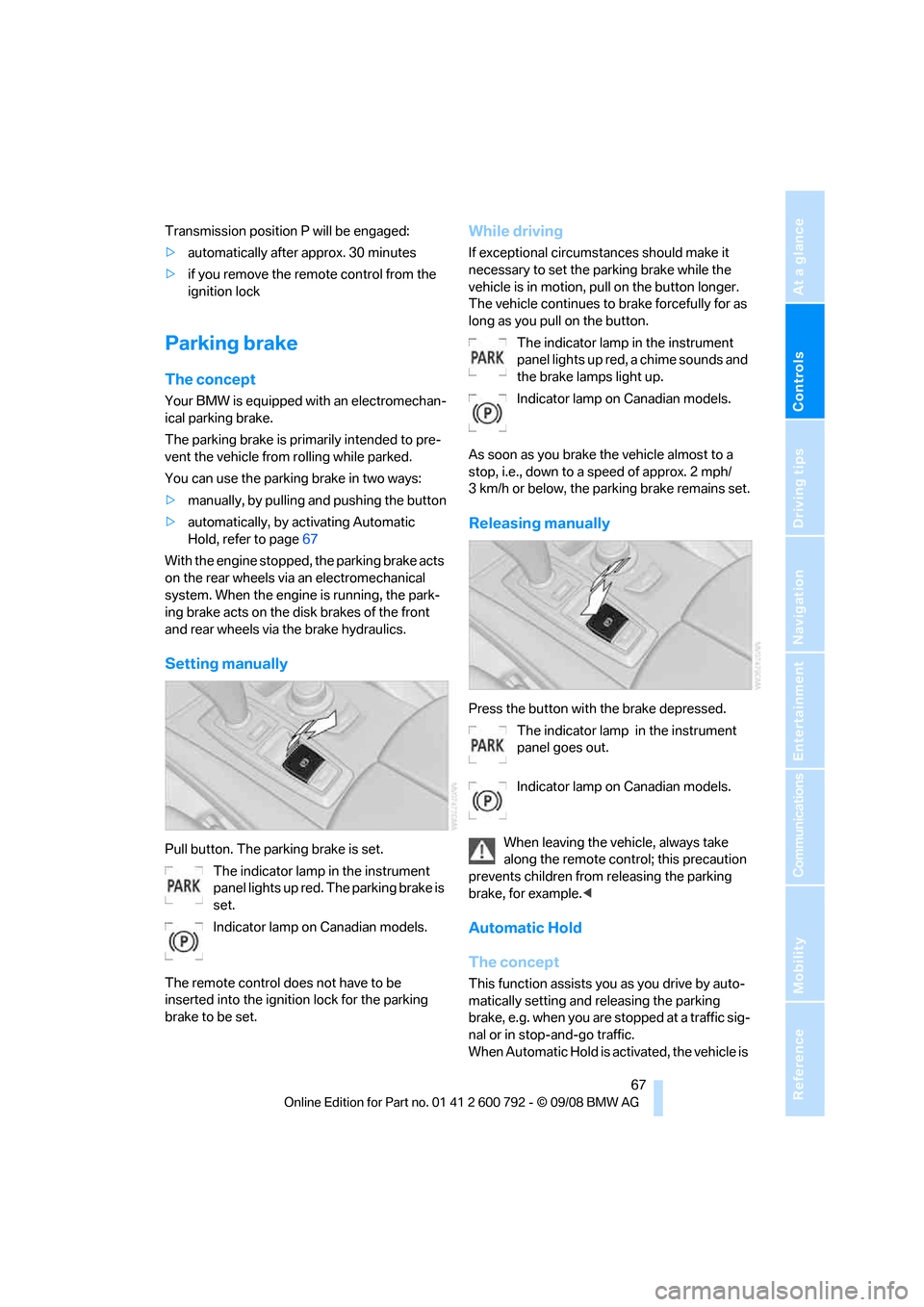
Setting manually
Pull button. The parking brake is set. The indicator lamp in the instrument
panel lights up red. The parking brake is
set.
Indicator lamp on Canadian models.
The remote control do es not have to be
inserted into the ignition lock for the parking
brake to be set.
While driving
If exceptional circumst ances should make it
necessary to set the pa rking brake while the
vehicle is in motion, pull on the button longer.
The vehicle continues to brake forcefully for as
long as you pull on the button.
The indicator lamp in the instrument
panel lights up red, a chime sounds and
the brake lamps light up.
Indicator lamp on Canadian models.
As soon as you brake the vehicle almost to a
stop, i.e., down to a speed of approx. 2 mph/
3 km/h or below, the pa rking brake remains set.
Releasing manually
Press the button with the brake depressed.
The indicator lamp in the instrument
panel goes out.
Indicator lamp on Canadian models.
When leaving the vehicle, always take
along the remote control; this precaution
prevents children from releasing the parking
brake, for example. <
Automatic Hold
The concept
This function assists yo u as you drive by auto-
matically setting and releasing the parking
brake, e.g. when you are stopped at a traffic sig-
nal or in stop-and-go traffic.
When Automatic Hold is ac tivated, the vehicle is
Page 70 of 317
Driving
68
automatically held in place when standing.
When driving up inclines, the system prevents
your vehicle from rolling
backward in an undes-
ired way.
After the engine is star ted, the system can be
activated and deactiva ted at any time the
driver's seat is occupied until the next time the
engine is switched off.
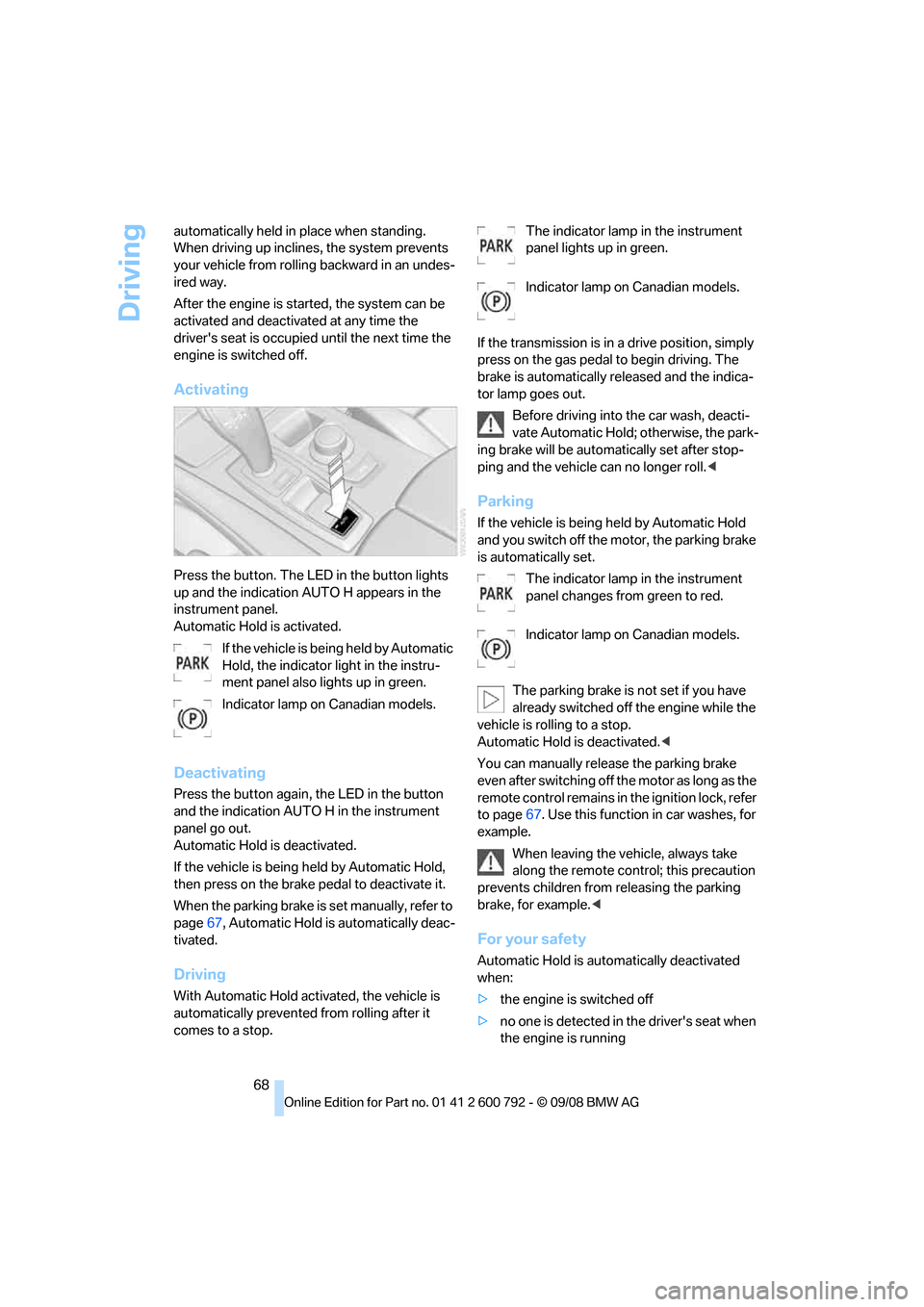
Activating
Press the button. The LED in the button lights
up and the indication AUTO H appears in the
instrument panel.
Automatic Hold is activated.
If the vehicle is bein g held by Automatic
Hold, the indicator light in the instru-
ment panel also lights up in green.
Indicator lamp on Canadian models.
Deactivating
Press the button again, the LED in the button
and the indication AUTO H in the instrument
panel go out.
Automatic Hold is deactivated.
If the vehicle is being held by Automatic Hold,
then press on the brake pedal to deactivate it.
When the parking brake is set manually, refer to
page 67, Automatic Hold is automatically deac-
tivated.
Driving
With Automatic Hold acti vated, the vehicle is
automatically prevented from rolling after it
comes to a stop. The indicator lamp in the instrument
panel lights up in green.
Indicator lamp on Canadian models.
If the transmission is in a drive position, simply
press on the gas pedal to begin driving. The
brake is automatically re leased and the indica-
tor lamp goes out.
Before driving into the car wash, deacti-
vate Automatic Hold; otherwise, the park-
ing brake will be automatically set after stop-
ping and the vehicle can no longer roll. <
Parking
If the vehicle is being held by Automatic Hold
and you switch off the motor, the parking brake
is automatically set.
The indicator lamp in the instrument
panel changes from green to red.
Indicator lamp on Canadian models.
The parking brake is not set if you have
already switched off the engine while the
vehicle is rolling to a stop.
Automatic Hold is deactivated. <
You can manually rele ase the parking brake
even after switching off th e motor as long as the
remote control remains in the ignition lock, refer
to page 67. Use this function in car washes, for
example.
When leaving the vehicle, always take
along the remote control; this precaution
prevents children from releasing the parking
brake, for example. <
For your safety
Automatic Hold is auto matically deactivated
when:
> the engine is switched off
> no one is detected in the driver's seat when
the engine is running
Page 72 of 317
Driving
70
Procedure
1.Switch on the ignition.
2. Press the button with the brake depressed.
The indicator lamp in the instrument
panel goes out as soon as the parking
brake is ready for operation again.
Indicator lamp on Canadian models.
Any noises which occur are normal. Start-up
may take several seconds.
Automatic transmission with
Steptronic
In addition to fully auto matic operation, you can
also manually shift with the Steptronic, refer to
page 71.
Transmission positions
P R N D M/S + –
To prevent the vehicle from creeping
after you select a driving position, main-
tain pressure on the brake pedal until you are
ready to start. <
Displays in instrument panel
P R N D, DS*, S1* through S6*, M1 through M6
The transmission position and the currently
engaged gear are displayed.
Engaging transm ission position
>You can only engage transmission posi-
tions D, R or N when the engine is running.
> With the vehicle stationary, depress the
brake pedal before shifting out of P or N;
otherwise the shift command will not be
executed: shiftlock.
To prevent the vehicle from creeping
after you select a driving position,
maintain pressure on the brake pedal until
you are ready to start. <
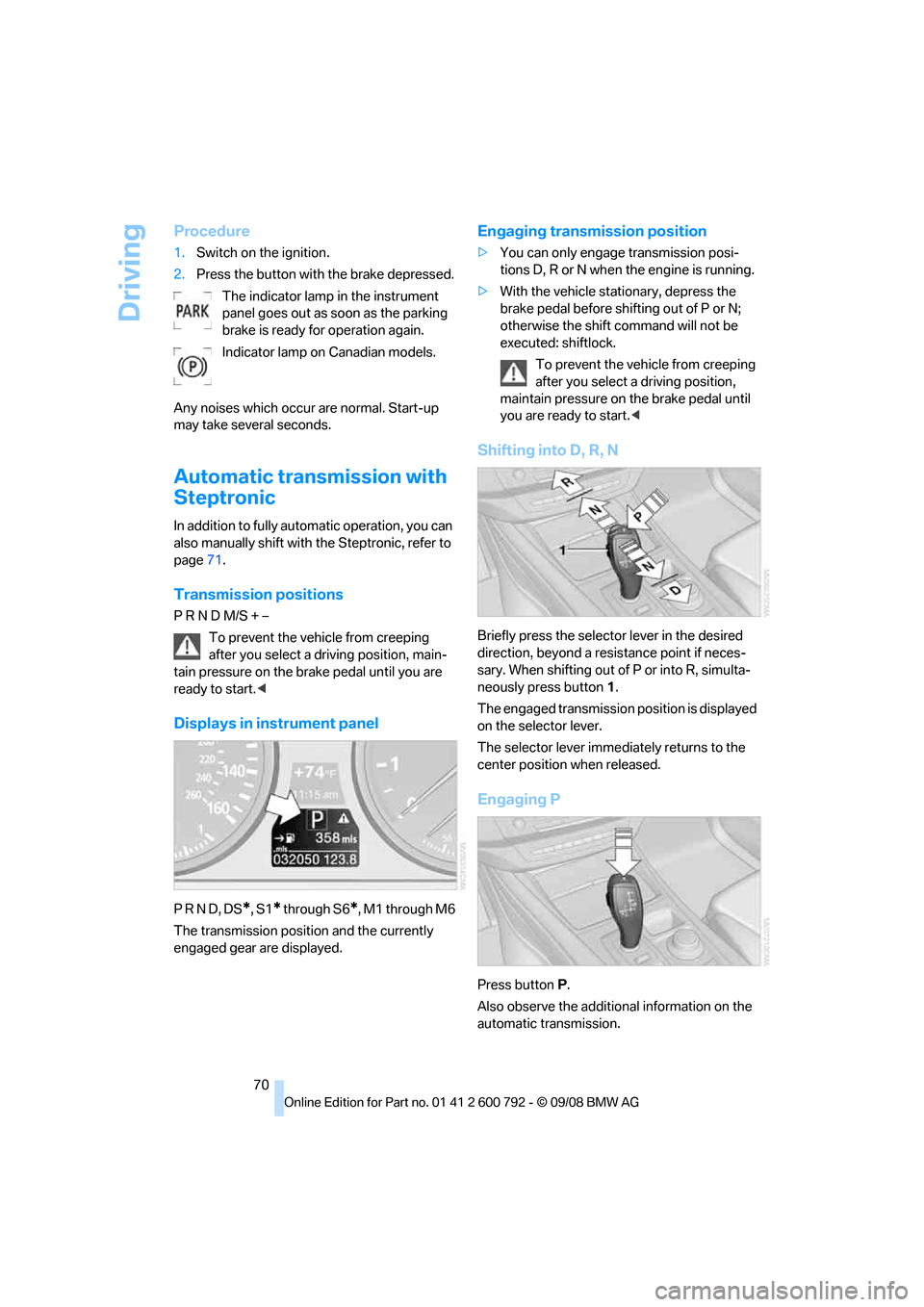
Shifting into D, R, N
Briefly press the selector lever in the desired
direction, beyond a resi stance point if neces-
sary. When shifting out of P or into R, simulta-
neously press button 1.
The engaged transmission position is displayed
on the selector lever.
The selector lever imme diately returns to the
center position when released.
Engaging P
Press button P.
Also observe the additional information on the
automatic transmission.
Page 73 of 317
Controls
71Reference
At a glance
Driving tips
Communications
Navigation
Entertainment
Mobility
The transmission automatically shifts into
park if you release the driver's safety belt
and open the driver's door with the engine run-
ning while in re verse or drive.
The picture from the rear view camera
* and
PDC Park Distance Control
* on the Control
Display is hidden. <
R Reverse
Select only with the vehicle stationary.
An interlock prevents inadvertent gearshifts
into transmission position R. To deactivate the
interlock, press the release button 1.
P Park
Select only with the vehicle stationary. The rear
wheels are locked.
P is engaged automatically as soon as
you switch off the engine unless N is
engaged and on vehicles with comfort access
the remote control is inserted in the ignition
lock, refer to page 65.<
N Neutral
Can, for example, be engaged in automatic car
washes. The vehicle can roll.
N remains engaged even after the engine
is switched off whenever you leave the
remote control in the ignition lock. This function
is used, for example, in a car wash, refer to
page 66. After approx. 30 minutes P is auto-
matically engaged. <
D Drive, automatic position
Position for normal vehi cle operation. All for-
ward gears are available.
Under normal operating conditions, the fuel
consumption is lowest when driving in posi-
tion D.
Kick-down
The kick-down mode provides maximum accel-
eration.
Press the accelerato r pedal beyond the
increased resistance at full throttle.
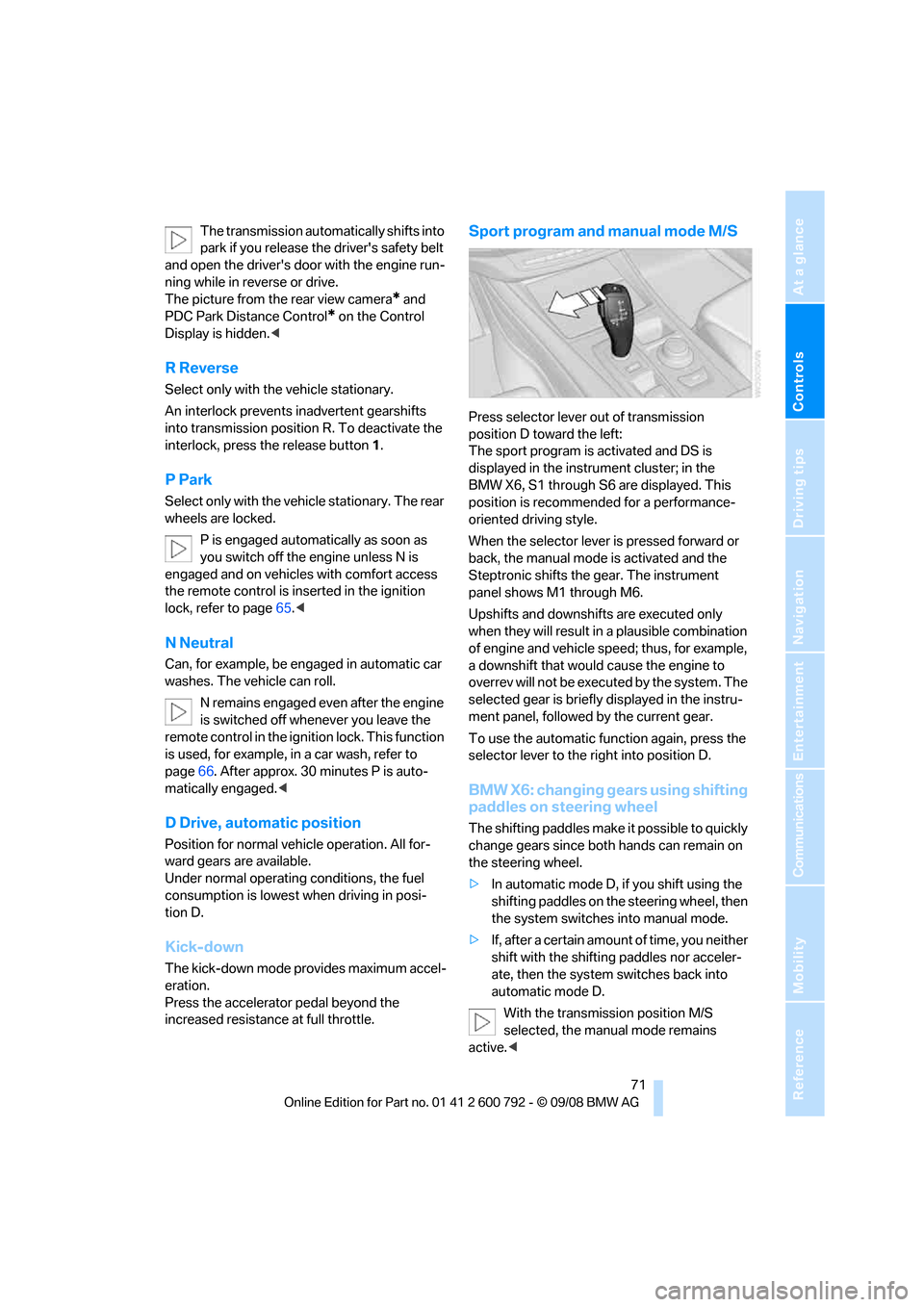
Sport program and manual mode M/S
Press selector lever out of transmission
position D toward the left:
The sport program is activated and DS is
displayed in the instru ment cluster; in the
BMW X6, S1 through S6 are displayed. This
position is recommend ed for a performance-
oriented driving style.
When the selector lever is pressed forward or
back, the manual mode is activated and the
Steptronic shifts the gear. The instrument
panel shows M1 through M6.
Upshifts and downshifts are executed only
when they will result in a plausible combination
of engine and vehicle speed; thus, for example,
a downshift that would cause the engine to
overrev will not be executed by the system. The
selected gear is briefly displayed in the instru-
ment panel, followed by the current gear.
To use the automatic func tion again, press the
selector lever to the right into position D.
BMW X6: changing gears using shifting
paddles on steering wheel
The shifting paddles make it possible to quickly
change gears since both hands can remain on
the steering wheel.
> In automatic mode D, if you shift using the
shifting paddles on the steering wheel, then
the system switches into manual mode.
> If, after a certain amount of time, you neither
shift with the shifting paddles nor acceler-
ate, then the system switches back into
automatic mode D.
With the transmission position M/S
selected, the manual mode remains
active.<
Page 75 of 317
Controls
73Reference
At a glance
Driving tips
Communications
Navigation
Entertainment
Mobility
Locking
1.Pull out the releasing tool.
The transmission lock is engaged again.
2. If necessary, insert the lock
* and lock it.
3. Close the cover in th e bottom of the cup
holder and lay in the mat again.
4. Close the cover of the cup holder and stow
the releasing tool.
Information on jump starting and towing, from
page 280.
Turn signals/headlamp
flasher/high beams
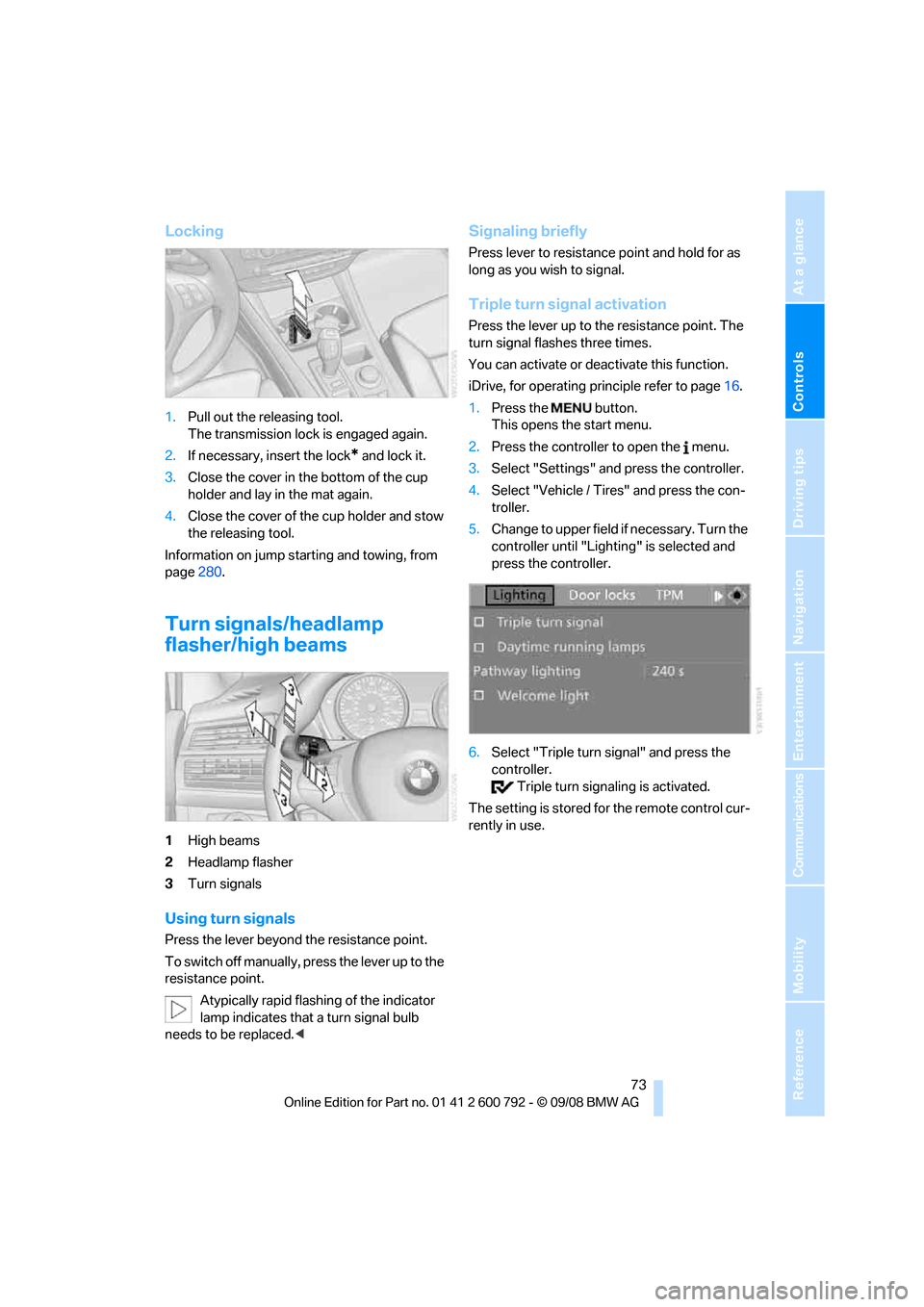
1High beams
2 Headlamp flasher
3 Turn signals
Using turn signals
Press the lever beyond the resistance point.
To switch off manually, pr ess the lever up to the
resistance point.
Atypically rapid flashi ng of the indicator
lamp indicates that a turn signal bulb
needs to be replaced. <
Signaling briefly
Press lever to resistance point and hold for as
long as you wish to signal.
Triple turn signal activation
Press the lever up to the resistance point. The
turn signal flashes three times.
You can activate or deac tivate this function.
iDrive, for operating pr inciple refer to page16.
1. Press the button.
This opens the start menu.
2. Press the controller to open the menu.
3. Select "Settings" and press the controller.
4. Select "Vehicle / Tire s" and press the con-
troller.
5. Change to upper field if necessary. Turn the
controller until "Lighting" is selected and
press the controller.
6. Select "Triple turn signal" and press the
controller.
Triple turn sign aling is activated.
The setting is stored for the remote control cur-
rently in use.
Page 76 of 317
Driving
74
Washer/wiper system
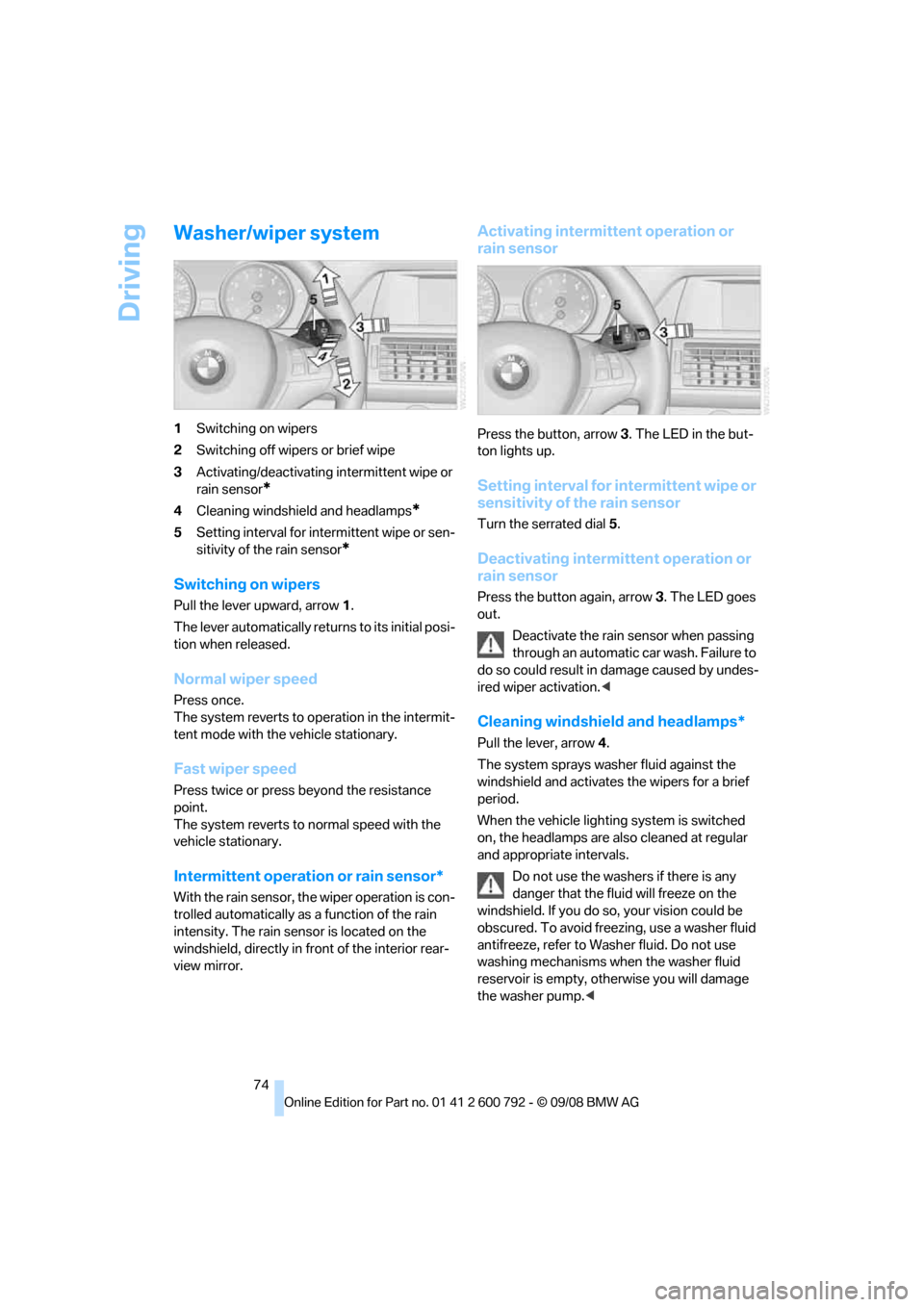
1Switching on wipers
2 Switching off wipers or brief wipe
3 Activating/deactivating intermittent wipe or
rain sensor
*
4Cleaning windshield and headlamps*
5Setting interval for inte rmittent wipe or sen-
sitivity of the rain sensor
*
Switching on wipers
Pull the lever upward, arrow 1.
The lever automatically retu rns to its initial posi-
tion when released.
Normal wiper speed
Press once.
The system reverts to op eration in the intermit-
tent mode with the vehicle stationary.
Fast wiper speed
Press twice or press beyond the resistance
point.
The system reverts to normal speed with the
vehicle stationary.
Intermittent operation or rain sensor*
With the rain sensor, th e wiper operation is con-
trolled automatically as a function of the rain
intensity. The rain sensor is located on the
windshield, directly in fr ont of the interior rear-
view mirror.
Activating intermittent operation or
rain sensor
Press the button, arrow 3. The LED in the but-
ton lights up.
Setting interval for intermittent wipe or
sensitivity of the rain sensor
Turn the serrated dial 5.
Deactivating intermittent operation or
rain sensor
Press the button again, arrow 3. The LED goes
out.
Deactivate the rain sensor when passing
through an automatic car wash. Failure to
do so could result in damage caused by undes-
ired wiper activation. <
Cleaning windshield and headlamps*
Pull the lever, arrow4.
The system sprays washer fluid against the
windshield and ac tivates the wipers for a brief
period.
When the vehicle lighting system is switched
on, the headlamps are also cleaned at regular
and appropriate intervals.
Do not use the washers if there is any
danger that the fluid will freeze on the
windshield. If you do so, your vision could be
obscured. To avoid freezing, use a washer fluid
antifreeze, refer to Wash er fluid. Do not use
washing mechanisms when the washer fluid
reservoir is empty, ot herwise you will damage
the washer pump.<