brake light BMW X6M 2009 E71 User Guide
[x] Cancel search | Manufacturer: BMW, Model Year: 2009, Model line: X6M, Model: BMW X6M 2009 E71Pages: 317, PDF Size: 9.56 MB
Page 101 of 317
Controls
99Reference
At a glance
Driving tips
Communications
Navigation
Entertainment
Mobility
Displays* in instrument panel
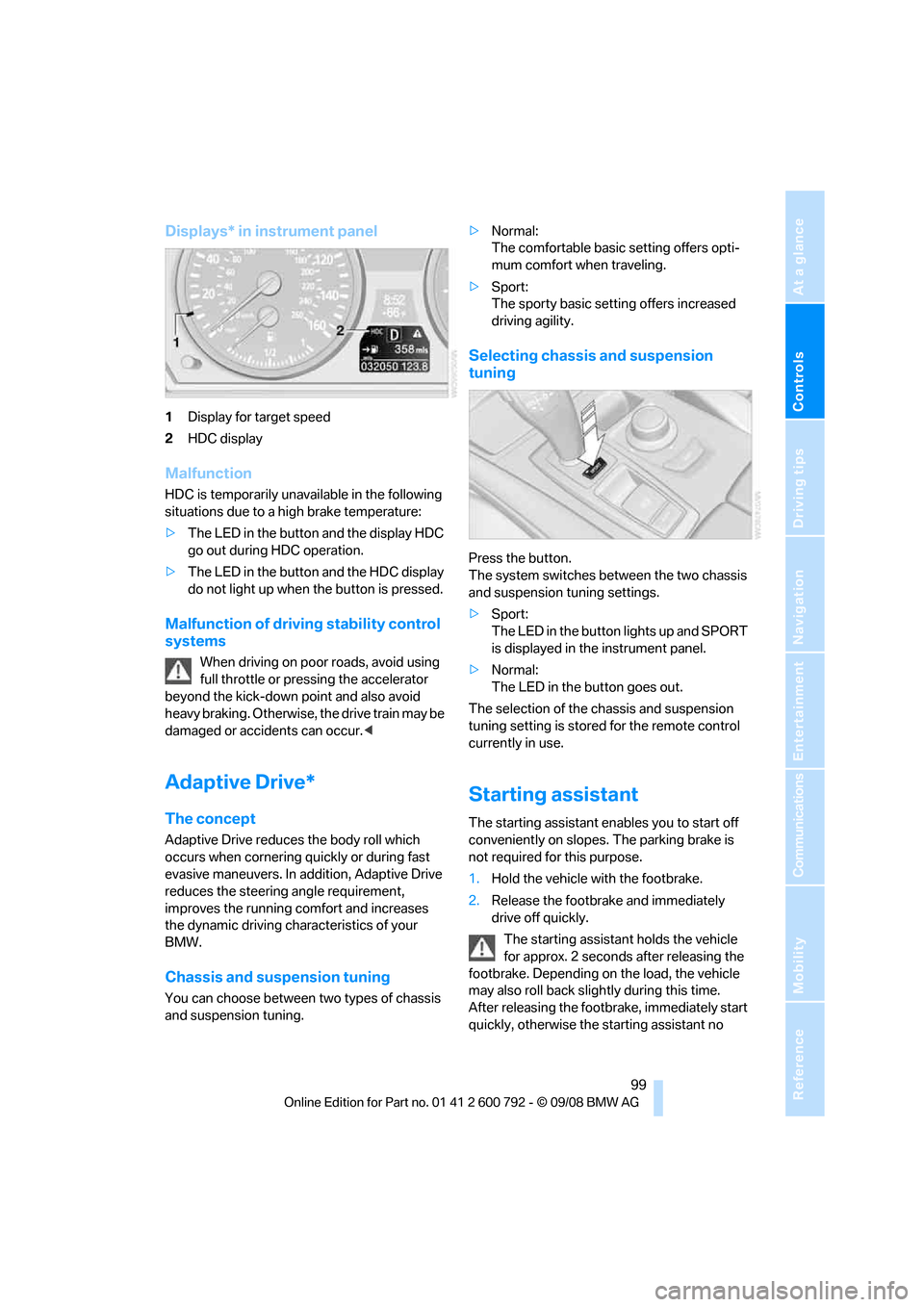
1Display for target speed
2 HDC display
Malfunction
HDC is temporarily unavailable in the following
situations due to a high brake temperature:
>The LED in the button and the display HDC
go out during HDC operation.
> The LED in the button and the HDC display
do not light up when the button is pressed.
Malfunction of driving stability control
systems
When driving on poor roads, avoid using
full throttle or pressing the accelerator
beyond the kick-down point and also avoid
heavy braking. Otherwise, the drive train may be
damaged or accidents can occur. <
Adaptive Drive*
The concept
Adaptive Drive reduces the body roll which
occurs when cornering qu ickly or during fast
evasive maneuvers. In addition, Adaptive Drive
reduces the steering angle requirement,
improves the running comfort and increases
the dynamic driving characteristics of your
BMW.
Chassis and susp ension tuning
You can choose between two types of chassis
and suspension tuning. >
Normal:
The comfortable basic setting offers opti-
mum comfort when traveling.
> Sport:
The sporty basic setting offers increased
driving agility.
Selecting chassis and suspension
tuning
Press the button.
The system switches between the two chassis
and suspension tuning settings.
>Sport:
The LED in the button lights up and SPORT
is displayed in the instrument panel.
> Normal:
The LED in the button goes out.
The selection of the chassis and suspension
tuning setting is stored for the remote control
currently in use.
Starting assistant
The starting assistant en ables you to start off
conveniently on slopes. The parking brake is
not required fo r this purpose.
1. Hold the vehicle with the footbrake.
2. Release the footbrake and immediately
drive off quickly.
The starting assistant holds the vehicle
for approx. 2 seconds after releasing the
footbrake. Depending on the load, the vehicle
may also roll back slight ly during this time.
After releasing the footbrake, immediately start
quickly, otherwise the starting assistant no
Page 142 of 317
Things to remember when driving
140
planing, and is characterized by a partial or
complete loss of contac
t between the tires and
the road surface, ultima tely undermining your
ability to steer and brake the vehicle. <
The risk of hydroplaning increases as the tread
depth of the tires decreases, also refer to Mini-
mum tread depth on page 255.
Driving through water
Maximum water depth:
>BMW X5 20 in/50 cm
> BMW X6 17 in/45 cm
Only drive through water up to the above-
mentioned depth at no greater than walk-
ing speed; otherwise, the engine, electrical sys-
tem, and transmission can be damaged. <
Braking safely
Your BMW is equipped with ABS as a standard
feature. In situations that require it, it is best to
brake with full force. Since the vehicle maintains
steering responsiveness, you can still avoid
possible obstacles with a minimum of steering
effort.
Pulsation of the brake pedal, combined with
sounds from the hydraulic circuits, indicate that
ABS is in its active mode.
Do not drive with your foot resting on the
brake pedal. Even light but consistent
pedal pressure can lead to high temperatures,
brake wear and possibly even brake failure.<
Driving in wet conditions
When roads are wet or there is heavy rain,
briefly exert gentle pre ssure on the brake pedal
every few miles. Monitor traffic conditions to
ensure that this maneuver does not endanger
other road users. The heat generated in this
process helps dry the pads and rotors to ensure
that full braking efficiency will then be available
when you need it.
Hills
To prevent overheating and the resulting
reduced efficiency of the brake system,
drive long or steep downhill gradients in the gear in which the least br
aking is required. Even
light but consistent pressure on the brake pedal
can lead to high temperatures, brake wear and
possibly even brake failure. <
The braking effect of the engine can be further
increased by downshifting in the manual mode
of the automatic transmis sion, if necessary into
first gear, refer to page 71. This prevents an
excessive strain on the brakes.
Do not drive in idle or with the engine
stopped, otherwise there will be no
engine braking action or support of the braking
force and steering.
Never allow floor mats, carpets or any other
objects to protrude into the area of movement
of the pedals and impair their operation. <
Corrosion on brake rotors
When the vehicle is driven only occasionally,
during extended periods when the vehicle is not
used at all, and in op erating conditions where
brake applications are less frequent, there is an
increased tendency for corrosion to form on
rotors, while contaminan ts accumulate on the
brake pads. This occurs because the minimum
pressure which must be exerted by the pads
during brake applications to clean the rotors is
not reached.
Should corrosion form on the brake rotors, the
brakes will tend to re spond with a pulsating
effect that even extended application will fail to
cure.
When vehicle is parked
Condensation forms in the automatic climate
control system during operation, and then exits
under the vehicle. Traces of condensed water
under the vehicle are therefore normal.
Before driving into a car wash
Fold in the exterior mirrors, refer to page 57,
otherwise they could be damaged due to the
width of the vehicle.
Release the parking brake, particularly when
you have activated Auto matic Hold, refer to
page 67.
Page 146 of 317
Things to remember when driving
144
Driving on poor roads
Your BMW is at home on all roads and surfaces.
It combines a 4-wheel drive system with the
advantages of a normal passenger car.Do not drive on unpaved terrain, as other-
wise the vehicle may be damaged. <
When you are driving on poor roads, there are a
few points which you shou ld strictly observe for
your own safety, for that of your passengers,
and for the safety of the vehicle:
> Familiarize yourself wi th the vehicle before
driving off and avoid taking risks at all costs.
> Adapt your driving spee d to the road condi-
tions. The steeper and rougher the road
surface is, the lower the speed should be.
> If you want to drive on very steep uphill or
downhill gradients, ma ke sure beforehand
that the engine oil and coolant levels are
near the MAX mark, refer to page 259.
BMW X5: you can operate your vehicle on
uphill and downhill gradients with a maxi-
mum slope of 50 %.
> On very steep downhill slopes, use Hill
Descent Control HDC, refer to page 98.
BMW X5: it is possible to start off on inclines
of up to 33 %. The permissible body roll is
50 %.
> While driving, watch carefully for obstacles
such as rocks or holes. Try to avoid these
obstacles whenev er possible.
> Make sure that the undercarriage does not
touch the ground, for example on crests and
bumpy roads. The ground clearance of the
vehicle is a maximum of approx. 8 in/20 cm.
Please note that the ground clearance can
vary depending on lo ading and the driving
conditions of the vehicle.
> Only drive through road surface water up to
a maximum water depth of
> BMW X5 20 in/50 cm
> BMW X6 17 in/45 cm
and only drive at walking speed; do not
remain stationary. >
After driving through water at low speed,
lightly press the brake pedal several times
to dry the brakes and to prevent the braking
effect from being reduced by wetness.
> Depending on the condition of the surface,
it may be practical to briefly activate DTC,
refer to DTC Dynamic Traction Control on
page 97.
> If the drive wheels spin on one side, depress
the accelerator pedal su fficiently so that the
driving stability control systems can distrib-
ute the drive forces to the individual wheels.
Please note the following points after driving on
poor roads to maintain the driving safety of your
BMW:
> Clean the coarsest dirt from the body.
> Clean mud, snow, ice etc. from the wheels
and tires and check the tires for damage.
Page 272 of 317
Replacing components
270
When performing care and maintenance on the
headlamps, please observe the information on
page
266.
For bulbs for which replacement is not
described and for checking and adjusting
headlamp aim, please contact your BMW
Sports Activity Vehicle Center. <
Light-emitting diodes LEDs
Light-emitting diodes installed behind translu-
cent lenses serve as the light source for many of
the controls and displays in your vehicle. These
light-emitting diodes, which operate using a
concept similar to that applied in conventional
lasers, are officially designated as Class 1 light-
emitting diodes.
Do not remove the covers, and never
stare into the unfilter ed light for several
hours, as irritation of the retina could result. <
BMW X5: changing lamps
Xenon light
These bulbs have a very long service life and
the probability of a failure is very low. If one of
these bulbs should nevertheless fail, it is possi-
ble to continue driving with great caution using
the fog lamps, provided traffic laws in your area
do not prohibit this.
Have work on the xenon light unit includ-
ing changing the bulb carried out only by
your BMW Sports Activity Vehicle Center or a
workshop that works according to BMW repair
procedures with correspondingly trained per-
sonnel. Due to the high voltage present in the
system, there is a danger of fatal injuries when
work is carried out improperly.<
Halogen bulbs:
Parking lamps and roadside parking
lamps, daytime driving lamps
35-Watt bulb, H8
The bulb is pressurized. Therefore, wear
safety glasses and protective gloves.
Otherwise there is a danger of injuries if the bulb is accidentally
damaged during replace-
ment. <
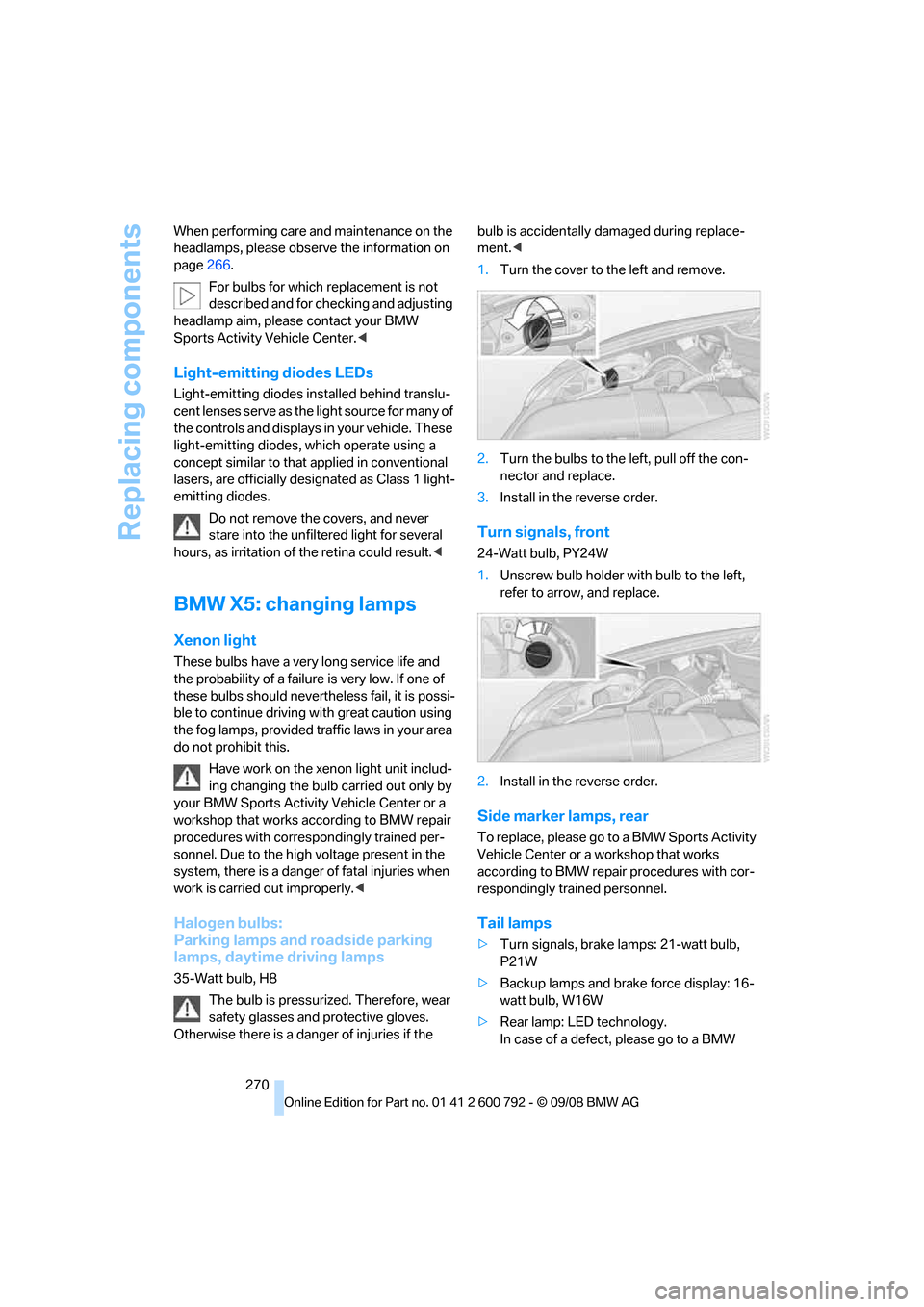
1. Turn the cover to the left and remove.
2. Turn the bulbs to the left, pull off the con-
nector and replace.
3. Install in the reverse order.
Turn signals, front
24-Watt bulb, PY24W
1.Unscrew bulb holder with bulb to the left,
refer to arrow, and replace.
2. Install in the reverse order.
Side marker lamps, rear
To replace, please go to a BMW Sports Activity
Vehicle Center or a workshop that works
according to BMW repair procedures with cor-
respondingly trained personnel.
Tail lamps
> Turn signals, brake lamps: 21-watt bulb,
P21W
> Backup lamps and brake force display: 16-
watt bulb, W16W
> Rear lamp: LE D technology.
In case of a defect, please go to a BMW
Page 275 of 317
Mobility
273Reference
At a glance
Controls
Driving tips
Communications
Navigation
Entertainment
the fog lamps, provided traffic laws in your area
do not prohibit this.
Have work on the xenon light unit includ-
ing changing the bulb carried out only by
your BMW Sports Activity Vehicle Center or a
workshop that works according to BMW repair
procedures with corres pondingly trained per-
sonnel. Due to the high voltage present in the
system, there is a danger of fatal injuries when
work is carried out improperly. <
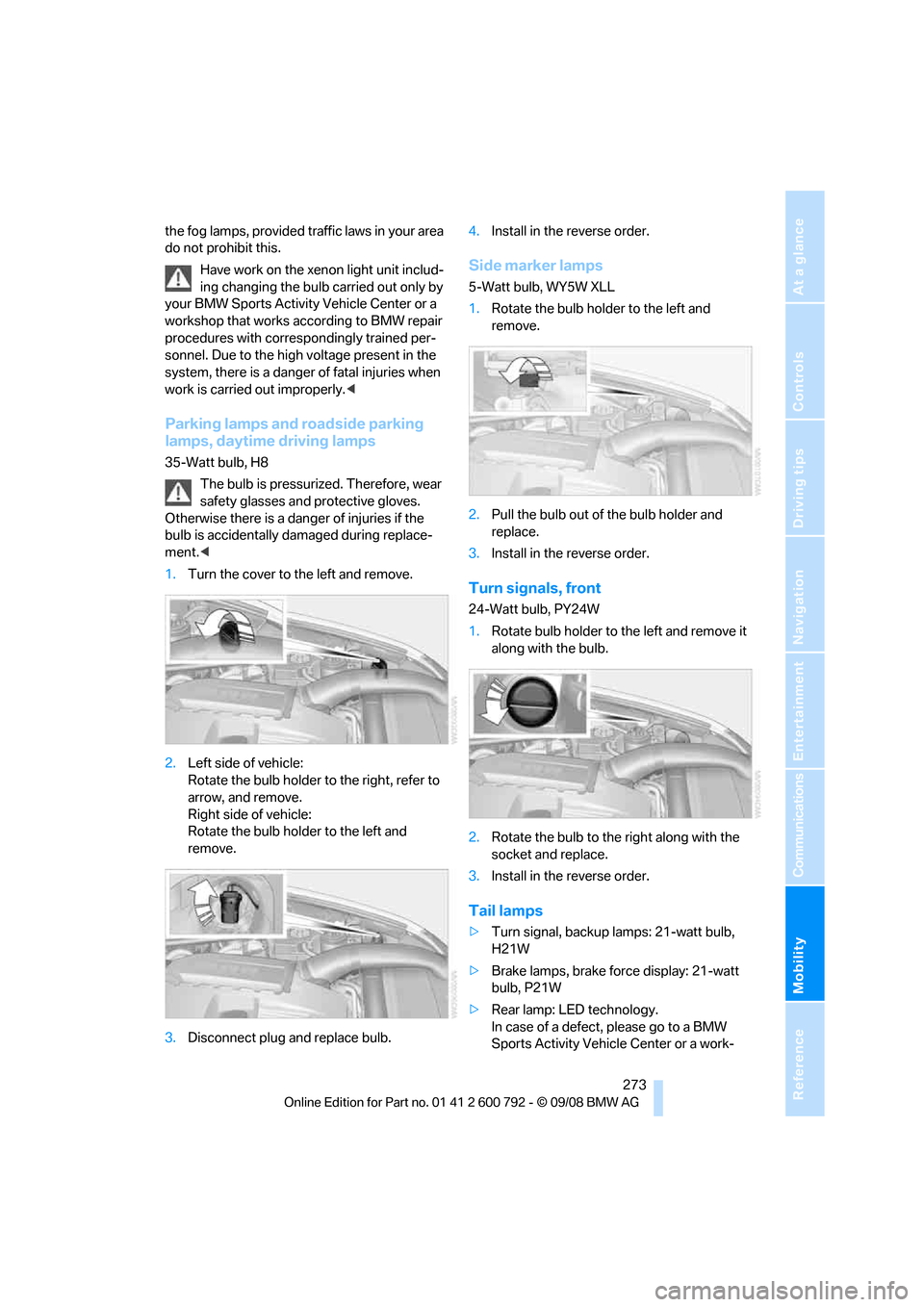
Parking lamps and roadside parking
lamps, daytime driving lamps
35-Watt bulb, H8
The bulb is pressurized. Therefore, wear
safety glasses and protective gloves.
Otherwise there is a dang er of injuries if the
bulb is accidentally damaged during replace-
ment. <
1. Turn the cover to th e left and remove.
2. Left side of vehicle:
Rotate the bulb holder to the right, refer to
arrow, and remove.
Right side of vehicle:
Rotate the bulb hold er to the left and
remove.
3. Disconnect plug and replace bulb. 4.
Install in the reverse order.
Side marker lamps
5-Watt bulb, WY5W XLL
1.Rotate the bulb hold er to the left and
remove.
2. Pull the bulb out of the bulb holder and
replace.
3. Install in the reverse order.
Turn signals, front
24-Watt bulb, PY24W
1.Rotate bulb holder to the left and remove it
along with the bulb.
2. Rotate the bulb to th e right along with the
socket and replace.
3. Install in the reverse order.
Tail lamps
>Turn signal, backup lamps: 21-watt bulb,
H21W
> Brake lamps, brake force display: 21-watt
bulb, P21W
> Rear lamp: LED technology.
In case of a defect, please go to a BMW
Sports Activity Vehicle Center or a work-
Page 298 of 317
Everything from A to Z
296
Everything from A to Z
Index
"..." Identifies Control Display texts used to select
individual functions, and
indicates where to find them
in the text.
A
ABS Antilock Brake System 96
Accessories 6
Access to 3rd row seats 54
Acoustic signal, refer to Check Control 85
Activated-charcoal filter 119
"Activation time" for parked- car ventilation 122
Active seat 57
Active seat ventilation 56
Active steering 104
– malfunction 104
– warning lamp 104
Adaptive brake lamp, brake force display 105
Adaptive Drive 99
Adaptive fixing system 133
Adaptive Head Light 112
"Add digits" for mobile phone 228
Address for navigation
– deleting 159
– entering 151,158
– selecting 159
– storing 158
– storing current position 158
"Add to destination list" 153
Adjusting confirmation signals for locking and unlocking 31
Adjusting opening
height 34,36, 37 Adjusting temperature with
expanded-scope automatic
climate control 116
Adjusting the tone during audio operation, refer to
Tone control 175
Adjusting thigh support 49,50
"After door opened" 51
"After unlocking" 51
Airbags 105
– sitting safely 48
– warning lamp 107
Air distribution
– automatic 115,120
– manual 116
Airing, refer to Ventilation 118
Air recirculation 117
– AUC Automatic recirculated-air control 117
– recirculated-air mode 117
"Air recirculation on / off" 59
Air vents 11
4
– refer to Ventilation 118
Air vents of automatic climate control 114
Air volume 116,120
AKI, refer to Fuel specifications 245
Alarm system 38
– avoiding unintentional alarms 39
– interior motion sensor 39
– switching off alarm 38
– switching off tilt alarm sensor and interior motion
sensor 39
– tilt alarm sensor 39
"All channels" in Satellite
radio 185
"All doors" 30
Alloy wheels 267 All-season tires, refer to
Winter tires 257
"All stations" displaying in
radio mode, 178
All-wheel drive, refer to xDrive 97
Alterations, tech nical, refer to
For your own safety 5
"AM", reception
range 175,178
"Angle of view"
– DVD changer 197
– DVD system in rear 209
Antenna for mobile phone 220
Antifreeze
– coolant 262
– washer fluid 75
Antilock Brake System
ABS 96
Anti-theft system
– refer to Alarm system 38
– refer to Central locking system 29
Approved axle weights, refer
to Weights 289
Approved engine oils 262
Approved gross vehicle
weight, refer to Weights 289
Armrest, refer to Center armrest, front 127
Around the center console 14
Around the steering wheel 10
Arrival time
– refer to Computer 80
– refer to Starting destination guidance 162
"Arrow display" in navigation 163
"Arrow display pop-up
instructions" 149
Arrow view for navigation system 163
Page 300 of 317
Everything from A to Z
298
"BMW
Assist" 236,237, 238, 239
BMW Assist
– activating 240
– concierge service 239
– contacting BMW Customer Relations 238
– offered services 235
– roadside assistance 236
– TeleServices 237
"BMW Contact" 230
"BMW Contact Numbers" 230
BMW homepage 4
BMW maintenance system 263
"BMW Service settings" 241
BMW Teleservice call
– automatic 237
– manual 237
BMW TeleServices 237
BMW TeleServices services
– displaying 238
– updating 238
BMW website 4
Bottle holder, refer to Cup holders 127
Brake assistant 96
Brake force display 105
Brake lamps
– brake force display 105
– replacing bulbs 270,273
Brake rotors 140
Brakes
– ABS Antilock Brake System 96
– brake assistant 96
– brake force display 105
– breaking-in 138
– CBC Cornering Brake
Control 96
– electronic brake-force distribution 96
– parking brake 67
– refer to Braking safely 140
– warning lamp 13 Brake system
138
– brake pads 138
– breaking-in 138
– disk brakes 140
Braking safely 140
Breakdown, Flat Tire Monitor 100
Breakdown services, refer to
Roadside Assistance 280
Breaking-in brake pads 138
Breaking-in d
ifferential 138
Break-in period 138
"Brightness" 89
– DVD changer 196
– DVD system in rear 208
Brightness
– of Control Display 89
– of the rear view camera 95
– on Head-Up Display 108
"Brightness / Position" 108
Button for starting engine 65
Buttons on steering wheel 11
Bypassing traffic congestion 169
C
Calibrating driver's seat 55
California Proposition 65 Warning 6
"Call" 228,239
Call
– accepting 226
– displaying accepted 229
– ending 227
– in absence 229
– starting 227
Calling
– from phone book 228
– from Top 8 list 229
– redialing 229
– refer to telephone operating instructions
Camera, refer to Rear view camera 93
"Camera picture and PDC" 95"Camera view
– full screen"
95
– main window" 95
Can holder, refer to Cup holders 127
Capacities 290
Capacity of cargo bay 289
Car battery, refer to Vehicle
battery 277
"Car Data" 81
Care 265
– car-care products 265
– carpets 267
– car washes 265
– CD/DVD-player 268
– chrome components 266
– displays 268
– exterior 265
– fine wooden
components 267
– hand washing 266
– headlamps 266
– high-pressure cleaning jets 266
– interior 267
– leather 267
– light-alloy wheels 267
– paint 266
– plastic components 267
– rubber gaskets 266
– running boards 267
– safety belts 268
– sensors and cameras 267,268
– upholstery materials and cloth-covered paneling 267
– windows 266
–
wiper blades 266
Cargo
– refer to Loading 141
– securing 143
– securing with ski bag 134
Cargo area, refer to Cargo
bay 130
Cargo area cover, refer to Roll- up cover 130
Page 301 of 317
Reference 299
At a glance
Controls
Driving tips
Communications
Navigation
Entertainment
Mobility
Cargo bay
– capacity289
– emergency operation, refer to Opening manually 33,36
– expanding 132
– opening/closing, refer to Liftgate 33,35
– opening/closing, refer to
Tailgate 35
– opening from inside 33,36
– opening from outside 33,36
– opening with remote control 30
Cargo bay cover, refer to Roll- up cover 130
Caring for the vehicle
finish 266
Car key, refer to Keys/remote control 28
Car phone 220
– installation location, refer to Center armrest, front 127
– refer to Mobile phone 220
– refer to separate operating instructions
Car radio, refer to Radio 178
Car wash 140,265
– before driving in 66
– with comfort access 41
Catalytic converter, refer to Hot exhaust system 139
"Categories" in Satellite radio 185
CBC Cornering Brake
Control 96
CBS Condition Based Service 263
"CD" 175,187
– for DVD system in rear 206
CD, refer to Playing audio
tracks, DVD system in
rear 210
CD/DVD player, DVD system
in rear 205 CD changer
187
– compressed audio files 187
– controls 174
– fast forward/reverse 190
– random sequence 190
– repeating a track 189
– sampling tracks 189
– selecting a CD 187
– selecting a track 188
– switching on/off 174
– ton
e control 175
– volume 175
CD player 187
– compressed audio files 187
– controls 174
– fast forward/reverse 190
– random sequence 190
– repeating a track 189
– sampling tracks 189
– selecting a track 188
– switching on/off 174
– tone control 175
– volume 175
Cell phone
– refer to Mobile phone
Center armrest
– front 127
– rear 130
Center brake lamp 272,275
Center console 14
Central locking system 29
– comfort access 39
– from inside vehicle 32
Changes, technical
– refer to For your own safety 5
– refer to Parts and
accessories 6
Changing gears using shift paddles 71
Changing language on Control Display 90
Changing tires 256
Changing units of measure on Control Display 89
Changing wheels 275
Check Control 85
"Check Control messages" 86 Checking the air pressure,
refer to Tire inflation
pressure 249
Children, transporting 61
Child restraint devices 61
Child restraint fixing system LATCH 62
Child restraint systems 61
Child-safety locks 64
Child seats 61
Chime, refer to Check
Control 85
Cigarette lighter, refer to
Lighter 129
Cleaning your BMW, refer to Care 265
"Climate" 56
Clock 78
– 12h/24h mode 89
– setting tim
e 88
Closing
– from inside 32
– using remote control 29
Closing fuel filler cap 244
Clothes hooks 127
Cockpit 10
Cold start, refer to Starting engine 66
"Color" in DVD system in rear 208
Comfort access 39
– observe in car wash 41
– replacing battery 41
Comfort area, refer to Around
the center console 14
Comfort start, refer to Starting engine 66
"Communication" 226 ,236, 237, 238,239
Compact Disc
– refer to CD changer 187
– refer to CD player 187
Compact wheel
– inflation pressure 251
– wheel change 275
Compartment for remote
control, refer to Ignition
lock 65
Page 305 of 317
Reference 303
At a glance
Controls
Driving tips
Communications
Navigation
Entertainment
Mobility
Flat tire
– changing wheels275
– compact wheel 275
– Flat Tire Monitor 100
– run-flat tires 101,103, 256
– TPM Tire Pressure Monitor 101
Flat Tire Monitor FTM 100
Fluid reservoir, refer to Filler neck for washer fluid 75
"FM", reception
range 175,178
FM, waveband 178
Fog lamps 112
– indicator lamp 13,112
Folding display screen open/
closed, DVD system in
rear 204
Folding rear seat backrest 132
Footbrake, refer to Braking safely 140
Footwell lamps 113
For your own safety 5
4-wheel drive system, refer to xDrive 97
Front airbags 105
Front passenger airbags 105
– deactivating 106
– refer to Exception of front passenger seat 61
Front seat adjustment 49
FTM Flat Tire Monitor 100
– false alarms 100
– indicating a flat tire 101
– initializing the system 100
– snow chains 257
– system limits 100
– warning lamp 101
Fuel 245
– capacity 290
– display 80
– high-quality brands 245
– quality 245
– saving 138
– specifications 245
Fuel clock, refer to Fuel
gauge 80 Fuel consumption display
– computer, average fuel
consumption 80
Fuel display, refer to Fuel gauge 80
Fuel filler door 244
– closing 24
4
– opening 244
– releasing manually 244
Fuses 278
G
Garage door opener, refer to
Integrated universal remote
control 123
Gasoline, refer to Required fuel 245
Gasoline display, refer to Fuel
gauge 80
Gearshifts, automatic transmission with
Steptronic 71
General driving notes 138,139
Glass sunroof
– convenience operation from outside 32
– convenience operation with comfort access 40
– remote control 30
Glass sunroof, electric 45
– moving manually 46
– opening, closing 45
– power interruption 46
– raising 45
Glove compartment 126
– lighting 126
GPS navigation, refer to Navigation system 148
Grills, refer to Ventilation 118
Grills of the automatic climate control 114
Gross vehicle weight, refer to Weights 289
H
Handbrake, refer to Parking
brake 67
Hands-free system, refer to
Microphone 14
Hand washing 266
Have diesel exhaust fluid
refilled 246
Hazard warning flashers 15
HDC Hill Descent Control 98
"HD radio" 181
HD radio, refer to High
Definition Radio 181
Head airbags 105
Headlamp control,
automatic 110
Headlamp flasher 73
Headlamps 110
– cleaning, refer to Washer/ wiper system 74
– replacing bulbs 269
Head Light, refer to Adaptive Head Light 112
Head restraints 52
– sitting safely 48
"Head-Up Display" 108
Head-Up Display 107
Heated
– mirrors 58
– rear window 116
– seats 55,56
– steering wheel 59
Heating 114
– exterior mirrors 58
– interior 114
– rear window 116
– residual heat 118
– seats 55,56
– steering wheel 59
Heating with engine switched off, refer to Residual
heat 118
Heavy cargo, refer to Securing cargo 143
Height, refer to
Dimensions 287
Page 306 of 317
Everything from A to Z
304
Height adjustment
– seats
49
– steering wheel 58
High beams 73,112
– headlamp flasher 73
– indicator lamp 13
High Definition Radio 181
High-pressure cleaning
jets 266
Highs, refer to Treble and bass 175
High water, refer to Driving through water 140
Highway, refer to Route criteria 160
Hill Descent Control HDC 98
Hills 140
Holder for cups 127
Home address 160
"Home address" in navigation 160
Homepage 4
Hood 258
Horn 10
Hot exhaust system 139
"Hour memo" 88
"House number" for destination entry 153
Hydraulic brake assistant, refer to Brake assistant 96
Hydroplaning 139
I
IBOC, refer to High Definition
Radio 181
Ice, refer to Outside
temperature warning 78
Ice warning, refer to Outside temperature warning 78
ID3 tag, refer to Information on track 188
Identification, tire 257
Identification mark, run-flat tires 256 iDrive
16
– assistance window 20
– changing language 90
– changing menu page 19
– changing settings 88
– changing units of measure and display type 89
– confirming selection or
entry 19
– controller 16
– controls 16
– displays, menus 17
– selecting menu item 19
– setting brightness 89
– setting date 89
– setting time 88
– start menu 17
– status information 20
– symbols 18
Ignition 65
– switched off 65
– switched on 65
Ignition key, refer to Keys/ remote control 28
Ignition key position 1, refer to
Radio readiness 65
Ignition key position 2, refer to Ignition on 65
Ignition lock 65
– starting engine with comfort access 40
Indicator/warning lamps 13
– active steering 104
– airbags 107
– DSC 13,97
– DTC 97
– fasten safety belt 55
– Flat Tire Monitor 101
– fog lamps 13
– TPM Tire Pressure
Monitor 103
Individual air distribution 117
Individually programmable
buttons on steering
wheel 59
Individual settings, refer to
Personal Profile 28
I
nflation pressure, refer to Tire inflation pressure 249Inflation pressure monitoring
– refer to FTM Flat Tire
Monitor 100
– refer to TPM Tire Pressure Monitor 101
Information
– on another location 156
– on country 156
– on current position 156
– on destination location 156
"Information on
destination" 157
"Info sources" 83
Initializing
– Flat Tire Monitor 100
– refer to Power failure 278
– refer to Setting date 89
– refer to Setting time 88
– seat, mirror and steering
wheel memory 50
Installation location
– drive for navigation DVD 148
– DVD changer 193
– mobile phone 127
Instructions for navigation
system, refer to Voice
instructions 165
Instrument cluster
– refer to Cockpit 10
– refer to Instrument panel 12
Instrument illumination, refer
to Instrument lighting 113
Instrument lighting 113
Instrument panel 12
– refer to Cockpit 10
Integrated key 28
Integrated universal remote
control 123
Interesting destination for navigation 156
"Interim time" 87
Interior lamps 113
– switching on with remote
control 30
Interior motion sensor 39
– switching off 39