lock BMW X6M 2009 E71 Service Manual
[x] Cancel search | Manufacturer: BMW, Model Year: 2009, Model line: X6M, Model: BMW X6M 2009 E71Pages: 317, PDF Size: 9.56 MB
Page 132 of 317
Practical interior accessories
130
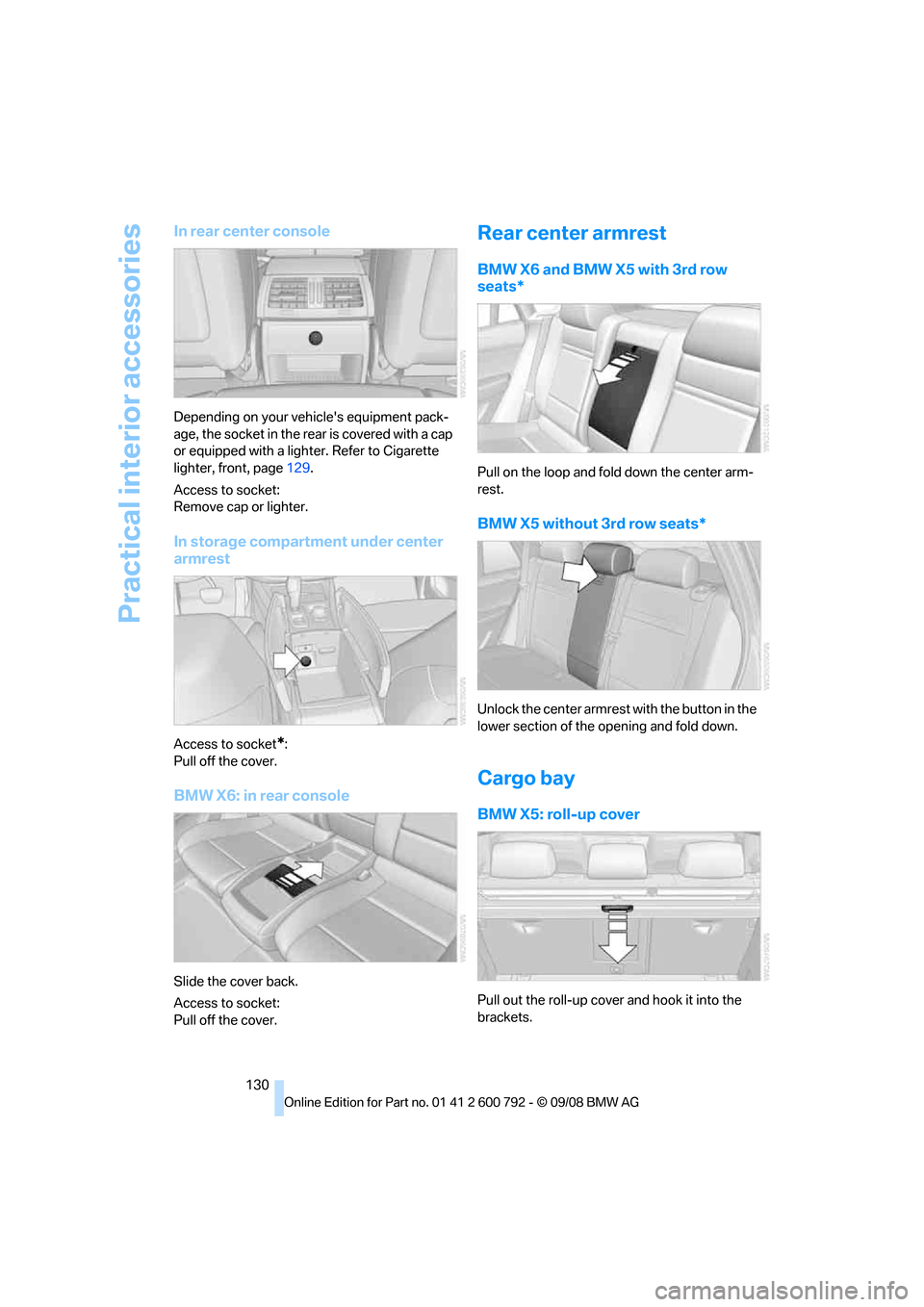
In rear center console
Depending on your vehicle's equipment pack-
age, the socket in the rear is covered with a cap
or equipped with a lighter. Refer to Cigarette
lighter, front, page 129.
Access to socket:
Remove cap or lighter.
In storage compartment under center
armrest
Access to socket*:
Pull off the cover.
BMW X6: in rear console
Slide the cover back.
Access to socket:
Pull off the cover.
Rear center armrest
BMW X6 and BMW X5 with 3rd row
seats*
Pull on the loop and fold down the center arm-
rest.
BMW X5 without 3rd row seats*
Unlock the center armrest with the button in the
lower section of the opening and fold down.
Cargo bay
BMW X5: roll-up cover
Pull out the roll-up cover and hook it into the
brackets.
Page 133 of 317
Controls
131Reference
At a glance
Driving tips
Communications
Navigation
Entertainment
Mobility
Do not place heavy or hard objects on the
roll-up cover. If you do so, they may
already pose a danger to vehicle occupants dur-
ing braking or evasive maneuvers.
Do not allow the roll-up cover to snap back, oth-
erwise it can be damaged. <
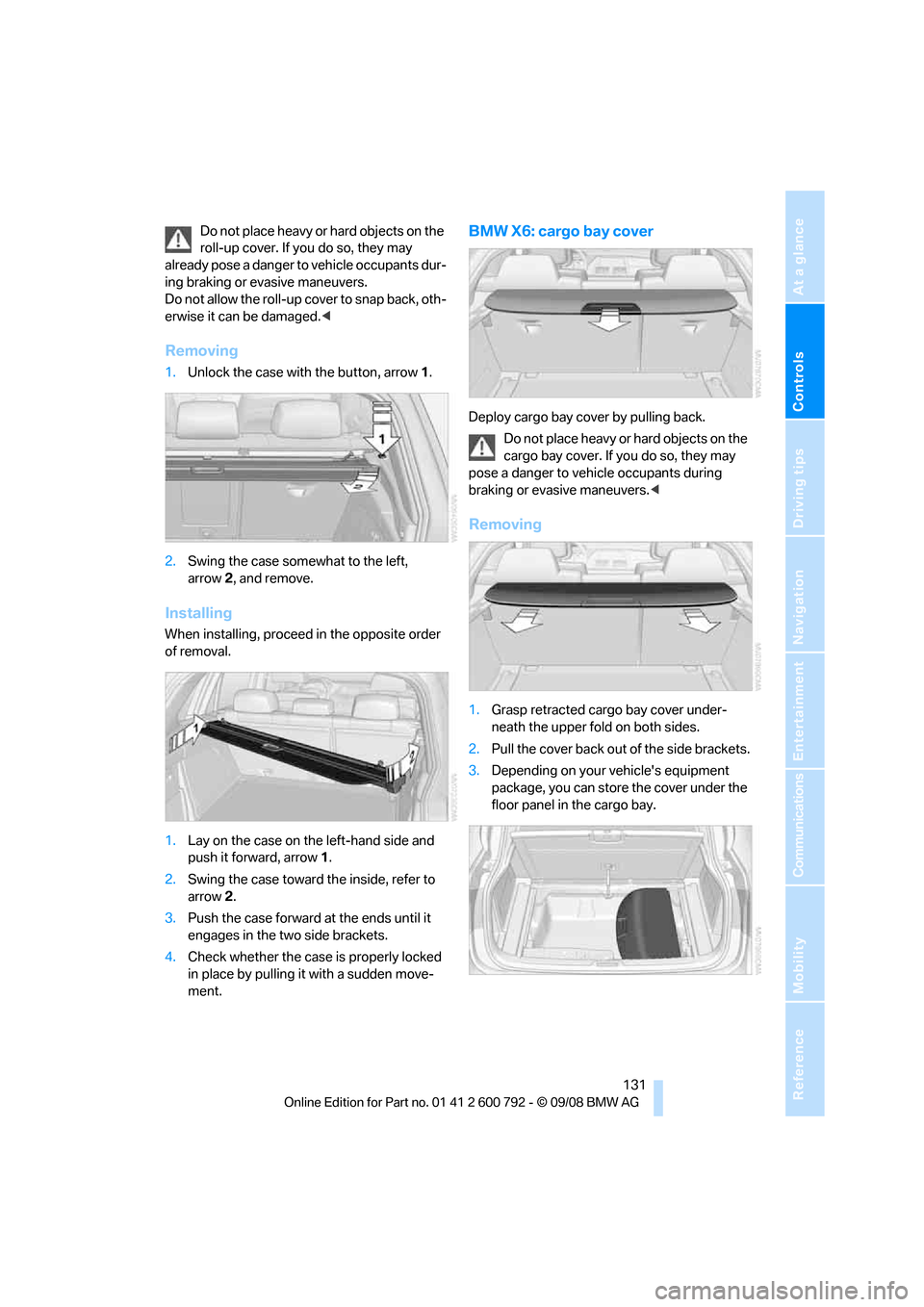
Removing
1.Unlock the case with the button, arrow 1.
2. Swing the case somewhat to the left,
arrow 2, and remove.
Installing
When installing, proceed in the opposite order
of removal.
1. Lay on the case on the left-hand side and
push it forward, arrow 1.
2. Swing the case toward the inside, refer to
arrow 2.
3. Push the case forward at the ends until it
engages in the two side brackets.
4. Check whether the case is properly locked
in place by pulling it with a sudden move-
ment.
BMW X6: cargo bay cover
Deploy cargo bay cover by pulling back.
Do not place heavy or hard objects on the
cargo bay cover. If you do so, they may
pose a danger to vehicle occupants during
braking or evasive maneuvers. <
Removing
1.Grasp retracted cargo bay cover under-
neath the upper fold on both sides.
2. Pull the cover back out of the side brackets.
3. Depending on your vehicle's equipment
package, you can store the cover under the
floor panel in the cargo bay.
Page 134 of 317
Practical interior accessories
132
Installing
When installing, proceed in the opposite order
of removal.
1.Set the cargo bay cove r into place on the
left and right sides.
2. Lift the back of the co ver slightly and slide
forward until it snaps into the two side
brackets.
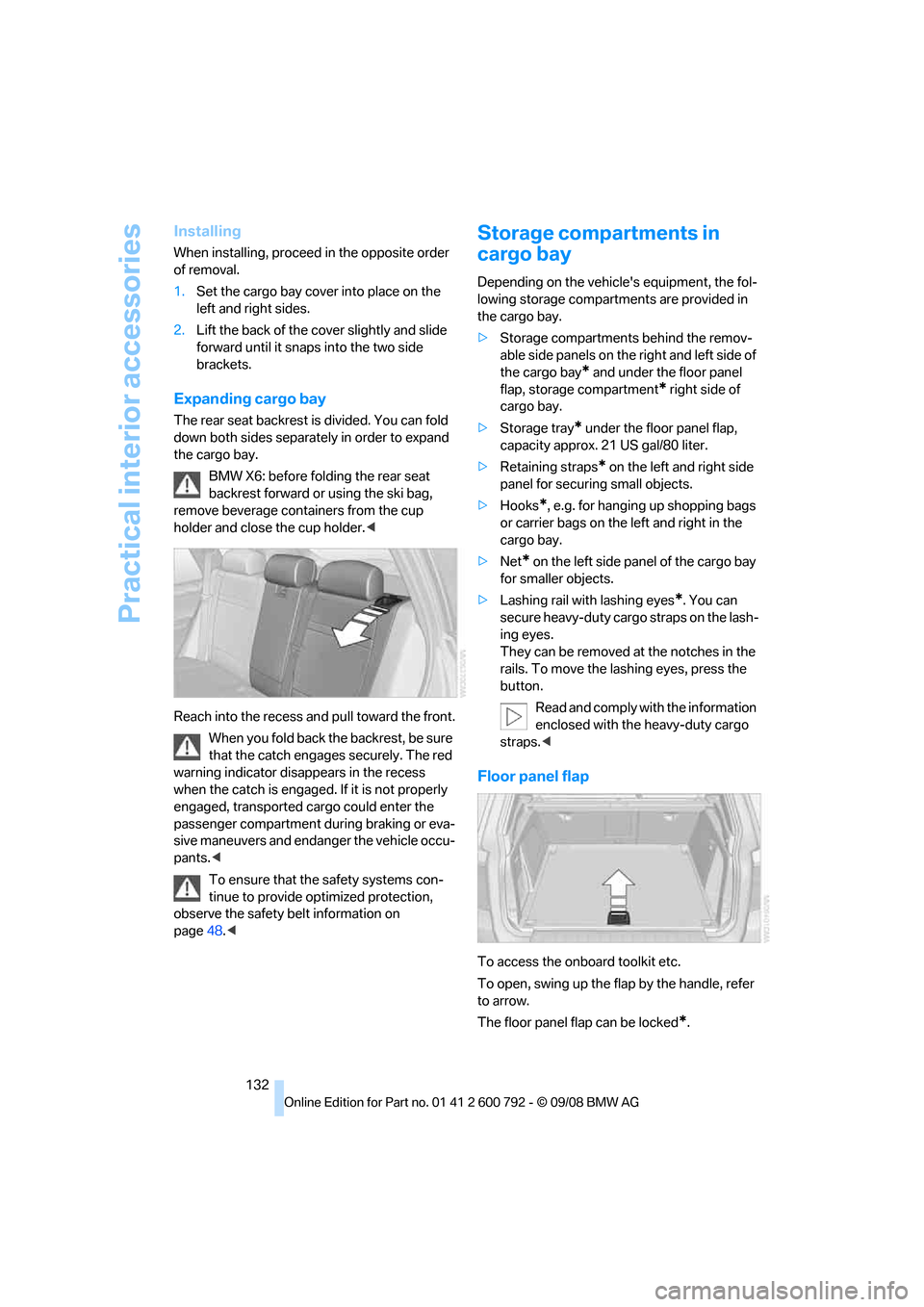
Expanding cargo bay
The rear seat backrest is divided. You can fold
down both sides separate ly in order to expand
the cargo bay.
BMW X6: before folding the rear seat
backrest forward or using the ski bag,
remove beverage containers from the cup
holder and close the cup holder. <
Reach into the recess an d pull toward the front.
When you fold back the backrest, be sure
that the catch engages securely. The red
warning indicator disappears in the recess
when the catch is engaged. If it is not properly
engaged, transported cargo could enter the
passenger compartment during braking or eva-
sive maneuvers and endanger the vehicle occu-
pants. <
To ensure that the safety systems con-
tinue to provide optimized protection,
observe the safety belt information on
page 48.<
Storage compartments in
cargo bay
Depending on the vehicle's equipment, the fol-
lowing storage compartments are provided in
the cargo bay.
> Storage compartments behind the remov-
able side panels on the right and left side of
the cargo bay
* and under the floor panel
flap, storage compartment
* right side of
cargo bay.
> Storage tray
* under the floor panel flap,
capacity approx. 21 US gal/80 liter.
> Retaining straps
* on the left and right side
panel for securing small objects.
> Hooks
*, e.g. for hanging up shopping bags
or carrier bags on the left and right in the
cargo bay.
> Net
* on the left side pa nel of the cargo bay
for smaller objects.
> Lashing rail with lashing eyes
*. You can
secure heavy-duty cargo straps on the lash-
ing eyes.
They can be removed at the notches in the
rails. To move the lashing eyes, press the
button.
Read and comply with the information
enclosed with the heavy-duty cargo
straps. <
Floor panel flap
To access the onboard toolkit etc.
To open, swing up the flap by the handle, refer
to arrow.
The floor panel flap can be locked
*.
Page 135 of 317
Controls
133Reference
At a glance
Driving tips
Communications
Navigation
Entertainment
Mobility
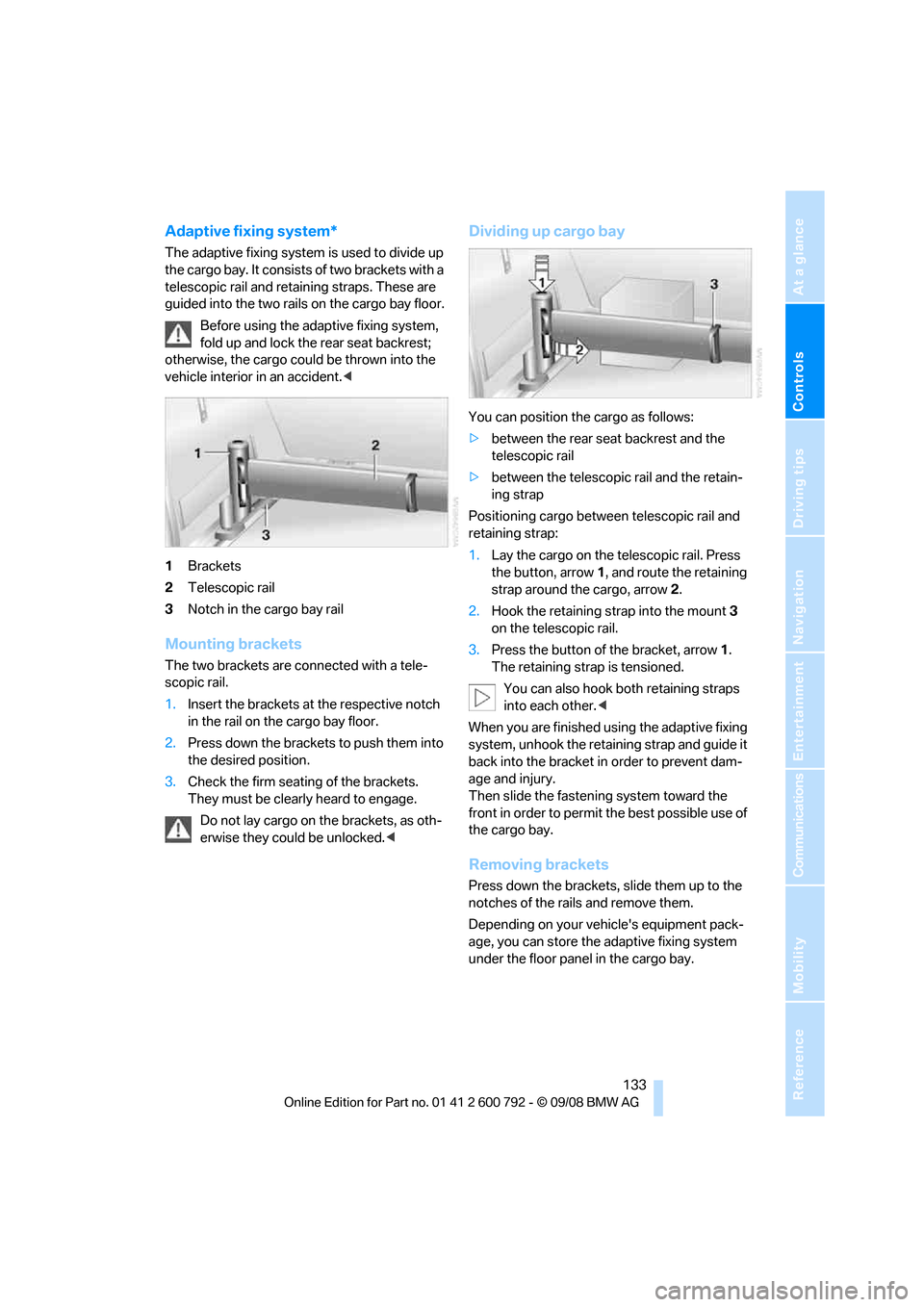
Adaptive fixing system*
The adaptive fixing system is used to divide up
the cargo bay. It consists of two brackets with a
telescopic rail and retaining straps. These are
guided into the two rails on the cargo bay floor.
Before using the adaptive fixing system,
fold up and lock the rear seat backrest;
otherwise, the cargo coul d be thrown into the
vehicle interior in an accident.<
1 Brackets
2 Telescopic rail
3 Notch in the cargo bay rail
Mounting brackets
The two brackets are co nnected with a tele-
scopic rail.
1. Insert the brackets at the respective notch
in the rail on the cargo bay floor.
2. Press down the brackets to push them into
the desired position.
3. Check the firm seating of the brackets.
They must be clearl y heard to engage.
Do not lay cargo on the brackets, as oth-
erwise they could be unlocked. <
Dividing up cargo bay
You can position the cargo as follows:
>between the rear seat backrest and the
telescopic rail
> between the telescopic rail and the retain-
ing strap
Positioning cargo betwee n telescopic rail and
retaining strap:
1. Lay the cargo on the te lescopic rail. Press
the button, arrow 1, and route the retaining
strap around the cargo, arrow 2.
2. Hook the retaining strap into the mount 3
on the telescopic rail.
3. Press the button of the bracket, arrow 1.
The retaining strap is tensioned.
You can also hook both retaining straps
into each other. <
When you are finished using the adaptive fixing
system, unhook the retaining strap and guide it
back into the bracket in order to prevent dam-
age and injury.
Then slide the fastening system toward the
front in order to permit the best possible use of
the cargo bay.
Removing brackets
Press down the brackets, slide them up to the
notches of the rails and remove them.
Depending on your vehicle's equipment pack-
age, you can store the adaptive fixing system
under the floor panel in the cargo bay.
Page 143 of 317
Driving tips
141Reference
At a glance
Controls
Communications
Navigation
Entertainment
Mobility
General information on the care of your BMW is
provided beginning on page265.
Mixed tires*
Before driving into a car wash, make sure
that the vehicle width is not too large for
the car wash, as otherwise the vehicle and the
car wash could be damaged. <
BMW X5: rear window wiper
The rear window wiper can be damaged in car
washes. Take appropriate protective measures;
ask the car wash operator if necessary.
With comfort access*
Insert the remote control into the ignition lock.
The engine can be switched off in transmission
position N, also refer to page41.
Loading
To avoid loading the tires beyond their
approved carrying capacity, never over-
load the vehicle. Overlo ading can lead to over-
heating and increases the rate at which damage
develops inside the tire s. The ultimate result
can assume the form of a sudden blow-out. <
Make sure that no fluids leak in the cargo
bay; otherwise the vehicle could be dam-
aged. <
Determining loading limit
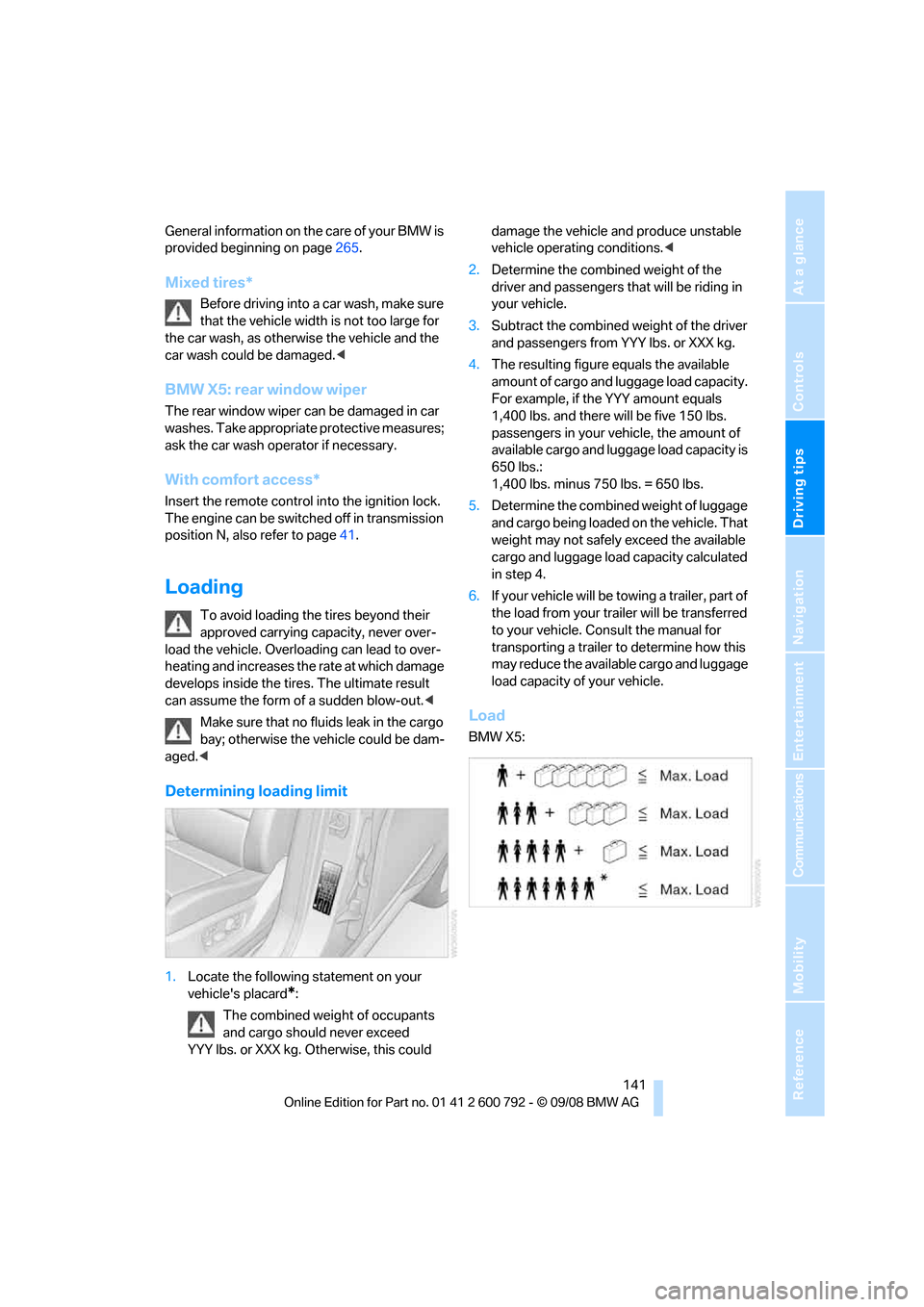
1.Locate the following statement on your
vehicle's placard
*:
The combined weight of occupants
and cargo should never exceed
YYY lbs. or XXX kg. Otherwise, this could damage the vehicle and produce unstable
vehicle operating conditions.
<
2. Determine the combined weight of the
driver and passengers that will be riding in
your vehicle.
3. Subtract the combined weight of the driver
and passengers from YYY lbs. or XXX kg.
4. The resulting figure equals the available
amount of cargo and luggage load capacity.
For example, if the YYY amount equals
1,400 lbs. and there will be five 150 lbs.
passengers in your ve hicle, the amount of
available cargo and lugga ge load capacity is
650 lbs.:
1,400 lbs. minus 750 lbs. = 650 lbs.
5. Determine the combined weight of luggage
and cargo being loaded on the vehicle. That
weight may not safely exceed the available
cargo and luggage load capacity calculated
in step 4.
6. If your vehicle will be towing a trailer, part of
the load from your tra iler will be transferred
to your vehicle. Consult the manual for
transporting a trailer to determine how this
may reduce the availa ble cargo and luggage
load capacity of your vehicle.
Load
BMW X5:
Page 150 of 317
Starting navigation system
148
Starting navigation system
Your navigation system can use satellites to
ascertain the precise position of your vehicle
and guide you reliably to any destination you
enter.
Navigation DVD
The navigation system requires a special navi-
gation DVD. The latest version is available at
your BMW Sports Activity Vehicle Center.
Inserting navigation DVD
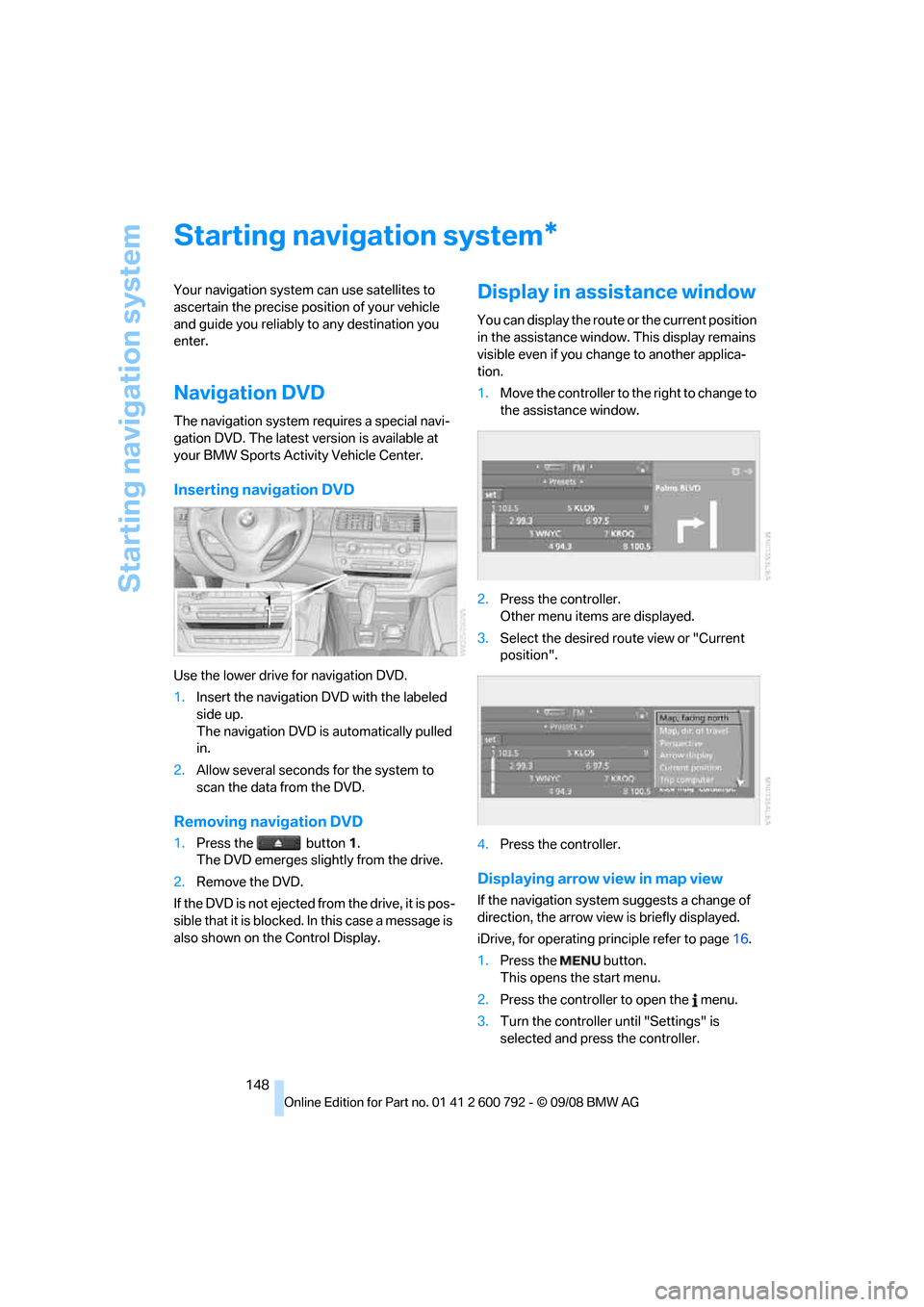
Use the lower drive for navigation DVD.
1. Insert the navigation DVD with the labeled
side up.
The navigation DVD is automatically pulled
in.
2. Allow several seconds for the system to
scan the data from the DVD.
Removing navigation DVD
1.Press the button 1.
The DVD emerges slightly from the drive.
2. Remove the DVD.
If the DVD is not ejected fr om the drive, it is pos-
sible that it is blocked. In this case a message is
also shown on the Control Display.
Display in assi stance window
You can display the route or the current position
in the assistance window . This display remains
visible even if you change to another applica-
tion.
1. Move the controller to th e right to change to
the assistance window.
2. Press the controller.
Other menu items are displayed.
3. Select the desired route view or "Current
position".
4. Press the controller.
Displaying arrow view in map view
If the navigation system suggests a change of
direction, the arrow view is briefly displayed.
iDrive, for operating pr inciple refer to page16.
1. Press the button.
This opens the start menu.
2. Press the controller to open the menu.
3. Turn the controller until "Settings" is
selected and press the controller.
*
Page 206 of 317
DVD system in rear
204
DVD system in rear
With the DVD system in the rear you can play
CDs and DVDs with audio, video and image
data. External audio and video devices can also
be connected and played via the DVD system in
the rear.
Tone output is possible both via headphones
and via the vehicle speakers.
You can operate the DVD system in the rear
with the buttons on the CD/DVD player or with
the remote control.
Some functions can only be operated
with the remote control. <
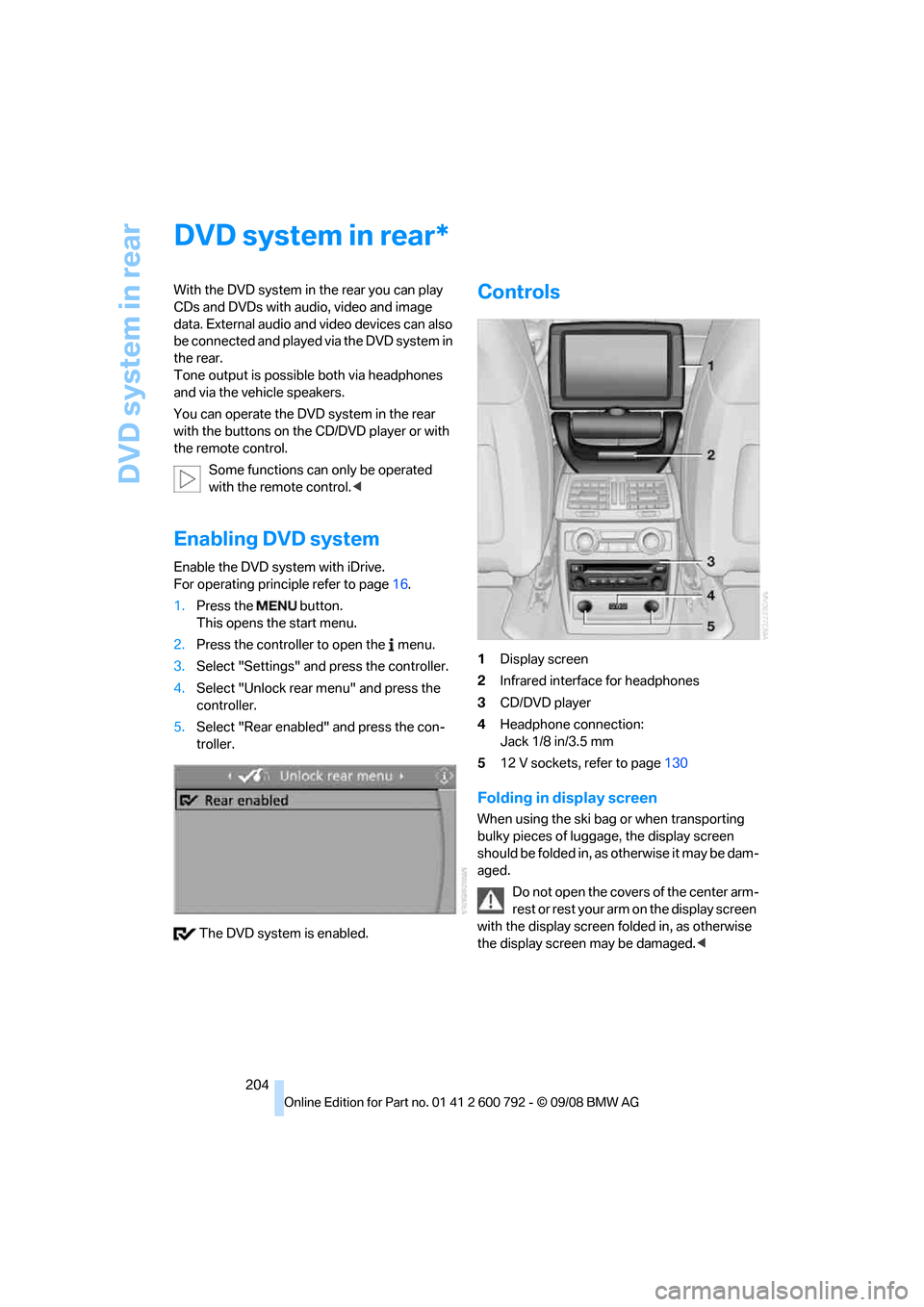
Enabling DVD system
Enable the DVD system with iDrive.
For operating principle refer to page 16.
1. Press the button.
This opens the start menu.
2. Press the controller to open the menu.
3. Select "Settings" and press the controller.
4. Select "Unlock rear menu" and press the
controller.
5. Select "Rear enabled" and press the con-
troller.
The DVD system is enabled.
Controls
1 Display screen
2 Infrared interface for headphones
3 CD/DVD player
4 Headphone connection:
Jack 1/8 in/3.5 mm
5 12 V sockets, refer to page 130
Folding in display screen
When using the ski bag or when transporting
bulky pieces of luggage, the display screen
should be folded in, as otherwise it may be dam-
aged.
Do not open the covers of the center arm-
rest or rest your arm on the display screen
with the display screen folded in, as otherwise
the display screen may be damaged. <
*
Page 223 of 317
221
Entertainment
Reference
At a glance
Controls
Driving tips
Communications
Navigation
Mobility
It may not be possible to establish a telephone
connection using the mobile phone while a con-
nection is being estab lished to BMW Assist or
while a call to BMW Assist is already in
progress. If this happens, you must log off the
mobile phone from the vehicle if you wish to
place a call with the mobile phone.
Commissioning
Pairing mobile phone in vehicle
The following prerequisites must be met:
> Suitable mobile phone: the mobile phone is
supported by the full mobile phone prepara-
tion package. Information on this subject is
also provided on the Internet at:
www.bmw.com
> The mobile phone is ready to operate.
> The Bluetooth link on th e vehicle, refer to
page 225, and on the mobile phone is
active.
> Depending on the mobile phone, it may be
necessary to adjust the presets of the
mobile phone, e.g. via the following menu
items:
>Bluetooth activated
> Connection not with confirmation
> Reconnect
> Depending on the mobile phone model, the
setting energy saving mode can, for exam-
ple, result in vehicle failing to detect the
paired mobile phone.
> For pairing, specify any desired number as
the Bluetooth passkey, e.g. 1. This Blue-
tooth passkey is no longer required follow-
ing successful pairing.
> The ignition is switched on.
Only pair the mobile phone with the vehi-
cle stationary, otherwise the passengers
and other road users can be endangered due to
a lack of attentiveness on the part of the
driver. <
Switching on ignition
1.Insert the remote control as far as possible
into the ignition lock.
2. Switch on the ignition by pressing the Start/
Stop button without depressing the brake
pedal.
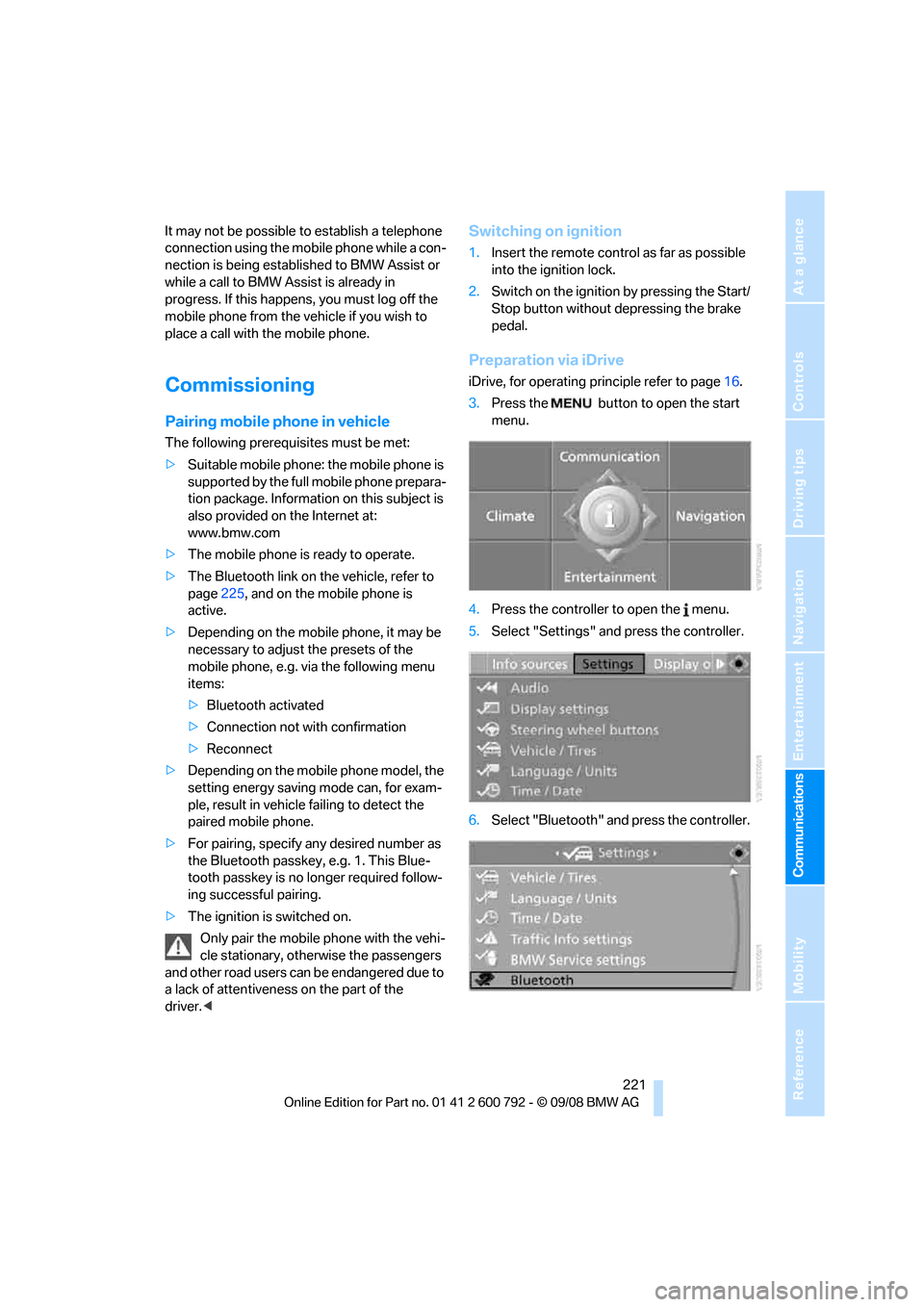
Preparation via iDrive
iDrive, for operating pr inciple refer to page16.
3. Press the button to open the start
menu.
4. Press the controller to open the menu.
5. Select "Settings" and press the controller.
6. Select "Bluetooth" an d press the controller.
Page 228 of 317
Telephoning
226
Adjusting volume
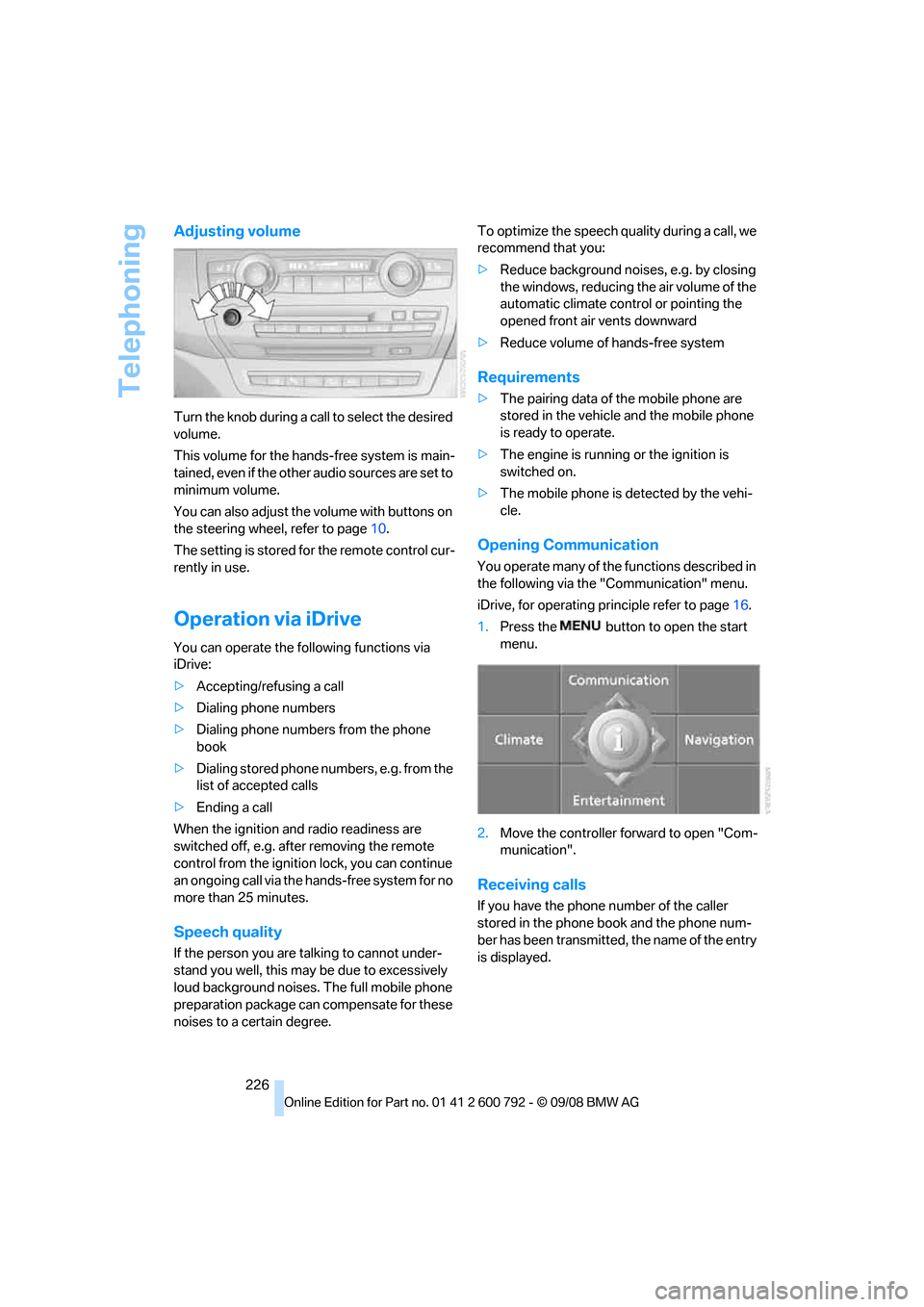
Turn the knob during a call to select the desired
volume.
This volume for the hand s-free system is main-
tained, even if the other audio sources are set to
minimum volume.
You can also adjust the volume with buttons on
the steering wheel, refer to page 10.
The setting is stored fo r the remote control cur-
rently in use.
Operation via iDrive
You can operate the following functions via
iDrive:
> Accepting/refusing a call
> Dialing phone numbers
> Dialing phone numbers from the phone
book
> Dialing stored phone numbers, e.g. from the
list of accepted calls
> Ending a call
When the ignition and radio readiness are
switched off, e.g. after removing the remote
control from the ignition lock, you can continue
an ongoing call via the hands-free system for no
more than 25 minutes.
Speech quality
If the person you are talking to cannot under-
stand you well, this may be due to excessively
loud background noises. The full mobile phone
preparation package can compensate for these
noises to a certain degree. To optimize the speech qua
lity during a call, we
recommend that you:
> Reduce background noises, e.g. by closing
the windows, reducing the air volume of the
automatic climate control or pointing the
opened front air vents downward
> Reduce volume of hands-free system
Requirements
>The pairing data of the mobile phone are
stored in the vehicle and the mobile phone
is ready to operate.
> The engine is running or the ignition is
switched on.
> The mobile phone is detected by the vehi-
cle.
Opening Communication
You operate many of the functions described in
the following via the "Communication" menu.
iDrive, for operating pr inciple refer to page16.
1. Press the button to open the start
menu.
2. Move the controller forward to open "Com-
munication".
Receiving calls
If you have the phone number of the caller
stored in the phone book and the phone num-
ber has been transmitted, the name of the entry
is displayed.
Page 237 of 317
235
Entertainment
Reference
At a glance
Controls
Driving tips
Communications
Navigation
Mobility
BMW Assist
BMW Assist provides you with various services.
For example, the position data of your vehicle
can be transferred to the BMW Assist
Response Center if an emergency request
* has
been initiated.
Many BMW Assist services depend on the indi-
vidually agreed contract.
After your contract has expired, the BMW
Assist system will be deactivated by the BMW
Assist Response Center without you having to
visit a BMW Sports Activity Vehicle Center.
After the BMW Assist system has been deacti-
vated, no BMW Assist se rvice will be available.
The BMW Assist system can be reactivated by
a BMW Sports Activity Vehicle Center after
signing a new contract.
Requirements
If the following requirements are met, you can
use BMW Assist:
> The installed BMW Assist system is logged
in on a wireless communications network.
This network must be capable of transmit-
ting the services.
> To transmit position data, the vehicle must
be able to determine the current position.
> To activate and update BMW Assist, a GPS
signal must be available.
> You have subscribed to BMW Assist with
your BMW Sports Activity Vehicle Center or
with the BMW Assist Response Center.
Enabling must have been completed.
> BMW Assist is activated, refer to page 240.
Offered services
The following services are available via
BMW Assist:
>Emergency request, refer to page 279:
When you press the SOS button, a connec-
tion is established to the BMW Assist
Response Center. The BMW Assist
Response Center contacts you and takes
further steps to help you.
> Automatic collision notification:
Under certain conditions, a connection is
established to the BMW Assist Response
Center after a serious accident. If possible,
the BMW Assist Response Center contacts
you and takes further steps to help you.
> Enhanced roadside assistance:
You can call BMW Roadside Assistance
*
should you require help in the event of a
breakdown. If possible, the vehicle and
position data are transmitted in the process.
> BMW Customer Relations:
For information on all aspects of your vehi-
cle, you can be connected to BMW Cus-
tomer Relations.
> BMW TeleServices
*:
The data on the service status of your vehi-
cle or on required inspections are transmit-
ted to your BMW Sports Activity Vehicle
Center either automati cally prior to the due
date or when you request a BMW service
appointment.
> Unlocking and locking the vehicle:
Inform the BMW Assist Response Center,
e.g. if your remote control is not available
and you want to have the vehicle opened or
closed.
> Stolen vehicle recovery:
After your vehicle has been reported to the
police as stolen, the BMW Assist Response
Center can locate its position.
In addition, you can be provided with other ser-
vices, e.g. the concierg e service or information
*