Accident BMW Z4 2013 E89 User Guide
[x] Cancel search | Manufacturer: BMW, Model Year: 2013, Model line: Z4, Model: BMW Z4 2013 E89Pages: 289, PDF Size: 6.86 MB
Page 75 of 289
DisplaysVehicle equipmentThis chapter describes all series equipment as
well as country-specific and special equipment
offered for this model series.Therefore, it also
describes equipment that may not be found in
your vehicle, for instance due to the selected
special equipment or the country version. This
also applies to safety-related functions and
systems.
Odometer, outside
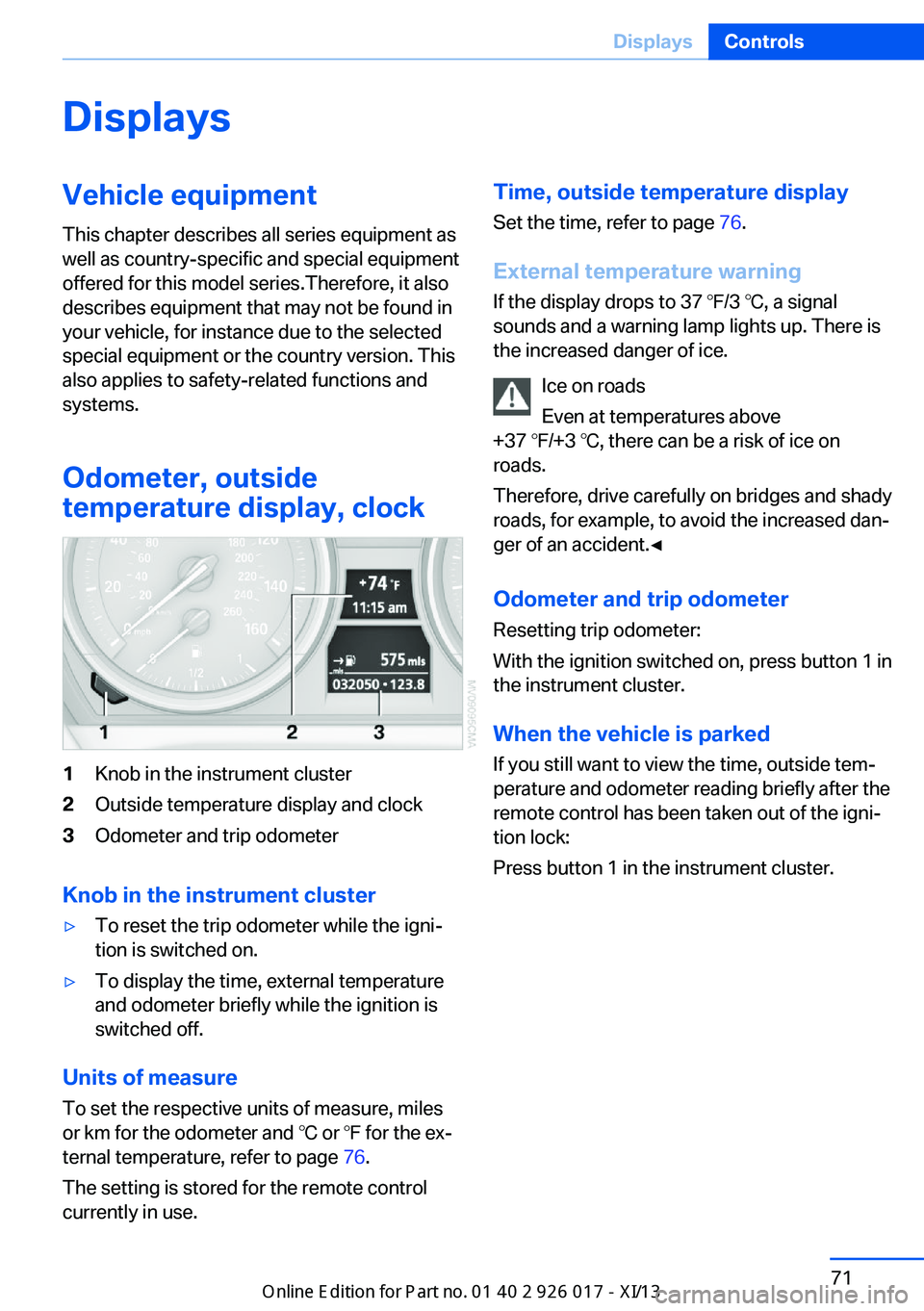
temperature display, clock1Knob in the instrument cluster2Outside temperature display and clock3Odometer and trip odometer
Knob in the instrument cluster
▷To reset the trip odometer while the igni‐
tion is switched on.▷To display the time, external temperature
and odometer briefly while the ignition is
switched off.
Units of measure
To set the respective units of measure, miles
or km for the odometer and ℃ or ℉ for the ex‐
ternal temperature, refer to page 76.
The setting is stored for the remote control
currently in use.
Time, outside temperature display
Set the time, refer to page 76.
External temperature warning
If the display drops to 37 ℉/3 ℃, a signal
sounds and a warning lamp lights up. There is
the increased danger of ice.
Ice on roads
Even at temperatures above
+37 ℉/+3 ℃, there can be a risk of ice on
roads.
Therefore, drive carefully on bridges and shady
roads, for example, to avoid the increased dan‐
ger of an accident.◀
Odometer and trip odometer
Resetting trip odometer:
With the ignition switched on, press button 1 in
the instrument cluster.
When the vehicle is parked If you still want to view the time, outside tem‐
perature and odometer reading briefly after the
remote control has been taken out of the igni‐
tion lock:
Press button 1 in the instrument cluster.Seite 71DisplaysControls71
Online Edition for Part no. 01 40 2 911 315 - VI/13
Page 94 of 289
SafetyVehicle equipment
This chapter describes all series equipment as
well as country-specific and special equipment
offered for this model series.Therefore, it also
describes equipment that may not be found in
your vehicle, for instance due to the selected
special equipment or the country version. This
also applies to safety-related functions and
systems.
Airbags
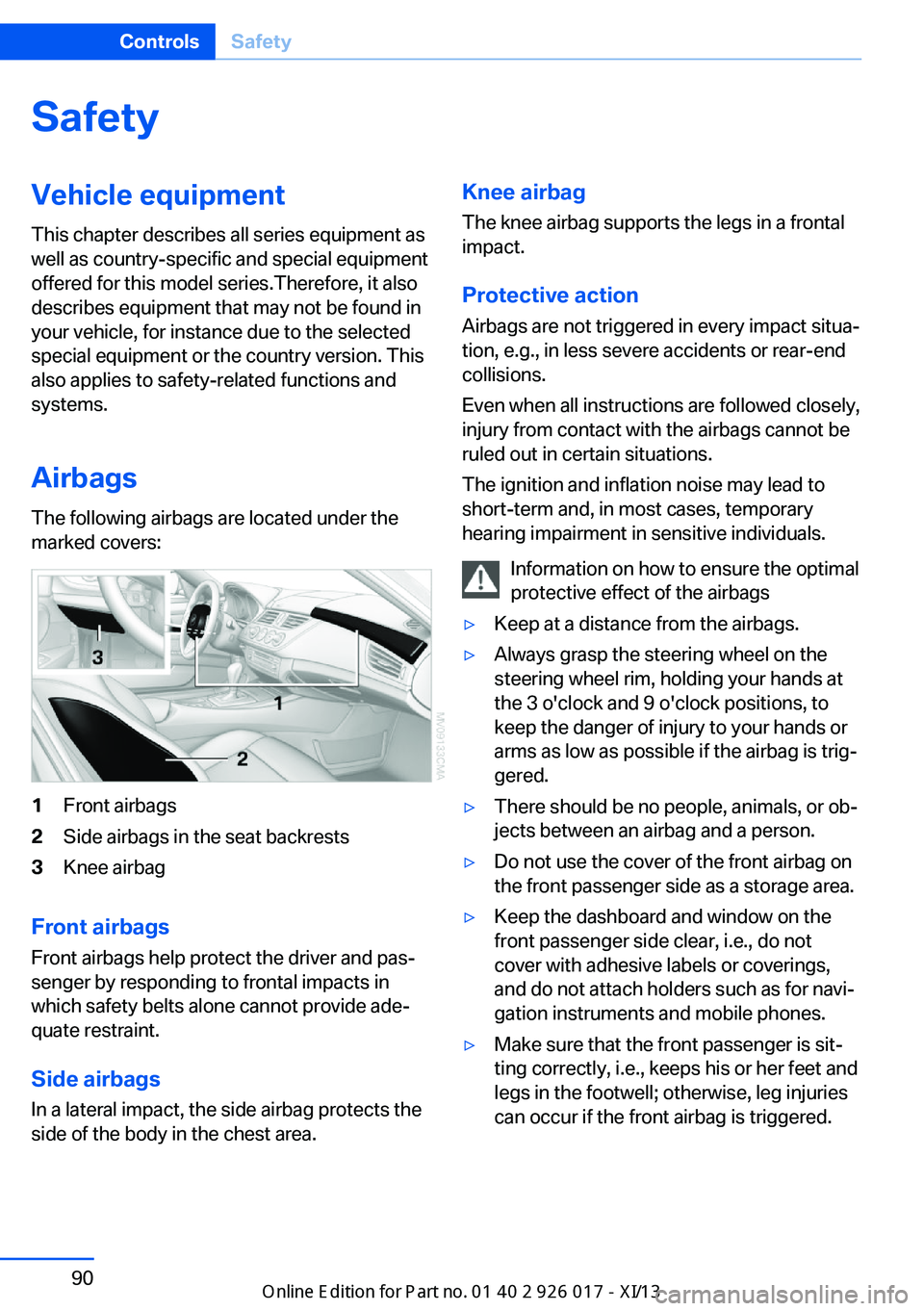
The following airbags are located under the
marked covers:1Front airbags2Side airbags in the seat backrests3Knee airbag
Front airbags
Front airbags help protect the driver and pas‐
senger by responding to frontal impacts in
which safety belts alone cannot provide ade‐
quate restraint.
Side airbags
In a lateral impact, the side airbag protects the
side of the body in the chest area.
Knee airbag
The knee airbag supports the legs in a frontal
impact.
Protective action
Airbags are not triggered in every impact situa‐
tion, e.g., in less severe accidents or rear-end
collisions.
Even when all instructions are followed closely,
injury from contact with the airbags cannot be
ruled out in certain situations.
The ignition and inflation noise may lead to
short-term and, in most cases, temporary
hearing impairment in sensitive individuals.
Information on how to ensure the optimal
protective effect of the airbags▷Keep at a distance from the airbags.▷Always grasp the steering wheel on the
steering wheel rim, holding your hands at
the 3 o'clock and 9 o'clock positions, to
keep the danger of injury to your hands or
arms as low as possible if the airbag is trig‐
gered.▷There should be no people, animals, or ob‐
jects between an airbag and a person.▷Do not use the cover of the front airbag on
the front passenger side as a storage area.▷Keep the dashboard and window on the
front passenger side clear, i.e., do not
cover with adhesive labels or coverings,
and do not attach holders such as for navi‐
gation instruments and mobile phones.▷Make sure that the front passenger is sit‐
ting correctly, i.e., keeps his or her feet and
legs in the footwell; otherwise, leg injuries
can occur if the front airbag is triggered.Seite 90ControlsSafety90
Online Edition for Part no. 01 40 2 911 315 - VI/13
Page 96 of 289
Status of passenger airbags
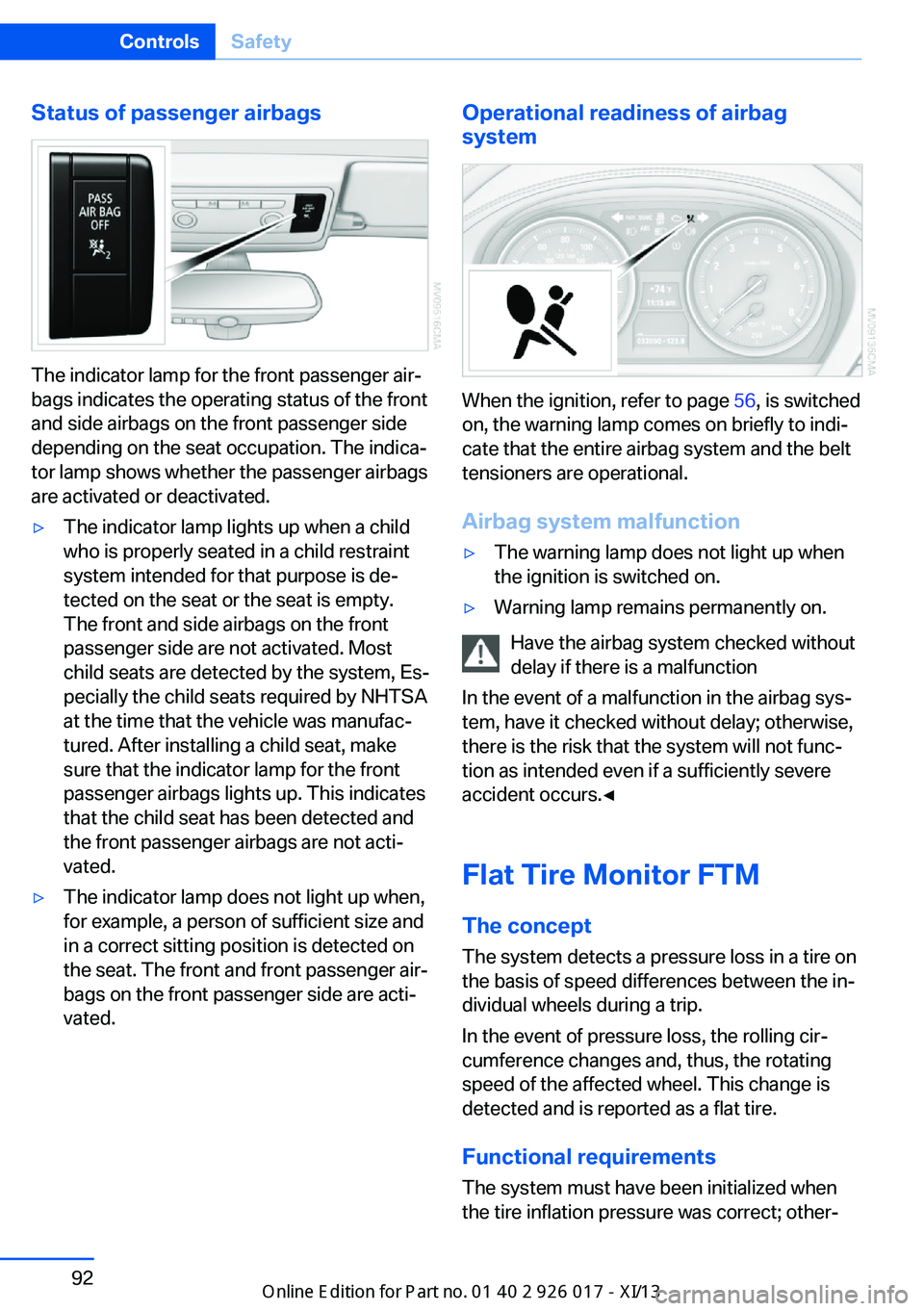
The indicator lamp for the front passenger air‐
bags indicates the operating status of the front
and side airbags on the front passenger side
depending on the seat occupation. The indica‐
tor lamp shows whether the passenger airbags
are activated or deactivated.
▷The indicator lamp lights up when a child
who is properly seated in a child restraint
system intended for that purpose is de‐
tected on the seat or the seat is empty.
The front and side airbags on the front
passenger side are not activated. Most
child seats are detected by the system, Es‐
pecially the child seats required by NHTSA
at the time that the vehicle was manufac‐
tured. After installing a child seat, make
sure that the indicator lamp for the front
passenger airbags lights up. This indicates
that the child seat has been detected and
the front passenger airbags are not acti‐
vated.▷The indicator lamp does not light up when,
for example, a person of sufficient size and
in a correct sitting position is detected on
the seat. The front and front passenger air‐
bags on the front passenger side are acti‐
vated.Operational readiness of airbag
system
When the ignition, refer to page 56, is switched
on, the warning lamp comes on briefly to indi‐
cate that the entire airbag system and the belt
tensioners are operational.
Airbag system malfunction
▷The warning lamp does not light up when
the ignition is switched on.▷Warning lamp remains permanently on.
Have the airbag system checked without
delay if there is a malfunction
In the event of a malfunction in the airbag sys‐
tem, have it checked without delay; otherwise,
there is the risk that the system will not func‐
tion as intended even if a sufficiently severe
accident occurs.◀
Flat Tire Monitor FTM The conceptThe system detects a pressure loss in a tire on
the basis of speed differences between the in‐
dividual wheels during a trip.
In the event of pressure loss, the rolling cir‐
cumference changes and, thus, the rotating
speed of the affected wheel. This change is
detected and is reported as a flat tire.
Functional requirements
The system must have been initialized when
the tire inflation pressure was correct; other‐
Seite 92ControlsSafety92
Online Edition for Part no. 01 40 2 911 315 - VI/13
Page 98 of 289
Run-flat tires, refer to page 233, are la‐
beled with a circular symbol containing the
letters RSC marked on the tire sidewall.
Do not continue driving without run-flat
tires
Do not continue driving if the vehicle is not
equipped with run-flat tires; continued driving
may result in serious accidents.◀
When a flat tire is indicated, DSC Dynamic Sta‐
bility Control is switched on if necessary.
Actions in the event of a flat tire Normal tires
1.Identify the damaged tire.
Do this by checking the air pressure in all
four tires.
If the tire inflation pressure in all four tires
is correct, the Flat Tire Monitor may not
have been initialized. In this case, initialize
the system.
If an identification is not possible, please
contact the service center.2.Rectify the flat tire.
Run-flat tires
You can continue driving with a damaged tire
at speeds up to 50 mph/80 km/h.
Continued driving with a flat tire
If continuing to drive with a damaged tire:
1.Avoid sudden braking and steering maneu‐
vers.2.Do not exceed a speed of 50 mph/80 km/h.3.Check the air pressure in all four tires at
the next opportunity.
If the tire inflation pressure in all four tires
is correct, the Flat Tire Monitor may not
have been initialized. In this case, initialize
the system.
Possible driving distance with complete loss of
tire inflation pressure:
The possible driving distance after a loss of tire
inflation pressure depends on the cargo load
and the driving style and conditions.
For a vehicle containing an average load, the
possible driving distance is approx.
50 miles/80 km.
When the vehicle is driven with a damaged tire,
its handling characteristics change, e.g., re‐
duced lane stability during braking, a longer
braking distance, and altered self-steering
properties. Adjust your driving style accord‐
ingly. Avoid abrupt steering maneuvers or driv‐
ing over obstacles, e. g., curbs, potholes, etc.
Because the possible driving distance de‐
pends on how the vehicle is used during the
trip, the actual distance may be smaller or
greater depending on the driving speed, road
conditions, external temperature, cargo load,
etc.
Continued driving with a flat tire
Drive moderately and do not exceed a
speed of 50 mph/80 km/h.
A loss of tire inflation pressure results in a
change in the handling characteristics, e.g., re‐
duced lane stability during braking, a longer
braking distance and altered self-steering
properties.◀
Final tire failure
Vibrations or loud noises while driving
can indicate the final failure of the tire. Reduce
speed and stop; otherwise, pieces of the tire
could come loose and cause an accident. Do
not continue driving, and contact your service
center.◀
Tire Pressure Monitor TPMThe concept
TPM checks the inflation pressures of the four mounted tires. The system notifies you if there
is a significant loss of pressure in one or more
tires.Seite 94ControlsSafety94
Online Edition for Part no. 01 40 2 911 315 - VI/13
Page 100 of 289
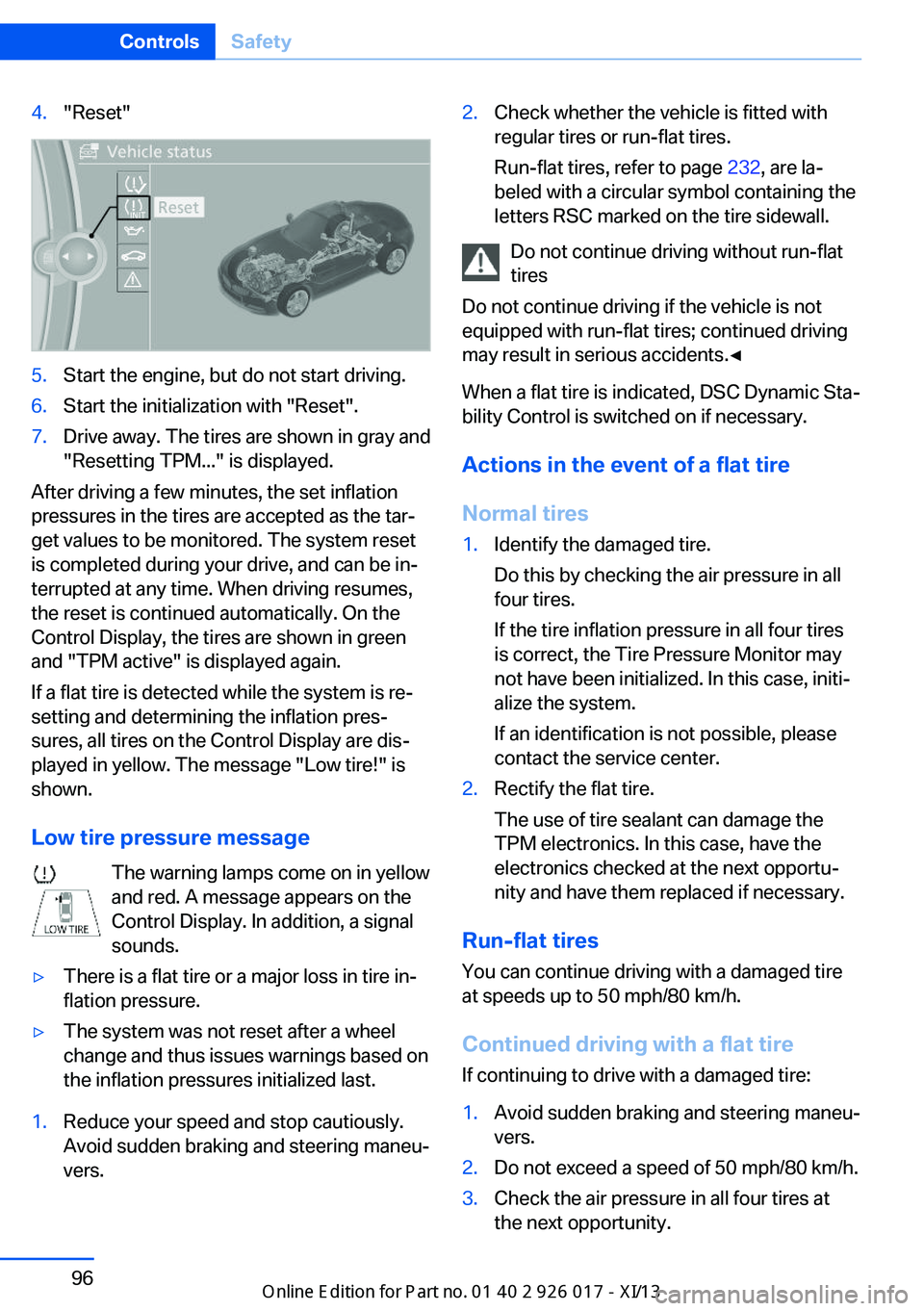
4."Reset"5.Start the engine, but do not start driving.6.Start the initialization with "Reset".7.Drive away. The tires are shown in gray and
"Resetting TPM..." is displayed.
After driving a few minutes, the set inflation
pressures in the tires are accepted as the tar‐
get values to be monitored. The system reset
is completed during your drive, and can be in‐
terrupted at any time. When driving resumes,
the reset is continued automatically. On the
Control Display, the tires are shown in green
and "TPM active" is displayed again.
If a flat tire is detected while the system is re‐
setting and determining the inflation pres‐
sures, all tires on the Control Display are dis‐
played in yellow. The message "Low tire!" is
shown.
Low tire pressure message The warning lamps come on in yellow
and red. A message appears on the
Control Display. In addition, a signal
sounds.
▷There is a flat tire or a major loss in tire in‐
flation pressure.▷The system was not reset after a wheel
change and thus issues warnings based on
the inflation pressures initialized last.1.Reduce your speed and stop cautiously.
Avoid sudden braking and steering maneu‐
vers.2.Check whether the vehicle is fitted with
regular tires or run-flat tires.
Run-flat tires, refer to page 232, are la‐
beled with a circular symbol containing the
letters RSC marked on the tire sidewall.
Do not continue driving without run-flat
tires
Do not continue driving if the vehicle is not
equipped with run-flat tires; continued driving
may result in serious accidents.◀
When a flat tire is indicated, DSC Dynamic Sta‐
bility Control is switched on if necessary.
Actions in the event of a flat tire Normal tires
1.Identify the damaged tire.
Do this by checking the air pressure in all
four tires.
If the tire inflation pressure in all four tires
is correct, the Tire Pressure Monitor may
not have been initialized. In this case, initi‐
alize the system.
If an identification is not possible, please
contact the service center.2.Rectify the flat tire.
The use of tire sealant can damage the
TPM electronics. In this case, have the
electronics checked at the next opportu‐
nity and have them replaced if necessary.
Run-flat tires
You can continue driving with a damaged tire
at speeds up to 50 mph/80 km/h.
Continued driving with a flat tire If continuing to drive with a damaged tire:
1.Avoid sudden braking and steering maneu‐
vers.2.Do not exceed a speed of 50 mph/80 km/h.3.Check the air pressure in all four tires at
the next opportunity.Seite 96ControlsSafety96
Online Edition for Part no. 01 40 2 911 315 - VI/13
Page 101 of 289
If the tire inflation pressure in all four tires
is correct, the Tire Pressure Monitor may
not have been initialized. In this case, initi‐
alize the system.
Possible driving distance with complete loss of
tire inflation pressure:
The possible driving distance after a loss of tire
inflation pressure depends on the cargo load
and the driving style and conditions.
For a vehicle containing an average load, the
possible driving distance is approx.
50 miles/80 km.
When the vehicle is driven with a damaged tire,
its handling characteristics change, e.g., re‐
duced lane stability during braking, a longer
braking distance, and altered self-steering
properties. Adjust your driving style accord‐
ingly. Avoid abrupt steering maneuvers or driv‐
ing over obstacles, e. g., curbs, potholes, etc.
Because the possible driving distance de‐
pends on how the vehicle is used during the
trip, the actual distance may be smaller or
greater depending on the driving speed, road
conditions, external temperature, cargo load,
etc.
Continued driving with a flat tire
Drive moderately and do not exceed a
speed of 50 mph/80 km/h.
A loss of tire inflation pressure results in a
change in the handling characteristics, e.g., re‐
duced lane stability during braking, a longer
braking distance and altered self-steering
properties.◀
Final tire failure
Vibrations or loud noises while driving
can indicate the final failure of the tire. Reduce
speed and stop; otherwise, pieces of the tire
could come loose and cause an accident. Do
not continue driving, and contact your service
center.◀
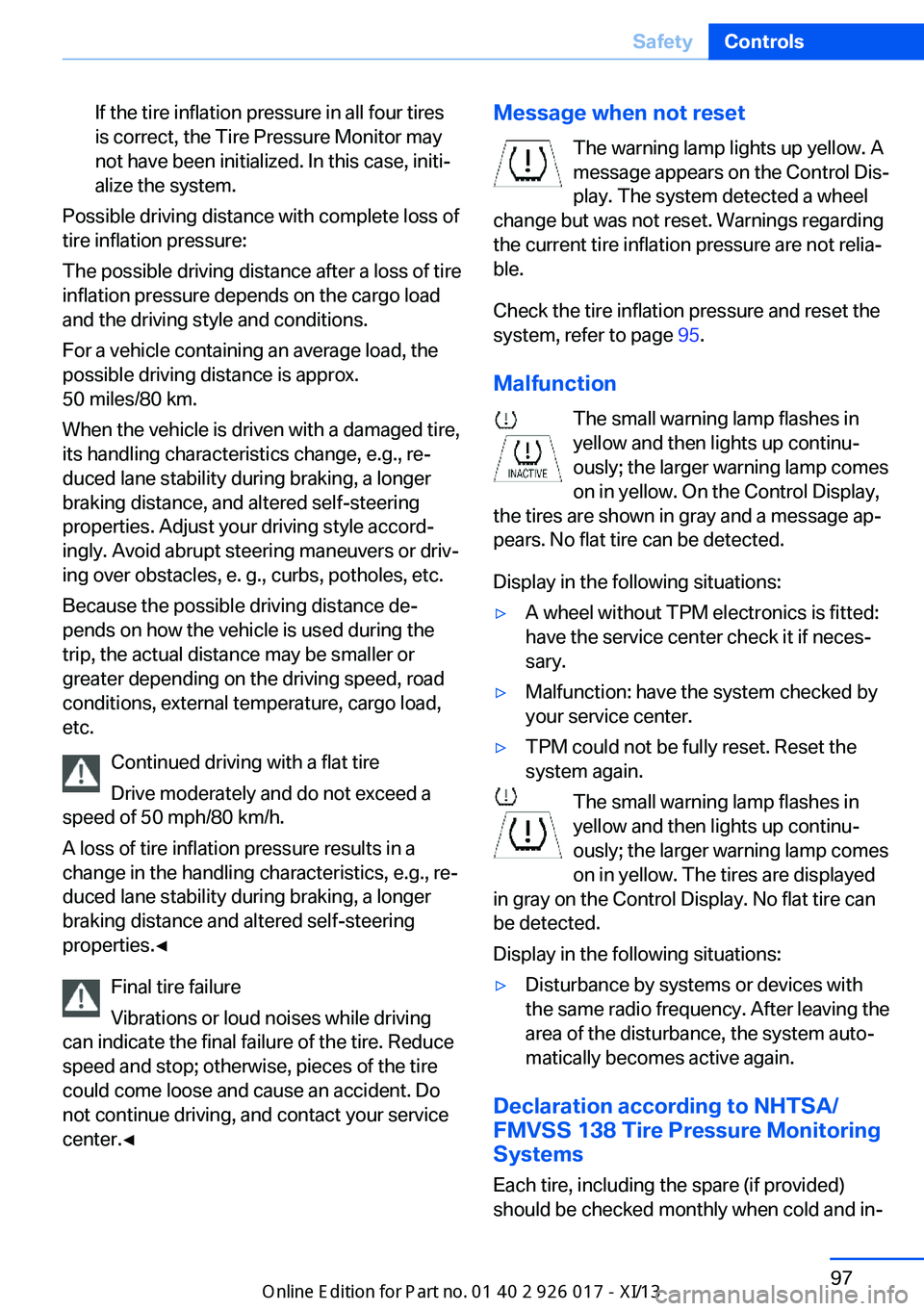
Message when not reset
The warning lamp lights up yellow. A
message appears on the Control Dis‐
play. The system detected a wheel
change but was not reset. Warnings regarding
the current tire inflation pressure are not relia‐
ble.
Check the tire inflation pressure and reset the
system, refer to page 95.
Malfunction The small warning lamp flashes in
yellow and then lights up continu‐
ously; the larger warning lamp comes
on in yellow. On the Control Display,
the tires are shown in gray and a message ap‐
pears. No flat tire can be detected.
Display in the following situations:▷A wheel without TPM electronics is fitted:
have the service center check it if neces‐
sary.▷Malfunction: have the system checked by
your service center.▷TPM could not be fully reset. Reset the
system again.
The small warning lamp flashes in yellow and then lights up continu‐
ously; the larger warning lamp comes
on in yellow. The tires are displayed
in gray on the Control Display. No flat tire can
be detected.
Display in the following situations:
▷Disturbance by systems or devices with
the same radio frequency. After leaving the
area of the disturbance, the system auto‐
matically becomes active again.
Declaration according to NHTSA/
FMVSS 138 Tire Pressure Monitoring
Systems
Each tire, including the spare (if provided)
should be checked monthly when cold and in‐
Seite 97SafetyControls97
Online Edition for Part no. 01 40 2 911 315 - VI/13
Page 107 of 289
Driving comfortVehicle equipment
This chapter describes all series equipment as
well as country-specific and special equipment
offered for this model series.Therefore, it also
describes equipment that may not be found in
your vehicle, for instance due to the selected
special equipment or the country version. This
also applies to safety-related functions and
systems.
Cruise controlThe concept
Cruise control is available for use at speeds of
approx. 20 mph/30 km/h and higher. The car
then stores and maintains the speed that you
specify using the lever on the steering column.
In order to maintain the specified speed, the
system brakes the vehicle when the engine
braking effect is insufficient on downhill gradi‐
ents.
Do not use cruise control
Do not use the system if unfavorable
conditions make it impossible to drive at a con‐
stant speed, for instance:▷On curvy roads.▷In heavy traffic.▷On slippery roads, in fog, snow or rain, or
on a loose road surface.
Otherwise, you could lose control of the vehi‐
cle and cause an accident.◀
Manual transmission
You can shift gears while cruise control is acti‐
vated. An indicator lamp notifies you that you
should shift gears when you drive for an ex‐
tended period at very high or very low engine
speeds, or the system is deactivated.
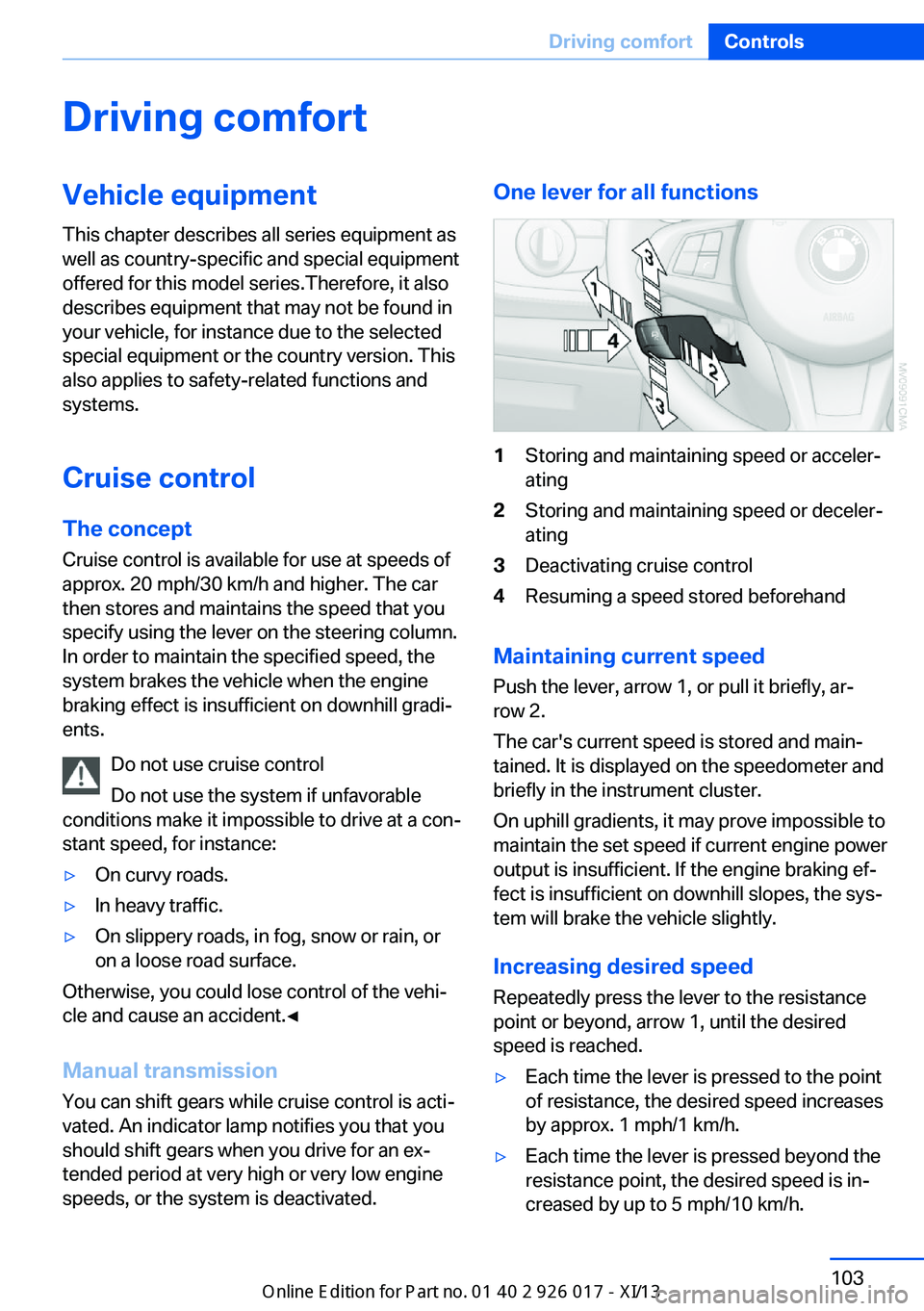
One lever for all functions1Storing and maintaining speed or acceler‐
ating2Storing and maintaining speed or deceler‐
ating3Deactivating cruise control4Resuming a speed stored beforehand
Maintaining current speed
Push the lever, arrow 1, or pull it briefly, ar‐
row 2.
The car's current speed is stored and main‐
tained. It is displayed on the speedometer and briefly in the instrument cluster.
On uphill gradients, it may prove impossible to
maintain the set speed if current engine power
output is insufficient. If the engine braking ef‐
fect is insufficient on downhill slopes, the sys‐
tem will brake the vehicle slightly.
Increasing desired speed
Repeatedly press the lever to the resistance
point or beyond, arrow 1, until the desired
speed is reached.
▷Each time the lever is pressed to the point
of resistance, the desired speed increases
by approx. 1 mph/1 km/h.▷Each time the lever is pressed beyond the
resistance point, the desired speed is in‐
creased by up to 5 mph/10 km/h.Seite 103Driving comfortControls103
Online Edition for Part no. 01 40 2 911 315 - VI/13
Page 126 of 289
Storage compartmentsVehicle equipmentThis chapter describes all series equipment as
well as country-specific and special equipment
offered for this model series.Therefore, it also
describes equipment that may not be found in
your vehicle, for instance due to the selected
special equipment or the country version. This
also applies to safety-related functions and
systems.
Glove compartment
Opening
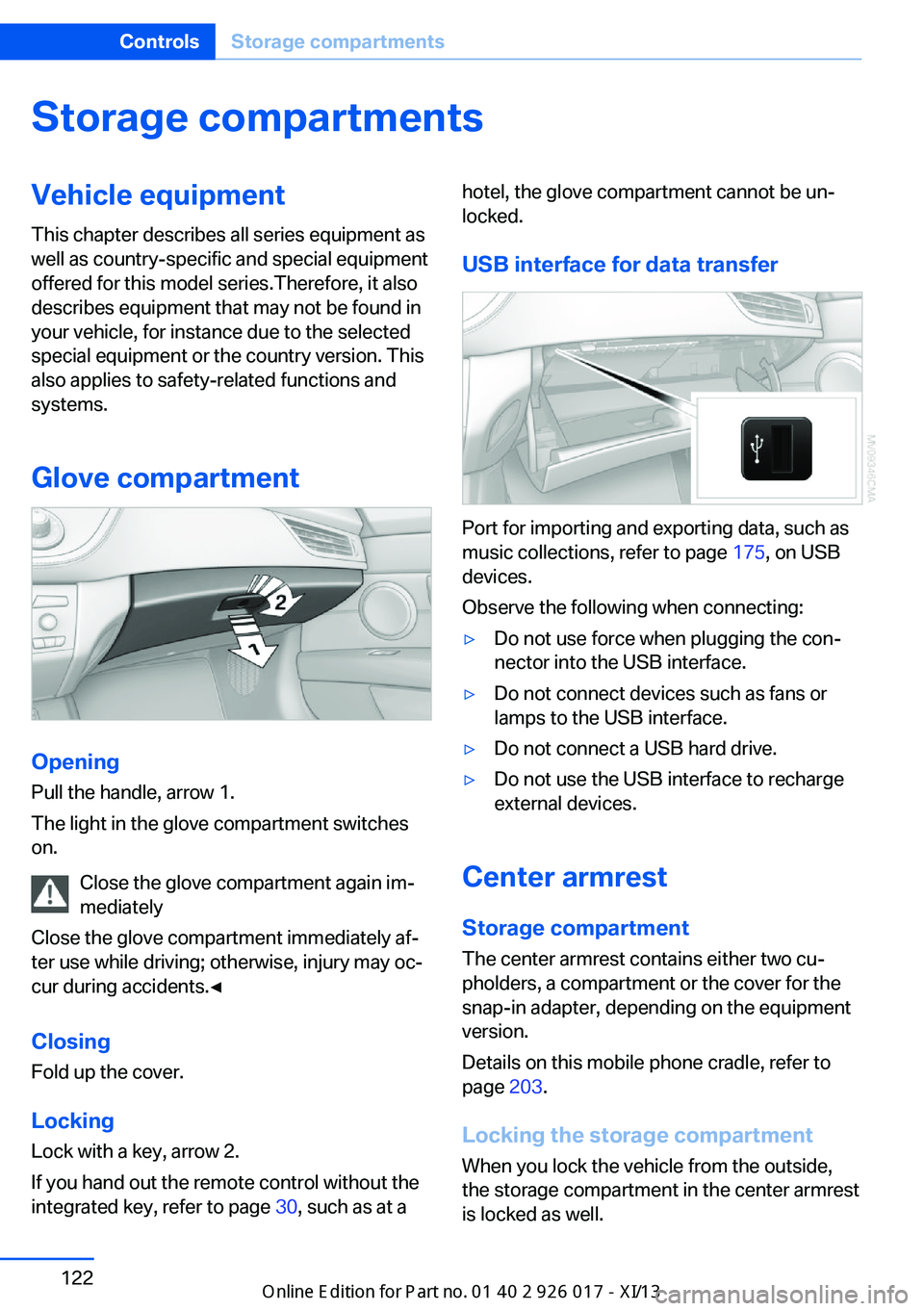
Pull the handle, arrow 1.
The light in the glove compartment switches
on.
Close the glove compartment again im‐
mediately
Close the glove compartment immediately af‐
ter use while driving; otherwise, injury may oc‐
cur during accidents.◀
ClosingFold up the cover.
Locking
Lock with a key, arrow 2.
If you hand out the remote control without the
integrated key, refer to page 30, such as at a
hotel, the glove compartment cannot be un‐
locked.
USB interface for data transfer
Port for importing and exporting data, such as
music collections, refer to page 175, on USB
devices.
Observe the following when connecting:
▷Do not use force when plugging the con‐
nector into the USB interface.▷Do not connect devices such as fans or
lamps to the USB interface.▷Do not connect a USB hard drive.▷Do not use the USB interface to recharge
external devices.
Center armrest
Storage compartment The center armrest contains either two cu‐
pholders, a compartment or the cover for the
snap-in adapter, depending on the equipment
version.
Details on this mobile phone cradle, refer to
page 203.
Locking the storage compartment
When you lock the vehicle from the outside,
the storage compartment in the center armrest
is locked as well.
Seite 122ControlsStorage compartments122
Online Edition for Part no. 01 40 2 911 315 - VI/13
Page 128 of 289
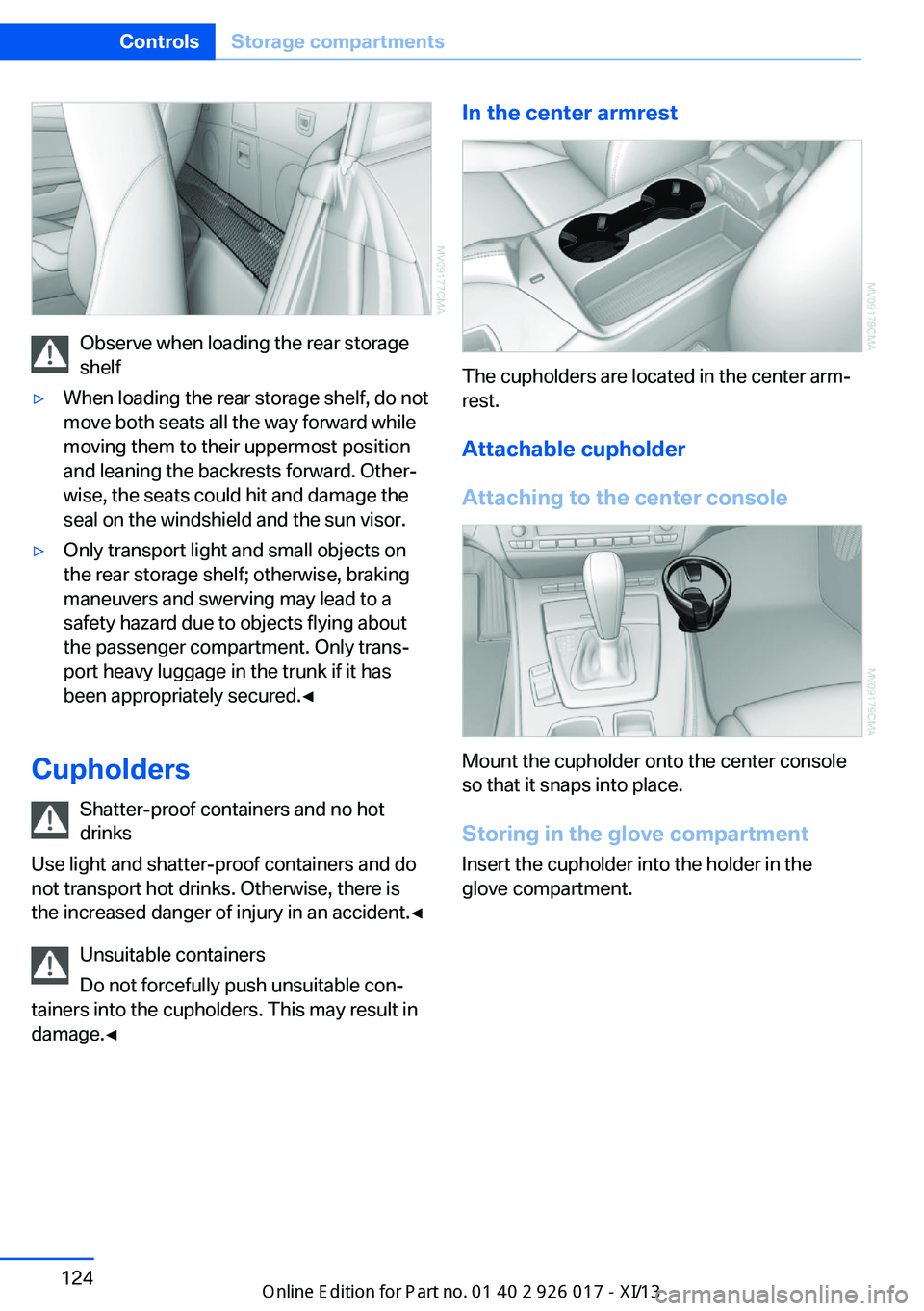
Observe when loading the rear storage
shelf
▷When loading the rear storage shelf, do not
move both seats all the way forward while
moving them to their uppermost position
and leaning the backrests forward. Other‐
wise, the seats could hit and damage the
seal on the windshield and the sun visor.▷Only transport light and small objects on
the rear storage shelf; otherwise, braking
maneuvers and swerving may lead to a
safety hazard due to objects flying about
the passenger compartment. Only trans‐
port heavy luggage in the trunk if it has
been appropriately secured.◀
Cupholders
Shatter-proof containers and no hot
drinks
Use light and shatter-proof containers and do
not transport hot drinks. Otherwise, there is
the increased danger of injury in an accident.◀
Unsuitable containers
Do not forcefully push unsuitable con‐
tainers into the cupholders. This may result in
damage.◀
In the center armrest
The cupholders are located in the center arm‐
rest.
Attachable cupholder
Attaching to the center console
Mount the cupholder onto the center console
so that it snaps into place.
Storing in the glove compartment Insert the cupholder into the holder in the
glove compartment.
Seite 124ControlsStorage compartments124
Online Edition for Part no. 01 40 2 911 315 - VI/13
Page 228 of 289
RefuelingVehicle equipment
This chapter describes all series equipment as
well as country-specific and special equipment
offered for this model series.Therefore, it also
describes equipment that may not be found in
your vehicle, for instance due to the selected
special equipment or the country version. This
also applies to safety-related functions and
systems.
General information Refuel promptly
At the latest, refuel at a range of
30 miles/50 km; otherwise, the engine function
is not ensured and damage may occur.◀
Notes Switch off the engine before refueling
Always switch off the engine before refu‐
eling; otherwise, fuel cannot be added to the tank and a message will be displayed.◀
Observe when handling fuel▷Take all precautionary measures and
observe all applicable regulations
when handling fuel.▷Do not carry any spare fuel containers in
your vehicle. They can develop a leak and
cause an explosion or cause a fire in the
event of an accident.◀Fuel filler flap
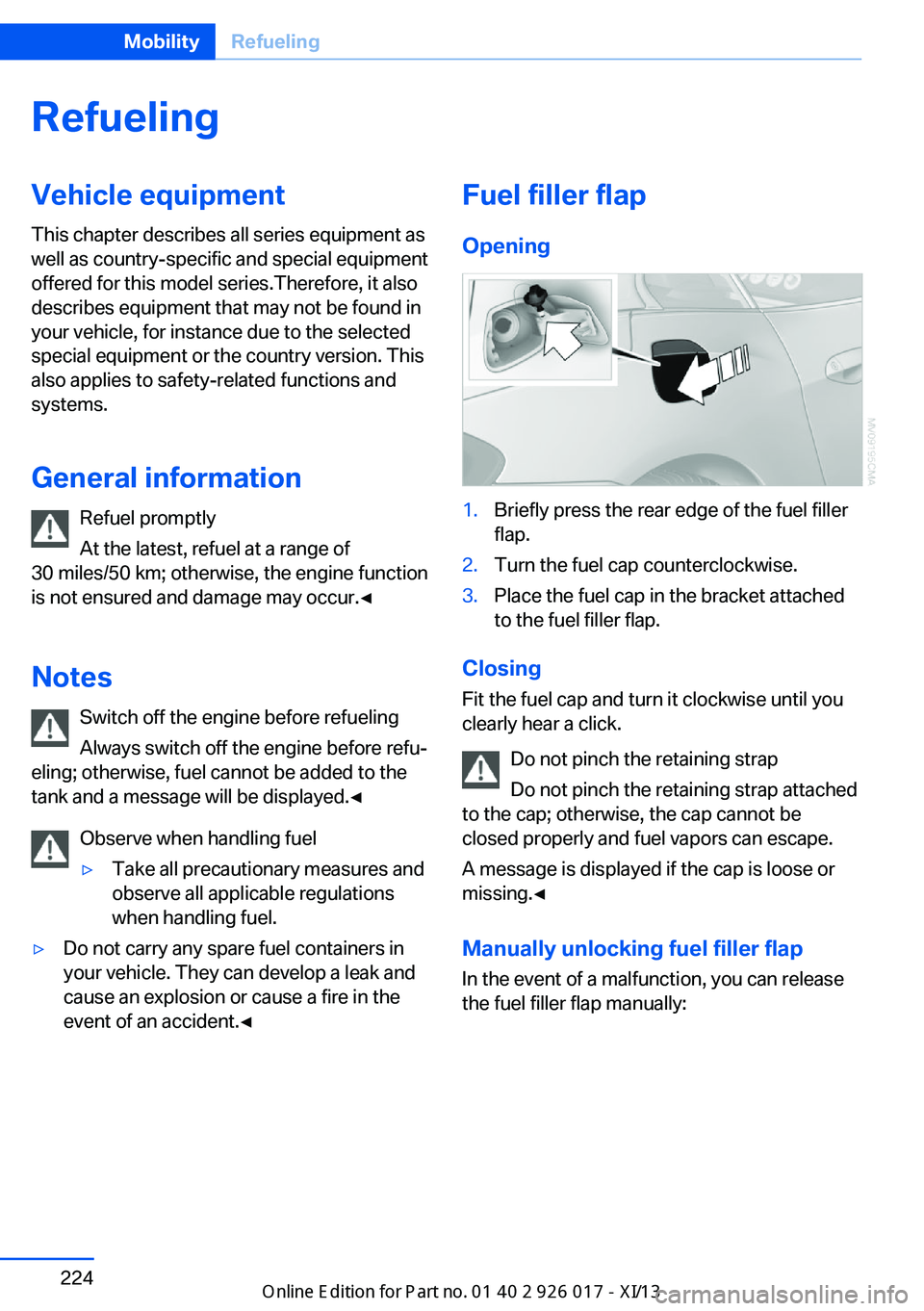
Opening1.Briefly press the rear edge of the fuel filler
flap.2.Turn the fuel cap counterclockwise.3.Place the fuel cap in the bracket attached
to the fuel filler flap.
Closing
Fit the fuel cap and turn it clockwise until you
clearly hear a click.
Do not pinch the retaining strap
Do not pinch the retaining strap attached
to the cap; otherwise, the cap cannot be
closed properly and fuel vapors can escape.
A message is displayed if the cap is loose or
missing.◀
Manually unlocking fuel filler flap In the event of a malfunction, you can release
the fuel filler flap manually:
Seite 224MobilityRefueling224
Online Edition for Part no. 01 40 2 911 315 - VI/13