warning BMW Z4 2013 E89 Owner's Guide
[x] Cancel search | Manufacturer: BMW, Model Year: 2013, Model line: Z4, Model: BMW Z4 2013 E89Pages: 289, PDF Size: 6.86 MB
Page 105 of 289
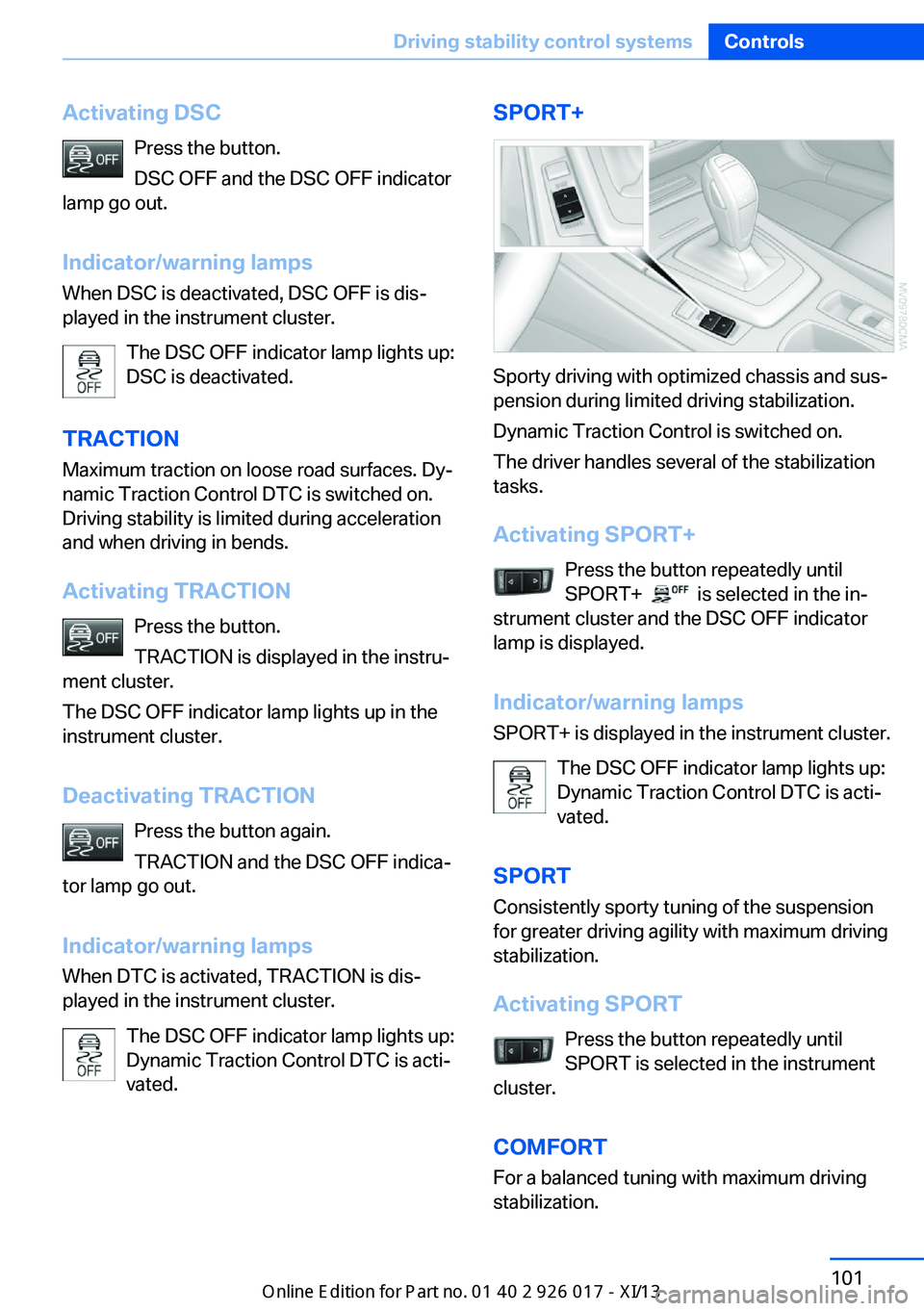
Activating DSCPress the button.
DSC OFF and the DSC OFF indicator
lamp go out.
Indicator/warning lamps
When DSC is deactivated, DSC OFF is dis‐
played in the instrument cluster.
The DSC OFF indicator lamp lights up:
DSC is deactivated.
TRACTION Maximum traction on loose road surfaces. Dy‐
namic Traction Control DTC is switched on.
Driving stability is limited during acceleration
and when driving in bends.
Activating TRACTION Press the button.
TRACTION is displayed in the instru‐
ment cluster.
The DSC OFF indicator lamp lights up in the
instrument cluster.
Deactivating TRACTION Press the button again.
TRACTION and the DSC OFF indica‐
tor lamp go out.
Indicator/warning lamps
When DTC is activated, TRACTION is dis‐
played in the instrument cluster.
The DSC OFF indicator lamp lights up:
Dynamic Traction Control DTC is acti‐
vated.SPORT+
Sporty driving with optimized chassis and sus‐
pension during limited driving stabilization.
Dynamic Traction Control is switched on.
The driver handles several of the stabilization
tasks.
Activating SPORT+ Press the button repeatedly until
SPORT+
is selected in the in‐
strument cluster and the DSC OFF indicator
lamp is displayed.
Indicator/warning lamps SPORT+ is displayed in the instrument cluster.
The DSC OFF indicator lamp lights up:
Dynamic Traction Control DTC is acti‐
vated.
SPORT Consistently sporty tuning of the suspension
for greater driving agility with maximum driving
stabilization.
Activating SPORT Press the button repeatedly until
SPORT is selected in the instrument
cluster.
COMFORT For a balanced tuning with maximum driving
stabilization.
Seite 101Driving stability control systemsControls101
Online Edition for Part no. 01 40 2 911 315 - VI/13
Page 108 of 289
The system stores and maintains the speed.
Accelerating using the lever Accelerating slightly:
Press the lever to the resistance point, arrow 1,
and hold until the desired speed is reached.
Accelerating significantly:
Press the lever beyond the resistance point,
arrow 1, and hold until the desired speed is
reached.
The vehicle accelerates without pressure on
the accelerator pedal. The system stores and
maintains the speed.
Decreasing speed
Repeatedly pull the lever to the resistance
point or beyond, arrow 2, until the desired
speed is displayed.▷Each time the lever is pulled to the resist‐
ance point, the desired speed is decreased
by approx. 1 mph/1 km/h.▷Each time the lever is pulled beyond the
resistance point, the desired speed is re‐
duced by up to 5 mph or 10 km/h until the
minimum speed of 20 mph/30 km/h is ach‐
ieved.
The system stores and maintains the speed.
Interrupting the system
Push the lever upwards or downwards, ar‐
row 3.
The displays in the speedometer change color.
In addition, the system is automatically inter‐
rupted in the following situations:
▷When the brakes are applied.▷In cars with manual transmission, when
gears are shifted very slowly or if neutral is
engaged.▷In cars with Sport automatic transmission,
when transmission position N is engaged.▷When DTC is activated or DSC is deacti‐
vated.▷When DSC or ABS is intervening.
Cruise control is not deactivated by depressing
the accelerator pedal. Once the accelerator
pedal is released, the stored speed is achieved
again and maintained.
Warning lamp A message appears on the ControlDisplay.
The warning lamp comes on, for ex‐
ample, when cruise control has been deacti‐
vated as a result of DSC intervention.
Deactivating the system
▷Press the lever upward or downward twice,
arrow 3.▷Switch off the ignition.
The stored speed is cleared.
Resuming a speed stored beforehand Press the button, arrow 4. The last stored
speed is resumed and maintained.
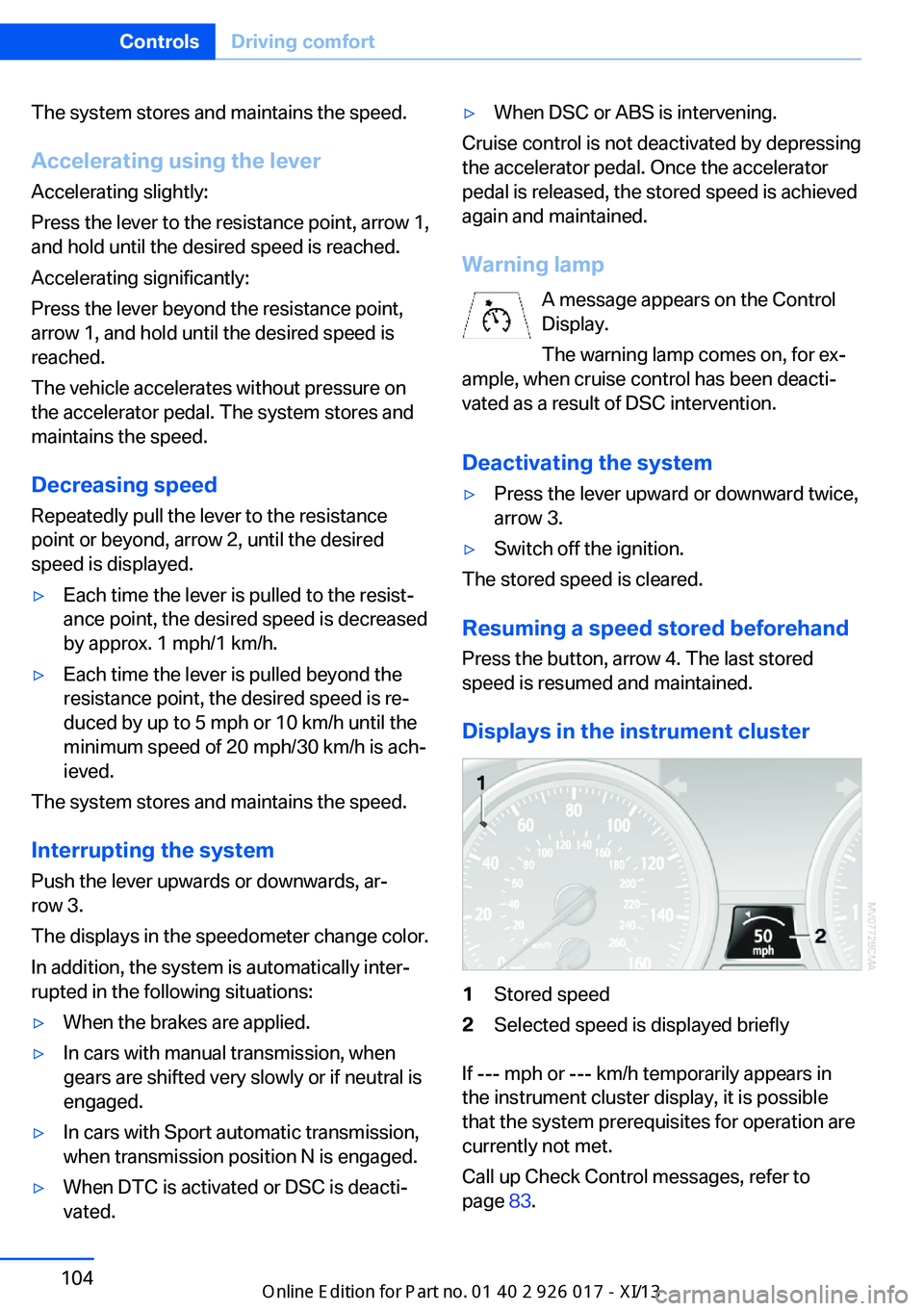
Displays in the instrument cluster
1Stored speed2Selected speed is displayed briefly
If --- mph or --- km/h temporarily appears in
the instrument cluster display, it is possible
that the system prerequisites for operation are
currently not met.
Call up Check Control messages, refer to
page 83.
Seite 104ControlsDriving comfort104
Online Edition for Part no. 01 40 2 911 315 - VI/13
Page 109 of 289
MalfunctionThe warning lamp comes on when
the system has failed.
A message appears on the Control
Display. More information, refer to page 82.
Park Distance Control PDC
The concept PDC supports you when parking.
You are alerted that you are slowly approach‐
ing an object behind the vehicle and, if equip‐
ped accordingly, in front of the vehicle by:▷Signal tones.▷A visual display.
Measurement
Measurements are made by ultrasound sen‐
sors in the bumpers.
The range is approx. 6 ft/2 m.
An acoustic warning is first given:
▷By the front sensors and two rear corner
sensors at approx. 24 in/60 cm.▷By the rear middle sensors at approx.
5 ft/1.50 m.
System limits
Check the traffic situation as well
PDC cannot serve as a substitute for the
driver's personal judgment of the traffic situa‐
tion. Check the traffic situation around the ve‐
hicle with your own eyes. Otherwise, an acci‐
dent could result from road users or objects
located outside of the PDC detection range.
Loud noises from outside and inside the vehi‐
cle may prevent you from hearing the PDC's
signal tone.◀
Avoid driving quickly with PDC
Avoid approaching an object quickly.
Avoid driving away quickly while PDC is not yet
active.
For technical reasons, the system may other‐
wise be too late in issuing a warning.◀
Limits of ultrasonic measurement
The detection of objects can reach the physi‐
cal limits of ultrasonic measurement, for in‐
stance:▷With tow bars and trailer hitches.▷With thin or wedge-shaped objects.▷With low objects.▷With objects with corners and sharp edges.
Low objects already displayed, e.g., curbs, can
move into the blind area of the sensors before
or after a continuous tone sounds.
High, protruding objects such as ledges may
not be detected.
False warnings
PDC may issue a warning under the following
conditions even though there is no obstacle
within the detection range:
▷In heavy rain.▷When sensors are very dirty or covered in
ice.▷When sensors are covered in snow.▷On rough road surfaces.▷In large buildings with right angles and
smooth walls, e.g., in underground ga‐
rages.▷In heavy exhaust.▷Due to other ultrasound sources, e.g.,
sweeping machines, high pressure steam
cleaners or neon lights.
Switching on automatically
Engage reverse gear with the engine running
or the ignition switched on.
Seite 105Driving comfortControls105
Online Edition for Part no. 01 40 2 911 315 - VI/13
Page 110 of 289
Switching off automatically when
driving forward
The system switches off when a certain dis‐
tance or speed is exceeded.
Switch on the system again if necessary.
Signal tonesWhen approaching an object, an intermittent
tone is sounded that indicates the position of
the object. For example, if an object is de‐
tected to the left rear of the vehicle, a signal
tone sounds from the left rear speaker.
The shorter the distance to the object be‐
comes, the shorter the intervals.
If the distance to a detected object is less than
approx. 10 in/25 cm, a continuous tone is
sounded.
If objects are located both in front of and be‐
hind the vehicle, an alternating continuous sig‐
nal is sounded.
The intermittent tone is interrupted after ap‐
prox. 3 seconds:▷If the vehicle stops in front of an object that
is detected by only one of the corner sen‐
sors.▷If moving parallel to a wall.
The signal tone is switched off:
▷When the vehicle moves away from an ob‐
ject by more than approx. 4 in/10 cm.▷When transmission position P is engaged.
Volume
You can set the volume of the PDC signal, refer
to page 161.
The setting is stored for the remote control
currently in use.
Visual warning
The approach of the vehicle to an object is
shown on the Control Display. Objects that are
farther away are displayed on the Control Dis‐
play before a signal sounds. The display ap‐
pears as soon as PDC is switched on.
Malfunction The indicator lamp in the instrument
cluster comes on. PDC has failed.
A message appears on the Control Display.
Have the system checked.
To ensure full operability:▷Keep the sensors clean and free of ice.▷When using high-pressure washers, do not
spray the sensors for long periods and
maintain a distance of at least 12 in/30 cm.Seite 106ControlsDriving comfort106
Online Edition for Part no. 01 40 2 911 315 - VI/13
Page 242 of 289
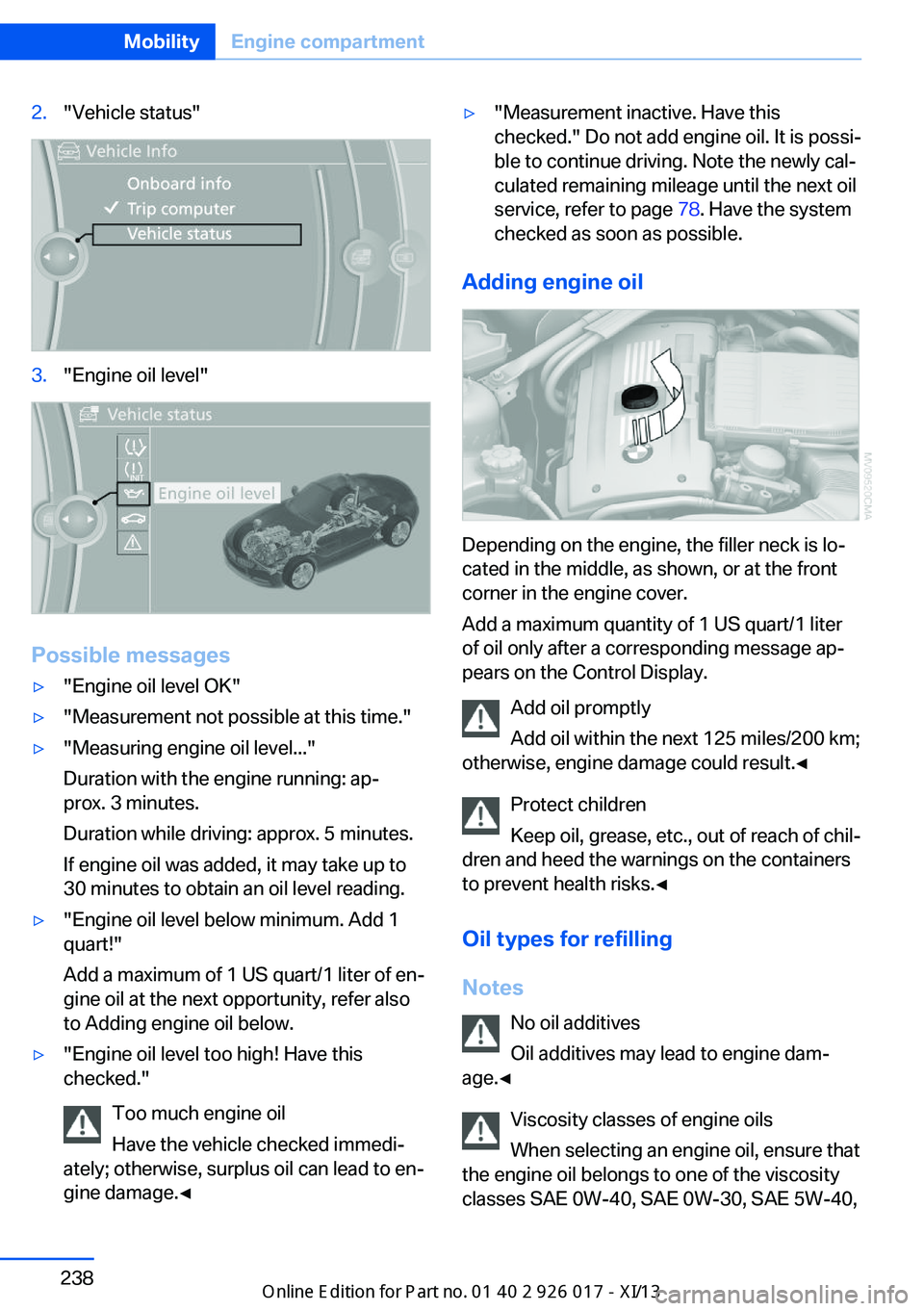
2."Vehicle status"3."Engine oil level"
Possible messages
▷"Engine oil level OK"▷"Measurement not possible at this time."▷"Measuring engine oil level..."
Duration with the engine running: ap‐
prox. 3 minutes.
Duration while driving: approx. 5 minutes.
If engine oil was added, it may take up to
30 minutes to obtain an oil level reading.▷"Engine oil level below minimum. Add 1
quart!"
Add a maximum of 1 US quart/1 liter of en‐
gine oil at the next opportunity, refer also
to Adding engine oil below.▷"Engine oil level too high! Have this
checked."
Too much engine oil
Have the vehicle checked immedi‐
ately; otherwise, surplus oil can lead to en‐
gine damage.◀▷"Measurement inactive. Have this
checked." Do not add engine oil. It is possi‐
ble to continue driving. Note the newly cal‐
culated remaining mileage until the next oil
service, refer to page 78. Have the system
checked as soon as possible.
Adding engine oil
Depending on the engine, the filler neck is lo‐
cated in the middle, as shown, or at the front
corner in the engine cover.
Add a maximum quantity of 1 US quart/1 liter
of oil only after a corresponding message ap‐
pears on the Control Display.
Add oil promptly
Add oil within the next 125 miles/200 km;
otherwise, engine damage could result.◀
Protect children
Keep oil, grease, etc., out of reach of chil‐
dren and heed the warnings on the containers
to prevent health risks.◀
Oil types for refilling
Notes No oil additives
Oil additives may lead to engine dam‐
age.◀
Viscosity classes of engine oils
When selecting an engine oil, ensure that
the engine oil belongs to one of the viscosity
classes SAE 0W-40, SAE 0W-30, SAE 5W-40,
Seite 238MobilityEngine compartment238
Online Edition for Part no. 01 40 2 911 315 - VI/13
Page 246 of 289
Socket for OBD Onboard
Diagnosis
Socket for Onboard Diagnosis
The socket for Onboard Diagnosis may
only be used by the service center, by work‐
shops that operate according to the specifica‐
tions of the vehicle manufacturer with appro‐
priately trained personnel, and by other
authorized persons. Otherwise, its use may
lead to vehicle malfunctions.◀
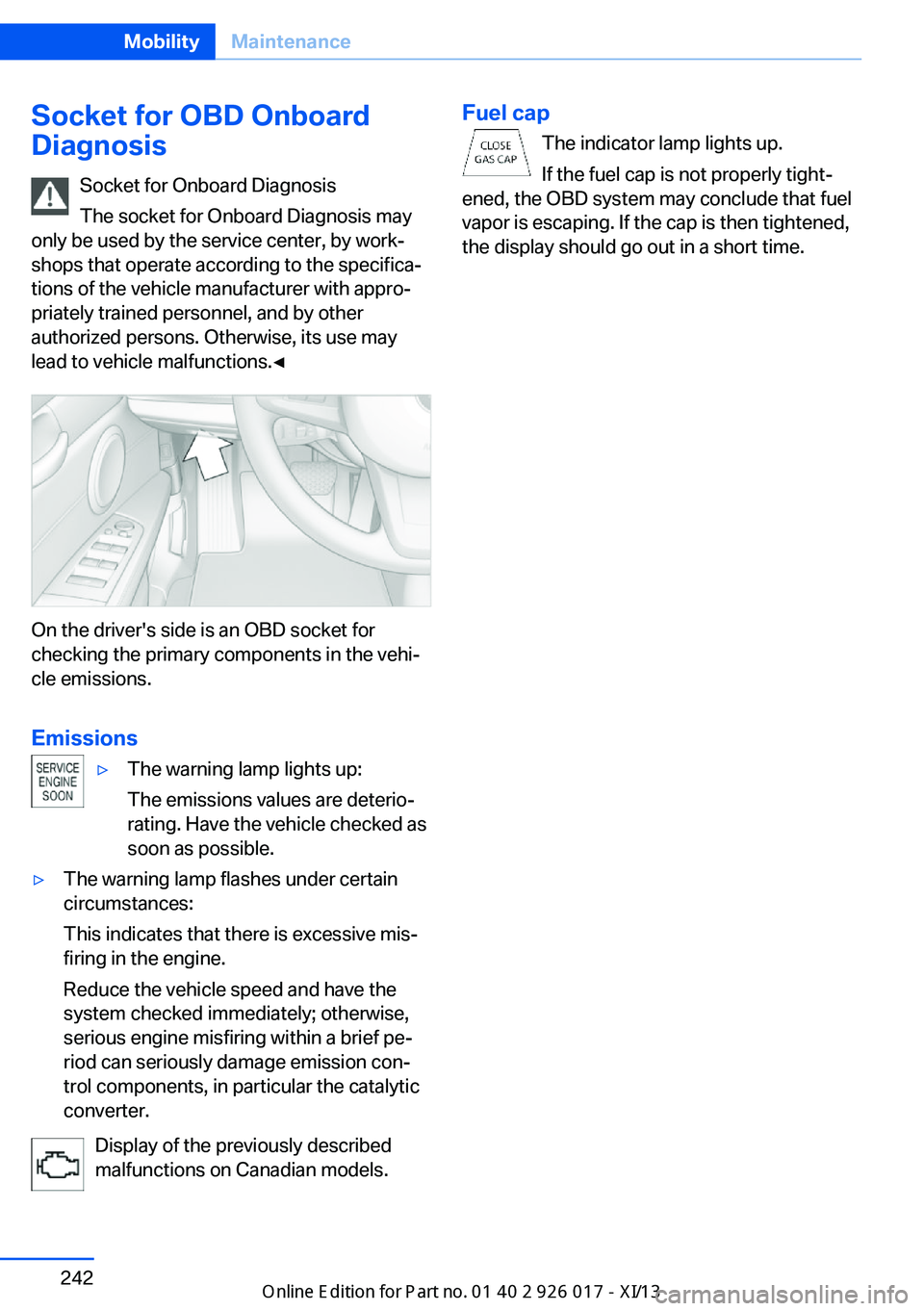
On the driver's side is an OBD socket for
checking the primary components in the vehi‐
cle emissions.
Emissions
▷The warning lamp lights up:
The emissions values are deterio‐
rating. Have the vehicle checked as
soon as possible.▷The warning lamp flashes under certain
circumstances:
This indicates that there is excessive mis‐
firing in the engine.
Reduce the vehicle speed and have the
system checked immediately; otherwise,
serious engine misfiring within a brief pe‐
riod can seriously damage emission con‐
trol components, in particular the catalytic
converter.
Display of the previously described
malfunctions on Canadian models.
Fuel cap
The indicator lamp lights up.
If the fuel cap is not properly tight‐
ened, the OBD system may conclude that fuel
vapor is escaping. If the cap is then tightened,
the display should go out in a short time.Seite 242MobilityMaintenance242
Online Edition for Part no. 01 40 2 911 315 - VI/13
Page 253 of 289
Breakdown assistanceVehicle equipment
This chapter describes all series equipment as
well as country-specific and special equipment
offered for this model series.Therefore, it also
describes equipment that may not be found in
your vehicle, for instance due to the selected
special equipment or the country version. This
also applies to safety-related functions and
systems.
Hazard warning system
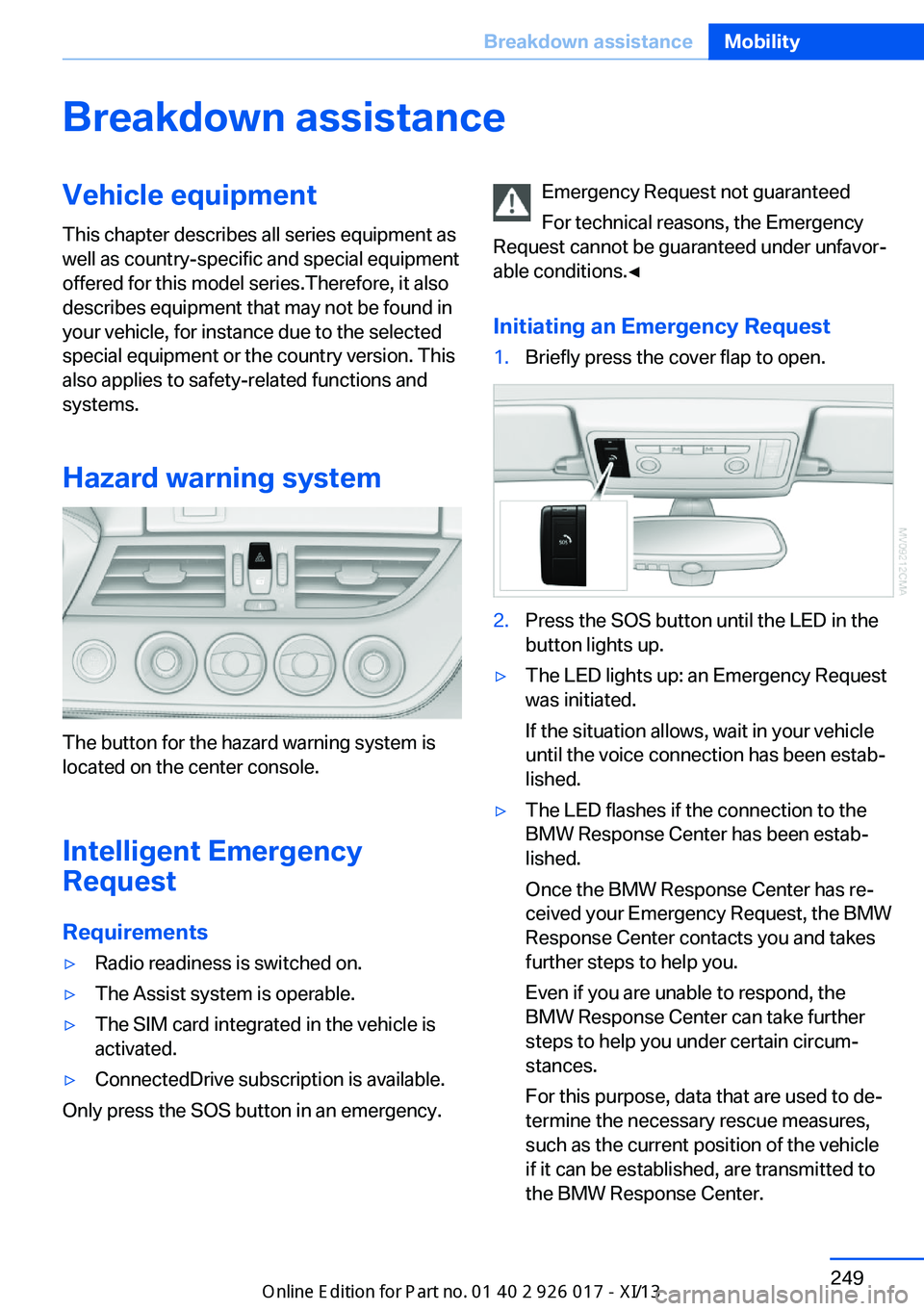
The button for the hazard warning system is
located on the center console.
Intelligent Emergency
Request
Requirements
▷Radio readiness is switched on.▷The Assist system is operable.▷The SIM card integrated in the vehicle is
activated.▷ConnectedDrive subscription is available.
Only press the SOS button in an emergency.
Emergency Request not guaranteed
For technical reasons, the Emergency
Request cannot be guaranteed under unfavor‐
able conditions.◀
Initiating an Emergency Request1.Briefly press the cover flap to open.2.Press the SOS button until the LED in the
button lights up.▷The LED lights up: an Emergency Request
was initiated.
If the situation allows, wait in your vehicle
until the voice connection has been estab‐
lished.▷The LED flashes if the connection to the
BMW Response Center has been estab‐
lished.
Once the BMW Response Center has re‐
ceived your Emergency Request, the BMW
Response Center contacts you and takes
further steps to help you.
Even if you are unable to respond, the
BMW Response Center can take further
steps to help you under certain circum‐
stances.
For this purpose, data that are used to de‐
termine the necessary rescue measures,
such as the current position of the vehicle
if it can be established, are transmitted to
the BMW Response Center.Seite 249Breakdown assistanceMobility249
Online Edition for Part no. 01 40 2 911 315 - VI/13
Page 254 of 289
▷If the LED is flashing but the BMW Re‐
sponse Center cannot be heard on the
hands-free system, the hands-free system
may be malfunctioning. However, the
BMW Response Center may still be able to
hear you.
Initiating an Emergency Request
automatically
Under certain conditions, an Emergency Re‐
quest is automatically initiated immediately af‐
ter a severe accident. Automatic Collision Noti‐
fication is not affected by pressing the SOS
button.
Warning triangle
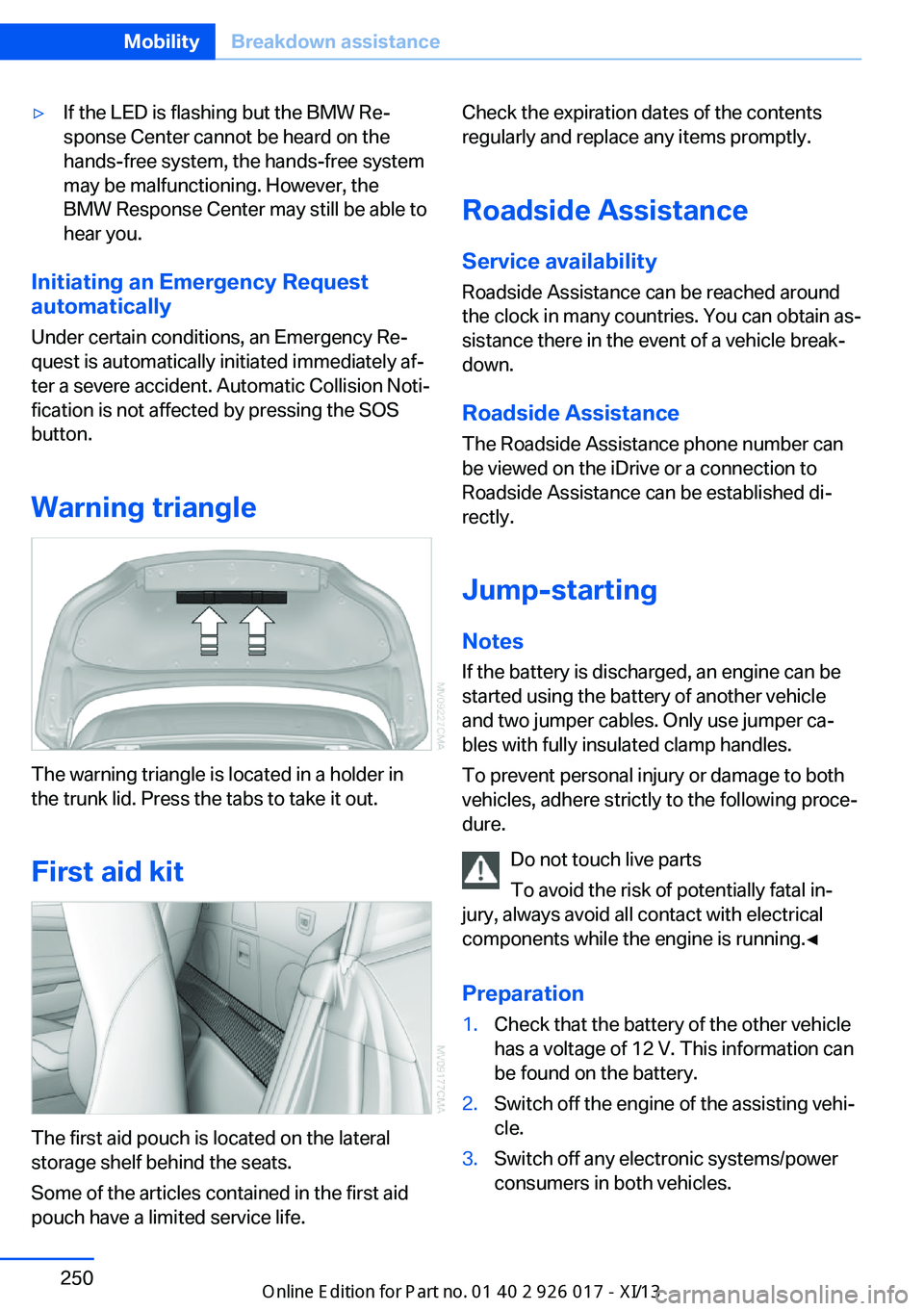
The warning triangle is located in a holder in
the trunk lid. Press the tabs to take it out.
First aid kit
The first aid pouch is located on the lateral
storage shelf behind the seats.
Some of the articles contained in the first aid
pouch have a limited service life.
Check the expiration dates of the contents
regularly and replace any items promptly.
Roadside Assistance Service availability
Roadside Assistance can be reached around
the clock in many countries. You can obtain as‐
sistance there in the event of a vehicle break‐
down.
Roadside Assistance The Roadside Assistance phone number can
be viewed on the iDrive or a connection to
Roadside Assistance can be established di‐
rectly.
Jump-starting
Notes If the battery is discharged, an engine can be
started using the battery of another vehicle
and two jumper cables. Only use jumper ca‐
bles with fully insulated clamp handles.
To prevent personal injury or damage to both
vehicles, adhere strictly to the following proce‐
dure.
Do not touch live parts
To avoid the risk of potentially fatal in‐
jury, always avoid all contact with electrical
components while the engine is running.◀
Preparation1.Check that the battery of the other vehicle
has a voltage of 12 V. This information can
be found on the battery.2.Switch off the engine of the assisting vehi‐
cle.3.Switch off any electronic systems/power
consumers in both vehicles.Seite 250MobilityBreakdown assistance250
Online Edition for Part no. 01 40 2 911 315 - VI/13
Page 257 of 289
Manual transmission
Observe before towing your vehicle Gearshift lever in neutral position.
Being towed Blocked parking brake
The parking brake cannot be released
manually.
When the parking brake is blocked, do not tow
the vehicle or else it may be damaged.
Contact your service center.◀
Follow the towing instructions
Follow all towing instructions, or vehicle
damage or accidents may occur.◀▷Make sure that the ignition is switched on;
otherwise, the low beams, tail lamps, turn
signals, and windshield wipers may be un‐
available.▷Do not tow the vehicle with the rear axle
tilted, as the front wheels could turn.▷When the engine is stopped, there is no
power assist. Consequently, more force
needs to be applied when braking and
steering.▷Larger steering wheel movements are re‐
quired.▷The towing vehicle must not be lighter
than the vehicle being towed; otherwise,
it will not be possible to control the vehicle
response.
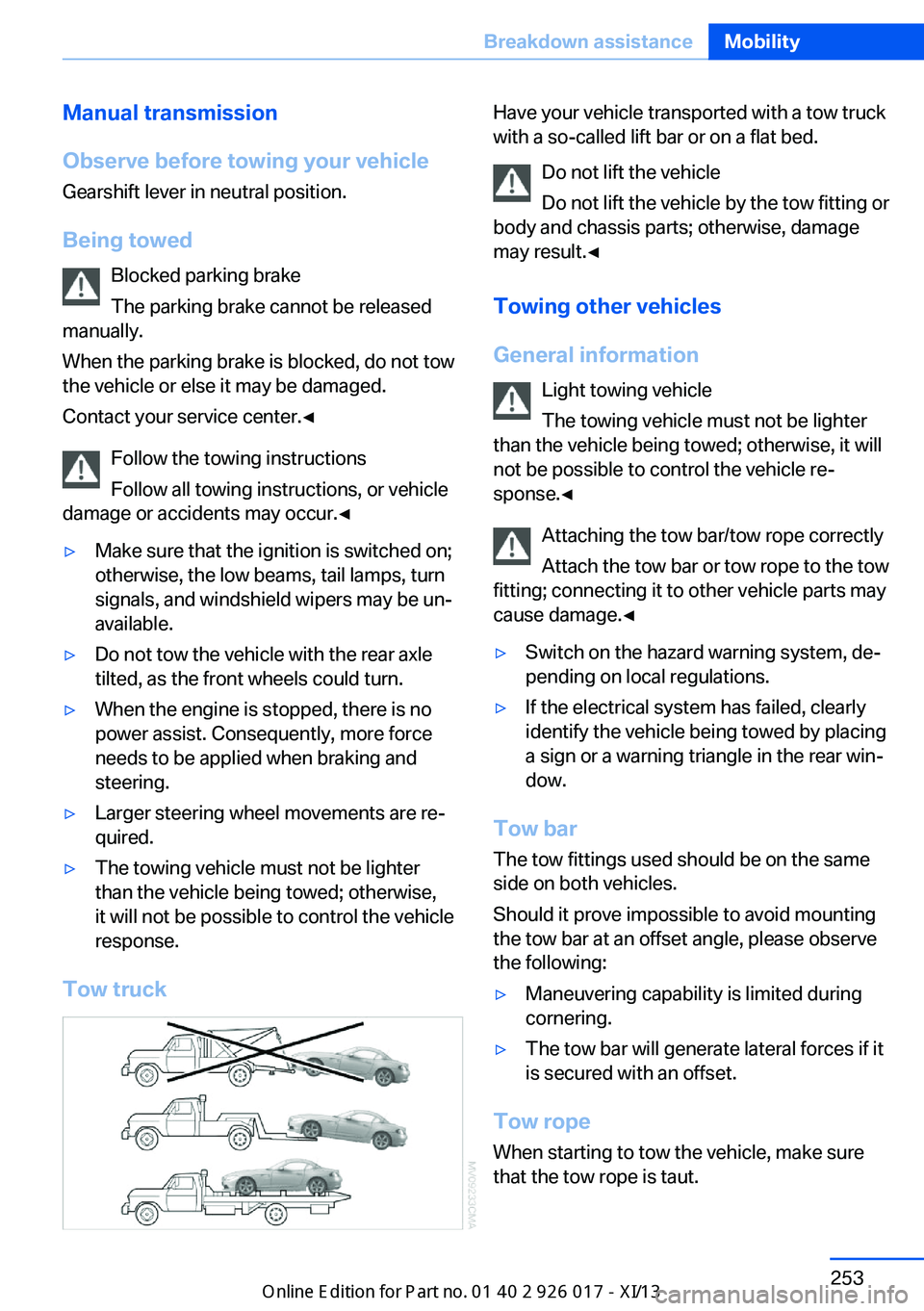
Tow truck
Have your vehicle transported with a tow truck
with a so-called lift bar or on a flat bed.
Do not lift the vehicle
Do not lift the vehicle by the tow fitting or
body and chassis parts; otherwise, damage
may result.◀
Towing other vehicles
General information Light towing vehicle
The towing vehicle must not be lighter
than the vehicle being towed; otherwise, it will
not be possible to control the vehicle re‐
sponse.◀
Attaching the tow bar/tow rope correctly
Attach the tow bar or tow rope to the tow
fitting; connecting it to other vehicle parts may
cause damage.◀▷Switch on the hazard warning system, de‐
pending on local regulations.▷If the electrical system has failed, clearly
identify the vehicle being towed by placing
a sign or a warning triangle in the rear win‐
dow.
Tow bar
The tow fittings used should be on the same
side on both vehicles.
Should it prove impossible to avoid mounting
the tow bar at an offset angle, please observe
the following:
▷Maneuvering capability is limited during
cornering.▷The tow bar will generate lateral forces if it
is secured with an offset.
Tow rope
When starting to tow the vehicle, make sure
that the tow rope is taut.
Seite 253Breakdown assistanceMobility253
Online Edition for Part no. 01 40 2 911 315 - VI/13
Page 258 of 289
To avoid jerking and the associated stresses
on the vehicle components when towing, al‐
ways use nylon ropes or nylon straps.
Attaching the tow rope correctly
Only secure the tow rope on the tow fit‐
ting; otherwise, damage can occur when it is
secured on other parts of the vehicle.◀
Tow fitting
The screw-in tow fitting should always be car‐
ried in the vehicle. It can be screwed in at the
front or rear of the BMW.
It is stored in the onboard vehicle tool kit under
the cargo floor panel, refer to page 243.
Tow fitting, information on use▷Use only the tow fitting provided with
the vehicle and screw it all the way in.▷Use the tow fitting for towing on paved
roads only.▷Avoid lateral loading of the tow fitting, e.g.,
do not lift the vehicle by the tow fitting.
Otherwise, damage to the tow fitting and the
vehicle can occur.◀
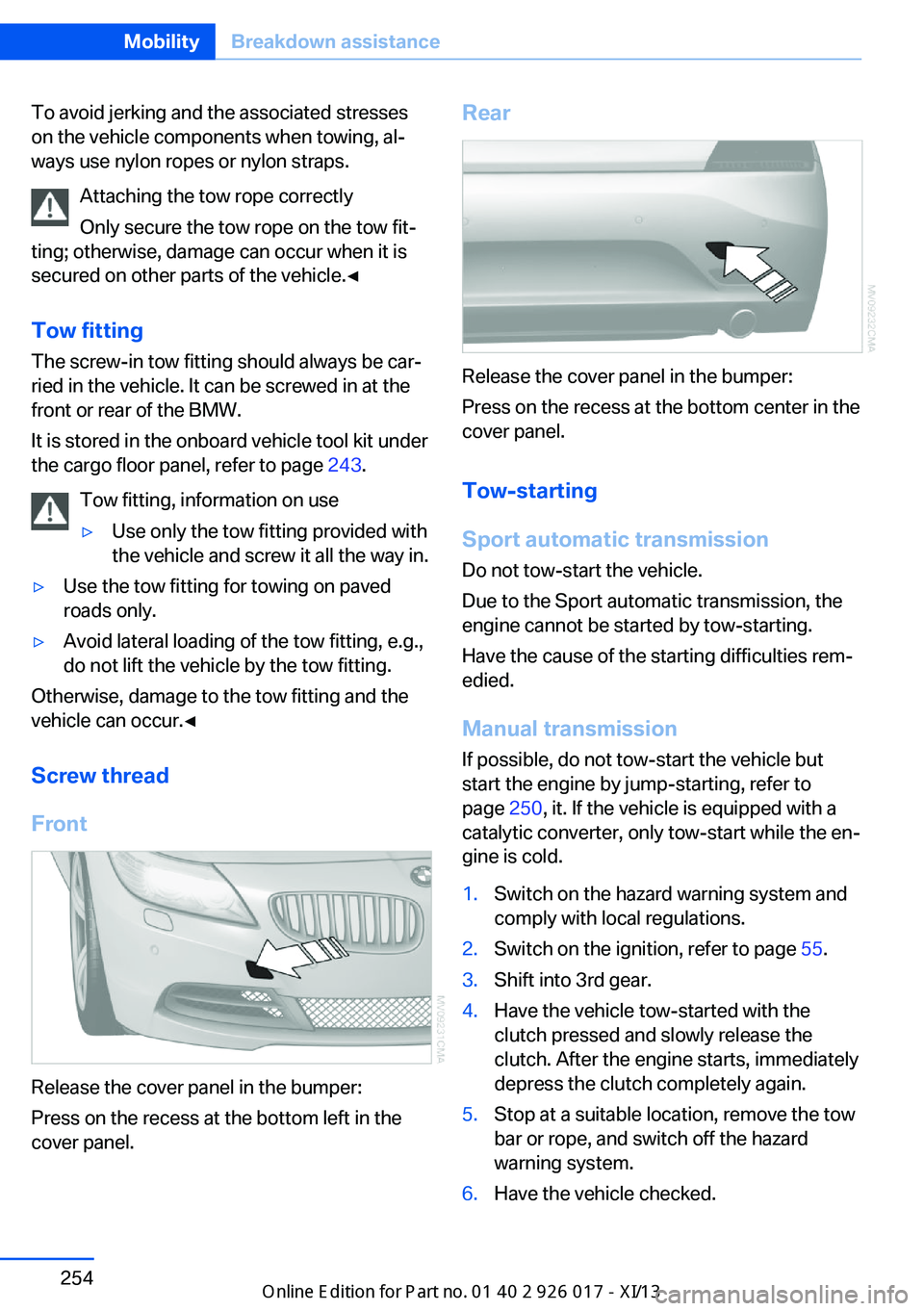
Screw thread
Front
Release the cover panel in the bumper:
Press on the recess at the bottom left in the
cover panel.
Rear
Release the cover panel in the bumper:
Press on the recess at the bottom center in the
cover panel.
Tow-starting
Sport automatic transmission Do not tow-start the vehicle.
Due to the Sport automatic transmission, the
engine cannot be started by tow-starting.
Have the cause of the starting difficulties rem‐
edied.
Manual transmission If possible, do not tow-start the vehicle but
start the engine by jump-starting, refer to
page 250, it. If the vehicle is equipped with a
catalytic converter, only tow-start while the en‐
gine is cold.
1.Switch on the hazard warning system and
comply with local regulations.2.Switch on the ignition, refer to page 55.3.Shift into 3rd gear.4.Have the vehicle tow-started with the
clutch pressed and slowly release the
clutch. After the engine starts, immediately
depress the clutch completely again.5.Stop at a suitable location, remove the tow
bar or rope, and switch off the hazard
warning system.6.Have the vehicle checked.Seite 254MobilityBreakdown assistance254
Online Edition for Part no. 01 40 2 911 315 - VI/13