lights BMW Z4 2013 E89 Owner's Guide
[x] Cancel search | Manufacturer: BMW, Model Year: 2013, Model line: Z4, Model: BMW Z4 2013 E89Pages: 289, PDF Size: 6.86 MB
Page 248 of 289
Use a clean tissue, cloth or something similar,
or hold the bulb by its base.◀
Light-emitting diodes LED
Light-emitting diodes installed behind translu‐
cent lenses serve as the light source for many
of the controls and displays in your vehicle.
These light-emitting diodes, which operate us‐
ing a concept similar to that applied in conven‐
tional lasers, are officially designated as
Class 1 light-emitting diodes.
Do not remove the covers
Do not remove the covers, and never
stare into the unfiltered light for several hours;
otherwise, irritation of the retina could result.◀
Headlamp glass
Condensation can form on the inside of the ex‐
ternal lamps in cool or humid weather. When
you drive with the lights switched on, the con‐
densation evaporates after a short time. The
headlamp glasses do not need to be changed.
If the condensation in the headlamps does not
evaporate after trips with the lights switched
on, and the amount of moisture in the head‐
lamps increases, for example if water droplets
form, have them checked by your service cen‐
ter.
Xenon headlamps Because of the long life of these bulbs, the
likelihood of failure is very low. Switching the
lamps on and off frequently shortens their life.
Do not perform work/bulb replacement
on xenon headlamps
Have any work on the xenon lighting system,
including bulb replacement, performed only by
a service center.
Due to the high voltage present in the system,
there is the danger of fatal injuries if work is
carried out improperly.◀Turn signals, front
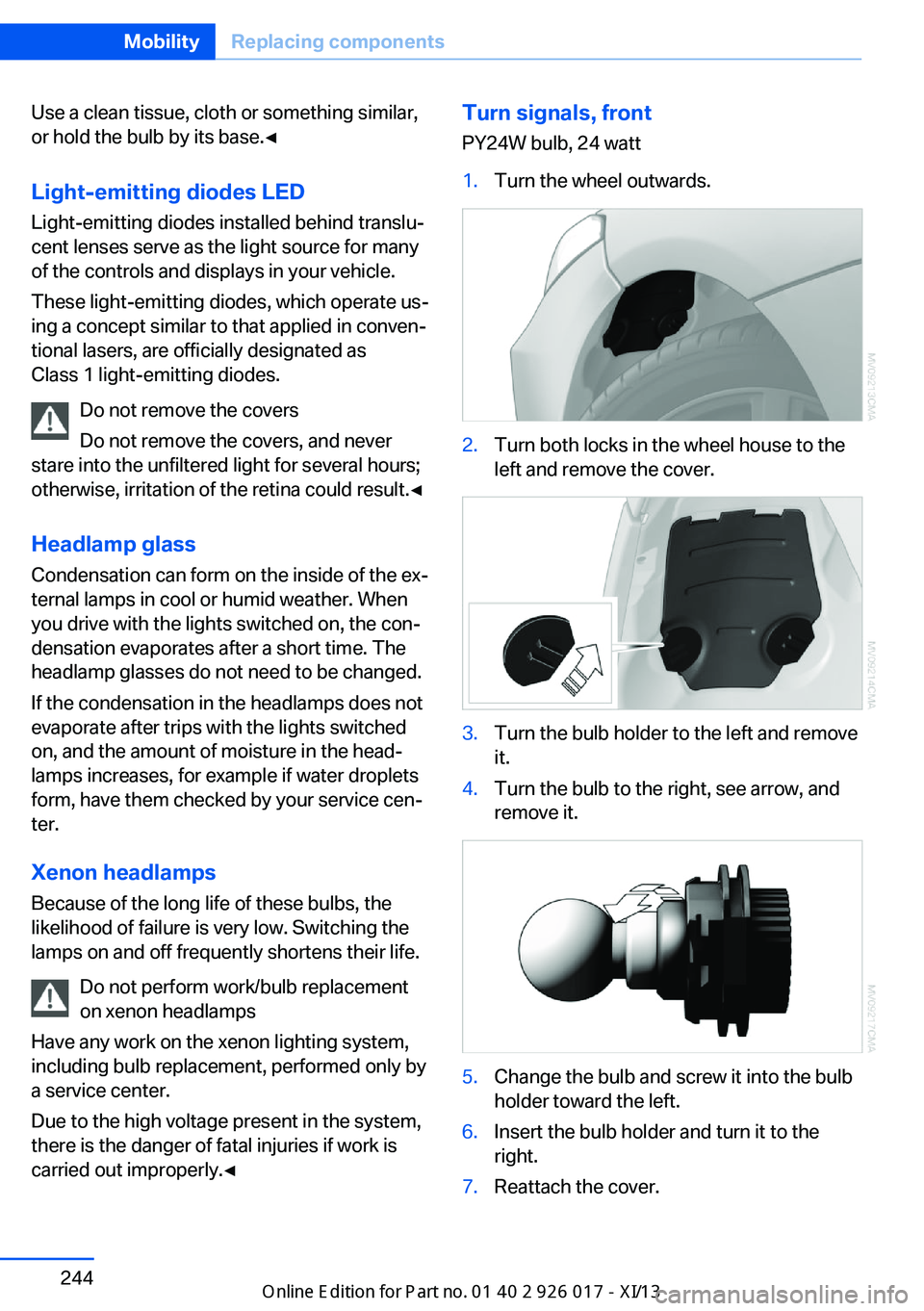
PY24W bulb, 24 watt1.Turn the wheel outwards.2.Turn both locks in the wheel house to the
left and remove the cover.3.Turn the bulb holder to the left and remove
it.4.Turn the bulb to the right, see arrow, and
remove it.5.Change the bulb and screw it into the bulb
holder toward the left.6.Insert the bulb holder and turn it to the
right.7.Reattach the cover.Seite 244MobilityReplacing components244
Online Edition for Part no. 01 40 2 911 315 - VI/13
Page 253 of 289
Breakdown assistanceVehicle equipment
This chapter describes all series equipment as
well as country-specific and special equipment
offered for this model series.Therefore, it also
describes equipment that may not be found in
your vehicle, for instance due to the selected
special equipment or the country version. This
also applies to safety-related functions and
systems.
Hazard warning system
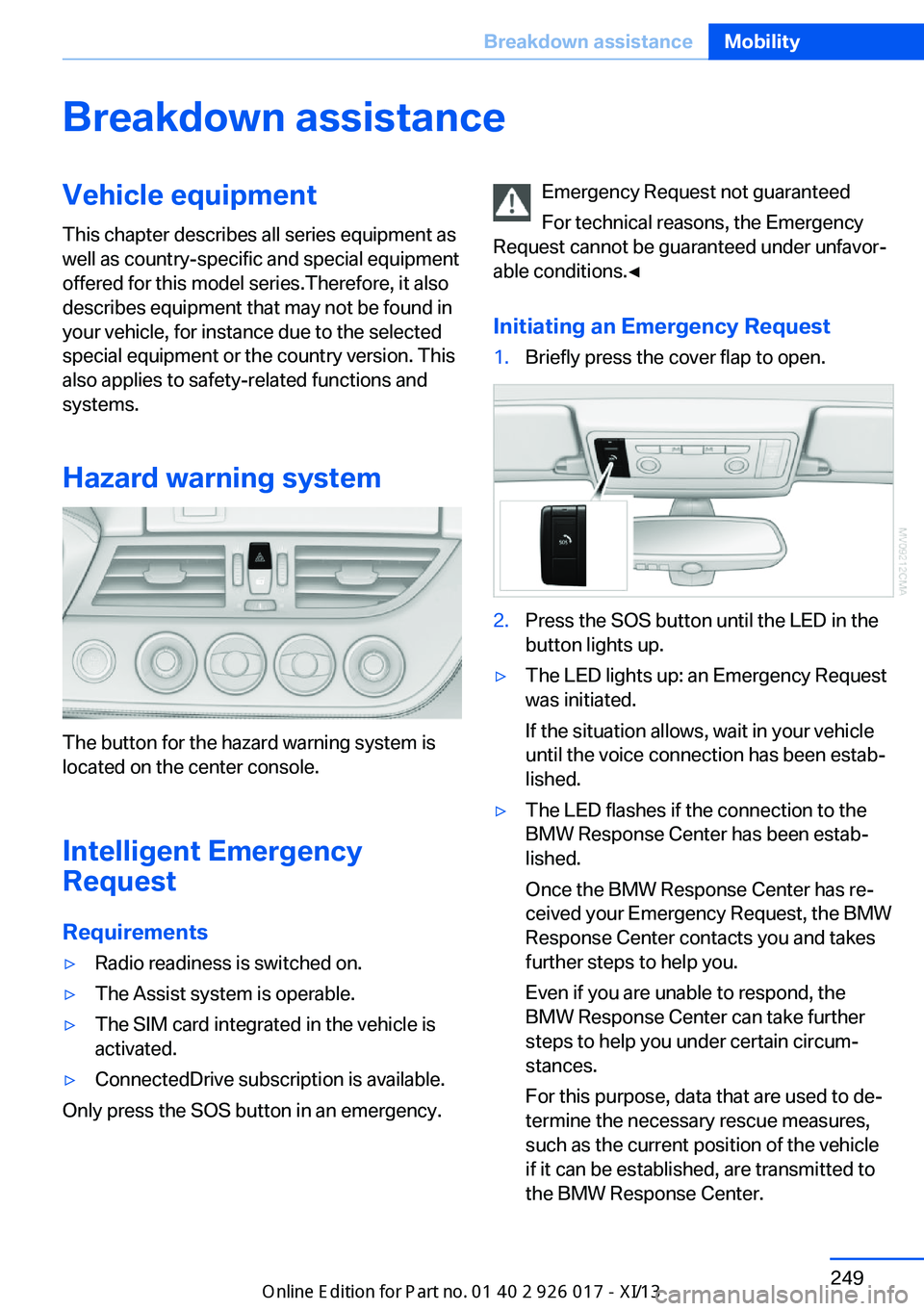
The button for the hazard warning system is
located on the center console.
Intelligent Emergency
Request
Requirements
▷Radio readiness is switched on.▷The Assist system is operable.▷The SIM card integrated in the vehicle is
activated.▷ConnectedDrive subscription is available.
Only press the SOS button in an emergency.
Emergency Request not guaranteed
For technical reasons, the Emergency
Request cannot be guaranteed under unfavor‐
able conditions.◀
Initiating an Emergency Request1.Briefly press the cover flap to open.2.Press the SOS button until the LED in the
button lights up.▷The LED lights up: an Emergency Request
was initiated.
If the situation allows, wait in your vehicle
until the voice connection has been estab‐
lished.▷The LED flashes if the connection to the
BMW Response Center has been estab‐
lished.
Once the BMW Response Center has re‐
ceived your Emergency Request, the BMW
Response Center contacts you and takes
further steps to help you.
Even if you are unable to respond, the
BMW Response Center can take further
steps to help you under certain circum‐
stances.
For this purpose, data that are used to de‐
termine the necessary rescue measures,
such as the current position of the vehicle
if it can be established, are transmitted to
the BMW Response Center.Seite 249Breakdown assistanceMobility249
Online Edition for Part no. 01 40 2 911 315 - VI/13
Page 277 of 289
Average fuel consumption– Setting the units 76
Average speed 73
Axle loads, refer to Weights 262
B
Backrest curvature, refer to Lumbar support 47
Backrests, refer to Seat ad‐ justment 46
Backrest width adjust‐ ment 47
Backup lamps
– Bulb replacement 245, 246
Balance 160
Band-aids, refer to First aid kit 250
Bass 160
Battery
– Disposal 39, 247– Power failure 247– Remote control 30– Replacement in the remote
control 39– Replacement, vehicle bat‐
tery 247– Vehicle 247
Before entering the car
wash 255
Belts, refer to Safety belts 48
Belt tensioners, refer to Safety belts 48
Beverage holder, refer to Cu‐ pholder 124
Black and white map dis‐ play 154
Blower, refer to Air flow rate 108, 111
Bluetooth audio 183
Bluetooth connection, acti‐ vating/deactivating 193
BMW Apps 220
BMW EfficientDynamics, re‐ fer to Saving fuel 132
BMW Homepage 6
BMW Internet page 6
BMW Maintenance Sys‐ tem 241
BMW Online 218
Bottle holder, refer to Cu‐ pholder 124
Brake assistant, refer to Dy‐ namic Brake Control 99
Brake discs, breaking in 128
Brake force display 98
Brake force distribution, elec‐ tronic 99
Brake lamps– Brake force display 98– Bulb replacement 245, 246
Brake lights, adaptive 98
Brake pads, breaking in 128
Brakes
– ABS 99
Braking
– Notes 129– Parking brake 59
Braking safely 129
Breakdown assistance 250
Breaking in 128
Brightness of Control Dis‐ play 78
Bulbs, replacing, refer to Lamps and bulbs 243
Button for starting the engine, refer to Start/Stop but‐
ton 55
Buttons on the steering wheel 12
Bypassing, see Starting aid 250
C Calendar 210
California Proposition 65 Warning 7
Camera, care 258
Can holder, refer to Cu‐ pholder 124
Capacities 263
Capacities– Cargo area, refer to
Weights 262– Fuel tank, refer to Filling ca‐
pacities 263
Car battery 247
Car care products 256
Care 255
Care, displays 258
Care, vehicle 256
Cargo 130
Cargo area 119
Cargo area
– Capacity 262– Comfort Access 38– Lamp, refer to Interior
lamps 89– Opening from the inside 36– Opening from the out‐
side 36
Cargo area capacity, enlarg‐
ing 119
Cargo, securing 120
Cargo straps, securing cargo 132
Car key, refer to Integrated key/remote control 30
Carpet, care 258
Car phone
– Installation location, refer to
Center armrest 122
Car phone, refer to Tele‐
phone 192
Car vacuum cleaner, connect‐ ing, refer to Connecting
electrical devices 118
Car wash 255
Car wash
– With Comfort Access 38
Catalytic converter, refer to
Hot exhaust system 129
CBS Condition Based Serv‐ ice 241
CD/DVD 170
CD/DVD notes 174
CDs, storing 175
Cell phone 192
Seite 273Everything from A to ZReference273
Online Edition for Part no. 01 40 2 911 315 - VI/13
Page 278 of 289
Cell phone, installation loca‐tion, refer to Center arm‐
rest 122
Center armrest 122
Center brake lamp– Bulb replacement 246
Center console, refer to
Around the center con‐
sole 16
Central locking
– Comfort Access 37– From the inside 35– Setting the unlocking char‐
acteristics 32
Central locking system
– From the outside 31– Principle 31
Central screen, refer to Con‐
trol Display 18
Changes, technical, refer to Safety 6
Changing wheels/tires 233
Chassis number, refer to En‐ gine compartment 235
Check Control 82
Children, transporting safely 53
Child restraint fixing sys‐ tem 53
Child seats, refer to Trans‐ porting children safely 53
Chrome parts, care 257
Cigarette lighter, refer to Lighter 118
Circulation of air, refer to Re‐ circulated air
mode 108, 112
Cleaning, displays 258
Cleaning your BMW, refer to Care 255
Clock 71
Clock
– 12h/24h format 77– Setting the time and date 76
Closing
– From the inside 35– From the outside 32
Cockpit 12
Cold start, refer to Starting
the engine 56
Combination instrument, refer to Instrument cluster 14
Combination switch– Refer to Washer/wiper sys‐
tem 61
Comfort Access
– Battery replacement 39– In a car wash 38
Comfort area, refer to Around
the center console 16
COMFORT program, Dy‐ namic Driving Control 101
Compartment for remote control, refer to Ignition
lock 55
Compartments, refer to Stor‐ age compartments 123
Compass 116
Computer 73
Computer
– Displays on the Control Dis‐
play 73
Concierge service 217
Condensation under the vehi‐ cle 130
Condition Based Service CBS 241
Confirmation signals for lock‐ ing/unlocking the vehicle 34
Connecting, mobile phone, refer to Pairing the mobile
phone 193
Consumption, refer to Aver‐ age fuel consumption 73
Contacts 206, 214
Control Display 18
Control Display, care 258
Control Display, settings 78
Controller 19
Controls and displays 12
Control systems, driving sta‐ bility 99
Convenient loading 33
Convenient opening and clos‐
ing– Retractable hardtop 33– Window 33
Convertible top, refer to Re‐
tractable hardtop 42
Coolant
– Checking the level 239– Temperature 72
Cooling, maximum 111
Cooling system, refer to Cool‐ ant 239
Corrosion on brake discs 130
Courtesy lamps, refer to Inte‐ rior lamps 89
Cradle for telephone or mo‐
bile phone
– Refer to Snap-in adapter in
center armrest storage
compartment 122
Cradle for telephone or mo‐
bile phone, refer to Snap-in
adapter 203
Cruise control 103
Cruise control
– Malfunction 105
Cupholder 124
Curb weight, refer to Weights 262
Current location, storing 142
D
Damage, tires 232
Dashboard lighting, refer to Instrument lighting 88
Dashboard, refer to Cock‐ pit 12
Data, technical
– Dimensions 262– Filling capacities 263– Weights 262
Date
– Date format 77– Setting 77
Daytime running lights 86
DBC Dynamic Brake Con‐ trol 99
Seite 274ReferenceEverything from A to Z274
Online Edition for Part no. 01 40 2 911 315 - VI/13
Page 284 of 289
Recommended tirebrands 233
Redialing 199
Refueling 224
Remaining range, refer to Range 73
Reminders 212
Remote app 221
Remote control– Battery replacement 39– Comfort Access 37– Garage door opener 114– Malfunction 34, 38– Removing from the ignition
lock 55– Trunk lid 33– Universal 114
Remote inquiry 198
Remote Services 221
Replacement fuses, refer to Spare fuses 247
Replacement remote con‐ trol 30
Replacing wheels/tires 233
Reporting safety defects 9
Reservoir for washer fluid 62
Restraining systems
– Refer to Safety belts 48
Restraint system
– For children 53
Retaining straps, securing
cargo 132
Retractable hardtop
– Convenient opening and
closing 33– Opening and closing 42– Remote control 33
Retreaded tires 233
Reverse gear
– 7-gear automatic transmis‐
sion 67– 8-gear automatic transmis‐
sion 63– Manual transmission 63
Rim cleaner, care 257
Road, avoiding 149
Road detour 149
Roadside Assistance 217
Roadside parking lamps 87
Roadworthiness test 78
Roof, refer to Retractable hardtop 42
Route 150
Route criteria, route 149
Route, displaying 150
Route section, bypass‐ ing 150
RSC Runflat System Compo‐ nent, refer to Run-flat
tires 233
Rubber components, care 257
Run-flat tires 233
Run-flat tires– Tire inflation pressure 227
Running lights, refer to Park‐
ing lamps/low beams 85
S Safety 6
Safety-belt height adjust‐ ment 49
Safety belts 48
Safety belts
– Damage 49– Indicator/warning lamp 49– Reminder 49
Safety belts, care 257
Safety systems
– Airbags 90– Safety belts 48
Safety tires 233
Satellite radio 164
Saving fuel 132
Scale, changing during navi‐ gation 152
Screen, refer to Control Dis‐ play 18
Search, refer to BMW On‐ line 218
Seat adjustment, electric 47
Seat adjustment, mechani‐ cal 46
Seat and mirror memory 49
Seat and mirror memory, re‐
trieving automatically 34
Seat Belt Reminder, refer to Safety belt reminder 49
Seat belts– Refer to Safety belts 48
Seat heating 48
Seats
– Adjusting 46– Adjusting electrically 47– Heating 48– Memory, refer to Seat and
mirror memory 49– Storing the setting, refer to
Seat and mirror memory 49
Sensors, care 258
Service and warranty 7
Service requirements, CBS Condition Based Serv‐
ice 241
Service requirements, dis‐ play 78
Service, Roadside Assis‐ tance 250
Services, remote 221
Servotronic 102
Settings and information 75
Settings, configuring, refer to Personal Profile 30
Settings, DVD 173
Settings on Control Dis‐ play 78
Setting the clock, 12h/24h format 77
Shift paddles on steering
wheel
– 7-gear automatic transmis‐
sion 68– 8-gear automatic transmis‐
sion 65
Short commands, voice acti‐
vation 264
Side airbags 90
Side windows, refer to Win‐ dows 40
Signal horn, refer to Horn 12
Sitting safely 46
Seite 280ReferenceEverything from A to Z280
Online Edition for Part no. 01 40 2 911 315 - VI/13