Sport button BMW Z4 2014 E89 User Guide
[x] Cancel search | Manufacturer: BMW, Model Year: 2014, Model line: Z4, Model: BMW Z4 2014 E89Pages: 289, PDF Size: 7.13 MB
Page 108 of 289
▷Each time the lever is pressed beyond the
resistance point, the desired speed is in‐
creased by up to 5 mph/10 km/h.
The system stores and maintains the speed.
Accelerating using the lever
Accelerating slightly:
Press the lever to the resistance point, arrow 1,
and hold until the desired speed is reached.
Accelerating significantly:
Press the lever beyond the resistance point,
arrow 1, and hold until the desired speed is
reached.
The vehicle accelerates without pressure on
the accelerator pedal. The system stores and
maintains the speed.
Decreasing speed Repeatedly pull the lever to the resistance
point or beyond, arrow 2, until the desired
speed is displayed.
▷Each time the lever is pulled to the resist‐
ance point, the desired speed is decreased
by approx. 1 mph/1 km/h.▷Each time the lever is pulled beyond the
resistance point, the desired speed is re‐
duced by up to 5 mph or 10 km/h until the
minimum speed of 20 mph/30 km/h is ach‐
ieved.
The system stores and maintains the speed.
Interrupting the system
Push the lever upwards or downwards, ar‐
row 3.
The displays in the speedometer change color.
In addition, the system is automatically inter‐
rupted in the following situations:
▷When the brakes are applied.▷In cars with manual transmission, when
gears are shifted very slowly or if neutral is
engaged.▷In cars with Sport automatic transmission,
when transmission position N is engaged.▷When DTC is activated or DSC is deacti‐
vated.▷When DSC or ABS is intervening.
Cruise control is not deactivated by depressing
the accelerator pedal. Once the accelerator
pedal is released, the stored speed is achieved
again and maintained.
Warning light A message appears on the Control
Display.
The warning light comes on, for ex‐
ample, when cruise control has been deacti‐
vated as a result of DSC intervention.
Deactivating the system
▷Press the lever upward or downward twice,
arrow 3.▷Switch off the ignition.
The stored speed is cleared.
Resuming a speed stored beforehand Press the button, arrow 4. The last stored
speed is resumed and maintained.
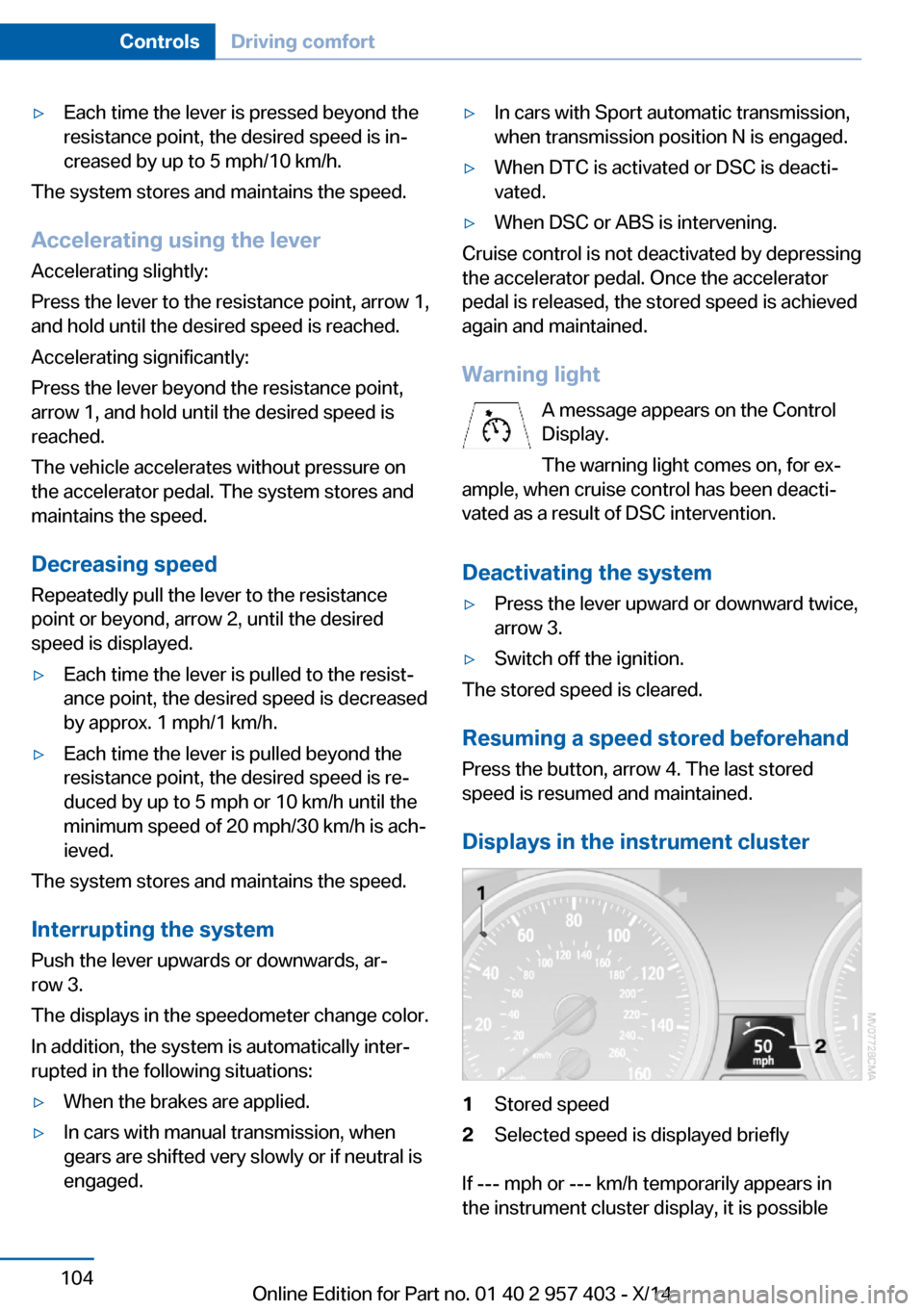
Displays in the instrument cluster
1Stored speed2Selected speed is displayed briefly
If --- mph or --- km/h temporarily appears in
the instrument cluster display, it is possible
Seite 104ControlsDriving comfort104
Online Edition for Part no. 01 40 2 957 403 - X/14
Page 260 of 289
Sport automatic transmission1.Insert the remote control into the ignition
lock, even with Comfort Access.2.Release the parking brake, refer to
page 59.3.Drive into the car wash.4.Engage transmission position N.5.Switch the engine off.6.Leave the remote control in the ignition
lock so that the vehicle can roll.
When starting the engine:
1.Depress the brake pedal.2.Press the Start/Stop button.
Transmission position P is engaged automati‐
cally:
▷Automatically after approx. 30 minutes.▷When the remote control is removed from
the ignition lock.
Headlights
▷Do not rub dry and do not use abrasive or
caustic cleansers.▷Soak areas that have been soiled e.g. due
to insects, with shampoo and wash off with
water.▷Thaw ice with de-icing spray; do not use an
ice scraper.
Retractable hardtop
When you open a wet hardtop, water drops
may run into the cargo area. If necessary, re‐
move items from the cargo area beforehand to
avoid water stains or soiling.
After washing the vehicle
After washing the vehicle, apply the brakes
briefly to dry them; otherwise, braking action
can be reduced and corrosion of the brake
discs can occur.
Fully remove any residue from the windows to
prevent obstruction of view from streaking,
wiping noises, and wiper wear.
Vehicle careCar care productsBMW recommends using cleaning and care
products from BMW, since these have been
tested and approved.
Car care and cleaning products
Follow the instructions on the container.
When cleaning the interior, open the doors or
windows.
Only use products intended for cleaning vehi‐
cles.
Cleansers can contain substances that are
dangerous and harmful to your health.◀
Vehicle paint Regular care contributes to driving safety and
value retention. Environmental influences in
areas with high air pollution or natural contami‐
nants, such as tree resin or pollen, can have an
impact on the vehicle paint. Tailor the fre‐
quency and extent of your car care to these in‐
fluences.
Immediately remove aggressive substances,
such as spilled fuel, oil, grease, or bird drop‐
pings, to prevent damage to or discoloration of
the paintwork.
Leather care
Remove dust from the leather often, using a
cloth or vacuum cleaner.
Otherwise, particles of dust and road grime
chafe in pores and folds, and lead to increased
wear and premature degradation of the leather
surface.
To guard against discoloration, such as from
clothing, provide leather care roughly every
two months.Seite 256MobilityCare256
Online Edition for Part no. 01 40 2 957 403 - X/14
Page 285 of 289
Slot for remote control 55
Smokers' package, refer to Ashtray 118
Snap-in adapter, mobile phone 201
Snap-in adapter, refer to Cen‐ ter armrest storage com‐
partment 122
Snow chains 233
Socket, OBD Onboard Diag‐ nostics 242
Socket, refer to Connecting electrical devices 118
Software applications, iPhone 218
Software part number 192
Software update 187
SOS, refer to Emergency Re‐ quest, initiating 249
Sound output 162, 170
Spare fuses 248
Special destinations, naviga‐ tion 143
Special equipment, series equipment 6
Specified oil types 238
Speed, average 73
Speed limit 83
Speedometer 14
Split screen 22
Split screen map set‐ tings 153
Spoken instructions, naviga‐ tion 151
SPORT+ program, Dynamic Driving Control 101
Sport program– 7-gear automatic transmis‐
sion 67– 8-gear automatic transmis‐
sion 64
SPORT program, Dynamic
Driving Control 101
Spray nozzles, refer to Clean‐ ing the windshield and head‐
lamps 62
Stability control systems 99
Start/Stop button 55
Start/Stop button– Starting the engine 56– Switching off the engine 57
Starting aid 250
Starting the engine 56
State/province, selecting for navigation 140
Stations, stored 168
Station, storing 162
Status information, iDrive 21
Status of Owner's Manual 6
Steam jets 255
Steering wheel 52
Steering wheel
– Adjusting 52– Buttons on the steering
wheel 12
Stopping
– Engine 57
Storage compartments 123
Storage, tires 233
Storing the seat position, re‐ fer to Seat and mirror mem‐
ory 49
Storing the vehicle 258
Street, entering for naviga‐ tion 141
Summer tires, refer to Wheels and tires 226
Summer tires, tread 231
Suspension settings 100
Switches, refer to Cockpit 12
Switch for Dynamic Driving Control 100
Switching off
– Engine 57– Vehicle 57
Symbols 6
T Tachometer 72
Tailgate, opening from the in‐ side 36
Tailgate, refer to Trunk lid 36
Tail lights 245
Tail lights– Bulb replacement 245, 246
Tank display 72
Tasks 209
Technical changes, refer to Safety 6
Technical data 262
Telephone 192
Telephone, adjusting the vol‐ ume 196
Telephone, installation loca‐ tion, refer to Center arm‐
rest 122
TeleService 215
Temperature, air condi‐ tioner 109
Temperature, automatic cli‐ mate control 110
Temperature, changing the unit of measure 76
Temperature, coolant 72
Temperature display
– External temperature 71– External temperature warn‐
ing 71– Setting the unit 76
Temperature, engine oil 72
Text messages 206
Theft alarm system, refer to Alarm system 39
Thigh support adjustment 47
Third brake light, refer to Center brake light 246
Through-loading opening with integrated transport
bag 119
Tilt alarm sensor 40
Tilting the passenger side mirror 50
Time
– Setting the time 76– Setting the time zone 76
Tire age 230
Tire damage 231
Tire identification marks 229
Tire inflation pressure 226
Seite 281Everything from A to ZReference281
Online Edition for Part no. 01 40 2 957 403 - X/14