heating BMW Z4 2014 E89 User Guide
[x] Cancel search | Manufacturer: BMW, Model Year: 2014, Model line: Z4, Model: BMW Z4 2014 E89Pages: 289, PDF Size: 7.13 MB
Page 114 of 289
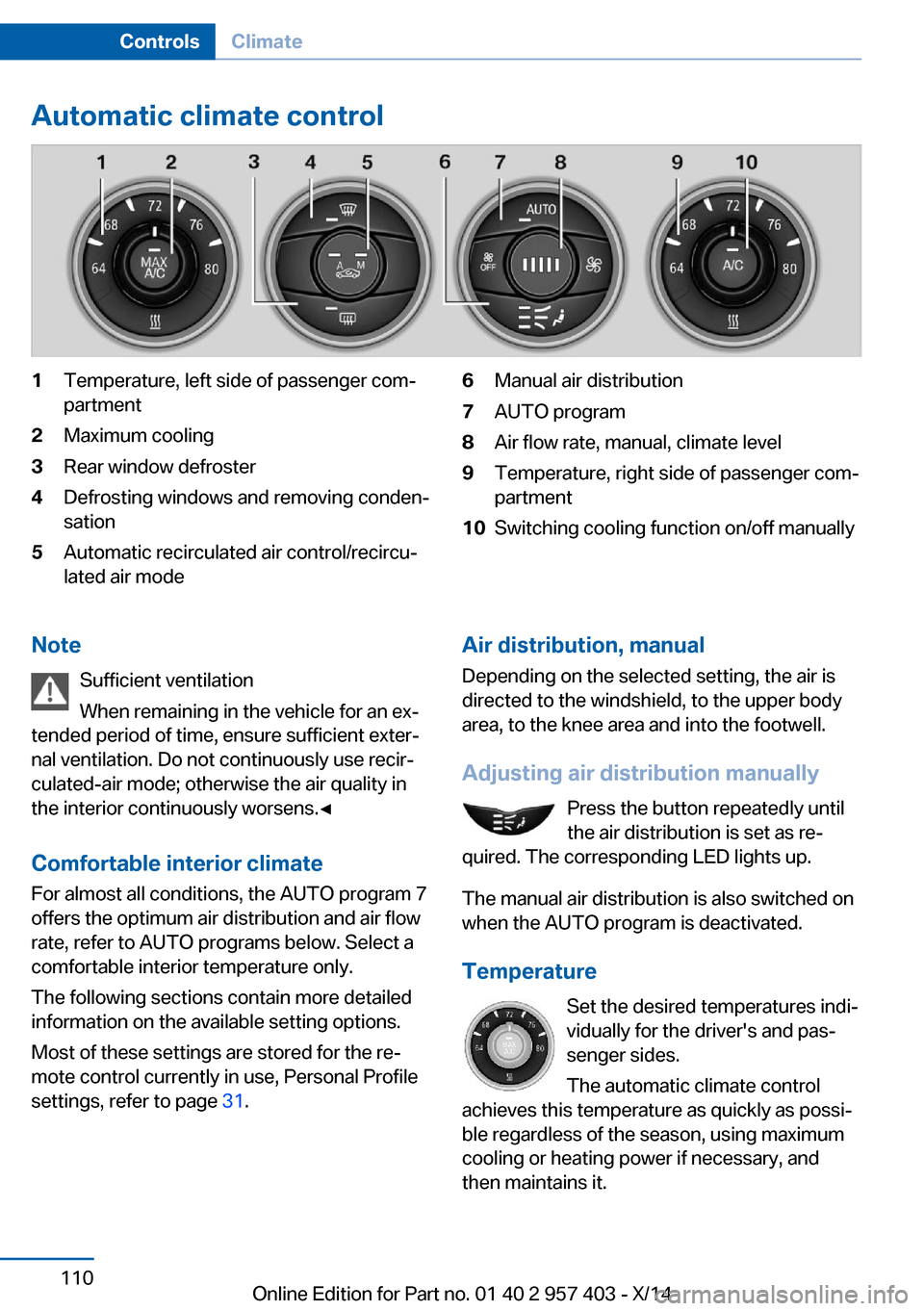
Automatic climate control1Temperature, left side of passenger com‐
partment2Maximum cooling3Rear window defroster4Defrosting windows and removing conden‐
sation5Automatic recirculated air control/recircu‐
lated air mode6Manual air distribution7AUTO program8Air flow rate, manual, climate level9Temperature, right side of passenger com‐
partment10Switching cooling function on/off manuallyNote
Sufficient ventilation
When remaining in the vehicle for an ex‐
tended period of time, ensure sufficient exter‐
nal ventilation. Do not continuously use recir‐
culated-air mode; otherwise the air quality in
the interior continuously worsens.◀
Comfortable interior climate For almost all conditions, the AUTO program 7
offers the optimum air distribution and air flow
rate, refer to AUTO programs below. Select a
comfortable interior temperature only.
The following sections contain more detailed
information on the available setting options.
Most of these settings are stored for the re‐
mote control currently in use, Personal Profile
settings, refer to page 31.Air distribution, manual
Depending on the selected setting, the air is
directed to the windshield, to the upper body
area, to the knee area and into the footwell.
Adjusting air distribution manually Press the button repeatedly until
the air distribution is set as re‐
quired. The corresponding LED lights up.
The manual air distribution is also switched on
when the AUTO program is deactivated.
Temperature Set the desired temperatures indi‐
vidually for the driver's and pas‐
senger sides.
The automatic climate control
achieves this temperature as quickly as possi‐
ble regardless of the season, using maximum
cooling or heating power if necessary, and
then maintains it.Seite 110ControlsClimate110
Online Edition for Part no. 01 40 2 957 403 - X/14
Page 115 of 289
To give the automatic climate control enough
time to achieve the set temperature, do not
switch between different temperature settings
in quick succession.
Maximum heating power can be obtained with
the highest setting, regardless of the external
temperature.
The lowest setting effects continuous cooling.
Switching the cooling function on and
off
The cooling function cools and
dehumidifies the incoming air be‐
fore reheating it as required, ac‐ cording to the temperature set‐
ting. This function is only available
while the engine is running.
The cooling function helps to prevent conden‐
sation on the windows or to remove it quickly.
Depending on the weather, the windshield may
fog over briefly when the engine is started.
The cooling function is switched on automati‐
cally with the AUTO program.
Maximum cooling The air is cooled as quickly as
possible with the engine running.
The automatic climate control goes into recir‐
culated air mode at the lowest temperature. Air
flows at maximum rate from the vents for the
upper body area. You should therefore open
the vents for maximum cooling.
AUTO program
The AUTO program automatically adjusts the
air distribution to the windshield and side win‐
dows, toward the upper body area, and into the
footwell and knee area.
The air flow rate and air distribution, in addition
to your temperature specifications, will be
adapted to outside influences as a result ofseasonal changes, e.g., sunlight or window
condensation.
The cooling function is switched on automati‐
cally with the AUTO program.
Switching on/off Press the button.
Manual air distribution and air flow
rate are activated when the AUTO program is
deactivated.
AUTO program climate level
The climate levels can be used to vary the in‐
tensity when the AUTO program is switched
on. For example, air flow is adjusted automati‐
cally to optimize climate control.
When the AUTO program is
switched on, the climate level of
the AUTO program can be se‐
lected using the buttons for controlling the
manual air flow rate.
The selected climate level is displayed by an
LED.
Convertible programWhen the hardtop is open, the convertible pro‐
gram is activated as well. In the convertible
program, the automatic climate control is opti‐
mized for driving with the hardtop open. In ad‐
dition, the air flow rate is increased as vehicle
speed increases.
The effectiveness of the convertible program
can be enhanced considerably by installing the
wind deflector.
Adjusting air flow rate manually Press the left side of the button to
reduce air flow. Press the right
side of the button to increase it.
The air volume may be reduced automatically
to save battery power. The display remains the
same.Seite 111ClimateControls111
Online Edition for Part no. 01 40 2 957 403 - X/14
Page 134 of 289
Objects in the area around the pedalsNo objects in the area around the pedals
Keep floor mats, carpets, and any other
objects out of the area of motion of the pedals;
otherwise, the function of the pedals could be
impeded while driving
Do not place additional floor mats over existing
mats or other objects.
Only use floor mats that have been approved
for the vehicle and can be properly fixed in
place.
Ensure that the floor mats are securely fas‐
tened again when they are returned after being
removed, such as for cleaning.◀
Driving in wet conditionsWhen roads are wet or there is heavy rain,
briefly exert gentle pressure on the brake pedal
every few miles.
Ensure that this action does not endanger
other road users.
The heat generated in this process helps dry
the brake discs and pads.
In this way braking efficiency will be available
when you need it.
Hills
Drive long or steep downhill gradients in the
gear in which the least braking is required.
Otherwise, the brake system may overheat, re‐
sulting in a reduction in the brake system effi‐
ciency.
You can increase the engine's braking effect
by shifting down, going all the way to first gear,
if necessary.
Downshifting in manual mode of the 8-gear
Sport automatic transmission, refer to
page 64.
Downshifting in manual mode of the 7-gear
Sport automatic transmission with dual clutch,
refer to page 67.Avoid load on the brakes
Avoid placing excessive load on the
brake system. Light but consistent brake pres‐
sure can lead to high temperatures, brake wear
and possibly even brake failure.◀
Do not drive in neutral
Never drive with the transmission in neu‐
tral, with the engine switched off or with the
clutch depressed; otherwise, you will have nei‐
ther the braking action of the engine or nor its
power assistance when braking or steering.◀
Brake disc corrosion Corrosion on the brake discs and contamina‐
tion on the brake pads are furthered by:▷Low mileage.▷Extended periods when the vehicle is not
used at all.▷Infrequent use of the brakes.
Corrosion occurs when the minimum pressure
that must be exerted by the pads during brake
applications to clean the discs is not reached.
Should corrosion form on the brake discs, the
brakes will tend to respond with a pulsating ef‐
fect that generally cannot be corrected.
Condensation under the parked
vehicle
When using the automatic climate control,
condensation water develops that exits under‐
neath the vehicle.
Therefore, traces of condensed water under
the vehicle are normal.
Loading Overloading the vehicle
To avoid exceeding the approved carry‐
ing capacity of the tires, never overload the ve‐
hicle. Overloading can lead to overheating and
increases the rate at which damage develops
Seite 130Driving tipsThings to remember when driving130
Online Edition for Part no. 01 40 2 957 403 - X/14
Page 279 of 289
DBC Dynamic Brake Con‐trol 99
DCC, refer to Cruise con‐ trol 103
Defogging windows 109
Defroster– Rear window 109, 112
Defrosting windows 109
Destination entry via the ad‐ dress book 142
Destination guidance 149
Destination guidance with in‐ termediate destinations 147
Destination input, naviga‐ tion 140
Digital clock 71
Digital compass 116
Digital radio 163
Dimensions 262
Dimming mirrors 51
Directional indicators, refer to Turn signals 60
Display lighting, refer to In‐ strument lighting 88
Display, refer to Control Dis‐ play 18
Displays and controls 12
Displays, care 258
Displays, cleaning 258
Displays, refer to Instrument cluster 14
Disposal
– Coolant 239– Remote control battery 39– Vehicle battery 248
Distance control, refer to
PDC 105
Divided screen view, split screen 22
Door key, refer to Remote control with integrated
key 30
Door lock 35
Doors, manual operation 35
Doors, unlocking and locking– Confirmation signals 34– From the inside 35– From the outside 32
DOT Quality Grades 230
Draft-free ventila‐ tion 109, 112
Drive-off assistant 102
Drive-off assistant, refer to DSC 99
Driving notes, breaking in 128
Driving notes, general 128
Driving stability control sys‐ tems 99
Driving tips 128
DSC Dynamic Stability Con‐ trol 99
DTC Dynamic Traction Con‐ trol 100
DTMF suffix dialing 198
DVD/CD 170
DVDs, storing 175
DVD, video 172
Dynamic Brake Control DBC 99
Dynamic destination guid‐ ance 156
Dynamic Driving Control 100
Dynamic Stability Control DSC 99
Dynamic Traction Control DTC 100
E
EBV electronic brake-force distribution 99
EfficientDynamics, refer to Saving fuel 132
Electrical fault
– 7-gear automatic transmis‐
sion 69
Electrical malfunction
– Door lock 35– Driver's door 35– Fuel filler flap 222Electric seat adjustment 47
Electronic brake-force distri‐ bution 99
Electronic engine oil level check 236
Electronic Stability Program ESP, refer to DSC 99
Emergency operation– Fuel filler flap, unlocking
manually 222
Emergency Request 249
Emergency unlocking
– Trunk lid, from the inside 37
Energy, saving
– Automatic Engine Start/
Stop Function 57
Engine compartment 235
Engine coolant, refer to Cool‐ ant 239
Engine oil, adding 238
Engine oil additives 238
Engine oil, checking the level 236
Engine oil temperature 72
Engine oil types, alterna‐ tive 238
Engine oil types, ap‐ proved 238
Engine, overheating, refer to Coolant temperature 72
Engine start, Help 250
Engine, starting 56
Engine, starting
– Comfort Access 37– Start/Stop button 55
Engine, stopping, Start/Stop
button 55
Engine, switching off 57
Engine temperature 72
Entry comparison 23
Entry lamps, refer to Interior lamps 89
Equalizer 160
Equipment, interior 114
Error messages, refer to Check Control 82
Seite 275Everything from A to ZReference275
Online Edition for Part no. 01 40 2 957 403 - X/14
Page 280 of 289
ESP Electronic Stability Pro‐gram, refer to DSC 99
Exchanging wheels/tires 232
Exhaust system 129
Exterior mirrors 50
Exterior mirrors– Automatic dimming 51– Automatic heating 51– Folding in and out 51– Setting 50
External audio device 123
External devices 180
External start 250
External temperature dis‐ play 71
External temperature display
– Changing the unit of meas‐
ure 76– On computer 76
External temperature warn‐
ing 71
Eyes for securing cargo 132
F
Fader 160
Failure messages, refer to Check Control 82
Failure of an electrical acces‐ sory 248
False alarm
– Avoiding unintentional
alarms 40– Ending an alarm 39
Fastening safety belts, refer
to Safety belts 48
Fasten safety belts reminder
– Refer to Safety belt re‐
minder 49
Filter
– Refer to Microfilter/acti‐
vated-charcoal filter with
automatic climate con‐
trol 113– Refer to Microfilter for air
conditioner 109
Fine wood, care 257
First aid kit 250
Flashing when locking/
unlocking 34
Flat tire, Flat Tire Monitor FTM 92
Flat Tire Monitor– Snow chains 233
Flat Tire Monitor FTM 92
Flat tire, Tire Pressure Moni‐ tor TPM 94
Flat tire, warning lamp 93
Flat tire, wheel change 246
Flooding 129
Floor carpet, care 258
Floor mats, care 258
FM/AM station 162
Foot brake 129
Footwell lamps, refer to Inte‐ rior lamps 89
For your own safety 6
Front airbags 90
FTM Flat Tire Monitor 92
Fuel
– Recommendation 224– Refer to Average fuel con‐
sumption 73
Fuel, average consump‐
tion 73
Fuel consumption display
– Average fuel consump‐
tion 73
Fuel display 72
Fuel filler flap 222
Fuel filler flap
– Unlocking in case of an
electrical malfunction 222
Fuel gauge 72
Fuel tank capacity, refer to Filling capacities 263
Fuel tank contents, refer to Filling capacities 263
Fuses 248
G
Garage door opener, refer to Universal garage door
opener 114
Gasoline– Fuel recommendation 224
Gasoline display 72
Gas station recommenda‐ tion 151
Gear display
– 7-gear automatic transmis‐
sion 66– 8-gear automatic transmis‐
sion 65
General driving notes 128
Glove compartment 122
GPS navigation, refer to Navi‐
gation system 138
Grilles, refer to Air vents 107
Gross vehicle weight, refer to Weights 262
H
Hand-held transmitter, alter‐ nating code 115
Hands-free microphone 16
Hardtop 42
Hazard warning system 16
HD Radio 163
Head airbags 90
Headlamp control, auto‐ matic 86
Headlamp courtesy delay fea‐ ture 86
Headlamp flasher 60
Headlamp flasher, indicator lamp 15
Headlamps, care 256
Headlamps, cleaning 62
Headliner 17
Heating 107
Heating
– Mirrors 51– Rear window 109, 112– Seats 48
Heavy cargo, stowing 131
Height adjustment
– Seats 46– Steering wheel 52Seite 276ReferenceEverything from A to Z276
Online Edition for Part no. 01 40 2 957 403 - X/14
Page 282 of 289
LED, light-emitting di‐odes 244
Length, refer to Dimen‐ sions 262
Letters and numbers, enter‐ ing 23
License plate light, bulb re‐ placement 246
Light 85
Light-alloy wheels, care 257
Light control 86
Light-emitting diodes LED 244
Lighter 118
Lighter– Connecting electrical devi‐
ces 118
Lighting
– Instruments 88– Lamps and bulbs 243
Light switch 85
Limit, refer to Speed limit 83
Load 131
Loading 130
Lockable lug bolts, refer to Lug bolt lock 247
Lock buttons, doors, refer to Locking 36
Locking
– From the inside 36– From the outside 33– Setting the confirmation
signals 34– Without remote control, re‐
fer to Comfort Access 37
Locking the vehicle
– From the inside 35– From the outside 32
Low beams 85
Low beams, automatic, refer to High-beam Assistant 87
Lower back support, refer to Lumbar support 47
Lug bolt lock 247
Lumbar support 47
M
M/S, automatic transmission– 7-gear 67– 8-gear 64
Maintenance 241
Maintenance require‐ ments 241
Maintenance, service require‐ ments 78
Maintenance system, BMW 241
Malfunction
– Door lock 35– Fuel filler flap 222– Parking brake 60
Malfunction warnings, refer to
Check Control 82
Manual air distribution 108
Manual mode
– 7-gear automatic transmis‐
sion 67– 8-gear automatic transmis‐
sion 64
Manual operation
– Door lock 35– Driver's door 35– Fuel filler flap 222– Transmission lock 69
Manual transmission 63
Map, destination entry 145
Map display in black and white 154
Map in split screen 153
Map view 151
Marking on approved tires 233
Marking, run-flat tires 232
Master key, refer to Remote control with integrated
key 30
Maximum cooling 111
Maximum speed, winter tires 233
Medical kit, refer to First aid kit 250
Memory, refer to Seat and mirror memory 49
Menus, of iDrive, operat‐
ing 18
Menus, refer to iDrive operat‐ ing concept 19
Message list, traffic bulle‐ tins 153
Messages 206
Microfilter– For air conditioner 109– With automatic climate con‐
trol 113
Minimum tread depth,
tires 231
Mirror
– Mirror memory, refer to Seat
and mirror memory 49
Mirrors 50
Mirrors
– Automatic Curb Monitor 50– Exterior mirrors 50– Folding in, before driving
into a car wash 51– Heating 51– Interior rearview mirror 51
Mobile communication devi‐
ces in the vehicle 129
Mobile phone, installation lo‐ cation, refer to Center arm‐
rest 122
Mobile phone, refer to Tele‐ phone 192
Modifications, technical, refer to Safety 6
Monitor, refer to Control Dis‐ play 18
MP3 player 180
Multimedia 170
Music collection 175
Music search 177
Music, storing 175
N
Navigation 138
Navigation data 138
Navigation data, updat‐ ing 138
Seite 278ReferenceEverything from A to Z278
Online Edition for Part no. 01 40 2 957 403 - X/14
Page 283 of 289
Navigation system– Destination entry by
voice 146
Nets, refer to Storage com‐
partments 123
Neutral cleaner, care 257
New wheels and tires 232
Notes 6, 209
Nozzles, refer to Air vents 107
Nozzles, refer to Ventila‐ tion 109, 112
O OBD Onboard Diagnos‐ tics 242
Odometer 71
Office 203
Oil additives 238
Oil change interval, service requirements 78
Oil consumption 236
Oil level 236
Oil, refer to Engine oil 236
Oil types, alternative 238
Oil types, approved 238
Old batteries, disposal 248
Onboard computer, refer to Computer 73
Onboard Diagnostics OBD 242
Onboard monitor, refer to Control Display 18
Onboard vehicle tool kit 243
Opening and closing
– Comfort Access 37– From the inside 35– From the outside 32– Using the door lock 35– Using the remote control 32
Operating principle, iDrive 18
Outside-air mode
– Automatic climate con‐
trol 112
Outside air, refer to Recircu‐
lated air mode 108, 112
Overheating of engine, refer
to Coolant temperature 72
P Paint, vehicle 256
Pairing, mobile phone 193
Park Distance Control PDC 105
Parked vehicle, condensa‐ tion 130
Parking aid, refer to PDC 105
Parking brake 59
Parking brake, refer to Park‐ ing brake 59
Parking lamps 85
Passenger airbags, deactivat‐ ing 91
Passenger side mirror, tilt‐ ing 50
PDC Park Distance Con‐ trol 105
Personal information 203
Personal Profile 30
Pinch protection– Windows 41
Plastic, care 257
Pollen
– Refer to Microfilter/acti‐
vated-charcoal filter with
automatic climate con‐
trol 113– Refer to Microfilter for air
conditioner 109
Position, storing 142
Postal code, entering in navi‐ gation 141
Power failure 247
Power windows, opening and closing 41
Power windows, refer to Win‐ dows 40
Pressure, tires 226
Pressure warning, tires 92
Pressure warning, tires
– Flat Tire Monitor 92Programmable memory but‐
tons, iDrive 22
Protective function, refer to
Pinch protection– Windows 41
Push-and-turn switch, refer to
Controller 19
R Radiator fluid, refer to Cool‐ ant 239
Radio-operated key, refer to Remote control with
integrated key 30
Radio ready state 56
Radio ready state
– Switched off 56– Switched on 56
Radio setting, refer to Radio
ready state 56
Rain sensor 61
Random 171
Random playback 171
Range 73
RDS 163
Reading lamps 89
Reading out loud 210
Rear lights
– Bulb replacement 245
Rear lights, refer to Tail
lights 245
Rear lights, refer to Tail lights
– Bulb replacement 245, 246
Rearview mirror, refer to Mir‐
rors 50
Rear window de‐ froster 109, 112
Recirculated air mode 108, 112
Reclining seat, refer to Back‐ rest 46
Recommended tire brands 233
Redialing 199
Refueling 222
Seite 279Everything from A to ZReference279
Online Edition for Part no. 01 40 2 957 403 - X/14
Page 284 of 289
Remaining range, refer toRange 73
Reminders 210
Remote app 219
Remote control 30
Remote control– Battery replacement 39– Comfort Access 37– Malfunction 34, 38– Removing from the ignition
lock 55– Trunk lid 33
Remote control, univer‐
sal 114
Remote inquiry 198
Remote Services 219
Replacement fuses, refer to Spare fuses 248
Replacement remote con‐ trol 30
Replacing wheels/tires 232
Reporting safety defects 9
Reservoir for washer fluid 62
Restraining systems
– Refer to Safety belts 48
Restraint system
– For children 53
Retaining straps, securing
cargo 132
Retractable hardtop
– Convenient opening and
closing 33– Opening and closing 42– Remote control 33
Retreaded tires 233
Reverse gear
– 7-gear automatic transmis‐
sion 67– 8-gear automatic transmis‐
sion 63– Manual transmission 63
Rim cleaner, care 257
Road, avoiding 149
Road detour 149
Roadside Assistance 215
Roadside parking lamps 87
Roadworthiness test 78
Roof, refer to Retractable
hardtop 42
Route 150
Route criteria, route 149
Route, displaying 150
Route section, bypass‐ ing 150
RSC Runflat System Compo‐ nent, refer to Run-flat
tires 232
Rubber components, care 257
Run-flat tires 232
Run-flat tires– Tire inflation pressure 226
Running lights, refer to Park‐
ing lamps/low beams 85
S Safety 6
Safety-belt height adjust‐ ment 49
Safety belts 48
Safety belts
– Damage 49– Indicator/warning light 49– Reminder 49
Safety belts, care 257
Safety systems
– Airbags 90– Safety belts 48
Safety tires 232
Satellite radio 164
Saving fuel 132
Scale, changing during navi‐ gation 152
Screen, refer to Control Dis‐ play 18
Search, refer to BMW On‐ line 216
Seat adjustment, electric 47
Seat adjustment, mechani‐ cal 46
Seat and mirror memory 49
Seat and mirror memory, re‐ trieving automatically 34
Seat Belt Reminder, refer to
Safety belt reminder 49
Seat belts– Refer to Safety belts 48
Seat heating 48
Seats 46
Seats
– Adjusting 46– Adjusting electrically 47– Heating 48– Memory, refer to Seat and
mirror memory 49– Storing the setting, refer to
Seat and mirror memory 49
Sensors, care 258
Service and warranty 7
Service requirements, CBS Condition Based Serv‐
ice 241
Service requirements, dis‐ play 78
Services, remote 219
Servotronic 102
Settings and information 75
Settings, configuring, refer to Personal Profile 30
Settings, DVD 173
Settings on Control Dis‐ play 78
Setting the clock, 12h/24h format 77
Shift paddles on steering
wheel
– 7-gear automatic transmis‐
sion 68– 8-gear automatic transmis‐
sion 65
Short commands, voice acti‐
vation 264
Side airbags 90
Side windows, refer to Win‐ dows 40
Signal horn, refer to Horn 12
Sitting safely 46
Ski bag, refer to Through- loading opening with
integrated transport
bag 119
Seite 280ReferenceEverything from A to Z280
Online Edition for Part no. 01 40 2 957 403 - X/14