buttons BMW Z4 2015 E89 Owner's Guide
[x] Cancel search | Manufacturer: BMW, Model Year: 2015, Model line: Z4, Model: BMW Z4 2015 E89Pages: 289, PDF Size: 7.16 MB
Page 170 of 289
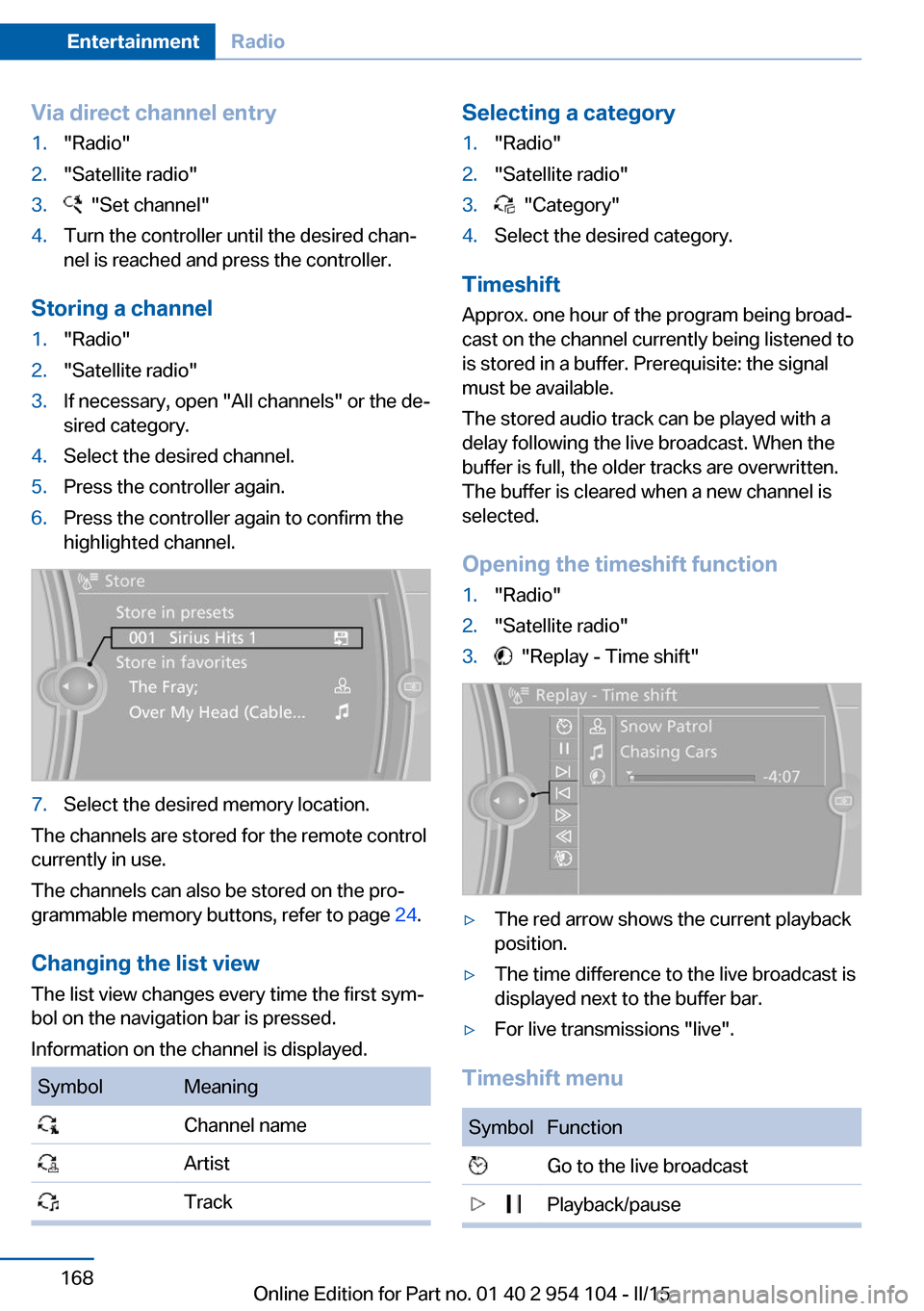
Via direct channel entry1."Radio"2."Satellite radio"3. "Set channel"4.Turn the controller until the desired chan‐
nel is reached and press the controller.
Storing a channel
1."Radio"2."Satellite radio"3.If necessary, open "All channels" or the de‐
sired category.4.Select the desired channel.5.Press the controller again.6.Press the controller again to confirm the
highlighted channel.7.Select the desired memory location.
The channels are stored for the remote control
currently in use.
The channels can also be stored on the pro‐
grammable memory buttons, refer to page 24.
Changing the list view
The list view changes every time the first sym‐
bol on the navigation bar is pressed.
Information on the channel is displayed.
SymbolMeaning Channel name Artist TrackSelecting a category1."Radio"2."Satellite radio"3. "Category"4.Select the desired category.
Timeshift
Approx. one hour of the program being broad‐
cast on the channel currently being listened to
is stored in a buffer. Prerequisite: the signal
must be available.
The stored audio track can be played with a
delay following the live broadcast. When the
buffer is full, the older tracks are overwritten.
The buffer is cleared when a new channel is
selected.
Opening the timeshift function
1."Radio"2."Satellite radio"3. "Replay - Time shift"▷The red arrow shows the current playback
position.▷The time difference to the live broadcast is
displayed next to the buffer bar.▷For live transmissions "live".
Timeshift menu
SymbolFunction Go to the live broadcast Playback/pauseSeite 168EntertainmentRadio168
Online Edition for Part no. 01 40 2 954 104 - II/15
Page 173 of 289
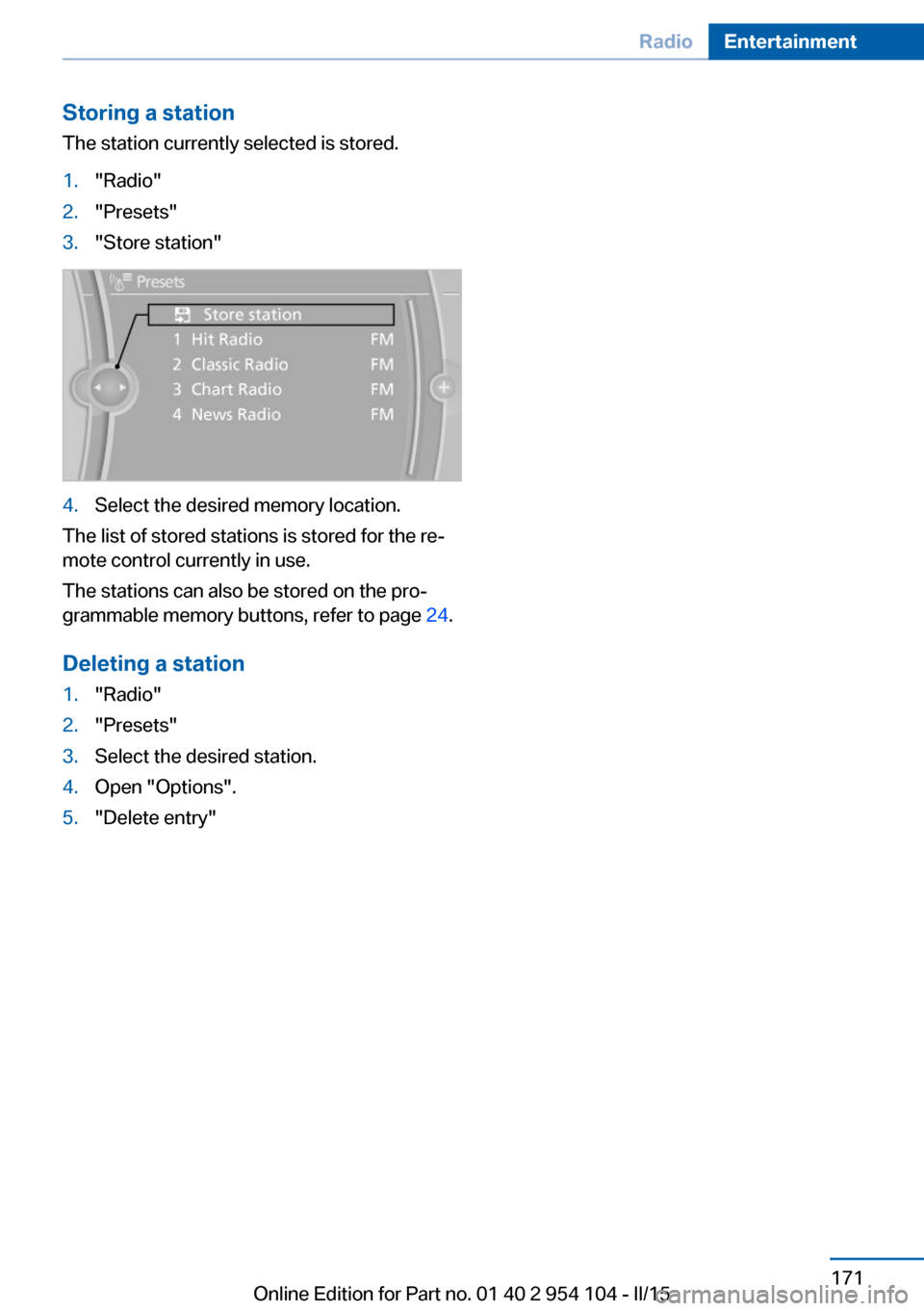
Storing a station
The station currently selected is stored.1."Radio"2."Presets"3."Store station"4.Select the desired memory location.
The list of stored stations is stored for the re‐
mote control currently in use.
The stations can also be stored on the pro‐
grammable memory buttons, refer to page 24.
Deleting a station
1."Radio"2."Presets"3.Select the desired station.4.Open "Options".5."Delete entry"Seite 171RadioEntertainment171
Online Edition for Part no. 01 40 2 954 104 - II/15
Page 174 of 289
CD/multimediaVehicle equipmentThis chapter describes all series equipment as
well as country-specific and special equipment
offered for this model series. Therefore, it also
describes equipment that may not be found in
your vehicle, for instance due to the selected
special equipment or the country version. This
also applies to safety-related functions and
systems.
When using the features and systems descri‐
bed here, adhere to local regulations.
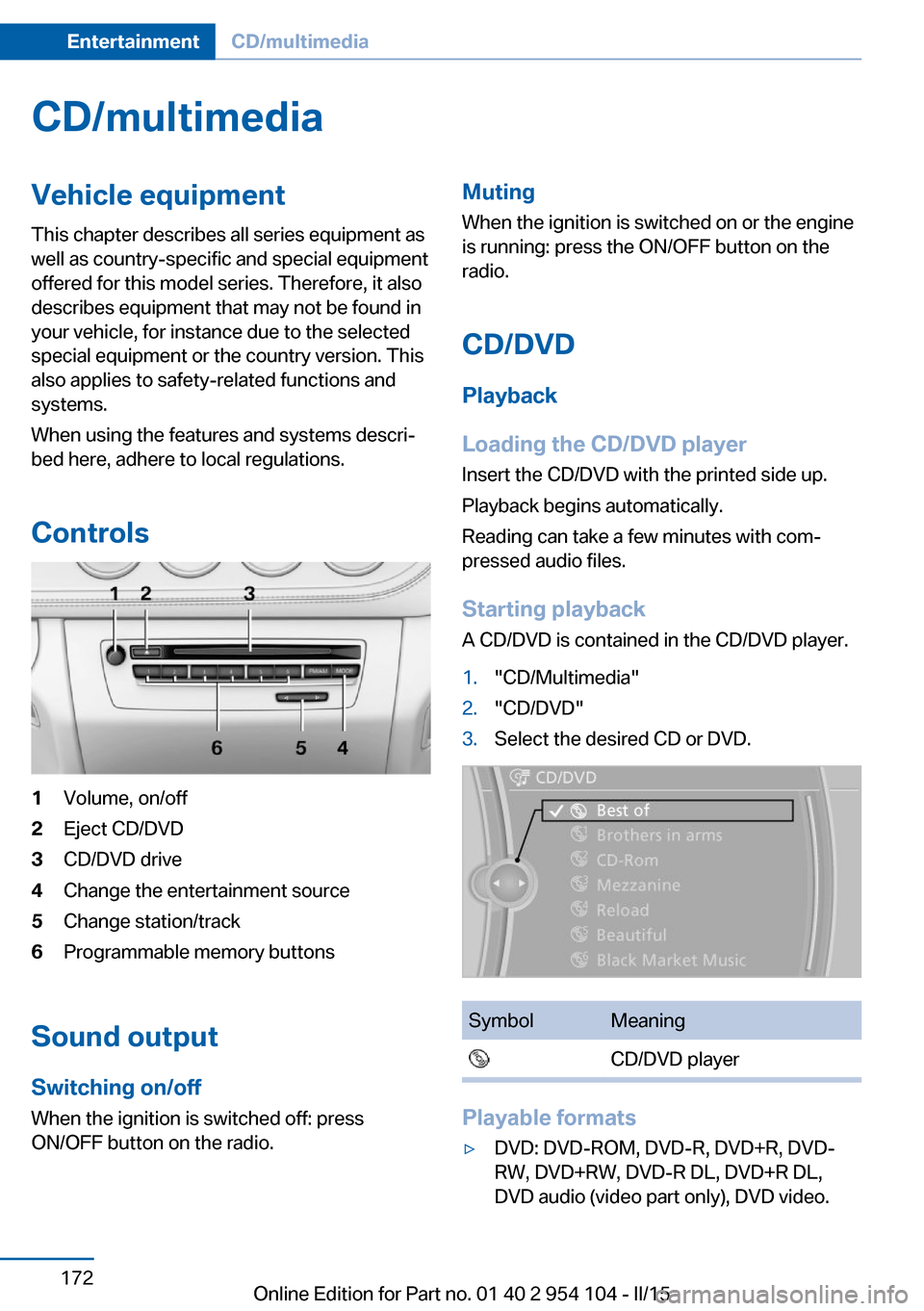
Controls1Volume, on/off2Eject CD/DVD3CD/DVD drive4Change the entertainment source5Change station/track6Programmable memory buttons
Sound output Switching on/offWhen the ignition is switched off: press
ON/OFF button on the radio.
Muting
When the ignition is switched on or the engine
is running: press the ON/OFF button on the
radio.
CD/DVD
Playback
Loading the CD/DVD player
Insert the CD/DVD with the printed side up.
Playback begins automatically.
Reading can take a few minutes with com‐
pressed audio files.
Starting playback A CD/DVD is contained in the CD/DVD player.1."CD/Multimedia"2."CD/DVD"3.Select the desired CD or DVD.SymbolMeaning CD/DVD player
Playable formats
▷DVD: DVD-ROM, DVD-R, DVD+R, DVD-
RW, DVD+RW, DVD-R DL, DVD+R DL,
DVD audio (video part only), DVD video.Seite 172EntertainmentCD/multimedia172
Online Edition for Part no. 01 40 2 954 104 - II/15
Page 191 of 289
Music cannot be played back.▷Start the program for playing back music
data on the device and select a track on the
device if necessary.▷Switch the radio on and off again.
Music files can only be played back softly.
▷Adjust the volume settings on the device.
Playback is disturbed when buttons are
pressed or by other messages on the device.
▷Switch off the button tones and other sig‐
nal tones on the device.
Playback is interrupted by a telephone call or
traffic bulletin and is not resumed automati‐
cally.
▷Switch the radio on and off again.
Playback is not possible if the mobile phone is
connected via Bluetooth Audio while it is also
connected via the USB interface or the snap-in
adapter.
▷Disconnect one of the two connections; for
example, disconnect the audio connection,
refer to page 188. Start playback again.
If all points in this list have been checked and
the required function is still not available,
please contact the hotline or service center.
Software Update
The vehicle supports various external devices
depending on the current software version.
With a software update, the vehicle can sup‐
port new mobile phones or new external de‐
vice, for example.
▷USB.
Software updates and related current infor‐
mation is available at www.bmw.com/
update.
Displaying the current version
The currently installed software is displayed.
1."Settings"2."Software update"3."Show current version"
Select desired version to display additional in‐
formation.
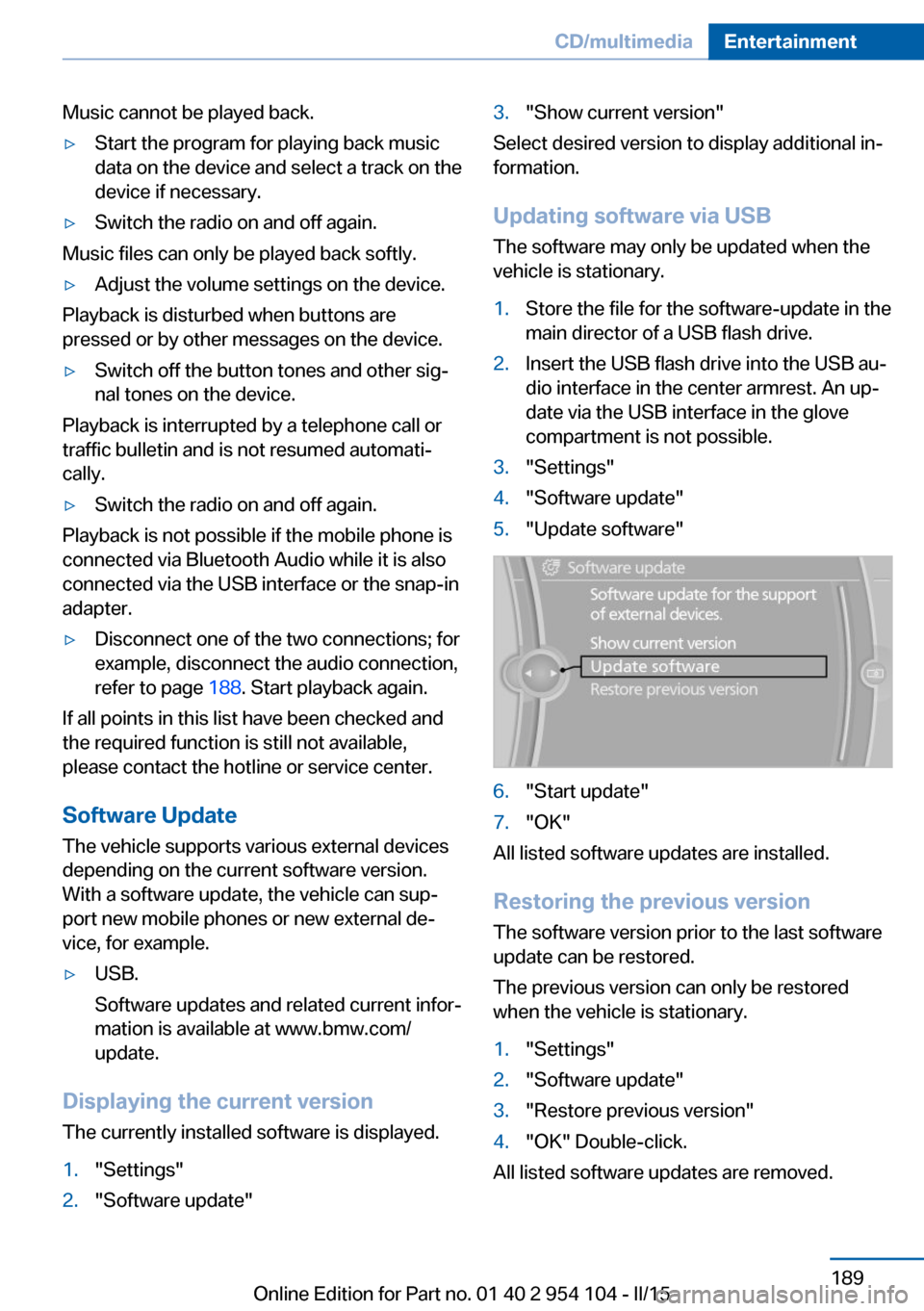
Updating software via USB The software may only be updated when the
vehicle is stationary.
1.Store the file for the software-update in the
main director of a USB flash drive.2.Insert the USB flash drive into the USB au‐
dio interface in the center armrest. An up‐
date via the USB interface in the glove
compartment is not possible.3."Settings"4."Software update"5."Update software"6."Start update"7."OK"
All listed software updates are installed.
Restoring the previous version
The software version prior to the last software
update can be restored.
The previous version can only be restored
when the vehicle is stationary.
1."Settings"2."Software update"3."Restore previous version"4."OK" Double-click.
All listed software updates are removed.
Seite 189CD/multimediaEntertainment189
Online Edition for Part no. 01 40 2 954 104 - II/15
Page 205 of 289
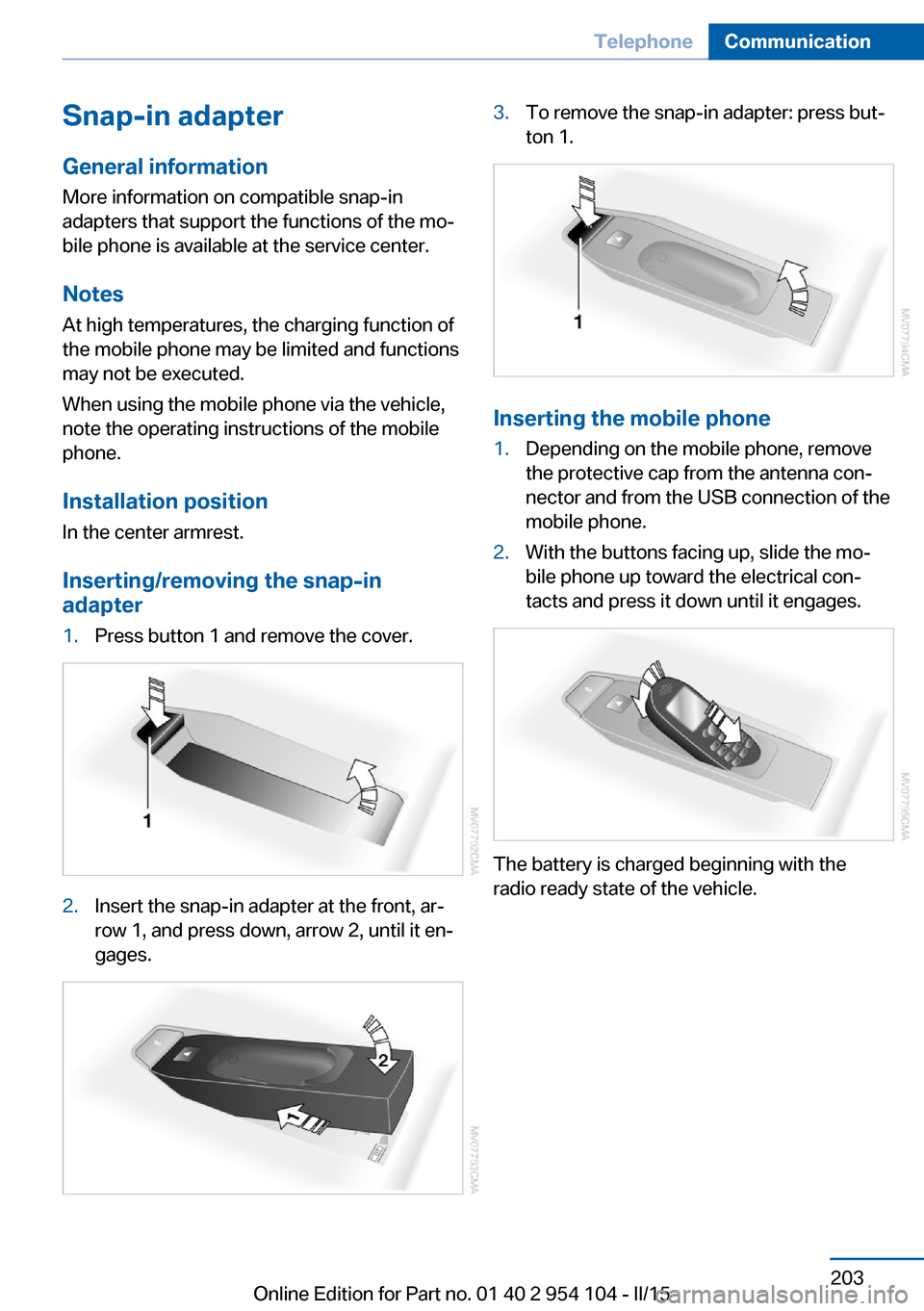
Snap-in adapter
General information More information on compatible snap-in
adapters that support the functions of the mo‐
bile phone is available at the service center.
Notes At high temperatures, the charging function of
the mobile phone may be limited and functions
may not be executed.
When using the mobile phone via the vehicle,
note the operating instructions of the mobile
phone.
Installation position
In the center armrest.
Inserting/removing the snap-in
adapter1.Press button 1 and remove the cover.2.Insert the snap-in adapter at the front, ar‐
row 1, and press down, arrow 2, until it en‐
gages.3.To remove the snap-in adapter: press but‐
ton 1.
Inserting the mobile phone
1.Depending on the mobile phone, remove
the protective cap from the antenna con‐
nector and from the USB connection of the
mobile phone.2.With the buttons facing up, slide the mo‐
bile phone up toward the electrical con‐
tacts and press it down until it engages.
The battery is charged beginning with the
radio ready state of the vehicle.
Seite 203TelephoneCommunication203
Online Edition for Part no. 01 40 2 954 104 - II/15
Page 277 of 289
AUTO program with auto‐matic climate control 113
AUX-IN port 182
Average fuel consumption 75
Average fuel consumption, setting the unit 78
Average speed 75
Axle loads, refer to Weights 264
B
Backrest curvature, refer to Lumbar support 49
Backrests, refer to Seat ad‐ justment 48
Backrest width adjust‐ ment 50
Backup lights, bulb replace‐ ment 247
Balance 162
Band-aids, refer to First aid kit 252
Bass 162
Battery, disposal 41
Battery, power failure 249
Battery, remote control 32
Battery, replacement in the remote control 41
Battery replacement, vehicle battery 249
Battery, vehicle 249
Before entering the car wash 257
Belts, refer to Safety belts 50
Belt tensioners, refer to Safety belts 50
Beverage holder, refer to Cu‐ pholder 126
Black and white map dis‐ play 156
Blower, refer to Air flow rate 111, 114
Bluetooth audio 185
Bluetooth connection, acti‐ vating/deactivating 195 BMW Apps 220
BMW Driver's Guide App 6
BMW EfficientDynamics, re‐ fer to Saving fuel 134
BMW Homepage 6
BMW Internet page 6
BMW Maintenance Sys‐ tem 243
BMW Online 218
Bottle holder, refer to Cu‐ pholder 126
Brake assistant, refer to Dy‐ namic Brake Control 101
Brake discs, breaking in 130
Brake force display 100
Brake force distribution, elec‐ tronic 101
Brake lights, adaptive 100
Brake lights, brake force dis‐ play 100
Brake lights, bulb replace‐ ment 247
Brake pads, breaking in 130
Brake, refer to Parking brake 61
Brakes, ABS 101
Braking, notes 131
Braking, parking brake 61
Breakdown assistance, refer to Roadside Assistance 217
Break-in 130
Brightness of Control Dis‐ play 80
Bulbs, replacing, refer to Lamps and bulbs 245
Button for starting the engine, refer to Start/Stop but‐
ton 57
Buttons on the steering wheel 14
Bypassing, see Starting aid 252
C Calendar 210 California Proposition 65
Warning 7
Camera, care 260
Can holder, refer to Cu‐ pholder 126
Capacities 265
Capacities, cargo area, refer to Weights 264
Capacities, fuel tank, refer to Filling capacities 265
Car battery 249
Car care products 258
Care 257
Care, displays 260
Care, vehicle 258
Cargo 132
Cargo area 121
Cargo area, capacity 264
Cargo area capacity, enlarg‐ ing 121
Cargo area, Comfort Ac‐ cess 40
Cargo area, lamp, refer to In‐ terior lights 91
Cargo area, opening from the inside 38
Cargo area, opening from the outside 38
Cargo, securing 122
Cargo straps, securing cargo 134
Car key, refer to Integrated key/remote control 32
Carpet, care 260
Car phone installation loca‐ tion, refer to Center arm‐
rest 124
Car phone, refer to Tele‐ phone 194
Car vacuum cleaner, connect‐ ing, refer to Connecting
electrical devices 120
Car wash 257
Car wash, with Comfort Ac‐ cess 40 Seite 275Everything from A to ZReference275
Online Edition for Part no. 01 40 2 954 104 - II/15
Page 282 of 289
Key, refer to Integrated key/remote control 32
Kickdown, 7-gear automatic transmission 70
Kickdown, 8-gear automatic transmission 66
Knee airbag 92
L
Lamps and bulbs, bulb re‐ placement 245
Lamps, replacing, refer to Lamps and bulbs 245
Language on Control Dis‐ play 80
Lap-and-shoulder belt, refer to Safety belts 50
Lashing eyes, securing cargo 134
Launch Control, acceleration assistant 71
Leather, care 258
LED, light-emitting di‐ odes 246
Length, refer to Dimen‐ sions 264
Letters and numbers, enter‐ ing 25
License plate light, bulb re‐ placement 248
Light 87
Light-alloy wheels, care 259
Light control 88
Light-emitting diodes LED 246
Lighter 120
Lighter, connecting electrical devices 120
Lighting, instruments 90
Lighting, lamps and bulbs 245
Light switch 87
Limit, refer to Speed limit 85
Load 133
Loading 132 Lockable lug bolts, refer to
Lug bolt lock 249
Lock buttons, doors, refer to Locking 38
Locking from the inside 38
Locking from the outside 35
Locking, setting the confirma‐ tion signals 36
Locking the vehicle from the inside 37
Locking the vehicle from the outside 34
Locking without remote con‐ trol, refer to Comfort Ac‐
cess 39
Low beams 87
Low beams, automatic, refer to High-beam Assistant 89
Lower back support, refer to Lumbar support 49
Lug bolt lock 249
Lumbar support 49
M
M/S, automatic transmission, 7-gear 70
M/S, automatic transmission, 8-gear 67
Maintenance 243
Maintenance require‐ ments 243
Maintenance, service require‐ ments 80
Maintenance system, BMW 243
Malfunction, door lock 37
Malfunction, fuel filler flap 224
Malfunction, parking brake 62
Malfunction warnings, refer to Check Control 84
Manual air distribution 111
Manual mode, 7-gear auto‐ matic transmission 70 Manual mode, 8-gear auto‐
matic transmission 67
Manual operation, door lock 37
Manual operation, driver's door 37
Manual operation, fuel filler flap 224
Manual operation, transmis‐ sion lock 71
Manual transmission 65
Map, destination entry 147
Map display in black and white 156
Map in split screen 155
Map view 153
Marking on approved tires 235
Marking, run-flat tires 234
Master key, refer to Remote control with integrated
key 32
Maximum cooling 113
Maximum speed, winter tires 235
Medical kit, refer to First aid kit 252
Memory, refer to Seat and mirror memory 51
Menus, of iDrive, operat‐ ing 20
Menus, refer to iDrive operat‐ ing concept 21
Message list, traffic bulle‐ tins 155
Messages 208
Microfilter for air condi‐ tioner 111
Microfilter, with automatic cli‐ mate control 114
Minimum tread depth, tires 233
Mirror, mirror memory, refer to Seat and mirror mem‐
ory 51
Mirrors 52 Seite 280ReferenceEverything from A to Z280
Online Edition for Part no. 01 40 2 954 104 - II/15
Page 285 of 289
Seats, storing the setting, re‐fer to Seat and mirror mem‐
ory 51
Sensors, care 260
Service and warranty 8
Service requirements, CBS Condition Based Serv‐
ice 243
Service requirements, dis‐ play 80
Services, remote 221
Servotronic 104
Settings and information 77
Settings, clock, 12h/24h mode 79
Settings, configuring, refer to Personal Profile 32
Settings, DVD 175
Settings on Control Dis‐ play 80
Shift paddles on steering wheel, 7-gear automatic
transmission 70
Shift paddles on steering wheel, 8-gear automatic
transmission 67
Short commands, voice acti‐ vation 266
Side airbags 92
Side windows, refer to Win‐ dows 42
Sitting safely 48
Ski bag, refer to Through- loading opening with
integrated transport
bag 121
Slot for remote control 57
Smokers' package, refer to Ashtray 120
Snap-in adapter, mobile phone 203
Snap-in adapter, refer to Cen‐ ter armrest storage com‐
partment 124
Snow chains 235 Socket, OBD Onboard Diag‐
nostics 244
Socket, refer to Connecting electrical devices 120
Software applications, iPhone 220
Software part number 194
Software update 189
SOS, refer to Emergency Re‐ quest, initiating 251
Spare fuses 250
Special destinations, naviga‐ tion 145
Special equipment, series equipment 6
Specified oil types 240
Speed, average 75
Speed limit 85
Speedometer 16
Split screen 24
Split screen map set‐ tings 155
Spoken instructions, naviga‐ tion 153
SPORT+ program, Dynamic Driving Control 103
Sport program, 7-gear auto‐ matic transmission 70
Sport program, 8-gear auto‐ matic transmission 67
SPORT program, Dynamic Driving Control 103
Spray nozzles, refer to Clean‐ ing the windshield and head‐
lamps 64
Stability control systems 101
Start/Stop button 57
Start/Stop button, starting the engine 58
Start/Stop button, switching off the engine 59
Starting aid 252
Starting the engine 58
State/province, selecting for navigation 142
Stations, stored 170 Station, storing 164
Status information, iDrive 23
Status of Owner's Manual 6
Steam jets 257
Steering wheel 54
Steering wheel, adjusting 54
Steering wheel, buttons on the steering wheel 14
Stopping, engine 59
Storage compartments 125
Storage, tires 235
Storing the seat position, re‐ fer to Seat and mirror mem‐
ory 51
Storing the vehicle 260
Street, entering for naviga‐ tion 143
Summer tires, refer to Wheels and tires 228
Summer tires, tread 233
Suspension settings 102
Switches, refer to Cockpit 14
Switch for Dynamic Driving Control 102
Switching off, engine 59
Switching off, vehicle 59
Symbols 6
T Tachometer 74
Tailgate, opening from the in‐ side 38
Tailgate, refer to Trunk lid 38
Tailgate, remote control 35
Tail lamps, bulb replace‐ ment 247
Tail lights 247
Tank display 74
Tasks 211
Technical changes, refer to Safety 7
Technical data 264
Telephone 194
Telephone, adjusting the vol‐ ume 198 Seite 283Everything from A to ZReference283
Online Edition for Part no. 01 40 2 954 104 - II/15