steering wheel heating BMW Z4 2015 E89 Owner's Manual
[x] Cancel search | Manufacturer: BMW, Model Year: 2015, Model line: Z4, Model: BMW Z4 2015 E89Pages: 289, PDF Size: 7.16 MB
Page 17 of 289
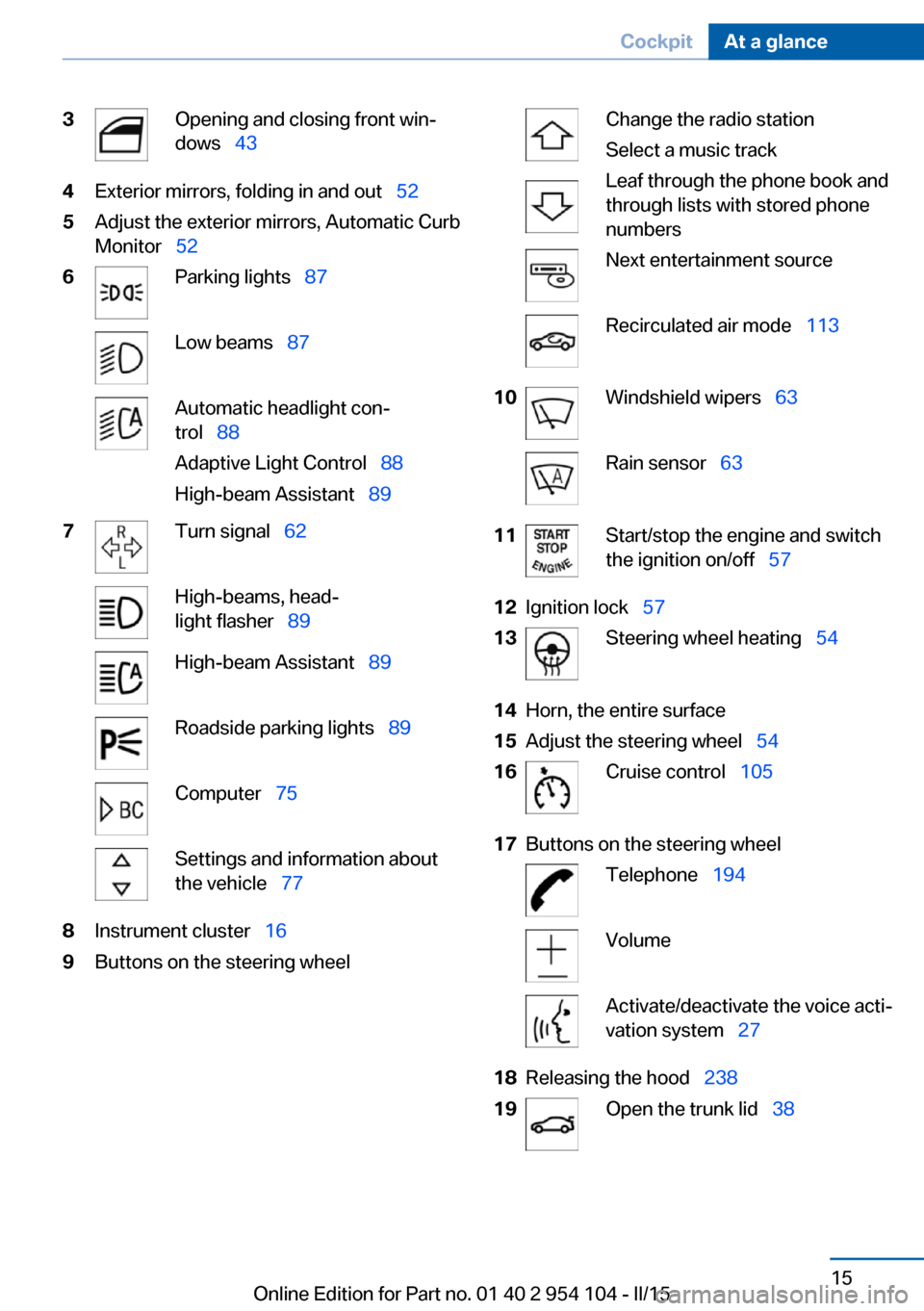
3Opening and closing front win‐
dows 434Exterior mirrors, folding in and out 525Adjust the exterior mirrors, Automatic Curb
Monitor 526Parking lights 87Low beams 87Automatic headlight con‐
trol 88
Adaptive Light Control 88
High-beam Assistant 897Turn signal 62High-beams, head‐
light flasher 89High-beam Assistant 89Roadside parking lights 89Computer 75Settings and information about
the vehicle 778Instrument cluster 169Buttons on the steering wheelChange the radio station
Select a music track
Leaf through the phone book and
through lists with stored phone
numbersNext entertainment sourceRecirculated air mode 11310Windshield wipers 63Rain sensor 6311Start/stop the engine and switch
the ignition on/off 5712Ignition lock 5713Steering wheel heating 5414Horn, the entire surface15Adjust the steering wheel 5416Cruise control 10517Buttons on the steering wheelTelephone 194VolumeActivate/deactivate the voice acti‐
vation system 2718Releasing the hood 23819Open the trunk lid 38Seite 15CockpitAt a glance15
Online Edition for Part no. 01 40 2 954 104 - II/15
Page 56 of 289
Steering wheel
General information Do not adjust while driving
Do not adjust the steering wheel while
driving; otherwise, an unexpected movement
could result in an accident.◀
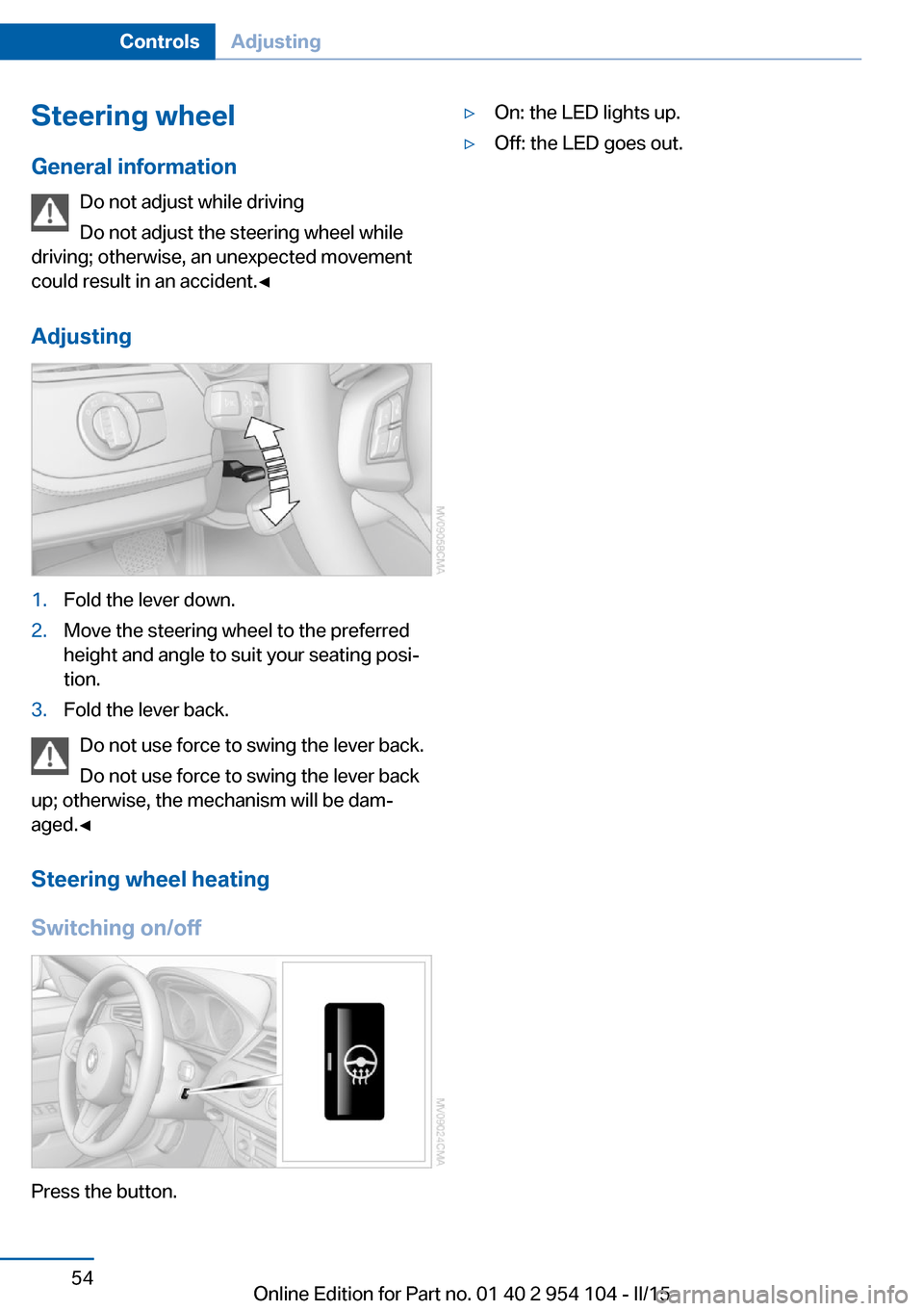
Adjusting1.Fold the lever down.2.Move the steering wheel to the preferred
height and angle to suit your seating posi‐
tion.3.Fold the lever back.
Do not use force to swing the lever back.
Do not use force to swing the lever back
up; otherwise, the mechanism will be dam‐
aged.◀
Steering wheel heating
Switching on/off
Press the button.
▷On: the LED lights up.▷Off: the LED goes out.Seite 54ControlsAdjusting54
Online Edition for Part no. 01 40 2 954 104 - II/15
Page 62 of 289
▷High external temperature and operation of
the automatic climate control.▷The interior is not yet heated or cooled as
much as desired.▷The engine is not yet at operating temper‐
ature.▷Sharp steering angle or the steering wheel
is being turned.▷After driving in reverse.▷Fogging of the windows when the auto‐
matic climate control is switched on.▷Vehicle battery charge is very low.▷Hood is unlocked.▷Stop-and-go traffic.
The indicator lamp is lit.
Parking the vehicle during an
automatic engine stop
The vehicle can be parked safely during an au‐
tomatic engine stop, such as when you wish to
leave the vehicle.
1.Press the Start/Stop button. The ignition is
switched off. The Auto Start/Stop function
is deactivated.2.Set the parking brake.
Start the engine as usual using the Start/Stop
button.
Automatic engine start To drive away, the engine starts automatically
as soon as the clutch pedal is depressed.
After the engine starts, accelerate as usual.
Safety mode
The engine does not start by itself after it is
switched off automatically if any of the follow‐
ing conditions are fulfilled:
▷The driver's safety belt is unfastened or
the driver's door is open.▷Hood was unlocked.The indicator lamp lights up. A mes‐
sage appears on the Control Display.
The engine can only be started via
the Start/Stop button.
Note Even if you do not wish to drive away, the stop‐
ped engine still starts automatically in the fol‐
lowing situations:▷The interior has heated up strongly with
the cooling function switched on.▷The steering wheel is turned.▷The vehicle begins to roll.▷Fogging of the windows when the auto‐
matic climate control is switched on.▷Vehicle battery charge is very low.▷The interior has cooled down strongly with
the heating switched on.▷Low braking pressure, such as from de‐
pressing the brake pedal a number of times
consecutively.
Activating/deactivating the system
manually
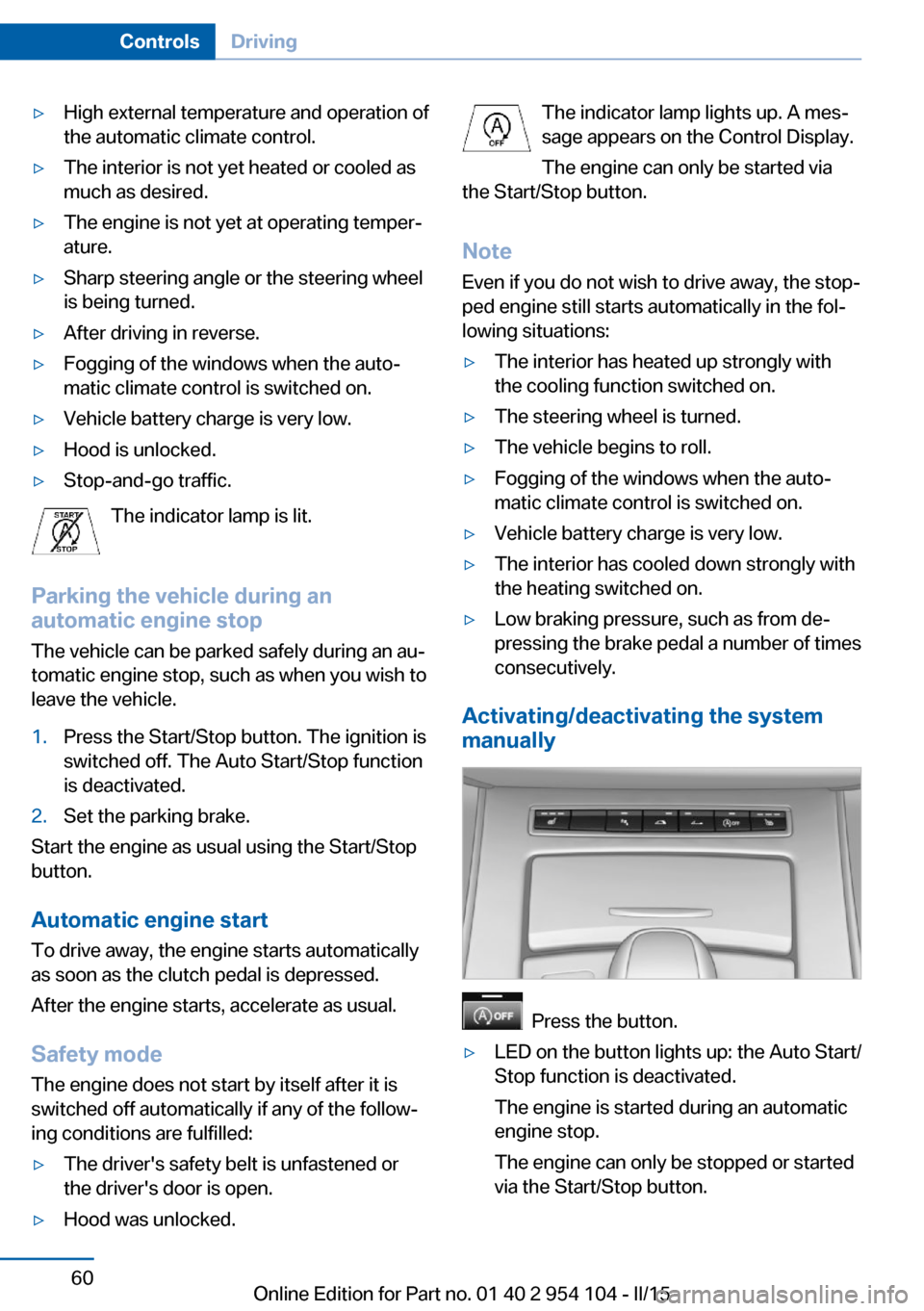
Press the button.
▷LED on the button lights up: the Auto Start/
Stop function is deactivated.
The engine is started during an automatic
engine stop.
The engine can only be stopped or started
via the Start/Stop button.Seite 60ControlsDriving60
Online Edition for Part no. 01 40 2 954 104 - II/15
Page 70 of 289
▷If the shift paddles are not used and the ve‐
hicle is not accelerated for a certain time,
the system switches back into automatic
mode if the selector lever is in transmission
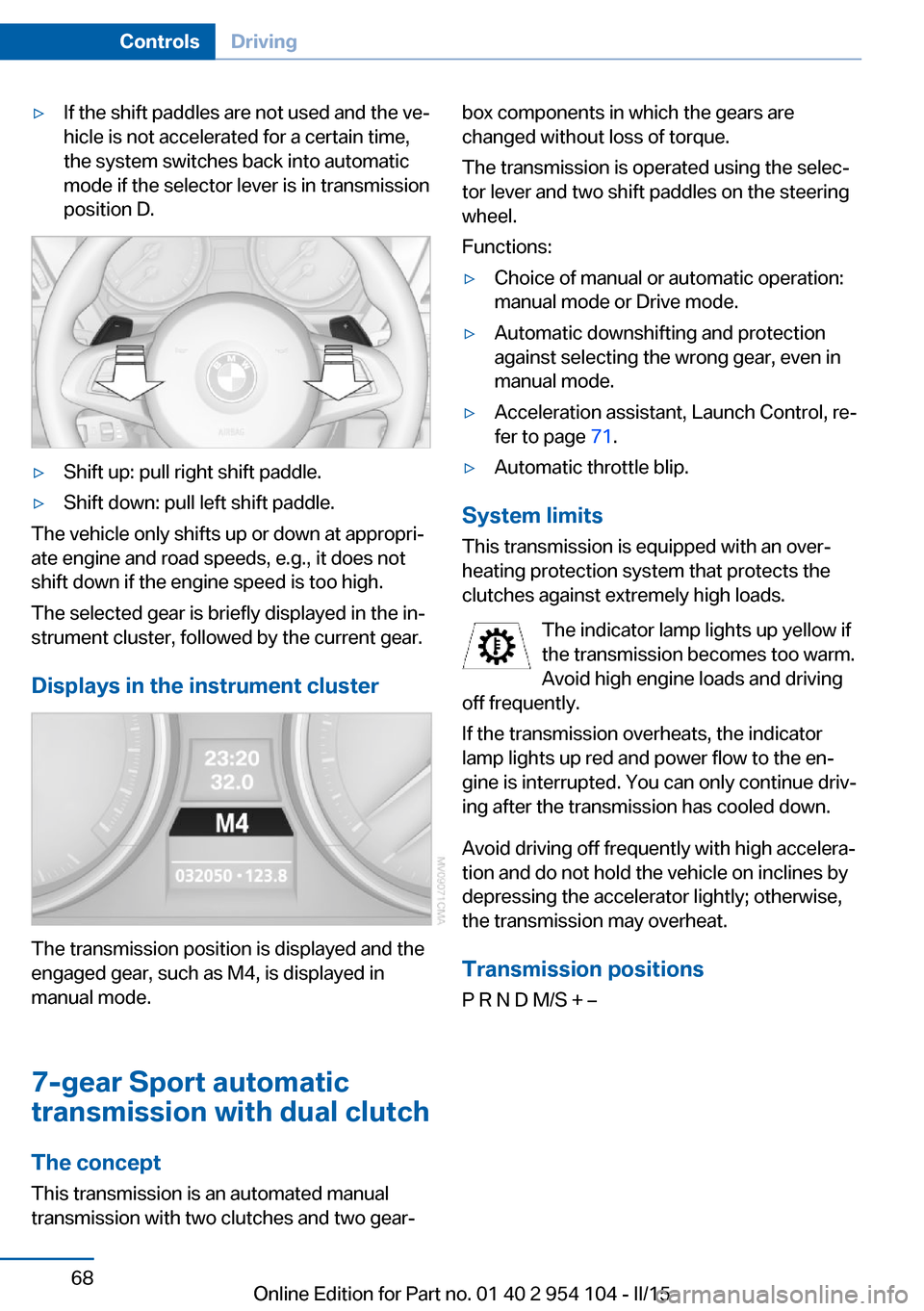
position D.▷Shift up: pull right shift paddle.▷Shift down: pull left shift paddle.
The vehicle only shifts up or down at appropri‐
ate engine and road speeds, e.g., it does not
shift down if the engine speed is too high.
The selected gear is briefly displayed in the in‐
strument cluster, followed by the current gear.
Displays in the instrument cluster
The transmission position is displayed and the
engaged gear, such as M4, is displayed in
manual mode.
7-gear Sport automatic
transmission with dual clutch
The concept This transmission is an automated manual
transmission with two clutches and two gear‐
box components in which the gears are
changed without loss of torque.
The transmission is operated using the selec‐
tor lever and two shift paddles on the steering
wheel.
Functions:▷Choice of manual or automatic operation:
manual mode or Drive mode.▷Automatic downshifting and protection
against selecting the wrong gear, even in
manual mode.▷Acceleration assistant, Launch Control, re‐
fer to page 71.▷Automatic throttle blip.
System limits
This transmission is equipped with an over‐
heating protection system that protects the
clutches against extremely high loads.
The indicator lamp lights up yellow if
the transmission becomes too warm.
Avoid high engine loads and driving
off frequently.
If the transmission overheats, the indicator
lamp lights up red and power flow to the en‐
gine is interrupted. You can only continue driv‐
ing after the transmission has cooled down.
Avoid driving off frequently with high accelera‐
tion and do not hold the vehicle on inclines by
depressing the accelerator lightly; otherwise,
the transmission may overheat.
Transmission positionsP R N D M/S + –
Seite 68ControlsDriving68
Online Edition for Part no. 01 40 2 954 104 - II/15
Page 113 of 289
tants, shut off the supply to the interior of the
car temporarily. The system then recirculates
the air currently within the vehicle.
The recirculated air mode can also be acti‐
vated/deactivated, refer to page 14, via a but‐
ton on the steering wheel.
Air volume Press the corresponding button.
The higher the rate, the more ef‐
fective the heating or cooling will
be.
The air flow rate may be reduced or the blower
may be switched off entirely to save on battery
power.
Vent settings Direct the flow of air to the win‐
dows
, to the upper body area
, or to the knee area and foot‐
well
. Intermediate positions
are possible. In the 6 o'clock posi‐
tion, a small amount of air is also directed to‐
ward the windows to keep them from fogging
over.
Defrosting windows and removing
condensation
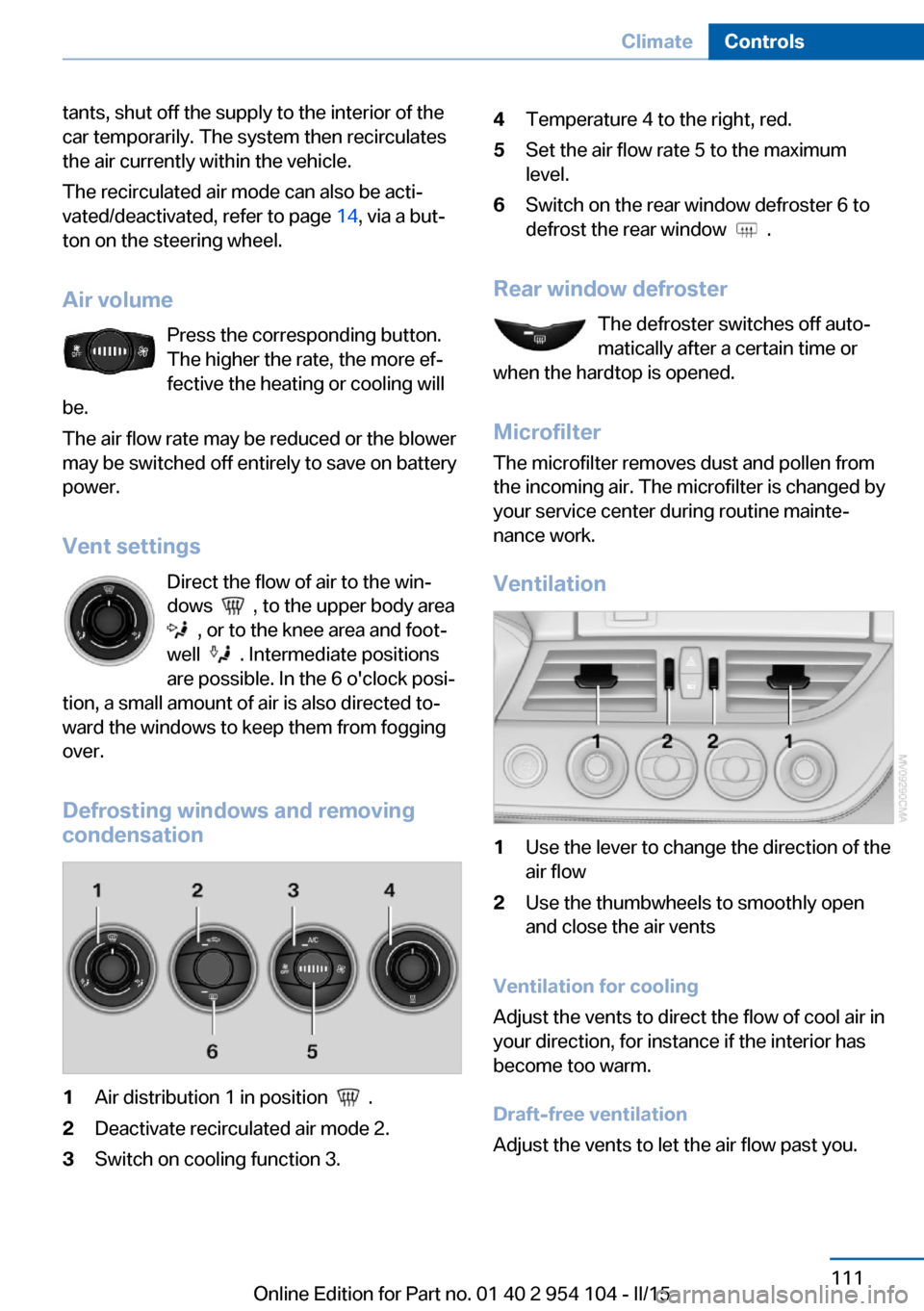
1Air distribution 1 in position .2Deactivate recirculated air mode 2.3Switch on cooling function 3.4Temperature 4 to the right, red.5Set the air flow rate 5 to the maximum
level.6Switch on the rear window defroster 6 to
defrost the rear window
.
Rear window defroster
The defroster switches off auto‐
matically after a certain time or
when the hardtop is opened.
Microfilter
The microfilter removes dust and pollen from
the incoming air. The microfilter is changed by
your service center during routine mainte‐
nance work.
Ventilation
1Use the lever to change the direction of the
air flow2Use the thumbwheels to smoothly open
and close the air vents
Ventilation for cooling
Adjust the vents to direct the flow of cool air in
your direction, for instance if the interior has
become too warm.
Draft-free ventilation
Adjust the vents to let the air flow past you.
Seite 111ClimateControls111
Online Edition for Part no. 01 40 2 954 104 - II/15
Page 281 of 289
Headlamp control, auto‐matic 88
Headlamps, care 258
Headlamps, cleaning 64
Headlight courtesy delay fea‐ ture 88
Headlight flasher 62
Headlight flasher, indicator lamp 17
Headliner 19
Heatable mirrors 53
Heatable rear win‐ dow 111, 114
Heating 109
Heating, mirrors 53
Heating, seats 50
Heavy cargo, stowing 133
Height adjustment, seats 48
Height adjustment, steering wheel 54
Height, refer to Dimen‐ sions 264
High-beam Assistant 89
High-beams 62
High-beams/low beams, refer to High-beam Assistant 89
High beams, headlight flasher 89
High-beams, indicator lamp 17
High-pressure washers 257
Hills 132
Hill start assistant, refer to Drive-off assistant 104
Holder for beverages 126
Holder for remote control, re‐ fer to Ignition lock 57
Homepage 6
Hood 238
Horn 14
Hot exhaust system 131
Hotline 219
House number, entering for navigation 143
Hydroplaning 131 I
Ice warning, refer to External temperature warning 73
Icy roads, refer to External temperature warning 73
Identification marks, tires 231
iDrive 20
iDrive, changing the date and time 78
iDrive, changing the units of measure and display for‐
mat 78
Ignition 58
Ignition key position 1, refer to Radio ready state 58
Ignition key position 2, refer to Ignition on 58
Ignition key, refer to Remote control with integrated
key 32
Ignition lock 57
Ignition, switched off 58
Ignition, switched on 58
Indication of a flat tire 95
Indicator and warning lamps, Tire Pressure Monitor
TPM 98
Indicator and warning lights 17
Individual air distribution 111
Inflation pressure, refer to Tire inflation pressure 228
Inflation pressure warning, tires 94
Information on the navigation data 140
Initializing, compass, refer to Calibrating 119
Initializing, Flat Tire Monitor FTM 95
Installation location, tele‐ phone 124
Instrument cluster 16
Instrument lighting 90 Instrument panel, refer to In‐
strument cluster 16
Instruments, refer to Cock‐ pit 14
Integrated key 32
Integrated universal remote control 116
Interactive map 147
Interior equipment 116
Interior lights 91
Interior lights, remote con‐ trol 35
Interior mirror 53
Interior motion sensor 42
Interior rearview mirror, auto‐ matic dimming 53
Interior rearview mirror, com‐ pass 118
Interior temperature, setting, refer to Air conditioner 110
Interior temperature, setting, refer to Automatic climate
control 112
Intermediate destina‐ tions 149
Intermittent wipe 63
Internet page 6
Intersection, entering for navi‐ gation 143
Interval display, service re‐ quirements 80
J Jacking points 249
Joystick, refer to iDrive 20
K
Keyless Go, refer to Comfort Access 39
Keyless opening and closing, refer to Comfort Access 39
Key Memory, refer to Per‐ sonal Profile 32 Seite 279Everything from A to ZReference279
Online Edition for Part no. 01 40 2 954 104 - II/15