tire BMW Z4 2015 E89 Owner's Manual
[x] Cancel search | Manufacturer: BMW, Model Year: 2015, Model line: Z4, Model: BMW Z4 2015 E89Pages: 289, PDF Size: 7.16 MB
Page 6 of 289
Addendum
“BMW recommends that you have the
maintenance carried out by your service
center.”
9. At page 221, under the heading “Apps” and
subheading “Requirements,” the section
that begins, “Use only … ,” should be disre-
garded and the following text should be
read in lieu thereof: “The manufacturer of
your vehicle recommends the use of BMW
recommended software; otherwise there
may be malfunctions in system operations.”
10. At page 228, under the heading “Pressure
specifications,” the sentence beginning,
“The inflation pressures apply to the tire
sizes approved … .” should be disregarded.
11. At page 234, under the heading: “Approved
wheels and tires,” the term “Approved”
should be disregarded and in lieu thereof,
the term “Recommended” should be read
in its place. In addition, the text of that sec-
tion should be disregarded and the follow-
ing text should be read in lieu thereof:
The manufacturer of your vehicle strongly
suggests that you use wheels and tires that
have been recommended by the vehicle
manufacturer for your vehicle type; other-
wise, for example, despite having the same
official size ratings, variations can lead to
body contact and with it, the risk of severe
accidents.
The manufacturer of your vehicle does not
evaluate non-recommended wheels and
tires to determine if they are suitable for use
on your vehicle.
12. At page 238, under the heading “Hood,” the
sentence beginning, “If you are unfamiliar”
should be disregarded.
13. At page 243 and page 244, under the head-
ing: “Service and Warranty Information
Booklet for US models and Warranty and
Service Guide Booklet for Canadian mod-
els,” the second paragraph should be disre-
garded and the following text read in lieu
thereof:
The manufacturer of your vehicle recom-
mends that you have maintenance and
repair performed by your BMW dealer's ser-
vice center or another service center or
repair shop that employs trained personnel
that can perform maintenance and repair
work on your vehicle in accordance with
BMW specifications. The manufacturer of
your vehicle recommends that you maintain
records of all maintenance and repair work
performed on your vehicle.
14. At page 246, where it reads: “Do not per-
form work/bulb replacement on xenon
headlamps,” that text should be disre-
garded and in lieu thereof the following text
should be read: “Xenon headlamp work or
replacement can cause serious and fatal
injuries.” In the text that follows, where it
reads: “[h]ave any work on the xenon light-
ing system … ,” the following words should
be read as preceding that passage: “It is
strongly suggested that you … .”
15. At page 249, under the “Battery replace-
ment” section, the text should be disre-
garded and in lieu thereof the following text
should be read:
Use of recommended vehicle batteries
The manufacturer of your vehicle recom-
mends that you use vehicle batteries that it
has tested and recommends for use in your
vehicle; otherwise the vehicle could be
damaged and systems or functions may not
be fully available.
After a battery replacement, the manufac-
turer of your vehicle recommends that you
have the battery registered on your vehicle
by a service center to ensure that all com-
fort functions are fully available, and that
any “check control” messages of these
comfort functions are no longer displayed.
Online Edition for Part no. 01 40 2 954 104 - II/15
Page 7 of 289
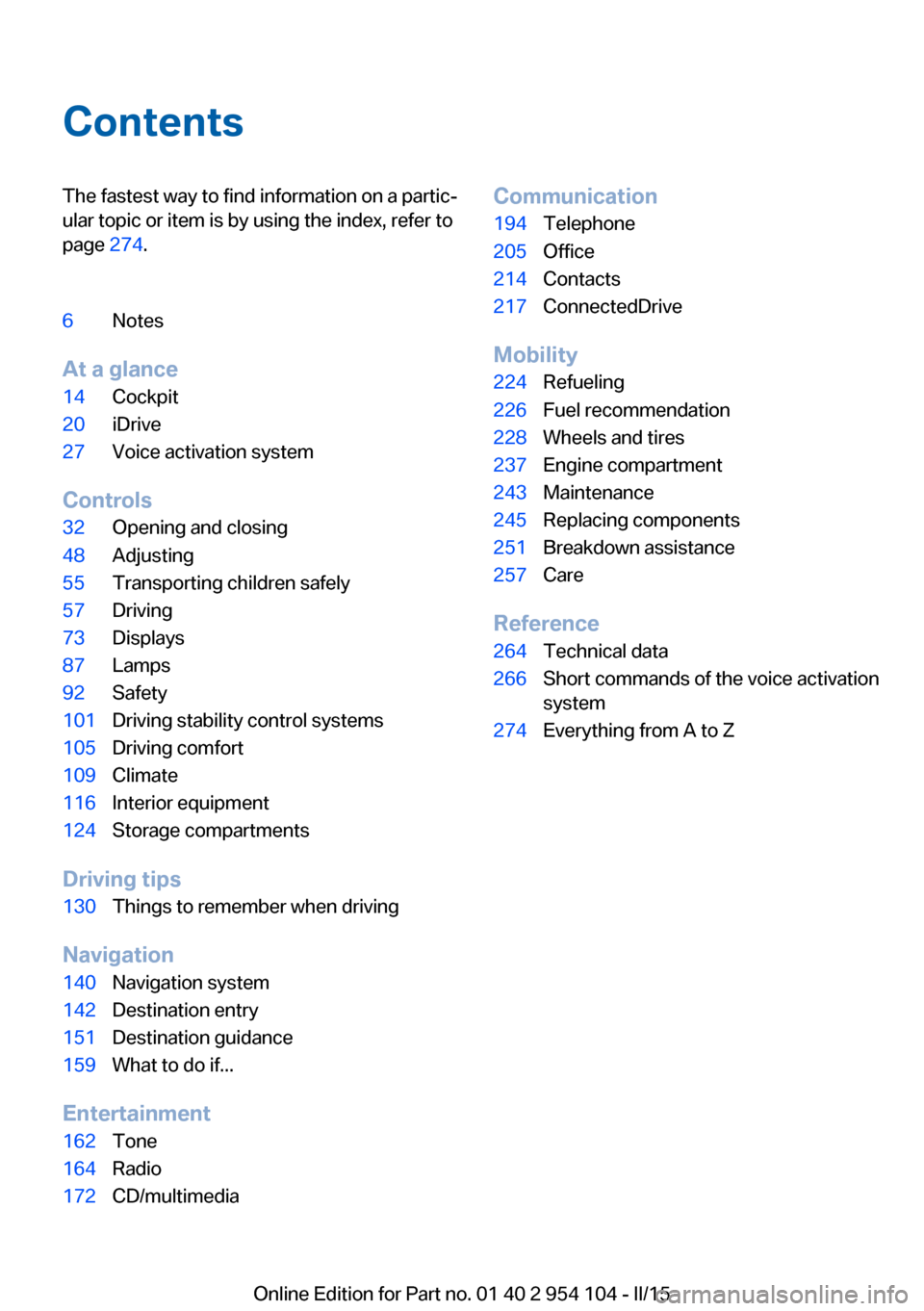
ContentsThe fastest way to find information on a partic‐
ular topic or item is by using the index, refer to
page 274.6Notes
At a glance
14Cockpit20iDrive27Voice activation system
Controls
32Opening and closing48Adjusting55Transporting children safely57Driving73Displays87Lamps92Safety101Driving stability control systems105Driving comfort109Climate116Interior equipment124Storage compartments
Driving tips
130Things to remember when driving
Navigation
140Navigation system142Destination entry151Destination guidance159What to do if...
Entertainment
162Tone164Radio172CD/multimediaCommunication194Telephone205Office214Contacts217ConnectedDrive
Mobility
224Refueling226Fuel recommendation228Wheels and tires237Engine compartment243Maintenance245Replacing components251Breakdown assistance257Care
Reference
264Technical data266Short commands of the voice activation
system274Everything from A to Z
Online Edition for Part no. 01 40 2 954 104 - II/15
Page 17 of 289
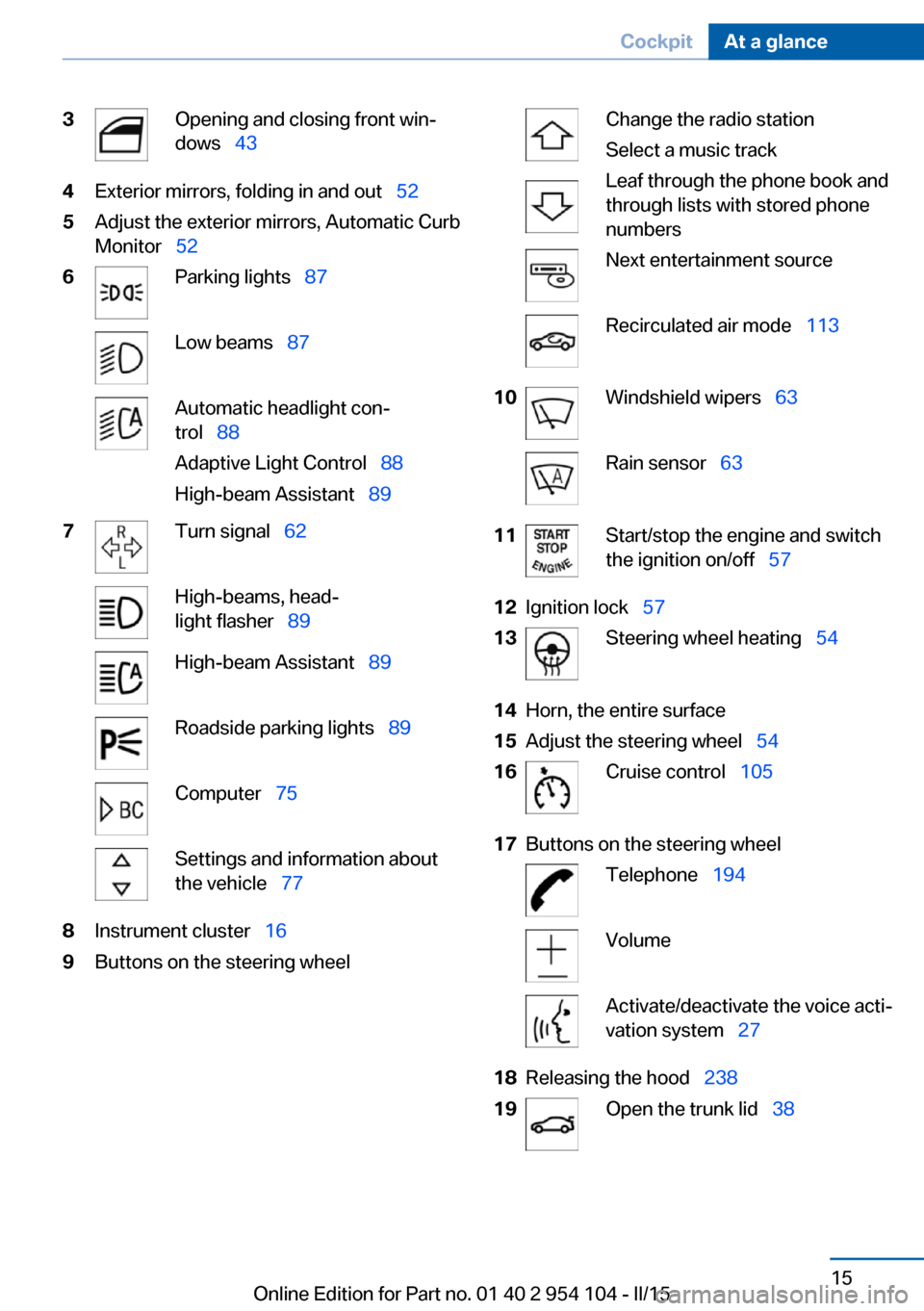
3Opening and closing front win‐
dows 434Exterior mirrors, folding in and out 525Adjust the exterior mirrors, Automatic Curb
Monitor 526Parking lights 87Low beams 87Automatic headlight con‐
trol 88
Adaptive Light Control 88
High-beam Assistant 897Turn signal 62High-beams, head‐
light flasher 89High-beam Assistant 89Roadside parking lights 89Computer 75Settings and information about
the vehicle 778Instrument cluster 169Buttons on the steering wheelChange the radio station
Select a music track
Leaf through the phone book and
through lists with stored phone
numbersNext entertainment sourceRecirculated air mode 11310Windshield wipers 63Rain sensor 6311Start/stop the engine and switch
the ignition on/off 5712Ignition lock 5713Steering wheel heating 5414Horn, the entire surface15Adjust the steering wheel 5416Cruise control 10517Buttons on the steering wheelTelephone 194VolumeActivate/deactivate the voice acti‐
vation system 2718Releasing the hood 23819Open the trunk lid 38Seite 15CockpitAt a glance15
Online Edition for Part no. 01 40 2 954 104 - II/15
Page 18 of 289
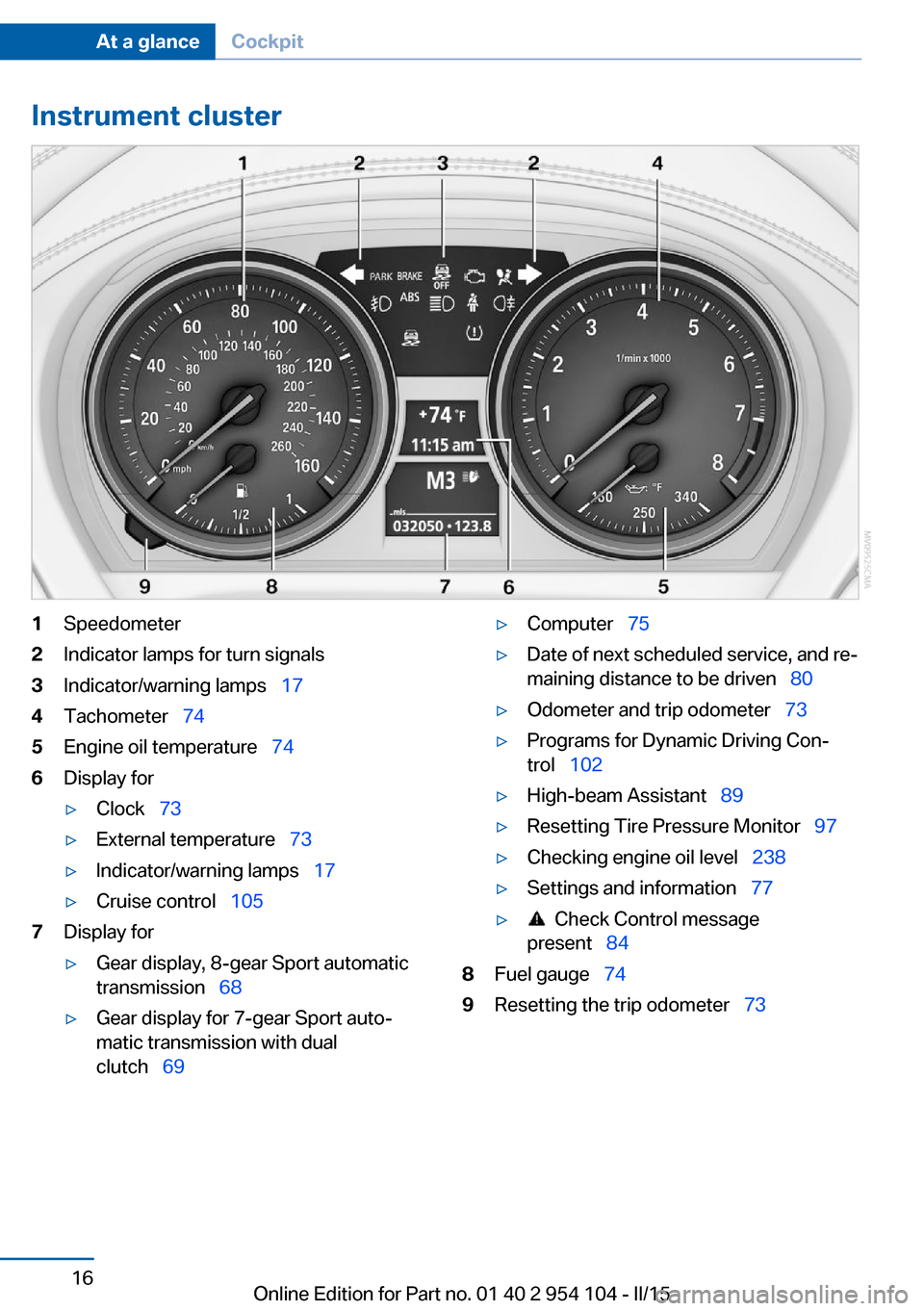
Instrument cluster1Speedometer2Indicator lamps for turn signals3Indicator/warning lamps 174Tachometer 745Engine oil temperature 746Display for▷Clock 73▷External temperature 73▷Indicator/warning lamps 17▷Cruise control 1057Display for▷Gear display, 8-gear Sport automatic
transmission 68▷Gear display for 7-gear Sport auto‐
matic transmission with dual
clutch 69▷Computer 75▷Date of next scheduled service, and re‐
maining distance to be driven 80▷Odometer and trip odometer 73▷Programs for Dynamic Driving Con‐
trol 102▷High-beam Assistant 89▷Resetting Tire Pressure Monitor 97▷Checking engine oil level 238▷Settings and information 77▷ Check Control message
present 848Fuel gauge 749Resetting the trip odometer 73Seite 16At a glanceCockpit16
Online Edition for Part no. 01 40 2 954 104 - II/15
Page 36 of 289
▷Trunk lid.▷Fuel filler flap.▷Center armrest.
Operating from the outside
▷Via the remote control.▷Via the driver's door lock.▷In cars with Comfort Access, via the door
handles on the driver's and front passen‐
ger sides.
The following takes place simultaneously
when locking/unlocking the vehicle via the re‐
mote control:
▷The welcome lamps, interior lamps and
courtesy lamps are switched on and off.▷The alarm system is armed or disarmed,
refer to page 41.
Operating from the inside
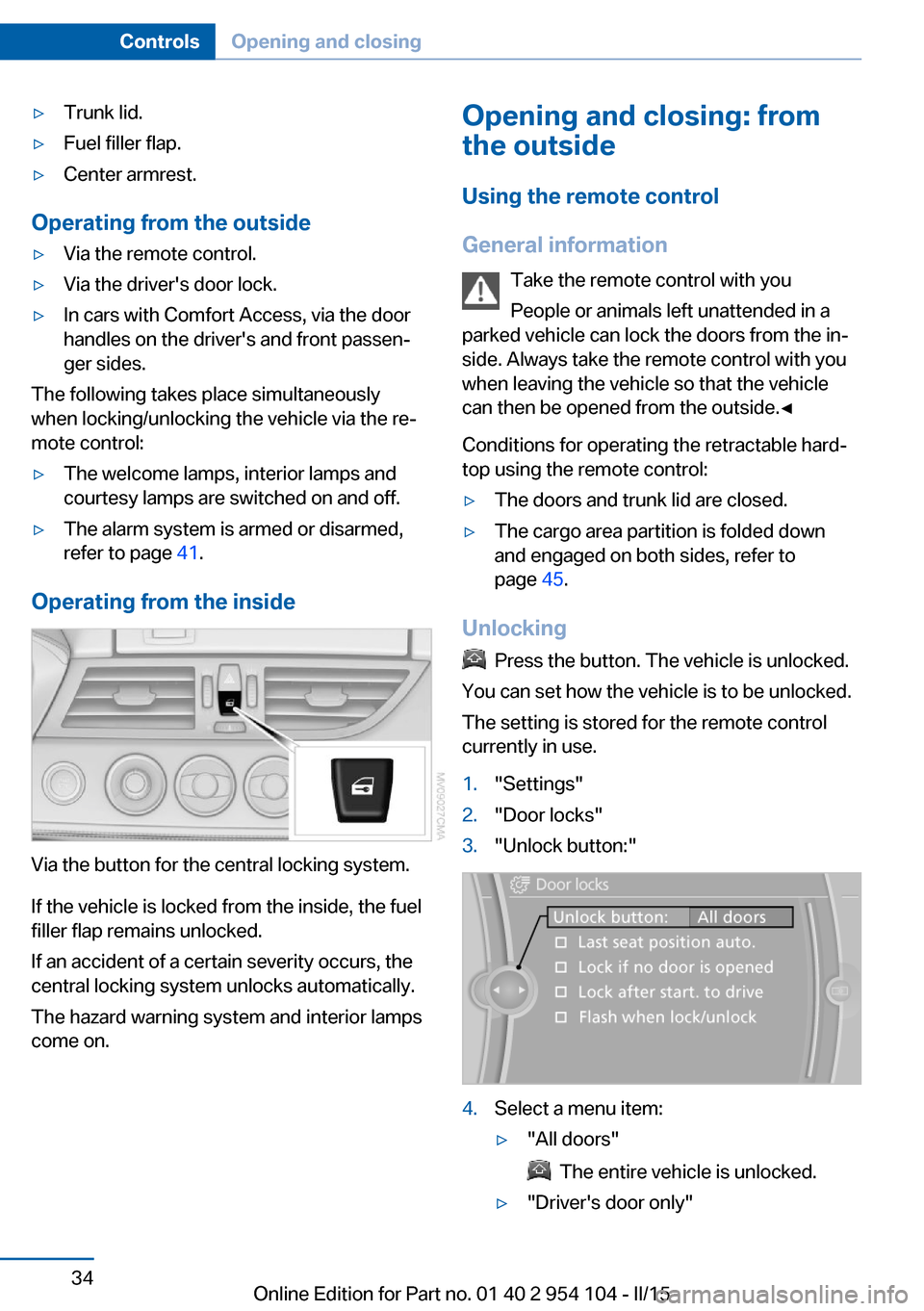
Via the button for the central locking system.
If the vehicle is locked from the inside, the fuel
filler flap remains unlocked.
If an accident of a certain severity occurs, the
central locking system unlocks automatically.
The hazard warning system and interior lamps
come on.
Opening and closing: from
the outside
Using the remote control
General information Take the remote control with you
People or animals left unattended in a
parked vehicle can lock the doors from the in‐
side. Always take the remote control with you
when leaving the vehicle so that the vehicle
can then be opened from the outside.◀
Conditions for operating the retractable hard‐
top using the remote control:▷The doors and trunk lid are closed.▷The cargo area partition is folded down
and engaged on both sides, refer to
page 45.
Unlocking
Press the button. The vehicle is unlocked.
You can set how the vehicle is to be unlocked.
The setting is stored for the remote control
currently in use.
1."Settings"2."Door locks"3."Unlock button:"4.Select a menu item:▷"All doors"
The entire vehicle is unlocked.
▷"Driver's door only"Seite 34ControlsOpening and closing34
Online Edition for Part no. 01 40 2 954 104 - II/15
Page 37 of 289
Only the driver's door and the fuel
filler flap are unlocked. Pressing again
unlocks the entire vehicle.5.Press the controller.
Convenient opening: window and hardtop
When you are close to the vehicle, the remote
control for Comfort Access can be used to
open the retractable hardtop.
Press and hold the button on the remote
control.
The windows and the retractable hardtop are
opened if the doors are closed.
Hold the button down. When you are close
to the vehicle, the windows move up after the
hardtop is opened.
Monitor the opening process
Monitor the opening process to ensure
that no one becomes trapped; otherwise, inju‐
ries may result. Releasing the button interrupts
the opening process.◀
Locking
Press the button on the remote con‐
trol.
Locking from the outside
Do not lock the vehicle from the outside
if there are people in it, as the vehicle cannot
be unlocked from inside without special knowl‐
edge.◀
Convenient closing
When you are close to the vehicle, the remote
control for Comfort Access can be used to
close the retractable hardtop and the windows.
Press and hold the button on the re‐
mote control.
The retractable hardtop and the windows are
closed.
Monitor the closing process
Monitor the closing process to ensure
that no one becomes trapped.
Releasing the button stops the motion.◀
Switching on the interior lamps and courtesy lamps
Press the button on the remote con‐
trol with the vehicle locked.
Unlocking the trunk lid
Press the button on the remote control for
approx. one second.
Note the opening height of the trunk lid
During opening, the trunk lid pivots back
and up. Ensure that there is sufficient clear‐
ance when the trunk lid opens; otherwise,
damage may result.◀
To avoid locking yourself out of the vehicle, do
not place the remote control in the cargo area.
A previously locked trunk lid is locked again af‐
ter closing.
Before and after each trip, check that the trunk
lid has not been inadvertently unlocked.
Convenient loading
When you are close to the vehicle, the remote
control for Comfort Access can be used to par‐
tially tilt the open hardtop for more convenient
loading of the cargo area.
1. Briefly press the button on the remote
control.
Press again within one second and hold
until the retractable hardtop stops in an in‐
termediate position. The trunk lid opens
slightly.2.Open the trunk lid, press the cargo area
partition upward and stow the cargo in the
cargo area.Seite 35Opening and closingControls35
Online Edition for Part no. 01 40 2 954 104 - II/15
Page 96 of 289
Status of passenger airbags
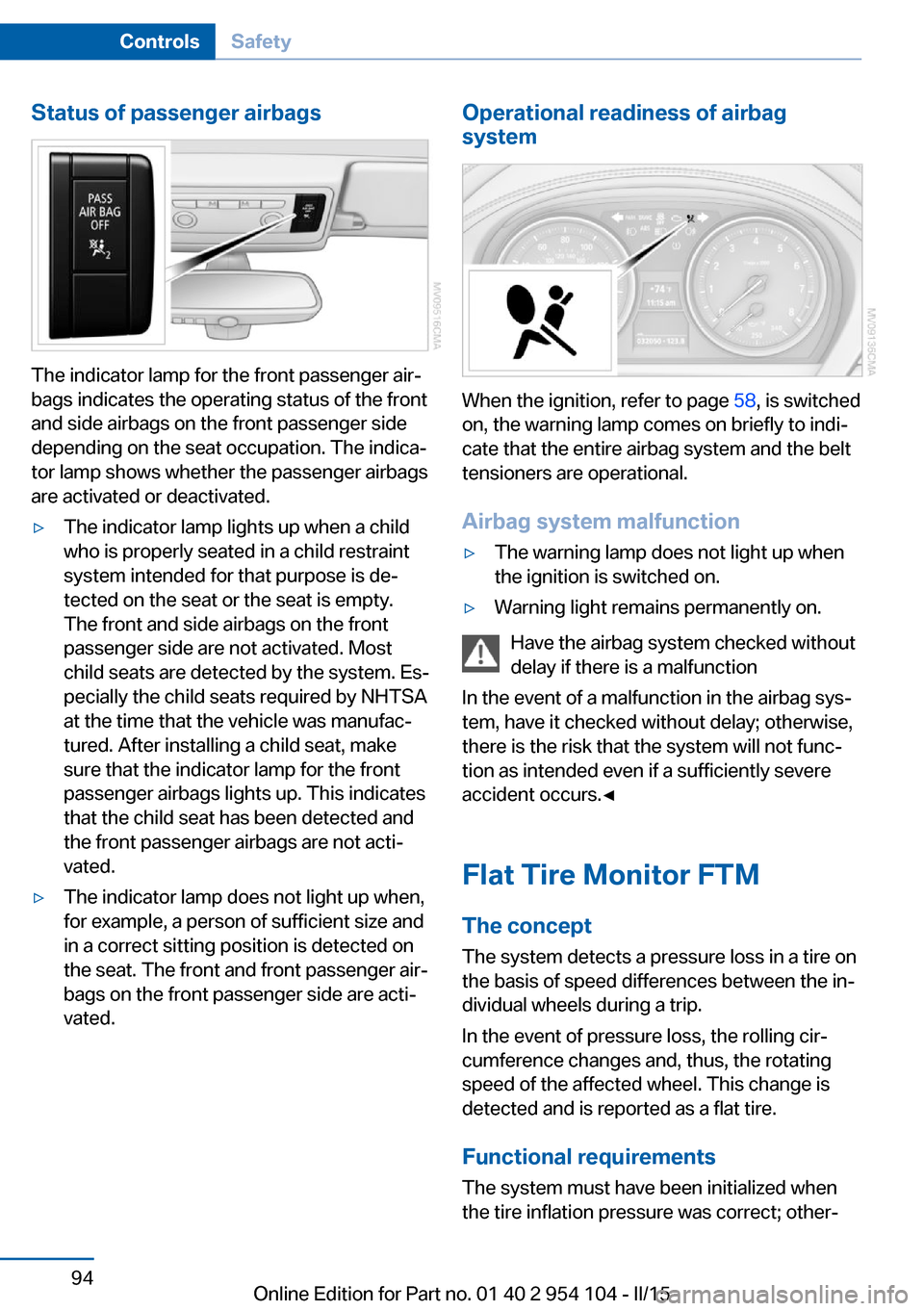
The indicator lamp for the front passenger air‐
bags indicates the operating status of the front
and side airbags on the front passenger side
depending on the seat occupation. The indica‐
tor lamp shows whether the passenger airbags
are activated or deactivated.
▷The indicator lamp lights up when a child
who is properly seated in a child restraint
system intended for that purpose is de‐
tected on the seat or the seat is empty.
The front and side airbags on the front
passenger side are not activated. Most
child seats are detected by the system. Es‐
pecially the child seats required by NHTSA
at the time that the vehicle was manufac‐
tured. After installing a child seat, make
sure that the indicator lamp for the front
passenger airbags lights up. This indicates
that the child seat has been detected and
the front passenger airbags are not acti‐
vated.▷The indicator lamp does not light up when,
for example, a person of sufficient size and
in a correct sitting position is detected on
the seat. The front and front passenger air‐
bags on the front passenger side are acti‐
vated.Operational readiness of airbag
system
When the ignition, refer to page 58, is switched
on, the warning lamp comes on briefly to indi‐
cate that the entire airbag system and the belt
tensioners are operational.
Airbag system malfunction
▷The warning lamp does not light up when
the ignition is switched on.▷Warning light remains permanently on.
Have the airbag system checked without
delay if there is a malfunction
In the event of a malfunction in the airbag sys‐
tem, have it checked without delay; otherwise,
there is the risk that the system will not func‐
tion as intended even if a sufficiently severe
accident occurs.◀
Flat Tire Monitor FTM The conceptThe system detects a pressure loss in a tire on
the basis of speed differences between the in‐
dividual wheels during a trip.
In the event of pressure loss, the rolling cir‐
cumference changes and, thus, the rotating
speed of the affected wheel. This change is
detected and is reported as a flat tire.
Functional requirements
The system must have been initialized when
the tire inflation pressure was correct; other‐
Seite 94ControlsSafety94
Online Edition for Part no. 01 40 2 954 104 - II/15
Page 97 of 289
wise, reliable signaling of a flat tire is not en‐
sured. Initialize the system after each correc‐
tion of the tire inflation pressure and after
every tire or wheel change.
System limits Sudden tire damage
Sudden serious tire damage caused by
external influences cannot be indicated in ad‐
vance.◀
A natural, even pressure loss in all four tires
cannot be detected.
The system could be delayed or malfunction in
the following situations:▷When the system has not been initialized.▷When driving on a snowy or slippery road
surface.▷Sporty driving style: slip in the drive
wheels, high lateral acceleration.▷When driving with snow chains.
Status display
The current status of the Flat Tire Monitor can
be displayed on the Control Display, e.g.,
whether or not the FTM is active.
1."Vehicle Info"2."Vehicle status"3. "Flat Tire Monitor"
The status is displayed.
Initialization
The initialization process adopts the set infla‐
tion tire pressures as reference values for the
detection of a flat tire. Initialization is started by
confirming the inflation pressures.
Do not initialize the system when driving with
snow chains.
1."Vehicle Info"2."Vehicle status"3. "Reset"4.Start the engine - do not drive away.5.Start the initialization with "Reset".6.Drive away.
The initialization is completed while driving,
which can be interrupted at any time.
The initialization automatically continues when
driving resumes.
Indication of a flat tire The warning lights come on in yellowand red. A message appears on the
Control Display. In addition, a signal
sounds.
There is a flat tire or a major loss in tire inflation
pressure.
1.Reduce your speed and stop cautiously.
Avoid sudden braking and steering maneu‐
vers.2.Check whether the vehicle is fitted with
regular tires or run-flat tires.
Run-flat tires, refer to page 234, are la‐
beled with a circular symbol containing the
letters RSC marked on the tire sidewall.
Do not continue driving without run-flat
tires
Do not continue driving if the vehicle is not
equipped with run-flat tires; continued driving
may result in serious accidents.◀
When a flat tire is indicated, DSC Dynamic Sta‐
bility Control is switched on if necessary.
Actions in the event of a flat tire Normal tires
1.Identify the damaged tire.
Do this by checking the air pressure in all
four tires.
If the tire inflation pressure in all four tires
is correct, the Flat Tire Monitor may not
have been initialized. In this case, initialize
the system.Seite 95SafetyControls95
Online Edition for Part no. 01 40 2 954 104 - II/15
Page 98 of 289
If an identification is not possible, please
contact the service center.2.Rectify the flat tire.
Run-flat tires
You can continue driving with a damaged tire
at speeds up to 50 mph/80 km/h.
Continued driving with a flat tire
If continuing to drive with a damaged tire:
1.Avoid sudden braking and steering maneu‐
vers.2.Do not exceed a speed of 50 mph/80 km/h.3.Check the air pressure in all four tires at
the next opportunity.
If the tire inflation pressure in all four tires
is correct, the Flat Tire Monitor may not
have been initialized. In this case, initialize
the system.
Possible driving distance with complete loss of
tire inflation pressure:
The possible driving distance after a loss of tire
inflation pressure depends on the cargo load
and the driving style and conditions.
For a vehicle containing an average load, the
possible driving distance is approx.
50 miles/80 km.
When the vehicle is driven with a damaged tire,
its handling characteristics change, e.g., re‐
duced lane stability during braking, a longer
braking distance, and altered self-steering
properties. Adjust your driving style accord‐
ingly. Avoid abrupt steering maneuvers or driv‐
ing over obstacles, e. g., curbs, potholes, etc.
Because the possible driving distance de‐
pends on how the vehicle is used during the
trip, the actual distance may be smaller or
greater depending on the driving speed, road
conditions, external temperature, cargo load,
etc.
Continued driving with a flat tire
Drive moderately and do not exceed a
speed of 50 mph/80 km/h.
A loss of tire inflation pressure results in a
change in the handling characteristics, e.g., re‐
duced lane stability during braking, a longer
braking distance and altered self-steering
properties.◀
Final tire failure
Vibrations or loud noises while driving
can indicate the final failure of the tire. Reduce
speed and stop; otherwise, pieces of the tire
could come loose and cause an accident. Do
not continue driving, and contact your service
center.◀
Tire Pressure Monitor TPMThe concept
The system monitors the tire pressure in the four mounted tires. The system issues a warn‐
ing if there is a significant loss of pressure in
one or more tires. Sensors in the tire valves
measure the tire pressure.
Notes Tire damage caused by external influen‐
ces
Sudden tire damage caused by external influ‐
ences cannot be indicated in advance.◀
To operate the system, also note the additional
information and instructions contained under
Tire inflation pressure, refer to page 228.
Functional requirement The system must have been reset while the in‐
flation pressure was correct; otherwise, reliable
signaling of pressure loss is not ensured.
Reset the system after adjusting the tire infla‐
tion pressure and after changing a tire or
wheel.Seite 96ControlsSafety96
Online Edition for Part no. 01 40 2 954 104 - II/15
Page 99 of 289
Always use wheels with TPM electronics to
ensure that the system will operate properly.
Status display1. Press the button. The start menu
opens.2."Vehicle Info"3."Vehicle status"4."TPM"5.The status is displayed.
Status indicator on the Control
Display
The tire and system status is indicated by the
color of the tires.
TPM takes into account that tire pressures
change while the vehicle is being driven.
All wheels are green
The system is active and issues warnings in
case of deviations from the tire inflation pres‐
sures stored last.
"TPM active" appears on the Control Display.
One wheel is yellow Flat tire or major drop in inflation pressure in
the indicated tire. A message appears on the
Control Display.
All wheels are yellow
▷Flat tire or major drop in inflation pressure
in several tires.▷The system was not reset after a wheel
change and issues warnings in case of de‐
viations from the tire inflation pressures
stored last.▷A flat tire in one or more tires while the sys‐
tem is being reset.
A message appears on the Control Display.
The wheels are gray The system cannot detect a flat tire.
Possible reasons for this:▷TPM is being reset.▷Disturbance by systems or devices with
the same radio frequency.▷Malfunction.
Status information
The status control display additionally shows
the current tire inflation pressures. It shows the actual values read; they may vary depending
on driving style or weather conditions.
Resetting the system
Reset the system after adjusting the tire infla‐
tion pressure and every time a tire or wheel is
changed.
1. Press the button. The start menu
opens.2."Vehicle Info"3."Vehicle status"4. "Reset"5.Start the engine, but do not start driving.6.Start the system reset with "Reset".7.Drive away. The tires are shown in gray and
"Resetting TPM..." is displayed.
After a short trip at over 30 km/h, the set tire
inflation pressures are adopted as target val‐
ues. The system reset is completed as you
drive, and can be interrupted at any time.
When driving resumes, the reset is continued
automatically. On the Control Display, the tires
are shown in green and "TPM active" is dis‐
played again.
If a flat tire is detected while the system is re‐
setting and determining the inflation pres‐
sures, all tires on the Control Display are dis‐
played in yellow. The message "Low tire!" is
shown.
Seite 97SafetyControls97
Online Edition for Part no. 01 40 2 954 104 - II/15