ECO mode BMW Z4 3.0SI ROADSTER 2007 E85 Owner's Manual
[x] Cancel search | Manufacturer: BMW, Model Year: 2007, Model line: Z4 3.0SI ROADSTER, Model: BMW Z4 3.0SI ROADSTER 2007 E85Pages: 132, PDF Size: 3.14 MB
Page 8 of 132
Notes
6
Parts and accessories
For your own safety, use genuine parts
and accessories approved by BMW.
When you purchase accessories tested and
approved by BMW and Original BMW Parts, you
simultaneously acquire the assurance that they
have been thoroughly tested by BMW to ensure
optimum performance when installed on your
vehicle.
BMW warrants these parts to be free from
defects in material and workmanship.
BMW will not accept any liability for damage
resulting from installation of parts and accesso-
ries not approved by BMW.
BMW cannot test every product made by other
manufacturers to verify if it can be used on a
BMW safely and without risk to either the vehi-
cle, its operation, or its occupants.
Original BMW Parts, BMW Accessories and
other products approved by BMW, together
with professional advice on using these items,
are available from all BMW centers.
Installation and operation of non-BMW
approved accessories such as alarms, radios,
amplifiers, radar detectors, wheels, suspension
components, brake dust shields, telephones,
including operation of any mobile phone from
within the vehicle without using an externally
mounted antenna, or transceiver equipment, for
instance, CBs, walkie-talkie, ham radio or simi-
lar accessories, may cause extensive damage
to the vehicle, compromise its safety, interfere
with the vehicle’s electrical system or affect the
validity of the BMW Limited Warranty. See your
BMW center for additional information.<
Maintenance, replacement or repair of
the emission control devices and sys-
tems may be performed by any automotive
repair establishment or individual using any cer-
tified automotive part.<
Service and warranty
We recommend that you read this publication
thoroughly.
Your BMW is covered by the following warran-
ties:
>New Vehicle Limited Warranty
>Rust Perforation Limited Warranty
>Federal Emissions System Defect Warranty
>Federal Emissions Performance Warranty
>California Emission Control System Limited
Warranty
Detailed information about these warranties is
listed in the Service and Warranty Information
Booklet for US models or in the Warranty and
Service Guide Booklet for Canadian models.
Page 22 of 132
Opening and closing
20 The luggage compartment lid/tailgate opens a
short distance, regardless of whether it was
locked or unlocked.
A previously locked luggage compart-
ment lid/tailgate is locked again after
closing.
Before and after each trip, check that the lug-
gage compartment lid/tailgate has not been
inadvertently unlocked.<
Panic mode*
You can also trigger the alarm system* if you
find yourself in a dangerous situation:
Press the button for at least 3 seconds.
To switch off the alarm: press any button.
Malfunctions
The remote control may malfunction due to
local radio waves. If this occurs, unlock and lock
the car at the door lock or luggage compart-
ment lid/tailgate lock with the key.
If the car can no longer be locked with a remote
control, the battery in the remote control is dis-
charged. Use this remote control key while driv-
ing for an extended period in order to recharge
the battery, refer to page18.
For US owners only
The transmitter and receiver units comply with
part 15 of the FCC/Federal Communications
Commission regulations. Operation is gov-
erned by the following:
FCC ID:
LX8EWS
LX8FZVS
LX8FZVE
Compliance statement:
This device complies with part 15 of the FCC
Rules. Operation is subject to the following two
conditions:
>This device may not cause harmful interfer-
ence, and
>this device must accept any interference
received, including interference that may
cause undesired operation.Any unauthorized modifications or
changes to these devices could void the
user’s authority to operate this equipment.<
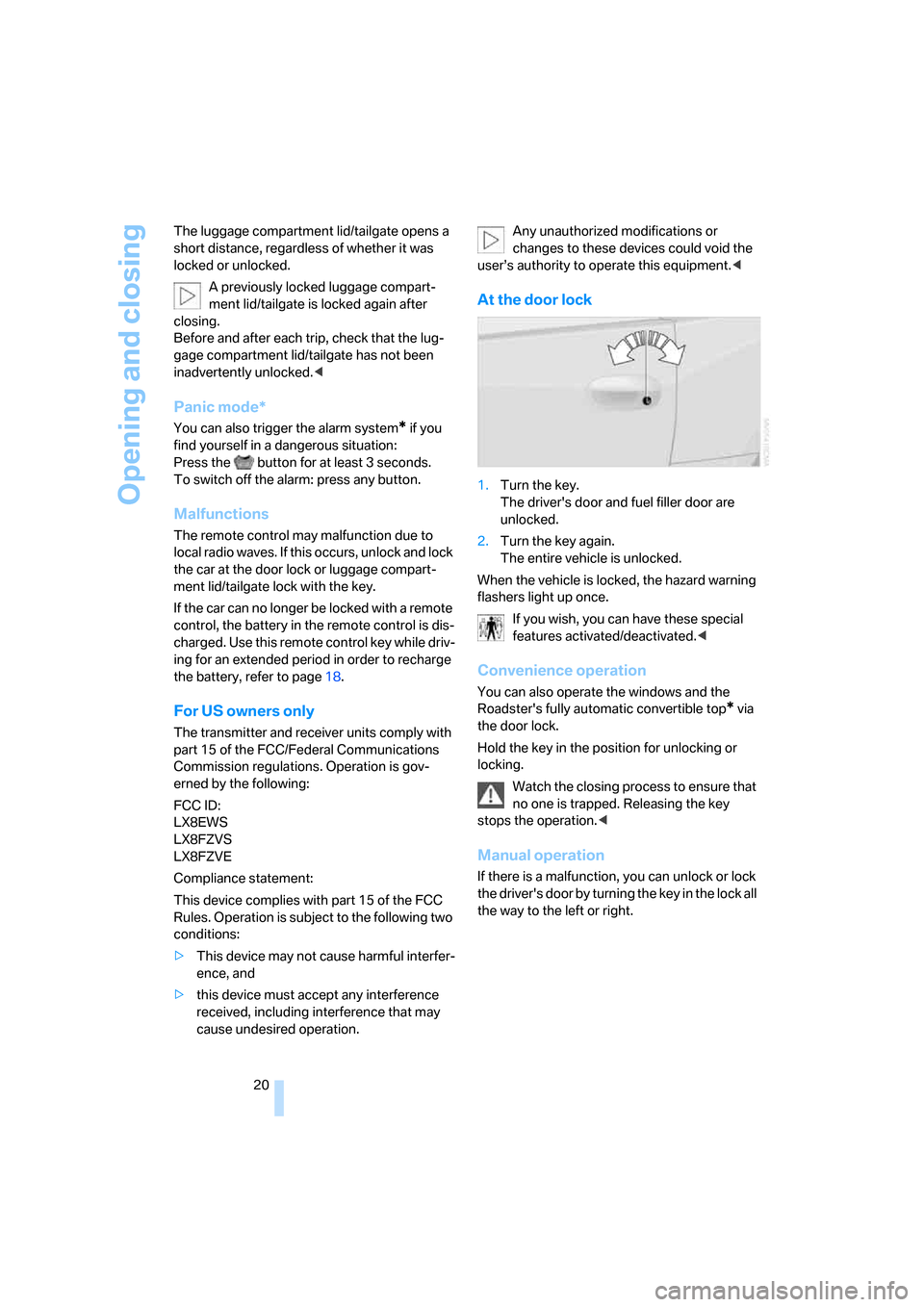
At the door lock
1.Turn the key.
The driver's door and fuel filler door are
unlocked.
2.Turn the key again.
The entire vehicle is unlocked.
When the vehicle is locked, the hazard warning
flashers light up once.
If you wish, you can have these special
features activated/deactivated.<
Convenience operation
You can also operate the windows and the
Roadster's fully automatic convertible top
* via
the door lock.
Hold the key in the position for unlocking or
locking.
Watch the closing process to ensure that
no one is trapped. Releasing the key
stops the operation.<
Manual operation
If there is a malfunction, you can unlock or lock
the driver's door by turning the key in the lock all
the way to the left or right.
Page 42 of 132
Driving
40
Driving
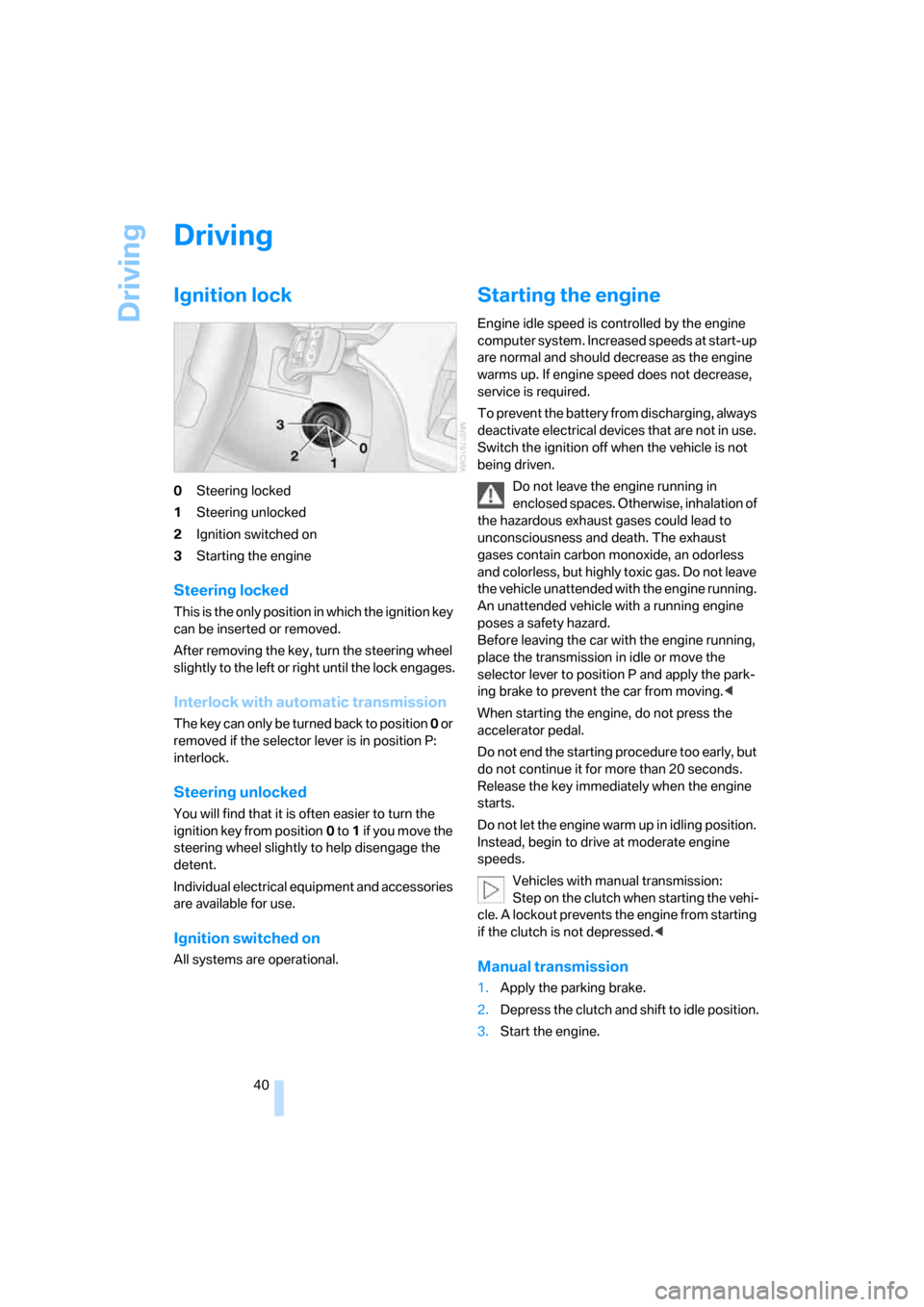
Ignition lock
0Steering locked
1Steering unlocked
2Ignition switched on
3Starting the engine
Steering locked
This is the only position in which the ignition key
can be inserted or removed.
After removing the key, turn the steering wheel
slightly to the left or right until the lock engages.
Interlock with automatic transmission
The key can only be turned back to position 0 or
removed if the selector lever is in position P:
interlock.
Steering unlocked
You will find that it is often easier to turn the
ignition key from position0 to 1 if yo u m ove the
steering wheel slightly to help disengage the
detent.
Individual electrical equipment and accessories
are available for use.
Ignition switched on
All systems are operational.
Starting the engine
Engine idle speed is controlled by the engine
computer system. Increased speeds at start-up
are normal and should decrease as the engine
warms up. If engine speed does not decrease,
service is required.
To prevent the battery from discharging, always
deactivate electrical devices that are not in use.
Switch the ignition off when the vehicle is not
being driven.
Do not leave the engine running in
enclosed spaces. Otherwise, inhalation of
the hazardous exhaust gases could lead to
unconsciousness and death. The exhaust
gases contain carbon monoxide, an odorless
and colorless, but highly toxic gas. Do not leave
the vehicle unattended with the engine running.
An unattended vehicle with a running engine
poses a safety hazard.
Before leaving the car with the engine running,
place the transmission in idle or move the
selector lever to position P and apply the park-
ing brake to prevent the car from moving.<
When starting the engine, do not press the
accelerator pedal.
Do not end the starting procedure too early, but
do not continue it for more than 20 seconds.
Release the key immediately when the engine
starts.
Do not let the engine warm up in idling position.
Instead, begin to drive at moderate engine
speeds.
Vehicles with manual transmission:
Step on the clutch when starting the vehi-
cle. A lockout prevents the engine from starting
if the clutch is not depressed.<
Manual transmission
1.Apply the parking brake.
2.Depress the clutch and shift to idle position.
3.Start the engine.
Page 45 of 132
Reference
At a glance
Controls
Driving tips
Mobility
43
R Reverse
Select only when the vehicle is stationary.
N Neutral, idle
You can select this in a car wash, for example.
The vehicle can roll.
D Drive, automatic position
This position is designed for driving under all
normal operating conditions. All forward gears
are selected automatically.
Under normal operating conditions, fuel con-
sumption is lowest when you are driving in posi-
tion D.
Kickdown
Kick-down enables you to achieve maximum
performance.
Press the accelerator pedal beyond the full-
throttle resistance point.
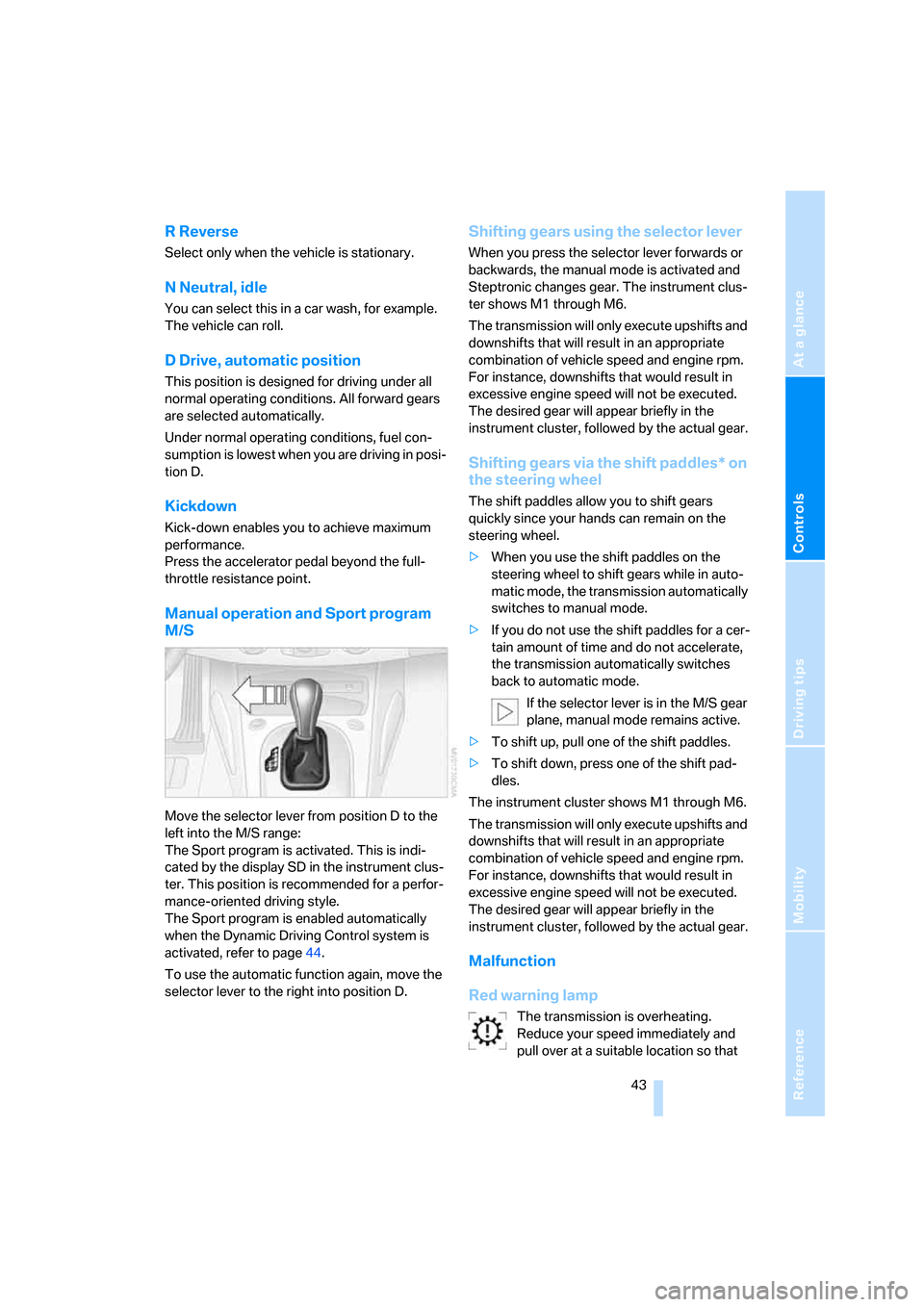
Manual operation and Sport program
M/S
Move the selector lever from position D to the
left into the M/S range:
The Sport program is activated. This is indi-
cated by the display SD in the instrument clus-
ter. This position is recommended for a perfor-
mance-oriented driving style.
The Sport program is enabled automatically
when the Dynamic Driving Control system is
activated, refer to page44.
To use the automatic function again, move the
selector lever to the right into position D.
Shifting gears using the selector lever
When you press the selector lever forwards or
backwards, the manual mode is activated and
Steptronic changes gear. The instrument clus-
ter shows M1 through M6.
The transmission will only execute upshifts and
downshifts that will result in an appropriate
combination of vehicle speed and engine rpm.
For instance, downshifts that would result in
excessive engine speed will not be executed.
The desired gear will appear briefly in the
instrument cluster, followed by the actual gear.
Shifting gears via the shift paddles* on
the steering wheel
The shift paddles allow you to shift gears
quickly since your hands can remain on the
steering wheel.
>When you use the shift paddles on the
steering wheel to shift gears while in auto-
matic mode, the transmission automatically
switches to manual mode.
>If you do not use the shift paddles for a cer-
tain amount of time and do not accelerate,
the transmission automatically switches
back to automatic mode.
If the selector lever is in the M/S gear
plane, manual mode remains active.
>To shift up, pull one of the shift paddles.
>To shift down, press one of the shift pad-
dles.
The instrument cluster shows M1 through M6.
The transmission will only execute upshifts and
downshifts that will result in an appropriate
combination of vehicle speed and engine rpm.
For instance, downshifts that would result in
excessive engine speed will not be executed.
The desired gear will appear briefly in the
instrument cluster, followed by the actual gear.
Malfunction
Red warning lamp
The transmission is overheating.
Reduce your speed immediately and
pull over at a suitable location so that
Page 52 of 132
Everything under control
50
Setting the clock
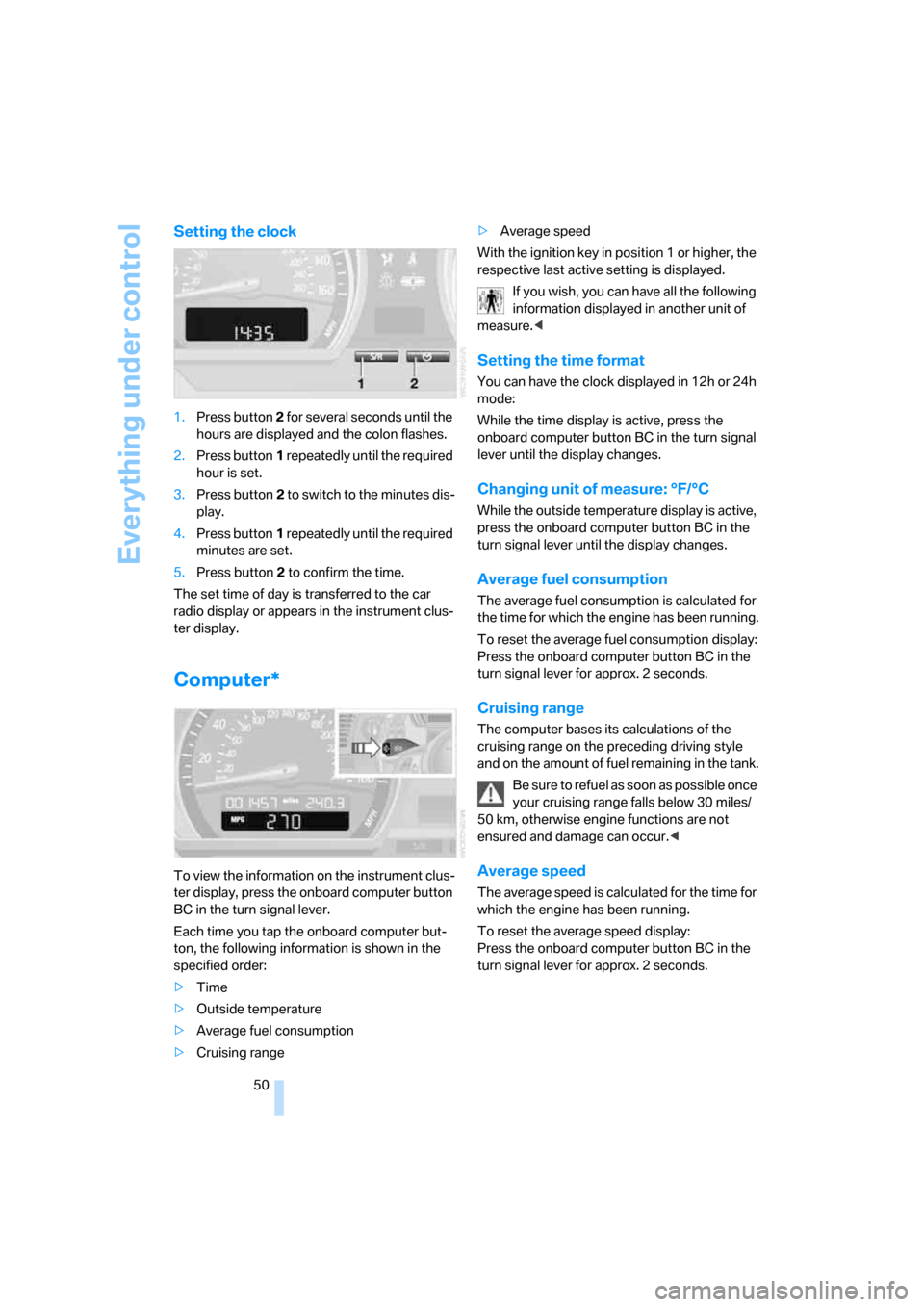
1.Press button 2 for several seconds until the
hours are displayed and the colon flashes.
2.Press button1 repeatedly until the required
hour is set.
3.Press button2 to switch to the minutes dis-
play.
4.Press button1 repeatedly until the required
minutes are set.
5.Press button2 to confirm the time.
The set time of day is transferred to the car
radio display or appears in the instrument clus-
ter display.
Computer*
To view the information on the instrument clus-
ter display, press the onboard computer button
BC in the turn signal lever.
Each time you tap the onboard computer but-
ton, the following information is shown in the
specified order:
>Time
>Outside temperature
>Average fuel consumption
>Cruising range>Average speed
With the ignition key in position 1 or higher, the
respective last active setting is displayed.
If you wish, you can have all the following
information displayed in another unit of
measure.<
Setting the time format
You can have the clock displayed in 12h or 24h
mode:
While the time display is active, press the
onboard computer button BC in the turn signal
lever until the display changes.
Changing unit of measure: °F/°C
While the outside temperature display is active,
press the onboard computer button BC in the
turn signal lever until the display changes.
Average fuel consumption
The average fuel consumption is calculated for
the time for which the engine has been running.
To reset the average fuel consumption display:
Press the onboard computer button BC in the
turn signal lever for approx. 2 seconds.
Cruising range
The computer bases its calculations of the
cruising range on the preceding driving style
and on the amount of fuel remaining in the tank.
B e s u r e t o r e f u e l a s s o o n a s p o s s i b l e o n c e
your cruising range falls below 30 miles/
50 km, otherwise engine functions are not
ensured and damage can occur.<
Average speed
The average speed is calculated for the time for
which the engine has been running.
To reset the average speed display:
Press the onboard computer button BC in the
turn signal lever for approx. 2 seconds.
Page 54 of 132
Technology for driving comfort and safety
52 In the following exceptional circumstances, it
may be effective to activate the DTC for a short
period:
>When driving on snow-covered grades, in
slush or on uncleared, snow-covered roads
>When rocking the vehicle or starting off in
deep snow or on loose surfaces
>When driving with snow chains
Activating DTC
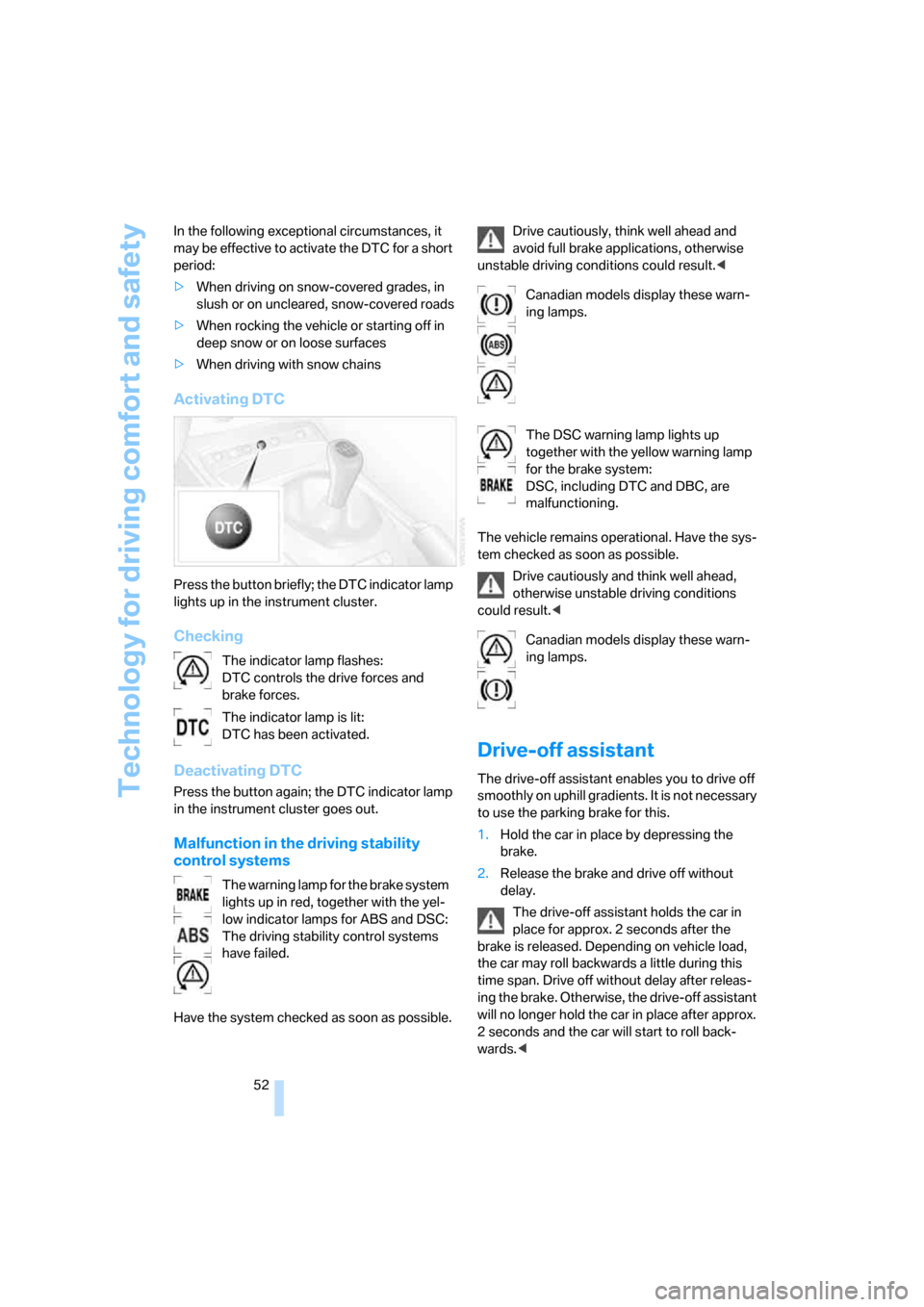
Press the button briefly; the DTC indicator lamp
lights up in the instrument cluster.
Checking
Deactivating DTC
Press the button again; the DTC indicator lamp
in the instrument cluster goes out.
Malfunction in the driving stability
control systems
Have the system checked as soon as possible.Drive cautiously, think well ahead and
avoid full brake applications, otherwise
unstable driving conditions could result.<
The vehicle remains operational. Have the sys-
tem checked as soon as possible.
Drive cautiously and think well ahead,
otherwise unstable driving conditions
could result.<
Drive-off assistant
The drive-off assistant enables you to drive off
smoothly on uphill gradients. It is not necessary
to use the parking brake for this.
1.Hold the car in place by depressing the
brake.
2.Release the brake and drive off without
delay.
The drive-off assistant holds the car in
place for approx. 2 seconds after the
brake is released. Depending on vehicle load,
the car may roll backwards a little during this
time span. Drive off without delay after releas-
ing the brake. Otherwise, the drive-off assistant
will no longer hold the car in place after approx.
2 seconds and the car will start to roll back-
wards.< The indicator lamp flashes:
DTC controls the drive forces and
brake forces.
The indicator lamp is lit:
DTC has been activated.
The warning lamp for the brake system
lights up in red, together with the yel-
low indicator lamps for ABS and DSC:
The driving stability control systems
have failed.
Canadian models display these warn-
ing lamps.
The DSC warning lamp lights up
together with the yellow warning lamp
for the brake system:
DSC, including DTC and DBC, are
malfunctioning.
Canadian models display these warn-
ing lamps.
Page 65 of 132
Reference
At a glance
Controls
Driving tips
Mobility
63
Air distribution
Direct the flow of air to the windows
, to the upper body area and to
the footwell . Intermediate settings
are possible.
Switching cooling function on/off
When the cooling function is on, the
air is cooled, dehumidified, then
reheated depending on the tempera-
ture setting.
Depending on the weather, the windshield may
fog over briefly when the engine is started.
Recirculated-air mode
If the air outside the car has an
unpleasant odor or contains pollut-
ants, temporarily shut off the supply
to the interior of the car. The system
recirculates the air within the vehicle.
If the windows fog over in the recircu-
lated-air mode, you should switch it off
and, if necessary, increase the air flow rate.
The manually controlled recirculated-air mode
should not be used continuously for lengthy
periods, otherwise the quality of the air inside
the car will gradually deteriorate.<
Temperature
For a higher temperature, turn the
rotary switch clockwise towards red.
For a lower temperature, turn the
rotary switch counterclockwise
towards blue.
Air flow rate
Adjust the air flow rate. The higher
the rate, the more effective the heat-
ing or cooling will be.
Switching the system on/off
Set the air flow rate to 0. Blower and air condi-
tioning are switched off and the air supply is cut
off.
To switch on the heater or air conditioning, set
any desired air flow rate.
Rear window defroster
The defroster switches off automati-
cally after a certain time.
Defrosting windows and removing
condensation
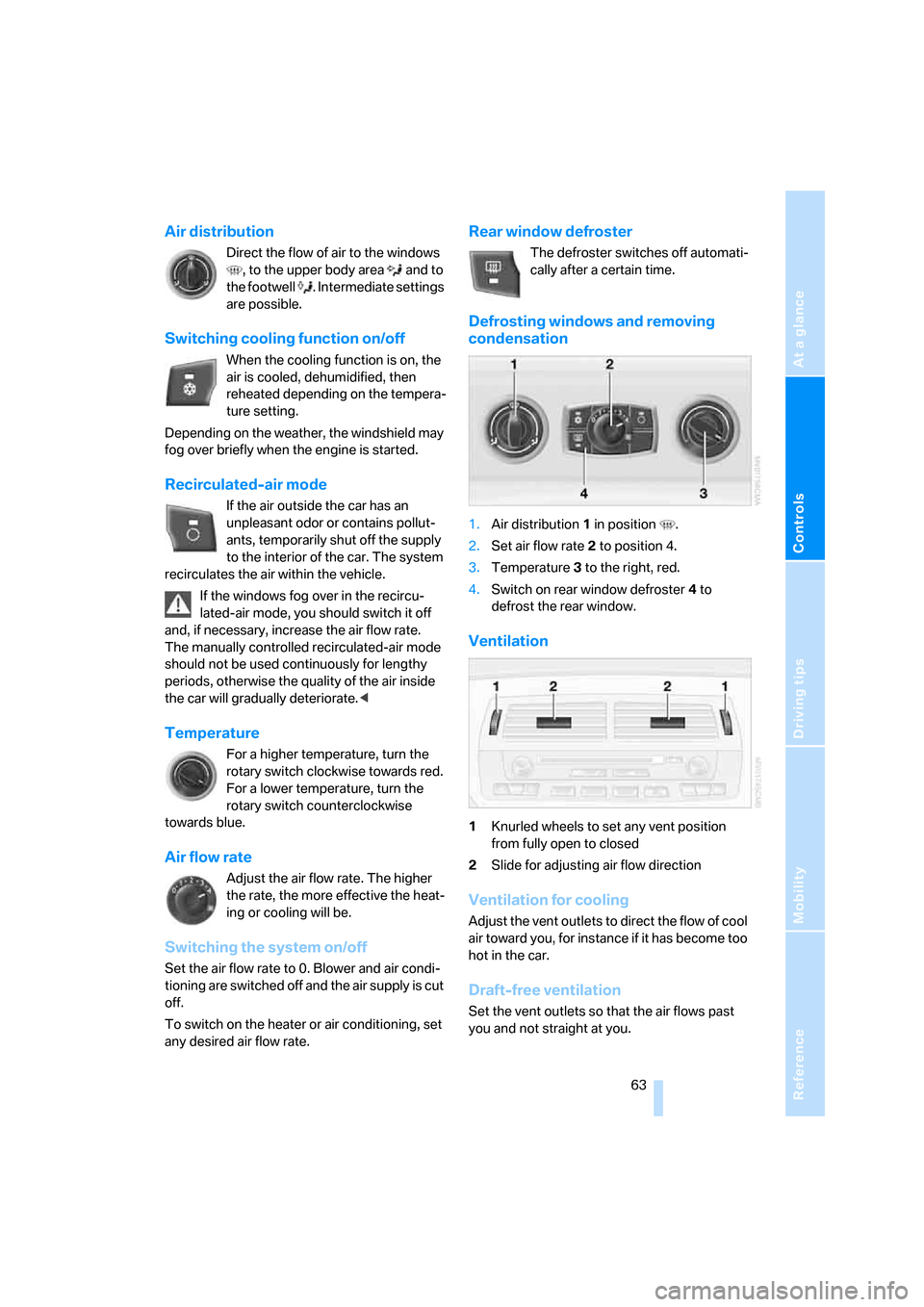
1.Air distribution1 in position .
2.Set air flow rate 2 to position 4.
3.Temperature3 to the right, red.
4.Switch on rear window defroster 4 to
defrost the rear window.
Ventilation
1Knurled wheels to set any vent position
from fully open to closed
2Slide for adjusting air flow direction
Ventilation for cooling
Adjust the vent outlets to direct the flow of cool
air toward you, for instance if it has become too
hot in the car.
Draft-free ventilation
Set the vent outlets so that the air flows past
you and not straight at you.
Page 69 of 132
Reference
At a glance
Controls
Driving tips
Mobility
67
automatic climate control does not have
enough time to achieve the set temperature.<
AUC Automatic recirculated-air
control/Recirculated-air mode
Switch on the desired operating
mode by pressing this button repeat-
edly:
>LEDs off: outside air flows in continuously.
>Left-hand LED on, AUC mode: a sensor
detects pollutants in the outside air. If nec-
essary, the system blocks the supply of out-
side air and recirculates the inside air. As
soon as the concentration of pollutants in
the outside air has decreased sufficiently,
the system automatically switches back to
outside air supply.
>Right-hand LED on, recirculated-air mode:
the inflow of outside air is shut off perma-
nently. The system recirculates the air
within the vehicle.
If the windows fog over in the recircu-
lated-air mode, you should switch it off
and, if necessary, increase the air flow rate.
The recirculated-air mode should not be used
over an extended period of time, otherwise the
air quality inside the car will deteriorate contin-
uously.<
Rear window defroster
The defroster switches off automati-
cally after a certain time.
Ventilation
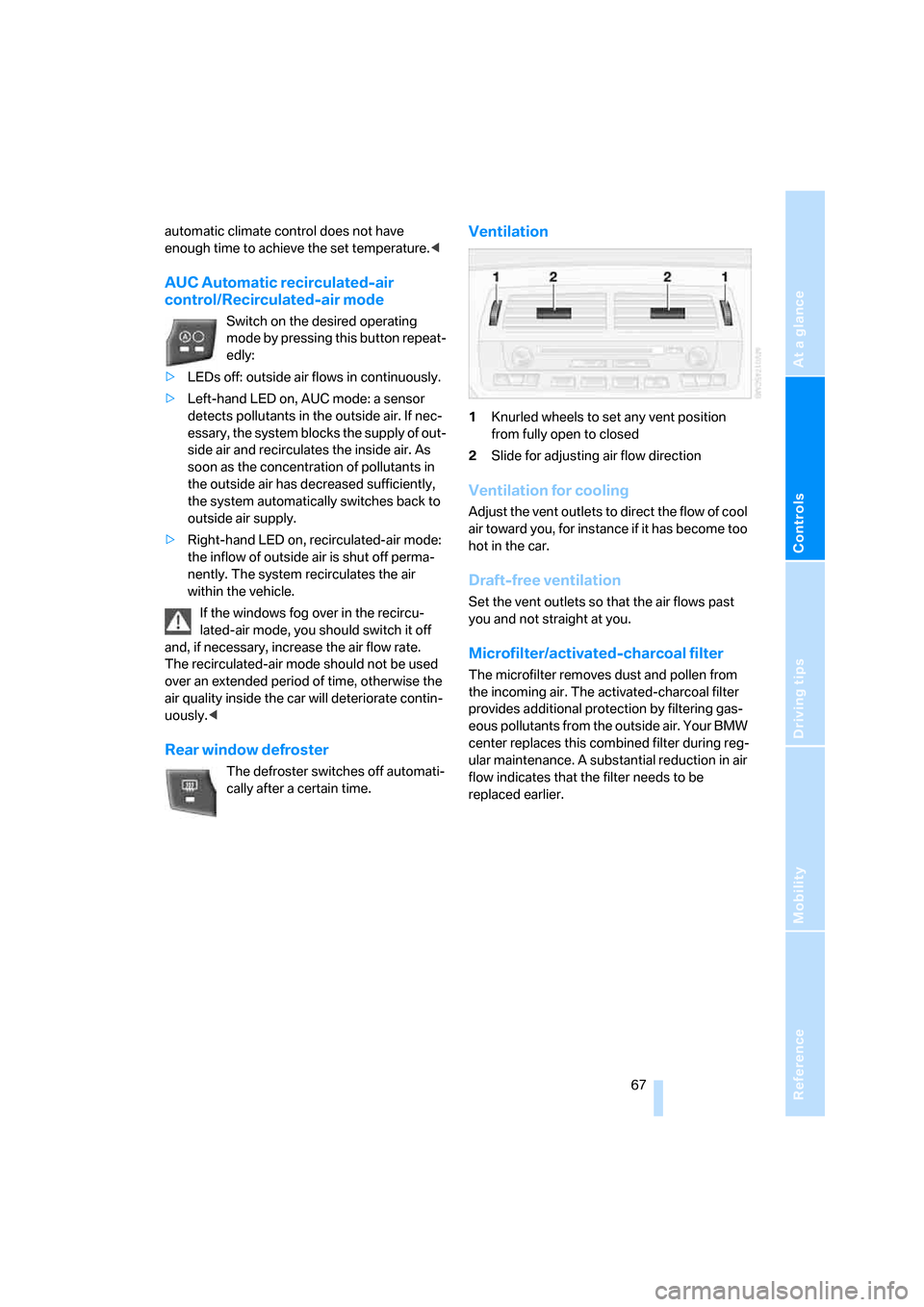
1Knurled wheels to set any vent position
from fully open to closed
2Slide for adjusting air flow direction
Ventilation for cooling
Adjust the vent outlets to direct the flow of cool
air toward you, for instance if it has become too
hot in the car.
Draft-free ventilation
Set the vent outlets so that the air flows past
you and not straight at you.
Microfilter/activated-charcoal filter
The microfilter removes dust and pollen from
the incoming air. The activated-charcoal filter
provides additional protection by filtering gas-
eous pollutants from the outside air. Your BMW
center replaces this combined filter during reg-
ular maintenance. A substantial reduction in air
flow indicates that the filter needs to be
replaced earlier.
Page 77 of 132
Reference
At a glance
Controls
Driving tips
Mobility
75
cannot be ruled out that vehicle electronics and
the mobile communications device interfere
with one another. In addition, it is not ensured
that the radio waves emitted during transmis-
sion are directed outside of the vehicle inte-
rior.<
Hydroplaning
When driving on wet or slushy roads,
reduce vehicle speed. If you do not, a
wedge of water may form between the tires and
the road surface. This situation, known as
hydroplaning, means that the tire can com-
pletely lose contact with the road surface, so
that neither the car can be steered nor the brake
be properly applied.<
The risk of hydroplaning increases with declin-
ing tread depth on the tires, refer also to Mini-
mum tread depth on page87.
Driving through water
Drive through water on the road only if it is
not deeper than 1 ft/30 cm, and then only
at walking speed at the most. Otherwise, the
vehicle's engine, the electrical systems and the
transmission may be damaged.<
Moisture inside the vehicle
Make sure that the passenger compart-
ment does not become wet and that liq-
uids are transported in closed containers.
Otherwise, moisture could penetrate and dam-
age electronic components inside the vehicle.<
Use the parking brake on inclines
On inclines, keep the vehicle from rolling
by using the parking brake rather than by
slipping the clutch, which would lead to a high
degree of clutch wear.<
Braking safely
Your BMW is equipped with ABS as a standard
feature. Applying the brakes fully is the most
effective way of braking in situations in which
this is necessary. Since the vehicle maintains
steering responsiveness, you can still avoid possible obstacles with a minimum of steering
effort.
Pulsation at the brake pedal combines with
sounds from the hydraulic circuits to indicate to
the driver that ABS is in its active mode.
Wet roads
When roads are wet or there is heavy rain,
briefly exert gentle pressure on the brake pedal
every few miles. Watch traffic conditions to
ensure that this maneuver does not endanger
other road users. The resulting heat dries the
brake rotors and brake pads. Immediate braking
force is then available if necessary.
Inclines
To prevent overheating and, as a result,
diminished braking effectiveness, drive
down long or steep downhill grades in the gear
that requires the least braking. Otherwise, even
light but consistent pedal pressure can lead to
high temperatures, brake wear and possibly
even brake failure.<
You can increase the engine's braking effect by
shifting down, all the way to first gear if neces-
sary. This strategy helps you avoid placing
excessive loads on the brake system. Down-
shifting in manual mode of the automatic trans-
mission, refer to page43.
Never drive with the clutch held down,
with the transmission in idle or with the
engine switched off; otherwise, engine braking
action will not be present or there will be no
power assistance to the brakes or steering.
Never allow floor mats, carpets or any other
objects to protrude into the area around the
pedals, otherwise pedal function could be
impaired.<
Corrosion on the brake rotors
Limited vehicle use, extended periods with the
vehicle parked or in storage, and operating con-
ditions in which braking is restricted to gentle,
low-pressure applications will all increase the
tendency for corrosion to form on the rotors and
contamination to accumulate on the brake
pads. This occurs because the minimal pres-
Page 91 of 132
Reference
At a glance
Controls
Driving tips
Mobility
89
Correct wheels and tires
BMW recommends using only wheels
and tires that have been approved by
BMW for your particular vehicle model, other-
wise body contact and serious accidents can
result despite the use of the same nominal size,
e.g. due to manufacturing tolerances. If non-
approved wheels and tires are used, BMW can-
not evaluate their suitability, and therefore can-
not be held liable for driving safety.<
You can inquire about the correct wheel/tire
combination at your BMW center.
The correct combination of wheels and tires is
also necessary to ensure reliable operation of
various vehicle systems such as ABS and DSC.
To maintain good handling and vehicle
response, only use tires of a single brand and
tread configuration. After a tire has been dam-
aged, for instance, mount the original wheel and
tire combination again as soon as possible.
Wheels with electronics for the Tire
Pressure Monitor TPM
When mounting new tires or changing from
summer to winter tires or vice versa, only use
wheels with TPMS electronics; otherwise the
Tire Pressure Monitor would not be able to
detect a flat tire, refer to page54. Your BMW
center will be glad to provide you with more
information.
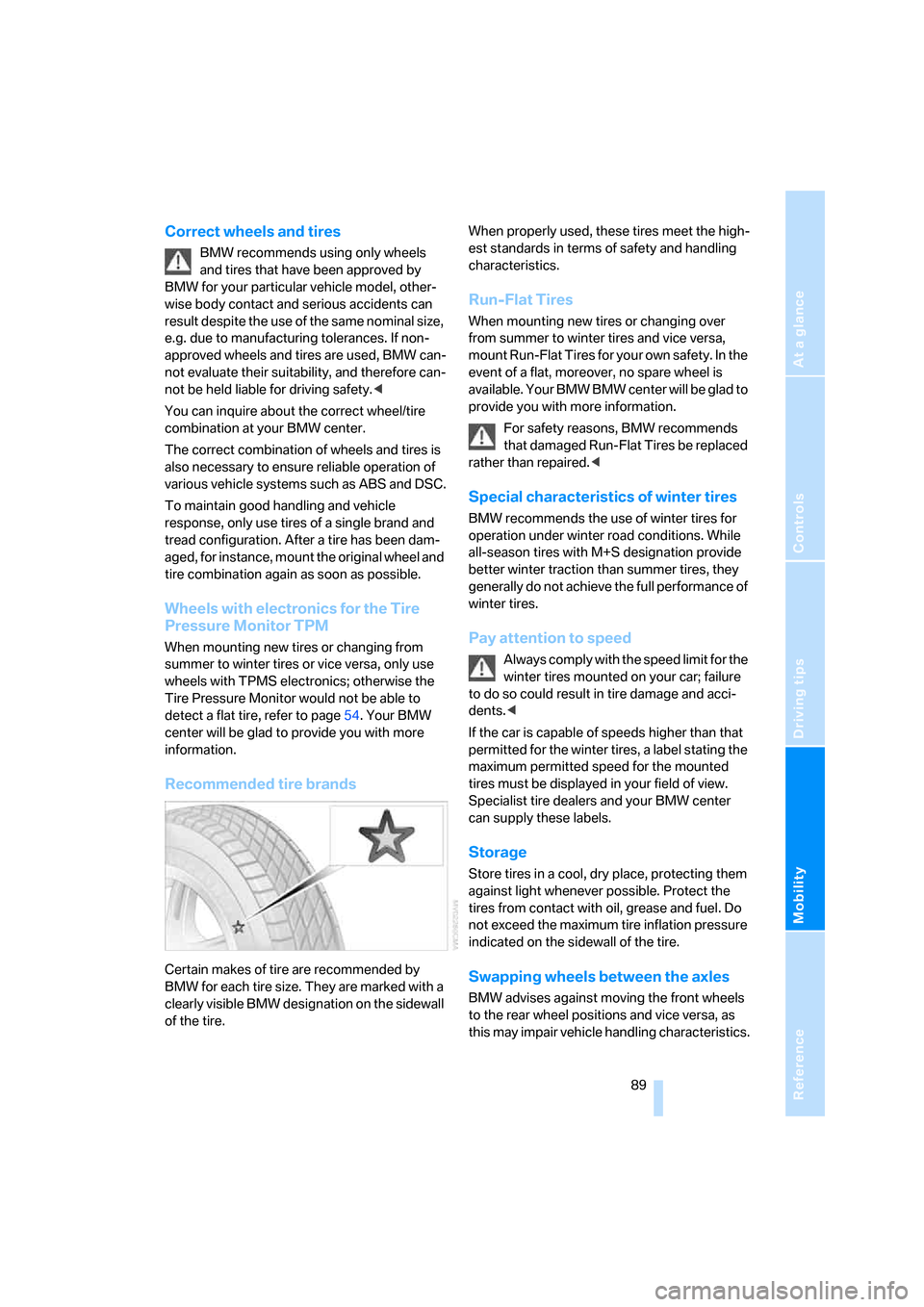
Recommended tire brands
Certain makes of tire are recommended by
BMW for each tire size. They are marked with a
clearly visible BMW designation on the sidewall
of the tire.When properly used, these tires meet the high-
est standards in terms of safety and handling
characteristics.
Run-Flat Tires
When mounting new tires or changing over
from summer to winter tires and vice versa,
mount Run-Flat Tires for your own safety. In the
event of a flat, moreover, no spare wheel is
available. Your BMW BMW center will be glad to
provide you with more information.
For safety reasons, BMW recommends
that damaged Run-Flat Tires be replaced
rather than repaired.<
Special characteristics of winter tires
BMW recommends the use of winter tires for
operation under winter road conditions. While
all-season tires with M+S designation provide
better winter traction than summer tires, they
generally do not achieve the full performance of
winter tires.
Pay attention to speed
Always comply with the speed limit for the
winter tires mounted on your car; failure
to do so could result in tire damage and acci-
dents.<
If the car is capable of speeds higher than that
permitted for the winter tires, a label stating the
maximum permitted speed for the mounted
tires must be displayed in your field of view.
Specialist tire dealers and your BMW center
can supply these labels.
Storage
Store tires in a cool, dry place, protecting them
against light whenever possible. Protect the
tires from contact with oil, grease and fuel. Do
not exceed the maximum tire inflation pressure
indicated on the sidewall of the tire.
Swapping wheels between the axles
BMW advises against moving the front wheels
to the rear wheel positions and vice versa, as
this may impair vehicle handling characteristics.