ignition BMW Z4 COUPE 2006 E86 User Guide
[x] Cancel search | Manufacturer: BMW, Model Year: 2006, Model line: Z4 COUPE, Model: BMW Z4 COUPE 2006 E86Pages: 128, PDF Size: 4.41 MB
Page 41 of 128
Reference
At a glance
Controls
Driving tips
Mobility
39
Automatic transmission
1.Depress the brake.
2.Start the engine.
Special starting conditions
In the following situations, press the accelerator
pedal halfway down when starting the engine:
>If the engine does not start on the first
attempt, for instance when it is extremely
hot or cold.
>If the engine is started at very low tempera-
tures, below approx. +57/–156, at high
altitudes above approx. 3,300 ft/1,000 m.
Avoid frequent starting attempts in quick
succession or repeated starting attempts
during which the engine does not start. Other-
wise, the fuel is not burned or inadequately
burned; there is a danger of overheating and
damaging the catalytic converter.<
Switching off the engine
Do not remove the key while the vehicle is
still moving. Otherwise, the steering lock
would engage when the steering wheel is
turned.
When you leave the vehicle, always remove the
key and engage the steering lock.
Apply the parking brake when parking on steep
gradients, otherwise the vehicle could start to
roll.<
You can have an acoustic signal set as a
reminder that the key is still in the ignition
switch after the driver's door has been
opened.<
Manual transmission
1.Turn the key to position 1 or 0.
2.Engage first gear or reverse gear.
3.Apply the handbrake.
Automatic transmission
1.With the car at a standstill, move the selec-
tor lever to position P.
2.Turn the key to position 1 or 0.
Parking brake
The parking brake is designed primarily to pre-
vent the vehicle from rolling when parked. It
operates against the rear wheels.
Indicator lamp
The indicator lamp is lit, and when you
drive off a signal sounds in addition.
The handbrake is still applied.
Indicator lamp for Canadian models.
Applying
The lever locks in position automatically.
Releasing
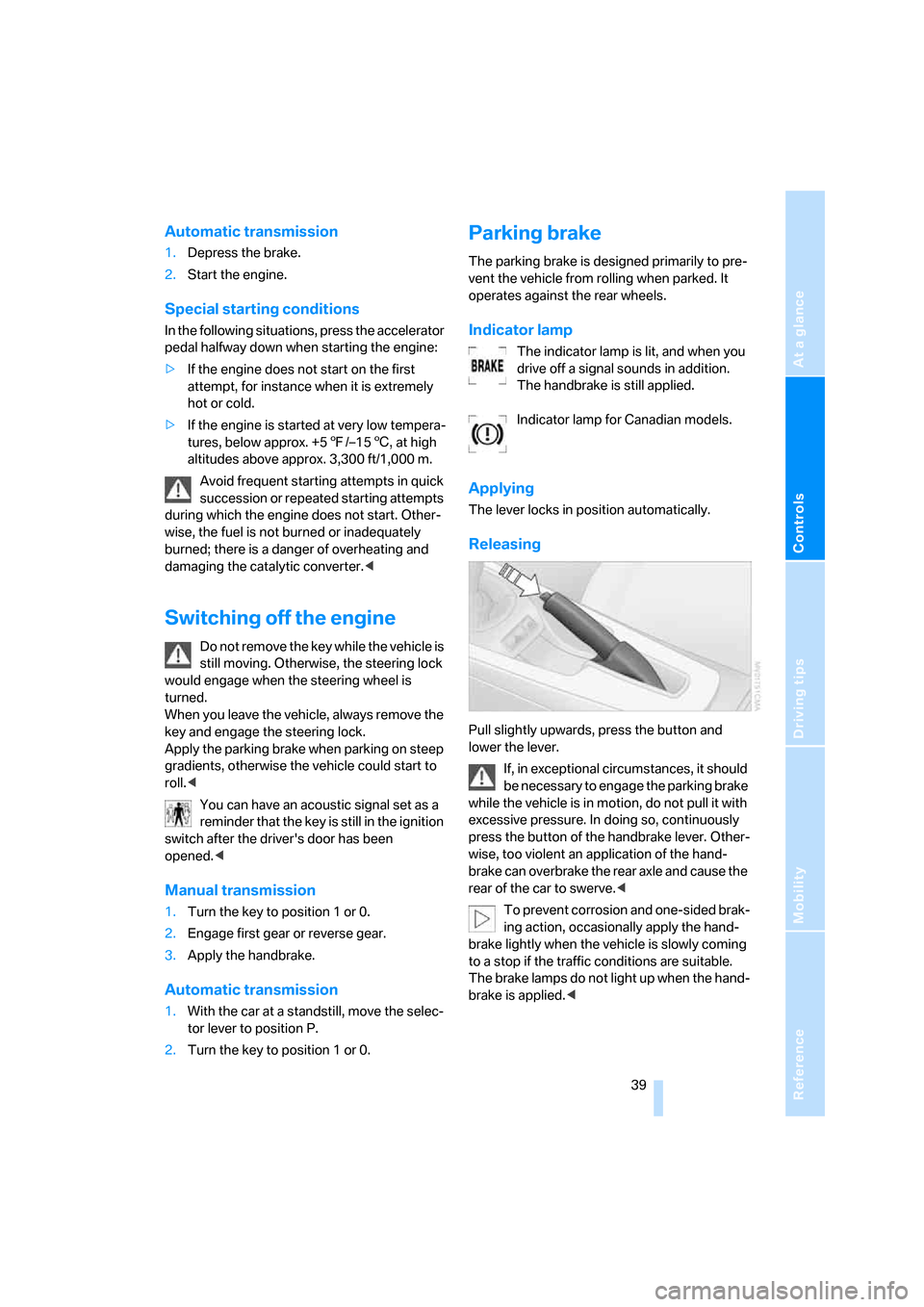
Pull slightly upwards, press the button and
lower the lever.
If, in exceptional circumstances, it should
be necessary to engage the parking brake
while the vehicle is in motion, do not pull it with
excessive pressure. In doing so, continuously
press the button of the handbrake lever. Other-
wise, too violent an application of the hand-
brake can overbrake the rear axle and cause the
rear of the car to swerve.<
To prevent corrosion and one-sided brak-
ing action, occasionally apply the hand-
brake lightly when the vehicle is slowly coming
to a stop if the traffic conditions are suitable.
The brake lamps do not light up when the hand-
brake is applied.<
Page 42 of 128
Driving
40
Manual transmission
When shifting into 5th or 6th gear, press
the gearshift lever to the right. Otherwise,
the engine could be damaged by accidentally
engaging 3rd or 4th gear.<
Reverse
Select only when the vehicle is stationary.
When the gearshift lever is pressed to the left, a
slight resistance has to be overcome.
Automatic transmission with
Steptronic*
In addition to operating the Steptronic as a fully
automatic transmission, you can also shift
gears manually with it, refer to page41.
Vehicle parking
To prevent the vehicle from rolling,
always select position P before leaving
the vehicle with the engine running.<
Removing the key
To turn the key in the ignition lock back to posi-
tion 0 or to remove it, first engage selector lever
position P and switch off the engine: interlock.
Selector lever positions
P R N D M/S + –
Displays in the instrument cluster
P R N D SD M1 to M6
The selector lever position is displayed; in the
manual mode, the gear currently engaged is
shown.
Range selection
>With the ignition switched on or the engine
running, the selector lever can be moved
out of position P: interlock.
>Before moving the lever away from P or N
with the vehicle stationary, first depress the
brake; otherwise the selector lever will
refuse to move: shiftlock.
To prevent the vehicle from creeping
after you select a driving position,
depress the brake until you are ready to
start.<
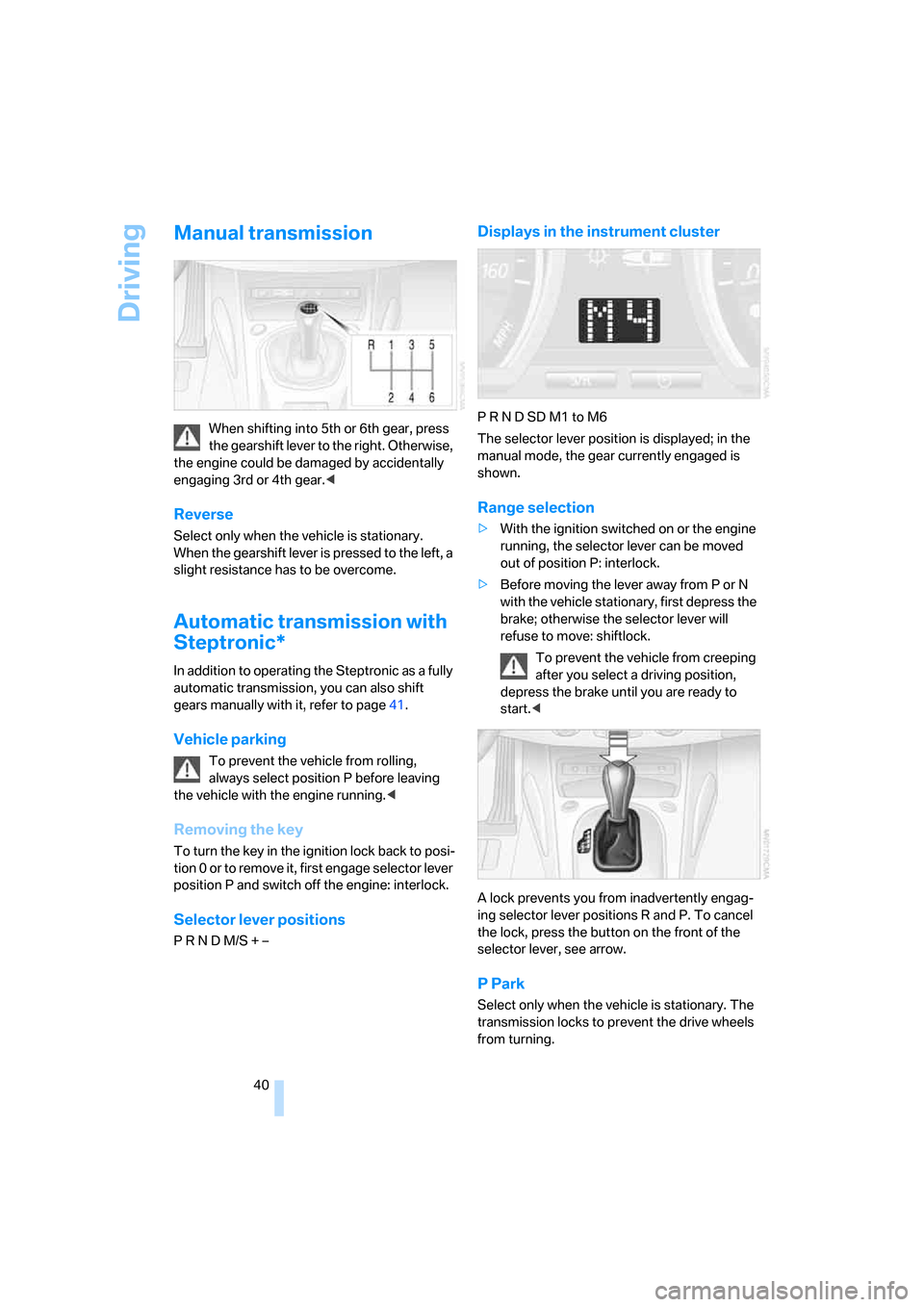
A lock prevents you from inadvertently engag-
ing selector lever positions R and P. To cancel
the lock, press the button on the front of the
selector lever, see arrow.
P Park
Select only when the vehicle is stationary. The
transmission locks to prevent the drive wheels
from turning.
Page 45 of 128
Reference
At a glance
Controls
Driving tips
Mobility
43
Washer/wiper system/
Rain sensor*
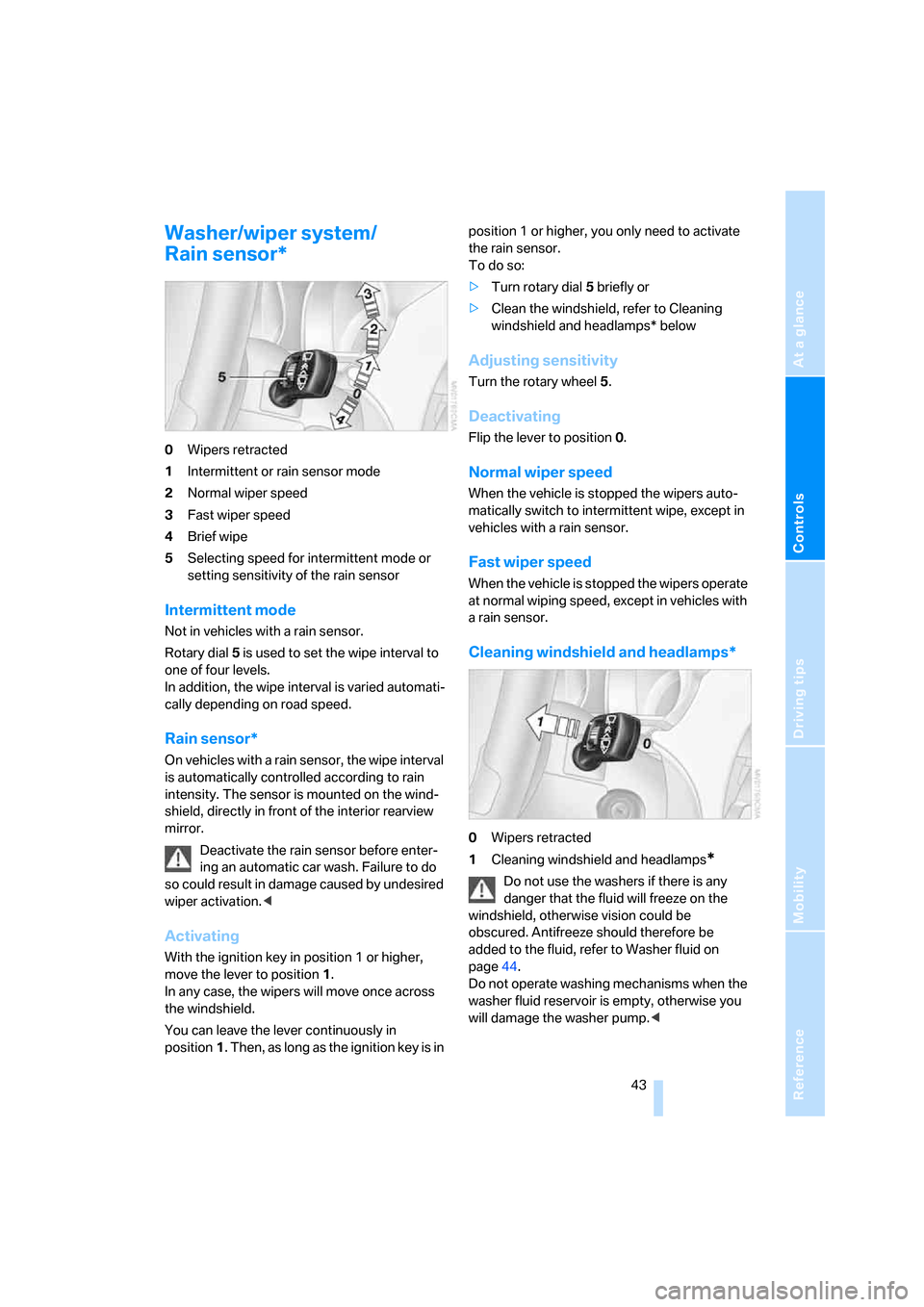
0Wipers retracted
1Intermittent or rain sensor mode
2Normal wiper speed
3Fast wiper speed
4Brief wipe
5Selecting speed for intermittent mode or
setting sensitivity of the rain sensor
Intermittent mode
Not in vehicles with a rain sensor.
Rotary dial 5 is used to set the wipe interval to
one of four levels.
In addition, the wipe interval is varied automati-
cally depending on road speed.
Rain sensor*
On vehicles with a rain sensor, the wipe interval
is automatically controlled according to rain
intensity. The sensor is mounted on the wind-
shield, directly in front of the interior rearview
mirror.
Deactivate the rain sensor before enter-
ing an automatic car wash. Failure to do
so could result in damage caused by undesired
wiper activation.<
Activating
With the ignition key in position 1 or higher,
move the lever to position 1.
In any case, the wipers will move once across
the windshield.
You can leave the lever continuously in
position1. Then, as long as the ignition key is in position 1 or higher, you only need to activate
the rain sensor.
To do so:
>Turn rotary dial 5 briefly or
>Clean the windshield, refer to Cleaning
windshield and headlamps* below
Adjusting sensitivity
Turn the rotary wheel 5.
Deactivating
Flip the lever to position 0.
Normal wiper speed
When the vehicle is stopped the wipers auto-
matically switch to intermittent wipe, except in
vehicles with a rain sensor.
Fast wiper speed
When the vehicle is stopped the wipers operate
at normal wiping speed, except in vehicles with
a rain sensor.
Cleaning windshield and headlamps*
0Wipers retracted
1Cleaning windshield and headlamps
*
Do not use the washers if there is any
danger that the fluid will freeze on the
windshield, otherwise vision could be
obscured. Antifreeze should therefore be
added to the fluid, refer to Washer fluid on
page44.
Do not operate washing mechanisms when the
washer fluid reservoir is empty, otherwise you
will damage the washer pump.<
Page 46 of 128
Driving
44
Cleaning windshield
The system sprays washer fluid against the
windshield and activates the wipers for a brief
period.
The windshield washer nozzles are automati-
cally heated
* when the engine is running or the
ignition is on.
Cleaning headlamps*
When the vehicle lighting system is switched
on, the headlamps are cleaned at regular and
appropriate intervals.
Washer fluid
Washer fluid antifreeze is flammable. For
this reason, keep it away from sources of
flame and store it only in its original container.
Store it so that it is inaccessible to children.
Comply with the instructions on the con-
tainer.<
Washer fluid reservoir
Fill with water and, if required, with antifreeze
according to its manufacturer's recommenda-
tions.
Mix the water and antifreeze before filling
the washer fluid reservoir to make sure
the correct concentration is maintained.<
Capacity
Approx. 5.3 US quarts/5 liters.
Cruise control*
The concept
Cruise control is available at speeds of at least
approx. 20 mph/30 km/h. The car stores and
maintains the speed that you specify with the
lever on the steering column.
Do not use cruise control if conditions are
unfavorable for driving at a constant
speed, e.g. due to winding roads, dense traffic,
or poor road conditions such as snow, rain, ice,
loose surface, etc. Otherwise, you could lose
control of the vehicle and cause an accident.<
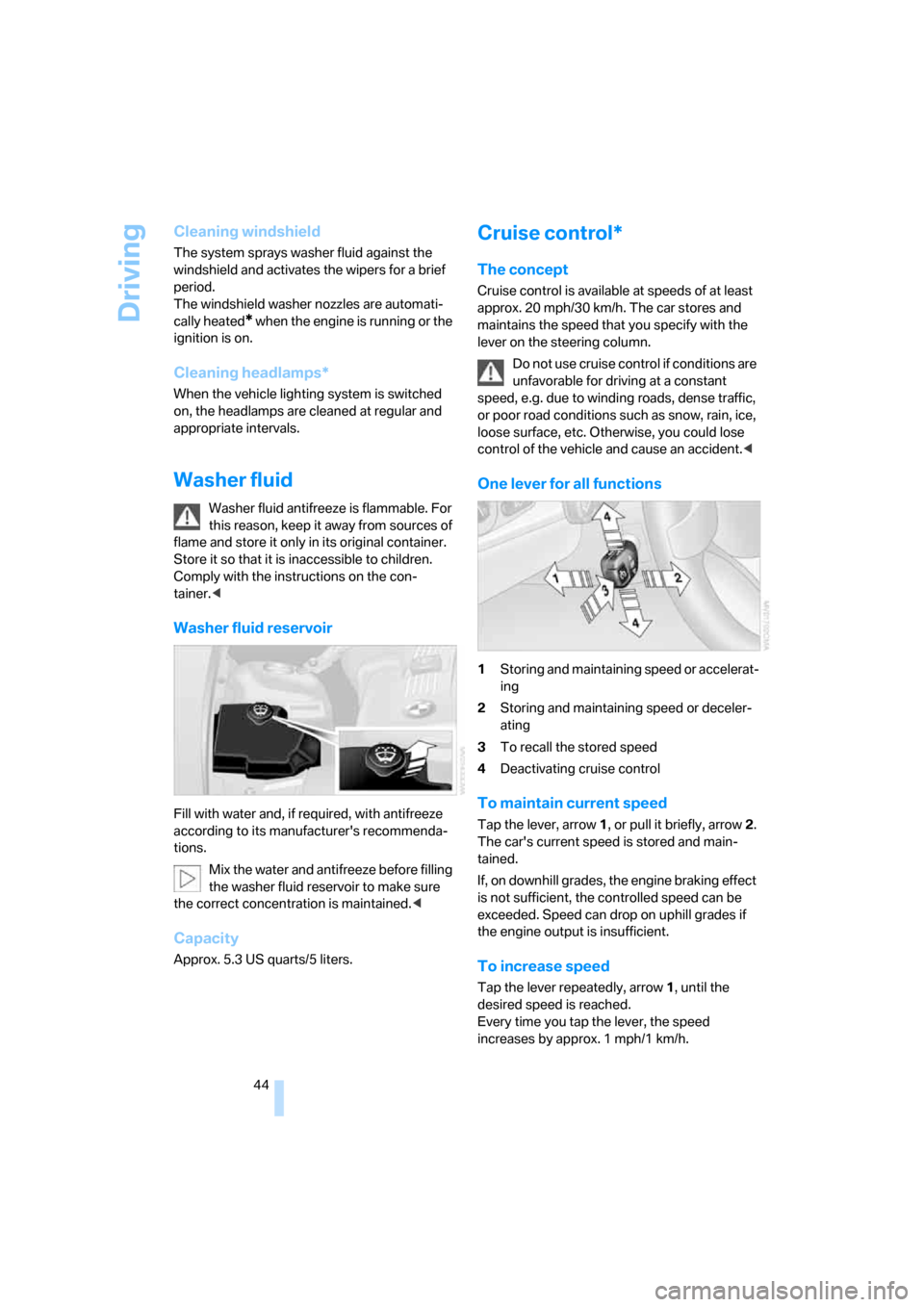
One lever for all functions
1Storing and maintaining speed or accelerat-
ing
2Storing and maintaining speed or deceler-
ating
3To recall the stored speed
4Deactivating cruise control
To maintain current speed
Tap the lever, arrow 1, or pull it briefly, arrow 2.
The car's current speed is stored and main-
tained.
If, on downhill grades, the engine braking effect
is not sufficient, the controlled speed can be
exceeded. Speed can drop on uphill grades if
the engine output is insufficient.
To increase speed
Tap the lever repeatedly, arrow 1, until the
desired speed is reached.
Every time you tap the lever, the speed
increases by approx. 1 mph/1 km/h.
Page 48 of 128
Everything under control
46
Everything under control
Odometer
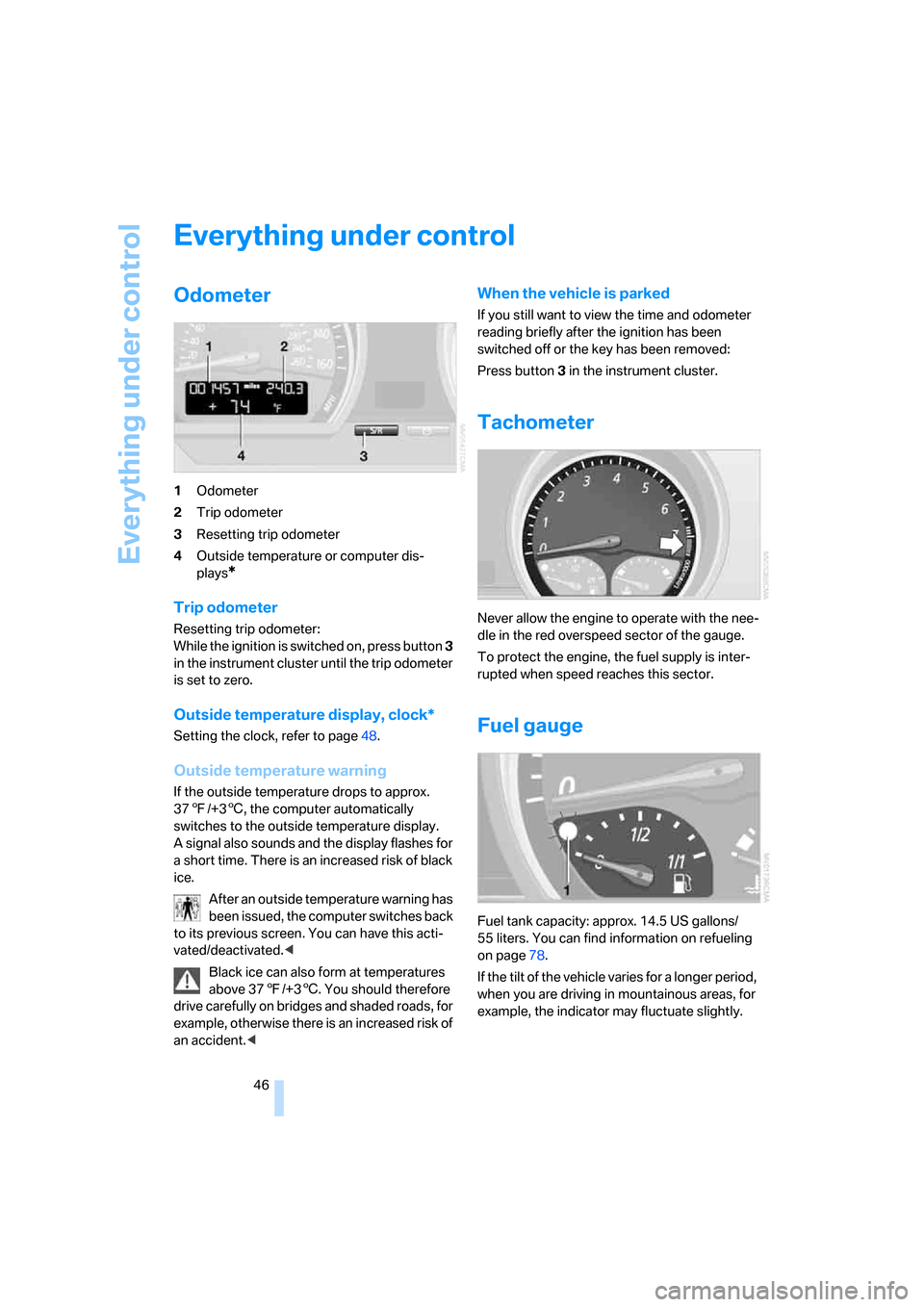
1Odometer
2Trip odometer
3Resetting trip odometer
4Outside temperature or computer dis-
plays
*
Trip odometer
Resetting trip odometer:
While the ignition is switched on, press button 3
in the instrument cluster until the trip odometer
is set to zero.
Outside temperature display, clock*
Setting the clock, refer to page48.
Outside temperature warning
If the outside temperature drops to approx.
377/+36, the computer automatically
switches to the outside temperature display.
A signal also sounds and the display flashes for
a short time. There is an increased risk of black
ice.
After an outside temperature warning has
been issued, the computer switches back
to its previous screen. You can have this acti-
vated/deactivated.<
Black ice can also form at temperatures
above 377/+36. You should therefore
drive carefully on bridges and shaded roads, for
example, otherwise there is an increased risk of
an accident.<
When the vehicle is parked
If you still want to view the time and odometer
reading briefly after the ignition has been
switched off or the key has been removed:
Press button 3 in the instrument cluster.
Tachometer
Never allow the engine to operate with the nee-
dle in the red overspeed sector of the gauge.
To protect the engine, the fuel supply is inter-
rupted when speed reaches this sector.
Fuel gauge
Fuel tank capacity: approx. 14.5 US gallons/
55 liters. You can find information on refueling
on page78.
If the tilt of the vehicle varies for a longer period,
when you are driving in mountainous areas, for
example, the indicator may fluctuate slightly.
Page 49 of 128
Reference
At a glance
Controls
Driving tips
Mobility
47
Reserve
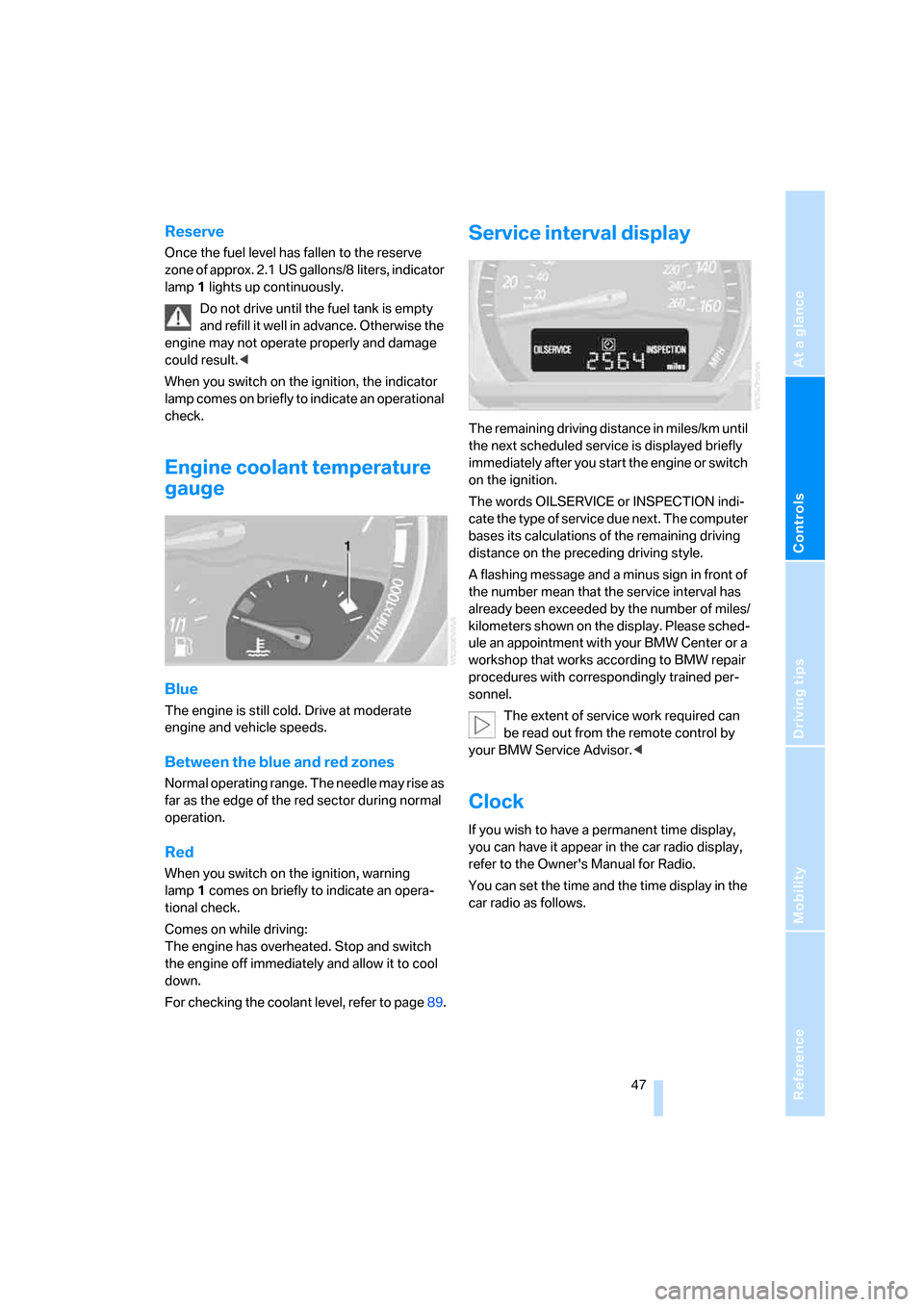
Once the fuel level has fallen to the reserve
zone of approx. 2.1 US gallons/8 liters, indicator
lamp 1 lights up continuously.
Do not drive until the fuel tank is empty
and refill it well in advance. Otherwise the
engine may not operate properly and damage
could result.<
When you switch on the ignition, the indicator
lamp comes on briefly to indicate an operational
check.
Engine coolant temperature
gauge
Blue
The engine is still cold. Drive at moderate
engine and vehicle speeds.
Between the blue and red zones
Normal operating range. The needle may rise as
far as the edge of the red sector during normal
operation.
Red
When you switch on the ignition, warning
lamp1 comes on briefly to indicate an opera-
tional check.
Comes on while driving:
The engine has overheated. Stop and switch
the engine off immediately and allow it to cool
down.
For checking the coolant level, refer to page89.
Service interval display
The remaining driving distance in miles/km until
the next scheduled service is displayed briefly
immediately after you start the engine or switch
on the ignition.
The words OILSERVICE or INSPECTION indi-
cate the type of service due next. The computer
bases its calculations of the remaining driving
distance on the preceding driving style.
A flashing message and a minus sign in front of
the number mean that the service interval has
already been exceeded by the number of miles/
kilometers shown on the display. Please sched-
ule an appointment with your BMW Center or a
workshop that works according to BMW repair
procedures with correspondingly trained per-
sonnel.
The extent of service work required can
be read out from the remote control by
your BMW Service Advisor.<
Clock
If you wish to have a permanent time display,
you can have it appear in the car radio display,
refer to the Owner's Manual for Radio.
You can set the time and the time display in the
car radio as follows.
Page 50 of 128
Everything under control
48
Setting the clock
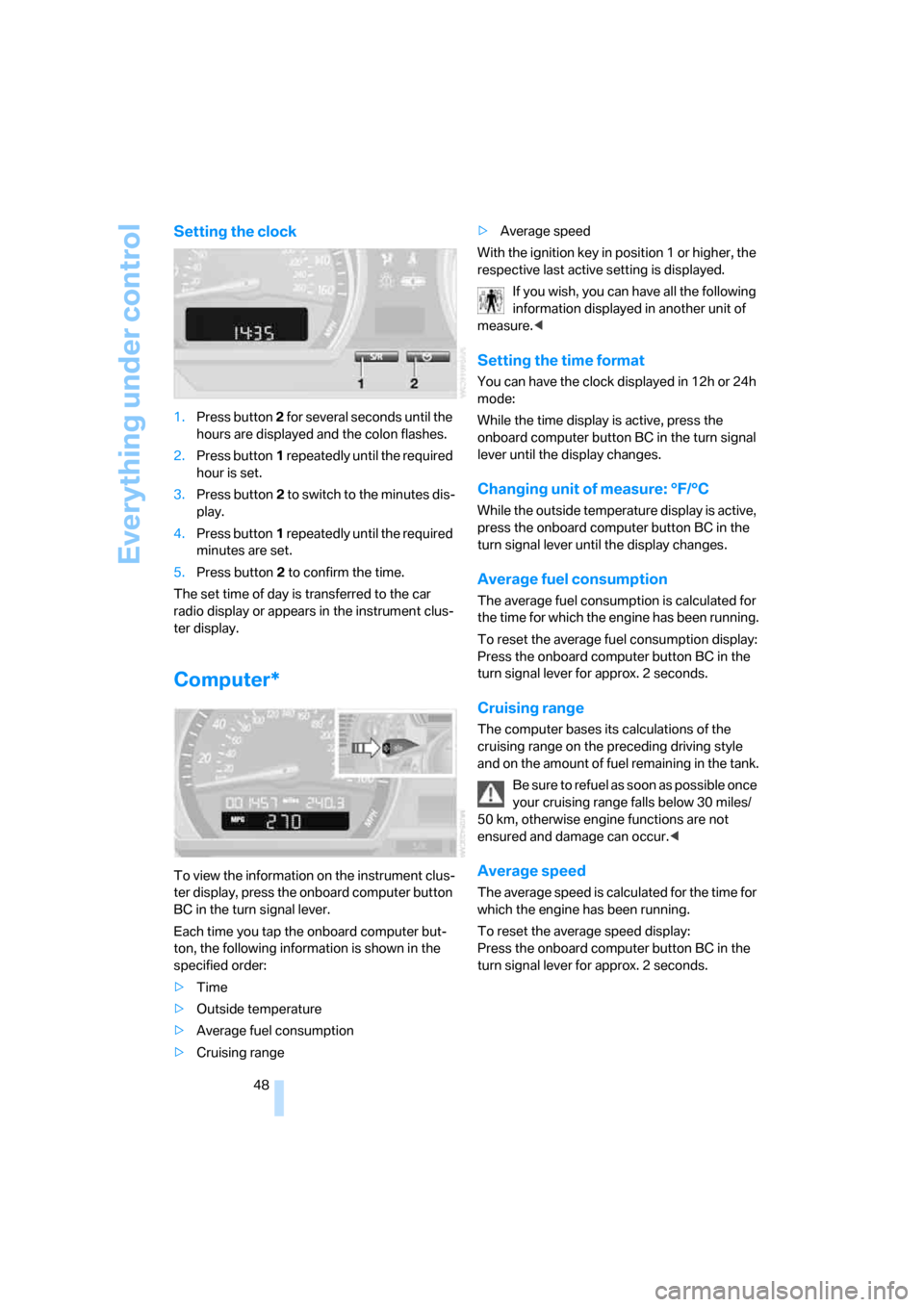
1.Press button 2 for several seconds until the
hours are displayed and the colon flashes.
2.Press button1 repeatedly until the required
hour is set.
3.Press button2 to switch to the minutes dis-
play.
4.Press button1 repeatedly until the required
minutes are set.
5.Press button2 to confirm the time.
The set time of day is transferred to the car
radio display or appears in the instrument clus-
ter display.
Computer*
To view the information on the instrument clus-
ter display, press the onboard computer button
BC in the turn signal lever.
Each time you tap the onboard computer but-
ton, the following information is shown in the
specified order:
>Time
>Outside temperature
>Average fuel consumption
>Cruising range>Average speed
With the ignition key in position 1 or higher, the
respective last active setting is displayed.
If you wish, you can have all the following
information displayed in another unit of
measure.<
Setting the time format
You can have the clock displayed in 12h or 24h
mode:
While the time display is active, press the
onboard computer button BC in the turn signal
lever until the display changes.
Changing unit of measure: °F/°C
While the outside temperature display is active,
press the onboard computer button BC in the
turn signal lever until the display changes.
Average fuel consumption
The average fuel consumption is calculated for
the time for which the engine has been running.
To reset the average fuel consumption display:
Press the onboard computer button BC in the
turn signal lever for approx. 2 seconds.
Cruising range
The computer bases its calculations of the
cruising range on the preceding driving style
and on the amount of fuel remaining in the tank.
Be sure to refuel as soon as possible once
your cruising range falls below 30 miles/
50 km, otherwise engine functions are not
ensured and damage can occur.<
Average speed
The average speed is calculated for the time for
which the engine has been running.
To reset the average speed display:
Press the onboard computer button BC in the
turn signal lever for approx. 2 seconds.
Page 56 of 128
Technology for driving comfort and safety
54 >The indicator lamp does not come on as
long as a person of sufficient size and in a
correct sitting position is detected on the
seat. The front and side airbags for the pas-
senger are activated.
>The indicator lamp does not come on if the
seat is empty. However, the front and side
airbags for the passenger are not activated.
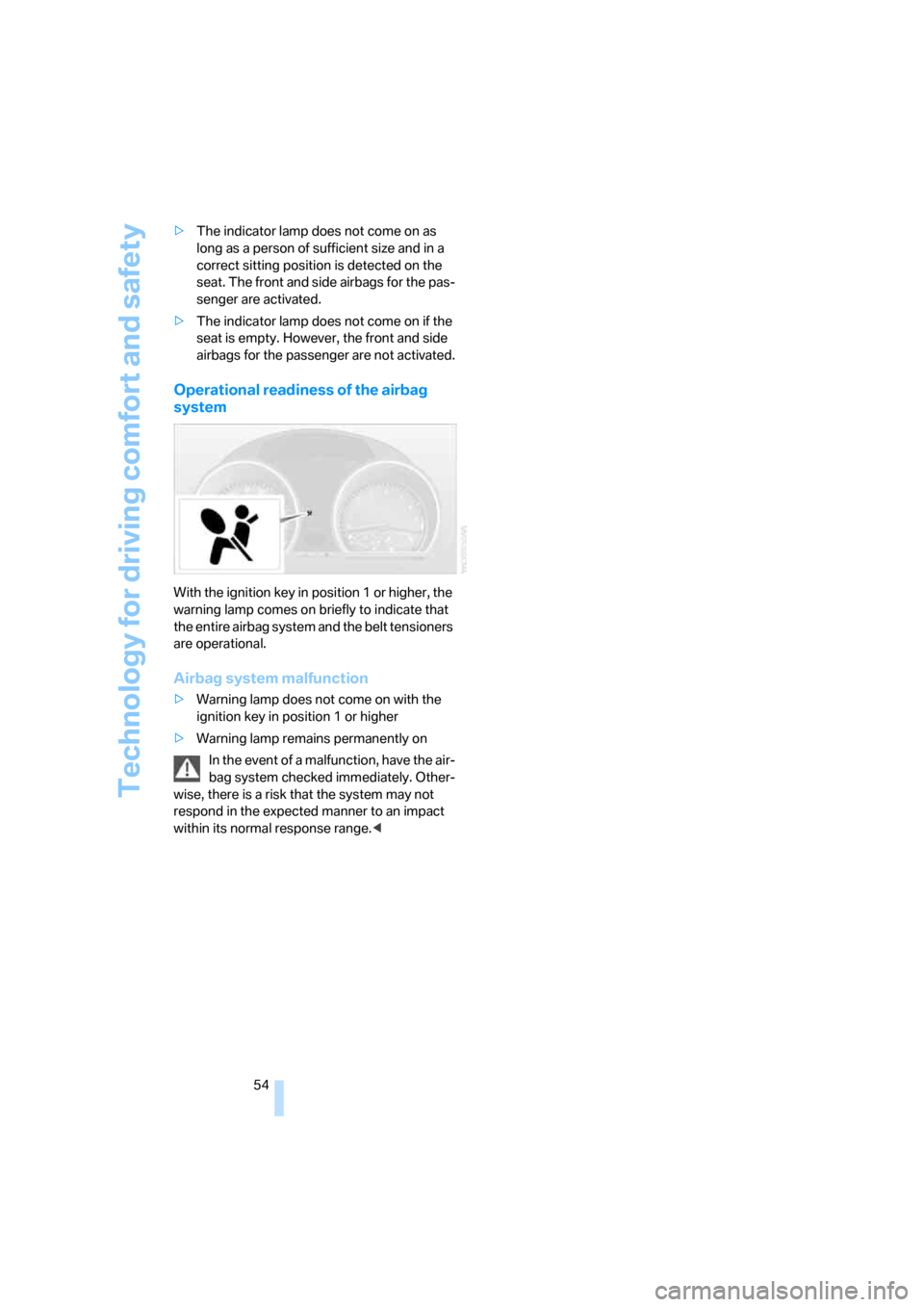
Operational readiness of the airbag
system
With the ignition key in position 1 or higher, the
warning lamp comes on briefly to indicate that
the entire airbag system and the belt tensioners
are operational.
Airbag system malfunction
>Warning lamp does not come on with the
ignition key in position 1 or higher
>Warning lamp remains permanently on
In the event of a malfunction, have the air-
bag system checked immediately. Other-
wise, there is a risk that the system may not
respond in the expected manner to an impact
within its normal response range.<
Page 57 of 128
Reference
At a glance
Controls
Driving tips
Mobility
55
Lamps
Parking lamps/Low beams
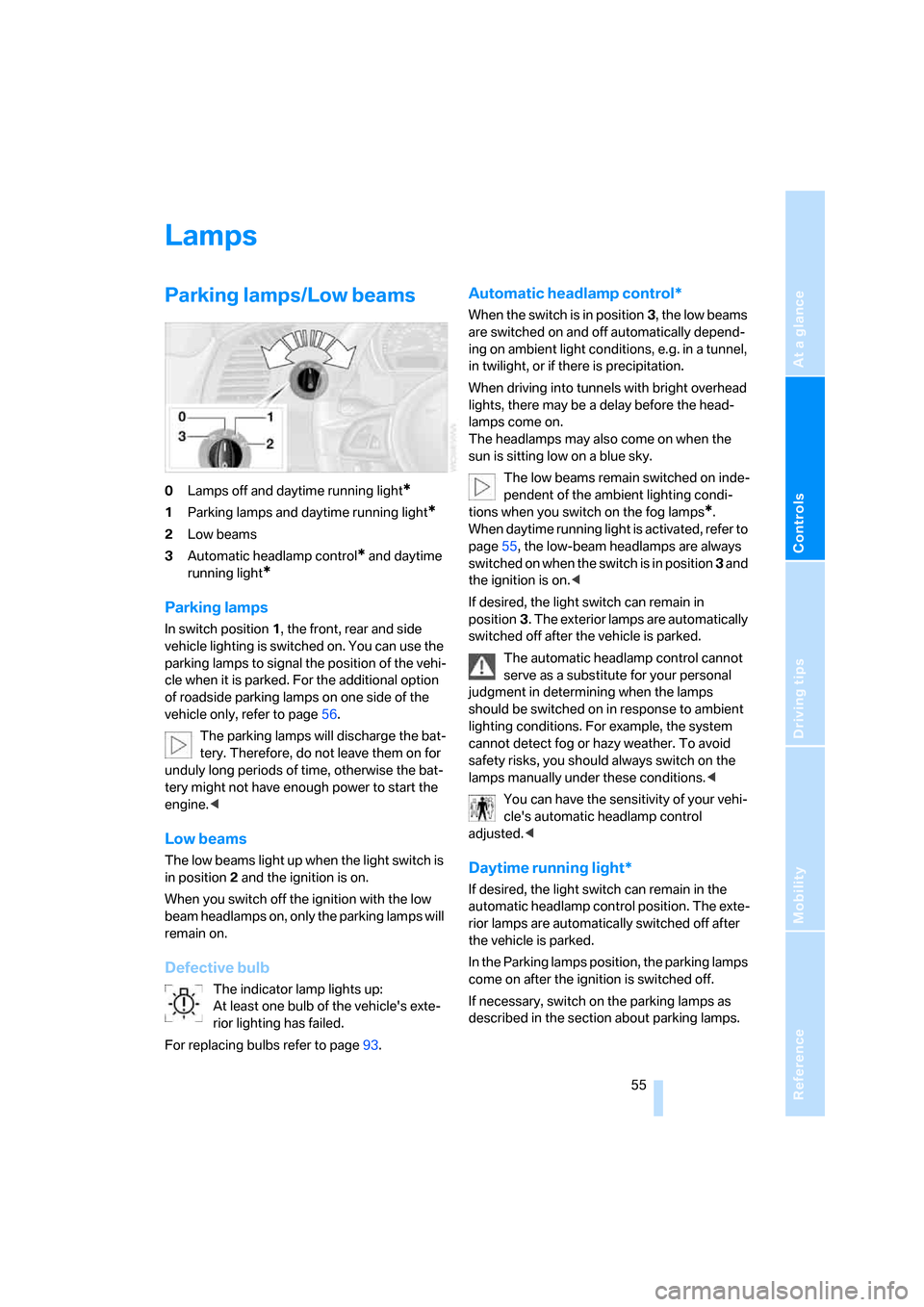
0Lamps off and daytime running light*
1Parking lamps and daytime running light*
2Low beams
3Automatic headlamp control
* and daytime
running light
*
Parking lamps
In switch position1, the front, rear and side
vehicle lighting is switched on. You can use the
parking lamps to signal the position of the vehi-
cle when it is parked. For the additional option
of roadside parking lamps on one side of the
vehicle only, refer to page56.
The parking lamps will discharge the bat-
tery. Therefore, do not leave them on for
unduly long periods of time, otherwise the bat-
tery might not have enough power to start the
engine.<
Low beams
The low beams light up when the light switch is
in position 2 and the ignition is on.
When you switch off the ignition with the low
beam headlamps on, only the parking lamps will
remain on.
Defective bulb
The indicator lamp lights up:
At least one bulb of the vehicle's exte-
rior lighting has failed.
For replacing bulbs refer to page93.
Automatic headlamp control*
When the switch is in position3, the low beams
are switched on and off automatically depend-
ing on ambient light conditions, e.g. in a tunnel,
in twilight, or if there is precipitation.
When driving into tunnels with bright overhead
lights, there may be a delay before the head-
lamps come on.
The headlamps may also come on when the
sun is sitting low on a blue sky.
The low beams remain switched on inde-
pendent of the ambient lighting condi-
tions when you switch on the fog lamps
*.
When daytime running light is activated, refer to
page55, the low-beam headlamps are always
switched on when the switch is in position 3 and
the ignition is on.<
If desired, the light switch can remain in
position3. The exterior lamps are automatically
switched off after the vehicle is parked.
The automatic headlamp control cannot
serve as a substitute for your personal
judgment in determining when the lamps
should be switched on in response to ambient
lighting conditions. For example, the system
cannot detect fog or hazy weather. To avoid
safety risks, you should always switch on the
lamps manually under these conditions.<
You can have the sensitivity of your vehi-
cle's automatic headlamp control
adjusted.<
Daytime running light*
If desired, the light switch can remain in the
automatic headlamp control position. The exte-
rior lamps are automatically switched off after
the vehicle is parked.
In the Parking lamps position, the parking lamps
come on after the ignition is switched off.
If necessary, switch on the parking lamps as
described in the section about parking lamps.
Page 119 of 128
Reference
At a glance
Controls
Driving tips
Mobility
117
Height adjustment
– seats31
– steering wheel34
High beams56
– bulb replacement94
– headlamp flasher42
– indicator lamp12
High temperatures70
Holders for beverages65
Homepage BMW4
Hood86
Horn10
Hot exhaust system70
Hydraulic Brake Assistant,
refer to Dynamic Brake
Control DBC49
Hydraulics, brake90
Hydroplaning71
I
Ice warning, refer to Outside
temperature warning46
Identification mark
– Run-Flat Tires84
– tire coding82
– tires84,85
Ignition, refer to Ignition
switched on38
Ignition key positions, refer to
Ignition lock38
Ignition keys, refer to The key
set18
Ignition lock38
Imprint2
Inclines71Indicator/warning lamp12
– airbags54
– alarm system24
– automatic transmission with
Steptronic41
– brakes13
– coolant temperature47
– DSC49
– DTC50
– engine oil level87
– engine oil pressure87
– engine temperature47
– fasten safety belts33
– Flat Tire Monitor51
– passenger airbags36
– reserve46
Indicator and warning lamps,
overview12
Individual vehicle
– equipment, refer to Your
individual vehicle5
Inflation pressure, refer to Tire
inflation pressure80
Inflation pressure monitoring,
refer to
– Flat Tire Monitor51
– Tire inflation pressure80
Initializing
– Flat Tire Monitor FTM51
– windows25
Inspection47
Instrument cluster12
Instrument lighting56
Instrument panel, refer to
Cockpit10
Instrument panel, refer to
Instrument cluster12
Interior lamps56
– remote control19
Interior motion sensor24
Interior rearview mirror34
– automatic dimming
feature
71
Interior temperature
adjusting59,62
Interlock, refer to Steering
locked38,40
Intermittent
– operation of the wipers43Interval
– display, service47
J
Jack96
Jacking points97
Jets, refer to
Ventilation59,63
Jump-starting99
K
Key Memory18
Keys18
Keys, refer to The key set18
Key switch for passenger
airbags35
Kickdown41
Knee airbags52
Knock control79
L
Lamps55
Lamps and bulbs93
LATCH, child-restraint
mounting system37
Leather care, refer to the
Caring for your vehicle
brochure
LEDs Light-emitting
diodes93
Length, refer to
Dimensions107,108
License plate lamps, bulb
replacement96
Light-alloy wheels, care, refer
to the Caring for your vehicle
brochure
Light-emitting diodes
LEDs93
Lighter socket, refer to
Cigarette lighter65
Lighting
– instruments56
– lamps and bulbs93
– vehicle, refer to Lamps55