air condition BMW Z4 ROADSTER SDRIVE30I 2010 E89 User Guide
[x] Cancel search | Manufacturer: BMW, Model Year: 2010, Model line: Z4 ROADSTER SDRIVE30I, Model: BMW Z4 ROADSTER SDRIVE30I 2010 E89Pages: 254, PDF Size: 8.04 MB
Page 201 of 254
Mobility
199Reference
At a glance
Controls
Driving tips
Communications
Navigation
Entertainment
Tire age
For various reasons, such as the development
of brittleness, BMW recommends tire replace-
ment after no more than 6 years, regardless of
the actual wear of the tires.
The manufacturing date of tires is contained in
the tire coding:
DOT ... 3709 means that the tire was manufac-
tured in week 37 of 2009.
Run-flat tires
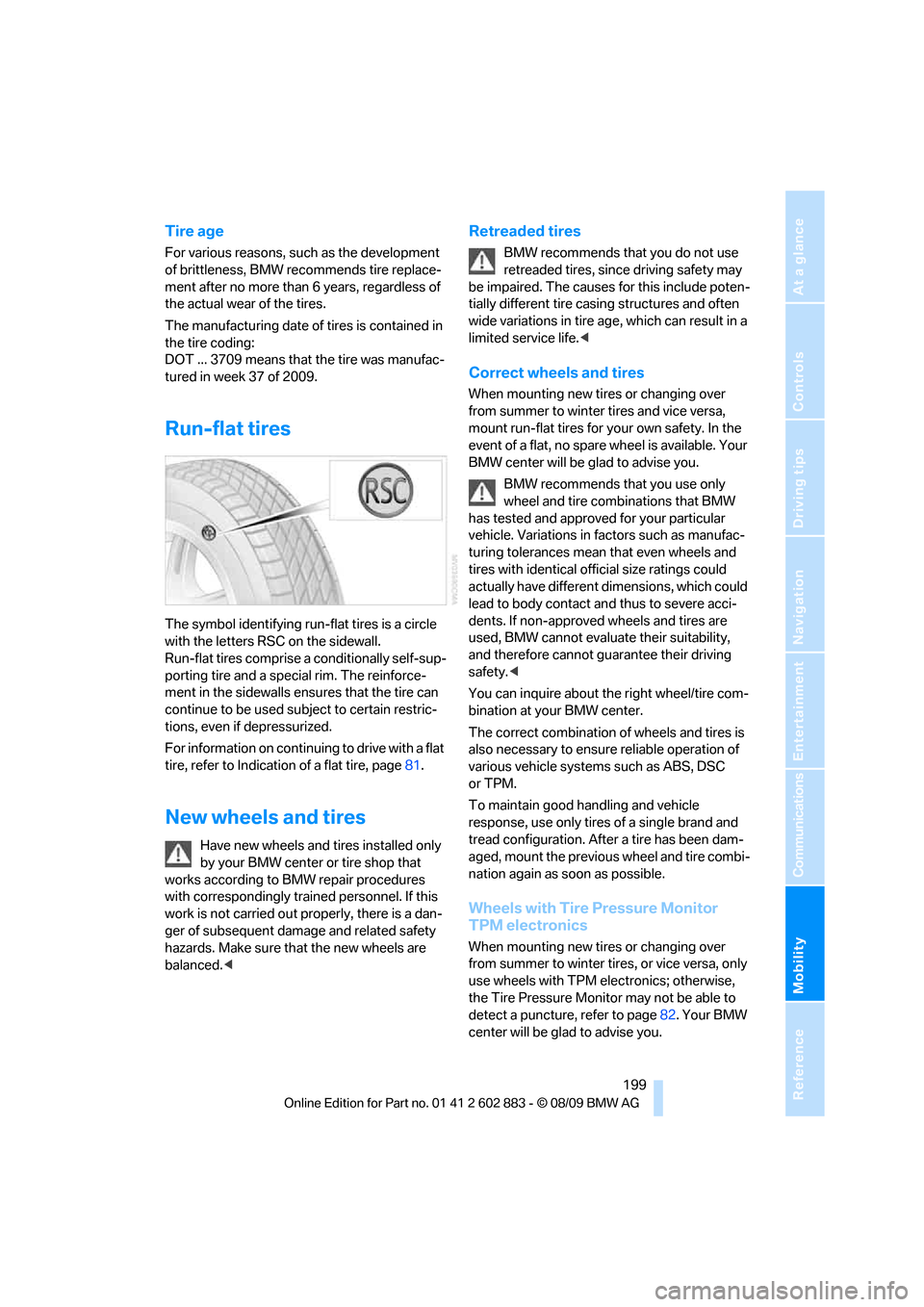
The symbol identifying run-flat tires is a circle
with the letters RSC on the sidewall.
Run-flat tires comprise a conditionally self-sup-
porting tire and a special rim. The reinforce-
ment in the sidewalls ensures that the tire can
continue to be used subject to certain restric-
tions, even if depressurized.
For information on continuing to drive with a flat
tire, refer to Indication of a flat tire, page81.
New wheels and tires
Have new wheels and tires installed only
by your BMW center or tire shop that
works according to BMW repair procedures
with correspondingly trained personnel. If this
work is not carried out properly, there is a dan-
ger of subsequent damage and related safety
hazards. Make sure that the new wheels are
balanced.<
Retreaded tires
BMW recommends that you do not use
retreaded tires, since driving safety may
be impaired. The causes for this include poten-
tially different tire casing structures and often
wide variations in tire age, which can result in a
limited service life.<
Correct wheels and tires
When mounting new tires or changing over
from summer to winter tires and vice versa,
mount run-flat tires for your own safety. In the
event of a flat, no spare wheel is available. Your
BMW center will be glad to advise you.
BMW recommends that you use only
wheel and tire combinations that BMW
has tested and approved for your particular
vehicle. Variations in factors such as manufac-
turing tolerances mean that even wheels and
tires with identical official size ratings could
actually have different dimensions, which could
lead to body contact and thus to severe acci-
dents. If non-approved wheels and tires are
used, BMW cannot evaluate their suitability,
and therefore cannot guarantee their driving
safety.<
You can inquire about the right wheel/tire com-
bination at your BMW center.
The correct combination of wheels and tires is
also necessary to ensure reliable operation of
various vehicle systems such as ABS, DSC
or TPM.
To maintain good handling and vehicle
response, use only tires of a single brand and
tread configuration. After a tire has been dam-
aged, mount the previous wheel and tire combi-
nation again as soon as possible.
Wheels with Tire Pressure Monitor
TPM electronics
When mounting new tires or changing over
from summer to winter tires, or vice versa, only
use wheels with TPM electronics; otherwise,
the Tire Pressure Monitor may not be able to
detect a puncture, refer to page82. Your BMW
center will be glad to advise you.
Page 208 of 254
Maintenance
206
Maintenance
BMW Maintenance System
The BMW Maintenance System supports the
preservation of the traffic and operating safety
of your BMW. The objective is to optimize
efforts with respect to minimal vehicle mainte-
nance costs.
If and when you come to sell your BMW, a com-
prehensive record of servicing will prove a sig-
nificant benefit.
Condition Based Service CBS
Sensors and special algorithms take the differ-
ent driving conditions of your BMW into
account. Condition Based Service uses this to
determine the current and future service
requirements. By letting you define a service
and maintenance regimen that reflects your
own individual requirements, the system builds
the basis for trouble-free driving.
On the Control Display, you can have the
remaining times or distances for selected main-
tenance tasks and any legally prescribed dates
displayed, refer to page69:
>Engine oil
>Brake pads, separately for the front
and back
>Brake fluid
>Vehicle check
>Legally mandated inspections depending
on local regulations
Service data in the remote control
Your vehicle continuously stores service-
requirement information in the remote control
while you are driving. Your BMW Service Advi-
sor can read out this data from the remote con-
trol unit, and propose an optimized mainte-
nance approach. Whenever you take your car in
for servicing you should therefore hand your
BMW Service Advisor the remote control unit
that you last used.
Make sure that the date is always set cor-
rectly, refer to page72; otherwise, the
effectiveness of Condition Based Service CBS
is not assured.<
Service and Warranty Information
Booklet for US models and Warranty
and Service Guide Booklet for
Canadian models
Please consult your Service and Warranty Infor-
mation Booklet for US models and Warranty
and Service Guide Booklet for Canadian models
for additional information on service require-
ments.
BMW recommends that you have service
and repair operations performed at your
BMW center.
Take the time to ensure that these service pro-
cedures are confirmed by entries in your vehi-
cle's Service and Warranty Information Booklet
for US models and Warranty and Service Guide
Booklet for Canadian models. These entries
verify that your vehicle has received the speci-
fied regular maintenance.<
Page 220 of 254
Giving and receiving assistance
218
Giving and receiving assistance
Emergency Request*
Requirements
>BMW Assist is activated. Activating
BMW Assist, refer to page186.
>Radio readiness is on.
>The BMW Assist system is logged on to a
wireless network.
>The Emergency Request system is
operable.
>Equipment version with full preparation
package mobile phone. This equipment
makes it possible to send an Emergency
Request even if no mobile phone is paired
with the vehicle.
Once your service contract for BMW Assist
expires, the BMW Assist system can be deacti-
vated by a BMW center without you having to
visit a workshop. Once the BMW Assist system
has been deactivated, Emergency Requests
are not possible. The BMW Assist system can
be reactivated by a BMW center after a new
contract has been signed.
Sending an Emergency Request
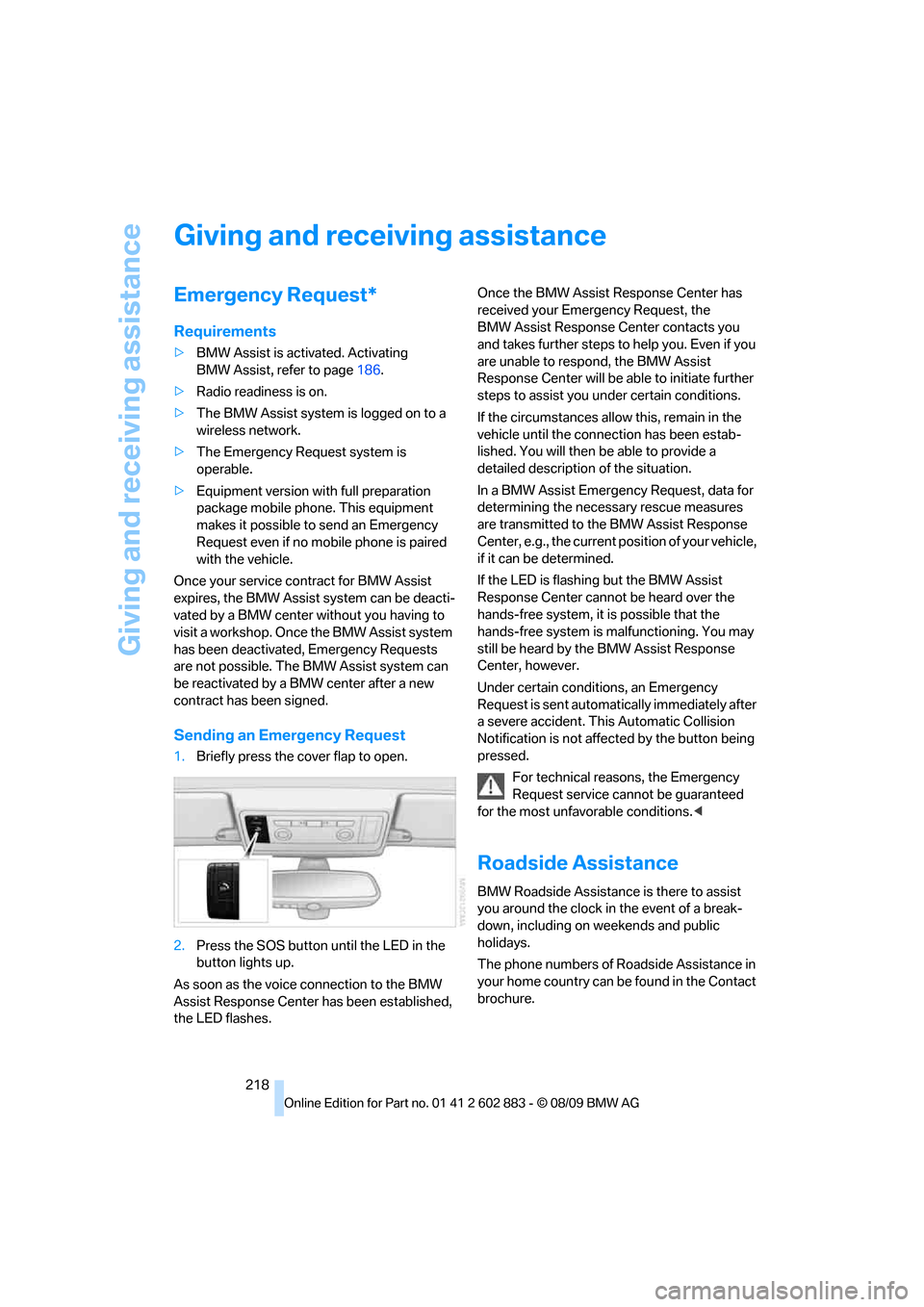
1.Briefly press the cover flap to open.
2.Press the SOS button until the LED in the
button lights up.
As soon as the voice connection to the BMW
Assist Response Center has been established,
the LED flashes.Once the BMW Assist Response Center has
received your Emergency Request, the
BMW Assist Response Center contacts you
and takes further steps to help you. Even if you
are unable to respond, the BMW Assist
Response Center will be able to initiate further
steps to assist you under certain conditions.
If the circumstances allow this, remain in the
vehicle until the connection has been estab-
lished. You will then be able to provide a
detailed description of the situation.
In a BMW Assist Emergency Request, data for
determining the necessary rescue measures
are transmitted to the BMW Assist Response
Center, e.g., the current position of your vehicle,
if it can be determined.
If the LED is flashing but the BMW Assist
Response Center cannot be heard over the
hands-free system, it is possible that the
hands-free system is malfunctioning. You may
still be heard by the BMW Assist Response
Center, however.
Under certain conditions, an Emergency
Request is sent automatically immediately after
a severe accident. This Automatic Collision
Notification is not affected by the button being
pressed.
For technical reasons, the Emergency
Request service cannot be guaranteed
for the most unfavorable conditions.<
Roadside Assistance
BMW Roadside Assistance is there to assist
you around the clock in the event of a break-
down, including on weekends and public
holidays.
The phone numbers of Roadside Assistance in
your home country can be found in the Contact
brochure.
Page 238 of 254
Everything from A to Z
236
Everything from A to Z
Index
A
ABS Antilock Brake
System78
Acceleration assistant, refer to
Launch Control58
Accident, refer to Sending an
Emergency Request218
Activated-charcoal filter for
automatic climate control98
Adaptive light control89
Additional connection of the
music player in the mobile
phone163
Additives
– coolant204
– engine oil204
Address for navigation
– entering121
Adjusting temperature inside
the car, refer to Air
conditioner94
Adjusting temperature inside
the car, refer to Automatic
climate control96
Adjusting the thigh support42
Adjusting the tone during
audio operation, refer to
Tone control140
Airbags85
– indicator/warning lamp87
– sitting safely41
Air conditioner93
Air conditioning mode
– air conditioner94
– automatic climate control96
– ventilation95,98Air distribution
– automatic97
– individual94
– manual94
Air flow rate94,97
Airing, refer to
Ventilation95,98
Air outlets, refer to Air
vents93
Air pressure, refer to Tire
inflation pressure194
Air recirculation, refer to
Recirculated-air
mode94,98
Air supply
– air conditioner94
– automatic climate control96
– ventilation95,98
Air vents93
AKI, refer to Fuel
specifications193
Alarm system33
– avoiding unintentional
alarms34
– interior motion sensor34
– switching off an alarm34
– tilt alarm sensor34
Albums of music
collection160
All-season tires, refer to
Winter tires200
AM, waveband143
Ambient air, refer to
Recirculated-air
mode94,98
Antenna for mobile phone170
Antifreeze
– coolant204
– washer fluid61Antilock Brake System
ABS78
Anti-theft alarm system, refer
to Alarm system33
Anti-theft system29
– for lug bolts, refer to Lug bolt
lock215
Approved axle loads, refer to
Weights228
Approved engine oils, refer to
Specified engine oils204
Approved gross vehicle
weight, refer to Weights228
Armrest, refer to Center
armrest104
Arrival time, refer to
Computer66
Assistance systems, refer to
Driving stability control
systems78
AUC automatic recirculated-
air control98
Audio140
– controls140
– switching on/off140
– tone control140
– volume140
Audio device, external104
Automatic
– air distribution97
– air flow rate97
– cruise control61
– headlamp control88
Automatic car washes208
Automatic climate control93
– automatic air distribution97
Automatic curb monitor46
Page 241 of 254
Reference 239
At a glance
Controls
Driving tips
Communications
Navigation
Entertainment
Mobility
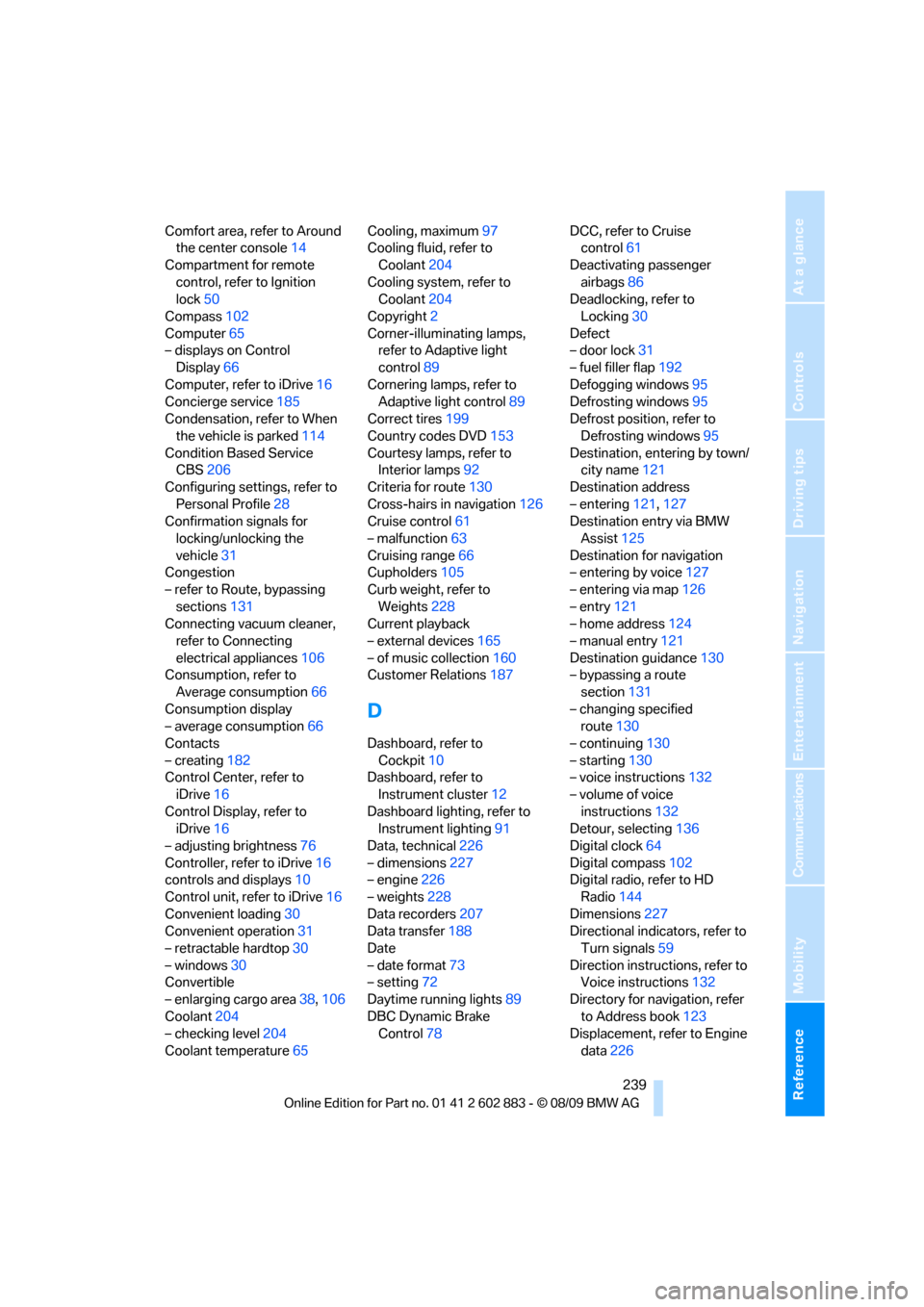
Comfort area, refer to Around
the center console14
Compartment for remote
control, refer to Ignition
lock50
Compass102
Computer65
– displays on Control
Display66
Computer, refer to iDrive16
Concierge service185
Condensation, refer to When
the vehicle is parked114
Condition Based Service
CBS206
Configuring settings, refer to
Personal Profile28
Confirmation signals for
locking/unlocking the
vehicle31
Congestion
– refer to Route, bypassing
sections131
Connecting vacuum cleaner,
refer to Connecting
electrical appliances106
Consumption, refer to
Average consumption66
Consumption display
– average consumption66
Contacts
– creating182
Control Center, refer to
iDrive16
Control Display, refer to
iDrive16
– adjusting brightness76
Controller, refer to iDrive16
controls and displays10
Control unit, refer to iDrive16
Convenient loading30
Convenient operation31
– retractable hardtop30
– windows30
Convertible
– enlarging cargo area38,106
Coolant204
– checking level204
Coolant temperature65Cooling, maximum97
Cooling fluid, refer to
Coolant204
Cooling system, refer to
Coolant204
Copyright2
Corner-illuminating lamps,
refer to Adaptive light
control89
Cornering lamps, refer to
Adaptive light control89
Correct tires199
Country codes DVD153
Courtesy lamps, refer to
Interior lamps
92
Criteria for route130
Cross-hairs in navigation126
Cruise control61
– malfunction63
Cruising range66
Cupholders105
Curb weight, refer to
Weights228
Current playback
– external devices165
– of music collection160
Customer Relations187
D
Dashboard, refer to
Cockpit10
Dashboard, refer to
Instrument cluster12
Dashboard lighting, refer to
Instrument lighting91
Data, technical226
– dimensions227
– engine226
– weights228
Data recorders207
Data transfer188
Date
– date format73
– setting72
Daytime running lights89
DBC Dynamic Brake
Control78DCC, refer to Cruise
control61
Deactivating passenger
airbags86
Deadlocking, refer to
Locking30
Defect
– door lock31
– fuel filler flap192
Defogging windows95
Defrosting windows95
Defrost position, refer to
Defrosting windows95
Destination, entering by town/
city name121
Destination address
– entering121,127
Destination entry via BMW
Assist125
Destination for navigation
– entering by voice127
– entering via map126
– entry121
– home address124
– manual entry121
Destination guidance130
– bypassing a route
section131
– changing specified
route130
– continuing130
– starting130
– voice instructions132
– volume of voice
instructions132
Detour, selecting136
Digital clock64
Digital compass102
Digital radio, refer to HD
Radio144
Dimensions227
Directional indicators, refer to
Turn signals59
Direction instructions, refer to
Voice instructions132
Directory for navigation, refer
to Address book123
Displacement, refer to Engine
data226
Page 243 of 254
Reference 241
At a glance
Controls
Driving tips
Communications
Navigation
Entertainment
Mobility
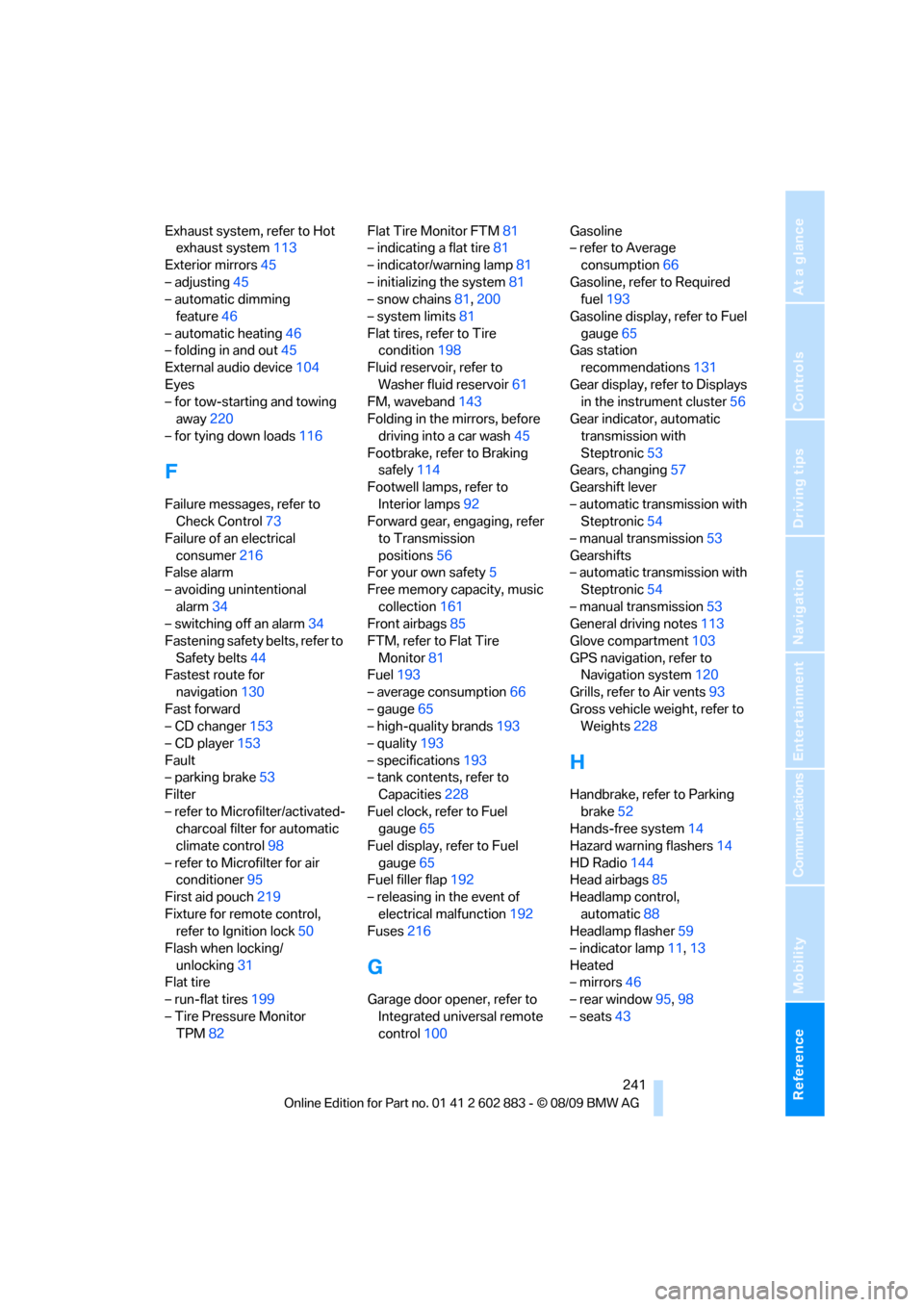
Exhaust system, refer to Hot
exhaust system113
Exterior mirrors45
– adjusting45
– automatic dimming
feature46
– automatic heating46
– folding in and out45
External audio device104
Eyes
– for tow-starting and towing
away220
– for tying down loads116
F
Failure messages, refer to
Check Control73
Failure of an electrical
consumer216
False alarm
– avoiding unintentional
alarm34
– switching off an alarm34
Fastening safety belts, refer to
Safety belts44
Fastest route for
navigation130
Fast forward
– CD changer153
– CD player153
Fault
– parking brake53
Filter
– refer to Microfilter/activated-
charcoal filter for automatic
climate control98
– refer to Microfilter for air
conditioner95
First aid pouch219
Fixture for remote control,
refer to Ignition lock50
Flash when locking/
unlocking31
Flat tire
– run-flat tires199
– Tire Pressure Monitor
TPM82Flat Tire Monitor FTM81
– indicating a flat tire81
– indicator/warning lamp81
– initializing the system81
– snow chains81,200
– system limits81
Flat tires, refer to Tire
condition198
Fluid reservoir, refer to
Washer fluid reservoir61
FM, waveband143
Folding in the mirrors, before
driving into a car wash45
Footbrake, refer to Braking
safely114
Footwell lamps, refer to
Interior lamps92
Forward gear, engaging, refer
to Transmission
positions56
For your own safety5
Free memory capacity, music
collection161
Front airbags85
FTM, refer to Flat Tire
Monitor81
Fuel193
– average consumption66
– gauge65
– high-quality brands193
– quality193
– specifications
193
– tank contents, refer to
Capacities228
Fuel clock, refer to Fuel
gauge65
Fuel display, refer to Fuel
gauge65
Fuel filler flap192
– releasing in the event of
electrical malfunction192
Fuses216
G
Garage door opener, refer to
Integrated universal remote
control100Gasoline
– refer to Average
consumption66
Gasoline, refer to Required
fuel193
Gasoline display, refer to Fuel
gauge65
Gas station
recommendations131
Gear display, refer to Displays
in the instrument cluster56
Gear indicator, automatic
transmission with
Steptronic53
Gears, changing57
Gearshift lever
– automatic transmission with
Steptronic54
– manual transmission53
Gearshifts
– automatic transmission with
Steptronic54
– manual transmission53
General driving notes113
Glove compartment103
GPS navigation, refer to
Navigation system120
Grills, refer to Air vents93
Gross vehicle weight, refer to
Weights228
H
Handbrake, refer to Parking
brake52
Hands-free system14
Hazard warning flashers14
HD Radio144
Head airbags85
Headlamp control,
automatic88
Headlamp flasher59
– indicator lamp11,13
Heated
– mirrors46
– rear window95,98
– seats43
Page 246 of 254
Everything from A to Z
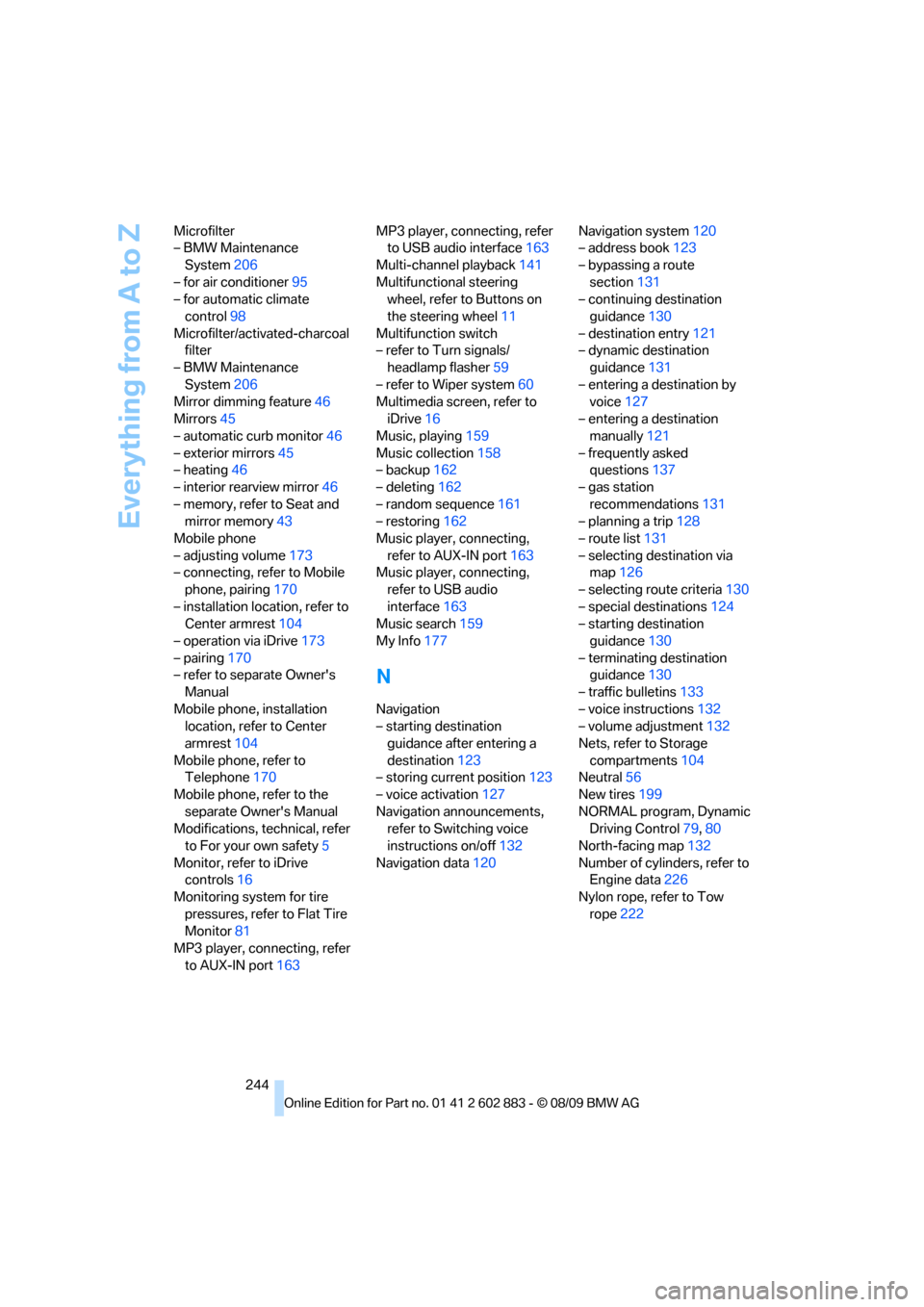
244 Microfilter
– BMW Maintenance
System206
– for air conditioner95
– for automatic climate
control98
Microfilter/activated-charcoal
filter
– BMW Maintenance
System206
Mirror dimming feature46
Mirrors45
– automatic curb monitor46
– exterior mirrors45
– heating46
– interior rearview mirror46
– memory, refer to Seat and
mirror memory43
Mobile phone
– adjusting volume173
– connecting, refer to Mobile
phone, pairing170
– installation location, refer to
Center armrest104
– operation via iDrive173
– pairing170
– refer to separate Owner's
Manual
Mobile phone, installation
location, refer to Center
armrest104
Mobile phone, refer to
Telephone170
Mobile phone, refer to the
separate Owner's Manual
Modifications, technical, refer
to For your own safety5
Monitor, refer to iDrive
controls16
Monitoring system for tire
pressures, refer to Flat Tire
Monitor81
MP3 player, connecting, refer
to AUX-IN port163MP3 player, connecting, refer
to USB audio interface163
Multi-channel playback141
Multifunctional steering
wheel, refer to Buttons on
the steering wheel11
Multifunction switch
– refer to Turn signals/
headlamp flasher59
– refer to Wiper system60
Multimedia screen, refer to
iDrive16
Music, playing159
Music collection158
– backup162
– deleting162
– random sequence161
– restoring162
Music player, connecting,
refer to AUX-IN port163
Music player, connecting,
refer to USB audio
interface163
Music search159
My Info177
N
Navigation
– starting destination
guidance after entering a
destination123
– storing current position123
– voice activation127
Navigation announcements,
refer to Switching voice
instructions on/off132
Navigation data120Navigation system120
– address book123
– bypassing a route
section131
– continuing destination
guidance130
– destination entry121
– dynamic destination
guidance131
– entering a destination by
voice127
– entering a destination
manually121
– frequently asked
questions137
– gas station
recommendations131
– planning a trip128
– route list131
– selecting destination via
map126
– selecting route criteria130
– special destinations124
– starting destination
guidance130
– terminating destination
guidance130
– traffic bulletins133
– voice instructions132
– volume adjustment132
Nets, refer to Storage
compartments104
Neutral56
New tires199
NORMAL program, Dynamic
Driving Control79,80
North-facing map132
Number of cylinders, refer to
Engine data226
Nylon rope, refer to Tow
rope222
Page 247 of 254
Reference 245
At a glance
Controls
Driving tips
Communications
Navigation
Entertainment
Mobility
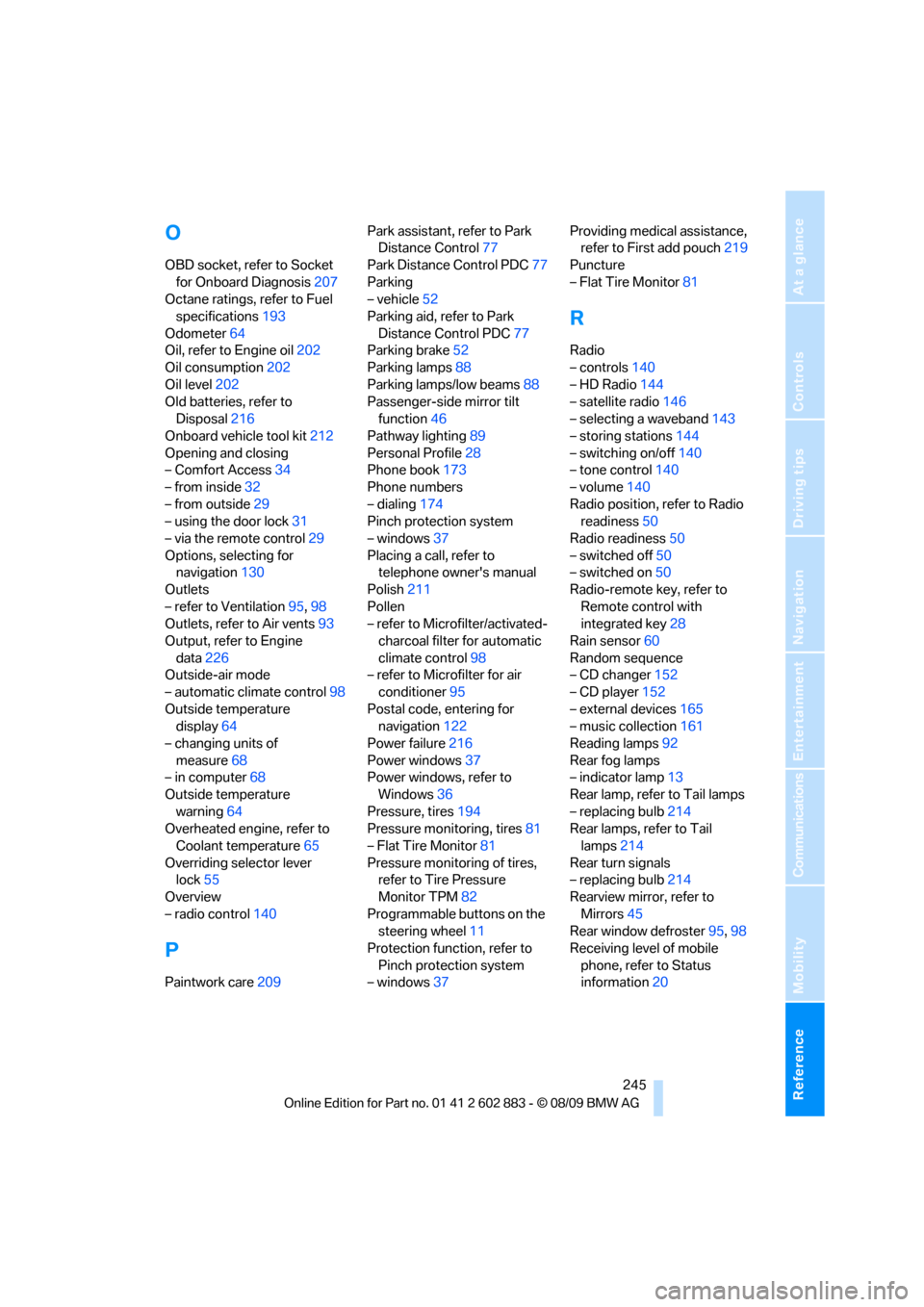
O
OBD socket, refer to Socket
for Onboard Diagnosis207
Octane ratings, refer to Fuel
specifications193
Odometer64
Oil, refer to Engine oil202
Oil consumption202
Oil level202
Old batteries, refer to
Disposal216
Onboard vehicle tool kit212
Opening and closing
– Comfort Access34
– from inside32
– from outside29
– using the door lock31
– via the remote control29
Options, selecting for
navigation130
Outlets
– refer to Ventilation95,98
Outlets, refer to Air vents93
Output, refer to Engine
data226
Outside-air mode
– automatic climate control98
Outside temperature
display64
– changing units of
measure68
– in computer68
Outside temperature
warning64
Overheated engine, refer to
Coolant temperature65
Overriding selector lever
lock55
Overview
– radio control140
P
Paintwork care209Park assistant, refer to Park
Distance Control77
Park Distance Control PDC77
Parking
– vehicle52
Parking aid, refer to Park
Distance Control PDC77
Parking brake52
Parking lamps88
Parking lamps/low beams88
Passenger-side mirror tilt
function46
Pathway lighting89
Personal Profile28
Phone book173
Phone numbers
– dialing174
Pinch protection system
– windows37
Placing a call, refer to
telephone owner's manual
Polish211
Pollen
– refer to Microfilter/activated-
charcoal filter for automatic
climate control98
– refer to Microfilter for air
conditioner95
Postal code, entering for
navigation122
Power failure216
Power windows37
Power windows, refer to
Windows36
Pressure, tires194
Pressure monitoring, tires81
– Flat Tire Monitor81
Pressure monitoring of tires,
refer to Tire Pressure
Monitor TPM82
Programmable buttons on the
steering wheel11
Protection function, refer to
Pinch protection system
– windows37Providing medical assistance,
refer to First add pouch219
Puncture
– Flat Tire Monitor81
R
Radio
– controls140
– HD Radio144
– satellite radio146
– selecting a waveband143
– storing stations144
– switching on/off140
– tone control140
– volume140
Radio position, refer to Radio
readiness50
Radio readiness50
– switched off50
– switched on50
Radio-remote key, refer to
Remote control with
integrated key28
Rain sensor60
Random sequence
– CD changer152
– CD player152
– external devices165
– music collection161
Reading lamps92
Rear fog lamps
– indicator lamp13
Rear lamp, refer to Tail lamps
– replacing bulb214
Rear lamps, refer to Tail
lamps214
Rear turn signals
– replacing bulb214
Rearview mirror, refer to
Mirrors45
Rear window defroster95,98
Receiving level of mobile
phone, refer to Status
information20
Page 249 of 254
Reference 247
At a glance
Controls
Driving tips
Communications
Navigation
Entertainment
Mobility
Seats41
– adjusting electrically42
– adjusting the seats42
– heating43
– memory, refer to Seat and
mirror memory43
– saving a setting, refer to Seat
and mirror memory43
– sitting safely41
Securing cargo107
Securing the vehicle
– from inside32
– from outside29
Selecting new scale for
navigation133
Selector lever56
– automatic transmission with
Steptronic54
Selector lever lock, refer to
Changing selector lever
positions, shiftlock54
Selector lever positions
– automatic transmission with
Steptronic54
Service, refer to Roadside
Assistance218
Service car, refer to Roadside
Assistance218
Service data in the remote
control206
Service Interval Display, refer
to Condition Based Service
CBS206
Service Request187
Service requirement display,
refer to Condition Based
Service CBS206
Service requirements69
Services status188
Servotronic85
Settings
– changing on Control
Display75
– clock, 12h/24h mode72
– DVD154
– language75
Settings and information68Settings for the map
display133
Shifting57
Shifting, sport automatic
transmission57
Shifting gears
– automatic transmission with
Steptronic54
– manual transmission53
Shiftlock
– automatic transmission,
refer to Changing selector
lever positions54
Shift paddles on steering
wheel57
Short commands for the voice
activation system229
Short route in navigation, refer
to Selecting route
130
Side airbags85
Side windows, refer to
Windows36
Signal horn, refer to
Horn10,11
Sitting safely41
– with airbags41
– with safety belts41
Ski bag for convertible, refer to
Through-loading opening
with integrated transport
bag106
Slot for remote control50
Snap-in adapter
– inserting/removing180
– use170
Snap-in adapter, refer to
Center armrest storage
compartment104
Socket, Onboard Diagnosis
OBD207
Socket, refer to Connecting
electrical appliances106
SOS, refer to Sending an
Emergency Request218
Sound output for
entertainment on/off140
Spare fuses,216
Spare fuses, refer to
Fuses216Special destinations124
Special destinations,
displaying126
Special oils, refer to Specified
engine oils204
Specified engine oils204
Speed
– run-flat tires82
– with winter tires200
Speed limit74
Speed limit warning, refer to
Speed limit74
Speedometer12
Speed Volume142
SPORT+ program, Dynamic
Driving Control79,80
SPORT program, Dynamic
Driving Control79,80
Sport program with sport
automatic transmission57
Spray nozzles, refer to
Cleaning windshield and
headlamps61
Stability control, refer to
Driving stability control
systems78,79
Start/stop button50
– starting the engine51
– switching off the engine52
Starting, refer to Starting the
engine51
Starting assistance, refer to
Jump-starting219
Starting difficulties
– jump-starting219
Starting the engine
– start/stop button50
State/province, for
navigation121
Station, refer to Radio143
Station, selecting
– radio143
Status of this Owner's Manual
at time of printing5
Steam jet208,209
Page 250 of 254
Everything from A to Z
248 Steering wheel46
– adjustment46
– buttons on steering
wheel11
– lock50
– locking with Comfort
Access35
– shift paddles57
Steering wheel buttons, refer
to Shift paddles57
Steptronic, refer to Automatic
transmission with
Steptronic53
Storage211
Storage compartments104
Storage nets106
Stored trip, calling up129
Storing a destination in the
address book123
Storing music158
Storing seat positions, refer to
Seat and mirror memory43
Storing tires200
Stowage, refer to Storage
compartments104
Stowing cargo116
Street, entering,
navigation122
Summer tires, refer to Wheels
and tires194
Surface ice, refer to Outside
temperature warning64
Surround141
SVCD153
SW, waveband143
Switches, refer to Cockpit10
Switching off
– engine52
Switching off the engine
– start/stop button50
Switching on
– audio140
– CD changer140
– CD player140
– radio140
Symbols4
– status information20
T
Tachometer64
Tailgate
– opening from inside32
Tailgate, refer to Luggage
compartment lid32
Tail lamps214
– replacing bulb214
Tank contents, refer to
Capacities228
Technical data226
– capacities228
– dimensions227
Technical modifications, refer
to For your own safety5
Telephone170
– installation location, refer to
Center armrest104
– refer to separate Owner's
Manual
– voice commands178
TeleService185
TeleService Diagnosis186
TeleService Help186
Temperature
– air conditioner95
– automatic climate control96
– changing unit of measure68
– coolant, refer to Coolant
temperature65
Temperature display
– outside temperature64
– outside temperature
warning64
– setting the units68
Tempomat, refer to Cruise
control61
Tensioning straps, refer to
Securing cargo116
The individual vehicle5
Third brake lamp, refer to
Center brake lamp215
Through-loading opening with
integrated transport
bag106
Tilt alarm sensor34
Tilt function, passenger-side
mirror46Tire inflation pressure194
– loss81,83
Tire pressure monitoring,
refer to Flat Tire Monitor81
Tire Pressure Monitor
TPM82
– resetting the system83
– system limitations82
– warning lamp83
Tire puncture, refer to Flat Tire
Monitor81
Tire Quality Grading197
Tires
– age197,199
– air loss83
– breaking in112
– changing, refer to Changing
wheels215
– condition198
– damage198
– inflation pressure194
– labels197
– minimum tread depth198
– new wheels and tires199
– pressure monitoring, refer to
Flat Tire Monitor81
– pressure monitoring, refer to
Tire Pressure Monitor
TPM82
– puncture81
– replacing199
– run-flat199
– size197
– storage200
– tread depth198
– wear indicators, refer to
Minimum tread depth198
– wheel/tire combination, refer
to Correct wheels and
tires199
– winter tires200
TMC station, refer to Traffic
bulletins133
Tone
– control140
– middle setting142
Tools, refer to Onboard
vehicle tool kit212