launch BMW Z4 ROADSTER SDRIVE35I 2010 E89 Owner's Manual
[x] Cancel search | Manufacturer: BMW, Model Year: 2010, Model line: Z4 ROADSTER SDRIVE35I, Model: BMW Z4 ROADSTER SDRIVE35I 2010 E89Pages: 254, PDF Size: 8.04 MB
Page 57 of 254
Controls
55Reference
At a glance
Driving tips
Communications
Navigation
Entertainment
Mobility
a downshift that would cause the engine to
overrev will not be executed by the system. The
gear selected is briefly displayed in the instru-
ment cluster, followed by the gear actually
in use.
Shifting gears via shift paddles* on the
steering wheel
The shift paddles allow you to shift gears with-
out taking your hands off the steering wheel.
>When you use the shift paddles on the
steering wheel to shift gears in automatic
mode, the transmission switches to man-
ual mode.
>If you do not accelerate or shift gears using
the shift paddles for a certain amount of
time, the transmission switches back to
automatic mode.
If the selector lever is in the M/S gear
plane, manual mode remains active.<
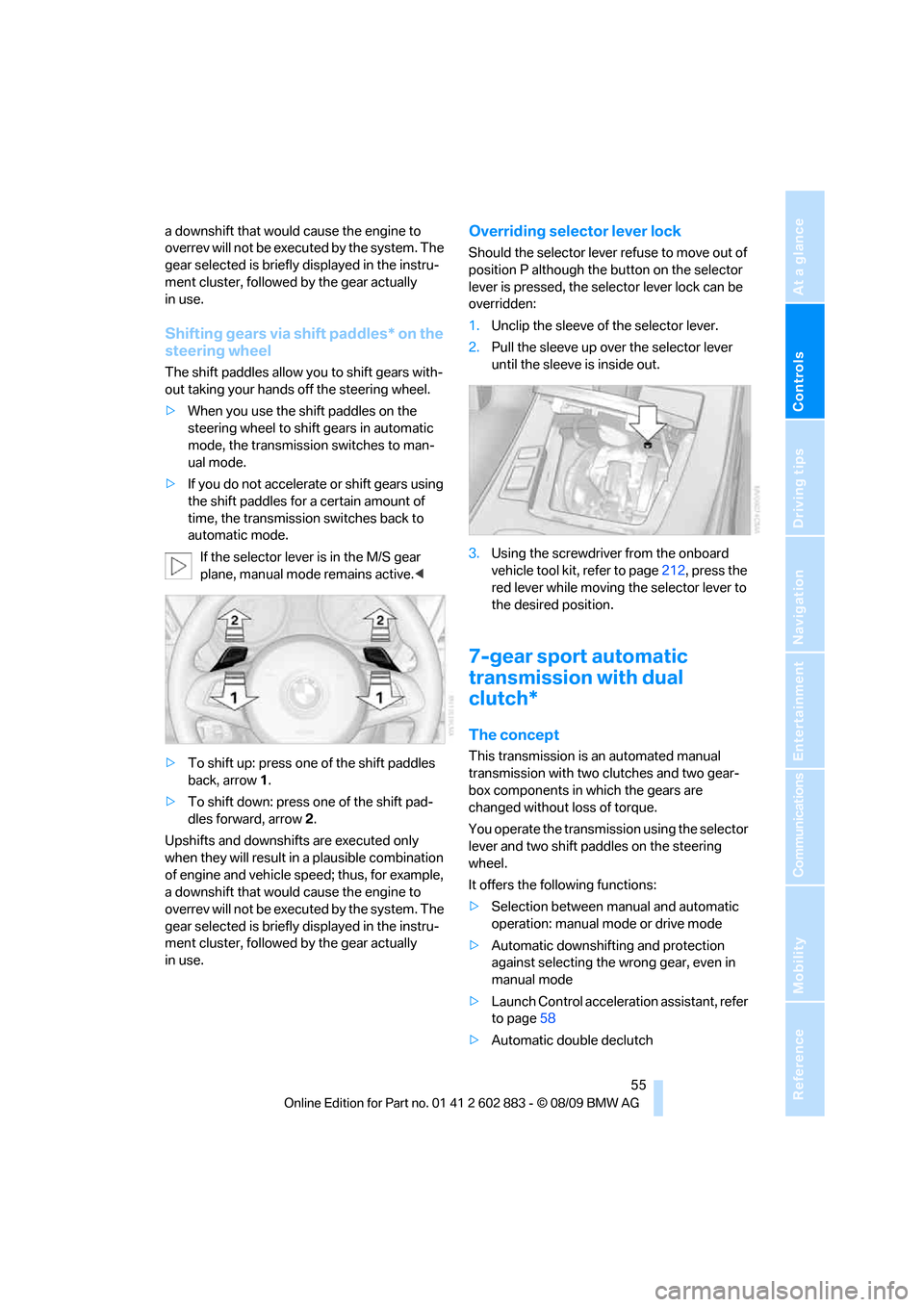
>To shift up: press one of the shift paddles
back, arrow 1.
>To shift down: press one of the shift pad-
dles forward, arrow 2.
Upshifts and downshifts are executed only
when they will result in a plausible combination
of engine and vehicle speed; thus, for example,
a downshift that would cause the engine to
overrev will not be executed by the system. The
gear selected is briefly displayed in the instru-
ment cluster, followed by the gear actually
in use.
Overriding selector lever lock
Should the selector lever refuse to move out of
position P although the button on the selector
lever is pressed, the selector lever lock can be
overridden:
1.Unclip the sleeve of the selector lever.
2.Pull the sleeve up over the selector lever
until the sleeve is inside out.
3.Using the screwdriver from the onboard
vehicle tool kit, refer to page212, press the
red lever while moving the selector lever to
the desired position.
7-gear sport automatic
transmission with dual
clutch*
The concept
This transmission is an automated manual
transmission with two clutches and two gear-
box components in which the gears are
changed without loss of torque.
You operate the transmission using the selector
lever and two shift paddles on the steering
wheel.
It offers the following functions:
>Selection between manual and automatic
operation: manual mode or drive mode
>Automatic downshifting and protection
against selecting the wrong gear, even in
manual mode
>Launch Control acceleration assistant, refer
to page58
>Automatic double declutch
Page 60 of 254
Driving
58 >To shift down: press one of the shift pad-
dles forward, arrow2.
Gears can be shifted using the shift paddles in
drive mode or in manual mode.
Gear change in manual mode:
When manual mode is active, refer to page57,
gears can be changed using the shift paddles or
the selector lever.
Gear change in drive mode
The shift paddles can be used to change gears
in drive mode as well.
Afterwards, if the shift paddles are not used for
some time and vehicle acceleration is insuffi-
cient, the forward gears are changed again
automatically.
Launch Control
Launch Control enables you to drive off with an
optimal vehicle acceleration on a high grip road
surface.
Do not use Launch Control too often, as
the higher loads on the vehicle lead to
premature component wear.<
Launch Control is available when the engine is
at operating temperature, i.e., after driving con-
tinuously for at least 6 miles/10 km.
1.With the engine running, depress the brake
pedal with your left foot.
2.Activate the SPORT+ program of the
Dynamic Driving Control, refer to page79.
3.With the vehicle stationary, activate manual
mode and select first gear.
4.Press the accelerator all the way down. The
engine speed when driving off is controlled.
A flag symbol appears in the instrument
cluster.
5.The vehicle accelerates when you release
the brake pedal. Keep the accelerator
pressed all the way down.
6.The transmission shifts up automatically as
long as the accelerator is pressed all the
way down.Launch Control only becomes available again
after a certain distance has been driven.
Launch Control can only be used after the
break-in phase, refer to page112.
To maintain driving stability, activate DSC
whenever possible.<
Manually releasing and engaging the
transmission lock
If a power failure occurs, e.g., if the battery
is discharged or disconnected or if there
is an electrical malfunction, the transmission
lock must be released manually; otherwise, the
rear wheels are blocked and the vehicle cannot
be towed.<
Release the transmission lock manually for tow-
ing only and set the parking brake beforehand
to prevent the vehicle from rolling. After parking
the vehicle, lock the transmission lock again
manually, refer to page59.
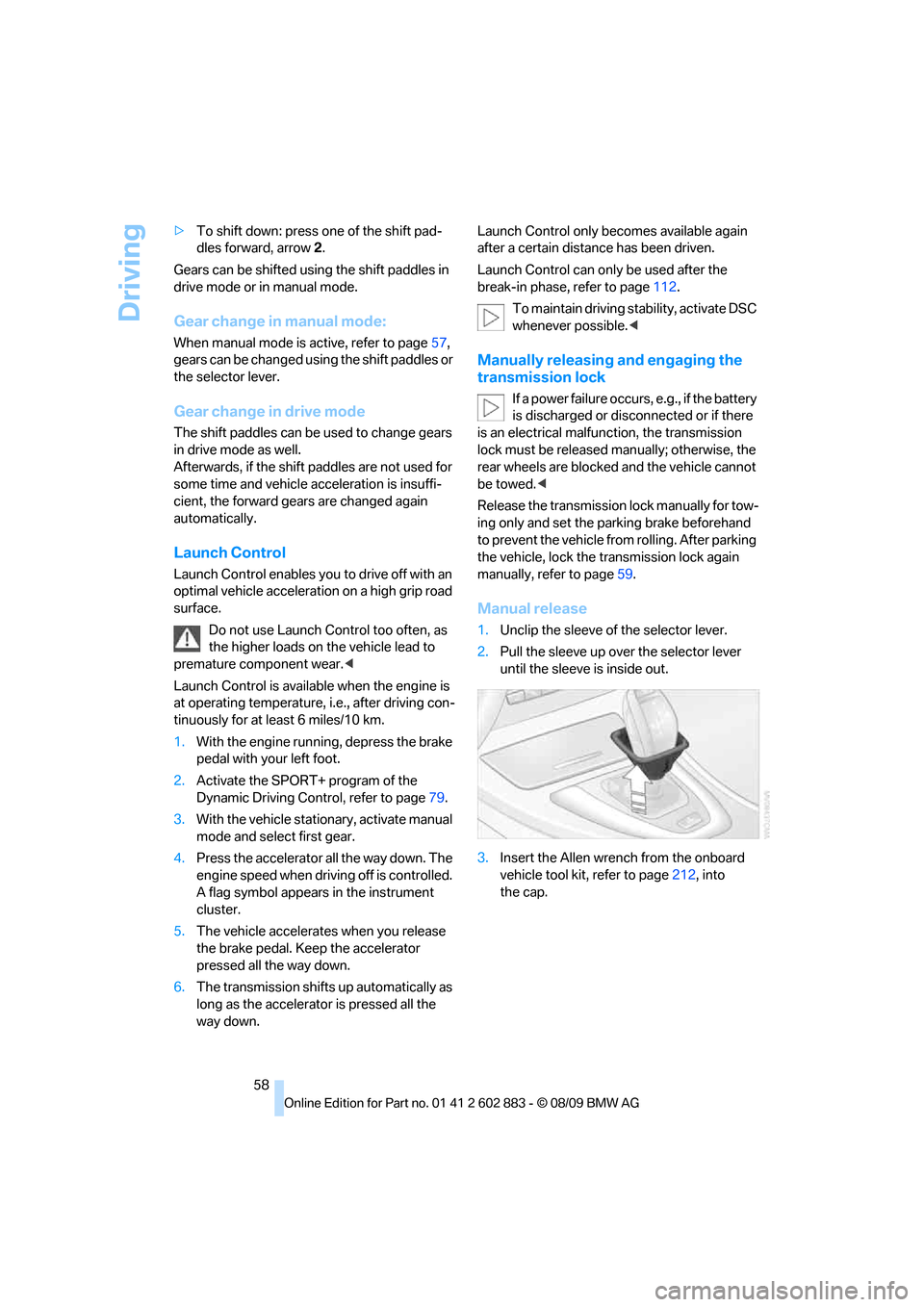
Manual release
1.Unclip the sleeve of the selector lever.
2.Pull the sleeve up over the selector lever
until the sleeve is inside out.
3.Insert the Allen wrench from the onboard
vehicle tool kit, refer to page212, into
the cap.
Page 114 of 254
Things to remember when driving
112
Things to remember when driving
Break-in period
Moving parts need breaking-in time to adjust to
each other. Please follow the instructions below
in order to achieve the optimal service life and
economy of operation for your vehicle.
Engine and differential
Always obey all official speed limits.
Up to 1,200 miles/2,000 km
Drive at varying engine and road speeds, but do
not exceed an engine speed of 4,500 rpm or a
road speed of 100 mph/160 km/h.
Do not drive with full-throttle operation, and do
not use the transmission's kickdown mode or
Launch Control.
After driving 1,200 miles/2,000 km
Engine and vehicle speeds can be gradually
increased.
Tires
Due to technical factors associated with their
manufacture, tires do not achieve their full trac-
tion potential until after an initial break-in
period. Therefore, drive cautiously during the
first 200 miles/300 km.
Brake system
Brakes require an initial break-in period of
approx. 300 miles/500 km to achieve optimized
contact and wear patterns between brake pads
and rotors. Drive cautiously during this break-in
period.
Clutch
The function of the clutch reaches its optimal
level only after a distance driven of approx.
300 miles/500 km. During this break-in period,
engage the clutch gently.
Following part replacement
The same break-in procedures should be
observed if any of the components mentioned
above have to be renewed in the course of the
vehicle's operating life.
Saving fuel
The fuel consumption of your vehicle depends
on several factors. You can lower fuel consump-
tion and the environmental impact by taking
certain measures, adjusting your driving style
and having the vehicle serviced regularly.
Remove any unneeded cargo
Additional weight increases fuel consumption.
Remove any mounted parts after you
have finished using them
Remove additional mirrors and the luggage rack
when they are no longer in use. Mounted parts
affect the vehicle's aerodynamics and increase
fuel consumption.
Close both windows
An open window causes higher air resistance
and thus increases fuel consumption.
Check tire inflation pressure regularly
Check the tire inflation pressure at least twice a
month and before embarking on a long journey,
and correct it if necessary.
Low tire inflation pressure causes higher rolling
resistance and thus increases fuel consumption
and tire wear.
Set off immediately
Do not let the engine warm up while the car is
still standing, but set off immediately at moder-
ate engine speed. This is the fastest way for the
cold engine to reach its operating temperature.
Page 238 of 254
Everything from A to Z
236
Everything from A to Z
Index
A
ABS Antilock Brake
System78
Acceleration assistant, refer to
Launch Control58
Accident, refer to Sending an
Emergency Request218
Activated-charcoal filter for
automatic climate control98
Adaptive light control89
Additional connection of the
music player in the mobile
phone163
Additives
– coolant204
– engine oil204
Address for navigation
– entering121
Adjusting temperature inside
the car, refer to Air
conditioner94
Adjusting temperature inside
the car, refer to Automatic
climate control96
Adjusting the thigh support42
Adjusting the tone during
audio operation, refer to
Tone control140
Airbags85
– indicator/warning lamp87
– sitting safely41
Air conditioner93
Air conditioning mode
– air conditioner94
– automatic climate control96
– ventilation95,98Air distribution
– automatic97
– individual94
– manual94
Air flow rate94,97
Airing, refer to
Ventilation95,98
Air outlets, refer to Air
vents93
Air pressure, refer to Tire
inflation pressure194
Air recirculation, refer to
Recirculated-air
mode94,98
Air supply
– air conditioner94
– automatic climate control96
– ventilation95,98
Air vents93
AKI, refer to Fuel
specifications193
Alarm system33
– avoiding unintentional
alarms34
– interior motion sensor34
– switching off an alarm34
– tilt alarm sensor34
Albums of music
collection160
All-season tires, refer to
Winter tires200
AM, waveband143
Ambient air, refer to
Recirculated-air
mode94,98
Antenna for mobile phone170
Antifreeze
– coolant204
– washer fluid61Antilock Brake System
ABS78
Anti-theft alarm system, refer
to Alarm system33
Anti-theft system29
– for lug bolts, refer to Lug bolt
lock215
Approved axle loads, refer to
Weights228
Approved engine oils, refer to
Specified engine oils204
Approved gross vehicle
weight, refer to Weights228
Armrest, refer to Center
armrest104
Arrival time, refer to
Computer66
Assistance systems, refer to
Driving stability control
systems78
AUC automatic recirculated-
air control98
Audio140
– controls140
– switching on/off140
– tone control140
– volume140
Audio device, external104
Automatic
– air distribution97
– air flow rate97
– cruise control61
– headlamp control88
Automatic car washes208
Automatic climate control93
– automatic air distribution97
Automatic curb monitor46
Page 245 of 254
Reference 243
At a glance
Controls
Driving tips
Communications
Navigation
Entertainment
Mobility
Keyless opening and closing,
refer to Comfort Access34
Key Memory, refer to Personal
Profile28
Kickdown54
– automatic transmission with
Steptronic54
Knock control193
L
Lamps
– automatic headlamp
control88
– parking lamps/low beams88
Lamps and bulbs, replacing
bulbs212
Language, changing on
Control Display75
Lap-and-shoulder belt, refer
to Safety belts44
Lashing eyes, refer to
Securing cargo116
Last destinations124
Launch Control58
Leather care210
LED Light-emitting
diodes212
Length, refer to
Dimensions227
License plate lamp, replacing
bulb215
Light
– high-beam assistant90
– refer to High-beam
assistant90
Light-alloy wheels210
Light-emitting diodes
LED212
Lighter
– connecting electrical
appliances106
Lighting
– instruments91
– lamps and bulbs212
– vehicle, refer to Lamps88Light switch88
Limit, refer to Speed limit74
Load securing equipment,
refer to Securing cargo116
Lockable lug bolts, refer to
Lug bolt lock215
Lock buttons, doors, refer to
Locking32
Locking
– adjusting confirmation
signal31
– from inside32
– from outside30
– without remote control, refer
to Comfort Access34
Locking and unlocking doors
– confirmation signals31
– from inside32
– from outside29
Low beam control, refer to
High-beam assistant90
Low-beam headlamps88
– automatic88
Lower back support, refer to
Lumbar support43
Lug bolt lock215
Luggage compartment lid32
– Comfort Access
35
– emergency release33
– opening from inside32
– opening from outside33
– remote control30
Lumbar support43
M
M+S tires, refer to Winter
tires200
Maintenance, refer to Service
Booklet
Maintenance system206
Malfunction
– automatic transmission with
Steptronic55
– tires81Malfunction warnings, refer to
Check Control73
Managing music161
Manual air distribution94
Manual car wash209
Manual mode, automatic
transmission with
Steptronic54
Manual operation
– door lock31
– driver's door31
– fuel filler flap192
– transmission lock58
– transmission lock, automatic
transmission55
Manual transmission53
Map display132
Map for navigation
– changing scale133
– entering destination126
Master key, refer to Remote
control with integrated
key28
Maximum cooling97
Maximum speed
– with winter tires200
M dual clutch transmission
with Drivelogic
– Launch Control58
– manually releasing
transmission lock58
– neutral56
– reverse gear56
Measurements, refer to
Dimensions227
Memory, refer to Seat and
mirror memory43
MENU button16
Menus, refer to iDrive16
Messages176
Messages from the concierge
service177
Page 251 of 254
Reference 249
At a glance
Controls
Driving tips
Communications
Navigation
Entertainment
Mobility
Top, refer to Retractable
hardtop38
Top 50 of music
collection160
Torque, refer to Engine
data226
Tow bar221
Tow fitting220
– screw thread220
Tow fittings for tow-starting
and towing away220
Towing220
– car with automatic
transmission220
– methods221
Towing and tow-starting220
Town/city, for navigation121
Tow rope222
Tow-starting220,222
TPM, refer to Tire Pressure
Monitor82
Track
– selecting on CD152
Traction control, refer to
Dynamic Stability Control
DSC78
TRACTION program,
Dynamic Driving Control79
Traffic bulletins
– categories135
Traffic bulletins, filtering135
Traffic bulletins for
navigation133
– during destination
guidance135
– in map view135
Traffic jam
– displaying traffic
bulletins133Transmission
– automatic transmission with
Steptronic53
– dual clutch transmission55
– Launch Control58
– manual transmission53
– neutral56
– overriding selector lever lock
for automatic transmission
with Steptronic55
– reverse gear56
– transmission lock, releasing
manually58
Transmission interlock
– refer to Changing selector
lever position54
– refer to P Park54
Transmission lock, releasing
manually58
Transmission positions56
Transporting children
safely48
Transport securing devices,
refer to Securing cargo116
Travel instructions, refer to
Voice instructions132
Tread depth, refer to Minimum
tire tread198
Trip, deleting129
Trip, storing128
Trip-distance counter, refer to
Trip odometer64
Triple turn signal activation60
Trip odometer64
Trips, changing129
Turning circle, refer to
Dimensions227
Turn signal indicators
– indicator/warning lamp12
– triple turn signal60
Turn signals59
Tying down loads, refer to
Cargo loading116
U
Uniform Tire Quality Grading/
UTQR197Units
– average consumption68
– temperature68
Universal garage door opener,
refer to Integrated universal
remote control100
Universal mobile phone
preparation package, refer
to separate Owner's Manual
Universal remote control100
Unlatching, refer to
Unlocking34
Unlocking
– from inside32
– from outside29
– luggage compartment lid35
– setting unlocking
characteristics29
– without remote control, refer
to Comfort Access34
Updating the navigation
data120
USB audio interface163
USB interface103
V
VCD153
Vehicle
– battery216
– breaking in112
– cargo loading115
– Identification Number, refer
to Engine compartment202
– measurements, refer to
Dimensions227
– parking52
– weight228
Vehicle jack215
Vehicle storage211
Ventilation98
– air conditioner95
– draft-free95,98
Ventilation, refer to Climate93
Vents, refer to Air vents93
Vents, refer to
Ventilation95,98
Video menu154
Video playback153