ESP BMW Z4 SDRIVE28I 2012 User Guide
[x] Cancel search | Manufacturer: BMW, Model Year: 2012, Model line: Z4 SDRIVE28I, Model: BMW Z4 SDRIVE28I 2012Pages: 220, PDF Size: 9.9 MB
Page 63 of 220
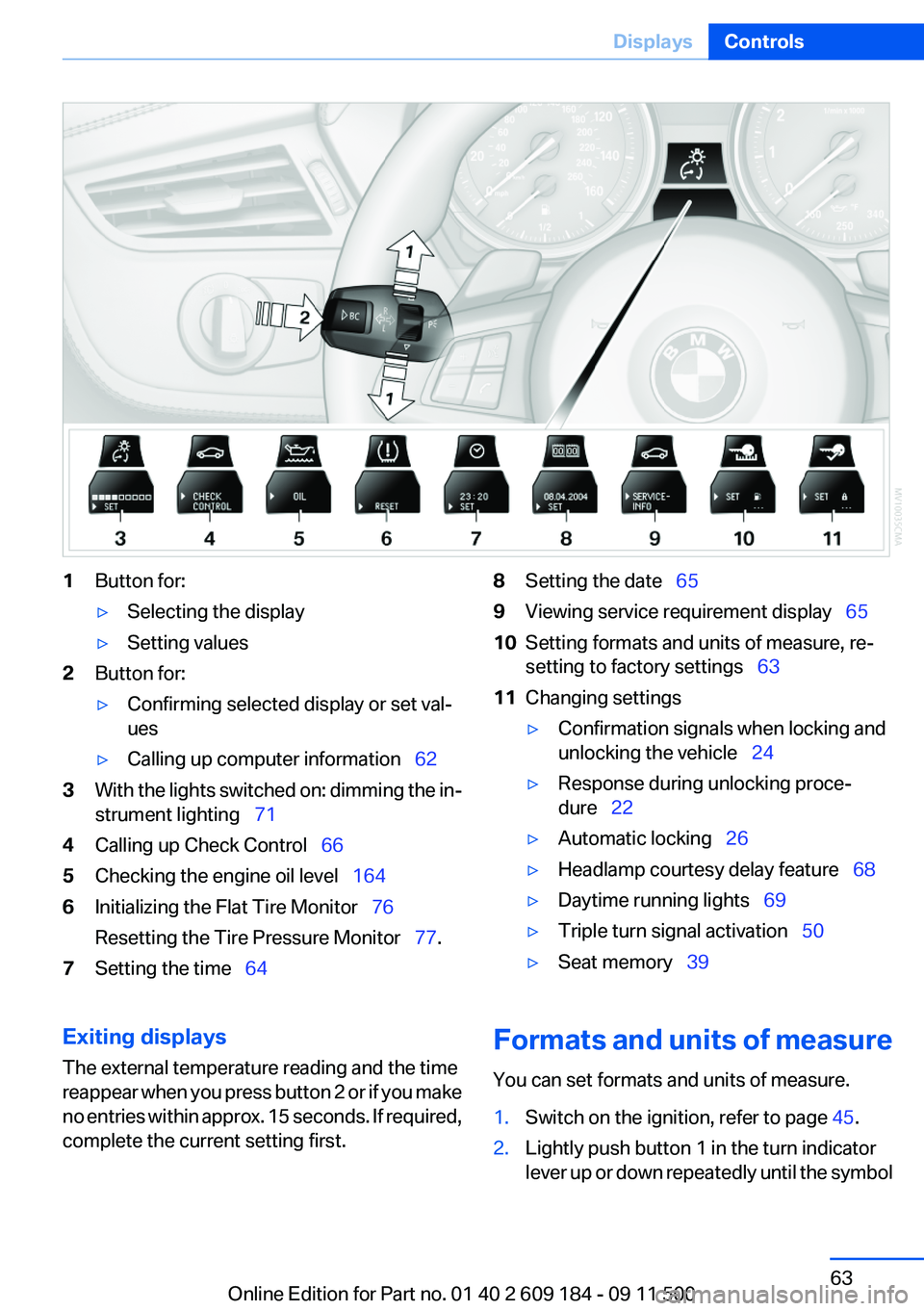
1Button for:▷Selecting the display▷Setting values2Button for:▷Confirming selected display or set val‐
ues▷Calling up computer information 623With the lights switched on: dimming the in‐
strument lighting 714Calling up Check Control 665Checking the engine oil level 1646Initializing the Flat Tire Monitor 76
Resetting the Tire Pressure Monitor 77.7Setting the time 648Setting the date 659Viewing service requirement display 6510Setting formats and units of measure, re‐
setting to factory settings 6311Changing settings▷Confirmation signals when locking and
unlocking the vehicle 24▷Response during unlocking proce‐
dure 22▷Automatic locking 26▷Headlamp courtesy delay feature 68▷Daytime running lights 69▷Triple turn signal activation 50▷Seat memory 39Exiting displays
The external temperature reading and the time
reappear when you press button 2 or if you make
no entries within approx. 15 seconds. If required,
complete the current setting first.Formats and units of measure
You can set formats and units of measure.1.Switch on the ignition, refer to page 45.2.Lightly push button 1 in the turn indicator
lever up or down repeatedly until the symbolSeite 63DisplaysControls63
Online Edition for Part no. 01 40 2 609 184 - 09 11 500
Page 67 of 220
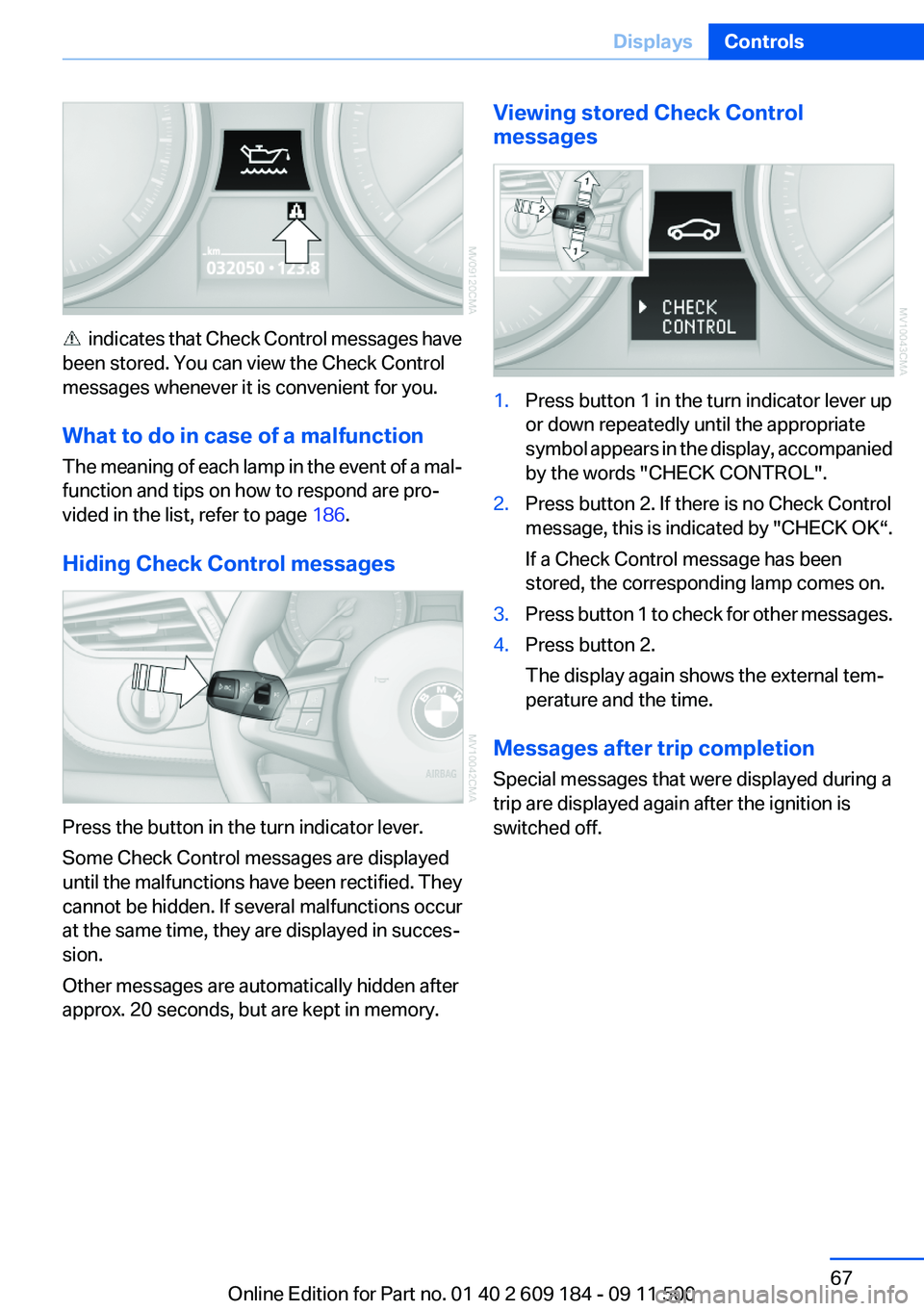
indicates that Check Control messages have
been stored. You can view the Check Control
messages whenever it is convenient for you.
What to do in case of a malfunction
The meaning of each lamp in the event of a mal‐
function and tips on how to respond are pro‐
vided in the list, refer to page 186.
Hiding Check Control messages
Press the button in the turn indicator lever.
Some Check Control messages are displayed
until the malfunctions have been rectified. They
cannot be hidden. If several malfunctions occur
at the same time, they are displayed in succes‐
sion.
Other messages are automatically hidden after
approx. 20 seconds, but are kept in memory.
Viewing stored Check Control
messages1.Press button 1 in the turn indicator lever up
or down repeatedly until the appropriate
symbol appears in the display, accompanied
by the words "CHECK CONTROL".2.Press button 2. If there is no Check Control
message, this is indicated by "CHECK OK“.
If a Check Control message has been
stored, the corresponding lamp comes on.3.Press button 1 to check for other messages.4.Press button 2.
The display again shows the external tem‐
perature and the time.
Messages after trip completion
Special messages that were displayed during a
trip are displayed again after the ignition is
switched off.
Seite 67DisplaysControls67
Online Edition for Part no. 01 40 2 609 184 - 09 11 500
Page 69 of 220
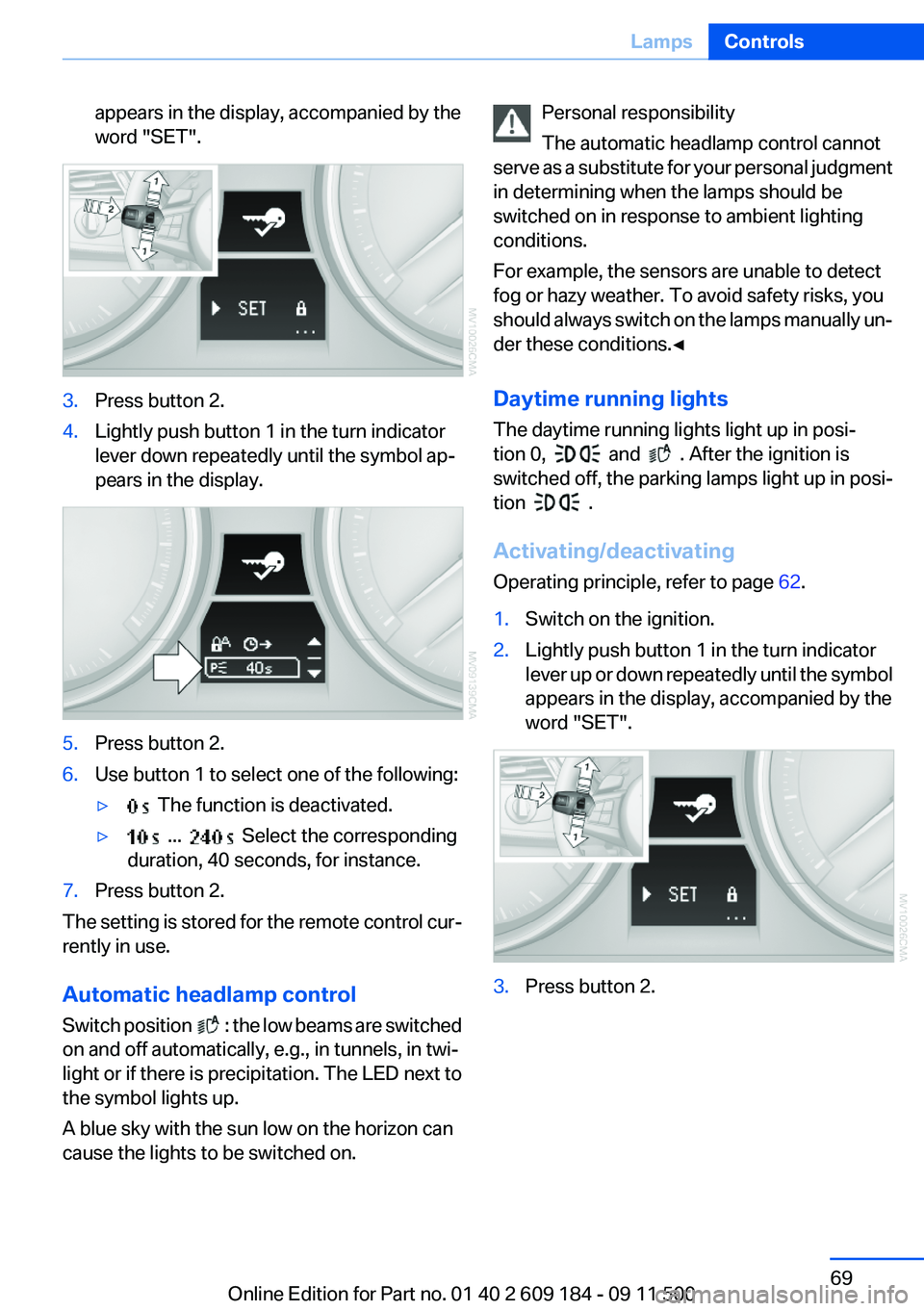
appears in the display, accompanied by the
word "SET".3.Press button 2.4.Lightly push button 1 in the turn indicator
lever down repeatedly until the symbol ap‐
pears in the display.5.Press button 2.6.Use button 1 to select one of the following:▷ The function is deactivated.▷ ... Select the corresponding
duration, 40 seconds, for instance.7.Press button 2.
The setting is stored for the remote control cur‐
rently in use.
Automatic headlamp control
Switch position
: the low beams are switched
on and off automatically, e.g., in tunnels, in twi‐
light or if there is precipitation. The LED next to
the symbol lights up.
A blue sky with the sun low on the horizon can
cause the lights to be switched on.
Personal responsibility
The automatic headlamp control cannot
serve as a substitute for your personal judgment
in determining when the lamps should be
switched on in response to ambient lighting
conditions.
For example, the sensors are unable to detect
fog or hazy weather. To avoid safety risks, you
should always switch on the lamps manually un‐
der these conditions.◀
Daytime running lights
The daytime running lights light up in posi‐
tion 0,
and . After the ignition is
switched off, the parking lamps light up in posi‐
tion
.
Activating/deactivating
Operating principle, refer to page 62.
1.Switch on the ignition.2.Lightly push button 1 in the turn indicator
lever up or down repeatedly until the symbol
appears in the display, accompanied by the
word "SET".3.Press button 2.Seite 69LampsControls69
Online Edition for Part no. 01 40 2 609 184 - 09 11 500
Page 71 of 220
High-beam Assistant
The concept
When the lights are switched on, this system
automatically switches the high beams on and
off. The procedure is controlled by a sensor on
the front of the interior rearview mirror. The as‐
sistant ensures that the high beams are
switched on whenever the traffic situation al‐
lows. The driver can intervene at any time and
switch the high beams on and off as usual.
Activating the High-beam Assistant1.Turn the light switch to .2.With the low beams switched on, briefly
push the turn indicator lever in the direction
of the high beam.
The indicator lamp in the instrument
cluster lights up.
When the lights are switched on, the
high beams are switched on and off automati‐
cally.
The system responds to light from oncoming
traffic and traffic driving ahead of you, and to ad‐
equate illumination, e.g., in towns and cities.
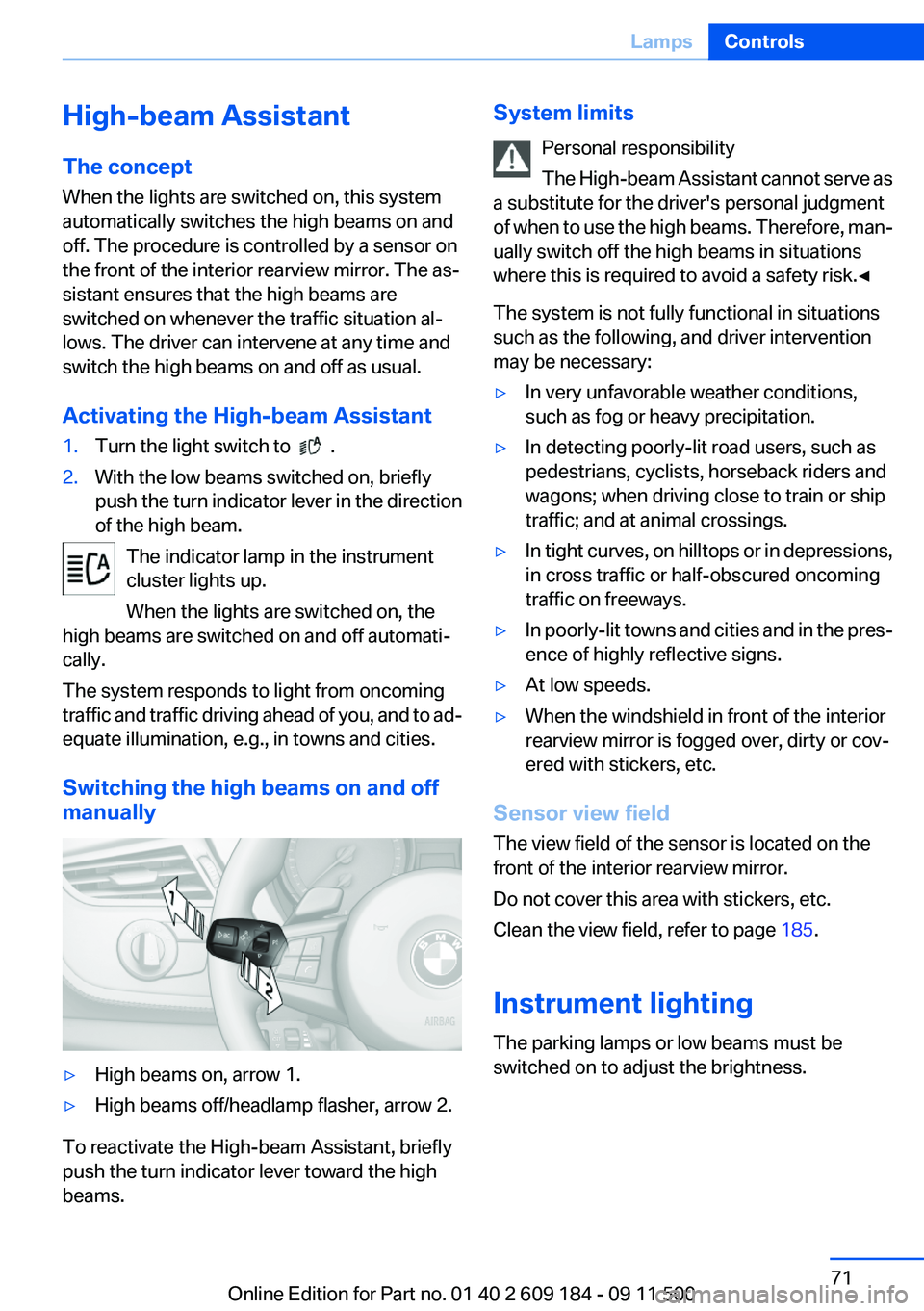
Switching the high beams on and off
manually
▷High beams on, arrow 1.▷High beams off/headlamp flasher, arrow 2.
To reactivate the High-beam Assistant, briefly
push the turn indicator lever toward the high
beams.
System limits
Personal responsibility
The High-beam Assistant cannot serve as
a substitute for the driver's personal judgment
of when to use the high beams. Therefore, man‐
ually switch off the high beams in situations
where this is required to avoid a safety risk.◀
The system is not fully functional in situations
such as the following, and driver intervention
may be necessary:▷In very unfavorable weather conditions,
such as fog or heavy precipitation.▷In detecting poorly-lit road users, such as
pedestrians, cyclists, horseback riders and
wagons; when driving close to train or ship
traffic; and at animal crossings.▷In tight curves, on hilltops or in depressions,
in cross traffic or half-obscured oncoming
traffic on freeways.▷In poorly-lit towns and cities and in the pres‐
ence of highly reflective signs.▷At low speeds.▷When the windshield in front of the interior
rearview mirror is fogged over, dirty or cov‐
ered with stickers, etc.
Sensor view field
The view field of the sensor is located on the
front of the interior rearview mirror.
Do not cover this area with stickers, etc.
Clean the view field, refer to page 185.
Instrument lighting
The parking lamps or low beams must be
switched on to adjust the brightness.
Seite 71LampsControls71
Online Edition for Part no. 01 40 2 609 184 - 09 11 500
Page 73 of 220
SafetyVehicle equipment
This chapter describes all series equipment as
well as country-specific and special equipment
offered for this model series.Therefore, it also
describes equipment that may not be found in
your vehicle, for instance due to the selected
special equipment or the country version. This
also applies to safety-related functions and sys‐
tems.
Airbags
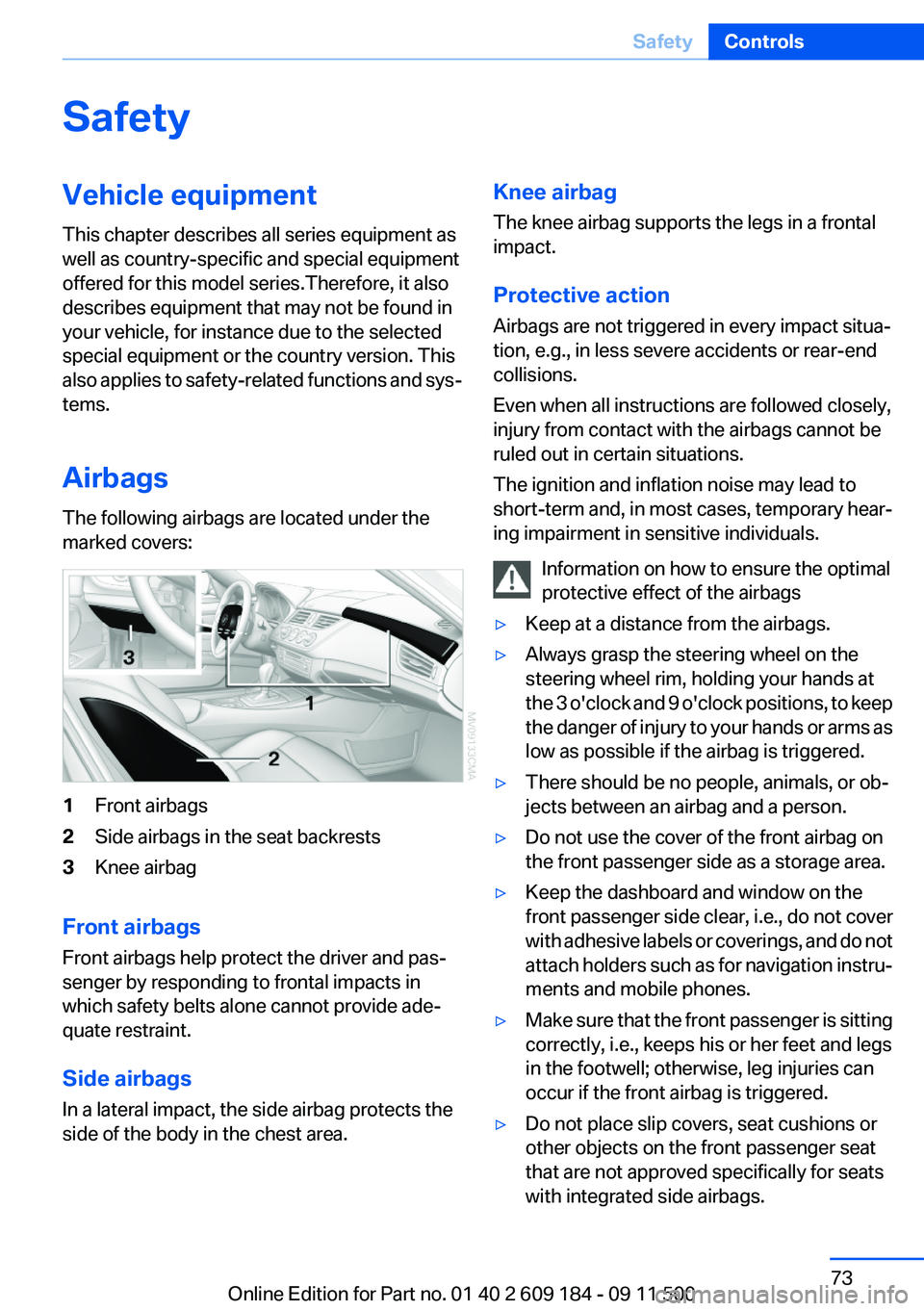
The following airbags are located under the
marked covers:1Front airbags2Side airbags in the seat backrests3Knee airbag
Front airbags
Front airbags help protect the driver and pas‐
senger by responding to frontal impacts in
which safety belts alone cannot provide ade‐
quate restraint.
Side airbags
In a lateral impact, the side airbag protects the
side of the body in the chest area.
Knee airbag
The knee airbag supports the legs in a frontal
impact.
Protective action
Airbags are not triggered in every impact situa‐
tion, e.g., in less severe accidents or rear-end
collisions.
Even when all instructions are followed closely,
injury from contact with the airbags cannot be
ruled out in certain situations.
The ignition and inflation noise may lead to
short-term and, in most cases, temporary hear‐
ing impairment in sensitive individuals.
Information on how to ensure the optimal
protective effect of the airbags▷Keep at a distance from the airbags.▷Always grasp the steering wheel on the
steering wheel rim, holding your hands at
the 3 o'clock and 9 o'clock positions, to keep
the danger of injury to your hands or arms as
low as possible if the airbag is triggered.▷There should be no people, animals, or ob‐
jects between an airbag and a person.▷Do not use the cover of the front airbag on
the front passenger side as a storage area.▷Keep the dashboard and window on the
front passenger side clear, i.e., do not cover
with adhesive labels or coverings, and do not
attach holders such as for navigation instru‐
ments and mobile phones.▷Make sure that the front passenger is sitting
correctly, i.e., keeps his or her feet and legs
in the footwell; otherwise, leg injuries can
occur if the front airbag is triggered.▷Do not place slip covers, seat cushions or
other objects on the front passenger seat
that are not approved specifically for seats
with integrated side airbags.Seite 73SafetyControls73
Online Edition for Part no. 01 40 2 609 184 - 09 11 500
Page 75 of 220
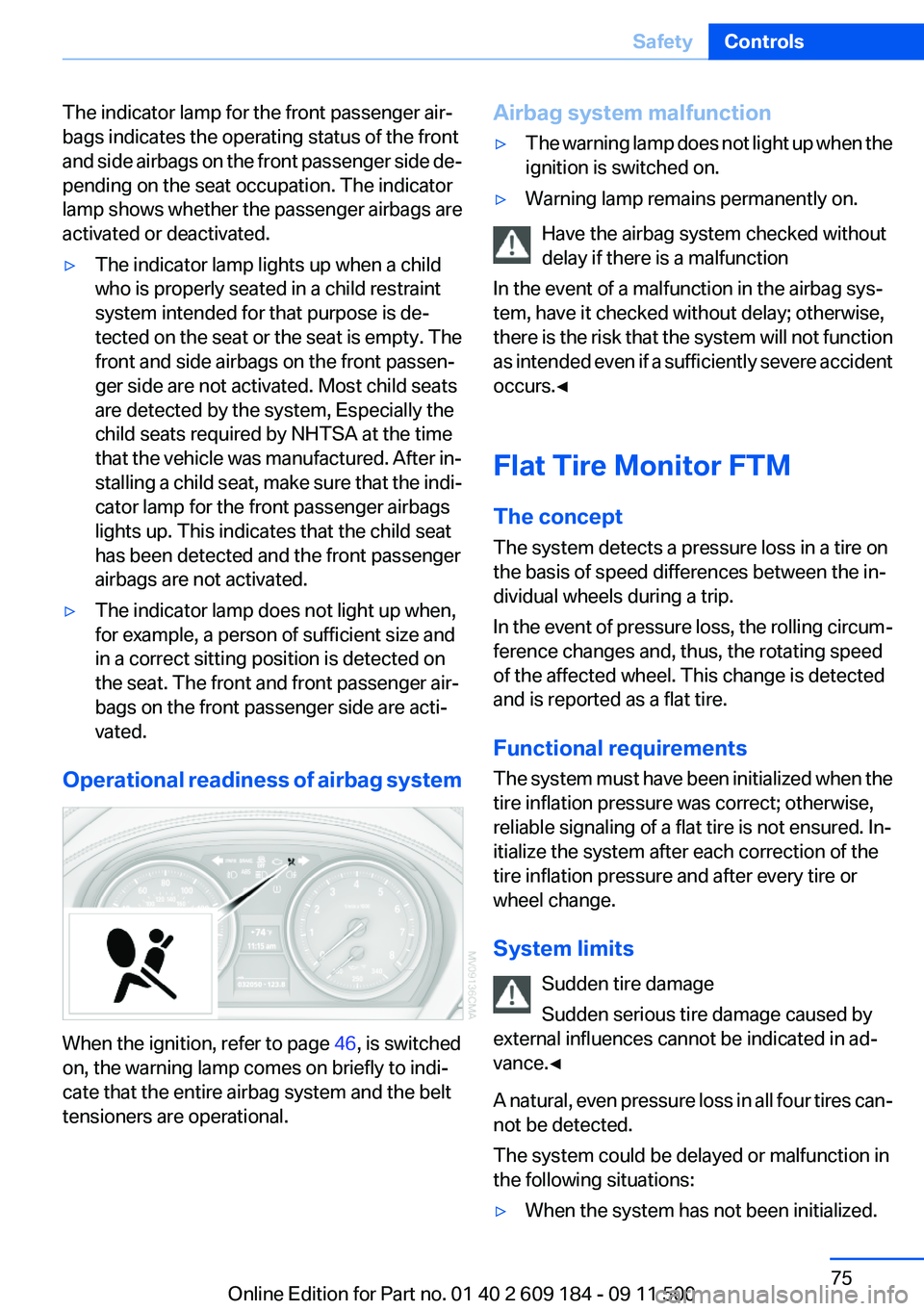
The indicator lamp for the front passenger air‐
bags indicates the operating status of the front
and side airbags on the front passenger side de‐
pending on the seat occupation. The indicator
lamp shows whether the passenger airbags are
activated or deactivated.▷The indicator lamp lights up when a child
who is properly seated in a child restraint
system intended for that purpose is de‐
tected on the seat or the seat is empty. The
front and side airbags on the front passen‐
ger side are not activated. Most child seats
are detected by the system, Especially the
child seats required by NHTSA at the time
that the vehicle was manufactured. After in‐
stalling a child seat, make sure that the indi‐
cator lamp for the front passenger airbags
lights up. This indicates that the child seat
has been detected and the front passenger
airbags are not activated.▷The indicator lamp does not light up when,
for example, a person of sufficient size and
in a correct sitting position is detected on
the seat. The front and front passenger air‐
bags on the front passenger side are acti‐
vated.
Operational readiness of airbag system
When the ignition, refer to page 46, is switched
on, the warning lamp comes on briefly to indi‐
cate that the entire airbag system and the belt
tensioners are operational.
Airbag system malfunction▷The warning lamp does not light up when the
ignition is switched on.▷Warning lamp remains permanently on.
Have the airbag system checked without
delay if there is a malfunction
In the event of a malfunction in the airbag sys‐
tem, have it checked without delay; otherwise,
there is the risk that the system will not function
as intended even if a sufficiently severe accident
occurs.◀
Flat Tire Monitor FTM
The concept
The system detects a pressure loss in a tire on
the basis of speed differences between the in‐
dividual wheels during a trip.
In the event of pressure loss, the rolling circum‐
ference changes and, thus, the rotating speed
of the affected wheel. This change is detected
and is reported as a flat tire.
Functional requirements
The system must have been initialized when the
tire inflation pressure was correct; otherwise,
reliable signaling of a flat tire is not ensured. In‐
itialize the system after each correction of the
tire inflation pressure and after every tire or
wheel change.
System limits Sudden tire damage
Sudden serious tire damage caused by
external influences cannot be indicated in ad‐
vance.◀
A natural, even pressure loss in all four tires can‐
not be detected.
The system could be delayed or malfunction in
the following situations:
▷When the system has not been initialized.Seite 75SafetyControls75
Online Edition for Part no. 01 40 2 609 184 - 09 11 500
Page 81 of 220
Driving stability control systemsVehicle equipment
This chapter describes all series equipment as
well as country-specific and special equipment
offered for this model series.Therefore, it also
describes equipment that may not be found in
your vehicle, for instance due to the selected
special equipment or the country version. This
also applies to safety-related functions and sys‐
tems.
Antilock Brake System ABS
ABS prevents locking of the wheels during brak‐
ing.
The vehicle remains steerable even during full
brake applications, thus increasing active
safety.
ABS is operational every time you start the en‐
gine.
Electronic brake-force
distribution
The system controls the brake pressure in the
rear wheels to ensure stable braking behavior.
Dynamic Brake Control DBC
When you apply the brakes rapidly, this system
automatically produces the maximum braking
force boost. It thus helps to achieve the shortest
possible braking distance during full braking.
This system utilizes all of the benefits provided
by ABS.
Do not reduce the pressure on the brake pedal
for the duration of the full braking.Dynamic Stability Control
DSC
The concept
DSC prevents traction loss in the driving wheels
when driving away and accelerating.
DSC also recognizes unstable vehicle condi‐
tions, such as fishtailing or nose-diving. Subject
to physical limits, DSC helps to keep the vehicle
on a steady course by reducing engine speed
and by applying brakes to the individual wheels.
Adjust your driving style to the situation
An appropriate driving style is always the
responsibility of the driver.
The laws of physics cannot be repealed, even
with DSC.
Therefore, do not reduce the additional safety
margin by driving in a risky manner.◀
Activating/deactivating DSC
DSC can be deactivated/activated via the DSC
OFF program of the Dynamic Driving Control,
refer to page 82.
For better control The DSC indicator lamp flashes: DSC is
controlling the drive forces and brake
forces.
The DSC indicator lamp lights up: DSC has
failed.Seite 81Driving stability control systemsControls81
Online Edition for Part no. 01 40 2 609 184 - 09 11 500
Page 90 of 220
supply continuously; the levers change the
direction of the airflow.5Air vent: air for the knee area, footwell
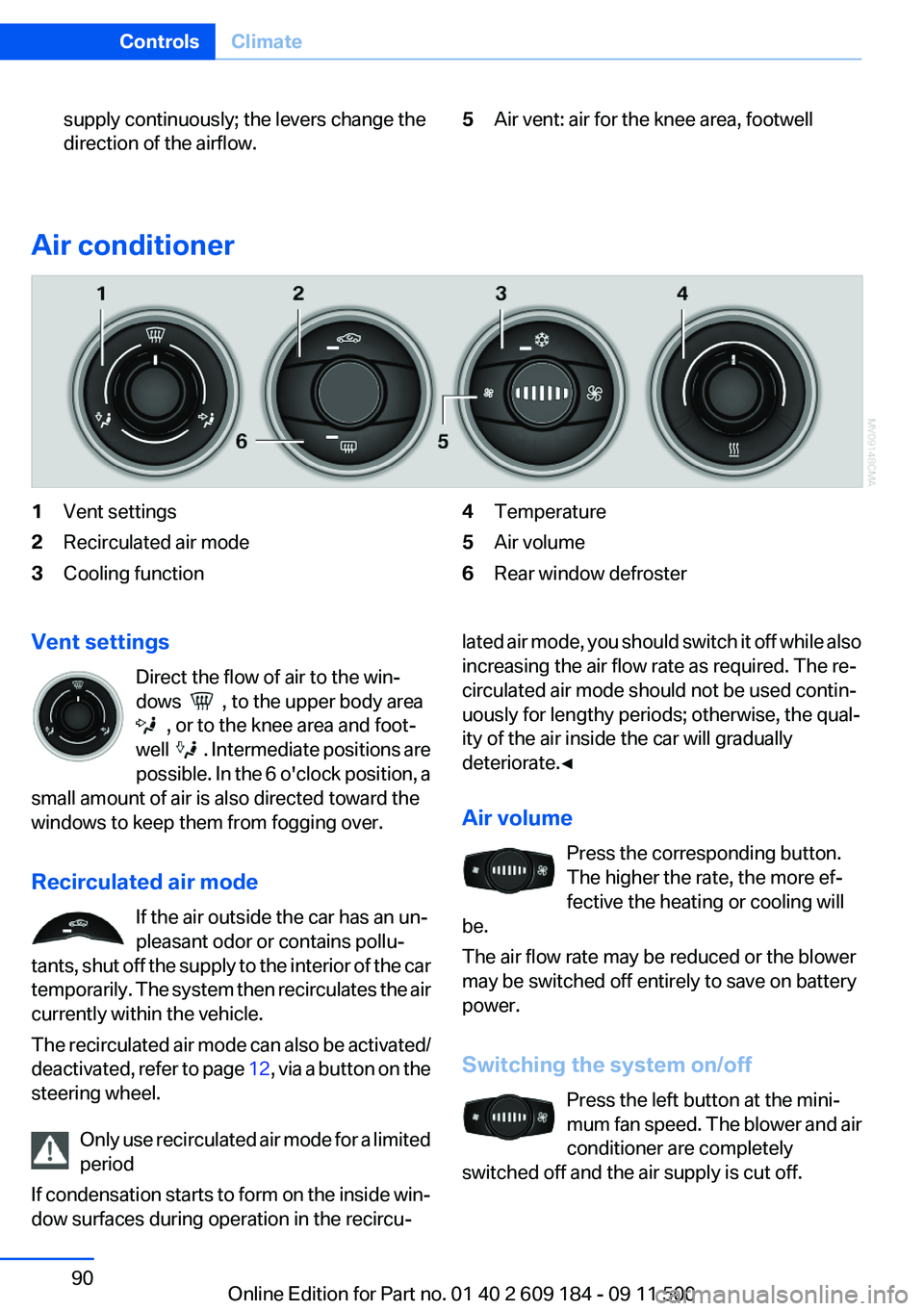
Air conditioner
1Vent settings2Recirculated air mode3Cooling function4Temperature5Air volume6Rear window defrosterVent settings
Direct the flow of air to the win‐
dows
, to the upper body area
, or to the knee area and foot‐
well
. Intermediate positions are
possible. In the 6 o'clock position, a
small amount of air is also directed toward the
windows to keep them from fogging over.
Recirculated air mode If the air outside the car has an un‐
pleasant odor or contains pollu‐
tants, shut off the supply to the interior of the car
temporarily. The system then recirculates the air
currently within the vehicle.
The recirculated air mode can also be activated/
deactivated, refer to page 12, via a button on the
steering wheel.
Only use recirculated air mode for a limited
period
If condensation starts to form on the inside win‐
dow surfaces during operation in the recircu‐
lated air mode, you should switch it off while also
increasing the air flow rate as required. The re‐
circulated air mode should not be used contin‐
uously for lengthy periods; otherwise, the qual‐
ity of the air inside the car will gradually
deteriorate.◀
Air volume Press the corresponding button.
The higher the rate, the more ef‐
fective the heating or cooling will
be.
The air flow rate may be reduced or the blower
may be switched off entirely to save on battery
power.
Switching the system on/off Press the left button at the mini‐
mum fan speed. The blower and air
conditioner are completely
switched off and the air supply is cut off.Seite 90ControlsClimate90
Online Edition for Part no. 01 40 2 609 184 - 09 11 500
Page 92 of 220
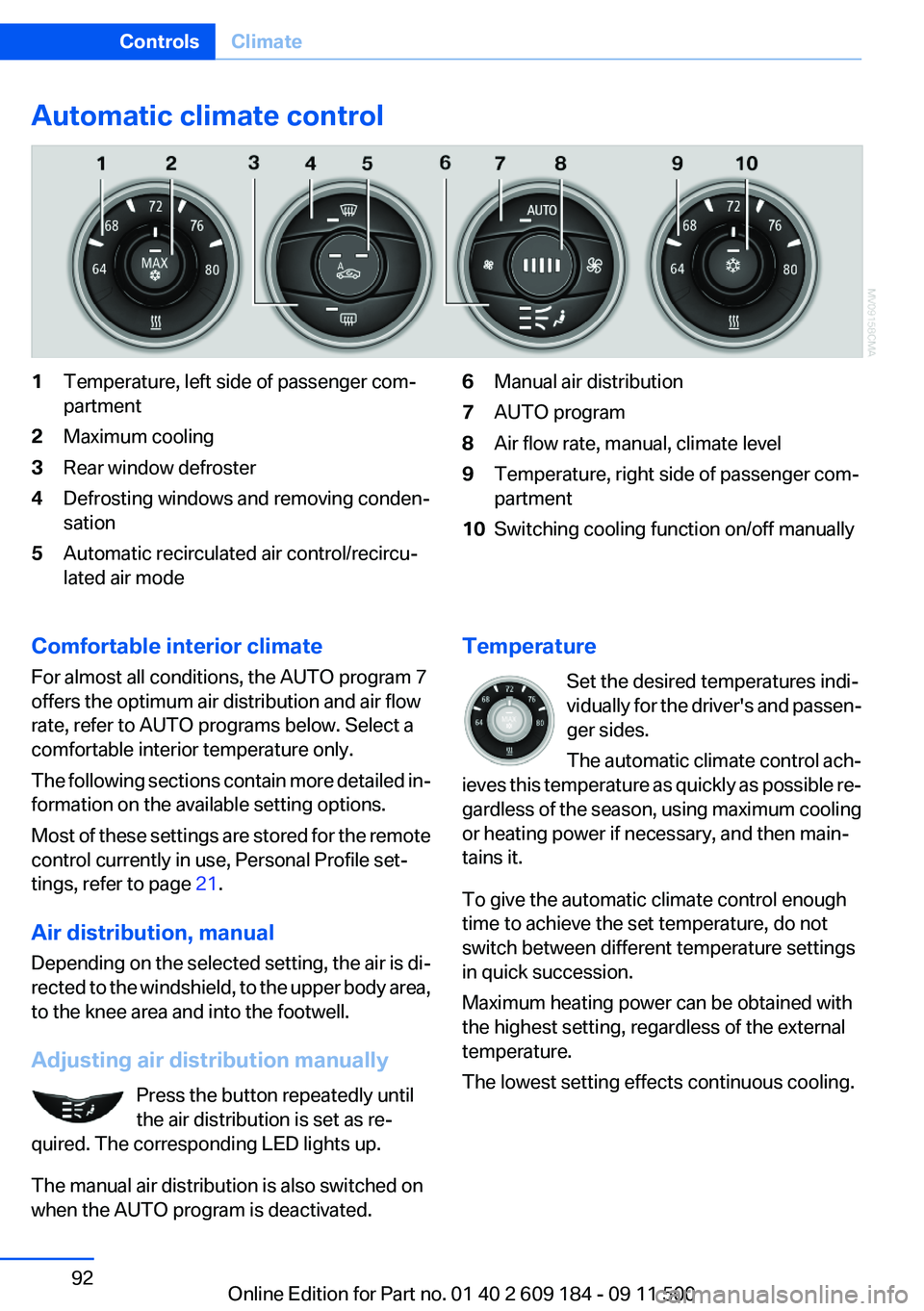
Automatic climate control1Temperature, left side of passenger com‐
partment2Maximum cooling3Rear window defroster4Defrosting windows and removing conden‐
sation5Automatic recirculated air control/recircu‐
lated air mode6Manual air distribution7AUTO program8Air flow rate, manual, climate level9Temperature, right side of passenger com‐
partment10Switching cooling function on/off manuallyComfortable interior climate
For almost all conditions, the AUTO program 7
offers the optimum air distribution and air flow
rate, refer to AUTO programs below. Select a
comfortable interior temperature only.
The following sections contain more detailed in‐
formation on the available setting options.
Most of these settings are stored for the remote
control currently in use, Personal Profile set‐
tings, refer to page 21.
Air distribution, manual
Depending on the selected setting, the air is di‐
rected to the windshield, to the upper body area,
to the knee area and into the footwell.
Adjusting air distribution manually Press the button repeatedly until
the air distribution is set as re‐
quired. The corresponding LED lights up.
The manual air distribution is also switched on
when the AUTO program is deactivated.Temperature
Set the desired temperatures indi‐
vidually for the driver's and passen‐
ger sides.
The automatic climate control ach‐
ieves this temperature as quickly as possible re‐
gardless of the season, using maximum cooling
or heating power if necessary, and then main‐
tains it.
To give the automatic climate control enough
time to achieve the set temperature, do not
switch between different temperature settings
in quick succession.
Maximum heating power can be obtained with
the highest setting, regardless of the external
temperature.
The lowest setting effects continuous cooling.Seite 92ControlsClimate92
Online Edition for Part no. 01 40 2 609 184 - 09 11 500
Page 97 of 220
distance depends on the particular hand-
held transmitter.4.Press the button of the desired function on
the hand-held transmitter and the button
being programmed on the interior rearview
mirror simultaneously and hold. The LED on
the interior rearview mirror flashes slowly at
first.5.When the LED flashes more rapidly, release
both buttons. Rapid flashing indicates that
the button on the interior rearview mirror has
been programmed.
If the LED does not flash faster after 60 sec‐
onds, change the distance between the in‐
terior rearview mirror and the hand-held
transmitter and repeat the step. Multiple tri‐
als at different distances may be necessary.
Wait at least 15 seconds between trials.
Canada: If the programming procedure with
the hand-held transmitter was interrupted,
press and hold the button on the interior
rearview mirror and press the button on the
hand-held transmitter multiple times for
2 seconds each and release.6.To program additional functions on other
buttons, repeat steps 3 to 5.
The systems can be operated with the buttons
on the interior rearview mirror.
Special characteristics of alternating-
code radio systems
If the system cannot be operated after repeated
programming, check whether the system to be
operated uses an alternating-code system.
Read the operating instructions of the system or
press and hold the programmed button on the
interior rearview mirror. If the LED on the interior
rearview mirror flashes rapidly at first and then
lights up continuously for 2 seconds, the system
is equipped with an alternating-code system.
This flashing LED pattern repeats itself for ap‐
prox. 20 seconds.
In systems with an alternating-code system, the
Universal Garage Door Opener and the system
must be additionally synchronized.
Please obtain additional information on syn‐
chronization in the operating instructions of the
system being set up.
The systems will be easier to synchronize with
the aid of a second person.
Synchronization:1.Park the vehicle within range of the remote-
controlled system.2.Program the corresponding button on the
interior rearview mirror as described.3.Identify and press the synchronization but‐
ton on the system being set up. You have
approx. 30 seconds for the next step.4.Press and hold the button on the interior
rearview mirror for approx. 3 seconds and
then release it. Repeat this step up to three
times if necessary to complete the synchro‐
nization procedure. When synchronization
is completed, the programmed function is
executed.
Reprogramming individual buttons
1.Switch on the ignition.2.Hold the hand-held transmitter at a distance
of approx. 1 to 3 in/2.5 to 8 cm from the
memory buttons.
The required distance depends on the par‐
ticular hand-held transmitter.3.Press the memory button of the Universal
Garage Door Opener.4.If the LED flashes slowly after approx.
20 seconds, press the transmit button on
the hand-held transmitter.5.Release both buttons when the LED flashes
rapidly.
If the LED does not flash rapidly after approx.
60 seconds, change the distance and repeat
the step.Seite 97Interior equipmentControls97
Online Edition for Part no. 01 40 2 609 184 - 09 11 500