change wheel BMW Z4 SDRIVE28I 2012 User Guide
[x] Cancel search | Manufacturer: BMW, Model Year: 2012, Model line: Z4 SDRIVE28I, Model: BMW Z4 SDRIVE28I 2012Pages: 220, PDF Size: 9.9 MB
Page 90 of 220
supply continuously; the levers change the
direction of the airflow.5Air vent: air for the knee area, footwell
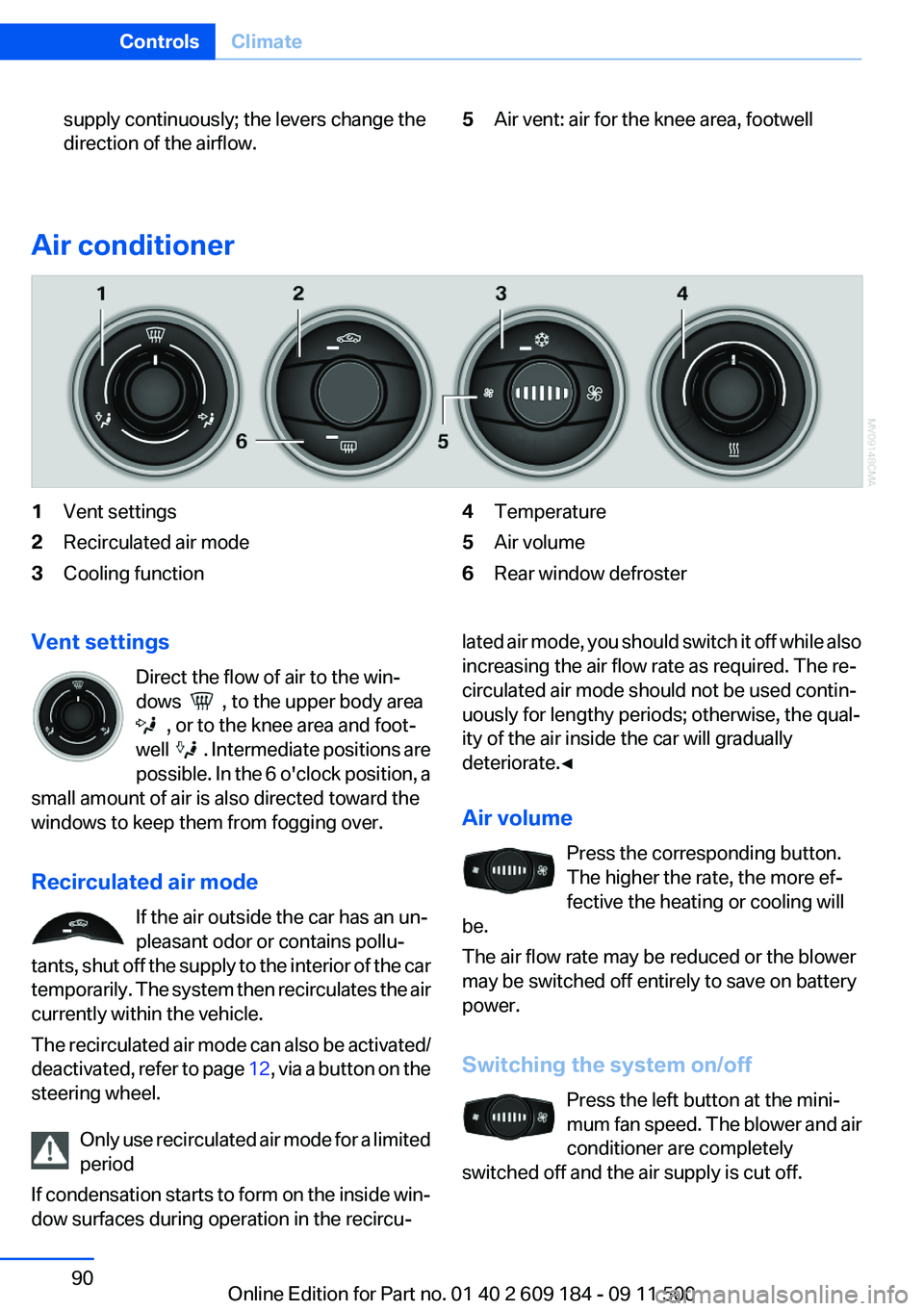
Air conditioner
1Vent settings2Recirculated air mode3Cooling function4Temperature5Air volume6Rear window defrosterVent settings
Direct the flow of air to the win‐
dows
, to the upper body area
, or to the knee area and foot‐
well
. Intermediate positions are
possible. In the 6 o'clock position, a
small amount of air is also directed toward the
windows to keep them from fogging over.
Recirculated air mode If the air outside the car has an un‐
pleasant odor or contains pollu‐
tants, shut off the supply to the interior of the car
temporarily. The system then recirculates the air
currently within the vehicle.
The recirculated air mode can also be activated/
deactivated, refer to page 12, via a button on the
steering wheel.
Only use recirculated air mode for a limited
period
If condensation starts to form on the inside win‐
dow surfaces during operation in the recircu‐
lated air mode, you should switch it off while also
increasing the air flow rate as required. The re‐
circulated air mode should not be used contin‐
uously for lengthy periods; otherwise, the qual‐
ity of the air inside the car will gradually
deteriorate.◀
Air volume Press the corresponding button.
The higher the rate, the more ef‐
fective the heating or cooling will
be.
The air flow rate may be reduced or the blower
may be switched off entirely to save on battery
power.
Switching the system on/off Press the left button at the mini‐
mum fan speed. The blower and air
conditioner are completely
switched off and the air supply is cut off.Seite 90ControlsClimate90
Online Edition for Part no. 01 40 2 609 184 - 09 11 500
Page 91 of 220
To switch on the air conditioner, set the desired
air flow rate.
Switching cooling function on/off The cooling function cools and de‐
humidifies the incoming air before
reheating it as required, according to the tem‐
perature setting. This function is only available
while the engine is running.
The cooling function helps to prevent conden‐
sation on the windows or to remove it quickly.
Depending on the weather, the windshield may
fog over briefly when the engine is started.
Rear window defroster The defroster switches off auto‐
matically after a certain time or
when the hardtop is opened.
Temperature To increase the temperature, turn
the rotary switch clockwise to‐
wards red. For a lower temperature,
turn the rotary switch counter‐
clockwise towards blue.
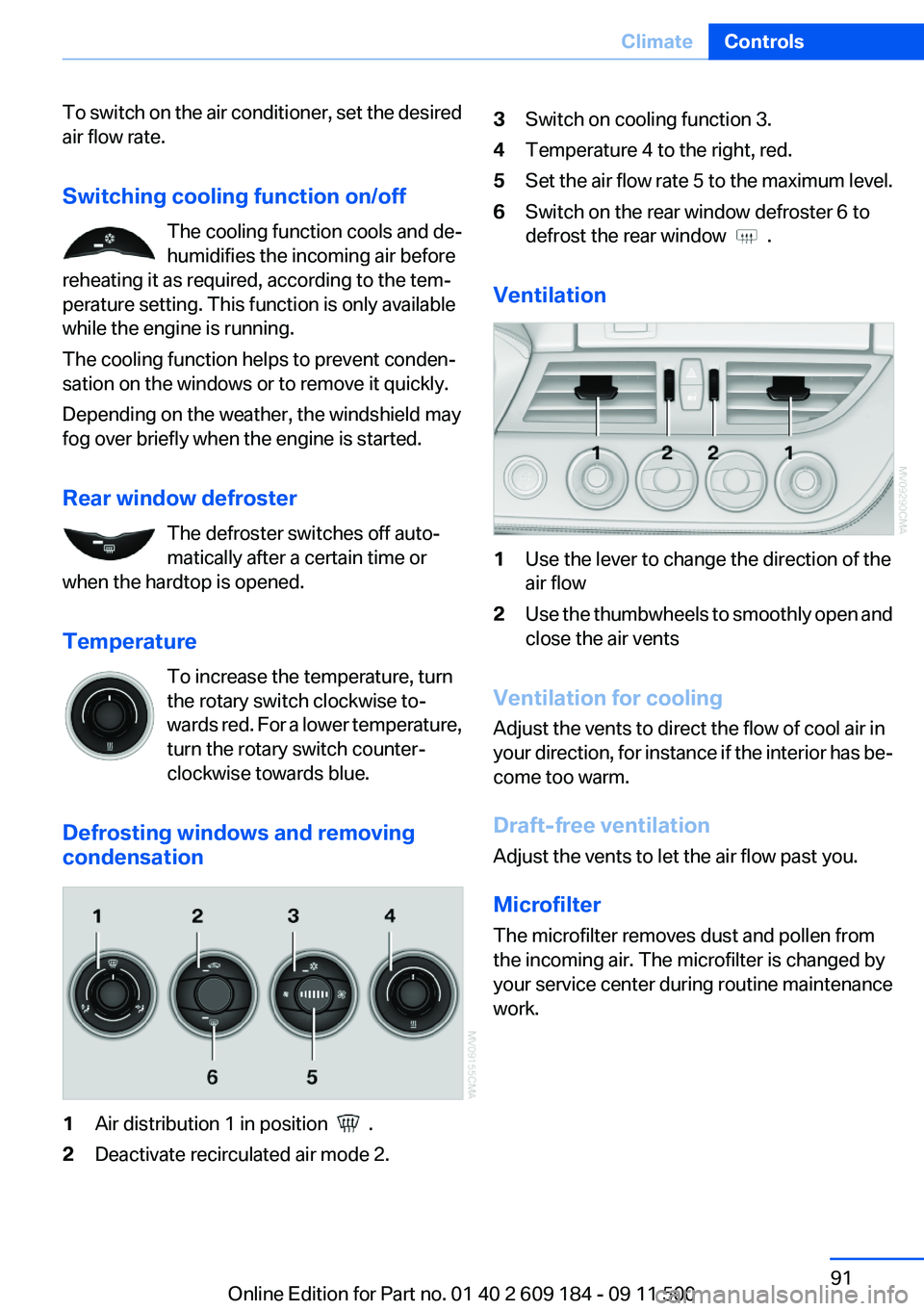
Defrosting windows and removing
condensation1Air distribution 1 in position .2Deactivate recirculated air mode 2.3Switch on cooling function 3.4Temperature 4 to the right, red.5Set the air flow rate 5 to the maximum level.6Switch on the rear window defroster 6 to
defrost the rear window
.
Ventilation
1Use the lever to change the direction of the
air flow2Use the thumbwheels to smoothly open and
close the air vents
Ventilation for cooling
Adjust the vents to direct the flow of cool air in
your direction, for instance if the interior has be‐
come too warm.
Draft-free ventilation
Adjust the vents to let the air flow past you.
Microfilter
The microfilter removes dust and pollen from
the incoming air. The microfilter is changed by
your service center during routine maintenance
work.
Seite 91ClimateControls91
Online Edition for Part no. 01 40 2 609 184 - 09 11 500
Page 94 of 220
Press any button except the rear window de‐
froster to reactivate the automatic climate con‐
trol.
Residual heat
The heat stored in the engine is used to heat the
interior.
This function can be switched on
using the right-hand button under
the following conditions:▷Up to 15 minutes after switching off the en‐
gine.▷When the engine is warm.▷With sufficient battery voltage.▷At an external temperature under 77 ℉/
25 ℃.
The middle LED is lit when the function is on.
Automatic recirculated air mode/
recirculated air mode
Switch on the desired operating
mode by pressing this button re‐
peatedly:
▷LED off: outside air flows in
continuously.▷Left LED on, automatic recirculated air con‐
trol: a sensor detects pollutants in the out‐
side air. If necessary, the system blocks the
supply of outside air and recirculates the in‐
side air. As soon as the concentration of pol‐
lutants in the outside air has decreased suf‐
ficiently, the system automatically switches
back to outside air supply.▷Right LED on, recirculated air mode: the
supply of outside air into the vehicle is per‐
manently blocked. The system then recir‐
culates the air currently within the vehicle.
Only use recirculated air mode for a limited
period
If condensation starts to form on the inside win‐
dow surfaces during operation in the recircu‐
lated air mode, you should switch it off while also
increasing the air flow rate as required. The re‐
circulated air mode should not be used for an
extended period of time, as the air quality inside
the vehicle deteriorates steadily.◀
Defrosting and defogging windows Quickly removes ice and conden‐
sation from the windshield and
front side windows.
For this purpose, also switch on the cooling
function.
Rear window defroster The defroster switches off auto‐
matically after a certain time or
when the hardtop is opened.
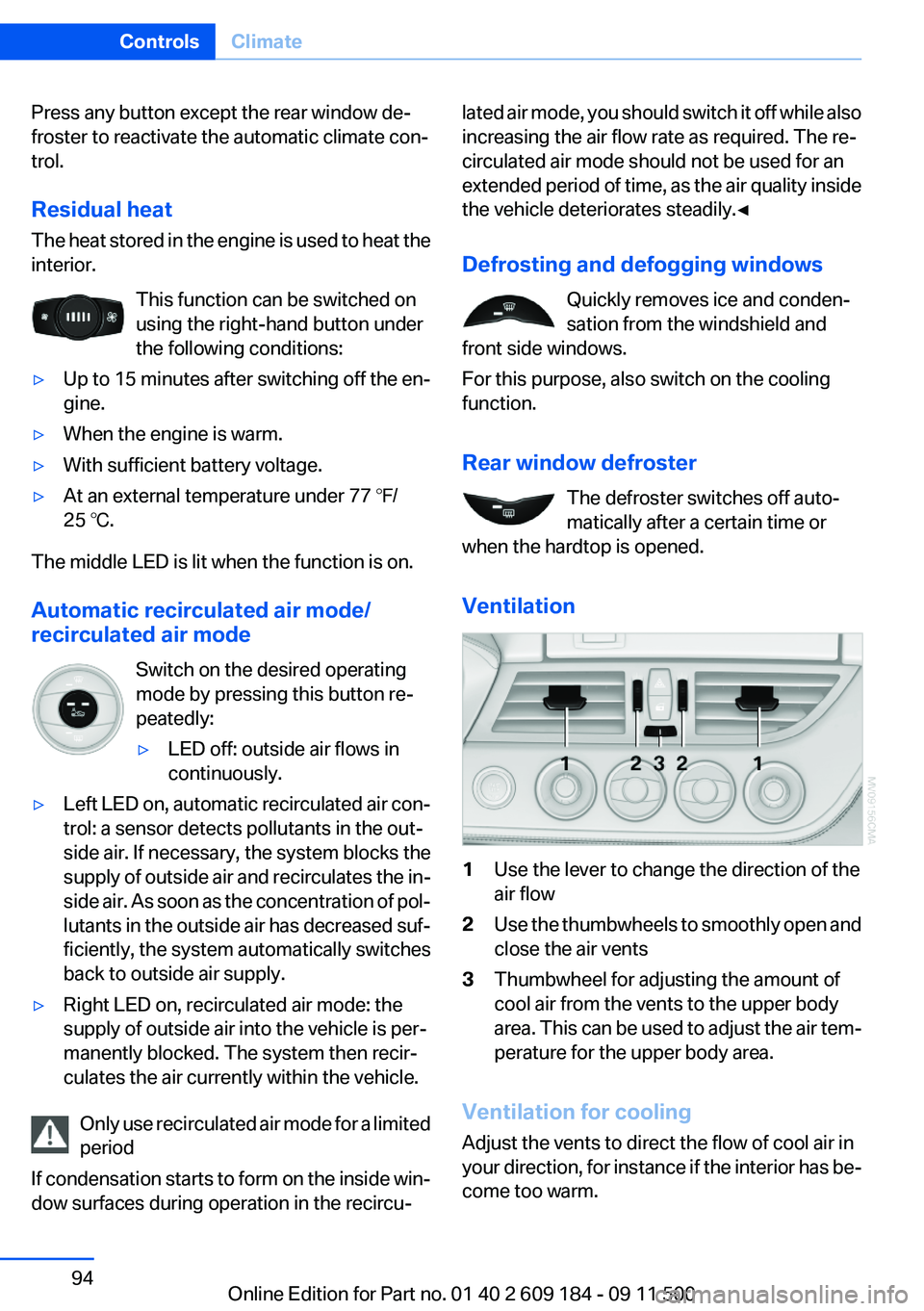
Ventilation1Use the lever to change the direction of the
air flow2Use the thumbwheels to smoothly open and
close the air vents3Thumbwheel for adjusting the amount of
cool air from the vents to the upper body
area. This can be used to adjust the air tem‐
perature for the upper body area.
Ventilation for cooling
Adjust the vents to direct the flow of cool air in
your direction, for instance if the interior has be‐
come too warm.
Seite 94ControlsClimate94
Online Edition for Part no. 01 40 2 609 184 - 09 11 500
Page 140 of 220
Press the button on the steering
wheel or radio to dial the number.
The phone number is dialed.
Editing and dialing a phone number
from the phone book
You can edit the phone number of an entry be‐
fore making a call. This change is not stored in
the phone book.
1.Selecting an entry.2."EDIT"3.To delete a digit: "DEL"4.Enter additional digits on the buttons 0–9.5.Press the right knob to dial the phone num‐
ber.
Dialing a phone number from the phone
book using the buttons on the steering
wheel
1. Press and hold the button to display
the Telephone menu.2.Press the arrow buttons on the steering
wheel to leaf through the phone book.3. Press the button to dial the phone
number.
Dialing a phone number stored in a list
To select an entry and establish a connection:
1.Switch on the radio ready state or the igni‐
tion.2. Press the button.3."PHONE"4.Select a list, for instance "TOP8"5.Turn the right knob to select an entry and
press the knob to dial the phone number.
Deleting an individual entry
1.Select an entry from the list.2."DEL"
DTMF suffix dialing
DTMF suffix dialing can be used for gaining ac‐
cess to network services or for controlling devi‐
ces, e.g., to make a remote inquiry of an answer‐
ing machine. The DTMF code is needed for this
purpose.
This function is only available if a connection ex‐
ists and if the hands-free system is being used.
1."Keypad"2.Enter the DTMF code on the buttons 0–9.3.If necessary, press and hold the function
button on the right or left to enter special
characters.
Displaying the call duration
During a call:
"DURAT"
Hands-free system
General information
Calls that are being made on the hands-free
system can be continued on the mobile phone
and vice versa.
From the mobile phone to the hands-
free system
Calls that were begun outside of the Bluetooth
range of the vehicle can be continued on the
hands-free system with the ignition switched
on.
Depending on the mobile phone, the system au‐
tomatically switches to the hands-free system.
If the system does not switch over automatically,
follow the instructions on the mobile phone dis‐
play; refer also to the mobile phone operating
instructions.
Seite 140CommunicationTelephone140
Online Edition for Part no. 01 40 2 609 184 - 09 11 500
Page 172 of 220
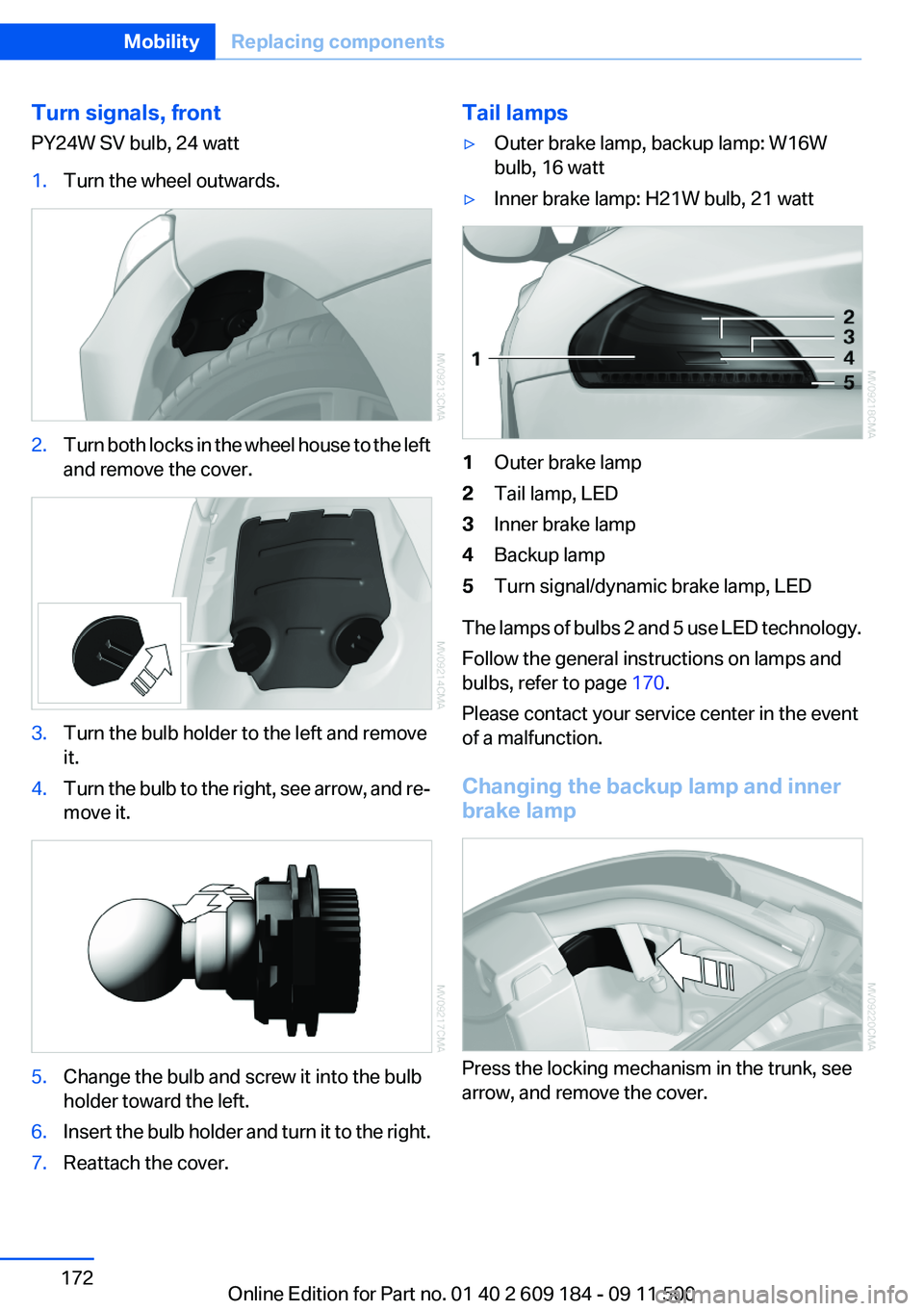
Turn signals, front
PY24W SV bulb, 24 watt1.Turn the wheel outwards.2.Turn both locks in the wheel house to the left
and remove the cover.3.Turn the bulb holder to the left and remove
it.4.Turn the bulb to the right, see arrow, and re‐
move it.5.Change the bulb and screw it into the bulb
holder toward the left.6.Insert the bulb holder and turn it to the right.7.Reattach the cover.Tail lamps▷Outer brake lamp, backup lamp: W16W
bulb, 16 watt▷Inner brake lamp: H21W bulb, 21 watt1Outer brake lamp2Tail lamp, LED3Inner brake lamp4Backup lamp5Turn signal/dynamic brake lamp, LED
The lamps of bulbs 2 and 5 use LED technology.
Follow the general instructions on lamps and
bulbs, refer to page 170.
Please contact your service center in the event
of a malfunction.
Changing the backup lamp and inner
brake lamp
Press the locking mechanism in the trunk, see
arrow, and remove the cover.
Seite 172MobilityReplacing components172
Online Edition for Part no. 01 40 2 609 184 - 09 11 500
Page 173 of 220
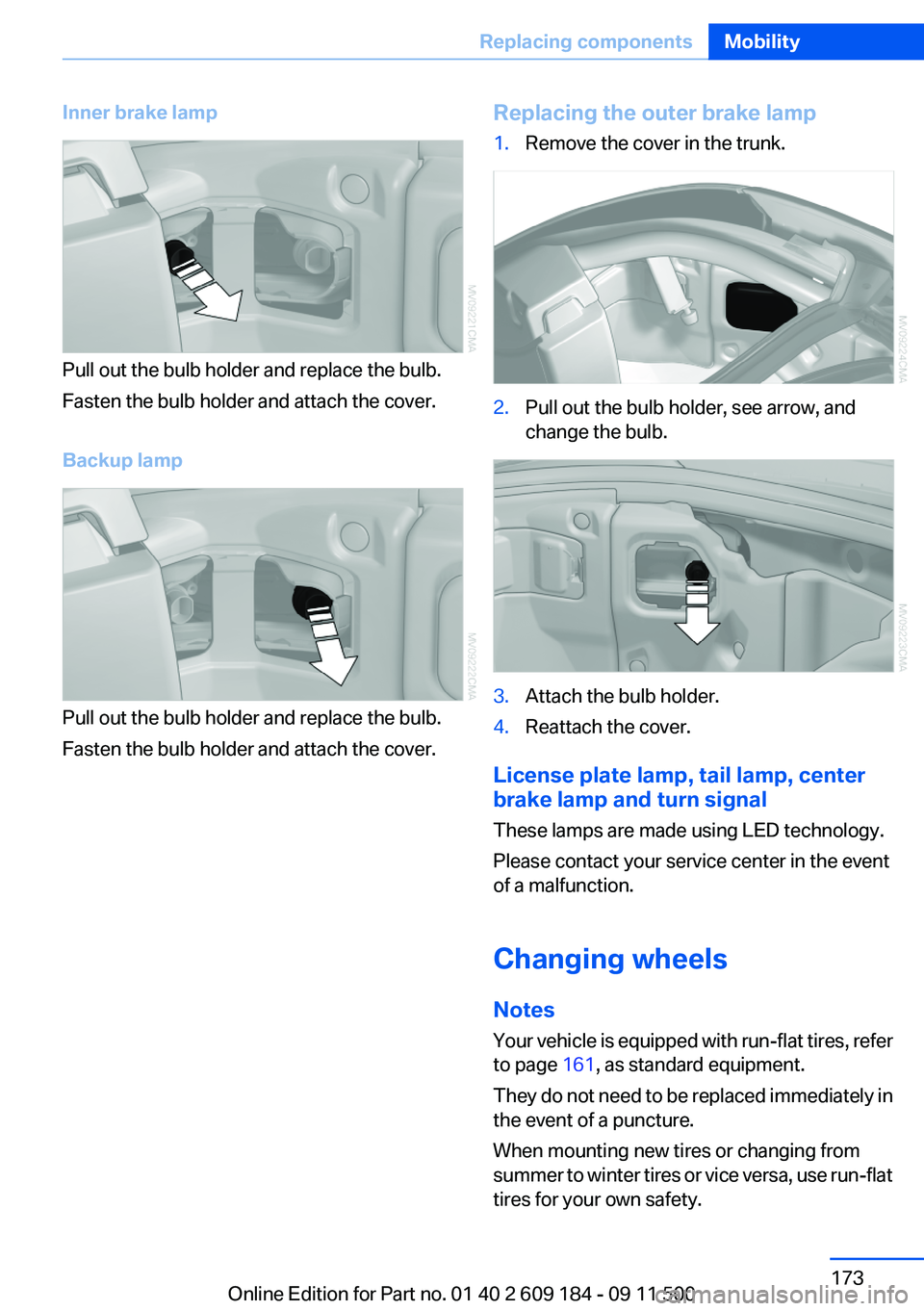
Inner brake lamp
Pull out the bulb holder and replace the bulb.
Fasten the bulb holder and attach the cover.
Backup lamp
Pull out the bulb holder and replace the bulb.
Fasten the bulb holder and attach the cover.
Replacing the outer brake lamp1.Remove the cover in the trunk.2.Pull out the bulb holder, see arrow, and
change the bulb.3.Attach the bulb holder.4.Reattach the cover.
License plate lamp, tail lamp, center
brake lamp and turn signal
These lamps are made using LED technology.
Please contact your service center in the event
of a malfunction.
Changing wheels
Notes
Your vehicle is equipped with run-flat tires, refer
to page 161, as standard equipment.
They do not need to be replaced immediately in
the event of a puncture.
When mounting new tires or changing from
summer to winter tires or vice versa, use run-flat
tires for your own safety.
Seite 173Replacing componentsMobility173
Online Edition for Part no. 01 40 2 609 184 - 09 11 500
Page 209 of 220
Band-aids, refer to First aidkit 177
Bar, refer to Towing meth‐ ods 180
Battery– Disposal 30, 175– Power failure 174– Remote control 20– Replacement in the remote
control 30– Replacement, vehicle bat‐
tery 174– Vehicle 174
Before entering the car
wash 182
Being towed 179
Belts, refer to Safety belts 38
Belt tensioners, refer to Safety belts 38
Beverage holder, refer to Cu‐ pholder 105
Blower, refer to Air flow rate 90, 93
BMW Assist 145
BMW Assist, refer to Connec‐ tedDrive 145
BMW EfficientDynamics, refer to Saving fuel 112
BMW homepage 6
BMW Internet page 6
BMW Maintenance Sys‐ tem 168
Bottle holder, refer to Cu‐ pholder 105
Brake assistant, refer to Dy‐ namic Brake Control 81
Brake discs, breaking in 108
Brake force display 80
Brake force distribution, elec‐ tronic 81
Brake lamps
– Brake force display 80– Bulb replacement 172, 173
Brake lights, adaptive 80
Brake pads, breaking in 108
Brakes
– ABS 81Braking– Notes 109– Parking brake 49
Braking safely 109
Breakdown assistance 177
Breaking in 108
Bulbs, replacing, refer to Lamps and bulbs 170
Button for starting the engine, refer to Start/Stop button 45
Buttons on the steering wheel 12
Bypassing, see Starting aid 177
C
California Proposition 65 Warning 7
Camera, care 185
Can holder, refer to Cu‐ pholder 105
Capacities
– Cargo area, refer to
Weights 204– Fuel tank, refer to Filling ca‐
pacities 206
Car battery 174
Car care products 183
Care 182
Care, displays 185
Care, vehicle 183
Cargo 110
Cargo area
– Capacity 204– Lamp, refer to Interior
lamps 72– Opening from the inside 27– Opening from the out‐
side 27
Cargo, securing 101
Cargo straps, securing cargo 112
Car key, refer to Integrated key/remote control 20
Carpet, care 184
Car phone– Installation location, refer to
Center armrest 103
Car vacuum cleaner, connect‐
ing, refer to Connecting elec‐
trical devices 100
Car wash 182
Car wash
– With Comfort Access 29
Catalytic converter, refer to
Hot exhaust system 109
CBS Condition Based Serv‐ ice 168
CD/DVD changer 124
CD/DVD notes 126
Cell phone, installation loca‐ tion, refer to Center arm‐
rest 103
Center armrest 103
Center brake lamp
– Bulb replacement 173
Center console, refer to
Around the center con‐
sole 15
Central locking
– Comfort Access 28– From the inside 26– Setting the unlocking char‐
acteristics 22
Central locking system
– From the outside 21– Principle 21
Changes, technical, refer to
Safety 6
Changing wheels/tires 161
Chassis number, refer to En‐ gine compartment 163
Check Control 66
Children, transporting safely 43
Child restraint fixing sys‐ tem 43
Child seats, refer to Transport‐ ing children safely 43
Chrome parts, care 184
Circulation of air, refer to Re‐ circulated air mode 90, 94
Seite 209Everything from A to ZReference209
Online Edition for Part no. 01 40 2 609 184 - 09 11 500
Page 211 of 220
Driving stability control sys‐tems 81
Driving tips 108
DSC Dynamic Stability Con‐ trol 81
DTC Dynamic Traction Con‐ trol 82
Dynamic Brake Control DBC 81
Dynamic Driving Control 82
Dynamic Stability Control DSC 81
Dynamic Traction Control DTC 82
E
EBV electronic brake-force distribution 81
EfficientDynamics, refer to Saving fuel 112
Electrical fault– 7-gear automatic transmis‐
sion 58
Electrical malfunction
– Door lock 26– Driver's door 26– Fuel filler flap 152
Electric seat adjustment 37
Electronic brake-force distri‐ bution 81
Electronic engine oil level check 164
Electronic Stability Program ESP, refer to DSC 81
Emergency operation
– Fuel filler flap, unlocking
manually 152
Emergency Request 176
Emergency service, refer to Roadside Assistance 177
Emergency unlocking
– Trunk lid, from the inside 28
Energy, saving
– Automatic Engine Start/Stop
Function 47
Engine compartment 163
Engine coolant, refer to Cool‐
ant 166
Engine data 202
Engine oil, adding 165
Engine oil additives 166
Engine oil, checking the level 164
Engine oil, filling capacity 206
Engine oil temperature 61
Engine oil types, alterna‐ tive 166
Engine oil types, ap‐ proved 166
Engine, overheating, refer to Coolant temperature 61
Engine power, refer to Engine data 202
Engine, RPM 202
Engine start, Help 177
Engine, starting 46
Engine, starting– Comfort Access 28– Start/Stop button 45
Engine, stopping, Start/Stop
button 45
Engine, switching off 46
Engine temperature 61
Entry lamps, refer to Interior lamps 72
Equipment, interior 96
Error messages, refer to Check Control 66
ESP Electronic Stability Pro‐ gram, refer to DSC 81
Exchanging wheels/tires 161
Exhaust system 109
Exterior mirrors 40
Exterior mirrors
– Automatic dimming 41– Automatic heating 41– Folding in and out 41– Setting 40
External audio device 103
External start 177
External temperature dis‐ play 60
External temperature display– Changing the units 63– On the computer 63
External temperature warn‐
ing 60
Eyes for securing cargo 112
F
Failure messages, refer to Check Control 66
Failure of an electrical acces‐ sory 175
False alarm
– Avoiding unintentional
alarms 31– Ending an alarm 30
Fastening safety belts, refer to
Safety belts 38
Fasten safety belts reminder
– Refer to Safety belt re‐
minder 39
Filter
– Refer to Microfilter/acti‐
vated-charcoal filter with au‐
tomatic climate control 95– Refer to Microfilter for air
conditioner 91
Fine wood, care 184
First aid kit 177
Fittings
– For tow-starting and tow‐
ing 179
Flashing when locking/unlock‐
ing 24
Flat tire, Flat Tire Monitor FTM 75
Flat Tire Monitor
– Snow chains 162
Flat Tire Monitor FTM 75
Flat tire, Tire Pressure Monitor TPM 77
Flat tire, warning lamp 76
Flat tire, wheel change 173
Flooding 109
Floor carpet, care 184
Floor mats, care 184
Foot brake 109
Seite 211Everything from A to ZReference211
Online Edition for Part no. 01 40 2 609 184 - 09 11 500
Page 214 of 220
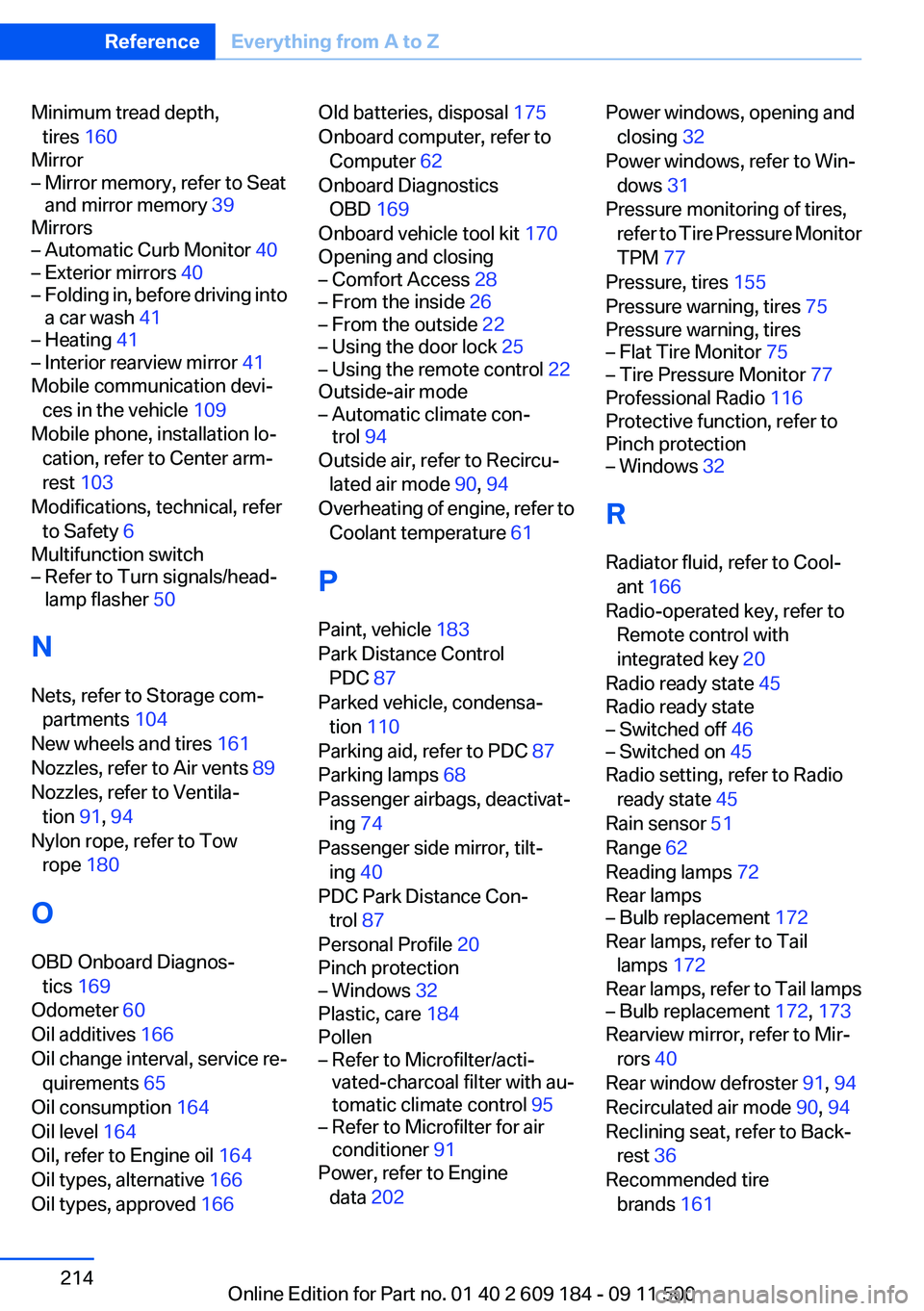
Minimum tread depth,tires 160
Mirror– Mirror memory, refer to Seat
and mirror memory 39
Mirrors
– Automatic Curb Monitor 40– Exterior mirrors 40– Folding in, before driving into
a car wash 41– Heating 41– Interior rearview mirror 41
Mobile communication devi‐
ces in the vehicle 109
Mobile phone, installation lo‐ cation, refer to Center arm‐
rest 103
Modifications, technical, refer to Safety 6
Multifunction switch
– Refer to Turn signals/head‐
lamp flasher 50
N
Nets, refer to Storage com‐ partments 104
New wheels and tires 161
Nozzles, refer to Air vents 89
Nozzles, refer to Ventila‐ tion 91, 94
Nylon rope, refer to Tow rope 180
O
OBD Onboard Diagnos‐ tics 169
Odometer 60
Oil additives 166
Oil change interval, service re‐ quirements 65
Oil consumption 164
Oil level 164
Oil, refer to Engine oil 164
Oil types, alternative 166
Oil types, approved 166
Old batteries, disposal 175
Onboard computer, refer to Computer 62
Onboard Diagnostics OBD 169
Onboard vehicle tool kit 170
Opening and closing– Comfort Access 28– From the inside 26– From the outside 22– Using the door lock 25– Using the remote control 22
Outside-air mode
– Automatic climate con‐
trol 94
Outside air, refer to Recircu‐
lated air mode 90, 94
Overheating of engine, refer to Coolant temperature 61
P
Paint, vehicle 183
Park Distance Control PDC 87
Parked vehicle, condensa‐ tion 110
Parking aid, refer to PDC 87
Parking lamps 68
Passenger airbags, deactivat‐ ing 74
Passenger side mirror, tilt‐ ing 40
PDC Park Distance Con‐ trol 87
Personal Profile 20
Pinch protection
– Windows 32
Plastic, care 184
Pollen
– Refer to Microfilter/acti‐
vated-charcoal filter with au‐
tomatic climate control 95– Refer to Microfilter for air
conditioner 91
Power, refer to Engine
data 202
Power windows, opening and
closing 32
Power windows, refer to Win‐ dows 31
Pressure monitoring of tires, refer to Tire Pressure Monitor
TPM 77
Pressure, tires 155
Pressure warning, tires 75
Pressure warning, tires– Flat Tire Monitor 75– Tire Pressure Monitor 77
Professional Radio 116
Protective function, refer to
Pinch protection
– Windows 32
R
Radiator fluid, refer to Cool‐ ant 166
Radio-operated key, refer to Remote control with
integrated key 20
Radio ready state 45
Radio ready state
– Switched off 46– Switched on 45
Radio setting, refer to Radio
ready state 45
Rain sensor 51
Range 62
Reading lamps 72
Rear lamps
– Bulb replacement 172
Rear lamps, refer to Tail
lamps 172
Rear lamps, refer to Tail lamps
– Bulb replacement 172, 173
Rearview mirror, refer to Mir‐
rors 40
Rear window defroster 91, 94
Recirculated air mode 90, 94
Reclining seat, refer to Back‐ rest 36
Recommended tire brands 161
Seite 214ReferenceEverything from A to Z214
Online Edition for Part no. 01 40 2 609 184 - 09 11 500
Page 216 of 220
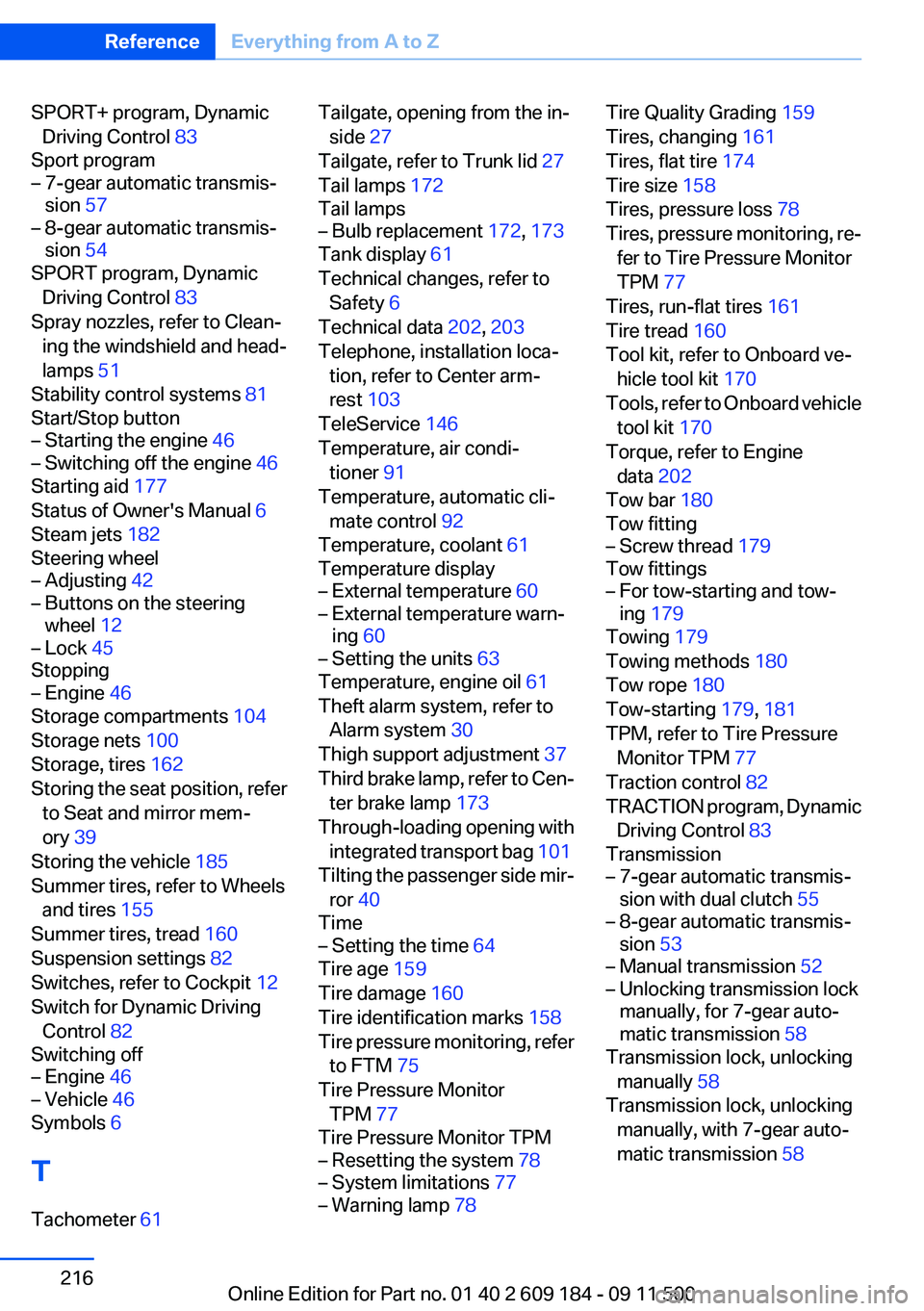
SPORT+ program, DynamicDriving Control 83
Sport program– 7-gear automatic transmis‐
sion 57– 8-gear automatic transmis‐
sion 54
SPORT program, Dynamic
Driving Control 83
Spray nozzles, refer to Clean‐ ing the windshield and head‐
lamps 51
Stability control systems 81
Start/Stop button
– Starting the engine 46– Switching off the engine 46
Starting aid 177
Status of Owner's Manual 6
Steam jets 182
Steering wheel
– Adjusting 42– Buttons on the steering
wheel 12– Lock 45
Stopping
– Engine 46
Storage compartments 104
Storage nets 100
Storage, tires 162
Storing the seat position, refer to Seat and mirror mem‐
ory 39
Storing the vehicle 185
Summer tires, refer to Wheels and tires 155
Summer tires, tread 160
Suspension settings 82
Switches, refer to Cockpit 12
Switch for Dynamic Driving Control 82
Switching off
– Engine 46– Vehicle 46
Symbols 6
T
Tachometer 61
Tailgate, opening from the in‐
side 27
Tailgate, refer to Trunk lid 27
Tail lamps 172
Tail lamps– Bulb replacement 172, 173
Tank display 61
Technical changes, refer to Safety 6
Technical data 202, 203
Telephone, installation loca‐ tion, refer to Center arm‐
rest 103
TeleService 146
Temperature, air condi‐ tioner 91
Temperature, automatic cli‐ mate control 92
Temperature, coolant 61
Temperature display
– External temperature 60– External temperature warn‐
ing 60– Setting the units 63
Temperature, engine oil 61
Theft alarm system, refer to Alarm system 30
Thigh support adjustment 37
Third brake lamp, refer to Cen‐ ter brake lamp 173
Through-loading opening with integrated transport bag 101
Tilting the passenger side mir‐ ror 40
Time
– Setting the time 64
Tire age 159
Tire damage 160
Tire identification marks 158
Tire pressure monitoring, refer to FTM 75
Tire Pressure Monitor TPM 77
Tire Pressure Monitor TPM
– Resetting the system 78– System limitations 77– Warning lamp 78Tire Quality Grading 159
Tires, changing 161
Tires, flat tire 174
Tire size 158
Tires, pressure loss 78
Tires, pressure monitoring, re‐ fer to Tire Pressure Monitor
TPM 77
Tires, run-flat tires 161
Tire tread 160
Tool kit, refer to Onboard ve‐ hicle tool kit 170
Tools, refer to Onboard vehicle tool kit 170
Torque, refer to Engine data 202
Tow bar 180
Tow fitting– Screw thread 179
Tow fittings
– For tow-starting and tow‐
ing 179
Towing 179
Towing methods 180
Tow rope 180
Tow-starting 179, 181
TPM, refer to Tire Pressure Monitor TPM 77
Traction control 82
TRACTION program, Dynamic Driving Control 83
Transmission
– 7-gear automatic transmis‐
sion with dual clutch 55– 8-gear automatic transmis‐
sion 53– Manual transmission 52– Unlocking transmission lock
manually, for 7-gear auto‐
matic transmission 58
Transmission lock, unlocking
manually 58
Transmission lock, unlocking manually, with 7-gear auto‐
matic transmission 58
Seite 216ReferenceEverything from A to Z216
Online Edition for Part no. 01 40 2 609 184 - 09 11 500